turn signal AUDI A5 COUPE 2008 User Guide
[x] Cancel search | Manufacturer: AUDI, Model Year: 2008, Model line: A5 COUPE, Model: AUDI A5 COUPE 2008Pages: 313, PDF Size: 13.86 MB
Page 157 of 313
HomeLink155
Controls
Safety
Driving tips
General maintenance
Self-help
Technical data
At the operating unit
1. Switch on the ignition (do not start the engine).
2. Press and hold down the two outer HomeLink buttons
⇒page 154, fig. 171 until the indicator diode
⇒ page 154, fig. 171 begins to flash after about
20 seconds. This procedure will delete the standard
factory settings and does not need to be repeated when
programming the other buttons.
3. Press the particular Home Link button which you would
like to program.
4. Wait until the diode begins to flash. The HomeLink module now remains in training mode for 5 minutes.
5. Now step in front of your vehicle with the original hand-
held transmitter for the garage door opener or any other
device you wish to assign to the HomeLink control
button.
At the radiator grille
6. Hold the original hand-held transmitter at or near the
centre of your car's radiator grille ⇒ page 154, fig. 172.
7. Press the activator button on the original hand-held
transmitter .
8. As you do so, watch the tu rn signals on your vehicle.
HomeLink confirms successful programming by flashing
all four turn signals three times.
9. If the turn signals fail to flash three times, repeat the procedure with the transmitter held at a different
distance from the radiator grille.
The proper distance between the hand-held transmitter and the
HomeLink module at the radiator grille depends on the system you
want to train. It may re quire several attempts.
The turn signals will flash once if the time limit for the programming
mode has been exceeded. In this case the programming procedure
needs to be performed again. Repeat the sequence at the operating
unit starting with step 3.
The programming instructions above also apply to th e other control
buttons. Start with step 3 if yo u wish to proceed and program the
other two buttons.
If the garage door or other devices st ill fail to be activated with the
HomeLink control buttons after programming is completed, it is
possible that these systems might be working with a rolling code
instead of the normal fixed security code. If this is the case, a rolling
code programming is required in addition to the steps described
above. ⇒page 155Applies to vehicles: with HomeLinkRolling code programming
Some devices require rolling code programming of the
HomeLink universal transmitter.Identifying a rolling code
– Press the already programmed HomeLink button again
and hold it down.
–Watch HomeLink diode ⇒ page 154, fig. 171. If the
diode starts flashing rapidly and turns into a constant
light after about 2 seconds, this indicates that the device
you wish to operate (e.g. a garage door opener) is
equipped with a rolling code.
– Program the rolling code as follows:
AA
AA
AA
document_0900452a8179700c.book Seite 155 Donnerstag, 22. März 2007 10:19 10
--4 -
-T
-+
•
+-
Page 158 of 313
HomeLink
156
Activating the garage door opener drive unit
– Locate the programming button on the garage door drive. The exact location and colour of the button may
vary depending on the type of garage door opener.
– Press the programming button on the door drive unit (this will normally cause a “programming mode indicator
lamp” on the unit to light up). You now have about 30
seconds to start and complete the programming of the
HomeLink control button on the operating unit.
Programming at the operating unit in the
headliner
– Press and release the already programmed HomeLink button.
– Press the HomeLink button again to complete rolling code programming.After programming at the operating unit in the headliner, the
garage door opener should recognize the HomeLink signal and
respond when the HomeLink button is pressed. Now the other
control buttons can be programmed as required.
Note
•
Having a second person assist you makes programming of the
rolling code easier and faster. For some makes of garage door
openers the HomeLink button may have to be pressed a third time
to complete the training sequence.
•
If you encounter problems programming the rolling code you
may find helpful information in the operating instructions of the
garage door opener or other device you wish to operate.
Applies to vehicles: with HomeLinkOperating HomeLink
The programmed devices are activated by means of the
HomeLink control buttons in the headliner.– Make sure that the ignition is on.
– Press the programmed HomeLink button ⇒page 154,
fig. 171. The device assigned to that button (e.g. garage
door) will be activated.The HomeLink indicator diode ⇒page 154, fig. 171 will light up
when you press the button.Applies to vehicles: with HomeLinkErasing the button programming
You can erase the complete HomeLink programming by
pressing the two outer buttons.– Switch on the ignition (do not start the engine).
– Press and hold down the two outer buttons until the indi- cator diode starts to flash ⇒page 154, fig. 171.
– Then release the buttons.After the programming of the Home Link buttons has been erased,
the system will return to the training mode and is ready to be re-
programmed at any time.
Note
•
Programmed buttons cannot be erased individually.
•
For security reasons it is advisable to erase the programming of
the HomeLink buttons prior to selling your vehicle.
document_0900452a8179700c.book Seite 156 Donnerstag, 22. März 2007 10:19 10
--4 -
-T
•
-+ +-
[I]
[I]
•
•
Page 159 of 313
HomeLink157
Controls
Safety
Driving tips
General maintenance
Self-help
Technical data
Applies to vehicles: with HomeLinkRe-programming a button
A HomeLink button can be re-programmed individually
without affecting the other button allocations.At the operating unit in the headliner
– Press and hold down the selected button until the indi-
cator diode ⇒ page 154, fig. 171 starts flashing slowly.
At the radiator grille
–Hold the original hand-held transmitter for the garage
door opener or other device directly in front of the radi-
ator grille of your vehicle (at or near the centre)
⇒ page 154, fig. 172. The exact distance depends on the
system that you want to program.
– Press the button on the original hand-held transmitter
for the garage door opener or other device.
– As you do so, watch the turn signals on your vehicle.
HomeLink confirms successful programming by flashing
all four turn signals three times.
– If the turn signals fail to flash three times, repeat the procedure with the transmitter held at a different
distance from the radiator grille.When the turn signals have flas hed three times, this means the
device previously stored in HomeLink has been erased and the new
system programmed in its place. To activate the new system, press
the HomeLink button that has just been re-programmed.
Note
It may require several attempts be fore programming is successful.
When programming a new device, keep the button pressed for at least 15 seconds before trying again with the transmitter in a
different position. Keep watching the turn signals during that
time.
Applies to vehicles: with HomeLinkConformity certificationThe HomeLink universal transmitter is registered in the following
countries under the following certification numbers:Country
Certification number
Andorra
16SEP2003
Belgium
RTT/D/X2064
Denmark
98.3142-266
Germany
D800038K
Finland
FI98080106
France
97619 RD
Gibraltar
RTTE 20754/0087847
Greece
JCI 05JUL2000 RTTE
Great Britain
RTTE 20754/0087847
Republic of Ireland
TRA 24/5/109/5
Iceland
IS-3418-00
Italy
DGPGF/4/341032/TB 0002573
Croatia
SRD-156/03
Luxembourg
L2433/10510-03J
Malta
WT/122/98
Monaco
PC/cp-CI.T55-03/04672
Netherlands
NL99030970
Norway
NO20000026
document_0900452a8179700c.book Seite 157
Donnerstag, 22. März 2007 10:19 10
--4 -
-T
•
-+ +-
(I]
Page 165 of 313
Safe driving163
Controls
Safety
Driving tips
General maintenance
Self-help
Technical data
– Make sure that all lights and turn signals are working
properly.
– Check the tyre pressures.
– Make sure that all windows are clean and give good visi- bility to the outside.
– Secure all luggage and other items carefully ⇒page 77 .
– Make sure that no objects can interfere with the pedals.
– Adjust the front seat, head restraint and mirrors correctly.
– Make sure that the head restraints for all passengers are adjusted to the correct position.
– Make sure that children are protected with suitable safety seats and properly worn seat belts ⇒ page 185.
– Sit in the correct position in your seat and make sure that
your passengers do the same. ⇒page 70 .
– Fasten your seat belt correctly. Make sure that your passengers do the same ⇒page 170.What affects driving safety?
Safety on the road is directly related to how you drive, and
can also be affected by the passengers in the vehicle.The driver is responsible for th e safety of the vehicle and all
its occupants. If your ability to drive is impaired in any way,
you endanger yourself and other road users ⇒. There-
fore:
– Do not let yourself be distracted by passengers or by using a mobile phone, etc. – Never drive when your driving ability is impaired (by
medication, alcohol, drugs, etc.).
– Obey all traffic regulations and speed limits and always maintain a safe distance to the vehicle in front.
– Always adjust your speed to suit the road, traffic and weather conditions.
– Take frequent breaks on long trips. Do not drive for more than two hours without a stop.
– If possible, avoid driving when you are tired or stressed.
WARNING
•
Distractions while driving or any kind of impairment to your
driving ability increase the risk of accident and injury.
•
Do not store loose objects on the dashboard. These objects
could fly around the interior when the vehicle is moving (under
acceleration or whilst cornering) and distract the driver – this
could lead to an accident.
document_0900452a8179700c.book Seite 163 Donnerstag, 22. März 2007 10:19 10
--4 -
-T
-+
•
+-
•
Page 179 of 313
Airbag system177
Controls
Safety
Driving tips
General maintenance
Self-help
Technical data
•
The airbag system can only be acti vated once; if the airbag has
been triggered, the system must be replaced. Should the airbag
system or airbag modules have to be replaced, the qualified work-
shop carrying out the replacement will document all details in the
appropriate section of the Service Schedule.
•
If you sell the vehi cle, please remember to pass on the
complete Service Wallet to the ne w owner. If any of the airbags
have been deactivated, it is impo rtant that the new owner is also
given the relevant documents.
•
The relevant safety requiremen ts must be observed when the
vehicle or components of the airbag or belt tensioner systems are
scrapped.
•
In an accident in which one or more airbags are triggered the
alternator and the starter are - for safety reasons - both discon-
nected from the battery via a pyrotechnic circuit breaker.
−Any repairs to the pyrotechnic circuit breaker must always
be performed by a qualified workshop (accident risk).
− The relevant safety requirements must be observed when
the vehicle or the circuit breaker are scrapped.
When are the airbags triggered?
The airbag system is triggered in collisions with a severe
impact.The airbag system is designed so that the airbags for the driver and
front passenger are triggered in a severe frontal collision .
In severe side collisions the side airbags on th e impact side of the
vehicle are triggered together with the head-protection airbag.
The front airbags, side airbags and one of the head-protection
airbags may be triggered together in certain types of accident. The airbag system is
not triggered in minor frontal or side collisions,
or in rear collisions or if the ca r overturns. In these situations the
occupants are protected by wearing the seat belts.
Factors determining the triggering response
It is not possible to define the exact triggering response of the
airbag system in all possible situations, since the circumstances in
different types of accident will vary considerably. Important factors
include, for example, the nature (hard or soft) of the object which
the car hits, the angle of impact, vehicle speed and so on.
Whether the airbags are triggered depends primarily on the vehicle
deceleration rate resulting from the collision. By processing the
signals from the sensors located in the vehicle, the electronic
control unit is immediately able to evaluate the severity of the colli-
sion and activate the restraint syst ems accordingly. If the decelera-
tion rate is below the predefined reference value in the control unit
the airbags will not be triggered, even though the accident may
cause extensive damage to the car.
Note
The airbag releases a fine dust when it inflates. This is quite normal
and does not mean there is a fire in the vehicle.
WARNING (continued)
document_0900452a8179700c.book Seite 177 Donnerstag, 22. März 2007 10:19 10
--4 -
-T
-+
[I]
+-
•
•
Page 269 of 313
Self-help267
Controls
Safety
Driving tips
General maintenance
Self-help
Technical data
terminal must not touch metal parts of the vehicle: this can cause
short circuiting.
•
Do not bend over the batteries – risk of acid burns.
•
The screw plugs on the battery ce
lls must be screwed in firmly.
•
Keep sparks, flame and lighted cigarettes away from batteries:
the gases given off can cause an explosion.
•
If jump-starting another vehicle, position the jump leads in
such a way that they cannot come into contact with any moving
parts in the engine compart ment of the other vehicle.Caution
Please note that the above method of connecting the leads is meant
for jump-starting your vehicle. If jump-starting another vehicle, you
should not connect the negative lead (–) to the negative terminal of
the discharged battery, but directly to the engine block or a solid
metal part bolted to the engine bl ock. If the battery of the other
vehicle does not have a gas vent, there is a risk that a mixture of
oxygen and hydrogen gas can accumulate and cause an
explosion.Tow-starting and towing awayGeneral notes
Points to observe when tow-starting or towing awayIf you use a towrope:
Notes for the driver of the towing vehicle
– The towrope must be taut before driving off. – Engage the clutch very gently when starting to move; on
vehicles with automatic gearbox press the accelerator
slowly.
Notes for the driver of the towed vehicle
– The ignition should be switched on so that the turn signals, horn, windscreen wipers and washers can be
used. Please ensure that the steering wheel is unlocked
when you switch on the ignition, and that it moves freely.
–Put gear lever in neutral (manual gearbox) or move
selector lever to position N (automatic gearbox).
– The brake servo and power steering only work when the engine is running. Considerably more effort is required
on the brake pedal and steering wheel when the engine
is switched off.
– Ensure that the towrope remains taut at all times when towing.
Towrope or towbar
It is easier and safer to tow a vehicle with a tow bar. You should only
use a tow rope if you do not have a towbar.
A towrope should be slightly elasti c to reduce the loading on both
vehicles. It is advisable to use a towrope made of synthetic fibre or
similar material.
Attach the tow-rope or tow-bar only to the towing anchorages
intended for this purpose ⇒page 268 or ⇒page 269 .
Driving technique
Towing requires some experience – especially when using a
tow rope . Both drivers should be familiar with the technique required
for towing. Inexperienced drivers sh ould not attempt to tow-start or
tow away another vehicle.
WARNING (continued)
document_0900452a8179700c.book Seite 267 Donnerstag, 22. März 2007 10:19 10
--4 -
-T
CD
-+ +-
•
Page 278 of 313
Fuses and bulbs
276BulbsChanging bulbs
Changing bulbs requires a certain degree of practical
skill.You can change the following bulbs for exterior lights yourself:•
Halogen headlights: Bulb for dipped headlights
•
Halogen headlights: Bulb for main beam headlights
•
Halogen headlights: Bulb for side lights
•
Xenon headlights*: Bulb for turn signals
•
Bulb for fog light
•
Bulbs for rear lights in boot lid
•
Bulbs for rear lights in side panel
•
Bulbs for number plate light
The following bulbs should only be changed by a qualified work-
shop :
•
Halogen headlights: Bulb for turn signals
•
Xenon headlights*: Light source for daytime running
lights/parki ng lights
•
Bulb for headlights: Bi-xenon lights ⇒
•
Light source for turn signal in exterior mirror housing
•
Light source for high-level brake light
As a rule, you require a certain degree of practical skill to change
defective bulbs. This applies in particular to those bulbs which are
only accessible from the engine compartment.
If in doubt, we recommend that you have defective bulbs changed
by a qualified workshop or qualified mechanic.
If you do decide to change bulbs in the engine compartment your-
self, be aware of the safety risks involved ⇒page 231 ⇒ .
Types of bulbs
You must only replace a bulb with a bulb of the same type. Informa-
tion regarding e.g. the wattage can be found on the base of the
bulb.
4
Cigarette lighter
15
5
Parking aid
5
6
Phone pre-installation without handsfree sys-
tem (VDA interface)
5
7
Vacant
8
Vacant
9
EPB switch (electro-mechanical parking brake)
5
10
Lane change assist feature
5
11
Seat heating, rear
5
12
Airbag
5
No.
Electrical equipment
amps
Front bulb (12 V)
Vers io n
Dipped-beam headlights (halogen)
55 W (H7)
Main beam headlights (halogen)
55 W (H7)
Front fog lights
55 W (H7)
Side lights (vehicles with halogen headlights)
W 5 W
Front turn signals (vehicles with bi-
xenon headlights)
Hiper PY 24 W
Rear bulb (12 V)
Vers io n
Brake lights / tail lights
P 21 W
Turn signals (rear)
P 21 W
document_0900452a8179700c.book Seite 276 Donnerstag, 22. März 2007 10:19 10
--4 -
1111
-
T
1111
-
6
1111
-
1111
-
1111
-
•
6
-+ +-
Page 284 of 313
Fuses and bulbs
282
– Press the connector in the direction of the arrow ⇒page 281, fig. 267 until the bulb engages.
– Check that the bulb is securely seated in the bulb housing.
– Fit the cover and swivel the retaining clip downwards.
– Install the headlight ⇒page 278.
– Check whether the new bulb is working.
– Have the headlight settings checked.Applies to vehicles: with xenon headlight bulbsChanging bulb for turn signalsThe bulb is secured in the bulb carrier with a bayonet
fastener.
– Remove the headlight ⇒page 278 .
– Take off the rubber cap (small cover) and remove the bulb carrier.
– Lightly press the defective bulb into the bulb carrier, then turn it anti-clockwise and remove it.
– Do not touch the glass part of the new bulb with your bare hands, use a cloth or paper towel instead.
– Fit the new bulb, pressing it into the bulb carrier, and turn it clockwise as far as it will go.
– If necessary, use a cloth to re move any fingerprints from
the glass part of the bulb.
– Insert the bulb carrier into the headlight. Note
Ensure that the rubber cap is seated
correctly so that no water can
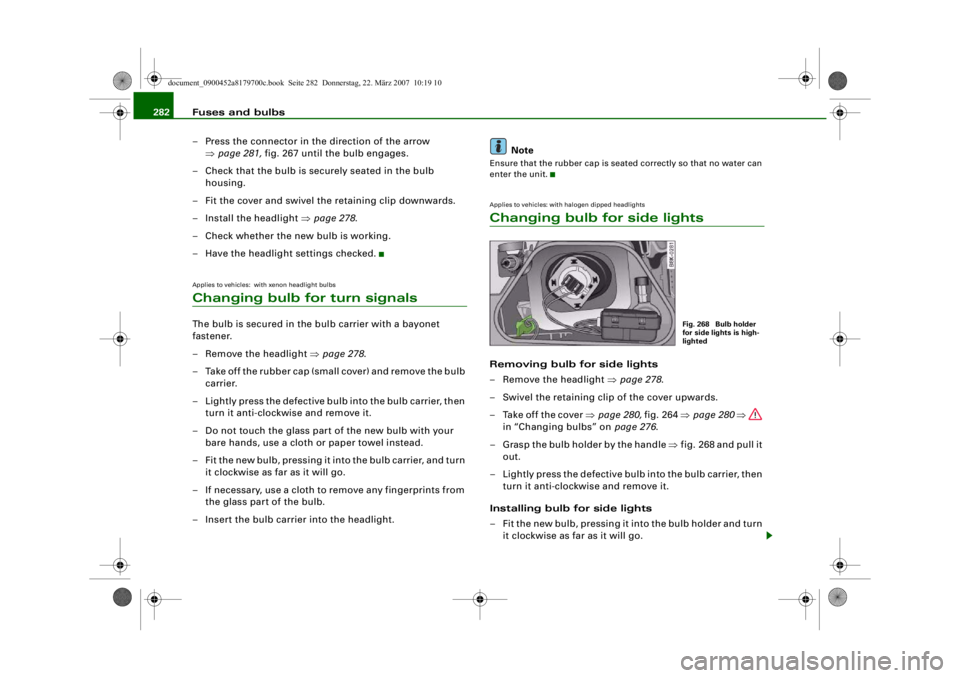
enter the unit.Applies to vehicles: with halogen dipped headlightsChanging bulb for side lightsRemoving bulb for side lights
– Remove the headlight ⇒page 278 .
– Swivel the retaining clip of the cover upwards.
– Take off the cover ⇒page 280, fig. 264 ⇒page 280 ⇒
in “Changing bulbs” on page 276.
– Grasp the bulb holder by the handle ⇒fig. 268 and pull it
out.
– Lightly press the defective bulb into the bulb carrier, then turn it anti-clockwise and remove it.
Installing bulb for side lights
– Fit the new bulb, pressing it into the bulb holder and turn it clockwise as far as it will go.
Fig. 268 Bulb holder
for side lights is high-
lighted
document_0900452a8179700c.book Seite 282 Donnerstag, 22. März 2007 10:19 10
--4 -
-
[I]
T
•
•
-+ +-
Page 286 of 313
Fuses and bulbs
284
– Insert the new bulb holder and turn it clockwise as far as the stop ⇒page 278.After changing the bulb re-install all parts in the reverse sequence
and check that the bulb is working.Changing bulbs for rear lights in side
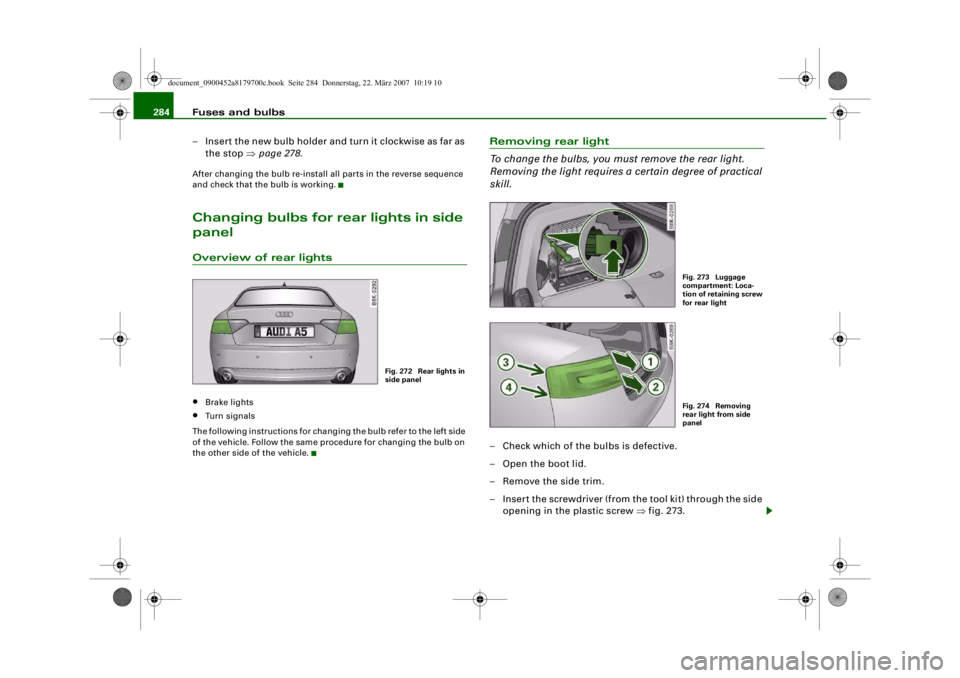
panelOverview of rear lights•
Brake lights
•
Turn signals
The following instructions for changing the bulb refer to the left side
of the vehicle. Follow the same procedure for changing the bulb on
the other side of the vehicle.
Removing rear light
To change the bulbs, you must remove the rear light.
Removing the light requires a certain degree of practical
skill.– Check which of the bulbs is defective.
– Open the boot lid.
– Remove the side trim.
– Insert the screwdriver (from the tool kit) through the side opening in the plastic screw ⇒fig. 273.
Fig. 272 Rear lights in
side panel
Fig. 273 Luggage
compartment: Loca-
tion of retaining screw
for rear lightFig. 274 Removing
rear light from side
panel
document_0900452a8179700c.book Seite 284 Donnerstag, 22. März 2007 10:19 10
--4 -
-T
•
-+ +-
•
Page 287 of 313
Fuses and bulbs285
Controls
Safety
Driving tips
General maintenance
Self-help
Technical data
– Turn the screwdriver anti-clockwise to loosen the screw
and then carefully remove the screw.
– Gradually ease the light housing out of the rubber mountings (positions ⇒page 284, fig. 274 and ) by
pulling alternately in direction of arrows and . If
necessary use the tool for changing bulbs from your
vehicle's toolkit to carefully apply some pressure
between positions and ⇒.
– Unplug the electrical connector.
– Change the defective bulb ⇒page 285 .
CautionWhen removing or installing the rear light, take care not to cause
any damage.•
Removing the rear light in particul ar can lead to the paintwork or
rear light becoming damaged. This is another reason why we
recommend having the bulbs changed by a qualified workshop.
•
NEVER use metal tools (e.g. a screwdriver) or sharp or pointed
plastic tools to lever out the rear light - risk of damaging the paint.Note
Make sure you have a soft cloth ready to place under the glass on
the rear light, to avoid any scratches.
Changing bulbs
All bulbs can be changed easily after removing the rear
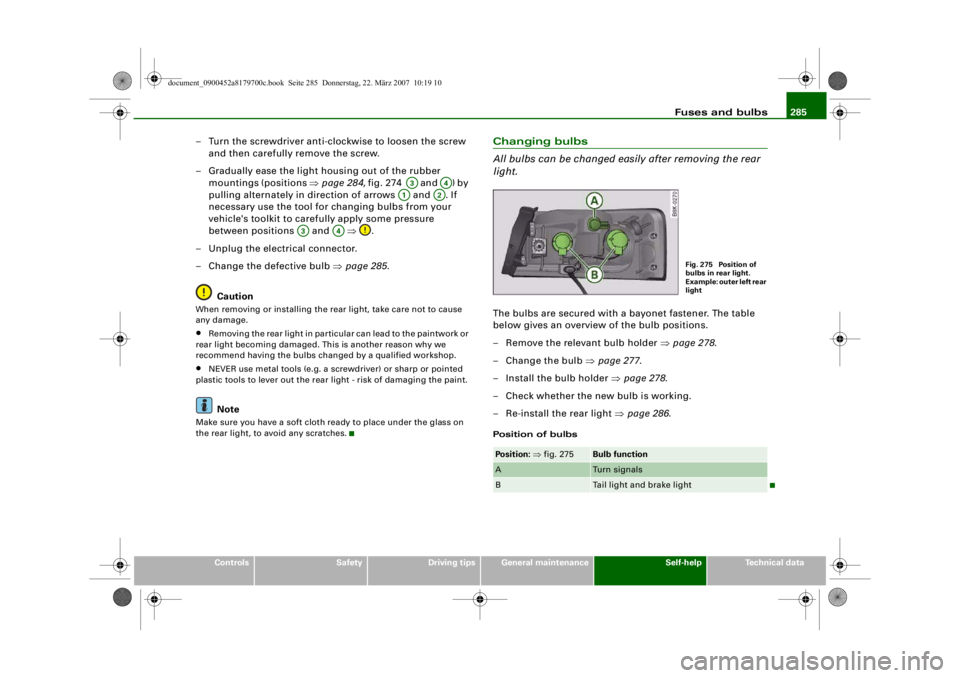
light.The bulbs are secured with a bayonet fastener. The table
below gives an overview of the bulb positions.
– Remove the relevant bulb holder ⇒page 278 .
–Change the bulb ⇒page 277 .
– Install the bulb holder ⇒page 278 .
– Check whether the new bulb is working.
– Re-install the rear light ⇒page 286 .Position of bulbs
A3
A4
A1
A2
A3
A4
Position: ⇒ fig. 275
Bulb function
A
Turn signals
B
Tail light and brake light
Fig. 275 Position of
bulbs in rear light.
Example: outer left rear
light
document_0900452a8179700c.book Seite 285 Donnerstag, 22. März 2007 10:19 10
--4 -
-T
CD
CD
-+ +-
(I]
•
•