door lock AUDI A5 COUPE 2008 Owner's Manual
[x] Cancel search | Manufacturer: AUDI, Model Year: 2008, Model line: A5 COUPE, Model: AUDI A5 COUPE 2008Pages: 313, PDF Size: 13.86 MB
Page 62 of 313
Lights and vision
60Interior lightsFront interior lights
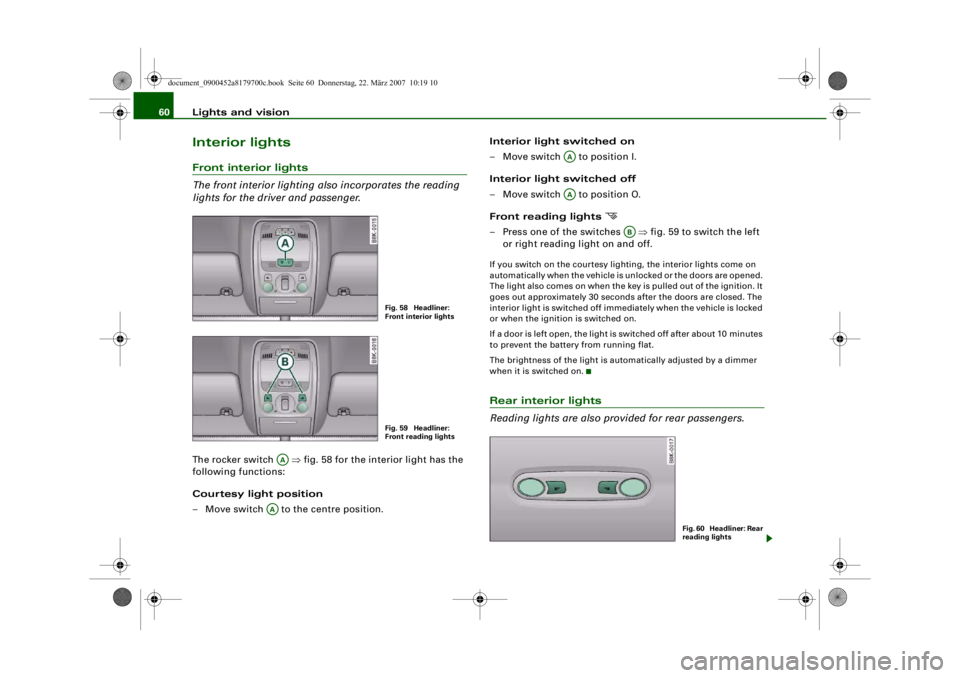
The front interior lighting also incorporates the reading
lights for the driver and passenger.The rocker switch ⇒ fig. 58 for the interior light has the
following functions:
Courtesy light position
– Move switch to the centre position. Interior light switched on
– Move switch to position I.
Interior light switched off
– Move switch to position O.
Front reading lights
– Press one of the switches
⇒fig. 59 to switch the left
or right reading light on and off.If you switch on the courtesy ligh ting, the interior lights come on
automatically when the vehicle is unlocked or the doors are opened.
The light also comes on when the ke y is pulled out of the ignition. It
goes out approximately 30 second s after the doors are closed. The
interior light is switched off immediately when the vehicle is locked
or when the ignition is switched on.
If a door is left open, the light is switched off after about 10 minutes
to prevent the battery from running flat.
The brightness of the light is automatically adjusted by a dimmer
when it is switched on.Rear interior lights
Reading lights are also provided for rear passengers.
Fig. 58 Headliner:
Front interior lightsFig. 59 Headliner:
Front reading lights
AA
AA
AAAA
AB
Fig. 60 Headliner: Rear
reading lights
document_0900452a8179700c.book Seite 60 Donnerstag, 22. März 2007 10:19 10
--4 -
-T
-+ +-
•
Page 76 of 313
Seats and storage
74When the front seats are moved forw ard, their original positions are
stored in a memory. The seats then stop automatically in this posi-
tion when they are moved back. If you want to move one of the seats
back further, release the switch and press it again.
The head restraints on the front seats retract automatically
(depending on the seat height setting) when the backrests are
tipped forward, and move back to their original positions when the
backrests are returned to the upright position.
Note
The easy-entry switches on the relevant seat are out of action when
the driver's or passenger's doors are closed.Seat memoryApplies to vehicles: with seat memoryMemory for driver's seat
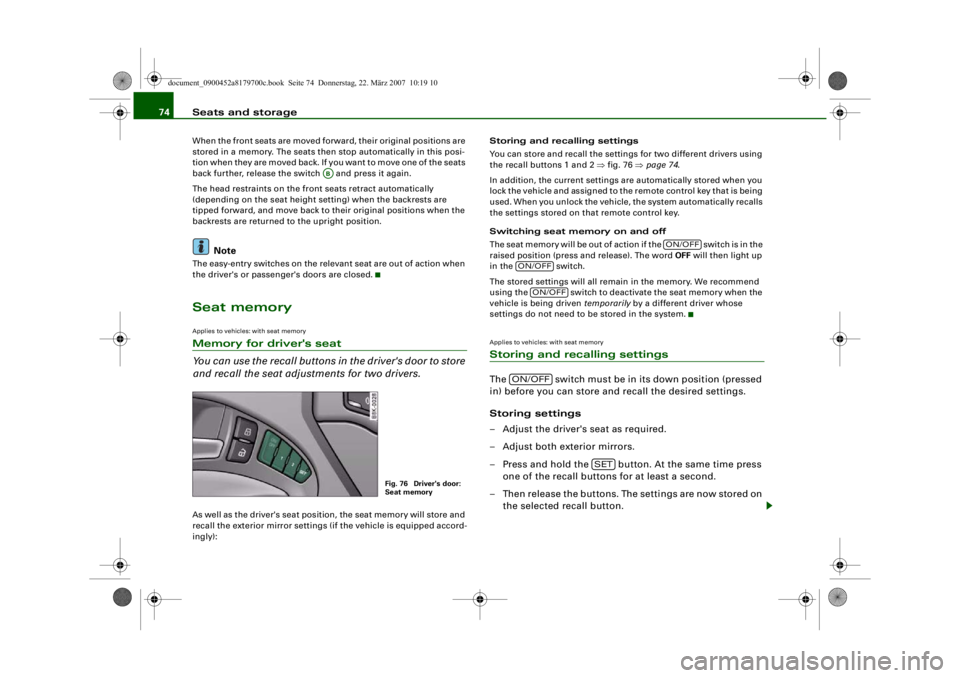
You can use the recall buttons in the driver's door to store
and recall the seat adjustments for two drivers.As well as the driver's seat position, the seat memory will store and
recall the exterior mirror settings (if the vehicle is equipped accord-
ingly): Storing and recalling settings
You can store and recall the settings for two different drivers using
the recall buttons 1 and 2
⇒fig. 76 ⇒page 74 .
In addition, the current settings are automatically stored when you
lock the vehicle and assigned to th e remote control key that is being
used. When you unlock the vehicle, the system automatically recalls
the settings stored on that remote control key.
Switching seat memory on and off
Th e s e a t m e m o r y w i l l b e o u t o f a c t i o n i f t h e s w i t c h i s i n t h e
raised position (press and release). The word OFF will then light up
in the switch.
The stored settings will all remain in the memory. We recommend
using the switch to deactivate the seat memory when the
vehicle is being driven temporarily by a different driver whose
settings do not need to be stored in the system.
Applies to vehicles: with seat memoryStoring and recalling settingsThe switch must be in its down position (pressed
in) before you can store and recall the desired settings.
Storing settings
– Adjust the driver's seat as required.
– Adjust both exterior mirrors.
– Press and hold the button. At the same time press one of the recall buttons for at least a second.
– Then release the buttons. The settings are now stored on the selected recall button.
AB
Fig. 76 Driver's door:
Seat memory
ON/OFF
ON/OFF
ON/OFF
ON/OFF
SET
document_0900452a8179700c.book Seite 74 Donnerstag, 22. März 2007 10:19 10
--4 -
-T
I I
I I
•
I I
-+
•
+-
CJ
Page 77 of 313
Seats and storage75
Controls
Safety
Driving tips
General maintenance
Self-help
Technical data
Recalling settings
– If the driver's door is open, press the desired recall
button briefly.
– If the driver's door is clos ed, press and hold down the
desired recall button until the programmed settings are
reached.A tone will sound and the diode in the button ⇒page 74,
fig. 76 will light up to confirm th at the settings have been stored.
When you lock the vehicle the current settings are automatically
stored and assigned to the remote control key. However, the
settings assigned to the remote control key will not overwrite the
settings stored on recall buttons 1 and 2. The settings stored on the
recall buttons can be called up at any time. When you unlock the
vehicle, the settings assigned to the remote control key are recalled
automatically.
If your vehicle is also driven by other persons using your remote
control key, it is advisable to store your personal settings on one of
the recall buttons. You can then reca ll your own settings at any time
simply by pressing the corresponding recall button. When you lock
the vehicle these setti ngs are then stored automatically and
assigned once again to the remote control key.
WARNING
•
For safety reasons, never recall seat settings when the vehicle
is moving - this could lead to an accident.
•
In an emergency the recall fu nction can be stopped at any time
by pressing the switch, or by briefly pressing any of the
recall buttons.
Applies to vehicles: with seat memoryActivating memory for remote control key
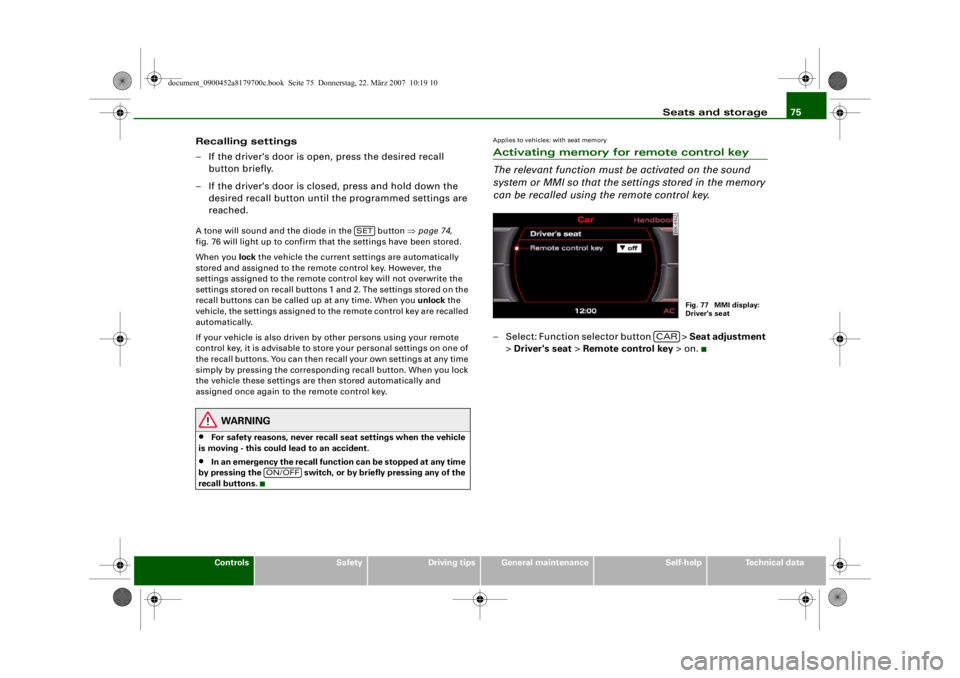
The relevant function must be activated on the sound
system or MMI so that the se ttings stored in the memory
can be recalled using the remote control key.– Select: Function selector button > Seat adjustment
> Driver's seat > Remote control key > on.
SET
ON/OFF
Fig. 77 MMI display:
Driver's seat
CAR
document_0900452a8179700c.book Seite 75 Donnerstag, 22. März 2007 10:19 10
--4 -
-T
D
-+
•
+-
•
Page 119 of 313

Driving117
Controls
Safety
Driving tips
General maintenance
Self-help
Technical data
If you press in the key
without pressing the clutch or brake pedal,
the ignition will be switched on or off. The steering lock is released
when the ignition is switched on. Diesel engines continue to be
automatically preheated.
The key can be removed only when the ignition is off. The key has to
be pressed in briefly to switch off the ignition. On vehicles with an
automatic gearbox, the selector lever has to be in position P.
Electrical components with a high power consumption are switched
off temporarily while you start the engine.
When starting from cold the engine may be a little noisy for the first
few seconds until oil pressure has built up in the hydraulic tappets.
This is quite normal and no cause for concern.
If the engine fails to start immediately, the starter will be switched
off automatically after a few seconds. Try to start the engine again.
Driving away from a standstill
On some vehicles, the engine revs are automatically increased
slightly as soon as you release the clutch. This helps you drive off
more smoothly.
Driver message in the instrument cluster display
Press brake pedal to start engine
This message appears on vehicles with an automatic gearbox if you
try to start the engine without first pressing the brake pedal.
Press clutch pedal to start engine
This message appears on vehicles with a manual gearbox if you try
to start the engine without first pressing the clutch pedal.
Engage N or P to start engine
This message will appear if you try to start the engine when the
selector lever of the automatic gearbox is not in P or N. Shift to P, otherwise vehicle can roll away. Doors do not lock if lever
is not in P.
or Please move selector lever to position P. Vehicle
cannot be locked.
For safety reasons, this message will appear and a warning buzzer
will sound if the selector lever of the automatic gearbox is not in
position P after you switch off the ignition. Put the se lector lever in
position P; otherwise the vehicle can roll away. If the lever is not in
position P you will not be able to lock the vehicle using the exterior
locking switch on the door hand le or the remote control key.
Steering lock
The steering is locked when the key is not in the ignition. The
steering lock acts as a theft deterrent.
WARNING
•
Always take the key with you when you leave the vehicle.
Otherwise the engine can be st arted or power-operated equip-
ment such as the electric windows can be used. This could result
in serious injury.
•
Never leave children or disabled people alone in the car. The
doors could be locked with the re mote control key and the occu-
pants could become trapped in the vehicle. The vehicle occupants
could be exposed to extremely high or low temperatures,
depending on the time of year.
•
Never remove the key from the ignition while the vehicle is
moving. The steering l ock could engage suddenly, and you would
not be able to steer the car.Caution
•
If a malfunction occurs in the electronic ignition lock, a flashing
symbol and the message Ignition lock defective will appear in the
instrument cluster display.
document_0900452a8179700c.book Seite 117 Donnerstag, 22. März 2007 10:19 10
--4 -
-T
-+ +-
0
Page 121 of 313
Driving119
Controls
Safety
Driving tips
General maintenance
Self-help
Technical data
–Manual gearbox: Press the clutch pedal all the way down
and move the gear lever into neutral.
– Automatic gearbox: Press the brake pedal and move the
selector lever to position P or N ⇒.
– Press the Start/Stop button ⇒page 118, fig. 135 to start
the engine.
– Diesel engines can take a fe w seconds longer than usual
to star t on cold days. Please keep your foot on the clutch
or brake pedal until the engine starts. The glow plug indi-
cator lamp
lights up in the instrument cluster while
the glow plugs are preheating.
If you press the Start/Stop button without pressing the clutch or
brake pedal, the ignition will be switched on (and will be switched
off if you press the button again). Diesel engines are preheated
when the ignition is switched on.
If the engine fails to start straight-away, switch off the starter after
about 10 seconds and try again after about half a minute.
When starting from cold the engine may be a little noisy for the first
few seconds until oil pressure has built up in the hydraulic tappets.
This is quite normal and no cause for concern.
Driving away from a standstill
On some vehicles, the engine revs are automatically increased
slightly as soon as you release the clutch. This helps you drive off
more smoothly.
Driver message in the instrument cluster display
No key identified
This message appears when you pre ss the Start/Stop button if there
is no remote control key inside the vehicle or if the system cannot
detect or identify the key. This can happen, for example, if the radio
signal from the key is obstructed by a metal briefcase or similar. Electronic equipment, such as mobile phones, can also interfere
with the radio signal from the key.
Press brake pedal to start engine
This message appears on automatic vehicles if you press the
Start/Stop button to start the en
gine without first pressing the
brake pedal. The engine will only start if you press the brake pedal.
Press clutch pedal to start engine
This message appears on manual vehicles if you press the
Start/Stop button to start the en gine without first pressing the
clutch pedal. The engine will only star t if you press the clutch pedal.
Engage N or P to start engine
This message will appear if you try to start the engine when the
selector lever of the automatic gear box is not in P or N. The engine
can only be started if the selector lever is in one of these positions.
Key not in vehicle
This message will appear together with the symbol
if the remote
control key is removed from the vehicle while the engine is running.
This is to remind you not to continue driving without the key (for
example if you change drivers).
If the remote control key is not in the vehicle you will not be able to
switch on the ignition or restar t the engine after it has been
switched off. Without the key, you wi ll also not be able to lock the
vehicle from the outside.
Shift to P, otherwise vehicle can roll away. Doors do not lock if lever
is not in P. or Please move selector lever to position P. Vehicle
cannot be locked.
For safety reasons, this message will appear and a warning buzzer
will sound if the selector lever of the automatic gearbox is not in
position P when you switch off th e ignition with the Start/Stop
button. Put the selector lever in position P; otherwise the vehicle
can roll away. If the lever is not in position P you will not be able to
document_0900452a8179700c.book Seite 119 Donnerstag, 22. März 2007 10:19 10
--4 -
-T
-+ +-
Page 122 of 313
Driving
120lock the vehicle using the exterior locking switch on the door handle
or the remote control key.
Advanced key defective! Use ignition lock
This message appears if the vehicle has to be started with the igni-
tion key instead of the Start/Stop button.
Steering lock
The steering is locked if the key is not in the ignition and the driver
door has been opened. The steering lock acts as a theft deterrent.
WARNING
Never run the engine in confin ed spaces. The exhaust gases are
toxic.•
Never switch off the engine until the vehicle is stationary.
•
The brake servo and the power steering system work only
when the engine is running. You need more strength to steer and
brake the vehicle when the engine is switched off. This would
mean a greater risk of accidents and serious injury, because you
cannot steer and brake in the normal manner.Caution
•
Avoid high engine speeds, full throttle and extreme load condi-
tions until the engine has reached its normal operating tempera-
ture, otherwise this can damage the engine.
•
The engine cannot be started by push-starting or towing.
•
If the engine has been working hard for a long time, there is a risk
of heat building up in the engine compartment after the engine has
been switched off; this could cause engine damage. For this reason,
you should leave the engine idling for about 2 minutes before
switching it off.
Switching off the engine with the Start/Stop button–Stop the vehicle.
– Automatic gearbox: Move the selector lever to position P or N.
– Press the Start/Stop button ⇒page 118, fig. 135.Emergency Off function
Should it be necessary in an emergency, the engine can be switched
off when the selector lever is in position R, D or S. To switch off the
engine (max. speed 10 km/h) press and hold the Start/Stop button
and keep your foot on the brake.
WARNING
•
Never switch off the engine until the vehicle is stationary.
•
The brake servo and the power steering system work only
when the engine is running. You need more strength to steer and
brake the vehicle when the engine is switched off. This would
mean a greater risk of accidents and serious injury, because you
cannot steer and brake in the normal manner.Caution
If the engine has been working hard for a long time, there is a risk
of heat building up in the engine compartment after the engine has
been switched off; this could cause engine damage. For this reason,
you should leave the engine idling for about 2 minutes before
switching it off.
Note
After the engine is stopped the radiator fan may run on for up to
10 minutes, even if the ignition is switched off. The fan may also
document_0900452a8179700c.book Seite 120 Donnerstag, 22. März 2007 10:19 10
--4 -
-T
-+ +-
0
0
•
[I]
Page 124 of 313
Driving
122a fault in the parking brake. Have the fault repaired by a qualified
workshop without delay ⇒page 31 .
Note
•
The parking brake can be applied at any time - even when the
ignition is switched off. However, the ignition must be switched on
before the parking brake can be released.
•
Any slight noise which may be heard when the parking brake is
applied or released is quite normal and no cause for concern.
•
The parking brake runs an automatic test cycle at regular inter-
vals when the vehicle is parked. This may also cause a slight noise,
which is normal.
Parking
Please note the following points to ensure there is no risk
of the car rolling away accidentally after it is parked.Parking t he c ar
– Use the foot brake to stop the vehicle.
– Pull the switch to apply the parking brake.
– Automatic gearbox: Move the selector lever to P.
– Switch off the engine ⇒ .
– Manual gearbox: Engage the first gear.
When parking on slopes
– Turn the steering wheel so that the vehicle would roll into
the kerb if it did start to move accidentally.
WARNING
•
Always take the key with you when leaving the vehicle – even
if you only intend to be gone for a short time. This is especially
important if children are left in the car. They might otherwise be
able to start the engine, releas e the parking brake or use power-
operated equipment such as the elec tric windows - this could lead
to injuries.
•
Do not leave anyone (especially chi ldren) in the vehicle when it
is locked. Locked doors could delay assistance in an emergency,
potentially putting lives at risk.
Driving away from a standstill
The parking brake auto release function releases the
parking brake automatically when you wish to start
moving.Applying the parking brake when stopping
– Pull the switch to apply the parking brake.
Releasing the parking brake when driving away
– Drive off in the normal way: the parking brake will be released automatically and the vehicle will start moving.On vehicles with automatic gearbox, you can apply the parking
brake when stopping at traffic lights, etc. Then you do not have to
hold the car with the footbrake, as the parking brake will stop it
creeping forward while a gear is engaged in the automatic transmis-
sion. When you drive off in the normal way, the parking brake will be
released automatically and the vehicle will start moving.
Driving away on a slope
When driving away on a gradient, the parking brake auto release
function prevents the vehicle from rolling back unintentionally. The
document_0900452a8179700c.book Seite 122 Donnerstag, 22. März 2007 10:19 10
--4 -
-T
[I)
•
•
-+ +-
Page 171 of 313
Safe driving169
Controls
Safety
Driving tips
General maintenance
Self-help
Technical data
inside. In this case the child wo
uld be unable to get out of the
vehicle without help. This could have fatal consequences.
•
Never allow children to play in or around the vehicle. Always
close and lock the boot lid and all the doors when you leave the
vehicle.
•
Never let passengers ride in the luggage compartment. All
occupants must be properly restrained by the seat belts at all
times ⇒page 170 .Note
•
Air circulation in the vehicle helps reduce fogging of the
windows. Used air escapes through ventilation slots in the rear of
the vehicle. Make sure that these ventilation slots are not
obstructed.
•
Suitable belts for securing loads to the fastening rings* are
commercially available.
Applies to vehicles: with fastening ringsFastening rings
Unsecured loads are a hazard to all vehicle occupants.There are fastening rings in the luggage compartment
which can be used to secure luggage and other objects
⇒ page 78 .
– Use the fastening rings to secure items safely in the luggage compartment ⇒ in “Loading the luggage
compartment” on page 77.During a collision or an accident, even small and light objects can
possess so much energy that they can cause very severe injuries.
The amount of this “kinetic energy” depends on the speed of the vehicle and the weight of the object. The most significant factor,
however, is the speed of the vehicle.
An example: An object weighing 4.5 kg is lying unsecured in the
vehicle. During a frontal collision at a speed of 50 km/h, this object
generates a force corresponding to 20 times its weight. That means
that the effective weight of the object increases to about 90 kg. You
can imagine the severity of the injuries which might be sustained if
this “projectile” strikes an occupant as it flies through the
passenger compartment.
WARNING
If items of luggage or other obje
cts are secured to the fastening
rings with inappropriate or da maged retaining cords, injuries
could result in the event of sudden braking or a collision.•
To prevent pieces of luggage or other objects from flying
forward, always use appropriate retaining cords which are prop-
erly secured to the fastening rings.
•
Never secure a child seat on the fastening rings.
WARNING (continued)
document_0900452a8179700c.book Seite 169 Donnerstag, 22. März 2007 10:19 10
--4 -
-T
[I]
-+
•
•
+-
Page 232 of 313
Checking and topping up fluids
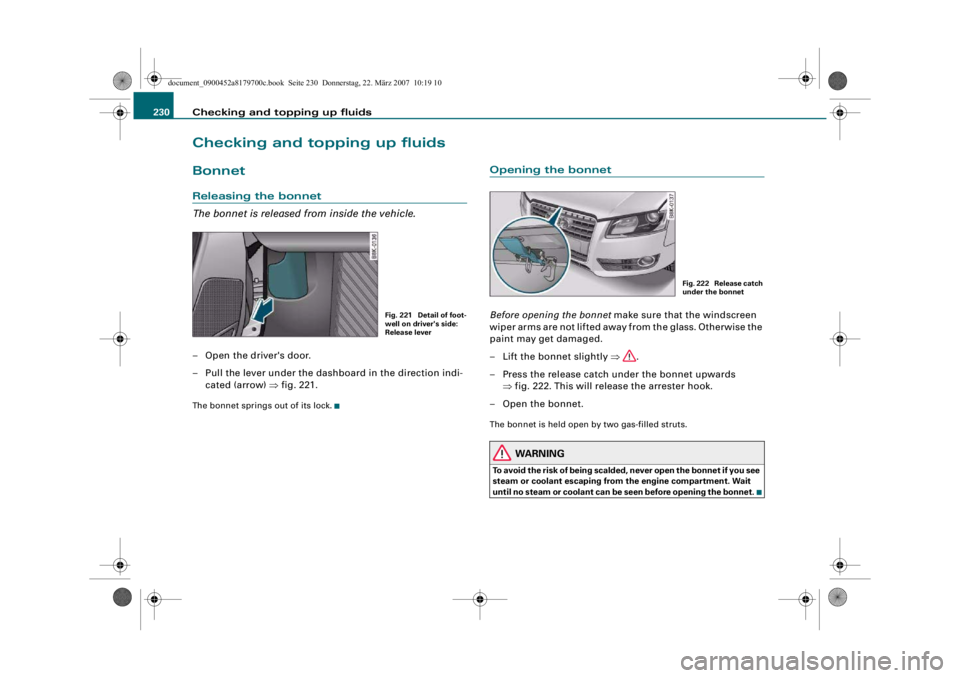
230Checking and topping up fluidsBonnetReleasing the bonnet
The bonnet is released from inside the vehicle.– Open the driver's door.
– Pull the lever under the dash board in the direction indi-
cated (arrow) ⇒fig. 221.The bonnet springs out of its lock.
Opening the bonnetBefore opening the bonnet make sure that the windscreen
wiper arms are not lifted away from the glass. Otherwise the
paint may get damaged.
– Lift the bonnet slightly ⇒.
– Press the release catch under the bonnet upwards ⇒fig. 222. This will release the arrester hook.
– Open the bonnet.The bonnet is held open by two gas-filled struts.
WARNING
To avoid the risk of being scalded, never open the bonnet if you see
steam or coolant escaping from the engine compartment. Wait
until no steam or coolant can be seen before opening the bonnet.
Fig. 221 Detail of foot-
well on driver's side:
Release lever
Fig. 222 Release catch
under the bonnet
document_0900452a8179700c.book Seite 230 Donnerstag, 22. März 2007 10:19 10
--4 -
-T
-+ +-
•
.I
Page 265 of 313
Self-help263
Controls
Safety
Driving tips
General maintenance
Self-help
Technical data
– Now fit the crank handle onto the jack by inserting it
in the opening on the knob ⇒page 262, fig. 244. Turn the
crank handle clockwise or anti-clockwise to secure it in
place.
– Raise the vehicle by windin g the crank handle until the
defective wheel is clear of the ground.Recesses at the front and rear of the door sills mark the jacking
points ⇒page 262, fig. 243. There is one jacking point for each
wheel. The distance from the jacking points to the wheel arches is
approximately 20 cm at the front an d 40 cm at the rear. The jack may
only be applied at the seam of the jacking points shown.
An unstable surface under the jack may cause the vehicle to slip off
the jack. Always provide a firm base for the jack on the ground. If
necessary use a large, strong board or similar support. On a hard,
slippery surface (such as tiles) use a rubber mat or similar to prevent
the jack from slipping.
WARNING
•
Prevent the base of the jack fr om slipping – risk of injury.
•
The car can be damaged if the jack is not applied at the correct
jacking points. There is also a risk of injury since the jack can slip
off suddenly if it is not properly engaged.
Taking off the wheel and putting on the spare wheel
Step-by-step instructions for taking off the wheel and
putting on the spare wheel.Change the wheel as described below after loosening the
wheel bolts and raising the vehicle with the jack*.
Taking off the wheel
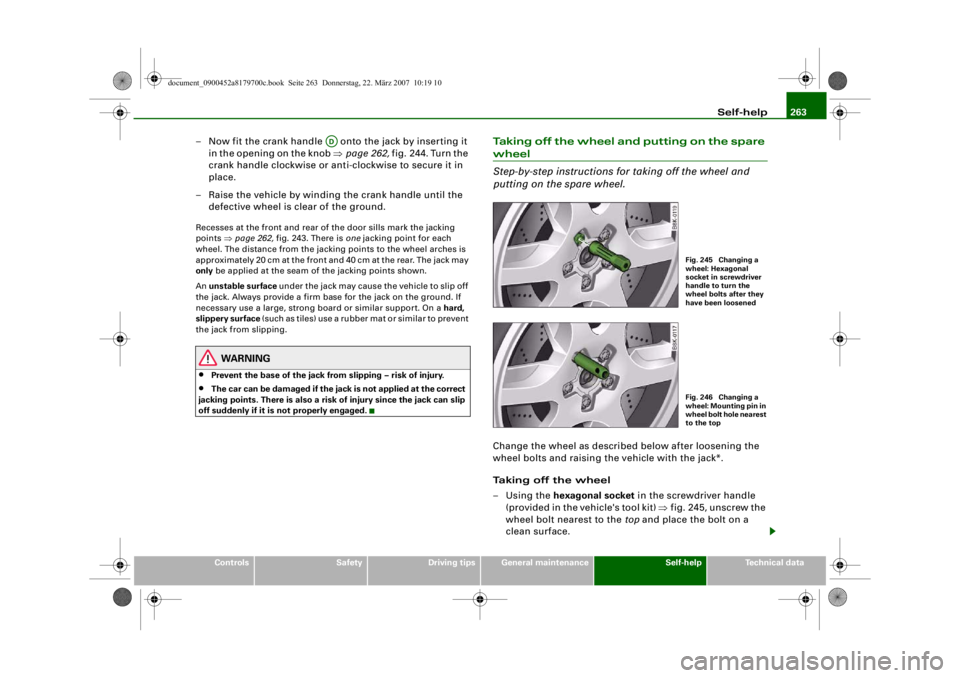
–Using the hexagonal socket in the screwdriver handle
(provided in the vehicle's tool kit) ⇒fig. 245, unscrew the
wheel bolt nearest to the top and place the bolt on a
clean surface.
AD
Fig. 245 Changing a
wheel: Hexagonal
socket in screwdriver
handle to turn the
wheel bolts after they
have been loosenedFig. 246 Changing a
wheel: Mounting pin in
wheel bolt hole nearest
to the top
document_0900452a8179700c.book Seite 263 Donnerstag, 22. März 2007 10:19 10
--4 -
-T
-+ +-
•