instrument cluster AUDI A5 COUPE 2008 Owner's Manual
[x] Cancel search | Manufacturer: AUDI, Model Year: 2008, Model line: A5 COUPE, Model: AUDI A5 COUPE 2008Pages: 313, PDF Size: 13.86 MB
Page 56 of 313

Lights and vision
54Lights and visionLightsSwitching lights on and off
Switching on automatic headlights* (AUTO)
– Turn the light switch to AUTO ⇒ fig. 50.
Switching on the side lights
– Turn the light switch to position
.
Switching on dipped headlights
– Turn the light switch to position
.
Switching off the lights
– Turn the light switch to position O.
The dipped beam headlights will only work with the ignition on.
The symbol
next to the light switch will light up when the side
lights or headlights are on. Automatic headlight control (AUTO)*
When the switch is set to AUTO
, the headlights switch on automati-
cally according to the ambient light conditions, for instance in a
tunnel, at sunset, or in the rain or snow. The
symbol lights up
when the dipped headlights are on. The headlights are switched on,
regardless of the light conditions, when you switch on the fog
lights.
The headlights are switched off automatically when you switch off
the ignition.
On vehicles with a rain sensor, the headlights switch on automati-
cally after several windscreen wiper cycles. The instrument lighting
does not switch on, however.
While using the automatic headligh ts you can activate the main
beam headlights as normal if this function has been activated in the
MMI. However, if you switch on the main beam headlights while
using the AUTO function and then do not switch back to the dipped
headlights setting, only the dipped headlights will come on the next
time you switch on the AUTO function. To be able to use the main
beam headlights again you must first pull the main beam lever back
to the "off" position and then push it forward to "on".
Malfunction of light sensor
If a malfunction should occur in the light sensor, the instrument
cluster will show the message:
Automatic headlights/ automatic wipers defective
For safety reasons, the dipped beam headlights will then be
switched on permanently when the light switch is set to the AUTO
position. However, you can still switch the lights on and off in the
normal way with the light switch. You should have the light sensor
checked by a qualified workshop as soon as possible.
Fig. 50 Dashboard:
Light switch
document_0900452a8179700c.book Seite 54 Donnerstag, 22. März 2007 10:19 10
--4 -
-T
-+ +-
Page 59 of 313

Lights and vision57
Controls
Safety
Driving tips
General maintenance
Self-help
Technical data
– Turn the thumbwheel
⇒ page 56, fig. 53 to the appro-
priate setting.
Adjustment settings
The settings correspond roughly to the following load conditions:
Two front occupants, luggage compartment empty
All seats occupied, luggage compartment empty
All seats occupied, luggage compartment loadedDriver only, luggage compartment loaded
Caution
Always adjust the headlights to avoid dazzling oncoming traffic.
Make sure you lower the headlights when the vehicle is carrying a
heavy load.Instrument lighting
The background lighting of the instruments, the centre
console and the display can be adjusted as required.– Briefly press the knob to release it.
– Turn the button clockwise +” to increase the brightness
of the instrument lighting in dark conditions. – Turn the button anti-clockwise -” to reduce the bright-
ness of the instrument lighting in dark conditions.
– Press the knob in again to prevent the setting from being changed unintentionally.
The instrument lighting (dials and needles), the centre console illu-
mination and the illumination of the displays are regulated by a
light sensor incorporated in the instrument cluster. In bright condi-
tions any changes made to the brigh tness of the instrument lighting
have no effect.
Note
The instrument lighting (illumination of dials and needles) is
switched on when the ignition is on and the vehicle's lights are off.
The instrument lighting is dimmed automatically as the daylight
starts to fade; it is switched off completely when the light condi-
tions become very poor. This function is intended to remind the
driver to switch on the dipped-beam headlights in good time when
light conditions become poor.Applies to vehicles: with xenon headlight bulbsDynamic headlight range controlHeadlights with xenon gas-discharge bulbs automatically adapt to
suit the load being carried when the engine is switched on. The
headlights are also automatically adjusted when the vehicle is in
motion (e.g. when accelerating and braking).
AOAIAIIAIII
Fig. 54 Instrument
lighting
document_0900452a8179700c.book Seite 57 Donnerstag, 22. März 2007 10:19 10
--4 -
-T
0
•
-+
•
+-
•
Page 61 of 313
Lights and vision59
Controls
Safety
Driving tips
General maintenance
Self-help
Technical data
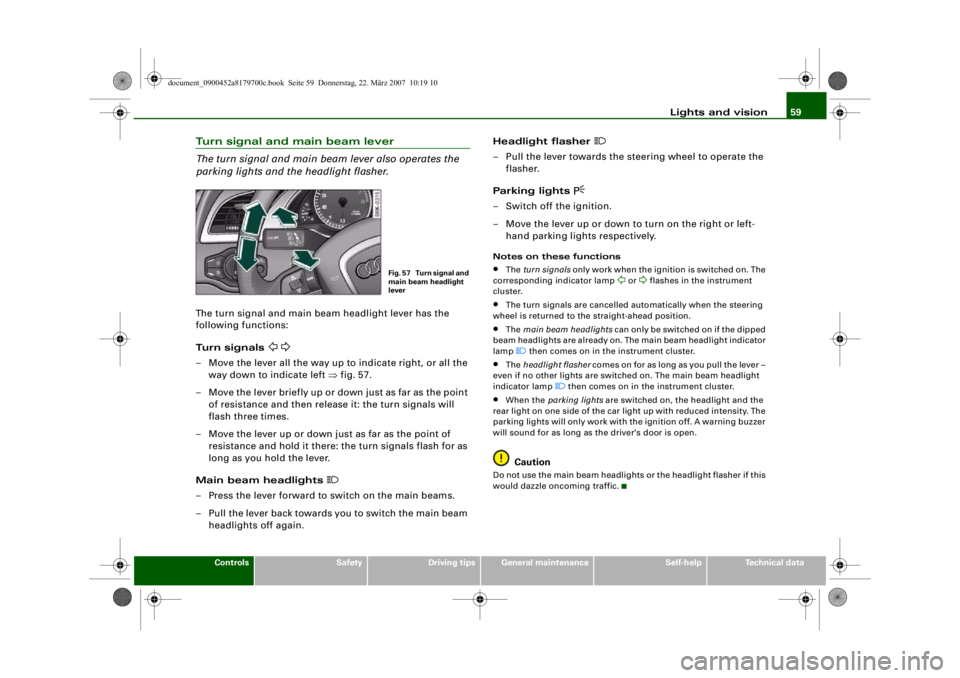
Turn signal and main beam lever
The turn signal and main beam lever also operates the
parking lights and the headlight flasher.The turn signal and main beam headlight lever has the
following functions:
Turn signals
– Move the lever all the way up to indicate right, or all the
way down to indicate left ⇒fig. 57.
– Move the lever briefly up or down just as far as the point of resistance and then rele ase it: the turn signals will
flash three times.
– Move the lever up or down just as far as the point of resistance and hold it there: the turn signals flash for as
long as you hold the lever.
Main beam headlights
– Press the lever forward to switch on the main beams.
– Pull the lever back towards you to switch the main beam headlights off again. Headlight flasher
– Pull the lever towards the steering wheel to operate the
flasher.
Parking lights
– Switch off the ignition.
– Move the lever up or down to turn on the right or left- hand parking lights respectively.Notes on these functions•
The turn signals only work when the ignition is switched on. The
corresponding indicator lamp
or
flashes in the instrument
cluster.
•
The turn signals are cancelled automatically when the steering
wheel is returned to the straight-ahead position.
•
The main beam headlights can only be switched on if the dipped
beam headlights are already on. The main beam headlight indicator
lamp then comes on in the instrument cluster.
•
The headlight flasher comes on for as long as you pull the lever –
even if no other lights are switched on. The main beam headlight
indicator lamp
then comes on in the instrument cluster.
•
When the parking lights are switched on, the headlight and the
rear light on one side of the car light up with reduced intensity. The
parking lights will only work with the ignition off. A warning buzzer
will sound for as long as the driver's door is open.Caution
Do not use the main beam headlights or the headlight flasher if this
would dazzle oncoming traffic.
Fig. 57 Turn signal and
main beam headlight
lever
document_0900452a8179700c.book Seite 59 Donnerstag, 22. März 2007 10:19 10
--4 -
-T
-+ +-
CD
•
Page 113 of 313

Heating and cooling111
Controls
Safety
Driving tips
General maintenance
Self-help
Technical data
Auxiliary heating and auxiliary
ventilationApplies to vehicles: with auxiliary heating - under development at the time of printingDescription
The auxiliary heating and ventilation systems heat and
cool the interior independently of the engine.The auxiliary heating
works in conjunction with the air condi-
tioner system, but does not rely on heat from the engine. Instead of
this, the system burns fuel. The system's main function is to warm
up the interior of the vehicle and to defrost the windows in cold
weather.
The auxiliary heating system can be used both when the vehicle is
stationary and when driving (to provide extra heat while the engine
is warming up).
The auxiliary ventilation also operates independently of the
engine. This feature can be used to cool the interior with the blower
when the vehicle is left parked in the sun.
The system will automatically activate either the auxiliary heating or
the auxiliary ventilation mode, de pending on the actual tempera-
ture measured inside the car and the temperature you have set with
the air conditioner controls. It is possible to alter the temperature
setting while the auxiliary he ating/ventilation is running.
Switching on and off
There are two different ways of switching on the auxiliary
heating/ventilation system.
•
Immediate start: You can switch the auxiliary heating/ventilation
on and off at any time in the MMI Car menu ⇒page 112 . You can
also switch the system on and off using the remote control
⇒ page 114 .
•
Switching on via timer: You can programme various start times
using the timers ⇒ page 112. However you must first activate the timer before the auxiliary heating/ve
ntilation system will switch on
automatically.
The auxiliary heating/ventilation will switch itself off at the end of
the programmed running time. The running time can be set to 15,
30, 45 or 60 minutes ⇒page 113 .
WARNING
•
The auxiliary heating must no t be allowed to run when the
vehicle is in a confined space because it can give off toxic fumes.
•
To avoid any possible fire risk, never have the auxiliary heating
switched on when refuelling the vehicle.
•
Because of the high temperatur es which occur when the auxil-
iary heating is running, make sure when parking the car that the
exhaust outlet under the car is no t obstructed in any way and that
the exhaust gases do not come in to contact with flammable mate-
rials (fire risk).Note
•
It is advisable to open the air outlets when using the auxiliary
heating/ventilation.
•
The auxiliary heating/ventilation will not switch on if the fuel in
the tank has reached the reserve zone.
•
The auxiliary heating/ventilation wi ll not switch on if the battery
charge level is low.
•
The symbols
(auxiliary ventilation) or
(auxiliary heating)
flash in the instrument cluster ne xt to the clock display when the
auxiliary heating/ventilation is switched on. Both symbols light
continuously when the timer is activated.
•
At low outside temperatures some visible water vapour may
form in the engine compartment. This is a normal phenomenon,
and no reason for concern.
document_0900452a8179700c.book Seite 111 Donnerstag, 22. März 2007 10:19 10
--4 -
-T
-+
[I]
+-
•
Page 114 of 313

Heating and cooling
112Applies to vehicles: with auxiliary heating - under development at the time of printingSwitching on/off immediatelySwitching on immediately
– Press the button.
– Press the control button for AC.
–Set Aux. heating or Aux. ventilation to on.
Switching off immediately
– Press the button.
– Press the control button for AC.
–Set Aux. heating or Aux. ventilation to off.When the auxiliary heating/ventilat ion is running, you can press the
button on the air conditioner co nsole to switch off the blower
only. Pressing the button a second time will switch on the
blower again.
Note
The symbols
(auxiliary ventilation) or
(auxiliary heating) flash in
the instrument cluster next to th e clock display when the auxiliary
heating/ventilation is switched on.
Applies to vehicles: with auxiliary heating - under development at the time of printingSetting the timers
The timers need to be activated before they will switch on
the auxiliary heating/ventilation.Setting the timers
– Press the button.
– Press the control button for AC.
– Select the timer you wish to set, and enter the required
time and date ⇒fig. 127.
– Then press the rotary control to confirm the time and date settings.
Fig. 126 MMI display:
Setup AC
CARCAR
OFF
OFF
Fig. 127 MMI display:
TimerFig. 128 MMI display:
Timer status
CAR
document_0900452a8179700c.book Seite 112 Donnerstag, 22. März 2007 10:19 10
--4 -
-T
-+ +-
D
[I]
•
Page 118 of 313
Driving
116DrivingSteeringApplies to vehicles: with manually adjustable steering columnAdjusting the steering wheel position
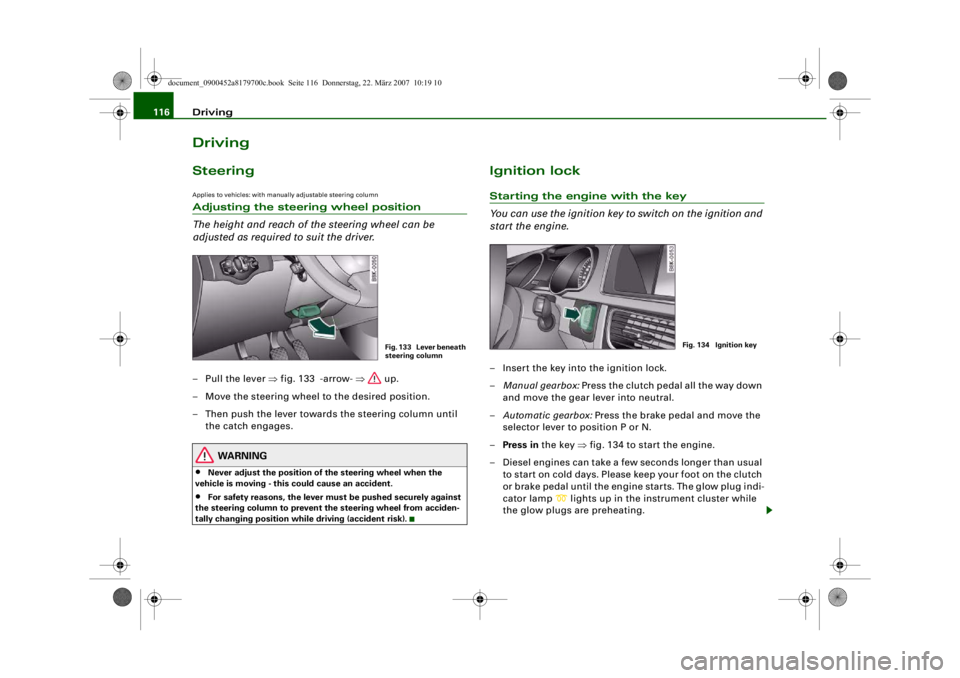
The height and reach of the steering wheel can be
adjusted as required to suit the driver.– Pull the lever ⇒fig. 133 -arrow- ⇒ up.
– Move the steering wheel to the desired position.
– Then push the lever towards the steering column until the catch engages.
WARNING
•
Never adjust the position of the steering wheel when the
vehicle is moving - this could cause an accident.
•
For safety reasons, the lever must be pushed securely against
the steering column to prevent the steering wheel from acciden-
tally changing position wh ile driving (accident risk).
Ignition lockStarting the engine with the key
You can use the ignition key to switch on the ignition and
start the engine.– Insert the key into the ignition lock.
– Manual gearbox: Press the clutch pedal all the way down
and move the gear lever into neutral.
– Automatic gearbox: Press the brake pedal and move the
selector lever to position P or N.
– Press in the key ⇒fig. 134 to start the engine.
– Diesel engines can take a few seconds longer than usual to star t on cold days. Please keep your foot on the clutch
or brake pedal until the engine starts. The glow plug indi-
cator lamp
lights up in the instrument cluster while
the glow plugs are preheating.
Fig. 133 Lever beneath
steering column
Fig. 134 Ignition key
document_0900452a8179700c.book Seite 116 Donnerstag, 22. März 2007 10:19 10
--4 -
-T
-+ +-
•
Page 119 of 313

Driving117
Controls
Safety
Driving tips
General maintenance
Self-help
Technical data
If you press in the key
without pressing the clutch or brake pedal,
the ignition will be switched on or off. The steering lock is released
when the ignition is switched on. Diesel engines continue to be
automatically preheated.
The key can be removed only when the ignition is off. The key has to
be pressed in briefly to switch off the ignition. On vehicles with an
automatic gearbox, the selector lever has to be in position P.
Electrical components with a high power consumption are switched
off temporarily while you start the engine.
When starting from cold the engine may be a little noisy for the first
few seconds until oil pressure has built up in the hydraulic tappets.
This is quite normal and no cause for concern.
If the engine fails to start immediately, the starter will be switched
off automatically after a few seconds. Try to start the engine again.
Driving away from a standstill
On some vehicles, the engine revs are automatically increased
slightly as soon as you release the clutch. This helps you drive off
more smoothly.
Driver message in the instrument cluster display
Press brake pedal to start engine
This message appears on vehicles with an automatic gearbox if you
try to start the engine without first pressing the brake pedal.
Press clutch pedal to start engine
This message appears on vehicles with a manual gearbox if you try
to start the engine without first pressing the clutch pedal.
Engage N or P to start engine
This message will appear if you try to start the engine when the
selector lever of the automatic gearbox is not in P or N. Shift to P, otherwise vehicle can roll away. Doors do not lock if lever
is not in P.
or Please move selector lever to position P. Vehicle
cannot be locked.
For safety reasons, this message will appear and a warning buzzer
will sound if the selector lever of the automatic gearbox is not in
position P after you switch off the ignition. Put the se lector lever in
position P; otherwise the vehicle can roll away. If the lever is not in
position P you will not be able to lock the vehicle using the exterior
locking switch on the door hand le or the remote control key.
Steering lock
The steering is locked when the key is not in the ignition. The
steering lock acts as a theft deterrent.
WARNING
•
Always take the key with you when you leave the vehicle.
Otherwise the engine can be st arted or power-operated equip-
ment such as the electric windows can be used. This could result
in serious injury.
•
Never leave children or disabled people alone in the car. The
doors could be locked with the re mote control key and the occu-
pants could become trapped in the vehicle. The vehicle occupants
could be exposed to extremely high or low temperatures,
depending on the time of year.
•
Never remove the key from the ignition while the vehicle is
moving. The steering l ock could engage suddenly, and you would
not be able to steer the car.Caution
•
If a malfunction occurs in the electronic ignition lock, a flashing
symbol and the message Ignition lock defective will appear in the
instrument cluster display.
document_0900452a8179700c.book Seite 117 Donnerstag, 22. März 2007 10:19 10
--4 -
-T
-+ +-
0
Page 121 of 313
Driving119
Controls
Safety
Driving tips
General maintenance
Self-help
Technical data
–Manual gearbox: Press the clutch pedal all the way down
and move the gear lever into neutral.
– Automatic gearbox: Press the brake pedal and move the
selector lever to position P or N ⇒.
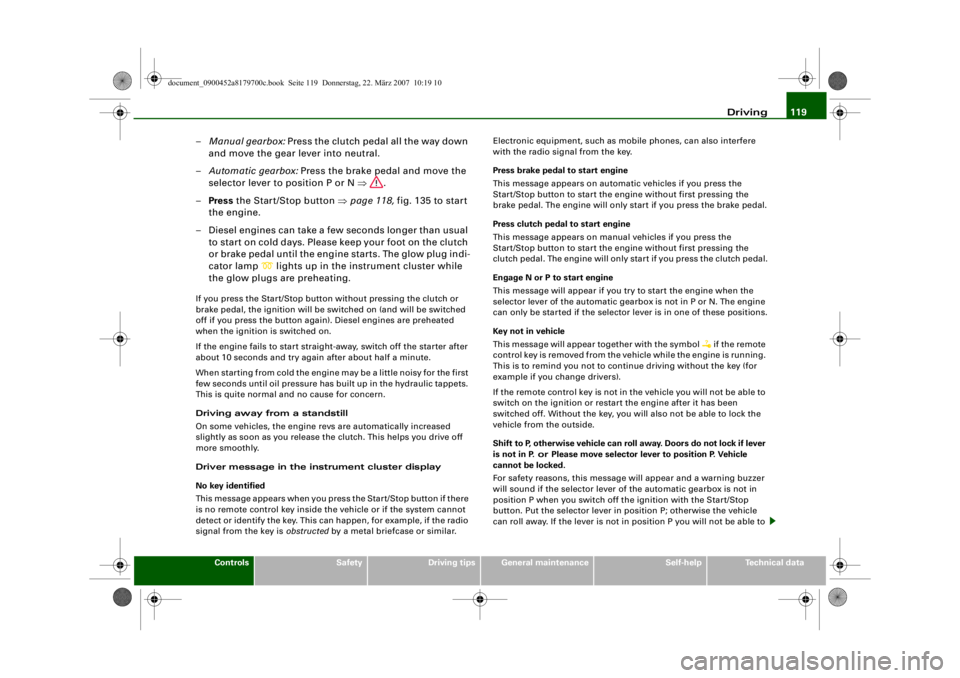
– Press the Start/Stop button ⇒page 118, fig. 135 to start
the engine.
– Diesel engines can take a fe w seconds longer than usual
to star t on cold days. Please keep your foot on the clutch
or brake pedal until the engine starts. The glow plug indi-
cator lamp
lights up in the instrument cluster while
the glow plugs are preheating.
If you press the Start/Stop button without pressing the clutch or
brake pedal, the ignition will be switched on (and will be switched
off if you press the button again). Diesel engines are preheated
when the ignition is switched on.
If the engine fails to start straight-away, switch off the starter after
about 10 seconds and try again after about half a minute.
When starting from cold the engine may be a little noisy for the first
few seconds until oil pressure has built up in the hydraulic tappets.
This is quite normal and no cause for concern.
Driving away from a standstill
On some vehicles, the engine revs are automatically increased
slightly as soon as you release the clutch. This helps you drive off
more smoothly.
Driver message in the instrument cluster display
No key identified
This message appears when you pre ss the Start/Stop button if there
is no remote control key inside the vehicle or if the system cannot
detect or identify the key. This can happen, for example, if the radio
signal from the key is obstructed by a metal briefcase or similar. Electronic equipment, such as mobile phones, can also interfere
with the radio signal from the key.
Press brake pedal to start engine
This message appears on automatic vehicles if you press the
Start/Stop button to start the en
gine without first pressing the
brake pedal. The engine will only start if you press the brake pedal.
Press clutch pedal to start engine
This message appears on manual vehicles if you press the
Start/Stop button to start the en gine without first pressing the
clutch pedal. The engine will only star t if you press the clutch pedal.
Engage N or P to start engine
This message will appear if you try to start the engine when the
selector lever of the automatic gear box is not in P or N. The engine
can only be started if the selector lever is in one of these positions.
Key not in vehicle
This message will appear together with the symbol
if the remote
control key is removed from the vehicle while the engine is running.
This is to remind you not to continue driving without the key (for
example if you change drivers).
If the remote control key is not in the vehicle you will not be able to
switch on the ignition or restar t the engine after it has been
switched off. Without the key, you wi ll also not be able to lock the
vehicle from the outside.
Shift to P, otherwise vehicle can roll away. Doors do not lock if lever
is not in P. or Please move selector lever to position P. Vehicle
cannot be locked.
For safety reasons, this message will appear and a warning buzzer
will sound if the selector lever of the automatic gearbox is not in
position P when you switch off th e ignition with the Start/Stop
button. Put the selector lever in position P; otherwise the vehicle
can roll away. If the lever is not in position P you will not be able to
document_0900452a8179700c.book Seite 119 Donnerstag, 22. März 2007 10:19 10
--4 -
-T
-+ +-
Page 123 of 313
Driving121
Controls
Safety
Driving tips
General maintenance
Self-help
Technical data
start running again after some time
if the coolant temperature rises
due to a build-up of heat, or if the engine is hot and the engine
compartment is heated up further by direct sunlight.
Electro-mechanical parking brakeOperation
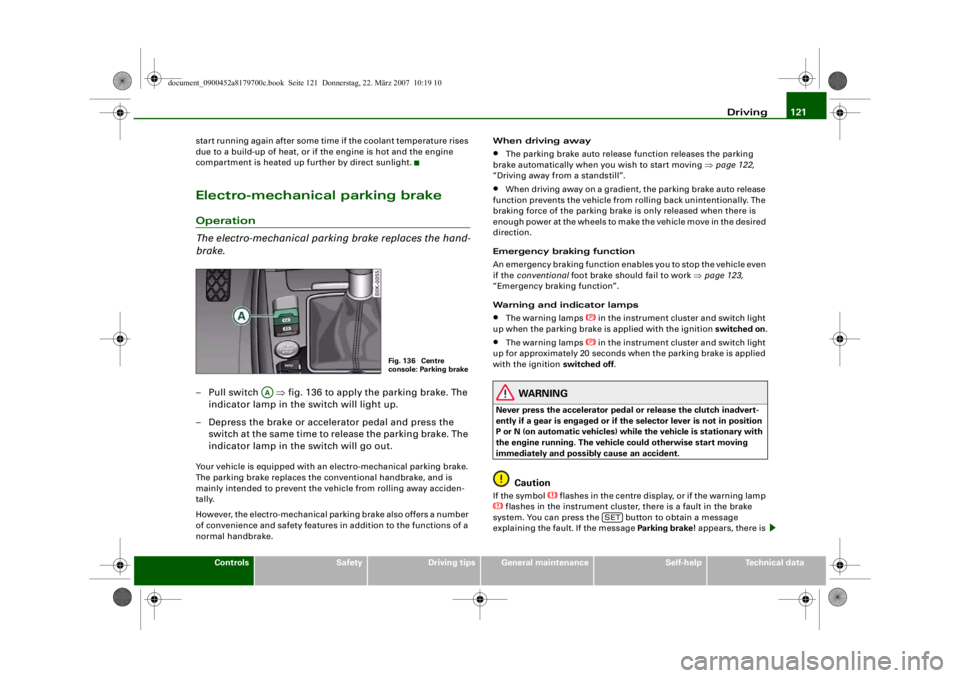
The electro-mechanical parking brake replaces the hand-
brake.– Pull switch ⇒fig. 136 to apply the parking brake. The
indicator lamp in the switch will light up.
– Depress the brake or accelerator pedal and press the switch at the same time to release the parking brake. The
indicator lamp in the switch will go out.Your vehicle is equipped with an electro-mechanical parking brake.
The parking brake replaces the co nventional handbrake, and is
mainly intended to prevent the vehicle from rolling away acciden-
tally.
However, the electro-mechanical pa rking brake also offers a number
of convenience and safety features in addition to the functions of a
normal handbrake. When driving away
•
The parking brake auto release function releases the parking
brake automatically when you wish to start moving ⇒page 122,
“Driving away from a standstill”.
•
When driving away on a gradient, the parking brake auto release
function prevents the vehicle from rolling back unintentionally. The
braking force of the parking brake is only released when there is
enough power at the wheels to make the vehicle move in the desired
direction.
Emergency braking function
An emergency braking function enables you to stop the vehicle even
if the conventional foot brake should fail to work ⇒page 123,
“Emergency braking function”.
Warning and indicator lamps
•
The warning lamps
in the instrument cluster and switch light
up when the parking brake is applied with the ignition switched on.
•
The warning lamps
in the instrument cluster and switch light
up for approximately 20 seconds when the parking brake is applied
with the ignition switched off .
WARNING
Never press the accelerator pedal or release the clutch inadvert-
ently if a gear is engaged or if the selector lever is not in position
P or N (on automatic vehicles) while the vehicle is stationary with
the engine running. The vehicl e could otherwise start moving
immediately and possibly cause an accident.
Caution
If the symbol
flashes in the centre display, or if the warning lamp
flashes in the instrument cluster, there is a fault in the brake
system. You can press the button to obtain a message
explaining the faul t. If the message Parking brake ! appears, there is
Fig. 136 Centre
console: Parking brake
AA
SET
document_0900452a8179700c.book Seite 121 Donnerstag, 22. März 2007 10:19 10
--4 -
-T
•
-+ +-
CD
D
Page 125 of 313
Driving123
Controls
Safety
Driving tips
General maintenance
Self-help
Technical data
braking force of the parking brake is only released when there is
enough power at the wheels to make the vehicle move in the desired
direction.
Note
For safety reasons the parking brake will only release automatically
if the driver's seat belt
is engaged in its buckle.Driving away when towing a trailer
Please note the following po ints to prevent the vehicle
from rolling back unintentionally on a gradient.– Pull and hold the parking brake switch and press the
accelerator. The parking brake will remain engaged and
prevent any tendency to roll back down the slope.
– You can release the parking brake switch as soon as the engine is delivering enough power to the wheels.Depending on the weight of the vehicle and trailer and the steep-
ness of the slope, there may be a tendency to roll back downhill
when driving away from a standstill. You can prevent this by pulling
out the parking brake switch as you press the accelerator (in the
same way as with a conventional handbrake).Emergency braking function
This feature enables you to stop the vehicle if the main
brake system should fail or if the pedal is obstructed.– Pull out and hold the parkin g brake switch to stop the
vehicle with the parking brake in an emergency.
– The brakes will be released immediately if you release the switch or press down the accelerator.
If you pull out and hold the park ing brake switch at a road speed
above about 8 km/h, this will initiate an emergency brake applica-
tion. The brakes are then applied hy draulically at all four wheels.
The effect is the same as an emergency stop (full brake application)
⇒
To prevent the emergency braking function from being used acci-
dentally, a warning buzzer sounds when the switch is operated. The
brakes are released immediately when you release the switch or
press down the accelerator.
WARNING
You should only use the emergency braking function in a real
emergency, for example if the brake system should fail or if the
brake pedal is obstructed. If you use the emergency braking func-
tion by activating the parking brak e switch, the effect is similar to
a full brake application (emergenc y stop). Please remember that
the ESP (with its combined ABS, EDL and traction control func-
tions) is still subject to certain physical limits. In a corner or in bad
road or weather conditions an emergency stop can cause the
vehicle to skid or lose steering control.Driver messages in the instrument cluster displayCaution: Vehicle parked too steep
This message can appear when you apply the parking brake if the
car is parked on a gradient steeper than about 30%.
In this case the parking brake may not be strong enough to prevent
the vehicle from rolling back accidentally.
Please release parking brake
However, please remember that, for safety reasons, the parking
brake will only release automatically if the driver's seat belt is
buckled.
document_0900452a8179700c.book Seite 123 Donnerstag, 22. März 2007 10:19 10
--4 -
-T
[I]
•
-+
•
+-
•