lock AUDI A5 COUPE 2008 Workshop Manual
[x] Cancel search | Manufacturer: AUDI, Model Year: 2008, Model line: A5 COUPE, Model: AUDI A5 COUPE 2008Pages: 313, PDF Size: 13.86 MB
Page 133 of 313

Automatic gearbox131
Controls
Safety
Driving tips
General maintenance
Self-help
Technical data
– To prevent the vehicle from rolling away, apply the
parking brake before moving off on steep gradients
⇒ .
– As soon as you accelerate as normal, the parking brake will automatically be released and the vehicle will start
moving.
Pa rking the c ar
– Press and hold the brake pedal ⇒.
– Apply the parking brake.
– Press and hold the interlock button, move the selector lever to P and release the interlock button.Your vehicle is equipped with the hill hold assist function which
makes it easier to drive away on a slope. The system is activated
when you press and hold the brake pedal for a few seconds. When
you release the brake pedal the braking force will be maintained for
a moment in order to prevent the vehicle rolling back when you drive
away.
The engine c an only be started when the selector lever is at P or N.
On level ground it is sufficient to move the selector lever to P. On a
gradient the parking brake should be applied first and the selector
lever should be moved to P. This reduces the load on the locking
mechanism and makes it easier to move the selector lever out of
position P.
WARNING
•
Do not press the accelerator while selecting a gear with the
vehicle stationary and the engine running, as this could cause an
accident.
•
Please note that some power will still be transmitted when you
stop temporarily with the selector lever in position D, S or R. For this reason, to avoid ri
sking an accident, appl y the footbrake firmly
when stopping to prevent the vehicle rolling away.
•
Never move the selector lever to R or P when driving, as this
could cause an accident.
Applies to vehicles: with multitronic®Selector lever positions
This section covers all the selector lever positions.The current selector lever position is shown in the instrument
cluster display.
P - Parking lock
This locks the driving wheels mechanically. The parking lock must
only be engaged when the vehicle is stationary ⇒.
The interlock button (the button in the selector lever handle) must
be pressed in and the brake pedal must be depressed before
moving the selector lever either in or out of position P. The lever can
only be moved out of position P when the ignition is on.
R - Reverse gear
When reverse gear is engaged the gearbox automatically selects the
lowest gear ratio.
Fig. 145 Display:
Selector lever posi-
tions
document_0900452a8179700c.book Seite 131 Donnerstag, 22. März 2007 10:19 10
--4 -
-T
•
-+ +-
Page 134 of 313
Automatic gearbox
132Reverse gear must only be engaged when the vehicle is stationary
and the engine is idling ⇒.
To move the selector lever to position R, press in the interlock
button and at the same time press the brake pedal. Depending on
the model, one or two reversing lights will come on in selector lever
position R (when ignition is switched on).
N - Neutral
In this position the gearbox is in neutral ⇒.
D - Drive (forwards)
In this position the gearbox auto matically selects the best gear
ratio. This depends on the engine load, the road speed and the
dynamic gear control program (DCP).
Press the brake pedal when moving the selector lever from N to D if
the vehicle is stationary or at speeds below 5 km/h ⇒.
In some situations (such as on mountain roads or when towing a
trailer or caravan) it can be advantageous to switch temporarily to
tiptronic mode ⇒page 134 , so that the gear ratios can be selected
manually to suit the driving conditions.
S - Sport position
Select this position if you wish to take full advantage of the car's
performance. This setting makes use of the engine's maximum
power output. When accelerating the gear shifts will be noticeable.
Press the brake pedal when moving the selector lever from N to S if
the vehicle is stationary or at speeds below 5 km/h ⇒.
WARNING
•
Never move the selector lever to R or P when driving, as this
could cause an accident.
•
In selector position D or S the vehicle must always be held with
the foot brake when the engine is running. This is because an auto-
matic gearbox still tran smits power even at idling speed, and the vehicle tends to “creep”. The
throttle must on no account be
opened inadvertently (for instan ce by hand from the engine
compartment) when a ge ar is engaged with the vehicle stationary.
The vehicle could otherwise star t moving immediately (in some
cases even if the parking brake is engaged) and possibly cause an
accident.
•
To avoid accidents, apply th e parking brake and put the
selector lever in position P befor e opening the bonnet and working
on the vehicle with the engine running. Please observe the impor-
tant safety warnings ⇒page 231, “Working on components in the
engine compartment”.
Applies to vehicles: with multitronic®Selector lever lock
The selector lever lock prevents gears from being
engaged inadvertently, so that the vehicle is not set in
motion unintentionally.The selector lever lock is released as follows:
– Switch on the ignition.
WARNING (continued)
Fig. 146 Selector lever
lock functions
document_0900452a8179700c.book Seite 132 Donnerstag, 22. März 2007 10:19 10
--4 -
-T
•
-+ +-
Page 135 of 313
Automatic gearbox133
Controls
Safety
Driving tips
General maintenance
Self-help
Technical data
– Press the brake pedal and at the same time press in the
interlock button.Automatic selector lever lock
The selector lever is locked in the P and N positions when the igni-
tion is on. The brake pedal must be depressed before the lever can
be moved out of either of these positions. The following message
appears in the instrument display as a reminder for the driver when
the selector lever is in position P or N:
WHEN STATIONARY APPLY FOOTBRAKE WHILE SELECTING GEAR.
The selector lever lock only works if the vehicle is stationary or
driving at speeds up to 5 km/h. At higher speeds the selector lever
lock in the N position is disengaged automatically.
The selector lever lock is not engaged if the selector lever is moved
quickly through position N (e.g. when shifting from R to D). This
makes it possible, for instance, to “rock” the vehicle backwards and
forwards if it is stuck in snow or mud. The selector lever lock
engages automatically if the brake pedal is not depressed and the
lever is in position N for more than about a second.
Interlock button
The interlock button on the selector lever handle prevents the driver
from inadvertently engaging particul ar gears. Press the button in to
disengage the selector lever lock. Th e illustration shows the selector
lever positions in which the button has to be pressed, highlighted in
colour ⇒page 132, fig. 146.
Safety interlock for ignition key
The key can only be withdrawn with the ignition switched off and
the selector lever in position P. When the ignition key is removed,
the selector lever is locked in position P.
Applies to vehicles: with multitronic®Kick-down feature
The kick-down feature is designed to give maximum
acceleration.When the accelerator pedal is pressed right down past the point of
resistance at full throttle, the gearbox will select a lower gear,
depending on road speed and engine speed. While you keep the
accelerator depressed the engine speed is automatically controlled
to give your vehicle maximum acceleration.
WARNING
Please note that if the road surf ace is slippery or wet, the kick-
down feature could cause the driv ing wheels to spin, which could
result in skidding.Applies to vehicles: with multitronic®Dynamic gear control program (DCP)
The multitronic
® gearbox is controlled electronically.
The vehicle is equipped with an electronically controlled gearbox.
The gear ratios are selected automatically according to preset gear-
shift programmes.
When you drive at moderate speeds the gearbox will select the most
economical shift programme. It will then change up early and delay
the downshifts to give better fuel economy.
If you drive at higher speeds with heavy acceleration, if you open the
throttle quickly, or if you use the kick-down or the car's maximum
speed, the gearbox will automaticall y select the more “sporty” shift
programmes.
The gearbox is self-adapting, and continuously selects the most
suitable shift programme. At the same time, the driver can also
make the gearbox switch to a more "sporty" programme by pressing
document_0900452a8179700c.book Seite 133 Donnerstag, 22. März 2007 10:19 10
--4 -
-T
-+ +-
•
Page 137 of 313
Automatic gearbox135
Controls
Safety
Driving tips
General maintenance
Self-help
Technical data
When the vehicle slows down (for
instance when braking), the
gearbox automatically shifts down into the next gear when the
minimum engine speed is reached.
Changing down to a lower gear increases the engine braking effect
on downhill gradients.
When the accelerator pedal is pressed right down past the point of
resistance at full throttle, the ge arbox will select a lower gear,
depending on road speed and engine speed.
Applies to vehicles: with multitronic®Back-up programme
A back-up system is in place should a fault occur in the
control system.The automatic gearbox switches to the back-up programme if a fault
should occur in the control system. This is indicated by all segments
of the display panel either lighti ng up together or going out
completely.
It is still possible to move the selector lever to all positions. The
manual shift programme (tiptronic) is not available when the back-
up programme is active.
It will still be possible to use reverse gear in the normal way.
However, the electronic lock for reverse gear will be switched off.
Caution
Should the gearbox ever switch into the back-up programme, you
should take the vehicle to an Audi dealer or qualified workshop as
soon as possible.
Applies to vehicles: Tiptronic controls on steering wheelSteering wheel with tiptronic controls
The paddle levers on the steering wheel enable the driver
to manually select seven pre-programmed ratios (gears).– Briefly pull the left-hand paddle lever to change down to a lower gear.
– Briefly pull the right-hand paddle lever to change up to a higher gear.The paddle levers are activated when the selector lever is in position
D or S, or the position for the manual shift programme (tiptronic).
The manual shift programme can, of course, still be operated using
the selector lever in the centre console.
Fig. 149 Steering
wheel: tiptronic
switchesA…A+
document_0900452a8179700c.book Seite 135 Donnerstag, 22. März 2007 10:19 10
--4 -
-T
•
-+ +-
•
CD
•
Page 138 of 313
Automatic gearbox
136Applies to vehicles: with multitronic®Manual release of selector lever
The selector lever can be rele ased manually if the elec-
trical power supply should fail.The manual release mechanism is behind the ashtray.
– Slide open the cover for the ashtray.
–Slide the switch ⇒fig. 150 to the right to release the
ashtray.
– Take out the ashtray .
– You will now see a small cover cap at the front of the opening in the ashtray mounting unit. – Loosen and remove this cover cap.
– Use a screwdriver or similar object to press down the pin,
which is now accessible, and hold it down ⇒fig. 151.
– Now press the interlock button on the selector lever and move the selector lever to position N.
The selector lever can only be moved out of position P if the ignition
key is inserted and the ignition is switched on. If the power supply
should ever fail (discharged battery, etc.) and the vehicle has to be
pushed or towed, the selector lever must first be moved to
position N. This is possible after operating the manual release
mechanism.
Fig. 150 Removing
ashtrayFig. 151 Manual
release of selector
lever
AA
AB
document_0900452a8179700c.book Seite 136 Donnerstag, 22. März 2007 10:19 10
--4 -
-T
•
-+ +-
Page 155 of 313
Audi parking system153
Controls
Safety
Driving tips
General maintenance
Self-help
Technical data
•
Do not allow the camera images in the MMI display to distract
you from watching the traffic.
•
When parking or manoeuvring do not rely solely on the MMI
display. Some objects (e.g. narrow posts or bars) may - due to the
resolution of the display screen - not be displayed in a satisfactory
manner or may not be displayed at all.
•
Only use the reversing camera to assist you if it is supplying
you with a good and clear picture. The quality of the picture could
be impaired by adverse light, dirt on the lens or a defect (accident
risk).
•
If the MMI display is switched on and the picture is obscured or
the area behind the vehicle is no t visible (e.g. due to a dirty or
defective lens) you must not use the reversing camera to assist
you when manoeuvrin g (accident risk).
•
The reversing camera produc es two-dimensional images.
Please remember that ridges in the ground, parts protruding on
other vehicles or fixed objects jutting out are all more difficult to
detect on the MMI display screen du e to a lack of spatial depth. In
some cases it may not be possi ble to detect them at all.
•
For safety reasons, you should not use the system if the posi-
tion and installati on angle of the camera have been changed, e.g.
in a rear-end collision. Have it checked by a qualified workshop.
•
Only use the reversing camera wh en the boot lid is completely
closed. Please make sure that th ere are no objects mounted to the
rear end of the vehicle which could block the view of the reversing
camera.Caution
•
Never remove snow and ice from the lens of the reversing
camera using warm or hot water - da nger of cracks appearing on the
lens.
•
Never use abrasive cleaning agents on the lens.WARNING (continued)
document_0900452a8179700c.book Seite 153 Donnerstag, 22. März 2007 10:19 10
--4 -
-T
-+ +-
CD
•
Page 166 of 313
Safe driving
164Correct sitting positionsCorrect sitting position for driver
The correct driving position is important for safe and
fatigue-free driving.For your own safety, and to reduce the risk of injury in the
event of an accident, we re commend the following driving
position.
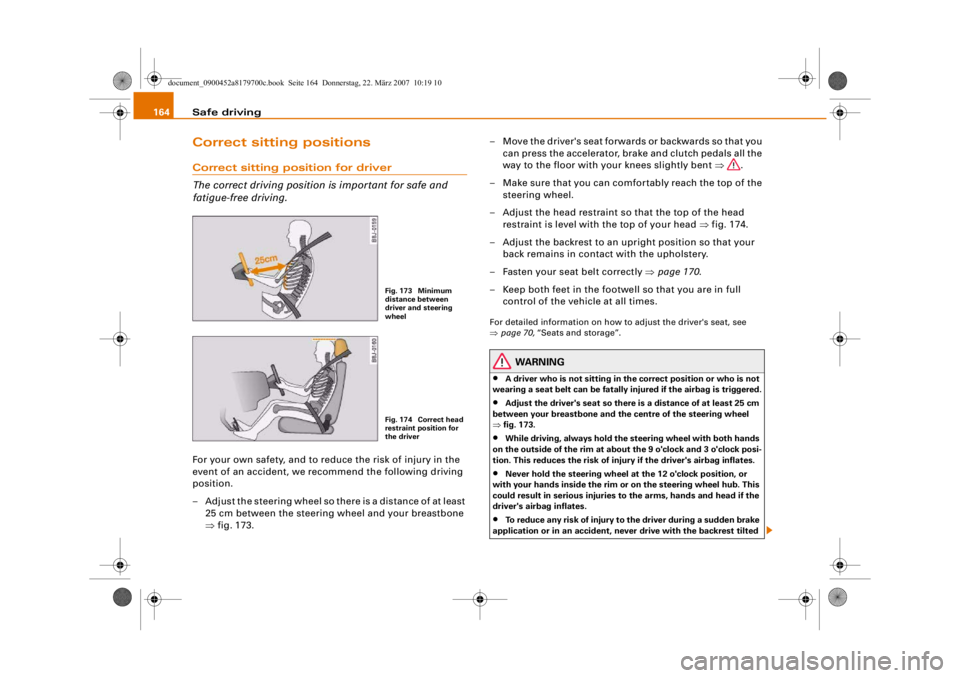
– Adjust the steering wheel so there is a distance of at least 25 cm between the steering wheel and your breastbone
⇒fig. 173. – Move the driver's seat forwards or backwards so that you
can press the accelerator, brake and clutch pedals all the
way to the floor with your knees slightly bent ⇒.
– Make sure that you can comfortably reach the top of the steering wheel.
– Adjust the head restraint so that the top of the head restraint is level with the top of your head ⇒fig. 174.
– Adjust the backrest to an upright position so that your back remains in contact with the upholstery.
– Fasten your seat belt correctly ⇒page 170 .
– Keep both feet in the footwe ll so that you are in full
control of the vehicle at all times.
For detailed information on how to adjust the driver's seat, see
⇒ page 70, “Seats and storage”.
WARNING
•
A driver who is not sitting in the correct position or who is not
wearing a seat belt can be fatally injured if the airbag is triggered.
•
Adjust the driver's seat so there is a distance of at least 25 cm
between your breastbone and th e centre of the steering wheel
⇒ fig. 173.
•
While driving, always hold the steering wheel with both hands
on the outside of the rim at about the 9 o'clock and 3 o'clock posi-
tion. This reduces the risk of injury if the driver's airbag inflates.
•
Never hold the steering wheel at the 12 o'clock position, or
with your hands inside the rim or on the steering wheel hub. This
could result in serious injuries to the arms, hands and head if the
driver's airbag inflates.
•
To reduce any risk of injury to the driver during a sudden brake
application or in an accident, neve r drive with the backrest tilted
Fig. 173 Minimum
distance between
driver and steering
wheelFig. 174 Correct head
restraint position for
the driver
document_0900452a8179700c.book Seite 164 Donnerstag, 22. März 2007 10:19 10
--4 -
-T
-+ +-
Page 171 of 313
Safe driving169
Controls
Safety
Driving tips
General maintenance
Self-help
Technical data
inside. In this case the child wo
uld be unable to get out of the
vehicle without help. This could have fatal consequences.
•
Never allow children to play in or around the vehicle. Always
close and lock the boot lid and all the doors when you leave the
vehicle.
•
Never let passengers ride in the luggage compartment. All
occupants must be properly restrained by the seat belts at all
times ⇒page 170 .Note
•
Air circulation in the vehicle helps reduce fogging of the
windows. Used air escapes through ventilation slots in the rear of
the vehicle. Make sure that these ventilation slots are not
obstructed.
•
Suitable belts for securing loads to the fastening rings* are
commercially available.
Applies to vehicles: with fastening ringsFastening rings
Unsecured loads are a hazard to all vehicle occupants.There are fastening rings in the luggage compartment
which can be used to secure luggage and other objects
⇒ page 78 .
– Use the fastening rings to secure items safely in the luggage compartment ⇒ in “Loading the luggage
compartment” on page 77.During a collision or an accident, even small and light objects can
possess so much energy that they can cause very severe injuries.
The amount of this “kinetic energy” depends on the speed of the vehicle and the weight of the object. The most significant factor,
however, is the speed of the vehicle.
An example: An object weighing 4.5 kg is lying unsecured in the
vehicle. During a frontal collision at a speed of 50 km/h, this object
generates a force corresponding to 20 times its weight. That means
that the effective weight of the object increases to about 90 kg. You
can imagine the severity of the injuries which might be sustained if
this “projectile” strikes an occupant as it flies through the
passenger compartment.
WARNING
If items of luggage or other obje
cts are secured to the fastening
rings with inappropriate or da maged retaining cords, injuries
could result in the event of sudden braking or a collision.•
To prevent pieces of luggage or other objects from flying
forward, always use appropriate retaining cords which are prop-
erly secured to the fastening rings.
•
Never secure a child seat on the fastening rings.
WARNING (continued)
document_0900452a8179700c.book Seite 169 Donnerstag, 22. März 2007 10:19 10
--4 -
-T
[I]
-+
•
•
+-
Page 173 of 313
Seat belts171
Controls
Safety
Driving tips
General maintenance
Self-help
Technical data
Important safety instructions for using seat belts
There are a number of safety points concerning the seat
belts which you should remember. This will help to reduce
the risk of injury in an accident.
WARNING
•
The seat belts can only provi de maximum protection if the
seats are adjusted properly ⇒page 70, “Seats and storage”.
•
To ensure proper protection, it is important to wear the seat
belts in the co rrect position ⇒page 173, “How to wear seat belts
properly”. Ensure that the seat belts are worn exactly as recom-
mended in this chapter. Belts wh ich are not worn properly can
increase the risk of injury in accidents considerably.
•
Do not allow the seat belt to be come twisted or jammed, or to
rub on any sharp edges.
•
Never allow two passengers (even children) to share the same
seat belt. It is especially dangerou s to place a seat belt over a child
sitting on your lap.
•
Do not wear the belt over hard or fragile objects (such as
glasses or pens, etc. ) because this can cause injuries.
•
Loose, bulky clothing (such as an overcoat over a jacket)
impairs the proper fit an d function of the belts.
•
The belts must be kept clean, otherwise the retractors may not
work properly ⇒page 226, “Seat belts”.
•
The slot in the seat belt buckle must not be blocked with paper
or other objects, as this can prev ent the latch plate from engaging
properly.
•
The latch plate of the belt mu st always be engaged in the
correct buckle for that seat, ot herwise the belt will not be fully
effective.
•
Check the condition of the seat bel ts at regular intervals. If you
notice that the belt webbing, fi ttings, retractor mechanism or buckle of any of the belts is da
maged, the belt must be replaced
by a qualified workshop.
•
The seat belts must not be remov ed or modified in any way. Do
not attempt to repair a damaged belt yourself.
•
Seat belts which have been worn in an accident and stretched
must be replaced by a qualified workshop. The belt anchorages
should also be checked.
Forces acting in a collisionThe physical principles involved in a frontal impact
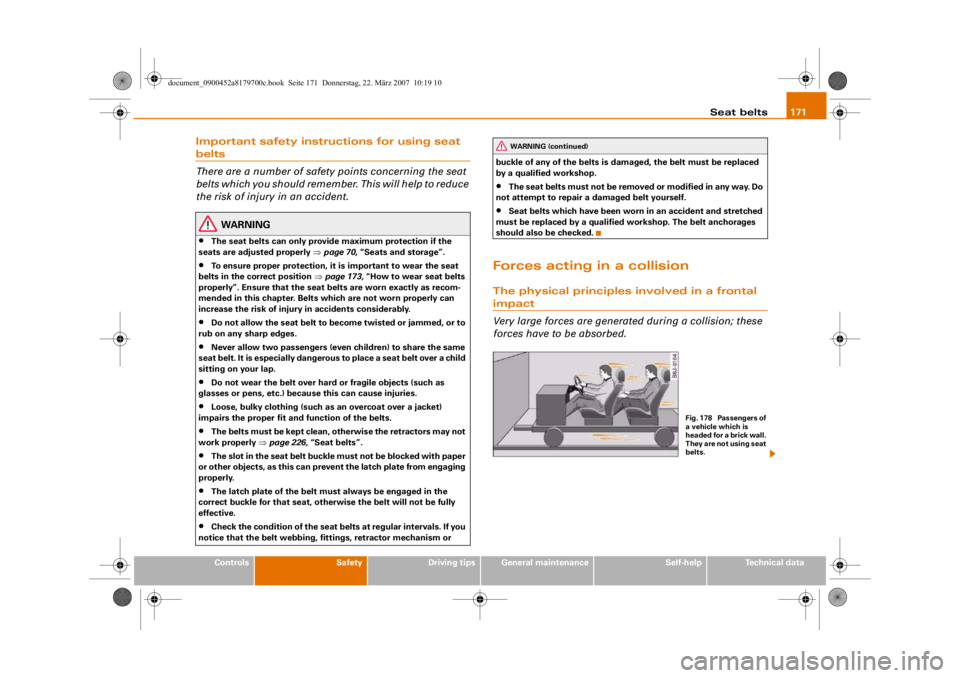
Very large forces are generat ed during a collision; these
forces have to be absorbed.
WARNING (continued)
Fig. 178 Passengers of
a vehicle which is
headed for a brick wall.
They are not using seat
belts.
document_0900452a8179700c.book Seite 171 Donnerstag, 22. März 2007 10:19 10
--4 -
-T
•
-+ +-
Page 175 of 313
Seat belts173
Controls
Safety
Driving tips
General maintenance
Self-help
Technical data
It is also important for the rear passengers to wear seat belts, as
they could otherwise be thrown forwards violently in an accident.
Rear passengers who do not use seat belts endanger not only them-
selves but also the other occupants
⇒page 172, fig. 181.
How to wear seat belts properlyPutting on the three-point seat belts
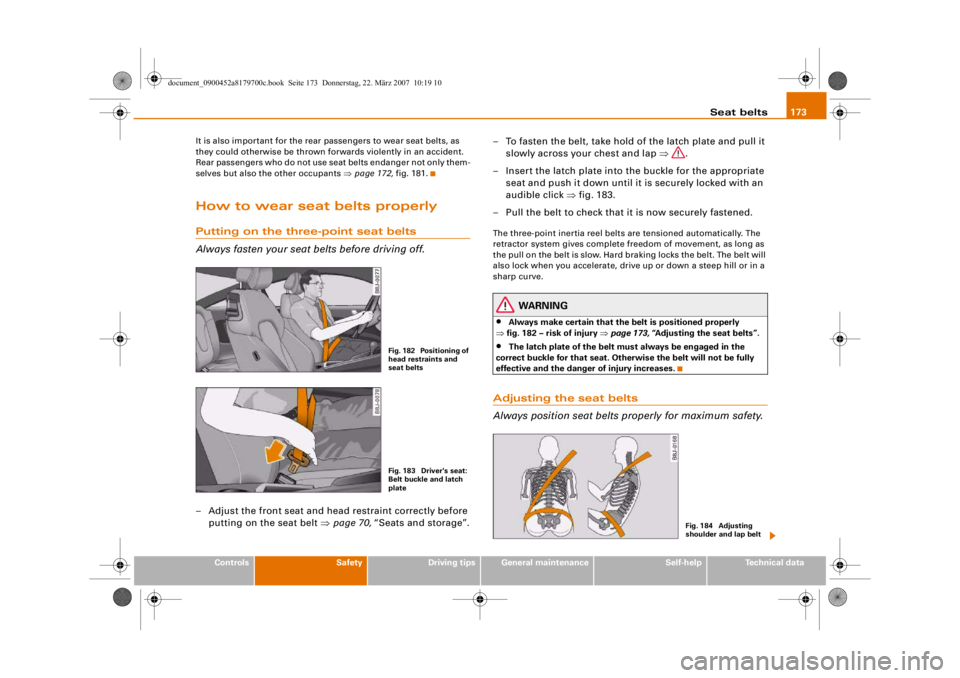
Always fasten your seat belts before driving off.– Adjust the front seat and head restraint correctly before
putting on the seat belt ⇒page 70, “Seats and storage”. – To fasten the belt, take hold of the latch plate and pull it
slowly across your chest and lap ⇒.
– Insert the latch plate into the buckle for the appropriate seat and push it down until it is securely locked with an
audible click ⇒fig. 183.
– Pull the belt to check that it is now securely fastened.
The three-point inertia reel belts are tensioned automatically. The
retractor system gives complete freedom of movement, as long as
the pull on the belt is slow. Hard braking locks the belt. The belt will
also lock when you accelerate, drive up or down a steep hill or in a
sharp curve.
WARNING
•
Always make certain that the belt is positioned properly
⇒ fig. 182 – risk of injury ⇒page 173, “Adjusting the seat belts”.
•
The latch plate of the belt must always be engaged in the
correct buckle for that seat. Oth erwise the belt will not be fully
effective and the danger of injury increases.
Adjusting the seat belts
Always position seat belts properly for maximum safety.
Fig. 182 Positioning of
head restraints and
seat beltsFig. 183 Driver's seat:
Belt buckle and latch
plate
Fig. 184 Adjusting
shoulder and lap belt
document_0900452a8179700c.book Seite 173 Donnerstag, 22. März 2007 10:19 10
--4 -
-T
•
-+
•
+-