park assist AUDI A5 COUPE 2010 User Guide
[x] Cancel search | Manufacturer: AUDI, Model Year: 2010, Model line: A5 COUPE, Model: AUDI A5 COUPE 2010Pages: 360, PDF Size: 84.39 MB
Page 117 of 360
On th e road 1111
-------------------'
Driver messages in the instrument cluster
Warning Vehicl e in cline is e xce ssive
This message appears when the parking brake is applied on an
incline that exceeds about 30%.
In this case the braking power of the park ing brake may
n ot be
adequ ate
to prevent the vehicle from rol ling unintentionally.
Pl ease release parking brake
Please note that for safety reasons the parking brake is re leased
automatically only if the driver's seat belt is fully engaged in the
buckle.
To relea se the parking brake pre ss the br ake pedal
This driver message appears when the switch to release the parking
brake was pressed. The parking brake can only be released if you
step on the brake pedal and at the same time press the switch or
you automatically release the parking brake wi th the starting assist
=> page 113.
Parking brake!
This driver message appears together with the yellow symbol
when there is a parking b rake ma lfunction.
M alfun ction sta rt ing a ssist
This driver message appears if the re is a starting assist ma lfunction .
The automatic release of the parking brake when starting is
malfunctioning. You have to release the parking brake manua lly by
pressing the switch. Have the problem corrected by an authorized
Audi dea ler .•
Con tro ls and eq uip
ment
Cruise control
Switching on
The cruise control system m akes it possible to drive at a
constan t speed starting at 20 mph (30 km/h) .
A--
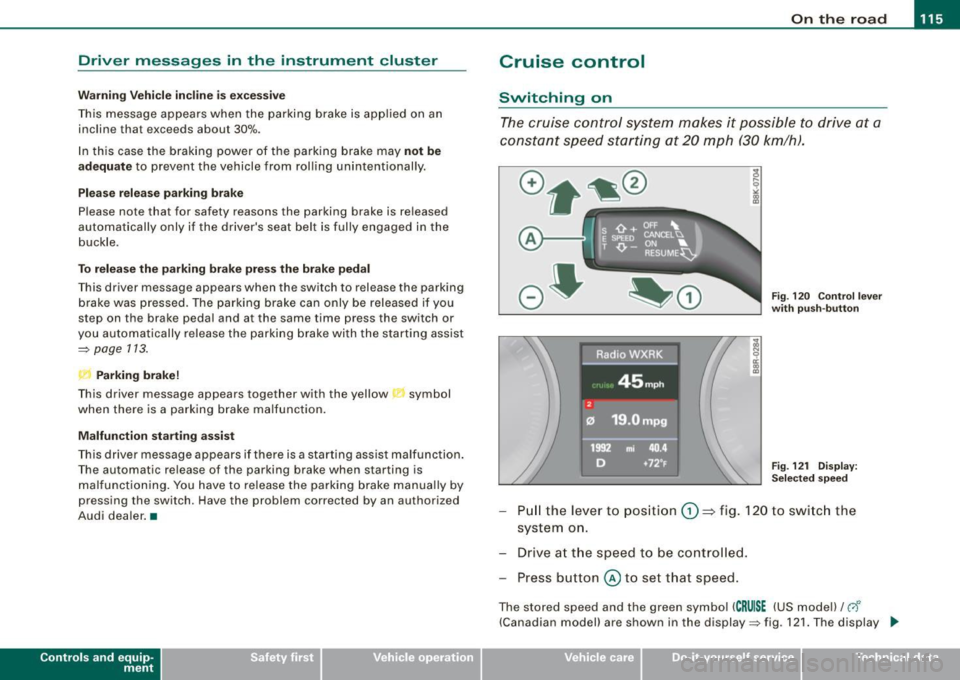
Fig. 120 Con tro l l ever
w ith pu sh -butt on
Fig . 12 1 D ispla y:
Se lec te d sp ee d
Pull the lever to pos ition (D => fig. 120 to switc h the
system on.
Drive a t th e speed to be controlled .
Press button
© to set that speed.
The stored speed and the green symbol ( CRU ISE (US mode l)/ c,f'
(Canadian model) are shown in the display=> fig. 121. The display _.,
Vehicle care I I irechnical data
Page 157 of 360

Park ass ist -
----------------
Park assist
Applies to vehicle s: wi th pa rki ng system
Parking system
Different park assist systems may be used for parking or
maneuvering, depending on the vehicle's features.
P a rk in g sy ste m (r ea r)* :
For the parking system (rear), the acoustic park assist system is
insta lled in the rear of the vehicle=>
page 155.
The rear parking assist system uses ultrasonic sensors to determine
the distance of the vehicle from a detected obstacle. There are a
t otal of four sensors loca ted on the rear bumper (two in the midd le
and two on the sides).
P a rking s ystem (r e ar , w ith rear vi ew camera )*:
For the parking system (rear, wi th rear view camera) , the rear
acoustic park ass ist system is integrated in the rear of the vehicle
and the rear view camera is integrated in the rear lid=>
page 159.
The parking system (rear, with rear view camera) uses ultrasonic
sensors to determ ine the distance of the vehicle from a detected
obstacle. There ar e a total of four sensors located on the rear
bumper (two in the middle and two on the sides). •
Controls and equip
ment
Parking system (rear)
A pplie s to vehic les : w ith p arking syste m (re ar)
Rear acoustic park assist
The rear acoustic park assist warns y ou of obsta cles or
objects behind your car.
D esc ripti on
The rear acoustic parking assist system determines the distance of
the vehicle from an obstacle using ultrasonic sensors. There are 4
sensors in the rear bumper.
The range at which the sensors start to measure is
a bo ut:
To the sid e
Acti va tio n
2 ft (0.60 ml
5.2 ft ( 1.60 m)
Acoustic parking assist is activated automatically when
r e ver se gea r
is engaged . A brief tone confirms that the system is activated .
Warning tones
Distance warning is given by warning tones which are generated by
the rear signa l generator. The volume and the pitch of the wa rning
tones can be adjusted in the MMI* =>
page 156.
Reversing
Distance warn ing when reversing starts when an obstacle is
detected in the range of the parking assist system . As the distance
decreases, the time interval between the audible tones becomes
shorter .
When the distance is less than 1ft (0.30 ml, the tone becomes continuous. At this point you should stop backing up .
I • •
Page 159 of 360

____________________________________________________ P_a _ r_ k_ a_s_ s_ i_ s _t _ __._
The newly adjusted value is briefly heard from the signal generator.
The settings are automatically stored and assigned to the master
key with remote control. •
Parking system (rear, with
camera)
.
rear view
Applies to vehicles : w ith park in g sys tem (rear, with rear view came ra )
Introduction
Fig . 168 Parking
mode 1: reverse
parking
Fig . 169 Parking
mode 2 : parallel
park ing
Vehicles with the parking system are equipped with a rear view
camera in addition to the acous tic parking system.
Con tro ls and eq uip
ment You can choose between two modes to assist you with parking
. For
example, you can use "parking mode 1" when parking in a parking
space or garage~ fig. 168. When you want to park para llel to the
edge of the street, se lect "parking mode 2"
~ fig. 169.
The rear acoustic park assist system is integrated in the rear of the
vehicle and the rear view camera is integrated in the rear lid
~ page 159.
& WARNING
• The rear view camera has blind spots, in which objects cannot
be detected . Be especially careful to check for small children and
animals before backing up . Small children and animals will not
always be detected by the sensors. •
App lies to veh ic les : wi th p arking system ( rea r, wi th r ear vi ew ca mera)
General Information
Vehicle care I I
®
Fig . 170 Covered area
(D and unco vered a rea
@ of the rear view
cam era .,,_
Technical data
Page 160 of 360

• ..__P_ a_r _k _ a_s _ s_ i_ s _t ____________________________________________________ _
•
Sensor s in th e bump er
Fig . 17 1 Tru nk l id:
L oca tion of th e r ear
vi ew c amera
Sensors are located in the rear bumpers. If these detect an obstac le,
audible and visual signals warn you . The range at which the sensors
begin to measure is approximately:
To the side 2 ft (0.60 ml
Center rear
5.2 ft (1.60 m)
Distance warning when reversing starts when an obstacle is
detected in the range of the parking assist system. As the distance
decreases, the time interval between the audible tones becomes
shorter.
When the distance is less than 1ft (0.30 ml, the tone becomes continuous . At this point you should stop backing up.
If the distance to an obstacle stays the same, the vo lume of the
distance signal chime is gradually reduced after about 4 seconds
(does not affect the continuous signal tone). Approaching another
obstac le wi ll cause the distance signal to sound again at the normal
volume.
R ea r vi ew camera cover age ar ea
The MMI display shows the area covered by the rear view camera
=>
page 157, fig . 170 G) . Objects that are not in the area covered 0
are not shown on the MMI display. We recommend that you practice parking with the rear view camera
in a traffic -free location or parking lot to become familiar with the
system, the orientation lines, and their function. When doing this,
there should be good ligh t and weather conditions.
In the MMI d isplay, objec ts or vehicles appear closer or further away
if:
• you are driving in reverse gear from a level surface onto an
incline, or a downward slope,
• you are driving in reverse gear toward protruding objects,
• the vehic le is carrying too much load in the rear.
The accuracy of the orientation lines and b lue surfaces diminishes
if:
• the rear view camera does not provide a reliable image, for
example, in poor visibility conditions or if the lens is dirty,
• the image on the screen is not visible due to sun glare and reflec
tion.
C aring for the rear vi ew c amera l en s
The rear view camera is located above the rear license plate bracket.
For the parking assist to operate, the lens => fig. 171 must be kept
clean :
• Dampen the lens with a household alcohol -based glass cleaner,
and clean the lens with a dry cloth
~ 0 .
• Remove snow with a hand brush and ice preferably with a de
icing spray=>
0 .
& WARNING
• The p arking aid cannot repl ace the driver' s attentio n. The
driv er alo ne is re spon sible for parkin g and similar dri ving m aneu
v ers .
• Alway s keep your eyes on the vehicle' s surrounding s, usin g the
r ea r vie w mirror as w ell. ..,.
Page 161 of 360

______________________________________________________ P_ a _ r_k _ a_s _s _ i_s _t __ lfflll
& WARN ING (con tinued)
• Do n ot all ow y ourself to b e di stract ed from tr affic by the r ear
vi ew c amera pictur es.
• If th e po sition and th e installati on an gle of th e camera ha s
chan ged, fo r exa mpl e, after a re ar end colli sion , do not con tinue to
u se the sy ste m for safety re ason s. Have it checked by a qua lifi ed
de alers hip .
0 Note
• Low obstac les already signa led by a warning can disappear from
the system's detection range as they are approached and will not
cont inue to be signaled . Objects such as barrier chains, trailer draw
bars, thin painted vertical po les or fences may not be detected by
the system, posing risk o f damage .
• Never use warm or hot water to remove snow or ice from the
camera lens - danger of crack formation on the lens!
• When cleaning the lens, never use products that are abrasive .•
Appl ies t o veh ic les: with parking s ystem (rear, with rear view ca m era)
Switching on /off
The rear view camera switches on automatically together
with the acoustic park assist when you put the vehicle in
reverse.
Switching on
- Put the vehicle in reve rse gear, the acoustic parking
system with rear view camera is activated automatically.
Activation of the acoustic park ing system is confirmed by
a brief acknowledgement sou nd.
Switching off
- Drive faster than 6 mph ( 10 km/h), or
Controls and equip
ment
take t he vehicle out of reve rse gear . The acoustic parking
system is immediate ly deactivated, and t he rear view
camera picture is d eactivated automatica lly after a
period of about 15 seco nds, or
- switch off the ignition .
The delay in deactivating the camera provides an uninterrupted
view behind the vehicle especially when maneuvering in tight
parking spaces and prevents the picture from turning off the every
time you shift out of reverse.
I f the warni ng message appears in the display but not the rear view
camera picture, read and confirm the warn ing message. The
acoustic distance signal is a lways ac tive .
I f you press a function button on the MMI termina l, the rear view
camera picture disappears. The rear view camera picture reappears
the next time you park.
Further information on the warning message and the MMI terminal
can be found in the MMI inst ruction booklet.
[ i ] Tips
• The rear view camera picture is available as soon as the MMI
Display or the MMI is switched on, or the start -up phase is
completed.
• Keep the sensors in the rear bumper and the rear view camera
lens clean and free of snow and ice, so that the parking system can
work properly . Please fo llow the additional notes on=>
page 163. •
I • •
Page 165 of 360

______________________________________________________ P_ a _ r_k _ a_s _s _ i_s _t __ _
& WARNING
• Always make sure that the volume and frequen cy of the
warning tones is adjusted so that you can easily hear the acoustic distan ce signal even if the radio is playing , the air -conditioner
blower is on High or there is a high level of outside noise .
• Che ck the settings whene ver someone else has dri ven the
vehicle before you.
[ i ] Tips
• The wa rni ng ton es can a ls o b e adjuste d directly fro m the rea r
v iew camera image. Simp ly press the [SettingsJ * control button .
• Change d se ttin gs are ac tivated whe n parking ass is t is switched
on again .•
App lies to veh ic les: w ith parking system ( rear , with rea r view camera)
Error messages
If a war nin g to ne is au dible fo r abou t five seconds wh en yo u tu rn on
the ignit ion, there is a malfunc tion in the system . Have the prob lem
co rrected by y our autho rized Aud i deale r.
Kee p the sensors in the rea r bu mper c lean a nd free fro m ice so that
the acoustic park assist system can function prope rly. •
Controls and equip
ment
I • •
Page 241 of 360

How the ABS system works
An au tomatic check is made when a speed of about 12 mph (20
km/h) is reached. When this happens, a pumping no ise can be
heard .
I f an individua l wheel begins to ro tate too s low ly in relation to
vehic le speed and tends to lock, the ABS automatical ly reduces
b rake pressure t o preven t tha t whee l from locking.
This automatic adjustment process wil l cause a
slight vibration of
t he brake peda l and some noises to ale rt you tha t veh ic le sp eed
must be adapted to existing road and traffic conditions.
in. WARNING
Although the ABS is very effe ctive , always remember that braking
c apability is limited by tire traction. Always adjust your driving
speed a ccording to the road and traffi c conditions. Do not let the
extra safety afforded by the ABS tempt you into taking extra risks.
The ABS c annot overcome the laws of physics .
[ i J Tips
• I f ABS is not functioning properly, a warning l ight wil l come on .
See
~ page 15.
• I f a fau lt occurs in the ABS, the EDL is also not funct ioning. This
is indicated by the ABS warning light .
Brake assist
Brake assist is designed to achieve the optimum brakin g
effect.
B rake a ssist hel ps to in crease the eff ective b raking powe r an d t hus
to achieve a shorter stopping distance. If the driver presses the
br ake pe dal ve ry q uickl y, br ake a ss is t auto matically boo sts t he
braking force to the maximum lev el, up to the point where the anti
lock b ra ke function (ABS) intervenes to stop the wheels from
Controls and equip
ment Safety first Vehicle operation
Intelligent technology
locking
. You shou ld then keep the brake pedal pressed until the
ve hic le has braked to the required spee d. Brake assist swi tches itse lf
off as soon as you release the brake pedal.
in. WARNING
Please remember that the accident r isk always increases if you
drive too fast , espe cially in corners or on a slippery road , or if you
follow the vehicle ahead of you too closely. Increa sed risk of an
accident cannot be compensated for even by brake as sist , so
always maintain a safe speed .•
Servotronic® -advanced power
steering system
The pow er st eer in g systems uses th e po we r of t he
run nin g eng ine to a llow prec ise s tee ring with lit tle eff ort.
The advanced S ervotronic ® power steering system senses the road
s p eed and electr onically a djusts power assis tance t o provide
comfortab le and safe steering response exactly matched to the
ve hicle speed .
Power steering wi ll n ot work if the eng ine is off. As a result, the
steering whee l wil l be hard to turn.
Th e power s teering flu id leve l is check ed during the sc hed uled
maintenance services .
0 Note
If there is an electronic ma lfunction, servotronic wi ll still function
like a conventi onal power s teer ing sys te m , pr ovi ding a constan t
steering support force that is no longer proportionate to the vehicle
speed. This is mo st noticeable when tu rning t he steering whee l at
low speeds {for examp le when parking), -more effort wi ll be
r equired than usual.
~
Vehicle care Do-it-yourself service Technical data
Page 326 of 360
11111.___F_ u_ s _ e_s _ a_n _ d_ b_ u_lb _ s _______________________________________________ _
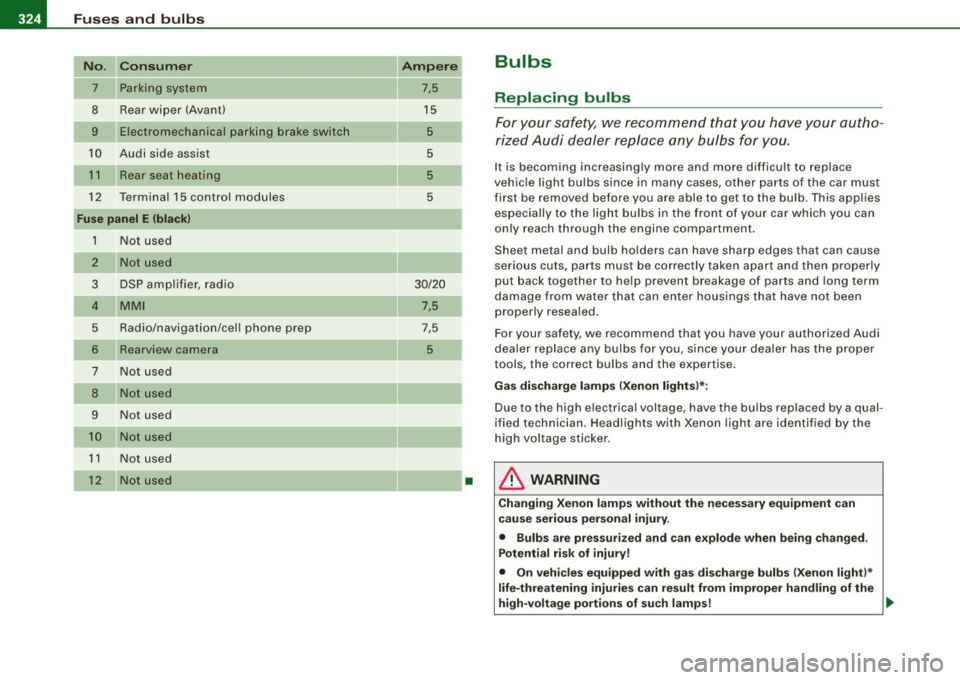
No. Consum er
7 Parking system
8 Rear wiper (Avant)
9 Electromechanical parking brake switch
10 Audi side assist
1 1 Rear seat heating
12 Terminal 15 control modu les
Fu se panel E (bla ck)
1 N ot used
2 Not used
3 DSP amp lifier, radio
4 MMI
5 Radio/navigation/cel l phone prep
6
Rearview camera
7 Not used
8 Not used
9 N ot used
10 Not us ed
1 1 Not used
12 Not used
Ampere
7,5
15 5
5
5
5
30/20
7,5
7,5
5
•
Bulbs
Replacing bulbs
For your s afety, we recommend th at you have your autho
ri zed Audi dealer replace any bulbs for you.
It is becoming increasingly more and more difficult to replace
vehic le light bulbs since in many cases, o ther parts of the car must
first be removed before you are able to get to the bu lb . This applies
especia lly to the light bu lbs in the front of your car which you can
only reach through the engine compartment .
Sheet metal and bulb holders can have sharp edges that can cause
serious cuts, parts must be correctly taken apart and then properly
put back together to help prevent breakage of parts and long term
damage from water that can enter housings that have not been
properly resealed.
Fo r your safety, we recommend that you have your authorized Audi
dea ler replace any bulbs for you, s ince your dealer has the proper
tools, the correct bulbs and the expertise.
Ga s di scharg e lamps (X enon ligh ts)*:
Due to the high electrical voltage, have the bulbs replaced by a qual
ified technician . Headlights with Xenon light are identified by the
high voltage sticker .
& WARNING
Changi ng Xeno n lamp s w ithout th e necess ary e quipm ent can
c a use se riou s pers on al injury .
• Bulb s are p ress urize d and can e xpl ode when being ch ange d.
Po tentia l ri sk of injury!
• On ve hic les equ ippe d with g as disc ha rg e bulb s (Xenon li ght )*
li fe -thre atening injuri es can re sult from impro per h andling of th e
hi gh-v olt age portion s of su ch lam ps! .,_
Page 347 of 360

______________________________________________ A_ l_,_ p _h_ a_ b_e _t_ic _ a _ l _in _ d_e _ x __ _
Status messages . . . . . . . . . . . . . . . . . 134
Switching on and off .. .... ...... .. 133
Audi drive se lect .. ...... .... ........ 144
Adaptive dampers .. ...... .... .... 144
Description ... ... .... .... ...... .. 144
Dynamic st eering .. ....... ...... .. 144
Se tting th e driving mode . ...... ... 145
Audi Service Repair Manuals and Literature
339
Auto Lock .......... ................. 42
Auto Safety Hotline ... ... ... .... .... . 177
Auto-Ch eck Contro l .... ... .. .... .... .. 27
Automatic belt retractor .......... .... 183
Automatic car wash
See Washing .. .... .... ... .... .... 253
Automatic climate control A/C mod e ..... .. .... .... ...... ... 95
Au tomatic climate control plus ....... .. 96
A/C mode . . . . . . . . . . . . . . . . . . . . . . . 102
See also Deluxe automatic climate control
plus ...... .. ..... ... ..... .. ..... 96
Automatic c limate control system ...... 90
See also Deluxe automatic climate
control ... .. .... .... ..... ...... . 90
Automatic driving light control ..... .. .. 53
Automatic Shift Lock (ASU .. ..... .... 150
Automatic transmission ...... ...... .. 147
6-speed automatic transmission . ... 147
Automatic Shift Lock (ASU ... . ..... 150
Driving .. .. .. ...... .......... ... 148
Dynamic shift program . ...... ... .. 151
Emergency release . . . . . . . . . . . . . . . 154
Fail -safe mode . ...... .... .. . ..... 153
Controls and equip
ment Safety first
Kick-down
.... ..... .. ..... .. . .... 151
Manual shif t program . ...... ...... 152
Selector lever ...... ........ .... .. 149
Shift buttons . ...... .... ... .. ... . 153
Steering wheel with tiptronic ....... 153
Automatic wip e/wash system ...... ... . 61
Average speed ........... .... .... .... 23
Avoid damaging the vehicle ........... 244
B
Battery . .... .... ...... ....... .... .. 281
Battery location inside the luggage
compartment .. . .. .. .... .... .... 282
Charging ............. .... ... .... 284
Important warnings when working on the
battery ..... .. .. .... .... .... ... 282
Jump starting ............. ... .... 326
Low ... .. .... .. . .. ... ....... .... 241
Replacing the battery ......... .... 285
State of charge . .............. .... 241
W inter operat ion . .... .... .... .... 281
Working on th e battery ...... .... .. 282
Battery voltage ..... ....... .... .... .. 35
Before driving ... ..... .. ... ... .. .... 169
Blended gasoline ... . .. ... ....... .... 265
Body cavity sealing ...... ...... ... .. . 258
Boost er seats .... .... .... ...... ... .. 221
Brake assist ..... .... .... .... .... ... 239
Brake booster .... .. .. ... ..... .. . .... 238
Brake fluid Changing the brake fluid .. .... .... 281
Checking the brake fluid level .. .... 280 Reservoir
.. .... .. .. ... .... .... ... 280
What is the correct brake fluid level? 280
What should I do if the brake fluid warning
light comes on? ..... .... .... .. . . 280
Brake system .... ... .... .... .... .... 280
Anti-lock brake system ............. 15
Brake fluid . ........... .... ....... 280
Brake fluid specifications for refill and
replacement . .... .... .... ...... . 281
Brake light defec tive ... ...... ... .. . 35
Brake pads ..... .. ...... ....... .. 244
Electromechanical parking brake .... 112
General information ...... .... ... . 237
How does moisture or road salt affect the
brak es? . ...... .. ...... .... .... . 237
Malfunc tion ... .. .. .. .... .... ..... 29
Warning/indicator lights .... ...... .. 16
Worn brake pads symbol .. ... .... .. 34
Braking guard
See Audi braking guard .... .... ... . 132
Break -in period ...... .... .. .. .... ... 243
Brake pads ... .... .... ........... 244
Tires ... ..................... .. .. 243
Bulbs .... .... ... ... ... .. ...... .... . 324
C
California Proposition 65 Warning ... .. 272
Battery specific ... .... .... .... ... . 283
Capaciti es .. ... .... .... .... .... ..... 337
Car care ... . .... .. .. .... .... .... .. . . 252
Inter ior .... ... .... .... ...... ..... 259
P lastic and vinyl ....... ......... .. 256
Weatherstrips ... .. .... .. . .... ... . 257
Vehicle operation Vehicle care Do-it-yourself service Technical data
Page 349 of 360

Alphab eti ca l ind ex 111111 ____________________________ ...:.....=.!:..:....:.=.::::...::...::.:....::....:.: __ _
Cup holders ... .. ...... . .... .. .. .... . 86
D
Data 337
Data recorder . ..... .. .. .... .... .... . 234
Date display ....... .... .... .......... 10
Daytim e running l ights ........ .... .... 55
Declaration of compliance Adaptive cruise control .. ......... . 342
Audi side assist . .. .. . ... ... . ... .. 342
Ce ll phone package . ..... .... .... . 342
Convenience key ..... .... ....... . 342
Electronic immobilizer . ..... .. .... 342
Hom elink® universal remote control 342
Remote control k ey .. .. .. .... .... . 342
Tire pressure monitoring syste m ... 34 2
Defective light bulb warning .... . ... ... 35
Defrosting the windows .. .... .... . 95, 102
Defrosting windows . .... .... ... .. 95, 102
De luxe automat ic climate contro l .... ... 90
Air distribution . ...... .... .. .... ... 94
Air ven ts (rear) ... .... .... .. . .... .. 96
Automatic mode . .. .. .. ... ..... ... 92
Controls ... .. ...... .. .... ..... ... 9 1
Defrost . ...... .. .... .... ..... .. .. 95
Description ... ... .... .... ...... ... 90
Economical use .. .... ...... ..... .. 96
Fan ........... .... .... .... .... ... 93
Rear window defogger ... .... ..... . 95
Recirculation mode .... .. .... .... .. 94
Temperature . ...... ....... .. ... ... 93
Turning on and off ... .... ... .... .. 92
Controls and equip
ment Safety first
Deluxe automatic c
limate control p lus ... 96
Air distribu tion ... .... ...... ...... 101
Air vents ........... .... ...... ... 103
Air vents (rear) ...... .... ... .. .... 103
Au toma tic mode . .... .... .... ... .. 99
Au tomatic recircu lation ...... .... . 104
Basic settings .. .. ... .... .... ... .. 104
Controls ... .. .... .... ... .. .. ..... 98
Defrost . . . . . . . . . . . . . . . . . . . . . . . . . 102
Description ... .. .. .... .... .... ... . 96
Economical use .. .... .... .... .... 104
F an .. .... .... ...... ....... .. .... 100
Rear window defogger .... ... ..... 102
Recirculation mode ......... .... .. 101
Synchroniza tion .................. 105
Temperature . .............. .... .. 100
Turn ing on and off .... .... .... .... . 99
Determining corr ect load limit ... .... . 296
Digita l clock ... .. .. .... .... .... ... .. . 10
Digi tal compass ........... ....... .... 67
Digital speedometer .... .... .. .. .... .. 20
Dimensions ........ ... .. .... ... .... 336
Doors Emerg ency locking ......... .... ... 47
Driver information sys.tern ... ... ... ... . 18
Defective light bulb warning ... ... .. 35
Digital speedometer ...... ... .... .. 20
Driver information messages ...... .. 28
Open door or rear lid warning .. .... . 21
Outside temperatu re disp lay .. ... ... 19
Sound system display . ........ .... . 19
Driver seat
See Seating posit ion ...... .... .... 1 70 Driver's seat memory
Activa ting remote con trol key . .... .. 76
Driving lights .. ...... .... ... .... .. . .. 53
Driving messages .... .... .... ...... .. 28
Driving safely ........ .... ..... .. ... . 168
Driving through water ... .. .. .... .... . 244
Driving time ..... ... . .... ...... ... .. . 23
Dup licate key . .... .. .... ... .... .... .. 38
Dust and pollen fi lter
De luxe au tomatic c limate control pl us 96
Dust filter Deluxe automatic c limate contro l .. .. 90
Deluxe automatic c limate control plus 96
Dynamic steering . .... ... ..... 13, 33, 144
E
Easy entry function ... .... ... ...... 72, 7 4
Electrical seat adjustment
See Seat adjustment . .... . .... .. .. . 72
Electromechanica l parking brake
Emergency braking ... .... .... .... 114
Ma lfunction . .... .... .... .... .... 115
Operation .... .... ... ... ... .. .... 112
Parking ... .... .... ... ........ ... 113
Releasing and c losing ..... .... ... . 112
Starting ass ist .... .... ... .... .... 113
Starting from rest ... .. .. .. .... ... 113
Starting off wi th a traile r ... .... .... 114
Warni ng/indicator lights .. ...... ... . 16
Electron ic differential lock (EDU
How the system works .. ...... .. .. 235
Warning/ind ica tor lights .. ...... ... . 15
Vehicle operation Vehicle care Do-it-yourself service Technical data