turn signal AUDI A5 COUPE 2010 Owner's Manual
[x] Cancel search | Manufacturer: AUDI, Model Year: 2010, Model line: A5 COUPE, Model: AUDI A5 COUPE 2010Pages: 360, PDF Size: 84.39 MB
Page 145 of 360

___________________________________________________ A_ u _ d_i_ s---- id ___ e....:. a:..:s :..:s :..: i..::s :..:t __ ftllll
Ap plies to vehi cle s: w ith side a ssist
Safety tips
The side ass ist detec tion may be l imited w hen d riv ing ar ound
narrow street corners, on hi lly streets, and under poor weather
co nd ition s.
I t is possible that the radar sensors may also detect other objects,
suc h as high o r stagge red guardra ils .
S ide ass ist does not meas ure ac tua l la ne widt h. The syste m
assumes a fi xed lane width . Detection in the left and right lanes is
b ased on this assu med lan e wid th. Whe n driv in g o n na rro w roa ds or
when driving to the left or r ight of the c enter of a trave l lane, it is
po ssi ble that ve hic le s will be detec te d tha t are
no t in th e lane next
to the lane you are using .
& WARNING
• Improper reliance on the side assist system can cause colli
sions and serious personal injury:
-Never rely only on side assist when changing lanes .
- Always check rear view mirrors to make sure that it is safe to change lanes .
• Side assist cannot detect all vehicles under all condition s
danger of accident!
• Side a ssist cannot detect vehicles in time to alert you when
they approach from behind at very high speed , or fall drop back
very quickly.
• The radar sensor's
vision can be redu ced or entirely blocked by
rain, snow , and heavy spray . This can result in side assi st not
adequately detecting veh icles or , in some cases , not detecting
them at all . Always keep an eye on the direction you are traveling
and the relevant area around the vehicle.
Controls and equip
ment
& WARNING (continued )
• Please note that side assist indicates there are approaching
vehicles, or vehicles in your blind spot , only after your vehicle has
reached a driving speed of at least 19 mph 130 km/h).
• Side assist signal does not work around tight corners (turning
radius less than 328 feet, or 100 ml. • S ide assist is no replacement for the driver' s full attention. The
driver alone is responsible for lane changes and similar driving
maneuvers . Always keep an eye on the direction you are traveling
and the relevant area around the vehicle .
(D Note
To ensu re that side assist is not adversely affected , you sho uld not
b lock the area on the rear bumper where t he radar s ensors are
located with foreign objects (such as with stickers or bicycle racks) .
[ i ] Tips
If the positions of the radar sensors have been changed as a result
o f a re ar end -c olli sio n, for i nsta nce, have s ide ass ist c hecked by a n
authorized Audi dea ler for safety reasons .•
I • •
Page 155 of 360

Transmi ssion -_______________ ___.
Applies to vehi cles : wi th tip troni c st eer ing w heel
Steering wheel with tiptronic
The shift buttons on the steering wheel allow the driver to
shift gears manually.
F ig . 164 Steer in g
whee l: S hift b utt ons
- To downshift, touch the button on the left Q .
- To upshift , touch the button on t he r ight G) .
The shift buttons are activated when the selector lever is in D, S or
in the manual shift program (tip tronic) .
Of course, you can continue to use the manual shift program with
t he selector lever on the center console .•
A pplies to vehicle s: with automatic t ran sm iss ion
Fail -safe mode
If tiptronic suffers a malfunction, the f ail-safe mode main
tains minimum drivability .
In the event of particular system malfunctions, the automatic trans
mission switches to the fail-safe mode . This is signaled by all the
segments in the display illuminating or going out.
Con tro ls and eq uip
ment
You can continue to move the selector lever to a ll positions . The
manual shift p rogram (tiptronic) is switched off in the fail -safe
mode.
I n selector lever positions D and Sand in the manual shift program,
the transm ission remains in 3rd gear if 1st, 2nd or 3rd gear was
engaged previously. The transmission remains in 5th gear, if 4th, 5th
or 6th gear was engaged previously .
The next time you drive off or start the engine, 3rd gear is engaged .
You can continue to use reverse gear. But the electronic loc kout for
reverse gear is turned off .
0 Note
If the transmission switches to fail-sa fe mode, you should take the
vehicle to an authorized Audi dea le rship as soon as possib le to have
t he condition corrected .•
A pplies to vehi cles : w ith au to m atic t ran smi ssio n
Automatic transmission malfunction t'.!>
In the event of a system malfunction, the automatic transm ission
switches to emergency operation mode .
Gearb ox malfun cti on: you can continue dr iving
You can continue to drive the veh icle. See an authori zed Audi dealer
or other qua lified workshop at the next opportunity .
Gearbo x m alfun ction : you can continue driving !limited
fun ctionality )
There is a serious system ma lfunction:
• The program shifts only into certain gears .
• The engine may stall.
• I t is not poss ib le to restart the engine if it has been switched of f.
• Continuing to drive could resu lt in subsequent damage . .,,_
Vehicle care I I Technical data
Page 158 of 360

• .___P_ a_r_ k_ a_s_ s_ i _s_ t ____________________________________________________ _
Please note that low objects already signalled by a warning can
disappear fro m the system 's detectio n range and wil l n ot con tinu e
to be signa lled .
If the distance to an obstacle remains the same, the vo lume of the
d istance wa rni ng i s gradually reduced after a bout 4 seconds .
Approaching another obstacle wi ll result in the distance warning
sound ing at th e nor mal vo lume agai n.
Malfunctions in the system If a warnin g tone is audib le for about five seconds when you turn on
the ignition, there is a ma lfunction in the system. Have the prob lem
corrected by y our aut horiz ed Aud i deale r.
Keep the sensors in the rear bu mper c lean and free from ice so that
th e acous tic par k ass is t sy stem can f unction properl y.
& WARNING
• Sensors have dead spaces in which objects cannot be
detected . Be especially alert for small children and animals , since
they are not always detected by the sensors.
• The acoustic parking system is not a substitute for the dr iver's
own caution and alertness . Ultimate responsibility always
remains with the driver during parking and similar maneuvers .
Always watch where you are driving .
• You should always adjust the volume and frequency of the
warning tones so that you can easily hear the acoustic distance
warn ing even if the radio is play ing , the air-conditioner blower is
on High or there is a high level of outside noise.
-Check the settings whenever anyone else has driven the
vehicle before you.
0 Note
• Reme mber that low obstacles for wh ic h a war ning has already
been issued may "dive" below the system's sensing zone if the
v ehicl e is be ing backe d up close r. In t his cas e, t he wa rnin g so und shutting off does
not indicate that you have c leared the obstacle .
In stea d, impact is im min ent.
• Objects such as trai ler hitches, chains, narrow posts or fences
cov ered by a t hin lay er of p ain t may no t always be detecte d by t he
syst em . T hey can stil l damage your vehicle without warning.
[ i ] Tips
K eep the sensors in the rear bumper clean and free of snow and ice
s o t hat the ac oustic parki ng a ssis t s ystem ca n fu nc tio n proper ly.•
Ap plies to ve hic le s : w ith pa rk ing syst em (rea r)
Adjusting the warning tones
Th e warning ton es can be adj usted in the MM /*.
-Select: [CARI> Parking system.
• Rear volume - rea r sens or vo lum e
• Rear frequency -rea r sensor frequency
Fig . 167 MMI displ ay:
parking system
• In-car entertainment fader -when the parking system is
sw itched o n, t he v olum e of the ac tive a udio sou rce is lo wered .
Page 161 of 360

______________________________________________________ P_ a _ r_k _ a_s _s _ i_s _t __ lfflll
& WARN ING (con tinued)
• Do n ot all ow y ourself to b e di stract ed from tr affic by the r ear
vi ew c amera pictur es.
• If th e po sition and th e installati on an gle of th e camera ha s
chan ged, fo r exa mpl e, after a re ar end colli sion , do not con tinue to
u se the sy ste m for safety re ason s. Have it checked by a qua lifi ed
de alers hip .
0 Note
• Low obstac les already signa led by a warning can disappear from
the system's detection range as they are approached and will not
cont inue to be signaled . Objects such as barrier chains, trailer draw
bars, thin painted vertical po les or fences may not be detected by
the system, posing risk o f damage .
• Never use warm or hot water to remove snow or ice from the
camera lens - danger of crack formation on the lens!
• When cleaning the lens, never use products that are abrasive .•
Appl ies t o veh ic les: with parking s ystem (rear, with rear view ca m era)
Switching on /off
The rear view camera switches on automatically together
with the acoustic park assist when you put the vehicle in
reverse.
Switching on
- Put the vehicle in reve rse gear, the acoustic parking
system with rear view camera is activated automatically.
Activation of the acoustic park ing system is confirmed by
a brief acknowledgement sou nd.
Switching off
- Drive faster than 6 mph ( 10 km/h), or
Controls and equip
ment
take t he vehicle out of reve rse gear . The acoustic parking
system is immediate ly deactivated, and t he rear view
camera picture is d eactivated automatica lly after a
period of about 15 seco nds, or
- switch off the ignition .
The delay in deactivating the camera provides an uninterrupted
view behind the vehicle especially when maneuvering in tight
parking spaces and prevents the picture from turning off the every
time you shift out of reverse.
I f the warni ng message appears in the display but not the rear view
camera picture, read and confirm the warn ing message. The
acoustic distance signal is a lways ac tive .
I f you press a function button on the MMI termina l, the rear view
camera picture disappears. The rear view camera picture reappears
the next time you park.
Further information on the warning message and the MMI terminal
can be found in the MMI inst ruction booklet.
[ i ] Tips
• The rear view camera picture is available as soon as the MMI
Display or the MMI is switched on, or the start -up phase is
completed.
• Keep the sensors in the rear bumper and the rear view camera
lens clean and free of snow and ice, so that the parking system can
work properly . Please fo llow the additional notes on=>
page 163. •
I • •
Page 162 of 360
• ..__P_ a_r _k _ a_s _ s_ i_ s _t ____________________________________________________ _
Applies to veh ic les : w it h par king syste m lrear , w ith rear view camera)
Reverse Parking
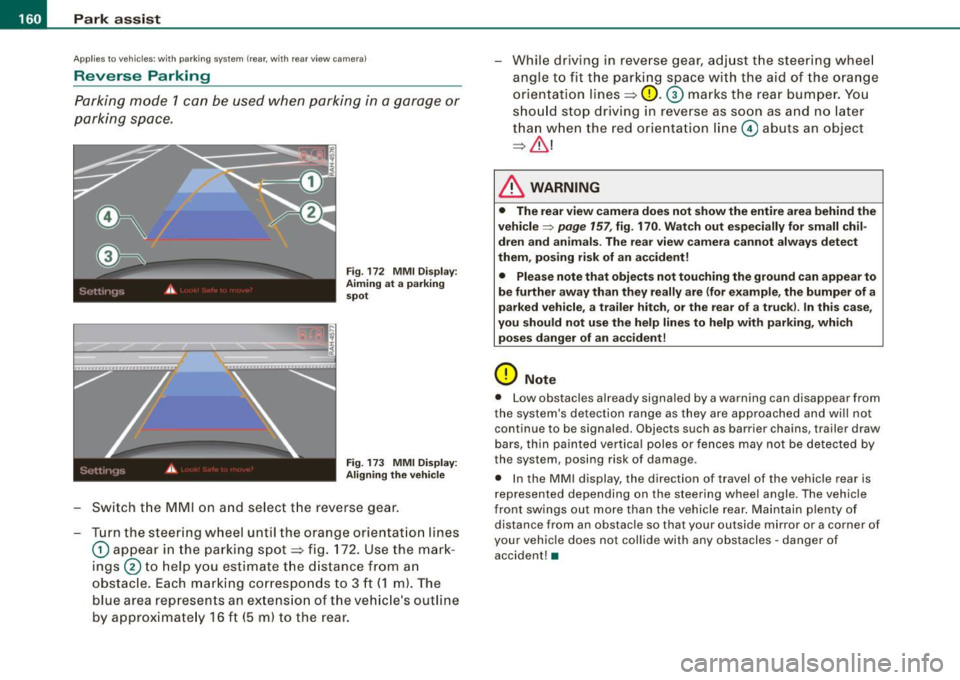
Parking mode 1 can be used when parking in a garage or
parking space .
Fig. 172 MMI Display:
Aiming at a parking
spot
Fig. 173 MMI Display:
Aligning the vehicle
Switch the MMI on and select the reverse gear.
- Turn the steering wheel until the orange orientation lines
0 appear in the parking spot~ fig. 172. Use the mark
ings
0 to help you estimate the distance from an
obstacle. Each marking corresponds to 3 ft
(1 m). The
blue area represents an extension of the vehicle's outline
by approximately 16 ft (5 m) to the rear. While driving
in reverse gear, adjust the steering wheel
angle to fit the parking space with the aid of the orange
orientation lines~
0. G) marks the rear bumper. You
should stop driving in reverse as soon as and no later
than when the red orientation line
0 abuts an object
~& !
& WARNING
• The rear view camera does not show the entire area behind the
vehicle~
page 157 , fig. 170. Watch out especially for small chil
dren and animals . The rear view camera cannot always detect
them , posing risk of an accident!
• Please note that objects not touching the ground can appear to
be further away than they really are (for example, the bumper of a
parked vehicle, a trailer hitch, or the rear of a truck). In this case,
you should not use the help lines to help with parking, which
poses danger of an accident!
0 Note
• Low obstacles already signaled by a warning can disappear from
the system's detection range as they are approached and will not
continue to be signaled . Objects such as barrier chains, trailer draw
bars, thin painted vertical poles or fences may not be detected by
the system, posing risk of damage.
• In the MMI display , the direction of travel of the vehicle rear is
represented depending on the steering wheel angle. The vehicle
front swings out more than the vehicle rear. Maintain plenty of distance from an obstacle so that your ou tside mirror or a corner of
your vehicle does not collide with any obstacles -danger of
accident! •
Page 163 of 360

______________________________________________________ P_ a_ r_k _ a_ s_s _i_s _t _ __._
Ap plies to vehicle s: with parkin g syste m (rear , w it h rea r view camera)
Parall el Parking
Use parking mode 2 to help you park on the edge of a
street.
Fig. 174 MMI Display:
blue surface in the
parking spot
Fig . 175 MMI Display:
Blue curve on the curb
The following steps apply only when there is no obstacle
(such as a wall) near the parking spot. Otherwise, please read the "Tips on Parking Next to Obstacles" .
- Activate the turn signal.
- Switch the MMI on and select the reverse gear. The parking aid turns on and parking mode
1 appears on the
display.
Con tro ls and eq uip
ment
- Position your vehicle parallel to the edge of the street,
approximately 3
ft (1 m) from a parked vehicle.
- Press the
Mode=> fig. 174 G) control button on the MMI
terminal. Parking mode 2 appears.
- Back up in reverse gear and align your vehicle so that the
blue area
0 borders on the rear end of the vehicle or on
the parking spot line. The blue area represents an exten
sion of the vehicle's outline by approximately 16 ft (5 ml
to the rear. The long side of the blue area should be on
the curb. The entire blue area must fit into the parking spot.
- While the vehicle is stationary, turn the steering wheel to
the right as far as it will go.
- Back into the parking spot until the blue curve touches
the curb => fig, 175. Stop the vehicle .
While the vehicle is stationary, turn the steering wheel to
the left as far as it will go.
- Continue to back up into the parking spot until the
vehicle is parked parallel to the curb.® marks the rear
bumper. You should stop driving in reverse as soon as
and no later than when the red orientation line© abuts
an object =>,& ! Ke~ an eye on the front of your vehicle
while doing this=>
U).
Parking next to obstacles
When there is an obstacle (such as a wall) next to the parking spot,
choose a spot with more space on the sides . Position the long side
of the blue area so that there is sufficient space from the curb. The
area must not be on the curb. You will also need to start turning the
steering wheel much earlier. There should be a sufficient amount of
space between the curb and the blue curve , and the blue curve
~ fig. 175 must not touch the curb. .,
Vehicle care I I irechnical data
Page 217 of 360

-------------------------------------------~C::._! h~ i~ ld ~ S~ a~ f~e :_!t tY ~--
restraints and for the different models of the same kind of child
restraint offered by child restraint manufacturers.
The weight ranges for the individual types, makes and models of
child restraints that the NHTSA has specified in the Safety Standard
together with the weight ranges of typ ical infants and typical 1 year
old child have been stored in the control unit of the Advanced
Airbag System. When a child restraint is being used on the front
passenger seat with a typical 1 year -old child, the Advanced Airbag
System compares the weight measured by the weight sensing mat
with the information stored in the electronic control unit.
The electronic control unit also registers the tension on the front
passenger safety belt. The tension on the safety belt for the front
passenger seat will be different for an adult who is properly using
the safety belt as compared to the tension on the belt when it is
used to attach a child restraint to the seat. The sensor below the
latch for the safety belt for the front seat passenger measures the
tension on the belt . The input from this sensor is then used with the
weight to "decide" , whether there is a child restraint with a typical 1
year-old child on the front passenger seat and whether or not the airbag must be turned off.•
Child restraints and Advanced Airbags
Regardless of the child restraint that you use, make sure that it has
been certified to meet United States Federal Motor Vehicle Safety
Standards and has been certified by its manufacturer for use with
an airbag. Always be sure that the chi ld restraint is properly
installed at one of the rear seating positions. If in exceptiona l
circumstances you must use it on the front passenger seat, carefully
read all of the information on child safety and Advanced Airbags
and heed a ll of the applicable WARNINGS. Make certain that the
child restraint is correctly recognized by the weight -sensing mat
inside the front passenger seat, that the front passenger airbag is
turned off and that the airbag status is always correctly signaled by
th e
PASSENGER AIR BAG OFF light .
Controls and equip
ment Safety first Vehicle operation
Many
types and models of child restraints have been available over
the years, new mode ls are introduced regularly incorporating new
and improved designs and older mode ls are taken out of produc
tion. Child restraints are not standardized . Child restraints of the
same type typically have different weights and sizes and different
'footprints,' the size and shape of the bottom of the chi ld restraint
that sits on the seat, when they are installed on a vehicle sea t. These
differences make it virtual ly impossible to certify comp liance with
the requirements for advanced airbags with each and every child
restraint that has ever been sold in the past or will be sold over the
course of the usefu l life of your vehic le.
For this reason, the United States National Highway Traffic Safety
Administration has pub lished a list of specific type, makes and
models of child restraints that must be used to certify compliance
of the Advanced Airbag System in your vehicle with the suppression
requirements of Federal Motor Vehicle Safety Standard 208. These
child restraints are:
A. Car beds, manufactured on or after September 1,
2004:
• Cosco Dream Ride 02-719
B. Rearward facing child restraint systems,
manufactured on or after September 1, 2004:
(When the restraint system comes equipped with a removable base,
compliance has to be certified with or without the base) .
• Britax Handle with Care 191
• Century Assura 4553
• Century Smart Fit 4543
• Cosco Arriva 02727
• Evenflo Discovery Adjust Right 212
• Evenflo First Choice 204
• Graco lnfant8457
Vehicle care Do-it-yourself service Technical data
Page 237 of 360

The system operates across the entire speed range in combination
with the ABS system. If the Anti -Lock Brake System (ABS) ma lfunc
tions, the ESP wil l also shut down .
How the system works
The Anti -Lock Brake System (ABS), Electronic Differential Lock (EDU
and the Anti -Slip Regulation System (ASR) are integrated in the elec
tronic stabilization program. In addition to the data provided by
th ese functions, the ESP control unit requires additional measure
ment data provided by high performance sensors . The rotational
speed of the vehicle about its vertica l axis, vehicle acceleration in
the fore-and-aft and lateral directions , the brake pressure, and the
steering angle are all measured.
The direction in which the driver wishes to travel is determined with
the aid of the steering angle and vehicle speed and is continua lly
compared with the actual behavior of the vehicle. If the two do not
match, for example, when the vehicle starts hydrop laning on a wet
road, ESP will automatically brake the appropriate whee l to correct
the prob lem.
The vehicle is then stabi lized by the forces acting on the whee l
during braking. If the vehicle is
oversteering (the vehicle turns too
sharply and the rear wheels slide toward th e ou tside of a curve), the
brakes are main ly app lied on the wheel that is on the outside of the
curve . In the case of a vehicle that is
understeering (the vehicle does
not turn sharply enough and pushes out of a curve), the brakes are
applied as needed on the wheel that is on the inside of the curve or
additional ly on the other wheels. An acoustic signal indicates when
ESP brake app lication cuts in=>&.
T he system operates across the entire speed range in combination
with the ABS system =>
page 238. If the Anti-Lock Brake System
(ABS) malfunctions, the ESP will be out of action as well.
Activating
When you turn on the engine, ESP will automatica lly be activated
and will perform a se lf-test. As soon as the test is comp leted, the
system is in norma l operating mode.
Controls and equip
ment Safety first Vehicle operation
Intelligent technology
You
can activate a deactivated ESP or deactivated ESP/ASR if
required by pressing the::::>
page 234, fig. 215 ::::> page 234, fig. 214
button . When they are activated, the message
ESP /ASR on appears
briefly in the display .
Deactivating
The ESP should normally be activated al l the time. If necessary, you
can deactivate Anti -Slip Regu lation (ASR) or the Electronic Stabiliza
tion Program (ESP) by pressing the button=>
page 234, fig. 215.
• Deactivating ASR: Tap the button . In certain exceptional situa
tions (e .g. driving with tire chains), the Anti-Slip Regulation (ASR)
can be deactivated =>
page 236. The message ASR off appears in the
display as we ll.
• Deact ivating ESP/ASR Press the button for more than 3 seconds.
With the ESP/ASR deactivated, the indicator light comes on, see
=>
page 13. The message ESP switched off appears in the disp lay as
we ll.
& WARNING
The Electronic Stabilization Program is nevertheless subject to the
laws of physics . It is particularly important to pay attention to this
fact on wet and slippery roads. It is therefore important that you
always adapt your driving to the condition of the road and traffic
conditions. Do not allow the increased safety provided by the Elec
tronic Stabilization Program system to lull you into accepting
additional safety risks. •
Electronic differential lock (EDL)
---------
The electronic differential lock monitors the rotational
speed of the drive wheels.
General notes
The electronic differential lock (EDU helps the car to start moving,
acc elerate and c limb a gradient on surfaces providing poor or
Vehicle care Do-it-yourself service Technical data
Page 352 of 360

___ A_l.:,. p _h_ a_ b_e _t _ic _ a_l _in _ d_e _x ____________________________________________ _
How often should I check my tire pressures?
294
How safety be lt pretensioners work . . . 186 Interval wiping
Rain sensor .
.. ..... .. ... ... .. .... 61
61
Hydroplaning ..... .. .... .... ..... .. 298
J
I
Ignition key .... ... .. .... .... ...... . 108
Emergency unlocking .............. 40
Ignition lock ...... ...... .... ...... . 108
Malfunction ................... 32, 36
Immobilizer .. ............... ..... 11, 38
Important things to do before driving . . 169
Im proper ly worn safety belts . . . . . . . . . 186
Indicator light
Dynam ic steering ... ... .... .. .. 13, 33
Indicator lights ........... ...... ..... 12
Airbag system . . . . . . . . . . . . . . . 199, 200
PASSENGER AIR BAG OFF . . . . . . . . . 200
Infant seats ..... ................... 218
Inside rear view mirror ......... ....... 64
Installing child safety seats
Safety belts . . . . . . . . . . . . . . . . . . . . . 223
Installing the upper tether strap on the
anchorage ................. .... 231
Instrument lighting .............. .... 56
Instruments and controls .............. 8
General illustration ................. 7
Interior lights
Dimming ................. .... ... 59
Front ................. ........... 59
Rear . ..... ... .... ........ .... ... 59 Jumper cables ........
............ .. 327
Jump -starting 326
K
Key ......... .... ...... ....... ...... 38
Battery replacement . . . . . . . . . . . . . . . 39
Key replacement . . . . . . . . . . . . . . . . . . 38
Master key with remote contro l ..... 38
Mechanica l key ................... 40
Kick -down
tiptronic ...... ............. ..... 151
Knee airbags ................ ....... 204
Description ............ ..... .. ... 204
How they work . . . . . . . . . . . . . . . . . . . 205
Important safety instructions 206
L
LATCH .................. ..... .. ... 227
Description ... ....... ...... ...... 228
Installing a child restraint ......... 229
Location ......... ............... 228
Mounting and releasing the anchorage hook ........ ........ .......... 229
Leather ... .... .... .. ..... ...... .... 260
Cleaning ..... .... ... .... ....... . 261
Lifting jack .. .... ....... ...... ...... 315
Lifting vehicle ...................... 331 Light
Coming home .................... 55
Daytime running lights . .... .... .... 55
Driving light control ....... .... .... 53
Exterior light ing ................... 55
Leaving home ......... ... .... .... 55
Switching on and off ... .... .... .... 53
Light sensor .... .... ... ..... ... .. .... 53
Light sensor defective ........ .... .... 34
Lighting ...... ........... .... .... ... 53
Lights Emergency flashers .... .... .... ... . 57
High beam . ... ... ... .. ..... ...... 58
High beam warning/indicator light ... 15
Turn signals ...................... 58
Xenon headlights .. ........ ... .... 56
Loading the luggage compartment 175
Locking Power locking switch ...... .... .... 46
R ear lid/trunk lid . ...... .... .... ... 47
Remote control key . . . . . . . . . . . . . . . . 43
Using the mechanical key .. .... .... 45
Low beams . ... .. .... .... ...... .... . 53
Low -beam headlight
De fective ......................... 35
Lower anchorage locator button ...... 228
Lower universal anchorage bars (Canada) ...
227
Lower universal anchorages (Canada) 227
Luggage Stowing ........ .. .............. 175
Page 357 of 360

Alphabetical index -
-------------=----
Torn or frayed safety belts . . . . . . . . . . . . 182
Touch -up pain t ..... .... .... .... .... 256
Towing Front eyelet .. .... .... ... .... .... 329
Rear eyelet ... ................... 330
Tow truck procedures .. ...... .... . 329
TPMS Tire pressure monitoring system ... 307
Trailer towing ... .... .... ........ ... 248
Operating instructions .... ... .... . 248
Technical requirements ...... . 248, 249
Tips .... ... ... ... .... ..... .. .... 250
Transmission .. ...... .... ...... .... . 147
6 -speed manual transmission ...... 147
tiptronic ... .. .... .... ........... 147
Transport Canada .... ....... .... .... 178
Tread Wear Indicator (TWI) .. .... .... . 297
Trip computer Fuel consumption .... ... .... .... .. 23
Mileage .... ... .. .... .... ...... ... 23
Single -trip memory . ...... ...... ... 24
Total -trip memory .. ...... ...... ... 24
Trip odometer ... ...... ........ .... .. 11
Trunk See Rear lid .. .... .... .... ... .... .. 47
Trunk escape handle .... ... .... .... . 310
Trunk pass-through ... ... .. .... .... .. 83
Turn signals . .... .... .... .... .... .... 58
Warning/indicator lights ............ 14
u
Undercoating ........... .... ..... .. . 258
Controls and equip
ment Safety first
Unfastening safety belts
... .. ... ..... 186 Electronic power control . ...... ..... 13
Unidirectiona l tires ....... .... ....... 287 Electronic stabilization program (ESP) 13
Uniform tire quality grading .......... 303 High beam
.... ....... .... ...... .. 15
Unlocking Power locking switch ..... .... .... . 46 Malfunction Indicator Lamp (MIU ..
.. 15
Safety belt .... .... .... ............ 14
Rear lid/trunk lid . ..... ....... .... . 47 Tire pressure
monitoring system ..... 14
Remote control key .......... ...... 43 Turn signals
...... .... .... .... .... 14
Using the mechanical key . ...... .. .. 45 Warranty coverages ...
... .. ... .... . . 339
Use of jumper cables .... .... ...... .. 327 Washer
reservoir ... .. .... ...... .... . 286
Washing ........................... 252
V Automatic car wash ....... ........ 253
by hand .... ... .. .... .... .... .... 253
Valet parking ... ....... ...... ..... .. . 50
General information ...... .... .... 252
Vanity mirror .... ... ........ .... .... . 60 with a power
washer ...... .... .... 254
Vehicle Identification !Number (VIN) .... 334 Waxing
............................ 255
Vehicle jack .... ....... ...... .... ... 315 Wear indicator .................. .... 297
Vehicle literature .... .. . .. .. ...... ... .. 4 Weatherstrips ........... .... ....... 257
Vehicle tool kit ... ... ..... ... .... .... 31
O Weights .. ..... .. .... .... ...... ..... 335
Vehicle-care products ...... .... ... .. . 252 What happens if you wear your safety belt too
Venti lation loose? ... ... .... .... .... .... ... 184
Deluxe automatic c limate control .... 90 What happens to unbelted occupants? . 181
Deluxe automatic climate control plus 96 What impairs driving safety? .......... 169
What should I do after changing a wheel? ..
W 294
What should I do after replacing whee ls?
Warning lights . ........ ... ........ ... 12 294
Warning/indicator lights . .... .... ....... 8 Wheel bo lts
Adaptive cruise contro l .. .. ........ 125 Torque .... ... .... ....... .... .... 305
Airbag system .... .... ........ .... 14 Wheels .. ........ .... ..... .. ...... . 287
Anti-lock brake system (ABS) ... ..... 15 cast a lloy . .... ........ .... .... ... 258
Brake system ... ... .. .... .. .. .... . 16
Checking tire pressure ............ 293
Cruise control .... ... .... .... .... .. 15
Cold tire inflation pressure . .... .... 291
Elec tromechanica l parking brake .... 16
General notes .. .... ..... .. ...... . 287
Vehicle operation Vehicle care Do-it-yourself service Technical data