parking brake AUDI A5 COUPE 2011 User Guide
[x] Cancel search | Manufacturer: AUDI, Model Year: 2011, Model line: A5 COUPE, Model: AUDI A5 COUPE 2011Pages: 362, PDF Size: 84.88 MB
Page 120 of 362

_____ o_ n_ t_h _e_ r_o _a _ d ________________________________________________ _
When stopping at a traffic signal or stopping in city traffic on vehicles
with an automatic transmission, the parking brake can be applied.
The vehicle does not have to be held with the footbrake . The parking
brake eliminates the tendency to creep with a drive range engaged.
As soon as you drive
off as usual, the parking brake is released auto
matically and the vehicle starts to move.
Starting on slopes
When starting on inclines, the starting assist prevents the vehicle
from unintentionally rolling back. The braking force of the parking
brake is not released until sufficient driving force has been built up at
the wheels .
[I) Tips
For safety reasons, the parking brake is released automatically only
when the driver 's safety belt is engaged in the buckle. •
Starting off with a trailer
To prevent rolling back unintentionally on an incline, do
the following:
- Keep the switch pulled and depress the accelerator. The
parking brake stays applied and prevents the vehicle from
rolling backward.
- You can release the switch once you are sure that you are
developing enough driving force at the wheels by
depressing the accelerator.
Depending on the weight of the rig (vehicle and trailer) and the
severity of the incline, you may roll backwards as you start. You can
prevent rolling backwards by holding the parking brake switch pulled
out and accelerating -just as you would when starting on a hill with a
conventional hand brake. •
Emergency braking
In the event that the conventional brake system fails or
locks.
- In an emergency, pull the switch and continue to pull it to
slow your vehicle down with the parking brake .
- As soon as you release the switch or accelerate, the
braking process stops.
If you pull the switch and hold it above a speed of about 5 mph (8
km/h), the emergency braking function is initiated. The vehicle is
braked at all four wheels by activating the hydraulic brake system.
The brake performance is similar to making an emergency stop:::>& .
In order not to activate the emergency braking by mistake, an audible
warning tone (buzzer) sounds when the switch is pulled. As soon as
the switch is released, or the accelerator pedal is depressed, emer
gency braking stops.
& WARNING
Emergency braking should only be used in an emergency, when
the normal foot brake has failed or the brake pedal is obstructed.
Using the parking brake to perform emergency braking will slow
your vehicle down as if you had made a full brake application. The laws of physics cannot be suspended even with ESP and its associ
ated components (ABS, ASR, EDS). In corners and when road or
weather conditions are bad, a full brake application can cause the
vehicle to skid or the rear end to break away· risking an accident. •
Driver messages in the instrument cluster
Warning Vehicle incline is excessive
This message appears when the parking brake is applied on an incline
that exceeds about 30%. ._
Page 121 of 362
_________________________________________________ O_ n_ t_ h_ e_ r _o_ a_d _--J_
In this case the braking power of the parking brake may not be
adequate
to prevent the vehicle from rolling unintentionally.
Please release parking brake
Please note that for safety reasons the parking brake is released auto
matically only if the driver's seat belt is fully engaged in the buckle.
To release the parking brake press the brake pedal
This driver message appears when the switch to release the parking
brake was pressed. The parking brake can only be released if you step
on the brake pedal and at the same time press the switch or you auto
matically release the parking brake with the starting assist
=>
page 117 .
' Parking brake!
This driver message appears together with the yellow , symbol
when there is a parking brak e malfunction.
Malfunction starting assist
Th is dr iver message appears if there is a starting assist malfunction.
The automatic release of the parking brake when starting is malfunc
tioning. You have to release the parking brake manually by pressing
the switch. Have the problem corrected by an authorized Audi
dealer. •
Contro ls a nd e quip
m en t Vehicle
OP-eration
Cruise control
Switching on
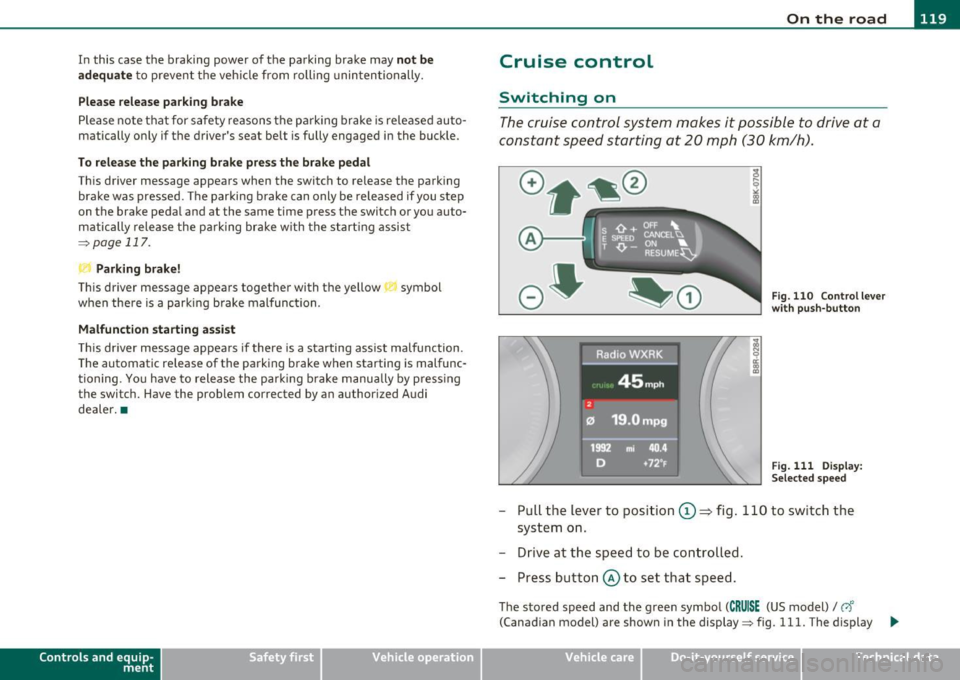
The cruise control system makes it possible to drive at a
constant speed starting at 20 mph (30 km/h).
A,.....__
Fig. 110 Control lever
with push-button
Fig. 111 Display:
Selected speed
- Pull the lever to position ©==> fig . 110 to switch the
system on.
- Drive at the speed to be controlled.
- Press button @ to set that speed.
The stored speed and the green symbol (CRUISE (US model)/ 0'
(Canadian model) are shown in the display => fig. 111. The display _.,
Vehicle care Do-it-yourselt service iTechnical data
Page 134 of 362
Ill Adaptive cruise control ..__..,___ _____________ _
Engine speed !
The text message Engine speed ! appears in vehicles with manual
transmission when the driver did not shift up or down in time while
using adaptive cruise control braking or accelerating, causing the
vehicle to exceed or not reach the permitted limit speed. This causes
adaptive cruise control to deactivate automatically. A chime sounds
as a reminder .
Parking brake!
The text message Parking brake! appears if emergency braking was
manually initiated with the Electromechanical Parking Brake (EPB).
The adaptive cruise control is turned off . This is accompanied by a
warning tone.
Stabilisation program
The text message Stabilisation program appears if the Electronic
Stab ilizat ion Program (ESP) has inter vened. In this case the adaptive
cruise control is automatically turned off. This is accompanied by a
warning tone.
Speed
The set speed in mph (Canada km/h) always appears when saving or
changing the speed in adaptive cruise control~
page 125, "How is
the speed stored?" and~
page 125, "Chang ing stored speed".
Speed too low
The text message Speed too low appears if the current speed is too
low
to set or to hold the requested speed.
When setting a desired speed, it must be at least 20 mph (30 km/h).
At speeds be low 12 mph (20 km/h), the cruise control is turned off.
In speeds over 95 mph (150 km/h), the system remains active and
resumes the speed of 95 mph (150 km/h) if the driver removes the
foot from the acce lerator .
Selector lever position!
The text message Selector lever position! appears when the selector
lever is moved to position
N. In this position, adaptive cruise control
is not available. •
Appli es to veh icles : w ith a daptive cr uise c ontro l
Driver intervention prompt
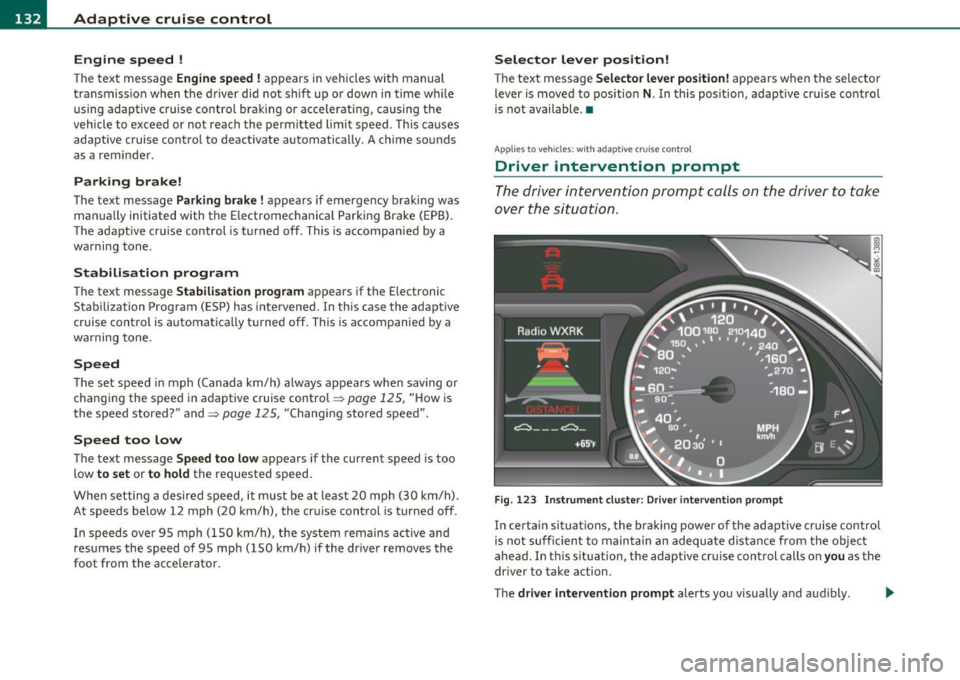
The driver intervention prompt calls on the driver to take
over the situation.
Fig. 123 Instrument cluster: Driver intervention prompt
In certain situations, the braking power of the adaptive cruise control
is not sufficient to maintain an adequate distance from the object
ahead. In this situation, the adaptive cruise control calls on
you as the
driver to take action.
The
driver intervention prompt alerts you visually and audibly. -.,
Page 153 of 362
Transmission -_______________ ___.
The transmiss ion is also equipped with tiptronic . It allows the driver
t o shift gea rs
manually if desired ~ page 155 . •
Applies to vehicles: wit h au tom atic tr ansm ission
Driving the automatic transmission
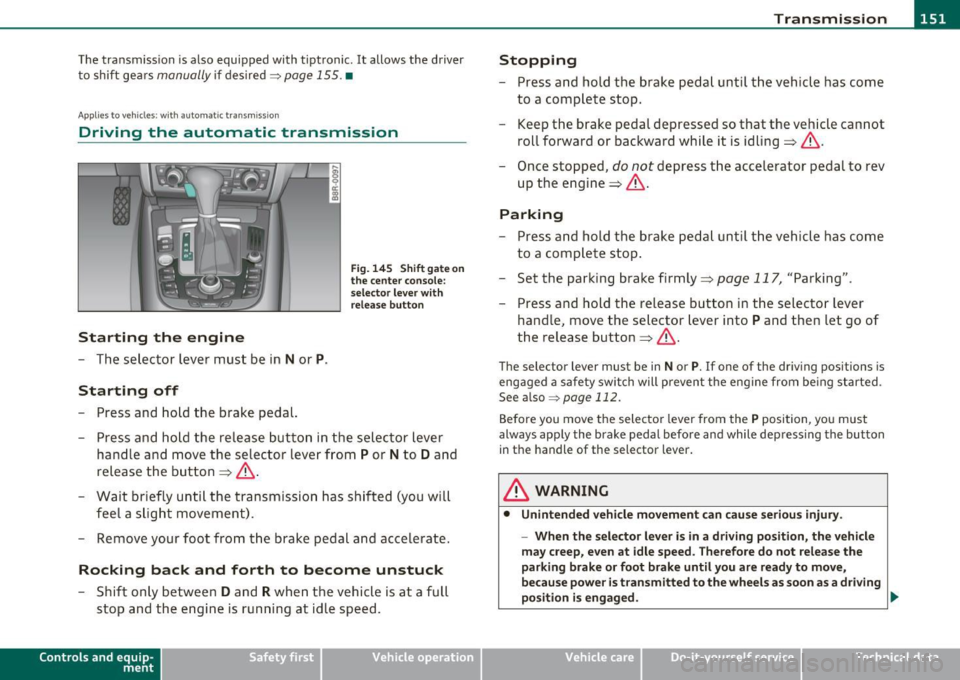
Starting the engine
- The se lector lever must be in N or P.
Starting off
- Press and hold the brake pedal.
Fi g. 14 5 Sh ift gat e on
the center con sole:
s e le ctor le ve r with
r e lea se b utton
- Press and ho ld the release button in the sel ector lever
handle a nd move the selector lever from
P or N to D and
release the but ton => &, .
- Wait briefly unti l the tran smission has shif ted (you will
feel a slight movement).
- Remove your foot from t he brake pedal and accelerate.
Rocking back and forth to become unstuck
- Shift o nly betwee n D and R when the ve hicle is at a full
stop and the engine is running at idle speed.
Con tro ls a nd e quip
m en t Vehicle
OP-eration
Stopping
-Press and hold the brake peda l unti l th e vehicle has come
to a complete stop.
- Keep the brake pedal depressed so that the veh icle can not
roll forward or backward while it is idling => &, .
- Once stopped,
do not depress t he accelerator pedal to rev
up the engine=> &,.
Parking
-Press and ho ld the brake peda l unt il the veh icle has come
to a compl ete stop .
- Set the parking brake firmly=>
page 117, "Parking" .
- Press and hold the release button in the selector lever
handle, move the selector lever into
P and then let go of
the release button=>&, .
The selector lever must be in Nor P. If one of the dr iv ing positions is
engaged a safety swi tch will prevent the eng ine from be ing started.
See also ~
page 112.
Before you move the selecto r lever from the P position, yo u must
always apply the brake pedal befo re and while depressing the button
in the handle of the selector lever .
& WARNING
• Unintended vehicle movement can c ause seriou s injur y.
- When th e selector l ever is in a driv ing po sition, the vehicl e
m ay creep , even at idle speed. Therefore do not relea se the
parking bra ke or foot brak e until you are ready to mov e,
because power is t ransmitted to the wheel s as soon as a dri ving
po sition i s engaged . ._
Vehicle care Do-it-yourselt service iTechnical data
Page 154 of 362
-Transmission •m ___________________ _
& WARNING (continued)
- Do not accelerate while selecting a driving position . At this
time the engine must be at idle speed so that undue stre ss is
not placed on the clutches in the transmission.
- Remember : Even when stopped briefly with the automatic
transmission in D,S or R , engine power is being transmitted to
the wheels . Your vehicle could " creep" forward or backward.
When stopped, keep the brake pedal fully depressed and use
the parking brake if necessary to keep the vehicle from rolling .
• If the selector lever is unintentionally mo ved into N while you
are driving, take your foot off the accelerator p edal and wait for
the engine to return to idle speed before selecting a driv ing posi
tion .
• Never shift into R or P when the vehicle is in motion.
• Never get out of the dr iver's seat when the engine is running.
• If you must get out of the vehicle, move the selector lever
secure ly into the P position and app ly the parking brake firmly.
• If the engine must remain running, never have any driving
position engaged when checking under the hood. Make sure the
selector lever has securely engaged and is locked in P with the parking brake firmly set=>
page 267, "Engine compartment ".
Otherwi se, any increase in engine speed may set the vehicle in
motion, even with the parking brake applied. •
Applie s to v ehicl es: wi th auto matic tra nsm issi on
Selector Lever positions
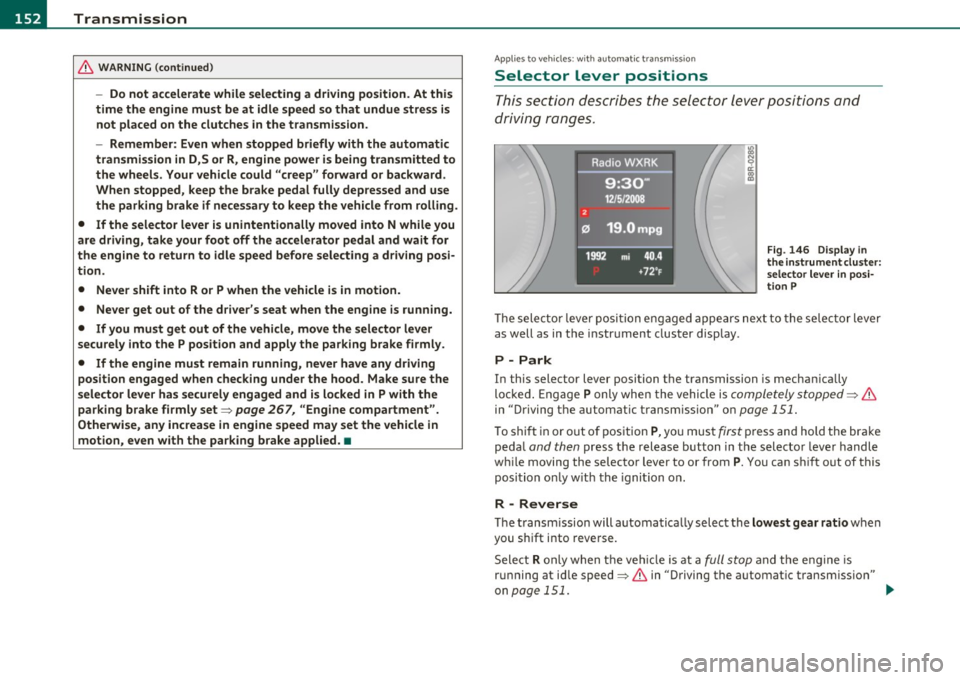
This section descri bes the se lector lever positions and
driving r ang es .
Fig. 146 Dis play in
the in strument clu ster :
selecto r leve r
in posi
ti on P
Th e sele cto r lever posi tio n engaged appears nex t to the se lec tor lever
as well as in the i nstr ument clus ter disp lay .
P -Park
In this selector lever position th e transmission is mechan ically
lo ck ed. En gage
P only whe n the ve hicl e is completely stopped=> &
in "Driving the automatic t ransm ission" on page 151.
To shift in or o ut o f p osit ion P, yo u must first press and hold the bra ke
peda l
and then press t he release button in t he selecto r leve r handle
w hil e moving the selector lever to or from
P. You can shif t out of this
position on ly w it h t he i gni tion o n.
R -Reverse
Th e transm ission will automa tica lly select the lowest gear ratio when
you sh ift into reverse.
Sele ct
R o nl y when t he ve hicle is at a full stop a nd t he e ng ine is
ru nning at idle speed=>
& in "Driving th e automat ic transm issio n"
on
page 151 . ...
Page 168 of 362

lffll.__ __ H_o_ m_ e_ L_ in_ k_® ____________________________________________________ _
Homelink®
Universal remote control
Applies to veh icles: w ith Hom elin k® un iversal re m ote contro l
General information
The Homelink ® feature can learn up to three radio
frequency codes for most current transmitters used for
operating garage doors, estate gates , home or outdoor
lighting systems, and other devices.
Yo u must fi rst p rogr am the Home link® tra nsmi tte r be fore you can
use the system=>
page 167, "Programming the Homelink ® trans
m itter".
In order to program the Homelink ® transm itter fo r devices utilizing
rolling code, a second person on a ladder who can sa fely reach t he
garage door opener motor is recommended. It is also necessary to
locate the "learn" button on yo ur garage door opener motor . Re fer to
t he oper ating ins truc tions fo r th e opene r, as the loca tion and color o f
this button may vary by manufacturer .
Yo u can still use the original remote control for the device at any
t ime .
& WARNING
• Never use the Homelink'"' transmitter with any garage door
opener that does have not the safety stop and rever se feature as
required by fed eral safety standards. This includes any garage
door opener model manufactured before April
l , 1982 .
• A garage door opener which cannot detect an object, signaling
the door to stop and reverse does not meet current federal safety
standards . Using a garage door opener without these features
increases risk of serious injury or death.
& WARNING (cont inu ed )
• For safety reasons never release the parking brake o r start the
engine while anyone i s standing in front of the vehicle .
• A ga rage door or an estate gate may sometimes be set in
motion when the Homelink ® remote control is being
programmed. If the device is repeatedly activated, this can over
s train motor and dam age its electri cal components · an over
heated motor is a fi re hazard!
• To avoid pos sible injurie s
or property damage , plea se always
make absolutely certain that no persons or objects are located in
the range of motion of any equipment being operated.
[ i ] Tips
• If you would like mo re inf orma tion o n Hom eli nk ®, whe re to
purchase the Homelink ® compat ible products, or would like to
purc hase the Homeli nk® Home Lighting Pac kage, p lease ca ll to ll
free : 1-800-355-3515 .
• F or Declaration of Compliance to United Sta tes FCC an d Indus try
Canada regulations=>
page 343. •
Page 169 of 362

_________________________________________________ H_ o_ m_ e_ L_in _ k_® _ __.fflll
App lies to veh icles : w ith Home link® un iversa l remote control
Progr amming the Homelink ® tr ansmitter
The transmitter is programmed in two phases . For rolling
code transmitters, a third phase is also necessary .
,,,,, r, o: o "'' '''"
Fig. 161 Ove rhead
console: Homelink ®
keypa d
Fig. 162 Rad iator
g rille
Phase 1: progr amming the overhe ad keyp ad
1. Make sure your vehicle is within operating range of the
r emote controlled garage door opener .
2 . Set the parking brake:::::>
& in "General information " on
page 166.
3. Turn the ignition on. Do not start the engine!
Con tro ls a nd e quip
m en t Vehicle
OP-eration
4. Press and hold the two outside Homelink ® buttons G)and
@ for approximately
20 seconds until indicator light@
:::::> fig. 161 begins to flash . Then release both buttons. Do
not hold the buttons for longer than
30 seconds .
- This procedure only needs to be performed
once. It erases
the factory-set default codes and does not have to be repeated to program additional remote controls.
5. Press and hold the Homelink ® button G), @ or@ until
the indicator light @starts flashing
slowly . Release the
button.
- The system will remain in programming mode for 5
minutes .
Co to the front of the vehicle and proceed with
phase
2 .
Phase 2: at the rad iator g rille
6. Point the o rigi nal r emote control to the m iddle of the
radiator grille of your vehicle=> fig.
162 .
7. Hold the original remote control at a distance between O
S in. (0-13 cm) (use the shortest distance possible) .
8 . Press and hold the activation button on the remote
control.
- May be different in Canada . If so, press and re-press
(cycle) the activation button on your remote control every
two seconds.
9. The emergency flashers will flash
three tim es (after about
15-60 seconds) when the programming is successful.
Release the button on the remote control.
- To program more devices , repeat steps 4 to 9.
Vehicle care Do-it-yourselt service iTechnical data
Page 255 of 362

Observe speed limits. In some areas, speeds for vehicles towing
t railers are lowe r than for regular veh icles.
Always apply brakes early. When dr iv ing downh ill, sh ift in to a lower
gear to use the engine braking effect to slow the vehicle. Use of the
brakes alone can cause them to overheat and fail.
Coolant temperature
The coolant temperature gauge~ page 10 must be observed care
fully. If the needle moves close to the upper end of the scale, reduce
speed immediately and/or turn off the air conditione r.
If the coolant temperature warning light in the instrument cluster
star ts flashing
-t- , pull off the road, stop and let the engine idle for
about two minutes to prevent heat bu ild-up.
& WARNING
Anyone not properly restrained in a moving vehicle is at a much
greater risk in an accident. Never let anyone ride in your car who is
not properly wearing the restraints provided by Audi. u
Trailer towing tips
Important to know
------------
Your vehicle handles differently when tow ing a tra iler because of the
additiona l weight and different weight distribution. Safety, perfor
mance and economy will greatly depend on how carefu lly you load
your trailer and operate your rig .
Before you actua lly tow your trailer, practice turning, stopp ing and
backing up in an area away from traffic. Keep pract icing until you have
become completely familiar with the way your vehicle-t railer combi
nation behaves and responds.
Controls and equip ment Safety first Vehicle operation
Backing up
is d iff icult and requ ires practice . Backing up with a trailer
generally requires steer ing action opposite to that when backing up
your vehicle without a trailer.
Maintain a greater distance between your vehicle and the one in front
of you. You will need more room to stop . To compensate fo r the
trailer, you will need a larger than norma l turning radius.
When passing, remember that you cannot accelerate as fast as you
normally would because of the added load. Make sure you have
enough room to pass. After passing, allow plenty of room for you r
trailer before changing lanes again.
Avoid jerky starts, sharp turns or rapid lane changes .
[I) Tips
• Do not tow a trai ler during the break-in per iod of your vehicle.
• If you tow a tra iler, your Audi may requi re more frequent mainte
nance due to the extra toad~
page 340. •
Parking on a slope
Do not park on a slope with a trailer. If it cannot be
avoided, do so only after doing the following:
When parking:
-Apply the foot brake.
- Have someone place chocks under both the vehicle and the
trailer wheels.
- With chocks in place, slowly release the brakes until the
wheel chocks absorb the load.
- Turn the wheels towards the curb.
- Apply the parking brake .
Vehicle care Do-it-yourself service Technical data
Page 256 of 362

Trailer towing
"-------------------------------------------------
- Place an automatic transmission* in P, respectively a
manual transmission in first or reverse gear.
When restarting after parking:
- Apply the foot brake.
- Start the engine.
- Move the selector lever to
D, respectively a manual trans-
mission in first gear.
- Release the parking brake and slowly pull out and away
from the wheel chocks.
- Stop and have someone retrieve the wheel chocks.
00 Tips
If you move the selector lever of the automatic transmission* to P
before applying the parking brake and before blocking the wheels,
you may have to use more force later to move the lever out of the P
position. •
Page 277 of 362

Checking and filling Ill
-------------~--
Closing the engine hood
- Pull the hood down until the pressure from the struts is
reduced.
- Let the hood
drop down and latch in place. Do not try to
push it shut;
it may fail to engage=:> &.
& WARNING
A hood that is not completely latched could fly up and block your
view while driving.
• When you close the engine hood, check it to make sure the
safety catch has properly engaged. The hood should be flush with
the surrounding vehicle body parts.
• If you notice while driving that the hood is not secured prop
erly, stop at once and close it. •
Working in the engine compartment
Be especially careful whenever you work in the engine
compartment.
Whenever you must perform any work in the engine compartment,
for example checking and filling different fluids, there is a risk of injury, burns and accidents. To prevent personal injury always
observe the following WARNINGS. The engine compartment of any
vehicle is a hazardous area=>& .
& WARNING
To help avoid injury, before you check anything under the hood:
• Turn off the engine.
• Remove the ignition key.
• Apply the parking brake.
Safety first
& WARNING (continued)
• Move selector lever of automatic transmission to "P" (Park);
put manual transmission in Neutral.
• Always let the engine cool down. Hot components will burn
skin on contact.
• To reduce the risk of being burned, never open the hood if you
see or hear steam or coolant escaping from the engine compart
ment. Wait until no steam or coolant can be seen or heard before
carefully opening the hood.
• Keep children away from the engine compartment.
• Never spill fluids on hot engine components. They can cause a
fire.
• Never touch the radiator fan. The auxiliary electric fan is
temperature controlled and can switch on suddenly.
• Never open the coolant reservoir cap when the engine is still
warm. The coolant system is pressurized and hot coolant could
spray out.
• Protect your face, hands and arm from steam or hot engine
coolant by placing a thick rag over the cap when you open the
coolant reservoir.
• If work on the fuel system or the electrical system is necessary:
-Always disconnect the battery.
- Never smoke or work near heaters or open flames. Fluids in
the engine compartment could start a fire.
- Keep an approved fire extinguisher immediately available.
• To avoid electrical shock and personal injury while the engine is
running or being started, never touch:
-Ignition cables
- Other components of the high voltage electronic ignition
system.
• If you must perform a check or repair with the engine running: ..,
Vehicle care Technical data