radio AUDI A5 COUPE 2011 Owner's Manual
[x] Cancel search | Manufacturer: AUDI, Model Year: 2011, Model line: A5 COUPE, Model: AUDI A5 COUPE 2011Pages: 362, PDF Size: 84.88 MB
Page 129 of 362
____________________________________________ A_ d_ a.:.p _t_ i_ v _e_ c_r_u _ i_ s _e_ c_o_ n_ t_r _o _l __ ffl'II
A ppli es to ve hicl es: wi th a daptive cruise cont rol
How is the distance (time interval) set?
Distance con be set in four stages.
m 0 [;; ,.: 00 a,
Fig . 118 Control
l ever : Sett ing distance
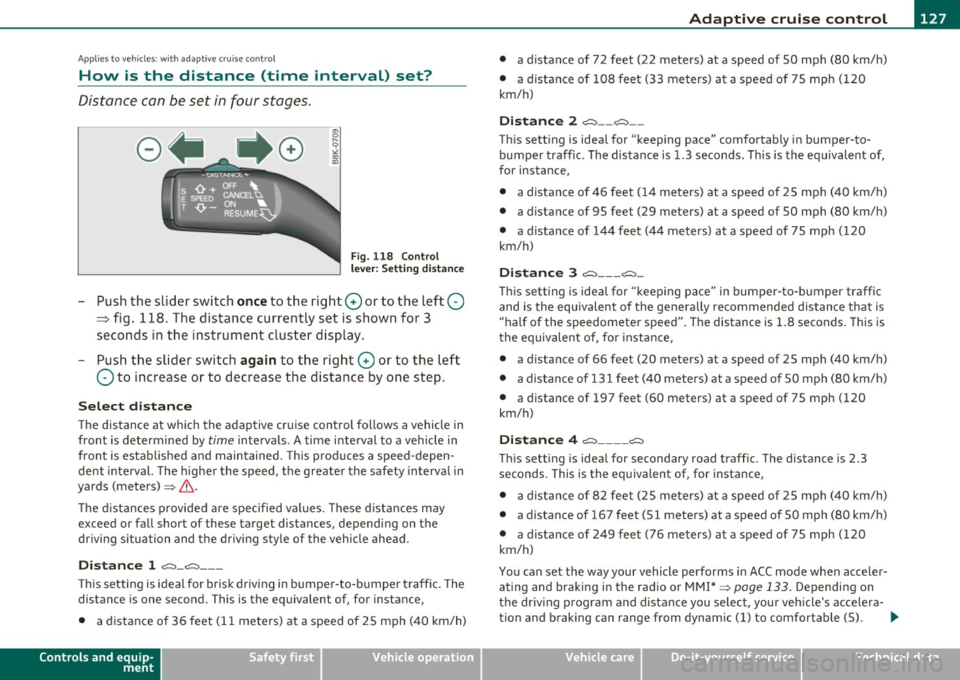
-Push the slider switch once to the right 0 or to the left Q
~ fig. 118. The distance currently set is shown for 3
seconds in the instrument cluster display.
- Push the slider switch again to the right 0 or to the left
Q to increase or to decrease the distance by one step.
Select distance
The distance at which the adaptive cru ise control follows a vehicle in
front is determined by
time intervals . A time interval to a vehicle in
front is estab lished and maintained. This produces a speed-depen
dent interval. The higher the speed, the greater the safety interval in
yards (meters) ~
&-
Th e distances provided are specified values. These distances may
exceed or fall short of these target distances, depending on the
driving situation and the driving style of the vehicle ahead.
Distance 1 ~-~ ---
Thi s sett ing is ideal for brisk driving i n bumper-to-bumper traffic. The
distance is one second. This is the equivalent of, for instance,
• a distance of 36 feet (11 meters) at a speed of 25 mph (40 km/h)
Controls and equip
ment Safety first
•
a distance of 72 feet (22 meters) at a speed of 50 mph (80 km/h)
• a dist ance of 108 feet (33 meters) at a speed of 75 mph (120
km/h)
Distance 2 ,;::::,-- ~--
This setting is ideal for "keeping pace" comfortably in bumper-to
bumper traffic. The distance is 1.3 seconds. This is the equ ivalent of,
for instance,
• a distance of 46 feet (14 meters) at a speed of 25 mph (40 km/h)
• a dista nce of 95 feet (29 meters) at a speed of 50 mph (80 km/h)
• a distance of 144 feet (44 meters) at a speed of 75 mph ( 120
km/h)
Distance 3 ~--- ~-
This setting is idea l for "keeping pace" in bumper-to-bumper traffic
and is the equivalent of the generally recommended distance that is
"half of the speedometer speed" . The distance is 1 .8 seconds. This is
th e equivalent of, fo r instance,
• a distance of 66 feet (20 meters) at a speed of 25 mph (40 km/h)
• a distance of 131 feet (40 meters) at a speed of 50 mph (80 km/h)
• a distance of 197 feet (60 meters) at a speed of 75 mph (120
km/h)
Distance 4 ~---- ~
This sett ing is ideal for secondary road traffic. The distance is 2.3
seconds. This is the equivalent of, for instance,
• a distance of 82 feet (25 meters) at a speed of 25 mph (40 km/h)
• a distance of 167 feet (51 meters) at a speed of 50 mph (80 km/h)
• a distance of 249 feet (76 meters) at a speed of 75 mph (120
km/h)
You can set the way your vehicle performs in ACC mode when acce ler
ating and braking in the radio or MM !* ~
page 133. Depending on
the driving program and distance you select , you r veh icle's accelera-
tion and braking can range from dynam ic (1) to comfortable (5) . _,.
Vehicle care Technical data
Page 145 of 362
_________________________________________________ A_ u _ d_ i_ s_ id_ e_ a _ s_s _ i_s _t _--J_
A pplie s to ve hicles : wi th s id e ass ist
Driving situation: Vehicles dropping back
quickly
@
I
- (OIDJ -
•. _ ...
' I
- Q•n
-~---
Fig. 139 Side assist: Vehicles dropping back quickly
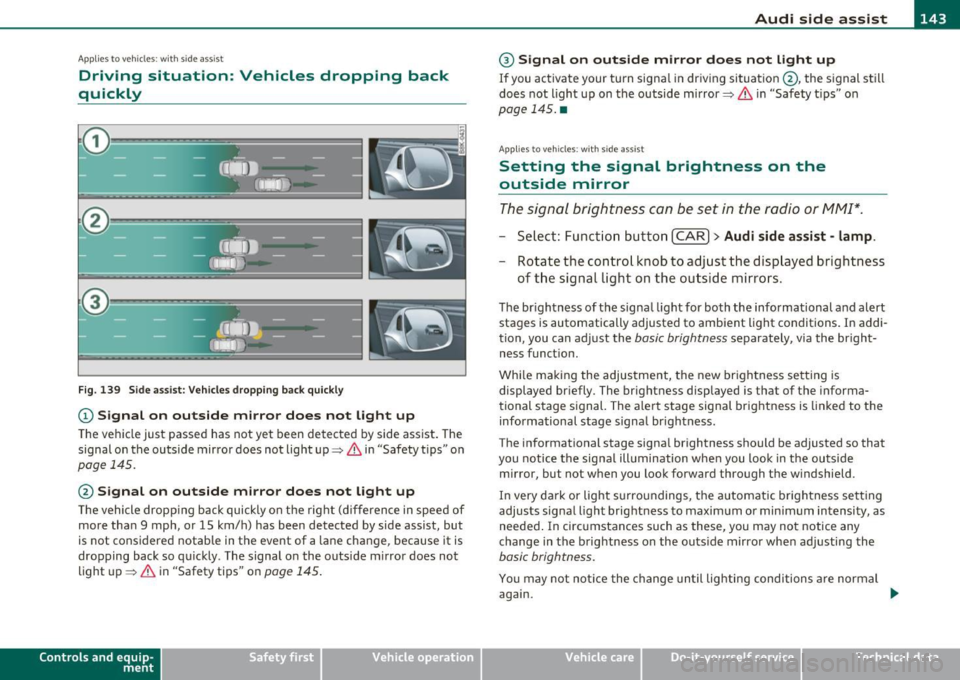
(D Signal on outside mirror does not light up
The vehicle just passed has not yet been detected by side assist. The
signal on the outside mirror does not light up~
& in "Safety tips" on
page 145.
@ Signal on outside mirror does not light up
The vehicle dropping back quickly on the right (difference in speed of
more than 9 mph, or 15 km/h) has been detected by side assist, but
is not considered notable in the event of a lane change, because it is
dropping back so quickly . The signal on the outside mirror does not
light up~
& in "Safety tips" on page 145.
Con tro ls a nd e quip
m en t Vehicle
OP-eration
® Signal on outside mirror does not light up
If you activate your turn signal in driving situation @, the signal still
does not light up on the outside mirror~
& in "Safety tips" on
page 145. •
App lies to ve hicles : with side assis t
Setting the signal brightness on the
outside mirror
The signal brightness con be set in the radio or MM!*.
- Select: Function button [CAR ]> Audi side assist -lamp.
- Rotate the control knob to adjust the displayed brightness
of the signal light on the outside mirrors.
The brightness of the signal light for both the informational and alert
stages is automatically adjusted to ambient light conditions. In addi
tion, you can adjust the
basic brightness separately, via the bright
ness funct ion.
While making the adjustment, the new brightness setting is displayed briefly. The brightness displayed is that of the informa
tional stage signal. The alert stage signal brightness is linked to the
informational stage signal brightness.
The informat ional stage signal brightness should be adjusted so that
you notice the signal illumination when you look in the outside
mirror, but not when you look forward through the windshield.
In very dark or light surroundings, the automatic brightness setting
adjusts signal light brightness to maximum or minimum intensity , as
needed. In circumstances such as these, you may not notice any
change in the brightness on the outside mirror when adjusting the
basic brightness.
You may not notice the change until lighting conditions are normal
again.
Vehicle care Do-it-yourselt service iTechnical data
Page 150 of 362
ffl..__A_ u_d_ i _d _r_ i_v _e _ s_e _ l_ e _ c_ t _______________________________________________ _
(I) Tips
• Sporty sh ifting characteristics can be set by selecting the
DYNAMIC mode. The S selector lev er position is not available.
• The dynamic steering may make noise when starting or stopp ing
the engine. This does not indicate a problem .•
Ap plies to ve hicles : with drive se lect
Selecting the driving mode
You can choose between COMFORT, AUTO, DYNAMIC and
INDIVIDUAL* modes.
__, __ . -
.,,
~
--========== "' "" l8
Fig. 142 Shift gate:
Control for Audi drive
select
Fig. 143 Center
console: Co ntrol for
Audi drive select
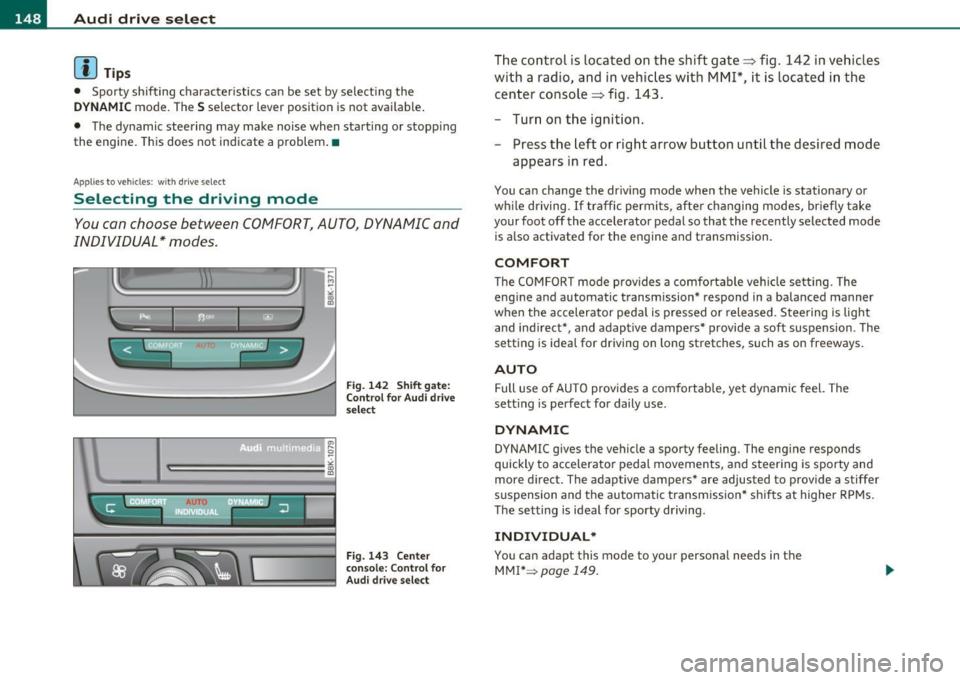
The control is located on the shift gate:::::, fig. 142 in vehic les
with a radio, and in vehicles with
MMI*, it is located in the
center console :::::, fig . 143 .
- Turn on the ignition.
- Press the left or right arrow button until the desired mode
appears in red.
You can change the driv ing mode when the vehicle is stationary or
w hil e driving. If traffic permits, after chan ging modes, briefly take
your foot off the accelerator pedal so that the recently selected mode
is also activated for the eng ine and transmission .
COMFORT
The COMFORT mode prov ides a comfo rtable vehi cle se tting . The
engine and automatic t ransm ission * respond in a balanced manner
when the accelerator pedal is pressed or released. Steering is light
and ind irect*, and adaptive dampers* provide a soft suspension . The
setting is ideal for driving on long stretches , such as on freeways.
AUTO
Full use of AUTO provides a comfortable, yet dynamic feel. The
sett ing is perfect for daily use .
DYNAMIC
DYNAMIC gives the vehicle a sporty feeling. The eng ine responds
quickly to accelerator pedal movements, and steer ing is sporty and
more direct. The adap tive dampers* are adjus ted to provide a stiffer
suspension and the automatic t ransmission* sh ifts at higher RPMs.
The setting is ideal for sporty driving .
INDIVIDUAL*
You can adap t this mode to your personal needs in the
MMI* =>
page 149.
Page 161 of 362
___________________________________________________ P_a _r _k _ a_s _s_ i_s _t __ _
Please note that low objects a lready s ignalled by a war ning can disap
pe ar from the sys te m 's d etection r ange and will not co nti nue to be
signa lled .
If the distance to an obstacle remains t he same, the vo lume of the
dis tan ce warn ing is gradu ally redu ced af ter abou t 4 seco nds.
Approaching another obstacle will result in the distance warning
s ou nding a t th e normal vo lume aga in.
Malfunctions in the system
If a wa rning tone is aud ible fo r about five seconds when you turn o n
the ignition , there is a ma lfunction in the system. Have the prob lem
c o rrected by yo ur auth orized Aud i de aler.
Keep the sensors in the rear bumper clean and free from ice so t hat
t he acous tic par k ass ist system can func tion prope rly.
& WARNING
• Sens ors have dead space s in whi ch objects cannot be dete cted.
Be especi ally alert for small children and animals , since they are
not alway s detected by the sen sors.
• The acou stic parking system is not a substitute for the dr iver 's
own caution and alertne ss. Ultimate respon sibility alway s
remains w ith the driver during parking and similar maneuvers.
Alway s w atch wh ere you are driving .
• You should always adjust the volume and frequency of the
warning tone s so that you can e asily hear the acoustic di stan ce
wa rning e ven if the radio is pl aying, the air -conditioner blowe r is
on High or there i s a high level of out side noi se .
- Check the setting s whenever anyone else has driven the
vehicle before you.
0 Note
• Remember that low obst acles fo r which a warning has a lready
been issued may "d ive" below the system 's sensing zone if the ve hicle
is be ing b acked up closer . In th is case, the wa rni ng so und shutting off
Controls and equip
ment Safety first
does not ind
icate that you have cleared the obstacle . Instead, impact
is imm inen t.
• Objects such as trai ler hitches, chains, narrow posts or fences
c ove red by a th in layer of paint m ay no t always be detec ted by the
system . They can st ill damage your vehicle w ithout warning .
lI] Tips
Keep the sensors in the rear b umper clean and free of snow and ice so
that the aco ustic parki ng assist system can function proper ly .•
App lies to ve hicles : w it h pa rkin g system (re ar)
Adjusting the warning tones
The warning tones can be adjusted in the MMI*.
-Select : [CAR]> Parking sy stem .
• Rear volume · rear sensor vol ume
• Rear frequ ency -rear sensor frequency
• In-car entertainment fad er-when the park ing system is switched
on , the vol ume of the active audio source is lowered .
Th e newly adj usted value is br iefly heard from the signa l gene rator.
The settings are automatically stored and ass igned to the master key
with remote control. •
Vehicle care Technical data
Page 167 of 362
Park assist IIJII _________________________________ _____;.....:;_;_.:..:,____;;_ ____ _
0 Note
In the MMI display, the d irect ion of t ravel of the vehicle rear is rep re
sented depend ing on the steering wheel angle. The vehicle front
swi ngs ou t mo re t han t he ve hicle re ar. M ain tain ple nty of dist ance
from an obstacle so t hat your outs ide mirror or a corner of your
vehicle d oes no t collide with any o bstacles - dange r of accide nt!
[ i ) Tips
Th e left or right or ientat ion lines and s urfaces will be displ aye d,
depending on the tu rn signal being used. •
App lies to veh icles : with park ing syst em (rear, wit h rea r view cam era)
Adjusting the display and warning tones
The display and warning tones are adjusted in the radio
or fv1fv1 I*.
-Select : [CAR]> Parking system.
Display
• Off -
when the parking system is switched off, only aud ible sig nals
are given.
• On -when the pa rking system is switc hed on, the pic ture from the
rea r view camera is displayed.
Warning tones
• Rear volume -rear sensor vo lume
• Rear frequency -rear sensor frequency
• In-car entertainment fader -when the par kin g sys tem i s sw itched
on, the volume of the active audio source is lowered.
T he newly a djusted value is br iefly hear d from the signal generator .
T he settings are automatica lly stored and assigned to the remote
cont rol key.
Controls and equip
ment Safety first
& WARNING
•
Always make sure that the volume and frequency of the
warning tones i s adju sted so that you can easily hear the acou stic
distance signal even if the radio is playing , the air-conditioner
blower is on High or there is a high level of outside noise.
• Check the settings whenever someone else has driven the
vehicle before you.
[I] Tips
• Th e warning tones can also be ad justed directly from the rea r view
camera image . Simply p ress the
[Settings I* cont rol b utton .
• C han ged settings are a ctivat ed w hen parking assist is switched on
again .•
A pplies to v ehicl es: w ith park ing syst em (r e a r, wi th re ar view cam era)
Error messages
If a warni ng tone is aud ible fo r about five se conds when yo u turn on
the ignition, the re is a ma lfunction in t he system. Have the prob lem
co rrected by yo ur a utho rized Audi dea ler .
K eep the se nsors in the rear b umper clean and free from i ce s o th at
the acoustic pa rk assist system can function p roper ly .•
Vehicle care Technical data
Page 168 of 362

lffll.__ __ H_o_ m_ e_ L_ in_ k_® ____________________________________________________ _
Homelink®
Universal remote control
Applies to veh icles: w ith Hom elin k® un iversal re m ote contro l
General information
The Homelink ® feature can learn up to three radio
frequency codes for most current transmitters used for
operating garage doors, estate gates , home or outdoor
lighting systems, and other devices.
Yo u must fi rst p rogr am the Home link® tra nsmi tte r be fore you can
use the system=>
page 167, "Programming the Homelink ® trans
m itter".
In order to program the Homelink ® transm itter fo r devices utilizing
rolling code, a second person on a ladder who can sa fely reach t he
garage door opener motor is recommended. It is also necessary to
locate the "learn" button on yo ur garage door opener motor . Re fer to
t he oper ating ins truc tions fo r th e opene r, as the loca tion and color o f
this button may vary by manufacturer .
Yo u can still use the original remote control for the device at any
t ime .
& WARNING
• Never use the Homelink'"' transmitter with any garage door
opener that does have not the safety stop and rever se feature as
required by fed eral safety standards. This includes any garage
door opener model manufactured before April
l , 1982 .
• A garage door opener which cannot detect an object, signaling
the door to stop and reverse does not meet current federal safety
standards . Using a garage door opener without these features
increases risk of serious injury or death.
& WARNING (cont inu ed )
• For safety reasons never release the parking brake o r start the
engine while anyone i s standing in front of the vehicle .
• A ga rage door or an estate gate may sometimes be set in
motion when the Homelink ® remote control is being
programmed. If the device is repeatedly activated, this can over
s train motor and dam age its electri cal components · an over
heated motor is a fi re hazard!
• To avoid pos sible injurie s
or property damage , plea se always
make absolutely certain that no persons or objects are located in
the range of motion of any equipment being operated.
[ i ] Tips
• If you would like mo re inf orma tion o n Hom eli nk ®, whe re to
purchase the Homelink ® compat ible products, or would like to
purc hase the Homeli nk® Home Lighting Pac kage, p lease ca ll to ll
free : 1-800-355-3515 .
• F or Declaration of Compliance to United Sta tes FCC an d Indus try
Canada regulations=>
page 343. •
Page 170 of 362
fflL----.:H....:..: o:....:m..:..:.. e= L:.:.i :....: n :.:.k :....: ® __________________________________________________ _
10. Press and hold the trained Homelink® button and
o bserve the in dicator light©==>
page 167, fig. 161.
- If the indicator light is solid/continuous, programming is
complete and your device should activate when you press
and release the trained Homelink ® button .
- If the indicator light blinks rapidly for 2 seconds and is
then a solid/continuous light , proceed with phase 3 to
program a rolling code device .
Phase 3: rolling code progr amming
- A second person on a ladder who can safely reach the
garage door opener motor is recommended.
11. Locate the "learn" button on the garage door opener
motor (refer to the operating instructions for the opener,
as the location of this button may vary by manufacturer) .
12. Press and release the learn button on the garage door opener motor.
- Note: once the button is pressed, the re are 30 seconds in
which to initiate the next s tep .
13. On the Homelink ® keyJ)ad inside the vehicle, firmly press
and hold the Homelink ® button previously programmed
in phases 1 and 2 for two seconds and release . Repeat this
sequence
twice .
-Some vehicles may require the press/hold/release
sequence up to three times to complete the training
process .
-Homelink ® should now activate your rolling code
equipped device .
If the 5 minute time limit is exceeded, the emergency fl ash ers will
fla sh one time
to ind icate that the process has been terminated. In
this case, repeat steps 4 t hrough 9 .
If the emergency flashers do not flash
three t imes (after about 15-
60 seconds), programming was not s uccessful. In th is case, repeat
steps 4 through 9.
Remote control un its for garage doo r openers in Canada are se t to
stop transmitting radio frequency s ignals after two seconds. Th is
time may not be sufficient for the Homelink ® system to learn the
radio frequency signal. Perform all other steps as descr ibed above .•
App lies to veh icles: with H omeli nk® un iv ers al re m ote con tro l
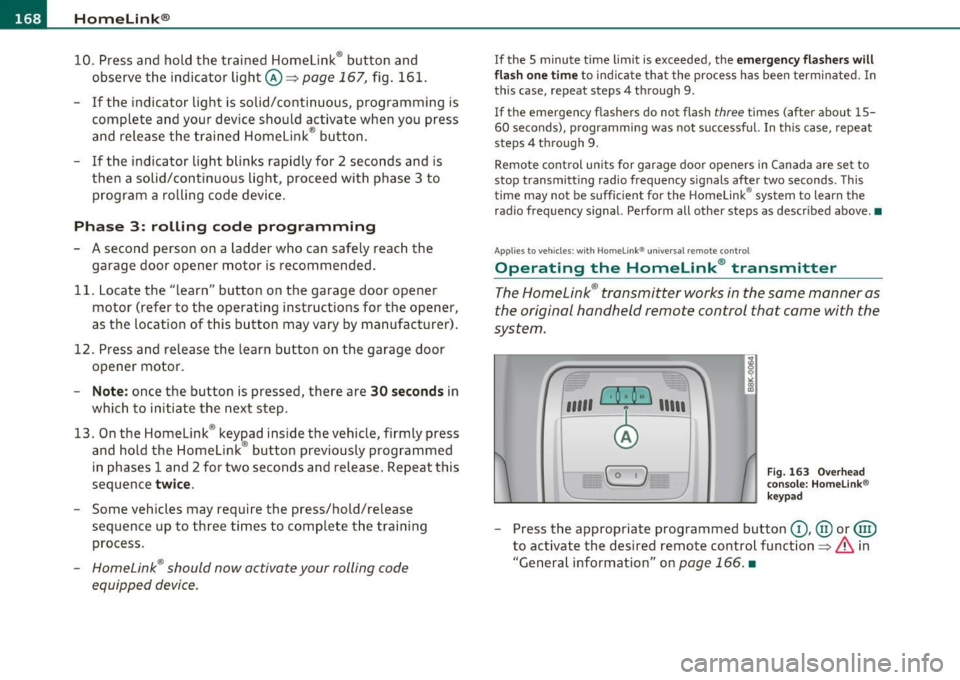
Operating the Homelink ® transmitter
The Homelink ® transmitter works in the same manner as
the original hand held remote control that came with the
system .
,,,,, r. o; o ,,, ) 1 ,111
F
ig. 1 63 O ve rh ead
co nso le : H om elink ®
k ey p ad
- Press the appropriate programmed button G), @ or@)
to activate the desired remote control function==>
& in
"General information " on
page 166. •
Page 206 of 362
111 ....... _A_ i_rb _ a_,g,:;._ s_, y'- s_ t_e _m ________________________________________________ _
& WARNING (conti nued)
seating position and have the airbag system inspected by your
authorized Audi dealer .
• A tight tether or othe r strap on a rearward-facing child
restraint attached to the front passenger seat can put too much
pressure on the weight-sensing mat in the seat and register more
weight than i s actually on the seat. The heav ier weight registered
can make the system work as though an adult were on the seat
and deploy the Advanced Airbag when it must be suppressed
causing serious or even fatal injury to the child .
• If, in ex ceptional circumstances, you must install a forward·
facing child restraint on the front passenger seat, always move
the seat into i ts rearmo st po sition in the seat's fore and aft adjust ·
ment range, as far away from the airbag as possible . The backrest
must be adjusted to an upright position. Make sure that the
PASSENGER AIR BAG OFF light comes on and stays on all the time
whenever the ignition is switched on.
& WARNING
• If the PASSENGER AIR BAG OFF light do es not go out when an
adult is sitting on the front passenger seat after taking the steps
de scribed above, make sure the adult i s properly seated and
restrained at one of the rear seating positions.
• Have the airbag system inspected by your authorized Audi
dealer before transporting anyone on the front passenger seat.
[ i ] Tips
If the we ight-sens ing mat in the front passenger seat detects an
empty seat, the front a irbag on the passenger side w ill be t urne d off,
and PASS ENGER AIR BAG OFF will stay on.•
Repair, care and disposal of the airbags
Parts of the a irbag system a re installed at many different p laces on
your Audi. Inst all in g, remov ing, servic ing or repa iring a part in an
area of the ve hicle can damage a part of an airbag system and preve nt
t ha t system from working pro perl y in a coll is ion.
T here are some important thi ngs you have to know to make sure that
the effectiveness of the system will not be impa ired an d that
discarded components do no t cause injury or poll ute the enviro n
ment .
& WARNING
Improper care , servicing and repair procedures can increase the
risk of personal injury and death by preventing an airbag from
deploying when needed or deploying an airbag unexpectedly:
• Never cover, obstruct , or change the steering wheel horn pad or
airbag cover or the instrument panel or modify them in any way.
• Never attach any objects such as cupholders or telephone
mountings to the surfaces covering the airbag unit s.
• For cleaning the horn pad or instrument panel, use only a soft,
dry cloth or one moistened with plain water. Solvent s or cleaners
could damage the airbag cover or change the stiffness or strength
of the material so that the airbag cannot deploy and protect prop·
erly .
• Never repair, adjust, or change any part s of the airbag system .
• All work on the steering wheel, instrument panel , front seats
or electrical sy stem (including the installation of audio equip·
ment , cellular telephones and CB radios, etc .) must be performed
by a qualified technician who ha s the training and special equip ·
ment necessary .
• For any work on the airbag system, we strongly re commend
that you see your autho rized Audi dealer or qualified workshop.
• Never modify the front bumper or parts of the vehicle body.
liJ,,
Page 246 of 362
Intelligent technology
'-------------------------------------------------
vi dual components. It regulates consumption, so that more electrical
energy is not being used than is being generated and ensures an
optimal state of charge for the battery .
[I] Tips
• But even energy management cannot negate the limits of physics.
Consider that the power and life of a battery are limited.
• If starting ability is threatened, you are informed by a warning
~ page 245, "Driver notification in the instrument cluster display" .•
What you should know
The highest priority is given to maintaining starting capa
bility.
Th e battery is severe ly taxed in short-distance driving, in city traffic
and during the cold time of year. Abundant electrical energy is
required, but only a little is generated.
It is also critical if the engine
is not running and electrical components are turned on. In this
instance energy is being consumed but none is being generated.
It is in prec ise ly these sit uations that you will notice energy manage
ment actively regulating the distribution of energy.
Vehicle stands for an extended period
If you do not drive your vehicle over a period of several days or weeks,
electrical components are gradually cut back or sw itched off. This
reduces energy consumption and maintains starting capability over a
longer period.
Take into consideration that when you unlock your vehicle, some
convenience functions, such as the remo te key or power seat adjust
ment, may not be available. The convenience functions will be avail
able again when you turn on the ignition and start the engine.
W ith the engine turned off
If you listen to the radio, for example, with the engine turned off or
use other MMI functions, the battery is being discharged .
If starting capability is jeopardized due to energy consumption, the
following warning appears in the MMI display:
Please start engine, otherwise system will switch off in
3 minutes.
Th e warn ing indicates that the system will be turned off automati
cally after 3 m inutes. If you wish to continue using the functions, you
have to start the engine.
With the engine running
Although electrica l energy is generated when the vehicle is being
driven, the battery can become discharged. This happens most ly
when little energy is being generated and a great deal consumed and
the battery's state of charge is not optimal.
T o br ing the ene rgy balance back into equilibrium, consumers which
require especially large amounts of energy are temporarily cut back
or switched off. Heating systems in particular require a great deal of
energy .
If you notice, for example, that the heated seats* or the
heated rear window are not heating, they have been temporarily cut
back or switched off. These systems will be ava ilable again as soon as
the energy ba lance has been restored.
You will also notice that engine idle speed has been increased
slightly. This is normal and not a cause for concern. By increasing
eng ine id le speed the additional energy required is generated and the
battery is charged. •
Page 282 of 362
-~_C_ h_e _c_ k_ i_ n ....: g:::e._ a_ n _ d_ f_il _l _in _ g =- --------------------------------------------
- Unscrew the cap~ to the engine oil filling hole
=>
page 279, fig . 207.
- Carefully top off with the app ropriate oil in 0.5 liter doses.
- Check the oil le v e l again after two minutes=>
page 2 79.
- Top off the oil aga in , if necessary .
- S crew the cap bac k on th e fi lling hole.
& WARNING
• While topping off, the oil must not come in contact with hot
engine parts -fire hazard!
• The oil filler cap must be properly secured to prevent oil from
being sprayed on the hot engine and e xhaust system when the
engine i s running · fire hazard!
• If your skin has come in contact with the engine oil , you mu st
s ub sequently cleanse it thoroughly .
0 Note
• Check the oil level using the radio or MMI*. If the message Please
reduce oil level
appears, contact your authorized Audi dealer or other
qualified wo rkshop to have excess o il extra cted if necessary.
• Audi does not recommend the use of oil additives. They may
damage the engine and adversely affect your New V ehicl e
Warranty.
<£> For the sake of the environment
• Under no circumstances can the o il come in contact with the
sew age netwo rk or the so il.
• Observe and fo llow legal reg ulat ions when dispos ing of empty oil
conta iners. •
Changing the engine oil
We reco mmend tha t ha ve your oil chan ged by an auth o
ri zed Audi deal er or a qualified s erv ic e sta tion.
Before you check anything in the engine compartment, always read
and heed all WARNINGS=>
& in "Working in the engine compart
ment" on
page 275.
Th e en gine oi l must be changed a ccording to the i nte rvals spe cifi ed i n
your Warranty
& Maintenance booklet. This is very important because
the lubricating prope rties of oil diminis h gradually during normal
veh icle use.
Under some circumstances the engine o il should be changed more
frequently . Change o il more often if yo u drive most ly sho rt dista nces,
operate the vehicle in dusty areas or under predom inant ly stop-and
go tra ffic condi tions , or have your vehi cle where tempera tures rem ain
be low freezing for extended per iods.
Detergent ad ditives in the oi l will make fresh oil look dark after the
eng ine has bee n ru nning fo r a short t ime . This is normal a nd is not a
reason to change the oil mo re often than recommen ded .
B eca u se of the prob lem of pro per disposal, along with the s peci al
too ls and necessary expertise required, we strong ly recommend that
you have your o il changed by a n autho rized
Audi dealer or a qualified
serv ice stat io n.
If you choo se to change your oil yourself , please note the following
i m po rtant informat ion:
& WARNING
To reduce the risk of personal injury if you must change the engine
oil in your vehicle yourself :
• Wear eye protection.
• To reduce the risk of burns from hot engine oil, let the engine
cool down to the touch.
~