turn signal AUDI A5 COUPE 2011 Owner's Manual
[x] Cancel search | Manufacturer: AUDI, Model Year: 2011, Model line: A5 COUPE, Model: AUDI A5 COUPE 2011Pages: 362, PDF Size: 84.88 MB
Page 165 of 362
___________________________________________________ P_ a _ r_k :...:.; a..::s ...:s...: i..::s ...:t _ ___,J_
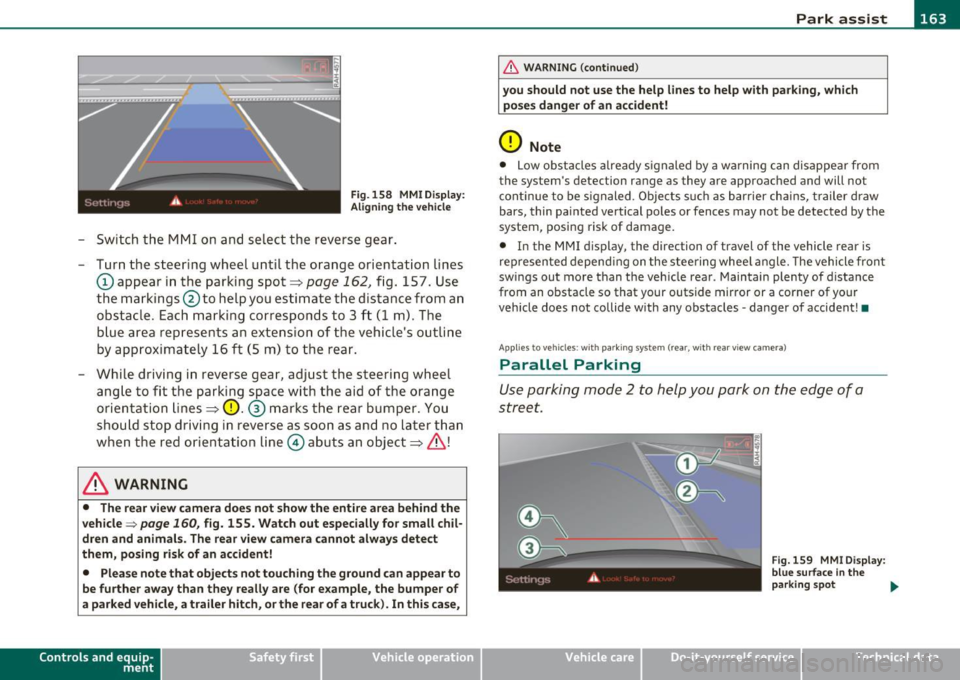
Fig. 158 MMI D isplay:
Ali gning the vehicl e
-Switch the MMI on and se lect the reverse gear .
- Turn the steering wheel until the orange orientation lines
(D appear in the parking spot=> page 162 , fig. 157. Use
the markings @to help you estimate the distance from an
obstac le. Each marking corresponds to 3 ft (1 m) . The
b lue ar ea represents an extension of the vehicle's outline
by approximately 16
ft (5 m) to the rear .
- While driving in reverse gear, adjust the steering wheel ang le to fit the parking space with the aid of the orange
orientation lines =>
0. ® marks the rear bumper . You
should stop driving in reverse as soon as and no la ter than
when the red orientation line© abuts an object=>& !
& WARNING
• The rear view came ra does not show the enti re area beh ind the
v ehicle =>
page 160, fig. 155. Watch out e spe cially fo r s mall chil ·
dren and animal s. The rear v iew cam era cannot alwa ys dete ct
them , posing ri sk of an accident!
• Plea se note that obje ct s not tou ching the groun d can appear to
be further awa y than th ey reall y are (for example , th e bum per of
a parked vehi cle, a trailer hit ch , or the r ear of a truck) . In thi s case ,
Con tro ls a nd e quip ·
m en t Vehicle
OP-eration
& WARNING (con tin ued)
you sh o uld not use the help lin es to help with p arking , whic h
po se s dang er of an accident!
0 Note
• Low obstacles a lready signaled by a wa rning c an disappear from
the sys tem's de te ct ion range as they are app roached and will no t
conti nue to be signaled . Objects such as barrier cha ins, trailer draw
bars, thin painted ve rtical poles or fences may not be detected by the
system , posing risk of damage.
• In the MMI display , the direc tion o f travel o f the vehicle rear is
represen ted depend ing on the steering whee l angle. The vehicle front
swings out more than the veh icle rear . Maintain plenty of distance
from an obstacle so that your outside mirror or a corner of your
vehicle does not collide with any obstacles -danger of accident !•
Ap plie s to veh icle s: with pa rk ing syst e m (r ea r, wi th rear vie w cam era)
Parallel P arking
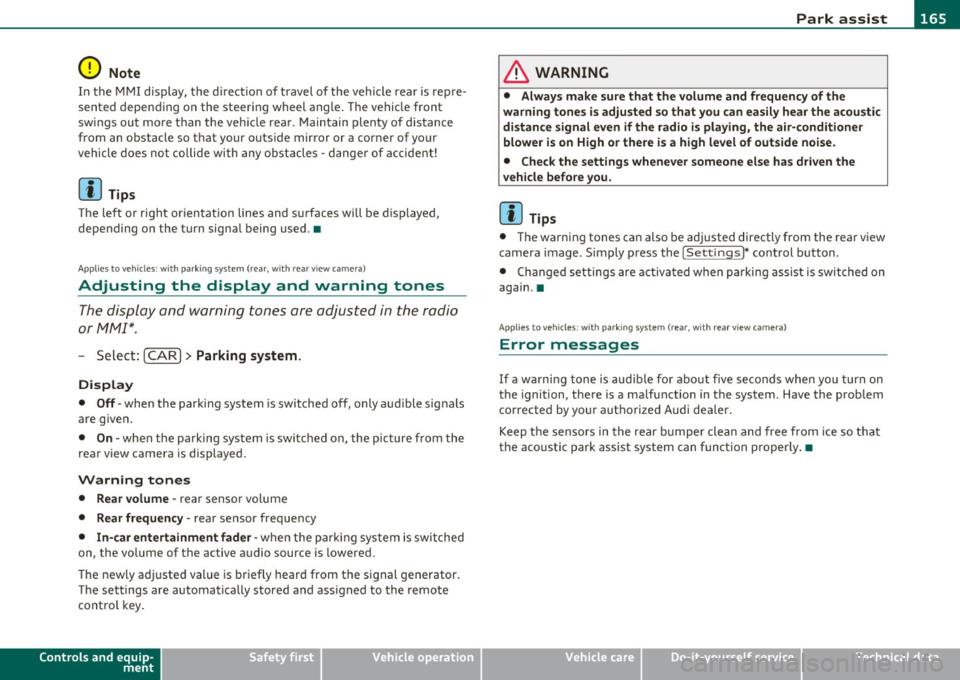
Use parking mode 2 to help you park on the edge of a
street.
Vehicle care
Fig. 159 MMI Di spl ay :
blue surface In the
p arking s pot
~
Do-it-yourselt service iTechnical data
Page 166 of 362

1111....__P_ a_r_ k_ a_s_ s_ i_ s _t __________________________________________________ _
Fig.160 MMI Display:
Blue curve on the curb
The following steps apply only when there is no obstacle
(such as a wall) near the parking spot. Otherwise, please read
the "Tips on Parking Next to Obstacles".
- Activate the turn signal.
- Switch the MMI on and select the reverse gear. The
parking aid turns on and parking mode 1 appea rs on the
display.
- Position your vehicle parallel to the edge of the street,
approximately 3 ft (1 m) from a parked vehicle.
- Press the
Mode => page 163, fig. 159 (D control button
on the MMI control console. Parking mode 2 appears.
- Back up in reverse gear and align your vehicle so that the
blue area ® borders on the rear end of the vehicle or on
the parking spot line. The blue area represents an exten
sion of the vehicle's outline by approximately 16 ft (5 m)
to the rear. The long side of the blue area should be on the
curb. The entire blue area must fit into the parking spot.
- While the vehicle is stationary, turn the steering wheel to
the right as far as it will go. -
Back into the parking spot until the blue curve touches the
curb ::::> fig. 160. Stop the vehicle.
- While the vehicle is stationary , turn the steering wheel to
the left as far as it will go .
- Continue to back up into the parking spot until the vehicle
is parked parallel to the curb .® marks the rear bumper .
You should stop driving in reverse as soon as and no later
than when the red orientation line© abuts an object
=> & !Keep an eye on the front of your vehicle while doing
this =>
0.
Parking next to obstacles
When there is an obstacle (such as a wall) next to the parking spot,
choose a spot with more space on the sides. Position the long side of
the blue a rea so that the re is sufficient space from the curb. The area
must not be on the curb. You will also need to start turning the
steering wheel much earlier. There should be a sufficient amount of
space between the curb and the blue curve, and the blue curve
=> fig . 160 must not touch the curb .
& WARNING
• The rear view camera does not show the entire area behind the
vehicle => page
160, fig. 155. Watch out especially for small chil
dren and animals. The rear view camera cannot always detect
them, posing risk of an accident!
• Please note that objects not touching the ground can appear to
be further away than they really are (for example, the bumper of
a parked vehicle, a trailer hitch, or the rear of a truck). In this case,
you should not use the help lines to help with parking, which
poses danger of an accident! _,,,
Page 167 of 362
Park assist IIJII _________________________________ _____;.....:;_;_.:..:,____;;_ ____ _
0 Note
In the MMI display, the d irect ion of t ravel of the vehicle rear is rep re
sented depend ing on the steering wheel angle. The vehicle front
swi ngs ou t mo re t han t he ve hicle re ar. M ain tain ple nty of dist ance
from an obstacle so t hat your outs ide mirror or a corner of your
vehicle d oes no t collide with any o bstacles - dange r of accide nt!
[ i ) Tips
Th e left or right or ientat ion lines and s urfaces will be displ aye d,
depending on the tu rn signal being used. •
App lies to veh icles : with park ing syst em (rear, wit h rea r view cam era)
Adjusting the display and warning tones
The display and warning tones are adjusted in the radio
or fv1fv1 I*.
-Select : [CAR]> Parking system.
Display
• Off -
when the parking system is switched off, only aud ible sig nals
are given.
• On -when the pa rking system is switc hed on, the pic ture from the
rea r view camera is displayed.
Warning tones
• Rear volume -rear sensor vo lume
• Rear frequency -rear sensor frequency
• In-car entertainment fader -when the par kin g sys tem i s sw itched
on, the volume of the active audio source is lowered.
T he newly a djusted value is br iefly hear d from the signal generator .
T he settings are automatica lly stored and assigned to the remote
cont rol key.
Controls and equip
ment Safety first
& WARNING
•
Always make sure that the volume and frequency of the
warning tones i s adju sted so that you can easily hear the acou stic
distance signal even if the radio is playing , the air-conditioner
blower is on High or there is a high level of outside noise.
• Check the settings whenever someone else has driven the
vehicle before you.
[I] Tips
• Th e warning tones can also be ad justed directly from the rea r view
camera image . Simply p ress the
[Settings I* cont rol b utton .
• C han ged settings are a ctivat ed w hen parking assist is switched on
again .•
A pplies to v ehicl es: w ith park ing syst em (r e a r, wi th re ar view cam era)
Error messages
If a warni ng tone is aud ible fo r about five se conds when yo u turn on
the ignition, the re is a ma lfunction in t he system. Have the prob lem
co rrected by yo ur a utho rized Audi dea ler .
K eep the se nsors in the rear b umper clean and free from i ce s o th at
the acoustic pa rk assist system can function p roper ly .•
Vehicle care Technical data
Page 219 of 362
_________________________________________ _:C~ h~il ~d ~ S~a ..!.:fe =. t SYL _lffll
and for the different models of the same kind of child restraint
offered by child restraint manufacturers.
The weight ranges for the individual types, makes and models of ch ild
restraints that the NHTSA has specified in the Safety Standard
together with the weight ranges of typical infants and typical 1 year
old child have been stored in the control unit of the Advanced Airbag
System. When a child restraint is being used on the front passenger
seat with a typical 1 year-old chi ld, the Advanced Airbag System
compares the weight meas ured by the weight sensing mat with the
information stored in the electronic control unit .
The electronic contro l unit a lso registers the tension on the front
passenger safety belt. The tension on the safety belt for the front
passenger seat will be different for an adult who is properly using the
safety belt as compared to the tension on the belt when it is used to
attach a child restraint to the seat . The sensor below the latch for the
safety belt for the front seat passenger measures the tension on the
belt. The input from this sensor is then used with the weight to
"decide", whether there is a child restraint with a typical 1 year-old
child on the front passenger seat and whether or not the airbag must
be turned off .•
Child restraints and Advanced Airbags
Regardless of the child restraint that you use, ma ke sure that it has
been certified to meet United States Federal Motor Vehicle Safety
Standards and has been ce rtified by its manufacturer for use with an
airbag . Always be sure that the child restraint is properly installed at
one of the rear seating positions. If in exceptional circumstances you
must use it on the front passenger seat, carefully read all of the infor
mation on ch ild safety and Advanced Airbags and heed all of the
app licab le WARNINGS. Make certain that the child restra int is
correctly recognized by the weight-sensing mat inside the front
passenger seat, that the front passenger airbag is turned off and that
the airbag status is always correctly signaled by the
PASSENGER AIR
BAG OFF
light.
Controls and equip ment Safety first Vehicle operation
Many types and models of child restra
ints have been available over
t he years, new models are introduced reg ularly incorpo rating new
and improved designs and older models are taken out of product ion.
Chi ld restraints are not standardized. Child restraints of the same
type typ ically have d ifferent weights and sizes and differe nt 'foot
prints,' the size and shape of the bottom of the child restraint that
sits on the seat, when they are installed on a vehicle seat . These
differences make it virtually impossib le to certify compliance with
t he requirements for advanced airbags with each and every chil d
restra int that has ever been sold in the past or will be sold over the
course of the useful life of your vehicle.
For this reason, the United States Nationa l Highway Traffic Safety
Administration has published a list of specific type, makes and
mode ls of child restra ints that must be used to cert ify compliance of
the Advanced Airbag System in yo ur vehicle with the suppression
requirements of Federal Motor Veh icle Safety Standard 208. These
child restraints are:
Subpart A - Car bed child restraints
Model
Angel Gua rd Angel Ride
AA2403 FOF
Manufactured on or
after
September 25, 2007
Subpart B -Rear-facing child restraints
Model
Century SmartF it 4543
Cosco Ar riva 22-013PAW and
base 22-999 WHO
Evenflo D iscovery Ad just Right
21 2
Evenflo First Cho ice 204
Manufactured on or
after
December 1, 1999
September 25, 20 07
December 1, 1999
December 1, 1999
Vehicle care Do-it-yourself service Technical data
Page 354 of 362
-Alphabetical inde x lffi'f ___,__ ______________ _
Heating
Deluxe automatic climate control plus
101
Heavy clothing and safety belts . ... ... . 184
High beam ................ ...... .. . 62
Warning/indicator lights . .......... 17
H igh vo ltage warning labe l ......... .. 336
HomeL ink® un iversal remote control . .. 166
Hood
Opening ................ ...... ..
274
Release lever ............ .. .... .. 2 7 4
Horn ................. .. .. .. .. .... .. 9
How are child restraint system anchors related to chi ld safety ..... .............
229
How many a irbags does my vehicle have? .. ..
197
How often should I check my tire pressures? .
298
How safety belt pretensioners work ... . 188
Indicator lights ... .......... ..... .. .. 14
Airbag system .......... .. ... 201, 202
PASSENGER AIR BAG OFF .......... 202
Infant seats ....... ... .. .... ....... 221
Ins ide rear view mirror ........ .. .. .. .. 68
Installing child safety seats
Safety belts ............... ... .. .
225
Installing the upper tether strap on the
anchorage ... .... ... ..... .... ..
233
Instrument lighting .......... .. .. .. .. 61
Instruments and controls ..... .. .... .. 10
General illustration .............. ... 9
Interior lights Dimming . .... ... .. .. .. .. .. .. .. ..
63
Front .. ................. .. .. .. .. 63
Rear ... ................. .. .. .. .. 64
Interval wiping . .. .. ............... .. 65
Rain sensor ......................
65
Hydroplaning . .. ............ ....... 302 J
I Jumper cables .. .. .................. 329
Jump-sta rting ................ .... .. 328
Ignition key ........ ............. ... 112
Emergency unlocking .. ....... ..... 44 K
Ignition lock .. .... .. .. .... ......... 112
Malfunction ............. ...... 36, 40 Key ........ ...... ... .. .... ........ 42
Immobilizer . ... ..... ............... 42 Battery replacement ............... 43
Important things to do before driving .. 171
Improperly worn safety belts ......... 188
Indicato r light
Dynamic steer ing .......... ....
15, 37
Key replacement ..... ............. 42
Master key with remote control .. .. .. 42
Mechanica l key ................. .. 44
Kick-down tiptronic ....... .............. ...
154
Knee airbags .. .... .... ...... ... .. .. 206
Description .. .. .. ............... 206
How they work .............. ... . 207
Important safety instructions ...... 208
L
LATCH 229
Description .. ...... ............. 230
Insta lling a child restraint ....... .. 231
Location . ........... .. .... .... .. 230
Mounting and releasing the anchorage
hook .. ...... .. .. ..... .. .. .. ..
231
Leather .................... ... .. .. 264
Cleaning ........... .. .... .... .. 265
Lifting jack .......... ... . .. .... .. .. 319
Lifting vehicle ...................... 333
Light
Coming home ............ ... ... ..
60
Daytime running lights ............. 60
Driving light control ............... 58
Exterior lighting .. .. .... ......... . 60
Leaving home ....... .. .. .. .... .. . 60
Switching on and off ....... ... .. .. . 58
Light sensor ................ ... .. .. . 58
Light sensor defective ...... .. .. ... ... 38
Lighting ..... .. .. .... .............. 58
Lights
Emergency flashers . . . . . . . . . . . . . . .
62
High beam ...... . .. .............. 62
High beam warning/indicator light ... 17
Turn signals .................... .. 62
Xenon headlights . .. .... .......... 61
Page 359 of 362
_________________________________________ ..!.A~ lp~ h~a ~b~ e~ t~ i~c ~a ~l ...!_i~n ~d ~e~ x~ _ffllll
Tires and vehicle load limits .. .. .... 299 Trunk pass-through .... .. .. .. ... ..... 88 W
Wheel bolts ..................... 308 Turn s ignals ... .. ... .... ..... .. .. .. .. 62
W inter t ires ............. ... ... .. 307 Warning/indicator lights ... ..... .. . 16 Warning lights . .. ................... 14
T ires/Wheels
Low aspect ratio tires ............. 309
Tire pressure mo nitoring system 16,310
T ool kit .. ................... .. .. .. . 314
T orn or frayed safety be lts ............ 184
T ouch -up paint ....... .. .. .. ... .. .. . 260
T ow ing
Fro nt eye let ..................... 331
Rea r eye let ...................... 332
T ow tr uck procedu res . .. .......... 3 31
TP MS
Ti re pressure monito ring system . .. . 3 11
Trailer towing ................... .. . 251
Operating instructions ... ...... .. .
251
Tech nica l requirements ..... .. 251,252
Tips .................... ... .. .. . 253
T .. ransm1ss1on ... ..... .... ... ... .. .. . 150
6-speed manual transmission . .. . ... 150
tiptronic . ... .. .. ... ..... .... . .. . 150
Tr ansport Canada . .................. 180
Tread Wear Indicator (TWI) ........... 301
T rip comp uter
Fuel consumption ... .. .. .. .... .. .. 24
Mileage ......... .. .. ... .... .. .. .. 24
Single-trip memory ............ .. .. 25
Total-trip memory ................. 25
Tr ip odometer .... .. ... . ..... .. .. .. .. 13
T runk escape handle .................. 52
T ru nk lid
See Luggage compartment .......... 51
Controls and equip
ment Safety first
Warning/indicator lights .
... .... .. .. .. 10
u Adaptive cruise control ............ 129
Airbag system ...... ...... .. .... .. 16
Undercoating ... .. ... ... .. .. .. .. ... 2 62
Anti-lock brake system (ABS) ........ 17
Unfasteni ng safety be lts .. ... ........ 188
Brake system .. ..... ..... ... . ... .. 18
Unidirect ional tires .. ... .. .. .. .. ..... 291 Cru
ise con trol . ................... 17
Uniform t ire quali ty g r.ad ing . ......... 306 Electromechanical
parking brake ..... 18
Unlocking Lu ggage compartment lid ....... .... 51
Powe r locking switch ... ........ ... . SO
Remote cont rol key ................ 47
Us ing the me chanical key ........ .. . 4 9 E
lectron ic power cont rol . ........... 15
E lectron ic stabi liz ation prog ram ( ESP) 15
Hi gh beam ........ ............. .. 17
Ma lf u n ction Indi cato r L amp ( MIL) .... 17
Sa fety belt . ... ... ... .... .. .. ... .. 16
Use of jumper cables ... .. .. .. .. .. ... 329 T
ir e pressure mon itoring system ... .. 16
T urn signals ... ... ... ... .. ... ... .. 16
V Warra nty cove rages . .. ..... ......... 340
Washer reservo ir ............. .. .. .. . 290
Valet parking .................... ... . 55
w h'
a s ing .... .. ... .... .. .. .. .... .. . 2 56
Vani ty mir ror . ... ...... .. .. ... .... .. . 64 Automatic car wash ... ... .... .. .. . 257
Vehicle Ide ntificat io n Numbe r (VIN) .. .. 336 by hand ......
... .. .. .. .. .... .. . 257
Vehicle jac k ................ .. ...... 319 Genera
l informat ion ...... ... .. .. . 256
Vehicle lite rat ure ... ............ .... .. S with
a power washer ............. . 258
Vehicle tool kit ..................... 314 Waxing .
.. .... ....... ...... .. .... . 2 59
Vehicle-care products ... .... ... ... .. . 256 Wea r indicator ... ... ...... ... .... .. 301
Ventilation Deluxe au tomatic climate control .... 95
Delu xe au tomati c clim ate cont rol p lu s
101 Weatherstrips .
... .. .. ...... .. .. ... . 26 1
w' h e1g ts ... ..... ....... ....... . ... . 337
What happens if you wear your safety belt too
loose? ........... .. .... .... .. . 186
What happens to u nbelted occupants? .. 183
What impairs driving safety? . .... . .. .. 171
Vehicle operation Vehicle care Do-it-yourself service Technical data