warning AUDI A5 COUPE 2011 Owner's Guide
[x] Cancel search | Manufacturer: AUDI, Model Year: 2011, Model line: A5 COUPE, Model: AUDI A5 COUPE 2011Pages: 362, PDF Size: 84.88 MB
Page 54 of 362

Opening and closing
Closing the rear lid
- Pull the rear lid dow n at the grip on the i nside a nd allow it
t o drop g ent ly to c lose it~ &.
LJ}. WARNING
• After closing the rear lid, always pull up on it to make sure that
it is p rope rly closed. Otherwi se it could open suddenly when the
vehicle is moving.
• To help prevent poisonous e xhaust ga s from being d rawn into
the vehicle, always keep the rear lid closed while dri ving. N eve r
tran sport objects larger than those which fit completely into the
luggage area, becau se th en the rear l id cannot be fully clo sed .
• Never leave your vehicle unattended e specially with the rear lid
left op en. A child could crawl into th e car through the luggage
compartment and pull the lid shut , becoming trapped and unable
to get out . To reduce the risk of personal injury, never let children
play in or around your vehicle . Always keep the rea r lid a s well as
the vehicle doors closed when not in u se.
• Alway s ensure that no one is within range of the rear lid when
it is moving, in particular close to the hinges -fingers or hands can
be pinched.
(J] Tips
• When the vehicle is locked, the rear lid can be opened separate ly
by p ressing the button
c::5 on th e maste r key. When yo u close the rear
lid again, it locks automatica lly.
• If the rear lid is open o r not p roper ly closed w hen the ignitio n is
turned on, the door and rear lid warning=>
page 23 appears in the
instrument cluste r display .•
Trunk escape handle
In ca se o f an emergency, the lug gage com partme nt lid
can be opened from the inside using the trunk escape
handle.
Fig. 43 T runk esca pe
handle : view from
in side t he close d trunk
To open luggage compartment lid
- Pull t he hand le down towar ds the bumper ~ fig. 4 3.
The trunk escape handle inside the l uggage compartment lid is made
o f fluorescent mater ial to g low in the dar k.
LJ}. WARNING
The trunk escape handle is to be used only in an emergency .
(J] Tips
The emerge ncy re lease lever should never be used as a hand le for
closing the luggage compartment lid.•
Page 55 of 362

Power windows
Controls
The driver can operate the window regulator for the
driver's door with the left switch and the window regu
lator for the passenger's door with the right switch.
Fig. 44 Driver's door:
power window
switches
If the respective switch is pushed or pulled the window will
open or close. The power window switches have a
two-posi
tion function:
Opening the windows
- Push the switch to the first stop and hold it there until the
window has lowered to the desired position .
- Push the switch briefly to the
second stop : the window
will automatically open all the way .
Closing the windows
-Pull the switch up to the first stop and hold it there until
the window has risen to the desired position.
- Pull the switch quickly to the
second position: the window
will automatically close all the way.
Con tro ls a nd e quip
m en t Vehicle
OP-eration
Opening and closing
& WARNING
• Do not leave children unattended in the vehicle, especially with
access to vehicle keys. Unsupervised use of the keys can result in
starting of the engine and use of vehicle systems such as power
windows, etc. which could result in serious injury.
• Remember -you can still open or close the power windows for
about ten minutes after the ignition is switched off. Only when
either of the doors are opened are the power windows switched
off.
• Be careful when closing the windows. Check to see that no one
is in the way, or serious injury could result!
• Always remove the ignition key whenever you leave your
vehicle.
• If you lock your vehicle from the outside, no one, especially
children, should remain in the vehicle.
• Do not stick anything on the windows or the windshield that
may interfere with the driver 's field of vision.
(I) Tips
• When you open the doors, the windows automatically lower about
10mm.
• After the ignition has been switched off, the windows can still be
opened o r closed for about 10 minutes. The window regulato rs are
not switched until the driver's or passenger's door is opened. •
Vehicle care Do-it-yourselt service iTechnical data
Page 56 of 362

Open ing and closing
Convenience opening/closing
The windows and the panoramic tilting sunroof can be
opened and closed with the mechanical key or the emer
gency key .
Convenience opening feature
~ N 0 ,; (X) a,
Fig . 45 Key turns for
ope nin g an d clos in g
- Use the emergency key or pull the mechan ical key out of
the master key~
page 44.
- Insert the key into the lock of the driver's door .
- Turn the key to position~ fig. 45
© until all the windows
have reached the desired position and the panoramic
tilting sunroof is t ilted .
Convenience closing featu re
- Use the emergency key or pull the mechanical key out of
the master key~
page 44.
-Turn the key in the lock of the driver's door to the lock
position @ until the windows and the panoramic tilting
sunroof are closed~&.
When the panoramic tilting sunroof is tilted/closed, the electric sun
shade* is also opened/closed.
& WARNING
• Neve r close the windows and th epanor amic til tin g sunroof
i nat tent ively and wi thout chec king -th ere is risk of i njur y.
• You m ust alway s wa tc h w hen the windows ar e being ra ise d s o
tha t no o ne can be trapp ed. If you r ele ase th e key, t he cl osing
ac tion is immediat ely can cel ed .
• Alwa ys read and hee d W ARNIN G~
& in "Gener al desc ripti on"
on
pa ge 45 . •
Correcting window regulator malfunction
After disconnecting the vehicle battery, the one-touch up
and down feature must be activated again.
- Pull and hold the power window switch until the window is
completely closed .
- Release the switch.
- Pull the switch again for one second . The automatic
closing/opening is now reactivated .•
Page 58 of 362

Opening and closing
& WARNING
Pay careful attention when closing the panoramic tilting sunroof
• otherwise serious injury could result! For this reason, always
remove the ignition key when leaving the vehicle.
• Never leave children or persons requiring assistance alone in
the vehicle, especially when they could access the vehicle keys.
Unsupervised use of the keys can result in the engine being started
or use of vehicle systems such as the power windows, etc. which
could result in serious injury. The doors could be locked with the remote key, delaying help in an emergency.
• The panoramic tilting sunroof will continue to operate until
the ignition key has been removed and one of the front doors has
been opened .
0 Note
Always close your panoramic tilting sunroof when leaving your
vehicle . Sudden rain can cause damage to the interior equipment of
your vehicle, particularly the electronic equipment.
[ i J Tips
• Information on convenience opening/closing=> page 54. •
Emergency closing of the panoramic tilting
sunroof
The panoramic tilting sunroof can be closed manually in
an emergency .
Fig. 48 Section of
headliner: Unscrewing
lighting unit
Fig. 49 Section from
headliner: Crank for
emergency operation
If the panorama sunroof detects an object in its path when it
is closing, it will open again automatically. In this case, you
can close the roof with the power emergency closing func-
tion.
~
Page 61 of 362
& WARNING
Automatic headlights are only intended to assist the driver. They
do not relieve the driver of his responsibility to check the head
lights and to turn them on manually a ccording to th e current light
and visibility conditions . For example , fog cannot be detected by
the light sensors. So always switch on the headlights
fD under
these weather conditions and when driving in the dark.
[I] Tips
• Th e light sensor * for headlight contro l is located in the rear view
m irror mount. You shou ld therefore no t apply any st ick ers to the
windshield in th is area in order to prevent malfunct ions or fa ilures.
• Th e sensitivi ty leve l for t he lig ht se nsor* set at th e fa cto ry ca n be
change d in the MMI * men u::::>
page 60 in the a utomat ic dr iving lights
fu nct ion.
• When you remove your key from the ign ition wh ile the vehicle's
ligh ts ar e tu rned on, a bu zze r soun ds as long as the d river's door is
open.
• Please obey all laws when using the lighting systems described
here .
• The comi ng home/leaving home f unct ion* is available only with
the switch in the A UTO position .•
Con tro ls a nd e quip
m en t Vehicle
OP-eration
Fog Lights
Clear vision
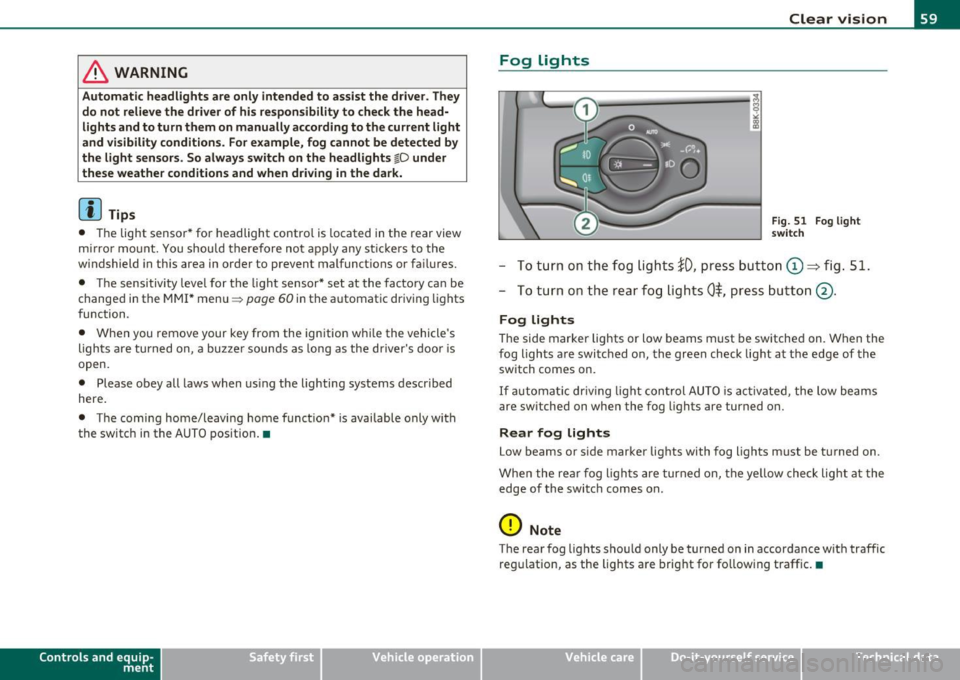
Fig. 51 Fog light
swit ch
- To t urn on th e fog lights !D, pres s butt on (D => fig. 51.
- To tu rn on t he rea r fo g lig hts
0$, pres s butt on @ .
Fog lights
The side marker lights or low beams must be sw itche d on. When the
fog lights a re switc hed o n, the green check light a t the edge of the
switch comes on.
If au to m atic driv ing lig ht con trol AU TO is acti vate d, the low beams
are switched on whe n the fog lights are turned on.
Rear fog lights
Low beams or s ide marker lights with fog lights m ust b e tur ned on .
Whe n the re ar fog lights are tur ned o n, th e ye llow check lig ht at t he
edg e of the swi tc h comes on.
0 Note
The rea r fog lig hts sho uld only be tur ned on in accordance w it h t raffic
re gul ation , as the lights a re bright for fo llow ing traff ic. •
Vehicle care Do-it-yourselt service iTechnical data
Page 62 of 362
![AUDI A5 COUPE 2011 Owners Guide Clear vision
Adjusting exterior Lighting
The functions are selected in the radio or fvf fvfI *.
- Select : Function button I CAR ]> E xterior lighting .
Coming home*
The coming home](/img/6/57583/w960_57583-61.png "AUDI A5 COUPE 2011 Owners Guide Clear vision
Adjusting exterior Lighting
The functions are selected in the radio or fvf fvfI *.
- Select : Function button I CAR ]> E xterior lighting .
Coming home*
The coming home")
Clear vision
Adjusting exterior Lighting
The functions are selected in the radio or fvf fvfI *.
- Select : Function button I CAR ]> E xterior lighting .
Coming home*
The coming home function ensures that after
tu rning off the ignition
a nd op enin g th e driv er' s door
the vehi cle periphery is illum inated i n
the dark . In addition, the fron t fog lights, the ta il ligh ts and the
license p late light a re tu rned on . The power-on time can be set for a
period from O (off) to 30 or 60 seconds .
Leaving home *
The leaving home funct ions ensures that
w hen unlocking , the vehicle
periphery is illuminated in t he da rk. In addi tion, the front fog l igh ts,
the tail lights and the license p late light are turned on . This function
can be tu rned on and off.
Auto he adligh ts*
When the light switch is in the AUTO=> page 58 position, the switch
on point of the l ights can be changed in the automatic driving light
function.
D aytime running lights
T he daytime running lights ca n be tu rn ed on o r off using this func
tion*. If the function is act ive, the dayt ime runn ing lights are turned
on a utomat ica lly when the ignition is switched on.
[ i ] Tips
T he coming home/ leaving home f unct ion * is avai lab le only wi th the
switch in the AUTO position .•
Daytime running Lights
When you turn on the ignition the daytime running lights
will
come on automatically .
USA models
Th e daytime running lights a re a ct ivated when the lig ht switch
=>
page 58, fig. SO is in the O position or the AUTO position (only in
daylig ht condit ions) . The daytime running lig hts function can be
turned on and off in the radio or MMI* menu
E xterior lighting
=> page 60.
Canada models
Th e dayt ime running lights are act ivated when the lig ht switch
=>
page 58, fig. SO is in the O position, oo oc position or the AUT O posi
tion (only in day light conditions) . The daytime r unning lights funct ion
cannot be turned off .
& WARNING
Never use daytime runn ing lights to see whe re you a re going . They
are not bright enough and will not l et you see far enough ahead
fo r safety , espe cially at dusk or when it is dark. Be aware of
changes in out side light condition s when you are driving and
r espond by swi tching on your low beams
io .
0 Note
Alw ay s be aware of change s in out side light conditions whil e you
are d riving. Re spond in time to fading d aylight by turning the light
s witch to position
io (or "AUTO ") to turn on you r head lights. •
Page 63 of 362

Instrument lighting
The basic brightness of the illumination for the instru
ments, the center console and the display can be
adjusted.
- Press the knob to release it .
N ~ 0 0
i
"'
Fig. 52 Instrument
lighting
Rotating the knob to the right"+" will increase the basic
brightness when it is dark.
- Rotating the knob to the left"-" will decrease the basic
brightness when it is dark.
- Pressing the knob will prevent unintentional changes.
(I) Tips
The illumination for the instrument cluster lights up whenever you
switch on the ignition with the vehicle headlights off . As the daylight
fades, the instrument cluster illumination likewise dims automati
cally and will go out completely when the outside light is very low .
This feature is meant to remind you to switch on the headlights when
outside light conditions become poor.•
Contro ls a nd e quip
m en t Vehicle
OP-eration
Clear vision
App lies to veh icles : wi th xenon h ead lights
Xenon headlights
After starting the engine, the xenon headlights are automatically
adjusted to the load and angle of the vehicle (for example, during
acceleration and braking) . This prevents oncoming traffic from expe
riencing unnecessary headlight glare from your xenon headlights .
If the system is not operating properly, a warning symbol in the Auto
Check Control is displayed~
page 40. •
Ap plies to vehicles : wit h adap tive light
Adaptive light
When driving around bends, the relevant area of the road
is better illuminated.
Fig. 53 Adaptive light
when driving
The benefit of adaptive light is that the curve and the edge of the road
are better illuminated ~ fig. 53. Dynamic adaptive light is controlled
automatically, depending on vehicle speed and steering wheel angle.
When driving around bends, the headlights are controlled according
to steering wheel angle . So that there is no black hole ahead of the
vehicle, the two main beams pivot at different angles. ..,_
Vehicle care Do-it-yourselt service iTechnical data
Page 68 of 362

Clear vision
©·Single wipe
© -Clean the windshield. To eliminate water droplets, the wind
shield wiper performs one afterwipe operation after several seconds
while driving. You can switch this function off by moving the lever to
posit ion© within 10 seconds of the afterwipe operation. The after
wipe function is reactivated the next time the ignition is switched on.
Cleaning the headlights*. The headlight washer system* only func
tions when the light is switched on. The headlights are automat ically
cleaned the first time and every fifth time the lever is moved to posi
tion ®· They are also cleaned every time you hold the lever in pos it ion
© for longer than 2 seconds.
& WARNING
• The rain sensor is only intended to assist the driver . The driver
is still responsible for manually switching the wipers on according
to the visibility conditions.
• The windshield may not be treated with water-repelling wind
shield coating agent s. Unfavorable conditions, such as wetness,
darkness, low sun, can result in increased glare. Wiper blade
chatter is also possible.
• Properly functioning windshield wiper blades are required for
a clear view and safe driving=>
page 67, "Replacing windshield
wiper blades" .
0 Note
• In the case of frost, check whether the windshield wiper blades are
frozen to the windshie ld . Switching on the windshield wipers can
damage the wiper blades!
• Prior to using a car wash, the windshield wiper system must be
switched off (lever in position 0). This helps to prevent unintentional
switching on and damage to the windshield wiper system .
[I] Tips
• The w indshield wipe rs are switched off when the ignition is turned
off . Activate the windshield wipers after the ignition is switched back
on by mov ing the windshield w iper lever to any position.
• Worn or dirty windshield wiper blades result in streaking. This can
affect the rain sensor* function. Check your windshie ld wiper blades
regularly.
• The rain sensor* is part of the interval wiping system . Turning off
the ignition will a lso deactivate the rain sensor*. To reactivate the
sensor, switch off the interval wiping function, then switch it back on
again .
• The washer fluid nozzles of the w indshield washer system are
heated at low temperatures when the ignition is on .
• When stopping temporarily, e.g. at a traffic light, the set speed of
the windshield wipers is automatically reduced by one speed .•
Service position
The windshield wiper blades are replaced in the service
position.
Fig . 62 Service posi
tion
The service position is set in the radio or MMI*.
Page 69 of 362
![AUDI A5 COUPE 2011 Owners Guide - If the wiper blades are not frozen to the windshield, bring the windshield wiper lever to the basic position ®
=:> page 65, fig. 61.
- Select: Function b utt on
I CAR ]> Windsh](/img/6/57583/w960_57583-68.png "AUDI A5 COUPE 2011 Owners Guide - If the wiper blades are not frozen to the windshield, bring the windshield wiper lever to the basic position ®
=:> page 65, fig. 61.
- Select: Function b utt on
I CAR ]> Windsh")
- If the wiper blades are not frozen to the windshield, bring the windshield wiper lever to the basic position ®
=:> page 65, fig. 61.
- Select: Function b utt on
I CAR ]> Windshield wipers >
Service position.
• On -chang ing the w indshield w iper blades can on ly be done if you
bring the wiper arms to the service position~ page
66, fig. 62. You
wi ll also avoid pa int damage to the hood when working on the w ipers
in this position.
• Off -the w indshield wipers are moved to their initia l posit ion
again .
0 Note
Never maneuver yo ur vehicle with the front w indshield wiper arms
raised since they will automatically be moved back to their basic posi
tion above a speed of 3 mp h (6 km/h) and can scratch the hood .
W Tips
• You ca n also use the se rvice pos ition, for example, if you want to
protect the w indshield from icing by using a cover.
• The service position automatically switches to
Off w hen you
operate the windshield wiper lever, or speed exceeds
3 mph (6
km/h). •
Controls and equip
ment Safety first
Clear v
ision
Replacing windshield wiper blades
Wiper blades in good condition help keep the windshield
clear .
~ 0 0 ci:
~
Fig . 63 R emoving th e
wi pe r b la de
Removing the wiper blade
- Bring the windshield wipers to the service position
=:> page 66.
-Lift the winds hie ld wiper arm up from the windshie ld.
- Press the locking knob ©::::> fig. 63 on the wiper blade .
Hold the wiper blade firm ly .
- Remov e the wi per b lad e in the di rection of th e ar row.
Attaching the wiper blade
- Install the new w iper b lade in the retai ner on the wiper
arm @until you hear it click into place on the wiper arm .
- Place the wiper arm back on the windsh ield .
& WARNING
• Clean your wiper blade s regularly with a wind sh ield wa she r
solution to prevent streak ing . If th e wiper blade s are very dirty , .,
Vehicle care Technical data
Page 70 of 362

Clear vision
& WARNING (continued)
for example with insects, carefully clean the wiper blades with a
s ponge or a soft brush .
• For your safety, you should replace the wiper blades once or
twice a year. See your authorized Audi dealer for replacement
blades.
0 Note
• The windshield wiper blades must only be replaced when in the
service position :::::, page 66! Otherwise, you risk damag ing the pa int
on the hood or the windsh ield w iper motor.
• T o help prevent damage to the wiper system, always loosen
blades which are frozen to the windshield before operating wipers.
• To help prevent damage to w iper blades, do not use gasoline,
kerosene, paint thinner, or other solvents on or near the wiper
blades.
• To help prevent damage to the wiper arms or other components,
do not attempt to move the wipers by hand .
(I) Tips
Commercial hot waxes applied by automatic car washes affect the
how easily the glass surface can be cleaned. •
Mirrors
Manual glare-dimming
Standard setting
- Move the small lever (located on the bottom edge of the
mirror) to the front .
Anti-glare setting
- Move the small lever (located on the bottom edge of the
mirror) to the rear .•
App lies to veh icles: with automatical ly dimm ing inside mirro r
Automatically dimming inside mirror
The automatic dimming function can be turned on and
off if required .
Disabling auto dimming
Fig. 64 Inside rear
view mirror
- Press button @~ fig. 64 briefly, -the indicator light ®
goes out.
Activating/reactivating auto dimming
- Press button @ briefly, -the indicator light® goes on.
Automatic dimming function
The automatic dimming function is act ivated every time the ign ition
is turned on. The green indicator light is lit to indicate auto dimming
is active.
When dimming is activated, the inside mirror will darken
automati
cally in response to the amount of light striking the mirror (suc h as ..