fuel AUDI A5 COUPE 2012 User Guide
[x] Cancel search | Manufacturer: AUDI, Model Year: 2012, Model line: A5 COUPE, Model: AUDI A5 COUPE 2012Pages: 316, PDF Size: 78.59 MB
Page 28 of 316
26 Driver information d isplay
Fuel economy messages
App lies to vehicles: with trip computer w ith eff ic iency
program
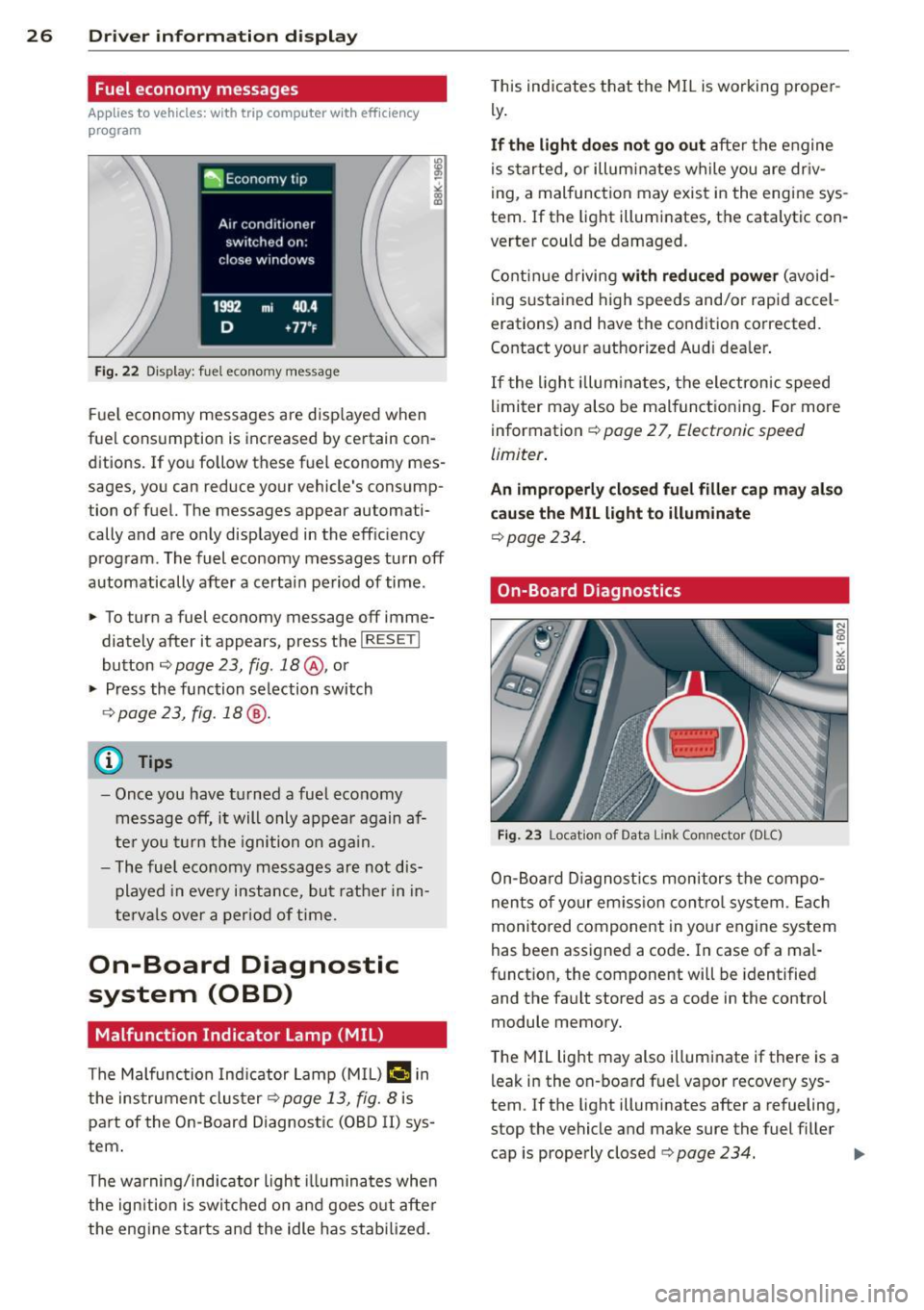
Fig. 22 Display: fuel economy message
F ue l economy messages are disp layed when
fuel consumption is increased by certain con ditions. If you follow these fuel economy mes
sages, you can reduce your vehicle's consump
tion of fuel. The messages appear automati
cally and are only displayed in the efficiency program. The fuel economy messages turn
off
automatically after a certain period of time .
~ To turn a fuel economy message off imme-
diately after it appears, press the
I RESETI
button ¢ page 23, fig. 18@, or
~ Press the function selection switch
9page23, fig.18@.
(D Tips
-Once you have turned a fuel economy
message
off, it will only appear again af
ter you turn the ignition on aga in.
- The fuel eco nomy messages are not dis
played in every instance, but rather in in
tervals over a period of time.
On-Board Diagnostic
system (OBD)
Malfunction Indicator Lamp (MIL)
The Malfunction Indicator Lamp (MIL) flllifi in
the instrument clus ter
9 page 13, fig. 8 is
part of the On-Board Diagnostic (OBD II) sys
tem .
The warning/indicator light illuminates whe n
the ign ition is switched on and goes out after
the engine starts and the idle has stabilized. T
his indicates that the MIL is working proper
ly .
If the light does not go out after the engine
is started, or illuminates while you are dr iv
ing, a malfunction may exist in the engine sys
tem. If the light illuminates, the catalytic con
verter could be damaged.
Continue driving
with reduced power (avoid
ing sustained high speeds and/or rapid accel
erations) and have the condition corrected.
Contact your authorized Audi dealer .
If the light illum ina tes, the electronic speed
limiter may also be mal functioning. For more
information ¢
page 2 7, Electronic speed
limiter .
An improperly closed fuel filler cap may also
cause the MIL light to illuminate
¢ page 234.
On-Board Diagnostics
Fig. 23 Location of Data Link Connector (OLC)
On-Board Diagnostics monitors the compo
nents of your em iss ion contro l system . Each
monitored component in your engine system
has been assigned a code . In case of a mal
function, the component will be identified
and the fault stored as a code in the control
module memory.
T he MIL light may also illuminate if there is a
leak in the on-board fuel vapor recovery sys
tem . If the light illuminates after a refueling,
stop the vehicle and make sure the fuel filler cap is properly closed¢
page 234. .,..
Page 34 of 316

32 Driver information display
• Co ntac t you r authorized Audi dea ler if nec -
essa ry .
Engine oil level too low
If th e e ngine o il leve l is too l ow, ad d eng ine
oil
<> page 242.
Engine oil level correct
If th e . symbo l flash es even t houg h the en
g ine o il lev el is co rrec t, p lease seek prof essio
na l assis tan ce. Do not cont inu e dr iv in g. Do
no t leave the eng ine run nin g
idle, either .
{O) Tips
- The engine oil pressure symbol. is
not an indicator for a low engine oil lev
el. Do not rely on it. Instead, che ck the
oil level in your engine at regular inter
vals, preferably each time you refuel,
and always before going on a long trip.
- The yellow oil level warning indication
II requires oil refill or workshop serv
ice without delay . Do not wait until the
red oil pressure warning. starts to
flash before you respond to the low oil level warning
II. By then, your engine
may already have suffered serious dam
age .
~ . Fill engine oil now
WARNING: Please add oil immediately
If t he . symbo l lights up, t hen the oil has to
be rep lenished r ight now
c:> page 242 .
Q31-e Steering malfunction
If there is a malfunction in the electronic
steering column lock, th e steering cannot b e
unlocked .
If th e . symbol in the disp lay blinks, there
is a malfunction in the elect ronic steer ing col
u m n lock. A dr iver message app ears as well to
explain the malfunc tion in mo re de ta il. The
dr iver war ning goes out after about 5 sec
on ds, but it can be broug ht up a t any time by
p res sing t he
ISE TI bu tton again .
Stop the vehicle and turn off the engine.
Steering defective
• Obtain profess ional a ssista nc e.
• Do
not tow your ve hicle.
A WARNING
-
Your veh icle must not be towe d in t he
event of a malfunction in the electronic
steering co lumn lock beca use it cannot be
steered due to the locked steering. I f it is
t o we d wit h the steeri ng locked, there is
t h e risk o f an accident.
I
{i) Tips
The symbol's ap pearance might be differ
ent in some mode ls.
© -e Ignition lock malfunction
A malfunction in the ignition lock must be re
paired immediately.
If the . symbol in the display blinks , there
is a ma lf u nction in the e lectronic ignition lock .
A driver message appears as we ll to explain
t h e malfunction in mo re deta il. The dr iver
warning goes out after about 5 seconds, but it can be b rought up a t any time by press ing the
ISE TI bu tton again
Defective ignition switch Get it serviced!
• Do not turn the e ngine off .
• Drive imme diate ly to a n author ized service
facility to have the malfunct io n corrected.
If there is a mal funct ion i n the elect ron ic ign i
tion loc k, the ignition cannot be t urne d off .
D rive immed iate ly to an autho rized serv ice fa
c ili ty to have the cause of the malfunct ion c or
rected.
On vehicles with conve nience key*, the engi ne
sho uld not be switched off us ing the start/
stop button because the engine cannot be
started again afte r the ignit io n h as been
switched off .
Page 35 of 316
(D Tips
The symbol's appearance might be different in some models .
Yellow symbols
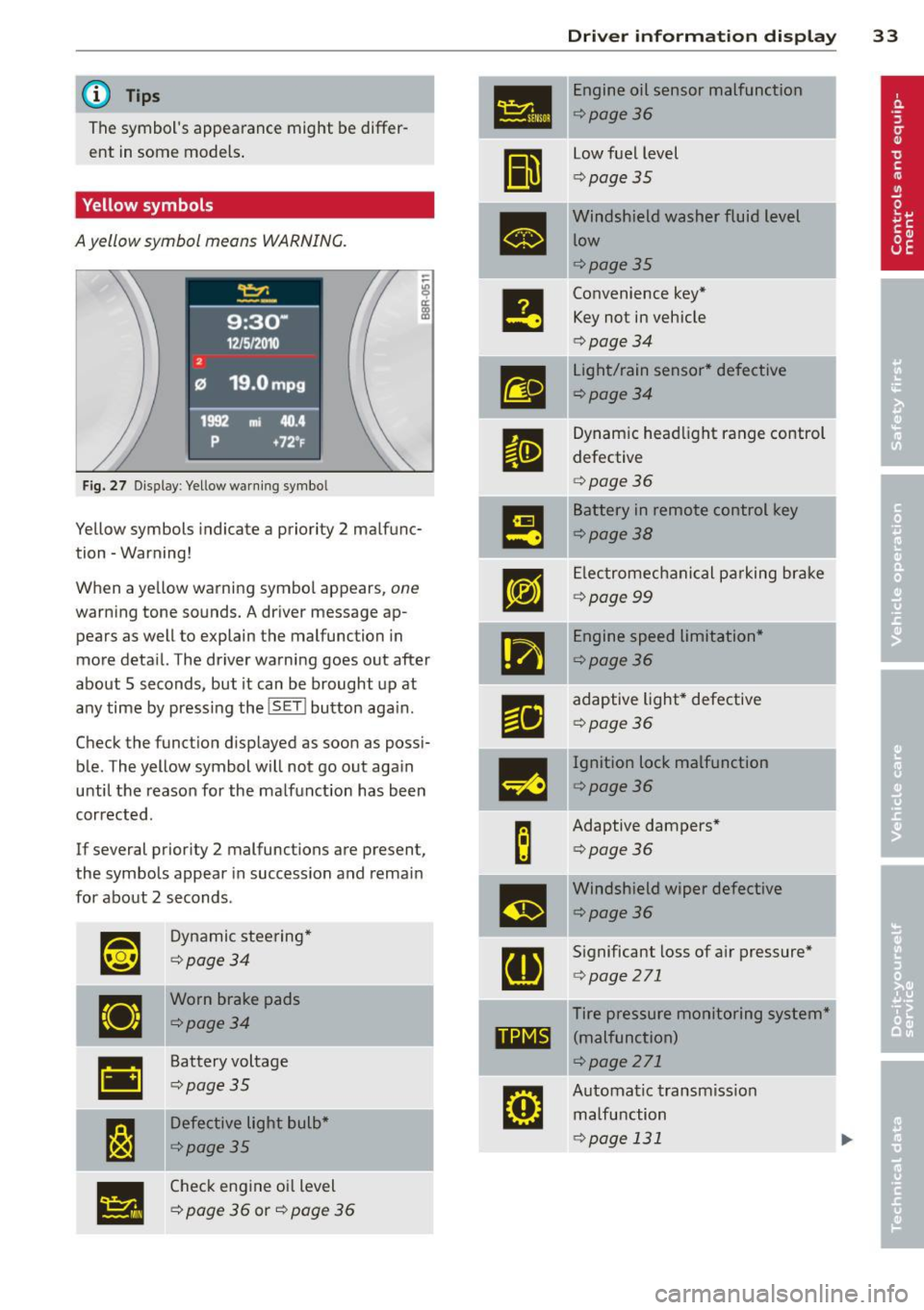
A yellow symbol means WARNING.
Fig. 27 Display: Yellow warning symbo l
Yellow symbols indicate a priority 2 malfunc
tion -Warning!
When a yellow warning symbol appears,
one
warning tone sounds. A driver message ap
pears as well to explain the malfunction in
more deta il. The driver warning goes out after
about 5 seconds, but it can be brought up at
any time by pressing the
! SET I button aga in.
Check the funct ion displayed as soon as possi
ble. The yellow symbol will not go out again
until the reason for the malfunction has been
corrected.
If several priority 2 malfunctions are present ,
the symbols appear in succession and remain
for about 2 seconds .
~~
Dynamic steering*
¢page34
•
Worn brake pads
¢page34
•
Battery voltage
¢page35
I:~
Defective light bulb*
¢page35
•
Check engine oil level
¢
page 36 or¢ page 36
Dri ver inform ation di spl ay 33
•
Engine oil sensor malfunction
¢page36
II
low fuel level
¢ page 35
•
Windshield washer fluid level
low
¢page35
e
Convenience key* Key not in vehicle
¢ page 34
m
light/rain sensor* defective
¢page34
II
Dynamic headl ight range control
defective
¢ page 36
m
Battery in remote control key
¢page38
rm
Electromechanical pa rking brake
¢ page 99
•
Engine speed limitation*
¢page36
r1i
adaptive light* defective
¢page 36
-
m
Ignition lock malfunction
¢page36
B
Adaptive dampers*
¢page36
m
Windshield wiper defective
¢page36
[ti
Significant loss of air pressure*
¢page 271
Tire pressure monitoring system*
11111 (malfunction)
¢page 271
rm
Automatic transmiss ion
malfunction
¢page 131
Page 37 of 316

-If the El war ning light and the -
warning light
l ) w ith the message Br ake
pads !
comes on in the instrument cluster
display, immediately contact your au
thorized Aud i dealer o r qualified work
shop to have a ll brake pads checked or
replaced if necessary.
~ Defective light bulb warning
Applies to vehicles: with defective light bulb warning
The defective light bulb warning monitors the
function of the light bulbs in the vehicle.
The defective l ight bulb warning monitors the
function of the light bulbs . If a defect ive lig ht
bu lb is detected, or if a light bulb has burned
out, the
I symbol appears as well as a notifi
cation that shows wh ic h light bulb is defe c
tive.
A WARNING
- Ligh t bul bs are under pressure and can
exp lode when bulbs a re replaced -risk o f
injury.
- W it h gas -discharge lamps* (xenon head
lights), the high-voltage component
must be handled approp riately. Doing
otherwise poses a risk of death!
(D Tips
Have an author ized Audi dealer or other
qua lified workshop perform the rep lace
ment or the repai r.
c:> Windshield washer fluid level too
low
f-4 "lease refill washer fluid
-
If the symbo l illuminates, add windshield
washer fluid to the washer system and also to
the head light washer system*
c::> page 251 .
1) - : USA mod els on ly
Dri ver information di spla y 35
Ehl Fuel supply too low
When the 11)1 symbol illum inates, t his means
th ere are abo ut 2.1 gallons (8 lite rs) of fuel
l eft in the fue l tank . Time to re fuel!
<=:> page 233.
If the symbol lights up, even when there is
amp le fue l in the t ank, and the text
TANK
SYSTEM MALFUNCTION
! CONTACT WORK
SHOP
appears in the disp lay, there is a fa ult in
the system . Contact a qualified works hop to
have the fa ult rectif ied .
0 Battery voltage
App lies to vehicles : with battery voltage warn ing
If battery power drops into the range where it
can limit the ability of the engi ne to start, this
thP
(•i symbol appears i n the instrumen t
cluster d isp lay with the fo llow ing drive r mes
sage
batter y charge low : Indicates charging
by being driven .
While this d river notification is d isp layed, you
have to be prepa red fo r limited starting capa
bility.
Driver message appears and goes out
again
If this drive r message appea rs after the ign i
t ion is tu rned on or while dr iv in g and it goes
o ut again afte r a while, t he battery has been
adequate ly re charged.
Driver message appears and does not go
out again
If this d rive r notifi cation appea rs after the ig
ni tion is t urne d on o r wh ile dr iving and does
not go out again, the ba tte ry's state of charge
is not in the optima l range . Starting capab ility
is restricted . Have the battery checked at an
authorized Aud i dea ler or other q ualified
wor kshop as soon as possib le.
Page 38 of 316

36 Driver in formation d isplay
'l:"::71 , Check engine oil
II Add o il, ma x x qt (l). You may c ontinu e
drivin g
If the ll!I symbol lights up d isplay ing th is
driver message, then add a maximum of
I li
ter at you r earliest oppo rtunity
c:> page 242.
'l:":?J. Engine oil level
II Please c heck oil l evel
When the symbol illuminates, check the en
g ine oil level as soo n as poss ible
c:> page 242.
Top off the oil at yo ur earliest oppo rtunity
c:> page 2 42.
'IY ..,. Engine oil sensor defective
II Oil le vel! Sen sor defecti ve
If the symbol illum inates, contact your au
thor ized Audi dealer and have the o il sensor
inspected . Until you have th is done, check the
oil leve l each time you refuel just to be on the
safe side
¢ page 242.
! ?) Engine speed limitation
Applies to vehicles : with engine speed limi tation
IP,I Do not e xceed ma x. engine spee d of XXXX
rpm
The II! symbo l illuminates when there is an
engine contro l malfunction. The
(m indicator
light in the instrument cluster also illumi
nates. The engine speed is limited to the
speed displayed in the driver information sys
tem . Keep in mind that the eng ine speed will
not exceed the va lue disp layed in the driver in
formation system, fo r example when down
shifting.
Please go to an authorized Aud i dealer or oth
er qualified workshop to have the ma lfunction
repaired.
~(D Headlight range control defective
II Headlight range control d efe cti ve !
If the fl symbo l ill uminates , the dynamic
headlight range contro l is no longer working
properly . Have the system checked and re
paired at your authori zed Audi dealer.
§0 Adaptive light defective
Applies to vehicles: with adaptive light
l/ll adapt ive Light defecti ve
When the l/ll symbol illuminates, it means
that adaptive light is defective. Go to an au
thorized Audi dealer to have the headlights or
the control un it for the adaptive light re
paired .
~ Ignition lock malfunction
I!! Ignition lock def ectiv e
If the I!! symbol in the display comes on,
there is a malfunction in the e lectronic igni
tion lock . Please go to an author ized Audi
dealer or other qualified workshop to have the
malfu nction repa ired.
Q Adaptive dampers
Applies to vehicles: with Audi drive select
E Adapti ve damper s: syste m malfunc tion
If the E symbol in the d isplay comes on, there
is a ma lfunction in the adaptive dampers.
Please go to an authori zed A udi dealer or oth
er qualified workshop to have the mal funct ion
repaired .
~ Windshield wipers faulty
ti Windscreen wipe r defective!
When the fw,j symbol illum inates, it means
that the elect ronics for the winds hield wipers
are defective . Please go to an authorized A udi
dealer or qualified workshop to have the
windshield wiper system repaired.
Page 43 of 316
-Do not leave children inside the vehicle
unsupervised. In an emergency it would
be impossible to open the doors from
the outside without the key.
(D Tips
- In the event of a crash with airbag de
ployment all locked doors will be auto
matically unlocked to give access to the
vehicle occupants from the outside .
- If the power lock ing system should mal
function, you can lock the driver's door
using the mechanical key
q page 44.
- If the power lock ing system should fail,
you can still open the fuel tank flap in an
emergency
c:> page 235 .
-You are well advised not to keep valua
bles inside an unattended vehicle, visible
or not . Even a properly locked vehicle
cannot provide the security of a safe.
- If the LED in the upper edge of the driv
er's door panel comes on for about 30
seconds after the vehicle is locked, there
i s a ma lfunction in the power locking or
the anti-theft warning system. Have the
malfunction corrected by an authorized
Audi dealership or qualified repair facili
ty.
Setting power locking
The driver can determine the functions for
power locking in the radio or MMI*.
In the Central locking menu you can decide
which doors should be unlocked when open
ing the vehicle.
.,. Se lect :
I CAR I funct ion button > Central lock-
ing .
For example, if you switch the item Unlocking
single door On ,
the passenger 's doo r is no
longer included in the power Locking system,
and will not be unlocked by p ress ing the un
l ock button on the master key remote control.
You can continue to unloc k all the doors and
the rear lid as before. Press the open ing but
ton on the master key tw ice.
Opening and closing 41
In addition to this, the Auto locking can be
switched on and off.
When locki ng the vehicle, all doors and the
trunk lid are locked automatically.
If you switch
Trunk lid/tailgate On, then the
handle on the rear lid
c:> page 44 , fig. 42 is
locked . In this case the rear lid can be opened
with the button
cs on the master key
c:> page 41, fig. 36 or with the un locking
button in the dr iver 's door
c:> page 44,
fig .
41 .
When yo u se lect Confirmation tone On, a
confirmation tone sounds when yo u lock the
vehicle.
Unlocking and locking the vehicle with
the remote control
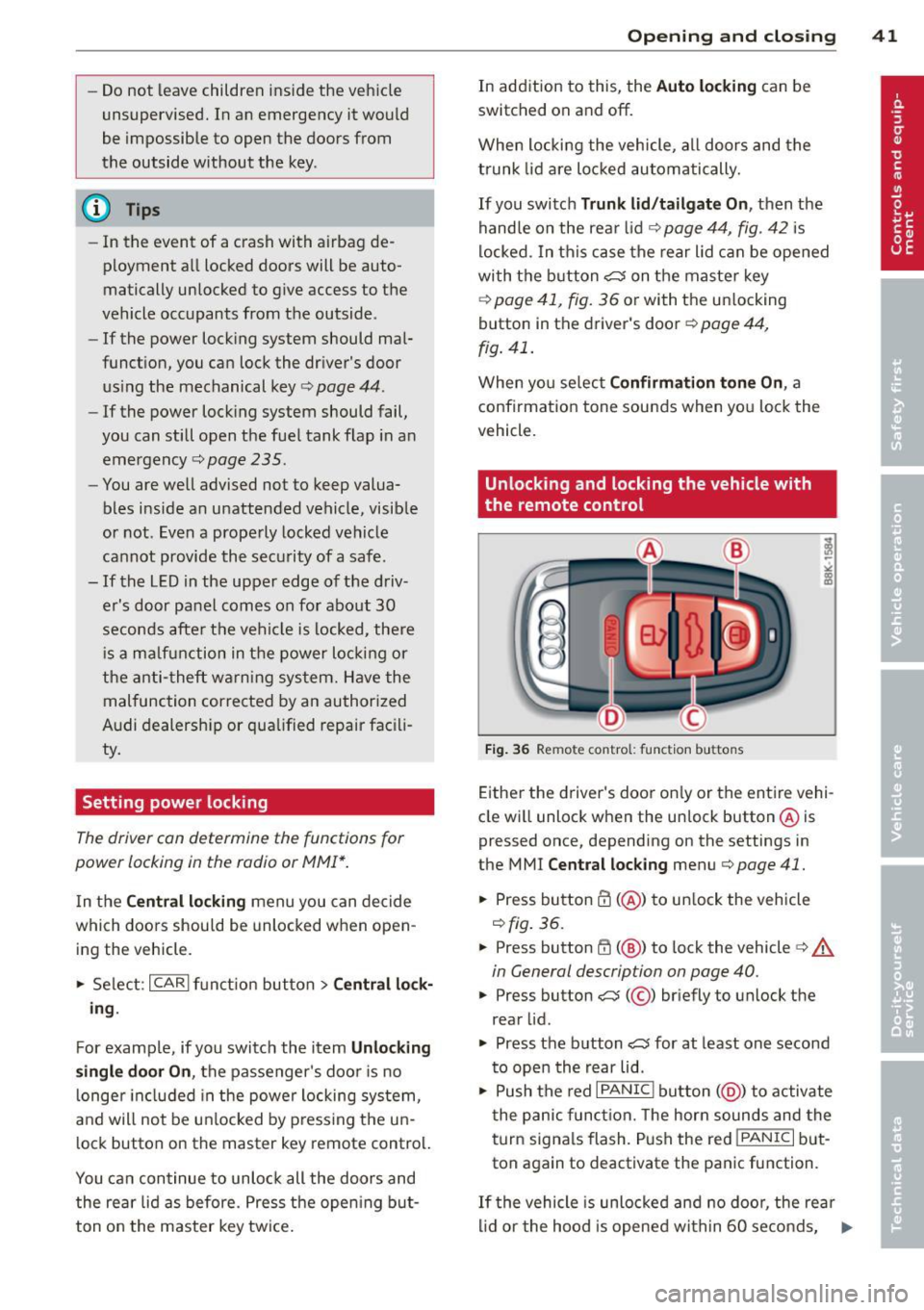
Fig. 36 Remote control: f unc tion buttons
Either the driver's door on ly or the entire vehi
cle wi ll unlock when the unlock button @is
pressed once, depending on the settings in
the MMI
Central locking menu c:> page 41 .
.,. Press button ffi (@ ) to unlock the vehicle
c:> fig. 36.
.,. Press button ffi (@ ) to lock the vehicle ¢ A
in General description on page 40 .
.,. Press button cs( @) briefly to unlock the
rear lid .
.,. Press the button
cs for at least one second
to open the rear lid .
.,. Push the red
I PANIC I button ( @ ) to activate
the panic function. The horn sounds and the
turn signa ls flash . P ush the red
!PANIC I but
ton again to deactivate the panic function.
If th e vehicle is unlocked and no door, the rear
lid or the hood is opened within 60 seconds, .,._
Page 75 of 316
button down and push the cover for
ward.
- The pass-through can be locked and un
l ocked with the vehicle mechanical key
r=;, fig. 84.
Securing the ski sack
Applies to vehicles: with ski sack
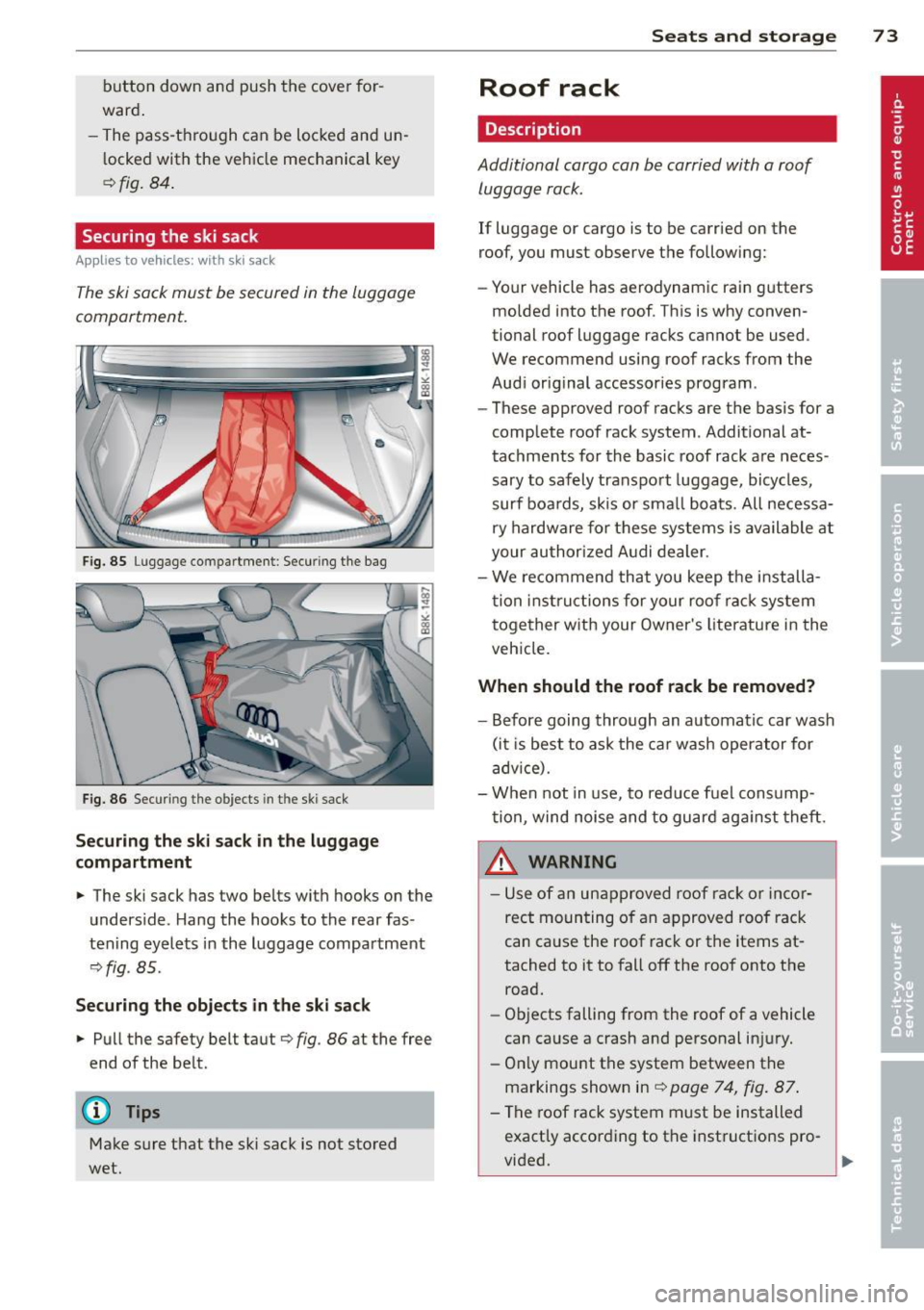
The ski sack must be secured in the luggage
compartment.
F ig. 85 Luggage compartment : Securing the bag
Fig. 86 Securing the objects in t he ski sack
Securing the ski sack in the luggage
compartment
.,. The ski sack has two belts with hooks on the
underside . Hang the hooks to the rear fas
tening eyelets in the luggage compartment
¢ fig . 85.
Securing the objects in the ski sack
.,. Pull the safety belt taut ¢ fig. 86 at the free
end of the be lt.
(D Tips
Make sure that the ski sack is not stored
wet.
Seats and storage 73
Roof rack
Description
Additional cargo can be carried with a roof
luggage rack .
If luggage or cargo is to be carried on the
roof, you must observe the following:
- Your vehicle has aerodynamic rain gutters
molded into the roof . This is why conven
tional roof luggage racks cannot be used .
We recommend using roof racks from the
Aud i original accessories program .
- These approved roof racks are the basis for a
complete roof rack system. Additional at
tachments for the basic roof rack are neces
sary to safely transpo rt luggage, bicycles,
surf boards, skis or sma ll boats. All necessa
ry hardware for these systems is available at
your authorized Audi dealer.
- We recommend that you keep the installa
tion instructions for your roo f rack system
together with your Owner's literature in the
vehicle.
When should the roof rack be removed?
-Before going through an automatic car wash
(it is best to ask the car wash operator for
advice).
- When not in use, to reduce fuel consump
tion, wind noise and to guard aga inst theft.
8_ WARNING
- Use of an unapproved roof rack or incor
rect mounting of an approved roof rack
can cause the roof rack or the items at
tached to it to fall off the roof onto the
road.
- Objects falling from the roof of a vehicle
can cause a crash and personal in jury.
- Only mount the system between the
markings shown in
r=;, page 74, fig. 87 .
- The roof rack system must be installed
exactly according to the instructions pro-
-
vided. .,,.
Page 76 of 316
7 4 Seats and storage
(D Note
- Your vehicle warranty does not cover any
damages to the vehicle caused by using
roof racks or mounting structures not
approved by Audi for your vehicle . The
same applies to damage resulting from incorrect roof rack installation .
- Always check the roof rack mountings
and hardware before each trip and dur
ing a trip to make sure everything is se
curely tightened. If necessary, retighten
the mountings and check the ent ire sys
tem from time to time.
- After mounting a roof rack system, or
when you transport objects on the roof
of your vehicle, the height of the vehicle
is naturally increased. Be careful when
driving under low bridges or in parking
garages for example. This could cause
damage to the load and even the vehicle itself.
Mounting points
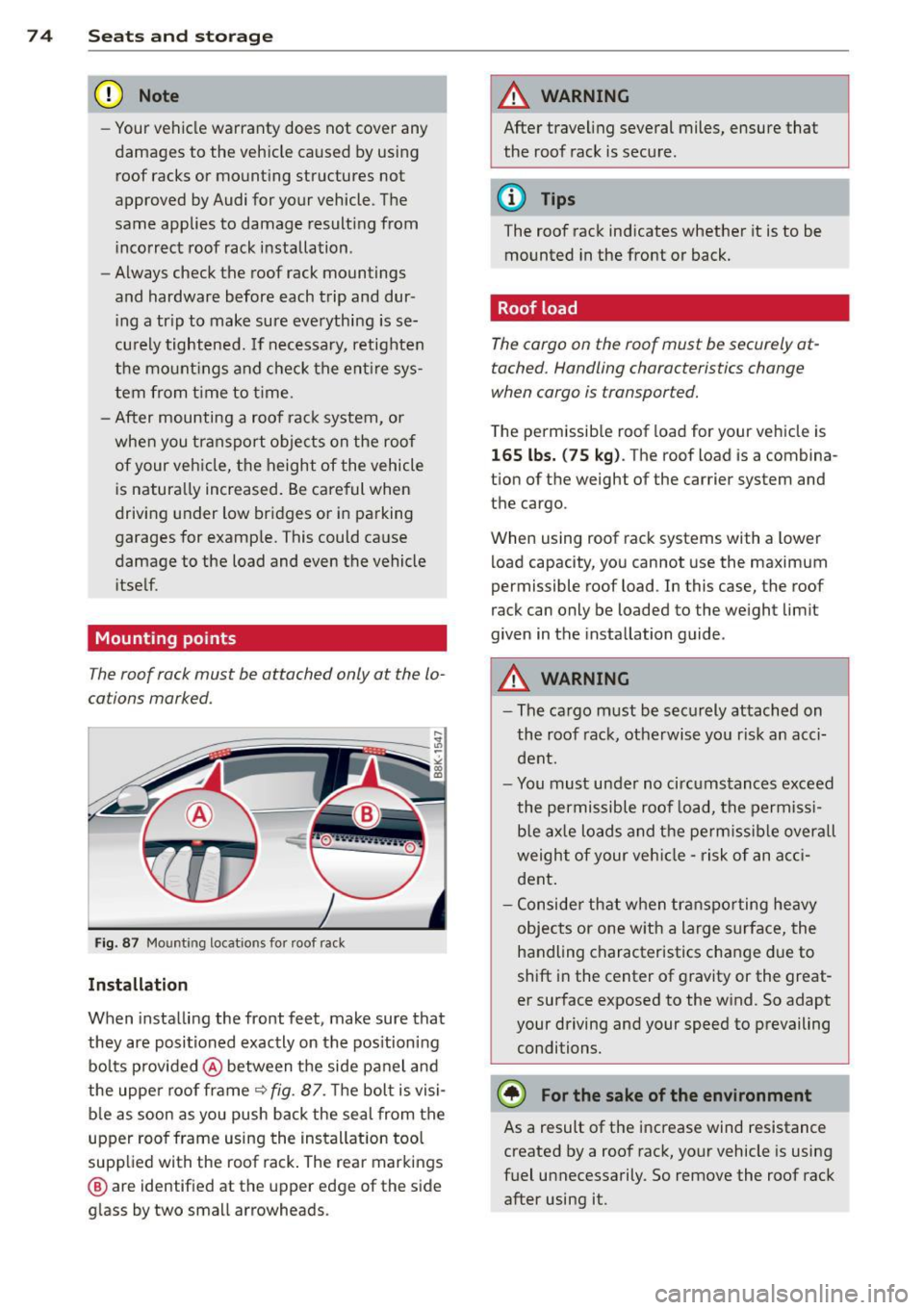
T he roof rack must be attached only at the lo
cations marked .
Fig. 87 Mounting locations for roof rack
Installation
When installing the front feet , make sure that
they are positioned exactly on the positioning
bolts provided @between the side panel and
the uppe r roof frame¢
fig . 87. Th e bolt is visi
ble as soon as you push back the seal from the
upper roof frame using the installation tool
supplied with the roof rack . The rear markings
@ are identified at the upper edge of the side
glass by two small arrowheads.
A WARNING
-After traveling several miles, ensure that
the roof rack is secure.
(D Tips
The roof rack indicates whether it is to be mounted in the front or back.
Roof load
The cargo on the roof must be securely at
tached. Handling characteristics change
when cargo is transported.
The permissible roof load for your vehicle is
165 lbs. (75 kg) . The roof load is a combina
tion of the weight of the carrier system and the cargo.
When using roof rack systems with a lower
load capacity, you cannot use the maximum
permissible roof load . In this case, the roof
rack can only be loaded to the weight limit
given in the installation guide.
A WARNING
- The cargo must be securely attached on
the roof rack, otherwise you risk an acci
dent.
- You must under no circumstances exceed
the permissible roof load, the permissi
ble axle loads and the permissible overall
weight of your vehicle -risk of an acci
dent.
- Consider that when transporting heavy
objects or one with a large surface, the
handling characteristics change due to
shift in the center of gravity or the great
er surface exposed to the wind. So adapt
your driving and your speed to prevailing conditions.
~ For the sake of the environment
As a result of the increase wind resistance
created by a roof rack, your vehicle is using
fuel unnecessarily. So remove the roof rack
after using it.
Page 85 of 316
Rear window defogger~
Applies to vehicles: with deluxe automatic climate control
The rear window defogger clears the rear win
dow of condensation .
.. Press the@il button to turn the rear window
defogger on and off.
The rear window defogger works only when
the eng ine is running. The indicator light in
the button illuminates when the rear window
defogger is on.
The rear window defogger is switched off au
tomatically after 10 to 20 minutes, depend
ing on the outside temperature.
The rear w indow defogger can be turned on
permanently by pressing the@il button for
more than two seconds. This rema ins stored
until the ignition is switched off. A rear w in
dow defogger that was switched on also re
mains stored for 15 minutes after the ignition
is switched off.
If the engine is restarted within these 15 mi
nutes, the rear window defogger is act ivated
for 10 to 20 mi nutes, depend ing on outs ide
temperature . When a veh icle is parked for a
shor t time, the rear w indow defogger does
not need to be man ually ac tivated again.
@ For the sake of the environment
As soon as the rear window is clear, yo u
should switch the rea r window defogger
off. The reduced power consumption has a
beneficial effect on fuel consumption.
AC mode ~
Applies to vehicles: with deluxe automatic climate cont rol
Deacti vating
.. Press the !AC I button.
Activating
.. Press the !AC I button again .
The cooling system is turned on in AC mode.
The heating and ventilation system is control
led automatically.
Warm and c old 83
(D Tips
If the LED in the switch contin ues to illu
minate after AC mode has been turned off
(= turning the AC off), there is a fault in an
a ir-conditioning component. Please con
su lt an authorized dealership if there is an
operat ing problem.
Economical use of the climate control
system
Applies to vehicles: with deluxe automatic climate control
Economical use of the climate control system
helps save fuel.
When the climate control system is working in
cooling mode, eng ine performance is reduced
and fuel consumpt ion is affected. To keep the
t ime the climate cont ro l system is on as shor t
as possib le, yo u should do the following:
.,. To save fue l, tur n off cooling mode by press
ing the
! AC I button ( indicator lig ht goes
out) .
.. In addi tion, if you open the window or the
panorama/t ilting sunroo f* while driving,
turn off cooling mode by pressing the
IAC !
button (indicator light goes out).
.. If the vehicle is extreme ly hot due to the
heat of the sun, briefly ope n doors and win
dows .
@) For the sake of the environment
When yo u save fuel, you reduce emissions
from the vehicle.
Deluxe automatic
climate control plus
Description
Applies to vehicles: with Deluxe automat ic climate con
trol plus
The air conditioner is fully automatic and is
designed to maintain a comfortable and uni
form climate inside the vehicle .
We recommend the follow ing settings:
.,. Set the temperature to 75 °F (+23 °C).
.. Press the
IAUTO I button.
Page 90 of 316
88 Warm and cold
Defrost~
Applies to vehicles: with Deluxe automatic climate con
trol plus
The windshield and side windows ore defrost
ed or cleared of condensation as quickly as
possible.
.. Press the~ button to turn on the defrost
er .
.. Press the~ button again, or press the
IAUTO I button to turn it off.
Temperature is controlled automatically . The
maximum amount of air flows main ly from
the vents below the windshield.
Pressing the~ button switches off recircu la
tion mode.
Rear window defogger~
Applies to vehicles: with Deluxe automatic climate con
trol plus
The rear window defogger clears the rear win
dow of condensation .
.. Press the~ button to turn the rear window
defogger on and off .
The rear w indow defogger works only when
the eng ine is running . The indicator light in
the button illum inates when the rear window
defogger is on.
The rear w indow defogger is switched off au
tomatically after
1 0 to 20 minutes, depend
ing on the outside temperature .
The rear w indow defogger can be turned on
permanently by press ing the~ button for
more than two seconds. This remains stored
unti l the ignition is switched off . A rear win- dow defogger that was switched on also re
mains stored for 15 minutes after the ignition
is sw
itched off .
If the engine is res tarted w it hi n these 15 mi
nutes, the rear window defogger is activated
for
1 0 to 20 minutes, depending on outside
temperature . When a vehicle is parked for a
short time, the rear window defogger does
not need to be manually activated again .
@ For the sake of the environment
As soon as the rear w indow is clear, you
shou ld sw itch the rear window defogger
off. The reduced power consumption has a
beneficia l effect on fuel consumpt ion .
AC mode ~
Applies to vehicles: with Deluxe automatic climate con
trol plus
Turning AC off
.. Press the IAC ! button.
Turning AC on
.. Press the IAC ! bu tton again.
The cooling system is turned on in AC mode .
T he heating and vent ilation system is control
l ed automatically .
(D Tips
If the LED in the sw itch does not illumi
nate after AC mode has been turned on(=
turning the AC off), there is a fault in an
air-conditioning component. Please con
su lt a authorized dealersh ip if the re is an
operating problem .