warning AUDI A5 COUPE 2012 Service Manual
[x] Cancel search | Manufacturer: AUDI, Model Year: 2012, Model line: A5 COUPE, Model: AUDI A5 COUPE 2012Pages: 316, PDF Size: 78.59 MB
Page 64 of 316

62 Seats and storage
Front passenger's seat
Always move the front passenger seat into
the rearmost position.
To avoid contact with the airbag while it is de
ploying, do not sit any closer to the instru
ment panel than necessa ry and always wear
the three-point safety belt provided adjusted
correctly. We recommend that you adjust the
passenger's seat i n the fol low ing ma nner:
"' Bring the backrest up to an (almost) upright
posit ion.
Do not ride w ith the seat reclined .
"' Adjust the head restraint so the upper edge
i s as even a s poss ible with the top of yo ur
head.
If that is not possible, try to adjust
the head rest raint so that it is as close to
this position as possible ¢
page 67.
"' Place your feet on the floor in front of the
passenger's seat .
Adjusting front seats
manually
Seat adjustment controls
Applies to vehicles: with man uaUy adjustable seats
The seat has several adjustmen ts.
Fig . 66 Contro ls on the drive r's seat
Some the controls shown are only installed in
certain model versions or are supplied as an
option.
Controls
CD Fore -and-aft adjustment
@ Upper thigh support*
@ Adjusting seat c ush ion angle*
@ Adjusting lumbar support *
® Adjust ing seat height
@ Adjusting seatback ang le
Adjusting the seat
Appl ies to vehicles: wit h manually adjustable seats
Position and shape of the seat can be adj ust
ed manually to ensure safe and comfortable
seating .
Read and fo llow the warning notices¢ & be
f ore you adjust yo ur seat.
Fore-and-aft adjustment
"' Pull the lever CD¢ page 62, fig . 66 up and
push the seat to the desired position .
"' Release the lever CD and cont in ue to move
t he seat until it loc ks in to pl ace.
Lengthening or shortening upper thigh
support*
"' Lift the b utton @under the seat cush ion.
The fron t seat cush ion moves forw ard under
spri ng force .
"' Push the seat c ushion back when yo u have
fi nished using it .
Adjusting seat cushion angle*
"' Pull or push the lever@¢ page 62, fig. 66
up or down (pumping mo tion).
Ad justing the curvature of the lumbar
support*
"' Push the swi tc h plate @) forward o r bac k
ward to increase o r reduce the curvature.
Ad justing the height of the lumbar
support*
"' Push the switc h plate @) up or dow n to po
sit ion the curva ture h igher or lower.
Raising or lowering seat height
"' Pull or push the lever®¢ page 62, fig . 66
up or down (pumping motion).
Adju sting seatback angle
"' Remove we ight from the seatback (do not
lean against it).
"' Turn th e hand wheel@¢
page 62 , fig . 66
to adjust the angle of the seatback accord -
ing ly.
Iii>
Page 65 of 316

A WARNING
-Adjust the driver's seat only when the ve
hicle is stationary . You risk an accident
otherwise .
- Exercise caution when adjusting the
seats. Adjusting the seat carelessly or
without checking can pinch hands and
fingers.
- While the vehicle is moving, the seat
backs of the front seats must not be in
clined too far to the rear because the ef
fectiveness of the safety belts and the
airbag system is severely compromised -
there is a risk of injury.
Easy entry function
Applies to vehicles: with man ually adjustable seats
The easy entry function makes it easier for
the rear passengers to enter and leave the ve
hicle.
Fig. 67 Driver's seat: Latch on the seatback
Tilt the seatback forward and push the
front seats forward
~ Lift the latch c::> fig. 67.
~ Hold the latch and tilt the seatback for
wa rd.
~ Re lease the latch and push the seat for
ward .
Push the front seats back and fold the
seatback up
~ Push the front seat back before you fold the
seat backs up. Otherwise the seat cannot be
pushed back to its original position.
Seats and storage 63
A WARNING
Always be certain that the front seats are
upright and securely latched when you
drive.
Power front seat
adjustment
Seat adjustment controls
App lies to vehicles: wit h powe r adjustable seats
The operating logic for the switches corre
sponds to the construction and function of
the seat.
Fig. 68 Front seat: Controls for seat ad justment
The switches to adjust the seat cush ion and
the seatback correspond to the layout , the de
sign and the function of the seat. Th e seats
are adjusted by moving the switches following
this logic.
Controls
@ Lumbar support*
@ Seat adjustment
© Seat back and head restraint height ad
justment*
@ Upper thigh support*
Adjusting the seat
Appl ies to vehicles: wi th power adjustable seats
Position, angle and shape of the seat can be
adjusted electrically to ensure safe and com
fortable seating.
Read and fo llow the warning notices c::> .&. be
fore you adjust your seat.
Page 66 of 316

64 Seats and storage
Adjusting the curvature of the lumbar
s up port *
• Push the switch plate @forward or back
ward to increase or reduce the curvature .
Adjusting the height of the lumbar
s uppo rt*
• Push the switch plate @ up or down to po
sition the curvature higher or lower.
Fore -and-aft adjustment
• Push the sw itch @ forward or backward
r=;, pag e 63, fig . 68.
Adjusting seat height
• Pull or push the switch @ up or down .
Front seat cush ion up / down
• Press the sw itch @ at the front up or down.
Rear s eat cushion up / down
• Press the sw itch @ at the rear up o r down .
Adjusting seatback angle
• Push the sw itch © forward or backward .
Head restr aint height adjustm ent*
• Press the switch © from up to down or the
other way .
Lengthen ing or short enin g upper thigh
s uppo rt *
• Lift the button @ under the seat cushion.
The front seat cushion moves forward under
spring force.
• Push the seat cush ion back whe n you have
finished using it .
_& WARNING
-Adjust the d river's seat only when the ve
hicle is s tat ionary. You r isk an acc iden t
otherwise.
- T he power adjustment for the front seats
also wo rks w ith the ignition switched off
or with the igni tion key removed . For this
reason, children sho uld never be left un
attended in t he veh icle -they could be in
jured! -
Exerc ise caution when adjusting the seat
he ight. Unsupervised or careless seat ad
justment can pinch fingers or hands
causing injuries .
- W hile the vehicle is mov ing, the seat
backs of the front seats must not be in
clined too far to the rear because the ef
fectiveness of the safety be lts and the
airbag system is seve rely comp romised -
there is a risk of injury.
Easy entry function
App lies to vehicles: wit h power adjustable seats
The easy entry function makes it easier for
the rear passengers ta enter and leave the ve
hicle.
Fig . 69 D river 's sea t: Co ntro ls for eas y entry ass ist
Folding down th e front seat back s
• Lift the latch ¢ fig. 69.
• Tilt the seatback forward.
Moving the front seats forward
• Press and hold the sw itch @ unti l the seat
has reached the desired position .
Moving front seats back
• Press and hold the sw itch @ until the seat
has reached the desired position . T he seat
s tops automatically when i t has reac hed its
s tarting posi tion again.
To make it eas ier to enter and leave the rear
seat, the seatbacks of the fro nt seats can be
folded fo rward and the head restraints are au
tomat ica lly lowered . At the same time, the
front seats can be moved forward and back.
Page 68 of 316

66 Seats and storage
is unlocked , the settings assigned to the
remote contro l key are restored.
If your vehicle is driven by other persons using
your remote control key , you sho uld save yo ur
individual seat position on one o f the memory
buttons . You can recall your settings again
simply and conven iently by pressing the corre
sponding memory button. When the vehicle is locked, these settings are automatically re-as
signed to the remote control key and stored .
A WARNING
-For safety reasons, the seat setting can
only be reca lled when the veh icle is sta
tionary -otherwise you risk having an ac
ci dent.
- In an emergency the recall procedure can
be cancelled by pressing the
I ON/OF F I
switch or by tapping of the the memory
buttons .
Activating remote control key memory
Applies to vehicles: with seat memo ry
To assign the driver's seat settings to the re
mote contro l key when locking the vehicle , the
function must be activated in the radio or
MMI*
.. Select: Function button
ICARI > Seat adjust
ment > Driver's seat > Key mem . profile
>
On .
@ Tips
If you do not want another driver's set
tings to be assigned to the remote key,
sw itch off the memory function using the
rad io or MMI* or the
!O FF ! button
c:>page 65.
Seat adjustments in MMI
Applies to vehicles: wit h seat memory and MMI
The passenger 's seat can be adjusted to vari
ous positions by the driver .
Convenience side view
.. Select: Function button I CAR!> Seat adjust
ment > Passenger's seat > Convenience side
view.
.. Continue to press the control knob until the
ad justment process is complete .
Seat symmetry
.. Select: Function button I CAR !> Seat adjust
ment > Passenger's seat > Seat symmetry.
.. Continue to press the control knob until the
adjustment process is complete .
U sing the
Convenience side view function, the
passenger's seat is adjusted so tha t the driver
has the best poss ible view to the right . When
the Conven ience s ide v iew is set, the specific
pos ition of the driver's seat is taken into con
s ideration .
Using the
Seat symmetry function, the pas
senger's seat can be moved to the same posi
t ion as the driver's seat. The settings for the
drive r's seat are imported and set automati
cally .
Page 69 of 316

Head restraints
Front head restraints
Head restraints that are adjusted according
to body size, along with the seat bealt, offer
effective protection.
Fig. 71 Front seat: Ad justing t he head restraint
Fig. 72 Fron t seat: Ad justing head restraint electr ical ·
Ly*
The head restraints on the front seats can be
adjusted to provide safe support to head and neck at the optimum height¢
fig. 71 . Adjust
the head restraint so the upper edge is as
even as possible with the top of your head. If
that is not possible, try to adjust the head re·
straint so that it is as close to this position as
possible
¢ page 67 .
Raising/Lowering the head restraint
~ Grasp the sides of the head restra int with
both hands and slide the head restraint up
ward/downwa rd, until you feel it click into
place
¢ fig. 71.
Electric height adjustment*
~ Push the sw itch up or down¢ fig. 72 to ad·
just the height of the head restra int.
Refer to ¢
page 147, Proper adjustment of
head restraints
for guidelines on how to ad·
Seats and storage 67
just the height of the front head restraints to
suit the occupant's body size.
A WARNING
- Driving without head restraints or with
head restraints that are not properly ad·
justed increases the risk of serious or fa·
tal neck injury dramat ically.
- Read and heed all WARNINGS
¢page 147.
{I) Tips
Correct ly adjusted head restraints and
safety be lts are an extreme ly effective
combination of safety features.
Rear head restraints
Fig. 73 Rear seats: Head restrain t
Fig. 74 Rear head restraints: release
Adjusting the head restraints
~ To move the head restraint up, hold it at the
sides with bo th hands and slide it upward
until you fee l it click into place.
~ To move the head restraint down, press the
button @¢
fig. 73 and slide the head re-
straint downward .
!IJ,
Page 70 of 316

68 Seats and storage
R emoving the h ead re straint s
.,. Fold the backrest forward
Q page 70.
.,. Move the head restraint upward as far as it
can go.
.,. Press the release @
Q fig. 74 with the me
chanical key
Q page 39 and the button @
r:::> fig. 73. Pull the head restraint out of the
backrest at the same timer:::>&_ .
I n st all ing th e head re st ra ints
.,. Slide the posts on the head restra int down
into the guides until you feel the posts click
into place.
.,. Press the button @
Q fig. 73 and slide the
head restraint all the way down. You shou ld
not be able to pull the head restra int out of
the backrest .
So that the driver can have a better view to
the rear, the head restraints should be pushed
down completely when the rear seats are not
occupied.
A WARNING
- Only remove the rear seat head restraints
when necessa ry in order to i nstall a chi ld
seat. Install the head restraint again im
mediately once the child seat is removed.
Driv ing without head restraints or with
head restraints that are not properly ad
justed increases the risk of serious or fa
tal neck injury dramatically .
- Read and heed all WARNINGS
r:::>page 147.
@ Tips
Correctly adjusted head restraints and
safety belts are an extremely effective
comb inat ion of safety features.
Center armrest
The center armrest can be adjusted to several
levels.
0 g ~
"' "' a,
F ig. 75 Arm rest between the driver's/front passenger's
seats.
A dj usting the cent er arm rest
.,. To adjust the ang le, raise the arm rest from
the starting position
r:::> fig . 75 detent by de
tent.
.. To bring the armrest back into the starting
position, raise it out of the top detent and
fold it back down.
The armrest can slide forward and back.
Luggage compartment
Loading luggage compartment
Items of luggage must be stowed securely.
Fig. 76 Place heavy objects as far forward as possib le.
Note the following to preserve the ve hicle's
good handling charac teristics .
.,. Distribute the load as evenly as possible .
.,. Place heavy objects as far forward as poss i-
ble
Q fig . 76. .,.
Page 71 of 316
.. Secure the items of luggage with the cargo
net* or with non-elastic retaining straps to
the tie-down rings*¢
page 69.
A WARNING
-Loose objects in the luggage compart
ment can slide about suddenly and alter
the vehicle's handling characterist ics.
- Loose objects in the passenger compart
ment can fly forward during abrupt ma
neuve rs or accidents and injure occu
pants.
- Always store objects in the luggage com partment and use su itab le straps, partic
ularly with heavy objects.
- When you transport heavy objects, al
ways remembe r that a change in the cen
ter of gravity may resul t in a change in
the vehicle's handling characterist ics.
- Follow a ll warnings¢
page 144, Driving
Safely.
(D Tips
The tire pressure must be adjusted to the
load -see the tire pressure sticker on the
edge of the driver's door.
T ie -down rings
A ppl ies to vehicles: with tie -dow n rings
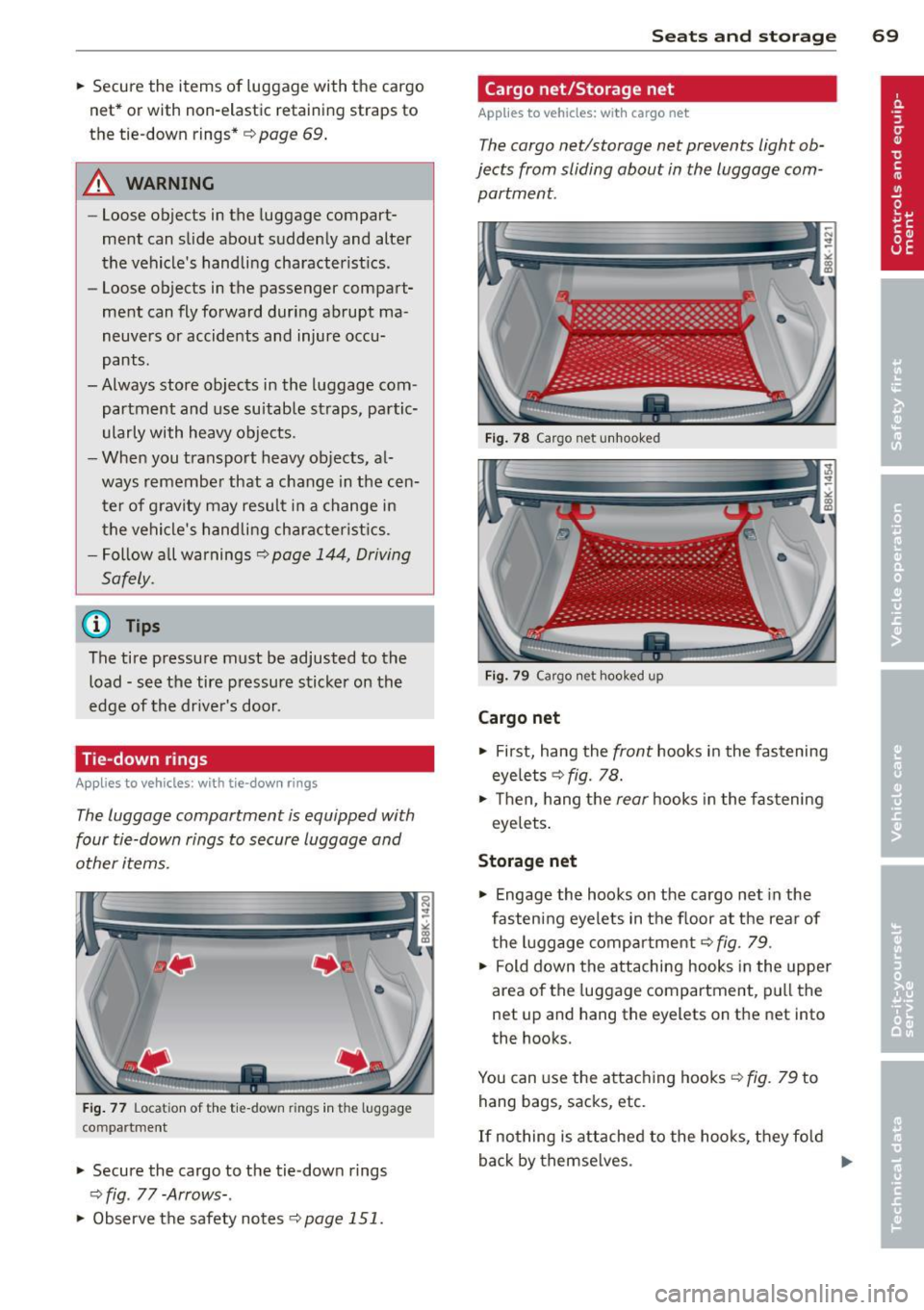
The luggage compartment is equipped with
four tie-down rings to secure luggage and
other items.
F ig . 77 Locat ion of the tie-down rings in the luggage
compartment
.. Secure the cargo to the tie-down rings
¢fig . 77-Arrows- .
.. Observe the safety notes ¢page 151.
Sea ts a nd s to rage 69
Cargo net/Storage net
Applies to vehicles : wi th cargo net
The cargo net/storage net prevents light ob
jects from sliding about in the luggage com partment.
Fig . 78 Cargo n et unhooked
Fi g. 79 Cargo net hooked up
Cargo net
.. First, hang the front hooks in the fastening
eyelets ¢
fig. 78.
.. Then, hang the rear hooks in the fas tening
eyelets .
Storage net
.,. Engage the hooks on the cargo net in the
fastening eyelets in the floor at the rear of t he luggage compartment¢
fig . 79 .
.. Fold down the attaching hooks in the upper
area of the luggage compartment, pull the
net up and hang the eyelets on the net into
the hooks.
You can use the attaching hooks ¢
fig. 79 to
hang bags, sacks, etc.
If no thing is attached to the hooks, they fold
back by themse lves .
Ill>-
Page 72 of 316
70 Seats and storage
A WARNING
For reasons of strength, only objects with
a maximum weight of 5 kg should be car
ried in the storage net. Heavier objects are
not adequately secured. There is risk of
personal injury.
Enlarging cargo capacity of the vehicle
interior
Appl ies to vehicles: with folding rear seatback
The seat backs can be folded forward to en
large the cargo capacity.
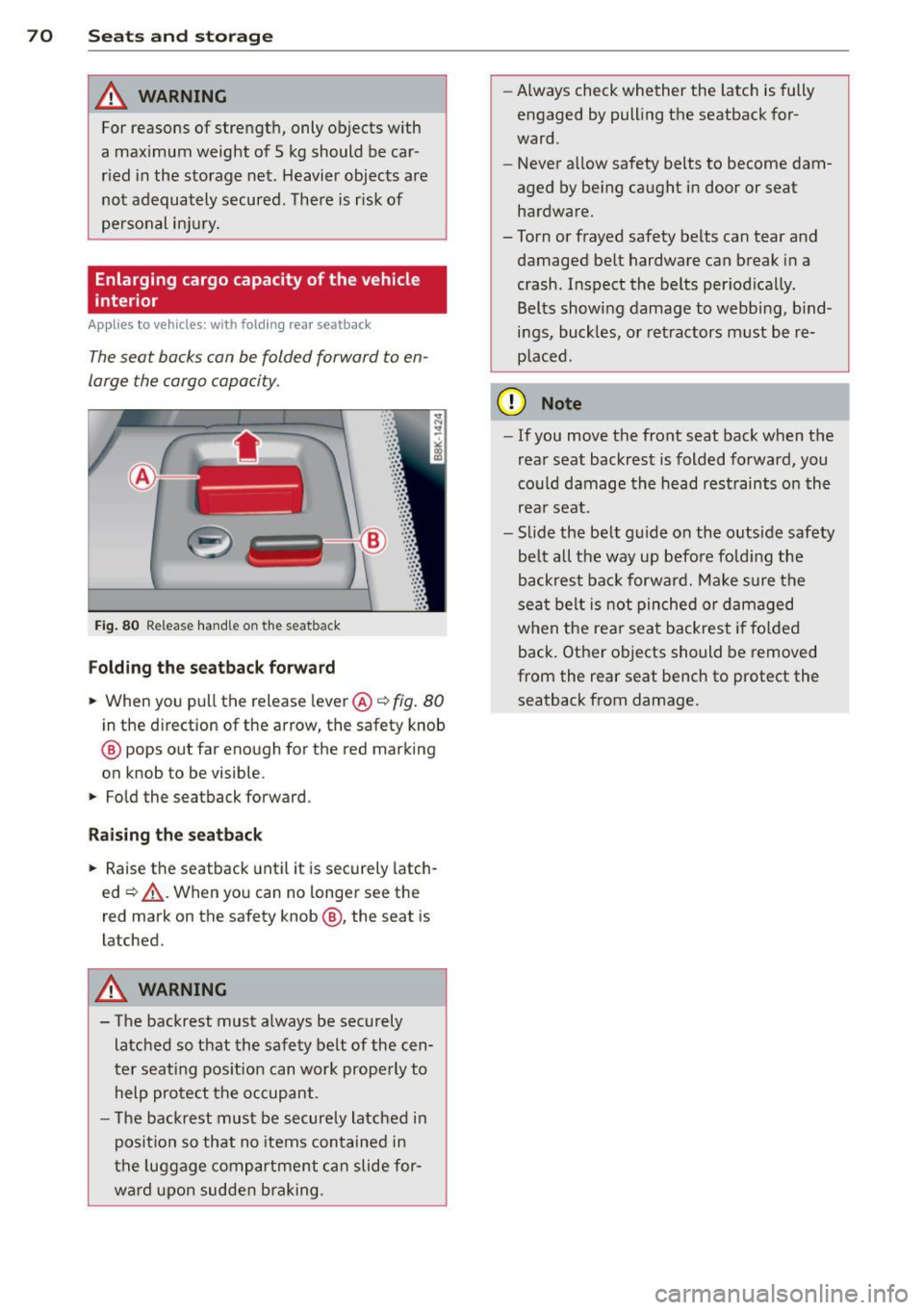
Fig. 80 Release handle on the seatback
Folding the seatback forward
., When you pull the release lever @ c::> fig. 80
in the direction of the arrow, the safety knob
@ pops out far enough for the red marking
on knob to be visible .
., Fold the seatback forward.
Raising the seatback
., Raise the seatback until it is securely latch
ed ~,&.. . When you can no longer see the
red mark on the safety knob@, the seat is
latched.
A WARNING
- The backrest must always be securely
latched so that the safety belt of the cen
ter seating position can work properly to
help protect the occupant.
- The backrest must be securely latched in
position so that no items contained in
the luggage compartment can slide for
ward upon sudden braking . -
Always check whether the latch is fully
engaged by pulling the seatback for
ward.
- Never allow safety belts to become dam
aged by being caught in door or seat hardware.
-Torn or frayed safety belts can tear and
damaged belt hardware can break in a
crash . Inspect the belts periodically.
Belts showing damage to webbing, bind
ings, buckles, or retractors must be re
placed.
(D Note
- If you move the front seat back when the
rear seat backrest is folded forward, you
could damage the head restraints on the
rear seat.
- Slide the belt guide on the outside safety
belt all the way up before folding the
backrest back forward. Make sure the
seat belt is not pinched or damaged
when the rear seat backrest if folded
back. Other objects should be removed
from the rear seat bench to protect the
seatback from damage.
Page 73 of 316
Enlarging cargo capacity of the luggage
compartment
Applies to vehicles: with fold ing rear sea tback
The seat backs can be folded forward to en
large the cargo capacity .
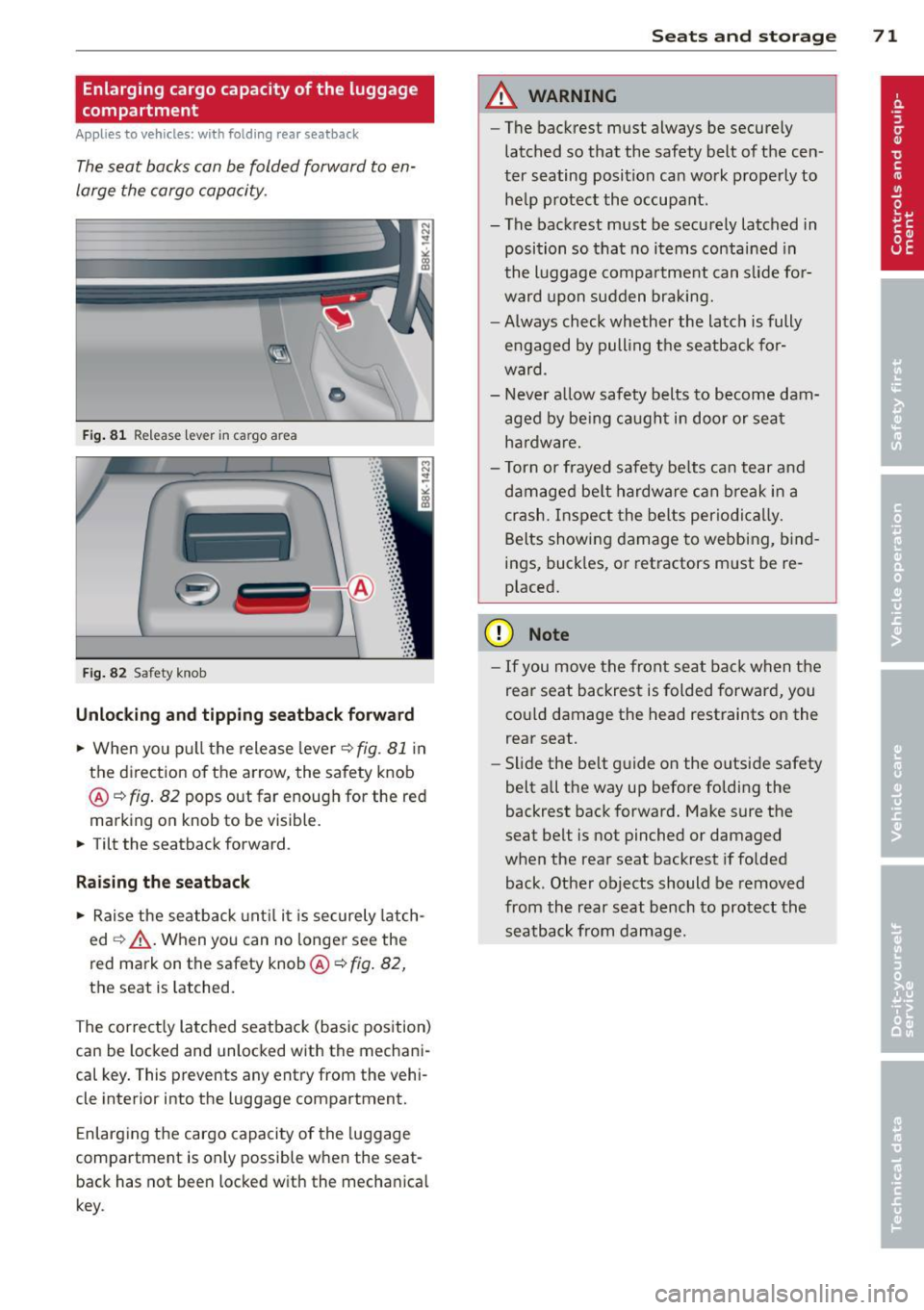
Fig. 81 Release lever in cargo area
'
-
-
. -~ .
Fig. 82 Safety knob
•
·:: ·:: ·:: · : : ·::
· ::
... : :·: ·::
· ::
·:: ·:: · ::
· ::
· :: ·:: ~: :
· ::
· ::
· ::
· :: ... .. ...
Unlocking and tipping seatback forward
.. When you pu ll the release lever c::> fig . 81 in
the direction of the arrow, the safety knob
@ c::>
fig. 82 pops out far enough for the red
marking on knob to be visible.
.. Tilt the seatback forward .
Raising the seatback
.. Raise the seatback until it is securely latch
ed
c::> _& . When you can no longer see the
red mark on the safety knob @c::>
fig. 82,
the seat is Latched.
The correct ly Latched seatback (basic pos ition)
can be Locked and unlocked with the mechani
cal key. This prevents any entry from the vehi
cle inter ior into the Luggage compartment.
Enlarging the cargo capacity of the luggage
compartment is only possible when the seat back has not been locked with the mechanical
key .
Seats and storage 71
A WARNING
-The backrest must always be secure ly
latched so that the safety belt of th e cen
ter seating position can work properly to
he lp protect the occupant.
- The backrest must be securely Latched in
position so that no items contained in
the Luggage compartment can slide fo r
ward upon sudden braking.
- Always check whether the Latch is fully
e ngaged by pull ing the seatback for
ward.
- Never allow safety belts to become dam
aged by being caught in door or seat
hardware.
- Torn or frayed safety be lts can tear and
damaged belt hardware can break in a
crash. Inspect the belts periodically.
Belts showing damage to webbing, bind
ings, buckles, or retractors must be re
placed.
(D Note
- If you move the front seat back when the
rear seat backrest is folded forward, you
co uld damage the head restraints on the
rear seat .
- Slide the be lt guide on the outside safety
belt all the way up before folding the
backrest back forward. Make sure the
seat belt is not pinched or damaged
when the rear seat backrest if folded
back . Other objects should be removed
from the rear seat bench to protect the
seatback from damage.
Page 74 of 316
7 2 Seats and storage
locking the seatback
Appli es to vehicles: with fold ing rear seatback
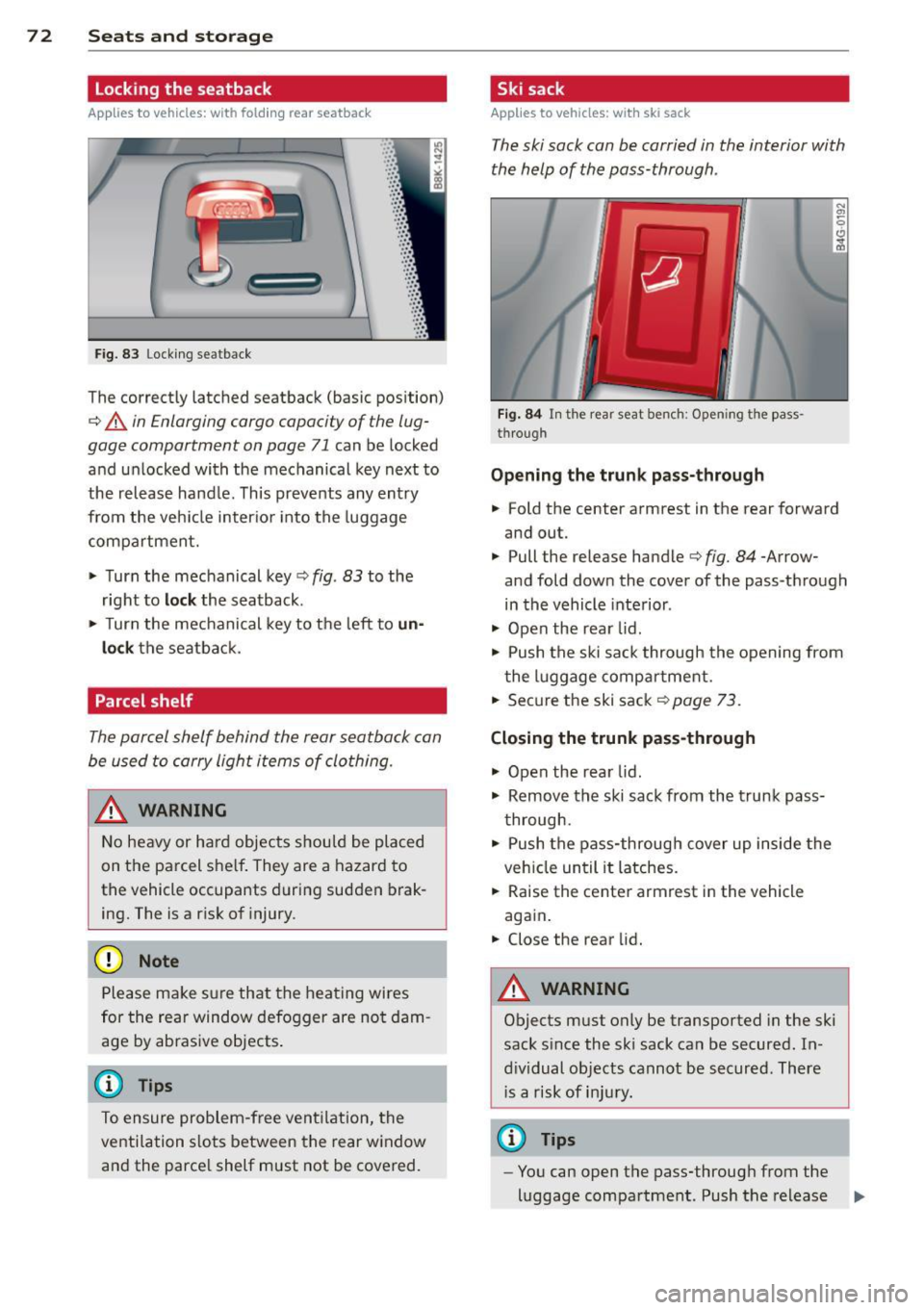
Fig. 83 Lock ing seatback
.. ... ,:: ·:: ·: : ·:: • :: ... ,: ·: ... .. ·::
· ::
•: : ·:: · :: ·:: · ::
· ::
· ::
· :: ·:: ·:: · :: ...
The correctly latched seatback (basic pos ition)
¢ A in Enlarging cargo capacity of the lug
gage compartment on page 71
can be locked
and unlocked with the mechanical key next to
the release hand le . This prevents any entry
from the vehi cle inter io r i nto the luggage
compartment.
.. Turn the mechanical key¢
fig. 83 to the
r ight to
loc k the seatback .
.. Turn the mec hani cal key to the left to
un
lock
the seatba ck.
Parcel shelf
The parcel shelf behind the rear seatback can
be used to carry light items of clothing.
A WARNING
N o heavy or ha rd objec ts shou ld be placed
on the parcel she lf . They are a hazard to
the vehicle occupants during sudden brak
ing. The is a r is k of injury .
(D Note
Please ma ke s ure that the heating wires
for the rear window defogger are no t dam
age by abrasive objects .
@ Tips
To ensure problem-free ventilation, the
ventilation s lots between the rear window
and the parce l shelf must not be cove red.
Ski sack
Applies to vehicles: w ith ski sack
The ski sack can be carried in the interior with
the help of the pass-through .
Fig . 84 In t he rear seat bench: Opening the pass
through
Opening the trunk p ass-through
.. Fold the center armrest in the rear forward
and out.
.. Pull the release handle¢
fig. 84 -Arrow
and fold dow n the cover of the pass -through
in the vehicle inte rior .
.. Open the rea r lid.
.. Push the ski sa ck through the opening from
the l uggage compar tment.
.. Secure the ski sack¢
page 73.
Closing the trunk pass -through
.. Open the rear lid .
.. Remove the ski sack from the trunk pass
through .
.. Push the pass-through cover up inside the
veh icle until it latches.
.. Raise the center armrest in the vehicle
aga in .
.. Close the rear lid.
A WARNING
=
Objects must only be transported in the ski
sack s ince the ski sack can be secured. In
d iv idual objects cannot be secured. There
i s a risk of in ju ry.
@ Tips
- You can open the pass-through from the
luggage compartment. Push the release
II>