cruise control AUDI A5 COUPE 2013 Owners Manual
[x] Cancel search | Manufacturer: AUDI, Model Year: 2013, Model line: A5 COUPE, Model: AUDI A5 COUPE 2013Pages: 294, PDF Size: 73.84 MB
Page 4 of 294
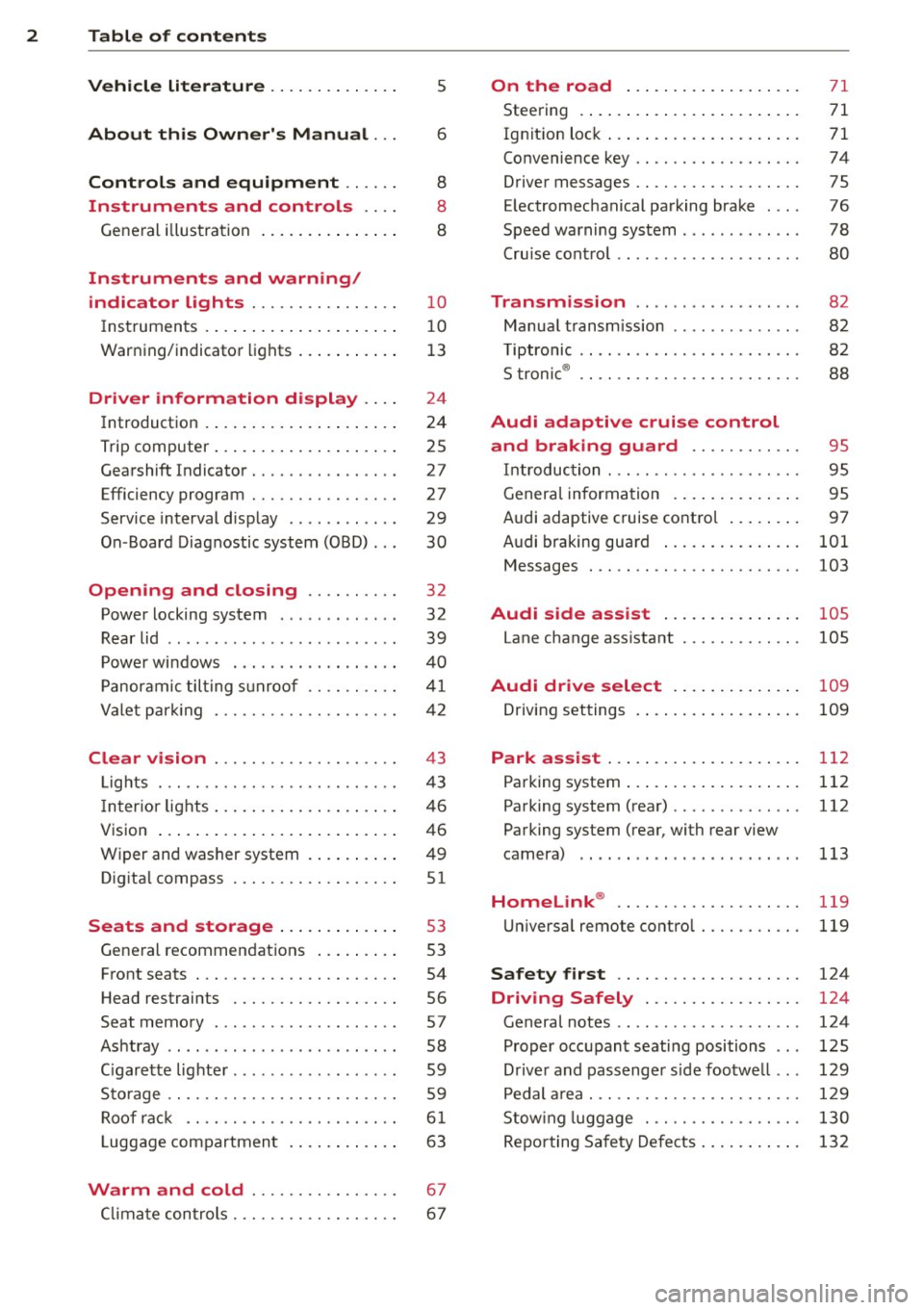
2 Table of contents Vehicle literature .. .. .. .. .. ... .
About this Owner's Manual ...
Controls and equipment .. ... .
Ins truments and controls .. . .
General illus tration .... ... .. .. ... .
Instruments and warning /
indicator lights ........ .. .. .. . .
Ins truments . .. .. ..... ... .. .. ... .
War ning/ indi cator lights ... .. ... .. .
Driver information d isplay .. . .
Introduct ion . .. .. ..... ... .. .. ... .
Trip computer .. .. ..... ... .. .. ... .
Gearshift Indicator ........ .. .. ... .
Efficiency program ........ .. .. .. . .
Service interval d isp lay .. .. .. .. .. . .
On -Board Diagnostic system (OBD) .. .
Opening and closing .... .. .. . .
Power locking system .. ... .. .. .. . .
R ear lid .. .. ................ ... . .
5
6
8
8
8
10
1 0
13
24
24
25
27
27
29
30
32
32
39
P owe r windows . . . . . . . . . . . . . . . . . . 40
P anorami c til ting s unroof .. .. .. .. . .
Va let p arki ng ............ .. .. .. . .
Clear vision .............. .. ... .
Lig hts . .. .... ........... .. .. .. . .
I n ter ior lights .. . ...... ... .. .. ... .
V1s 1on ...... .. .. ..... ... .. .. ... .
Wi per and washer system . ... .... . .
Dig ita l compass .......... .. .. ... .
Seats and storage ... .. .. .. ... .
General recommendat ions ... ... .. .
Front seats ................ .. ... .
H ead restraints .......... .. .. ... .
Seat memory . .. ...... .... ... .. . .
As htray .. .. ................ ... . .
C igar ette lighte r .... ...... .. .. .. . .
S to rage .... ... .......... .. .. .. . .
Ro of r ack .. ............. ....... .
L uggage compartmen t .. .. .. .. .. . .
41
42
43
4 3
46
46
49
51
53
53
54
56
57
58
59
5 9
6 1
63
Warm and cold . . . . . . . . . . . . . . . . 67
C lima te controls. . . . . . . . . . . . . . . . . . 6 7
On the road ... ... .. ..... .... . .
Stee ring . ..... .. .. ... ..... ... .. .
Ig nit ion loc k ... .. ... .. ..... ... .. .
Convenience key .. ............. .. .
Driver messages .. ............. .. .
E lectromechanical pa rking brake ... .
Speed warning system .. .. ... ... .. .
71
71
71
74
75
76
78
Cru ise cont ro l . . . . . . . . . . . . . . . . . . . . 80
Transm1ss1on . . . . . . . . . . . . . . . . . . 82
Manua l transm iss ion . . . . . . . . . . . . . . 82
T iptronic . . . . . . . . . . . . . . . . . . . . . . . . 82
S troni c® . . . . . . . . . . . . . . . . . . . . . . . . 88
Audi adaptive cruise control
and braking guard . . . . . . . . . . . .
95
I n troduc tion . . . . . . . . . . . . . . . . . . . . . 95
Genera l informa tion . . . . . . . . . . . . . . 95
Audi adaptive cruise contro l . . . . . . . .
97
A udi braking guard . . . . . . . . . . . . . . . 101
Messages . . . . . . . . . . . . . . . . . . . . . . . 103
Audi side assist .... ..... ... .. .
Lane change ass istant
105
105
Audi drive select . . . . . . . . . . . . . . 109
Driving settings . . . . . . . . . . . . . . . . . . 109
Park as sist . . . . . . . . . . . . . . . . . . . . . 112
Pa rking system ... ... .. ..... ... .. . 112
Pa rking system (rear) . . . . . . . . . . . . . . 112
Parking system (rea r, with rear view
camera) . . . . . . . . . . . . . . . . . . . . . . . .
113
Homelink ® . . . . . . . . . . . . . . . . . . . . 119
Universa l remote control........ ... 119
Safety first . . . . . . . . . . . . . . . . . . . . 124
Driving Safely . . . . . . . . . . . . . . . . . 124
General notes . . . . . . . . . . . . . . . . . . . . 124
Proper occ upant seating positions . . . 125
Drive r and passenge r side foo twe ll . . . 129
Pedal a rea . . . . . . . . . . . . . . . . . . . . . . . 129
Stow ing luggage . . . . . . . . . . . . . . . . . 130
Re po rting Sa fety Defects . . . . . . . . . . . 132
Page 11 of 294
CD
@
®
©
®
®
(j)
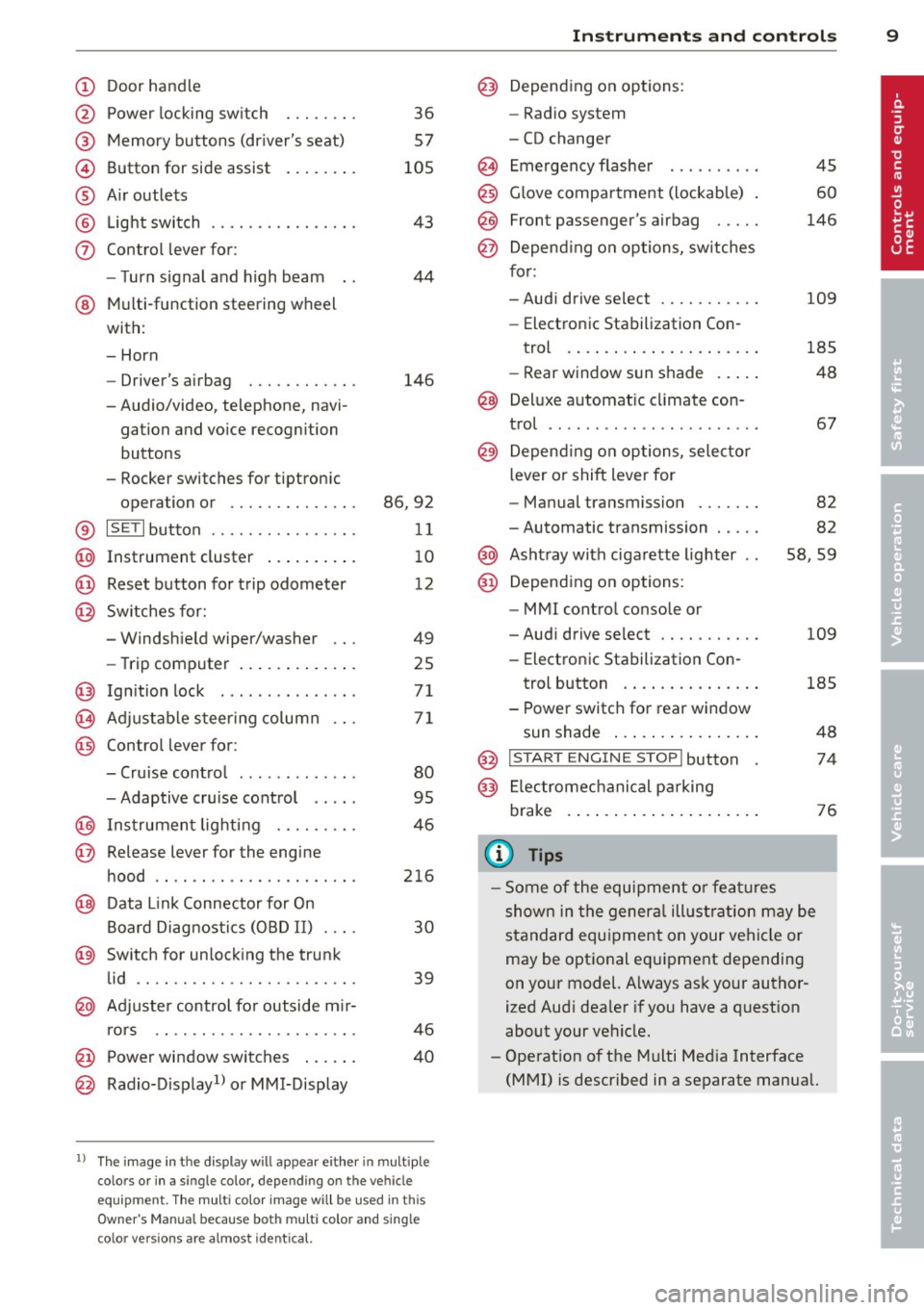
Door handle
Power locking sw it ch
Memory buttons (dr iver's seat)
Button for side ass ist
A ir outlets
L ight switch
Control lever for :
- T urn signal and high beam
@ Multi-function steering wheel
with:
- Horn
- Driver's airbag
- Audio/video, telephone, navi
gation and vo ice recogni tion
buttons
- Rocker switches for tiptroni c
36
57
105
43
44
146
opera tion or . . . . . . . . . . . . . . 86, 92
® ISET lbutton . . . . . . . . . . . . . . . . 11
@ Instrument cluster . . . . . . . . . . 10
@ Reset button for trip odometer 12
@ Switches for:
- Windshield wiper/washer 49
- Trip computer . . . . . . . . . . . . . 25
@ Ignition lock ............. . .
(8) Adjustable s teer ing column
@ Control lever for :
- Cruise contro l ......... ... .
- Adaptive cruise control .. .. .
@ Ins trumen t lighting .... .. .. .
@ Release lever for the engine
hood .. .. .. .. ........... .. .
@ Data L ink Connector for On
B oard Diag nostics (OBD II) . .. .
@ Sw itch for unlock ing the trunk
lid .. .. .. ...... ..... ...... .
@ Adjuste r control fo r outside m ir-
r ors .. .. .. .. ........... .. .
@ Power window switches ... .. .
@ Rad io-Display1l or MMI-Display
71
71
80
95
4 6
216
30
39
46
40
l) T he image in t he d is pl ay will app ea r e it h er in mu lt ipl e
c o lor s or in a singl e co lor , de pen din g o n th e vehicl e
e q ui pment. T he m ulti co lo r im age w ill b e used i n this
O w ner's M anual becau se bo th mu lt i co lo r and sin gle
c o lor ver sio ns are almos t identic al.
In strument s and control s 9
@) Depending on options:
- Rad io system
- CD changer
Emergency flasher
G love compartment (lockab le)
Front passenger's airbag .....
Depend ing o n options, sw itches
for:
45
60
146
- Audi drive se lect .......... .
109
- Electronic Stabili zation Con-
trol . ... .. .. .. . .. ... .... .
- Rear window sun shade .. .. . 185
48
@ Deluxe automat
ic cl imate con-
trol ...... .. .... .......... .
@) Depending on options, selecto r
lever or shift lever for 67
- Manual transmission . . . . . . . 82
- Automatic transmission . . . . . 82
@ Ashtray with ciga rette lighter 58, 59
@ Depend ing on options:
- MMI contro l console or
- Aud i drive select . . . . . . . . . . . 109
- Electronic Stab ilizat ion Con-
trol button . . . . . . . . . . . . . . . 185
- Power switch for rear window sun shade . . . . . . . . . . . . . . . . 48
@ I STA RT ENGI NE STOPI button 74
@) Electromec hanical pa rking
brake . . . . . . . . . . . . . . . . . . . . . 76
(D Tips
-Some of the equipment o r feat ures
show n in the genera l ill ustration may be
standard equ ipment on your vehicle or
may be optional eq uipment depending
on your model. Always as k your author
ized Aud i dea ler if you have a question
about your vehicle.
- Operat ion of the Multi Med ia Interface
(MMI) is described in a separate manual.
Page 17 of 294
Instrument s and warnin g/indic ator ligh ts 15
ml
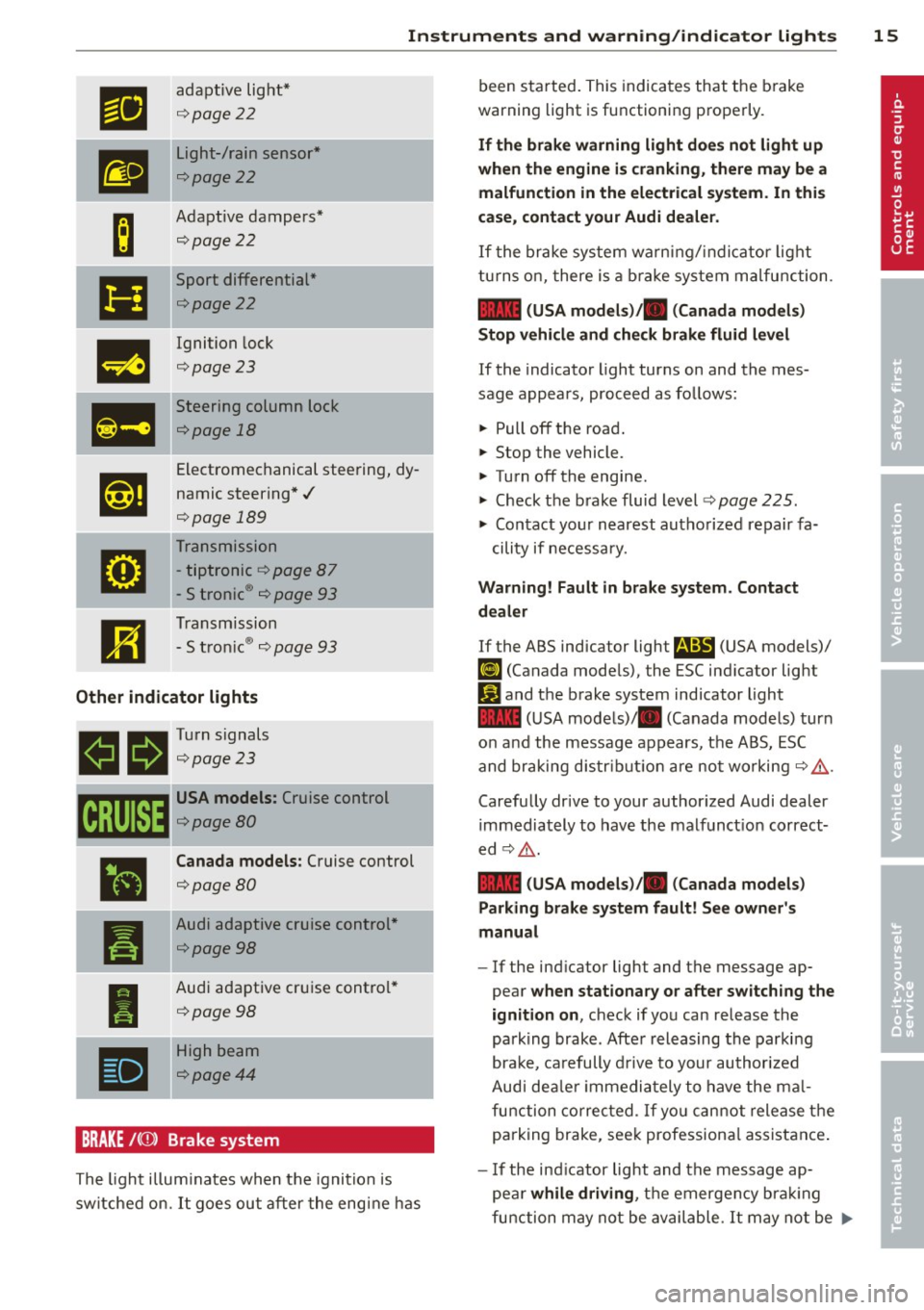
adaptive light *
¢page22
m
Light-/rain sensor*
¢page22
-
B
Adaptive dampers*
¢page 22
Ill
Sport differential *
¢page22
m
Ignition lock
¢page 23
Ill
Steering column lock
¢page 18
,1,ij
Electromechanical steering, dy-
namic steering*./
¢page 189
g
Transmission
- tiptronic
¢page 87
- S tronic ® ¢ page 93
R1
Transmission
- S tron ic ® ¢ page 93
Other indicator lights
B!l 1!11 Turn signals
allf. ¢page23
CRUISE
-
•
I
•
USA models: Cruise control
¢page80
Canada models : Cruise control
¢page80
Audi adaptive cruise con trol *
¢page98
Audi adaptive cruise control *
¢poge98
-High beam
¢poge44
BRAKE /((f)) Brake system
The light illum inates when the ignition is
sw itched on.
It goes ou t after the eng ine has been started.
This indicates that the b rake
warning light is functioning properly.
If th e brake warning light doe s not light up
when the engine is cranking, there may be a
malfunction in the electrical system . In thi s
case, contact your Audi dealer .
If the brake system wa rn ing/ indica tor light
t u rns o n, there is a b ra ke sys tem ma lfunction .
1111 (USA model s)/. (Canada model s)
Stop v ehicle and check brake fluid lev el
If the indicator l ight turns on and the mes
sage appears , proceed as follows:
.,. Pull off the road.
.,. Stop the vehicle.
.,. Tu rn off the engine.
.,. Check the b rake fluid level¢
page 225 .
.,. Contact your n earest autho rized repair fa-
cility if necessa ry.
Warning! Fault in brake system . Contact
d ealer
If the ABS indicator light fl!S (USA models)/
(11 (Canada mode ls), the ESC ind icator light
Ji1 and the b rake system indicator light
1111 (U SA mode ls)/ . (Canada mode ls) turn
o n and the message appears, the ABS, ESC
and braking d is tribut ion are not worki ng ¢ ,&. .
Carefully drive to your author ized Audi dealer
immediately to have the malfunct ion correct
ed ¢,&. .
1111 (USA models )/. (Canada models)
Parking brake system fault! See owner' s
manual
- If the ind icator light and the message ap
pear
when stationary or after switch ing the
ignition on ,
check if you can release the
park ing brake . Afte r releasing the parki ng
brake, carefully d rive to your au thor ized
Audi dea le r i mmedia tely t o have the ma l
fu nction corre cted. If yo u can not release the
parking brake, see k professiona l assistance .
-If the ind icator light and the message ap-
pea r
while driving , th e e mergen cy b ra ki ng
fu nction may not be avail able.
It may not be .,..
Page 26 of 294
24 Driver information d isplay
Driver information
display
Introduction
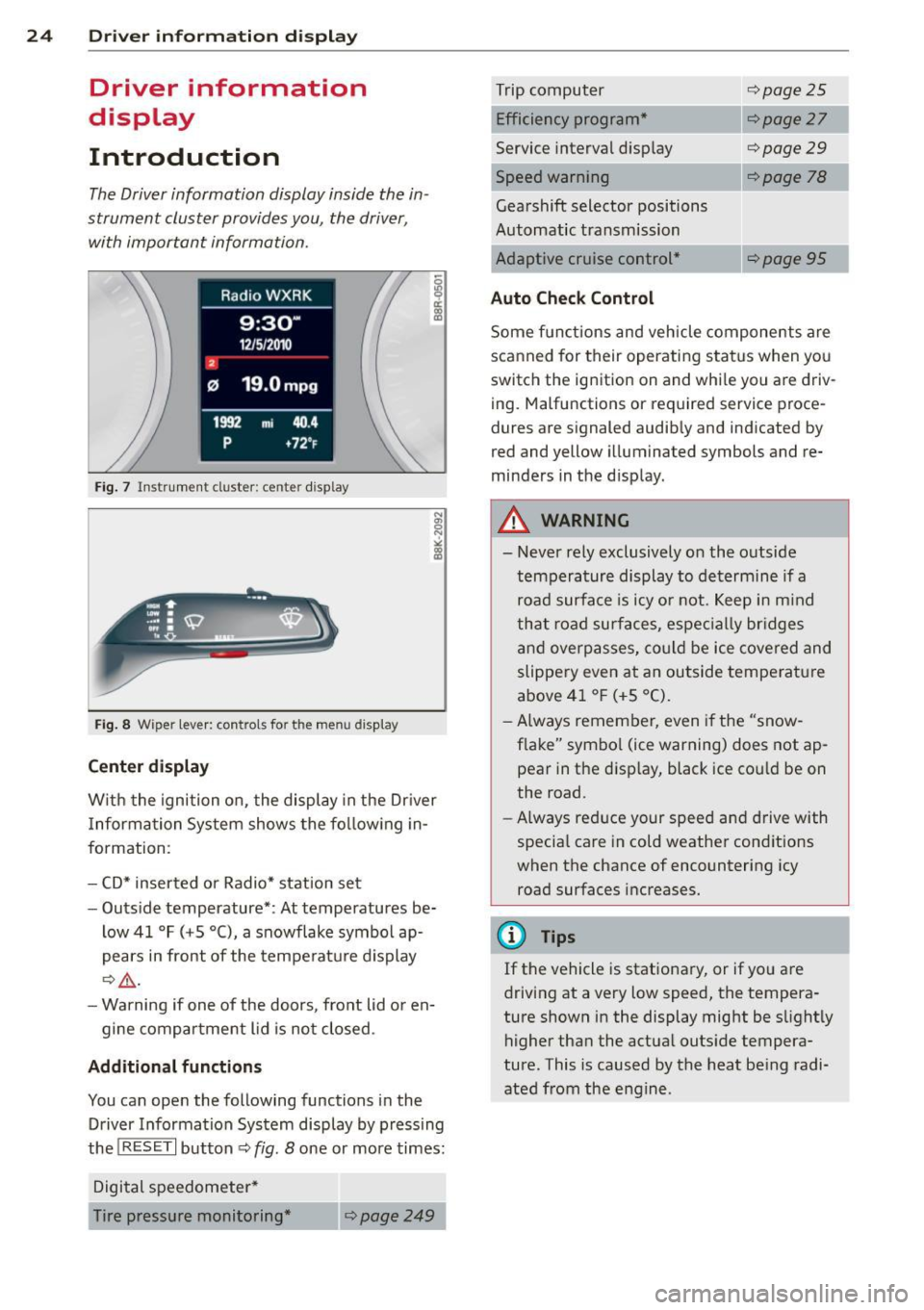
The Driver information display inside the in
strument cluster provides you, the driver ,
with important information.
Fig. 7 Ins trum en t cl uster : ce nter display
Fig. 8 W iper lev er: con trols fo r th e menu disp lay
Center display
W ith the ignition on, the display in the Dr iver
I nformation System shows the following in
formation :
- CD* inserted or Radio* station set
- Outside temperature* : At temperatures be-
low 41 °F (+5 °C), a snowflake symbol ap
pears in front of the temperature display
c::> .&_.
-Warning if one of the doors, front lid or en-
gine compartment lid is not closed .
Additional functions
You can open the following functions in the
Driver Information System display by pressing
the
! RESET I button c::> fig. 8 one or more times:
Digital speedometer*
Tire pressure monitoring *
~page249
Trip computer
Efficiency program*
Service interval display
c::>page25
c::> page 27
c::> page 29
--·-
Gearshift selector positions
Automatic transmission
Adaptive cruise control*
Auto Check Control
c::> page 78
Some functions and vehicle components are
scanned for their operating status when you
switch the ignition on and whi le you are driv
ing. Malfunctions or required service proce
dures are signaled audibly and indicated by
red and yellow illuminated symbols and re
minders in the d isplay.
A WARNING
--- Never rely exclusively on the outside
temperature display to determine if a
road surface is icy or not. Keep in mind
that road surfaces, especially br idges
and overpasses, could be ice covered and
slippery even at an outside temperature
above 41 °F (+5 °C).
- Always remember, even if the "snow
flake" symbol (ice warning) does not ap
pear in the disp lay, black ice cou ld be on
the road.
- Always reduce your speed and drive with
specia l care in cold weather cond itions
when the chance of encountering icy
road surfaces increases.
¢j) Tips
If the vehicle is stationary, or if you are
driving at a very low speed, the tempera
ture shown in the display might be s light ly
higher than the actual outs ide tempera
ture. This i.s caused by the heat being radi
ated from the engine .
Page 35 of 294
-If the power lock ing system should ma l
function, you can lock the driver's door
using the mechanical key
~ page 3 7.
- If the power locking system should fail,
you can still open the fue l tank flap in an
emergency <=>
page 215.
-You are well advised not to keep valua
bles inside an unattended vehicle, visible
or not . Even a properly locked vehicle
cannot provide the security of a safe .
- If the LED in the upper edge of the driv
er's door panel comes on for about
30
seconds after the vehicle is locked, there
i s a malfunction in the power locking or
the anti-theft warning system. Have the
malfunction corrected by an author ized
Audi dealersh ip or qua lified repair fac ili
ty.
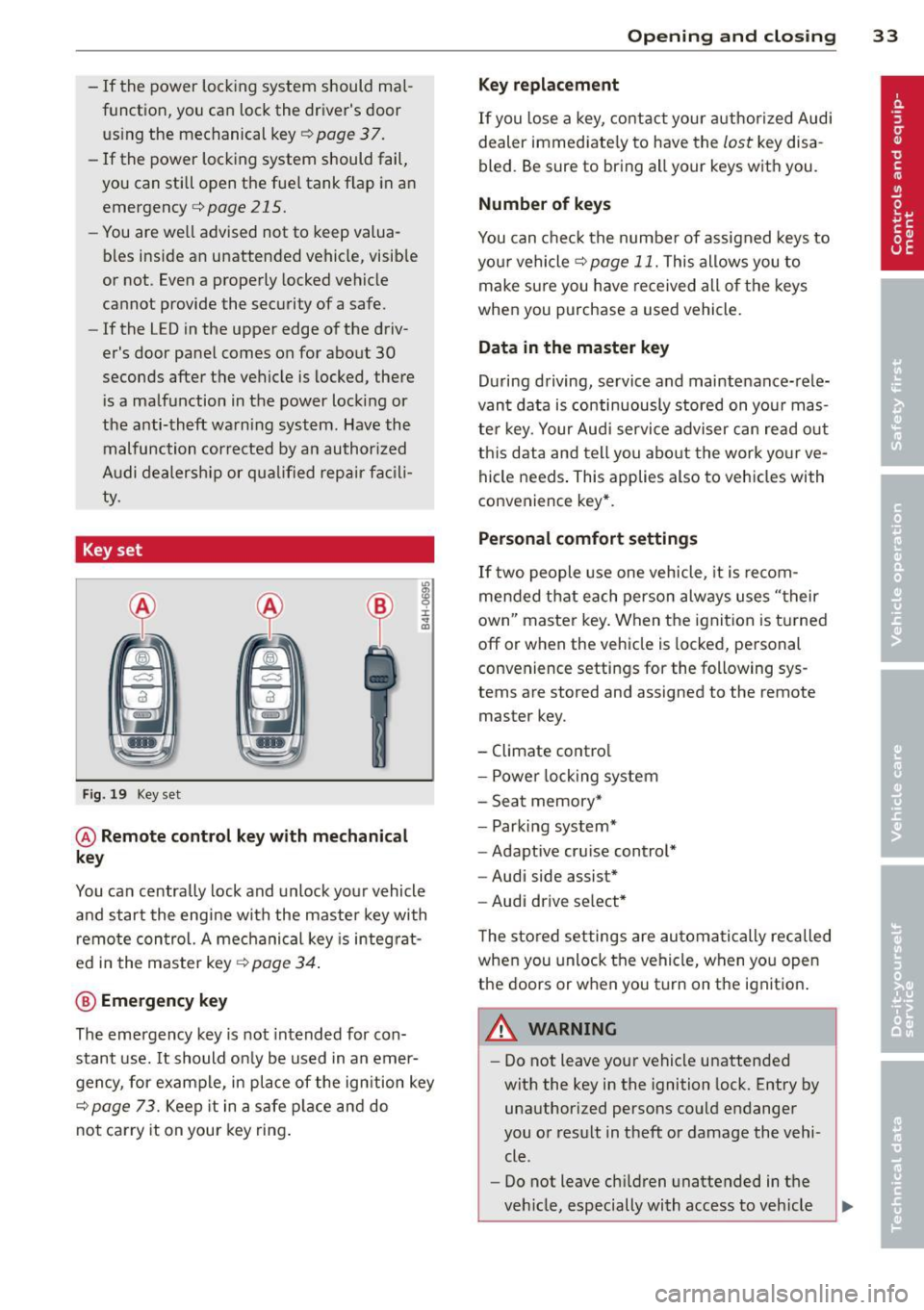
Key set
Fig. 19 Key set
@ Remote cont rol k ey with me chanical
ke y
You can centrally lock and unlock your vehicle
and start the engine with the master key with
remote control. A mechanical key is integrat
ed i n the master key
<=> page 34 .
@ Emerg ency key
The emergency key is not intended for con
stant use.
It should on ly be used in an emer
gency, for example, in place of the ign ition key
<=> page 73. Keep it in a safe p lace and do
not carry it on your key ring .
Openin g an d clos ing 33
Ke y re plac ement
If you lose a key, contact your author ized Audi
dealer immediate ly to have the
lost key disa
bled. Be sure to bring all your keys with you .
Number of keys
You can check the number of assigned keys to
you r vehicle <=>
page 11. This allows you to
make sure you have re ceived all of the keys
when you purchase a used vehicle.
Data in th e mast er ke y
During driving, service and maintenance-rele
vant data is continuously stored on your mas
ter key. Your Audi service adviser can read out
this data and tell you abo ut the work yo ur ve
hicle needs . This applies also to vehicles with
convenience key*.
Person al comf ort settings
If two people use one vehicle, it is recom
mended that each person always uses "their
own'' master key. When the ignition is turned
off or when the vehicle is locked, pe rsonal
convenience settings for the following sys
tems are stored and assigned to the remote
master key.
- Climate control
- Powe r locking system
- Seat memory*
- Parking system*
- Adaptive cruise control*
- Audi side assist*
- Audi drive se lect*
T he sto red settings are automatically recalled
when you unlock the vehicle, when you open
the doors or when you turn on the ignition .
A WARNING
--
-Do not leave your vehicle unattended
with the key in the ignition lock . Entry by
unauthorized persons could endanger
you or result in theft or damage the vehi
cle .
- Do not leave ch ildren unattended in t he
veh icle, especially with access to vehicle
Page 82 of 294
80 On the road
Warning threshold 2 can be set in the speed range starting from 20 mph to 150 mph (30
km/h to 240 km/h). Settings can each be ad
justed in intervals of 6 mph (10 km/h).
Cruise control
Switching on
The cruise control system makes it possible to
drive at a constant speed starting at
20 mph
(30 km/h).
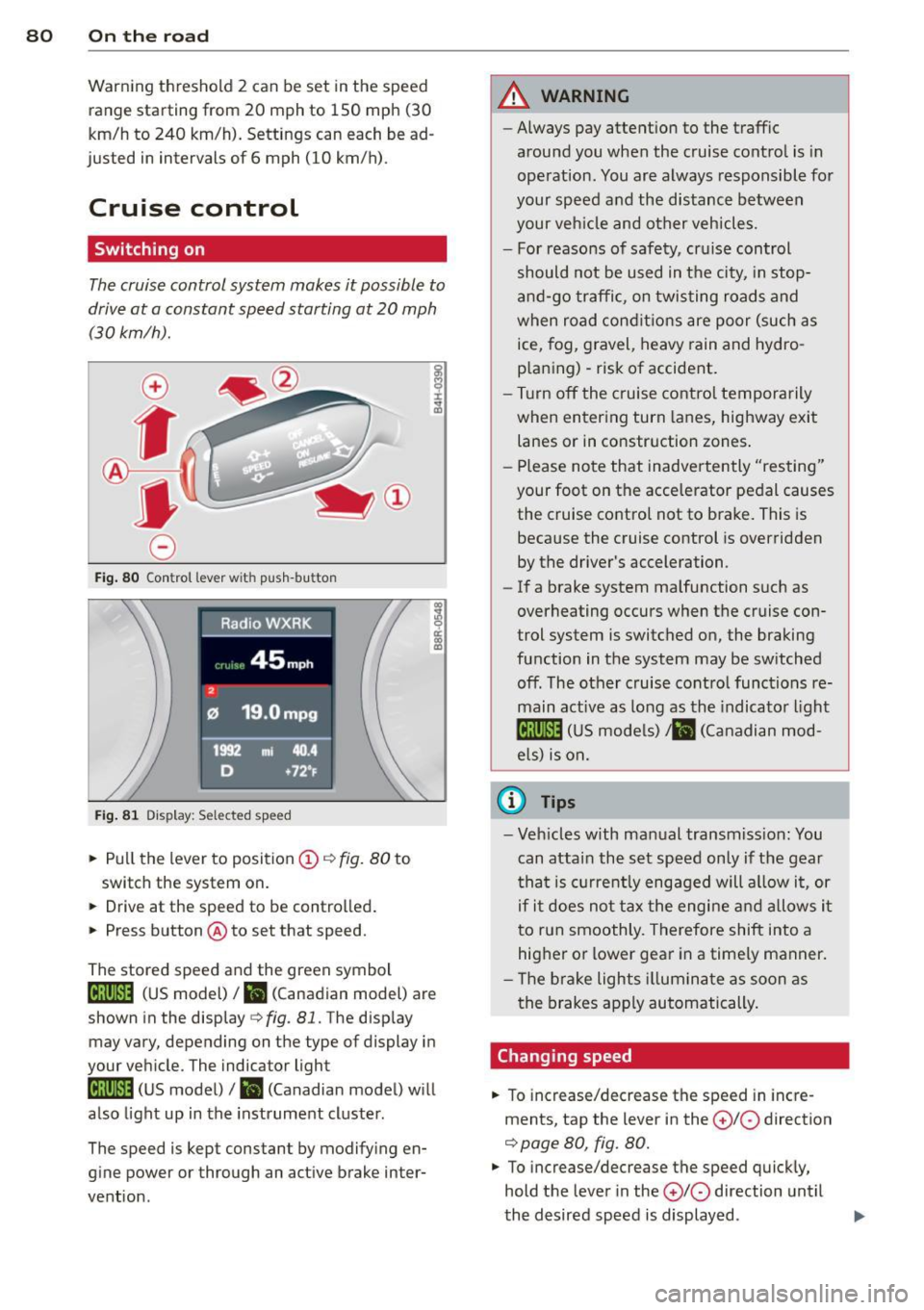
Fig. 80 Control lever w it h push-bu tton
Fig. 81 Dis play : Sel ected speed
.. Pull the lever to position (D i:::> fig. 80 to
switch the system on.
.. Drive at the speed to be controlled .
.. Press button @to set that speed.
co ~ 9 a:
l:l
The stored speed and the green symbol
ll!j(i)~i4 (US model) I ill (Canadian model) are
shown in the display
c::> fig . 81. The display
may vary, depending on the type of display in
your vehicle. The indicator light
ll!;(i)~i4 (US model)/ ii (Canadian model) will
also light up in the instrument cluster .
The speed is kept constant by modifying en
gine power or through an active brake inter
vention.
A WARNING
-- Always pay attent ion to the traffic
around you when the cruise control is in
operation. You are always responsible for
your speed and the distance between
your veh icle and other vehicles.
- For reasons of safety, cruise control
should not be used in t he city, in stop
and-go traffic, on twisting roads and
when road conditions are poor (such as
ice, fog, gravel, heavy rain and hydro
p laning) -risk of accident .
- Turn off the cruise control temporarily
when entering turn lanes, highway exit
lanes or in constr uction zones .
- Please note that inadve rtently "resting"
your foot on the accelerator pedal causes the cruise control not to brake. This is
because the cruise control is overridden
by the driver's acceleration.
- If a brake system malfunction such as
overheating occurs when the cruise con
trol system is switched on, the braking
function in the system may be sw itched
off. The other cruise control functions re
main active as long as the indicator light
lij;(l)~i4 (US models) ;ill (Canadian mod
els) is on.
(D Tips
-Veh icles with manual transmiss ion: You
can attain the set speed only if the gear
th at is cur rently engaged will allow it, or
if it does not tax the engine and allows it
to run smoothly. Therefore shift into a
higher or lower gear in a timely manner.
- Th e brake lights illuminate as soon as
the brakes apply automatically.
Changing speed
.. To increase/decrease the speed in incre
ments, tap the lever in the
0 10 direction
i:::> page 80, fig. 80.
.. To increase/decrease the speed quickly,
hold the lever in the
0 10 direction until
the desired speed is displayed .
Page 83 of 294
You can also p ress the accelerator pedal down
to increase your speed , e .g. if you want to
pass someone. The speed yo u saved earlier
will resume as soon as you let off of the accel
erator pedal.
If, however, you exceed your saved speed by
6 mph (10 km/h) for longer than 5 min utes,
the cruise control will be turned off tempora rily. The green symbol in the display turns
white . The saved speed remains the same .
Presetting your speed
You can preset your desired speed while the
vehicle is not moving.
" Switc h on the ignition.
" Pull lever into pos ition
(D c> page 80,
fig. 80.
" Press the lever in the 0 or O direction to
i ncrease o r decrease yo ur speed .
" Re lease the lever to save that speed .
This funct ion makes it possible, for example,
to save th e speed you want before driving on
the highway . Once on the highway, activate
the c ruise cont ro l by pulling the leve r towa rd
(D .
Switching off
Temporary deactivation
" Press the brake ped al, or
" Manual transmission : Keep the clut ch pedal
pressed down
longer, or
" Press the lever into pos ition @ (not clicked
into p lace)
¢ page 80, fig. 80, or
" Drive for longer than S minutes at more
than 6 mph (10 km/h) above the stored
speed .
Switching off compl ete ly
" Press lever into position @(clicked into
place), or
" Switc h the ignition off.
The speed yo u saved wi ll be retained if the
cru ise control has been switched off tempora
rily. To resume the saved speed, let up on the
On th e ro ad 81
brake or clutch pedal and p ull the lever to po
sition
(I) .
Swi tc hi ng the ignit ion off e rases the saved
speed.
A WARNING ~
You shou ld only ret urn to the saved speed
if it is not too fast for the current traffic
conditions -risk o f an accident!
Page 93 of 294
may be useful to switch temporarily to the
manual shift program in order to adjust the
gears to the driving conditions by hand
Q & .
On slopes, activate the parking brake first and
then move the selector lever to the P position.
This prevents the locking mechanism from be ing loaded too heavily and will make it easier
to move the selector lever out of P.
A WARNING
-Never leave your vehicle with the engine
running while in gear. If you must leave
your vehicle when the engine is running, activate the parking brake and move the
selector lever to P.
- Power is still transmitted to the wheels
when the engine is running at idle. To
prevent the vehicle from "creeping", you
must keep your foot on the brake when
the engine is running and the selector
lever is in D/S or R or "tiptronic" mode is
selected.
- Do not press the accelerator pedal when
changing the selector lever position
while the vehicle is stationary and the
engine is running.
- Never shift into R or P while driving.
- Before driving down a steep slope, re-
duce your speed and shift into a lower
gear with "tiptronic".
- Do not ride the brakes or press the brake
pedal too often or too long. Constant
braking causes the brakes to overheat
and substantially reduces braking per
formance, increases braking distance or
causes complete failure of the brake sys
tem .
- To prevent the vehicle from rolling back
when stopping on inclines, always hold it
in place with the brake pedal or parking
brake.
- Never hold the vehicle on an incline with
a slipping clutch . The clutch opens auto
matically when it becomes too hot from
the overload. An indicator lamp
[O] illu
minates and a driver message appears
Transmission 91
Q page 93 when the clutch is overload
ed.
(D Note
- When stopping on an incline, do not try
to hold the vehicle in place by pressing
the accelerator pedal while a driving gear
is selected. This can cause the S tronic
transmission to overheat and can dam
age it . Activate the parking brake or
press the brake pedal to prevent the ve
hicle from rolling .
- Allowing the vehicle to roll when the en
gine is stopped and the selector lever is
in N will damage the S tronic transmis
sion because it is not lubricated under
those circumstances.
(D Tips
For safety reasons, the parking brake is re
leased automatically only when the driv
er's safety belt is engaged in the buckle.
Hill descent control
App lies to vehicles : wi th S tronic t ra nsmi ssio n and hill de ·
sce nt contro l
The hill descent con trol system assists the
driver when driving down declines .
Hill descent control is activated when these
lector lever is in D/S and you press the brake
pedal. The S tronic transmission automatically
shifts down into a gear suitable for the de cline. Hill descent control tries to maintain
the speed achieved at the time of braking,
within physical and technical limitations. If
may still be necessary to adjust the speed
with the brakes.
Hill descent control switches off once the de
cline levels out or you press the accelerator
pedal.
On vehicles with the cruise control system*
Q page 80, hill descent control is also activat-
ed when the speed is set. .,,.
Page 97 of 294
Audi adaptive cruise control and braking guard 95
Audi adaptive cruise
control and braking
guard
Introduction
App lies to vehicles: with Audi adaptive cruise co ntrol
The adaptive cruise control system assists the
driver by regu lating vehicle speed and helping
to maintain a set distance to the vehicle
ahead, within the limits of the system . If the
system detects a moving vehicle up ahead,
adaptive cruise control can brake and then ac
celerate your vehicle. This he lps to make driv
ing more comfortable on long highway
stretches.
The braking guard system can warn you about
an impending collision and initiate braking
maneuvers
c::;, page 101.
Adaptive cruise control and braking guard
have technical limitations that you must
know , so please read this section carefully, un
derstand how the system works and use them properly at all times.
General information
General information
Applies to vehicles: with Audi adaptive cruise control
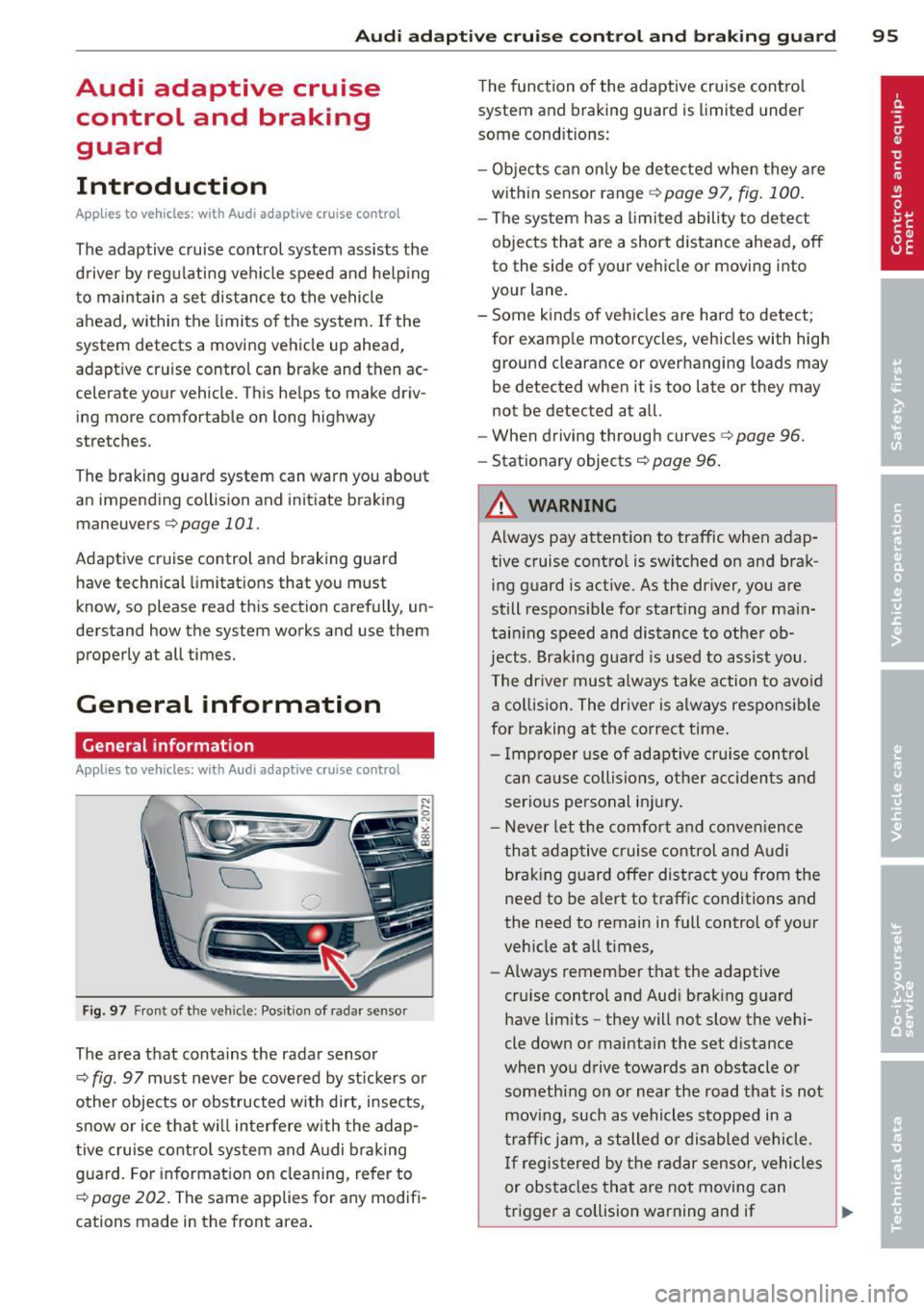
Fig. 97 Front of the veh icle: Pos ition of radar sensor
The area that contains the radar sensor
c::;, fig. 97 must never be covered by st ickers or
other objects or obstructed with dirt, insects,
snow or ice that will interfere with the adap
tive cruise control system and Audi braking
guard. For information on cleaning, refer to
c::;, page 202. The same applies for any modifi
cations made in the front area . The
function of the adaptive cruise contro l
system and braking guard is limited under
some cond itions:
- Objects can only be detected when they are
within sensor range
c;,page 97, fig . 100 .
-The system has a limited ability to detect
objects that are a short distance ahead, off
to the side of your vehicle or moving into
your lane.
- Some kinds of vehicles are hard to detect;
for examp le motorcycles, vehicles with high
ground clearance or overhanging loads may
be detected when it is too late or they may
not be detected at all.
- When driving through curves
c::;, page 96.
-Stationary objects c::;, page 96 .
A WARNING
-Always pay attention to traffic when adap-
tive cruise control is switched on and brak ing guard is active. As the dr iver, you are
still responsible for starting and for ma in
tain ing speed and distance to other ob
jects. Braking guard is used to assist you.
The driver must always take action to avoid
a collision. The driver is always responsible
for braking at the correct time.
- Improper use of adaptive cruise con trol
can caus e collisions, other accidents and
serious personal injury .
- Never let the comfort and convenience
that adaptive cruise control and Audi
braking guard offer distract you from the
need to be alert to traff ic conditions and
the need to remain in full control of yo ur
veh icle at a ll times,
- Always remember that the adaptive
cru ise contro l and Aud i brak ing guard
have lim its -they will not slow the vehi
cle down or maintain the set d istance
when you drive towards an obstacle o r
someth ing on or nea r the road that is not
moving, such as vehicles stopped in a
traffic jam, a stalled or disabled vehicle.
If registered by the radar sensor, vehicles
or obstacles that are not moving can
trigger a collision warning and if .,.
Page 98 of 294
96 Audi adaptive cruise control and braking guard
confirmed by the video camera, an acute
collision warning.
- For safety reasons, do not use adaptive
cruise control when driving on roads with
many curves, when the road surface is in
poor condition and/or in bad weather
(such as ice, fog, gravel, heavy rain and
hydroplaning). Using the system under
these conditions could result in a colli
sion.
- Switch adaptive cruise control off tempo
rarily when driving in turning lanes, on
expressway exits or in construction
zones. This prevents the vehicle from ac
celerating to the set speed when in these
situations.
- The adaptive cruise control system will
not brake by itself if you put your foot on
the accelerator pedal. Doing so can over
ride the speed and distance regulation.
- When approaching stationary objects
such as stopped traffic, adaptive cruise
control will not respond and braking
guard will have limited function.
- The adaptive cruise control system and
braking guard do not react to people, an
imals, objects crossing the road or on
coming objects .
- The function of the radar sensor can be
affected by reflective objects such as
guard rails, the entrance to a tunnel,
heavy rain or ice.
- Never follow a vehicle so closely that you cannot stop your vehicle safely. The
adaptive cruise control cannot slow or
brake the vehicle safely when you follow
another vehicle too closely . Always re
member that the automatic braking
function cannot bring the vehicle to a sudden or emergency stop under these
conditions.
- To prevent unintended operation, always
switch ACC
off when it is not being used.
{[) Note
The sensor can be displaced by impacts or
damage to the bumper, wheel housing and
underbody. That could affect the adaptive cruise control system and braking guard.
Have your authorized Audi dealer or au
thorized Audi Service Facility check their
function.
, In curves
App lies to vehicles: wi th Audi ada ptive c ruise contro l
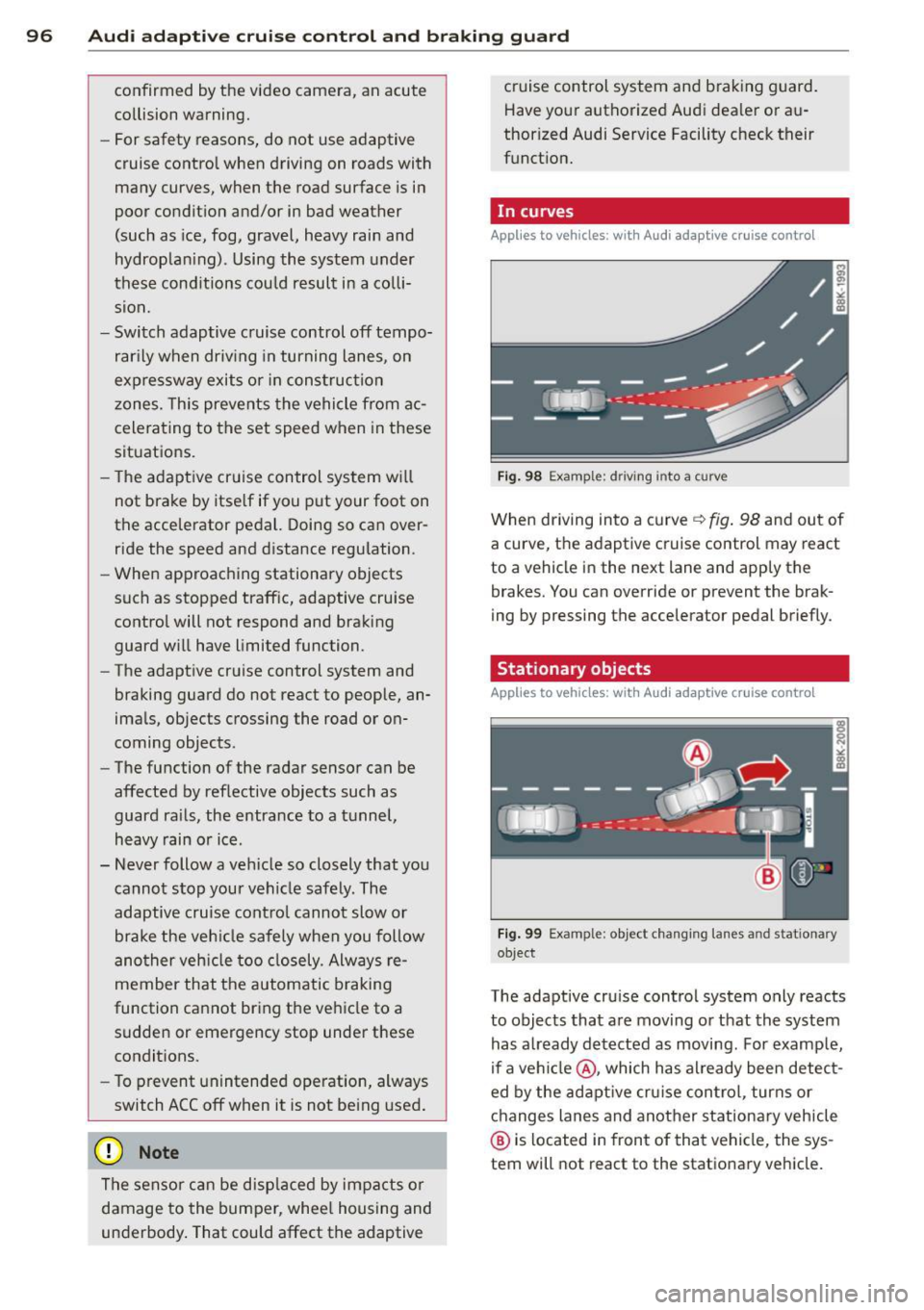
Fig. 98 Example: d riving i nto a curve
When driving into a curve ~ fig. 98 and out of
a curve, the adaptive cruise control may react
to a vehicle in the next lane and apply the
brakes. You can override or prevent the brak
ing by pressing the accelerator pedal briefly.
Stationary objects
Applies to vehicles : wi th Audi adapt ive crui se contro l
Fig. 99 Example: object changing lanes a nd stat ionary
object
The adaptive cruise control system only reacts
to objects that are moving or that the system
has already detected as moving. For example,
if a vehicle @, which has already been detect
ed by the adaptive cruise control, turns or
changes lanes and another stationary vehicle
@ is located in front of that vehicle, the sys
tem will not react to the stationary vehicle.