automatic transmission AUDI A5 COUPE 2014 User Guide
[x] Cancel search | Manufacturer: AUDI, Model Year: 2014, Model line: A5 COUPE, Model: AUDI A5 COUPE 2014Pages: 286, PDF Size: 70.99 MB
Page 84 of 286
82 Transmission
Transmission Manual transmission
Gearshift lever
Applies to vehicles: with manual transmission
The clutch pedal must be depressed all the
way before you can start the engine.
The manual transmission in your Audi is
equipped with an
interlock-feature .
• Depress the clutch pedal all the way.
• Start the engine with the gearshift lever in
Neutral and the clutch pedal depressed.
(D Note
Always depress the clutch pedal fully when
changing gears. Do not hold the vehicle on
a hill with the clutch pedal partially de
pressed. This may cause premature clutch
wear or damage .
@ Tips
-Resting your hand on the gearshift lever
knob while driving will cause premature
wear in the transmission.
- The back-up lights go on when you sh ift
in to Reverse with the ignition on.
Gearshift pattern (6-speed manual
transmission)
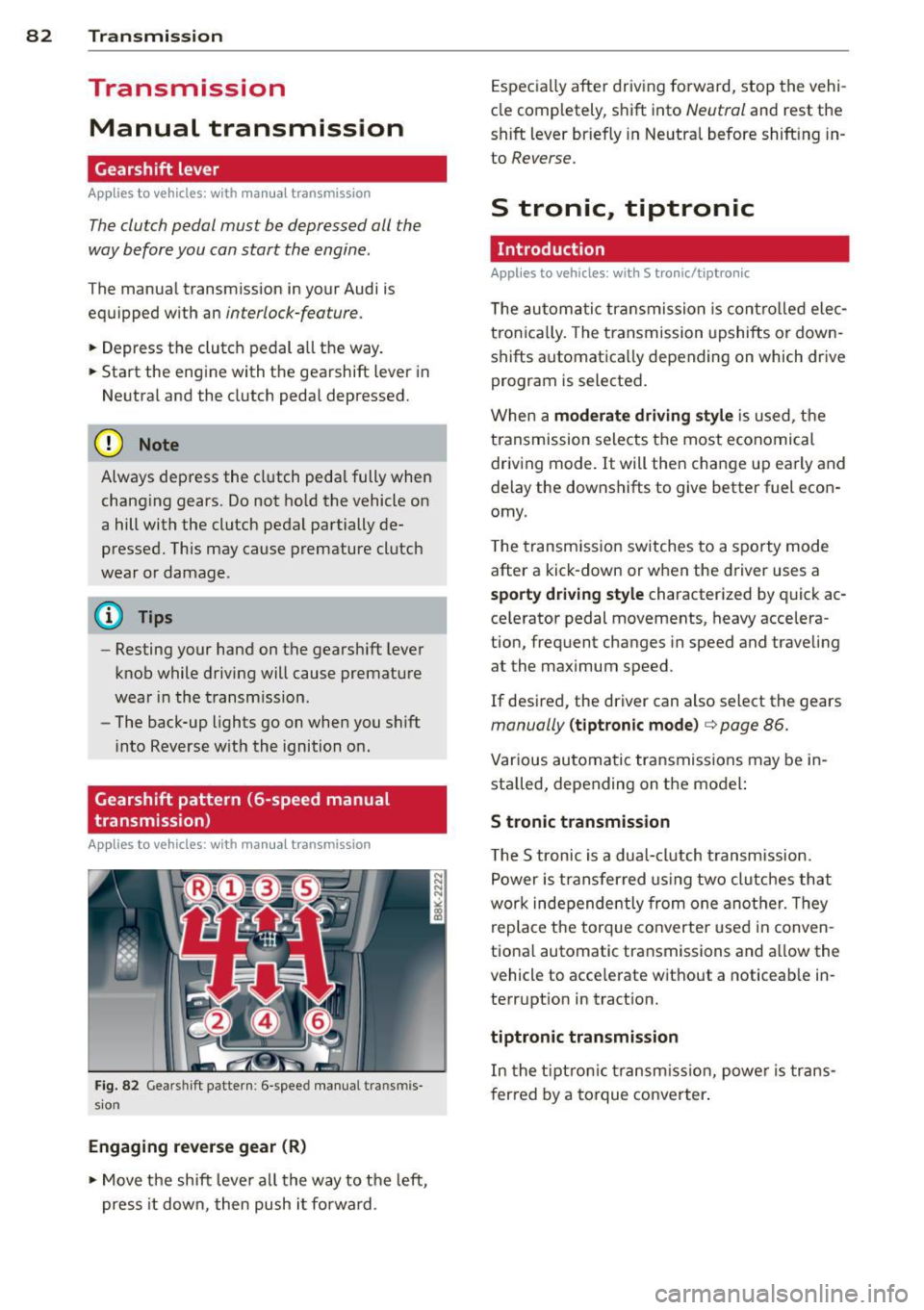
Applies to vehicles: with manual transmission
Fig. 82 Gears hi ft pattern : 6 -speed manual tra n smi s
sio n
Engaging reverse gear (R)
• Move the shift lever all the way to the left,
press it down, then push i t forward . Especially
after driving forward, stop the vehi
cle completely, shift into
Neutral and rest the
shift lever briefly in Neutral before shift ing in
to
Reverse.
S tronic, tiptronic
Introduction
Applies to vehicles: with S tronic/tiptronic
T he automatic transmission is controlled elec
tronically. The transmission upshifts or down
shifts automatica lly depending on which drive
program is selected.
When a
moderate driving style is used, the
transmission selects the most economical
driving mode. It will then change up early and
delay the downshifts to give better fuel econ
omy .
T he transmission switches to a sporty mode
after a kick-down or when the driver uses a
sporty driving style characterized by quick ac
ce lerator pedal movements, heavy accelera
tion, frequent changes in speed and traveling
at the maximum speed.
If desired, the driver can also select the gears
manually (tiptronic mode) c> page 86.
Various automatic transmissions may be in
stalled, depending on the model:
S tronic transmission
The S tronic is a dual-clutch transmission.
Power is transferred using two clutches that
work independe ntly from one another. Th ey
replace the torque converter used in conven
tional automatic transmissions and al low the
vehicle to acce lerate without a noticeable in
terruption in tract ion.
tiptronic transmission
In the tiptronic transmission, power is trans
f er red by a torque converter.
Page 85 of 286
Selector lever positions
Applies to vehicles: with S tronic/t ipt ronic
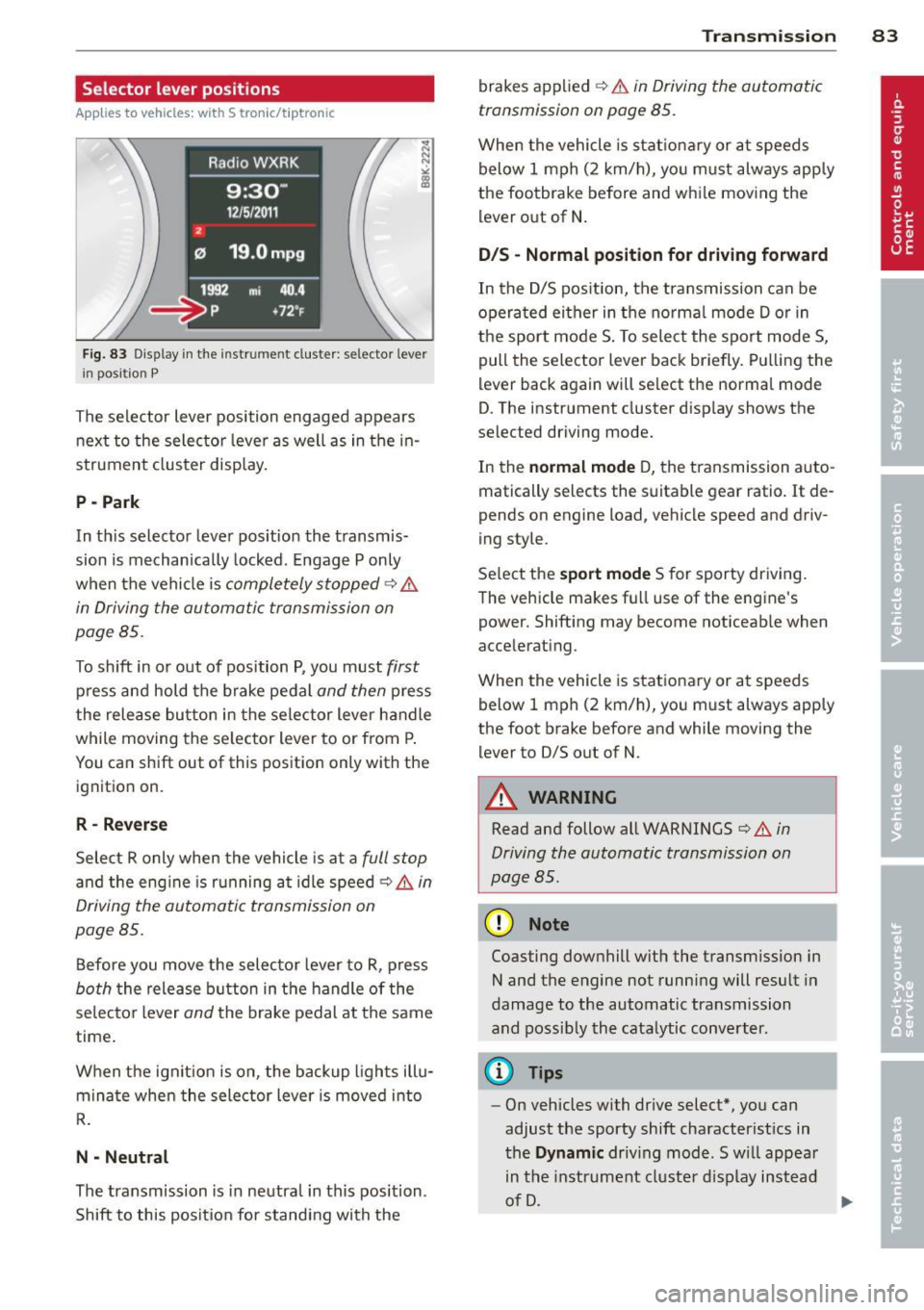
Fig. 83 Display in th e in str um en t cluste r: selecto r leve r
i n posit ion P
The selector lever position engaged appears
next to the selector lever as well as in the in
strument cluster display.
P -Park
In th is selector lever position the transmis
sion is mechanically locked. Engage P only
when the vehicle is
completely stopped¢ &
in Driving the automatic transmission on
page 85 .
To shift in or out of position P, you must first
press and hold the brake pedal and then press
the release button in the selector lever handle
while moving the selector lever to or from P.
You can shift out of this position only with the ignition on.
R - Reverse
Select R only when the vehicle is at a full stop
and the eng ine is running at idle speed ¢ & in
Driving the automatic transmission on
page 85.
Before you move the selector lever to R, press
both the release button in the handle of the
selector lever
and the brake pedal at the same
time .
When the ignit ion is on, the backup l ights illu
minate when the selector lever is moved into
R.
N -Neutral
The transmission is in neutra l in this position .
Shift to this position for standing with the
Transmission 83
brakes applied ¢ & in Driving the automatic
transmission on page 85.
When the vehicle is stationary or at speeds
below 1 mph (2 km/h), you m ust always apply
the footbrake before and whi le moving the
lever out of N .
DIS -Normal position for driving forward
In the D/S pos ition, the transmission can be
operated either in the norma l mode D or in
the sport mode S . To select the sport mode S ,
pull the selector lever back briefly. Pulling the
lever back again will se lect the normal mode
D . The inst rument cluster display shows the
selected driving mode.
In the
normal mode D, the transmission auto
matically selects the suitabl e gear ratio.
It de
pends on engine load, vehicle speed and driv
ing style.
Select the
sport mode S for sporty driving.
The vehicle makes fu ll use of the engine's
powe r. Shifting may become noticeab le when
a ccelerating.
When the veh icle is stationary or at speeds
below
1 mph (2 km/h), you must always apply
the foot brake before and while mov ing the
lever to 0/S out of N.
A WARNING
Read and follow all WARNINGS ¢ & in
Driving the automatic transmission on
page BS.
(D Note
-
Coasting downhill with the transm ission in
N and the engine not running will result in
damage to the automatic transmission
and possibly the catalytic converter.
(D Tips
- On vehicles with drive select*, you can
adjust the sporty shift characteristics in
the
Dynamic driv ing mode .Swill appear
in the instrument cluster display instead
of D.
Page 86 of 286
84 Transmi ssion
-If you accidenta lly select N while driv ing ,
ta ke your foot off the acce lerator pedal
i mmediately and wait for t he eng ine to
s low down to idle before se lecting 0/5.
- If there is a power failure, the se lector
l ever will not move out of the P position.
The emergency release can be used if
t hi s happens
¢ page 89.
Automatic Shift Lock (ASL)
Applies to vehicles: with S tron ic/tiptronic
The Automatic Shift Lock safeguards you
agains t acciden tally shifting into a forward or
the reverse gear and causing the vehicle to
move unintentionally.
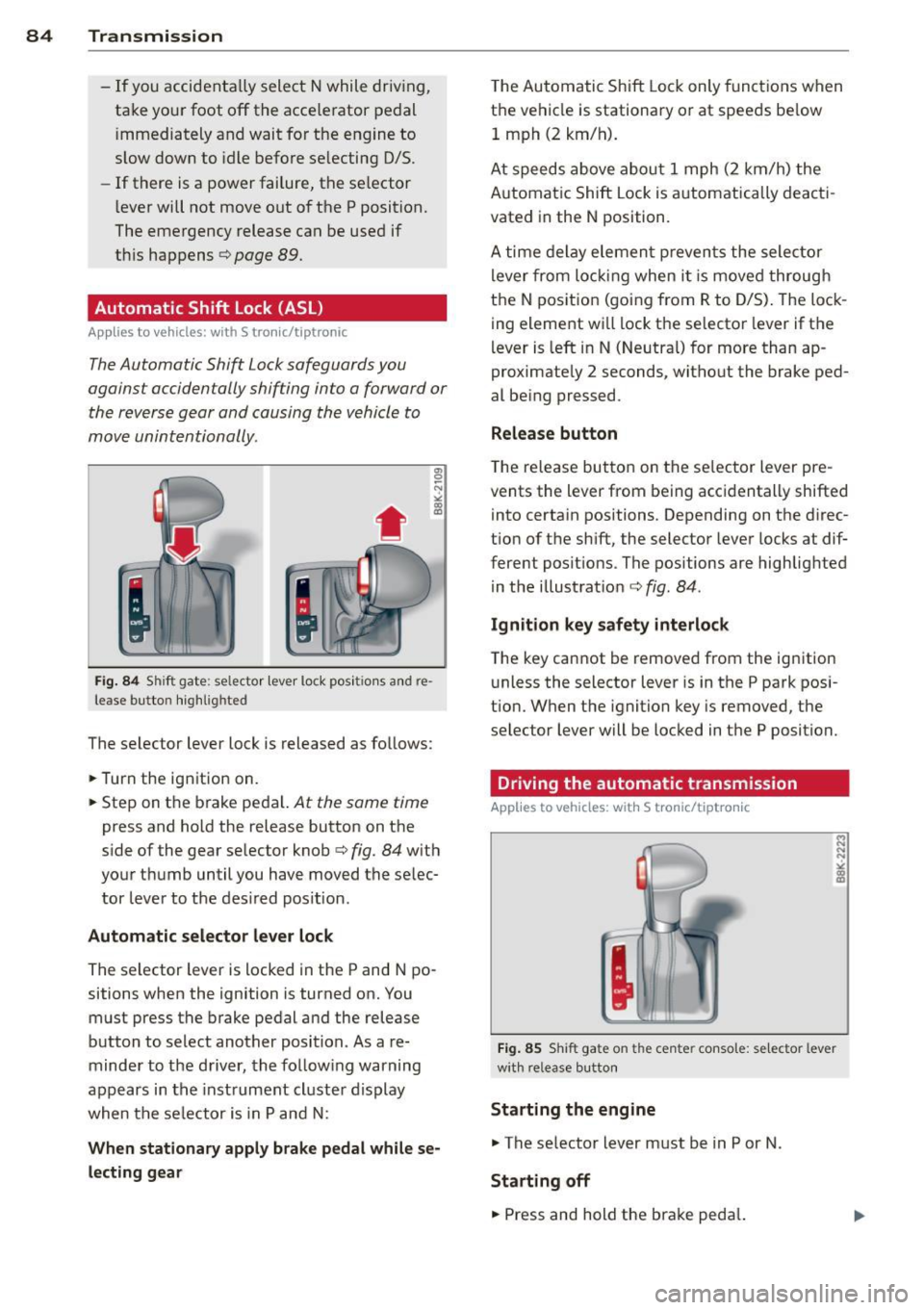
Fi g. 84 Shi ft gate : se lector lever loc k po siti ons a nd re
le ase button highlig hte d
The selector lever lock is released as fo llows:
• Turn the ign ition on.
• Step on t he b rake peda l.
At the same time
press and hold the release button on t he
s ide of the gear se lector knob
c::> fig. 84 w it h
you r th umb until you have moved the se lec
tor leve r to the des ired pos it ion .
Automatic selector lever lock
The selector lever is locked in the P and N po
sitions when the ignition is turned on. You
must press the brake pedal and the release
button to select another position. As a re
minder to the d river, the fo llow ing warning
appears in the inst rument cluste r display
when t he se lector is in P and N:
When stationary apply brake pedal while se lecting gear T
he Autom atic Shift Loc k only funct ions when
t h e vehicle is stationary o r at speeds be low
1 mph (2 km/ h).
At speeds above abo ut 1 mph (2 km/h) the
A utoma tic Shift Lock is automatically deac ti
vated in the N position.
A time de lay elemen t preven ts the sele ctor
l ever from lo cking when i t is moved through
the N pos itio n (going from R to D/S) . The loc k
ing element w ill lock the se lecto r lever if the
l ever is left in N (Neutra l) for more than ap
proximate ly 2 seconds, witho ut the brake ped
al be ing pressed .
Release button
The re lease bu tton on the se lector lever pre
vents the lever from being acc identally shifted
i nto certa in positions. Depending on the d irec
t ion of t he shift, the selector lever locks at dif
ferent posit ions . The positions are highlig hted
in the illustrat io n
c::> fig. 84.
Ignition key safety interlock
The key can not be remove d from the ig nition
u nless the selector lever is in the P park pos i
t ion. When t he ignition key is removed, the
selector lever will be locked in t he P position.
Driving the automatic transmission
Applies to vehicles: with S tronic/tiptron ic
Fi g. 8 5 Sh ift gate o n th e cen te r console: se lector leve r
w ith release b utto n
Starting the engine
"'The selector lever must be in P or N .
Starting off
• Press and hold the br ake peda l.
Page 87 of 286
~ Press and hold the release button in these
lector lever handle, se lect the desired se lec
tor lever position such as D/S and re lease
the button.
~ Wait br iefly until the transmission has shift
ed (you will feel a slight movement).
~ Remove your foot from the brake pedal and
acce lerate.
Stopp ing temporaril y
~ Keep the vehicle stationary us ing the brak
ing pedal, for example at traffic lights.
~ Do not press the accelerator pedal when do
i ng this.
~ To p revent the veh icle from rolling when you
sta rt driving, set the pa rking brake whe n
stopp ing on steep inclines ¢
&-
~ The parking brake will re lease automatically
and the vehicle will start moving once yo u
press the accelerator peda l.
Stopping /pa rking
If the selecto r lever is not in the P position
when yo u ope n the dr iver's door, the vehicle
could ro ll. The message
Transmis sion: Car
m ay ro ll! Shift to pa rk!
appears.
~ Press and ho ld the brake pedal unt il the ve-
hicle has come to a comple te stop.
~ Apply the parking brake ¢ page 77, Parking.
~ Select the P selector lever position c::, & -
Stopping on an incline
~ Always press t he b rake pedal to hold the ve
hicle i n place and preven t it from " rolling
back" ¢
& -Do not try to prevent the vehi
cle from "rolling back" when a gear is en
gaged by increasing the engine speed ¢(D .
Starting on an incline
~ Activate the par kin g b rake.
~ Wi th the driving gea r se lected, press the ac
ce lerato r pedal ca re fully . The parking brake
will release a utomatically i f yo ur seat belt is
fastened.
Under certain circumstances, s uch as driv ing
in the mountains, it may be useful to switch
temporari ly to the manua l shift program in or-
Tran sm iss ion 85
der to ad just the gears to the driv ing cond i
tions by hand
c::, page 86.
On s lopes, activ ate the parki ng b rake first and
then move the selec to r l ever to the P posi tion.
T his prevents too much st ress from being
placed on the locking mechanism .
A WARNING
-The vehicle can also roll when the engine
is stopped.
- Unintended vehicle movement can cause
serio us injury.
- Never leave your vehicle with the engine
ru nning while in gear. If yo u must leave
your veh icle when the engine is running,
activate the parking brake and move the
selector lever to P.
- Power is still transm itted to the wheels
when the engine is runn ing at idle. To
prevent the vehicle from "creeping", you
must keep your foot on the brake when
the eng ine is ru nning and the se lector
leve r is in D/S o r R or "t ipt ron ic" mode is
selec ted .
-Do not press the accelerator pedal when
changing t he se lector lever posi tion
while the veh icle is s ta tionary and the
engine is running .
- Never sh ift into R o r P wh ile d rivi ng.
- Before driving dow n a steep slope, re-
duce your speed and shift into a lowe r
gear wi th "tiptronic".
- Do not ride the bra kes o r press the bra ke
pe dal too ofte n or too long whe n driving
down a hi ll. Constant braking causes the
brakes to over heat and substantially re
duces braking performance, increases
brak ing distance or causes complete fa il
ure of t he brake system.
- To prevent the vehicle from ro lling back
when stopp ing o n inclines, always ho ld it
in place with the brake pedal or parking
brake.
- Never hold the vehicle on an incline with
a slipping clutch. The clutch opens auto mat ically when it becomes too hot from
the overload. An indicato r lamp
mJ
Page 88 of 286
86 Transmis sion
illuminates and a driver message ap
pears
¢ page 88 when the clutch is
overloaded.
- If the engine must remain running, never
have any driving position engaged when
checking under the hood. Make sure the
selector lever has securely engaged and
is locked in P with the parking brake set
¢ page 206. Otherwise, any increase in
engine speed may set the vehicle in mo
tion, even with the park ing brake ap
plied.
(D Note
- When stopping on an incline, do not try
to hold the vehicle in place by pressing
the accelerator pedal while a driving gear
is selected. This can cause the transmis
sion to overheat and can damage it. Acti
vate the parking brake or press the brake
pedal to prevent the vehicle from rolling.
- Allowing the vehicle to roll when the en
gine is stopped and the selector lever is
in N will damage the transmission be
cause it is not lubricated under those cir
cumstances.
@ Tips
For safety reasons, the park ing brake is re
leased automatically only when the driv
er's safety belt is engaged in the buckle.
Hill descent control
Applies to vehicles: with S tronic/tiptronic
The hill descent control system assists the
driver when driving down declines.
Hill descent control is activated when these
lector lever is in D/S and you press the brake
pedal. The transmi ssion automatically selects
a gear that is suitable for the incline. Hill de
scent control tries to maintain the speed ach ieved at the time of braking, within physical
and technical limitations. It may st ill be nec
essary to adjust the speed with the brakes. Hill descent contro
l switches off once the de
cline levels out or you press the accelerator
pedal.
On vehicles with the cruise control system*
¢ page 80, hill descent control is also activat
ed when the speed is set.
A WARNING
--
Hill descent control cannot overcome
physical limitations, so it may not be able
to maintain a constant speed under all
conditions. Always be ready to apply the brakes .
Manual shift program
Applies to vehicles: with S tronic/tiptron ic
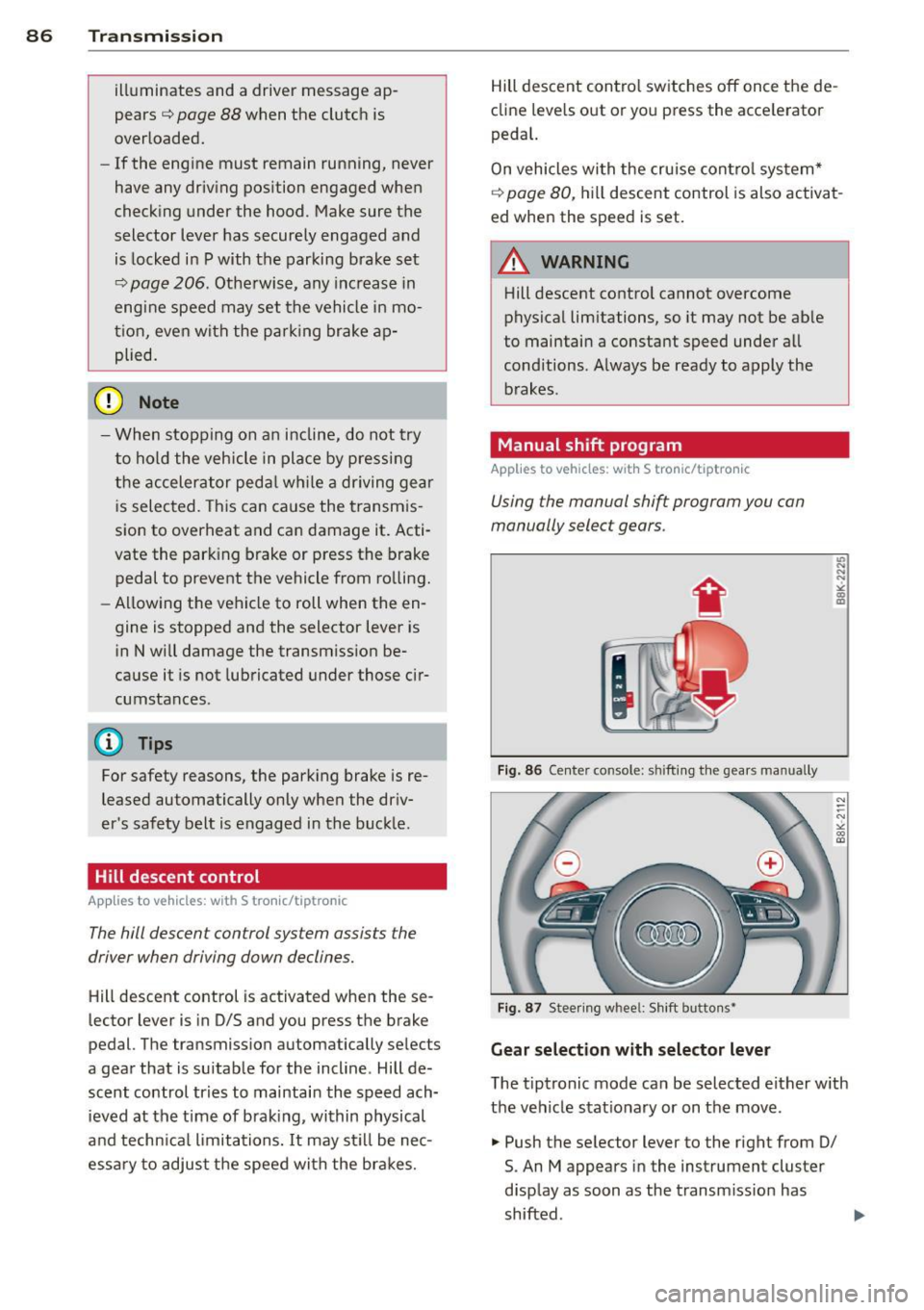
Using the manual shift program you can
manually select gears.
Fig. 86 Center console: shift ing the gears manually
Fig. 87 Steering whee l: Shift butto ns~
Gear selection with selector lever
L'> N ... "!
"' m a,
N
--N ,;,
gi
The tiptronic mode can be selected either with
the vehicle stationary or on the move.
.,. Push the selector lever to the right from 0/
S. An M appears in the instrument cluster
display as soon as the transmission has
shifted .
Page 89 of 286
"To upshift, push the selector lever fo rward
to the plus position
0 ~ fig. 86.
" To downshift, push the lever to the minus
pos it ion
Q .
Gea r se lection with paddle lever s*
The shift buttons are act ivated when these
l ector lever is in D/S or the tiptronic manual
shift program .
"T o upsh ift, touch the button on the right
0
~ fig. 87.
"To downshift, touch the button on the left
Q .
"If you do not press a shift button within a
short time while in the D/S position, the
transmission will return to automatic mode .
To keep shifting using the shift buttons, move the selector lever to the right out of
the D/S position .
T he transmission automatically shifts up or
down before critical engine speed is reached .
The transmission only a llows manua l shifting
when the engine speed is within the permit ted range .
(D Tips
-When yo u sh ift into the next lower gear,
the transmiss ion will downshift only
when there is no possibility of over-rev
v ing the engine .
- When the kick-down comes on, the
transmission will sh ift down to a lower
gear, depending on vehicle and engine
speeds.
- Tiptronic is inoperat ive when the trans
mission is in the fail-safe mode .
Kick-down
Appl ies to vehicles: with S tro nic/t iptronic
Kick -down enables maximum acceleration .
When you depress the accelerator pedal be
yond the resistance po int, the automat ic
transmission downshifts into a lower gear, de pending on vehicle speed and engine speed .
The upshift into the next higher gear takes
Tran sm iss ion 87
place once the max imum specified engine
speed is reached.
A WARNING
P lease note that the drive wheels can spin
if kick-down is used on a smooth slippery
road - there is a risk of skidd ing .
Launch Control Program
App lies to vehicles : wi th S tronic
The Launch Control Program provides the
best acceleration possible when starting from
a stop.
Req uirement: The engine must be at operat
ing temperature and the steering whee l must
not be t urned.
" Press the
I~ O FF ! button r::!:> page 182 whi le
the engine is running. The
II indicator light
ill uminates in the instrument cl uster and
Stabili zat ion control (ESC): Sport. Warn ·
ing! Restricted stability
appears in the driv
er information system display .
" Move the selector lever to the D/S posit ion
to select sport mode (S) or se lect the
d y
nami c driv ing mode in dr ive se lect*
r::!:> page 105.
"Press the brake pedal s trongly with yo ur left
foot and hold it down for at least 1 second .
" At the same time, press the acce lerator ped
al down completely with your right foot un
til the eng ine reaches and maintains a high
RPM.
" Remove your foot from the brake pedal
w ith in 5 seconds
r::!:> & .
A WARNING
-Always adapt your dr iving to the traffic
f low.
- On ly us e th e Launch Cont ro l Program
when road and t raff ic condi tions a llow i t
an d other d rivers w il l not be e ndangered
or annoyed by your driving and the vehi
cle's acceleration.
- Please no te that t he drivin g wheels c an
spin and the vehicle can break away
-
Page 100 of 286
98 Audi adaptive cruise control and braking guard
-If you restrict or switch off the ESC, the
braking guard also switches itself off
r=;,page 182.
-Switch braking guard off when you are
loading the vehicle onto a vehicle carrier,
train, ship or other type of transporta
tion. This can prevent undesired warn ings from the braking guard system.
Messages
Applies to vehicles: with Audi adaptive cruise co ntro l
Braking guard: Off
This driver message appears if the system is
turned off via the radio/MM!*. Otherwise, if
the system is turned off, the information ap pears every time shortly after the start of the
trip.
The driver message also appears if the system is not available due to a malfunction or if the
ESC is not switched on
r=;, page 182 . If this is
the case, the system will not provide warnings
about a possible collision.
Braking guard: Activated
This driver message appears if sharp brake
pressure was applied due to an acute warning.
•••
Three white dots appear if a setting cannot be
selected with the operating lever. For exam
ple, this happens if you want to raise/lower
the speed even though there was no previous
ly saved speed .
ACC: Deactivation
The driver message appears in vehicles with
manual transmission . If the clutch pedal was
pressed down for too long, the adaptive cruise
control turns off. A chime sounds as a remind
er .
ACC: Sensor blocked
This message appears if the sensor view is ob
structed, for example by leaves, snow, heavy
spray or dirt. Clean the sensor
r=;, page 90,
fig. 90 .
ACC: not available
The driver message appears if there is a mal
function. The adaptive cruise control turns off.
A chime sounds as a reminder. Have the sys
tem checked by an authori zed Audi dealer or
authorized Audi Service Facility.
ACC: unavailable
The driver message appears if, for example,
the brake temperature is too high. The adap
tive cruise control is temporarily unavailable.
A chime sounds as a reminder.
Engine speed!
This driver message appears in vehicles with
manual transmission if the driver had not up
shifted or downshifted in time while using
adaptive cruise control braking or accelerat
ing, causing the vehicle to exceed or not reach
the permitted limit speed. The adaptive cruise control turns off. A chime sounds as a remind
er .
Shift lever position!
Vehicles with an automatic transmission: the
driver message appears if the selector lever is
shifted to the N position. The adaptive cruise
control is not available while in this position.
Vehicles with manual transmission: the driver
message appears for vehicles with manual
transmission if there is no forward gear en
gaged, meaning if the reverse gear or the 1st
gear is engaged or if the selector lever is in
the neutral position. The adaptive cruise con
trol is not available while in this position.
Stabilization control (ESC)
This message appears if the electronic stabili
zation control (ESC) is taking action to stabi
lize the vehicle. The adaptive cruise control
turns off . A chime sounds as a reminder .
Speed too low
This message appears if the current speed is
too low
to set or to maintain the desired
speed .
The speed being saved must be at least
20 mph (30 km/h). The cruise control is
turned off for speeds lower than 12 mph
Page 106 of 286
104 Audi drive select
Audi drive select
Driving settings
Introduction
App lies to vehicles: with Audi drive select
Drive select provides the possib ility to exper i
e nce diffe ren t types of vehi cle sett ings in o ne
ve hicl e. For ins tance, us ing t he three
Com
fort , Auto and Dynamic modes, the driver can
switch from a sporty to a comfortab le drivi ng
mode with the press of a b utton.
A ddit ionally, in veh icles wi th MM I*, the vehi
cle setup for
Individual* mode can be c us
tom ized by you . This makes it possib le to
comb ine settings such as a sporty engine tun
ing with comfortable steering.
A WARNING
Improper use of the A udi drive select can
cause collisions , ot her acc idents and se ri
ous pe rsonal injury .
Description
Applies to vehicles: with Audi drive select
The vehicle setup in each mode depends on
the veh icle's features . However, the engin e,
automa tic t ransmissio n* and steer ing are al
ways involved.
-
Engine and automatic transmission*
Depending on the mode , the e ngine and the
automatic t ransm ission respond quicke r or i n
a mo re ba la nced manne r to a cce le rator pedal
move ments. In t he sporty dynam ic mode, the
a utom atic t ra nsm ission shifts at h igher R PMs.
Steering
The stee ring adapts in terms of stee ring effort
and st eering ra tios . Ind ir e ct steer ing that
moves easi ly, l ike the stee ring in comfort
mode, is bes t su ite d to long dr ives on a high
way. In co ntr ast, dynam ic mo de p rov ides
sporty, direct steerin g.
Th e fo llow ing applies to vehicl es with dynam ic
s teer ing*: the stee ring rati o changes based on
ve hicl e spee d in order to main ta in op timum stee
ring effort for the drive r at all times . This
sets the stee ring to be less sens itive at higher
speeds in order to provide improved vehicle
control. At reduced speeds, however, steer ing
is more d irect in order to keep the steering ef
fort as minima l as poss ible when the drive r is
mane uveri ng the veh icle . At low and ave rage
spe eds, dynamic steering add itiona lly pro
vides more responsive stee ring pe rforma nce.
Adaptive dampers*
The adaptive dampers* use se nsors to record
i nforma tion regard ing st eer ing movements,
braking and acceleration o perations by the
drive r, road surfac e, d riv ing speed, and load.
T his makes it poss ible to adapt damp ing to
t h e dr iving si tua tion v irtu ally in real t ime.
Dr ive sele ct also makes i t possib le to sa tisfy
t h e desi re fo r spo rty suspension ( Dynamic)
and comfortab le suspension (Comfort) with
o ut giving up ba lanced tuning (Auto) .
Sport differential*
As a compone nt of t he all whee l dr ive sys tem
(quat tro)
~ page 185, t he spo rt differential *
dist ributes the driving power to the rear ax le
depen ding on the sit uat io n. The distrib ution
of power var ies depending on the mode se
lected. The goal is a high level of agility and
ability to accelerate on curves . T he ve hicle is
very res pons ive to steering .
Audi adaptive crui se control*
The behav ior when accelerating can be adjust
ed from comfortab le to sporty, depending on
t h e drive select mode. Adaptive cr uise control
also responds to the driv ing behavior of the
vehicle ahead in a mo re conservative o r spo rty
man ner.
Engine sound*
The sound of the eng ine is adapted to these
lected mode and ranges from subtle to sporty.
(!) Tips
- In s ome models, the maximum vehicle
spee d can only be reached in the
Auto
and Dynamic modes.
Page 107 of 286
-For vehicles with an automatic transmis
sion, selecting the
Dynamic mode re
su lts in sporty shifting characteristics .
The
5 gear posit ion engages automati
cally.
- In vehicles that have dynamic steering*,
operating noise is heard when starting or
stopping the eng ine. Th is does not ind i
cate a problem .
Selecting the driving mode
Applies to vehicles: with Audi drive select
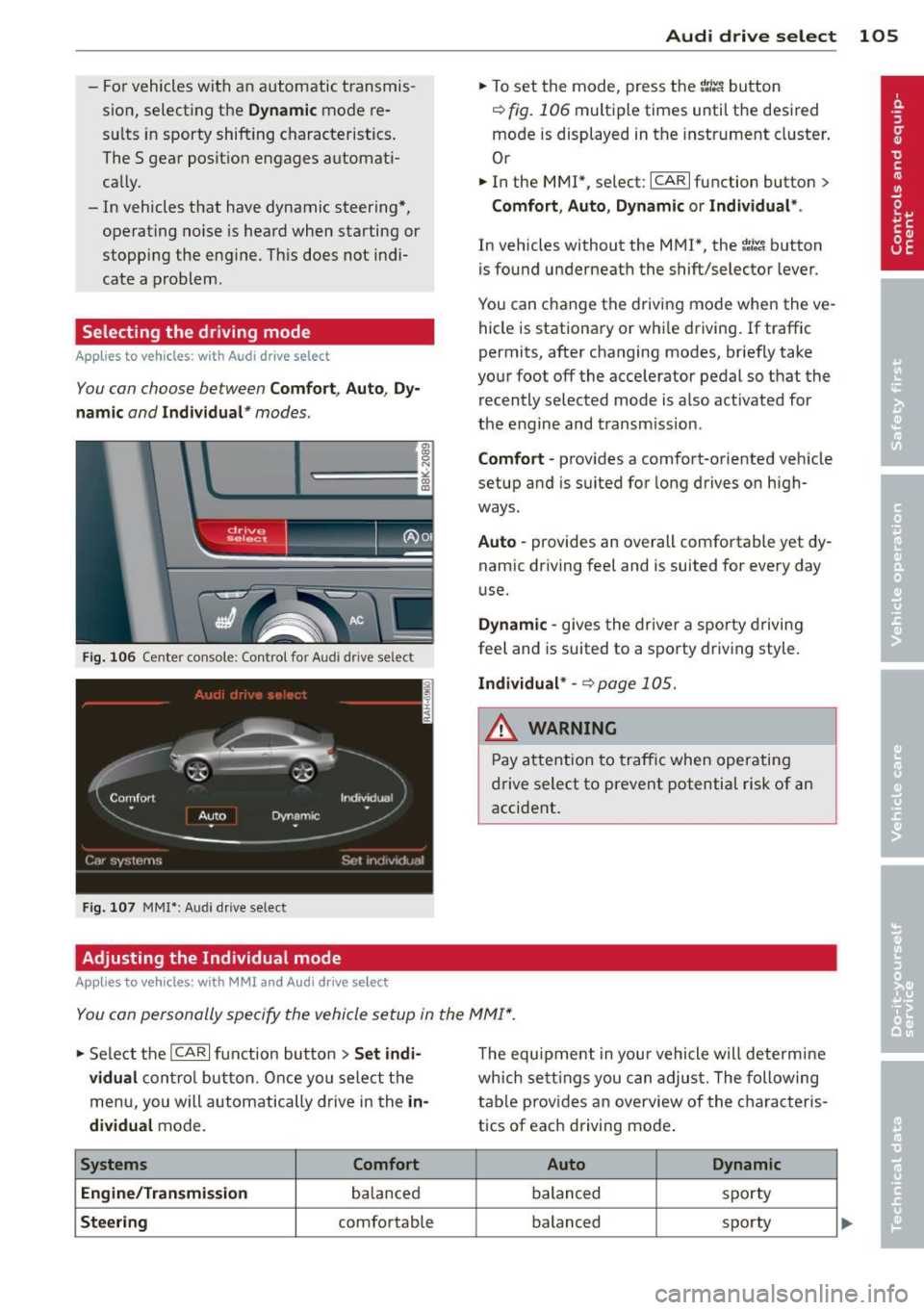
You con choose between Comfort, Auto, Dy
namic and Individual* modes.
drive I I fi el•ct _ ~-=
Fig. 106 Center console ; Con trol for Aud i dr ive se lect
Fig. 107 MMI *: Aud i drive select
Adjusting the Individual mode
Applies to vehicles: with MMI and Aud i d rive select
Audi drive select 105
.. To set the mode, press the 1.:il'.'l button
r=> fig. 106 multiple times until the desired
mode is displayed in the instrument cluster .
Or
.. In the MMI*, select: ICARlfunction button>
Comfort, Auto , Dynamic or Individual* .
In vehicles without the MMI*, the ~:/~c1 button
is found underneath the shift/selector lever.
You can change the driving mode when the ve
hicle is stationary or whi le driving.
If traffic
permits, after changing modes, briefly take
your foot off the accelerator pedal so that the recently selected mode is also activated for
the engine and transmission.
Comfort -provides a comfort-oriented vehicle
setup and is suited for long drives on high
ways.
Auto -provides an overall comfortable yet dy
namic driving feel and is suited for every day
u se.
Dynamic -gives the driver a sporty driving
feel and is suited to a sporty driving style .
Individual* -~ page 105.
& WARNING ~
Pay attention to traffic when operating
drive select to prevent potential risk of an
accident .
You con personally specify the vehicle setup in the MMI* .
.. Select the ICARI function button > Set indi
vidual
control button. Once you select the
menu, you will automatically drive in the
in
dividual
mode.
Systems Comfort
Engine/Transmission
ba lanced
Steering comfortable The
equipment in your vehicle will determine
which settings you can adjust. The following
table prov ides an overview of the characteris
tics of eac h driving mode .
Auto Dynamic
balanced spo
rty
balanced sporty
Page 246 of 286
24 4 What do I do no w?
There are some restrictions on the use of the
compact spare tire. The compact spare tire
has been des igned specifically for your type of
vehicle.
It must not be swapped with a com
pact spare tire from another type of vehicle.
Sno w cha in s
For technical reasons, the use of snow chains
on the compact spare tire is
n ot permitted .
If you do have to dr ive with snow cha ins and a
front tire fails, mount the spare wheel w ith
tire instead of a rear tire. Install the snow
chains on the rear tire and use it to rep lace
the defective front tire.
A WARNING
- Never use the spare tire if it is damaged
or if it is worn down to the tread wear in
dicators.
- If the spare tire is more than 6 years o ld,
use it only in an emergency and w ith ex
t reme caution and careful driving.
- The spare tire is intended only for tem
porary and short-term use. It should be
replaced as soon as possib le w ith the
normal wheel and t ire.
- After mounting the compact spare tire, the tire pressu re must be checked as
soon as poss ible. The tire pressure of the
c ompac t spare tire must be 4.2 bar; oth
erwise, you risk hav ing an accident.
- Do not drive faster than 50 mph (80 km/
h). You r isk having an acc ident.
- Avoid full-throttle acce le rat ion, heavy
braking, and fast corner ing . Yo u risk hav
ing an acc iden t.
- Never dr ive us ing more than one spare
wheel and tire. You risk having an acci
dent.
- No rma l summer o r winte r ti res m ust not
be mounted on the compact spare whee l
rim.
- F or te chnical reasons, the use o f ti re
chains on the spare tire is not permi tted .
If it is necessary to drive with tire chains,
the spare whee l must be mounted o n the
front axle in the event of a f lat in a rear tire. The new
ly available front wheel
must then be installed in place of the
rear whee l with the flat tire. Installing
the t ire cha in before mounting the whee l
and tire is recommended .
- Loose items in the passenger compart
ment can cause serious personal injury
during hard brak ing or in an accident.
Never store the spa re tire or jack and
too ls in the passenger compa rtment.
Changing a wheel
Before changing a wheel
Observe the following precautions for your
own and your passenger's safety when chang
ing a wheel .
"'After you expe rience a tire failure, pull the
car we ll away from moving traffic and try to
reach
le vel ground before you stop ¢ ,&.
"'All passengers should leave the car and
move to a safe location (for instance, behind
the guardrail)¢ &,.
"' Engage the
parking brak e to prevent your
veh icle from rolling unintentionally¢&, .
"' Shift into
1st gea r on ve hicles w ith manual
transmiss io n, or move the
select or lever to
the P p osition
on ve hicles w it h automatic
transmission .
"'I f you are towing a trailer : unhitch the trai l
er from your vehicle .
"' Take the
jack¢ page 243 and the spare tire
¢ page 243 out of the luggage compart
ment.
A WARNING
--
You o r you r passengers could be injured
while changing a wheel if you do not fo l
l ow these safety precaut io ns:
- I f you have a flat tire, move a safe d is
tance off the road. Tu rn off the engine,
tur n the eme rgency flashers on and use
o ther warning devices to a lert other mo-
torists .
IIJ>