steering AUDI A5 COUPE 2014 User Guide
[x] Cancel search | Manufacturer: AUDI, Model Year: 2014, Model line: A5 COUPE, Model: AUDI A5 COUPE 2014Pages: 286, PDF Size: 70.99 MB
Page 77 of 286
in the hy draulic valve adjus ters. This is
norma l and not a cause for concern .
- If you leave the vehicle with the ignit ion
switched on, the ignition will switch off
after a certain pe riod of time . Please
note that e lectr ica l equipment such as
exterior lights will swi tch off as well
when tha t happens .
Switching engine off
Applies to vehicles: with conven ie nce key
.,. Bring your vehicle to a complete stop .
.,. Automatic transmiss ion: Move the selector
lever to the P or N pos it ion.
.. Press the
I STA RT ENGINE STOPI button
~ page 74, fig. 77.
Steering lock
The steering locks when you turn the engine
off us ing the
I STAR T ENGIN E STOP I button
and open the dr iver's door. The locked stee r
i ng helps prevent vehi cle theft.
Emergency off
If necessary , the eng ine can be sw itched off
with the selector lever in the R or D/S pos i
tions. To do so , step on the brake peda l and
p ress and hold the
I S TA RT E NGINE STO PI bu t
ton vehicle speed must be less than 6 mph (10 km/h).
A WARNING
- Never turn off the eng ine before the ve
hicle has come to a complete stop . The
full function of the brake booster and the
power steering is not guaranteed. You
must use more force to turn or brake if
necessary . Because you cannot steer and
brake as you usua lly would, t his could
lead to crashes and serious injur ies .
- For safety reasons, you should always
par k your vehicle with the se lector lever
in P. Otherwise, the ve hicle co uld i nad
vertent ly roll away.
- T he rad iator fan ca n con tinue to ru n for
u p to 10 min utes eve n after yo u have
t ur ned o ff the eng ine and removed the
On th e ro ad 75
ignition key. The radiator fan can a lso
turn on again if the engine coo lant heats
up because of intense sunlight or heat
bu ild-up in the engine compartment.
- Always take the key w ith you whenever
you leave your ve hicle. Otherw ise, the
engine could be started or electrical
equ ipme nt such as the power windows
could be ope rated. This can lead to seri
ous injury.
0 Note
If the engine has been under heavy load
fo r an extended pe riod, heat bu ilds up in
the engine compartm ent after the engine
i s sw itched off -th ere is a r is k of damag ing
the engine . A llow the engi ne to run at id le
fo r abo ut two minutes before switching it
off.
Driver messages
Ignition is o n
This message appears and a warning tone
sou nds if you open the d river's door when the
ignition is sw itched on .
No key ident ified
This message appears when the
I S TART ENG IN E STOP I bu tton is pressed if
there is no master key ins ide the veh icle or if
the system does not recognize it . Fo r exam
ple , the master key cannot be recogni zed if it
is covered by an obje ct (e.g . al uminum brief
case) which
screens t he radio s ignal. Elec tron
i c dev ices such as cell phones can also inter
fere with the radio s ignal.
Pre ss brak e pedal to start engine
This message appears if you do not press the
brake pedal to start the eng ine in a vehicle
with an automat ic transm iss ion.
Press clutch pedal to start engine
T his message appears if you do not press the
clutch pedal to start the engine in a veh icle
with a manual tr ansmission . ..,.
Page 88 of 286
86 Transmis sion
illuminates and a driver message ap
pears
¢ page 88 when the clutch is
overloaded.
- If the engine must remain running, never
have any driving position engaged when
checking under the hood. Make sure the
selector lever has securely engaged and
is locked in P with the parking brake set
¢ page 206. Otherwise, any increase in
engine speed may set the vehicle in mo
tion, even with the park ing brake ap
plied.
(D Note
- When stopping on an incline, do not try
to hold the vehicle in place by pressing
the accelerator pedal while a driving gear
is selected. This can cause the transmis
sion to overheat and can damage it. Acti
vate the parking brake or press the brake
pedal to prevent the vehicle from rolling.
- Allowing the vehicle to roll when the en
gine is stopped and the selector lever is
in N will damage the transmission be
cause it is not lubricated under those cir
cumstances.
@ Tips
For safety reasons, the park ing brake is re
leased automatically only when the driv
er's safety belt is engaged in the buckle.
Hill descent control
Applies to vehicles: with S tronic/tiptronic
The hill descent control system assists the
driver when driving down declines.
Hill descent control is activated when these
lector lever is in D/S and you press the brake
pedal. The transmi ssion automatically selects
a gear that is suitable for the incline. Hill de
scent control tries to maintain the speed ach ieved at the time of braking, within physical
and technical limitations. It may st ill be nec
essary to adjust the speed with the brakes. Hill descent contro
l switches off once the de
cline levels out or you press the accelerator
pedal.
On vehicles with the cruise control system*
¢ page 80, hill descent control is also activat
ed when the speed is set.
A WARNING
--
Hill descent control cannot overcome
physical limitations, so it may not be able
to maintain a constant speed under all
conditions. Always be ready to apply the brakes .
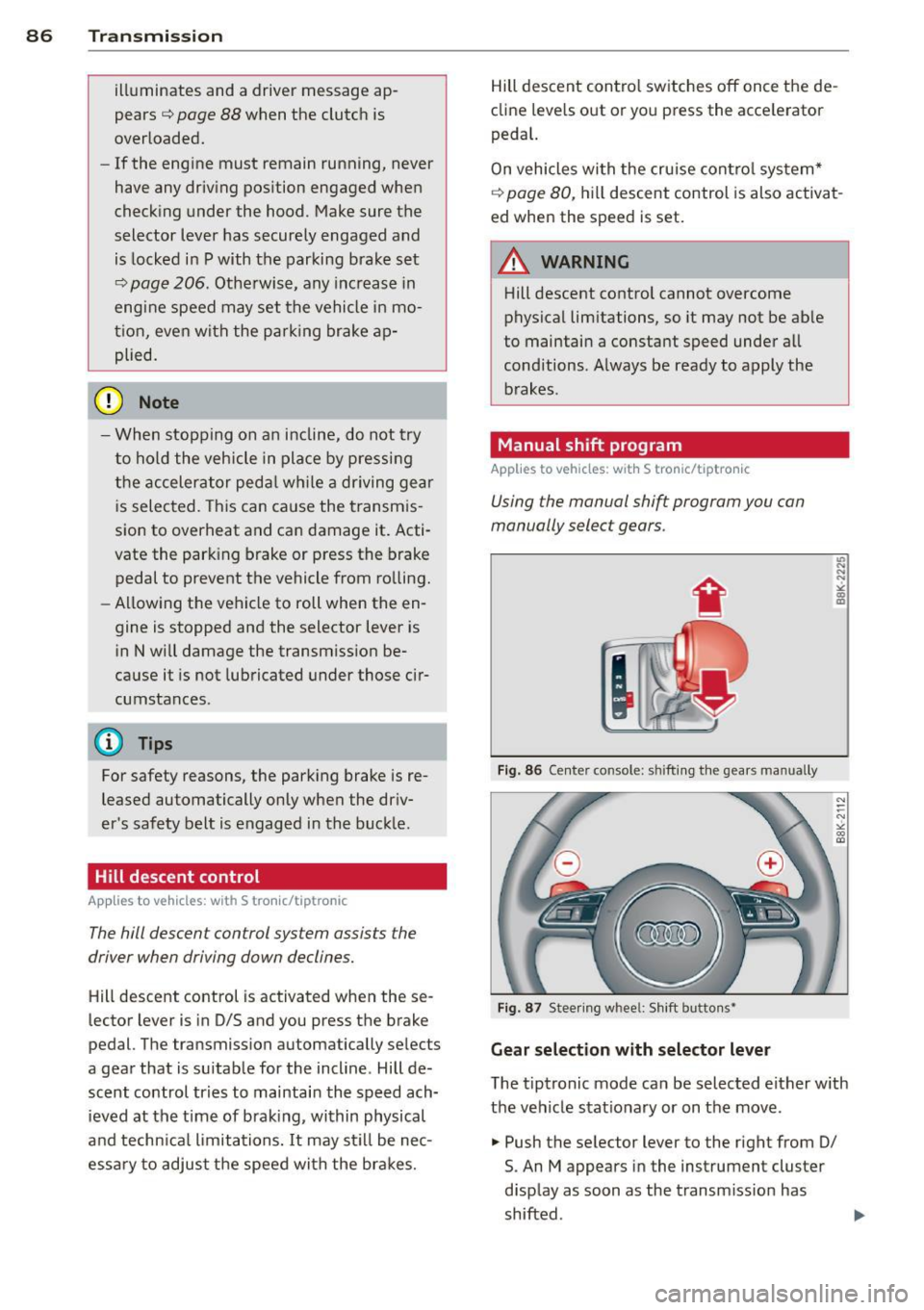
Manual shift program
Applies to vehicles: with S tronic/tiptron ic
Using the manual shift program you can
manually select gears.
Fig. 86 Center console: shift ing the gears manually
Fig. 87 Steering whee l: Shift butto ns~
Gear selection with selector lever
L'> N ... "!
"' m a,
N
--N ,;,
gi
The tiptronic mode can be selected either with
the vehicle stationary or on the move.
.,. Push the selector lever to the right from 0/
S. An M appears in the instrument cluster
display as soon as the transmission has
shifted .
Page 89 of 286
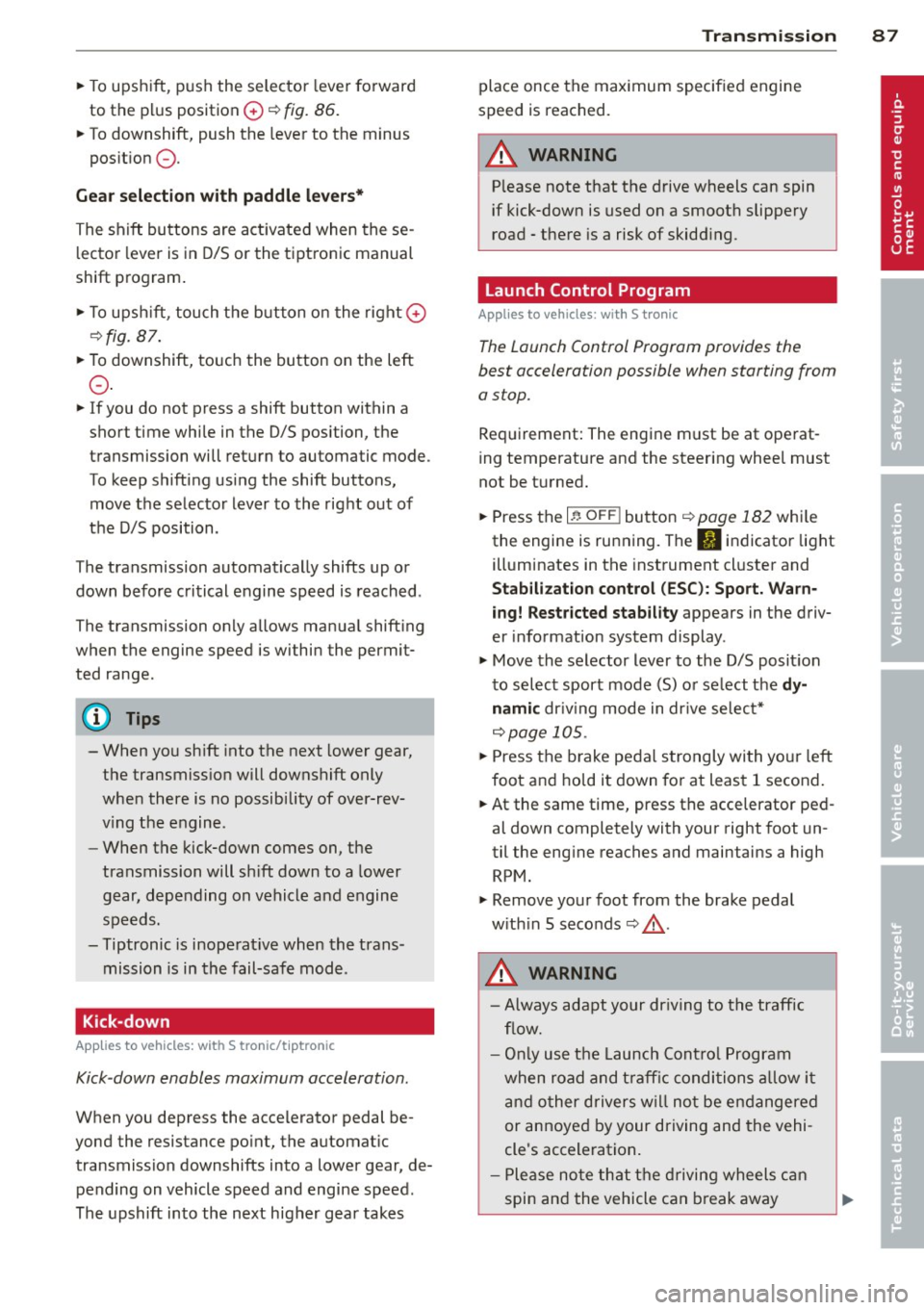
"To upshift, push the selector lever fo rward
to the plus position
0 ~ fig. 86.
" To downshift, push the lever to the minus
pos it ion
Q .
Gea r se lection with paddle lever s*
The shift buttons are act ivated when these
l ector lever is in D/S or the tiptronic manual
shift program .
"T o upsh ift, touch the button on the right
0
~ fig. 87.
"To downshift, touch the button on the left
Q .
"If you do not press a shift button within a
short time while in the D/S position, the
transmission will return to automatic mode .
To keep shifting using the shift buttons, move the selector lever to the right out of
the D/S position .
T he transmission automatically shifts up or
down before critical engine speed is reached .
The transmission only a llows manua l shifting
when the engine speed is within the permit ted range .
(D Tips
-When yo u sh ift into the next lower gear,
the transmiss ion will downshift only
when there is no possibility of over-rev
v ing the engine .
- When the kick-down comes on, the
transmission will sh ift down to a lower
gear, depending on vehicle and engine
speeds.
- Tiptronic is inoperat ive when the trans
mission is in the fail-safe mode .
Kick-down
Appl ies to vehicles: with S tro nic/t iptronic
Kick -down enables maximum acceleration .
When you depress the accelerator pedal be
yond the resistance po int, the automat ic
transmission downshifts into a lower gear, de pending on vehicle speed and engine speed .
The upshift into the next higher gear takes
Tran sm iss ion 87
place once the max imum specified engine
speed is reached.
A WARNING
P lease note that the drive wheels can spin
if kick-down is used on a smooth slippery
road - there is a risk of skidd ing .
Launch Control Program
App lies to vehicles : wi th S tronic
The Launch Control Program provides the
best acceleration possible when starting from
a stop.
Req uirement: The engine must be at operat
ing temperature and the steering whee l must
not be t urned.
" Press the
I~ O FF ! button r::!:> page 182 whi le
the engine is running. The
II indicator light
ill uminates in the instrument cl uster and
Stabili zat ion control (ESC): Sport. Warn ·
ing! Restricted stability
appears in the driv
er information system display .
" Move the selector lever to the D/S posit ion
to select sport mode (S) or se lect the
d y
nami c driv ing mode in dr ive se lect*
r::!:> page 105.
"Press the brake pedal s trongly with yo ur left
foot and hold it down for at least 1 second .
" At the same time, press the acce lerator ped
al down completely with your right foot un
til the eng ine reaches and maintains a high
RPM.
" Remove your foot from the brake pedal
w ith in 5 seconds
r::!:> & .
A WARNING
-Always adapt your dr iving to the traffic
f low.
- On ly us e th e Launch Cont ro l Program
when road and t raff ic condi tions a llow i t
an d other d rivers w il l not be e ndangered
or annoyed by your driving and the vehi
cle's acceleration.
- Please no te that t he drivin g wheels c an
spin and the vehicle can break away
-
Page 106 of 286
104 Audi drive select
Audi drive select
Driving settings
Introduction
App lies to vehicles: with Audi drive select
Drive select provides the possib ility to exper i
e nce diffe ren t types of vehi cle sett ings in o ne
ve hicl e. For ins tance, us ing t he three
Com
fort , Auto and Dynamic modes, the driver can
switch from a sporty to a comfortab le drivi ng
mode with the press of a b utton.
A ddit ionally, in veh icles wi th MM I*, the vehi
cle setup for
Individual* mode can be c us
tom ized by you . This makes it possib le to
comb ine settings such as a sporty engine tun
ing with comfortable steering.
A WARNING
Improper use of the A udi drive select can
cause collisions , ot her acc idents and se ri
ous pe rsonal injury .
Description
Applies to vehicles: with Audi drive select
The vehicle setup in each mode depends on
the veh icle's features . However, the engin e,
automa tic t ransmissio n* and steer ing are al
ways involved.
-
Engine and automatic transmission*
Depending on the mode , the e ngine and the
automatic t ransm ission respond quicke r or i n
a mo re ba la nced manne r to a cce le rator pedal
move ments. In t he sporty dynam ic mode, the
a utom atic t ra nsm ission shifts at h igher R PMs.
Steering
The stee ring adapts in terms of stee ring effort
and st eering ra tios . Ind ir e ct steer ing that
moves easi ly, l ike the stee ring in comfort
mode, is bes t su ite d to long dr ives on a high
way. In co ntr ast, dynam ic mo de p rov ides
sporty, direct steerin g.
Th e fo llow ing applies to vehicl es with dynam ic
s teer ing*: the stee ring rati o changes based on
ve hicl e spee d in order to main ta in op timum stee
ring effort for the drive r at all times . This
sets the stee ring to be less sens itive at higher
speeds in order to provide improved vehicle
control. At reduced speeds, however, steer ing
is more d irect in order to keep the steering ef
fort as minima l as poss ible when the drive r is
mane uveri ng the veh icle . At low and ave rage
spe eds, dynamic steering add itiona lly pro
vides more responsive stee ring pe rforma nce.
Adaptive dampers*
The adaptive dampers* use se nsors to record
i nforma tion regard ing st eer ing movements,
braking and acceleration o perations by the
drive r, road surfac e, d riv ing speed, and load.
T his makes it poss ible to adapt damp ing to
t h e dr iving si tua tion v irtu ally in real t ime.
Dr ive sele ct also makes i t possib le to sa tisfy
t h e desi re fo r spo rty suspension ( Dynamic)
and comfortab le suspension (Comfort) with
o ut giving up ba lanced tuning (Auto) .
Sport differential*
As a compone nt of t he all whee l dr ive sys tem
(quat tro)
~ page 185, t he spo rt differential *
dist ributes the driving power to the rear ax le
depen ding on the sit uat io n. The distrib ution
of power var ies depending on the mode se
lected. The goal is a high level of agility and
ability to accelerate on curves . T he ve hicle is
very res pons ive to steering .
Audi adaptive crui se control*
The behav ior when accelerating can be adjust
ed from comfortab le to sporty, depending on
t h e drive select mode. Adaptive cr uise control
also responds to the driv ing behavior of the
vehicle ahead in a mo re conservative o r spo rty
man ner.
Engine sound*
The sound of the eng ine is adapted to these
lected mode and ranges from subtle to sporty.
(!) Tips
- In s ome models, the maximum vehicle
spee d can only be reached in the
Auto
and Dynamic modes.
Page 107 of 286
-For vehicles with an automatic transmis
sion, selecting the
Dynamic mode re
su lts in sporty shifting characteristics .
The
5 gear posit ion engages automati
cally.
- In vehicles that have dynamic steering*,
operating noise is heard when starting or
stopping the eng ine. Th is does not ind i
cate a problem .
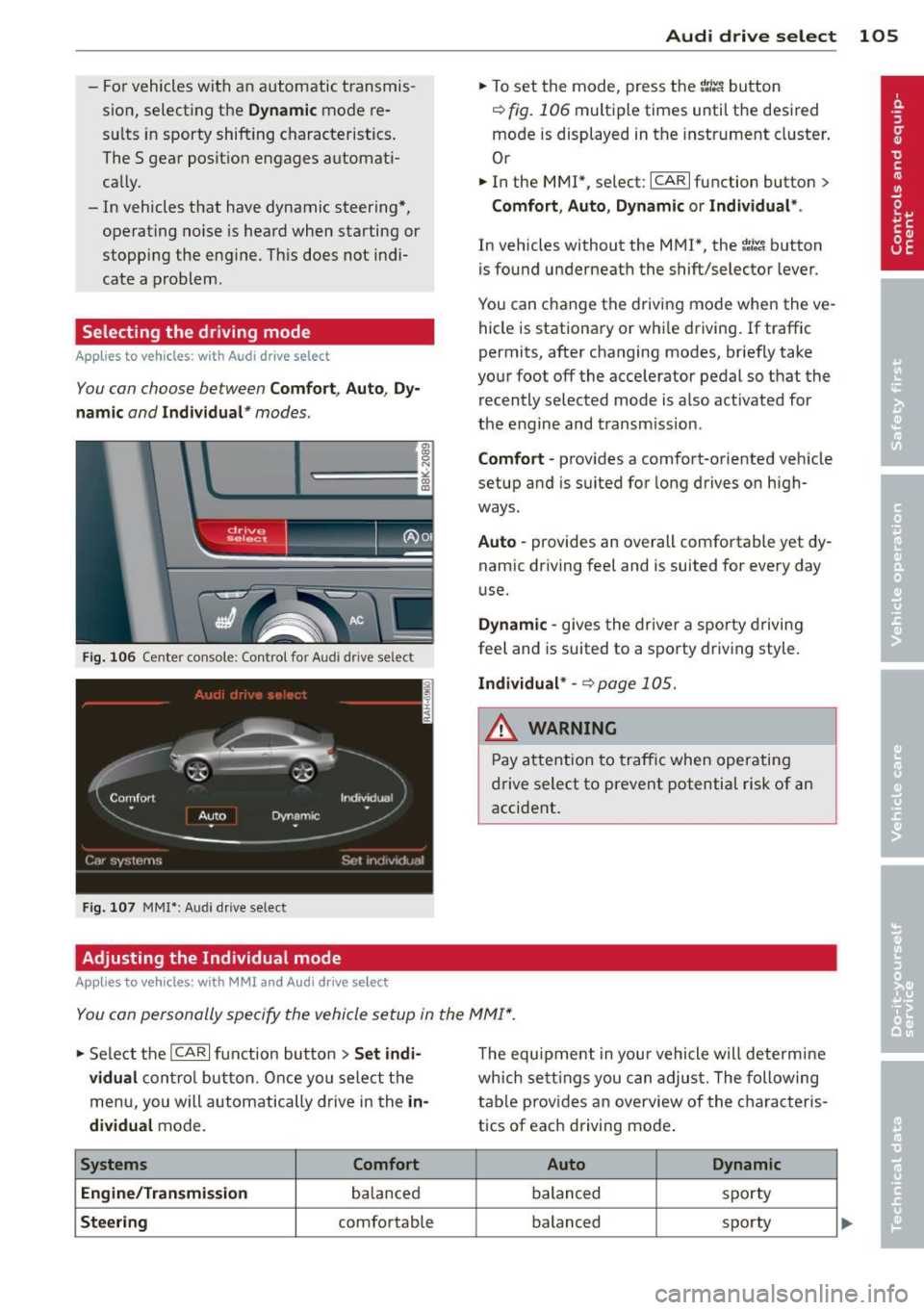
Selecting the driving mode
Applies to vehicles: with Audi drive select
You con choose between Comfort, Auto, Dy
namic and Individual* modes.
drive I I fi el•ct _ ~-=
Fig. 106 Center console ; Con trol for Aud i dr ive se lect
Fig. 107 MMI *: Aud i drive select
Adjusting the Individual mode
Applies to vehicles: with MMI and Aud i d rive select
Audi drive select 105
.. To set the mode, press the 1.:il'.'l button
r=> fig. 106 multiple times until the desired
mode is displayed in the instrument cluster .
Or
.. In the MMI*, select: ICARlfunction button>
Comfort, Auto , Dynamic or Individual* .
In vehicles without the MMI*, the ~:/~c1 button
is found underneath the shift/selector lever.
You can change the driving mode when the ve
hicle is stationary or whi le driving.
If traffic
permits, after changing modes, briefly take
your foot off the accelerator pedal so that the recently selected mode is also activated for
the engine and transmission.
Comfort -provides a comfort-oriented vehicle
setup and is suited for long drives on high
ways.
Auto -provides an overall comfortable yet dy
namic driving feel and is suited for every day
u se.
Dynamic -gives the driver a sporty driving
feel and is suited to a sporty driving style .
Individual* -~ page 105.
& WARNING ~
Pay attention to traffic when operating
drive select to prevent potential risk of an
accident .
You con personally specify the vehicle setup in the MMI* .
.. Select the ICARI function button > Set indi
vidual
control button. Once you select the
menu, you will automatically drive in the
in
dividual
mode.
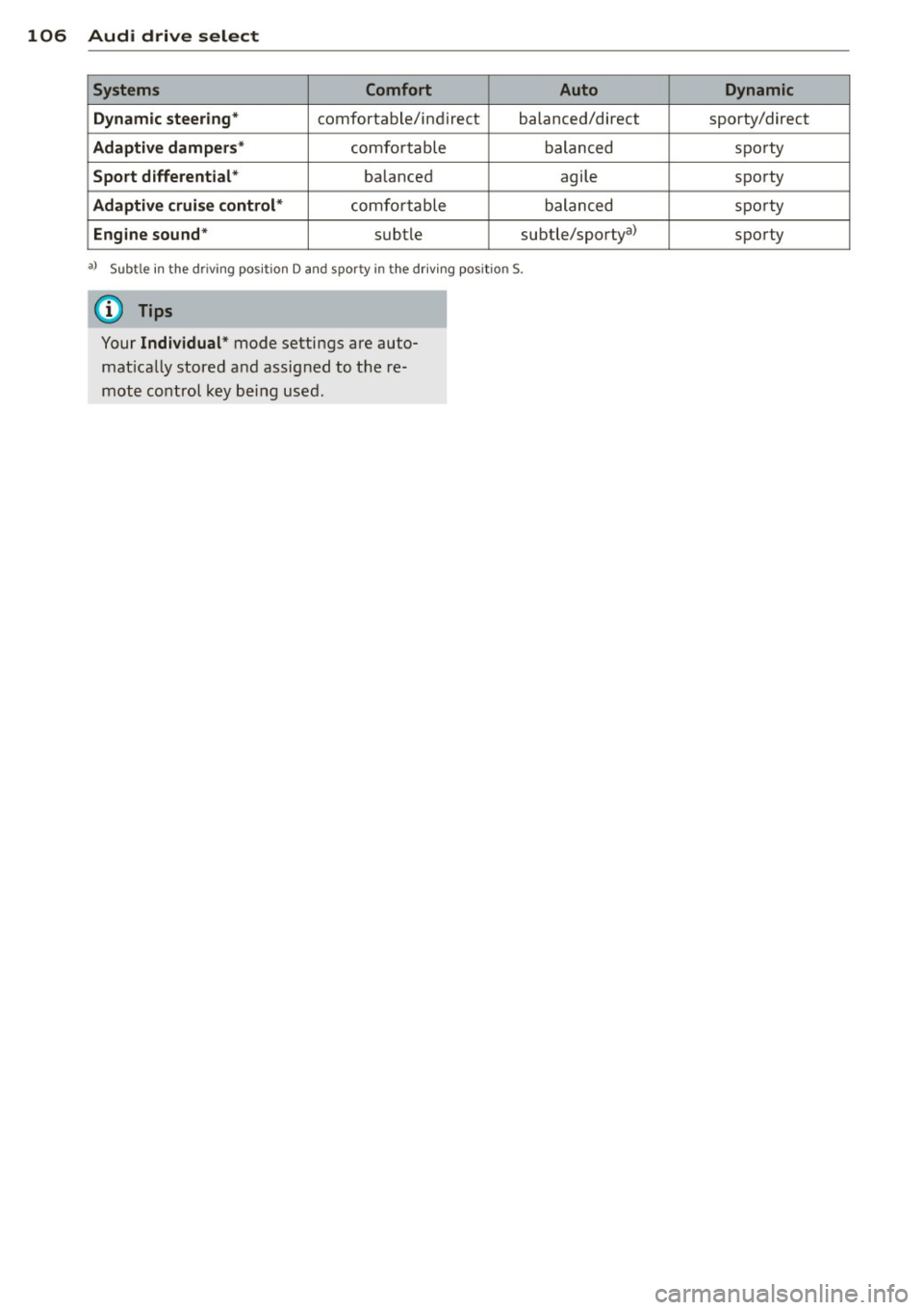
Systems Comfort
Engine/Transmission
ba lanced
Steering comfortable The
equipment in your vehicle will determine
which settings you can adjust. The following
table prov ides an overview of the characteris
tics of eac h driving mode .
Auto Dynamic
balanced spo
rty
balanced sporty
Page 108 of 286
106 Audi drive select
Systems Comfort Auto
Dynamic steering*
comfortable/ind ire ct balanced/direct
Adaptive dampers* comfortable balanced
Sport differential* balanced agile
Adaptive cruise control* comfortable balanced
Engine sound* subtle subtle/sportya>
•)
Sub tle in th e d rivin g p osit ion D an d sporty in t he dr iv ing pos itio n S.
(D Tips
Your Individual * mode settings are auto
mat ically stored and assigned to the re
mote control key being used.
Dynamic
sporty/direct
sporty
sporty
sporty
sporty
Page 113 of 286
Switching off
• Drive faster than 9 mph (15 km/h), or
• take the vehicle out of reverse gear. The
acoustic parking system is immediately de
activated, and the rear view camera picture is deactivated automatically after a period
of about 15 seconds, or
• switch off the ignition.
The delay in deactivating the camera provides
an uninterrupted view behind the vehicle es
pecially when maneuvering in tight parking
spaces and prevents the picture from turning
off the every time you sh ift out of reverse .
If the warning message appears in the display but not the rear view camera picture, read and
confirm the warning message . The acoustic
d istance signal is always active.
If you press a function button on the MMI
control console, the rear view camera picture
disappears . The rear view camera picture reap
pears the next time you park.
Further information on the warning message
and the MMI control console can be found in
the MMI instruction booklet.
A WARNING
- Only use the rearview camera to assist
you if it shows a good, clear picture. For
example, the image may be affected by
the sun shining into the lens, dirt on the
lens or if there is a defect.
- Use the rearview camera only with the
rear lid completely closed. Make sure any
objects you may have mounted on the
rear lid do not block the rearview cam
era.
(D Tips
- The rear v iew camera picture is available
as soon as the MMI Display or the MMI is
switched on, or the start-up phase is
completed.
- The sensors must be kept clean and free
of snow and ice for the park assist to op
erate.
Park assist 111
- You can change the vo lume and pitch of
the signals as we ll as the disp lay
~page 113.
-What appears in the display is time-de
layed.
Reverse Parking
App lies to vehicles: wit h parking system (rear, with rear
v iew camera}
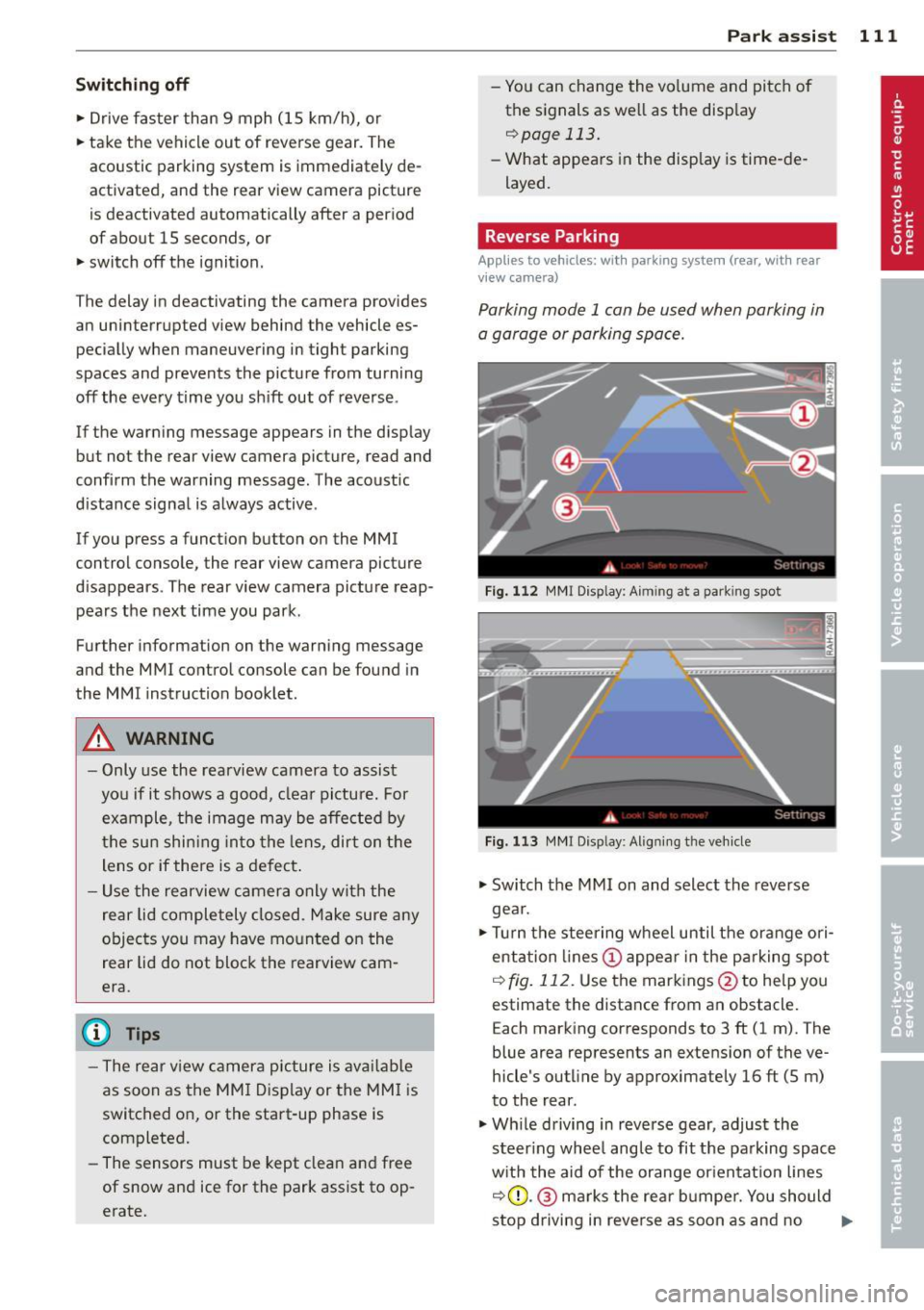
Parking mode 1 can be used when parking in
a garage or parking space.
Fig. 112 MMI Display: Aim ing at a park ing spot
Fig. 113 MMI Disp lay : Al ign ing the veh icle
• Switch the MMI on and select the reverse
gea r.
• Turn the steering wheel until the orange ori
entation lines (!) appear in the parking spot
i=> fig. 112. Use the markings @to help you
estimate the distance from an obstacle.
Each marking corresponds to 3 ft (1 m). The
blue area represents an extens ion of the ve
hicle's outline by approximately 16 ft (5 m)
to the rear.
• Wh ile driving in reverse gear, adjust the
steer ing whee l angle to fit the parking space
with the aid of the orange orientation lines
i::>0 .@ marks the rear bumper. You should
stop driving in reve rse as soon as and no
Ill>-
Page 115 of 286
the blue area should be o n the curb. The en
tire b lue area must fit into the parking spot.
~ While the vehicle is stationary, t urn the
steering wheel to the right as far as it will go.
~ Back into the park ing spot . Stop the vehicle
as soon a s the blue curve touches the curb
¢ fig . 115.
~ While the vehicle is stationary, tu rn the
steering wheel to the left as far as it w ill go.
~ Continue to back up into the park ing spot
until the vehicle is parked paralle l to the
curb .@ marks the rear bumper . You should
stop dr iving in reverse as soon as and no lat
er than when the red orientation line@
abuts an object¢,& ! Keep an eye on the
front of your vehicle wh ile doing this ¢(D .
Par kin g ne xt to obst acles
When there is an obstacle (such as a wall)
next to the parking spot, choose a spot with
more space on the sides. Position the long
side of the blue area so that there i s sufficien t
space from the curb . The area must not be on
the curb . You w ill also need to start turning
the steeri ng whee l much ear lie r. T he re should
be a suffic ien t amo unt of space between the
curb and the b lue curve, and the blue c urve
¢
fig . 115 mus t not touch the curb .
&_ WARNING
-The rear view came ra does not show the
entire area behind the vehicle
¢ page 109, fig. 110. Watch out espe
c ially for small children and an imals. The
rear view camera cannot a lways detect
them, posing risk of an accident!
- Please note that objects not touch ing the
ground can appear to be further away
than they really are (for example, the bumper of a pa rked vehicle, a t railer
hi tc h, or the rear of a tru ck) . In this case,
yo u should not use the help lines to he lp
with park ing, which poses danger of an
accident!
P ark a ssis t 113
@ Note
In the MMI display, the direction of travel
of the vehicle rear is represented depend
i ng on the steering wheel angle . The vehi
cle front swings out more than the vehicle
rear. Maintain p lenty of d istance from an
obstacle so that your outs ide mirror or a
corner of you r vehicle does not coll ide with
any obstacles - dange r of accident!
(D Tips
The left o r right orie ntation lines and su r
faces will be displayed, depending on the
turn s ignal being used .
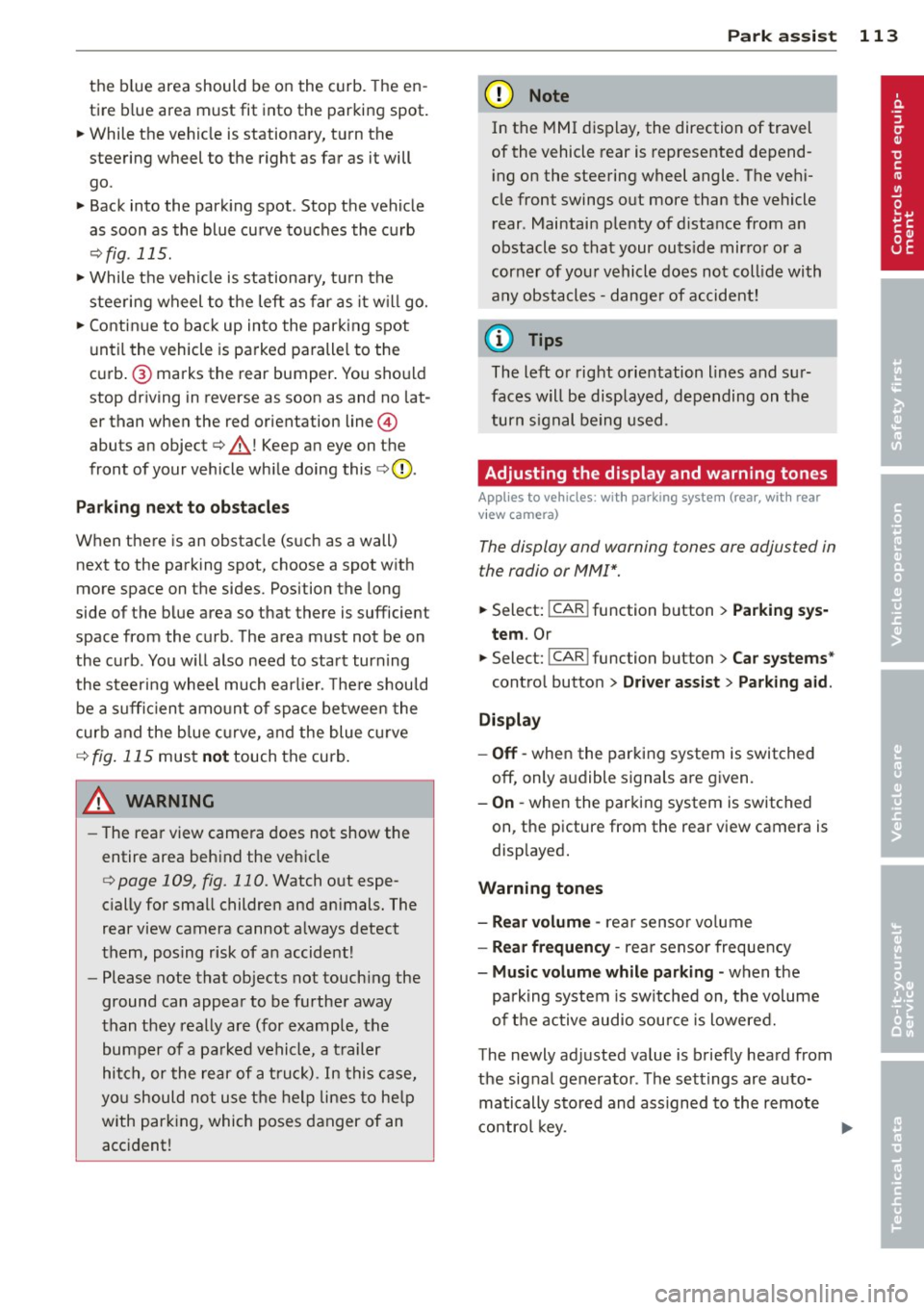
Adjusting the display and warning tones
Applies to vehicles: with parking system (rear, with rear
view camera)
The display and warning tones are adjus ted in
the radio or MM!*.
~ Select: !CAR ! function button > Par king sys
tem .
Or
--~ Select: !C AR ! function but ton> Car systems *
contro l butto n > Driver ass ist > Parking aid .
Di splay
- Off -when the parking system is switched
off, only a udible s ignals a re g iv en .
- On -when the parking system is switched
on, the picture from the rear view camera is
disp layed.
Warning tones
- Rear volum e -
rear sensor vo lume
- Rear frequency -rear senso r frequency
- Music volume while parking -when the
park ing system is sw itched on, the volume
of t he active audio sour ce is lowered.
The newly adjusted value is briefly heard from
the sig nal generato r. Th e settings are auto
matically stored and assigned to the remote
control key. ..,.
Page 121 of 286
Driving Safely
General notes
Safe driving habits
Please remember -safety first!
This chapter contains important information,
tips, instructions and warnings that you need
to read and observe for your own safety, the
safety of your passengers and others . We have
summarized here what you need to know
about safety belts, airbags, child restraints as
well as child safety. Your safety is for us
priori
ty number 1.
Always observe the information
and warnings in this section - for your own
safety as well as that of your passengers.
The information in this section applies to all
model versions of your vehicle . Some of the
features described in this sections may be
standard equipment on some models, or may
be optional equipment on others. If you are
not sure, ask your authorized Audi dealer.
A WARNING
- Always make sure that you follow the in
structions and heed the WARNINGS in
this Manual. It is in your interest and in
the interest of your passengers.
- Always keep the complete Owner's Liter
ature in your Audi when you lend or sell
your vehicle so that this important infor
mation will always be available to the
driver and passengers.
- Always keep the Owner's literature handy
so that you can find it easily if you have
questions.
Safety equipment
The safety features are part of the occupant
restraint system and work together to help
reduce the risk of injury in a wide variety of
accident situations .
Your safety and the safety of your passengers
should not be left to chance. Advances in
technology have made a variety of features
available to help reduce the risk of injury in an
Driving Safely 119
accident. The following is a list of just a few of
the safety features in your Audi :
- sophisticated safety belts for driver and all
passenger seating positions,
- belt force limiters for the front seats,
- belt pretensioners for the seats,
- head restraints for each seating position,
- front airbags,
- side airbags in the front seats,
- side curtain airbags ,
- special LATCH anchorages for child re-
straints,
- adjustable steering column.
These individual safety features, can work to
gether as a system to help protect you and
your passengers in a wide range of accidents.
These features cannot work as a system if
they are not always correctly adjusted and cor
rectly used.
Safety is everybody's responsibility!
Important things to do before driving
Safety is everybody's job! Vehicle and occu
pant safety always depends on the informed and careful driver.
For your safety and the safety of your passen
gers,
before driving always:
"'Make sure that all lights and signals are op
erating correctly .
"' Make sure that the tire pressure is correct.
"'Make sure that all windows are clean and af
ford good visibility to the outside.
"'Secure all luggage and other items carefully
qpage59.
"'Make sure that nothing can interfere with
the pedals.
"'Adjust front seat, head restraint and mirrors
correctly for your height .
"'Instruct rear seat passengers to adjust the
head restraints according to their height.
"' Make sure to use the right child restraint
correctly to protect children
q page 161,
and~~fy. ~
•
•
Page 122 of 286
120 Driving Safel y
• Sit properly in your seat and make sure that
yo ur passengers do the same¢
page 53,
Seats and storage.
• Fasten your safety belt and wear it properly.
Also instruct your passenge rs to fasten their
safety belts properly¢
page 129 .
What impairs driving safety?
Safe driving is directly related to the condi
tion of the vehicle, the driver as well as the
driver's ability to concentrate on the road
without being distracted .
The driver is responsible for the safety of the
vehicle and all of its occupants . If your ability
to drive is impa ired, safety r isks for everybody
in the vehicle increase and you also become a
hazard to everyone else on the road
9 .&,.
Therefore:
• Do not let yourself be distracted by passen
gers or by us ing a cellular telephone.
• NEV ER dr ive when your dr iv in g ability is im
paired (by medicat ions, alcohol, drugs, etc.).
• Observe all traffic laws, rules of the road
and speed limits and plain common sense.
• ALWAYS adjust your speed to road, traffic
and weather conditions .
• Take frequent breaks on long trips. Do not
drive for more than two hours at a stretch.
> Do NOT drive when you are t ired, under
pressure or when you are stressed .
A WARNING
Impaired driving safety increases the risk
of serious personal injury and death when
ever a veh icle is being used.
Proper occupant
seating positions
Proper seating position for the driver
The proper driver seating position is impor
tant for safe, relaxed driving.
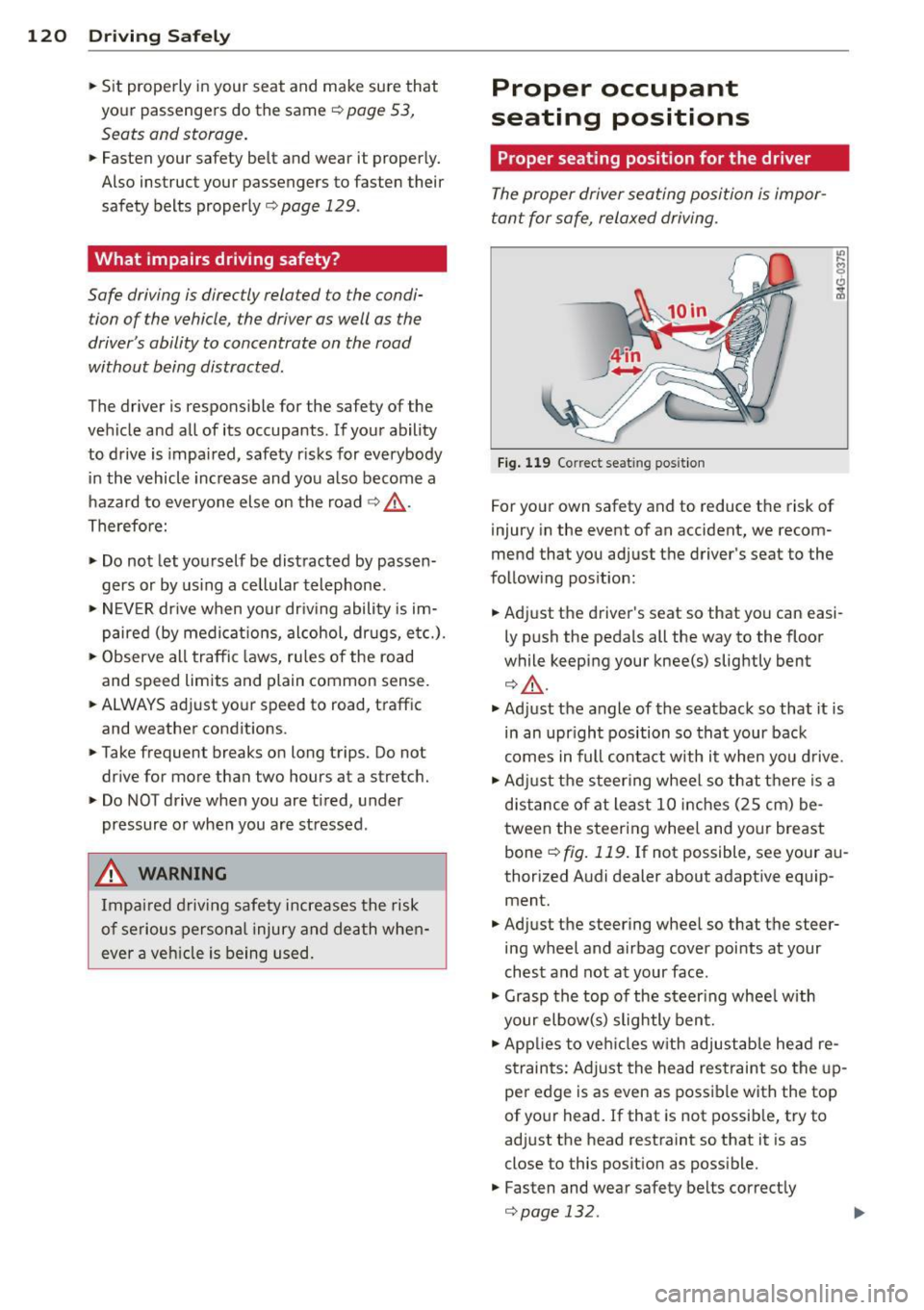
Fig. 119 Correc t seat ing posit ion
For your own safety and to reduce the risk of
injury in the event of an accident, we recom
mend that you adjust the driver's seat to the
following position:
• Adjust the driver's seat so that you can easi
ly push the pedals all the way to the floor
while keeping your knee(s) slightly bent
¢.&_ .
• Adjust the angle of the seatback so that it is
in an upr ight position so that your back
comes in full contact with it when you drive.
• Adj ust the steering wheel so that there is a
distance of at least 10 inches (25 cm) be
tween the steering wheel and your breast
bone ¢
fig. 119. If not possible, see your au
thorized Audi dealer about adaptive equip ment.
• Adjust the steering wheel so that the steer
ing wheel and airbag cover points at your
chest and not at your face .
• Grasp the top of the steer ing wheel with
your elbow(s) slightly bent.
• Applies to veh icles w ith adjustab le head re
straints: Adjust the head restraint so the up
per edge is as even as possible with the top
of your head. If that is not possible, try to
adjust the head restraint so that it is as
close to this posit ion as possible.
• Fasten and wear safety belts correctly
¢page 132.