ECO mode AUDI A5 COUPE 2014 Owner's Manual
[x] Cancel search | Manufacturer: AUDI, Model Year: 2014, Model line: A5 COUPE, Model: AUDI A5 COUPE 2014Pages: 286, PDF Size: 70.99 MB
Page 111 of 286
Parking system (rear,
with rear view camera)
Introduction
Applies to vehicles: with parking system (rear, with rear
view camera)
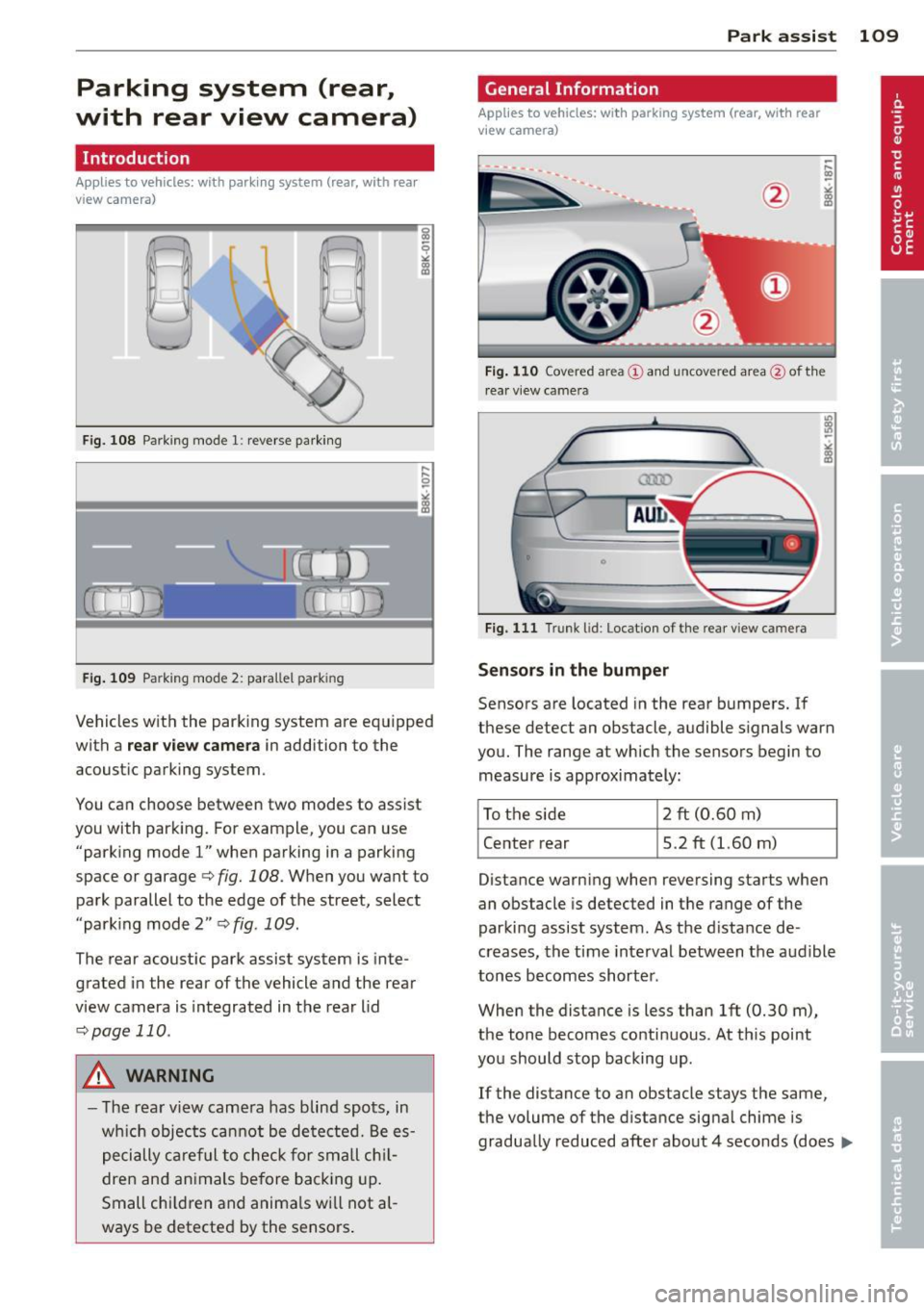
Fig. 108 Parking mode 1: reverse parking
Fig. 109 Parking mode 2: parallel park ing
Vehicles with the parking system are equipped
with a
rear view camera in addition to the
acoustic parking system.
You can choose between two modes to assist
you with parking. For example, you can use "parking mode
l" when parking in a parking
space or garage
q fig. 108. When you want to
park parallel to the edge of the street, select
"parking mode 2"
qfig. 109.
The rear acoustic park assist system is inte
grated in the rear of the vehicle and the rear
view camera is integrated in the rear lid
qpage 110.
A WARNING
-The rear view camera has blind spots, in
wh ich objects cannot be detected. Be es
pecially careful to check for small chil
dren and animals before backing up.
Small chi ldren and anima ls will not al
ways be detected by the sensors . Park assist 109
General Information
Applies
to vehicles: with parking system (rear, with rear
view camera)
Fig. 110 Covered area(!) and uncovered area@of th e
r ear v iew camera
0
Fig. 111 Trunk lid: Locat ion of the rear view camera
Senso rs in the bumper
Sensors are located in the rear bumpers. If
these detect an obstacle, audible signals warn
you. The range at which the sensors begin to
measure is approximately:
To the side
2 ft (0.60 m)
Center rear 5.2 ft (l.60 m)
Distance warning when reversing starts when
an obstacle is detected in the range of the
parking assist system . As the distance de
creases, the time interval between the audible
tones becomes shorter .
When the distance is less than 1ft (0.30 m),
the tone becomes continuous. At th is point
you should stop backing up.
If the distance to an obstacle stays the same,
the volume of the distance signa l chime is
gradually reduced after about 4 seconds (does ..,_
Page 113 of 286
Switching off
• Drive faster than 9 mph (15 km/h), or
• take the vehicle out of reverse gear. The
acoustic parking system is immediately de
activated, and the rear view camera picture is deactivated automatically after a period
of about 15 seconds, or
• switch off the ignition.
The delay in deactivating the camera provides
an uninterrupted view behind the vehicle es
pecially when maneuvering in tight parking
spaces and prevents the picture from turning
off the every time you sh ift out of reverse .
If the warning message appears in the display but not the rear view camera picture, read and
confirm the warning message . The acoustic
d istance signal is always active.
If you press a function button on the MMI
control console, the rear view camera picture
disappears . The rear view camera picture reap
pears the next time you park.
Further information on the warning message
and the MMI control console can be found in
the MMI instruction booklet.
A WARNING
- Only use the rearview camera to assist
you if it shows a good, clear picture. For
example, the image may be affected by
the sun shining into the lens, dirt on the
lens or if there is a defect.
- Use the rearview camera only with the
rear lid completely closed. Make sure any
objects you may have mounted on the
rear lid do not block the rearview cam
era.
(D Tips
- The rear v iew camera picture is available
as soon as the MMI Display or the MMI is
switched on, or the start-up phase is
completed.
- The sensors must be kept clean and free
of snow and ice for the park assist to op
erate.
Park assist 111
- You can change the vo lume and pitch of
the signals as we ll as the disp lay
~page 113.
-What appears in the display is time-de
layed.
Reverse Parking
App lies to vehicles: wit h parking system (rear, with rear
v iew camera}
Parking mode 1 can be used when parking in
a garage or parking space.
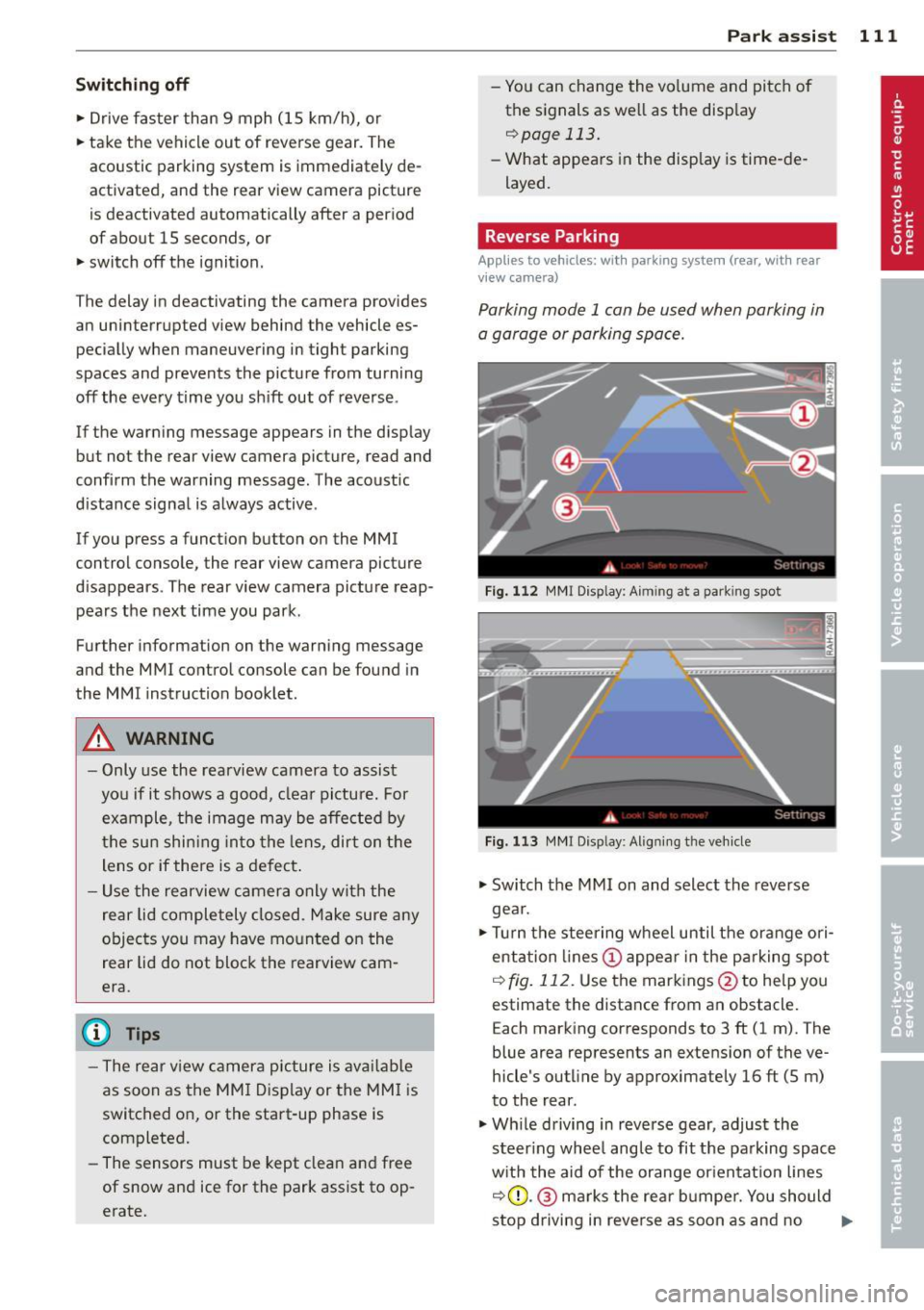
Fig. 112 MMI Display: Aim ing at a park ing spot
Fig. 113 MMI Disp lay : Al ign ing the veh icle
• Switch the MMI on and select the reverse
gea r.
• Turn the steering wheel until the orange ori
entation lines (!) appear in the parking spot
i=> fig. 112. Use the markings @to help you
estimate the distance from an obstacle.
Each marking corresponds to 3 ft (1 m). The
blue area represents an extens ion of the ve
hicle's outline by approximately 16 ft (5 m)
to the rear.
• Wh ile driving in reverse gear, adjust the
steer ing whee l angle to fit the parking space
with the aid of the orange orientation lines
i::>0 .@ marks the rear bumper. You should
stop driving in reve rse as soon as and no
Ill>-
Page 117 of 286
Homelink
Universal remote
control
Description
Applies to vehicles: with Home link
The HomeLink universal remote control can
be programmed with the remote control for
devices that are already present.
With Home Link, you can control devices such
as the garage door, security systems, house
lights , etc. comfortably from the inside of you
vehicle.
Homelink makes it possible for you to rep lace
three different remote controls from dev ices
in your home with one universal remote. This
feature works for most garage door and exte
rior door motor signals. Programming the in
dividual remote control for your remote con
trol takes place near the center of the radiator
grille. There is a control module attached at
this location .
A one-time programming of the sensor must be performed before you are able to use sys
tems with Homelink. If the system does not activate after performing the one-time pro
gramming, check whether the system uses a rolling coder:!.>
page 118 for vehicles without
the
MMI*.
,& WARNING
-
- Never use the Homelink transmitter
with any garage door opener that does
have not the safety stop and reverse fea
ture as requ ired by federa l safety stand
ards. This includes any garage door open
er model manufactured before April 1,
1982.
-A garage door opener which cannot de
tect an object, signaling the door to stop
and reverse does not meet current feder
al safety standards . Using a garage door
opener without these features increases
risk of serious injury or death.
Homelink 115
- For safety reasons never release the
parking brake or start the engine while
anyone is standing in front of the vehicle .
- A garage door or an estate gate may
sometimes be set in motion when the
Homelink remote control is being pro
grammed. If the device is repeatedly ac
tivated, th is can overstrain motor and
damage its electrical components - an
overheated mo tor is a fire hazard!
- To avoid possib le injuries or property
damage, please always make abso lutely
certa in that no persons or objects are lo
cated in the range of motion of any
equipment being operated.
(0 Tips
- If you would like more information on
Homelink, where to purchase the Home
Link compat ible products, or would like
to purchase the Home Link Home Light
ing Package, please call toll-free :
1-800-355-3515.
-For Declaration of Compliance to United
States FCC and Industry Canada regula
tions
¢ page 267.
-For security reasons, we recommend that
you clear the programmed buttons be
fore selling the vehicle.
Operation
App lies to vehicles : with Homeli nk
,~
1~
1 r ·O : O ·) 1111 ~
®
Fig.
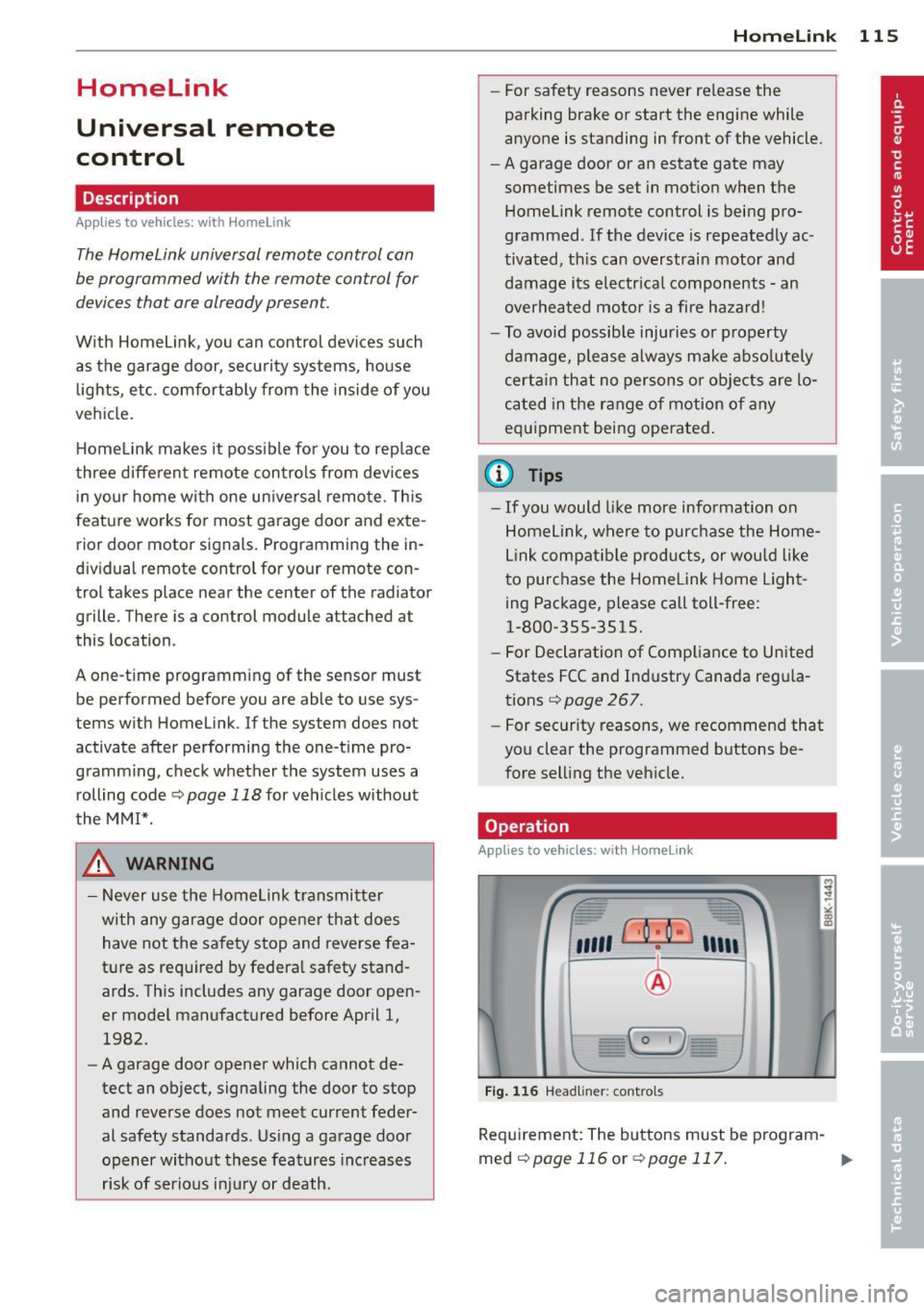
116 Headl iner: controls
Req uirement: The buttons must be program-
med
¢page 116 or ¢page 117. ..,_
Page 118 of 286
116 Homelink
• To open the garage door, press the p rogram
med button . The LED @will light up or
flash.
• To close the garage door, pre ss the button
again.
@ Tips
To open the garage door, press the button, but do not press it for longer ten seconds
or the Homelink module will switch to
programming mode.
Programming the transmitter (version A)
Appl ies to vehicles: with Home link and MMI
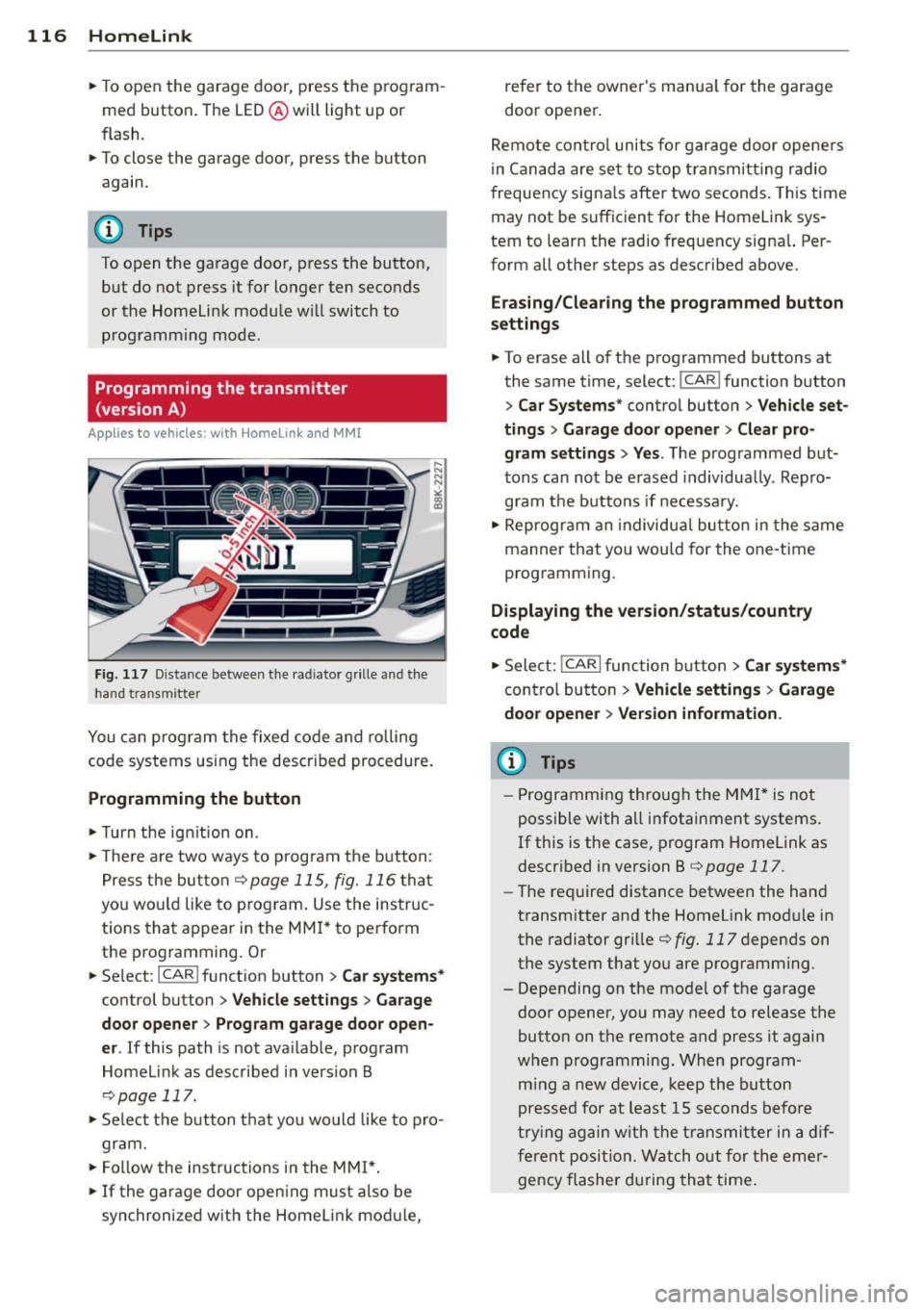
Fig. 1 17 D ista nce between t he ra d iato r grille and t he
hand tran sm itter
You can p rogram the fixed code and ro lling
code systems using the descr ibed procedure.
Programming the button
• Turn the ign ition on .
• The re a re two ways to program the button :
P res s the but ton
¢ page 115, fig. 116 tha t
you wou ld like to p rogram. Use the instruc
tions that appear in the MM I* to pe rform
the p rogramming. Or
• Se lect : ICAR ifunct ion button>
Car sy stems*
con trol but ton > Vehicle sett ing s> Garage
door opener
> Program garage door open·
er .
If this path is not ava ilable, program
Homelink as desc ribed in vers ion B
~ page 117.
• Se lect t he button t hat yo u wo uld like to p ro
gram.
• Fo llow the ins tructions in the MMI* .
• If the garage door open ing must also be
synchronized w it h the Homel ink modu le, refer to the owner
's manua l for the garage
door opener .
Remote con tro l unit s fo r garage door ope ne rs
in Canada are se t to stop t ransmi tting radio
frequency signa ls afte r two seconds . This time
may not be sufficient for the Homelink sys
tem to learn the radio frequency signa l. Per
form all other steps as described above.
Erasing /Clearing the programmed button
s etting s
• To erase all of the programmed buttons at
the same time, select : ICAR !function b utton
> Car Systems * control butto n > Vehicle set·
tings
> Garag e door opener > Clear pro·
gram setting s> Yes .
The prog rammed but
tons can not be erased individua lly. Repro
gram the buttons if ne cess ary.
• Reprogr am an individua l bu tton in the same
manner that you wou ld for the one-time
programming .
Displaying the version /status /country
code
• Sele ct: !CAR I function bu tton > Car sy stem s*
contro l but to n > Vehicle settings > Garage
door opener
> Version information .
(D Tips
- Programming throug h the MMI* is not
possible with all infotainment systems.
If this is the case , program Homelink as
descr ibed in version B
c:) page 117.
-The required distance betwee n the hand
transm itter and the Homelink module in
the radiator gr ille
¢ fig. 117 depends on
the system that you are prog ramming .
- Depending on the mode l of the garage
door opener, you may need to release the
butto n on the remote and press it again
w hen programming. When program ·
m ing a new device, keep the butto n
presse d for at least 15 seconds before
t ry ing ag ain w ith the transmit ter in a dif
fere nt posi tion. W atch o ut for the emer
gency flasher during tha t time.
Page 119 of 286
Programming the transmitter (version B)
Applies to vehicles: with Horne link
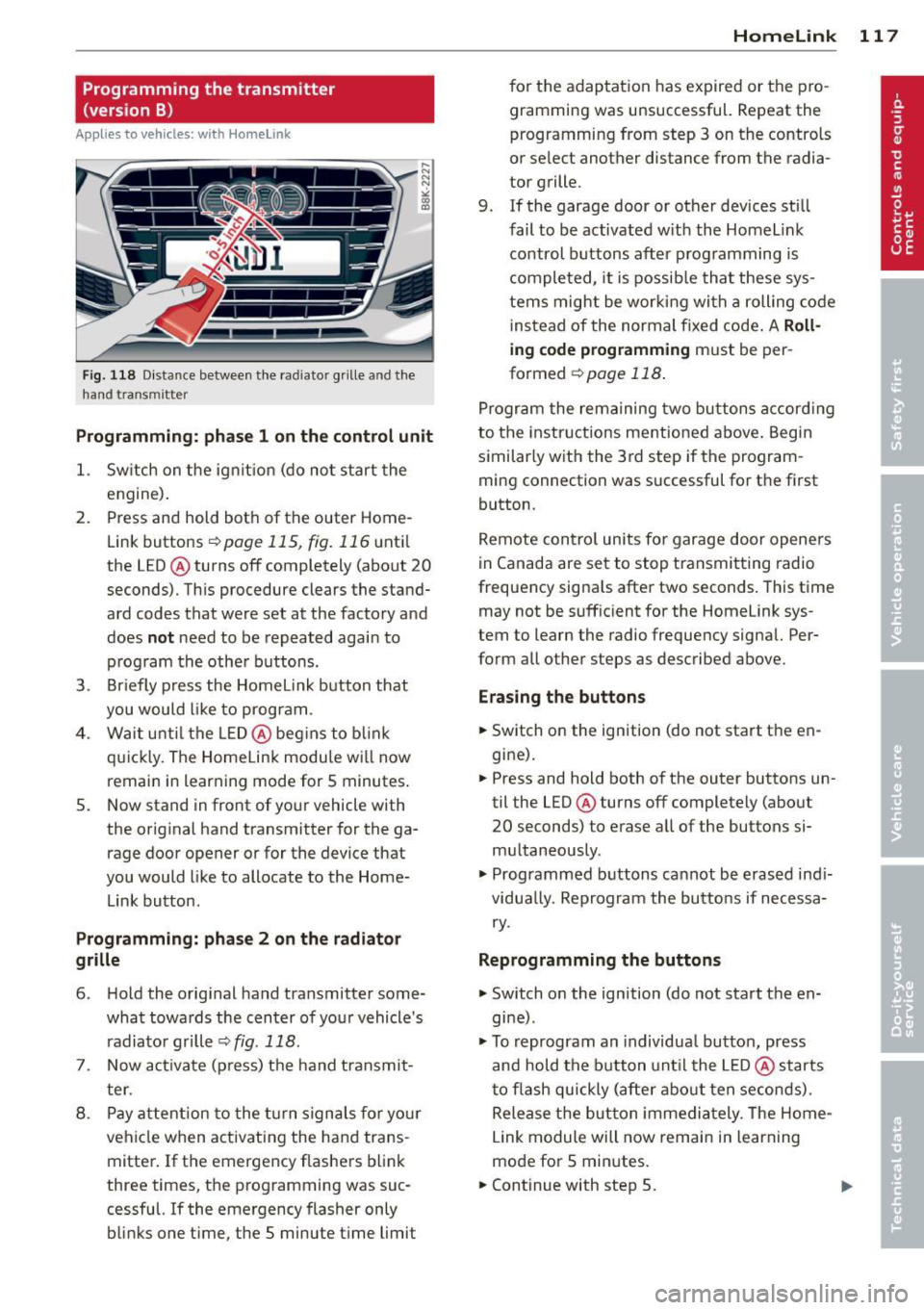
Fig. 118 D istance between t he rad ia to r gr ille a nd the
h and trans mitter
Programming: phase 1 on the control unit
1. Sw itch on the ig nit io n (do no t start the
engine ).
2. Press and hold bot h of the outer Home
Link buttons
r=> page 115, fig. 116 until
the LED @ turns off completely (about
20
seconds). Th is procedure clears the stand
ard codes that were set at the factory and
does
not need to be repeated agai n to
p rog ram the othe r buttons.
3 . Briefly press the Homelink button that
you would like to prog ram .
4 . Wai t unti l the LED @ beg ins to blink
q ui ckly . The Home Lin k modu le wi ll now
remai n in learning mode for
5 minutes .
5. Now stand in front of your vehicle with
the original hand transmitter for the ga rage door opener or for the device that
you would like to allocate to the Home
Link button.
Programming: pha se 2 on the radiator
grille
6 . Hold the orig inal hand t ransmitter some
what towa rds the center o f you r vehicle 's
radiato r gr ille
r=> fig . 118 .
7. Now activate (p ress) t he hand transmit
ter.
8 . Pay a ttention to the t urn sign als for yo ur
vehicle when activating the ha nd trans
mitter . If t he emergency flashers b link
three times, the programming was suc
cessful. If the emergency flasher only bli nks one t ime, the 5 minute t ime limit
Homelink 11 7
for the adaptat ion has expired or the pro
gram ming was unsuccessful. Repeat the
programming from step 3 on the controls
o r se lect another distance from the radia
tor grille.
9. If the garage door or other devices sti ll
fail to be activated w it h the Homelin k
control buttons after p rogramming is
comple ted, it is possib le tha t these sys
tems might be w ork ing wi th a roll ing co de
ins tead of the normal fixed co de.
A Roll
ing code programming must be per
formed
r=> page 118 .
Program the rema ining tw o butt ons accor ding
to the instructions mentioned above . Beg in
similar ly w ith the 3rd step if the program
m ing connection was successful for t he fi rst
button .
Remote con trol units fo r garage door opene rs
in Canada are set to stop tra nsmitting radio
frequency signa ls after two seconds . This t ime
may not be suffic ient for the Homelink sys
tem to learn the radio frequency signa l. Per
form all other steps as described above.
Erasing the buttons
.,. Switch on the ignition (do not sta rt the en
gi ne).
.,. Press and hold both o f the outer buttons un
til the LED@ turns off completely (abo ut
20 seconds) to e rase a ll of the buttons si
m ultaneously .
.,. Programmed b uttons ca nnot be erased ind i
vidua lly. Reprogram the butto ns if necessa
ry .
Reprogramming the buttons
.,. Switch o n the ignition (do not start t he en
gine) .
.,. To reprogram an individua l bu tto n, press
and hold the button unt il the LED @ starts
t o f lash quickly (a fter ab out ten seconds) .
Release t he bu tton imme dia tely. The Home
L ink module will now remai n in learning
mo de for 5 min utes.
.,. Continue with step 5.
Page 120 of 286
118 Homelink
-Programming using the Homelink but
tons is not poss ible with all infotainment
systems. If this is the case, program Homelink as described in vers ion A
¢ page 116.
-The requ ired distance between the hand
transmitter and the Homelink module in
the radiator grille
¢ fig . 118 depends on
the system that you are programming.
- Depend ing on the model of the garage
door opener, you may need to release the
button o n the remote and press it again
when prog ramming . W hen p rogram
ming a new dev ice, keep the button
pressed for a t le ast 15 se con ds before
trying again wi th the transmitte r in a dif
ferent posit ion . Watch out for the emer
gency flasher during that time.
Programming the rolling code
App lies to vehicles: with Home link
Additionally, a rolling code programming for
the Homelink universal remote control is re
quired for some systems.
Identifying the rolling code
"' Press the prev io usly progr amme d Homelink
bu tton aga in and ho ld it down .
"' Look at th e LED @¢
page 115, fig . 116 . If
the LED b links quickly, the features, s uch as
the garage door opene r, are equipped with
t he rolling code .
"' Program the rolling code as follows :
Activating the g arage door opene r motor
unit
"' Locate the setting button on the garage
door opener motor unit . The exact location
and co lor of t he button may vary depend ing
on the ga rage door opener ma nufactu rer .
"' Press the sett ing button on the ga rage door
opener motor unit (usually th is w ill act ivate
a "se tting ligh t disp lay" on the mo to r u nit).
Now you w ill have abo ut
30 second s time to
perform the Homelink button programming
on the cont ro ls.
Programming on the controls
"' Press the Homelink bu tton tha t was a lready
programmed and hol d for two seconds .
"' To end ro llin g code programming , press and
hold t he Home link button for two seconds
aga in.
"' The Home link button may need to be press
ed a t hird t ime to end the adjustment proce
dure for some ga rage doo r openers .
After the controls have been programmed, the
garage door opener shou ld recognize the
Homelink signa l and operate when the Home
Lin k button is pressed . N ow you may prog ram
t h e other buttons as needed .
(D Tips
- Programming the rolling code can be
perfor med quicke r and more easily with
the help of a se cond person .
- If d iff iculties should ar ise when pro
gramming the rolling code, consult the
operating instructions fo r th e garage
door opener or o ther dev ices for po ssible
so lutions.
Page 153 of 286
-Never attach any objects such as cu
pholders or telephone mountings to the
surfaces covering the airbag units.
- For cleaning the horn pad or instrument
panel, use only a soft, dry cloth or one
moistened with plain water. Solvents or
cleaners could damage the airbag cover
or change the stiffness or strength of the
material so that the airbag cannot de
ploy and protect properly.
- Never repair, adjust, or change any parts
of the airbag system.
-All work on the steering wheel, instru
ment panel, front seats or electrical sys
tem (including the installation of audio
equipment, cellular telephones and CB
radios, etc.) must be performed by a
qualified technician who has the training
and special equipment necessary.
- For any work on the airbag system, we
strongly recommend that you see your
authorized Audi dealer or qualified work
shop.
- Never modify the front bumper or parts
of the vehicle body.
- Always make sure that the side airbag
can inflate without interference:
- Never install seat covers or replace
ment upholstery over the front seat backs that have not been specifically
approved by Audi.
- Never use additional seat cushions that
cover the areas where the side airbags
inflate.
- Damage to the original seat covers or
to the seam in the area of the side air
bag module must always be repaired
immediately by an authorized Audi
dealer.
- The airbag system can be activated only
once. After an airbag has inflated, it must be replaced by an authorized Audi
dealer or qualified technician who has
the technical information, training and
special equipment necessary.
- The airbag system can be deployed only
once. After an airbag has been deployed,
it must be replaced with new replace-
Airbag system 151
ment parts designed and approved espe
cially for your Audi model version. Re placement of complete airbag systems
or airbag components must be per
formed by qualified workshops only. Make sure that any airbag service action
is entered in your Audi Warranty
& Main
tenance booklet under
AIRBAG REPLACE
MENT RECORD.
- In accidents when an airbag is deployed,
the vehicle battery separates the alterna
tor and the starter from the vehicle elec
trical system for safety reasons with a pyrotechnic circuit interrupter.
- Work on the pyrotechnic circuit inter
rupter must only be performed by a
qualified dealer -risk of an accident!
- If the vehicle or the circuit interrupter
is scrapped, all applicable safety pre
cautions must be followed.
@ For the sake of the environment
Undeployed airbag modules and preten
sioners might be classified as Perchlorate
Material -special handling may apply, see
www.dtsc.ca.gov/hazardouswaste/per-
ch lorate. When the vehicle or parts of the
restraint system including airbag modules
safety belts with pretensioners are scrap
ped , all applicable laws and regulations
must be observed. Your authorized Audi
dealer is familiar with these requirements
and we recommend that you have your
dealer perform this service for you.
Other things that can affect Advanced
Airbag performance
Changing the vehicle's suspension system can
change the way that the Advanced Airbag Sys
tem performs in a crash. For example, using
tire-rim combinations not approved by Audi, lowering the vehicle, changing the stiffness of
the suspension, including the springs, suspen
sion struts, shock absorbers etc. can change
the forces that are measured by the airbag
sensors and sent to the electronic control
unit. Some suspension changes can, for
•
•
Page 165 of 286
same kind of child restrain t offered by child
restraint manufacturers.
T he weight ranges for the ind iv idual types,
makes and models o f ch ild restra ints tha t the
NHTSA has specified in the Safety Standard
together with the weight ranges of typical in
fants and typical 1 year-o ld child have been
stored in the control unit of the Advanced A ir
bag System. When a child res traint is being
used on the front passenger seat with a typi
cal 1 year-old ch ild, the Advanced Airbag Sys
tem compares the we ight measured by the
weight sens ing mat with the info rmat ion s to r
ed i n the electron ic cont rol unit.
The electron ic control unit a lso registers the
tension on the front passenger safety be lt .
The te nsio n on the safety be lt fo r the front
p assenger seat will be d iffe ren t fo r an ad ult
who is properly using the safety belt as com
pared to the tension on the be lt when it is
used to attach a child restraint to the seat.
T he sensor below the latch for the safety be lt
for the front seat passenger measures the
t ension on the be lt. The input from this sen
sor is then used with the we ight to "decide",
whether there is a ch ild restrai nt with a typ ical
1 year-o ld child on the front passenge r seat
and whether or no t the airbag must be turned
off.
Child restraints and Advanced Airbags
Regard less o f the child res traint that you use,
make sure that it has been certified to meet
United States Federal Motor Vehicle Safety
Standards and has been certified by its manu
facturer for use with an airbag. Always be sure
that the child restraint is properly insta lled at
one of the rear seat ing pos itions .
If in excep
tional c ircumstances you must use it on the
fr ont passenge r seat, caref ully read all of the
information on c hild safety and Adv ance d Air
bags an d heed a ll of the app licable WAR N
I NGS . Make certai n that the child restraint is
correctly recognized by the weig ht-sensing
mat inside the front passenger seat, that the
front passenger airbag is turned off and that
Child Sa fet y 163
the a irbag s tat us is a lways cor rect ly signaled
by the
PASSENGER AIR BAG OFF light .
Many types and models of child res traints
have been available over t he years, new mod
els are introduced regu larly incorporating new
and improved designs and o lde r models are
ta ken o ut of product ion . Ch ild restraints are
not standa rd iz ed. Child restraints of the same
type typically have d ifferent weights and si zes
and different 'footpr ints, ' the size and shape
of the bottom of the ch ild restra int that sits
on the seat, when they a re insta lled on a vehi
cl e sea t. T hese d iffe rences make i t vir tually
i mpossible to certify compl ian ce wi th t he re
quiremen ts for advanced airbags with each
and every ch ild restraint that has eve r been
so ld in the past or wi ll be sold over the course
of the useful life of your veh icle.
For t his reason, the United S tates Na tional
Hig hway T raffic Safety Administration has
published a list of specific type, makes and
models of child restraints that must be used
to certify comp liance of the Advanced Airbag
Sys tem in your veh icle with the suppression
requirements of Federal Motor Vehicle Safety
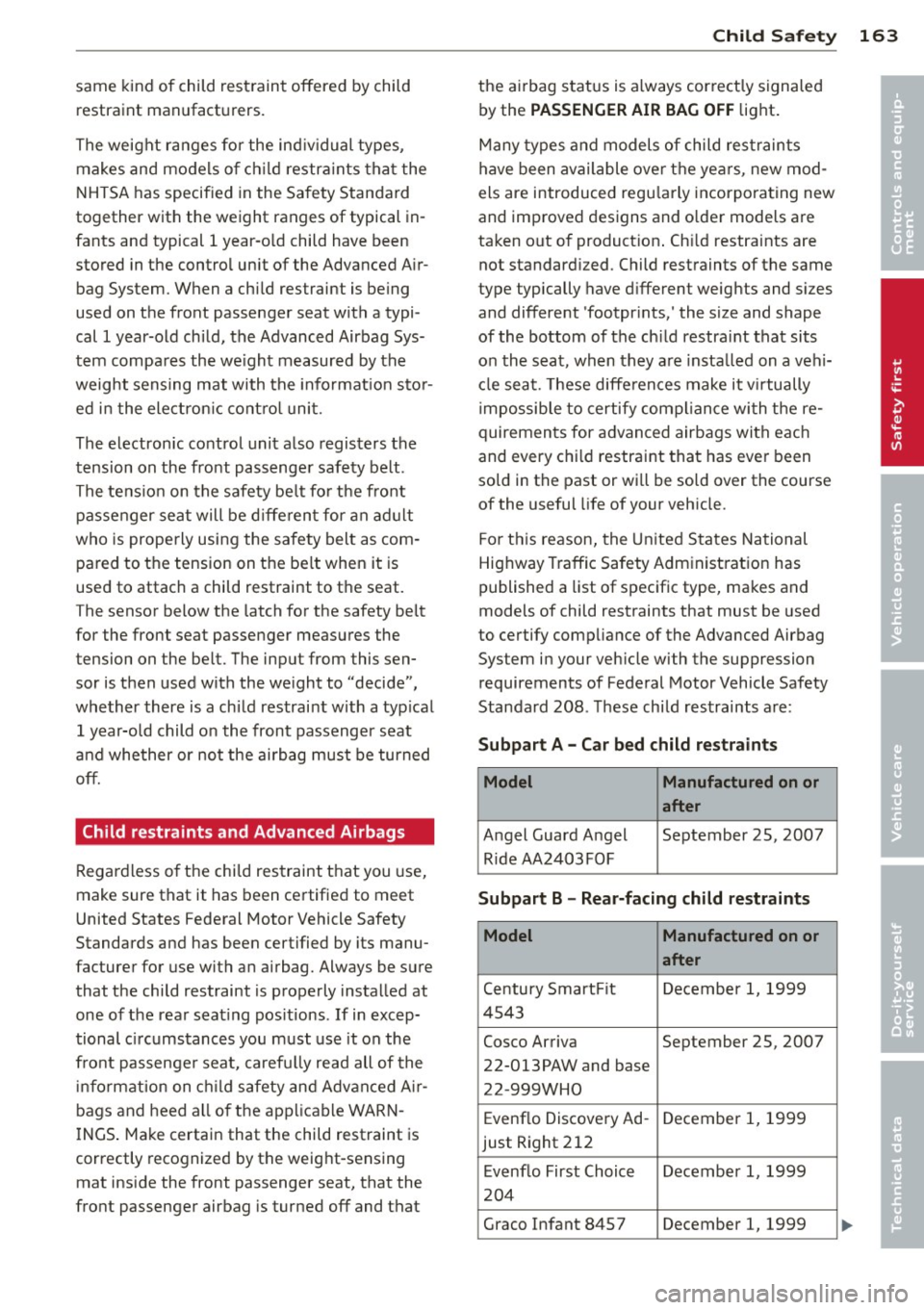
Standard 208. These child res traints are :
Subpart A - Car bed child restraints
Model Manufactured on or
after
A ngel Guard A ngel September 25, 2007
Ride AA2403FOF
Subpart B -Rear-facing child restraints
Model Manufactured on or
after
Ce ntury Smart Fit Decembe r 1, 1999
4 543
Cosco Arriva September 25, 2007 22-013PAW and base
22 -999WHO
Evenflo Discovery Ad -December 1, 1999
just Right 212
Evenflo First Choice December 1, 1999
204
Graco Infant 8457 December 1, 1999
•
•
Page 192 of 286
190 Driving and en vironm ent
- Have your vehicle main tained properly
and in accordance with the service rec
ommendations in your Warranty
&
Ma intenance booklet.
- Lack of proper maintenance as well as
improper use of the vehicle will impair
the function of the emission control
system and cou ld lead to damage.
@ For the sake of the environment
Even when the Emission Contro l System is
operating properly, the exhaust gas can have a sulfur-like exhaust gas smell under
some operating states. This depends on
the sulfur content of the fuel being used.
Using a different brand of fuel may help,
or filling the tank w it h lead-free super
grade gasoline.
Shutting down vehicle
If you wou ld like your veh icle to remain inop
e rat ive for a longer period of time, con tact an
Aud i or other specialized dealer. They can ad
vise you on necessary precautions e .g. corro
sion prevention, maintenance and storage. Pay attention to add itiona l information con
cerning the battery. Refer to
c:> page 217.
Operate your vehicle
economically and minimize pollution
General
Your personal style of driving will determine
the economy of your vehicle, as well as ex
haust and noise levels .
Fuel economy, environmental impact, and
wear on your engine, brakes and t ires largely
depend on three factors:
- yo ur persona l dr iving style
- operating conditions
- tec hnic al lim itations
If you anticipate what you need to do next and
d rive economically, you can eas ily cut your
f u el cons umption by 10 -15 pe rcen t. T his sec- t
ion w ill give you some tips on how you can
help the environment and your pocketbook .
(D Tips
The cons umption estima tes as published
by ENVIRONME NTAL PROTEC TION AGENCY
(EPA) and Transport Canada may not corre
spond to your actual consumption on the road, which will va ry depending upon vehi
cle load and speed, road and weather con
dit ions, trip length, etc.
Drive smoothly and keep a lookout
ahead
Vehicles use the most fuel when they are ac
celerating .
.. Avo id u nnecessary accelerating and brak ing.
Vehicles use the most fue l when they are ac
ce lerat ing. If you ant icipate what is going to
happen next, you wi ll need to brake less and,
t h us, acce lerate less . Let the veh icle coast
whenever possible -for example when you see
that the next t raff ic light is red.
Avoid full throttle
Driving at moderate speeds saves fuel and
improves your mileage.
.. Try and keep well below your car's maximum
speed.
Acce lerat ing gently red uces fue l cons ump
t ion, eng ine wear, and does not disturb the
environment .
Fuel consumption, exhaust emissions and en
gine noise increase disproportionate ly at h igh
speeds. If you drive at approximately three quarters of top speed, fuel consumption w ill
be reduced by one half. Never drive faster
than the posted speed limit and weathe r con
ditions pe rm it.
Page 211 of 286
Modern eng ine lubrication has taken a quan
tum leap in the last few years . Many synt hetic
oils ava ilable today provide better engine lu
brication that can outlast traditional petrole
um-based o ils, making them a smart choice
for use throughout the life of your Audi.
Whether you use synthetic or petroleum based engine oil, the oil that you use must
conform to Audi's oil quality standard
VW 502 00 to help keep your vehicle's engine running smoothly and help prevent the for
mat ion of harmfu l deposits, sometimes called
"sludge", that ove r time can lead to expensive
r epairs.
At the t ime of pri nting, engine o ils available in
the U.S . and Canada that meet the exacting
specifications of Audi oi l standard VW 502 00
are synthetic engine oils. This does not mean, h owever, that every synthetic engine oil w ill
meet Audi oil standard VW 502 00. So always
be sure that you use an approved oi l.
To help preve nt the format ion of harmful de
posits use only oi l with the fo llowing spec ifi
cations printed on the oil container:
Audi oil standard VW 502 00
O il conta iner labels may carry the specif ica
tion s ingly or in comb inat ion w ith other des ig
nations and oil qua lity standards.
Viscos ity
Engine oi ls are graded according to their vis
cosity. The proper v iscosity grade oi l for your
engine depends on cl imactic or seasonal con
d itions where you dr ive. You can use oil with a
viscosity grade of SAE SW40 across all tem
pe rature ranges for normal d riving conditions .
However, if eng ine oi l viscosity grade SAE
SW40 is not avai lab le, you can also use viscos
ity grade SAE SW-30 or SAE OW-40 as long as
it meets Audi o il quality standard VW 502 00
specifications.
Because engine oil that meets the Audi oil
standard may not be available everywhere
when you need it, we st rongly recomme nd
that you always carry with you a n ext ra quart
Checkin g and fillin g 209
(li ter) of oil that exp ress ly con forms to the
VW 502 00 specificatio n, in case you have to
top
off the o il while on the road.
Only if the level of the o il is at or be low the
minimum mark -and no oi l that expressly
confo rms to Audi oil standard VW 502 00
spec ifications is available -may you top
off
with a h igh quality engine o il, preferab ly syn
thet ic-based, that meets ACEA A3 or API SM
spec ifications, but even then, only in v iscosity
grades SAE SW-40, SA E SW-30, o r SAE
OW- 40. However, dur ing the entire time be
tween o il cha nge inte rva ls, never top
off with
more than a tota l of 0. 5 q t/liter engine o il
that does not con form to A udi oil specification
vw 502 00.
Fo r more information abo ut eng ine oi l tha t
has been approved for your veh icle, ple ase
contac t eit h er yo ur autho rized Aud i dea le r or
Audi C ustomer Re lations at 1 (800) 822 -2834
or visit our web site at www .a u diusa.com or
www.aud icanada.ca. Here you w ill also find a
current list of oils (manufacturers, brand
names etc.) that conform to Audi oil standard
vw 502 00.
Changing the engine oil
T he eng ine oi l and o il f ilter m ust be changed
according to the mileage (kilometers) and
time intervals specified i n your ve hicle's War
ranty
& Maintenance booklet. Do not exceed
these interva ls - harmful deposits from old
engine oil can reduce engine performance and
can lead to expensive engine repairs.
Changi ng the oil at the recommended inter
vals is so very important beca use the lubricat
ing propert ies of oil decrease gradually during
norma l veh icle use. If you a re not sure when
yo u have your o il cha nged, ask your author
ized Audi Se rv ice Adv isor.
Under some circumstances the engine oil
shou ld eve n be changed more frequent ly.
Change oil more often if you dr ive most ly
sho rt distances, operate the ve hicle in dusty
areas o r most ly under stop-and -go traff ic con-
di tions, o r when you use your vehi cle where .,..
•
•