ESP AUDI A5 COUPE 2014 Owner's Manual
[x] Cancel search | Manufacturer: AUDI, Model Year: 2014, Model line: A5 COUPE, Model: AUDI A5 COUPE 2014Pages: 286, PDF Size: 70.99 MB
Page 82 of 286
80 On the road
Warning threshold 2 can be set in the speed range starting from
20 mph to 150 mph (30
km/h to 240 km/h). Settings can each be ad
justed in intervals of
6 mph (10 km/h).
Cruise control
Switching on
The cruise control system makes it possible to
drive at a constant speed starting at
20 mph
(30 km/h).
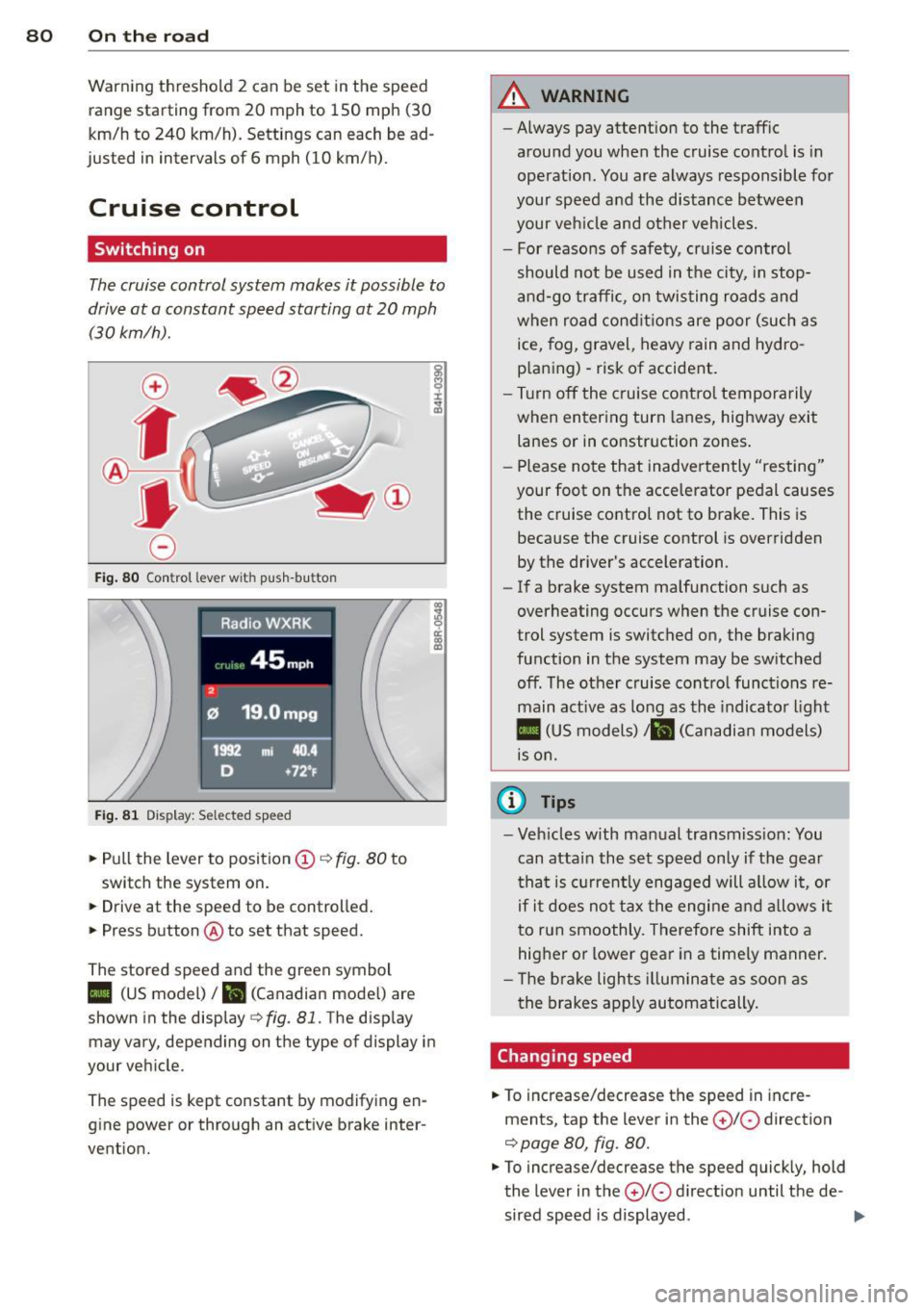
Fig. 80 Control lever w it h push-bu tton
Fig. 81 Dis play : Sel ected speed
.. Pull the lever to position(;)¢ fig. 80 to
switch the system on.
.. Drive at the speed to be controlled .
.. Press button @ to set that speed.
The stored speed and the green symbol
co ~ 9 a:
l:l
II (US model)/ B (Canadian mode l) are
shown in the display¢
fig. 81. The display
may vary, depending on the type of display in
your vehicle.
The speed is kept constant by modifying en
g ine power or through an active brake inter
vention.
A WARNING
-- Always pay attent ion to the traffic
around you when the cruise control is in
operation. You are always responsible for
your speed and the distance between
your veh icle and other vehicles.
- For reasons of safety, cruise control
should not be used in t he city, in stop
and-go traffic, on twisting roads and
when road conditions are poor (such as
ice, fog, gravel, heavy rain and hydro
p laning) -risk of accident .
- Turn off the cruise control temporarily
when entering turn lanes, highway exit
lanes or in constr uction zones .
- Please note that inadve rtently "resting"
your foot on the accelerator pedal causes the cruise control not to brake. This is
because the cruise control is overridden
by the driver's acceleration.
- If a brake system malfunction such as
overheating occurs when the cruise con
trol system is switched on, the braking
function in the system may be sw itched
off. The other cruise control functions re
main active as long as the indicator light
II (US models)/ ... (Canadian models)
is on.
(D Tips
-Veh icles with manual transmiss ion: You
can attain the set speed only if the gear
th at is cur rently engaged will allow it, or
if it does not tax the engine and allows it
to run smoothly. Therefore shift into a
hig her or lower gear in a timely manner.
- Th e brake lights illuminate as soon as
the brakes apply automatically.
Changing speed
.. To increase/decrease the speed in incre
ments, tap the lever in the
0 10 direction
¢ page 80, fig. 80.
.. To increase/decrease the speed quickly, hold
the lever in the
0 10 d irect io n until the de -
sired speed is displayed . ..,.
Page 84 of 286
82 Transmission
Transmission Manual transmission
Gearshift lever
Applies to vehicles: with manual transmission
The clutch pedal must be depressed all the
way before you can start the engine.
The manual transmission in your Audi is
equipped with an
interlock-feature .
• Depress the clutch pedal all the way.
• Start the engine with the gearshift lever in
Neutral and the clutch pedal depressed.
(D Note
Always depress the clutch pedal fully when
changing gears. Do not hold the vehicle on
a hill with the clutch pedal partially de
pressed. This may cause premature clutch
wear or damage .
@ Tips
-Resting your hand on the gearshift lever
knob while driving will cause premature
wear in the transmission.
- The back-up lights go on when you sh ift
in to Reverse with the ignition on.
Gearshift pattern (6-speed manual
transmission)
Applies to vehicles: with manual transmission
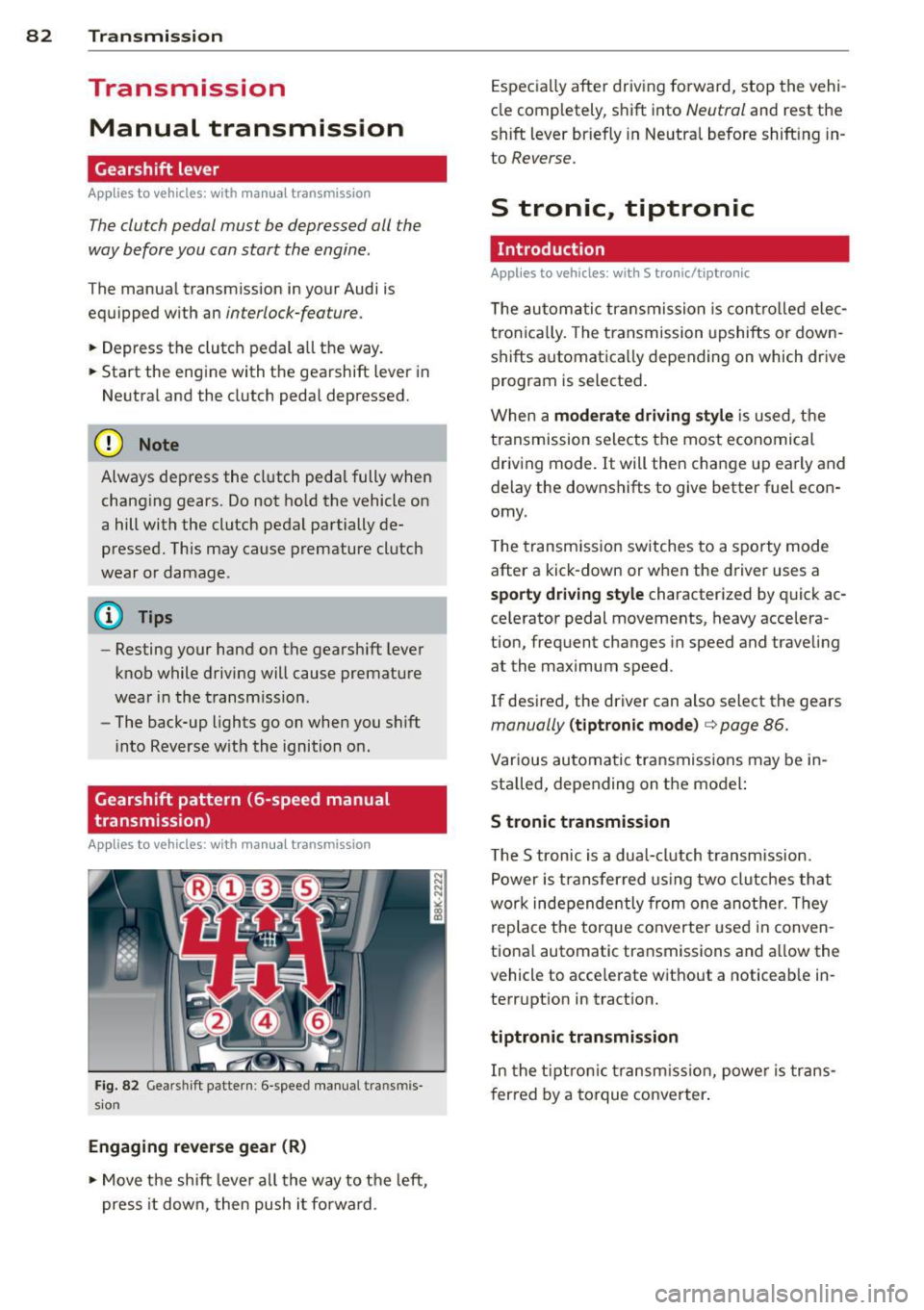
Fig. 82 Gears hi ft pattern : 6 -speed manual tra n smi s
sio n
Engaging reverse gear (R)
• Move the shift lever all the way to the left,
press it down, then push i t forward . Especially
after driving forward, stop the vehi
cle completely, shift into
Neutral and rest the
shift lever briefly in Neutral before shift ing in
to
Reverse.
S tronic, tiptronic
Introduction
Applies to vehicles: with S tronic/tiptronic
T he automatic transmission is controlled elec
tronically. The transmission upshifts or down
shifts automatica lly depending on which drive
program is selected.
When a
moderate driving style is used, the
transmission selects the most economical
driving mode. It will then change up early and
delay the downshifts to give better fuel econ
omy .
T he transmission switches to a sporty mode
after a kick-down or when the driver uses a
sporty driving style characterized by quick ac
ce lerator pedal movements, heavy accelera
tion, frequent changes in speed and traveling
at the maximum speed.
If desired, the driver can also select the gears
manually (tiptronic mode) c> page 86.
Various automatic transmissions may be in
stalled, depending on the model:
S tronic transmission
The S tronic is a dual-clutch transmission.
Power is transferred using two clutches that
work independe ntly from one another. Th ey
replace the torque converter used in conven
tional automatic transmissions and al low the
vehicle to acce lerate without a noticeable in
terruption in tract ion.
tiptronic transmission
In the tiptronic transmission, power is trans
f er red by a torque converter.
Page 90 of 286
88 Transmi ssion
when sport mode is sw itched on,
especially when the road is slippery.
- Once you have accelerated, yo u should
switch sport mode
off by pressing the
I ~ OFF I button.
@ Tips
- The transmission temperat ure may in
crease significantly after using the Launch Control Program. If that hap
pens, the program may not be available
fo r a few minutes . It will be availab le
again afte r a cool-down period .
- When accelerating using t he Launch
Control program, all vehicle parts are
subject to heavy loads. This can res ult in
i nc reas ed wea r.
Transmission malfunction
Applies to vehicles: with S tronic/tiptronic
DI Transmi ssion : Pr ess brake pedal and se
le ct gear again .
Press the brake pedal and se lect the des ired
se lecto r lever posit io n aga in. You can then
con tinue dr iv ing .
DI Transmi ssion overheating: Pleas e drive
conservatively .
The transmission temperature has increased
significantly due to the sporty driving ma nner .
Drive in a less sporty manner unt il the tem
pe rat ure retu rns to the no rmal range a nd the
i ndicator light sw itches of.
DI Transmiss ion malfunct ion: You can con
tinue driving
There is a system ma lf u nction in the transmis
sion. You may continue driving. Drive to your
author ized Audi dealer or qualified repair fa
cility soon to have the malfunction corrected.
DI Transmission malfunction: Limited driv
ing funct ionality
There is a system ma lf u nction in the transmis
sion. The transmission is switching to emer
gency mode. Th is mode only shifts into cer
tain gears or will no longer shift at a ll. The en- gine may sta
ll. Drive to your a uthorized Audi
dealer or qualified repair facility immediately
to have the mal function cor rected .
[O] lit Transmis sion malfunction : No reverse
You can continue driving
S t roni c tra nsmission: The re is a system mal
f unc tion in the transm ission. The t ransmis
s io n is swi tching to emerge ncy mode. This
mode only shifts into ce rtain gea rs or will no
l o nger shift at a ll. The engine may stall. You
cannot engage the reverse gear . Dr ive to your
autho riz ed Aud i dea ler or qualified repa ir fa
c ili ty immediately to have the malfunction
cor rected .
DI Transmission malfunction: Stop vehicle
and shift to park.
Do not continue dr iving. Se lect the P selector
lever positio n and see your authorized A udi
dealer or qualif ied repai r facility for assis
tance.
(D Note
If the transmission switches to emergency mode, yo u should ta ke the vehicle to an
a uth ori zed Audi dea lership as so on as pos
s ible to have the condition corrected.
Page 92 of 286
90 Audi adaptive cruise control and braking guard
Audi adaptive cruise
control and braking
guard
Introduction
App lies to vehicles: with Audi adaptive cruise co ntrol
The adaptive cruise control system assists the
driver by regulating vehicle speed and helping
to maintain a set distance to the vehicle
ahead, within the limits of the system .
If the
system detects a moving vehicle up ahead,
adaptive cruise control can brake and then ac
celerate your vehicle. This he lps to make driv
ing more comfortable on long highway
stretches.
The braking guard system can warn you about
an impending collision and initiate braking
maneuvers
c:::> page 96.
Adaptive cruise control and braking guard
have technical limitations that you must
know, so please read this section carefully, un
derstand how the system works and use them
properly at all times.
General information
General information
Applies to vehicles: with Audi adaptive cruise co ntrol
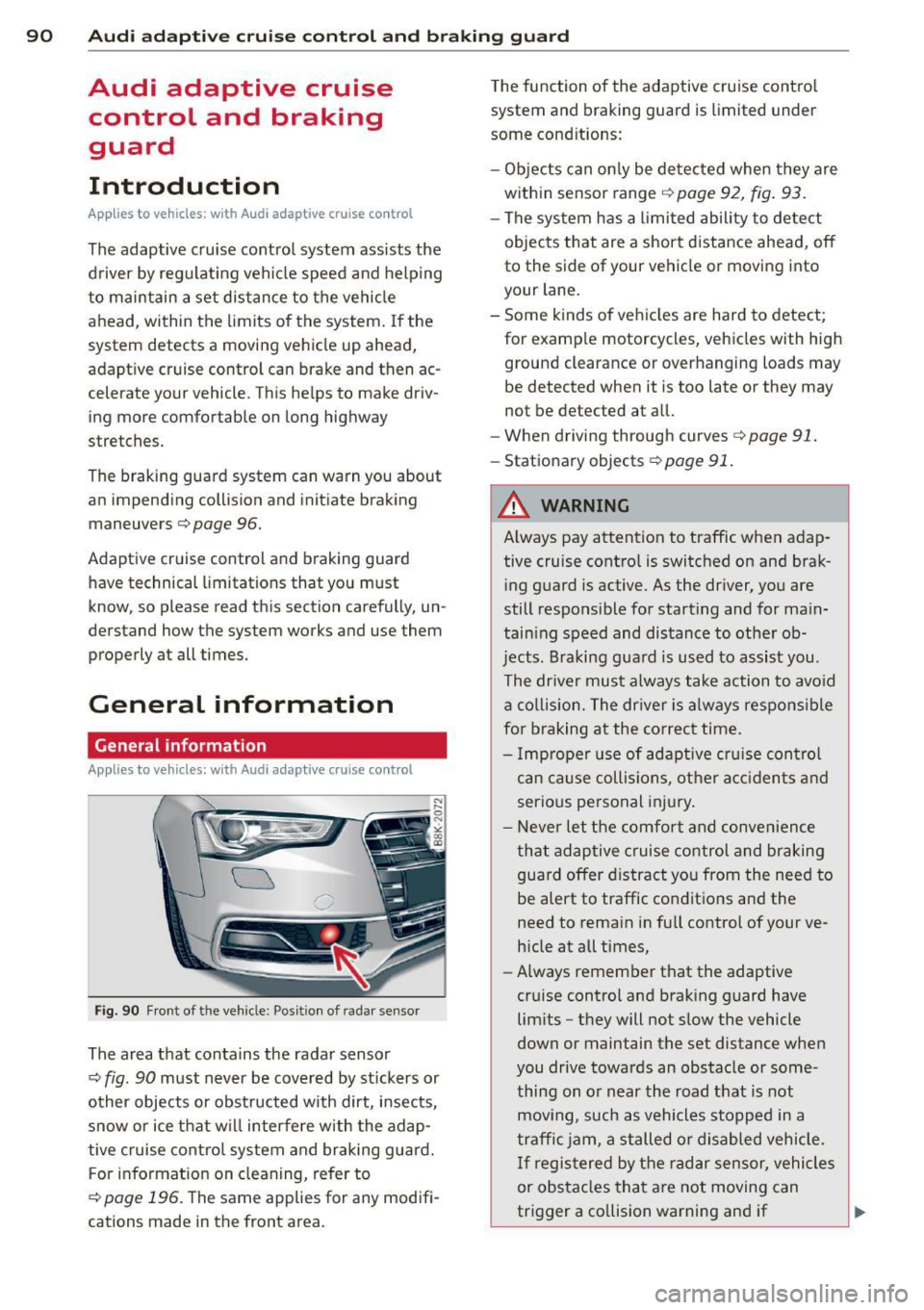
Fig. 90 Front of t he veh icle: Posit io n of radar sensor
The area that contains the radar senso r
c:::> fig. 90 must never be covered by stickers or
other objects or obstructed with dirt, insects,
snow or ice that w ill interfere with the adap
tive cruise control system and braking guard.
F or information on cleaning, refer to
c:::> page 196. The same applies for any modifi
cations made in the front area. T
he function of the adaptive cruise contro l
system and braking guard is limited under
some condit ions:
- Objects can only be de tected when they are
within sensor range
c:::>page 92, fig . 93.
-The system has a limited ability to detect
objects that are a short distance ahead, off
to the side of your vehicle or moving into
your lane.
- Some kinds of vehicles are hard to detect; for examp le motorcycles, vehicles with high
ground clearance or overhanging loads may
be detected when it is too late or they may
not be detected at a ll.
- When driving through curves
c:::> page 91.
-Stat ionary objects c:::> page 91 .
A WARNING
-
Always pay attention to traffic when adap-
tive cruise contro l is switched on and brak
i ng guard is active. As the driver, you are
still respons ible for starting and for main
tain ing speed and distance to other ob
jects. Braking guard is used to assist you.
The dr iver must always take action to avoid
a col lision. The driver is always responsibl e
for braking at the correct time.
- Im proper use of adaptive cruise con trol
can cause collisions, other accidents and
serio us personal injury.
- Never let the comfort and convenience
that adaptive cruise control and braking
guard offer distract you from the need to
be alert to traffic conditions and the
need to remain in full control of your ve
h icle at all times,
- Always remember that the adaptive
cru ise contro l and brak ing guard have
limits -they will not slow the vehicle
down or maintain the set distance when
you drive towards an obstacle or some
thing on or near the road that is not
mov ing, such as vehicles stopped in a
traffic jam, a stalled or disabled vehicle.
If registered by the radar sensor, vehicles
or obstacles that are not moving can
trigger a co llision warning and if
Page 93 of 286
Audi adapt ive crui se c ontrol an d bra kin g guard 91
confirmed by the video camera, an acute
collision warning.
- For safety reasons, do not use adaptive
cruise control when driving on roads with
many curves, when the road surface is in
poor condition and/or in bad weather
(such as ice, fog, gravel, heavy rain and
hydroplan ing). Using the system under
these conditions cou ld result in a co lli
sion.
- Switch adaptive cruise control off tempo rar ily when driving in turning lanes, on
expressway exits or in cons truction
zones. This prevents the vehicle from ac celerating to the set speed when in these
situations.
- The adaptive cr uise control system wi ll
not brake by itse lf if you p ut your foot on
the accelerator pedal. Doing so can over
ride the speed and distance regulation .
- When approaching stationary objects
such as stopped traff ic, adaptive cruise
control will not respond and braking
guard w ill have limited function.
- The adaptive cruise control system and
braking guard do not react to people, an
ima ls, objects crossing the road or on
coming objects.
- The function of the radar sensor can be
affected by reflective objects such as
guard rails, the entrance to a tunnel,
heavy rain or ice.
- Never follow a ve hicle so closely that you
cannot stop your vehicle safely. The
adaptive cruise cont ro l cannot slow or
brake the veh icle safely when you follow
ano ther veh icle too closely. Alway s re
member that the automatic braking
function cannot bring the vehicle to a sudden or emergency stop under these
condit ions.
- To prevent unintended operation, always
switch ACC off when it is not being used.
(D Note
The sensor can be disp laced by impacts or
damage to the bumper, whee l housing and
underbody . That could affect the adaptive cruise control system and braking g
uard.
Have your authorized Audi dea ler o r au
thorized Audi Service Facility chec k their
funct ion.
In curves
App lies to vehicles: with A ud i ada ptive c ruise contro l
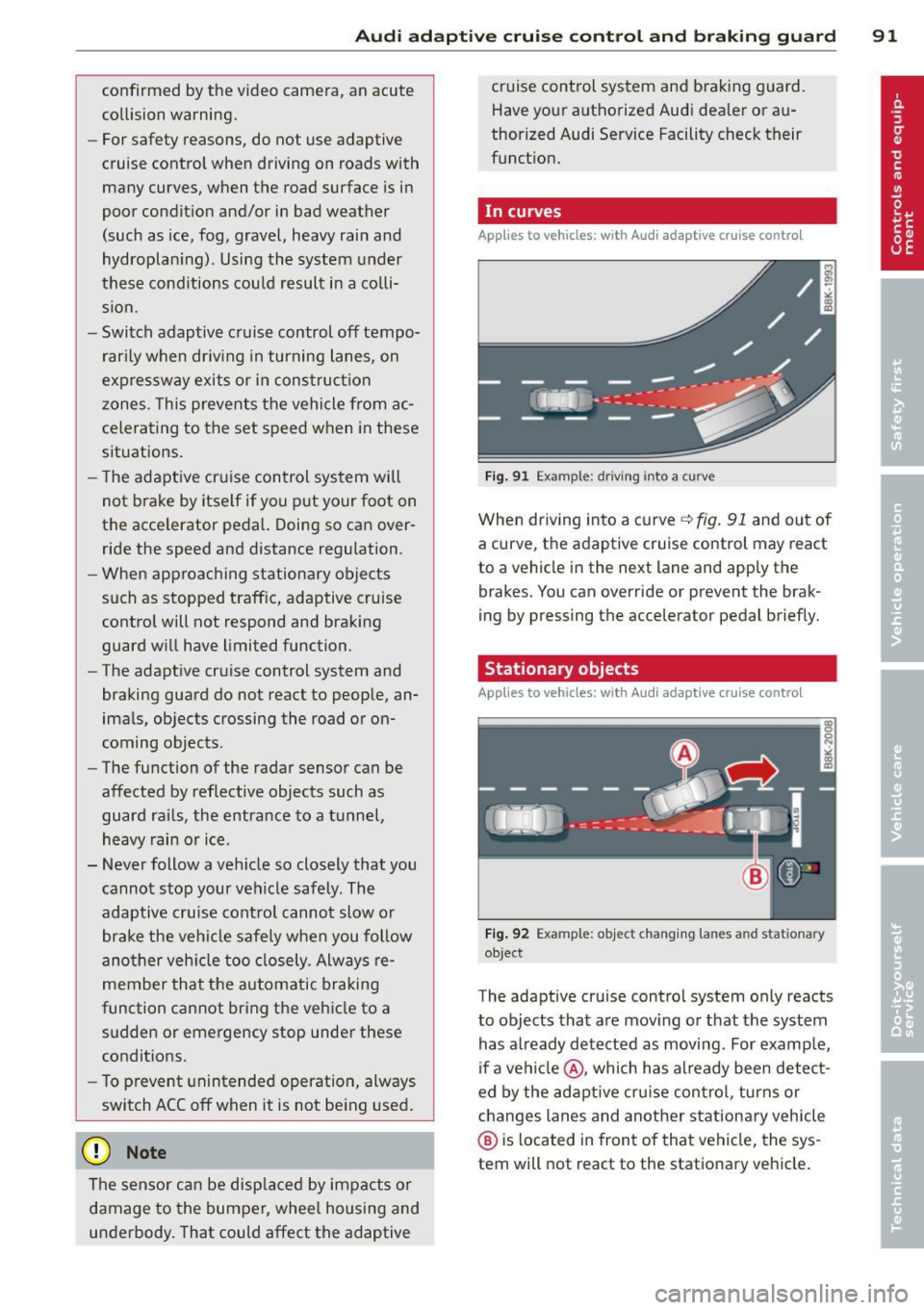
F ig . 91 Example: driving into a curve
When driving into a curve <=.> fig. 91 and ou t of
a curve, the adaptive cruise control may react
to a vehicle in the next lane and apply the
brakes. You can override or prevent the brak
ing by pressing the accelerator pedal briefly.
Stationary objects
App lies to vehicles: wit h Audi adapt ive cr uise contro l
F ig . 92 Example : objec t changing lanes an d stationary
object
The adaptive cru ise contro l system only reacts
to objects that are mov ing or that the system
has a lready detected as moving. For examp le,
if a ve hicle@ , which has already been detec t
ed by the adaptive cru ise con trol , turns or
changes lanes and another stationa ry vehicle
@ is located in front of that vehicle, the sys
tem will not react to the stationary vehicle.
Page 99 of 286
Audi adaptive cru ise control and brakin g guar d 97
-If a co llision is imminent, the system will
first provide an
acute wa rnin g by briefly and
sharp ly app lying the brakes .
- If you do not react to the ac ute warning,
braking guard can brake within the limits of
the system. This reduces the vehicle speed
in the event of a coll is ion.
- At speeds under 20 mph (30 km/h), the sys
tem can in it iate a complete decelerat ion
shortly before a collis ion
1>.
- If the braking guard senses that you are not
braking hard enough when a collision is im
minent, it can increase the braking force.
Which function s can be controll ed?
You can switch braking guard and the dis
tance/approach warning on or off in the radio
or MM I
¢ page 9 7, Settings in the radio/
MMI.
A WARNING
Lack of attention can cause col lis ions, oth
er accidents and serious persona l injuries.
The braking guard is an assist system and
cannot prevent a coll is ion by itself. The
driver must always intervene. The d river is
always responsib le for br aking at the cor
rect time .
- Always pay close attention to traffi c,
even when the bra king g uard is switched
on . Be ready to intervene and be ready to
take complete control whenever necessa ry. A lways keep the safe and lega l dis
tance between your vehicle and vehicles
up ahead.
- Braking guard works w ith in limits and
will not respond outs ide the system lim
its, for example when approaching a
stopped vehicle or stationary obstacle
(end of a traff ic jam or vehicle that has
broken down in traffic).
- Always remember that the radar sensor
for the braking guard wo rks only within
defined detection and ra nge limits that
1
> T hi s is not ava ilable in some countries .
may prevent the proper detection of oth
er vehicles .
- The radar sensor's function and range
can be reduced by rain, snow and heavy
spray. Moving ve hicles up ahead may not
be prompt ly detected or may not be de
tected at all.
- Reflective surfaces incl uding crash barri
ers or tunne l entrances may impair the
function of the radar senso r.
(D Tips
- Yo u can cancel the bra king that is in itiat
ed by the system by braking yourself, by
accelerating not iceably or by swerving.
- Braking guard error messages
¢page 98.
- Keep in mind that braking g uard can
brake unexpected ly. Always secure any
cargo or objects that you a re tra nsport
ing to reduce the risk of damage or in
jury .
Settings in the radio/MMI
Applies to veh icles: w it h Audi ada ptive cru ise co ntro l
.,. Sele ct: !CAR ! func tion button> Car sy ste m s*
con trol butto n > Driv er a ssist > Audi brak
ing guard .
Or
.,. Select: !CAR ! function button > Audi braking
gua rd.
Sy stem -
Switch A udi braking guard On an d
Off. When you switch the ignit ion on, the
message
Audi braking guard off appears if
the system is switched off.
Early warning -The distance and approach
warnings in the d isplay can be switched
On/
Off.
(D Tips
- Yo ur settings are au tom atically stored
and assigned to the remote cont ro l key
bein g used at the times the settings are
made.
Page 102 of 286
100 Audi side assist
Audi side assist
Lane change assistant
Description
App lies to vehicles: with Audi side assist
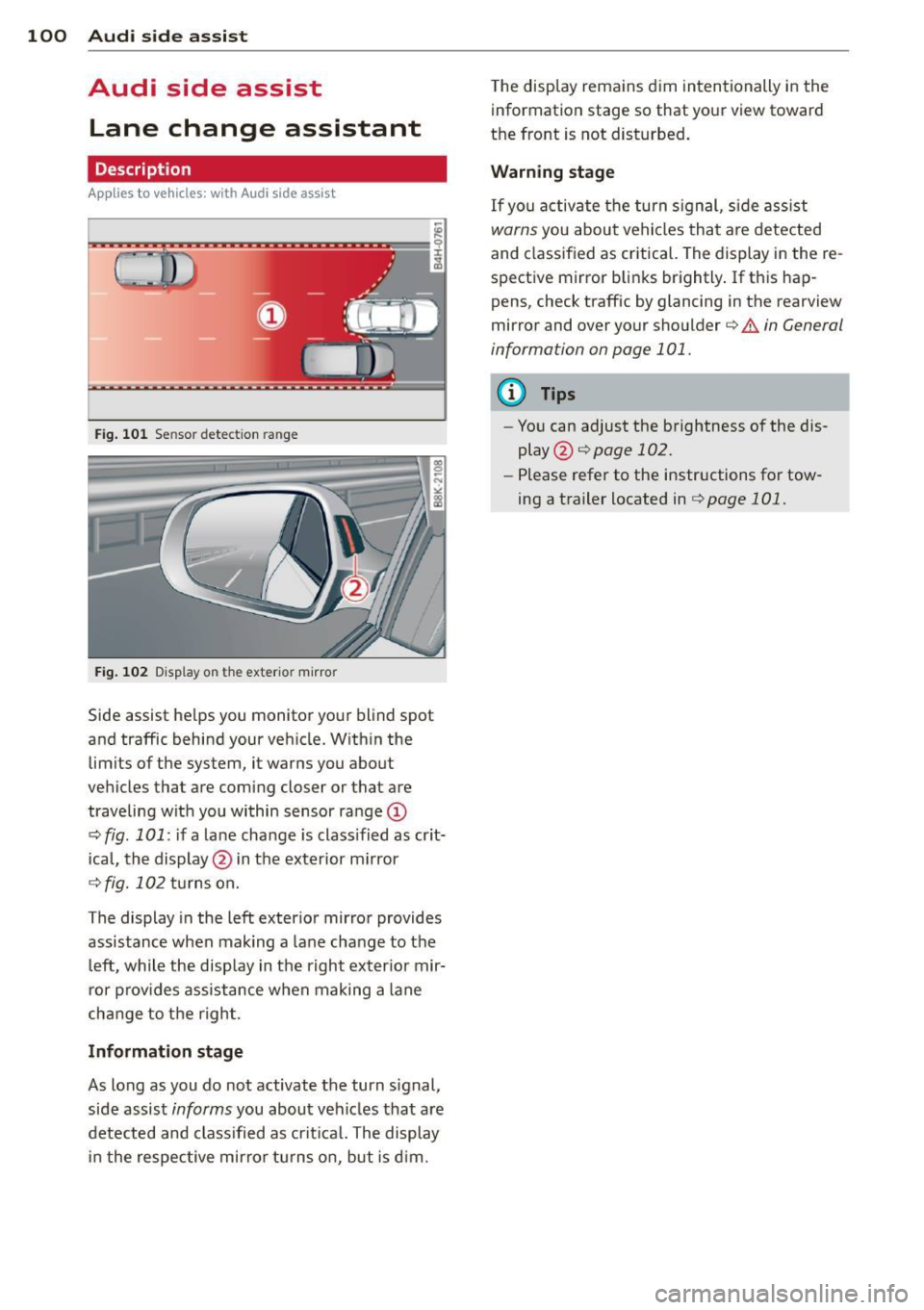
Fig . 101 Sensor detectio n range
Fig. 102 Display on the exterior mirror
Side assist he lps you monitor your blind spot
and traffic behind your veh icle. Within the
limits of the system, it warns you about
vehicles that are coming closer or that are
traveling wit h you within sensor range
(D
c:> fig . 101: if a lane change is class ified as crit
ical, the display @ in the exterior mirror
¢fig. 102 turns on.
The display in the left exterior mirror provides
assistance when mak ing a lane change to the
le ft, while the display in the right exter ior mir·
ror provides assistance when making a lane
cha nge to the right.
Information stage
As long as you do not activate the turn signal,
side assist
informs you about vehicles that are
detected and class ified as critical. The display
in the respective mirror turns on, but is d im. T
he display remains dim intentionally in the
information stage so that your view toward
the front is not disturbed .
Warning stage
If you activate the turn signal, s ide ass ist
warns you about vehicles that are detected
and class ified as critical. The display in the re
spective mirror blinks brightly . If this hap
pens, check traffic by glancing in the rearview
mirror and over your shoulder
c:> .&. in General
information on page 101.
(D Tips
- You can adjust the brightness of the dis
play @
c:> page 102.
-Please refer to the instructions for tow·
ing a trailer located in
¢page 101.
Page 103 of 286
General information
Applies to vehicles: with Audi side assist
®
©
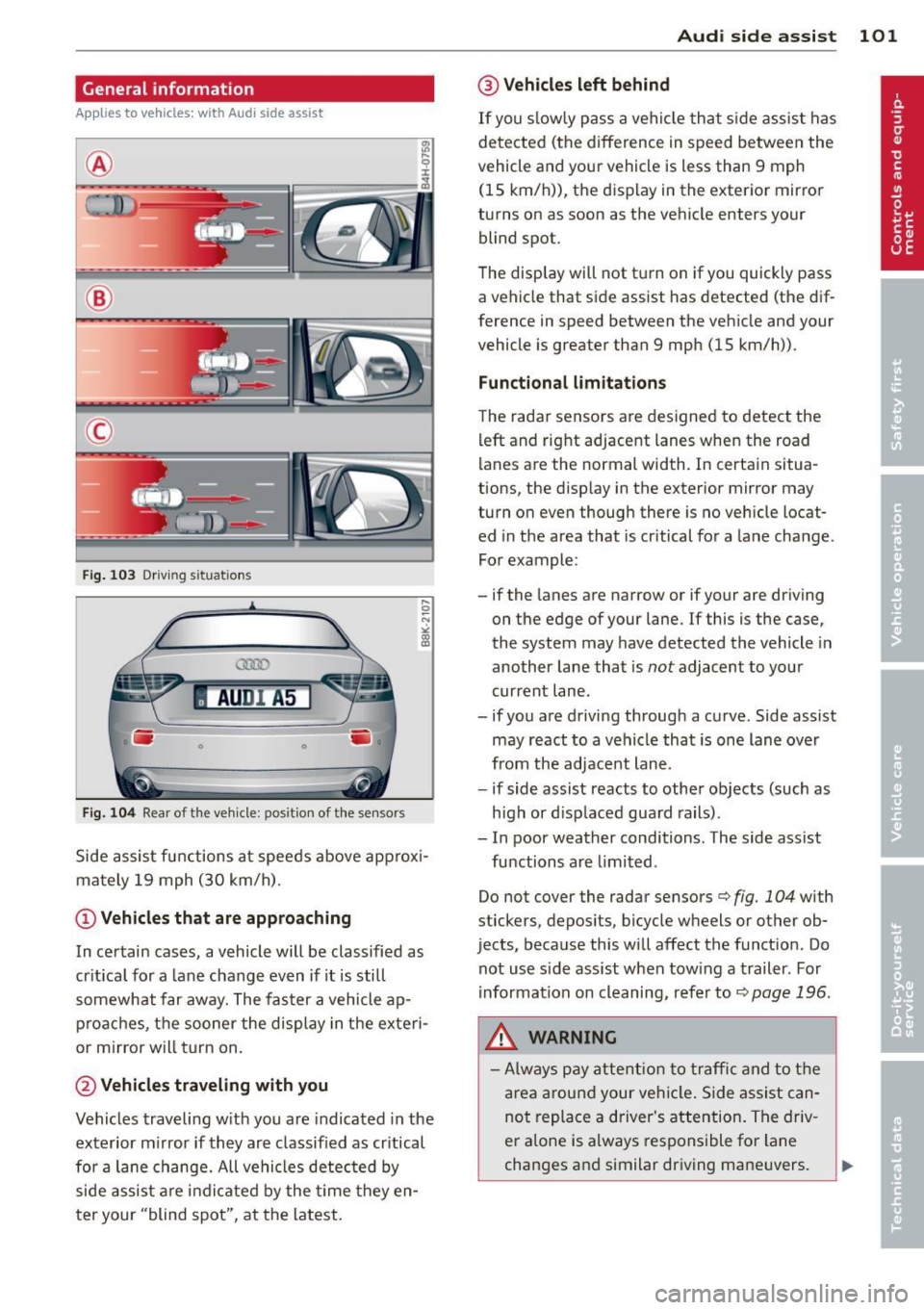
Fig . 103 Dr iving situations
AUDI A5
•
Fi g. 104 Rear of t he ve hicle: positio n of t he se nsors
Side assist functions at speeds above approx i
mately 19 mph (30 km/h).
@ Vehicl es th at ar e approaching
In certain cases, a vehicle will be classified as
cr itical for a lane change even if it is still
somewhat far away. The faster a vehicle ap
p roaches, the sooner the display in the exteri
or m irror will t urn on.
@ Vehicles traveling with you
Vehicles traveling w ith you are indicated in the
exterior m irror if they are classified as cr itical
for a lane change. All vehicles detec ted by
side assist are indicated by the time they en
ter your "blind spot", at the latest.
Audi side assist 101
@ Veh icle s left behind
If you s low ly pass a vehicle that s ide assist has
detected (the difference in speed between the
vehicle and your vehicle is less than 9 mph (15 km/h)), the display in the exterior mirror
turns on as soon as the vehicle enters your blind spot.
The disp lay will not t urn on if you quickly pass
a vehicle that side assist has detected (the dif
ference in speed between the vehicle and your
vehicle is greater than 9 mph (15 km/h)).
Functional limitation s
The radar senso rs are designed to detect the
left and right adjacent lanes when the road
lanes are the normal width. In certain situa
tions, the disp lay in the exterior mirror may
turn on even though there is no vehicle locat
ed in the area that is cr itical for a la ne change.
For example:
- if the lanes are narrow or if your are dr iving
on the edge of your lane.
If this is the case,
the system may have detected the vehicle in
another lane that is
not adjacent to your
current lane .
- if you a re driving through a curve. Side assist
may react to a vehicle that is one lane ove r
from the adjacent lane.
- if side assist reacts to other objects (such as
high or d isp laced guard rails) .
- In poor weather conditions. The side assist
functions are l imited .
Do not cover the radar sensors <=>
fig. 104 with
stickers, depos its, bicycle wheels or other ob
jects, because this will affect the funct ion. Do
not use s ide ass ist when towing a trailer. For
i nformation on cleaning, refer to<=>
page 196.
_&. WARNING
- Always pay attention to traffic and to t he
area around your ve hicl e. S ide assist can
not replace a driver's attention. The driv
er a lone is always responsible for lane
changes and similar driving mane uvers.
Page 106 of 286
104 Audi drive select
Audi drive select
Driving settings
Introduction
App lies to vehicles: with Audi drive select
Drive select provides the possib ility to exper i
e nce diffe ren t types of vehi cle sett ings in o ne
ve hicl e. For ins tance, us ing t he three
Com
fort , Auto and Dynamic modes, the driver can
switch from a sporty to a comfortab le drivi ng
mode with the press of a b utton.
A ddit ionally, in veh icles wi th MM I*, the vehi
cle setup for
Individual* mode can be c us
tom ized by you . This makes it possib le to
comb ine settings such as a sporty engine tun
ing with comfortable steering.
A WARNING
Improper use of the A udi drive select can
cause collisions , ot her acc idents and se ri
ous pe rsonal injury .
Description
Applies to vehicles: with Audi drive select
The vehicle setup in each mode depends on
the veh icle's features . However, the engin e,
automa tic t ransmissio n* and steer ing are al
ways involved.
-
Engine and automatic transmission*
Depending on the mode , the e ngine and the
automatic t ransm ission respond quicke r or i n
a mo re ba la nced manne r to a cce le rator pedal
move ments. In t he sporty dynam ic mode, the
a utom atic t ra nsm ission shifts at h igher R PMs.
Steering
The stee ring adapts in terms of stee ring effort
and st eering ra tios . Ind ir e ct steer ing that
moves easi ly, l ike the stee ring in comfort
mode, is bes t su ite d to long dr ives on a high
way. In co ntr ast, dynam ic mo de p rov ides
sporty, direct steerin g.
Th e fo llow ing applies to vehicl es with dynam ic
s teer ing*: the stee ring rati o changes based on
ve hicl e spee d in order to main ta in op timum stee
ring effort for the drive r at all times . This
sets the stee ring to be less sens itive at higher
speeds in order to provide improved vehicle
control. At reduced speeds, however, steer ing
is more d irect in order to keep the steering ef
fort as minima l as poss ible when the drive r is
mane uveri ng the veh icle . At low and ave rage
spe eds, dynamic steering add itiona lly pro
vides more responsive stee ring pe rforma nce.
Adaptive dampers*
The adaptive dampers* use se nsors to record
i nforma tion regard ing st eer ing movements,
braking and acceleration o perations by the
drive r, road surfac e, d riv ing speed, and load.
T his makes it poss ible to adapt damp ing to
t h e dr iving si tua tion v irtu ally in real t ime.
Dr ive sele ct also makes i t possib le to sa tisfy
t h e desi re fo r spo rty suspension ( Dynamic)
and comfortab le suspension (Comfort) with
o ut giving up ba lanced tuning (Auto) .
Sport differential*
As a compone nt of t he all whee l dr ive sys tem
(quat tro)
~ page 185, t he spo rt differential *
dist ributes the driving power to the rear ax le
depen ding on the sit uat io n. The distrib ution
of power var ies depending on the mode se
lected. The goal is a high level of agility and
ability to accelerate on curves . T he ve hicle is
very res pons ive to steering .
Audi adaptive crui se control*
The behav ior when accelerating can be adjust
ed from comfortab le to sporty, depending on
t h e drive select mode. Adaptive cr uise control
also responds to the driv ing behavior of the
vehicle ahead in a mo re conservative o r spo rty
man ner.
Engine sound*
The sound of the eng ine is adapted to these
lected mode and ranges from subtle to sporty.
(!) Tips
- In s ome models, the maximum vehicle
spee d can only be reached in the
Auto
and Dynamic modes.
Page 110 of 286
108 Park assist
Approaching another obstacle will result in
the distance warning sounding at the normal
volume again.
Malfunctions in the system
If a warning tone is audible for about five sec
onds when you turn on the ignition, there is a
malfunction in the system. Have the problem
corrected by your authorized Audi dealer.
Keep the sensors in the rear bumper clean and
free from ice so that the acoustic park assist
system can function properly.
A WARNING
-Sensors have dead spaces in which ob
jects cannot be detected. Be especially
alert for small children and animals,
since they are not always detected by the sensors.
- The acoustic parking system is not a sub
stitute for the driver's own caution and alertness . Ultimate responsibility always
remains with the driver during parking
and similar maneuvers. Always watch
where you are driving.
- You should always adjust the volume and
frequency of the warning tones so that
you can easily hear the acoustic distance
warning even if the radio is playing, the
air-conditioner blower is on High or there is a high level of outside noise.
- Check the settings whenever anyone
else has driven the vehicle before you .
{[) Note
-Remember that low obstacles for which
-
a warning has already been issued may
"dive" below the system's sensing zone if
the vehicle is being backed up closer . In
this case, the warning sound shutting off
does
not indicate that you have cleared
the obstacle. Instead, impact is immi
nent.
- Objects such as trailer hitches, chains,
narrow posts or fences covered by a thin
layer of paint may not always be detect- ed by the system. They can still damage
your vehicle without warning.
(D Tips
Keep the sensors in the rear bumper clean
and free of snow and ice so that the acous
tic parking assist system can function properly.
Adjusting the warning tones
Applies to vehicles: wit h parking syste m (rear)
The warning tones con be adjusted in the
MMI*.
.. Select: I CAR I function button > Parking sys
tem .
Or
.. Select:
!CAR I function button > Car systems*
control button > Driver assist > Parking aid.
- Rear volume -
rear sensor volume
-Rear frequency -rear sensor frequency
-Music volume while parking -when the
parking system is switched on, the volume
of the active audio source is lowered.
The newly adjusted value is briefly heard from
the signal generator. The settings are auto
matically stored and assigned to the master
key with remote control.