warning lights AUDI A5 COUPE 2014 Owner's Manual
[x] Cancel search | Manufacturer: AUDI, Model Year: 2014, Model line: A5 COUPE, Model: AUDI A5 COUPE 2014Pages: 286, PDF Size: 70.99 MB
Page 77 of 286
in the hy draulic valve adjus ters. This is
norma l and not a cause for concern .
- If you leave the vehicle with the ignit ion
switched on, the ignition will switch off
after a certain pe riod of time . Please
note that e lectr ica l equipment such as
exterior lights will swi tch off as well
when tha t happens .
Switching engine off
Applies to vehicles: with conven ie nce key
.,. Bring your vehicle to a complete stop .
.,. Automatic transmiss ion: Move the selector
lever to the P or N pos it ion.
.. Press the
I STA RT ENGINE STOPI button
~ page 74, fig. 77.
Steering lock
The steering locks when you turn the engine
off us ing the
I STAR T ENGIN E STOP I button
and open the dr iver's door. The locked stee r
i ng helps prevent vehi cle theft.
Emergency off
If necessary , the eng ine can be sw itched off
with the selector lever in the R or D/S pos i
tions. To do so , step on the brake peda l and
p ress and hold the
I S TA RT E NGINE STO PI bu t
ton vehicle speed must be less than 6 mph (10 km/h).
A WARNING
- Never turn off the eng ine before the ve
hicle has come to a complete stop . The
full function of the brake booster and the
power steering is not guaranteed. You
must use more force to turn or brake if
necessary . Because you cannot steer and
brake as you usua lly would, t his could
lead to crashes and serious injur ies .
- For safety reasons, you should always
par k your vehicle with the se lector lever
in P. Otherwise, the ve hicle co uld i nad
vertent ly roll away.
- T he rad iator fan ca n con tinue to ru n for
u p to 10 min utes eve n after yo u have
t ur ned o ff the eng ine and removed the
On th e ro ad 75
ignition key. The radiator fan can a lso
turn on again if the engine coo lant heats
up because of intense sunlight or heat
bu ild-up in the engine compartment.
- Always take the key w ith you whenever
you leave your ve hicle. Otherw ise, the
engine could be started or electrical
equ ipme nt such as the power windows
could be ope rated. This can lead to seri
ous injury.
0 Note
If the engine has been under heavy load
fo r an extended pe riod, heat bu ilds up in
the engine compartm ent after the engine
i s sw itched off -th ere is a r is k of damag ing
the engine . A llow the engi ne to run at id le
fo r abo ut two minutes before switching it
off.
Driver messages
Ignition is o n
This message appears and a warning tone
sou nds if you open the d river's door when the
ignition is sw itched on .
No key ident ified
This message appears when the
I S TART ENG IN E STOP I bu tton is pressed if
there is no master key ins ide the veh icle or if
the system does not recognize it . Fo r exam
ple , the master key cannot be recogni zed if it
is covered by an obje ct (e.g . al uminum brief
case) which
screens t he radio s ignal. Elec tron
i c dev ices such as cell phones can also inter
fere with the radio s ignal.
Pre ss brak e pedal to start engine
This message appears if you do not press the
brake pedal to start the eng ine in a vehicle
with an automat ic transm iss ion.
Press clutch pedal to start engine
T his message appears if you do not press the
clutch pedal to start the engine in a veh icle
with a manual tr ansmission . ..,.
Page 79 of 286
Emergency brake fun ction
An emergency brake ensures that the vehicle
can be slowed down even if the
normal b rakes
fail
c::> pag e 78 , Emergency broking .
Indicat or light s
-If the par king b rake is closed w ith the igni
t ion
s wit ched on the . (USA mode ls) /
• (Canada models) indica tor lights come
on in the instrument cluster and the switch .
-If the par king brake is closed w ith the igni
tion
s witched off the . (USA mode ls) /
• (Canada models) indicator lights come
on in the instrument cluster and the switc h
for about 20 seconds.
A WARNING
If a gear or a drive range (automat ic trans
m ission) is engaged with the vehicle s ta
tionary and the engine runn ing, you must
in no instance accelerate or release the
clutch* care lessly. Otherw ise the vehicle
w ill sta rt to move immediately- risk of an
accident.
(D Note
If the . symbol in the display or the.
(USA models) . (Canada mode ls) indica
tor light i n the instrument cluster flashes,
there is a mal function i n the brake system.
By pressing the
I SETI button, you can bring
up a driver message which explains the
malfunction in more detai l. If the driver
message
Park ing brake! appears, there is
an operating malfunct ion in the parking
brake wh ich you shou ld have repa ired im
mediately by an author ized Audi dealer or
qualified workshop
c::> poge 15.
(D} Tips
-You can apply the parking brake at any
time -even w ith the ignition switched
off . The ignit ion must be t urned on and
the brake peda l must be pressed in o rder
to release the pa rking bra ke .
On th e ro ad 77
-Occasional noises when the parking
brake is app lied and released are normal
and are not a cause for concern.
- When the vehicle is pa rked, the park ing
brake goes through a self -test cycle at
regu lar interva ls. Any associated noises
are normal.
Parking
.,. Press the brake pedal to stop the veh icle .
.. Pull the sw itch @
c::> page 76, fig . 78 to set
the parking brake .
.,. Automatic transmission : M ove the selecto r
lever to P.
.. Tu rn the engine off¢,&. .
.. Manual transmission: Shift into 1st gear.
.. When on inclines or declines, turn the steer
ing wheel so that the vehicle will roll into
the curb if i t beg ins to move.
A WARNING
--- When you leave your vehicle -even if on-
ly briefly -always remove the ignition
key . Thi s app lies pa rticula rly whe n chil
dren remain in the vehicle. Ot herwise t he
children could star t the eng ine , release
the par king brake or operate electrical
equipment (e.g. power windows). There
is the risk of an accident.
- When the veh icle is locked, no one -par
ticularly not children should remain in
the vehicle . Locked doors make it more
difficult for emergency workers to get in
to the vehicle -putting lives at risk .
Starting from rest
The starting assist function ensures that the
parking brak e is r ele ased automatically upon
star ting.
Stopping and applying park ing brake
.. Pull the switch @¢ page 76, fig. 78 to ap-
ply th e parking brake. ..,.
Page 82 of 286
80 On the road
Warning threshold 2 can be set in the speed range starting from
20 mph to 150 mph (30
km/h to 240 km/h). Settings can each be ad
justed in intervals of
6 mph (10 km/h).
Cruise control
Switching on
The cruise control system makes it possible to
drive at a constant speed starting at
20 mph
(30 km/h).
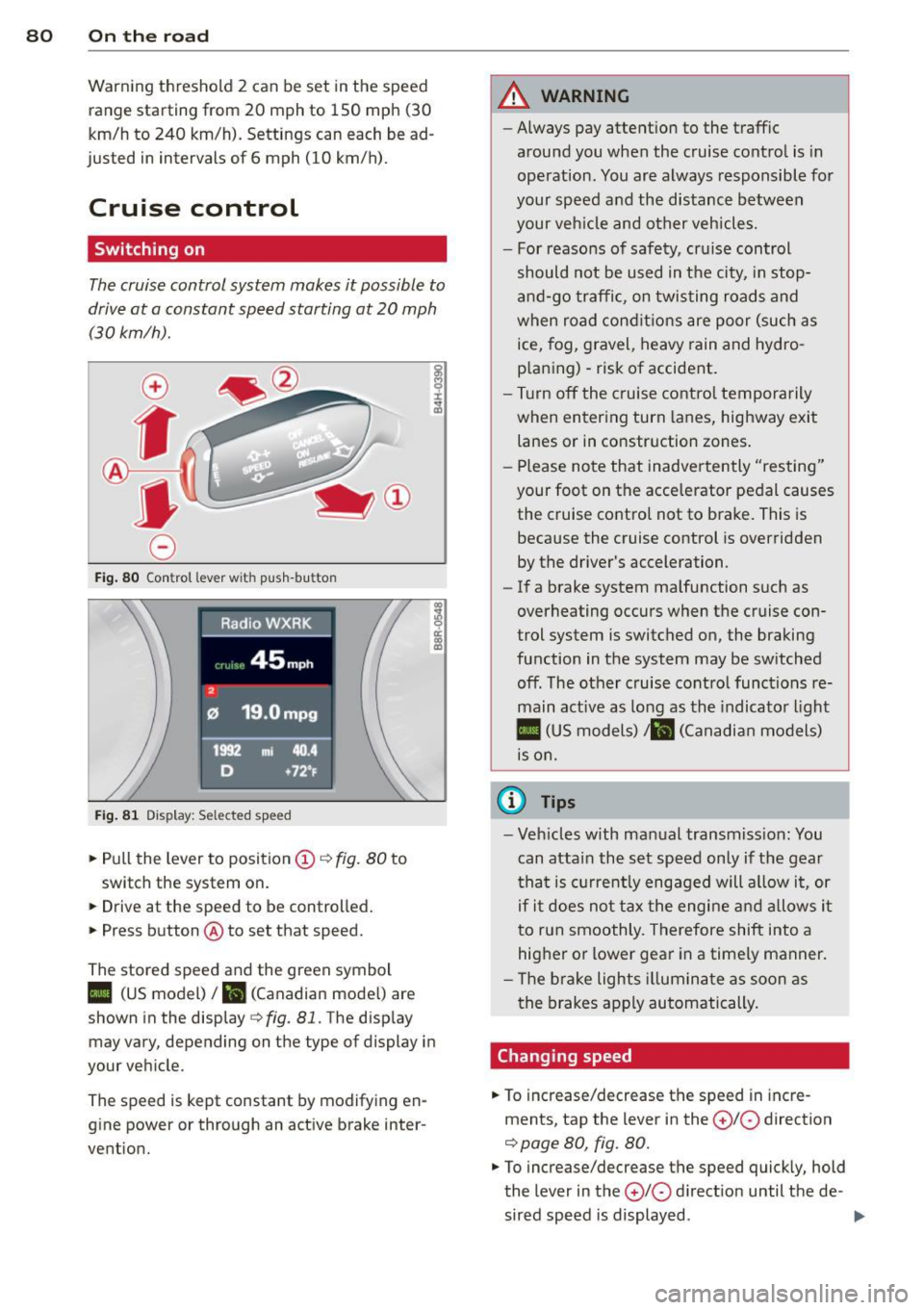
Fig. 80 Control lever w it h push-bu tton
Fig. 81 Dis play : Sel ected speed
.. Pull the lever to position(;)¢ fig. 80 to
switch the system on.
.. Drive at the speed to be controlled .
.. Press button @ to set that speed.
The stored speed and the green symbol
co ~ 9 a:
l:l
II (US model)/ B (Canadian mode l) are
shown in the display¢
fig. 81. The display
may vary, depending on the type of display in
your vehicle.
The speed is kept constant by modifying en
g ine power or through an active brake inter
vention.
A WARNING
-- Always pay attent ion to the traffic
around you when the cruise control is in
operation. You are always responsible for
your speed and the distance between
your veh icle and other vehicles.
- For reasons of safety, cruise control
should not be used in t he city, in stop
and-go traffic, on twisting roads and
when road conditions are poor (such as
ice, fog, gravel, heavy rain and hydro
p laning) -risk of accident .
- Turn off the cruise control temporarily
when entering turn lanes, highway exit
lanes or in constr uction zones .
- Please note that inadve rtently "resting"
your foot on the accelerator pedal causes the cruise control not to brake. This is
because the cruise control is overridden
by the driver's acceleration.
- If a brake system malfunction such as
overheating occurs when the cruise con
trol system is switched on, the braking
function in the system may be sw itched
off. The other cruise control functions re
main active as long as the indicator light
II (US models)/ ... (Canadian models)
is on.
(D Tips
-Veh icles with manual transmiss ion: You
can attain the set speed only if the gear
th at is cur rently engaged will allow it, or
if it does not tax the engine and allows it
to run smoothly. Therefore shift into a
hig her or lower gear in a timely manner.
- Th e brake lights illuminate as soon as
the brakes apply automatically.
Changing speed
.. To increase/decrease the speed in incre
ments, tap the lever in the
0 10 direction
¢ page 80, fig. 80.
.. To increase/decrease the speed quickly, hold
the lever in the
0 10 d irect io n until the de -
sired speed is displayed . ..,.
Page 87 of 286
~ Press and hold the release button in these
lector lever handle, se lect the desired se lec
tor lever position such as D/S and re lease
the button.
~ Wait br iefly until the transmission has shift
ed (you will feel a slight movement).
~ Remove your foot from the brake pedal and
acce lerate.
Stopp ing temporaril y
~ Keep the vehicle stationary us ing the brak
ing pedal, for example at traffic lights.
~ Do not press the accelerator pedal when do
i ng this.
~ To p revent the veh icle from rolling when you
sta rt driving, set the pa rking brake whe n
stopp ing on steep inclines ¢
&-
~ The parking brake will re lease automatically
and the vehicle will start moving once yo u
press the accelerator peda l.
Stopping /pa rking
If the selecto r lever is not in the P position
when yo u ope n the dr iver's door, the vehicle
could ro ll. The message
Transmis sion: Car
m ay ro ll! Shift to pa rk!
appears.
~ Press and ho ld the brake pedal unt il the ve-
hicle has come to a comple te stop.
~ Apply the parking brake ¢ page 77, Parking.
~ Select the P selector lever position c::, & -
Stopping on an incline
~ Always press t he b rake pedal to hold the ve
hicle i n place and preven t it from " rolling
back" ¢
& -Do not try to prevent the vehi
cle from "rolling back" when a gear is en
gaged by increasing the engine speed ¢(D .
Starting on an incline
~ Activate the par kin g b rake.
~ Wi th the driving gea r se lected, press the ac
ce lerato r pedal ca re fully . The parking brake
will release a utomatically i f yo ur seat belt is
fastened.
Under certain circumstances, s uch as driv ing
in the mountains, it may be useful to switch
temporari ly to the manua l shift program in or-
Tran sm iss ion 85
der to ad just the gears to the driv ing cond i
tions by hand
c::, page 86.
On s lopes, activ ate the parki ng b rake first and
then move the selec to r l ever to the P posi tion.
T his prevents too much st ress from being
placed on the locking mechanism .
A WARNING
-The vehicle can also roll when the engine
is stopped.
- Unintended vehicle movement can cause
serio us injury.
- Never leave your vehicle with the engine
ru nning while in gear. If yo u must leave
your veh icle when the engine is running,
activate the parking brake and move the
selector lever to P.
- Power is still transm itted to the wheels
when the engine is runn ing at idle. To
prevent the vehicle from "creeping", you
must keep your foot on the brake when
the eng ine is ru nning and the se lector
leve r is in D/S o r R or "t ipt ron ic" mode is
selec ted .
-Do not press the accelerator pedal when
changing t he se lector lever posi tion
while the veh icle is s ta tionary and the
engine is running .
- Never sh ift into R o r P wh ile d rivi ng.
- Before driving dow n a steep slope, re-
duce your speed and shift into a lowe r
gear wi th "tiptronic".
- Do not ride the bra kes o r press the bra ke
pe dal too ofte n or too long whe n driving
down a hi ll. Constant braking causes the
brakes to over heat and substantially re
duces braking performance, increases
brak ing distance or causes complete fa il
ure of t he brake system.
- To prevent the vehicle from ro lling back
when stopp ing o n inclines, always ho ld it
in place with the brake pedal or parking
brake.
- Never hold the vehicle on an incline with
a slipping clutch. The clutch opens auto mat ically when it becomes too hot from
the overload. An indicato r lamp
mJ
Page 117 of 286
Homelink
Universal remote
control
Description
Applies to vehicles: with Home link
The HomeLink universal remote control can
be programmed with the remote control for
devices that are already present.
With Home Link, you can control devices such
as the garage door, security systems, house
lights , etc. comfortably from the inside of you
vehicle.
Homelink makes it possible for you to rep lace
three different remote controls from dev ices
in your home with one universal remote. This
feature works for most garage door and exte
rior door motor signals. Programming the in
dividual remote control for your remote con
trol takes place near the center of the radiator
grille. There is a control module attached at
this location .
A one-time programming of the sensor must be performed before you are able to use sys
tems with Homelink. If the system does not activate after performing the one-time pro
gramming, check whether the system uses a rolling coder:!.>
page 118 for vehicles without
the
MMI*.
,& WARNING
-
- Never use the Homelink transmitter
with any garage door opener that does
have not the safety stop and reverse fea
ture as requ ired by federa l safety stand
ards. This includes any garage door open
er model manufactured before April 1,
1982.
-A garage door opener which cannot de
tect an object, signaling the door to stop
and reverse does not meet current feder
al safety standards . Using a garage door
opener without these features increases
risk of serious injury or death.
Homelink 115
- For safety reasons never release the
parking brake or start the engine while
anyone is standing in front of the vehicle .
- A garage door or an estate gate may
sometimes be set in motion when the
Homelink remote control is being pro
grammed. If the device is repeatedly ac
tivated, th is can overstrain motor and
damage its electrical components - an
overheated mo tor is a fire hazard!
- To avoid possib le injuries or property
damage, please always make abso lutely
certa in that no persons or objects are lo
cated in the range of motion of any
equipment being operated.
(0 Tips
- If you would like more information on
Homelink, where to purchase the Home
Link compat ible products, or would like
to purchase the Home Link Home Light
ing Package, please call toll-free :
1-800-355-3515.
-For Declaration of Compliance to United
States FCC and Industry Canada regula
tions
¢ page 267.
-For security reasons, we recommend that
you clear the programmed buttons be
fore selling the vehicle.
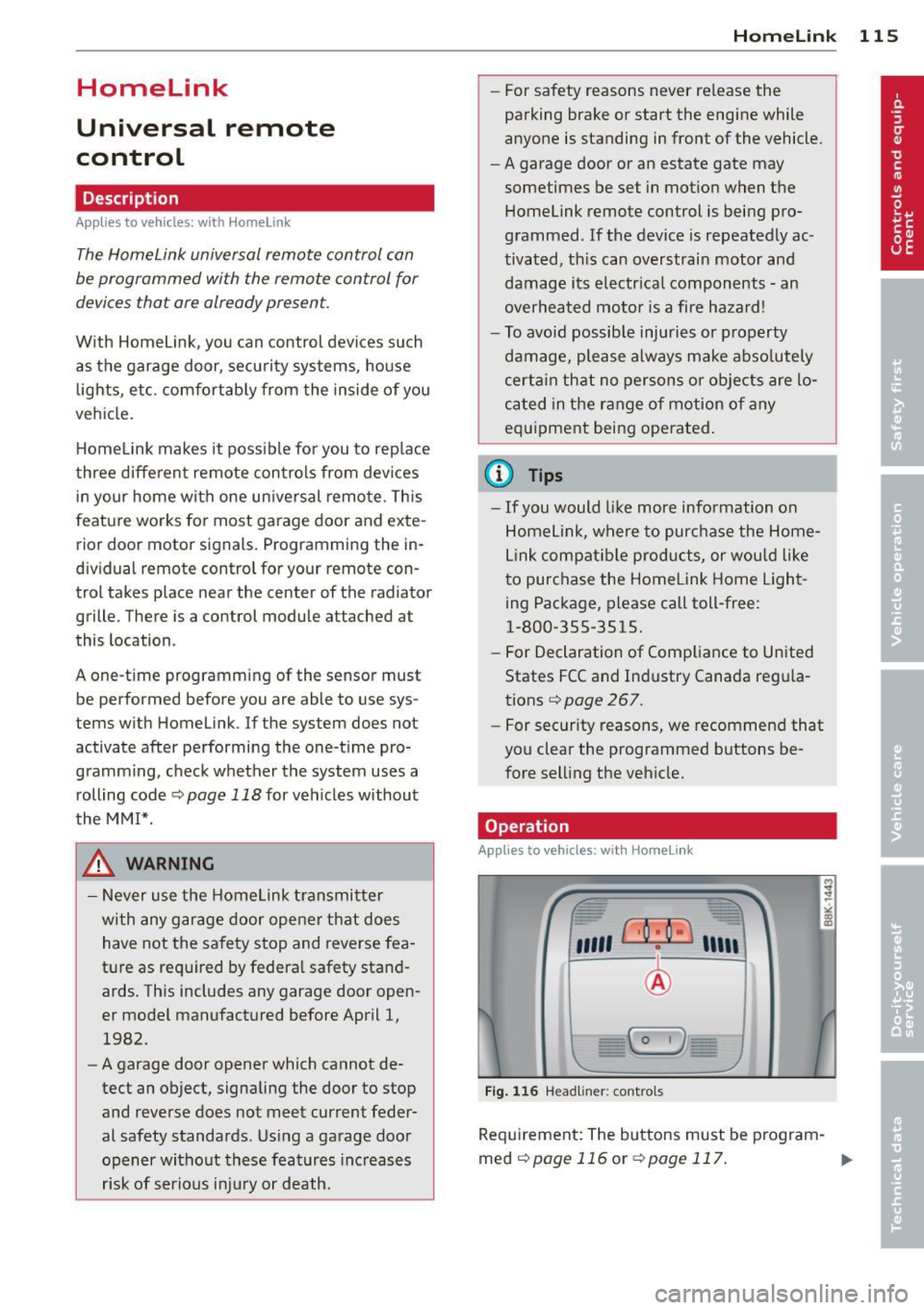
Operation
App lies to vehicles : with Homeli nk
,~
1~
1 r ·O : O ·) 1111 ~
®
Fig.
116 Headl iner: controls
Req uirement: The buttons must be program-
med
¢page 116 or ¢page 117. ..,_
Page 121 of 286
Driving Safely
General notes
Safe driving habits
Please remember -safety first!
This chapter contains important information,
tips, instructions and warnings that you need
to read and observe for your own safety, the
safety of your passengers and others . We have
summarized here what you need to know
about safety belts, airbags, child restraints as
well as child safety. Your safety is for us
priori
ty number 1.
Always observe the information
and warnings in this section - for your own
safety as well as that of your passengers.
The information in this section applies to all
model versions of your vehicle . Some of the
features described in this sections may be
standard equipment on some models, or may
be optional equipment on others. If you are
not sure, ask your authorized Audi dealer.
A WARNING
- Always make sure that you follow the in
structions and heed the WARNINGS in
this Manual. It is in your interest and in
the interest of your passengers.
- Always keep the complete Owner's Liter
ature in your Audi when you lend or sell
your vehicle so that this important infor
mation will always be available to the
driver and passengers.
- Always keep the Owner's literature handy
so that you can find it easily if you have
questions.
Safety equipment
The safety features are part of the occupant
restraint system and work together to help
reduce the risk of injury in a wide variety of
accident situations .
Your safety and the safety of your passengers
should not be left to chance. Advances in
technology have made a variety of features
available to help reduce the risk of injury in an
Driving Safely 119
accident. The following is a list of just a few of
the safety features in your Audi :
- sophisticated safety belts for driver and all
passenger seating positions,
- belt force limiters for the front seats,
- belt pretensioners for the seats,
- head restraints for each seating position,
- front airbags,
- side airbags in the front seats,
- side curtain airbags ,
- special LATCH anchorages for child re-
straints,
- adjustable steering column.
These individual safety features, can work to
gether as a system to help protect you and
your passengers in a wide range of accidents.
These features cannot work as a system if
they are not always correctly adjusted and cor
rectly used.
Safety is everybody's responsibility!
Important things to do before driving
Safety is everybody's job! Vehicle and occu
pant safety always depends on the informed and careful driver.
For your safety and the safety of your passen
gers,
before driving always:
"'Make sure that all lights and signals are op
erating correctly .
"' Make sure that the tire pressure is correct.
"'Make sure that all windows are clean and af
ford good visibility to the outside.
"'Secure all luggage and other items carefully
qpage59.
"'Make sure that nothing can interfere with
the pedals.
"'Adjust front seat, head restraint and mirrors
correctly for your height .
"'Instruct rear seat passengers to adjust the
head restraints according to their height.
"' Make sure to use the right child restraint
correctly to protect children
q page 161,
and~~fy. ~
•
•
Page 185 of 286
Intelligent technology 183
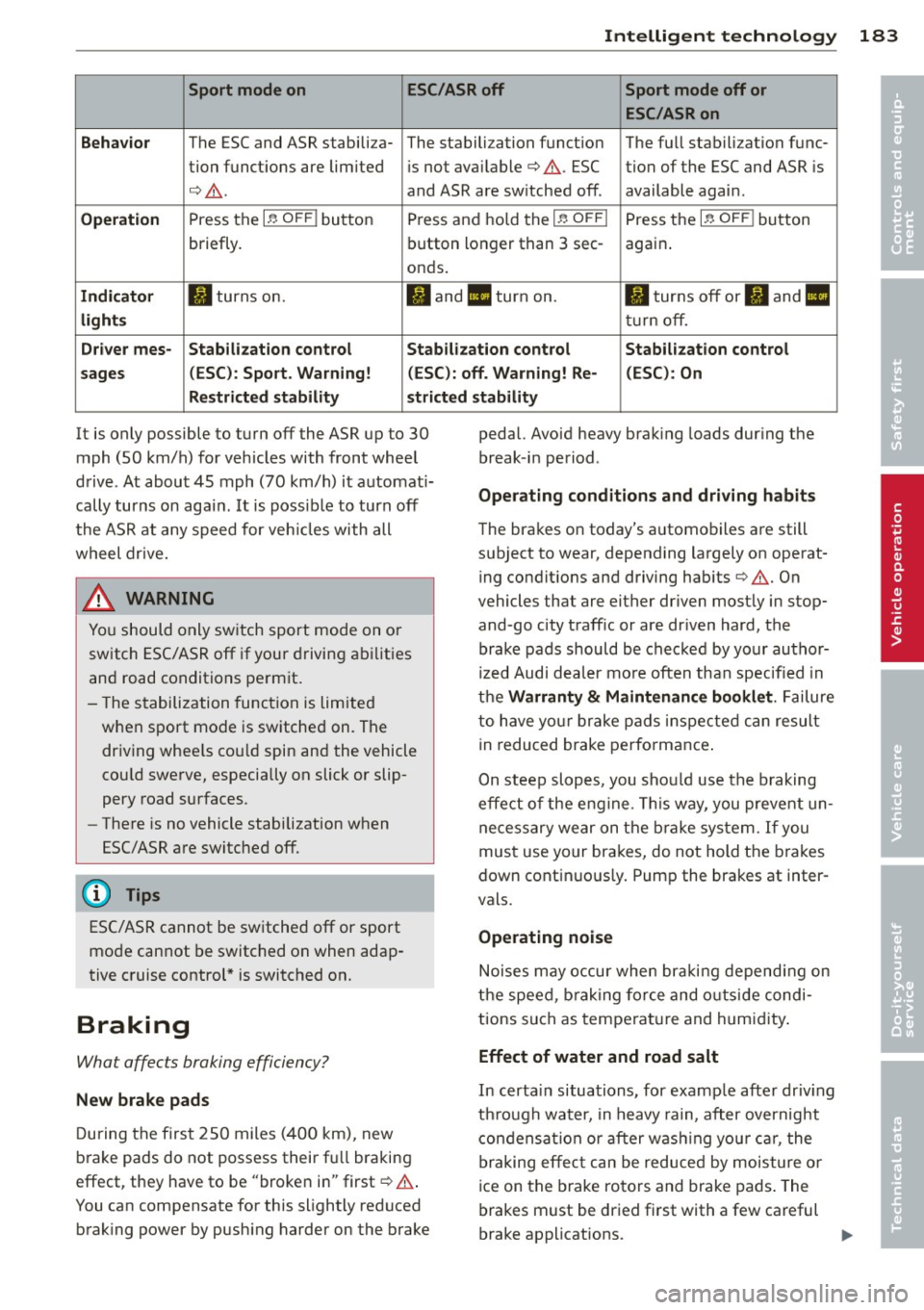
Sport mode on ESC/ASR off Sport mode off or
ESC /ASR on
Behavior
The ESC and ASR stabiliza- The stalbilization f unct ion T he fu ll stabilization f unc-
tion funct ions are lim ited is not available¢ .&,.. ESC tion of the ESC and ASR is
¢ .&,. .
and ASR are switched off . available agai n.
Operation Press the I~ OFF I button Press and ho ld the I~ OFFI Press t he I~ OF FI button
briefly. bu
tton lo nger than 3 sec-
again.
onds .
Indicator II turns on. II and 1/1 turn on. II tur ns off or fl and II
lights tur n off.
Driv er mes -Stab ilization control Stabilization control Stabilization control
sages (ESC ): Sport. Warning! (ESC ): off. Warning! Re- (ESC) : On
Restricted stability stricted stability
It is only possible to t urn off the ASR up to 30
mph (SO km/h) for vehicles with front whee l
d rive . At abou t
45 mph (70 km/h) it a utomat i
cally turns on aga in .
It is poss ible to turn off
the ASR a t any speed for veh icles with all
wheel drive.
_& WARNING
f--------- -
You should o nly sw itch sport mode on o r
switch ESC/ASR off if you r drivin g abili ties
and road conditions pe rm it .
- The s tabilization func tion is lim ited
w hen sport mode is sw itche d on. T he
dr iv ing whee ls co uld spin an d the vehicle
cou ld
swe rve, especially on slick or slip
pery road surfaces.
- The re is n o vehicle stabilization when
ESC/ASR a re switc hed off.
(D Tips
ES C/ASR cannot be sw itche d off or sport
mo de cannot be switc hed on when adap
t ive c ruise control * is switched on.
Braking
What affects braking efficiency?
New brake pads
During the firs t 250 miles (40 0 km), new
b ra ke pads do not possess their f ull braking
effect, they have to be "broke n in" first ¢.&,. .
You can compensate for th is slightly reduced
brak ing power by push ing harder on the brake pedal. Avoid heavy brak
ing loads dur ing the
break -in period .
Operating conditions and driving habits
The bra kes o n today's a utomo biles a re still
s u bject to wear, depend ing largely on operat
ing condit ions and driving habits ¢.&,. . On
vehicles that are either driven m ost ly in stop
and-g o city traff ic or are dr iven hard, the
brake pads should b e chec ked by your au tho r
iz ed Audi dea ler mo re often than specified in
the
Warranty & Maintenance booklet . Failure
to h ave yo ur bra ke pads insp ect ed ca n result
in reduced brake pe rfo rmance .
On steep slop es, you sho uld use the b raking
effe ct o f the e ngine. This way, you prevent un
ne ce ss ary wear on the br ake sys tem.
If you
mus t use your brakes, do not hold the b ra kes
down cont in uou sly. Pump the brakes at inter
vals.
Operating noise
N ois es m ay o ccur when br akin g depend ing on
th e speed, brak ing fo rce and o uts ide condi
ti ons such as tem pera ture and hum idity.
Effect of water and road salt
In certa in situa tions, for examp le afte r dr iv ing
t hr ough wa ter, in heavy rain, after overnight
c on den sat ion or after w ashin g your car , the
braking e ffec t ca n be reduce d by mois ture o r
ice on the b rake ro to rs and brake pads . The
brakes m ust be dr ied first with a few careful
brake ap plications .
•
•
Page 193 of 286
Reducing unnecessary idling
Even when your car is just idling it burns up
fuel.
11-Shut the engine off when you are not driving
the vehicle.
11-Do not warm up the vehicle by letting the
engine run at idle .
It makes sense to shut
off the engine in traffic
jams, when waiting for trains to pass at rail road cross ings, or at traffic lights that have
long wa its on red. Turning the engine
off for
just 30-40 seconds saves more fue l than is
burned s tarting the eng ine again.
It takes a long time for the engine to warm up
fully when it is running at idle . However, wear
and nox ious em issions are especially high
when the engine is warming up. So you should
drive away as soon as you start the engine and
avoid running at high rpms while the engine is
still warming up .
(D Note
Do not leave engine idling unattended af
ter starting . If warning lights should come
on to indicate improper operation, they
wou ld go unheeded. Extended idling also
produces heat, which cou ld result in over
heating or other damage to the vehicle or
other property .
Regular maintenance
A badly tuned engine unnecessarily wastes a lot of fuel .
11-Have your vehicle serviced at regular inter-
vals.
By having your vehicle regular ly serviced by an
authorized Audi dealer he lps to ensure that it
runs properly and economically. The condition
of your vehicle not only affects its safety and
ab ility to hold its value, it also affects fuel
co nsumpt ion .
Ch eck you r oil each time you fill you r ta nk .
Dri vin g and en vironm ent 191
The amount of oi l used is re lated to engine
load and speed.
It i s normal for the oil consumption of a new
engine to reach its lowest value after a certa in
mileage has been driven.
You must drive your veh icle about 3,000 m iles
(S,000 kilometers) before yo u can properly
assess oil consumpt ion.
Th is also app lies to fue l consumption and en
gine output.
(D Note
- Have your veh icle ma inta ined properly
and in accordance with the service rec
ommendations in your Wa rranty
& Ma in
t enance book let. Lack of p roper mainte
nance as well as improper use of the ve
hicle will impair the function of the
emission cont ro l system and could lead
to damage.
- Do not alter or remove any component of
the Emission Control System unless ap
proved by the manufacturer.
- Do not alter or remove any device, such
as heat shie lds, switches, ignition wires,
valves, which are designed to protect
your vehicle's Emission Control System and other important vehicle compo
nents.
Fewer short trips
Fuel consumption will always be relatively
high on short trips .
11-Try to avoid driving short distances w ith a
cold engine.
T he engine and cata lytic converter have to
reach their optimal opera ting temp era ture to
reduce fuel consumpt ion and noxious em is
s ions effectively .
Just after starting, a co ld engine in a mid-size
car on ly achieves a fuel economy of 6-8 mi les
per gallon (30-40 l/100 km). After about a
half a mile, fuel economy climbs to 12 mpg
(20 l/100 km). After about
2 .5 miles (4 km), liJI,
•
•
Page 195 of 286
Trailer towing Driving with a trailer
General information
Your Audi was designed primarily for passen
ger transportation .
If you plan to tow a tra iler, p lease remember
that the addit ional load will affect durab ility,
economy and performance .
T railer towing not on ly places more stress on
the vehicle, it also calls for more concentra
tion from the driver.
F or this reason, a lways fo llow the operating
and driving instructions provided and use
common sense.
Technical requirements
Traile r hitch
Use a weight-carrying hitch conforming to the
gross trailer we ight. The hitch must be suita
b le for your veh icle and trailer and must be
mounted secure ly on t he veh icle's chassis at a
technically sound location . Use only a t railer
h itch w ith a removab le ball moun t. A lways
check with the tr ailer hitch man ufac tur er to
make sure that you are using the correct
hitch.
Do not use a bumper hitch.
T he hitc h must be installed in such a way that
it does not inte rfe re with the impac t-absorb
i ng b umper syst em. No modifica tions should
be made to the vehicle exhaus t and b rake sys
tems . From t ime to time, check that a ll hitch
mo unt ing bolt s remain securely fas tened.
W hen you are not tow ing a trailer, remove the
trai le r hi tch ball moun t. T h is prevents the
hi tch from causing damage sho uld your ve hi
cle be str uck from be hind
¢ &. .
Trailer brakes
If yo ur tra iler is equ ipped w it h a braking sys
tem, check to be su re that it conforms to a ll
r eg ulat io ns.
Trailer towin g 193
The trailer hyd ra ulic bra ke system must not be
direct ly connected to the vehicle's hydraulic
brake system
¢ &. .
Safety chains
Alw ays use s afety chains between your ve hicle
and t he tra ile r.
Trailer lights
Tra ile r lights m ust meet all reg ulations . Be
su re to check w ith your authorized Audi dealer
fo r c orrec t w iri ng, sw itches, and relays.
Mirrors
If you a re unable to see the traffic behind you
u sing the regula r outside m irrors, then you
must insta ll ext ended mir ro rs. It is important
t h at you
always have clea r vis io n to the rear .
.8, WARNING
- If a trailer has elec trica l br ake s plea se
no te th at t hese bra kes are not activat ed
by the fa ctory -fit ted control unit -risk of
accident!
- After removing the t railer hi tch, do no t
s to re it in yo ur vehicle . In case of sudden
brak ing, the hitch could fly fo rward and
in ju re you or yo ur passenge rs .
Operating instructions
Maximum traile r we ight
-
A trai ler for your vehicle is limited to a typical
class 1 or class 2 tra iler.
Trailer load distribution
Be sure the lo ad in the traile r is h eld secure ly
i n p lace to p reven t it from shifting fo rward,
backward or sideways.
Never allow a passenger to ride in a trailer
¢ &. in Driving instru ctions on page 19 4.
Engine cooling system
Towing a t railer ma kes t he engine wor k hard
er . It is impo rta nt that the cooling system's
perfo rman ce is up to the additional load.
Make sure tha t the coo ling sys tem h as enough
f lu id . .,..
•
•
Page 196 of 286
194 Trailer towing
Tire pre ss ure
When towing a trai le r, inflate the t ires of your
vehicle to the co ld tire pressure listed under
"Full load" on the label located on the driver 's
side B-pillar (visible when the door is open).
Inflate trailer tires to trailer and tire manufac
turers' specifications.
Light s
The headlight settings should be checked with
the trailer attached before dr iving off. Check
to make sure both vehicle and tra iler lights
are working properly.
Saf ety chains
Be sure tra iler sa fe ty cha ins a re p roperly con
nected from the trailer to the hitch on the ve
hicle. Leave eno ugh slack in the chains to per
mit turning corners. When you install safety
cha ins, make sure they w ill not drag on the
road when you are driving.
The chains shou ld cross under the trai ler
tongue to prevent it from dropping in case of
separation from the hitch.
Driving instructions
Driving with a trailer always requires extra
care and consideration.
To obtain the best possible handling o f vehicle
and trai ler, p lease note the following:
.,. Do no t tow a lo aded tra ile r when your car it
self is no t loaded .
.,. Be especia lly carefu l when passing other
vehicles .
.,. Observe speed lim its .
.,. Do not drive at the maximum permissible
speed.
.,. Always apply brakes early.
.,. Monitor the temperature gauge.
Weight di stribution
Towing a loaded trai ler with an empty car re
sults in a highly unstable distribution of
weight . If this cannot be avo ided, drive at very
low speeds only to avoid the risk of losing
steering control. A "ba
lanced" rig is easier to operate and con
tro l. This means that the tow vehicle should
be loaded to the extent possible and permissi
ble, while keep ing the trai ler as light as possi
ble under the c ircumstances. Whenever poss i
ble, transfer some ca rgo to the luggage com
partment of the tow veh icle while obse rv ing
tongue load requ irements and vehicle load ing
co nsiderations.
Speed
The higher the speed, the more d iff icu lt it be
comes for the driver to control the rig. Do not
drive at the maximum permissible speed. Re
duce your speed even more if load, weather or
wind conditions are unfavorable -pa rtic ularly
whe n goi ng downhill.
Reduce veh icle speed
imm ediately if the trail
er shows the slightest s ign of sway ing.
Do not
try t o sto p th e swaying by a ccelerating .
Observe speed limits . In some areas, speeds
fo r vehicles tow ing tra ile rs a re lower than for
regular veh icles .
Always apply brakes early. When driving downh ill, shift into a lower gear to use the en
gine braking effect to slow the vehicle . U se of
the b rakes alone can cause them to overheat
and fail.
Coolant tempe rature
The coo lant temperature gauge c> page 10
must be observed carefu lly. If the need le
moves close to the upper end of the scale, re
duce speed immediately and/or turn off the
air condi tioner.
If the coolant temperature warning light •
i n t he i nstrument cluster starts flashing, pull
off the road, stop and let the engine
idle for
abo ut two min utes to prevent heat build-up .
_& WARNING
Anyone not proper ly restra ined in a mov
i ng vehicle is a t a much greater risk in an
accident . Never let anyone ride in yo ur car
who is not p roper ly wea ring the rest raints
prov ided by A udi.
-