seat memory AUDI A5 COUPE 2014 Owners Manual
[x] Cancel search | Manufacturer: AUDI, Model Year: 2014, Model line: A5 COUPE, Model: AUDI A5 COUPE 2014Pages: 286, PDF Size: 70.99 MB
Page 4 of 286
2 Table of contents Vehicle literature .. .. .. .. .. ... .
About this Owner's Manual ...
Controls and equipment .. ... .
Ins truments and controls .. . .
General illus tration .... ... .. .. ... .
Instruments and warning /
indicator lights ........ .. .. .. . .
Ins truments . .. .. ..... ... .. .. ... .
War ning/ indi cator lights ... .. ... .. .
Driver information d isplay .. . .
Introduct ion . .. .. ..... ... .. .. ... .
Trip computer .. .. ..... ... .. .. ... .
Gearshift Indicator ........ .. .. ... .
Efficiency program ........ .. .. .. . .
Service interval d isp lay .. .. .. .. .. . .
On -Board Diagnostic system (OBD) .. .
Opening and closing .... .. .. . .
Power locking system .. ... .. .. .. . .
R ear lid .. .. ................ ... . .
P owe r windows . ......... .. .. ... .
P anorami c til ting s unroof .. .. .. .. . .
Va let p arki ng ............ .. .. .. . .
Clear vision .............. .. ... .
Lig hts . .. .... ........... .. .. .. . .
I n ter ior lights .. . ...... ... .. .. ... .
V1s 1on ...... .. .. ..... ... .. .. ... .
Wi per and washer system . ... .... . .
Dig ita l compass .......... .. .. ... .
Seats and storage ... .. .. .. ... .
General recommendat ions ... ... .. .
Front seats ................ .. ... .
H ead restraints .......... .. .. ... .
Seat memory . .. ...... .... ... .. . .
As htray .. .. ................ ... . .
C igar ette lighte r .... ...... .. .. .. . .
S to rage .... ... .......... .. .. .. . .
Ro of r ack .. ............. ....... .
5
6
8
8
8
10
1 0
13
24
24
25
27
27
29
30
32
32
39
40
41
42
43
4 3
46
46
49
51
53
53
54
56
57
58
59
5 9
6 1
Luggage compartmen t . . . . . . . . . . . . 63
Warm and cold ............ ... .
C lima te con trols .......... .. .. ... .
67
6 7
On the road ... ... .. ..... .... . .
Stee ring . ..... .. .. ... ..... ... .. .
Ig nit ion loc k ... .. ... .. ..... ... .. .
Convenience key .. ............. .. .
Driver messages .. ............. .. .
E lectromechanical pa rking brake ... .
Speed warning system .. .. ... ... .. .
71
71
71
74
75
76
78
Cru ise cont ro l . . . . . . . . . . . . . . . . . . . . 80
Transm1ss1on . . . . . . . . . . . . . . . . . . 82
Manua l transm iss ion . . . . . . . . . . . . . . 82
S tronic, tiptronic . . . . . . . . . . . . . . . . . 82
Audi adaptive cruise control
and braking guard . . . . . . . . . . . .
90
In troduc tio n . . . . . . . . . . . . . . . . . . . . . 90
Ge ner al i nforma tion . . . . . . . . . . . . . . 90
Audi adaptive cruise cont rol . . . . . . . . 92
Audi braking gua rd . . . . . . . . . . . . . . . 96
Messages . . . . . . . . . . . . . . . . . . . . . . . 98
Audi side assist . . . . . . . . . . . . . . . 100
Lane change ass istant . . . . . . . . . . . . . 100
Audi drive select . . . . . . . . . . . . . . 104
Driving settings . . . . . . . . . . . . . . . . . . 104
Park a ssist . . . . . . . . . . . . . . . . . . . . . 107
Pa rking system . . . . . . . . . . . . . . . . . . . 107
Pa rking system (rear) . . . . . . . . . . . . . . 107
Pa rking system (rear, with rear view
camera) . . . . . . . . . . . . . . . . . . . . . . . .
109
Homelink . . . . . . . . . . . . . . . . . . . . . 115
U niversa l remote control.......... . 115
Safety first . . . . . . . . . . . . . . . . . . . . 119
Driving Safely . . . . . . . . . . . . . . . . . 119
General notes . . . . . . . . . . . . . . . . . . . . 119
Proper occupant seating positions . . . 120
Driver and passenger side foo twe ll . . . 124
Pedal a rea . . . . . . . . . . . . . . . . . . . . . . . 12 4
Stow ing luggage . . . . . . . . . . . . . . . . . 12 5
Repo rting Sa fety Defe cts.......... . 127
Safety belts . . . . . . . . . . . . . . . . . . . 129
Genera l notes . . . . . . . . . . . . . . . . . . . . 1 29
Why sa fe ty belts? . . . . . . . . . . . . . . . . 130
Page 11 of 286
CD
@
®
©
®
®
(j)
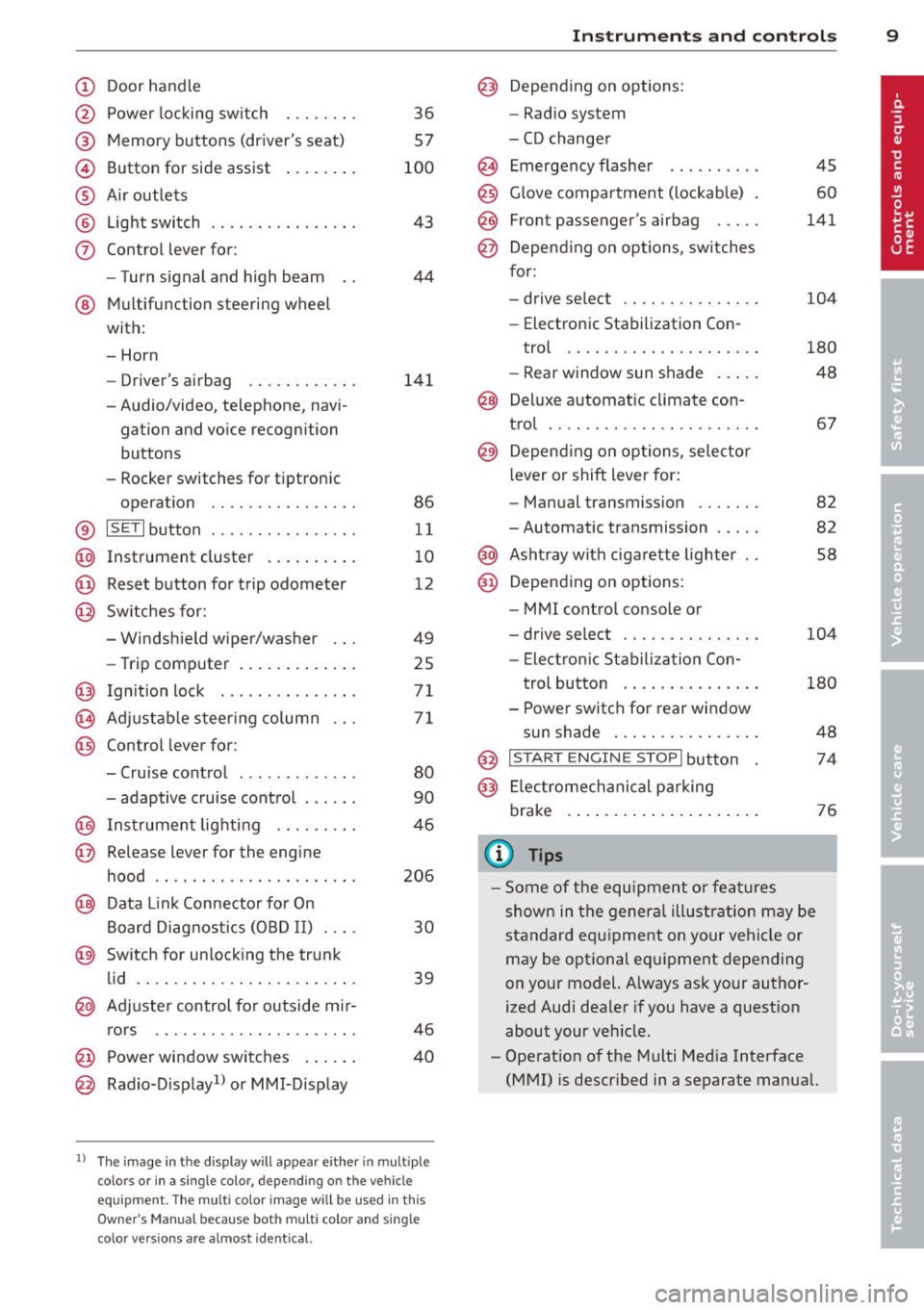
Door handle
Power locking sw it ch
Memory buttons (dr iver's seat)
Button for side ass ist
A ir outlets
L ight switch
Control lever for :
- T urn signal and high beam
@ Multifunction steering wheel
with:
- Horn
- Driver's airbag
- Audio/video, telephone, navi-
gation and vo ice recogni tion
buttons
- Rocker switches for tiptroni c
opera tion ........... .... .
® ISET I button .... .... ... .... .
@ Instrument cluster .. ...... . .
@ Reset button for trip odometer
@ Sw itches for:
- Windshield wiper/washer
- Trip computer ..... ... ... . .
@ Ignition lock .............. .
(8) Adjustable steering column
@ Con trol lever for :
- Cruise contro l ......... ... .
- adaptive cruise control ..... .
@ Instrument lighting .... .. .. .
@ Release lever for the engine
hood .. .. .. .. ........... .. .
@ Data L ink Connector for On
Board Diag nostics (OBD II) . .. .
@ Switch for unlocking the trunk
lid .. .. .. ...... ..... ...... .
@ Adjuste r control fo r outside m ir-
r ors .. .. .. .. ........... .. .
@ Power window switches ... .. .
@ Rad io-Display1l or MMI-Display
36
57
100
43
44
141
86
11
10
12
49
25
71
71
80
90
46
206
30
39
46
40
l) T he image in t he d is pl ay will app ea r e ither in mu lt ipl e
col ors or in a singl e co lor , de pen din g o n th e vehicl e
e q ui pment. T he m ulti co lo r im age w ill b e used i n this
O w ner's M anual becau se bo th mu lt i co lo r and sin gle
c o lor ver sio ns are almost iden tic al.
In strument s and control s 9
@) Depending on options:
- Rad io system
- CD changer
Emergency flasher
G love compartment (lockab le)
Front passenger's airbag .....
Depend ing o n options, sw itches
for:
- drive select .. .. .......... .
- Electronic Stabilization Con-
trol . ... .. .. .. . .. ... .... .
- Rear window sun shade .. .. .
@ Deluxe automat ic cl imate con-
trol ...... .. .... .......... .
@) Depending on options, selecto r
lever or shift lever for :
- Manual transmission ...... .
- Automatic transmission .... .
@ Ashtray with cigarette lighter
@ Depend ing on options:
- MMI contro l console or
- drive select .. .... ........ .
- Electronic Stab ilizat ion Con-
45
60
141
104
180
48
67
82
82
58
104
trol button . . . . . . . . . . . . . . . 180
- Power switch for rear window sun shade . . . . . . . . . . . . . . . . 48
@ I START ENG IN E STOPI button 74
@) Electromec hanical pa rking
brake . . . . . . . . . . . . . . . . . . . . . 76
(D Tips
-Some of the equipment o r feat ures
show n in the genera l ill ustration may be
standard equ ipment on your vehicle or
may be optional eq uipment depending
on your model. Always as k your author
ized Aud i dea ler if you have a question
about your vehicle.
- Operat ion of the Multi Med ia Interface
(MMI) is described in a separate manual.
Page 35 of 286
-If the power lock ing system should ma l
function, you can lock the driver's door
using the mechanical key
~ page 3 7.
- If the power locking system should fail,
you can still open the fue l tank flap in an
emergency <=>
page 205.
-You are well advised not to keep valua
bles inside an unattended vehicle, visible
or not . Even a properly locked vehicle
cannot provide the security of a safe .
- If the LED in the upper edge of the driv
er's door panel comes on for about
30
seconds after the vehicle is locked, there
i s a malfunction in the power locking or
the anti-theft warning system. Have the
malfunction corrected by an author ized
Audi dealersh ip or qua lified repair fac ili
ty.
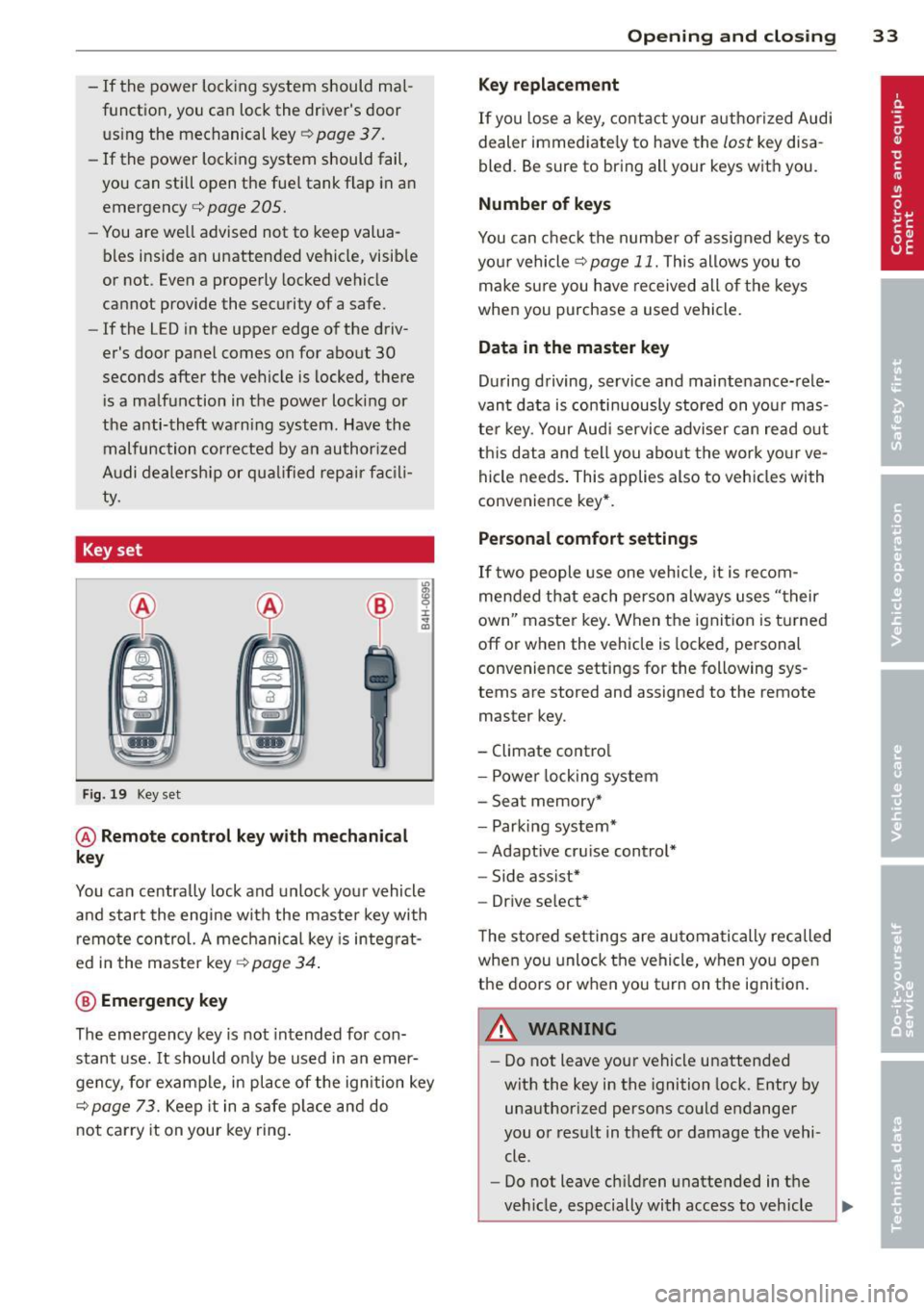
Key set
Fig. 19 Key set
@ Remote cont rol k ey with me chanical
ke y
You can centrally lock and unlock your vehicle
and start the engine with the master key with
remote control. A mechanical key is integrat
ed i n the master key
<=> page 34 .
@ Emerg ency key
The emergency key is not intended for con
stant use.
It should on ly be used in an emer
gency, for example, in place of the ign ition key
<=> page 73. Keep it in a safe p lace and do
not carry it on your key ring .
Openin g an d clos ing 33
Ke y re plac ement
If you lose a key, contact your author ized Audi
dealer immediate ly to have the
lost key disa
bled. Be sure to bring all your keys with you .
Number of keys
You can check the number of assigned keys to
you r vehicle <=>
page 11. This allows you to
make sure you have re ceived all of the keys
when you purchase a used vehicle.
Data in th e mast er ke y
During driving, service and maintenance-rele
vant data is continuously stored on your mas
ter key. Your Audi service adviser can read out
this data and tell you abo ut the work yo ur ve
hicle needs . This applies also to vehicles with
convenience key*.
Person al comf ort settings
If two people use one vehicle, it is recom
mended that each person always uses "their
own'' master key. When the ignition is turned
off or when the vehicle is locked, pe rsonal
convenience settings for the following sys
tems are stored and assigned to the remote
master key.
- Climate control
- Powe r locking system
- Seat memory*
- Parking system*
- Adaptive cruise control*
- Side assist*
- Drive select*
T he sto red settings are automatically recalled
when you unlock the vehicle, when you open
the doors or when you turn on the ignition .
A WARNING
--
-Do not leave your vehicle unattended
with the key in the ignition lock . Entry by
unauthorized persons could endanger
you or result in theft or damage the vehi
cle .
- Do not leave ch ildren unattended in t he
veh icle, especially with access to vehicle
Page 57 of 286
Power easy entry function
Applies to vehicles: with power ad justable seats
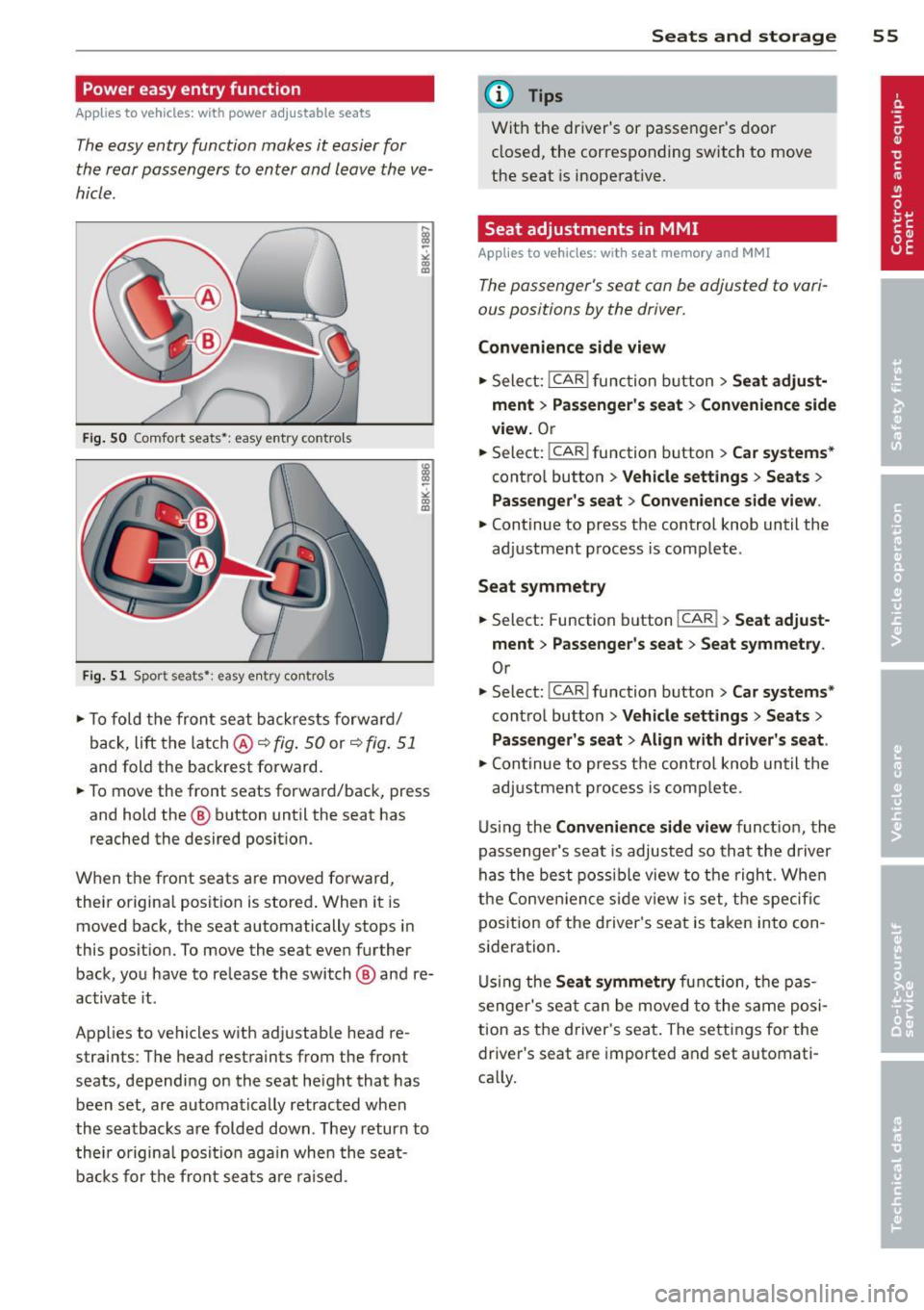
The easy entry function makes it easier for
the rear passengers to enter and leave the ve
hicle.
F ig. 50 Comfort seats•: easy entry contro ls
Fi g. 51 Spor t seats •: easy e ntry co ntrols
.,. To fold the front seat b ackrests forw ard/
back,
lift t he latch @ c:::> fig. 50 or c:::> fig. 51
and fold the backrest fo rward.
.,. To move the front seats forward/back, press
and hold the @ button until the seat has
reached the desired position.
When the front seats are moved forward,
their origina l posit ion is stored . When it is
moved back, the seat automatically stops in
this posit ion. To move the seat even further
back, you have to re lease the switch @ and re
activate it .
Applies to vehicles w ith ad justab le head re
straints : T he head restraints from the front
seats, dependi ng on the seat he ight that has
been set, are au tomatically retrac ted when
the seatbacks are folded down . They return to
thei r origina l posi tion aga in whe n the seat
ba cks f or th e fron t seat s are raised .
Seats and storage 55
@ Tips
With the driver's or passe nger's door
closed, the c orresponding switch to move
the seat is inoperat ive.
Seat adjustments in MMI
Applies to vehicles: wit h seat memory and MMI
The passenger's seat can be adjusted to vari
ous positions by the driver.
Convenience side view
.,. Select: !CAR l function b utton > Seat adjust
ment > Passenger's seat > Convenience side
view.
O r
--... Select: I CA R I function button > Car systems*
control butto n > Vehicle settings > Seats >
Passenger's seat > Con venience side view .
.,. Continue to press t he control knob until the
ad justment process is comp lete .
Seat symmetry
.,. Select: Function button I CAR ! > Seat adjust
ment > Passenger's seat > Seat symmetry .
Or
.,. Select: !CAR ! function button> Car systems*
cont ro l button > Ve hicle settings > Seats >
Pa ssenger's seat > Align with driver's seat .
.,. Cont inue to press t he control knob until the
adj ustment p roces s is com plete .
U sing the
Convenience side view func tion, the
passenger 's seat is adjust ed so that the driv er
ha s the best poss ib le view to the right . Whe n
t h e Co nve nience s ide v iew is set, t he specif ic
pos ition of the d river 's seat is ta ken in to con
s ideration.
U si ng the
Seat symmetry fu ncti on, the pa s
s enger 's seat c an be m oved to the sa m e po si
tion as t he d river's seat . The settings for the
drive r's seat a re imported and set automati
ca lly.
Page 59 of 286
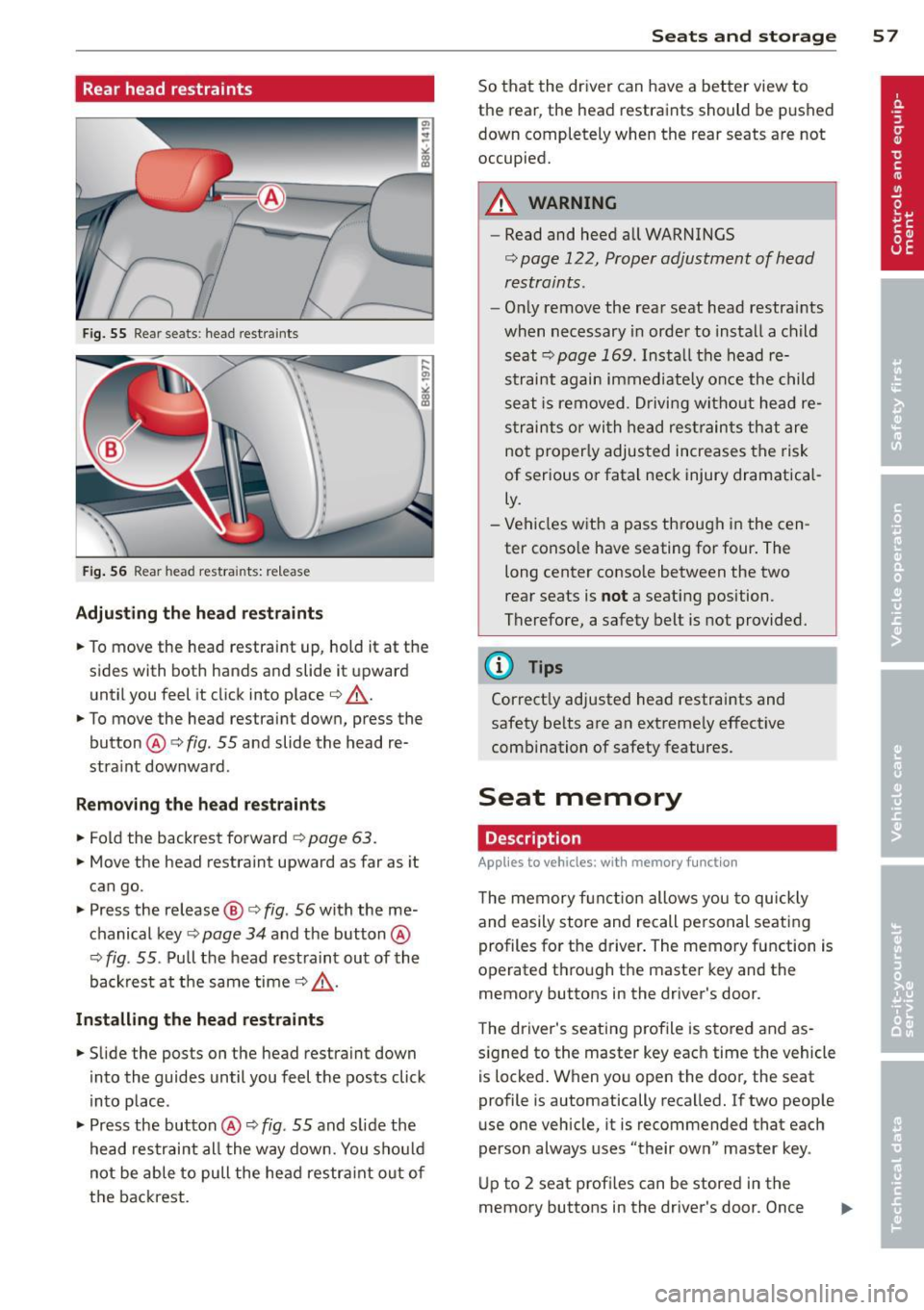
Rear head restraints
Fig. 55 Rear seats : head restraints
Fig. 56 Rear head restra ints: re lease
Adjusting the head restraints
• To move the head restraint up, hold it at the
s ides with both hands and slide it upward
until you feel it click into place¢.,& .
• To move the head restraint down, press the
button @¢
fig. 55 and slide the head re
stra int downward .
Removing the head restraints
• Fold the backrest forward ¢ page 63.
• Move the head restraint upward as far as it
can go.
• Press the release@¢
fig. 56 with the me
chanical key¢
page 34 and the button @
¢ fig. 55 . Pull the head restraint out of the
backrest at the same time¢.,& .
Installing the head restraints
• Slide the posts on the head restraint down
into the guides until you feel the posts click
into place .
• Press the button@¢
fig. 55 and slide the
head restraint al l the way down. You shou ld
not be able to pull the head restra int out of
the backrest.
Seats and storage 57
So that the driver can have a better view to
the rear, the head restraints should be pushed
down completely when the rear seats are not
occupied.
A WARNING
- Read and heed all WARNINGS
¢ page 122, Proper adjustment of head
restraints .
-Only remove the rear seat head restraints
when necessary in order to install a child seat ¢
page 169 . Install the head re
straint again immediately once the child
seat is removed . Driving without head re
straints or with head restraints that are
not properly adjusted increases the risk
of serious or fatal neck injury dramatical
ly.
- Vehicles with a pass through in the cen
ter conso le have seating for four. The
long center console between the two
rear seats is
not a seating position.
Therefore, a safety belt is not provided .
.
@ Tips
Correct ly adjusted head restraints and
safety belts are an extreme ly effective
combination of safety features.
Seat memory
Description
Applies to vehicles: with memory function
The memory function allows you to quickly
and easily store and recall personal seating
profiles for the driver . The memory function is
operated through the master key and the
memory buttons in the driver's door .
The driver's seating profile is stored and as
s ig ned to the master key each time the vehicle
is locked. When you open the door, the seat
profile is automatically recalled. If two people
use one vehicle, it is recommended that each
person always uses "their own" master key .
Up to 2 seat profi les can be stored in the
memory buttons in the driver's door . Once
Page 60 of 286
58 Seats and storage
they are stored, these seat profiles can be
se lected at any time .
I n addition to the driver 's sea t set tings, you
can also s tore and access the exterior mir ror
adj ustment settings* using the remote con
trol key or memory button .
Remote control key
Applies to vehicles: with seat memo ry
To assign the driver's seat settings to the re
mote control key when locking the vehicle, the
function must be activated in the radio or
MMI*
.. Se lect :
ICAR I function button> Seat adj ust
ment
> D riv er's s eat > Remote control key >
on .Or
> Select: ~ I C~ A~ Rc-, 1 funct ion button > Car sy st e m s*
control button > Vehicle setting s > Seat s>
Driv er' s s eat > Remot e control key > On .
@ Tips
If you do not want another driver's set
tings to be assigned to the remote key,
switch off the memory fu nction us ing t he
radio or MMI* or the
ION/OFF I button
qpage58.
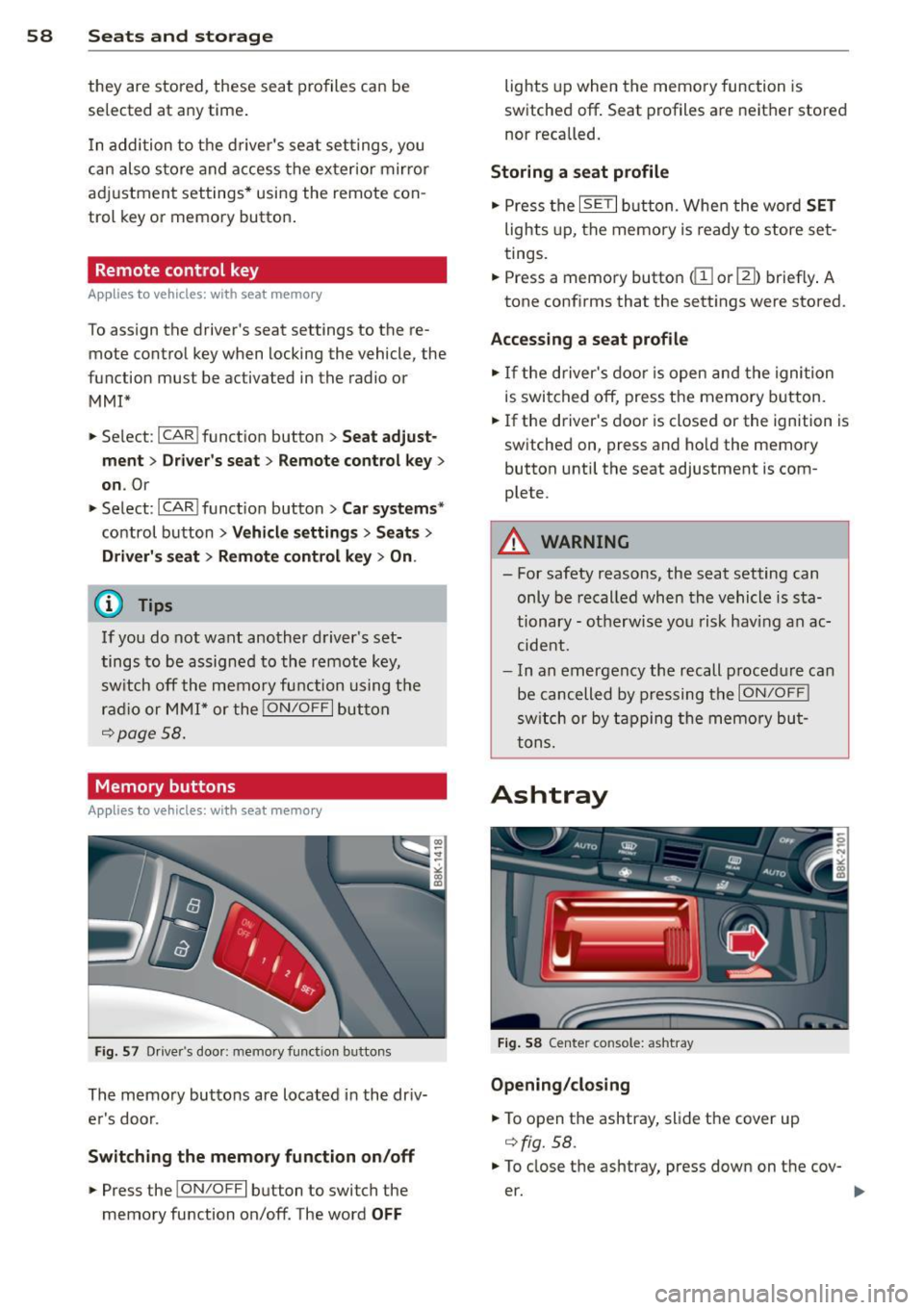
Memory buttons
Applies to vehicles: with seat memo ry
F ig. 57 D river's door: memory functio n buttons
The memory buttons are located in the driv
er's door.
Swit ching the memory fun ction on /off
.. Press the !ON/O FF I button to switch the
memory function on/off. The word
OFF
lights up when the memo ry function is
switched off . Seat profiles are neither stored
nor recalled.
Storing a seat profile
.. Press the ISET I button. Whe n the word SET
lights up, the memory is ready to store set
tings .
.. Press a memory button
dil or III) briefly . A
tone confirms that the sett ings were stored.
Accessing a seat pr ofile
.. If the driver's door is open and the ignition
is swi tched off, press the memory button.
.. If the driver's door is closed or the ignition is
switched on, press and ho ld the memory
button until the seat adjustment is com
plete.
A WARNING
- For safety reasons, the seat setting can
only be recalled when the vehicle is sta
tionary - ot herwise you risk hav ing an ac
cide nt.
- In an emergency the recall p rocedure can
be cancelled by pressing the
I ON/OFF !
switch or by tapping the memory bu t
tons.
Ashtray
F ig . 58 Center console: ashtray
Opening /cl os ing
.. To open the ashtray, slide the cover up
qfig. 58.
.. To close the ashtray, press down on the cov
er.
Page 141 of 286
Even though your vehicle is equipped with an
Advanced Airbag System, make certain that
all ch ildren, especially those 12 years and
younger, a lways ride in the back seat properly
restrained for their age and size. The airbag
on the passenger side makes the front seat a
potentially dangerous place for a child to ride.
The front seat is not the safest place for a
child in a forward-facing child safety seat.
It
can be a very dangerous place for an infant or
a child in a rearward-facing seat.
The Advanced Airbag System in your veh icle
has been certified to comply w ith the Requ ire
ments of United States Federa l Motor Vehicle
Safety Standard 208 as applicable at the time
your vehicle was manufactured.
The Standard requires the front ai rbag on the
passenger side to be turned off ("sup
p ressed") if a ch ild up to about one year of
age restrained in one of the rear-facing or for
ward -facing infant restraints listed in Federal
Motor Vehicle Safety Standard 208 with wh ich
the Advanced Airbag System in your vehicle
was certified has been installed on the front passenger seat . For a listing of the child re
straints that were used to certify compliance
with the US Safety Standard
Q page 163.
The PASSENGER AIR BAG OFF light in the in
strument panel tells you when the front Ad
vanced A irbag on the passenger side has bee n
turned off by the electronic control unit.
Each t ime you turn on the ignition, the
PAS
SENGER AIR BAG OFF
light will come on for a
few seconds and :
- will stay on if the front passenger seat is not
occupied,
- will stay on if there is a small child or child restraint on the front passenger seat,
- will go off if the front passenger seat is oc
cupied by an adult as registered by the
weight-sensing mat
Q page 147, Monitor
ing the Advanced Airbag System .
The PASSENGER AIR BAG OFF light comes on
when the control un it detects a total weight
on the front passenger seat that requires the
front airbag to be turned off.
Airbag system 139
If the total weight on the front passenger
seat is more than that of a typical 1 year-o ld
c hild but less than the weight of a small
adult, the front airbag on the passenger side
can deploy (the
PASSENGER AIR BAG OFF
light does not come on). If the PASSENGER
AIR BAG OFF
light does not come on, the
front a irbag on the passenger side has not
been turned off by the electronic con trol unit
and can deploy if the contr ol unit senses an
impact that meets the cond itions stored in its
memory .
For example, the airbag may deploy if:
-a small ch ild that is heav ie r than a typical 1
year-old ch ild is o n the front passenger seat
(regard less of whether the child is in one of
the child safety seats listed
Q page 163), or
- a child who has outgrown child restraints is
on the front passenger seat.
If the front passenger airbag is turned off, the
PASSENGER AIR BAG OFF light comes on in
the instrument cluster and stays on.
The front airbag on the passenger side may
not deploy (the PASSENGER AIR BAG OFF
light does not illum inate and stay lit) even if a
small adult or teenager, or a passenger who is
not sitting uprig ht with their back against a
non-reclined backrest w ith their feet on the
vehicle floor in front of the seat is on the front
passenger seat
~ page 120, Proper seating
position for the driver.
If the front passenger airbag deploys, the
Federal Standard requires the airbag to meet
the "low risk" deployment criteria to reduce
the risk of injury thro ugh interaction with the
airbag . "Low risk" deployment occ urs in those
crashes that take place at lower dece lerat ions
as defined in the electronic control unit
Q page 148, PASSENGER AIR BAG OFF light .
Always remember, a child safety seat or infant
carr ier installed on the front seat may be
struck and knocked out of posit ion by the rap
idly inflating passenger's airbag in a frontal
collision . The airbag could greatly reduce the
effectiveness of the child restraint and even
seriously injure the child during inflation. •
•
Page 144 of 286
142 Airbag system
old child is on the front passenger seat
and the other conditions for airbag de
ployment are met .
- Accident statistics have shown that chil
dren are generally safer in the rear seat
area than in the front seating position.
- For their own safety, all children, espe cially 12 years and younger, should al
ways ride in the back properly restrained
for their age and size.
Advanced front airbag system
Your vehicle is equipped with a front Advanced
Airbag System in compliance with United
States Federal Motor Vehicle Safety Standard
208 as applicable at the time your vehicle was
manufactured.
The front Advanced Airbag System supple ments the safety belts to provide additional
protection for the driver's and front passeng
er's heads and upper bodies in frontal crashes .
The airbags inflate only in frontal impacts
when the vehicle deceleration is high enough.
The front Advanced Airbag System for the
front seat occupants is not a substitute for
your safety belts. Rather, it is part of the over
all occupant restraint system in your vehicle.
Always remember that the airbag system can
only help to protect you , if you are sitting up
right, wearing your safety belt and wearing it
properly . This is why you and your passengers
must always be properly restrained, not just
because the law requires you to be.
The Advanced Airbag System in your vehicle has been certified to meet the "low risk" re
quirements for 3 and 6 year-old children on
the passenger side and very small adults on
the driver side . The low risk deployment crite
ria are intended to help reduce the risk of in
jury through interaction with the front airbag
that can occur, for example , by being too
close to the steering wheel and instrument panel when the airbag inflates.
In addition, the system has been certified to
comply with the "suppression" requirements of the Safety Standard
, to turn
off the front
airbag for infants 12 months old and younger
who are restrained on the front passenger
seat in child restraints that are listed in the
Standard ¢
page 163, Child restraints and
Advanced Airbags .
"Suppression" requires the front airbag on the
passenger side to be turned
off if:
- a child up to about one year of age is re
strained on the front passenger seat in one
of the rear-facing or forward-facing infant restraints listed in Federal Motor Vehicle
Safety Standard 208 with which the Ad
vanced Airbag System in your vehicle was
certified . For a listing of the child restraints
that were used to certify your vehicle's com pliance with the US Safety Standard
¢page 163,
-weight less than a threshold level stored in
the control unit is detected on the front pas
senger seat.
When a person is detected on the front pas
senger seat, weighing more than the total
weight of a child that is about 1 year old re
strained in one of the rear-facing or forward
facing infant restraints (listed in Federal Mo
tor Vehicle Safety Standard 208 with which
the Advanced Airbag System in your vehicle
was certified), the front airbag on the passen ger side may or may not deploy.
The
PASSENGER AIR BAG OFF light comes on
when the electronic control unit detects a to
tal weight on the front passenger seat that re
quires the front airbag to be turned
off. If the
PASSENGER AIR BAG OFF light does not
come on, the front airbag on the passenger
side has not been turned
off by the control
unit and can deploy if the control unit senses
an impact that meets the conditions stored in
its memory.
If the total weight on the front passenger
seat is more than that of a typical 1 year-old ,
but less than the weight of a small adult, the
front airbag on the passenger side may deploy
(the
PASSENGER AIR BAG OFF light does not
come on).
ll-
Page 274 of 286
272 Index
Declaration of compliance
Adaptive cruise control ... ... ... ... . 267
Audi side assist ................... 267
Cell phone package ....... .. .. .... . 267
Convenience key .......... .... .... . 267
Electronic immobilizer ......... .. ... 267
H omelink universal remote control .. . 267
Remote control key ........ ... .. .. . 267
Decorative parts/trim Cleaning . .. ............... ...... . 198
Defective light bulb warning . . . . . . . . . . . 21
Defrosting (w indows) ........ ... .. .. .. 69
Determining correct load limit ... .. ... 231
Digital clock .............. .. .. .... .. 12
Digital compass ............ ... .. .. .. 51
Dimensions .. ................ ..... . 262
Dimming the rearview mirror .. .. .. .. . . 47
Displays Cleaning . ... ............ .. .. .. .. . 198
Doors emergency locking .................. 37
Driver information system
Enhanced shift indicator . .. .. .. .. .. .. 28
Open door or front lid warning . . . . . . . . 24
Outside temperature display ...... .. .. 24
Sound system display . . . . . . . . . . . . . . . 24
Driver seat
refer to Seating pos ition ... .. .. .. .. . 120
Driving safely .. ... .... .... .. .. .... . 119
Driving through water ....... ..... .. . 188
Driving time . . . . . . . . . . . . . . . . . . . . . . . . 25
Dust filter
refer to Pollutant filter (automatic AC
system) .. .. ................ ... .. .. 67
Dynamic steering . . . . . . . . . . . . . . 104, 185
E
E8S ( Fue l) ... ................ ..... . 202
Easy entry function .. ........ ... .. .... 55
Efficiency program .......... ... .... .. 27
Fuel economy messages . . . . . . . . . . . . . 29
Memory levels . . . . . . . . . . . . . . . . . . . . . 25
Other equipment . . . . . . . . . . . . . . . . . . . 28
Shift indicator . . . . . . . . . . . . . . . . . . . . . 28
Electro-mechanical power assist . . . . . . . 185 Electromechanical
parking brake
Emergency braking ................. 78
Indicator light ... ................ .. 76
Parking ... .... .. ............. .... . 77
Releasing and closing .......... .... . 76
Starting assist . . . . . . . . . . . . . . . . . . . . . 77
Start ing from rest ....... ...... .. .. . 77
Starting off w ith a trailer ........... .. 78
Warning/ind icator lights ........ .. .. . 16
Electronic differential lock
Warning/indicator lights ........... .. 18
E lectronic differential lock (EDL) ....... 180
Warning/indicator lights ............. 19
Electronic immob ilizer . . . . . . . . . . . . 12, 38
Electronic power control (EPC) warning/indicator light . . . . . . . . . 20
E lectronic speed
Li miter . . . . . . . . . . . . . . . 31
Electronic stabilization control
Sport mode . .. .. ............. .. .. 182
Electronic Stabilization Control (ESC) . .. 180
Warning/indicator lights . ............ 18
Emergency actuation Doors .... .... .. ............. .... . 37
Ignition
key . .. .. ............. .. .. . 35
Panoramic t ilting sunroof . ...... .... . 42
Sun shade (roof) . ................ .. 42
Emergency braking ................. .. 78
Emergency flasher ................ .. . 45
Warning/ind icator lights ........ .. .. . 23
Emergency key . . . . . . . . . . . . . . . . . . . . . . 33
Starting engine . . . . . . . . . . . . . . . . . . . . 73
Emergency operation Emergency braking function (parking
brake) .... .... .. ............. .... . 78
Emergency starting ................ . 255
Emergency towing ................. . 257
Energy management . . . . . . . . . . . . . . . . 186
Battery power . . . . . . . . . . . . . . . . . . . . . 17
Driver notification . . . . . . . . . . . . . . . . . . 17
Engine Compartment .... ............. .... 208
Coolant . .. .. .. .. ............. .. .. 213
Data ..... .... .. .. ........... .... 263
Hood . .... .... ................... 206
Starting . . . . . . . . . . . . . . . . . . . . . . 71, 74
Starting with jumper cables ... .. .. .. 255
Stopping . . . . . . . . . . . . . . . . . . . . . . 73, 75
Page 280 of 286
278 Index .:..:..:..::....::..
...:..._ ___________________________ _
s
SAFE .. ... ... .. .......... .. .. .... .. 12
Safe driving habits ... ... ... .. .. .. .. . 119
Safety belt position . . . . . . . . . . . . . . . . . 133
Safety belts worn by pregnant women . 134
Safety belt pretensioner ... .. .... .. .. . 135
Service and disposal .............. . 135
Safety belts .. .. .. .. ...... .... ... .. . 132
Cleaning ..... ........... .. .. .... . 198
Danger to passengers who do not wear a
safety belt ... ................... . 130
Fast ening . .............. .. .. .... . 132
Improperly worn .................. 135
Not worn . . . . . . . . . . . . . . . . . . . . . . . . 130
Safety belt position ....... .... .... . 133
Safety instructions .......... .. .. .. . 132
Securing child safety seats ... .. .. .. . 171
Special considerations for pregnant
women ...... .. .. ...... .... ... .. . 134
Unfastening ............. .. .. .... . 134
Warning/indicator light .... .. .. .. .. . 129
Warning light ............ .. ........ 16
Why YOU MUST wear them ... ... ... . 129
Worn properly ............. .. .... . 131
Safety belt warning light ........ ..... 129
Safety compliance st icker ....... ..... 261
Safety equipment ............ .. .... . 119
Safety features for occupant restraint and
protection . . . . . . . . . . . . . . . . . . . . . . . . . 119
Safety guidelines
Seats . . . . . . . . . . . . . . . . . . . . . . . . . . . . . 53
Safety instructions
Engine compartment .......... .... . 206
for side curtain airbags .... .. .. .... . 159
for using child safety seats ..... .. ... 164
for us ing safety be lts .......... .... . 132
Monitoring the Advanced Airbag Sys-
tem ... .. .. ............ ... .. .. ... 149
Seat adjustment
Head restraints .............. .... . 122
Seat belts
refer to Safety belts ................ 129
Seat covers Cleaning . ................. .. .. .. . 199
Seat heating . . . . . . . . . . . . . . . . . . . . . . . . 69
Seating capacity .................... 129 Seating position
Driver .. ...... .. .. ... .......... .. 120
Front passenger ............... .. .. 121
How to ad just the front seats .... .... 121
I n correct seat position .......... .... 123
Occupants .... ... ... ......... ... .. 120
Rear passengers .. ..... .. ... ..... .. 122
Seat memory ........ .......... .. .. . 57
Seats Adjusting . . . . . . . . . . . . . . . . . . . . . . . . . 54
Adjusting in the MMI ........... .. .. . 55
Convenience side view . . . . . . . . . . . . . . . 55
Driver's seat . . . . . . . . . . . . . . . . . . . . . . . 53
Folding ..... .... .................. 63
Front passenger's seat . . . . . . . . . . . . . . . 54
Head restra ints .. ... .. ..... ... .. .. . 56
Number of seats .... .. ..... ... .. .. 129
Power easy entry function ....... .. .. . 55
Safety guidelines ................ .. . 53
Seat symmetry ................ ..... 55
Seat ventilation . . . . . . . . . . . . . . . . . . . . . 69
Selective unlock feature .......... .. ... 3 7
Selector lever . . . . . . . . . . . . . . . . . . . . . . . 83
Emerg ency re lease ............... .. . 89
Se lector lever emergency release . . . . . . . 89
S e rv ic e and disposal
Safety belt pretensioner ............ 135
Service interval display ........... ..... 29
Serv ice position
refer to Replacing wiper blades .... .. . 50
SET button . . . . . . . . . . . . . . . . . . . . . . . . . 11
Shift indicato r (efficiency program) ... .. . 28
Sh utting down vehicle ............... 190
Side airbags
Description ....................... 155
How they work ... ............. .. .. 156
side assist Adjusting the brightness ............ 102
Sensor range .... ................. 101
S ide assist
Activating and deactivating .. .. .. .. .. 102
Cleaning the sensors ............. .. 197
D esc ription ....................... 100
S ide curtain airbags ............... .. 157
Description .. .. .. ... .. ..... ... .. .. 157
How they work ... ... ... .... ..... .. 159
Safety instructions ............... .. 159