towing AUDI A5 COUPE 2014 Owners Manual
[x] Cancel search | Manufacturer: AUDI, Model Year: 2014, Model line: A5 COUPE, Model: AUDI A5 COUPE 2014Pages: 286, PDF Size: 70.99 MB
Page 5 of 286
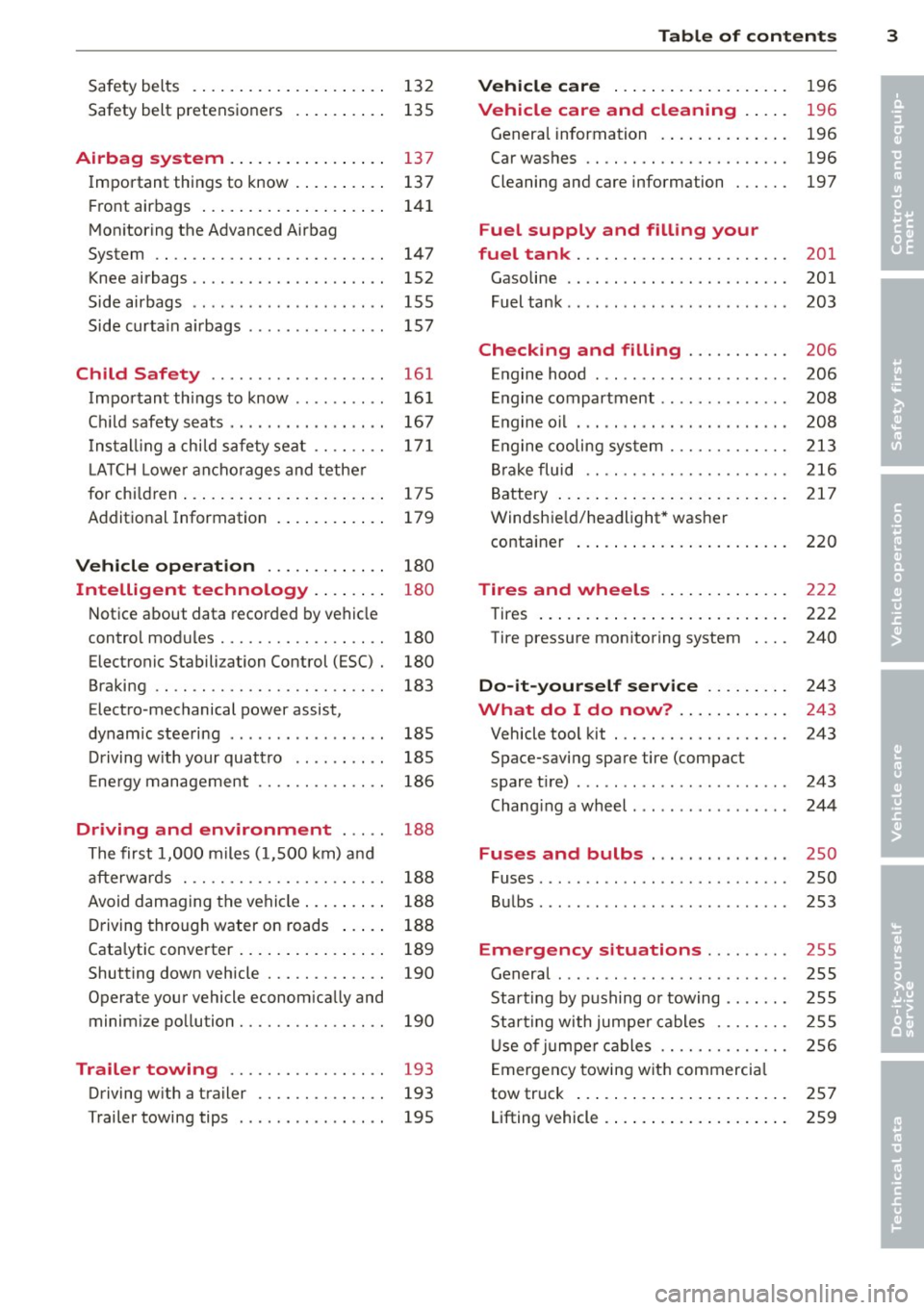
Safety belts . . . . . . . . . . . . . . . . . . . . . 132
Safety belt pretens ioners . . . . . . . . . . 135
Airbag system .. .... ... .. .. .. .. 137
I mportant th ings to know . . . . . . . . . . 137
Fr ont airbags . . . . . . . . . . . . . . . . . . . . 141
Mon itor ing the Advanced Airbag
System . . . . . . . . . . . . . . . . . . . . . . . . . 147
Knee airbags . . . . . . . . . . . . . . . . . . . . . 152
Side airbags . . . . . . . . . . . . . . . . . . . . . 155
Side curta in a irbags . . . . . . . . . . . . . . . 157
Ch ild Safety ........ .... ... ... .
Important things to know ....... .. .
C hil d safety s eats .... ... .. .. .. .. . .
I n st all ing a chi ld safe ty seat .. .. .. . .
L A TC H Lowe r ancho rages and tethe r
for ch ild ren ..... ...... ... .. .. .. . .
A ddit ional Information 161
16
1
167
17 1
175
179
Vehicle operation . . . . . . . . . . . . . 180
Intelligent technology . . . . . . . . 180
N ot ice about data recorded by veh icle
contro l mod ules . . . . . . . . . . . . . . . . . . 180
Electronic Stabili zation Control (ESC) . 180
Braking . . . . . . . . . . . . . . . . . . . . . . . . . 183
Elect ro -mechanical power assist,
dynam ic stee ring . . . . . . . . . . . . . . . . . 185
Dr iving w ith your quattro . . . . . . . . . . 185
E ne rgy management . . . . . . . . . . . . . . 186
Driving and environment . . . . . 188
T he first 1, 000 miles (1, 500 km) a nd
afterw ards . . . . . . . . . . . . . . . . . . . . . . 18 8
Avoid damaging the vehi cle . . . . . . . . . 188
D riving through water on roads . . . . . 188
Cata lytic converter . . . . . . . . . . . . . . . . 189
Shutting down vehicle . . . . . . . . . . . . . 190
Operate your vehicle econom ica lly and
minim ize po lluti on . . . . . . . . . . . . . . . . 190
Trailer towing . . . . . . . . . . . . . . . . . 193
Driving w ith a tra iler . . . . . . . . . . . . . . 193
T railer towing tips . . . . . . . . . . . . . . . . 195
Table of contents 3
Vehicle care . . . . . . . . . . . . . . . . . . .
196
Vehicle care and cleaning . . . . . 196
Genera l information . . . . . . . . . . . . . . 196
Car washes . . . . . . . . . . . . . . . . . . . . . . 196
Cleaning and care information . . . . . . 197
Fuel supply and filling your
fuel tank . . . . . . . . . . . . . . . . . . . . . . .
201
Gasoline . . . . . . . . . . . . . . . . . . . . . . . . 201
Fuel tank . . . . . . . . . . . . . . . . . . . . . . . . 203
Checking and filling . . . . . . . . . . . 206
E n gine hood . . . . . . . . . . . . . . . . . . . . . 206
E ngine compartment . . . . . . . . . . . . . . 208
E ngine o il . . . . . . . . . . . . . . . . . . . . . . . 20 8
En gine cooling sy stem . . . . . . . . . . . . . 213
Br ake fluid . . . . . . . . . . . . . . . . . . . . . . 216
B attery . . . . . . . . . . . . . . . . . . . . . . . . . 217
Windshie ld/headlight* was her
containe r . . . . . . . . . . . . . . . . . . . . . . . 220
Tires and wheels . . . . . . . . . . . . . . 222
Tires . . . . . . . . . . . . . . . . . . . . . . . . . . . 222
Tire pressure monitor ing system 240
Do-it-yourself service . . . . . . . . . 243
What do I do now? . . . . . . . . . . . . 243
Vehicle tool kit . . . . . . . . . . . . . . . . . . . 243
Space-saving spare tire (compact
spare t ire) . . . . . . . . . . . . . . . . . . . . . . . 243
Chang ing a wheel . . . . . . . . . . . . . . . . . 244
Fuses and bulbs . . . . . . . . . . . . . . . 250
Fuses ... .. .. .. .. .. . .. .... .... .. . 250
B ul bs. . . . . . . . . . . . . . . . . . . . . . . . . . . 253
Emergency situations . . . . . . . . . 255
Genera l . . . . . . . . . . . . . . . . . . . . . . . . . 255
Start ing by pushing or towing . . . . . . . 255
Star ting with jumpe r cables . . . . . . . . 255
U se o f jumpe r ca bles . . . . . . . . . . . . . . 256
E mergency towing wit h commerci al
tow truck . . . . . . . . . . . . . . . . . . . . . . . 257
Lifting vehicle . . . . . . . . . . . . . . . . . . . . 259
•
•
Page 29 of 286
In addition , you can determine what informa
tion from the trip computer should be shown in the instrument cluster display. If one of the
pieces of driver information is turned
O ff , that
driver information will not be shown in the
d isp lay. The information will continue to be
calculated by the trip computer and can be
turned back
On at any time .
(D Tips
-This function is not availab le on all
vehicles .
- The driving information in the efficiency
program is also reset to zero with t he
s ingle-trip memo ry.
Gearshift Indicator
Applies to vehicles: with manual transmission and gear·
shift indica tor
This indica tor can help conserve fuel .
r--....~------------...,,~ ~.,,
~ ~
" ., .,
F ig. 12 D is pl ay : G ea rs hi ft indicator
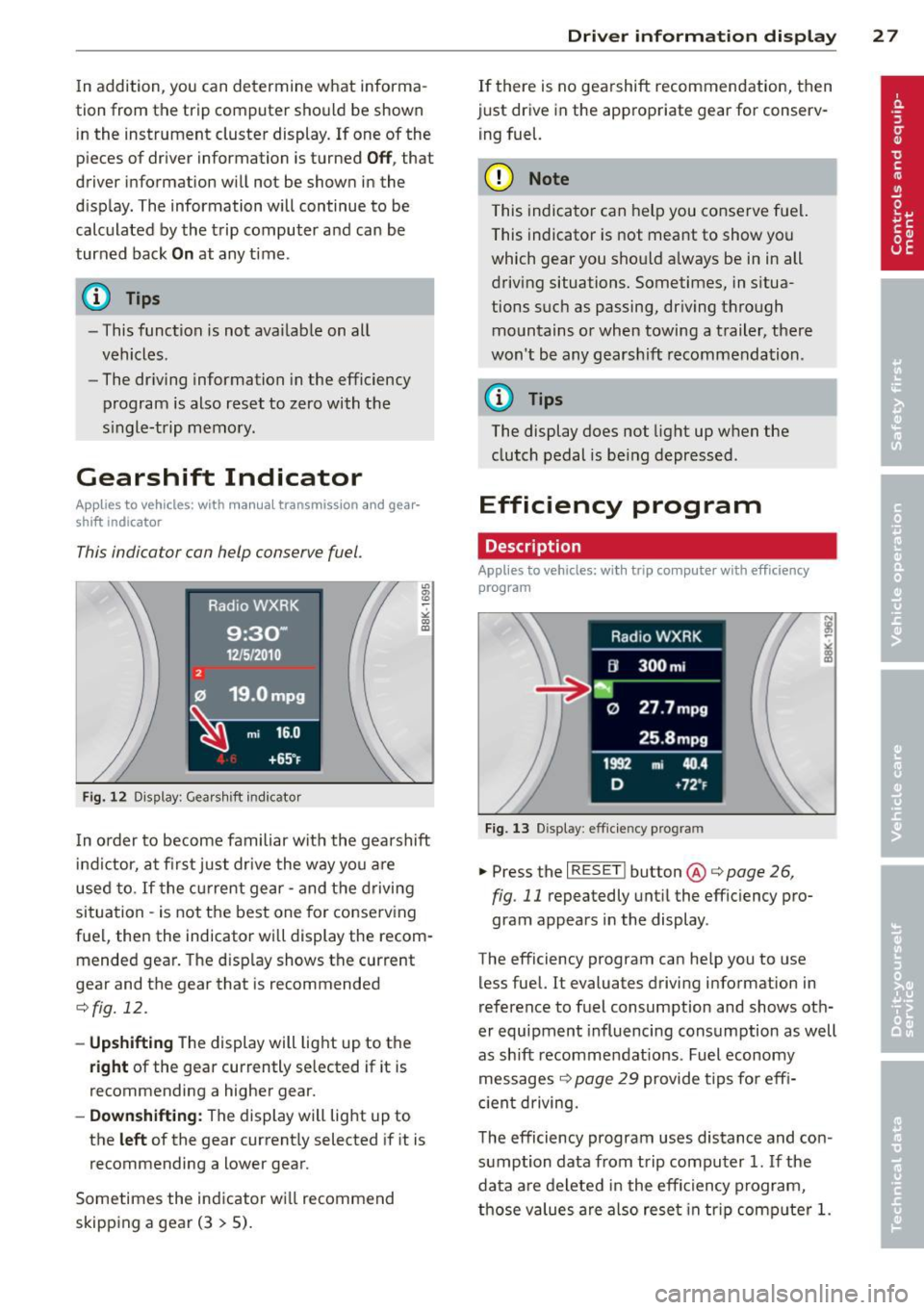
In order to become familiar with the gearshift
indictor, at firs t just drive the way you a re
used to.
If t he cu rrent gear· and the driving
situation - is not the best one for conserving
fuel, then the indicator will display the recom· mended gear. The d isp lay shows the current
gear and the gear that is recommended
¢fig. 12.
- Up shifti ng The d isplay will lig ht up to the
right of the gear currently selected if it is
recommending a higher gear.
- Dow nshifting: The display will light up to
the
left of the gear current ly selected if it is
recommending a lower gear .
Sometimes the indicator wi ll recommend
skipp ing a gear (3
> 5).
Dri ver inform ation di spl ay 2 7
If there is no gea rshift recommendation, then
just drive in the appropriate gear for conserv· ing fuel.
(D Note
This indicator can help you conserve fuel.
This indicator is not meant to show you
which gear you should a lways be in in all
driving situations. Sometimes, in situa
tions such as passing, dr iving thro ugh
mountains or when towing a trailer, there
won't be any gears hift recommendation .
(D Tips
The display does not light up w hen the
clutch pedal is be ing depressed .
Efficiency program
Description
Applies to vehicles: with trip computer with efficiency
program
F ig. 13 Displ ay : eff icie ncy pro gram
.. Press the I RESET ! button @c;, page 26,
fig .
11 repeatedly unt il the effic iency pro·
gram appears in the display .
T he efficiency program can he lp you to use
less fuel. It evaluates driving information in
reference to fuel consumption and shows oth
er equipment influencing consumption as well
as shift recommendat ions. Fuel economy
messages ¢
page 29 provide tips fo r eff i
c ient driving.
T he efficiency program uses distance and con
sumption data from trip computer
1. If the
data a re de leted in the efficiency p rogram,
those values are also rese t in tr ip comp ute r
1.
Page 30 of 286
28 Driver information d isplay
Enhanced shift indicator
Applies to vehicles: with manu al t ransmission a nd trip
c o mp ute r with e fficiency pr ogram
Fig. 14 Display: en hanced s hift ind icator
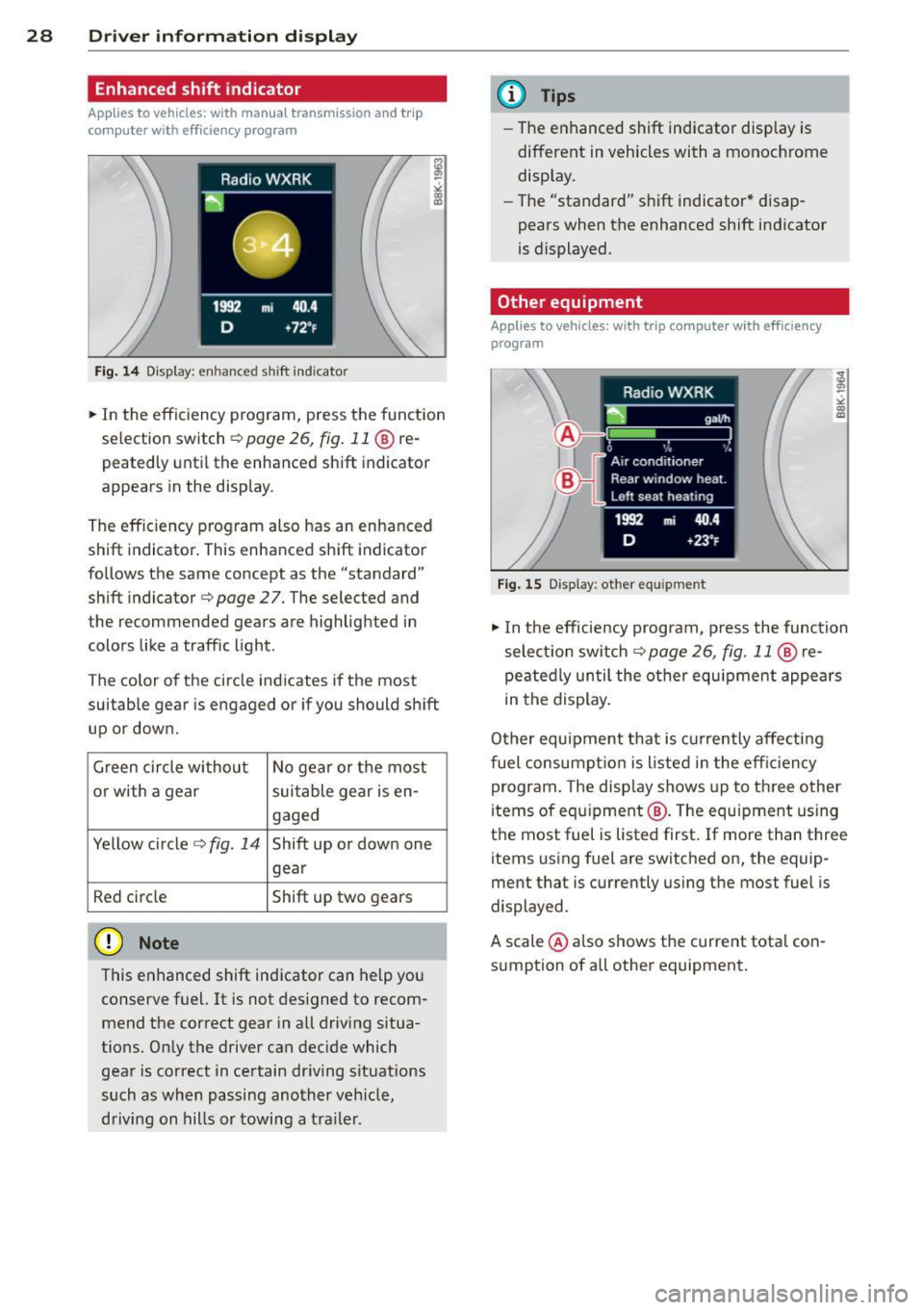
• In the efficiency program, press the funct ion
selection switch
c:> page 26, fig. 11 ® re
peatedly until the enhanced shift indicator
appears in the display .
The effic iency program also has an enhanced
shift indicator . This enhanced shift indicator
follows the same concept as the "standard"
shift indicator
c:> page 27. The selected and
the recommended gears are highlighted in
colors like a traffic light .
The color of the circle indicates if the most
suitable gear is engaged or if you should shift
up or down.
Green circle without No gear or the most
or with a gear suitable gear is en-
gaged
Yellow circle
c:> fig. 14 Shift up or down one
gear
Red circle Shift up two gears
(D Note
This enhanced shift indicator can help you
conserve fuel. It is not des igned to recom
mend the correct gear in all driving situa
tions. Only the driver can decide which gear is correct in certain driving situations
such as when passing another veh icle,
driving on hills or towing a trailer.
(D Tips
-The enhanced shift indicator display is
different in vehicles with a monochrome
display.
- The "standard" shift indicator* disap
pears when the enhanced shift indicator
is displayed.
Other equipment
App lies to vehicles: wit h trip co mputer with e fficiency
prog ra m
Fig . 15 Display: othe r equ ipment
"'I n the efficiency program, p ress the function
selection switch
c:> page 26, fig. 11 @ re
peatedly until the other equ ipment appears
in the display.
Other equipment that is currently affecting
fuel consumpt ion is l isted in the effic iency
program. The disp lay shows up to three other
items of equipment @. T he equ ipment using
the most fuel is listed first. If more than three
items using fuel are switched on, the equip
ment that is currently using the most fuel is
displayed .
A scale @also shows the current total con
sumption of all other equipment.
Page 65 of 286
will have a greater negative influence on
the vehicle's aerodynamics, center of
gravity and overall handling. Always
drive slowly, avo id sudden braking and
maneuvers when transporting cargo on
the roof of your vehicle.
- Never exceed the maximum permissible
load carrying capacity of the roof of your
vehicle, the pe rmissib le axle weights and
the permiss ible total weight of your veh i
cle¢
page 261, Weights.
@) For the sake of the environment
As a result of the increased w ind resist
ance created by a roof rack, your vehicle is
using fue l unnecessarily. So remove the
roof rack after using it.
Luggage compartment
General information
_& WARNING
Read and follow the important safety p re
cautions
on<> page 125, Stowing lug
gage.
Enlarging the luggage compartment
A pp lies to vehicles: with fold ing rear seatback
The backrests can be folded forward sepa
rately or together using the two release lev
ers.
0
Fig. 64 Luggage compartment : release lever
Sea ts a nd s to rage 63
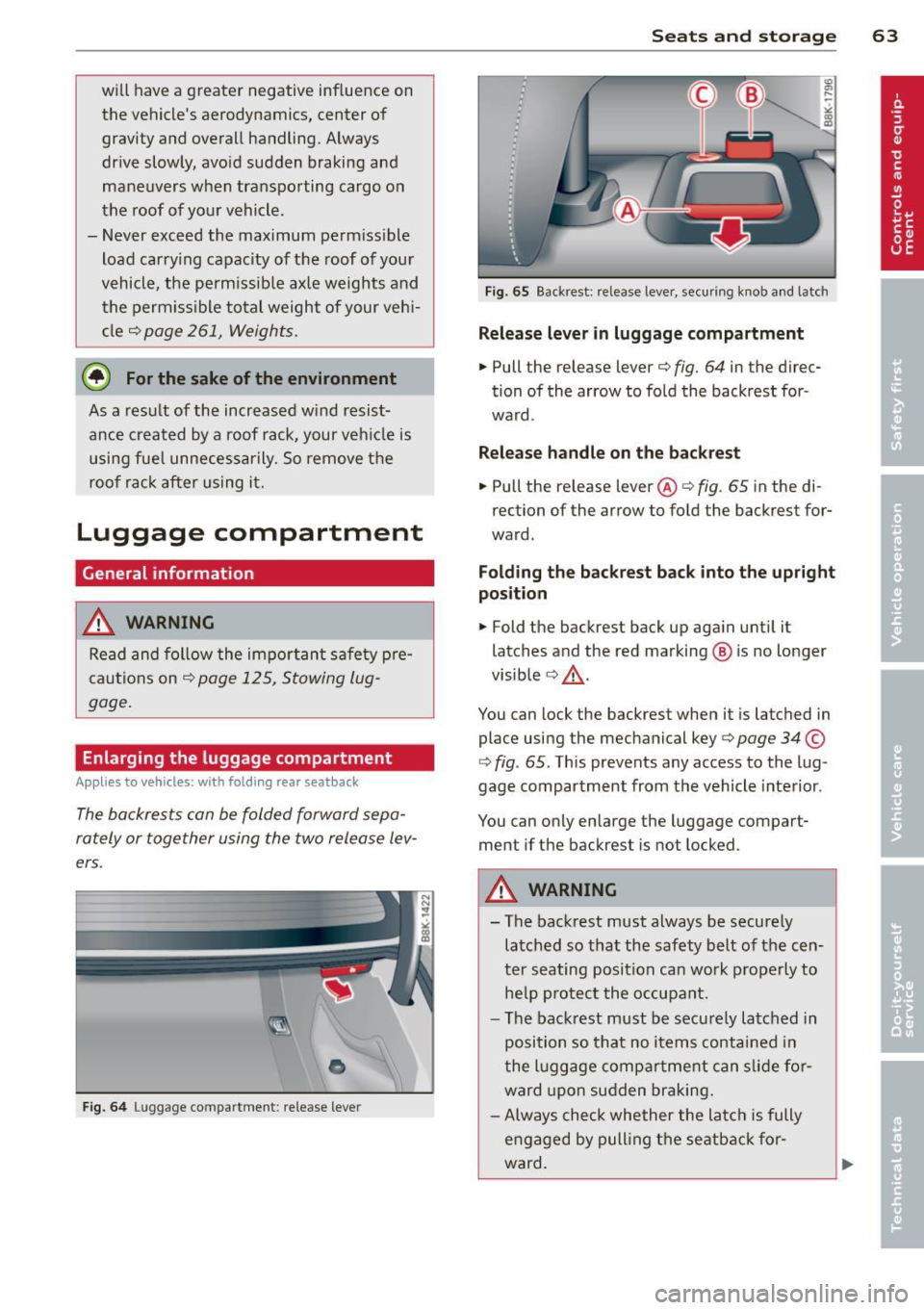
Fig . 65 Backrest: release lever, securing knob and latc h
Release lever in lug gage co mpartment
.. Pull the release lever¢ fig. 64 in the direc
tion of the arrow to fold the backrest for
ward .
Relea se h andle on th e backrest
.. Pull the release lever@¢ fig. 65 in the di
rection of the arrow to fold the backrest for
ward.
Fold ing th e back res t b ack into th e up right
p osition
.. Fold the backrest back up again until it
latches and the red marking@ is no longer
visible ¢.&_ .
You can lock the backrest when it is latched in
place using the mechanical key
c> page 34 ©
¢ fig. 65 . This prevents any access to the lug
gage compartment from the vehicle interior.
You can only enlarge the luggage compart
ment if the backrest is not locked.
_& WARNING
-
-The backrest must always be securely
latched so that the safety belt of the cen
ter seating position can work properly to
he lp protec t the occupant.
- The backrest must be securely latched in
position so that no items contained in
the l uggage compa rtment can slide for
ward upon sudden braking.
- Always check whether the latch is fully
engaged by pull ing the seatback for
ward.
Page 68 of 286
66 Seat s a nd s tor ag e
8_ WARNING
-
- The ski sack is intended only for the
transportation of skis and other light ob
jects . To reduce the risk of serious per
sonal injury, never transport heavy or
pointed objects in the ski sack.
- When brak ing rapidly or during an acci
dent, the load could be displaced and
ca use injury to occupants.
- Sharp edges on the load must be covered
for protect ion. Always fasten the belt
t ightly around the sack and its contents
¢ fig. 70.
-For safety reasons, do not transport
more than two pairs of skis in the ski
sack .
- You must sec ure the ski sac k with the
st rap after loading.
- Make su re that all objects you are t rans
porting in the pass-through are secured.
Otherwise they cou ld slide around during
sudden braking maneuvers and cause in
jur ies.
(D Tips
- Never stow the sk i sack away when it is
still wet or damp (for examp le, snow
melting from skis). Allow it to dry com
plete ly before stowing it away.
- When transporting skis or snowboards, tighten the securing strap between the bindings.
- Position skis in the ski sack wit h the
pointed ends facing the front and ski
po les with the pointed ends facing the
rear.
- You can lock or un lock the pass-through
u sing the mechanical key. This prevents
any access to the luggage compartment
from the vehicle interior .
Parcel shelf
The parcel shelf behind the rear seatback can
be used to car ry light items of cloth ing .
8_ WARNING
No heavy or hard objects should be p laced
on the parcel shelf. They are a hazard to
the veh icle occupants during s udden brak
i ng . The is a risk of injury .
(D Note
Please make sure that the heating w ires
for the rear window defogger are not dam
age by abrasive objects .
(D Tips
To ensure problem-free ven tilation , the
vent ilation slots between the rear window
and the pa rcel she lf must not be covered .
Page 103 of 286
General information
Applies to vehicles: with Audi side assist
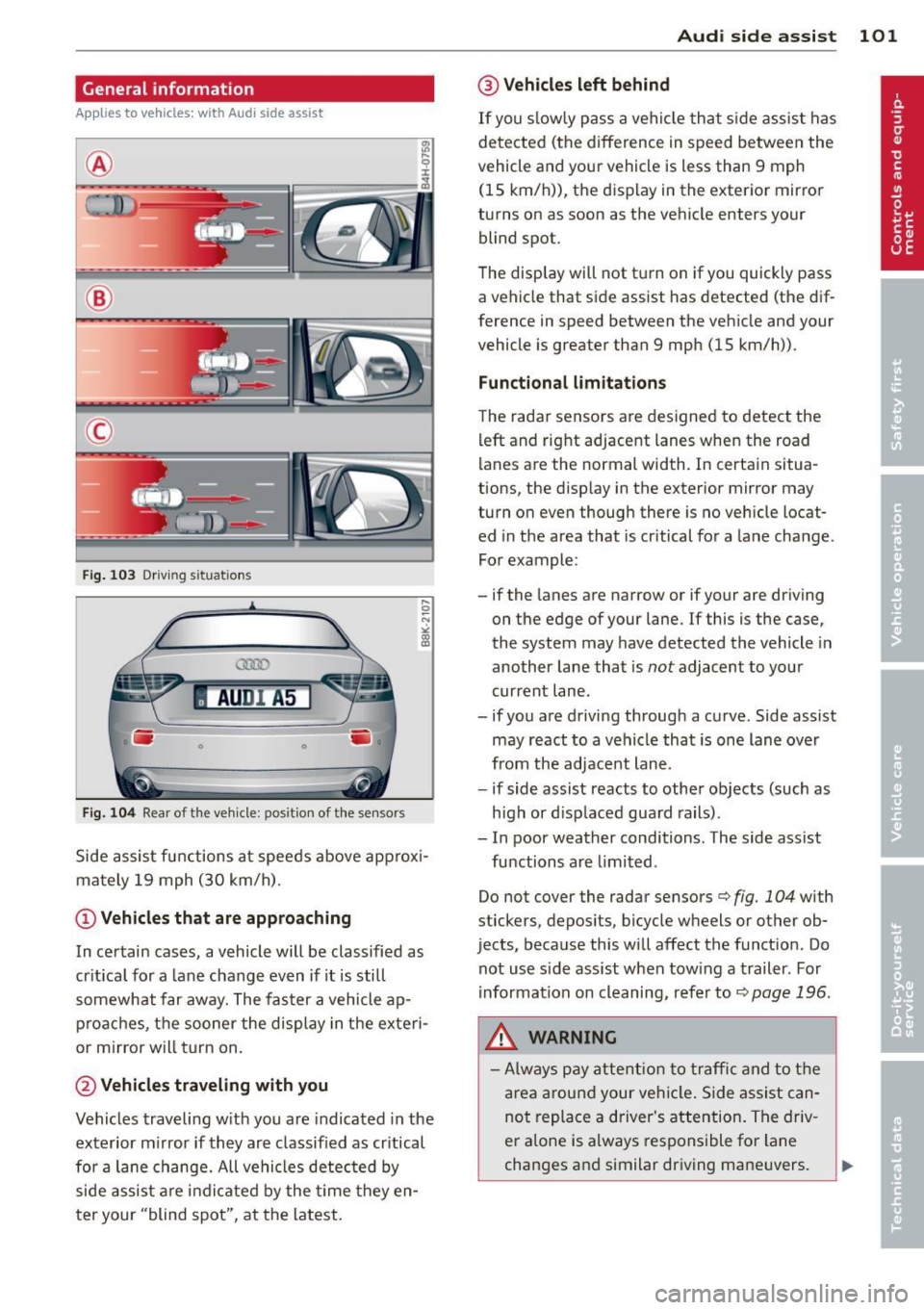
®
©
Fig . 103 Dr iving situations
AUDI A5
•
Fi g. 104 Rear of t he ve hicle: positio n of t he se nsors
Side assist functions at speeds above approx i
mately 19 mph (30 km/h).
@ Vehicl es th at ar e approaching
In certain cases, a vehicle will be classified as
cr itical for a lane change even if it is still
somewhat far away. The faster a vehicle ap
p roaches, the sooner the display in the exteri
or m irror will t urn on.
@ Vehicles traveling with you
Vehicles traveling w ith you are indicated in the
exterior m irror if they are classified as cr itical
for a lane change. All vehicles detec ted by
side assist are indicated by the time they en
ter your "blind spot", at the latest.
Audi side assist 101
@ Veh icle s left behind
If you s low ly pass a vehicle that s ide assist has
detected (the difference in speed between the
vehicle and your vehicle is less than 9 mph (15 km/h)), the display in the exterior mirror
turns on as soon as the vehicle enters your blind spot.
The disp lay will not t urn on if you quickly pass
a vehicle that side assist has detected (the dif
ference in speed between the vehicle and your
vehicle is greater than 9 mph (15 km/h)).
Functional limitation s
The radar senso rs are designed to detect the
left and right adjacent lanes when the road
lanes are the normal width. In certain situa
tions, the disp lay in the exterior mirror may
turn on even though there is no vehicle locat
ed in the area that is cr itical for a la ne change.
For example:
- if the lanes are narrow or if your are dr iving
on the edge of your lane.
If this is the case,
the system may have detected the vehicle in
another lane that is
not adjacent to your
current lane .
- if you a re driving through a curve. Side assist
may react to a vehicle that is one lane ove r
from the adjacent lane.
- if side assist reacts to other objects (such as
high or d isp laced guard rails) .
- In poor weather conditions. The side assist
functions are l imited .
Do not cover the radar sensors <=>
fig. 104 with
stickers, depos its, bicycle wheels or other ob
jects, because this will affect the funct ion. Do
not use s ide ass ist when towing a trailer. For
i nformation on cleaning, refer to<=>
page 196.
_&. WARNING
- Always pay attention to traffic and to t he
area around your ve hicl e. S ide assist can
not replace a driver's attention. The driv
er a lone is always responsible for lane
changes and similar driving mane uvers.
Page 105 of 286
@ Tips
-Side assist is not active whi le you are
making the adjustment.
- Your settings are automatica lly stored
and assigned to the remote control key
being used.
Driver messages
Applies to vehicles: with Audi side assist
If s ide ass ist switches off by itself, the LED in
the button turns off and a message will ap
pear in the instrument cluster display:
Audi side assist unavailable: Sensors blocked
The radar sensors' vision is affected. Do not
cover the area in front of the sensors with bike
wheels, stickers, dirt or other objects. Clean
the area in front of the sensors, if necessary
c;.page 101, fig. 104.
Audi side assist: Currently unavailable
Side assist cannot be switched on temporarily
because there is a malfunc tion (for example,
the battery charge leve l may be too low) .
Audi side assist: System fault!
The system cannot guara ntee that it will de
tect veh icles correctly and it is switched off .
The sensors have been displaced or are faulty.
H ave the system checked by an authorized
Aud i dealer or authorized Aud i Service Facility
soon.
Audi side assist: Unavailable when towing
Side assist sw itches off automatically when a
factory- insta lled trailer h itch is connected to
the electrical connector on the trailer. There is
no guarantee the system will switch off when
usi ng a retrofitted trailer hitch. Do not use
side assist when towing a trailer .
Audi side assist 103
Page 127 of 286
the pedals or the ability to control the
vehicle.
- Never place or install floor mats or other
floor coverings on top of already insta l
led floor mats. Additional floor mats and
other coverings will reduce the size of
the pedal area and interfere with the
pedals.
- Always property reinstall and secure floor
mats that have been taken out for clean
ing.
- Always make sure that objects cannot fall into the driver footwell wh ile the ve
hicle is moving. Objects can become
t rapped under t he brake pedal and accel
erator peda l causing a loss of veh icle
control.
Stowing Luggage
Loading the luggage compartment
All luggage and other objects must be prop
erly stowed and secured in the luggage com
partment.
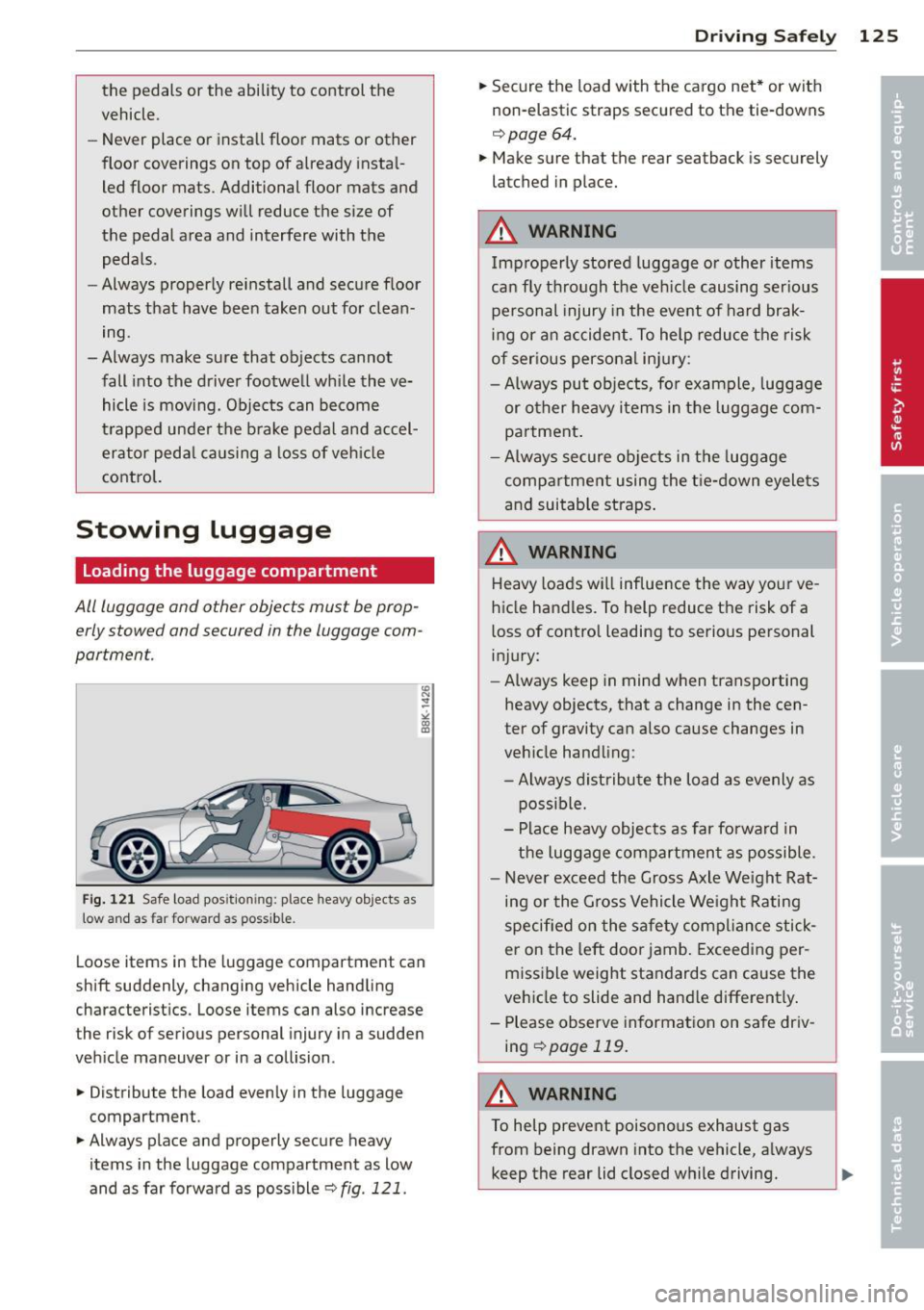
F ig. 121 Safe load pos ition ing: place heavy objects as
low and as far forward as possible.
Loose items in the luggage compartment can
shift suddenly, changing vehicle handling
characteristics. Loose items can also increase
the risk of serious personal injury in a sudden
veh icle maneuver or in a collision .
.. Distribute the load evenly in the luggage
compartment.
.. Always place and properly secure heavy
items in the luggage compartment as low
and as far forward as poss ible r::!)
fig. 121.
Dr ivin g Sa fely 125
.. Secure the load with the cargo net* or with
non-elastic straps secured to the tie-downs
r::!) page 64.
.. Make sure that the rear seatback is securely
latched in place.
A WARNING
Improperly stored luggage or other items
can fly t hro ugh the ve hicle causing ser ious
personal injury in the event of ha rd brak
ing or an accident. To help reduce the risk
of ser ious personal injury:
- Always put obje cts, fo r example, luggage
or other heavy i tems in the luggage com
partment .
- Always secure objects in the luggage
compartment using the t ie-down eyelets
and suitable straps .
A WARNING
Heavy loads w ill influence the way yo ur ve
hicle handles. To help reduce the risk of a
loss of contro l leading to serious personal
i njury:
- Always keep in mind w hen transporting
heavy objects, that a change in the cen
ter of gravity can also cause changes in
veh icle handling:
- Alway s distribute the load as evenly as
possible.
- Place heavy objects as far forward in
the luggage compartment as possible.
- Never exceed the Gross Axle We ight Rat
ing or the G ross Vehicle Weight Rating
speci fied on the safe ty comp lian ce stick
er on the left door jamb . Exceeding per
missible weight standards can cause the
vehicle to slide and hand le different ly .
- Please observe information on safe driv
ing
<::!)page 119.
WARNING
To help prevent poisonous exhaust gas
from being drawn into the vehicle, a lways
keep the rear lid closed w hile driving.
Page 182 of 286
180 Intellige nt tec hno logy
Intelligent technology
Notice about data
recorded by veh ic le
control modules
Your vehicle is not equipped with an Event Da
ta Recorder (EDR), installed by some manu
facturers fo r the express purpose of capturing
data for retrieval after an accident or crash
event . EDR's are sometimes called "crash re
corders".
Some state laws restrict the retrieval or down
loading of data stored by EDR's that were in
stalled in a vehicle for the express purpose of
retrieving data after an accident or crash
event without the owner's consent.
A lthough your vehicle is not equipped with an
EDR, it is equipped with a number of electron
ic control modules for various vehicle systems
such as, for example, engine function, emis
sion control, as well as for the airbags and
safety belts.
These electronic control modules also record
vehicle-related data during normal vehicle op
eration for diagnostic and repair purposes.
The recording capacity of the electronic con
trol modules is limited to data (no sound is re
corded) and only a small amount of data is ac
tually recorded over a very limited period of
time and stored when a system fault or other
condition is sensed by a control unit. Some of
the data then stored may relate to vehicle
speed, direction, braking as well as restraint
system use and performance in the event of a
crash or other condition. Stored data can only
be read and downloaded with special equip
ment.
Electronic Stab ilization
Control (ESC)
Description
ESC helps to improve road holding and vehicle
dynamics to help reduce the probability of
skidding and loss of vehicle control. It works
only when the engine is running. ESC detects certain difficult driving situations, including
when the vehicle is beginning to spin (yaw)
out of control and helps you to get the vehicle back under control by selectively braking the
wheels, and/or reducing engine power and
providing steering assistance to help hold the
vehicle on the driver's intended course. The in
dicator light
J.i) in the instrument cluster
blinks when ESC is taking action to help you
control the vehicle.
ESC has limitations.
It is important to remem
ber that ESC cannot overcome the laws of
physics. It will not always be able to help out
under a ll cond itions you may come up against.
For example, ESC may not always be able to
help you master situations where there is a
sudden change in the coefficient of friction of
the road surface. When there is a section of dry road that is suddenly covered with water,
slush or snow, ESC cannot perform the same
way it would on the dry surface . If the vehicle
hydroplanes (rides on a cushion of water in
stead of the road surface), ESC will not be
able to help you steer the vehicle because con
tact with the pavement has been interrupted
and the vehicle cannot be braked or steered.
During fast cornering, particularly on winding
roads, ESC cannot always deal as effectively
with difficult driving situations than at lower
speeds. When towing a trailer, ESC is not able
to help you regain control as it would if you
were not towing a trailer.
Always adjust your speed and driving style to road, traffic and weather conditions. ESC can
not override the vehicle's physical limits, in
crease the available traction, or keep a vehicle
on the road if road departure is a result of
driver inattent ion. Instead, ESC improves the
possibility of keeping the vehicle under con
trol and on the road during extreme maneu
vers by using the driver's steering inputs to
help keep the vehicle going in the intended di
rection . If you are traveling at a speed that
causes you to run off the road before ESC can
provide any assistance, you may not experi
ence the benefits of ESC.
Page 195 of 286
Trailer towing Driving with a trailer
General information
Your Audi was designed primarily for passen
ger transportation .
If you plan to tow a tra iler, p lease remember
that the addit ional load will affect durab ility,
economy and performance .
T railer towing not on ly places more stress on
the vehicle, it also calls for more concentra
tion from the driver.
F or this reason, a lways fo llow the operating
and driving instructions provided and use
common sense.
Technical requirements
Traile r hitch
Use a weight-carrying hitch conforming to the
gross trailer we ight. The hitch must be suita
b le for your veh icle and trailer and must be
mounted secure ly on t he veh icle's chassis at a
technically sound location . Use only a t railer
h itch w ith a removab le ball moun t. A lways
check with the tr ailer hitch man ufac tur er to
make sure that you are using the correct
hitch.
Do not use a bumper hitch.
T he hitc h must be installed in such a way that
it does not inte rfe re with the impac t-absorb
i ng b umper syst em. No modifica tions should
be made to the vehicle exhaus t and b rake sys
tems . From t ime to time, check that a ll hitch
mo unt ing bolt s remain securely fas tened.
W hen you are not tow ing a trailer, remove the
trai le r hi tch ball moun t. T h is prevents the
hi tch from causing damage sho uld your ve hi
cle be str uck from be hind
¢ &. .
Trailer brakes
If yo ur tra iler is equ ipped w it h a braking sys
tem, check to be su re that it conforms to a ll
r eg ulat io ns.
Trailer towin g 193
The trailer hyd ra ulic bra ke system must not be
direct ly connected to the vehicle's hydraulic
brake system
¢ &. .
Safety chains
Alw ays use s afety chains between your ve hicle
and t he tra ile r.
Trailer lights
Tra ile r lights m ust meet all reg ulations . Be
su re to check w ith your authorized Audi dealer
fo r c orrec t w iri ng, sw itches, and relays.
Mirrors
If you a re unable to see the traffic behind you
u sing the regula r outside m irrors, then you
must insta ll ext ended mir ro rs. It is important
t h at you
always have clea r vis io n to the rear .
.8, WARNING
- If a trailer has elec trica l br ake s plea se
no te th at t hese bra kes are not activat ed
by the fa ctory -fit ted control unit -risk of
accident!
- After removing the t railer hi tch, do no t
s to re it in yo ur vehicle . In case of sudden
brak ing, the hitch could fly fo rward and
in ju re you or yo ur passenge rs .
Operating instructions
Maximum traile r we ight
-
A trai ler for your vehicle is limited to a typical
class 1 or class 2 tra iler.
Trailer load distribution
Be sure the lo ad in the traile r is h eld secure ly
i n p lace to p reven t it from shifting fo rward,
backward or sideways.
Never allow a passenger to ride in a trailer
¢ &. in Driving instru ctions on page 19 4.
Engine cooling system
Towing a t railer ma kes t he engine wor k hard
er . It is impo rta nt that the cooling system's
perfo rman ce is up to the additional load.
Make sure tha t the coo ling sys tem h as enough
f lu id . .,..
•
•