radio AUDI A5 COUPE 2015 User Guide
[x] Cancel search | Manufacturer: AUDI, Model Year: 2015, Model line: A5 COUPE, Model: AUDI A5 COUPE 2015Pages: 264, PDF Size: 66.83 MB
Page 46 of 264
Lights and Vi sion
Lights and Vision
Exterior Lighting
Switching the lights on and off
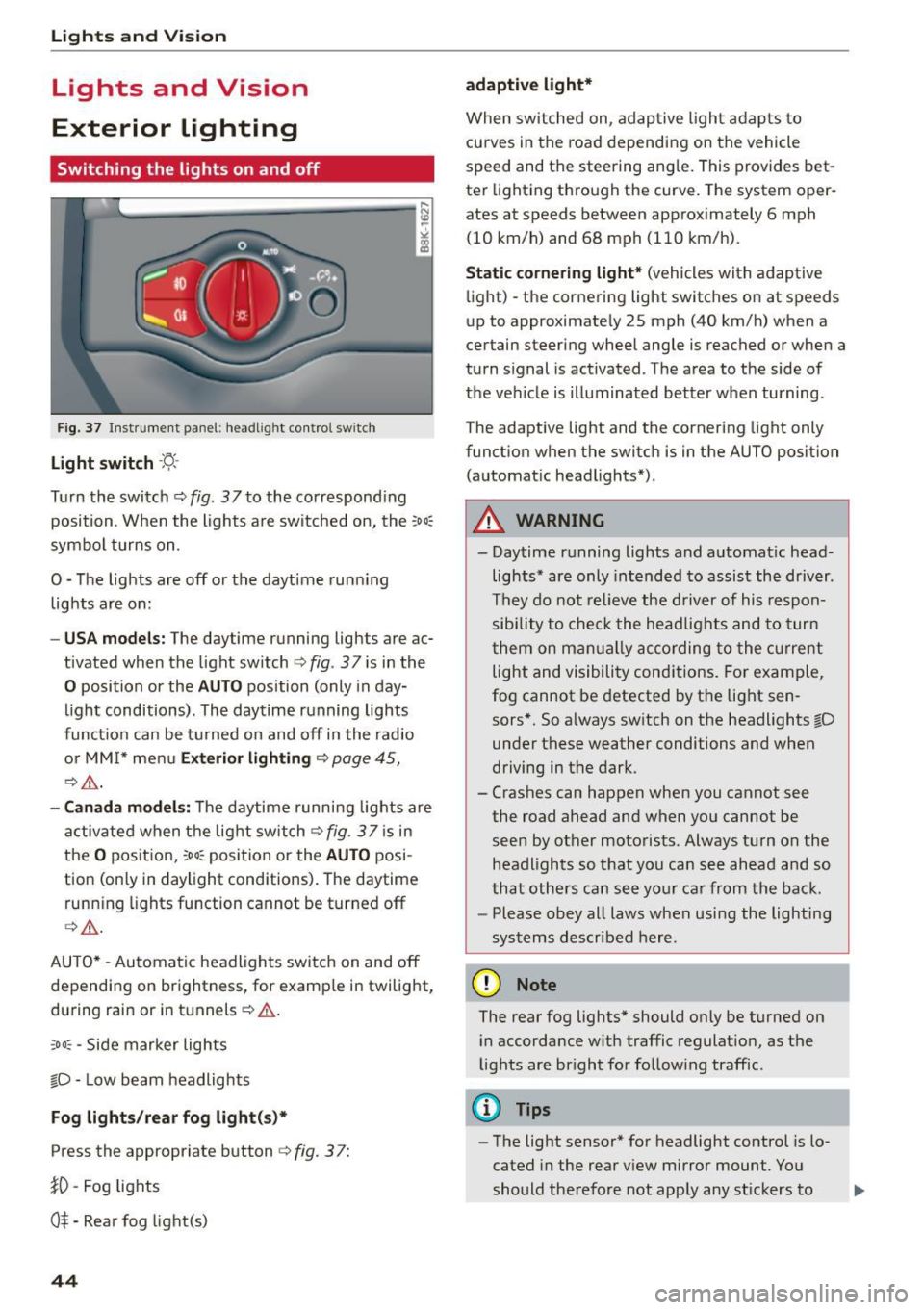
Fig. 3 7 Instrume nt pane l: headl ig h t co ntrol switc h
Light switch ·'t/-·
Tu rn the switch ¢ fig. 37 to the co rr e spond ing
position . Whe n the lights a re switched on, the
:oo,
symbo l turns on.
0 -The lights are off or the daytime runn ing
lights are on:
- USA models : The daytime running lights are ac
tivated when the light sw itch
¢ fig . 37 is in the
0 position or the AUTO position (only in day
li ght conditions). The daytime running lights
funct io n can be turned on and off in the radio
o r MM I* men u
Exterior lighting ¢ page 45,
c:?,& .
-Canada model s: T he daytime r unni ng lights are
activated when the lig ht switch
C?fig. 37 is in
t h e
O pos it ion, 300, position or the AUTO posi
tion (only in daylight conditions) . The daytime
runn ing lights function cannot be turned off
¢ ,A .
AUTO* -Au tomatic headlights swi tch on and off
depending on brightness, for examp le in twilight,
during rain or in tu nnels ¢
A.
:oo , -Side marker lights
fO -Low beam headlights
Fog lights /rear fog light(s )*
Press the appropriate button c:? fig. 3 7:
}0 -Fog lights
O* -Rea r fog light(s)
44
adaptive light*
When switched on, adap tive ligh t ad ap ts to
curves in the road depending on the vehicle
speed and the steering ang le. This provides bet
ter light ing through the curve. The system oper
ates at speeds between approximately 6 mph
(10 km/h) and 68 mph (110 km/h).
Static cornering light* (vehicles with adaptive
li ght) -the corne ring light switches on at speeds
up to approximate ly 25 mph (40 km/h) when a
certain steering wheel angle is reached or when a
turn s ignal is act ivated . T he area to the side of
the ve hicle is illuminated better when turning .
The adaptive light and the cornering light only
funct io n when the switc h is in the AUTO position
(automat ic head lights*) .
A WARNING
- Daytime r unning lights and a utomat ic head
lights* are only intended to as sist the driver .
T h ey do not re lieve the driver of his respon
sibility to c heck t he hea dlights and to tur n
t hem on m anually ac co rding to the cur rent
light and visibili ty conditions. Fo r exam ple,
fog cannot be detected by the light sen
sors*. So a lways sw itch on the headlights
l[D
under these weather conditi ons and when
driving in the dark.
- Crashes can happen when y ou cannot see
the road ahead and when you cannot be
seen by ot her moto rists. Always tu rn on the
headlights so that yo u ca n see ahead a nd so
that othe rs can see yo ur ca r from the back.
- Please obey all laws when usi ng the lighting
sys tems described here.
(D Note
The rear fog lights* should on ly be turned on
i n accordance w ith traffic regulat ion, as t he
lights are br ight for follow ing traffic.
{!) Tips
- The light sensor* for headlight control is lo
cated in the rear v iew mirror mount. Yo u
should the refore not app ly any st ickers to
Page 47 of 264
M N
0 loo
rl I.O
"' N
"' rl
the windshield in this a rea in order to
prevent malfunctions or failures .
- Some exterior lighting functions can be ad
ju ste d
~ page 45 .
-When yo u remove your key from the igni tion
while the vehi cle's ligh ts are turned o n, a
buzzer sounds as long as t he driver 's door is
open.
- In coo l o r dam p weather, t he inside of the
h eadlights, turn sig nals and tail lights can
fog over d ue to the temperature difference
between the inside and outs ide. They will
clea r shortly after switching them on. T his
does not affect t he service li fe of the light
i ng.
- In the event of a light sensor malfunction,
the driver is not ified in the instr ume nt clus
te r display~
page 21.
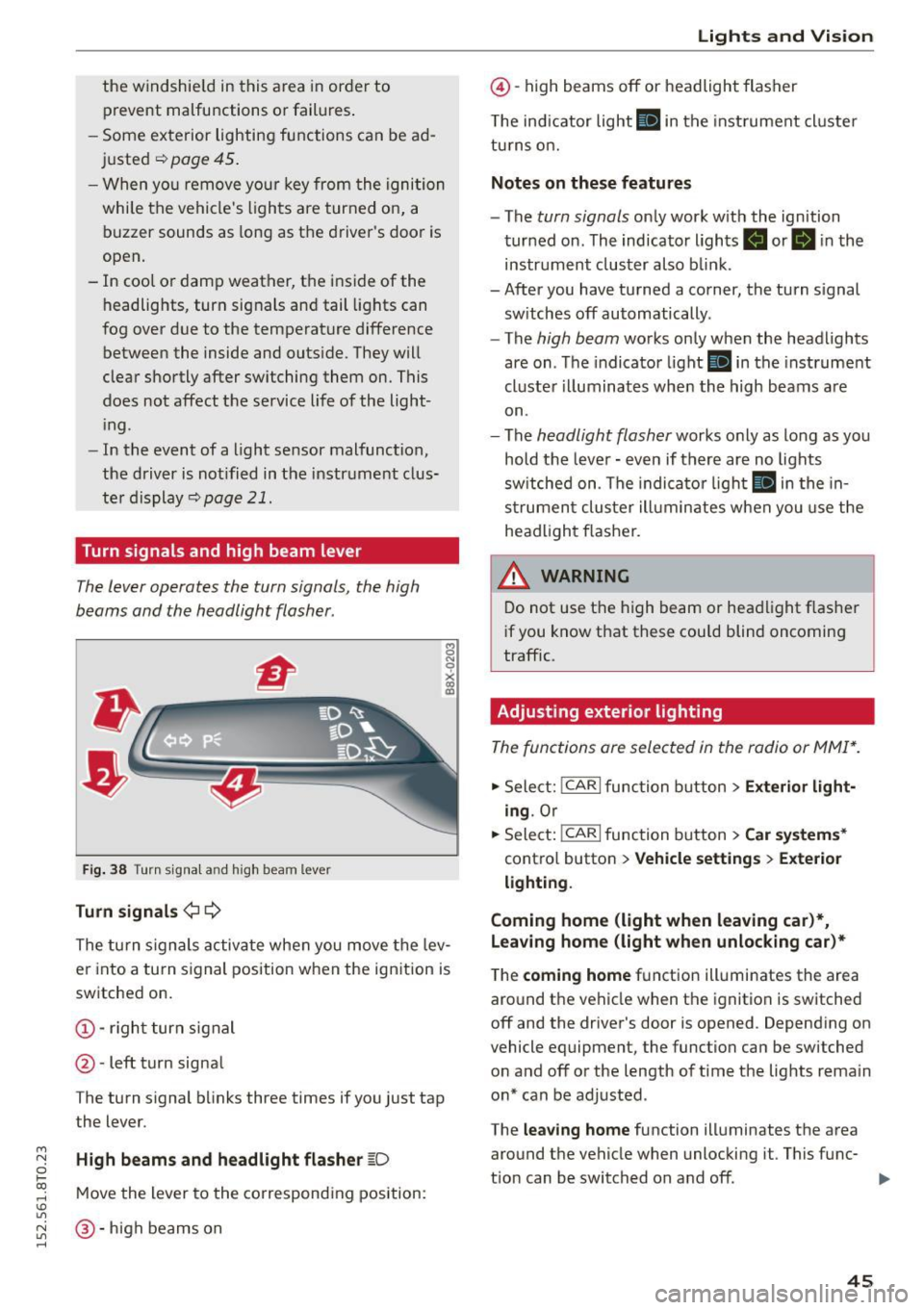
Turn signals and high beam lever
The lever operates the turn signals, the high
b eams and the headlight flasher.
Fi g. 3 8 Tu rn signa l and high beam lever
Turn signals ¢ Q
g N
0
~ CD
The turn signals activate when you move the lev
er into a turn s ignal position when the ignition is
switched on.
@ -righ t tur n signal
@ -left turn signa l
The turn s ignal b links three times if you just tap
the lever.
High beams and headlight flasher
[0
M ove the lever to the corresponding position:
@ -high beams o n
Lights and Vis ion
@ -high beams off or headlight flasher
T he ind icator light
II in t he inst rument cl uste r
tu rns on.
Notes on these features
- The
turn signals on ly wor k w ith the ign ition
tur ned on. The indicator ligh ts . or
II in the
instr um ent clus ter also b link.
-After you have tu rned a corner, the turn s ignal
sw itches off automatically.
- The
high beam works on ly when the headlights
are on . T he indicator light
II in the instrument
cluste r illuminates whe n the high beams a re
on.
- The
headlight flash er works o nly as long as yo u
hold the leve r - even if there are no lights
sw itched on . The indica to r li ght
II in the in
s trumen t cluste r ill umin ates when you use t he
head light flasher.
,&. WARNING
D o not use t he h igh beam or hea dlight flashe r
i f you know that these could blind oncoming
traffic.
Adjusting exterior lighting
The func tions are selected in the radio or MMI* .
.,. Select: !CAR I func tion b utton > Exterior light
ing .
Or
.,. Sele ct: !~C_A _R~ I function b utton > Car systems *
contro l butto n > Vehicle settings > Exterior
lighting .
Coming home (light when leaving car )*,
Leaving home (light when unlocking car)*
The
coming home f u nction illuminates the area
aro und t he vehicle when the ignition is switched
off and the driver's door is opened. Depend ing on
vehicle equipment, the function can be switched o n and off o r the length of t ime t he lig hts rema in
on* can be adjusted .
The
leaving home function illuminates t he area
around th e vehicle when unloc kin g it. This func-
t ion can be switched on and off. ""
45
Page 53 of 264
M N
i? co ,...., \!) 1.1"1
N 1.1"1 ,....,
windshield. Switching on the windshield
wipers can damage the wiper blades!
- Prior to using a car wash, the windshield
wiper system must be switched off (lever in
position @). Th is helps to prevent uninten
tiona l switching on and damage to the
windsh ield wiper system.
(D Tips
- The windshield wipers are switched off
when the ignition is turned off . Activate the
windsh ield wipers after the ignition is
switched back on by moving the winds hield
wiper lever to any posit ion .
- Worn or dirty windshie ld wiper blades result
i n streaking. This can affect the rain sensor*
funct ion. Check your windshield wiper
blades regularly.
- The washer fluid nozzles of the windshield washer system are heated at low tempera
tures when the ignit ion is on.
- When stopping temporarily , (e.g . at a traffic
light) the set speed of the windsh ield wipers
i s automatically reduced by one speed.
Cleaning windshield wiper blades
C lea n the windshield wi per blades when they be
gin to leave streaks . Use a soft cloth and glass
cleaner to clean the windshield wiper blades.
.,. Place the windshield wiper arms i n the service
pos ition. Re fer to ¢
page 51.
.,. Lift the wiper arm away from the front window .
A WARNING
-
Dirty windshield wiper blades can impair your
view . Th is can lead to acc idents.
Light s and Vis ion
Replacing windshield wiper blades
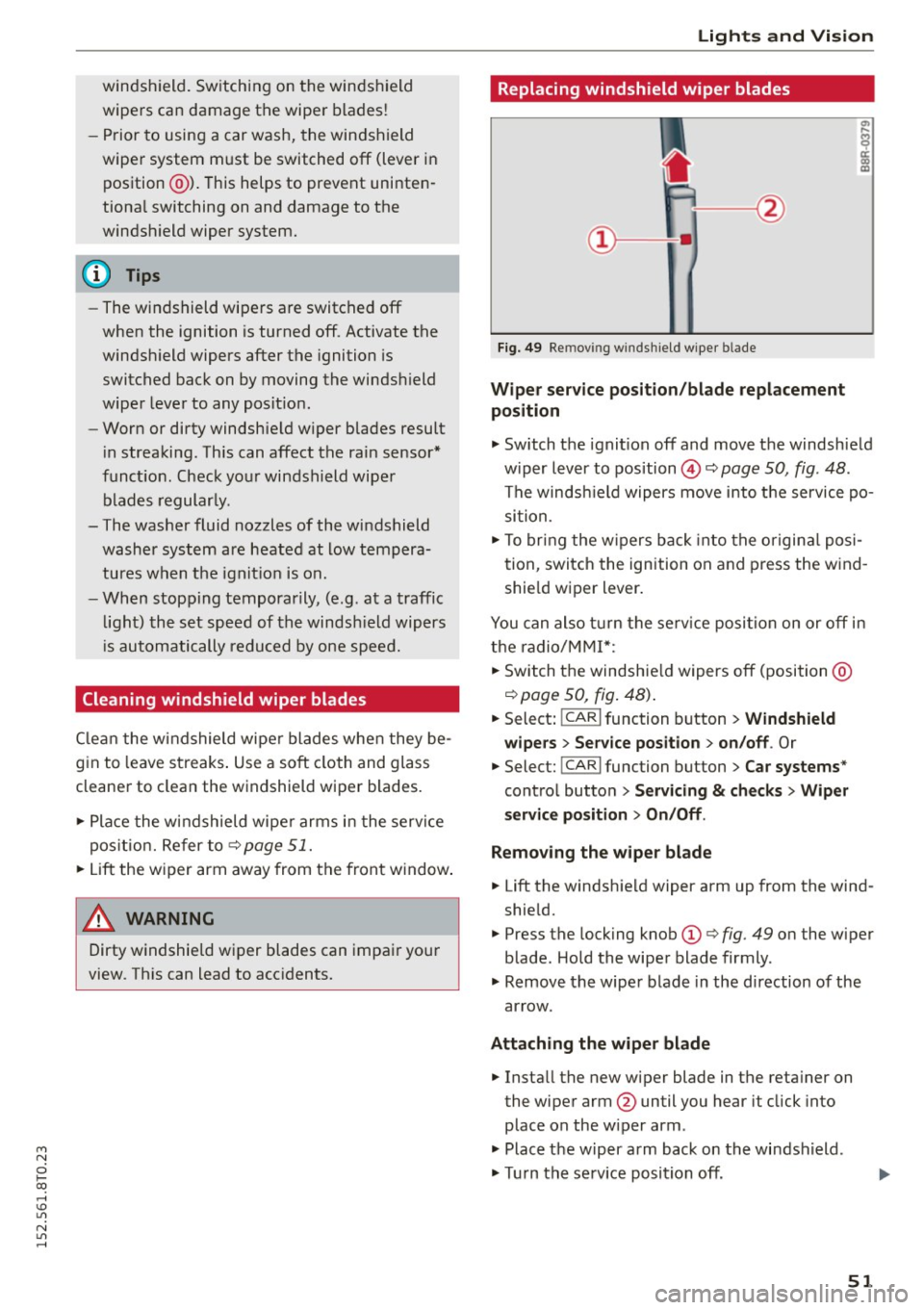
Fig. 49 Re mov ing wi nd sh ie ld wipe r bla de
Wipe r ser vice position /bl ade repl acement
position
.,. Switch the ignit ion off and move the windshield
w iper lever to pos ition @¢
page 50, fig. 48 .
The windsh ield wipers move into the service po
si tion.
.,. To bring the w ipers back into the o rigina l posi
tion , switch the ignition on and press the wind
shie ld wiper l ever .
You can also t urn the se rv ice position on or off in
the radio/MM!*:
.,. Switch the windshie ld wipers off (position @
¢page 50, fig. 48) .
.,. Select: !CAR I function button > Win dshield
wipe rs
> Serv ice po sition > on /off . Or
.,. Select: !CAR I func tion button > C ar systems *
control button
> S erv ici ng & checks > Wip er
s er vice po sition
> On /Off .
R emoving th e wiper bla d e
.,. Lift the windshie ld wiper arm up from the wind
shield.
.,. Press the locking knob
(D ¢ fig. 49 on the wiper
blade . Hold the wiper blade firmly .
.,. Remove the wiper blade in the d irection of the
ar row .
Att aching the w ipe r blade
.,. Install the new wiper blade in the reta iner on
the wiper arm @until you hear it click into
place on the w iper arm .
.,. Place the w iper arm back on the windshield.
.,. Turn the se rvice position off .
51
Page 61 of 264
M N
0 loo
rl 1.0
"' N
"' rl
In addition to the d river 's seat settings, you can
also store and access the exterior mirror adjust
ment settings* using the remote control key or
memory button.
Remote control key
App lies to vehicles: with seat memory
To assign the driver's seat settings to the remote
control key when locking the veh icle, the funct ion
must be act ivated in the radio or
MM!*
• Select: I CARI function button > Seat adjust·
ment
> Driver's seat > Remote control key >
on .Or
• Select : I CAR I function button > Car sy stem s*
control button > Vehicle settings > Seats >
Driver' s seat > Remot e contro l key > On .
@ Tips
If you do not want anoth er driver's settings to
be assigned to the remote key, sw itc h off the
memory f un ct io n using the radio or MM I* or
the
I O N/OFF I but ton ¢ page 59 .
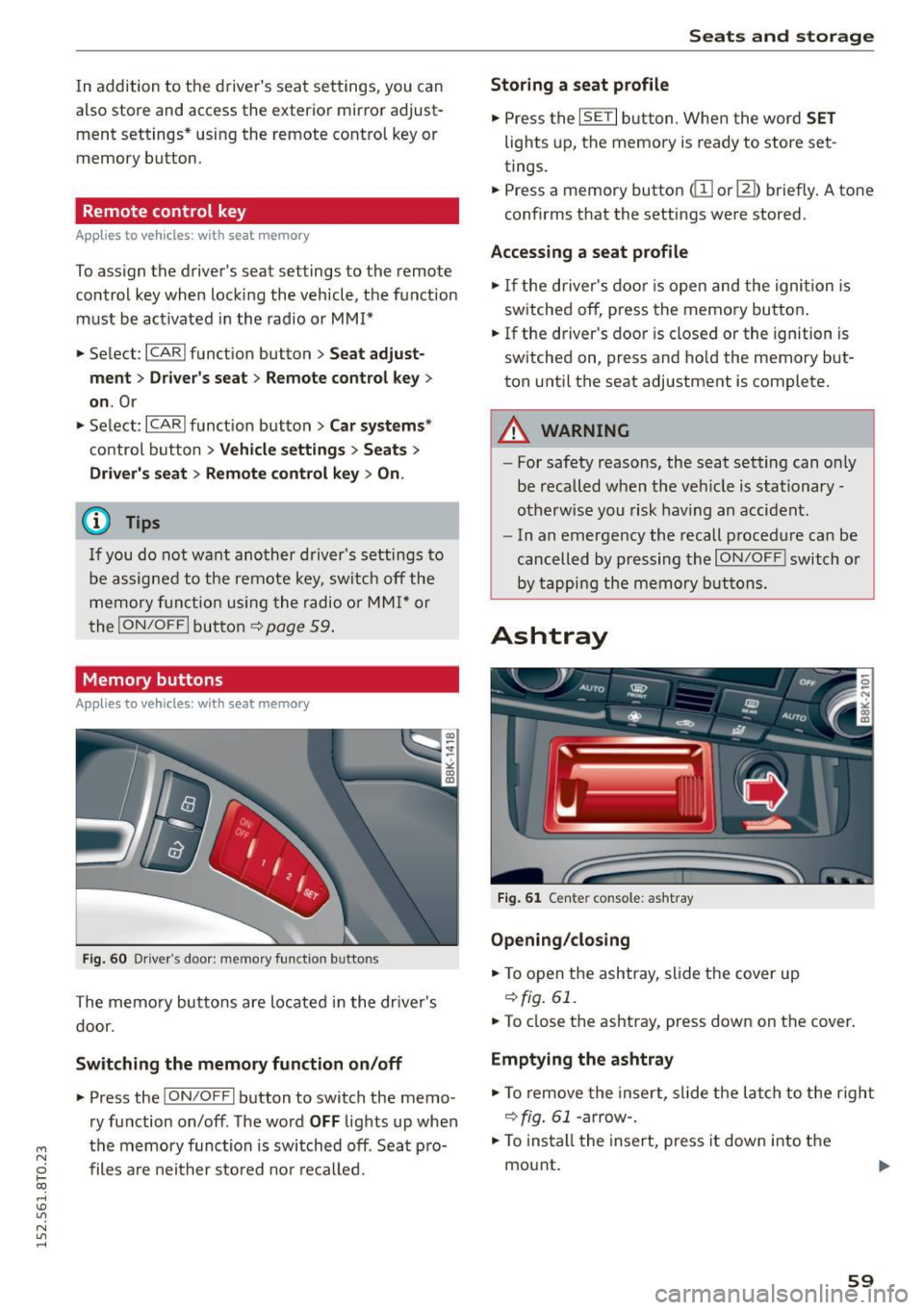
Memory buttons
Applies to vehicles: with seat memo ry
Fig. 6 0 Driver's door: memory fu nct io n buttons
The memory butto ns are located in the dr iver's
d oor.
Switching the memory function on /off
• Press the ION/O FF I button to switch the memo
ry function on/off . The word
OFF lights up when
the memory function is switched off. Seat p ro·
files are nei ther stored no r r eca lled.
Seats and storage
Storing a seat profile
• Press the ISET I button. Whe n the word SET
lights up, the memory is ready to store set
tings.
• Press a memory button
dil or [II) briefly . A tone
confirms that the settings were stored.
Accessing a seat profile
• If the driver's door is open and the ignition is
sw itched off, press the memory button .
• If the driver's door is closed or the ignition is
switched on, press and hold the memory but
ton unti l the seat adjustment is complete.
A WARNING
- For safety reasons, the seat setting can o nly
be recalled when the veh icle is stationary·
otherwise you risk hav ing an accident.
- In an emergency the recall procedure can be
cancelled by pressing the
I O N/OF F! switch o r
by tappi ng the memory buttons.
Ashtray
Fi g. 6 1 Center console: ashtray
Opening /clo sing
• To open the ashtray, sl ide the cover up
r:!) fig. 61.
• To close the ashtray, press down on the cover.
Emptying the ashtray
• To remove the insert, slide the latch to the right
r:!) fig. 61 -arrow-.
• To insta ll the insert, press it down into the
mou nt.
59
Page 71 of 264
Warm and cold
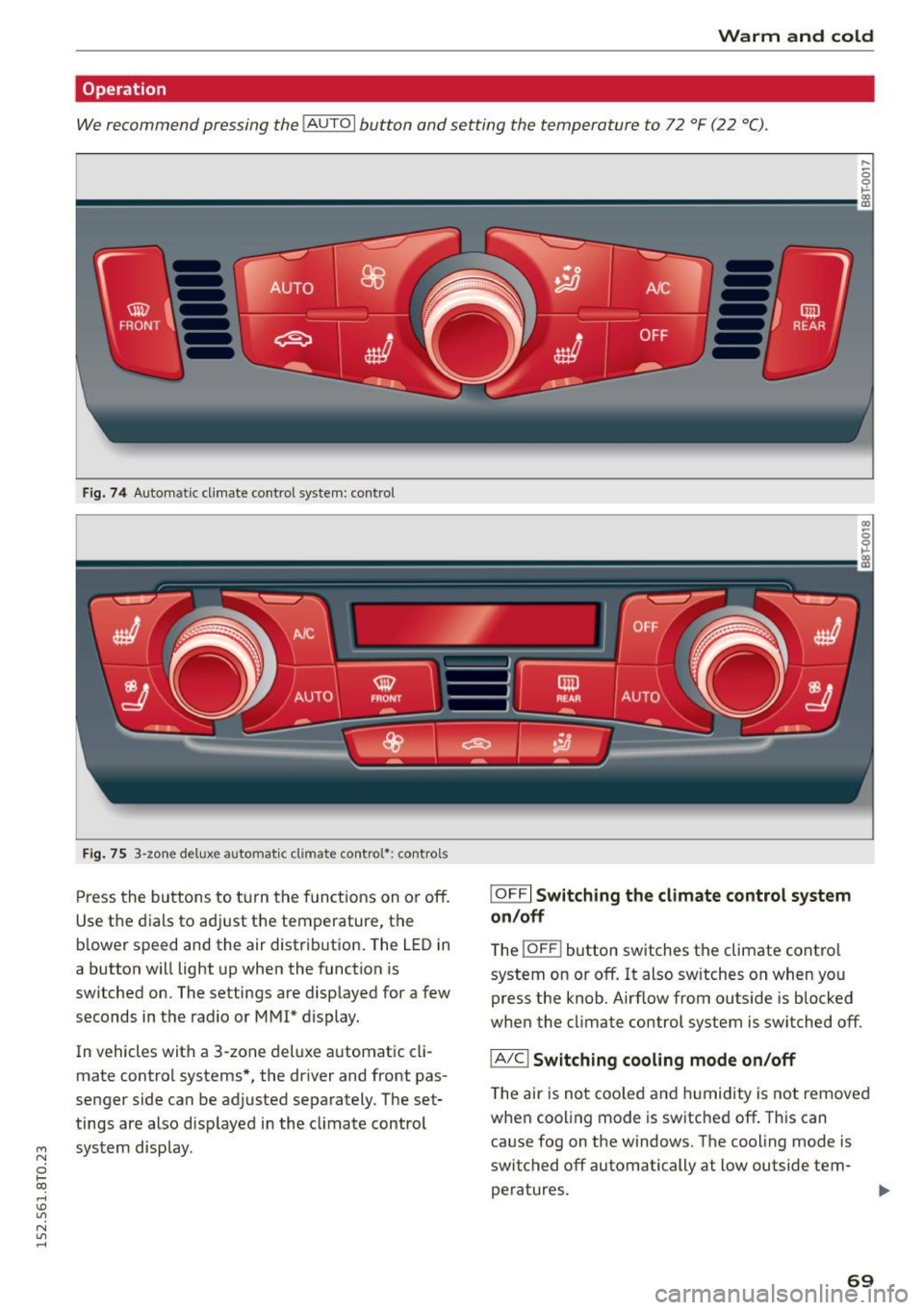
Operation
We recommend pressing the !AUTO I button and setting the temperature to 72 °F (22 °C).
Fig. 74 Automatic cl imate control system: control
Fig. 75 3-zone del ux e automatic climate controt•: controls
Press the buttons to turn the functio ns on or off.
Use the dials to adjust the temperature, the
b lower speed and the air distrib ution . The LED in
a button will light up when the function is
switched on. The settings are displayed for a few
seconds in the radio or MMI* display.
In vehicles with a 3-zone del uxe automat ic cl i
mate control systems*, the dr iver and front pas
senger side can be adjusted separately. The set·
tings are also disp layed in the climate control
"' system display.
N
0 loo
rl I.O
"' N
"' rl
IOFF I Switching the climate control system
on/off
The i OFF i button switches the climate contro l
system on or off. It also sw itches on when you
press the knob. Airflow from outside is blocked
when the climate control system is switched off.
IA/Cl Switching cooling mode on/off
The air is not coo led and humidity is not removed
when cool ing mode is switched off. This can
cause fog on the windows . The cooling mode is
switched off automatically at low outside tern· peratures. .,.
69
Page 73 of 264
M N
i? co ,...., \!) 1.1"1
N 1.1"1 ,....,
the risk of injury, these individuals sho uld
not use seat heating.
@ Note
To avo id damage to the heating elements in
the seats, do not kneel on the seats or place
heavy loads on a small a rea of the seat .
Setup
The basic climate control settings can be adjust
ed in the radio or MMI*.
"" Se lect : I CAR I fu nct ion button > A /C control but
ton . Or
"" Se lect:
ICAR I function button> Car sys tems*
control button > AC.
Automatic recircul ation*
When switched on, automatic re circula tion con
trols the recircu lation mode au toma tically . If the
windows fog up, press the
I ..., F RONT I button.
Synchronization *
When synchronization is sw itched on, the same
set tings are applied to both the d river and front
passenger, except fo r the seat heating/vent ila
t ion* . Synchronization switches off when you ad
just the settings on the front passenger's side .
You can a lso switc h synchron izat io n on by press
i ng and ho ld ing the knob on the driver's side.
Supplementary he ater
The supplementary heater warms the inter ior of
vehicles w ith flexible fuel engines more quickly.
The supplementa ry heater is cont rolled automat
i cally in the
Auto setting.
Warm and cold
71
Page 78 of 264
Driving
oil pressure must first build up in the hy
draulic va lve adjusters. This is normal and
not a cause for concern .
- If yo u leave the vehicle with the ign ition
switched on, the ignition will switch off af
ter a certa in period o f time . P lease note that
electr ica l equipment suc h as exterior lights
will switch off as well when that happens.
Switching engine off
Applies to vehicles: w ith conven ience key
" Bring your veh icle to a complete stop .
" Automat ic transm iss ion: Move the se lector lev
er to the P or N pos ition .
" Press the
!S TAR T ENGINE STOPI bu tton
~page 75, fig. 80 .
Steering lock
The steering locks when you tu rn the engine off
using the
! STA RT E NG IN E STOP I button and open
the dr iver's door . The locked stee ring helps pre
vent vehicle theft .
Emergency off
If necessary, the eng ine can be sw itched off with
the selector lever in the R o r D/S pos itions . T he
engine stops if you press and hold the
I S TAR T ENGIN E ST OP I button at speeds be low
6 mph ( 10 km/h) and p ress the brake pedal.
A WARNING
- Never turn off the engine be fore the veh icle
has come to a comp lete stop. The f ull func
t ion of the b rake booster and the power
steering is not guaranteed. Yo u must use
more force to turn or bra ke if necessa ry. Be
ca use you cannot steer and b ra ke as you
usually wou ld, this could lead to c rashes
and serious injur ies .
- For safety reasons , you should always park
yo ur vehicle wi th the selec to r l ever in P . Oth
erwise, t he vehicle could inadve rten tly roll
away .
- T he rad iator fan ca n con tinue to run for up
to 10 m inutes eve n after yo u have tur ned
o ff the engine and removed the igni tion key .
T he r adiator fan c an also turn on ag ai n if t he
76
engine coolant heats up because of intense
sunlight or heat b uild- up in the eng ine com
partme nt.
- Always take the key w ith you whenever yo u
leave your vehicle . Otherwise, the engine
could be started or electrical equipment
such as the powe r windows could be operat
ed. This can lead to serio us i njur y.
(D Note
If the engine has been under heavy load for
an extended pe riod, heat bu ilds up in the en
gine compartment after the eng ine is switch
ed off -there is a risk of damaging the engine .
A llow the engi ne to run at id le for about two
m in utes before swit ching i t off.
Driver messages
Ignition is on
This message appears and a warning tone sound s
i f you open the d river's door when the ign ition is
switched on .
No key ident ified
This message appears when the
I S TAR T ENGINE ST OP I butto n is pressed if there
i s no maste r key ins ide the ve hicle or if the sys
tem does not recogni ze it. For examp le, the mas
ter key cannot be recogn ized if it is covered by an
object (e .g . a luminum brief case) wh ich
screens
the radio signal. Elect ro n ic dev ices such as cell
phon es can a lso inte rfe re with the radio signal.
Press brake pedal to start eng ine
This message appears if yo u do not press the
brake pedal to start the eng ine in a vehicle with
an a utomat ic transm ission.
Pre ss clutch pedal to start engine
This message appears if yo u do no t press the
cl utc h ped al to sta rt the eng ine in a ve hicle w it h
a manual transmission.
Shift to N or P to start eng ine
This message appears when attempt ing to star t
t h e engine if the selecto r lever for the automat ic
transmission is not in the P o r
N position. T he ..,.
Page 82 of 264
Driving
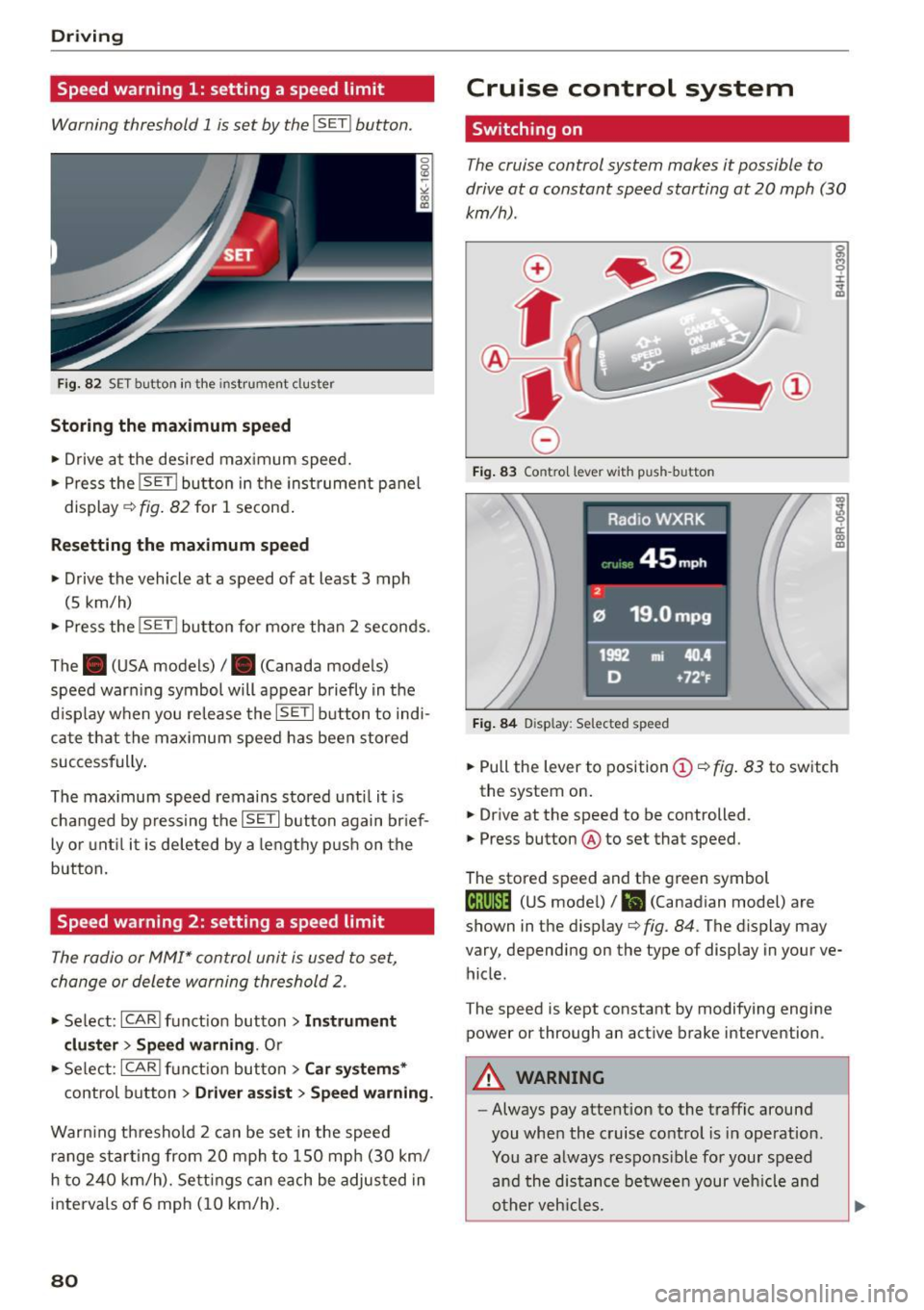
Speed warning 1: setting a speed limit
Warning threshold 1 is set by the I SE TI button.
F ig. 82 SET button in the instrument cluster
Storing the m aximum spe ed
• Drive at the desired maximum speed.
• Press the
!SET I button in the instrument p anel
display
c;, fig. 82 for 1 second .
Resetting the ma ximum speed
• Drive the vehicle at a speed of at least 3 mph
(5 km/h)
• Press the
i~S-ET~ I button for mo re than 2 seconds .
The . (USA models) /. (Canada models)
speed warn ing symbol will appear briefly in the
d isplay when you release the
!SETI button to indi
ca te that the max imum speed has been stored
successfully .
The max imum speed remains stored unti l it is
changed by pressing the
! SET I button again br ief
ly or unt il it is deleted by a lengthy p ush on the
button.
Speed warning 2: setting a speed limit
The radio or MMI* control unit is used to set,
change or delete warning threshold 2.
• Se lect: !CARI funct ion button> Instrum ent
clu ster > Sp eed warning .
Or
• Se lect: !CARI funct ion button> Car syste m s*
control button> Dri ver a ss is t> Speed warning .
Warning th reshold 2 can be set in the speed
r a nge starting from 20 mph to 150 mph (30 km/
h to 240 km/h). Settings can each be adjus ted in
interva ls of 6 mph (10 km/h) .
80
Cruise control system
Switching on
The cruise control system makes it possible to
drive at a constant speed starting at
20 mph (30
km/h).
0
f
®l
0
Fig . 83 Contro l lever with push-button
Fi g. 84 D isplay: Selected speed
g M 0 ±
~
Q)
~ ci: Q) m
• Pull the lever to position (D <::> fig. 83 to sw itch
the system on .
• Drive at the speed to be controlled .
• Press button ® to set that speed.
The stored speed and th e green symbol
til;\IJM4 (US mode l)/ El (Canadian model) are
shown in the display
c;, fig. 84. The display may
vary, depending on the type of display in your ve
hicle.
The speed is kept constant by modifying engine
power or through an act ive brake intervention.
A WARNING
-Always pay atte ntion to the traffic around
you when the cruise control is in operation.
You a re always respons ible for your speed
and the distance between your veh icle and
o ther veh icles.
-
Page 96 of 264
Audi adapt ive cru ise control and brak ing gu ard
c::::, ___ c::::,_ Distan ce 3: This setting corresponds
to a distance of 164 feet/SO meters when travel
ing at 62 mph (100 km/h), or a t ime interval of
1.8 seconds.
c::::, ___ _ c::::, Di stan ce 4: This setting corresponds
to a distance of 210 feet/64 meters when travel
ing at 62 mph (100 km/h), or a t ime interval of
2 .3 seconds.
_&. WARNING
Following other vehicles too closely increases
the risk of collisions and ser ious personal in
jury .
- Setting short distances to the traffic ahead
reduces the time and d istance availab le to
br ing your vehicle to a safe stop and makes
it eve n mo re necessa ry to pay close atten
t ion to traffic.
- Always obey applicable traffic laws, use
good judgment, and select a safe followi ng
dis tance for the traffic, ro ad an d wea ther
cond itio ns.
¢j) Tips
- Distance
3 is set automatically each time
you sw itch the ignit ion on.
- Your standard settings are automatically
stored and assigned to the remote contro l
k ey being used.
Setting the driving program
Applies to veh icles: with Audi adaptive cruise control
Depending on the se lected dr iv ing program and
distance, driving behavior when acce le rat ing will
vary from dynamic to comfortab le .
Setting the driving program for vehicles
w ithout Audi dr ive s elect*
~ In the radio/MM! *, select: I CAR ! function but
ton
> Adapti ve c ru is e control > Dri ving prog. >
comfo rt , stand ard or dyn amic . Or
~ Select : ICARI funct ion button > Car s ystems*
control button > Driver ass ist > Adap tive crui se
control
> Dr iving program * > Comfort , Stand
ard
o r Dynamic .
94
Setting the driving mode for vehicles with
Audi drive se lect*
Refer to r:!> page 103.
(D Tips
Your settings are automat ica lly stored and as
signed to the remote control key being used.
Request for driver intervention
Applies to vehicles: with Audi adapt ive cruise control
Fig . 102 Instr ument cl uster: request for driver interven
t ion
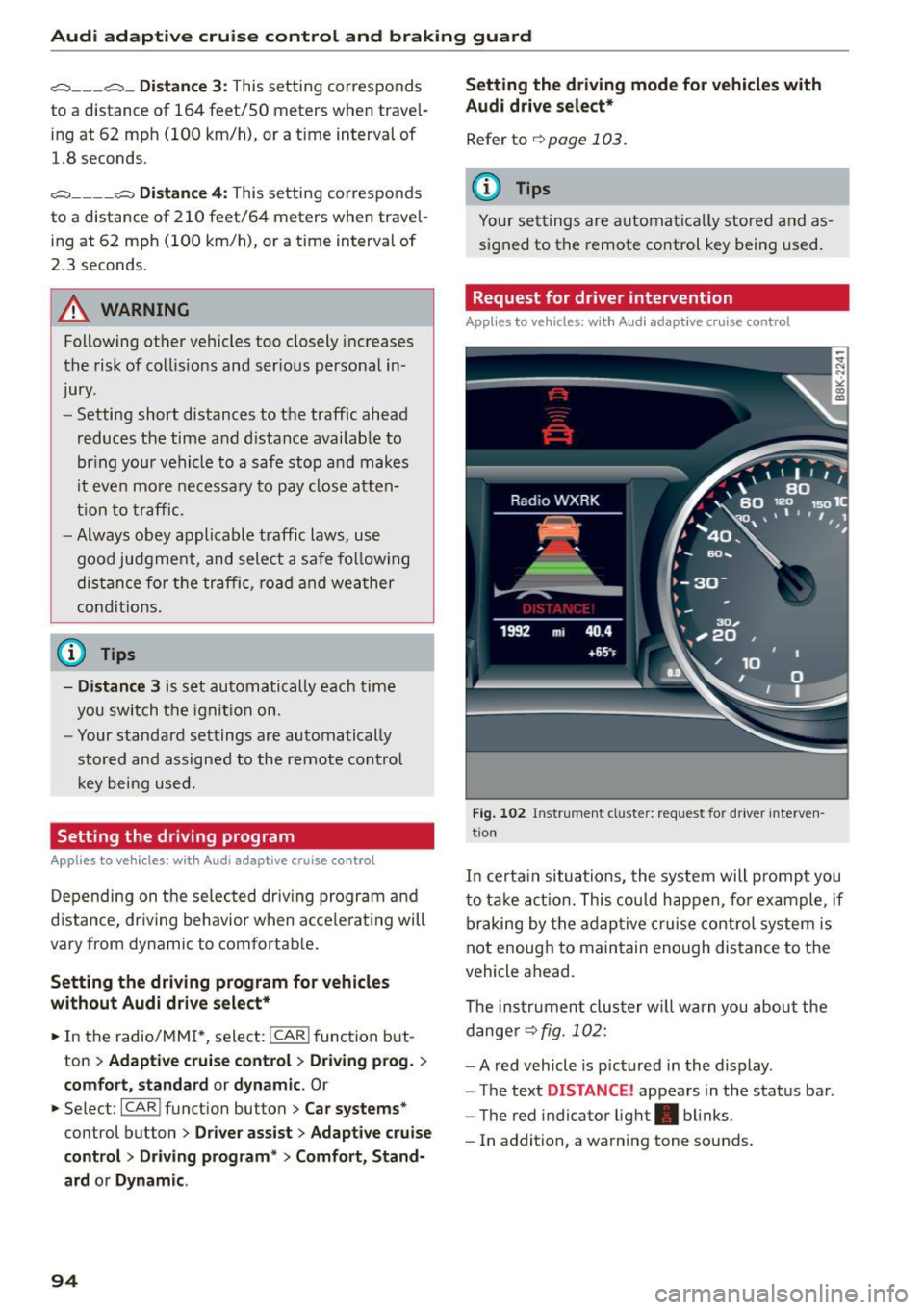
In certa in situations, the system will p rompt you
to take act ion. This could happen, fo r example, if
braking by the adap tive c ruise control system is
not enough to maintain enough distance to the
vehicle ahead.
The ins trumen t clu ster w ill warn you about the
dange r¢
fig. 102:
- A red vehicle is pictured in the display .
- The text
DISTANCE ! appears in the status bar .
- The red indicator light . blinks.
- In addition, a warning tone sounds.
Page 97 of 264
Audi adaptive cruise control and braking guard
Audi braking guard
Description
Applies to vehicles: with Audi adaptive cruise co ntrol
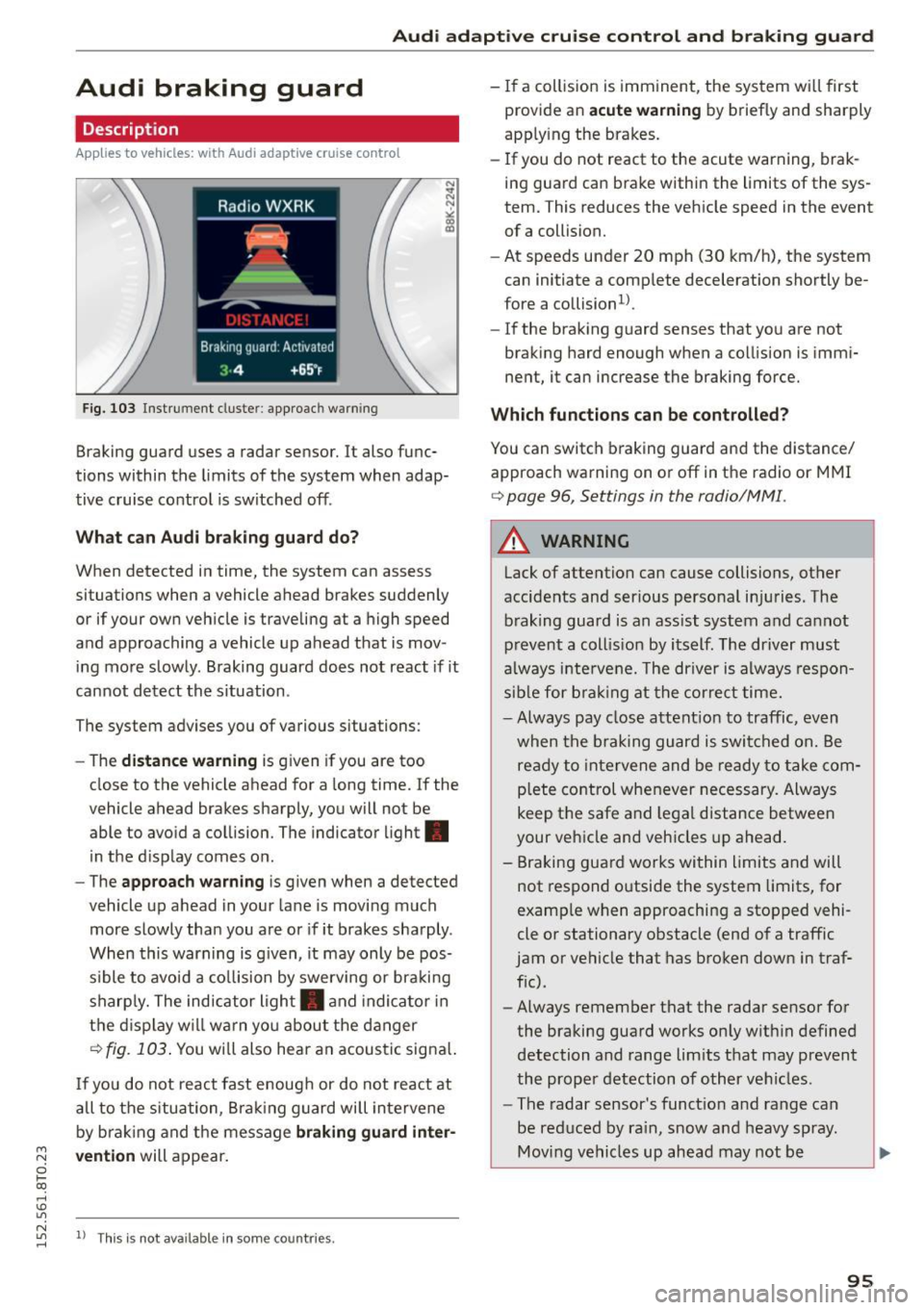
F ig. 103 Instrument cluste r: app roac h warn ing
Braking guard uses a radar sensor. It also func
tions within the limits of the system when adap
tive cruise control is switched off .
What can Audi braking guard do?
When detected in time, the system can assess
situations when a vehicle ahead brakes suddenly
or if your own vehicle is traveling at a high speed
and approaching a vehicle up ahead that is mov
ing more slowly . Braking guard does not react if it
cannot detect the s ituation .
The system advises you of various situations:
- The
distance warning is given if you are too
close to the vehicle ahead for a long time. If the
vehicle ahead brakes sharply, you will not be
able to avoid a collision. The indicator light.
in the d isplay comes on .
- The
approach warning is given when a detected
vehicle up ahead in your lane is moving much
more slowly than you are or if it brakes sharply .
When this warning is g iven, it may only be pos
s ible to avoid a co llision by swerving or braki ng
sharply. The indicator light . and indicator in
the display will warn yo u about the danger
c> fig. 103. You wi ll also hear an acoust ic signa l.
If you do not react fast enough or do not react at
all to the situation, Braking guard will intervene
by braking and the message
braking guard inter-
~ vention will appear.
0 l-oo
rl I.O
"' N "' 11
This is not available in som e count ries. rl
- If a collision is imminent, the system wi ll first
provide an
acute warning by briefly and sharply
app ly ing the brakes.
- If you do not react to the acute warning, brak
ing guard can brake within the limits of the sys
tem. This reduces the vehicle speed in the event
of a collision.
- At speeds under 20 mph (30 km/h), the system
can initiate a complete deceleration shortly be
fore a collisionl).
- If the braking guard senses that you are not
braking hard enough when a collision is immi
nent, it can increase the braking force.
Which functions can be controlled?
You can switch braking guard and the distance/
approach warning on or off in the radio or MMI
c> page 96, Settings in the radio/MM! .
A WARNING
-
Lack of attention can cause collisions, other
accidents and serious personal injuries. The b raking guard is an ass ist system and cannot
prevent a collis ion by itself. The driver must
always intervene. The driver is always respon
sib le for b ra kin g at the correct time.
- Always pay close attent ion to traffic, even
when the braking guard is switched on. Be
ready to intervene and be ready to take com
p lete control whenever necessary. Always
keep t he safe a nd legal distance between
your vehicle and vehicles up ahead.
- Braking guard works within limits and will
not respond outside the system limits, for
examp le when approaching a stopped vehi
cle or stationary obstacle (end of a traffic
jam or vehicle that has broken down in traf
f ic).
- Always remember that the radar sensor for
the braking guard works on ly w ithin defined
detection and range limits that may prevent
the proper detection of other vehicles.
- The radar sensor's funct ion and range can
be reduced by ra in, snow and heavy spray.
Moving vehicles up ahead may not be
,.
95