brakes AUDI A5 COUPE 2016 User Guide
[x] Cancel search | Manufacturer: AUDI, Model Year: 2016, Model line: A5 COUPE, Model: AUDI A5 COUPE 2016Pages: 264, PDF Size: 66.92 MB
Page 95 of 264
,-1 N
0 1-CX)
rl I.Cl U"I
,-1 I.Cl .-,
Audi adaptive cruise control and braking guard
.. To increase or reduce the speed in increments,
tap the lever up or down .
.. To increase or reduce the speed quickly,
hold
the lever up or down until the red LED ® reach
es the desired speed
<=:> page 91, fig. 97.
F ollowing any changes, the new stored speed will
be disp layed briefly in the display@r:::>
page 91,
fig. 97.
Interrupting cruise control
Appl ies to vehicles: w ith Audi a daptive cruise contro l
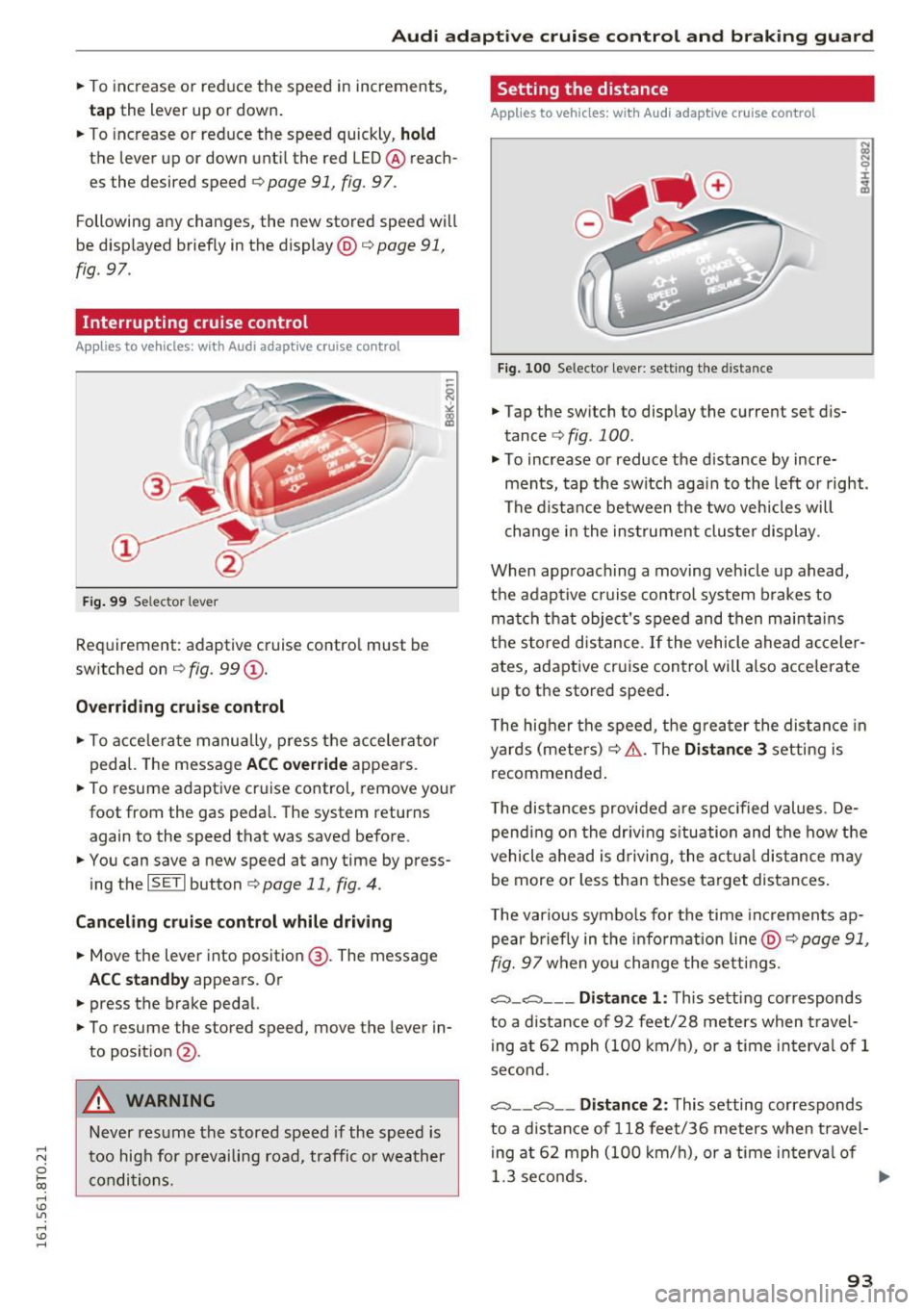
Fig. 99 Selec tor lever
Requirement: adaptive cruise contro l must be
switched on ¢
fig. 99 (D.
Overriding cruise control
.. To accelerate manually, press the accelerator
pedal. The message
ACC override appea rs.
.. To resume adaptive cruise control, remove your
foot from the gas pedal. The system returns again to the speed that was saved before.
.. You can save a new speed at any time by press
ing the
I SET I button ¢ page 11, fig . 4.
Canceling cruise control while driving
.. Move the lever into position @. The message
ACC standby appears. Or
.. press the brake pedal.
.. To resume the stored speed, move the lever in
to posit ion
@ .
A WARNING
Never resume the stored speed if the speed is
too high for prevailing road, traffic or weather
conditions.
Setting the distance
A pp lies to vehic les : with Aud i ada ptive cr uise con trol
Fig. 100 Selector lever: setting the distance
.. Tap the switch to display the current set dis
tance
r::::> fig. 100 .
.. To increase or reduce the d istance by incre
ments, tap the switch aga in to the left or right.
The distance between the two veh icles will
change in the instrument cluster display.
When approaching a moving vehicle up ahead,
the adaptive cruise control system brakes to
match that object's speed and then mainta ins
the stored distance.
If the vehicle ahead acceler
ates, adaptive cruise control will also accelerate
up to the stored speed .
T he higher the speed, the greater the distance in
yards (meters) ¢.& .T he
Distance 3 setting is
recommended .
T he distances provided are spec ified values. De
pending on the driving situation and the how the
vehicle ahead is driving, the actual distance may
be more or less than these target distances .
T he various symbols for the time increments ap
pear briefly in the info rmati on line @¢
page 91,
fig. 97 when you change the settings.
c:::::,_c:::::, ___ Distance 1: This setting corresponds
to a distance of 92 feet/28 meters when travel
ing at 62 mph (100 km/h), or a time interva l of 1
second.
c:::::, __ c:::::, __ Distance 2: This setting corresponds
to a distance of 118 feet/36 meters when travel
ing at 62 mph (100 km/h), or a time in terva l of
1.3 seconds.
ll>
93
Page 97 of 264

Audi adaptive cruise control and braking guard
Audi braking guard
Description
Applies to vehicles: with Audi adaptive cruise co ntro l
Fig. 102 Instrument cluste r: approach warning
Braking guard uses a radar sensor. It also func
tions within the limits of the system when adap
tive cruise control is switched off .
What can Audi braking guard do?
When detected in time, the system can assess
situations when a vehicle ahead brakes suddenly
or if your own vehicle is traveling at a high speed
and approaching a vehicle up ahead that is mov
ing more slowly . Braking guard does not react if
it cannot detect the situat ion.
The system advises you of various situations:
- The
distance warning is given if you are too
close to the vehicle ahead for a long time. If the
vehicle ahead brakes sharply, you will not be
able to avoid a collision. The indicator light .
in the display comes on.
- The
approach warning is given when a detected
vehicle up ahead in your lane is moving much
more slowly than you are or if it brakes sharply .
When this warning is g iven, it may only be pos
s ib le to avoid a collision by swerving or brak ing
sharply. The indicator light . and indicator in
the display will warn you about the danger
¢ fig. 102 . You will also hear an acoustic signal.
If you do not react fast enough or do not react at
all to the situation, Braking guard will intervene
by braking and the message
braking guard inter-
;::; vention
will appear.
0 l-ex)
rl I.Cl U'"I
rl
"' 1> Th
is is not availab le in some co untries. rl
-If a collision is imminent, the system wi ll first
provide an
acute warning by briefly and sharply
apply ing the brakes.
- If you do not react to the acute warning, brak
ing guard can brake within the limits of the sys
tem. This reduces the vehicle speed in the event of a collision.
- At speeds under 20 mph (30 km/h), the system
can initiate a comp lete decelerat ion shortly be
fore a collision
ll.
- If the braking guard senses that you are not
braking hard enough when a collision is immi
nent, it can increase the braking force .
Which functions can be controlled?
You can switch braking guard and the distance/
approach warn ing on or off in the radio or MMI
¢ page 96, Settings in the radio/MM! .
A WARNING
-
Lack of attention can cause collisions, other
accidents and ser ious personal in juries. The
braking guard is an assist system and cannot
prevent a collision by itself. The driver must
always intervene. The driver is always respon
sible for braking at the correct tim e.
- Always pay close attention to traffic, even
when the braking guard is switched on. Be
ready to intervene and be ready to take
comp lete control whenever necessary. Al
ways keep the safe and legal distance be
tween your vehicle and vehicles up ahead .
- Braking guard works within limits and will
not respond outside the system limits, for
examp le when approaching a stopped veh i
cle or stationary obstacle (end of a traff ic
jam or vehicle that has broken down in traf
fic).
- Always remember that the radar sensor for
the braking guard works only within def ined
detection and range limits that may prevent
the proper detect ion of other vehicles.
- The radar sensor's function and range can
be reduced by rain, snow and heavy spray.
Moving vehicles up ahead may not be
,.
95
Page 172 of 264
Intelligent Technology
shared, please see your contract with the
wireless te lecommunications provider and the
"About Aud i connect" tab in your vehicle's
MMI*:
I MENU ! button > Audi connect > About
Audi con nect .
Electronic Stabilization
Control (ESC)
Description
E SC helps to imp rove ro a d hold ing and vehicle
dynamics to help reduce the probab ility of skid
d ing and loss of veh icle control. It works only
when the engine is runn ing . ESC detects certain
d iffic ult dr iving situat io ns, including when the
ve hicl e is begin ning to spin (yaw) o ut of contro l
a nd h elps you to ge t the veh icle b ack u nder con
trol by se lectively braking the wheels, and/or re
ducing engine powe r and providing steering as
sistance to help hold the vehicle on the driver's intended course. The indicator light
GI in the in
strument cluster blinks when ESC is tak ing action
t o he lp you contro l the vehicle.
ESC has lim itations. It is important to remembe r
that ESC cannot overcome the laws of physics. It
will not a lways be able to help out under all con
d itions you may come up aga inst . For example,
ESC may not always be able to help you master
situations where there is a sudde n change in the
coeff ic ie nt of fr iction of the road surface. W hen
there is a se ction of dry road tha t is sudde nly cov
e red with w ater, slush o r sn ow , ESC c annot pe r
form the same way i t wou ld on the dry s urface. If
the vehicle hydrop lanes (rides on a cushion of wa
ter instead of t he road su rface), ESC wi ll not be
ab le to he lp you stee r the veh icle because contact
with the pavement has been inter rupted and the
ve hicle cannot be b raked or steered . Dur ing fast
cornering, part icu larly on w inding roads, ESC
can not always deal as effect ive ly w it h difficult
d riving situat ions than a t lowe r speeds . When
towi ng a trail er, ES C i s not able to help you re
g ai n con trol as it would if you we re not towing a
tra ile r.
A lways ad just yo ur speed and driving sty le to
road , tr affic and weathe r cond itions. ESC canno t
override the vehicle's phys ical lim its, incre ase the
170
available tract ion, or keep a vehicle on the road i f
r oad depa rt u re is a res ult of d river inattention .
Instead, ESC improves the poss ib ili ty of keeping
the ve hicle unde r contro l and on the road d uring
extreme maneuvers by using the driver's steer ing
i nputs to help keep the vehicle going in the in
tended direction . If you are traveli ng at a speed
t h at causes you to r un off the road before ESC
can p rovide any assista nce, you may not exper i
ence the benefi ts of ESC.
ESC is switched on all the time. In certa in s itua
tions when you need less tract ion, yo u can sw itch
off AS R by press ing the button
I!] c:> page 171,
fig. 152 or c> page 171 , fig. 153. Be s ure to
swi tch ASR on again w hen you no longer need
l ess trac tion.
The following systems a re in tegrated in the ESC:
Anti-lock braking system (ABS)
ABS prevents the wheels from locking up when
braki ng . The vehicle can st ill be steered even d ur
i ng hard b raking . Apply steady p ressure to the
brake peda l. Do not pump the pedal. A p uls ing in
t h e b rake pedal indica tes th at th e system is help
i ng yo u to b rake t he ve hicle.
Brake assist system
The bra ke assist system can decrease braking dis
ta nce. It increases b raking powe r whe n the dr iver
presses t he br ake peda l quickly i n emergency sit
u at io ns. Yo u must pre ss and ho ld the bra ke peda l
u nt il t he s itu at ion is ove r. In vehicles wi th adap
tive cr uise con trol *, the brake assist sys tem is
more sensitive if t he di stance detected to the ve
h icle ahead is too sma ll.
Anti-slip regulation (ASR)
ASR redu ces engine powe r whe n the dr ive whee ls
begin to spi n and a da pts the fo rce to the road
con ditio ns. Thi s ma kes it easier to s tart, acce le r
ate and d rive up hills .
Electronic differential lock (EDL)
The ED L brakes w heels that are spi nning and
t ra nsfe rs the dr ive power to the ot her dr ive
whee l or w heels if the vehicle is equ ipped with
a ll- wheel drive*. This function is not avai lab le at
h ighe r speeds. .,..
Page 174 of 264
Intelligent Technology
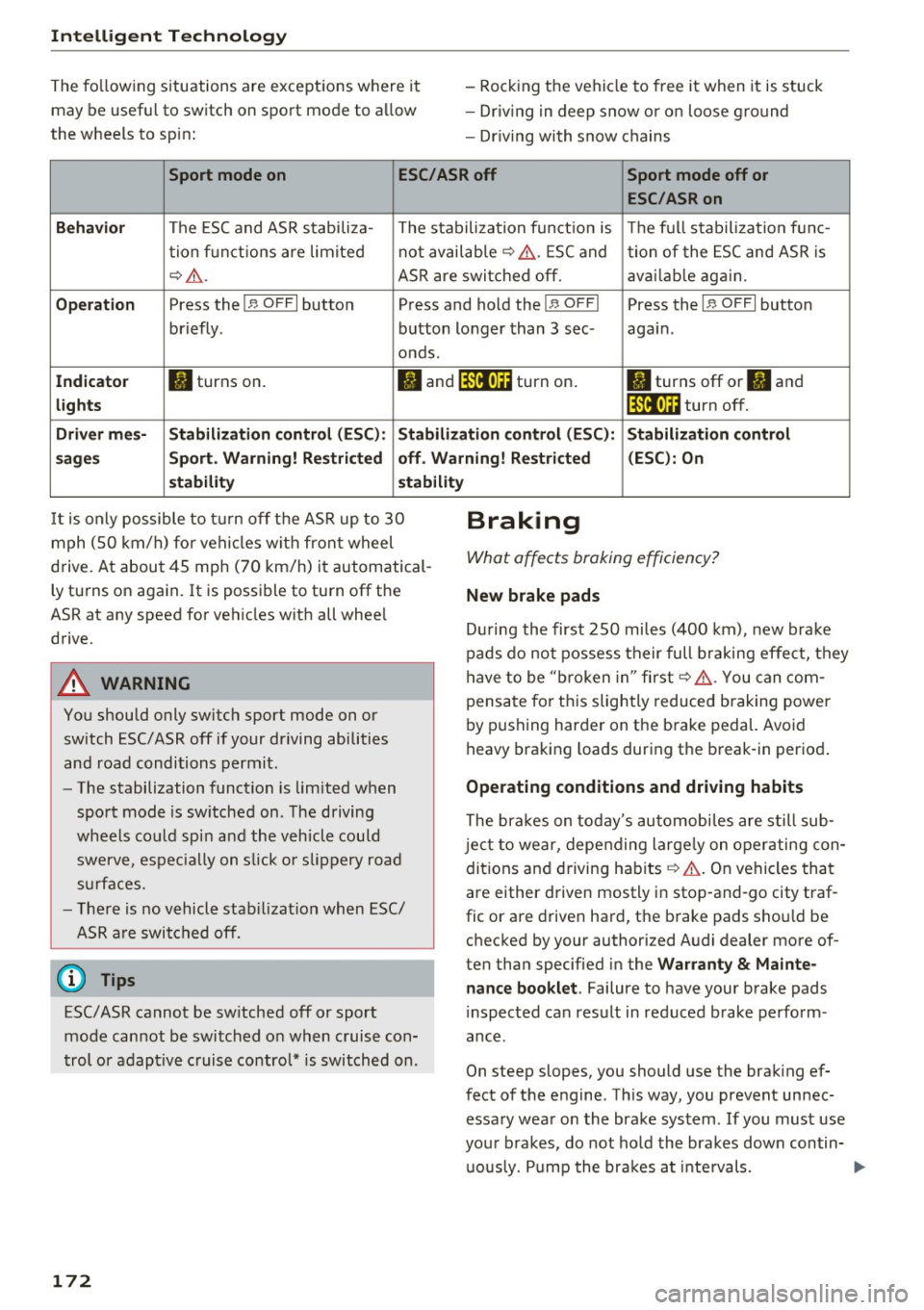
The fo llowing s ituations are exceptions where it
may be useful to switch on sport mod e to a llow
the wheels to sp in : -
Rock ing the vehicle to free it when it is stuck
- Dr iv ing in deep snow or o n loose g ro und
- Dr iving with snow chains
Sport mode on ESC/ASR off Sport mode off or
ESC/ASRon
Beha vior
The ESC and ASR stabiliza- The stabilization funct ion is The f ull stabilization fun c-
t ion f un ct ions are lim ited not availab
le ¢ ,&. . ESC and
tion of the ESC and ASR is
¢ .&. .
ASR are switched off. ava ilab le aga in.
Op era tion Press the I 1> OFF I button Press and hold the !1> O FFI Press the I,, OFF I button
briefly . button longer than 3 sec- again.
onds .
In dicato r II turns on.
• and lf'lii•li~ turn on . II turns off or II and
light s lf'lii•l~~ turn off.
Driv er m es- Stabilization contr ol (E S C): Stabilization control (ESC ): Stabilization control
s age s Sport. Warning! Restri cted off . Warning ! Re stri cted (ESC
): On
s t a bilit y stabilit y
It is only possible to t urn off the ASR up to 30
mph (SO km/h) fo r vehicles w ith front wheel
d rive. At about 45 mph (70 km/h) it automatical
ly tu rns on again. It is possible to turn off the
ASR at any speed for vehicles w ith all whee l
drive .
A WARNING
You should only switch sport mode on or
switch ESC/ASR off if your driving abilities
and road conditions permit .
-
-The stabilization function is limited when
sport mode is sw itched on . The driving
wheels co uld spi n and the vehicle could
swerve , espec ia lly on s lick o r slippery road
s ur faces.
- The re is no vehicle stab ilizat ion when ESC/
ASR a re switched off.
(D Tips
ESC/ASR cannot be sw itched off or sport
mode cannot be switched on when cruise co n
t rol or adaptive cruise control* is switched on .
172
Braking
What affects braking efficiency?
New brake pads
D ur ing the first 250 miles (400 km) , new brake
pads do not possess their full b raking effe ct, they
have to be "b roken in" first ¢,&. . You can com
pensa te for th is slightly reduced b raking power
by p ushing harder on the brake pedal. Avo id
heavy braking loads dur ing the break-in period .
Operating conditions and driving habits
The brakes on today's automobi les are s till sub
je ct to wear, depending large ly on operating con
dit ions and driving habits ¢.&. . On vehi cles that
a re either driven mostly i n stop-and-go city traf
fic or are drive n hard, the b rake pads sho uld be
checked by your authorized A udi dealer more of
ten than specified in the
Wa rrant y & Mainte
nance book let .
Failure to have your brake pads
i nspected can result in reduced brake perform
ance .
On steep slopes, you should use the brak ing ef
fect of the engine . Th is way, you prevent unnec
essary wear on the brake system . If you must use
your brakes, do not ho ld the bra kes down contin
u ously. P ump the bra kes at inte rvals.
Page 175 of 264
.... N
0 I-co ....
Noises may occur when braking depend ing on the
speed, braking force and outside conditions such
as temperature and humidity.
Eff ect of wat er and road salt
In ce rtain situations, for example after dr iving
through water, in heavy ra in, afte r ove rnig ht con
densat io n or after washing your car, the braking
effect can be reduced by moisture or ice on the
brake rotors and brake pads. The brakes must be
dried first with a few careful brake applications .
At highe r speeds and with the windsh ie ld wipers
turned on, the brake pads press against the brake rotors for a short amount of time . This occurs at
regular intervals without the driver noticing and
provides for better brake response time under
wet conditions.
The effectiveness of the brakes can be reduced
when the vehicle is driven on a salt-covered road and the brakes are not used . Likewise, you clean
off accumu lated salt coating from brake discs
and pads with a few cautious applications of the
brake ~,&. .
Cor ro sion
There may be a tendency for dirt to b uild up on
the brake pads and corros ion to form on the discs
if the car is not driven regularly or only for short
tr ips with little use of the brakes .
If the brakes are not used frequently, or if corro
sion has formed on the discs, it is adv isable to
clean off the pads and discs by braking firmly a
few t imes from a moderately high speed
c:> ,&. .
Fa ults in the brake sy stem
If you should notice a sudden increase in brake
pedal travel, then one of the two brake circuits
may have failed
c:> ,&. .
Low brak e fluid level
M alfunct ions can occur in the brake system if the
b rake fluid leve l is too low . The brake fluid level
is monitored e lectronically .
Intelligent Technology
Brake booster
The brake boos ter increases the press ure that
you generate with the brake peda l.
It works only
when the eng ine is running
. c:> .&.
Brake lining wear status
B rake lining wea r may be chec ked by visua l in
spe ct ion of the condi tion of the brake pads
t hr ough the openings in the wheel. If necessary,
the wheel may be removed for this inspection
c:> page 2 26, Replacing wheels .
_8 WARNING "'---
-New brake pads don't have the best stop
ping power and m ust be "broken-in" during
the initial 250 miles (400 kilometers). You can compensate for this by p ressing the
brake pedal more firmly . This also app lies
later when new pads are installed.
-
- You shou ld pe rform braking maneuvers for
the purpose of cleaning the brake system
only i f road condit ions pe rmit . Other road
users m ust not be put at r is k -you may
cause an ac ciden t!
- Before descending a s teep g rade , reduce
speed and sh ift tr ansmi ssion into a lower
gear or lower dr iving range. Do not r ide the
brakes or hold the pedal down too long or
too often. This co uld cause the brakes to get
hot and dimin ish braking eff ic iency.
- Do not "ride the bra kes" by resting your foot
on the pedal when you do not intend to brake. This may cause the brakes to over
heat, premature wear and increased stop
ping distance.
- Unde r ce rtain climatic and operating condi
tions such as passing through water, driving in heavy rain or after wash ing the veh icle,
the effectiveness o f the brakes ca n be re
duced. In winter, ice can accumu late on the
brake pads, lin ings , d is c s and dr ums . Care
fu lly apply br akes for a test. Brakes will dry
and ice coatings will be cleaned off after a
few careful bra ke applications .
- Driving for an extended period of time on
salt -covered roads without using your
brakes can also affect braking eff iciency .
173
Page 176 of 264
Intelligent Technology
Clean off accumulated salt coating from
brake discs and pads with a few caref ul
brake app lications.
- If you damage the front spoiler, or if yo u in
stall a d ifferent spoiler, be sure the air flow
to the front brakes is not obstructed. Other
wise the brake system could overheat reduc
ing the effectiveness of the entire b rake sys
tem.
- Failure of one brake c ircuit will impair the
bra king capability res ult in g in an increased
stopp ing distance. Avoid driving the vehicle
and h ave i t towe d to the ne arest author ized
Audi dealer or quali fied workshop.
- Never let the vehicle roll to a s to p wi th the
eng ine shut off.
- I f the bra ke booste r is not wor kin g, the
bra ke pe dal m ust be presse d considerably
harder to make up for the lac k of b oos ter
assistance .
Electro-mechanical
power assist, dynamic
steering
The electro-mechanical power assist helps the
driver when steering.
Power steering adapts electronically based on
the vehicle speed .
Indicator lights and mess ages
• Steering defective! Do not dri ve vehicle!
If thi s ind icator light tu rns on and stays o n and
this message appears, t he power steering may
have fa iled.
D o
not conti nue d riving. See yo ur autho riz ed
Aud i dea ler o r a q ua lified repair facility fo r assis
tance.
l;r-ij Dynamic steering : Sy stem fault! You can
c ontinue driving
If t he i ndicator lig ht t urns on and the message
appears, the steering may be more difficult to
move or mo re sens it ive than usual. The steer ing
wheel may also be a t an an gle when dr iv ing
s tra ight .
174
Drive slowly to your a uth orized Audi dea ler or
qualified workshop to have the malfunction cor
r ected.
'I-ij Dynamic steering: initializing
If this d rive r message appea rs and t he in dicator
li ght is flashing on the instr ume nt pa nel, dynam
ic steer ing * is being re ini tiali zed. After s tarting
the e ngine, t he s teer ing whee l w ill move sligh tly.
Re -initializa tion might be necessary if the steer
ing whee l was moved hard to the left and right
whi le the vehicle was not moving . T he d isp lay
goes out as soon as initiali zation is comp lete.
A WARNING
-
H ave the dynamic steering* system malfunc-
tion repaired as soon as poss ible by an au
thor ized Audi dealer or qualified workshop -
risk of acc ident!
@ Tips
- If the . or 'I-ij indicator light only stays on
for a sho rt time, you may cont inue driving.
- The dynamic steerin g* stab ility systems a re
not ava ilable in the event of a system mal
function .
- For add itiona l information on dynamic
steeri ng*, refer to
<=> page 102.
Driving with your
quattro
Applies to vehicles: with all-whee l dr ive
With all-wheel drive, all four wheels are driven.
General informat ion
With a ll-w heel d rive, power is distri buted to a ll
fo ur wheels. This happens automat ica lly depend
i ng on your d riving style a nd the roa d conditions
at the t ime . See also
c> page 170.
A center d ifferen tial d istr ibu tes the dr iving powe r
variab ly to the front and rear ax le.
It works to
gether w it h select ive whee l torque contro l, w hich
ac tiv ates w hen d rivi ng thro ugh curves
<=> page 171. With the spo rt different ial *, power
distribution to the rear wheels is variable and can
be adjusted with drive select<::>
page 102. .,.
Page 179 of 264
.... N
0 Ico ....
environment
Breaking in
New engine
The engine needs to be run-in during the first
1,000 miles (1,500 km).
For the first 600 miles (1 ,000 kilometer s):
"' Do not use full throttle .
"' Do not drive at engine speeds that are more
than
2/3 of the max imum permitted RPM .
From 600 to 1,000 miles (1 ,000 to 1 ,500
kilometers):
"' Speeds can gradually be increased to the maxi
mum pe rm issib le road or engine speed .
During and after break-in pe riod
"' Do not rev the engine up to high speeds when it
is cold. This applies whether the transmission is
in N (Neutral) or in gear .
After the break-in period
"'Do not exceed maximum engine speed under
any c ircumstances.
"'U pshift into the next higher gear
before reach
ing the red area at the end of the tachometer
sca le
c=>page 10.
During the first few hours of driving, the eng ine's
internal friction is higher than later when all the
mov ing parts have been broken in . How well this
b reak-in process is done depends to a considera
b le exte nt on the way the veh icle is d rive n during
t he first 1,000 miles (1,500 kilometers).
(D Note
Extremely high eng ine speeds a re au toma ti
cally reduced. However, these rpm limits are
programme d for a n engine well run-in, not a
new engine.
@) For the sake of the environment
D o not dr ive with u nnecessari ly high eng in e
spee ds -ups hifting ea rly saves fuel, reduces
noise and pro tec ts the envi ronme nt.
Driving and the envir onment
New tires
If your vehicle is runn ing on new tires, d rive very
car efu lly fo r the firs t 35 0 miles (500 kilometers)
a ft er fit ting.
New tires tend to be slippe ry and must a lso
be "bro ken-in". Be sure to remembe r th is dur
i ng the fi rst 350 m iles (500 kilometers).
Brake gent ly. Avoid following closely behind
other vehicles or other s ituations that m ight
r equire sudden, hard b raking.
Avoid damaging the
vehicle
When yo u are dr iv ing o n poor roa ds, or over
cur bs, stee p ramps, e tc., ma ke cert ain that low
ly ing parts s uch a s spo ile rs a nd exh aust sy stem
parts do no t bottom o ut and get dama ged.
T his is espec ially true for ve hicles with low-s lung
c h ass is (sports c hass is) * and fully loaded
vehicles.
Driving through water on
roads
Note t he following to avoi d ve hicle damage w hen
driv ing through water, for examp le on flooded
roads:
- The water must not be any hig her t han the bot
tom of the vehicle body.
- Do not dr ive faste r than walk ing speed.
A WARNING
= -
Afte r driv ing th ro ugh water, m ud, slush, etc .,
the brakes may be slow to take effect beca use
of wet brake rotors and pa ds. Dry the brakes
f irst by braking carefully to restore the full
b raking effect.
(D Note
Ve hicle compone nts such as the engine,
transmission, suspension o r electrica l system
can be severely damaged by driving throug h
water.
177
Page 181 of 264
.... N
0 Ico ....
tion, maintenance and storage . Pay attention to
addit ional information concerning the battery .
Refer to¢
page 200 .
Economical and environ
mentally-friendly driving
General
Your personal style of driving will determine the
economy of your vehicle, as well as exhaust and
noise levels.
F ue l economy, environmenta l impact, and we ar
on your engine, brakes and tires la rgely depend
on three factors :
- you r persona l dr iving sty le
- operating conditions
- technical lim itations
If you anticipate what you need to do next and
drive economically, you can eas ily cut your fue l
consumption by
10-15 percen t. This section will
g ive you some tips on how you can help the envi
ronment and yo ur pocketbook .
(!) Tips
The consumpt ion estimates as published by
ENVIRONMENTAL PROTECTION AGENCY (EPA) and Transport Canada may not cor re
spond to your actual consumption on the
road, which will va ry depending upon vehicle
load and speed, road and wea ther condi tions,
t rip length, etc.
Drive smoothly and keep a lookout ahead
Vehicles use the most fuel when they are acceler
ating.
" Avoid unnecessary accelerating a nd braking .
Veh icles use the most fuel when they are acceler
ating . If you anticipate what is going to happen
next , you will need to brake less and, thus, accel
e rate less . let the vehicle coast wheneve r possi
b le -fo r example when yo u see that the next traf
fic light is red .
Driving and the envir onment
Avoid full throttle
Driving at moderate speeds saves fuel and im
proves your mileage .
"Try and keep well below your car 's maximum
speed.
Acce lerating gently reduces fuel consumption,
engine wear, and does not disturb the environ
ment.
Fuel consumption, exhaust emissions and engine
noise increase disproport ionately at high speeds.
If you drive at approximately three quarters of
top speed, fuel consumption will be reduced by
one half. Never drive faster than the posted
speed limit and weather cond itions permit .
Reducing unnecessary idling
Even when your car is jus t idling it burns up fuel.
" Shut the eng ine off when you are not driving
the vehicle.
" Do not warm up the vehicle by lett ing the en-
gine run
at idle.
It makes sense to shut off the engine in traffic
jams, when waiting for trains to pass at railroad cross ings, or at traff ic lights that have long waits
on red . Turning the engine off for just
30 -40 sec
onds saves more f uel than is burned starting the
. . engine again.
It takes a long time for the eng ine to warm up
fully when it is running at idle . However, wear
and noxious emissions are especially h igh when
the engine is warming up . So yo u should dr ive
away as soon as you start the eng ine and avoid
runn ing at high rpms w hile the engine is st ill
warming up .
(D Note
Do not leave eng ine idling unattended after
s tart ing. If wa rning lights sho uld come on to
i ndicate improper operation, they would go
unheeded . Extended idling also prod uces
heat, which could resu lt in overheating or
other damage to the vehicle or other proper
ty.
179
Page 183 of 264
.... N
0 Ico ....
General information
Your Audi was designed primarily for passenger
transportation .
If you plan to tow a trailer, please remember that
the additional load will affect durability, econo my and performance.
T railer towing not only places more stress on the
vehicle, it also calls for more concentration from
the driver.
For this reason, always follow the operating and
driving instructions provided and use common
sense.
Technical requirements
Trailer hitch
Use a weight-carrying hitch conforming to the
gross trailer weight. The hitch must be suitable
for your vehicle and trailer and must be mounted
securely on the vehicle's chassis at a technically
sound
location . Use only a trailer hitch with a re
movable ball mount . Always check with the trail
er hitch manufacturer to make sure that you are
using the correct hitch.
Do not use a bumper hitch.
The hitch must be installed in such a way that it
does not interfere with the impact -absorbing
bumper system . No modifications should be
made to the vehicle exhaust and brake systems .
From time to time, check that all hitch mounting
bo lts remain securely fastened.
When you are not towing a trailer,
remove the
tra iler hitch ball mount . This prevents the hitch
from causing damage should your vehicle be
struck from beh ind ¢
,&. .
Trailer brakes
If your trailer is equipped with a braking system,
check to be sure that it conforms to all regula
tions .
Trailer mode
The trailer hydraulic brake system must not be
directly connected to the vehicle's hydraulic
brake system ¢.&. .
Safety chains
Always use safety chains between your vehicle
and the trailer.
Trailer lights
T ra iler lights must meet all regulations . Be sure
to check with your author ized Audi dealer for cor
rect wiring, switches, and relays.
Mirrors
If you are unable to see the traffic behind you us
ing the regular outside mirrors, then you
must in
stall extended mirrors. It is important that you
always have clear vision to the rear.
,8. WARNING
-If a trailer has electrical brakes please note
that these brakes are not activated by the
factory-fitted control unit -risk of accident!
- After removing the trailer hitch, do not store it in your vehicle. In case of sudden
braking, the hitch could fly forward and in
jure you or your passengers.
Operating instructions
Maximum trailer weight
A trailer for your vehicle is limited to a typical
class 1 or class 2 trailer.
Trailer load distribution
Be sure the load in the trailer is held securely in
place to prevent it from shifting forward, back
ward or sideways.
Never allow a passenger to ride in a trailer¢.&.
in Driving instructions on page 182.
Engine cooling system
Towing a trailer makes the engine work harder . It
is important that the cooling system's perform
ance is up to the additional load . Make sure that
the cooling system has enough fluid. .,..
181
Page 184 of 264
Trailer mode
Tire pressure
When towing a trailer, inflate the tires of you r
veh icle to the cold tire pressure listed under "Fu ll
load" on the label located on the driver's side B
pillar (visib le when the door is open) . Inflate
trai ler tires to trailer and tire manufacturers'
specifications.
Lights
The headlight settings should be checked with
the trailer attached before driving off. Check to
make sure both vehicle and trailer lights are
working properly .
Safety chains
Be sur e trailer safety chains are properly connect
ed from the trai ler to the hitch on the vehicle .
Leave enough slack in the chains to permit turn
ing corners . When you install safety chains, make
sure they w ill not drag on the road when you are
driving.
The chains shou ld cross under the trailer tongue
to prevent it from dropping in case of separation
from the hitch.
Driving instructions
Driving with a trailer always requires extra care
and consideration.
To obtain the best possible handling of vehicle
and trailer, please note the fo llowing :
.. Do not tow a loaded trailer when your car itself
is not load ed .
.. Be especia lly carefu l when passing other
vehicles .
.. Observe speed limits.
.. Do not drive at the maximum permissible
speed .
.. Always apply brakes early.
.. Monitor the temperature gauge .
Weight distribution
Towing a loaded trailer with an empty car resu lts
in a high ly unstable distribution of weight. If this
cannot be avo ided, drive at very low speeds only
to avoid the risk of losing steering control.
182
A "balanced" rig is easier to operate and control.
This means that the tow vehicle shou ld be loaded
to the extent possible and permissib le, wh ile
keeping the trailer as light as poss ible under the
c ir cumstances . Whenever possible, transfer
some cargo to the luggage compartment of the
tow veh icle while observing tongue load require
ments and vehicle load ing considerations .
Speed
The higher the speed, the more difficult it be
comes for the driver to control the r ig. Do not
drive at the maximum permissible speed. Reduce
your speed even more if load, weather or wind
cond it ion s are unfavorab le -particularly when
go ing downh ill.
Reduce vehicle speed
immediately if the trailer
shows the slightest sign of sway ing .
Do not try
to stop the swaying by accelerating.
Observe speed limits. In some areas, speeds for
vehicles towing tra ilers are lower than for regular
vehicles.
Always apply brakes early. When driving down
hill, shift into a lower gear to use the engine
braking effect to slow the vehicle . Use of the
brakes alone can cause them to overheat and fail.
Coolant tempe rature
The coolant temperature gauge c::> page 10 must
be observed carefully.
If the needle moves close
to the upper end of the scale, reduce speed im
med iately and/or turn off the a ir cond itioner .
If the coolant temperature warning light . in
the instrument cluster starts flashing, pull off
the road, stop and let the engine
idle for about
two m inutes to prevent heat build-up .
A WARNING
Anyone not properly restrained in a moving
vehicle is at a much greater risk in an acci
dent. Never let anyone ride in your car who is
not properly wearing the restraints provided
by Audi.
-