change time AUDI A5 COUPE 2016 User Guide
[x] Cancel search | Manufacturer: AUDI, Model Year: 2016, Model line: A5 COUPE, Model: AUDI A5 COUPE 2016Pages: 264, PDF Size: 66.92 MB
Page 101 of 264
,-1 N
0 1-CX)
,-1
"' U"I
,-1
"' ......
General information
App lies to vehicles: with Audi side assist
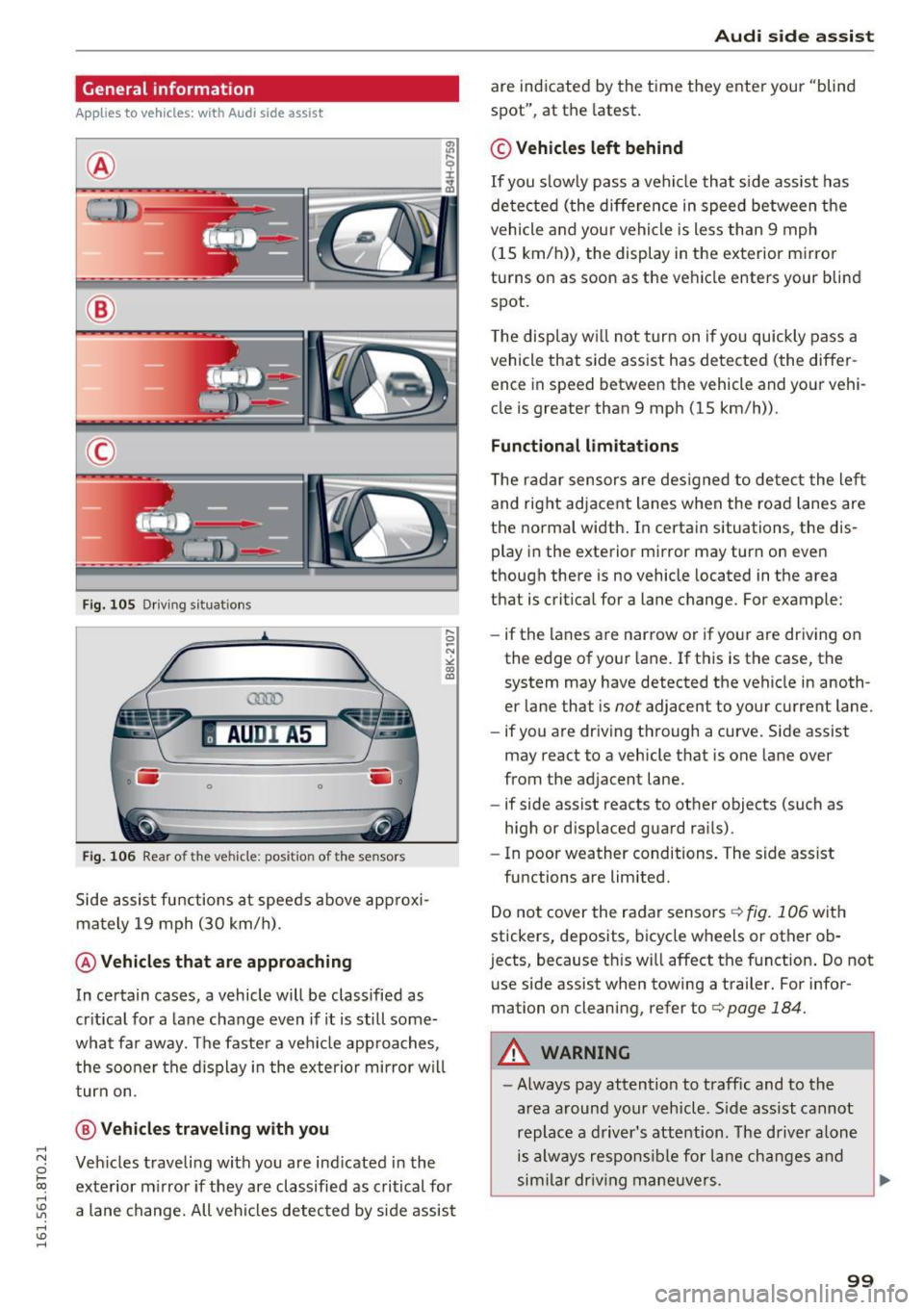
®
®
©
Fig. 105 Driving sit ua tio ns
AU DI A5
. .-0 0 iii .
Fig. 106 Rear of the vehicle: position of the senso rs
Side assist functions at speeds above approxi
mately 19 mph (30 km/h).
@ Vehicles that are approaching
In certain cases, a vehicle will be classified as
critical for a lane change even if it is still some
what far away. The faster a veh icle app roaches,
the sooner the display in the exterio r mirror w ill
turn on.
@ Vehicles traveling with you
Vehicles traveli ng with you are ind icated in the
exterior mi rror if they are classified as critical for
a lane change. All vehicles detected by side assist
Audi side assist
are indicated by the time they enter your "blind
spot", at the latest.
© Vehicles left behind
If you s low ly pass a vehi cle that side assist has
de tected (the difference in speed between the
vehicle and your vehicle is less than 9 mph
(15 km/h)), the display in the exterior mirror
turns on as soon as the vehicle enters your blind
spot.
T he display w ill not turn on if you quickly pass a
vehicle that side assist has detected (the differ ence in speed between the vehicle and your vehi
cle is greater than 9 mph (15 km/h)) .
Functional limitations
T he radar sensors are designed to detect the left
and right adjacent lanes when the road lanes are
the normal width . In certain situations, the dis
play in the exterior mirror may turn on even
though there is no vehicle located in the area
that is critical for a lane change. For example:
- if the lanes are narrow or if your are driving on
the edge of your lane. If this is the case, the
system may have detected the vehicle in anoth
er lane that is
not adjacent to your current lane.
- if you are driving through a curve. Side assist
may react to a vehicle that is one lane over
from the adjacent lane.
- if side assist reacts to other objects (such as
high or d isplaced guard rai ls) .
- In poor weather conditions. The side ass ist
functions are limited.
Do not cover the radar sensors
c:> fig. 106 with
stickers, deposits, bicycle wheels or other ob
j ects, because th is will affect the f unction . Do not
use side assist when towing a trailer. For infor
mation on cleaning, refer to
c:> page 184.
A WARNING
= -
-Always pay attention to traffic and to the
area around your vehicle. S ide assist cannot
replace a driver's attention. The driver alone
is always responsibl e for lane changes and
sim ilar drivin g maneuvers .
IJI,
99
Page 102 of 264
Audi side assist
-Improper reliance on the side assist system
can cause collisions and serious personal in
jury:
- Never rely only on side assist when chang
ing lanes.
- Always check rear view mirrors to make
sure that it is safe to change lanes.
- Side assist cannot detect all vehicles under
all conditions- danger of accident!
- Please note that side assist indicates there
are approaching vehicles, or vehicles in your blind spot, only after your vehicle has
reached a driving speed of at least 19 mph
(30 km/h).
- In certain situations, the system may not
function or its function may be limited. For
example:
- if vehicles are approaching or being left
behind very quickly . The display may not
turn on in time .
- in poor weather conditions such as heavy
rain, snow or heavy mist .
- on very wide lanes, in tight curves or if
there is a rise in the road surface . Vehicles
in the adjacent lane may not be detected
because they are outside of the sensor
range.
(D Note
The sensors can be displaced by impacts or damage to the bumper, wheel housing and
underbody . This can affect the system . Have
your authorized Audi dealer or authorized
Audi Service Facility check their function.
(D Tips
-If the window glass in the driver's door or
front passenger's door has been tinted, the
display in the exterior mirror may be misin
terpreted.
- For Declaration of Compliance to United
States FCC and Industry Canada regulations
c::> page 247.
100
Activating and deactivating
Applies to vehicles: with A udi side assist
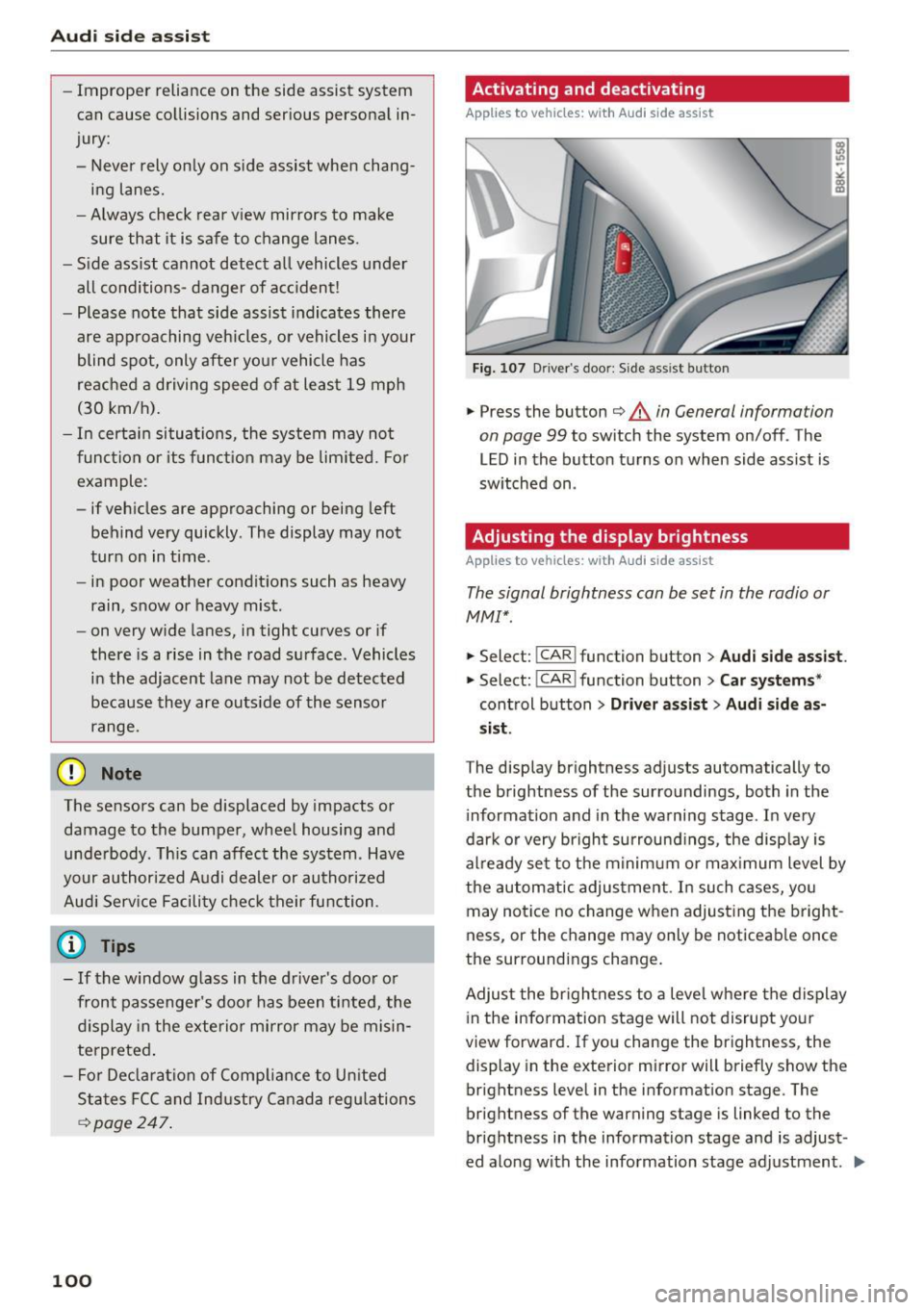
Fig. 107 D riv er's doo r: Side ass ist butto n
.,.. Press the button c::> &. in General information
on page 99
to switch the system on/off . The
LED in the button turns on when side assist is
switched on .
Adjusting the display brightness
Applies to vehicles: with A udi side ass ist
The signal brightness can be set in the radio or
MMI* .
.,.. Select: I CAR I function button > Audi side assist.
.,.. Select: I CAR I function button > Car systems*
control button > Driver assist> Audi side as
sist.
The display brightness adjusts automatically to
the brightness of the surroundings, both in the
information and in the warning stage . In very
dark or very bright surroundings, the display is
already set to the minimum or maximum level by
the automatic adjustment . In such cases, you
may notice no change when adjusting the bright
ness, or the change may only be noticeable once
the surroundings change.
Adjust the brightness to a level where the display
in the information stage will not disrupt your
view forward. If you change the brightness , the
display in the exterior mirror will briefly show the
brightness level in the information stage. The
brightness of the warning stage is linked to the
brightness in the information stage and is adjust
ed along with the information stage adjustment.
Iii>
Page 104 of 264
Audi drive select
Audi drive select
Driving settings
Introduction
Applies to vehicles: with Audi drive select
Drive select provides the poss ibility to experience
d ifferent types of vehicle settings in one veh icle.
F or instance, using the three
Comfort, Auto and
Dynamic modes, the driver can switch from a
sporty to a comfortable driving mode with the
press of a button.
Addit ional ly, in vehicles with MM I*, the vehicle
setup for
Individual* mode can be customized by
you. This makes it possible to combine settings such as a sporty engine tuning with comfortable
steering .
A WARNING
-
Improper use of the Audi drive select can
cause collisions, other accidents and serious
personal injury .
Description
Applies to vehicles: with Audi drive select
The vehicle setup in each mode depends on the
veh icle's features . However, the engine, auto
mat ic transmission* and steering are always in
volved.
Engine and automatic transmission*
Depending on the mode, the engine and the au
tomatic transmission respond quicker or in a
more balanced manner to accelerator pedal
movements . In the sporty dynamic mode, the au
tomatic transmission shifts at higher RPMs.
Steering
The steering adapts in terms of steering effort
and steering ratios. Indirect steer ing that moves
easi ly, like the steering in comfort mode, is best
suited to long drives on a highway. In contrast,
dynamic mode provides sporty, direct steering.
The follow ing applies to vehicles with dynam ic
steer ing*: the stee ring rat io changes based on
veh icle speed in orde r to ma inta in optim um
steer ing effort for the driver at all times. This
102
sets the steering to be less sensitive at higher
speeds in order to provide improved vehicle con
tro l. At reduced speeds, however, steering is
more direct in order to keep the steering effort as
minimal as possible when the driver is maneuver
ing the vehicle . At low and average speeds, dy
nam ic steering addit ionally prov ides more re
spons ive steering perfo rmance .
Adaptive dampers*
The adaptive dampers* use sensors to record in
formation regarding steering movements, brak
ing and acceleration operations by the driver,
road surface, driving speed, and load . This makes
i t possible to adapt damping to the driving situa
tion virtua lly in real time . Drive select also makes
i t possible to satisfy the desire for spor ty suspen
sion (Dynamic) and comfortable suspension
(Comfort) without giving up balanced tuning (Au
to).
Sport differential*
As a component of the all wheel dr ive system
(quattro)
r=;, page 174, the sport differential* dis
tributes the driving power to the rear axle de
pending on the situation. The distribution of
power varies depending on the mode selected.
The goal is a high level of ag ility and ability to ac
ce lerate on curves. The vehicle is very respons ive
to steering.
Audi adaptive cruise control*
The behavior when accelerating can be adjusted
from comfortable to sporty, depending on the
drive select mode. Adaptive cruise control also responds to the driving behavior of the vehicle
ahead in a more conservative or sporty manner .
Engine sound*
The sound of the engine is adapted to the select
ed mode and ranges from subtle to sporty.
@ Tips
- In some models, the maximum vehicle
speed can only be reached in the
Auto and
Dynamic modes.
- For vehicles with an automatic transmis-
sion, se lecting the
Dynamic mode resu lts in ..,_
Page 105 of 264
,-1 N
0 1-CX)
rl I.Cl U"I
,-1 I.Cl ......
sporty shifting characteristics. The S gear
position engages automatically.
- In vehicles that have dynamic steering*, op
erating noise is heard when starting or stop ping the engine. This does not indicate a
problem.
Selecting the driving mode
Applies to vehicles: with Audi drive select
You con choose between Comfort , Auto , Dynam
ic
and Individual* modes.
N N 0
~====:::: ~ ~
drive I se lect _ ~ -~-
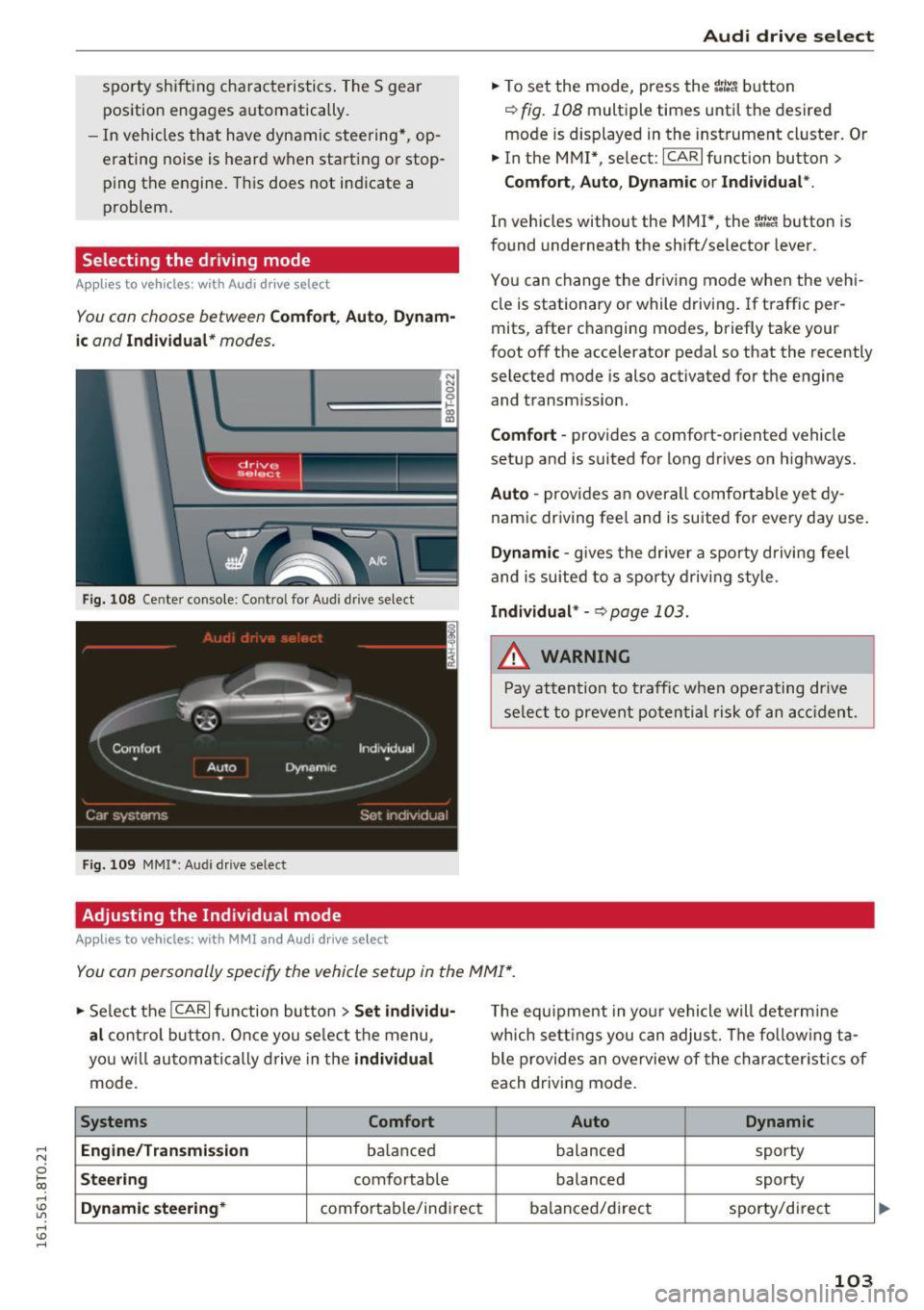
Fig. 108 Center console : Co ntro l fo r Audi d rive select
Fig. 109 MMI*: Aud i drive select
Adjusting the Individual mode
Applies to vehicles: with MMI and Audi drive select
Audi drive select
.,. To set the mode, press the r:/tc'i button
~ fig. 108 multiple times until the desired
mode is displayed in the instrument cluster. Or
.,. In the MMI* , select: ICARlfunction button>
Comfort, Auto, Dynamic or Individual *.
In vehicles without the MMI*, the r:l:c'i button is
found underneath the shift/selector lever.
You can change the driving mode when the vehi
cle is stationary or while driving . If traffic per
mits, after changing modes, briefly take your
foot off the accelerator pedal so that the recently
selected mode is also activated for the engine and transm ission.
Comfort -provides a comfort-or iented vehicle
setup and is suited for long drives on highways.
Auto -provides an overa ll comfortable yet dy
namic driving feel and is suited for every day use.
Dynamic -gives the driver a sporty driving feel
and is suited to a sporty driving style .
Individual* -Qpoge 103 .
.&, WARNING
-Pay attention to traffic when operating drive
select to prevent potential risk of an accident.
You con personally specify the vehicle setup in the MMI* .
.,. Select the I CAR I function button > Set individu·
al
control button. Once you select the menu,
you w ill automatically drive in the
individual
mode.
Systems Comfort
Engine/Transmi ssion
ba lanc ed
Steering comfortable
Dynamic steering* comfortable/indi rect T
he equipment in your vehicle will determine
which settings you can adjust. The fo llowing ta
ble provides an overview of the characteristics of
each driving mode.
Auto Dynamic
balanced sporty
balanced sporty
balanced/d irect
sporty/direct
103
Page 110 of 264

Parking System
-Dampen the lens with a household alcohol
based glass cleaner, and clean the lens with a
dry cloth
~0 .
- Remove snow with a hand brush and ice pref
erably with a de-icing spray
~ 0 .
A WARNING
-The parking aid cannot replace the driver's
attention. The driver alone is responsible for
parking and similar driving maneuvers.
-Always keep your eyes on the vehicle's sur roundings, using the rear view mirror as
well.
- Do not allow yourself to be distracted from
traffic by the rear view camera pictures.
- If the position and the installation angle of
the camera has changed, for example, after
a rear end collision, do not continue to use
the system for safety reasons . Have it
checked by a qualified dealership.
(D Note
-Low obstacles already signaled by a warning
can disappear from the system's detection
range as they are approached and will not
continue to be signaled. Objects such as
barrier chains, trailer draw bars, thin paint
ed vertical poles or fences may not be de
tected by the system, posing risk of dam
age.
- Never use warm or hot water to remove
snow or ice from the rear view camera lens -
danger of crack formation on the lens!
- When cleaning the lens, never use products
that are abrasive.
Switching on /off
A pp lies to veh icles : w ith pa rking system (rear, wit h rear view
camera)
The rear view camera switches on automatically
together with the acoustic park assist when you
put the vehicle in reverse.
Switching on
... Put the vehicle in reverse gear, the acoustic
parking system with rear view camera is acti
vated automatically. Activation of the acoustic
108
parking system is confirmed by a brief acknowl
edgement sound.
Switching off
""Drive faster than 9 mph (15 km/h), or
""take the vehicle out of reverse gear. The acous
tic parking system is immediately deactivated,
and the rear view camera picture is deactivated
automatically after a period of about 15 sec
onds, or
... switch off the ignition.
The delay in deactivating the camera provides an uninterrupted view behind the vehicle especially
when maneuvering in tight parking spaces and prevents the picture from turning off the every
time you shift out of reverse .
If the warning message appears in the display
but not the rear view camera picture, read and
confirm the warning message . The acoustic dis
tance signal is always active.
If you press a function button on the MMI control
console, the rear view camera picture disappears.
The rear view camera picture reappears the next
time you park.
Further information on the warning message and
the MMI control console can be found in the MMI
instruction booklet.
A WARNING
-Only use the rearview camera to assist you if
it shows a good, clear picture. For example,
the image may be affected by the sun shin
ing into the lens, dirt on the lens or if there
is a defect.
- Use the rearview camera only with the rear
lid completely closed. Make sure any objects
you may have mounted on the rear lid do
not block the rearview camera.
@ Tips
-The rear view camera picture is available as
soon as the MMI Display or the MMI is
switched on, or the start-up phase is com
pleted .
- The sensors must be kept clean and free of
snow and ice for the park assist to operate.
Page 111 of 264
,-1 N
0 1-CX)
,-1 I.Cl U"I
,-1 I.Cl ......
-You can change the volume and pitch of the
signals as well as the display
c::, page 111.
- What appears in the display is time-de
layed.
Reverse Parking
Applies to vehicles: with parking system (rear, with rear view
camera)
Parking mode 1 can be used when parking in a
garage or parking space .
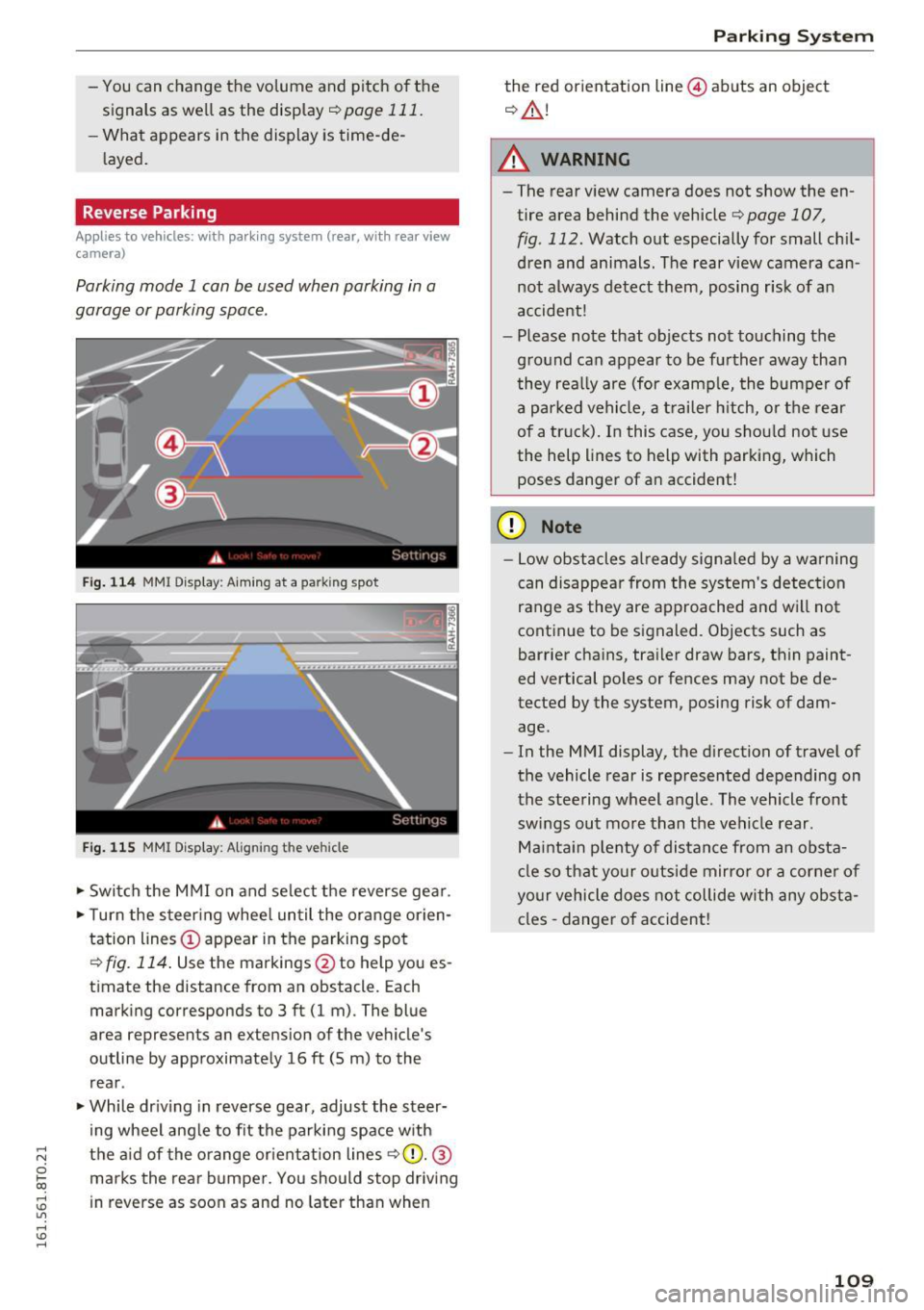
Fig. 114 MM I Di splay : Aiming at a park in g spot
Fig. 115 MMI Display: Aligning t he ve hicle
• Switch the MMI on and select the reverse gear .
• Turn the steering wheel until the orange orien
tation lines © appear in the parking spot
c::> fig. 114. Use the markings @to help you es
timate the distance from an obstacle. Each marking corresponds to 3 ft (1 m) . The blue
area represents an extension of the vehicle 's
outline by approximately 16
ft (5 m) to the
rear .
• While driving in reverse gear, adjust the steer
ing wheel angle to fit the parking space with
the aid of the orange orientation lines
r=> (D. @
marks the rear bumper. You should stop driving
in reverse as soon as and no later than when
Parking System
the red orientation line@) abuts an object
c::, &.!
A WARNING
-The rear view camera does not show the en
tire area behind the vehicle r=>page 107 ,
fig . 112. Watch out especially for small chil
dren and animals. The rear view camera can
not always detect them, posing r isk of an
accident!
- Please note that objects not touching the
ground can appear to be further away than
they really are (for example, the bumper of
a parked vehicle, a trailer hitch, or the rear
of a truck). In this case, you should not use
the help lines to help with parking, which
poses danger of an accident!
(D Note
- Low obstacles already signaled by a warning
can disappear from the system's detection
range as they are approached and will not
continue to be signaled. Objects such as
barrier chains, trailer draw bars, thin paint
ed vertical poles or fences may not be de
tected by the system, posing risk of dam
age.
- In the MMI display, the direction of travel of
the vehicle rear is represented depending on
the steering wheel angle . The vehicle front
swings out more than the vehicle rear .
Maintain plenty of distance from an obsta
cle so that your outside mirror or a corner of
your vehicle does not collide with any obsta
cles -danger of accident!
109
Page 172 of 264
Intelligent Technology
shared, please see your contract with the
wireless te lecommunications provider and the
"About Aud i connect" tab in your vehicle's
MMI*:
I MENU ! button > Audi connect > About
Audi con nect .
Electronic Stabilization
Control (ESC)
Description
E SC helps to imp rove ro a d hold ing and vehicle
dynamics to help reduce the probab ility of skid
d ing and loss of veh icle control. It works only
when the engine is runn ing . ESC detects certain
d iffic ult dr iving situat io ns, including when the
ve hicl e is begin ning to spin (yaw) o ut of contro l
a nd h elps you to ge t the veh icle b ack u nder con
trol by se lectively braking the wheels, and/or re
ducing engine powe r and providing steering as
sistance to help hold the vehicle on the driver's intended course. The indicator light
GI in the in
strument cluster blinks when ESC is tak ing action
t o he lp you contro l the vehicle.
ESC has lim itations. It is important to remembe r
that ESC cannot overcome the laws of physics. It
will not a lways be able to help out under all con
d itions you may come up aga inst . For example,
ESC may not always be able to help you master
situations where there is a sudde n change in the
coeff ic ie nt of fr iction of the road surface. W hen
there is a se ction of dry road tha t is sudde nly cov
e red with w ater, slush o r sn ow , ESC c annot pe r
form the same way i t wou ld on the dry s urface. If
the vehicle hydrop lanes (rides on a cushion of wa
ter instead of t he road su rface), ESC wi ll not be
ab le to he lp you stee r the veh icle because contact
with the pavement has been inter rupted and the
ve hicle cannot be b raked or steered . Dur ing fast
cornering, part icu larly on w inding roads, ESC
can not always deal as effect ive ly w it h difficult
d riving situat ions than a t lowe r speeds . When
towi ng a trail er, ES C i s not able to help you re
g ai n con trol as it would if you we re not towing a
tra ile r.
A lways ad just yo ur speed and driving sty le to
road , tr affic and weathe r cond itions. ESC canno t
override the vehicle's phys ical lim its, incre ase the
170
available tract ion, or keep a vehicle on the road i f
r oad depa rt u re is a res ult of d river inattention .
Instead, ESC improves the poss ib ili ty of keeping
the ve hicle unde r contro l and on the road d uring
extreme maneuvers by using the driver's steer ing
i nputs to help keep the vehicle going in the in
tended direction . If you are traveli ng at a speed
t h at causes you to r un off the road before ESC
can p rovide any assista nce, you may not exper i
ence the benefi ts of ESC.
ESC is switched on all the time. In certa in s itua
tions when you need less tract ion, yo u can sw itch
off AS R by press ing the button
I!] c:> page 171,
fig. 152 or c> page 171 , fig. 153. Be s ure to
swi tch ASR on again w hen you no longer need
l ess trac tion.
The following systems a re in tegrated in the ESC:
Anti-lock braking system (ABS)
ABS prevents the wheels from locking up when
braki ng . The vehicle can st ill be steered even d ur
i ng hard b raking . Apply steady p ressure to the
brake peda l. Do not pump the pedal. A p uls ing in
t h e b rake pedal indica tes th at th e system is help
i ng yo u to b rake t he ve hicle.
Brake assist system
The bra ke assist system can decrease braking dis
ta nce. It increases b raking powe r whe n the dr iver
presses t he br ake peda l quickly i n emergency sit
u at io ns. Yo u must pre ss and ho ld the bra ke peda l
u nt il t he s itu at ion is ove r. In vehicles wi th adap
tive cr uise con trol *, the brake assist sys tem is
more sensitive if t he di stance detected to the ve
h icle ahead is too sma ll.
Anti-slip regulation (ASR)
ASR redu ces engine powe r whe n the dr ive whee ls
begin to spi n and a da pts the fo rce to the road
con ditio ns. Thi s ma kes it easier to s tart, acce le r
ate and d rive up hills .
Electronic differential lock (EDL)
The ED L brakes w heels that are spi nning and
t ra nsfe rs the dr ive power to the ot her dr ive
whee l or w heels if the vehicle is equ ipped with
a ll- wheel drive*. This function is not avai lab le at
h ighe r speeds. .,..
Page 195 of 264
,-1 N
0 1-CX)
,-1 I.Cl U"I
,-1 I.Cl ......
Checking and Filling
Engine compartment
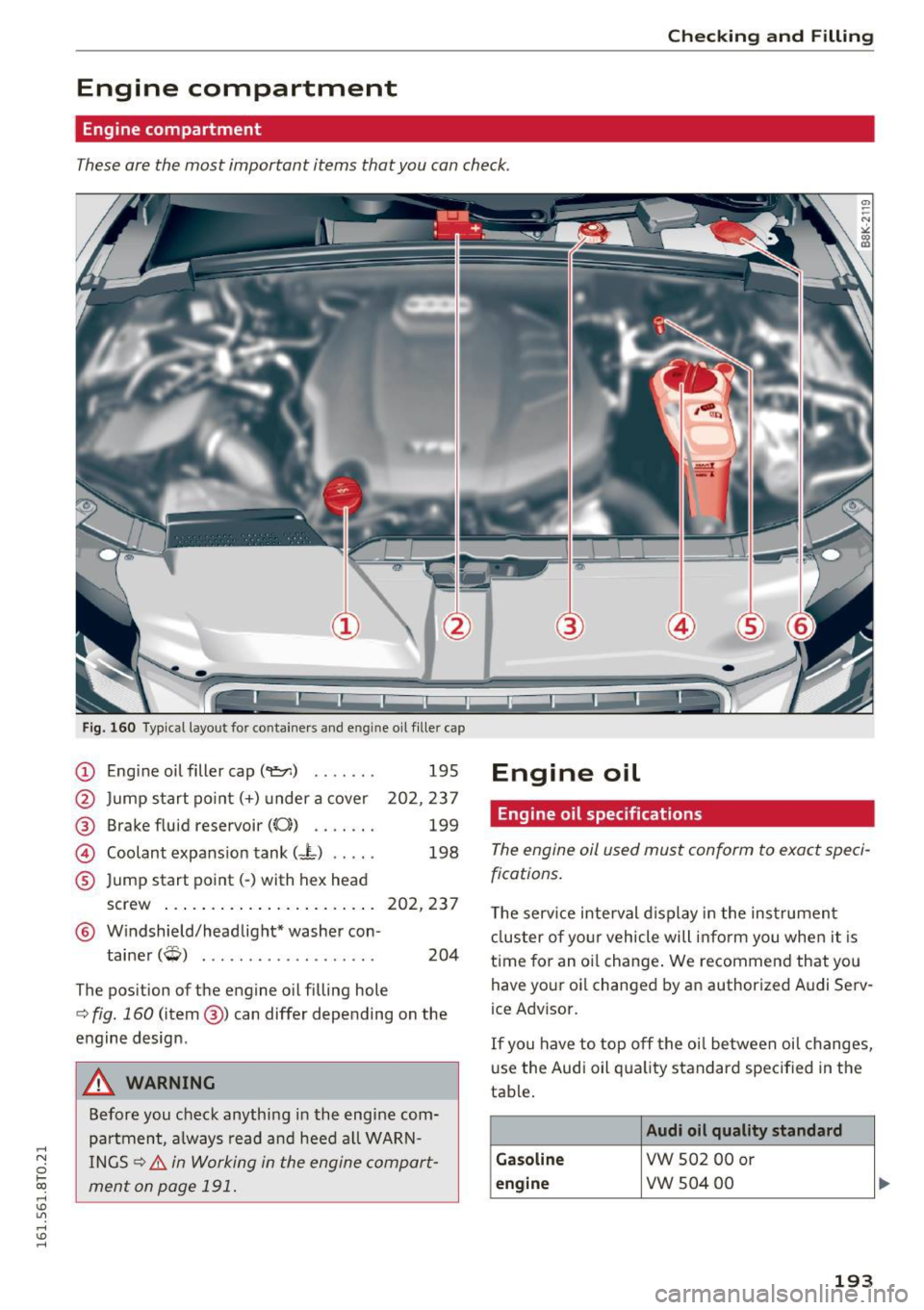
Engine compartment
These are the most important items that you can check.
Fig. 160 Typical layout for containers and e ngin e oil fille r cap
(D Eng ine o il filler cap (
@ Brake fluid reservoir
((0) ...... .
@ Coolant expansion tank (- L) .... .
® Jump start point( -) with hex head
195
202,237
199
198
screw . . . . . . . . . . . . . . . . . . . . . . . 202, 237
@ Windshield/headlight* washer con-
tainer
(W) . . . . . . . . . . . . . . . . . . . 204
The position of the engine oil filling hole
c:> fig. 160 (item @) can differ depending on the
engine design .
A WARNING
Before you check anything in the engine com
partment, always read and heed all WARN
INGS
c:> &. in Working in the engine compart
ment on page 191.
Engine oil
Engine oil specifications
The engine oil used must conform to exact speci
fications.
T he serv ice interval display in the instrument
cluster of your vehicle will inform you when it is
time for an oi l change . We recommend that you
have your oi l changed by an authorized Audi Serv
ice Advisor.
If you have to top off the oil between oil changes,
use the Audi oil quality standard specified in the
table .
Audi oil quality standard
Gasoline
VW 502 00 or
engine vw 504 00
193
Page 196 of 264
Check ing and F illing
Using the proper engine oil is impo rtant for the
functionality and service life of the engine. Your engine was facto ry-filled with a h igh-quality oi l
which can usually be used throughout the entire
year.
@) Note
Your Limited New Vehicle War ranty does not
cover damage or malfunctions due to failure
to follow recommended maintenance and use
requirements as set forth in the Audi Owner's
Manual and Warran ty
& Maintenance booklet.
- Use only a high quality eng ine oil t hat ex-
p ressly complies with the Audi oil qua lity
standard specified for your vehicle's engine .
Using a ny o ther oil can cause serious engine
d am age.
- D o not mix any lubricants o r other addit ives
i nto the engine oil. Doing so ca n cause en
g ine damage.
(D Tips
I f you need to add oil and there is none availa
ble t hat meets the Audi o il quality standard
your eng ine requi res , you m ay ad d a tot al of
no more than 0.5 qu art /li ter o f a h igh-quality
"synthe tic"oil that meets t he following speci
fications.
- Vehicles w it h gasoline eng ine: AC EA A3 o r
API SM with a viscosity grade of SAE 0W-30,
SAE SW -30 or SAE SW-40.
- Fo r more information about en gine o il that
has been approve d for your ve hicle, please
contact eithe r you r a uthorized Aud i dea ler
or A udi C ustome r Relat ions at
1 (800) 822-2834 or visit our web site at
www .audiusa .com or www.aud icanada .ca .
Engine oil consumption
The engine in your vehicle depends on an ade
quate amoun t of oil to lubricate and cool all of
its moving parts .
In order to provide effective lubr ication and coo l
ing of in ternal engine components, all internal
combustion eng ines consume a certain amou nt
of oil. Oil co nsumption varies from engine to en
g ine and may change significant ly over the life of
194
th e engine. Typically, engines w ith a specified
break-in period (see
r=:> poge 177) consume more
o il dur ing the b reak-in per iod than they consume
after oil consumption has stabili zed .
U nder normal cond itions, the rate of oil con
sumption depends on the q ua lity and viscosity of
the oil, the RPM (revo lutions per m inute) at
which the engine is operated, the ambient tem perature and road condit ions. Further factors are
the amo unt of o il di lution from water condensa
t ion or fuel residue a nd the oxidation level of the
o il. As any engine is subject to wea r as mileage
builds up, the o il cons umption may increase ove r
t i me unt il repla ce m ent of wo rn components m ay
be come necessary .
With a ll these va riab les coming into p lay, no
sta ndard rate of o il cons umption can be estab
li sh ed or spec ified . T he re is no alte rn ative to reg
ul ar and frequen t checking of the oi l level, see
Note .
If the yellow engine oi l leve l wa rning symbo l Ill
in the instrument clus ter lights up , you sho uld
c h eck t he o il level as soon as possible
r=:> page 195 . Top off the oi l at your ea rliest con
venience
r=:> poge 195.
A WARNING
Before you check anyth ing in the engine com
partment, always read and heed all WARN
INGS
r=:> .&. in Working in the engine compart
ment on page 191.
@ Note
D riving wit h an insuffic ient oil level is like ly to
cause severe damage to the eng ine.
(D Tips
- The oil pressure warning display. is not
an indicator of the oil level. Do not rely on
it . Instead, check the oil level in your en
gine at regular intervals, preferably each
time you refuel, and always before going
on a long trip .
-If you have the impress io n your e ngine con
sumes excessive amou nts of oil, we recom-
mend th at yo u consult an authori zed A udi .,.
Page 202 of 264
Check ing and F illing
The brake fluid rese rvoir is located at the rear
partition of the engine compartment on the l eft
side
c!,> pag e 193 .
The fl uid level may drop slightly after some time
due to the automatic adjustment of the brake
pads . This is not cause for alarm.
If th e b rake fl uid level fa lls considerably be low
the "M IN" mark, the b rake warning/ind icator
lig ht ( U.S. mode ls :
1111 , Canadian models:. )
will come on
c!,> page 15 . Do not contin ue to oper
ate the vehicle . T he comp lete brake system
should be thoroughly checked by an authori zed
Aud i dealer or qualified workshop and the cause
corrected . If the brake flu id level is too low, the
b rake warning/indicator light will i llum inate.
Contact a n author ized Audi dealer
immediately .
{D) Tips
The brake fluid reservoir is located under
neath the cover .
Changing brake fluid
Have the brake fluid changed by an experienced
technician .
Brake fluid absorbs mo isture from the air. If the
water content in the b rake fluid is too high, cor
rosion in the brake system may resu lt afte r ape
riod of t ime. The boiling poi nt of the brake flu id
will also decrease cons iderably and decrease
b raking perfo rman ce.
Therefore, the brake fluid must be changed
every
two year s.
Always use new brake fluid wh ic h con
forms to Fede ral Motor Veh icle Standard "FMVSS
1 16 DO T 4".
The brake fluid reservoir can be diff icult to reach,
therefore, we recommend that yo u have the
brake fl uid changed by yo ur autho rized
Audi
dealer .
Your dealer has t he corre ct tools, t he
right brake fluid and the know-how to do this for
you.
A WARNING
- Brake fluid is poisonous. It must be stored
only in the closed orig inal container out of
the reach of chi ldren!
200
- Bra ke fa ilure ca n result from old or inapp ro
priate brake fluid . Observe these precau
tions:
- Use only brake fluid t hat meets SA E speci
fi ca ti on
J 170 3 and con forms to Federa l
Motor Ve hicle Standard 116 . Always check
wi th yo ur autho rized Audi dea le r to make
s ur e yo u are using the correct brake fluid .
The correct type of brake flu id is also ind i
cated on the b rake fluid reservo ir .
- The brake fluid m ust be new . Heavy use of
the brakes can cause a vapo r lock if the
brake fluid is left in the system too long .
This can se riously affect the efficiency of
the b rakes as well as your safety . This
could resu lt in an accident .
(D Note
Brake fluid will damage the paint of your veh i
cle.
@ For the sake of the environment
Because of the problem o f proper d isposa l o f
brake fluid as well as the spec ial too ls re
q ui red a nd the necessary expertise, we rec
omme nd that you have the bra ke f luid
changed by yo ur autho rized Aud i dea le r.
Battery
, General information
U nder normal operating condit ions, the battery
i n your Audi does not need any maintenance.
With
high outside temperatures or long daily
drives we recommend that you have the elect ro
lyte level c hecked by an au thorized Aud i dealer o r
qualified workshop. The electro lyte level shou ld
a lso be che cked each time the battery is c ha rged
c:!,> page 202.
Have the batte ry chec ked when you take yo ur ve
hicle in for service. You are we ll adv ised to re
pla ce a battery tha t is older than 5 yea rs.
With certain types of airbag deployment, t he
batte ry is d iscon nected from the ve hicle electri
ca l system for safety reasons
c!,> .&. in Repair, care
and disposal of the airbags on page 1 42. .,.