transmission AUDI A5 COUPE 2016 User Guide
[x] Cancel search | Manufacturer: AUDI, Model Year: 2016, Model line: A5 COUPE, Model: AUDI A5 COUPE 2016Pages: 264, PDF Size: 66.92 MB
Page 78 of 264
Driving
oil pressure must first build up in the hy
draulic valve adjusters. This is normal and not a cause for concern.
- If you leave the vehicle with the ignition
switched on, the ignition will switch off af
ter a certain period of time. Please note that
electrical equipment such as exterior lights
will switch off as well when that happens .
Switching engine off
Applies to veh icles: w ith conven ience key
" Bring your vehicle to a complete stop .
" Automatic transmission: Move the selector lev
er to the P or N position.
"Press the
I STA RT ENG INE S TOPI button
~ page 75, fig. 79.
Steering lock
The steering locks when you turn the engine off
using the
I START E NGINE STOP ! button and
open the driver's door. The locked steering helps
prevent vehicle theft.
Emergency off
If necessary, the engine can be switched off with
the selector lever in the R or D/S positions . The
engine stops if you press and hold the
I STAR T ENGIN E STOPI button at speeds below
6 mph (10 km/h) and press the brake pedal.
A WARNING
-Never turn off the engine before the vehicle
has come to a complete stop. The full func
tion of the brake booster and the power
steering is not guaranteed. You must use
more force to turn or brake if necessary. Be
cause you cannot steer and brake as you
usually would, this could lead to crashes
and serious injuries.
- For safety reasons, you should always park
your vehicle with the selector lever in P.
Otherwise, the vehicle could inadvertently
roll away .
- The radiator fan can continue to run for up
to 10 minutes even after you have turned
off the engine and removed the ignition key.
The radiator fan can also turn on again if the
76
engine coolant heats up because of intense
sunlight or heat build-up in the engine com
partment.
- Always take the key with you whenever you
leave your vehicle . Otherwise, the engine
could be started or electrical equipment
such as the power windows could be operat
ed. This can lead to serious injury.
(D Note
If the engine has been under heavy load for
an extended period, heat builds up in the en
gine compartment after the engine is switch
ed off - there is a risk of damaging the engine .
Allow the engine to run at idle for about two
minutes before switching it off.
Driver messages
Ignition is on
This message appears and a warning tone sounds
if you open the driver's door when the ignition is
switched on .
No key identified
This message appears when the
I STAR T ENGINE ST OP ! button is pressed if there
is no master key inside the vehicle or if the sys
tem does not recogni ze it. For example, the mas
ter key cannot be recognized if it is covered by an
object (e .g . aluminum brief case) which
screens
the radio signal. Electronic devices such as cell
phones can also interfere with the radio signal.
Press brake pedal to start engine
This message appears if you do not press the
brake pedal to start the engine in a vehicle with
an automatic transmission.
Press clutch pedal to start engine
This message appears if you do not press the
clutch pedal to start the engine in a vehicle with
a manual transmission.
Shift to N or P to start engine
This message appears when attempting to start
the engine if the selector lever for the automatic
transmission is not in the P or N position . The .,_
Page 79 of 264
..... N
0 1-CX)
engine can only be star ted with the se lector in
these positions .
!I Is the key in the v ehicle?
This message appears if the master key is re
moved from the vehicle with the engine run ning .
If the maste r key is no longer in the veh icle, you
cannot swi tch on the ignition after stopping the
engine and yo u also cannot start the engine
again. Moreover, you cannot lock the vehicle
from the outside with the key .
Shift to P otherwise vehicle can roll away . Door s
do not lo ck if l ever i s not in
P.
This message appears fo r safety reasons a long
with a warning signal. It appears if the selec to r
l eve r fo r th e automatic transmission is not in the
P posit ion when switching off the ignition . M ove
the selector leve r to the P position, otherwise the
ve hicle is not secured against rolling away. You
also cannot lock the vehicle using the locking button* on the door handle or using the remote
key.
Con venien ce key d efectiv e! Use ignition lo ck
This message appea rs if the engine mus t be
s t arted or stopped us ing t he igni tion key and no t
the
! START ENGINE STOPI button .
Electromechanical
parking brake
Operation
The electromechanical parking brake replaces
the hand brake.
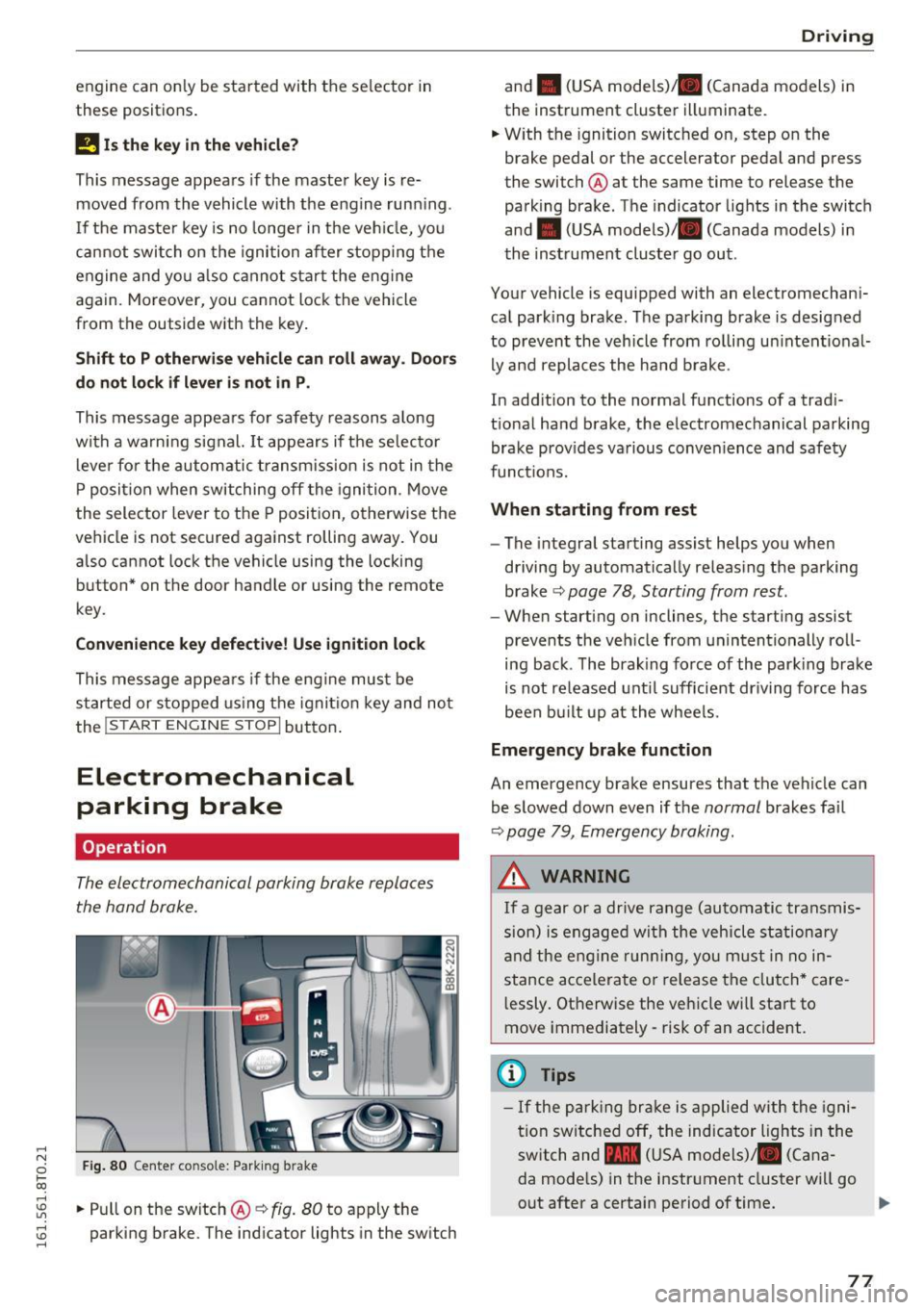
Fig . 8 0 Center co nsole: Park ing b rake
rl
~ .. Pull on the switch@~ fig. 80 to apply the
~ parking brake. The ind icator lights in the sw itch ......
D rivi ng
and . (USA mode ls)/ . (Canada models) in
the instrument cluster illuminate.
.. W ith the ignition switc hed on, step on the
brake pedal or the accelerator pedal and press
the switch @ at the same time to release the
parking brake . The indicator lights in the switch
and . (USA models)/ . (Canada models) in
the instrument cluster go out .
Your vehicle is equipped with an electromechani
cal park ing brake. The parking brake is designed
to prevent the vehicle from rolling un intent ional
ly and replaces the ha nd b rake .
In add ition to the normal functions of a trad i
t ional ha nd brake, the electromechanical parking
brake prov ides va rious conven ience and safety
funct ions.
When starting from rest
- The integral starting assist helps you when
driving by automatically releas ing the parking
brake ~
page 78 , Starting from rest.
- When start ing on inclines, the starting assist
prevents the veh icle from unintentionally roll
ing back . T he brak ing force of the park ing brake
is not re leased unt il sufficient dr iving force has
been bu ilt up at the whee ls.
Emergency brake function
An emergency brake ensures that the veh icle can
be slowed down even if the
normal brakes fa il
~ page 79, Emergency braking .
A WARNING
If a gear or a drive range (automatic transmis
s ion) is engaged wi th the vehicle stationa ry
a nd the engine runn ing, you must in no in
stance acce lera te or release the clutch* care
l essly. Otherwise the vehicle wi ll sta rt to
move immediately- risk of an accident.
(1) Tips
- If the pa rk ing br ake is a pplied with the igni
tion swi tche d off, the indicator lights i n the
switch and -(USA models) . (Cana
da mode ls) in the instr ument cluster wi ll go
out after a certain period of time.
77
Page 80 of 264
Driving
- Occasional noises when the parking brake is
applied and released are normal and are not
a cause for concern.
- When the vehicle is parked, the parking
brake goes through a self-test cycle at regu
lar intervals. Any associated noises are nor
mal.
Parking
.,. Press the brake pedal to stop the vehicle .
.,. Pull the switch @¢
page 77, fig. 80 to set the
parking brake .
.,. Automatic transmission: Move the selector lev-
er to P.
.. Turn the engine off¢.&, .
.. Manual transmission: Shift into 1st gear.
.. When on inclines or declines, turn the steering
wheel so that the vehicle will roll into the curb
if it begins to move.
A WARNING
-
-When you leave your vehicle -even if only
briefly -always remove the ignition key. This
applies particularly when children remain in
the vehicle. Otherwise the children could
start the engine, release the parking brake
or operate electrical equipment (e.g. power
windows). There is the risk of an accident.
- When the vehicle is locked, no one -particu
larly not children should remain in the vehi
cle. Locked doors make it more difficult for
emergency workers to get into the vehicle -
putting lives at risk.
Starting from rest
The starting assist function ensures that the
parking broke is released automatically upon
starting .
Stopping and applying parking brake
.. Pull the switch @¢ page 77, fig. 80 to apply
the parking brake.
78
Starting and automatically releasing the parking brake
.. When you start to drive as usual, the parking
brake is automatically released and your vehicle
begins to move.
When stopping at a traffic signal or stopping in city traffic on vehicles with an automatic trans
mission, the parking brake can be applied. The
vehicle does not have to be held with the foot brake. The parking brake eliminates the tendency
to creep with a drive range engaged . As soon as
you drive off as usual, the parking brake is re leased automatically and the vehicle starts to
move .
Starting on slopes
When starting on inclines, the starting assist pre
vents the vehicle from unintentionally rolling back. The braking force of the parking brake is
not released until sufficient driving force has
been built up at the wheels.
(D Tips
For safety reasons, the parking brake is re
leased automatically only when the driver's
safety belt is engaged in the buckle.
Starting off with a trailer
To prevent rolling back unintentionally on an in
cline, do the following:
.. Keep the switch @¢ page 77, fig. 80 pulled
and depress the accelerator. The parking brake
stays applied and prevents the vehicle from
rolling backward.
.,. You can release the switch @once you are sure
that you are developing enough driving force at
the wheels by depressing the accelerator.
Depending on the weight of the rig (vehicle and
trailer) and the severity of the incline, you may
roll backwards as you start. You can prevent roll
ing backwards by holding the parking brake
switch @pulled out and accelerating -just as
you would when starting on a hill with a conven
tional hand brake .
Page 83 of 264
.... N
0 Ico .... OJ:> Lil
.... OJ:> ....
-For reasons of safety, cruise control should
not be used in the city, in stop-and-go traf
fic, on twisting roads and when road condi
t ions are poor (such as ice, fog, gravel,
heavy ra in and hydroplan ing) -risk of acci
dent .
- Turn
off the cruise control temporar ily when
enter ing turn lanes, h ighway exit lanes o r in
construction zones.
- Please note that inadvertently "rest ing"
your foot on the accelerator pedal causes
the cruise control not to brake. This is be
cause the cruise cont rol is overridden by the
dr iver's acceleration.
- If a brake system ma lf u nction such as over
heating occu rs when the c ruise contro l sys
tem is switched on, the braking function in
the system may be switched
off . The other
cruise contro l functions remain active as
long as the indicator light
[lj;(i )~i~ (US mod
els)/ .. (Canadian models) is on .
(D Tips
-Vehicles with manual transmission: You can
attain the set speed only if the gear that is
currently engaged will allow it, or if it does
not tax the engine and allows it to run
smooth ly. Therefore sh ift into a higher or
lower gear in a timely ma nner.
- The brake lights illuminate as soon as the
brakes apply automatically .
Changing speed
.,. To inc rease/decrease the speed in increments,
tap the lever in the
0 10 direction ¢ page 80,
fig. 82.
.,. To inc rease/decrease the speed qu ickly , ho ld
the leve r in the
0 10 direction until the de
si red speed is displayed .
You can a lso press the accelerator pedal down to
increase yo ur speed, e.g. if you want to pass
someone . The speed you saved earlier wi ll re
sume as soon as you let
off of the acce lerator
pedal.
I f, however, you exceed your saved speed by
6 mph
( 1 0 km/h) for longer than 5 minutes, the
D riv ing
cruise contro l wi ll be turned off temporarily. The
green symbol in the display turns white. The
saved speed remains t he same.
Presetting your speed
You can preset your desired speed while the vehi
cle is not moving.
.,. Switch on the ign ition.
.,. Pull lever into position
(D ¢ page 80, fig . 82 .
.,. Press the lever in the 0 or 0 direction to in-
crease or decrease your speed.
.,. Release the lever to save that speed.
This function makes it possible, for example, to save the speed you want before driving on the
highway . Once on the highway, activate the
cruise contro l by pull ing the lever toward
(D .
Switching off
Temporar y de acti vation
.,. Press the brake pedal, or
.,. Manual transmission: Keep the clutch pedal
pressed down
longer, or
.,. Press the lever into position @ (not clicked into
place)
~ page 80, fig. 82, o r
.,. Dr ive fo r longer than 5 mi nutes a t more than
6 mph (1 0 km/h) above the s to red speed.
Switching off completely
.,. Press lever into pos it ion @ (clicked into p lace),
or
.,. Switch the ignit ion
off .
T he speed you saved will be retained if the cruise
control has been switched off temporarily . To re
s u me the saved speed , let up on the bra ke or
cl utch pedal and pull the lever to position
(D .
Switch ing the ignition off erases the saved speed .
A WARNING
--
You should only return to the saved speed if it
i s not too fast for the current t raffic condi
tions -ris k of an accident!
81
Page 84 of 264
Automatic transmission
Automatic transmission Manual transmission
Gearshift lever
Applies to vehicles: with manual transmiss ion
The clutch pedal must be depressed all the way
before you can start the engine .
The manua l transmission in your Audi is equip
ped with an
interlock-feature.
• Depress the clutch pedal a ll the way.
• Start the engine wit h the gearshift lever in Neu
tral and the clutch pedal depressed.
(D Note
Always depress the clutc h pedal fu lly when
chang ing gears. Do not ho ld the vehicle on a
hill with the clutch pedal partially depressed.
This may cause premature clutch wear or damage.
@ Tips
- Resting your hand o n the gearshift leve r
k nob while driving will cause premature
wear in the transmiss io n.
- The back-up lights go on when you shift into
Reverse w ith the ignition o n.
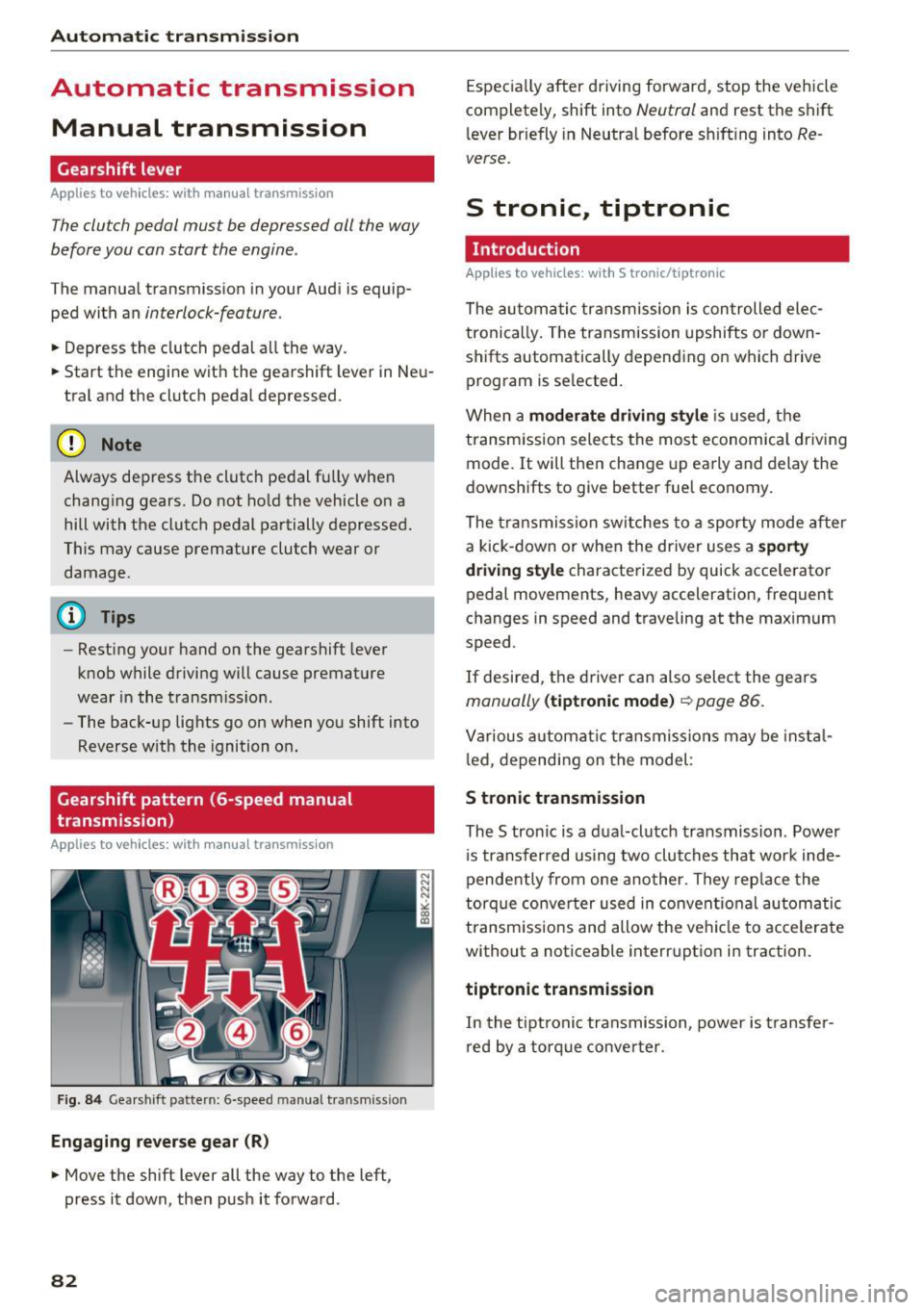
Gearshift pattern (6-speed manual
transmission)
Applies to vehicles: with man ual transmission
F ig. 84 Gea rshift pattern: 6 -speed manual transmiss io n
Engaging reverse gear (R)
• Move the shift lever all the way to the left,
press it down, then push it forward.
82
Espec ia lly after driving forward, stop the vehicle
completely, shift into
Neutral and rest the shift
l ever br iefly in Neutra l before s hift ing into
Re
verse.
S tronic., tiptronic
Introduction
Applies to vehicles: with S tronic/tip tronic
The au toma tic transmission is con trolled ele c
tronically . The transmission upshifts or down
shifts automatically depending on which drive program is se lected.
When a
moderate driving sty le is used, t he
transm ission selects the most economica l driv ing
mode. It will the n change up early and delay the
downshifts to give better fuel economy.
The tra nsmission sw itches to a sporty mode after
a kick-down or when the driver uses a
s porty
dri ving style
characterized by quick accelerato r
pedal movements, heavy acceleration, frequent
changes in speed and traveling at the max imum
speed .
If desired, the d river can also select the gears
manually (tiptronic mode ) ~ page 86.
Various automat ic tr ansmissio ns may be insta l
l ed, depending on the model :
S tronic transmission
The S tronic is a dual-clutch transmission . Power
i s transfer red using two clu tches that wor k inde
pendently from one another. They rep lace the
torque conve rter used in conven tiona l automatic
transm iss ions and allow the ve hicle to accelerate
without a noticeable interruption in traction.
tiptronic transmission
In the tiptroni c transmission, power is t ransfe r
r ed by a torq ue conve rter.
Page 85 of 264
,-1 N
0 1-CX)
rl I.Cl U"I
,-1 I.Cl ......
Selector lever positions
Applies to vehicles: with S tronic/t iptron ic
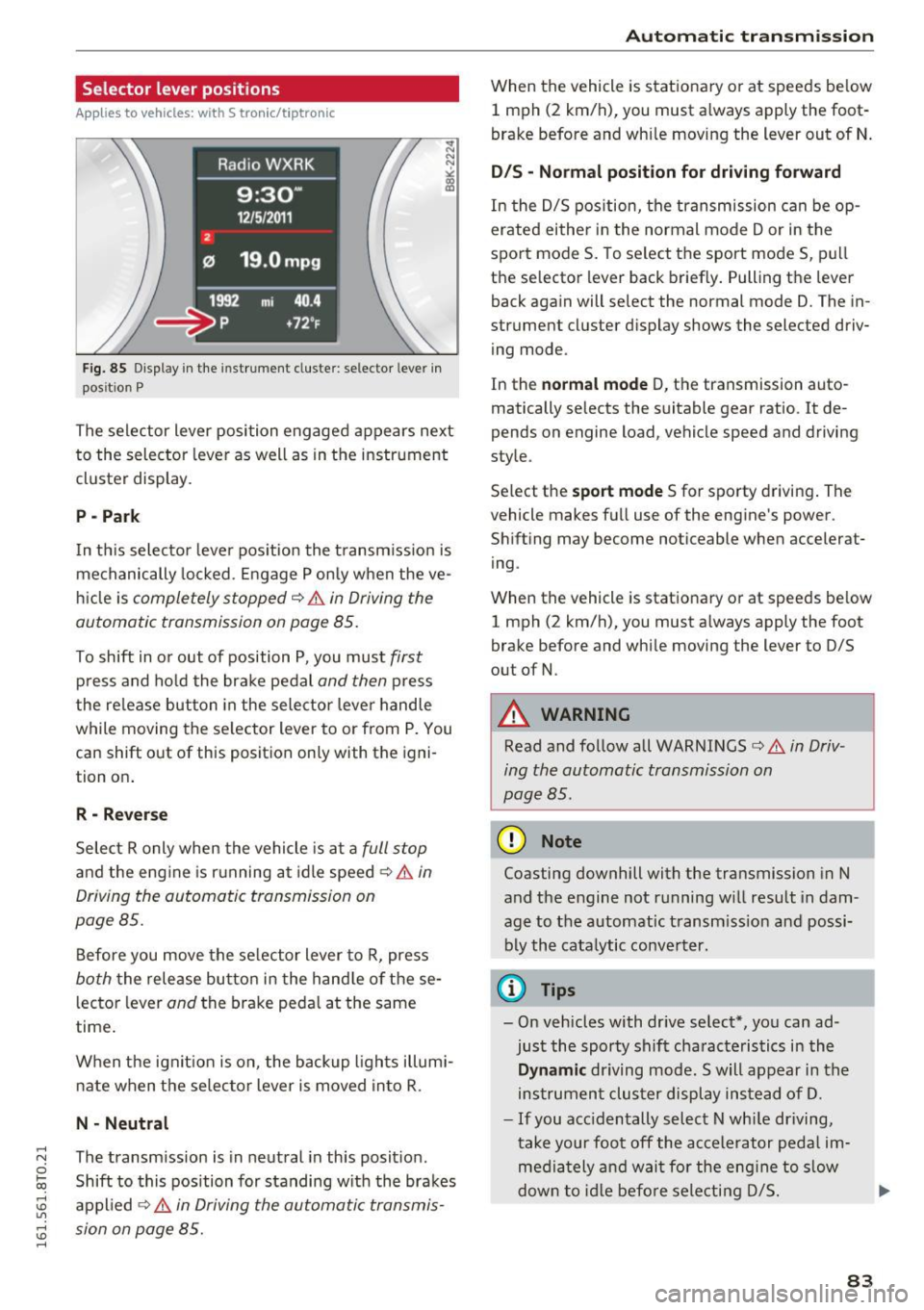
F ig. 85 Display in the instrument cluste r: selector leve r in
pos it ion P
The selector Lever position engaged appears next
to the selector Lever as well as in the instrument
cluster display.
P -Pa rk
In th is selector lever pos ition the t ransm iss ion is
mechanically locked . Engage P only when the ve
hi cle is
completely stopped¢&. in Driving the
automatic transmission on page 85.
To shift in o r out of position P, you must first
press and ho ld the brake pedal and then p ress
the re lease button in the selector lever handle
while moving the se lector lever to or from P. You
can shift out of this position only with the igni
tion on .
R - Rever se
Select R only when the vehicle is at a full stop
and the engine is r unning at idle speed ¢&. in
Driving the automatic transmission on
page 85.
Before you move the selector Lever to R, press
both the release button in the hand le of these
lector lever
and the brake pedal at the same
time .
When the ignit ion is on, the backup l ights illumi
nate when the se lecto r lever is moved into R .
N · N eutral
The transmission is in neutral in this posit ion .
Shift to this position for standing w ith the brakes
appl ied ¢&.
in Driving the automatic transmis
sion on page 85.
Aut oma tic tr ansm iss ion
When the vehicle is stationary or at speeds be low
1 mph (2 km/h), you must a lways apply the foot
brake before and wh ile moving the Lever out of N .
D/S · Normal position fo r driving fo rward
In the D/S pos ition, the transmission can be op
erated eithe r in the normal mode Dor in the
sport mode S. To select the sport mode S, pull
the se lector lever back briefly. Pulling the lever
back again will select the normal mode D. The in
strument cluster display shows the selected driv
ing mode.
In the
norm al mode D, the transmission auto
matically selects the suitable gear ratio . It de
pends on engine Load, vehicle speed and driving
style.
Se lect the
sport mode S for sporty driving . The
vehicle makes full use of the engine's power .
Shift ing may become noticeable when accelerat
ing .
When the vehicle is stat ionary or at speeds be low
1 mph (2 km/h), you must a lways apply the foot
brake before and while moving the Lever to D/S
out of N.
_& WARNING
-
Read and follow all WARNINGS¢&. in Driv
ing the automatic transmission on
page 85 .
(D Note
Coasting downhill with the transmission in N
and the engine not running w ill result in dam
age to the automatic transm iss ion and possi
bly the cata lytic conve rter.
¢j) Tips
- On vehicles with dr ive select*, you can ad
just the sporty shift cha racteristics in the
Dynamic driving mode. Swill appear in the
ins trument clus ter display instead of D.
- If you acc identally select N wh ile driving,
take your foot off the accelerator pedal im
media tely and wai t for the eng ine to s low
dow n to id le befo re sele cting D/S.
83
Page 86 of 264
Automatic transmission
-If there is a power fa ilure, the selec to r l ever
will not move out of the P pos it ion . The
emergency release can be used if this hap
pens
¢ page 88.
Automatic Shift Lock (ASL)
App lies to veh icles: with 5 tro nic/tiptron ic
The Automatic Shift Lock safeguards you against
accidentally shi~ing into a forward or the re
verse gear and causing the vehicle to move unin tentionally.
"' 0 ~ N ~ 00 a,
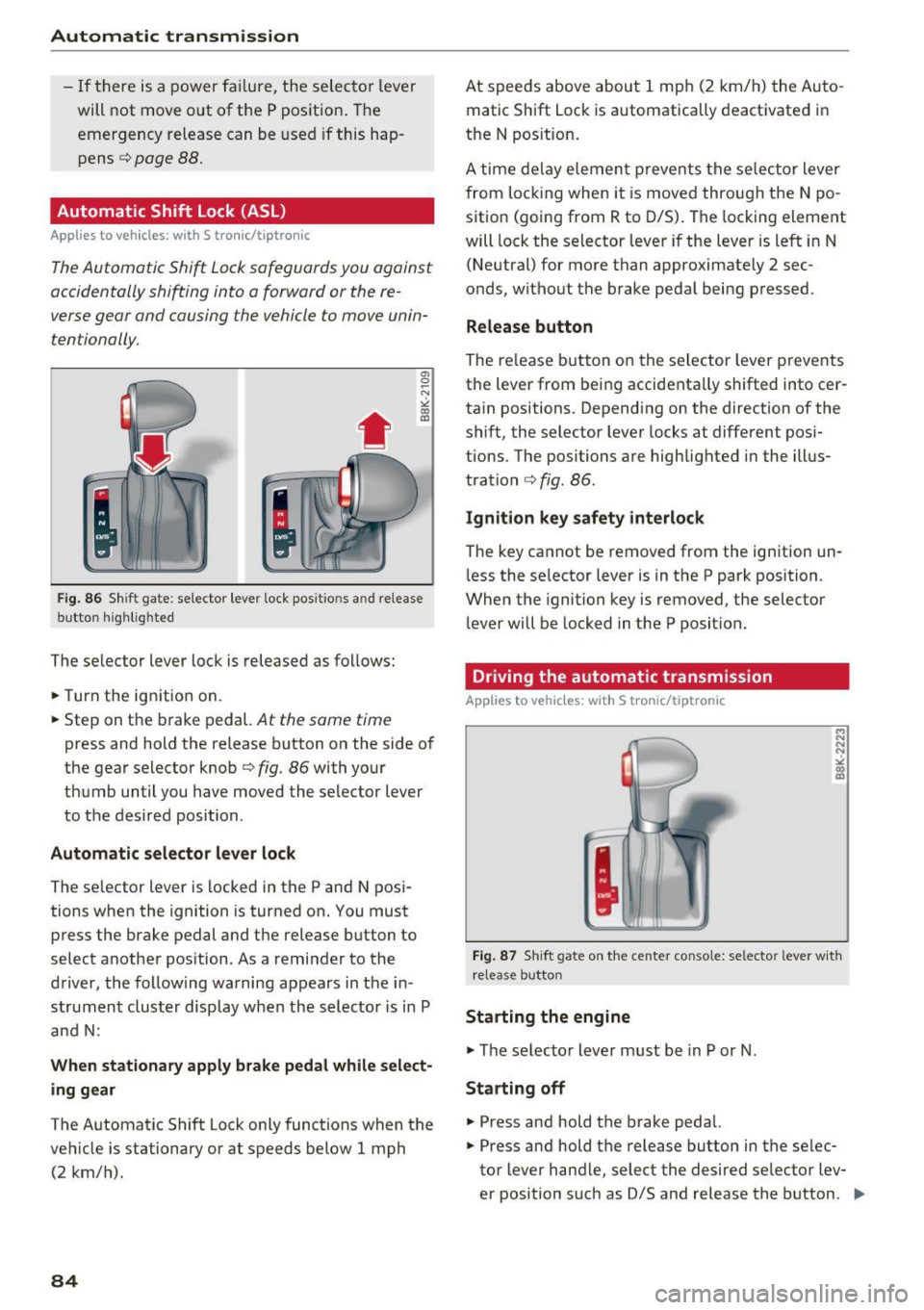
Fig. 86 Shi ft ga te: se lector lever lock pos it io n s a nd r elease
butto n highlig hted
The se lector lever lock is released as fo llows :
.. Turn the ign ition on.
.. Step on t he b rake pedal.
At the same time
press and hold the release b utton on the side of
the gea r selector knob
c:> fig . 86 with you r
th umb until you have moved the se lector lever
to the desired position .
Automatic selector lever lock
The se lector lever is locked in t he P an d N posi
tions when the ignition is turned on. You must
press the brake pedal and t he release b utt on to
select a nothe r pos ition . As a re min der to the
d river, the follow ing wa rning ap pears in t he in
s trumen t cluster display when th e selec tor is in P
a nd N:
When stationary apply brake pedal while select
ing gear
The A utomat ic Shift Lock only functions when the
ve hicle is stationary or at speeds below 1 mph
(2 km/ h).
84
At spee ds above abou t 1 mp h (2 k m/h) the A uto
matic Shift Lock is automatically deact ivated in
the N pos ition .
A time de lay e lemen t prevents the se lec tor lever
from lo cking when i t is move d thro ugh the N po
sition (going from R to D/S) . T he locking eleme nt
will lock the selector leve r if the lever is le ft in N
(Ne utral) for mo re t han approximately 2 sec
onds, without the b rake peda l bei ng p ressed .
Release button
The re lease but ton o n the selec tor lever p revents
t h e leve r from be ing accidenta lly shifted into cer
ta in positions . Depending on the direction of the
shift, the selector lever locks at diffe rent pos i
tions. The positions are highlig hted in the illus
tra tion
c::> fig . 86.
Ignition key safety interlock
The key ca nnot be removed from the i gnition un
l ess the se lector lever is in the P park position.
When the ignition key is removed, the selector
l ever w ill be locked in the P posit ion.
Driving the automatic transmission
Applies to vehicles: with S tronic/tiptronic
Fig. 87 Shift gate o n th e ce nter conso le : se lector lever w ith
r elease butto n
Starting the engine
.. The se lecto r lever m ust be in P or N .
Starting off
.. Press an d hold the brake peda l.
.. Press and hold the release button in the se lec
tor lever hand le, select the desired se lector lev-
er position s uc h as D/S and releas e the b utton . .,.
Page 87 of 264
.... N
0 I-co ....
~ Remove your foot from the brake pedal and ac
ce lerate .
Stopp ing tempo raril y
~ Keep the veh icle stat ionary using t he b raking
peda l, for example at traffic lights.
~ Do not press the accelerator pedal when doing
this.
~ To prevent the vehicle from rolling when you
start driving, set the park ing brake when stop
ping on steep inclines¢&, .
~ The parking brake w ill release automatically
and the vehicle w ill start moving once you press
the accelerator pedal.
Stopping /parking
If the selector lever is not in the P position when
you open the driver's door, the vehicle could roll. The message
Tran smission: Car may roll! Shift
to park! appears.
~ Press and hold the brake pedal unt il the vehicle
has come to a complete stop .
~ Apply the parking brake ¢ page 78, Parking .
~ Select the P selector leve r pos ition ¢ ,&.
Stopp ing on an incline
~ Always press the brake pedal to hold the vehi
cle in place and prevent it from "rolling back"
¢ &, . Do
not try to prevent the vehicle from
"ro lling back " when a gear is engaged by in
c reasing the engi ne speed ¢0 .
Starting on an incline
~ Activate the parking brake .
~ With the driving gear selected, press the accel
erator peda l carefully. The parking brake will
re lease automatically if your seat belt is fas
tened .
Unde r certain c ircumstances, such as dr iv ing in
the mountains, it may be useful to switch tempo rari ly to the manua l shift program in orde r to ad
just t he gears to the d rivi ng conditions by hand
¢ page 86.
On slopes, activate the parking brake first and
then move the selector lever to the P pos it ion.
Autom atic tran sm iss ion
This prevents too m uch stress from being placed
on the locking mechanism .
A WARNING ,-
-The vehicle can also ro ll when the eng ine is
stopped.
- Unintended vehicle movement can ca use se
rio us injury .
- Never leave your vehicle with the engine
r u nning while in gear. If you must leave
your veh icle when the engine is running, ac
tivate the pa rking brake and move the selec
tor lever to P .
- Power is still transmitted to the wheels
when the engine is runn ing at idle . To pre
vent the vehicle from "creepi ng", you must
keep your foot on the b rake when the en
g ine is r un ning and the selector lever is in D/
Sor R or "ti ptroni c" mode is selected.
- D o not press the acce le rator peda l when
cha nging t he se lecto r lever position while
t he vehicle is sta tionary and the engine is
r u nning .
- Never s hift into R or P wh ile driving.
- Before d riving down a s teep slope, reduce
your speed a nd s hift into a lowe r gear w it h
" t i pt ronic".
- Do not ride the brakes or press the brake
pedal too often o r too long when dr iv ing
down a hill. Const ant brak ing c auses t he
brakes to overheat and s ubstant ially re
duces bra king performance, increases brak
ing distance or causes comp lete fai lure of
the brake system.
- To prevent the vehicle from rol ling bac k
when stopp ing on inclines, always hold it in
p lace with the brake peda l or park ing brake.
- Never hold the vehicle on an incline with a
slipping clutch. The clutch opens a utomati
cally when it becomes too hot from the
overload. An ind icator lamp@] illuminates
a nd a driver message appears
¢ page 87
when the clu tch is over loaded .
- If the engine must rema in running, never
have any d riving position engaged when
checking unde r the hood . Make s ure these
lecto r lever has se cu rely engage d and is
lo ck ed in P with the par kin g b rake set
85
Page 88 of 264
Automatic transmission
¢ page 191. Otherwise, any increase in en
gine speed may set the vehicle in motion,
even with the parking brake applied.
(D Note
-When stopping on an incline, do not try to
hold the vehicle in place by pressing the ac
celerator pedal while a driving gear is se lected . This can cause the transmission to
overheat and can damage it. Activate the
parking brake or press the brake pedal to
prevent the vehicle from rolling .
- Allowing the vehicle to roll when the eng ine
i s stopped and the selector lever is in N w ill
damage the transmission because it is not
l ub ricated under those circumstances .
@ Tips
For safety reasons, the parking brake is re
leased automatically only when the dr iver's
safety belt is engaged in the buckle.
Hill descent control
Applies to veh icles: w ith S tronic/tiptron ic
The hill descent control system assists the driver
when driving down declines.
Hill descent contro l is activated when the selec
tor lever is in D/S and you press the brake pedal.
The transm ission automatically selects a gear
that is suitable for the incline. Hill descent con
trol tries to mainta in the speed achieved at the
time of braking, within physical and technical
limitations.
It may still be necessary to adjust the
speed with the brakes .
Hill descent control switches off once the decline
levels out or you press the accelerator peda l.
On veh icles w ith the cruise contro l system*
¢ page 80, hill descent control is also activated
when the speed is set.
& WARNING
Hill descent control cannot overcome physica l
limitations, so it may not be able to maintain
a constant speed under all condit ions . Always
be ready to apply the brakes.
86
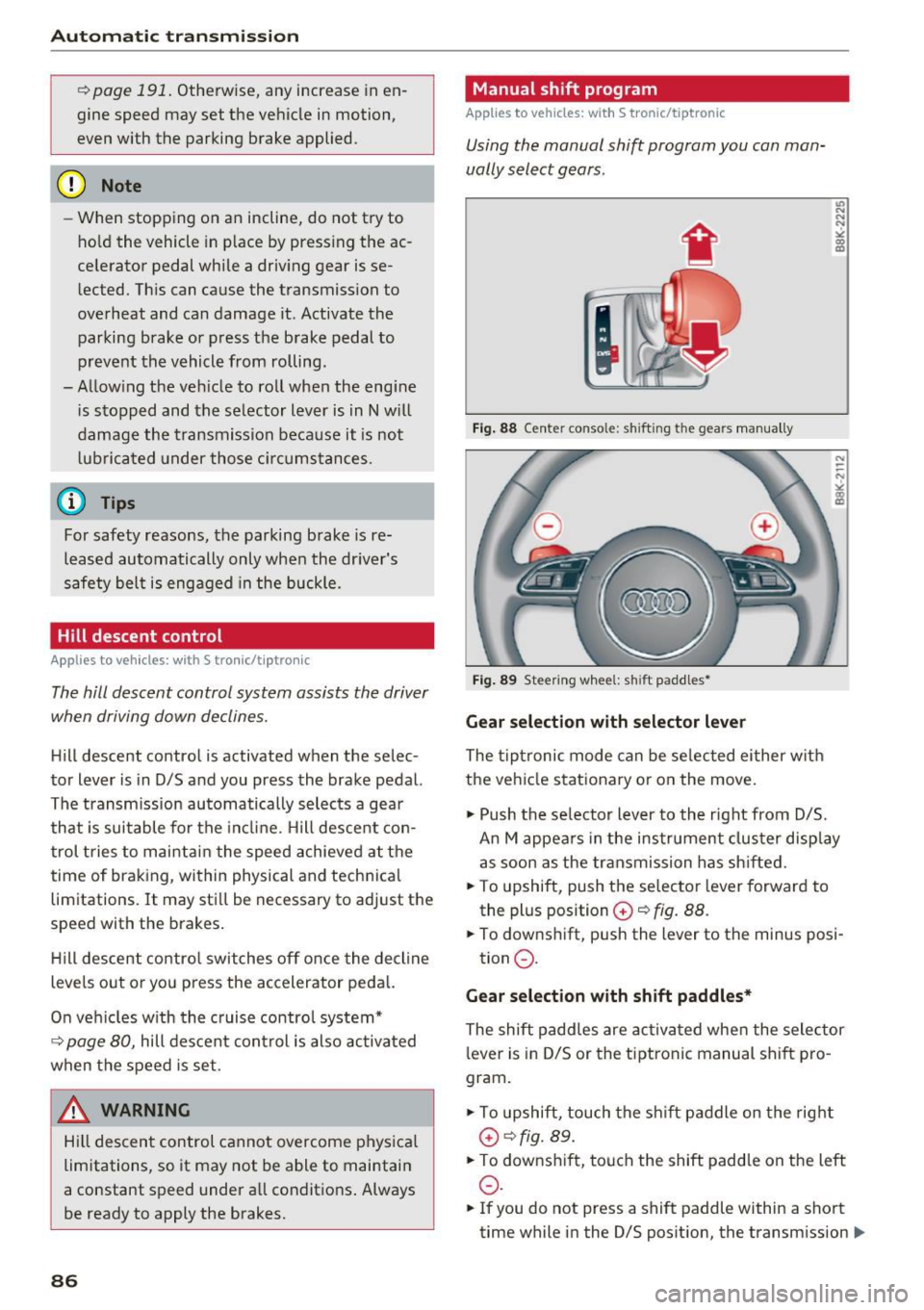
Manual sh ift program
App lies to vehicles: with S tronic/tiptronic
Using the manual shift program you can man
ually select gears.
'
Fig. 88 Center console: shift ing the gears manua lly
Fig. 89 Steering whee l: sh ift paddles•
Gear selection with selector lever
The tiptronic mode can be selected either w ith
the vehicle stationary or on the move.
.,. Push the se lector lever to the right from D/5.
An M appea rs in the instrument clus ter disp lay
as soon as the transmission has shifted.
.. To upshift, push the selector lever forward to
the plus position
G) ~ fig. 88.
.. To downshift, push the lever to the minus posi-
tion
0 .
Gear selection with shift paddles*
The shift paddles are activated when the selector
lever is in D/S or the tiptronic manual shift pro
gram.
.,. To upshift, touch the shift paddle on the right
G)¢fig. 89.
.. To downsh ift, touch the shift paddle on the left
0 .
.. If you do not press a shift paddle within a short
time while in the 0/5 position, the transmission
II>
Page 89 of 264

.... N
0 Ico ....
using the shift paddles, move the selector lever
to the right out of the 0/5 position.
The transmission automatically shifts up or down before critical engine speed is reached .
The transm ission only a llows manual sh ift ing
when the engine speed is within the permitted range.
@ Tips
- When you sh ift into the next lower gear, the
transm ission w ill downsh ift only when there
i s no poss ibility of over -rew ing the engine.
- When the kick-down comes on, the t rans
mission will sh ift down to a lowe r gear, de
pending on vehicle and engine speeds .
- Tiptron ic is inoperative when the transmis
s ion is in the fa il-safe mode .
Kick-down
Applies to vehicles: with S tronic/tiptronic
Kick-down enables maximum acceleration.
When you depress the accelerator pedal beyond
the resistance point, the automatic transm ission
downshifts into a lower gea r, depend ing on veh i
cle speed and engine speed. The upshift in to the
nex t higher gear ta kes place once the maximum
specified engine speed is reached.
A WARNING
Please note that the drive whee ls can spin if
kick-down is used on a smooth s lippery road -
there is a risk of skidding.
Launch Control Program
Applies to vehicles: with S tronic
The Launch Control Program provides the best
acceleration possible when starting from a stop .
Requirement: The engine must be at operating
temperature and the steering whee l must not be
turned .
.,. Press the
I~ OFF ! button¢ page 171 wh ile the
engine is running. The
II indicator light illumi
nates in the instrument cluster and
Stabiliza-
Autom atic tran sm iss ion
tion control (ESC ): Sport . Warning! R estricted
s tabilit y
appears in the driver information sys
tem disp lay .
.,. Move the selector lever to the 0/5 posit ion to
select sport mode (5) or select the
dynamic
driving mode in drive select*¢ page 103 .
.,. Press the brake pedal strongly w ith your left
foot and hold it down fo r at least 1 second.
.,. At the same time, p ress the accelerator pedal
down comp lete ly with yo ur right foo t unti l th e
eng ine reaches and ma intains a h igh RPM .
.,. Remove your foot from the brake peda l w ithin
5 seconds
¢ ,&. .
A WARNING
-Always adapt your driving to the traff ic flow.
- On ly use t he Launch Control Program when
road and traffic condit ions allow it and oth
er d rivers will not be endangered or an
noyed by your dr iving and the vehicle's ac
celerat io n.
- Please note that the d riving wheels can spin
and the vehicle can break away when sport
mode is switched on, especially when the
road is slippery.
- O nce you have acce lerated, you should
sw itch sport mode off by pressing the
I~ OFF ! button.
(D Tips
-The transmission temperature may increase
signif icant ly after using the Launch Contro l
Prog ram . If that happens, the program may
not be ava ilable for a few minutes. It will be
availab le aga in afte r a cool-down period.
- Whe n accelerating using the Launch Cont rol
prog ram, all vehicle parts a re subject to
heavy loads. This can res ult in increased
wear.
Transmission malfunction
Applies to vehicles: with S tronic/tip tron ic
[i] Transmi ss ion: Pre ss brake pedal and select
gear again . .,.
87