tow AUDI A5 COUPE 2016 Owners Manual
[x] Cancel search | Manufacturer: AUDI, Model Year: 2016, Model line: A5 COUPE, Model: AUDI A5 COUPE 2016Pages: 264, PDF Size: 66.92 MB
Page 5 of 264
.... N
0 Ico ....
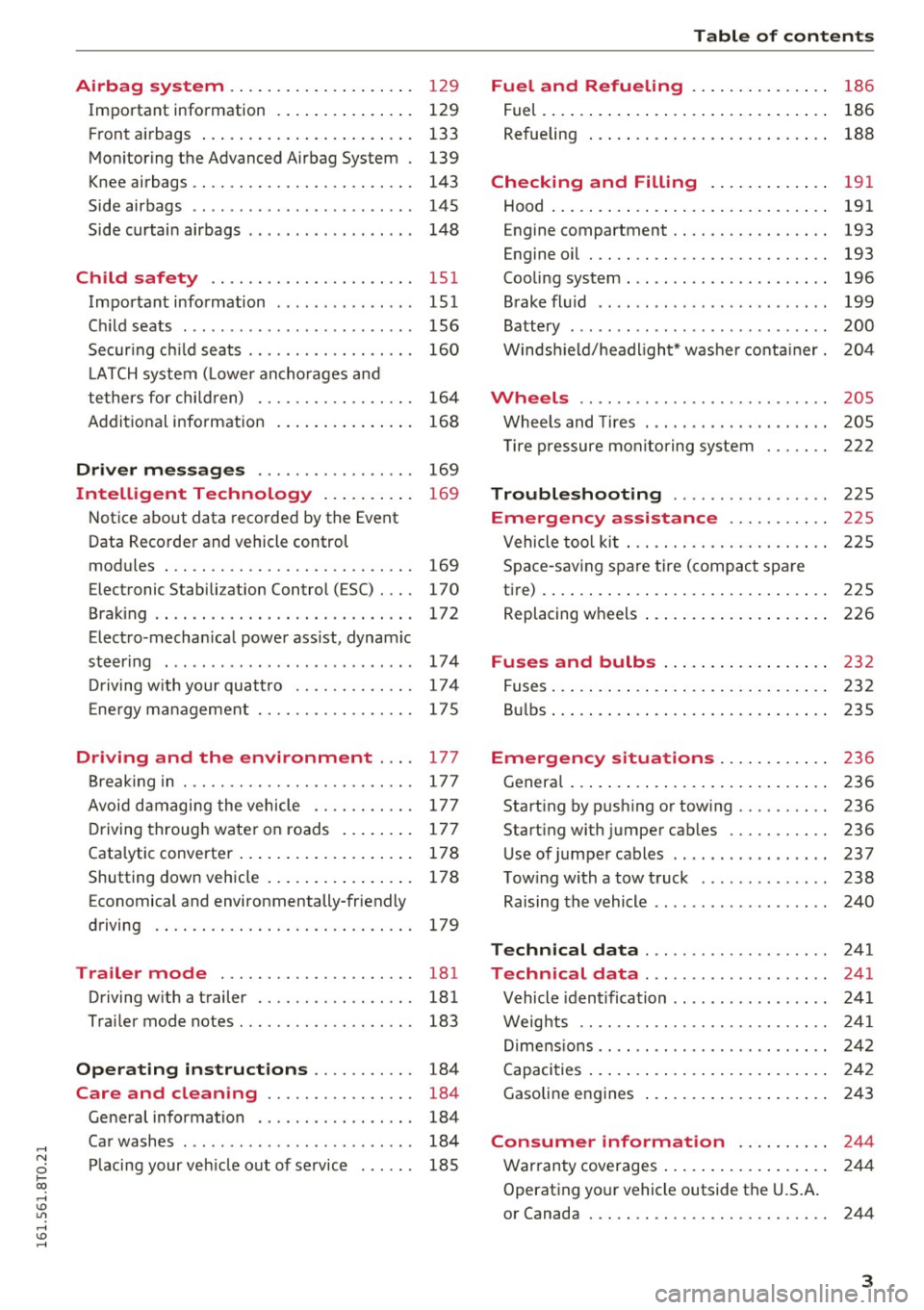
Important information . . . . . . . . . . . . . . . 129
F ront a irbags . . . . . . . . . . . . . . . . . . . . . . . 133
Mon itoring the Advanced Airbag System . 139
K nee airbags . . . . . . . . . . . . . . . . . . . . . . . . 143
Side airbags . . . . . . . . . . . . . . . . . . . . . . . . 145
Side curtai n airbags . . . . . . . . . . . . . . . . . . 14 8
Ch ild safety . . . . . . . . . . . . . . . . . . . . . . 151
Important information . . . . . . . . . . . . . . . 151
Ch ild seats . . . . . . . . . . . . . . . . . . . . . . . . . 156
Secur ing c hild seats . . . . . . . . . . . . . . . . . . 160
L ATCH system ( Lowe r ancho rages and
te thers for chi ldren) . . . . . . . . . . . . . . . . . 164
Addit ional information
168
Driver messages . . . . . . . . . . . . . . . . . 169
Intelligent Technology . . . . . . . . . . 169
N otice about data recorded by the Event
Data Recorde r and vehicle control
modules . . . . . . . . . . . . . . . . . . . . . . . . . . . 169
Elect ronic Stabilization Control (ESC) . . . . 170
Brak ing . . . . . . . . . . . . . . . . . . . . . . . . . . . . 172
Elect ro-mechan ica l power ass ist, dynamic
steer ing . . . . . . . . . . . . . . . . . . . . . . . . . . . 174
Dr iving w ith your quat tro . . . . . . . . . . . . . 17 4
E ne rgy ma nagement . . . . . . . . . . . . . . . . . 17 5
Driving and the environment ... . 177
B reaking in . . . . . . . . . . . . . . . . . . . . . . . . . 177
Avoid damaging the vehicle . . . . . . . . . . . 177
D riving throug h water on roads . . . . . . . . 177
Cata lytic converter . . . . . . . . . . . . . . . . . . . 178
Shutting down vehicle . . . . . . . . . . . . . . . . 178
Economical and environmentally-friendly
driving . . . . . . . . . . . . . . . . . . . . . . . . . . . . 179
Trailer mode . . . . . . . . . . . . . . . . . . . . . 181
Driving w ith a trailer . . . . . . . . . . . . . . . . . 181
Trai ler mode notes. . . . . . . . . . . . . . . . . . . 183
Operating instructions . . . . . . . . . . . 184
Care and cleaning . . . . . . . . . . . . . . . . 184
Ge neral information . . . . . . . . . . . . . . . . . 184
Ca r washes . . . . . . . . . . . . . . . . . . . . . . . . . 184
Pl acing your ve hicle out of se rvice . . . . . . 185
Table of contents
Fuel and Refueling . . . . . . . . . . . . . . .
186
Fuel. ... .. .. .. .. .. .... . ..... ... .. .. 186
Refueling . . . . . . . . . . . . . . . . . . . . . . . . . . 188
Checking and Filling . . . . . . . . . . . . . 191
Hood . . . . . . . . . . . . . . . . . . . . . . . . . . . . . . 191
Engine compartment . . . . . . . . . . . . . . . . . 193
Engine oil . . . . . . . . . . . . . . . . . . . . . . . . . . 193
Cooling system . . . . . . . . . . . . . . . . . . . . . . 196
Brake fl uid .. .. .. .. .... ...... ... .. .. 199
Battery . . . . . . . . . . . . . . . . . . . . . . . . . . . . 200
W indsh ield/headlight* washer conta iner. 204
Wheels ........ .. ................. 205
Whee ls and Tires . . . . . . . . . . . . . . . . . . . . 205
T ire p ressure monito ring sys tem 222
Troubleshooting . . . . . . . . . . . . . . . . . 225
Emergency assistance . . . . . . . . . . . 225
Vehicle too l ki t . . . . . . . . . . . . . . . . . . . . . . 225
Space -sav ing spare tir e ( compac t spare
t ire) . . . . . . . . . . . . . . . . . . . . . . . . . . . . . . . 225
Replacing w heels . . . . . . . . . . . . . . . . . . . . 226
Fuses and bulbs . . . . . . . . . . . . . . . . . . 232
Fuses ... .. .. .. .. .. .... . ..... ... .. .. 232
B ul bs . . . . . . . . . . . . . . . . . . . . . . . . . . . . . . 235
Emergency situations . . . . . . . . . . . . 236
Genera l . . . . . . . . . . . . . . . . . . . . . . . . . . . . 236
Start ing by pushing or tow ing . . . . . . . . . . 236
Start ing with jumper cables . . . . . . . . . . . 236
Use of jumper cables . . . . . . . . . . . . . . . . . 237
T ow ing with a tow t ruck . . . . . . . . . . . . . . 238
Raising the vehicle . . . . . . . . . . . . . . . . . . . 240
Technical data . . . . . . . . . . . . . . . . . . . . 241
Technical data . . . . . . . . . . . . . . . . . . . . 241
Vehicle iden tification . . . . . . . . . . . . . . . . . 241
Weig hts . . . . . . . . . . . . . . . . . . . . . . . . . . . 241
Di mens ions . . . . . . . . . . . . . . . . . . . . . . . . . 242
Capaci ties . . . . . . . . . . . . . . . . . . . . . . . . . . 2 42
Gasoline engines . . . . . . . . . . . . . . . . . . . . 243
Consumer informat ion ...... .. .. 244
War ranty coverages . . . . . . . . . . . . . . . . . . 244
Operating your vehicle outside the U.S.A.
or Canada . . . . . . . . . . . . . . . . . . . . . . . . . . 244
3
Page 20 of 264
Instruments and indicator lights
cooling system -you could damage your en
gine .
~- Steering column lock
• Steering defe cti ve! Do not dri ve vehicle!
If the indicator lig ht t urns on and the message
appears, there is an electronic steering column lock malf unction . You cannot switch the ignition
on.
Do
not tow your vehicle because i t cannot be
steered. Seek professional assistance.
£II S te erin g lo ck: C ontact dealer!
If t he indicator light turns on and the message
appears, there is an electro nic steer ing colum n
lock malfunct ion.
Drive to your authori zed Aud i dea ler immediately
to have the malfunct ion corrected.
A WARNING
Your vehicle must not be towed in the eve nt
of a malfunction i n the elect ronic steering
co lumn lock be ca use it cannot be steered d ue
t o the locked steering. If it is towed wi th t he
steering locked, the re is the r isk of an acci
dent .
©-Ignition lock
• Ignit ion lock defecti ve. Contact dealer!
If the indicator lig ht tu rns on and the message
appears, do
not switch the ign ition off because
you may not be ab le to switch it on again .
D rive to you r autho rized Aud i dea le r i mmedia tely
to have the malf unct ion corrected.
On ve hicles w ith convenience key*, the engine
should not be switched off using the
I S T AR T ENG IN E STOP I button because the en
g ine ca nnot be sta rted again after the ignition
has been switched off .
(D Tips
The symbol's appearance mig ht be diffe re nt
in some mode ls .
18
r;. I[/; Electronic Stabilization Control (ESC)
If the Dl ind icator light blinks while driving , the
ESC o r ASR (A nti-Sl ip Regulation) is act ively regu
l ating .
If the
G1 ind icator light turns on, the system has
switched the ESC off. In t his case, you can switch
t h e ign it io n off and then on to swi tch the ESC on
again. The indicator light t urns off when the sys
tem is functioning fu lly .
If the . indicator light turns on, ESC was re
stri cted or sw itched off using the
I.$ O FF I butto n
qpage 170 .
Stabilization cont rol (ESC / ABS ): Fault! See
owner' s manual
If the indicator l ight DJ and the ABS indicator
li ght
[IlJ (USA models) ;El] (Canada mode ls)
turn o n and the message appears, the ABS or
electron ic different ial lo ck is malfunctioning.
This also causes the ESC to malfunc tion. The
brakes st ill function with the ir norma l power, but
ABS is not active .
D rive to your au thori zed Audi dealer immediate ly
to have the malfunc tion cor rected .
Fo r more info rmation about the ESC
q page 170 .
A WARNING
If the 11111 (USA models)/ . (Canada mod
e ls) br ake system indicator light turns on to
gether with the ABS and ESC ind icator lights,
the ABS/ESC regulating function may have
failed. F unctions that stabilize the vehicle are
no longer ava ilab le. This could cause the vehi
cle to swerve and increase the risk of sliding. Drive carefully to the nearest authorized Aud i
dealer and have the malfunction corrected .
(D Tips
For additional informat ion on ESC and ABS,
r efer to
q page 170.
Page 28 of 264
Driver i nf orm ati on sy stem
information w ill not be shown in the display. The
information will continue to be calculated by the
tr ip computer and can be turned back
On at any
time.
(D Tips
- This function is not avai lable on all vehicles.
- The driving information in the efficiency
program is a lso reset to zero with the s in
gle-tr ip memory.
Gearshift Indicator
Applies to vehicles: with manual transmiss ion and gearshift
i n dica tor
This indicator con help conserve fuel.
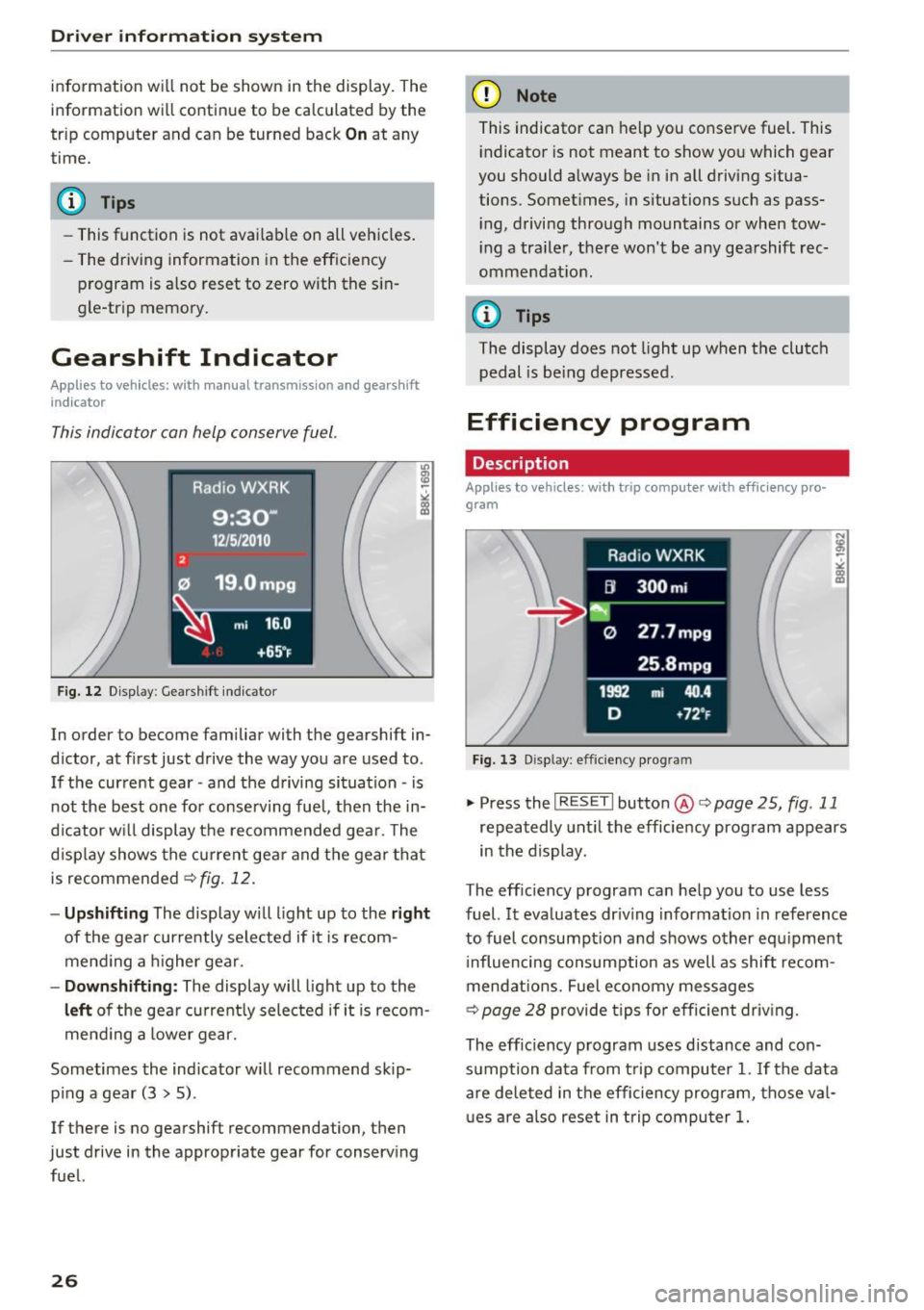
Fig. 12 Display : Gearshift indicator
In order to become familiar with the gearshift in
d icter, at first just drive the way you are used to .
If the current gear -and the driving situation -is
not the best one for conserving fuel, then the in
dicator wi ll display the recommended gea r. The
d isplay shows the current gea r and the gea r that
is recommended
¢fig. 12.
-Up shifting The display w ill light up to the ri ght
of the gear currently selected if it is recom
mend ing a h igher gear.
- Dow nshifting : The display will light up to the
left of the gear cu rrent ly selected if it is recom
mend ing a lower gear.
Sometimes the indicator w ill recommend skip
p ing a gear (3
> 5).
If there is no gearshift recommendation, then
just drive in the appropriate gear for conserving fuel.
26
(D Note
This indicator can help you conserve fuel. This i ndicator is not meant to show you which gear
you should always be in in all driving situa
tions. Somet imes, in situations such as pass
i ng, driving through mountains or when tow
i ng a tra ile r, there won't be any gearshift rec
ommendat ion.
(0 Tips
The display does not l ight up when the clutch
pedal is be ing depressed .
Efficiency program
Description
Applies to vehicles : with trip computer with efficiency pro·
gram
Fig. 13 Display : effic ie ncy program
.,. PressthelRESETlbutton @c>page25, fig .11
repeatedly unt il the efficiency program appears
in the display.
The effic iency program can help you to use less
fuel.
It eva luates dr iv ing information in reference
to fuel consumpt ion and shows other equ ipment
i nfluencing consumption as well as shift recom
mendat ions. Fuel e conomy messages
¢ page 28 provide tips for efficient driv ing.
The eff ic iency p rogram uses distance and con
sumption data from trip computer
1. If the data
a re de leted in the efficiency program, those va l
u es are also reset in trip computer
1.
Page 29 of 264
,-1 N
0 1-CX)
rl I.Cl U"I
,-1 I.Cl ......
Enhanced shift indicator
Applies to vehicles: with manual transmiss ion and tr ip com
p uter with eff iciency program
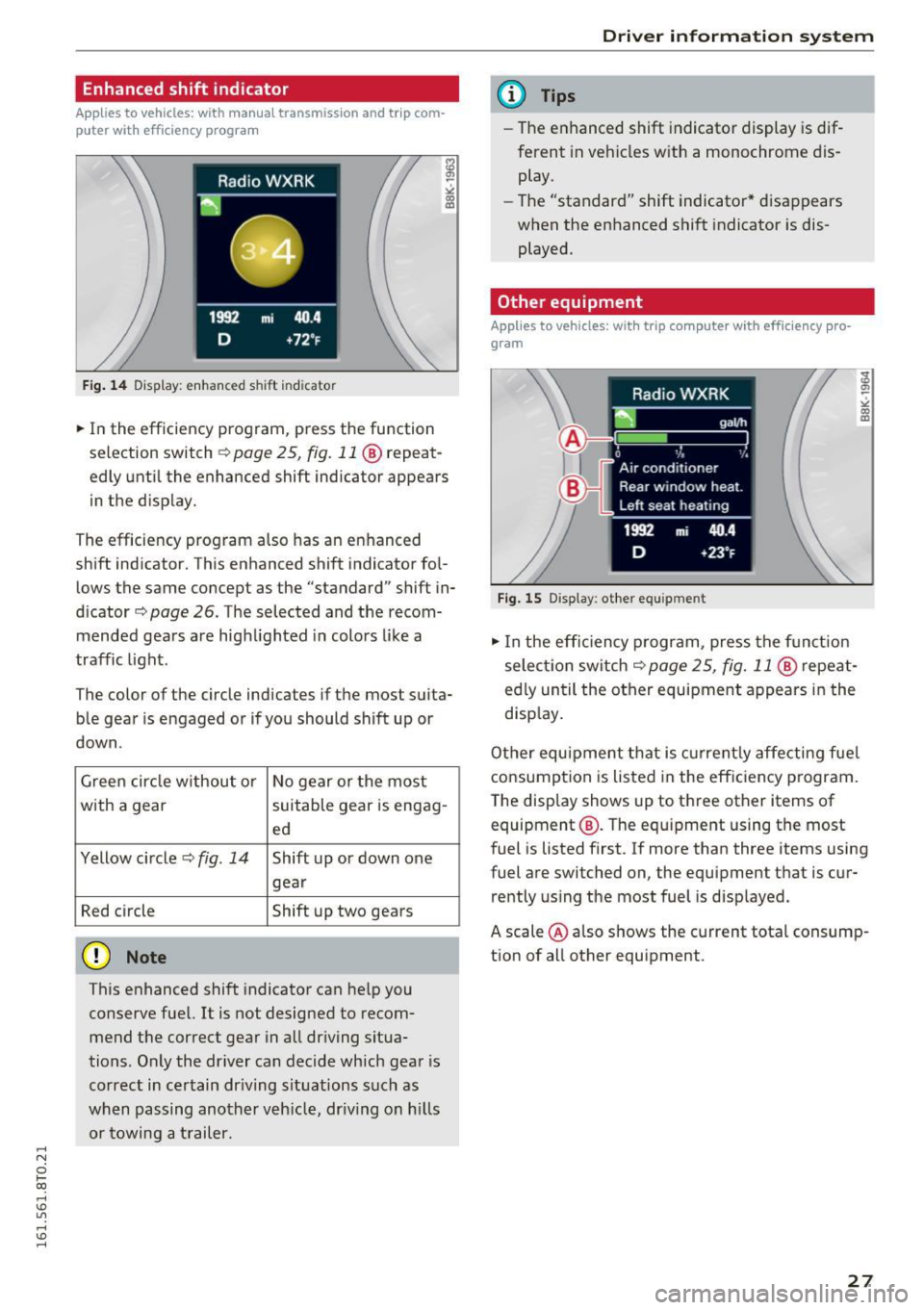
F ig. 14 Display: enhanced s hift i ndicator
• In the efficiency program, press the function
selection switch¢
page 25, fig. 11@ repeat
edly until the enhanced shift indicator appears
in the display.
The efficiency program also has an enhanced
shift ind icator. This enhanced shift indicator fol
lows the same concept as the "standard" shift in
dicator¢
page 26. The selected and the recom
mended gears are highlighted in colors like a
traffic light .
The color of the circle indicates if the most suita b le gear is engaged or if you should shift up or
down.
Green circle w ithout or No gear or the most
with a gear suitable gear is engag-
ed
Yellow circle¢
fig. 14 Shift up or down one
gear
Red circle Shift up two gears
(D Note
This enhanced shift indicator can help you
conserve fuel. It is not designed to recom
mend the correct gear in all driving situa
tions . Only the dr iver can decide which gear is
correct in certain dr iving situations such as
when passing another veh icle, dr iving on hill s
or towing a trailer.
Driver in forma tion system
(D Tips
-The enhanced shift indicator display is dif
ferent in vehicles with a monochrome dis
play.
- The "standard" shift indicator* disappears
when the enhanced shift indicator is dis
played.
Other equipment
Applies to vehicles: with trip computer with eff ic ie n cy pro
gram
Fig. 15 Display : other equ ipment
• In the effic iency program, press the function
select ion switch ¢
page 25, fig. 11 @ repeat
ed ly until the other equipment appears in the
disp lay.
Other equipment that is currently affecting fuel
consumption is listed in the eff ic iency program.
T he display shows up to three other items of
equipment @. T he equipment using the most
fuel is listed first. If more than three items using
fuel are switched on, the equipment that is cur rently using the most fuel is displayed.
A scale @also shows the current total consump
tion of all other equipment .
27
Page 40 of 264
Opening and clo sin g
_& WARNING
- After closing the rear lid, a lways pu ll up on
it to make sure that it is properly closed.
Otherwise it co uld open suddenly when the
vehicle is mov ing.
- To help prevent poisonous exhaust gas from
being drawn into the veh icle, always keep
the rear lid closed while driving. Never
transport objects larger than those which fit
completely into the luggage area, because
then the rear lid cannot be fully closed .
- Never leave yo ur vehicle unattended espe
c ially w ith the rear lid left open . A child
could crawl into the car through the luggage
compartment and p ull the lid shut, becom
ing t rapped and unable to get ou t. To re
duce the r is k of persona l injury, never let
childre n play in or around your vehicle. Al
w ays keep the rear lid as well as the vehicle
doors closed when not in use.
- Always ensure that no one is within range of
th e rear lid when it is moving, in particular
close to the hinges -fingers or hands can be
pinched.
(D Tips
When the vehicle is locked, the rear lid can be
o pened separately by p ressing the button
c:;;
on the master key. When you close the rear
lid again, it locks automatically.
Trunk escape handle
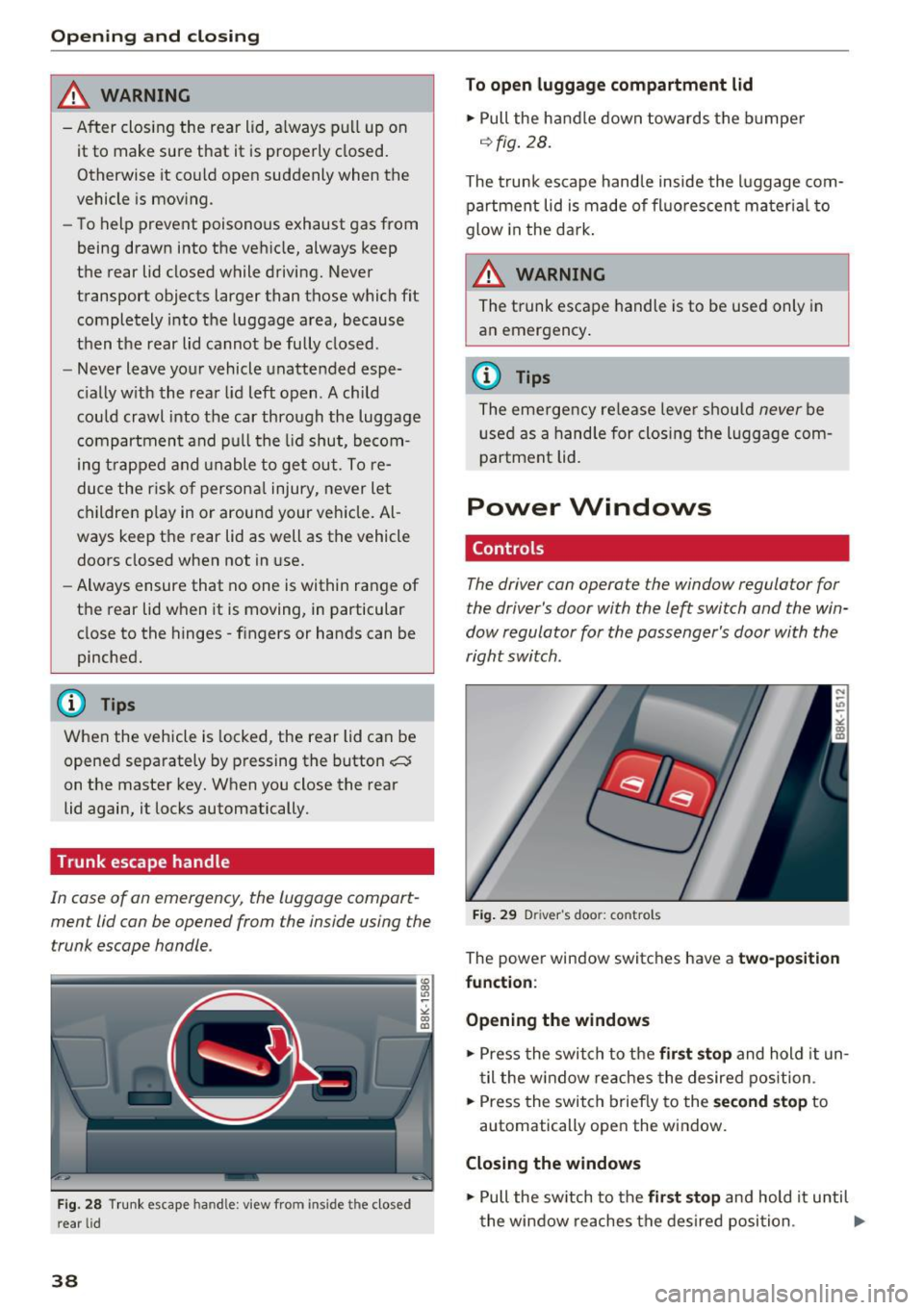
In cas e of an emerg ency, th e luggage compart
men t lid can be opened from the inside using the
t runk escape handle .
Fig . 2 8 Trunk escape han dle: view from in sid e th e closed
r e a r lid
38
To open luggage compartment lid
.,. Pull the handle down towards t he b umper
o::> fig. 28 .
The trunk escape hand le inside the luggage com
partment lid is made of fl uo rescen t ma teria l to
glow in the dark .
_& WARNING
The trunk escape handle is to be used only in
an emergency .
{!) Tips
The eme rge ncy re lease leve r should never be
use d as a h and le for clos ing the lugg age com
partment lid.
Power Windows
Controls
The driver can operate the window regulator for
the driver's door with the left switch and the win
dow regulator for the passenger's door with the
right switch .
Fig . 29 D river 's doo r: controls
The power w indow switches have a two-position
fun ction :
Opening the windows
.,. Press the swi tch to the fir st stop and hold it un
t il the w indow re aches the desired position .
.,. Press the switch briefly to the
s econd sto p to
automatically open the window .
Closing the windows
.,. Pull the sw itch to the fir st st o p and hold it until
the window reaches the desired posi tion .
Ill-
Page 48 of 264
Light and Vision
The coming home and leaving h ome functions
only operate when it is dark and t he light switch
is in the AUTO position
~ page 44, fig. 36.
Auto headlights*
W hen the light swi tch is in the A UTO ~ page 44
position, the sw itch-on po int of the lights can be
cha nged in the automatic driving light function.
Daytime running lights
USA models :
You can switch the daytime r unning
lights
on and off .
Canada models: The funct ion cannot be tu rned
off .
It is activated automatically each t ime the ig
n ition is switched on.
Tra vel mode*
The headlight beam is asymmetrical. This pro
vides stronger illumination on the side of the
road on which you are driving.
If you are driving
in a cou ntry that dr ives on the opposite side of
the road from you r own country, this will cause
g lar e fo r oncom ing dr ive rs . To p revent glare:
- Travel mode must be selected in veh icles w ith
Xenon headlights* .
- In vehicles with halogen headlights, certain
areas of the headlight lenses must be cove red
with waterproof adhesive covers that prev ent
l ight from passing through. For more informa
tion, ple ase see you r auth orized Audi dea le r or
a uthorized repair fa ci lity .
When travel mode is ac tiva ted, a disp lay in
t he dr ive r inf orm ation sys tem in dicates this
e ach t ime yo u sw itch the ignition on .
46
Emergency flashers
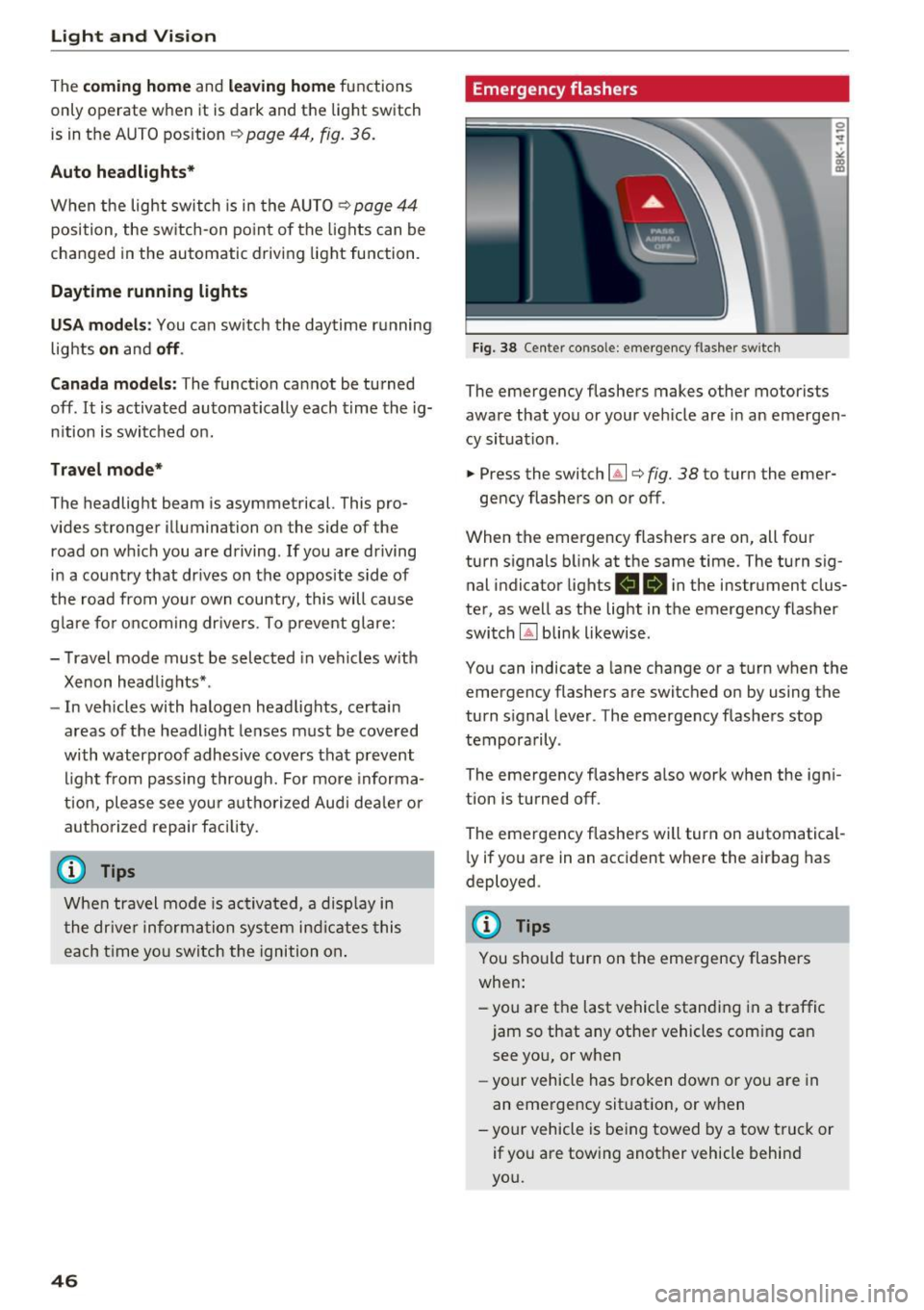
Fig. 38 Center console: emergency flashe r switc h
The emergency flashers makes other motorists
aware that you or your ve hicle are in an emergen
cy situat io n .
.. Press the switch~¢
fig. 38 to turn the emer-
gency flashers on or off .
When the emergency flashers are on, all four
turn s ignals b link at the same time. The turn sig
nal indicator lights
RB i n the instrument clus
ter, as well as the light in t he emergency flasher
switch
IA] blink likewise .
You can indicate a lane change or a turn when the
emergency flashers are switched on by using the
turn signal lever . The emergency flashers stop
tempora rily .
The emergency flashe rs a lso wor k when the ign i
tion is turned off.
The emergency flashers will turn on automatical
l y if you a re in an accident where the airbag has
deployed .
@ Tips
You should turn on the emergency flashers
when:
-you are the last vehicle standi ng in a traffic
jam so that any other vehicles com ing can
see yo u, or when
- yo ur ve hicle has broken down or yo u are in
an eme rge ncy sit uat ion, or w hen
-your vehicle is be ing towed by a tow tru ck or
if yo u are towing another vehicle behin d
you.
Page 49 of 264
,-1 N
0 1-CX)
,-1 I.Cl U"I
,-1 I.Cl ......
Interior Lighting
Front/rear interior lights
(• ' .,;,I
~~~
8 8
O. ~O
l
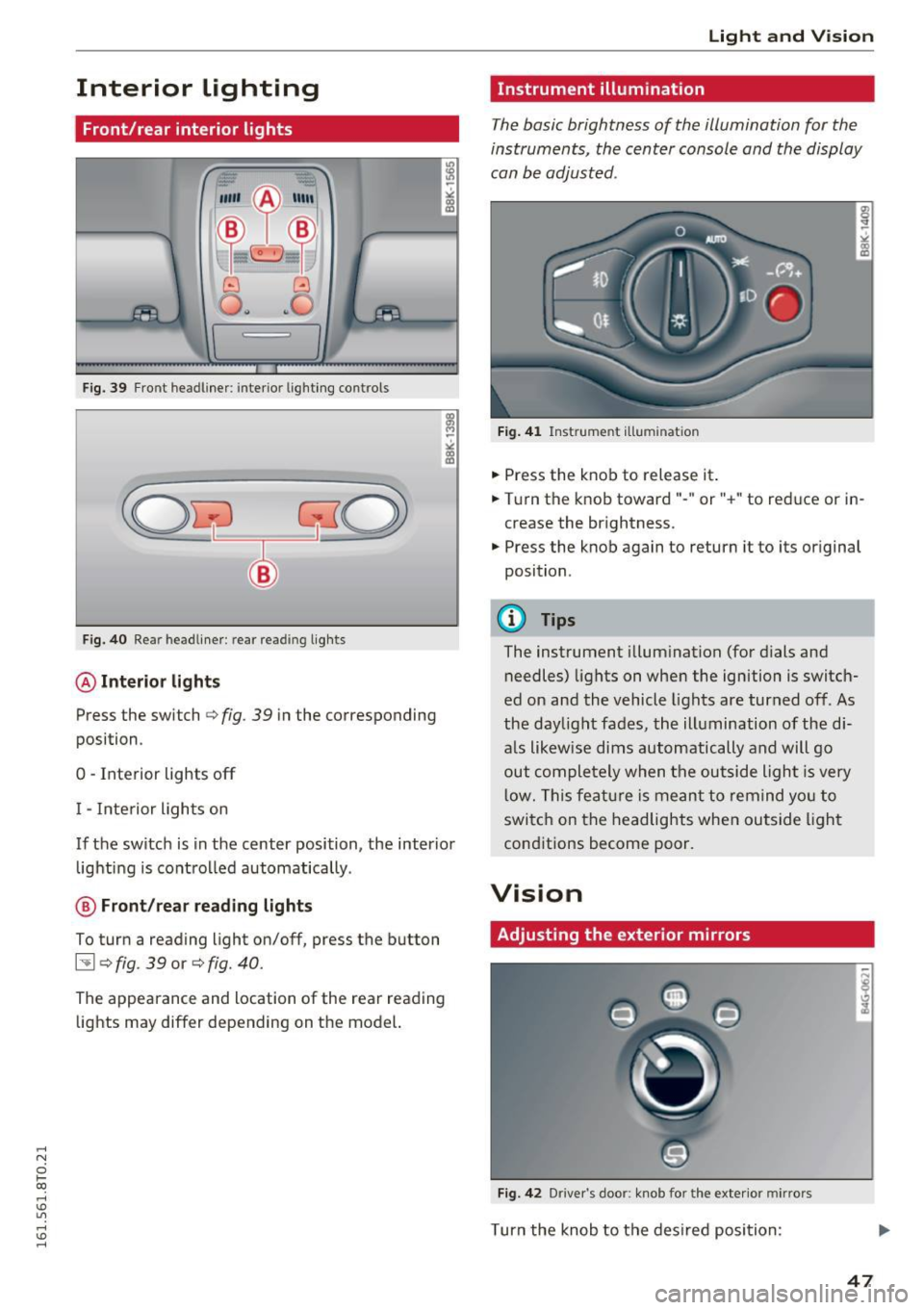
Fig. 39 Front headl iner : interio r lighting co ntrols
Fig. 40 Rear headliner : rear re ading lights
@Interior lights
Press the switch Qfig . 39 in the corresponding
position .
0 -Interior lights off
I - Interior lights on
If the switch is in the center position, the interior
lighting is controlled automatically .
@ Front/rear reading lights
To turn a reading light on/off, press the button
~ Q fig . 39 or Q fig. 40.
The appearance and location of the rear reading
lights may differ depending on the model.
Light and Vision
Instrument illumination
The basic brightness of the illumination for the
instruments, the center console and the display
can be adjusted .
Fig. 41 Instrume nt illumin atio n
• Press the knob to release it .
• Turn the knob toward"- " or"+" to reduce or in
crease the brightness .
• Press the knob again to return it to its original
position .
@ Tips
The instrument illumination (for dials and
needles) lights on when the ignition is switch
ed on and the vehicle lights are turned off. As
the daylight fades, the illumination of the di
a ls likewise dims automatically and will go
out completely when the outside light is very
low. This feature is meant to remind you to
switch on the headlights when outside light
conditions become poor.
Vision
Adjusting the exterior mirrors
Fig. 42 Driver 's doo r: kno b fo r the exterio r mirrors
Turn the knob to the desired position :
47
Page 51 of 264
,-1 N
0 1-CX)
,-1 I.Cl U"I
,-1 I.Cl ......
-If electrolyt e gets into the eyes, flush them
thoroughly with large amounts of clean
water for at least 15 minutes; medical at
tention is recommended.
- If electrolyte contacts skin, flush affected
area with clean water for at least 15 mi nutes and then wash affected area w ith
soap and water; medical attention is recom
mended . Thoroughly wash affected clothing
and shoes before reuse.
- If swallowed and person is conscious, rinse mouth with water for at least 15 m inutes.
Do not induce vomiting unless instructed to
do so by medical profession al. Get medical
attent ion immed iate ly.
(D Note
Liquid elect rolyte leaking from broken m irror
glass will damage any p lastic surfaces it
comes in co ntac t wi th. C lean up sp illed ele c
t rolyte immediately with clean water and a
sponge .
@ Tips
-Switch ing off the d imm ing f unction of the
i nside rear v iew m irror also deact ivates the
automat ic dimming function of the exterior
mirrors.
- Automat ic dimming for the m irror on ly op
erates properly if the sun shade* for the
rear window is not in use or the light strik
ing the ins ide mirror is not hindered by oth
er objects .
- The automatic d imm ing mirrors do not dim
when the interior lighting is turned on or
the reverse gear is selected .
Light and Vis ion
Sun visors
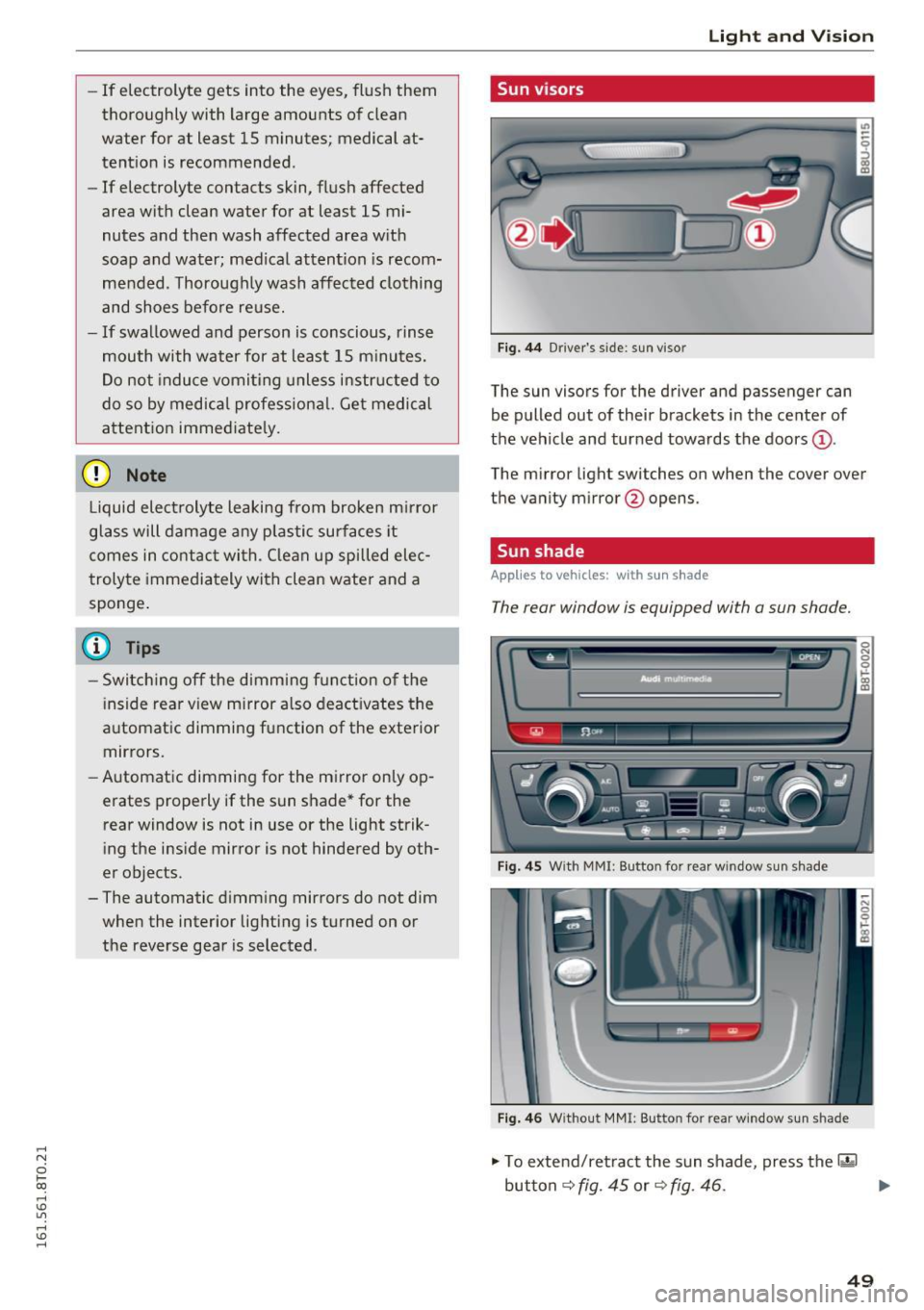
Fig. 44 Drive r's s ide: sun viso r
The sun visors for the dr iver and passenger can
be pulled out of their brackets in the center of
the vehicle and turned towards the doors
(D .
The m irro r light swi tches on when the cover over
t he va nity mirror @opens.
Sun shade
Applies to vehicles: with sun shade
The rear window is equipped with a sun shade.
F ig . 4 5 W ith MM I: Bu tton for re ar w in do w s un shade
F ig. 46 W ith out MMI : But ton for rear window sun s had e
"' To extend/retract the sun shade, press the 00
~ 0
0
I-' CD U)
button r=;, fig. 45 or r=;, fig. 46 . ""
49
Page 68 of 264
Seats and storage
@ Tips
-You can open the pass-through from the
luggag e compartment. Push the release
button down and push the cover forward.
- You can lock or unlock the pass-through us
ing the mechanical key. This prevents any
access to the luggage compartment from
the vehicle interior.
Securing the ski sack
Appl ies to veh icles: w ith s ki sac k
The ski sack must be secured in the luggage com
partment.
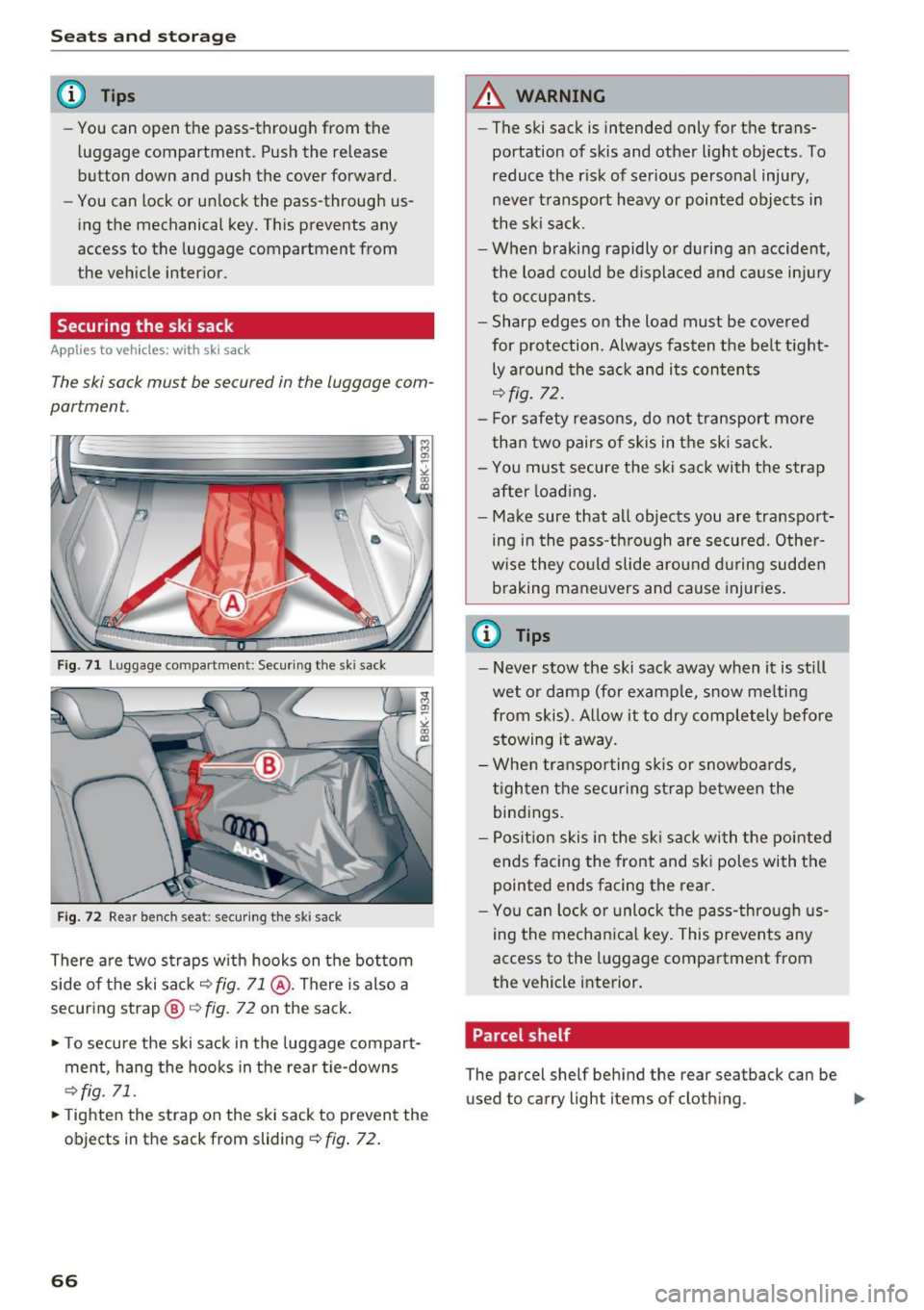
Fig. 71 Luggage compartme nt: Secur ing the ski sack
Fig. 72 Rear bench sea t: secu ring the ski sack
There are two straps with hooks on the bottom
side of the ski sack
~ fig. 71 @ . There is also a
securing strap@~
fig. 72 on the sack.
.. To secure the ski sack in the luggage compart
ment, hang the hooks in the rear tie-downs
~fig. 71.
.. Tight en the strap on the ski sack to prevent the
objects in the sack from sliding
~ fig. 72.
66
A WARNING
-The ski sack is intended only for the trans
portation of skis and other light objects . To
reduce the risk of serious personal injury,
never transport heavy or pointed objects in
the ski sack.
- When braking rapidly or during an accident,
the load could be displaced and cause injury to occupants.
- Sharp edges on the load must be covered
for protection . Always fasten the belt tight
ly around the sack and its contents
~fig . 72.
- For safety reasons, do not transport more
than two pairs of skis in the ski sack.
- You must secure the ski sack with the strap
after loading.
- Make sure that all objects you are transport
ing in the pass-through are secured. Other
wise they could slide around during sudden braking maneuvers and cause injuries.
@ Tips
-Never stow the ski sack away when it is still
wet or damp (for example, snow melting
from skis). Allow it to dry completely before stowing it away.
- When transporting skis or snowboards,
tighten the securing strap between the
bindings.
- Position skis in the ski sack with the pointed
ends facing the front and ski poles with the
pointed ends facing the rear.
- You can lock or unlock the pass-through us
ing the mechanical key. This prevents any
access to the luggage compartment from
the vehicle interior.
. Parcel shelf
The parcel shelf behind the rear seatback can be
used to carry light items of cloth ing. ..,.
Page 72 of 264
Warm and cold
1- 1 Switching recirculation mode on/off
In r ecirculation mode, the air inside the vehicle is
circu lated and filtered. This prevents the unfil
tered air outside the vehicle from entering the
ve hicl e interior. We recommend switching recir
culation mode on when driving through a tunnel
or when sitting in traffic¢.&,.
The
IAUTOI button or l
IAUTO I Switching automatic mode on
Automatic mode maintains a constant tempera
ture inside the vehicle. Air temperature, airflow
and air distribution are controlled automatically.
Adjusting the temperature
Temperatures between 60 °f (+16 °C) and 84 °f
( + 28 °C) can be set. Outside of this range,
LO or
HI will appear in the climate control system dis
p la y. At both of these settings, the climate con
trol system runs continuously at maximum cool
ing or heating power. There is no temperature
regulation.
~ Adjusting the airflow
You can adjust the airflow manually to suit your
needs. To have the airflow regulated automati
cally, press the
IAU TO I button.
~ Adjusting the air distribution
You can manually select the vents where the air
will flow. To have the air dist ribution regulated
automatically , press the
IAU TO I button.
QJ Adjusting seat heating*
Pressing the button switches the seat heating on
at the highest setting (level 3) . The LEDs indicate
the temperature level. To reduce the tempera
ture, press the button aga in. To switch the seat
heating off, press the button repeated ly until the
L ED turns off.
After 10 minutes, the seat heating automatically
switches from level 3 to level 2.
~ Adjusting seat ventilation*
Pressing the button switches the seat vent ilation
on at the highest setting (level 3). The LEDs indi-
70
cate the ventilation level. To reduce the venti la
tion level, press the button again. To switch the
seat ventilation off, press the button repeatedly
until the LED turns off.
I@ FRONT I Switch the defroster on/off
The windshield and side windows are defrosted
or cleared of condensation as quick ly as possible.
The maximum amount of air f lows mainly from
the vents below the windshield. Recirculation
mode switches off. The temperature should be
set to 72 °f (22 °C) or higher. The temperature is
controlled automatically.
The
! AU TOI button switches the defroster off.
lliil REAR I Switching rear window heater on/
off
The rear window heater only operates when the
engine is running. It switches off automatically
after a few m inutes, depending on the outside
temperature.
To prevent the rear window heater from switch
ing off automatica lly, press and hold the
loo REARI
button for more than 2 seconds. T his remains
stored until the ignition is sw itched off.
Air vents
You can open and close the center and rear air
vents using the thumbwheels. The levers adjust
the direction of the airflow from the vents.
In vehicles with a 3-zone deluxe automatic cli
mate contro l system*, you can adjust the air tem
perature in the rear by turning the thumbwheel
toward the red side to make it warmer or toward
the blue side to make it cooler.
A WARNING
- Do not use the rec irculat ion for extended
periods of time. The windows could fog up
since no fresh air can enter the vehicle . If
the windows fog up, press the air recircula
tion button again immediate ly to switch off
the air recirculat ion function or select de
frost.
- Individuals with reduced sensitiv it y to pain
or temperature could develop burns when
using the seat heating function. To reduce
-