airbag AUDI A5 COUPE 2018 User Guide
[x] Cancel search | Manufacturer: AUDI, Model Year: 2018, Model line: A5 COUPE, Model: AUDI A5 COUPE 2018Pages: 409, PDF Size: 67.63 MB
Page 199 of 409
<( a, .... N ,....
N .... 0 \0
3 a,
Connection man ag er
See ¢ page 2 52.
Licen se sub scr ipt ion
The val idity and expirat ion date of your licenses
are displayed . When the function is switched on
~, the message Warning befor e subscription
e xpire s
will display to warn you that your license
is about to expire.
Refre sh
The content of the selected Audi connect Info
tainment service o r the entire Audi connect (Info
tainment) list is updated.
Wi-Fi hotspot
A ppl ies to: ve hicles with Wi -F i h otspot
You can use the MMI as a Wi-Fi hotspot to con
nect up to eight Wi-Fi devices to the Internet.
While driving, restricted use of unsecured, light,
small wireless devices is only possible from the
rear of the vehicle.
Requirement: the ignition must be switched on.
.,. Se lect : I MENU I button >Telep ho ne> right con-
trol button
> Wi -Fi settin gs.
The follow ing settings can be selected:
Wi-F i
The MMI Wi-Fi hotspot is deactivated at the fac
tory. Switch the Wi-Fi hotspot to
Hot spo t before
establishing a connection between your vehicle
and your Wi -F i dev ice.
- On: the MMI Wi-Fi hotspot is active and visib le
to other devices . You can connect your Wi-Fi
device to the MMI and use the Internet connec
tion if necessary .
-Off: the MMI Wi-Fi hotspot is deactivated. An
Internet connection for Wi-Fi devices is not
poss ible.
A WARNING
- To reduce the risk of an accident, use the
Audi connect Infotainment serv ices w ith a
Wi -Fi hotspot on ly in the rea r seat when the
-
Audi c onn ect ( Inf ota inm ent )
vehicle is in motion, or only when the vehi
cle is stat ionary.
- It is only safe to use tablets, laptops, mo
bile devices and other similar devices when
the vehicle is stationary because, like all
loose objects, they could be thrown around
the inside of the vehicle in a crash and cause
serio us injuries . Store these types of devices
securely while driving.
- Do not use any wireless dev ices on the front
seats within range of the airbags while dr iv
ing. Also read the warnings in the chapte r
¢ page 281, Front airbags.
-As the driver, do not allow usage of the W i
F i hotspot to distract you from driv ing, as
this cou ld increase the r isk of an accident.
(D Note
- Under some conditions, certain mobile devi
ces and ope rating systems may automati
cally sw itch from your vehicle's Wi-Fi hot
spot to the device's mobi le da ta connection.
In that event, standard text and data usage
rates would apply whi le the device's mobile
data connection is in use . Please refer to
documentation provided by your mobile de
vice's manufacture and your data carrier for
details , related terms and privacy state
ment.
- You are responsib le for all precautions tak
en for data protect ion, anti-virus protection
and protection against loss of data on mo
bile devices that are used to access the In
ternet through the Wi-Fi hotspot.
(D Tips
- In vehicles w ithout Audi connect (Infota in
ment)*, the use of the Wi-Fi hotspot is only
possible fo r the W i- Fi aud io player*. A data
c onnect io n to the Inte rnet cannot be es tab
lished.
- For add itiona l information about the Audi
connect Info tainment services, visit
www .audiusa.com /myaudi .
197
Page 200 of 409
Audi connect (Infotainment)
Configuring the data
connection
App lies to veh icles with Audi co nnect (Infotainment)
The data connection for Audi connect Infotain
ment services is pre-configured at the factory .
However, if a configuration should be necessary,
you can adjust the following settings.
.,. Select: I MENU I button> right control button>
Connection manager.
.,. Select: right control button > Online settings>
Data connection settings.
Using the Data connection settings menu, you
can set when an Internet connection should be
made . T he Internet connection disconnects auto
matica lly once the requested Audi connect Info
tainment service no longer requires any data.
The follow ing settings can be selected:
Audi connect (MMI)
With the Audi connect (MMI) func tion, you can
Allow or Deny the use of Audi connect Infotain
ment services if the connection is set to No re
quest or With request.
Wi-Fi devices*
Using the Wi-Fi devices function, you can Allow
or Deny a connection to the Internet.
A WARNING
-As the driver, do not allow usage of the Wi
Fi hotspot to distract you from driving, as
this could increase the risk of an accident .
-It is only safe to use tablets, laptops, mo
bile devices and other similar devices when
the vehicle is stationary because, like all
loose objects, they could be thrown around
the ins ide of the vehicle in a crash and cause
serious injuries . Store these types of devices
securely whi le driving.
-Do not use any wireless devices on the front
seats within range of the airbags while driv
ing. Also read the warnings in the chapter
cc> page 281, Front airbags.
198
(D Note
A lways follow the information found in ¢(!) in
Wi-Fi hotspot on page 197.
Audi connect
(Infotainment) general
information
Audi connect Infotainment services
Applies to vehicles w it h Aud i connect (I nfotainment)
(D Tips
-You can only use services supported by Aud i
connect (Infotainment) if you have the op
tional MMI Navigation plus equipment with
MMI touch* and Audi connect (Infotain
ment).
-Use of the L TE* mobile network standard is
not available in every country. Contact an
authorized Audi dealer or authorized Audi
Service Facility or your cell phone service
provider for additiona l information.
-Usage of Audi connect Infotainment serv
ices depends on the avai lability of services
through third party providers.
-Audi connect Infotainment services are only
available within the cell phone network cov
erage from your cell phone service provider.
-Audi connect Infotainment services are
available in the USA . Audi connect Infotain
ment services are currently not availab le in
Canada or in Mexico.
-Also read the information in the chapter
c:> page 178, Telephone.
-Availability, scope, providers, screen display
and costs of services may vary depending on
the country, model, model year, end device
and rates . For additional information, v is it
www.audiusa.com .
-An initial registration/activation on the
myAudi platform at
www.audiusa.com/
myaudi
is required to use individual serv
ices. You can contact an authorized Audi
dealer or Aud i connect (Infotainment) cus
tomer service at (877) SOS-AUDI (2834) to
Page 207 of 409
Emergency call
Introduction
The following functions may be available depend
ing on the vehicle and the market.
- Emergency
ca ll ¢ page 205.
- Online roads ide ass istance ¢ page 206 .
@ Tips
- The serv ices are provided through a SIM
card installed in the vehicle . The cost of the
call and data connections is included in the
price for the services . Services a re provided
assuming that the cell phone network re
quired for the installed S IM card is function
ing and ready to operate. The available serv
i ces set by Audi AG are only available within
the cell phone network coverage area for
the cell phone service provider selected by
Audi AG.
- You can find what data will be transferred
at www.aud iusa.com.
- These services cannot be deactivated using
the settings in the Infotainment system.
Emergency call
Description
Appl ies to: vehicles with emergency call function
You can request help when in an eme rgency or
dangerous situation using the emergency call
function
l) _ An emergency call is a combination
of data transmission and a phone call. The data
transmission from your vehicle forwards impor
tant information, such as the vehicle and position
data, to the emergency call center.
1l The av ailabilit y of the serv ices o ffere d d ep end s on t he
c o untry a nd may chang e over t ime.
Emergen cy call
Making an emergency call
App lies to: vehicles with emergency call function
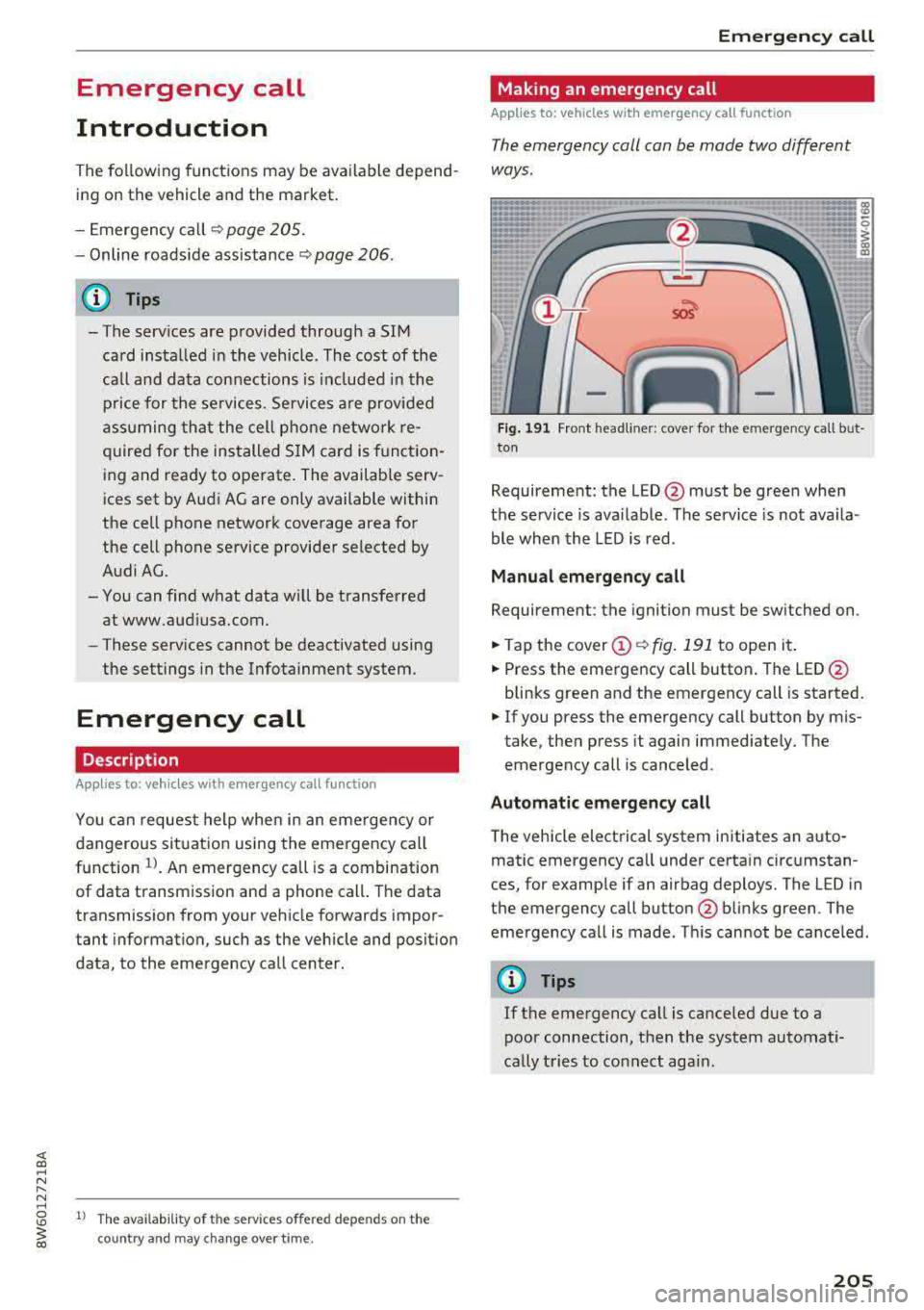
The emergency coll con be mode two different
ways .
Fig. 191 Front head liner: cover for the e mergency call b ut
ton
Requirement: the L ED @ must be green when
the service is available . The service is not availa
ble when the LED is red .
Manual emergency call
Requirement: the ignition must be switched on .
.. Tap the cover (D ¢ fig. 191 to open it .
.. Press the emergency call button. The LED@
blinks green and the emergency call is started.
.. If you press the emergency call button by m is
take, then press it again immed iately. The
emergency call is canceled .
Automatic emergency call
The vehicle electrical system initiates an auto
matic emergency call under certa in circumstan
ces, for example if an airbag deploys. The LED in
the emergency call button@blinks green . The
emergency call is made . This cannot be cance led.
(D Tips
If the emergency call is canceled due to a
poor connection, then the system automati
cally tries to connect again.
205
Page 236 of 409
Media
(D Tips
-Check for any connection requests on your
Bluetooth dev ice .
- Mult iple Bluetooth audio players can be
connected to the MMI, but only one mobile
device can be active.
- Bluetooth protocols AVRCP ( 1.0/1.3/1.4)
and A2DP are suppo rted.
- Note the volume setting on your Bluetooth device. A ud i recommends setting your mo
bile device to the maxim um vo lume when
us ing it as a Bluetooth audio player.
- The supported media functions (such as
sh uffle) depend on the Bluetooth device be
i ng used.
- For more information on the supported de
v ices, visit
www.aud iusa.com /bluetooth or
contact an author ized Audi dealer or author
i zed Audi Service Facility.
Wi-Fi audio player
A ppl ies to: ve hicles w ith Wi-F i audio playe r
Using the Wi-Fi audio player media source on the
MMI, you can connect and operate your Wi-Fi-ca
pable media player (such as a smartphone) to wirelessly play music from your media player
li
brary. The media player is connected through the
vehicle's Wi -Fi hotspot. A UPnP Server opp or an
integrated UPnPIDLNA server on your media
player is required to access your media player
li
brary.
Requirement: the Wi-Fi function on your media
p layer must be sw itched on. The
Aud i MMI con
n ect
app or a UPnP server app must be installed
on your med ia p layer .
Or: you must be us ing a
media player with an integrated UPnP/DLNA
server.
- Connecting a medi a playe r: press the I MEDIA !
button. Press the left control button unt il the
sources
overview ¢ page 239 is d isplayed . Se
lect and co nfirm
W i-Fi audio play er 0
¢ page 239, fig . 220.
- If necessary, select and confirm Wi-F i turn ed
off > Turn on Wi-Fi
to activate Wi-Fi in the
MMI. Select
Wi-Fi s etti ng s, if necessa ry . Se lect
234
the same settings on the wireless media player
that are used for the Wi- Fi hotspot .
-Starting the Wi-Fi audio pla yer : start the Audi
MMI connect
app or a UPnP server app, or set
media permissions on your media player.
Operating the medi a pl ayer : the med ia p layer is
operated through the MM I.
- Press the left control button repeatedly until
the
Folders menu item appears. Select and con
firm
Folder s.
- Playing music from the medi a pla yer:
select
and confirm
M edia cent er.
Web r adio :
see ¢page 235.
A WARNING
- As the d river, do not allow usage of the Wi
Fi hotspot to distract you from driving, as
this could increase the r isk of an accident.
- It is on ly safe to use tablets, laptops, mo
bi le devices and other similar dev ices when
the vehicle is stat ionary because, like all
loose objects, they co uld be thrown around
the inside of the ve hicle in a c rash and ca use
serio us inju ries . Store these types of devices
secure ly while driving.
- Do not use any wire less devices on the front
seats wi thin range of the airbags while dr iv
ing . Also read and follow the warn ings in
¢ page 281, Front airbags.
(D Note
A lways fo llow the information fo und in ¢ (!) in
Wi -Fi hotspo t on page
197.
(D Tips
- Always read the chapter¢ page 198, Audi
connect (Infotainment) general informa
tion.
- Please note that a Wi-F i connection does
not automatically make it possible to use
the Interne t. For addit io nal info rm ation,
see
¢ page 191 .
- To avoid interr upt ions du ring playback, de
act ivate the powe r saving function on the
media player or connect it to a charger.
Page 238 of 409
Media
-Do not u se any wireless devices on the fro nt
seats within range of the airba gs w hile driv
ing. Also read and follow the warnings in
c:> page 281, Fro nt airbags.
CD Note
- Always follow the information found in c> 0
in Wi-Fi hotspot on page 197 .
-Please note that there generally are add i
tiona l costs when using an online media
service account, especially when it is used i nternationally.
{!) Tips
-Depending on the Internet connection and
network traff ic, a connection loss can occur
during p layback of on line media serv ices.
-Online media and Internet radio usage de
pends on the serv ice avai lability of the third
party provider.
- Audi AG simply makes the access to on line
media serv ices possible t hrough the MMI
and does not take any respons ibility for the
contents of the onli ne med ia serv ices .
-Always read the chapter c:> page 198, Audi
connect (Infotainment) general informa
tion.
-Depending on the mobile device used, the re
may be interr uptions du ring media playback
and when using the
Audi MMI connect app.
T o avoi d inter ruption s when usi ng a mob ile
device, do no t loc k t he s creen on you r mo
bi le dev ice a nd keep the
Audi MMI connect
app in the foreground .
- Co ntact an a utho rized Audi dea le r or a u
thorized Audi Service Facili ty for additional
informat ion about on line media .
236
Multimedia connections
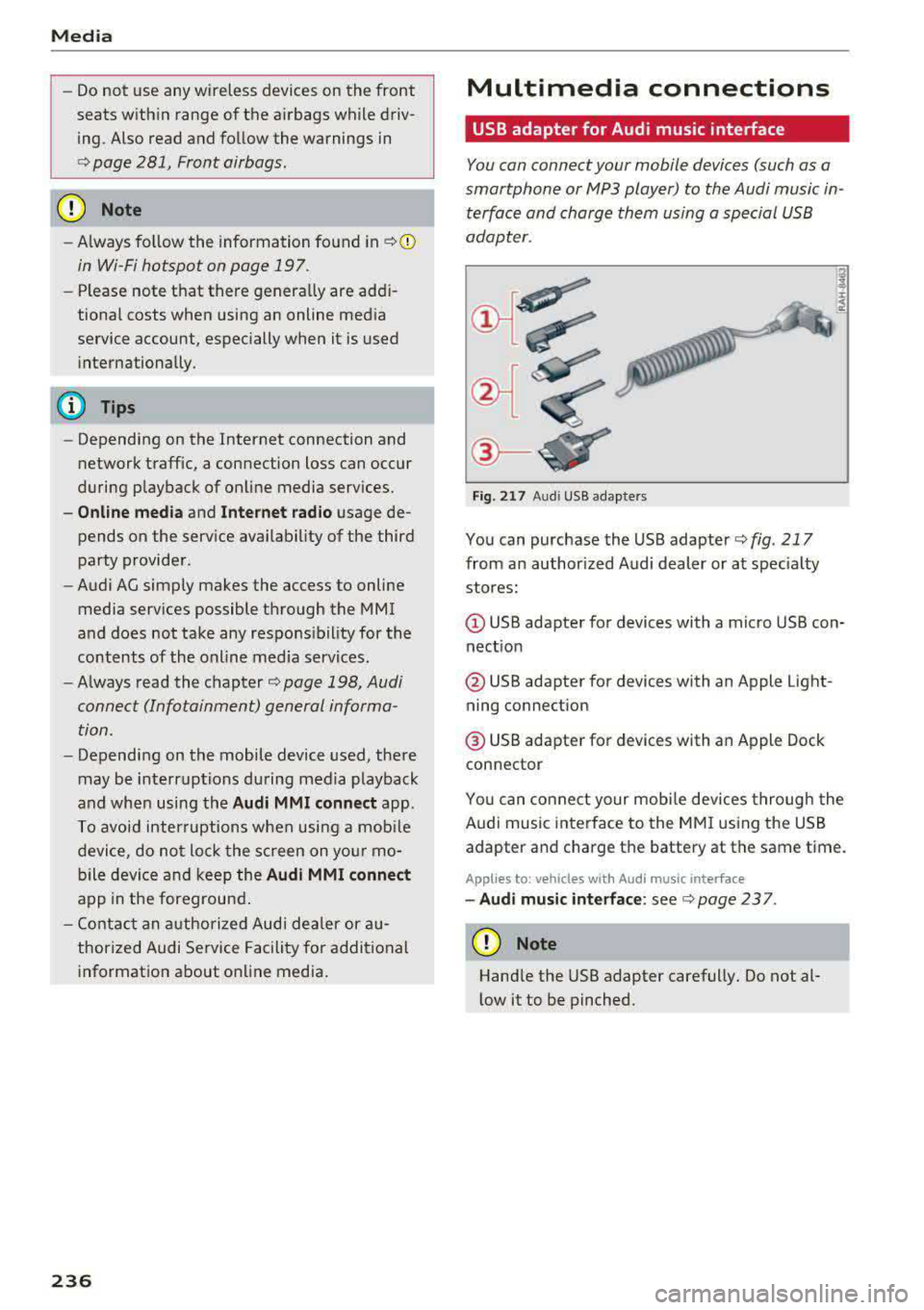
USB adapter for Audi music interface
You can connect your mobile devices (such as a
smartphone or
MP3 player) to the Audi music in
terface and charge them using a special USB
adapter .
®-
Fig. 21 7 Audi USB adapters
You can purchase the USB adapter c> fig . 217
from an author ized Audi dealer or at spec ia lty
stores:
Q) USB adapter for devices with a micro USB con
nect ion
@ USB adapter for devices with an Apple Light
ning connect ion
@ USB adapte r for devices with an Apple Dock
connector
You can conne ct your mob ile dev ices throug h the
Audi music interface to the MM I using the USB
adapter and charge the battery at the same time.
Applies to: vehicles wit h Aud i music interface
-Audi musi c interface : see c> page 237.
CD Note
Handle the USB adapter carefully. Do not al
l ow it to be pinched .
Page 260 of 409
.,. Observe all traffic laws, rules of the road and
speed limits and plain common sense .
.. ALWAYS adjust your speed to road, traffic and
weather conditions.
.. Take frequent breaks on long trips. Do not drive
for more than two hours at a stretch.
.. Do NOT drive when you are tired, under pres
sure or when you are st ressed.
& WARNING
Impai red dr iv ing safe ty inc reases the risk of
ser ious personal inju ry and death whenever a
vehicle is being used.
Correct passenger
seating positions
Proper seating position for the driver
The proper driver seating position is important
for safe, relaxed driving.
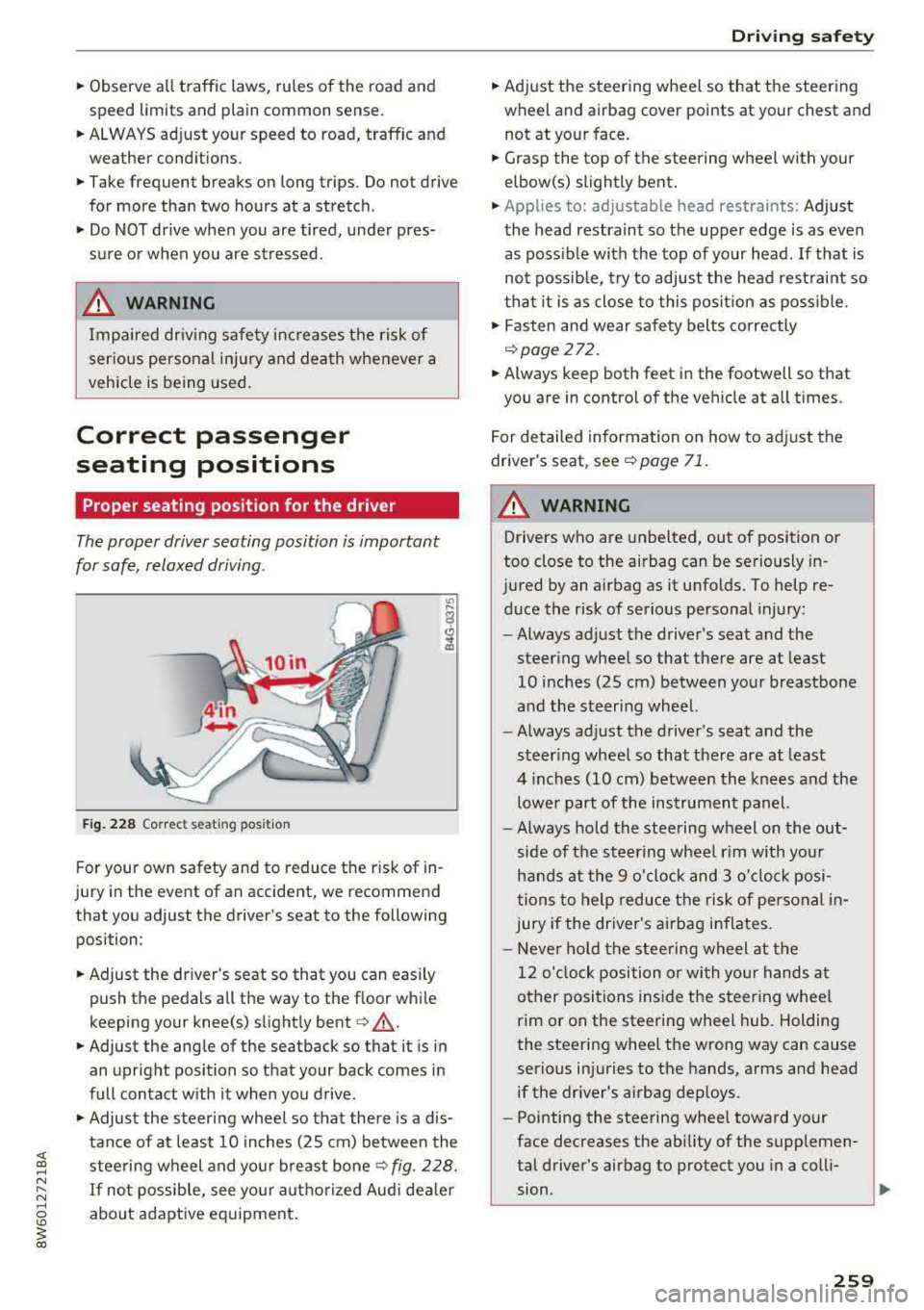
F ig . 2 28 Correct seating posit ion
F or your own safety and to reduce the risk of in
jury in the event of an accident, we recommend
that you adjust the driver's seat to the following position:
.. Adjust the dr iver's seat so that you can easily
push the pedals all the way to the floor while
keeping your knee(s) slight ly
bent ¢&_ .
.. Adjust the angle of the seatback so that it is in
an upright position so that your back comes in
full contact w ith it when you drive .
.,. Adjust the steering wheel so that there is a dis
tance of at least 10 in ches (25 cm) between the
steering wheel and you r breast
bone ¢ fig. 228.
If not possib le, see your aut horized Aud i dea le r
about adaptive eq uipment .
Driving safety
.. Adjust the steering wheel so that the steering
wheel and airbag cover points at your chest and
not at yo ur face .
.. Grasp the top of the steering wheel with your
elbow(s) slightly bent .
.,. Applies to: adjustable head restraints: Adjust
the head restraint so the upper edge is as even as poss ible with the top of your head. If that is
not possib le, try to adjust the head rest raint so
t ha t it is as close to this pos ition as poss ible .
.. Fasten and wear safety belts correctly
¢page 272.
.. Always keep both feet in the footwell so that
you are in contro l of the veh icle at a ll times.
F or detailed information on how to adj ust the
drive r's seat, see
¢page 71 .
A WARNING
-
Drivers who are unbelted, out of position or
too close to the airbag can be seriously in
jured by an airbag as it unfolds. To help re d uce the risk of serious personal injury:
- Always ad just the driver's seat and the
steer ing whee l so that there are at least
10 inc hes (25 cm) between you r breastbone
and the steering wheel.
- Always ad just the driver's seat and the
steer ing wheel so that there are at least
4 inches (10 cm) between the knees a nd the
lowe r part of the instrument panel.
- Always hold the steering w heel on the out
s ide of the steering wheel r im with yo ur
hands at the 9 o 'clock and 3 o'clo ck posi
tions to help reduce the risk of personal in
jury if the driver's airbag inflates.
- Never hold the stee ring wheel at the
12 o' clock position o r wi th yo ur hands at
other positions i nside the steer ing whee l
rim or on the steering wheel hub. Holding
the steering wheel the wrong way can cause
serio us injuries to the hands, arms and head
if the dr iver's airbag dep loys.
- Pointing the steering wheel toward your
face decreases the ability of the supplemen
tal driver's airbag to protect you in a coll i·
.,
sion. ..,
259
Page 261 of 409
Driving safety
-Always sit in an upright position and never
lean against or place any part of your body
too close to the area where the airbags are located .
- Before driving, always adjust the front seats
and head restraints properly and make sure
that all passengers are properly restrained .
- Never adjust the seats while the vehicle is
moving . Your seat may move unexpectedly
and you could lose control of the vehicle.
- Never drive with the backrest reclined or
tilted far back! The farther the backrests are
tilted back, the greater the risk of injury due
to incorrect positioning of the safety belt and improper seating position .
- Children must always ride in child safety
seats
c::> page 302 . Special precautions ap
ply when installing a child safety seat on the
front passenger seat
<=:> page 277 .
Proper seating position for the f ront
passenger
The proper front passenger seating position is
important for safe, relaxed driving.
For your own safety and to reduce the risk of in
jury in the event of an accident, we recommend
that you adjust the seat for the front passenger
to the following position:
.. Adjust the angle of the seatback so that it is in
an upright position and your back comes in full
contact with it whenever the vehicle is moving.
.. Applies to: adjustable head restraints: Adjust
the head restraint so the upper edge is as even
a s possible with the top of your head . If that is
not possible, try to adjust the head restraint so
that it is as close to this position as possible
c::> page 73 .
.. Keep both feet flat on the floor in front of the
front passenger seat.
.. Fasten and wear safety belts correct
ly <=:> page 2 72.
For detailed information on how to adjust the
front passenger's seat, see
<=:> page 71.
260
A WARNING ,_
Front seat passengers who are unbelted, out
of position or too close to the airbag can be
seriously injured or killed by the airbag as it
unfolds. To help reduce the risk of serious
personal injury:
- Passengers must always sit in an upright po
sition and never lean aga inst or place any
part of their body too close to the area
where the airbags are located.
- Passengers who are unbelted, out of posi
tion or too close to the airbag can be seri
ously injured by an airbag as it unfolds with
great force in the blink of an eye.
- Always make sure that there are at least
10 inches (25 cm) between the front pas
senger's breastbone and the instrument
panel.
- Always make sure that there are at least 4 inches (10 cm) between the front passen
ger's knees and the lower part of the instru
ment panel.
- Each passenger must always sit on a seat of
their own and properly fasten and wear the
safety belt belonging to that seat.
- Before driving, always adjust the front pas
senger seat and head restraint properly.
- Always keep your feet on the floor in front
of the seat. Never rest them on the seat, in
strument panel, out of the window, etc . The
airbag system and safety belt will not be
able to protect you properly and can even in
crease the risk of injury in a crash .
- Never drive with the backrest reclined or
tilted far back! The farther the backrests are
tilted back, the greater the r isk of injury due
to incorrect positioning of the safety be lt
and improper seat ing position.
- Ch ildren must always ride in child safety
seats
c::> page 302. Special precautions ap
ply when installing a child safety seat on the
front passenger seat
c::> page 2 77.
Page 263 of 409
Driving sa fe ty
-Never attempt to adjust head restraint
wh ile driving. If you have dr iven
off and
must adjust the driver headrest for any rea
son, first stop the vehicle safely before at
tempting to adjust the head restra int.
- Children must always be properly restrained
in a child restraint that is appropriate for
their age and size
¢ page 302.
Examples of improper seating positions
The occupant restraint system can only reduce
the risk of injury if vehicle occupants are properly
seated .
Improper seating positions can cause serious in
jury or deat h. Safety belts can only work when
they are properly positioned on the body . Im
proper seating positions reduce the effect iveness
of safety belts and w ill even increase the r isk of
i njur y and dea th by moving the safety be lt to crit
ical areas of the body. Impro per sea ting posit ions
a lso increase the risk of ser ious injury and dea th
when an airbag deploys and strikes an occupant
who is not in the proper seat ing position. A driver
is responsib le for the safety of all vehicle occu
pants and especially for children. Therefore :
~ Never allow anyone to assume an incorrect
seat ing pos ition when the vehicle is being used
c> .&, .
The fo llowing bulletins list only some sample po
sitions that will increase the risk of serio us inj ury
and death. Our hope is that these examp les will
make you more aware of seating posit ions that
are dangerous.
The ref ore, when ever th e vehicle i s moving:
- never stand up in the ve hicle
- never s tand on the seats
- never knee l on the seats
- never r ide with the seatback reclined
- never lie down on t he seats
- never lean up against the instrument pane l
- never sit on the edge of the seat
- never sit s ideways
- never le an out the w indow
- never put yo ur feet out the window
262
- never put your feet on the instrument panel
- neve r rest your feet on the seat c ushion or back
o f the seat
- neve r ride in the footwell
- neve r ride in the ca rgo area
A WARNING
I mp roper seating positions inc re ase the risk
of ser iou s personal inju ry and de ath whenever
a veh icle is being used.
- Always make sure that all veh icle occupants
s tay in a proper sea ting posit ion and are
pro perly restrained whenever the vehicle is
be ing used .
Driver's and front
passenger's footwell
Important safety instructions
A WARNING
A lways make sure that the knee airbag can in
flate w ithout interference. Objects between
yourself and the airbag can inc rease the risk
of injury in an accident by interfering with the
way the ai rbag dep loys o r by being pushed in
to you as the airbag dep loys.
- No persons (ch ild ren) or animals should ride
in the footwell in front of the passenger
seat . If the airbag deploys, this can res ult in
serio us or fat al injuries.
- No objects of any kind should be carried i n
the footwell area in front of the dr iver's or
passenger's seat. Bu lky objects (shopping
bags, for examp le) can hamper or prevent
proper dep loyment of the airbag . Sma ll ob
jects can be thrown thro ugh the vehicle if
the airbag deploys and injure you or your passengers.
Page 271 of 409
Safe ty belts
What happens to occupants not wearing
safety belts?
In crashes unbelted occupants cannot stop
themselves from flying forward and being in
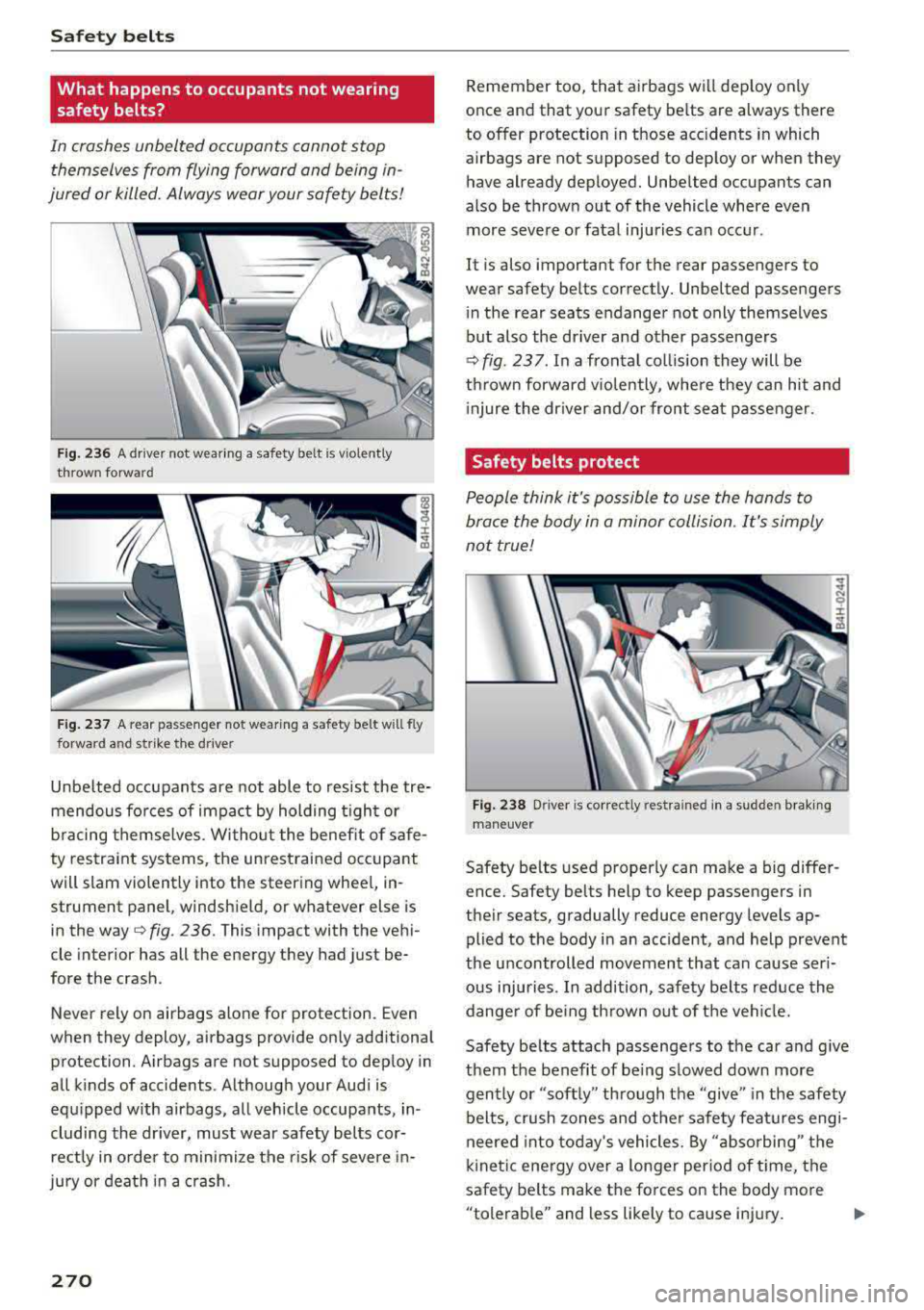
jured or killed. Always wear your safety bel ts!
F ig. 236 A dr iver not wear ing a safety belt is v iolently
thrown forwa rd
Fig. 237 A rear passenger not wearing a safety belt will fly
fo rward and strike t he d river
Unbe lted occupants are not able to resist the tre
mendous fo rces of impact by holding t igh t or
b racing themselves. Wi tho ut the benefit of safe
ty restraint systems, the unrestrained occupant
will slam violently into the steering whee l, in
strument panel, windsh ield, or whatever else is
in the way ¢
fig. 236. This impact with the veh i
cle interior has all the energy they had just be
fore the crash .
Never rely on airbags alone for protection. Even
when they deploy, airbags provide only additional
protection. Airbags are not supposed to dep loy in
all k inds of accidents . A lthough your Audi is
equ ipped w ith airbags, all vehicle occupants, in
cluding the dr iver, must wear safety belts cor
rectly in o rder to minimize the risk of severe in
jury or deat h in a cr ash.
270
Remember too, that a irbags w ill dep loy only
once and that your safety be lts are always there
to offer protection in those acc idents in which
airbags are not supposed to deploy or when they have already deployed. Unbe lted occupants can
also be thrown out of the vehicle where even
more severe or fata l injuries can occur.
It is also important for the rear passengers to
wear safety be lts correctly. Unbelted passengers
in the rear seats endanger not only themselves
but also the driver and other passengers
¢ fig. 237 . In a fronta l col lision they will be
th rown forward v io lently, whe re they can hit and
i njure the dr iver and/or front seat passenger.
Safety belts protect
People think it's possible to use the hands to
brace the body in a minor collision. It's simply
not true!
Fi g. 238 Driver is co rrectly rest rained in a sudden b rak ing
ma ne uver
Safety be lts used p roperly can make a big differ
ence. Safety belts he lp to keep passengers in
their seats, gradually reduce energy levels ap
plied to the body i n an accident, and help prevent
the u ncontrolled movement that can cause ser i
ous injuries . In addition, safety belts reduce the
dange r of be ing th rown ou t of the vehi cle.
Safety belts attach passenge rs to the car and give
them t he benefit of be ing slowed down more
gently or "soft ly" th ro ugh the
"give" in the safety
belts, crush zones and other safety fea tures engi
neered into today's vehicles. By " absorbing" the
k inetic energy over a longe r per iod of t ime, the
safety belts make the fo rces on the body more
"tolerab le" and less likely to cause injury.
IJ>
Page 272 of 409
<( a, .... N ,....
N .... 0 \0
3 a,
Although these examples are based on a frontal
collision, safety belts can also substantially re
duce the risk of injury in other k inds of crashes.
So, whether you're on a long trip or just going to
the corner store, always buckle up and make sure
others do, too . Accident statistics show that vehi
cle occupants properly wearing safety belts have
a lower risk of being injured and a much better
chance of su rviving a n accident. Prope rly using
safety be lts al so greatly increases the ability of
the supplemental ai rbags to do the ir job in a col
lision. For t his reason, wearing a safety belt is le
ga lly required in most countr ies including much
of the Un ited States and Canada.
A lthough your Audi is equipped with airbags, yo u
still have to wear the safety belts provided. Front
airbags, for examp le, are activated on ly in some
frontal collis ions. The front airbags are not acti
vated in all frontal coll is ions, in side and rear col
lisions, in rollovers or in cases where there is not
enough deceleration through impact to the front
of the vehicle . The same goes for the other airbag
systems in you r Audi . So, always wear your safety
be lt and make sure eve rybody in you r vehicle is
p roperly restrained!
Important safety instructions about safety
belts
Safety belts must always be correctly positioned
across the strongest bones of your body.
.,. Always wea r safety be lts as illust rated and de
scribed in this chapter.
.,. Make sure that your safety belts are a lways
ready for use and are not damaged .
A WARNING
Not wearing safety belts or wearing them im
properly increases the risk of serious personal
injury and death . Safety belts can work only
when used correctly.
- Always fasten your safety belts correctly be
fore driving off and make sure all passen
gers are cor rectly restrained.
- For maximum protection, safety belts must
always be posit ioned properly on the body .
Safet y be lts
- Never strap more than one person, includ
ing small children, into any belt.
- Never p lace a safety belt
over a child sitting
on your lap.
- Always keep feet in the footwe ll in front of
the seat while the veh icle is being driven.
- Never let any person ride with their feet on the instrument panel or stick ing out the
window or on the seat.
- Never
remove a safety belt while the vehicle
is moving . Doing so will increase your risk of
being injured or killed.
- Never wear be lts twisted .
- Never wear be lts
over rigid or breakable ob -
jects in or on yo ur clothing, such as eye
g lasses, pens, keys, etc ., as these may cause
injury.
- Never a llow safety belts to become dam
aged by be ing ca ught in door or seat hard
ware.
- Do not wear the shoulder part of the belt
under your arm or otherwise out of pos ition.
- Several layers of heavy clothing may inter
fe re with co rrect positioning of be lts and re ·
duce the overall effectiveness of the system.
- Always keep be lt buck les free of anything
that may prevent the buckle from latching
securely.
- Never use comfort clips or devices that cre
ate slack in the shoulder belt. However, spe
cial clips may be required for the proper use
of some child restraint systems .
- Torn or frayed safety be lts can tear, and
damaged be lt hardware can break in an acci
dent. Inspect belts regularly. If webb ing,
b indings, buckles, or retractors are dam
aged, have belts rep laced by an authorized
Aud i deale r o r qualified workshop.
- Safety belts that have been worn and loaded
in an accident must be replaced with the
corre ct replacement safety belt by an au
thori zed Audi dealer. Rep lacemen t may be
necessary
even if damage cannot be clearly
seen . Anchorages that were loaded must al
so be inspected .
- Never
remove, mod ify, disassemble, or try
to repair the safety belts yourse lf .
271