manual transmission AUDI A5 COUPE 2018 User Guide
[x] Cancel search | Manufacturer: AUDI, Model Year: 2018, Model line: A5 COUPE, Model: AUDI A5 COUPE 2018Pages: 409, PDF Size: 67.63 MB
Page 95 of 409
@j indicator light appears in the instrument clus
ter disp lay, the engine will not be stopped, for
examp le in the following situations:
- T he eng ine has not reached the minimum re
quired temperature for Start/Stop mode.
- T he interior temperature selected by the cli-
mate contro l system has not been reached .
- T he outs ide temperature is ext remely h igh/low.
- The windshield is being defrosted.
- The neck heating* is turned on .
- The vehicle battery charge level is too low.
- The steering wheel is turned at a sharp angle or is moving .
- After engaging the reverse gear.
- On sharp inclines.
- At high altitudes .
Engine automatically restarts
The standard Start/Stop mode will be canceled
during a stop phase in the follow ing s ituations .
The engine resta rts without any action by the
driver.
- The vehicle rolls , for example while on a slope.
- The interior temperature differs from the tem-
perature selected in the A/C system .
- The windshield is being defrosted.
- The brake pedal is pressed several times in a
row.
- The vehicle battery charge level is too low .
- Power consumption is high.
The engine can turn off again when the condi
tions for Start/Stop mode are met.
Ignition is switched off automatically
To prevent the vehicle battery from draining, the
ignition will switch off automat ically under the
following conditions :
- The Start/Stop system has stopped the engine .
- The vehicle is stationary.
- You left the ve hicle and the engine was not re-
started within approximate ly 30 seconds .
If th is happens, you w ill see the message
Igni
<( ~ tion turns off automatically in the instrument
~ cluster and the activated low beams are replaced N
8 by the parking light. The parking lights will \0
3
switch off after approximately 30 minutes or
when you lock the vehicle .
T he ign ition also switches off when you lock the
vehicle from the outside during a stop phase.
If the Start/Stop system has not turned off the
engine or if you have switched the Start/Stop sys
tem off manually, the ignition w ill no t be auto
matically sw itched off and the eng ine will contin
ue to
run ¢& .
A WARNING
To reduce the risk of poisoning, never allow
the engine to run in confined spaces.
(D Tips
Applies to: vehicles with automatic transmissions
- If you leave the vehicle with the 0/5 or R se
lector lever position engaged, the parking
brake is automatically set.
- If you select the D or N selector lever posi
tion after shifting into reverse, the vehicle
must be driven faster than 6 mph (10 km/h)
in order for the engine to switch off again .
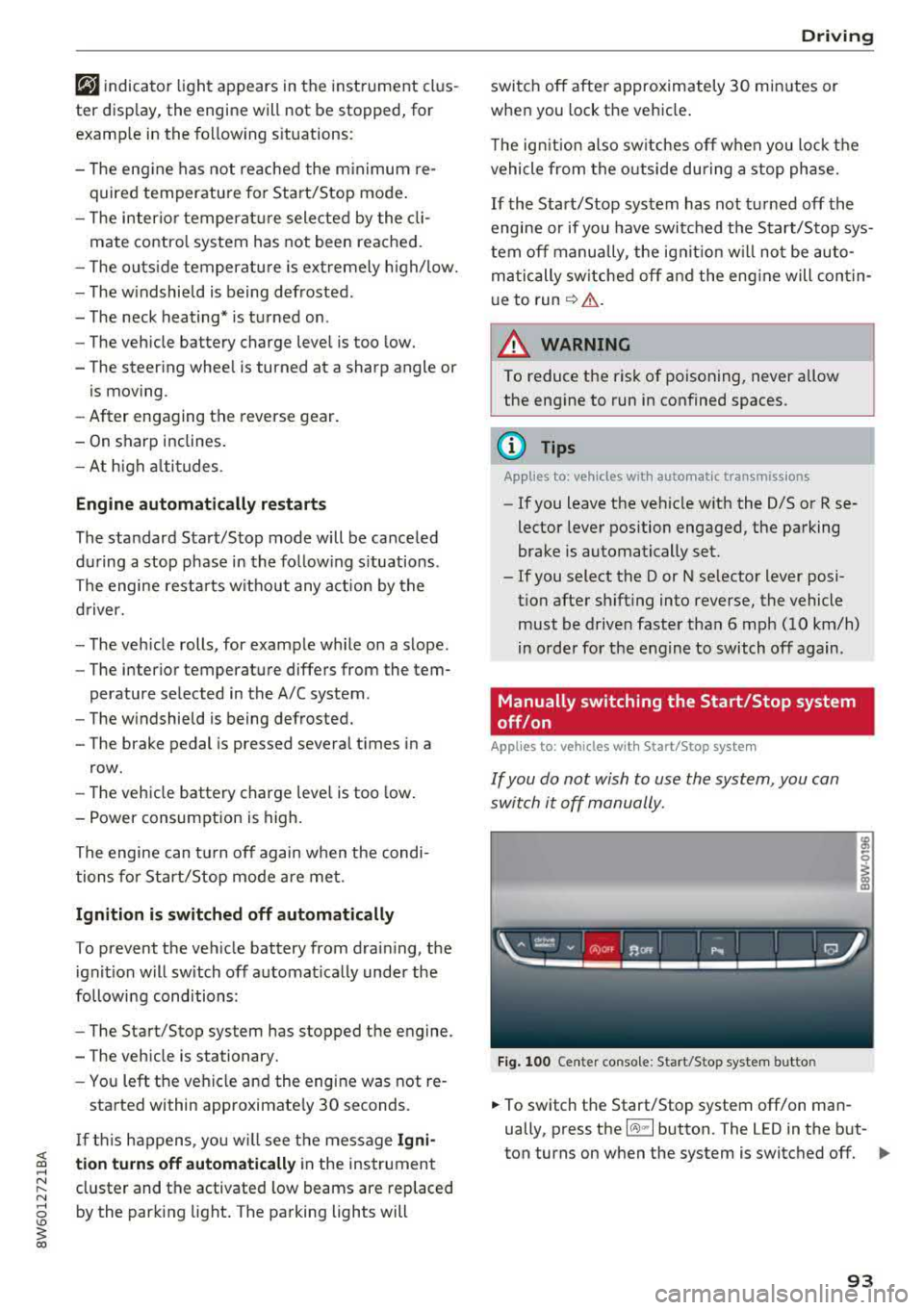
Manually switching the Start/Stop system
off/on
Applies to: veh icles w ith Start/Stop system
If you do not wish to use the system, you can
switch it off manually.
Fig. 100 Center co nsole: Start/Stop system butto n
-
.,. To switch the Start/Stop system off/on man
ually, press the
l (A) ml button. The LED in the but
ton turns on when the system is switched off.
Ill-
93
Page 97 of 409
<( a, .... N ,....
N .... 0 \0
3 a,
sounds when the C®> switch is pulled . Emergency
braking stops as soon as
the(®) switch is released
or the accelerator peda l is pressed.
Parking
.,. Press t he b rake peda l to stop the vehicle .
.,. Pull the(®) switc h to set the parking brake .
.,. Applies to: automatic transmission: Select the
P selector lever position .
.,. Turn the eng ine off c> & .
.,. Applies to: manual transmission: Engage 1st
gear .
.,. Turn the steer ing wheel when parking on in
clines so that the wheels will roll into the curb
i f the veh icle starts moving.
_& WARNING
- Never ac celer ate o r release the clutch pedal
carelessly when a gear or a selector lever
posit ion (automatic transm ission) is engag
ed wh ile the vehicle is stationary and the
en
gine is runn ing. Otherwise, the vehicle will
start to move immediately and this cou ld
re
sult in an accident.
- Emergency braking should only be used in an emergency, when the normal brake peda l
has failed or the brake pedal is obstructed.
During emergency braking, your veh icle will
bra ke sim ila r to heavy brak ing . ESC and the
associated components (ABS, ASR, EDL)
c annot overcome the laws of physics.
Around curves and when road or weather conditions are bad, a fu ll brake application
can cause the vehicle to skid or the rear end
to swerve, which increases the risk of an
ac
c ident.
- If the power supply fails, you cannot set the
park ing brake if it is released. If th is is the
case, stop the veh icle on leve l ground and
secure it by engaging 1st gear (manual
transmiss ion) or select ing the P selector lev
er position (automatic t ransm iss ion). See an
authorized Aud i dealer o r autho rized Aud i
Service Facility for assistance.
- Always take the vehicle key with you when
leaving your vehicle, even if for a short pe ri
od of time. Th is app lies p articu larly when
children rema in in the vehicle. Otherwise,
D riv ing
children could start the engine, release the
parking brake or operate e lectrical equip
ment such as power w indows, which
in
creases the risk of an accident.
- No one, especially children, should remain
in the vehicle when it is locked. Locked
doors make it more difficu lt for emergency
wo rkers to get into the vehicle, which puts
lives at risk .
(D Tips
Applies to: vehicles with automatic transmissions
When stopp ing at a t raff ic signa l or stopp ing
i n city traffic, yo u can set the park ing bra ke
manually. The vehicle does not have to be
held with the brake pedal. The park ing brake
eliminates the tendency to creep when a
se
l ector lever position is engaged. As soon as
you press the accelerator peda l, the parking
brake re leases automatically and your vehicle
starts to move
c>page 95.
(D Tips
- Occasional noises when the parking brake is
set and released are normal and are not a
cause for concern.
- The parking brake goes through a self-test cycle at regu lar intervals when the vehicle is
stopped. Any no ises assoc iated with th is are
normal.
- If there is a power failure, the parking brake
w ill not set if it is released, and it will not
release if it is set
c> A . See an a uthorized
Audi dealer or author ized Audi Service
Fa
cility for assis tance.
Starting to drive
Various convenience and safety funct ions may be
available when the vehicle begins driving,
de
pend ing on vehicle equipment.
Starting on hills w ith the pa rking brake set
Requirement: the driver's door must be closed .
.,. To start driving comfortably when on a hi ll, set
the parking brake and begin driving as usual.
The braking force of the parking brake does not
..,.
95
Page 98 of 409
Driving
release automatically until the wheels build up
enough driving force .
Starting on hills with hill hold assist
Hill hold ass ist makes it eas ier to start on hills.
Requirement: the driver 's door must be closed
and the eng ine must be running .
.,. To activate hill hold assist, press and hold the
brake pedal for several seconds. The vehicle
must be in an uph ill direction of travel.
After releasing the brake pedal, the braking pow
er is maintained for a brief moment
c;, .&. to pre
vent the vehicle from rolling back when starting. During this time, you can eas ily begin to move
your veh icle .
.&_ WARNING
-If you do not begin driving immediately or
the engine stalls after releas ing the b rake
pedal, your vehicle may begin to roll back
ward. Press the brake pedal or set the park
ing brake immediate ly.
- The intelligent technology of hill hold assist
cannot overcome the limitations imposed by
natural physical laws. The increased comfort
offered by hill hold assist should not cause
you to take safety risks.
-Hill hold assist cannot hold the vehicle in
place on all h ills (for example, if the ground
is slippery or icy).
-To reduce the risk of an accident, always make sure the vehicle is situated safely
wh ile stat ionary.
Automatic transmission
Introduction
Applies to: vehicles with automatic transmissions
.
The aut omat ic transmission is controlled elec
tronica lly. The transmission shifts up or down au
tomatically depending on which drive prog ram is
selected.
When a
moderate driving style is used, the
transmission se lects the most economical driving
mode. The transmission upshifts at a lower RPM
96
and downshifts at a higher RPM to improve fue l
effic iency.
The transmission switches to a sporty mode after
a kick-down or when the driver uses a
sporty
driving style
characterized by quick accelerator
pedal movements, heavy acceleration, frequent
changes in speed and traveling at the maximum
speed .
If desired, the driver can also select the gears
manually (tiptronic mode) c:;, page 99.
S tronic transmission
The S tron ic is a dual-clutch transmission. Power
i s transferred using two clutches that work inde
pendently from one another. They replace the
torque converter used in conventional automatic
transmissions and allow the vehicle to accelerate
without a noticeable interruption in traction .
tiptronic transmission
In the tiptronic transmission, power is transfer
red by a torque converter.
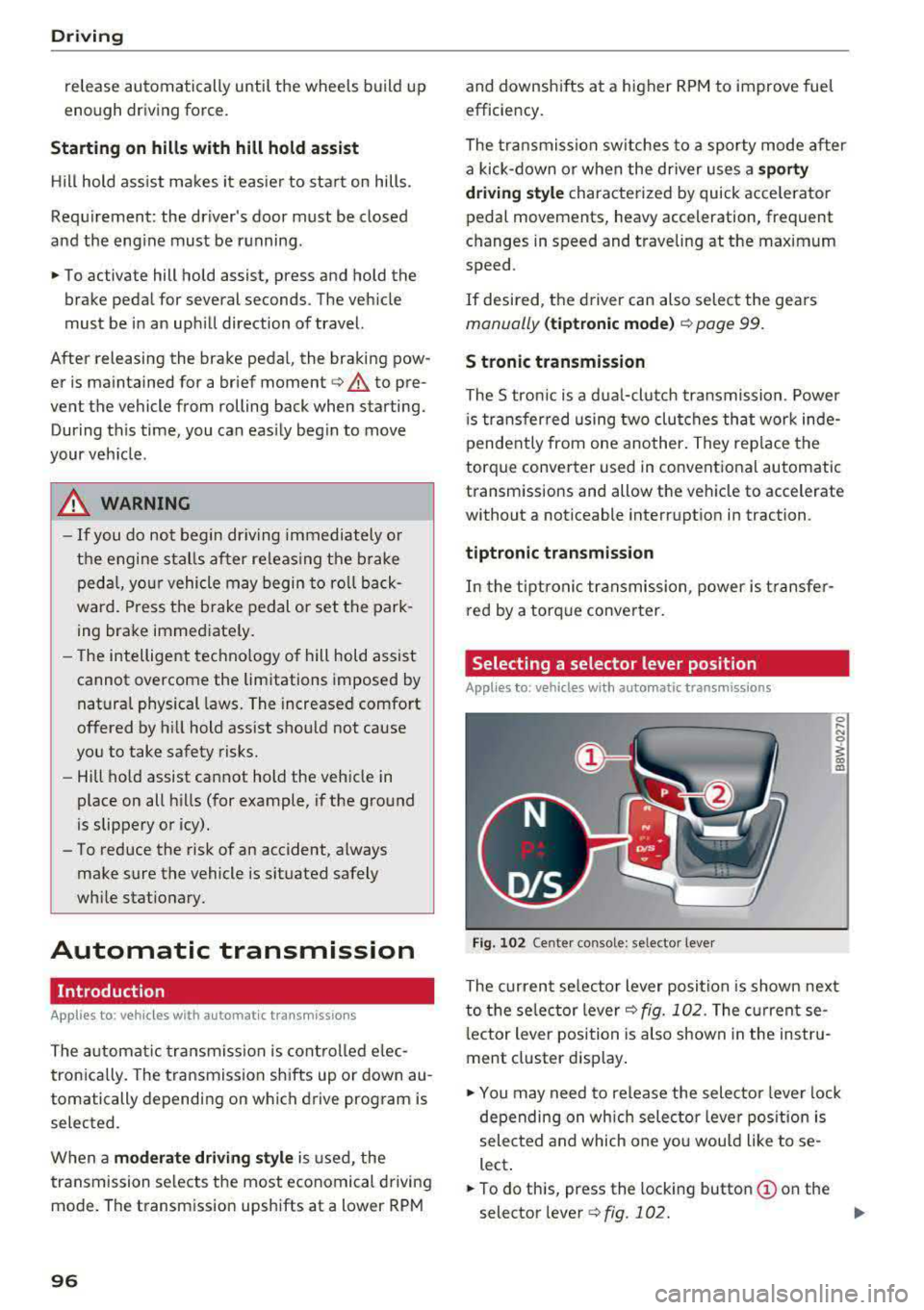
Selecting a selector lever position
Applies to: vehicles with auto matic transmissions
Fig. 102 Cente r console: se lector lever
The current se lecto r lever position is shown next
to the selector lever
c:;, fig. 102 . The current se
l ector lever position is also shown in the instru
ment cluster display .
.,. You may need to release the selector lever lock
depending on wh ich selector lever position is
selected and which one you would like to se
lect .
.,. To do this, press the locking button (!) on the
selector
l ever ¢fig .102. ..,_
Page 100 of 409
Driving
to engage the S sport mode. You can only select
the S selector lever position when the D or E posi
tion is selected. To select the Dor
E position
again when S is engaged, move the selector lever
back ¢,& . To shift from N to D when traveling at
speeds below
1 mph (2 km/h), press the brake
pedal and shift into the D
position ¢,& .
In the normal mode D, the transmission auto
matically selects the suitable gear ratio. It de
pends on engine load, vehicle speed and driving
style .
Select the
sport mode S for sporty driving. The
vehicle makes full use of the engine's power.
Shifting may become noticeable when accelerat
ing.
The S selector lever position engages automati cally when you select the
dynamic mode in drive
select* .
A WARNING
Read and follow all WARNINGS.
- The vehicle can roll even if the ignition is
switched off .
- Power is still transmitted to the wheels
when the engine is running at idle. To pre
vent the vehicle from "creeping", you must keep your foot on the brake in all selector
lever positions (except P and N) when the
engine is running.
- Before opening the hood, select the P selec
tor lever position and set the parking brake.
This reduces the risk of an accident. Always
read and follow the applicable warnings
¢ page 330, Working in the engine com
partment.
(D Tips
If
you accidentally select N while driving, take
your foot off the accelerator pedal and wait
for the engine to slow down to idle before se
lecting Dor S.
98
· Driving tips
App lies to: vehicles with automatic transmissions
Starting the engine
.,. The P or N position must be selected .
Starting from a stop
.,. Press and hold the brake pedal.
.,. Start the engine¢ page 89.
.,. Press the locking button (Don the selector lev
er and select the
D, E, Sor R position
¢ page 96 .
.,. Wait a moment until the transmission shifts.
You will notice a slight movement when the
gear engages .
.,. Release the brake pedal and press the accelera-
tor
pedal ¢ _A.
Various convenience functions are available for
starting on hills
¢ page 95.
Stopping temporarily
.,. Press the brake pedal to stop the vehicle, for
example at a traffic light . Do not press the ac
celerator pedal when doing this.
.,. To prevent the vehicle from rolling when you
start driving, set the parking brake when stop
ping on steep
hills ¢ _A.
.,. The parking brake will release automatically
and the vehicle will start moving once you press
the accelerator pedal.
Stopping/parking
If the selector lever is not in the P position when
you open the driver's door, the vehicle could roll.
.,. Press and hold the brake pedal ¢_& .
.,. Set the parking brake .
.,. To select the P selector lever position, press the
P button
@ on the selector lever ¢ page 96,
fig. 102.
Under certain conditions, such as driving in the
mountains or when towing a trailer, it may be
helpful to switch to manual mode temporarily
and shift
manually to adapt to the driving condi
tions
¢ page 99.
On hills, activate the parking brake first and then
shift into the P
position ¢ page 94. This prevents ..,.
Page 102 of 409
Driving
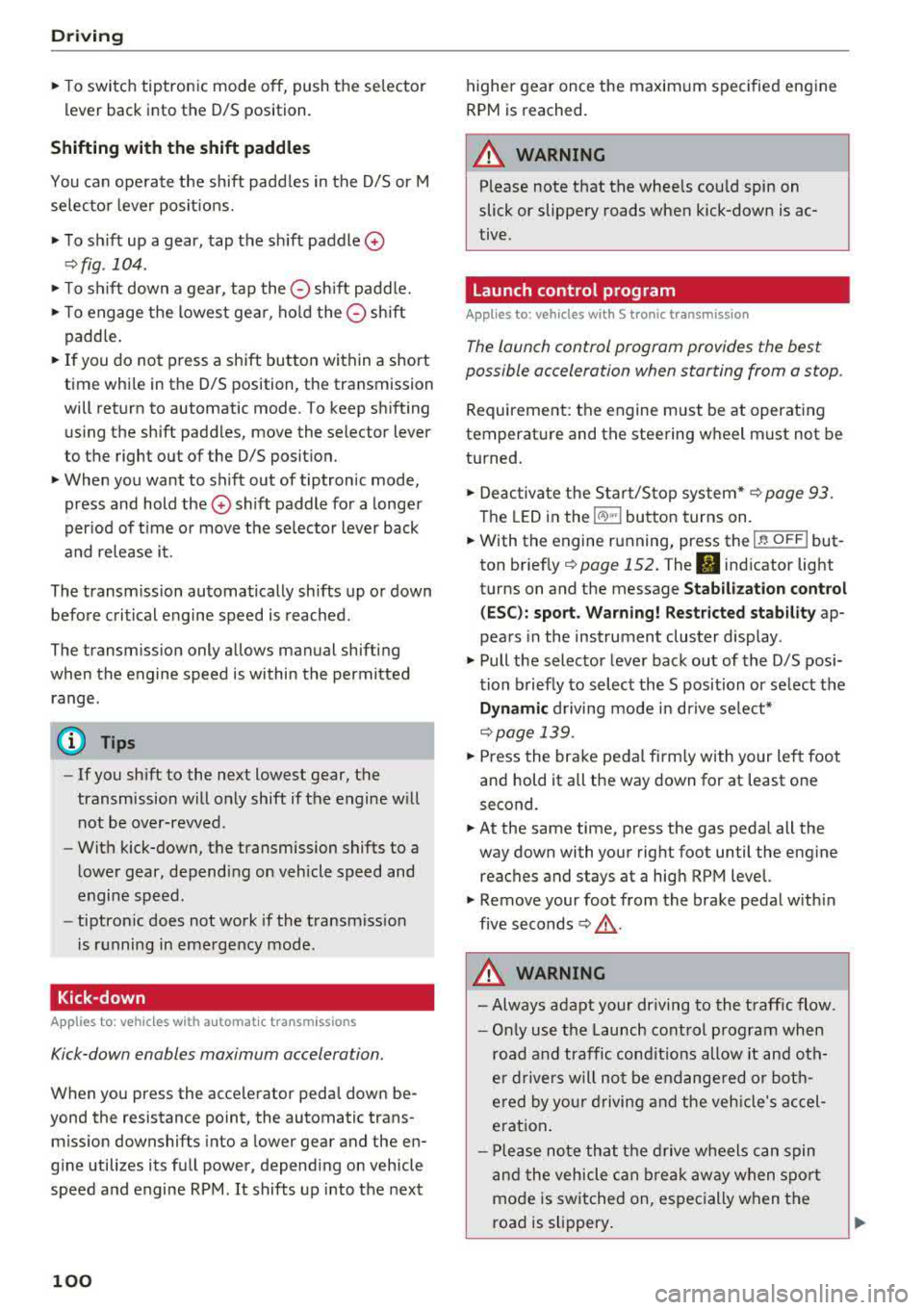
"'T o switch tiptronic mode off, push the se lector
lever back into the D/S position.
Shifting with th e shift paddle s
You can operate the shift padd les in the D/S or M
selector lever posit ions.
"' To sh ift up a gear, tap the sh ift paddle 0
~ fig . 104.
"'T o shift down a gea r, tap the 0 sh ift paddle.
"'T o engage the lowest gear, ho ld the 0 shift
padd le.
"' If you do not press a shift button within a short
time whi le in the D/S position, the transmission
will return to automatic mode. To keep shifting
us ing the shift paddles, move the selector lever
to the right out of the D/S position.
"' When you want to shift out of tiptronic mode,
press and hold the
0 shift paddle for a longer
per iod of t i me or move the se lector lever back
and release it.
The transm ission automatically shifts up or down
before critical engine speed is reached .
The transm ission only allows manual shifting
when the engine speed is within the permitted
range.
@ Tips
- If you shift to the next lowest gear, the
transmission will only shift if the engine w ill
not be over-rewed .
- With kick-down, the transmission shifts to a
lower gear, depending on vehicle speed and
engine speed.
- tiptronic does not work if the transmiss ion
i s running in emergency mode.
Kick-down
A pp lies to: ve hicles w ith a utomat ic tra nsmi ssio ns
Kick-down enables maximum acceleration.
When you press the accele rator peda l down be
yond the resistance point, the automatic trans
miss ion downshifts into a lower gear and the en
g ine utilizes its full power, depending on vehicle
speed and engine RPM. It shifts up into the next
100
higher gear once the maximum specified engine
RPM is reached.
A WARNING
P lease note that the whee ls cou ld spin on
slick or slippery roads when kick-down is ac
tive.
Launch control program
App lies to : vehicles wi th S tron ic transmiss ion
-
The launch control program provides the best
possible acceleration when starting from a stop .
Requirement: the engine must be at operating
temperature and the steering wheel must not be
turned.
"' Deactivate the Star t/Stop system* ~ page 93.
T he LED in the l(A) "'I button turns on .
"'With the engine running, press the ,...
I .I' -
, O ..,...,,. F=F I but
ton
brief ly ~ page 152. The . indicator light
turns on and the message
Stabil ization cont rol
( E SC) : sport. Warning ! Re st ri ct ed stab ility
ap
pears in the instrument cluster display .
"' Pull the selector lever back out of the D/S pos i
tion briefly to select the S position or se lect the
D ynamic driving mode i n drive se lect*
~ page 139 .
"'Press the brake pedal firm ly with yo ur left foot
and hold it all the way down for at least one
second.
"' At the same time, press the gas peda l all the
way down with your right foot until the eng ine
reaches and stays at a high RPM level.
"' Remove your foot from the brake pedal w ith in
five
seconds ~,& .
A WARNING
-Always adapt your driving to the t raff ic flow.
- Only use the Launch cont rol program when
road and traffic condit ions allow it and oth
er d rivers will not be endange red or both
ered by your driving and the veh icle's accel
erat ion .
- Please note that the d rive wheels can spin
and the vehicle can b reak away when spo rt
mode is switched on, especially when the
road is slippery .
Page 103 of 409
<( a, .... N ,....
N .... 0 \0
3 a,
-Once the vehicle has sta rted moving, press
the
I ~ OF F! button briefly to t urn the sport
mode off.
@ Tips
-The t ransmiss ion tem perature may increase
s ig nificantly a fter using t he launc h control
program. If that happens, the program may
not be available f or a few m inutes. It w ill be
available again after a cool-d ow n pe riod .
-When accelerating using the la unch control
program, all veh icle parts are subject to
h eavy loads. T his can lead to increased
wear .
Transmission malfunction
Appl ies to: ve hicles with a utomat ic tra nsmi ssio ns
• Transmission : too hot. Plea se stop vehicle
Do not cont inue driv ing. Selec t the P se lector lev
e r p osition and contact an autho rized Aud i dea le r
or author ized Audi Se rvice Facility for assis tance .
• Transmission : malfunct ion! Please stop ve
hicle and shift to P
Do not cont inue driving . Select the P se lector lev
er pos ition and contact an a utho riz ed Aud i dea le r
or author ized Audi Se rvice Facility for assistance .
DD Selector lever: malfunction! You may contin
ue driving. Please contact Service
T here is a sys tem mal fun ction in t he tra nsm is
sion. Drive to an author ized Audi dealer or au
thor ized Audi Se rvice Facility immed iate ly to have
the ma lf u nction co rrected .
DD P button: malfunction! Auto P when engine
off. Please contact Service
There is a malfunction in the P button on t hese
l ec to r l ever. The tran smi ssion a utomat ically en
g ages in P when you sw itch o ff the engi ne. D rive
to an author ize d Audi dealer or author ized A udi
Service Facility immediately to have t he malfunc
tion corrected.
DD Transmission : malfunction! Gear change on
ly possible using both paddle levers. Please con
tact Service D
riving
T he re is a system malfunction in t he transmis
s io n. You can continue dr iv ing with restr icted
f unct ion . The se lector lever is not work ing . Gea rs
can on ly be selected by tapping both shift pad
dles at t he same time whe n the vehicle is station
ary
r=> page 99 , fig. 104 . Pay attention to t hese
l ected tra nsmission pos ition in t he instr ume nt
cl ust er disp lay. The pa rking loc k engag es auto
ma tically when yo u tur n off the eng ine. Drive to
an a uth o riz e d Au di dealer o r author iz e d Aud i
S e rvice Facility immed iate ly to h ave the m alfun c
t ion co rrected .
DD Transmission: please pres s brake pedal and
select gear again
P ress t he b rake peda l and select the desire d se
l ector lever position again . Yo u can th en conti nue
dr iv ing .
DD Transmission: too hot . Please adapt driving
style
The tra nsmission temperature has inc reased sig
nificantly due to the sporty dr iving ma nner. Drive
i n a less s porty manne r until t he temperatu re re
tu rns to t he normal range and t he i ndicator lig ht
swi tch es of .
DD Transmission: malfunction! You can contin
ue driving. See owner's manual
The re is a system malfunction in the transmis
s ion. You may contin ue d riving . Dr ive t o an a u
t h orized Audi dea le r or authorized Audi Service
Facility soon to have the malfunct io n corrected .
DD Transmission: malfunction! You can contin·
ue driving in
D until engine off
T he re is a system malfunction in t he transmis
s io n. The transmission is switc hing to eme rgency
mode. If you turn the engine off, you w ill not be
able to se lect any othe r selector lever positions
after sta rting the engine aga in. Drive to an au
t h orized Au di dea ler or a uthorized Audi Service
Fac ility immed iate ly to have the ma lfu nction co r
r ec ted.
DD Transmission: malfunction! You can contin
ue driving with limited function. Please contact
Servi~ ~
101
Page 117 of 409
In curves
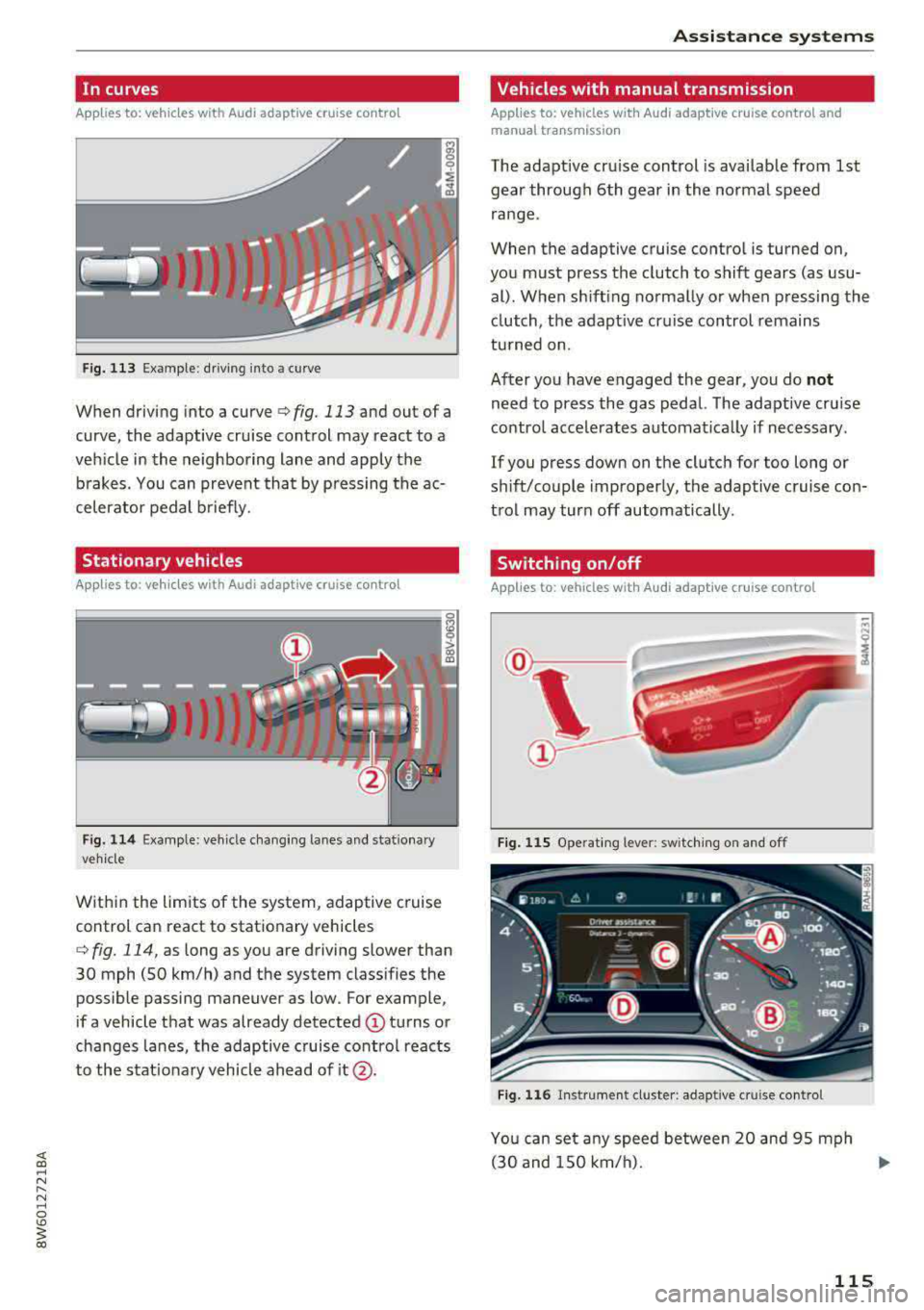
Applies to: vehicles with Audi adaptive cruise contro l
Fig. 113 Example: driving into a curve
When driving into a curve <=>fig. 113 and out of a
curve , the adaptive cruise control may react to a
vehicle in the neighboring lane and apply the
brakes. You can prevent that by pressing the ac
celerator pedal briefly.
Stationary vehicles
Applies to: vehicles with Audi adaptive cruise control
)))
Fig. 114 Example: vehicle changing lanes and stationary
vehicle
Within the limits of the system, adaptive cruise
control can react to stationary vehicles
c::> fig. 114, as long as you are driving slower than
30 mph (SO km/h) and the system classifies the possible passing maneuver as low. For example,
if a vehicle that was already detected
@ turns or
changes lanes, the adaptive cruise control reacts
to the stationary vehicle ahead of
it @ .
Assistance systems
Vehicles with manual transmission
Applies to: vehicles with Audi adaptive cruise control and
manual transmissio n
The adaptive cruise control is available from 1st
gear through 6th gear in the normal speed
range .
When the adaptive cruise control is turned on,
you must press the clutch to shift gears (as usu al). When shifting normally or when pressing the
clutch, the adaptive cruise control remains
turned on.
After you have engaged the gear, you do
not
need to press the gas pedal. The adaptive cruise
control accelerates automatically if necessary .
If you press down on the clutch for too long or
shift/couple improperly, the adaptive cruise con
trol may turn off automatically.
Switching on/off
Applies to: vehicles with Audi adaptive cruise control
Fig. 115 Ope rating leve r: switching on and off
Fig. 116 Ins trumen t cluster: adapt ive cr uise control
You can set any speed between 20 and 95 mph
(30 and 150 km/h).
.,._
115
Page 120 of 409
Assistance systems
-Press the brake pedal to slow your vehicle
down.
A WARNING
If the message ACC : automatic go1> appears,
your vehicle will start driving even if there is an obstacle between your vehicle and the ve
hicle drivi ng ahead. This increases the risk of
an acc ident.
(D Tips
If adaptive cruise contro l is active and your
veh icle does not start driving even though the
message
ACC: automatic go1l appears, you
can start driving by tapping the accelerator
pedal.
Interrupting cruise control
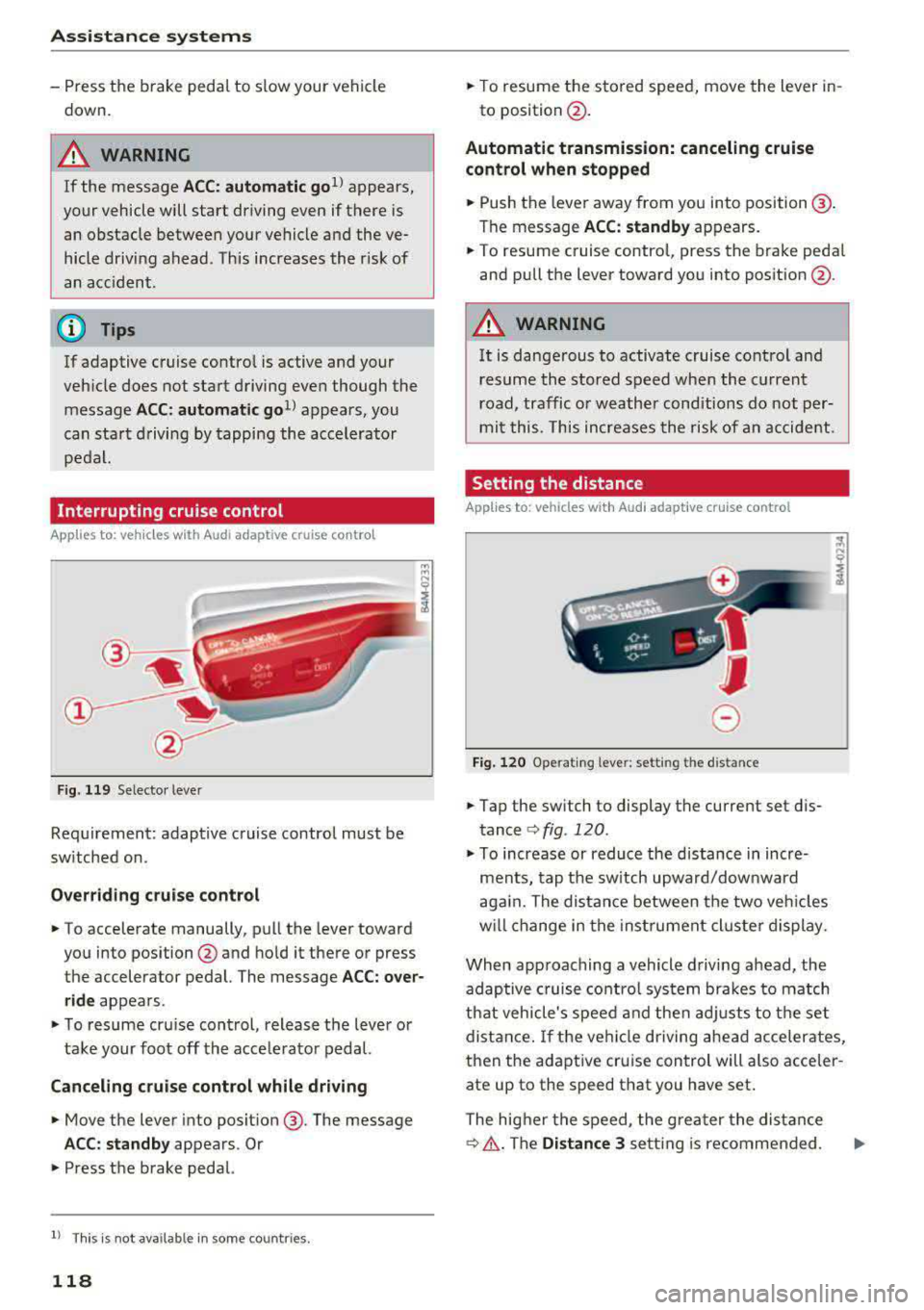
App lies to: veh icles with Audi adaptive cruise control
Fig. 119 Selecto r lever
Requirement: adaptive cruise control must be
sw itched on.
Overriding cruise control
.,. To accelerate manually, p ull the lever toward
you into position @and hold it there or press
the accelerator pedal. The message
ACC: over
ride
appears.
.,. To resume cruise cont rol, release the lever or
take your foot off the acce lerat or pedal.
Canceling cruise control while driving
.,. Move the lever into posit ion @. The message
ACC: standby appears . Or
.,. Press the brake pedal.
l ) Thi s is not ava ilab le in some countr ies .
118
.,. To resume the stored speed, move the lever in-
to position @.
Automatic transmission: canceling cruise
control when stopped
.,. Push the lever away from you into posit ion@.
The message
ACC: standby appears.
.,. To resume cruise control, press the brake pedal
and pull the lever toward you into position @.
A WARNING
It is dangerous to activate cruise control and
resume the stored speed when the current
road, traffic o r weather conditions do not per
mit this . This increases the risk of an accident .
Setting the distance
Applies to: vehicles with Audi adaptive cruise control
,
0
Fig. 120 Operating lever: setting the distance
.,. Tap the sw itch to display the current set dis
tance
c:> fig. 120.
.,. To increase or reduce the distance in incre
ments, tap the switch upward/dow nward
again. The distance between the two vehicles
w ill change in the instr ument cluster display.
When approaching a vehicle driving ahead, the
adaptive cruise control system brakes to match
that vehicle's speed and then adjusts to the set
distance. If the vehi cle driving ahead accelerates,
then the adaptive cruise control will also acceler
ate up to the speed that you have set .
The higher the speed, the greater the distance
c:> &. The Distance 3 setti ng is recommended .
Page 160 of 409
Multi Media Interface
Multi Media Interface
Traffic safety information
Audi recommends performing certain Infotain
ment system functions, such as entering a desti
nation, only when the vehicle is stationary . Al
ways be prepared to stop operat ing the Infotain
ment system in the interest of your safety and
the safety of other road users.
_& WARNING
Only use the Infotainment system when traf
fic cond itions permit and always in a way that
allows you to maintain complete control over
your vehicle.
@ Tips
Certain funct ions are not available wh ile driv
ing .
Introduction
The Multi Media Interface, or MMI for short,
combines various
systems for communication,
navigation* and entertainment in your Audi . You
can operate the MMI using the MMI control pan
el, the multifunction steering wheel or the voice
recognition system* .
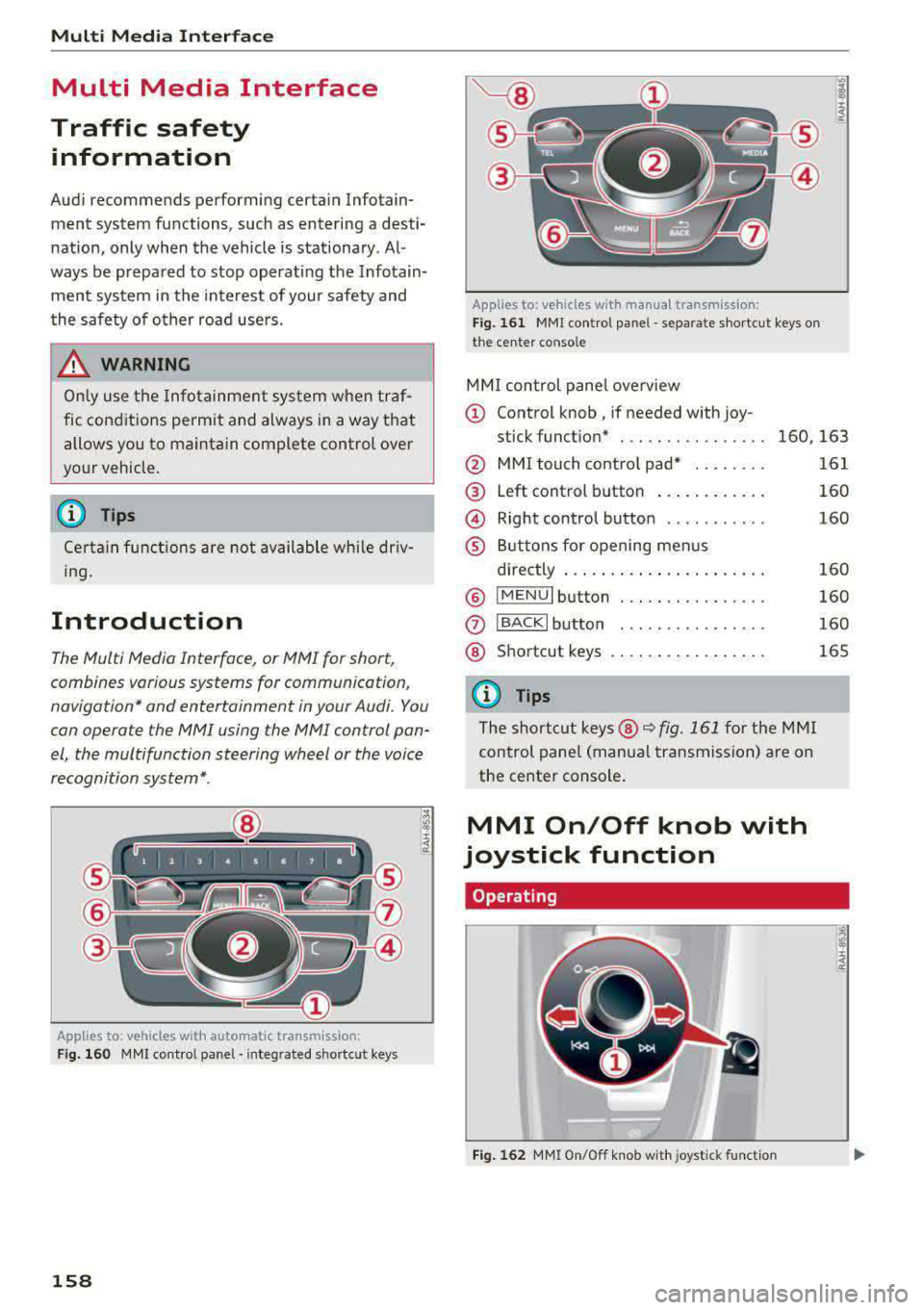
Applies to: vehicles with automatic transmission:
F ig. 160 MMI contro l panel· integ rated shortc ut keys
158
Applies to: ve hicles with manual transmission:
Fig. 161 MMI control pane l
-separate shortcut keys on
the ce nter conso le
MM I control panel overview
(D Control knob , if needed with joy-
stick function* . . . . . . . . . . . . . . . . 160, 163
@ MMI touch contro l pad* ....... .
@ Left control button ........... .
@ Right control button .......... .
® Buttons for opening menus
directly ..................... .
® IMENUI button ..... .... ...... .
0
®
IBACK I button
Shortcut keys
(0 Tips
The shortcut keys @¢ fig. 161 for the MMI
control panel (manua l transmission) are on
the center conso le .
MMI On/Off knob with
joystick function
Operating
•
Fig. 162 MMI On/Off knob w ith joystick function
161
160
160
160
160
160
165
Page 207 of 409
Emergency call
Introduction
The following functions may be available depend
ing on the vehicle and the market.
- Emergency
ca ll ¢ page 205.
- Online roads ide ass istance ¢ page 206 .
@ Tips
- The serv ices are provided through a SIM
card installed in the vehicle . The cost of the
call and data connections is included in the
price for the services . Services a re provided
assuming that the cell phone network re
quired for the installed S IM card is function
ing and ready to operate. The available serv
i ces set by Audi AG are only available within
the cell phone network coverage area for
the cell phone service provider selected by
Audi AG.
- You can find what data will be transferred
at www.aud iusa.com.
- These services cannot be deactivated using
the settings in the Infotainment system.
Emergency call
Description
Appl ies to: vehicles with emergency call function
You can request help when in an eme rgency or
dangerous situation using the emergency call
function
l) _ An emergency call is a combination
of data transmission and a phone call. The data
transmission from your vehicle forwards impor
tant information, such as the vehicle and position
data, to the emergency call center.
1l The av ailabilit y of the serv ices o ffere d d ep end s on t he
c o untry a nd may chang e over t ime.
Emergen cy call
Making an emergency call
App lies to: vehicles with emergency call function
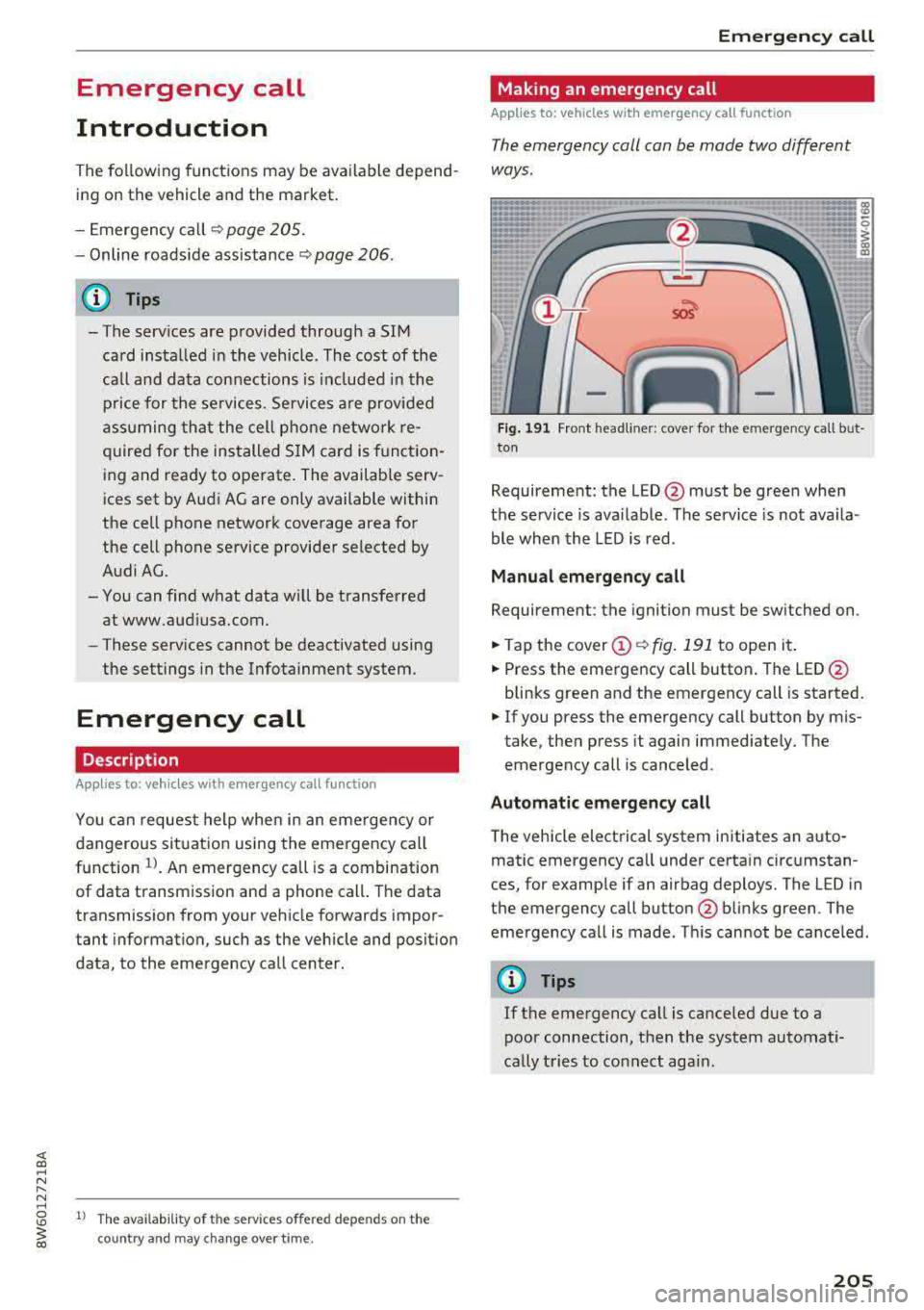
The emergency coll con be mode two different
ways .
Fig. 191 Front head liner: cover for the e mergency call b ut
ton
Requirement: the L ED @ must be green when
the service is available . The service is not availa
ble when the LED is red .
Manual emergency call
Requirement: the ignition must be switched on .
.. Tap the cover (D ¢ fig. 191 to open it .
.. Press the emergency call button. The LED@
blinks green and the emergency call is started.
.. If you press the emergency call button by m is
take, then press it again immed iately. The
emergency call is canceled .
Automatic emergency call
The vehicle electrical system initiates an auto
matic emergency call under certa in circumstan
ces, for example if an airbag deploys. The LED in
the emergency call button@blinks green . The
emergency call is made . This cannot be cance led.
(D Tips
If the emergency call is canceled due to a
poor connection, then the system automati
cally tries to connect again.
205