turn signal AUDI A5 COUPE 2018 User Guide
[x] Cancel search | Manufacturer: AUDI, Model Year: 2018, Model line: A5 COUPE, Model: AUDI A5 COUPE 2018Pages: 409, PDF Size: 67.63 MB
Page 145 of 409
sound was muted, no tone will sound. Pay atten
tion to the vehicle's surroundings when you start
to drive.
Switching on /off
A pp lies to: ve hi cles w ith parkin g system plus
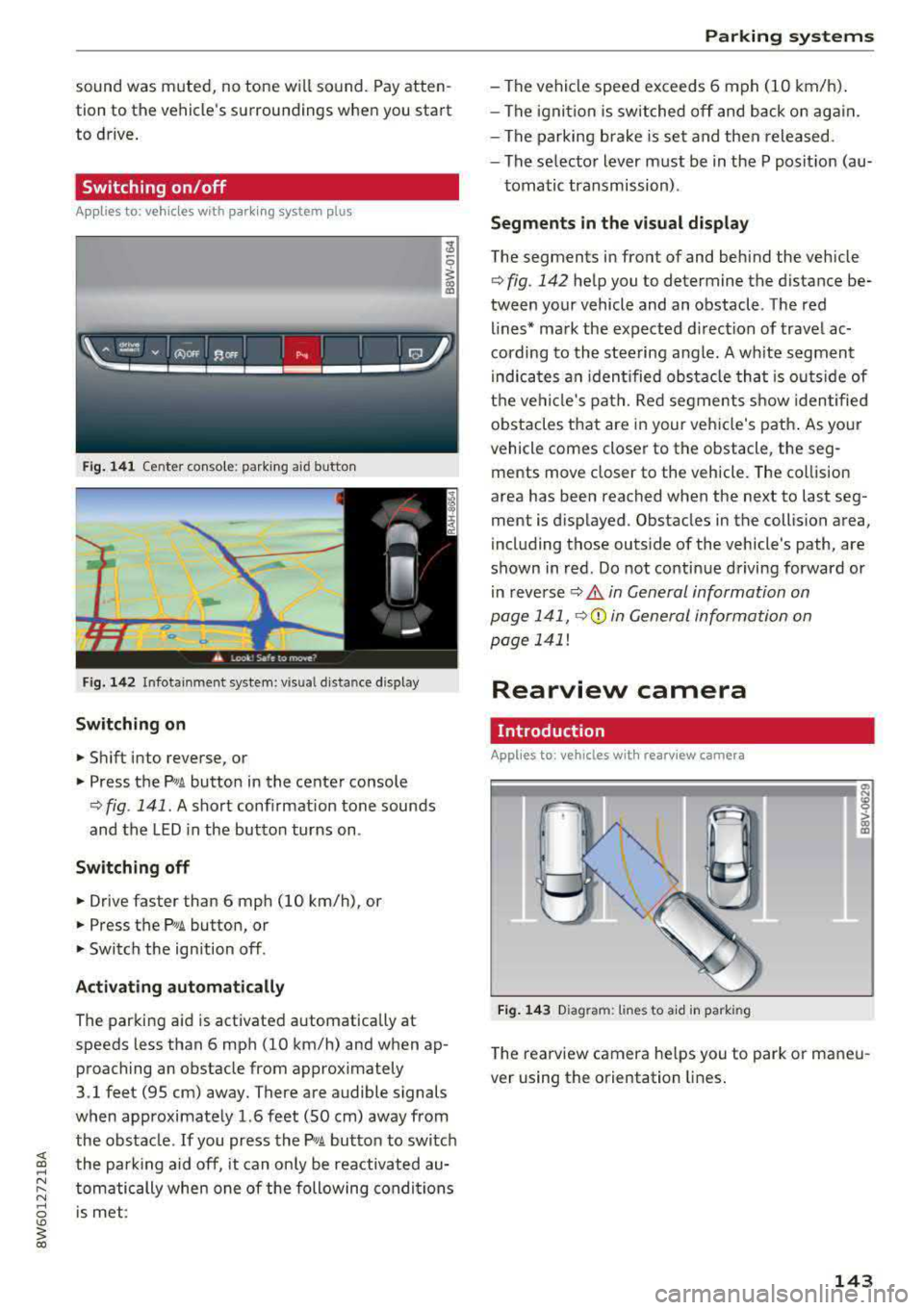
Fig. 141 Center conso le: parki ng aid button
Fig . 142 Infotainment system: visual d istance display
Switching on
~ Shift into reverse, or
~ Press the Pw A button in the center console
¢ fig . 141. A short confirmation tone sounds
and the LED in the button turns on.
Switching off
~ Drive faster than 6 mph (10 km/h), or
~ Press the P,11A button, or
~ Switch the ign ition off .
Activating automatically
The parking aid is activated a utomat ica lly at
speeds less than 6 mph (10 km/h) and when ap
proaching an obstacle from approximately
3.1 feet (95 cm) away. There are audible signals
when approximately 1.6 feet (SO cm) away from the obstacle . If you press the
p,,;A button to switch
the park ing aid off, it can on ly be reactivated au
tomatically when one of the following conditions
is met :
Parking systems
-The vehicle speed exceeds 6 mph (10 km/h).
- The ignition is switched off and back on again.
- The parking brake is set and then released .
- The selecto r lever must be in the P posit ion (au-
tomatic transmission) .
Segments in the visual display
The segments in front of and behind the veh icle
¢fig. 142 help you to determine the distance be
tween your vehicle and an obstacle . Th e red
lines* mark the expected direction of travel ac
cording to the steering angle. A wh ite segment
i ndica tes an identified obstacle tha t is outsid e of
the vehicle's path. Red segments show identified
obstacles that are in your veh icle's path. As your
vehicle comes closer to the obstacle, the seg
ments move closer to the veh icle. The collision
area has been reached when the next to last seg
ment is displayed . Obstacles in the collision area,
including those outs ide of the vehicle's path, are
shown in red. Do not continue driving forward or
in
reverse ¢ A in General information on
page 141,
Q© in General information on
page 141!
Rearview camera
Introduction
App lies to : vehicles wi th rearv iew camera
Fig. 143 D iagram: li nes to a id in parking
a, N :g
:l,. (I) (X)
The rearview camera he lps you to park or maneu
ver using the orientation lines.
143
Page 147 of 409
Switching off
• Drive faster than 6 mph (10 km/h), or
• Press the p,,,A button, or
• Switch the ignition off.
(D Tips
-The visual display in the r ight part of the
display should help you detect the critica l
vehicle area.
- You can change the volume of the signals
and the display
c:!) page 148.
Perpendicular parking
Applies to: vehicles with rearview came ra
This view may be used when parking in a garage
or in a parking space.
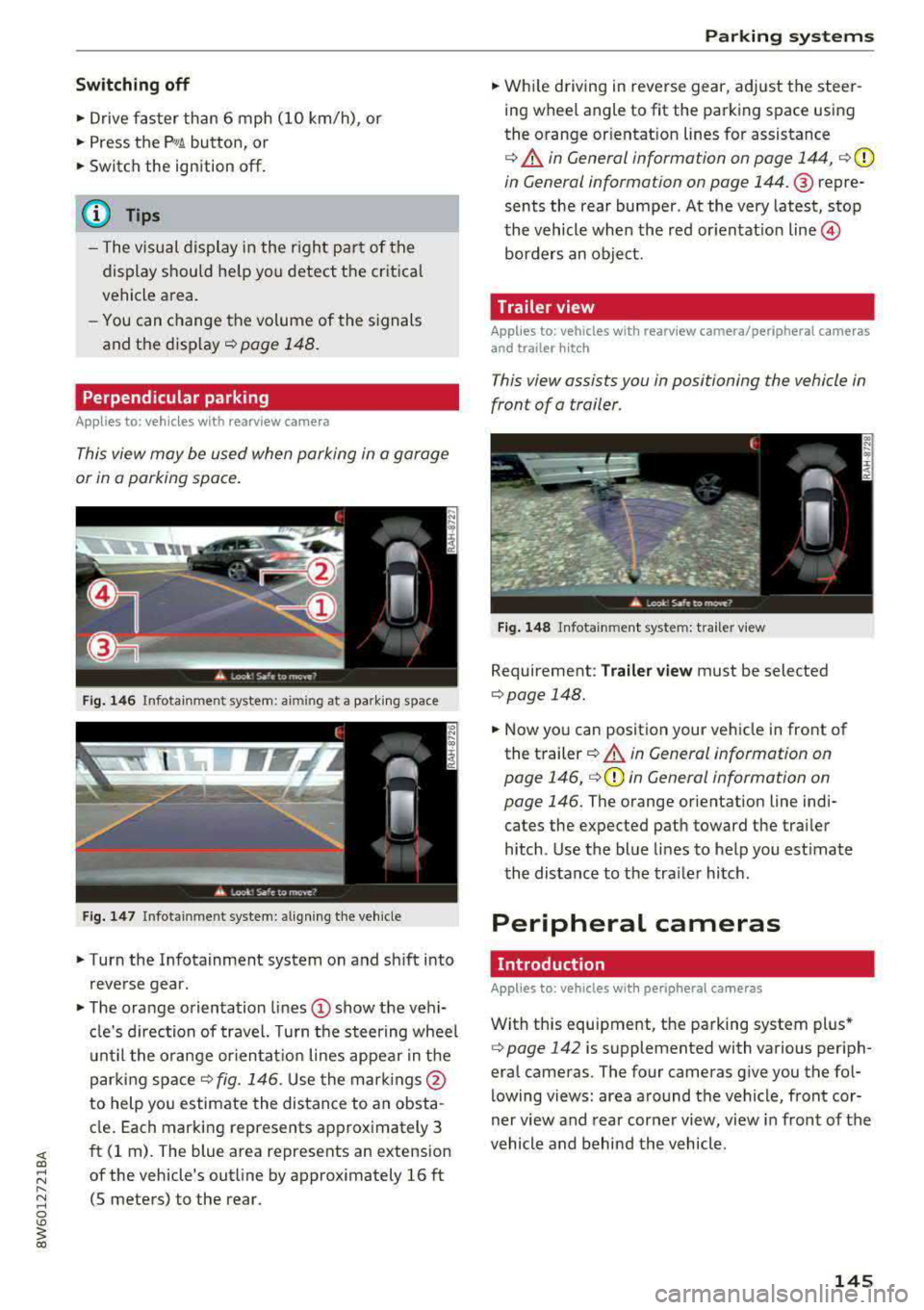
Fig. 146 Infotainment system: aiming at a parking space
Fig . 147 Infotainment sys tem: aligning th e vehicle
• Turn the Infotainment system on and sh ift into
reverse gear.
• The orange orientation lines (D show the vehi
cl e's direction of travel. Turn the steering wheel
until the orange orientat ion lines appear in the
parking
space ¢ fig. 146. Use the marking s@
to help you estimate the distance to an obsta
cle. Each marking represents approximately 3
ft (1 rn). The blue area represents an extension
of the vehicle's outline by approx imately 16 ft
(5 meters) to the rear.
Parking systems
• While driving in reverse gear, adjust the steer
ing wheel angle to fit the parking space using
the orange or ientation lines for assistance
¢ &. in General information on page 144, ¢(D
in General information on page 144. ® repre
sents the rear bumper. At the very latest, stop
the vehicle when the red or ientat io n
line ©
borders an object.
Trailer view
Applies to: vehicles with rearview camera/peripheral cameras
and trailer hitch
This view assists you in positioning the vehicle in
front of a trailer.
Fig. 148 Infota inment system: trailer view
Requirement: Trailer view must be selected
¢page 148.
• Now you can position your vehicle in front of
the trailer
c:!) &. in General information on
page 146,
¢ (D in General information on
page 146.
The orange orientation line indi
cates the expected path toward the trai ler
h itch. Use the blue lines to help you estimate
the distance to the tra iler hitch.
Peripheral cameras
Introduction
Applies to: vehicles wit h periph eral cameras
With this equipment, the parking system plus*
c:> page 142 is supplemented with various periph
eral cameras. The four cameras give you the fo l
lowing views: area around the vehicle, front cor
ner view and rear corner view, view in front of the
vehicle and behind the vehicle.
145
Page 227 of 409
Radio
Opening the radio
The radio supports the F M , AM and SiriusXM *
(satellite radio) bands. Using the HO Radio re
ceiver also allows you to receive radio stations
on the FM and AM bands in digital format.
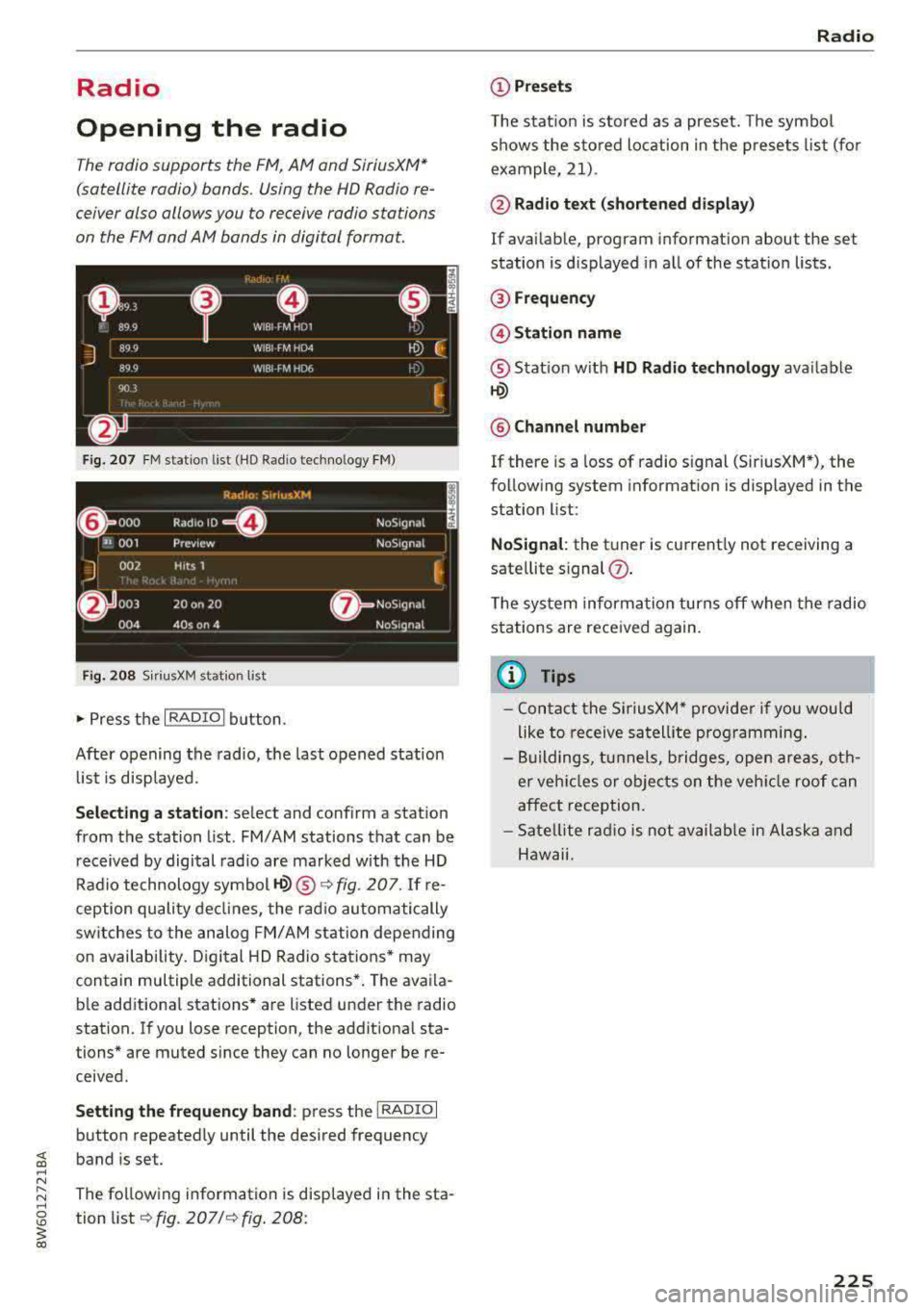
Fig . 20 7 FM stat ion list ( HO Ra dio tec hn ology FM)
R.td10: SiriusXM
~ 000 ---=0---Radio ID , NoS19nal
... 001 Prev iew N oS19nal
J 002 H its 1
~
f) 003 20 on 20 N
oS19na l
004 40s on 4 NoS19nal
F ig. 208 S iri usXM station list
.. P ress the I RAD IO I bu tton.
Afte r opening the rad io, t he last opened station
lis t is disp laye d.
.
I
Selecting a station : select and confirm a stat io n
from the station list . FM/ AM stations t hat can be
received by digital rad io are ma rked w ith the HD
R adio technology symbol
tQ) ® ¢fig. 207. If re
ception quality decl ines, the r adio automatically
switches to the analog FM/AM station depe nding
on availability . D igi tal HD Radio s ta tions * may
contain multiple additional stations* . The ava ila
b le add itiona l stations* are listed under the radio
station. I f you lose reception, the add it iona l sta
tions* are muted since they can no longer be re
ceived.
Setting the frequency band : press the I RADIO I
button repeated ly until the desired frequency
band is set.
The follow ing information is displayed in the sta
tion
li st ¢ fig. 207 /¢ fig . 208:
Radio
(D Presets
The s tat ion is stored as a preset. The symbo l
shows the s to red lo cation in the prese ts list (fo r
example, 21).
@ Radio text (shortened display )
If avai lab le, program information about the set
station is d isplayed in a ll of the statio n lists.
@ Frequency
@Station name
® Stat io n w ith HD Radio t echnolog y available
tQ)
® Channel number
If there is a loss of radio signal (Sir iusXM*), the
fo llowing system in format ion is displayed in the
station list:
NoSignal : the tu ner is cu rrent ly not receiving a
sate llite s ignal
(j) .
The system informa tion turns off when the radio
st ations are rece ived again.
(D Tips
- Con tact the SiriusXM" provide r if you would
like to receive sa tel lit e programming .
- B uilding s, tu nnels, b ridges, open area s, oth
er veh icles or objects o n the veh icle roof can
affect reception.
- Satel lite ra dio is not availab le in Alaska and
Hawaii.
225
Page 253 of 409
System settings
Short dialog : when this function is switched on
~ ' a shorter form of the prompts is used.
Command during voice output*1>: this function
is switched on at the factory. When this function
is switched
on~' you can say new commands
during announcements . You do not need to wait
for the signal tone (beep) during an announce
ment. When the function is switched off
0, you
need to wait for the signal tone (beep) to say a
new command.
Volume: you can adjust the volume of the
prompts by turning the control knob.
Individual speech training (on ly when the vehi
cle is stationary): you can adapt the voice recog
n ition system to yo ur voice or pronunciat ion in
order to improve the system's ability to recognize
your speech. Individual train ing is comprised of
20 speech entries that consist of commands and
sequences of numbers . You can delete the pro
grammed voice tra ining w ith the
Reset individu·
al speech training
function.
Display brightness
You can adjust the brightness of the Infotain
ment system display by turning the control knob .
Factory settings
The following functions can be reset to the facto
ry default settings:
-Sound settings
- Radio
- Media settings
- Jukebox*
- Directory
- Telephone
- Bluetooth and Wi-Fi *
- Navigation settings*
- Navigation and online memory*
- Voice recognition system *
- Shortcut keys
- Message settings*
- Apps*
- Tool tips
1
> Please note that this func tion is not available in Cab rio
lets.
252
- Audi connect*
- Audi smartphone interface*
You can select the desired functions individually
or a ll at once with the option
Select all entries .
Select and confirm Restore factory settings.
(D Tips
Make sure that not only the settings were de
leted but also the stored data, if applicable.
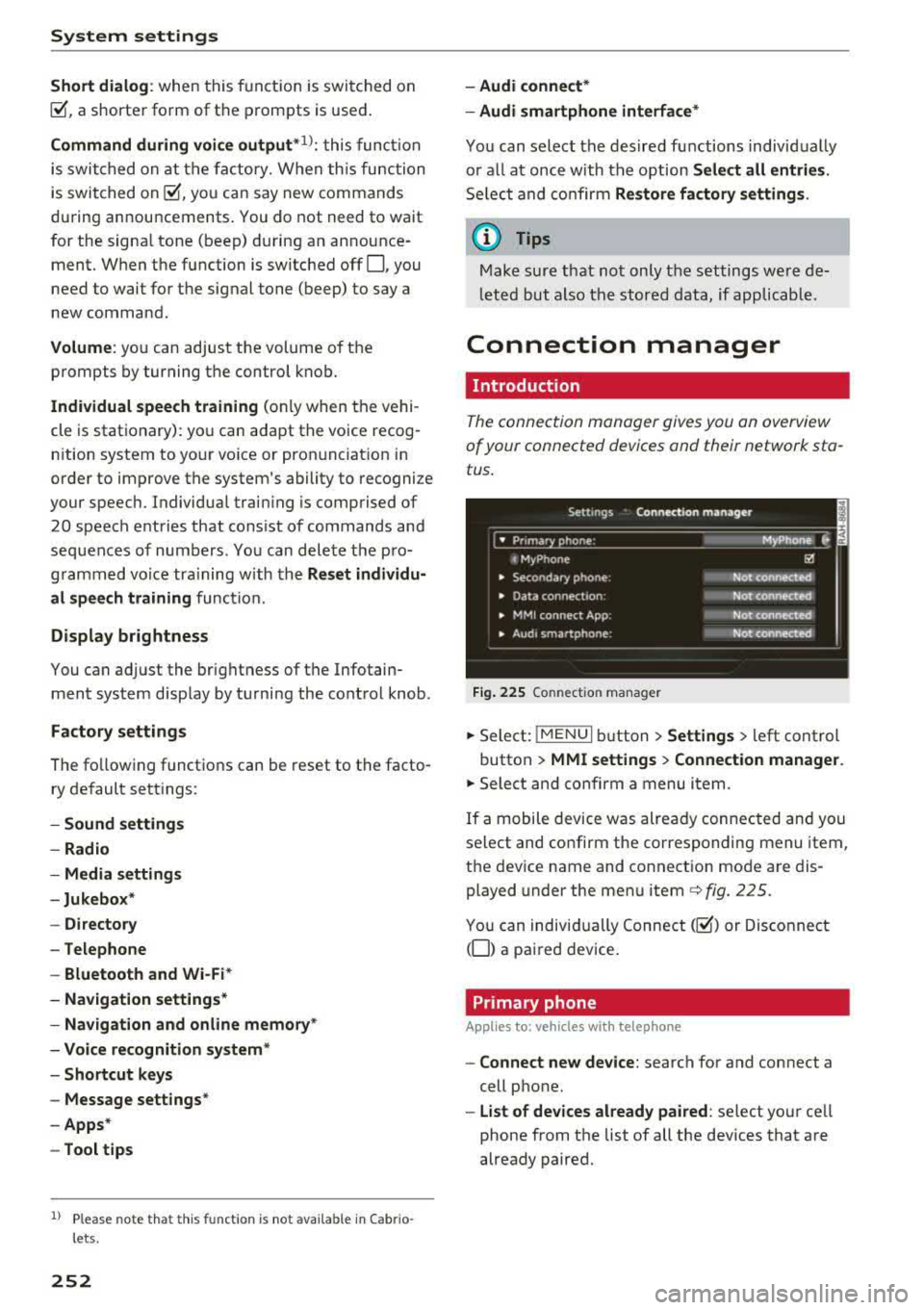
Connection manager
Introduction
The connection manager gives you an overview
of your connected devices and their network sta
tus .
Fig. 225 Connection manager
.,. Select: !MENUI button> Settings > left control
button >
MMI settings > Connection manager.
.,. Select and confirm a menu item.
If a mobile device was already connected and you
select and confirm the corresponding menu item,
the device name and connection mode are dis
played under the menu
item¢ fig. 225.
You can individually Connect(~) or Disconnect
(0) a paired device.
Primary phone
App lies to: vehicles wi th telepho ne
- Connect new device: search for and connect a
cell phone.
- List of devices already paired : select your cell
phone from the list of all the dev ices that are
already paired.
Page 256 of 409
<( a, .... N ,....
N .... 0 \0
3 a,
-Version information : information on the MMI
software version and the navigation database *
software version is displayed . The
Software in
format ion
function a lso provides information
on the software contained in the MMI and the
licensing agreement .
Sound settings
The sound distribution and volume of the MMI
can be adjusted individually . The settings depend
on vehicle equipment.
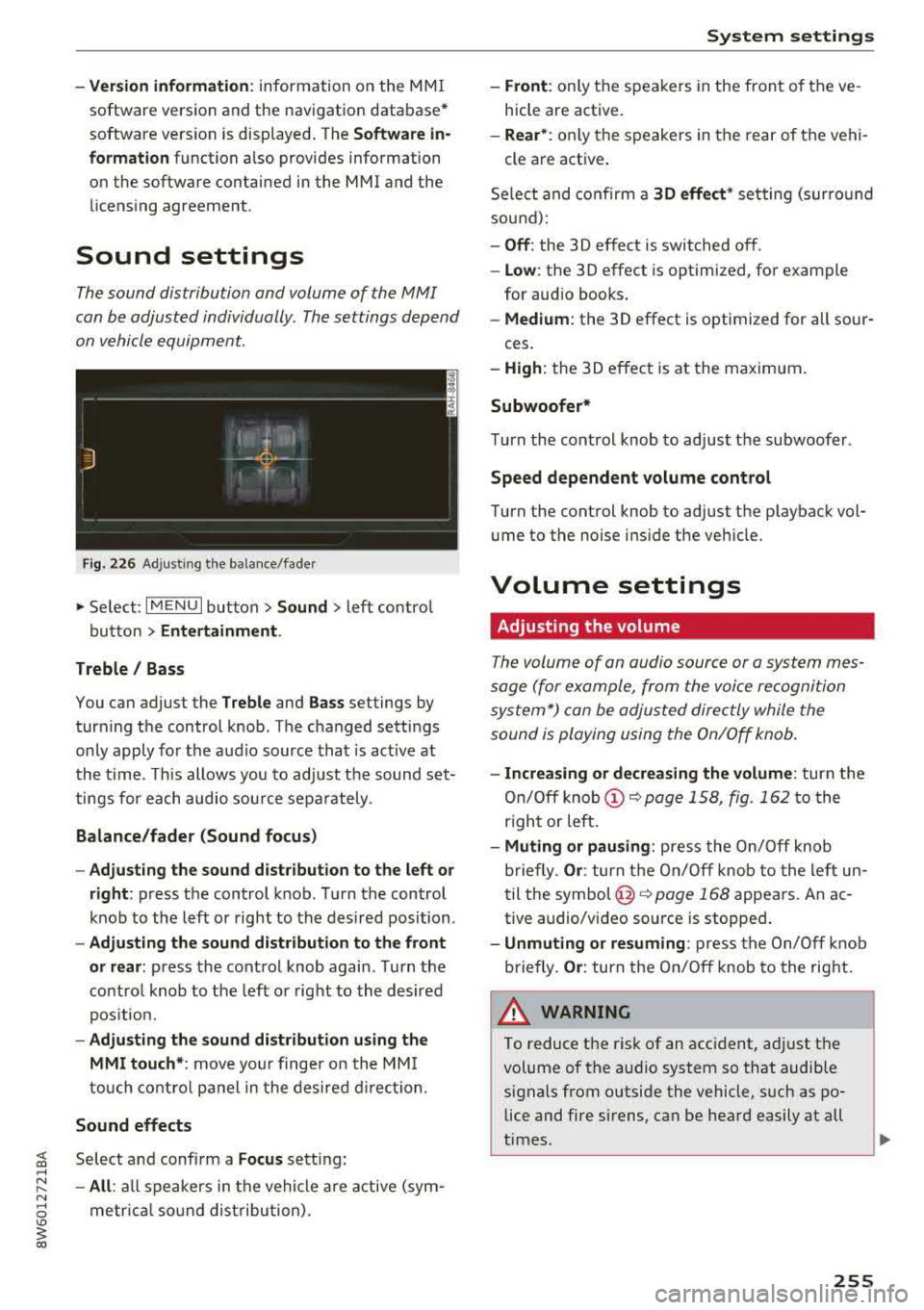
Fig. 226 Adjusti ng the balance/fader
" Se lect: I MENU I button> Sound > left contro l
button
> Entertainment .
Treble / Bass
You can adjust the Treble and Bass settings by
turning the control knob. The changed settings
only apply fo r the audio source that is act ive at
the time. This allows you to adjust the sound set
tings for each audio source separately .
Balance/fader (Sound focus)
-Adjusting the sound distribution to the left or
right :
press the control knob. Turn the control
knob to the left or right to the desired position .
-Adjusting the sound distribution to the front
or rear:
press the control knob again. Turn the
contro l knob to the left o r right to the desired
position.
-Adjusting the sound distribution using the
MMI touch* :
move your finger on the MMI
touch control panel in the desired direction.
Sound effects
Select and confirm a Focus sett ing:
-All : all speakers in the vehicle are active (sym
metr ical sound distribution) .
System settings
-Front: only the speakers in the front of the ve
hicle are active.
-Rear* : only the speakers in the rear of the vehi-
cle are active .
Select and confirm a
30 effect* setting (surro und
sound):
-Off : the 3D effect is switched off.
-Low : the 3D effect is optimized, for example
for aud io books .
-Medium : the 3D effect is optimized for all sour-
ces.
-High : the 3D effect is at the maximum .
Subwoofer*
Turn the cont rol knob to adjust the subwoofer .
Speed dependent volume control
Turn the control knob to adjust the playback vol
ume to the noise ins ide the veh icle.
Volume settings
Adjusting the volume
The volume of an audio source or a system mes
sage (for example, from the voice recognition
system*) can be adjusted directly while the
sound is playing using the On/Off knob.
-Increasing or decreasing the volume : turn the
On/Off knob
(D ~ page 158, fig. 162 to the
r ight or left.
-Muting or pausing: press the On/Off knob
briefly .
Or: turn the On/Off knob to the left un
til the
symbol @~ page 168 appears. An ac
tive audio/video source is stopped .
-Unmuting or resuming: press the On/Off knob
briefly .
Or: turn the On/Off knob to the right.
A WARNING ~
To reduce the risk of an accident, adj ust the
volume of the a udio system so that audible
signals from outside the vehicle, such as po lice and fire sirens, can be heard easily at all
times.
-
255
Page 285 of 409
Airbag syste m
-If you are unrestrained, leaning forward, sit
ting sideways or out of position in any way,
your risk of injury is much higher.
- You will also receive serious injuries and
could even be killed if you are up aga inst the
airbag or too close to it when it inflates
-
even with an Advanced Airbag ¢page 277.
A WARNING
A child in a rearward-facing child safety seat
installed on the front passenger seat w ill be
ser iously injured and can be killed if the front
airbag inflates
-even w ith an Advanced Airbag
System.
- Although the Advanced A irbag System in
yo ur vehicle is designed to turn off the front
airbag when a rearward-facing child re
straint has been insta lled on the front pas
senger seat, nobody can absolutely guaran
tee that deployment is impossible in all con ceivable s ituations that may happen during
the useful life of your vehicle.
- The inf lating airbag will hit the child safety
seat or infant carrier with great force and
will smash the chi ld safety seat and child
against the backrest, center armrest, door,
or roof.
- Always install rearward-facing ch ild re
straints on the rear seat.
- If you must install a rearward fac ing ch ild
safety seat on the front passenger seat be
cause of exceptiona l circumstances and the
PAS SENGER AIR BAG OFF ~; light does not
come on and stay on, immed iate ly install
the rear-fac ing ch ild safety seat in a rear
seating position and have the airbag system
inspected by your authorized Audi dea ler.
A WARNING
If, in exceptional circumstances, you must in
stall a forward-facing chi ld restraint on the
front passenger's seat:
- Always make sure the forward-facing seat
has been designed and certified by its man
ufacturer for use on a front seat with a pas
senger front and side a irbag.
284
- Never put the forward-facing child restraint
up against or very near the instrument pan
el.
- Always move the front passenger seat to
the highest posit ion in the up and down ad
justment range and move it back to the rearmost posit ion in the seat's fore and aft
ad justment range, as far away from the a ir
bag as poss ible, before install ing the for
ward-facing chi ld restraint.
- Always make sure that the safety be lt upper
anchorage is behind the ch ild rest raint and
not next to o r in fron t of the child rest raint
so that the safety be lt will be properly posi
tioned.
- Always make sure th at there is noth ing on
the front passenger seat that will cause the
capacitive passenger detection system in
the seat to signal to the Airbag System that
the seat is occup ied by a person when it is
not, or to signal that it is occupied by some
one who is heavier than the person actually
sitt ing on the seat. The presence of addi
tional objects could cause the passenger
front airbag to be turned on when it should
be off, or could cause the airbag to work in a
way that is d ifferent from the way it wou ld
have worked withou t the objec t on the seat .
- Ma ke sure that the
PASSENGER AIR BAG
OFF
"1; light comes on and stays on all the
time wheneve r the ignit ion is switched on .
' Advanced Airbag System components
The front passenger seat in your vehicle has a lot
of very important parts of the Advanced Airbag
System in it. These parts include the capacitive passenger detection system, wir ing, brackets,
and more. The control unit monitors the system
on the front passenger seat when the ignit ion is
switched on and turns the airbag indicato r light
o n when a malfunction in the one of the system
components is
detec ted¢ page 289. Because
t h e fron t passenger seat contains impo rtant
parts of the Advanced Ai rbag System, you must
take care to prevent it from being damaged .
Damage to the seat may prevent the Advanced
.,.
Page 289 of 409
Airbag system
airbag inflates -even with an Advanced Airbag
System.
- The inflating airbag will hit the child safety
seat or infant carrier with great force and
will smash the child safety seat and child
against the backrest, center armrest, door or roof .
- Always install rear-facing child safety seats
on the rear seat .
- If you must install a rearward-facing child
safety seat on the front passenger seat be
cause of exceptional circumstances and the
PASSENGER AIR BAG OFF~; light does not
come on and stay on, immediately install
the rear-facing child safety seat in a rear
seating position and have the airbag system inspected by your authorized Audi dealer.
A WARNING
Objects between you and the airbag will in
crease the risk of injury in a crash by interfer
ing with the way the airbag unfolds or by be
ing pushed into you as the airbag inflates.
- Never hold things in your hands or on your
lap when the vehicle is in use.
- Never transport items on or in the area of
the front passenger seat. Objects could move into the area of the front airbags dur
ing braking or other sudden maneuvers and
become dangerous projectiles that can
cause serious personal injury if the airbags
inflate .
- Never place or attach accessories or other
objects (such as cupholders, telephone
brackets, large, heavy or bulky objects) on
the doors, over or near the area marked "AIRBAG'' on the steering wheel, instru
ment panel, seat backrests or between
those areas and yourself. These objects could cause injury in a crash, especially
when the airbags inflate.
- Never recline the front passenger's seat to
transport objects. Items can also move into
the area of the side airbag or the front air bag during braking or in a sudden maneu
ver. Objects near the airbags can become
288
-
projectiles and cause injury, particularly
when the seat is reclined .
- Never place or transport objects on the
front passenger seat. Objects on the front passenger seat could cause the capacitive
sensor in the seat to signal to airbag system
that the seat is occupied by a person when it
in fact is not, or that the person on the seat
is heavier than he or she actually is. The
change in electric capacitance because of
such objects can cause the passenger front
airbag to be turned on when it should be
off, or can cause the airbag to work in a way
that is different from the way it would have
worked without objects on the seat.
- Always make sure that there is nothing on
the front passenger seat that will cause the
capacitive passenger detection system in
the seat to signal to the Airbag System that
the seat is occupied by a person when it is not , or to signal that it is occupied by some
one who is heavier than the person actually
sitting on the seat. The presence of an ob
ject could cause the passenger front airbag
to be turned on when it should be off, or
could cause the airbag to work in a way that
is different from the way it would have
worked without the object on the seat.
A WARNING
The fine dust created when airbags deploy can cause breathing problems for people with a history of asthma or other breathing condi
tions .
- To reduce the risk of breathing problems,
those with asthma or other respiratory con ditions should get fresh air right away by
getting out of the vehicle or opening win
dows or doors.
- If you are in a collision in which airbags de
ploy, wash your hands and face with mild
soap and water before eating.
- Be careful not to get the dust into your eyes,
or into any cuts or scratches.
- If the residue should get into your eyes,
flush them with water .
Page 290 of 409
Monitoring the
Advanced Airbag System
Airbag monitoring indicator light
Two separate indicators monitor the fun ction of
the A dvanced Airbag System : the
El ligh t and
t he
PASSENGER AIR BAG OFF ~ ; ON @ Light.
The Advanced Airbag System as we ll as the side
a ir bags and side c urta in air bags with ejec tion
m it iga tion fea tures ( in cludi ng the e lectro nic con
tro l uni t, sensors and sys tem wiring) are a ll
monitored co nti nu ously to ma ke sure that they
are funct ioning properly whenever the ignition is
on. Every t ime you turn on the ignition, the air
bag system ind icator
light E,lwill come on for a
few seconds (function check).
The system must be inspected when the
indicato r light
E,I:
- does not come on when the ignit ion is switched
on
- does not go out a few seconds after you have
switched on the ign ition, o r
- comes on w hile driving
If an airbag sys tem malf unct ion is de te cted, the
indicator light w ill come on to serve as a co nstant
remi nder to have the system inspected immedi
ately .
If a mal function occurs that turns the front air
bag on the passenger side off, the
PASSENGER
AIR BAG
OFF ~. lig ht w ill come o n an d stay on
whenever the ignit ion is on.
A WARNING
An airbag system that is not funct io ning prop
erly cannot provide supplemental p rotection
in a frontal crash .
- If the airbag indicato r
light¢ page 32
comes whe n the vehicle is be ing used, have
th e sys te m in spect ed immed iate ly by yo ur
au tho riz ed Aud i deale r.
It is possible that
th e air bag will i nflate w hen it i s n ot su p
p osed to, o r will not i nfla te whe n it shou ld.
Airbag system
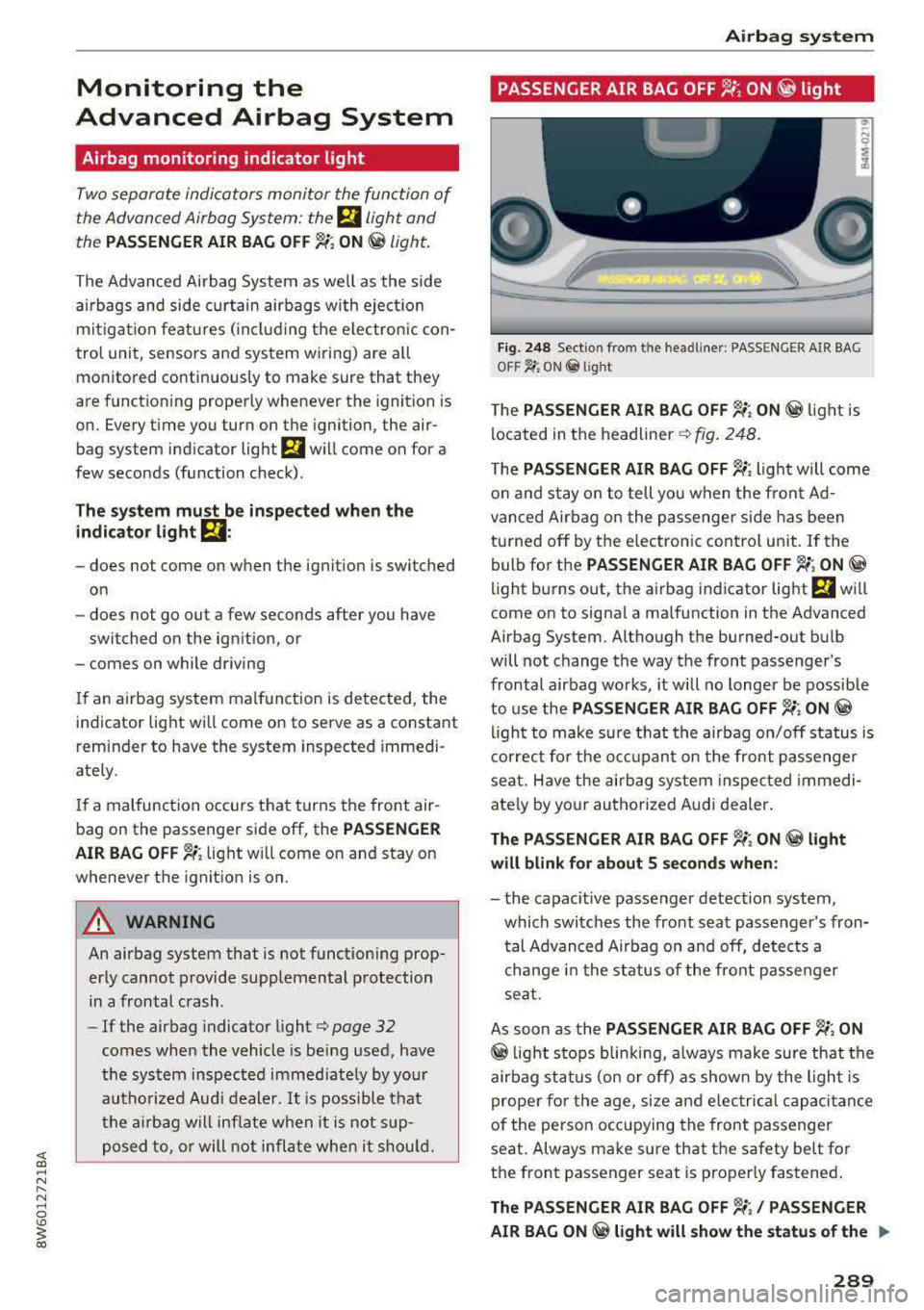
PASSENGER AIR BAG OFF '1; ON @ light
Fi g. 248 Sect io n fro m th e headli ner: PASSENGE R AIR BAG
OFF~ ; ON @ lig ht
T he PASSENGER AIR BAG OFF ~; ON@ light is
located in t he
headliner ¢ fig. 248.
The PASSENGER AIR BAG OFF ~; light will come
o n and stay on to tell you w hen t he fro nt Ad
van ced Air bag o n the p assenge r side has been
tu rned off by t he e lec tron ic control unit . If the
bulb fo r the
PASSENGER AIR BAG OFF ~; ON@
light b urns o ut, t he a irbag ind icator light El w ill
come on to signal a ma lfunction in the Advanced
Airbag System. Altho ugh the burned-out b ulb
will not change the way the front passenger's
frontal a irbag works , it w ill no longer be possible
to use the
PASSENGER AIR BAG OFF ~; ON@
ligh t to make s ure that the airbag on/off s tatus is
c or rec t fo r th e o ccu pan t on the front passenge r
sea t. Have the airb ag system inspec ted immedi
ate ly by yo ur au thorized A udi d ealer .
The PASSENGER AIR BAG OFF~; ON@ light
will blink for about S seconds when:
- the capacit ive passenger detection system,
which switc hes the front sea t passe nger's fron
tal Advanced Airbag o n and off, detects a
change in the st atus of the front pa sse nger
se at.
As soon as the
PASSENGER AIR BAG OFF ~; ON
@ light s tops blin kin g, a lways make sure that the
air bag st atus (on o r off) as shown by the ligh t is
prope r for the age, size and e lec trica l capacitance
of t he perso n occ up ying the front passenger
seat . Always ma ke sure that the safety be lt fo r
t h e front passenger seat is proper ly fastened .
The PASSENGER AIR BAG OFF~;/ PASSENGER
AIR BAG ON
@ light will show the statu s of the ..,.
289
Page 306 of 409
<( a, .... N ,....
N .... 0 \0
3 a,
manufacturer for use with an airbag. Always be
sure that the child restraint is properly installed
at one of the rear seating positions . If in excep
tional circumstances you must use it on the front
passenger seat, carefully read all of the informa
tion on child safety and Advanced Airbags and heed all of the appl icable WARNINGS . Make cer
tain that the child and ch ild restraint are correct
ly recognized by the capacitive passenger detec
tion system in the front passenger seat, that the
front passenger airbag is turned off, and that the
airbag status is always correctly signaled by the
PASSENGER A IR BAG OFF 1,;; light.
Many types and models of ch ild rest rai nts have
been available over the yea rs, new mode ls are in
troduced regularly incorporating new and im
proved designs and older mode ls are taken out of
product ion. Chi ld restraints are not standardized.
Ch ild restraints of the same type typically have
d ifferent weights and sizes and different "foot
prints", the s ize and shape of the bottom of the
chi ld restraint that sits on the seat, when they
are insta lled on a vehicle seat. These differences
make it virtually impossible to certify compliance
with the req uirements fo r advanced airbags wi th
each and every child restraint that has ever been
sold in the past or will be sold over the course of
the useful life of your vehicle.
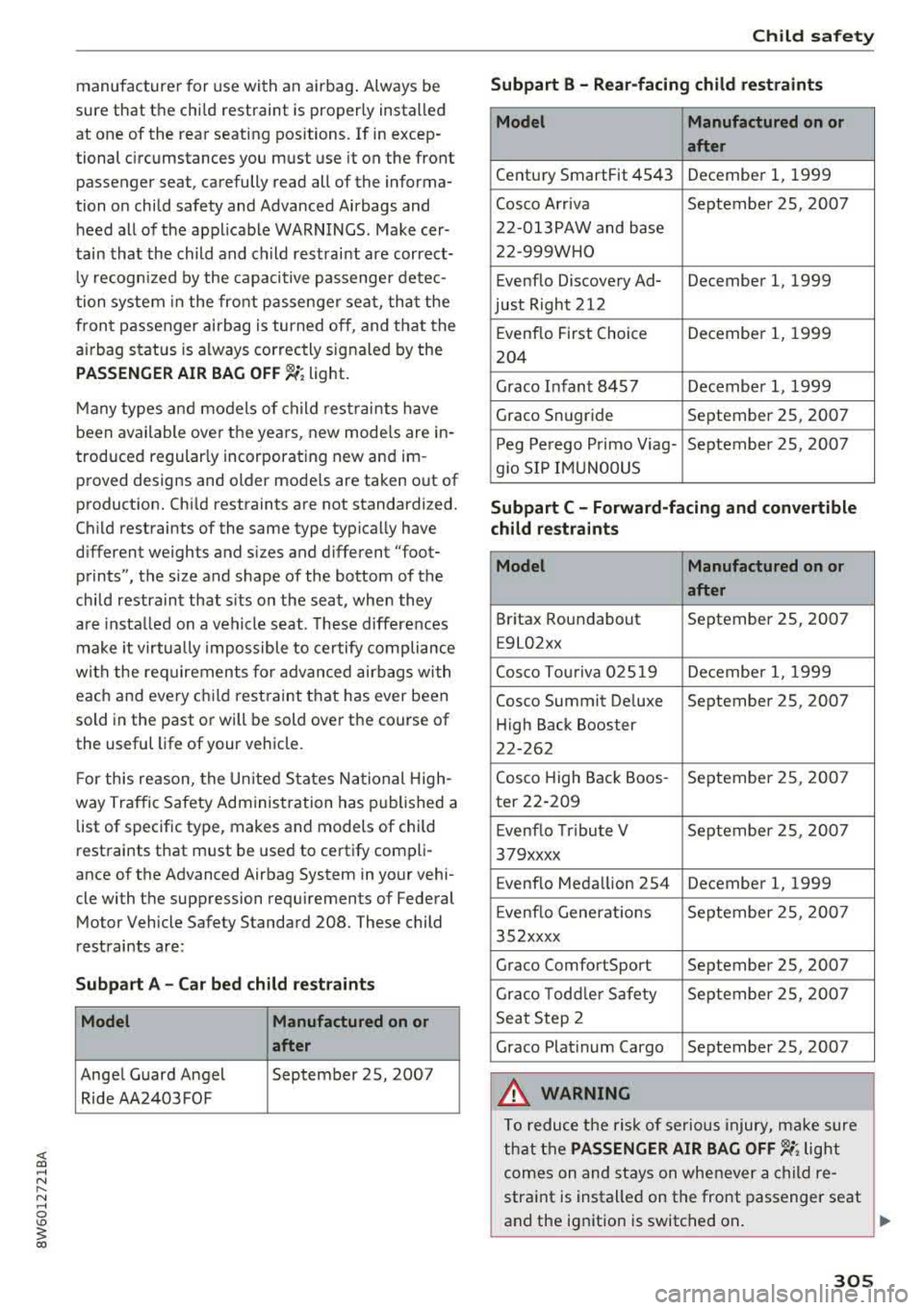
F or this reason, the Un ited States National High
way Traffic Safety Administration has published a
list of specific type, makes and models of child
restraints that must be used to certify compli
ance of the Advanced Airbag System in your vehi
cle with the suppression requ irements of Federal
Motor Vehicle Safety Standard 208 . These child
restraints are:
Subp art A - Car bed child re stra int s
Model Manufactured on or
after
Ange l Guard Angel September 25, 2007
Ride AA2403FOF
Ch ild safety
Subpart B - R ear -facing child restraints
Model Manufactured on or
after
Century SmartFit 4543 December 1, 1999
Cosco Arriva September 25, 2007
22-013PAW and base
22-999WHO
Evenflo Discovery Ad- December 1, 1999
just Right 212
Evenflo First Choice December 1, 1999
204
Graco Infant 8457 Decembe r 1, 1999
Graco Snugride September 25, 2007
P eg Pe rego P rimo Viag- September 25, 2007
g io SIP IMUNOOUS
Subpart C - Forward -facing and convertible
child restraints
Model Manufactured on or
after
Britax Roundabout September 25, 2007
E9L02xx
Cosco Tou riva 025 19 Decembe r 1, 1999
Cosco Summit De luxe September 25, 2007
H igh Back Booster
22-262
Cosco High Back Boos -September 25, 2007
ter 22-209
E venflo Tribute V September 25, 2007
379xxxx
Evenflo Medallion 254 December 1, 1999
E venflo Generat io ns September 25, 2007
352xxxx
Graco ComfortSport September 25, 2007
Graco Todd le r Safety September 25, 200 7
Seat Step 2
Graco Platinum Cargo September 25, 2007
A WARNING
To reduce the risk of serious injury, ma ke sure
that the
PASSENGER AIR BAG OFF 1,;; light
comes on and stays on whenever a child re
straint is installed on the front passenger seat
and the ignition is switched on .
..,.
305
Page 406 of 409
Traffic messages..................... . 218
Traffic sign recognition . . . . . . . . . . . . . . . . 109
Trailer mode (navigation)........ .. .. .. . 216
Trailer tow ing . . . . . . . . . . . . . . . . . . . . . . . . 104
Information . . . . . . . . . . . . . . . . . . . . . . . . 105
Parking systems . . . . . . . . . . . . . . . . . . . . . 149
Technical requirements . . . . . . . . . . . . . . . 104
Transport Canada . . . . . . . . . . . . . . . . . . . . . 267
Travel guide
refer to Travel (travel gu ide) . . . . . . . . . . . 195
Travel (travel guide) . . . . . . . . . . . . . . . . . . . 195
Treb le (sound) . . . . . . . . . . . . . . . . . . . . . . . 255
Trunk lid
Trunk escape latch . . . . . . . . . . . . . . . . . . . .
46
Turn assist . . . . . . . . . . . . . . . . . . . . . . . . . . . 126
Turn signal . . . . . . . . . . . . . . . . . . . . . . . . . . . 62
u
U LSD No . 2 (Diesel fuel) . . . . . . . . . . . . . . . . 323
Unfastening safety belts ......... ..... . 274
Uniform t ire quality grad ing . . . . . . . . . . . . 359
Unlocking/locking
By remote control . . . . . . . . . . . . . . . . . . . . 40
With the central locking switch . . . . . . . . .
41
W ith the convenience key . . . . . . . . . . . . . . 40
W ith the lock cylinder . . . . . . . . . . . . . . . . . 42
Updating stations (radio) . . . . . . . . . . . . . . . 225
USB stick
refer to Audi music interface ..... .. 236, 237
V
Valet parking function . . . . . . . . . . . . . . . . . . 51
Vanity mirror . . . . . . . . . . . . . . . . . . . . . . . . . . 67
Vehicle
Care/cleaning . . . . . . . . . . . . . . . . . . . . . . .
362
Dimensions . . . . . . . . . . . . . . . . . . . . . . . . . 387
Out of service . . . . . . . . . . . . . . . . . . . . . . . 367
Raising . . . . . . . . . . . . . . . . . . . . . . . . . . . . 372
Specifications . . . . . . . . . . . . . . . . . . . . . . . 386
Vehicle battery . . . . . . . . . . . . . . . . . . . . . . . 338
Charge level . . . . . . . . . . . . . . . . . . . . . . . . 155
Charging . . . . . . . . . . . . . . . . . . . . . . . . . . . 339
<( co Winter operation . . . . . . . . . . . . . . . . . . . . 338 .... N ~ Vehicle control modules. . . . . . . . . . . . . . . . 156
.... 0 \0
3 co
Index
Vehicle jack . . . . . . . . . . . . . . . . . . . . . . . . . . 368
Lifting points . . . . . . . . . . . . . . . . . . . . . . . 372
Vehicle key . . . . . . . . . . . . . . . . . . . . . . . . . . . 38
Vehicle status report
Audi connect vehicle control . . . . . . . . . . .
202
Vehicle tool kit . . . . . . . . . . . . . . . . . . . . . . . 368
Ventilation . . . . . . . . . . . . . . . . . . . . . . . . . . . 81
Version information . . . . . . . . . . . . . . . . . . . 254
VIEW button . . . . . . . . . . . . . . . . . . . . . . . . . . 13
VIN . . . . . . . . . . . . . . . . . . . . . . . . . . . . . . . . 386
Voice guidance
refer to Multifunction
steering wheel . . . . . . . . . . . . . . . . .
13, 15, 16
Voicemail . . . . . . . . . . . . . . . . . . . . . . . . . . . 186
Voice recognit ion system . . . . . . . . . . . . . . . 171
Commands . . . . . . . . . . . . . . . . . . . . . . . . . 172
External . . . . . . . . . . . . . . . . . . . . . . . . . . . 176
Mult ifunct ion steering wheel . . . . . . . . . . . 15
Operating . . . . . . . . . . . . . . . . . . . . . . . . . . 171
Settings . . . . . . . . . . . . . . . . . . . . . . . . . . . 251
Volume ............................ 256
Volume 255
w
Warning lights
refer to Indicator lights . . . . . . . . . . . . . . . . 25
Warranty coverages . . . . . . . . . . . . . . . . . . . 389
Washing matte finish pa int . . . . . . . . . . . . . 362
Web radio . . . . . . . . . . . . . . . . . . . . . . . . . . . 235
Weights . . . . . . . . . . . . . . . . . . . . . . . . . . . . . 387
What happens if you wear your safety belt too
loose? . . . . . . . . . . . . . . . . . . . . . . . . . . . . . .
273
What happens to unbelted occupants? . . . . 270
What impairs driving safety? . . . . . . . . . . . . 258
Wheel bolts . . . . . . . . . . . . . . . . . . . . . . . . . 357
Wheel replacement . . . . . . . . . . . . . . . . . . 371
Wheels . . . . . . . . . . . . . . . . . . . . . . . . . . . . . 341
Cleaning . . . . . . . . . . . . . . . . . . . . . . . . . . . 364
Glossary of tire and loading term inology . 343
Replacing . . . . . . . . . . . . . . . . . . . . . . . . . . 371
T ire pressure monitoring system . . . . . . . 360
Tires and vehicle load limits . . . . . . . . . . . 355
Wheel wrench . . . . . . . . . . . . . . . . . . . . . . . . 368
When must a safety belt be replaced? . . . . 271
When must the a irbag system be inspected? 289
Where are lower anchorages located? . . . .
317
405