light AUDI A5 COUPE 2018 Owner's Manual
[x] Cancel search | Manufacturer: AUDI, Model Year: 2018, Model line: A5 COUPE, Model: AUDI A5 COUPE 2018Pages: 409, PDF Size: 67.63 MB
Page 40 of 409
Opening and closing
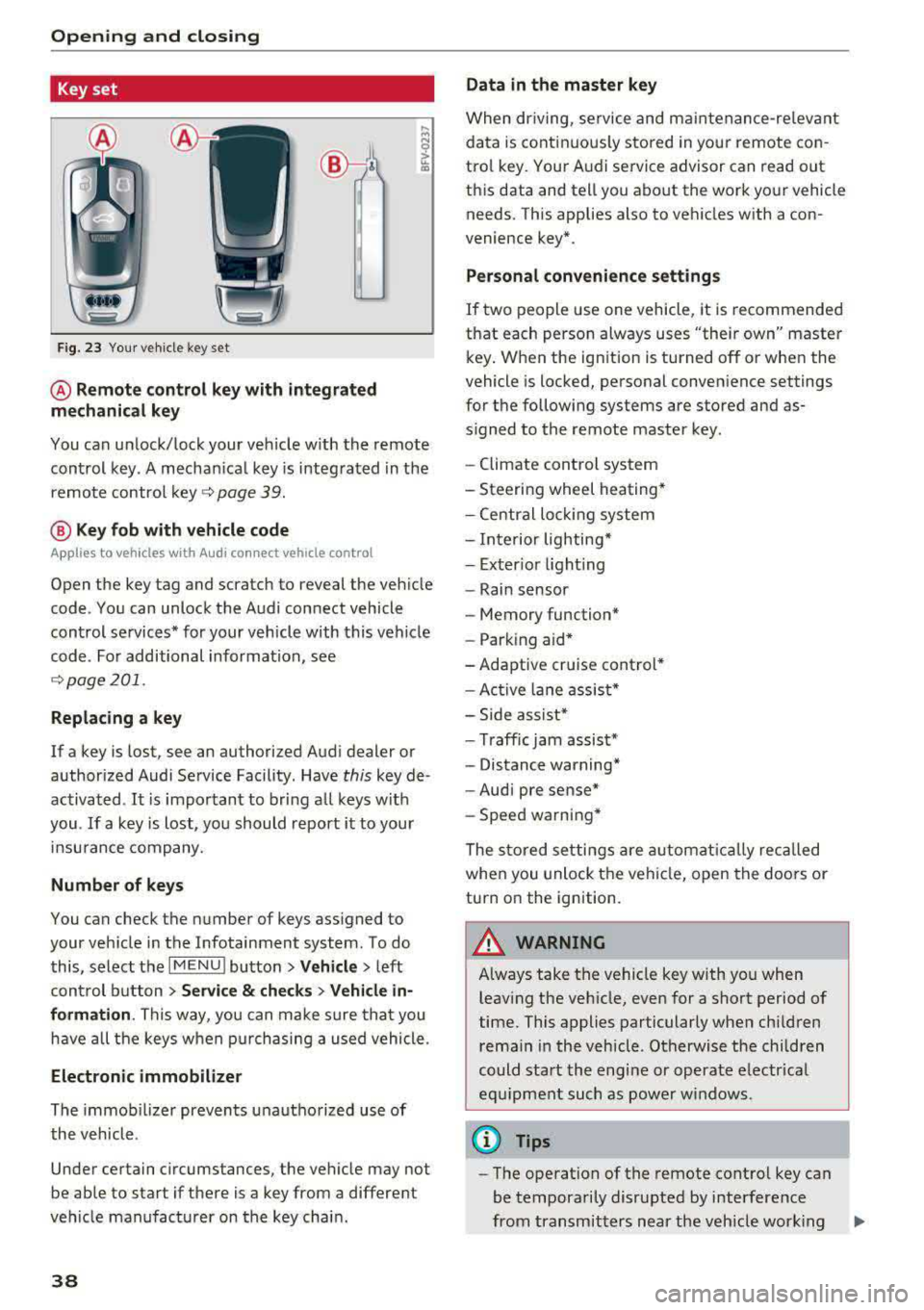
Key set
Fig. 23 Your veh icle key set
@ Remote control key with integrated
mechanical key
You can unlock/lock your veh icle w ith the remote
control key . A mechan ical key is integrated in the
remote control
key ~ page 39.
@ Key fob with vehicle code
Appl ies to veh icles with A udi co nnect vehicle con trol
Open the key tag and scratch to reveal the veh icle
code . You can unlock the Audi connect vehicle
control se rvices* for your vehicle with this vehicle
code . For additional information, see
~ page 201 .
Replacing a key
If a key is lost, see an authorized Audi dealer or
authorized Audi Service Facility. Have
this key de
activated .
It is important to bring all keys with
you .
If a key is lost, you should report it to your
insu rance company.
Number of keys
You can check the number of keys assigned to
your vehicle in the Infotainment system . To do
this, select the
IM ENU I button > Vehicle > left
control button
> Service & checks> Vehicle in·
formation .
This way, you can make sure that you
have all the keys when purchasing a used vehicle.
Electronic immobilizer
The immob ilizer prevents unauthorized use of
the vehicle .
Under certain circumstances, the vehicle may not
be able to start if there is a key from a different
veh icle manufacturer on the key chain.
38
Data in the master key
When dr iving, service and maintenance-re levant
data is continuously stored in your remote con
trol key. Your A udi service advisor can read out
this data and tell you about the work your vehicle needs . This applies also to vehicles with a con
venience key*.
Personal convenience settings
If two people use one vehicle, it is recommended
that each person always uses "their own" master
key . When the ign ition is turned off or when the
vehicle is locked, personal convenience settings
for the following systems are stored and as
s igned to the remote master key.
- Climate control system
-Steering wheel heating*
-Central lockin g system
-Interior lighting*
-Exter ior lighting
- Rain sensor
- Memory function*
- Park ing a id *
-Adaptive cr uise control *
-Active lane assist*
-Side assist*
-Traff ic jam assist*
- Distance warning*
-Audi pre sense*
- Speed warning *
The stored settings are automatically recalled
when you unlock the vehicle, open the doors or
turn on the ignition .
~ WARNING
Always take the vehicle key with you when
leaving the vehicle, even for a short period of
time. This applies particularly when children
rema in in the vehicle . Otherwise the children
could start the engine or operate electrical
equipment such as power windows .
(© Tips
-
-The operation of the remote control key can
be temporarily disrupted by interference
from transmitters near the veh icle work ing
1J11,
Page 41 of 409
in the same frequency range (s uch as a ce ll
phone or radio equipment) . A lways check if
your vehicle is locked!
- For an explanation on conformity with t he
FCC regulations in the United States and the
Ind ustry Canada regu lations, see
<::> page 392 .
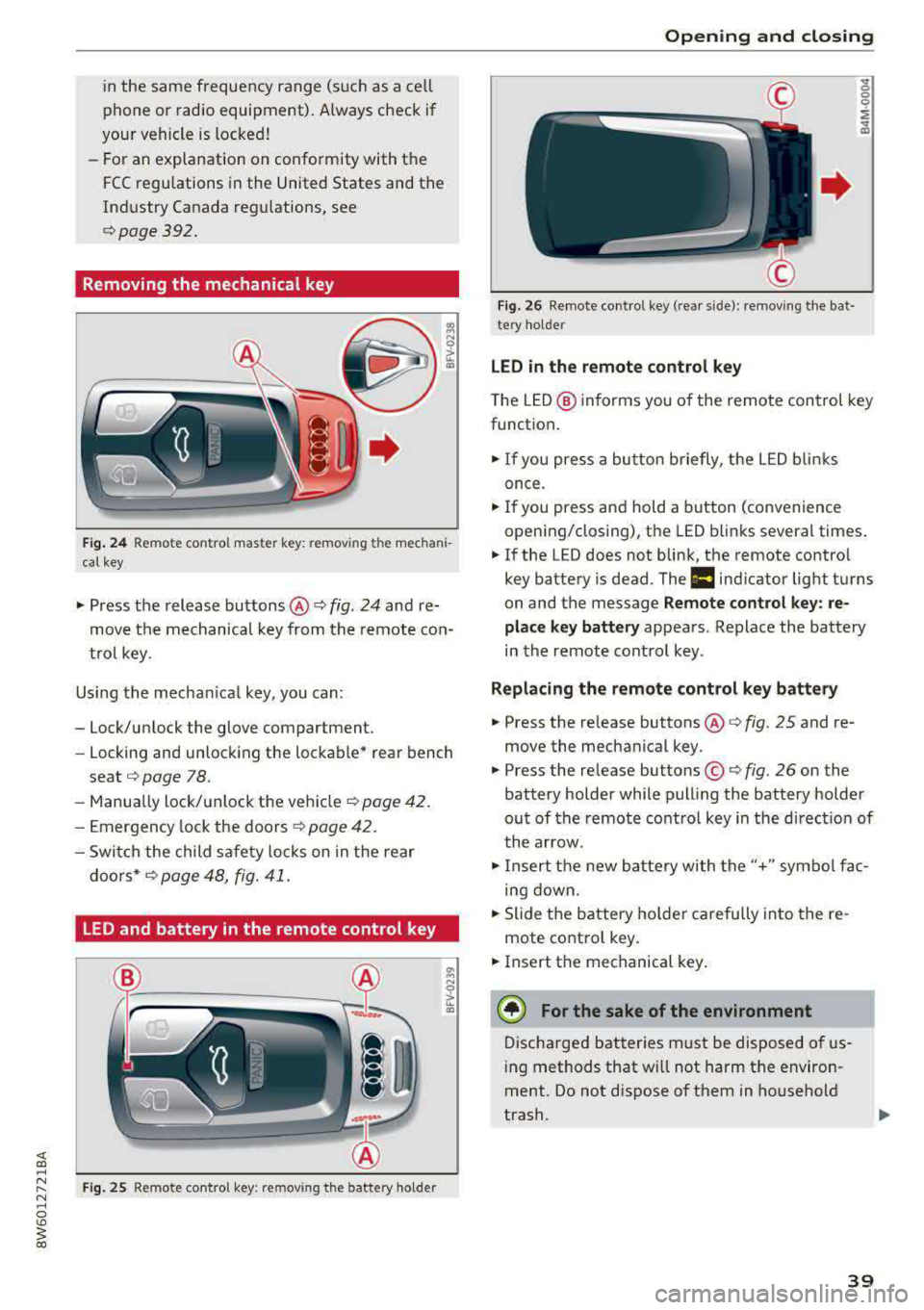
Removing the mechanical key
Fig. 24 Re mote control maste r key: remov ing t he mechani
ca l key
• Press the release buttons @¢ fig. 24 and re
move t he mechanical key from the remote co n
t ro l key .
Using the mecha nica l key, you can :
- Lock/un lock the glove compartment.
- Locking and unlock ing the lockable* rea r bench
seat <::>
page 78.
-Manua lly lock/ un lock the vehicle ¢ page 42.
- Emergency lock the doors ¢ page 4 2 .
- Swi tch the child safety locks on in t he rear
doo rs *
¢ page 48, fig. 41.
LED and battery in the remote control key
F ig. 25 Remote co ntro l key : rem ov ing the battery holder
Open ing and closing
F ig . 2 6 Re mote co ntrol key (rea r side) : re m ovi ng t he bat ·
te ry ho ld er
LED in the remote control key
" 0 0 0
i
~
T he L ED @ in forms you of the remote control key
funct ion .
• If you press a bu tto n briefly, the LE D blinks
once .
• If you press and hold a button (convenience
opening/closing), the LED b links severa l times .
• If the LED does not blink, the remote contro l
key battery is dead . The
1:1 ind icato r light turns
on and the message
Remote control key : re
place key battery
appears . Replace the battery
in the remote cont ro l key .
Replacing the remote control key battery
• Press the re lease buttons @¢ fig. 25 and re
move the mechanica l key .
• Press the re lease buttons ©¢ fig. 26 on the
battery holder while pulling the battery holder
ou t of the remote contro l key in the d irect io n of
t he arrow .
• Inse rt t he new b attery with the "+" sym bol fa c
ing down.
• Slide t he battery holde r car efully into the re
mote contro l key .
• Insert t he mechanical key .
® For the sake of the environment
Discha rged bat teries m ust be disposed o f us
in g methods that w ill not harm the env iron
ment. Do not d ispose o f them in ho useho ld
trash.
39
Page 43 of 409
.. To lock the vehicle, close the door and touch
the sensor in the door handle
on ce c::> fig. 28 . Do
not hold the door handle while doing this .
You can u nlock/ lock the vehicle at every door.
The remote control key cannot be more than ap
proximately 4 feet (1.5 m) away from the door
handle. It makes no difference whether the mas
ter key is in your jacket pocket or in your brief
case, for example .
If you hold the door handle while locking, this
can impair the locking function.
The doo r cannot be opened for a br ief period di
rect ly after locking it. This way you have the op
portunity to check if the doors locked correctly.
The settings in the Infotainment system deter
mine if the entire vehicle or on ly one of the doors
is unlocked when unlocking the vehicle
c::> pag e 41.
A WARNING
Read and following all WARNINGS c::> &. in De
scription on page 3
7.
@ Tips
If your vehicle is left standing for a long peri
od of time, note the following:
-The energy management system grad ually
turns off unnecessary convenience functions
to prevent the vehicle battery from draining
and to mainta in the vehicle's ab ility to start
for as long as possible. You may not be able
to unlock your vehicle us ing the convenience
key .
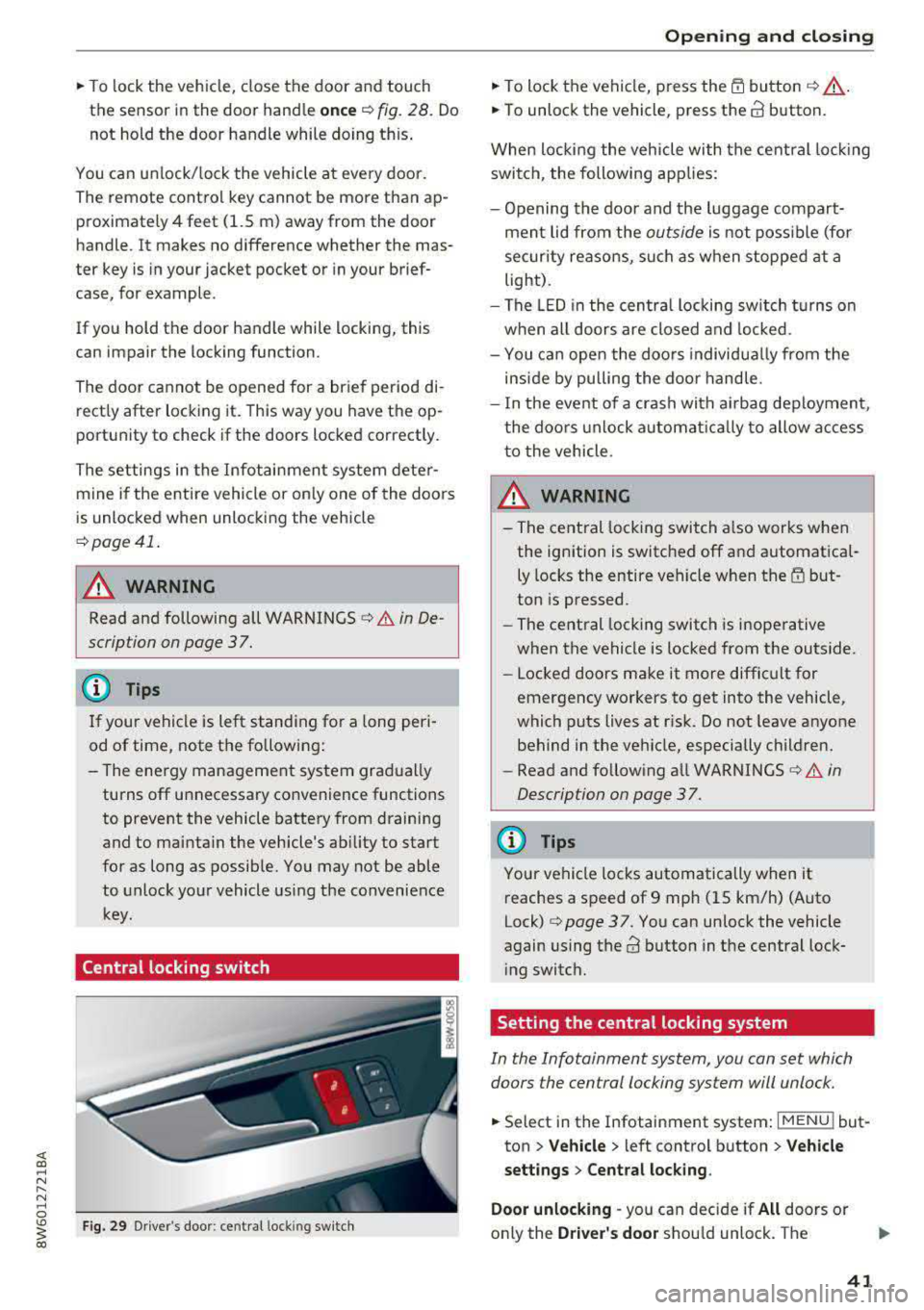
Central locking switch
Fig. 29 Drive r's door : central loc king switch
Openin g an d clos ing
.. To lock the vehicle, press the l'.D button c::> &_ .
.. To unlock the vehicle, press the @ button.
When locki ng the vehicle with the central lock ing
switch, the following applies:
-Opening the door and the luggage compart
ment lid from the
outside is not poss ible (for
secur ity reaso ns, such as when stopped at a
light) .
-The LED in the centra l locking sw itch t urns on
when all doors are closed and locked .
- You ca n open the doors individua lly from the
inside by pu lling the doo r handle.
- In the event of a crash with a irbag deploymen t,
the doo rs unlock automat ica lly to allow access
t o the vehicle .
~~ WARNING
-
- The central locking switch a lso works when
the ignition is switched off and automatica l
ly locks the entire vehicle when the
l'.D but
ton is pressed.
-The central locking switch is inope rative
when the vehicle is locked from the outs ide.
-Locked doors make it more difficult for
emergency workers to get into the vehicle,
which puts lives at r isk. Do not leave anyone
behind in the vehicle, especially children.
-Read and fo llowing a ll WARNINGS c::> &. in
Description on page 3
7.
(D Tips
Your vehicle locks automatically when it reaches a speed of 9 mph (15 km/h) (Auto
Lock)
c::> page 37. You can unlock the vehicle
again using the
ca button in the central lock
i ng switch.
Setting the central locking system
In the Infotainment system, you can set which
doors the central locking system will unlock .
.. Select in the Infotainment system: I MENU! but
ton
> V ehicle > left control b utton > Vehicle
settings > Central lock ing .
Door unlo cking
-you can decide if All doors or
only the
Dri ver 's door shou ld unlock. The
41
Page 45 of 409
triggered. The anti-theft alarm system is activat
ed when the vehicle is locked as usua l.
It
switches off when the vehicle is unlocked.
If the a larm is trigge red, it w ill shu t off automat
ically a fter a ce rtain amount of time . Switch the
ignition on or press
the m button on the remote
control key to turn
off the alarm.
Luggage compartment
Lid
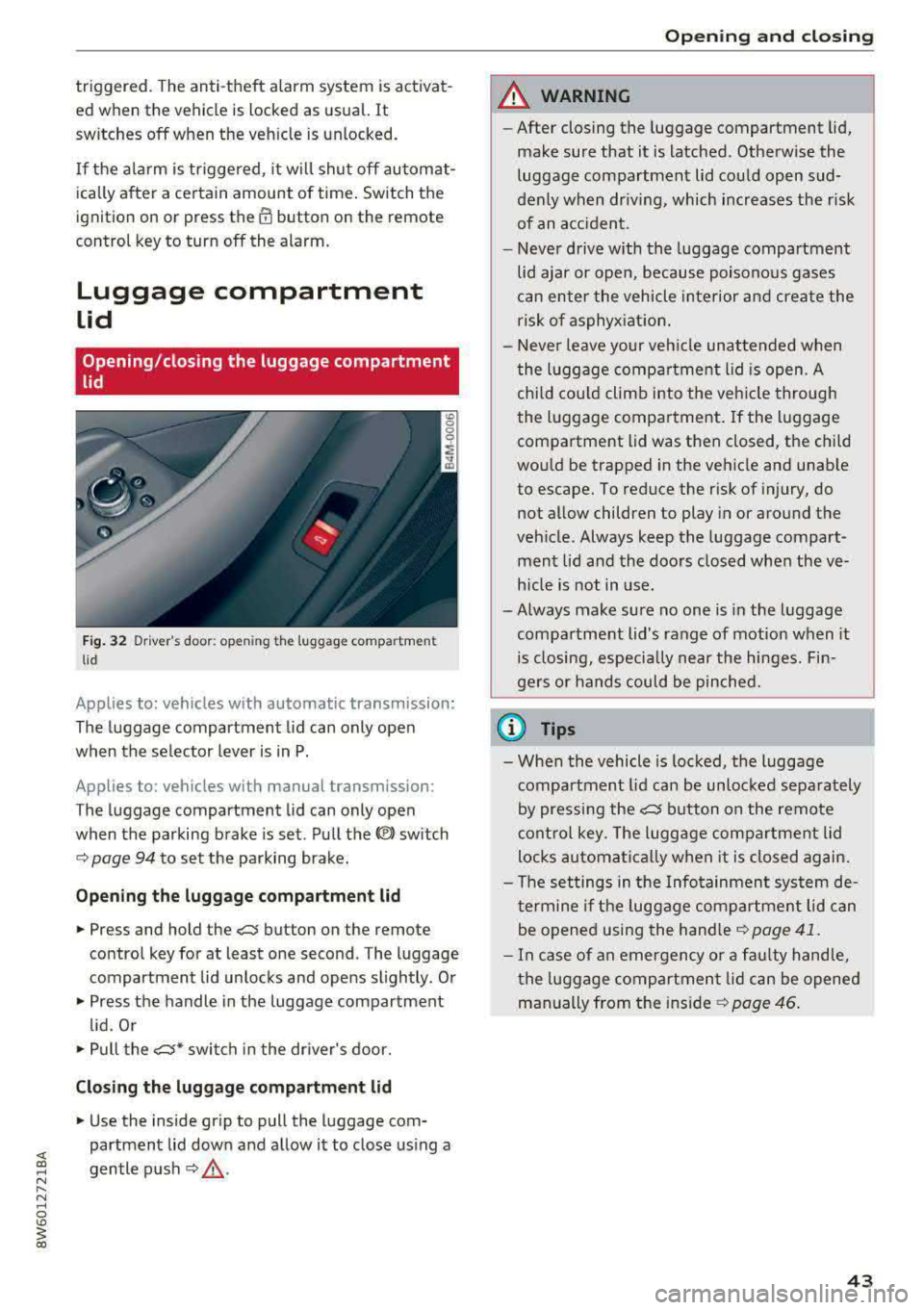
Opening /closing the luggage compartment
lid
Fig . 32 Driver 's door: opening the luggage compartment
lid
Applies to: vehicles with automatic transmission:
The luggage compartment lid can only open
when the selector lever is in P.
Applies to: vehicles with manual transmission:
The luggage compartment lid can only open
when the parking brake is set. Pull the
«el) sw itch
~ page 94 to set the parking brake.
Opening th e luggage compartment lid
.,. Press and hold the c:;; button on the remote
contro l key for at least one second . The luggage
compartment lid unlocks and opens slightly . Or
.,. Press the handle in the luggage compartment
l id. Or
.,. Pull the c:>* switch in the dr iver's door.
Cl osing the luggage compartment lid
.,. Use the inside gr ip to pull the luggage com
partment lid down and allow it to close using a
gentle p ush
~ ,&. .
Op enin g an d clos ing
A WARNING
--After closing the luggage compartment lid,
make sure that it is latched . Otherw ise the
luggage compartment lid could open sud
denly when dr iving, which increases the r isk
of an a cc ident.
- Never drive with the luggage compartment
lid ajar or open, because poisono us gases
can enter the vehicle interior and create the
risk of asphyx iat ion.
- Never leave your veh icle unattended when
the luggage compartment lid is open. A
child cou ld climb into the veh icle through
the luggage compartment. If the luggage compartment lid was then closed, the child
would be trapped in the vehicle and unable
to escape. To reduce the risk of injury, do
not allow children to play in or around the
veh icle . Always keep the luggage compart
ment lid and the doors closed when the ve h icle is not in use.
-Always make sure no one is in the luggage
compartment lid's range of motion when it
is closing, especially near the hinges. Fin
gers or hands could be pinched.
© Tips
- When the vehicle is locked, the luggage compartment lid can be unlocked separately
by pressing the
c:5 button on the remote
control key. The luggage compartment lid
locks automa tically when it is closed again.
- T he settings in the Infotainment system de
termine if the luggage compartment lid can be opened using the
hand le~ page 41 .
- In case of an emergency or a fau lty handle,
t he luggage compartment lid can be opened
manually from t he
ins ide ~ page 46.
43
Page 46 of 409
Opening and clo sin g
Automatic luggage compartment lid
Applies to: vehicles with automatic luggage compartment lid
The luggage compartment lid can be opened and
closed electrically.
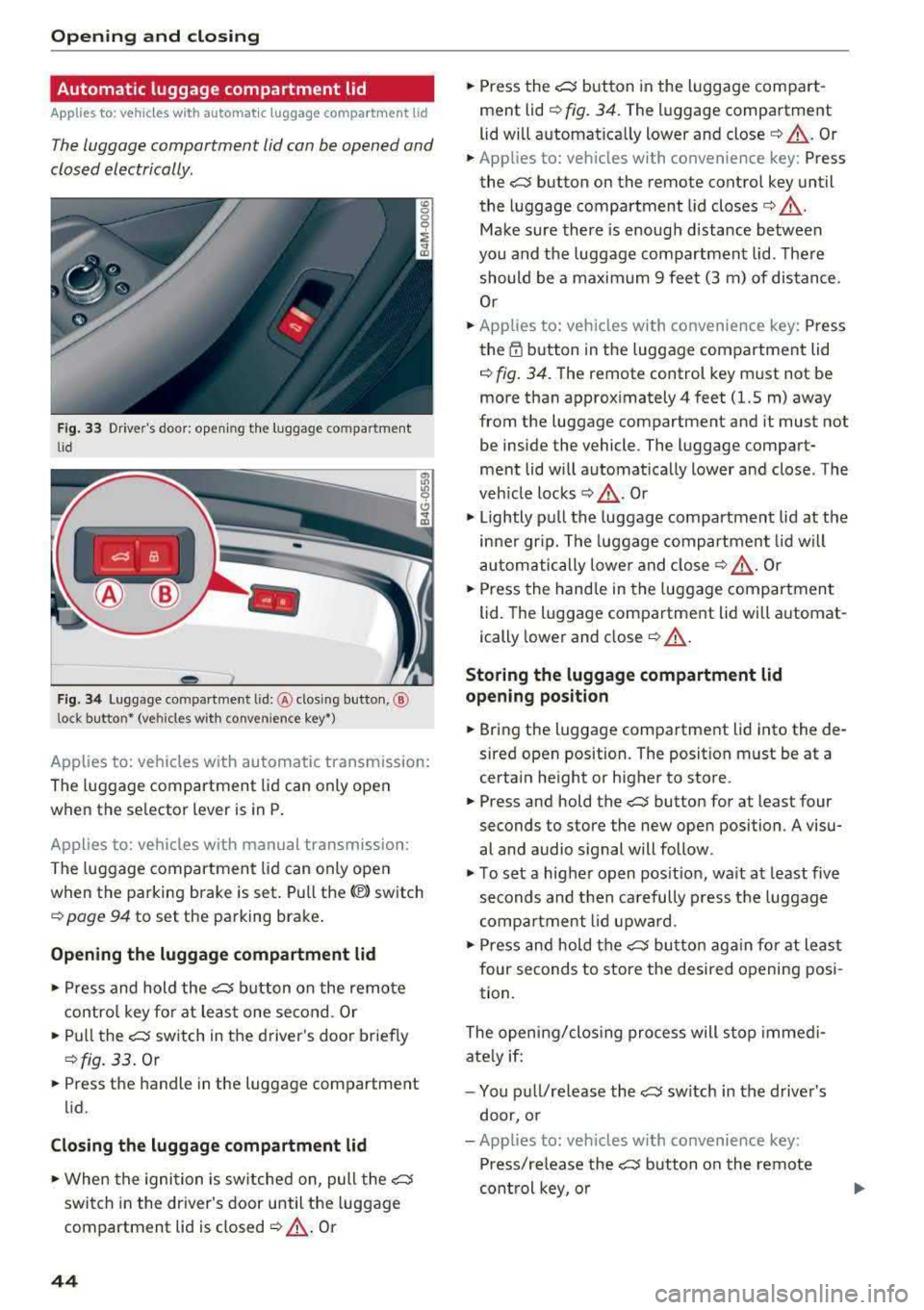
F ig. 33 Driver's doo r: opening the luggage compartment
lid
Fig. 34 Luggage compartment lid: @clos ing button, ®
lock button* (vehicles with convenience key*)
Applies to: vehicles with automatic transmission:
The luggage compartment lid can only open
when the se lector lever is in
P .
Applies to: vehicles with manual transmission:
The luggage compartment lid can only ope n
when the parking brake is set. Pull
the© switch
¢ page 94 to set the parking brake .
Opening the luggage compartment lid
... Press and hold the ~ b utton on the remote
contro l key fo r at leas t one second . Or
... Pu ll the~ switch in the driver 's door briefly
¢ fig. 33 . Or
... Press the handle in the luggage compartment
lid.
Cl osing th e luggage compartment lid
... When the ignition is sw itched on, pull the~
switch in the driver's door until the luggage
compartment lid is closed
¢ ,& . Or
44
... Press the~ button in the luggage compart
ment lid
¢ fig. 34. The luggage compartment
lid wi ll automat ica lly lower and
close¢ ,&. Or
... Applies to: vehicles with convenience key: Press
the~ button on the remote control key until
the luggage compartment l id
closes¢ .&,.
Make sure there is enough distance between
you and the luggage compartment lid . The re
should be a maxim um 9 feet (3 m) of distance.
Or
... Applies to: vehicles with convenience key: Press
the
tf) button in the luggage compartment lid
¢ fig. 34. The remote control key m ust not be
more than approx imately
4 feet (1.5 m) away
from the luggage compartment and it must not
be inside the vehicle. The luggage compart
ment lid will automatically lower and close. The
veh icle
locks ¢.&_ . Or
... Lightly p ull the luggage compartment lid at the
in ner gr ip. The luggage compartment lid wi ll
automatically lowe r and close
¢ .&_ . Or
... Press the hand le in the luggage compartment
lid. The luggage compartment lid will automat
ically lower and close
¢ .&, .
Storing the luggage compartment lid
opening position
... Bring the luggage compartment lid into the de
sired open position. The position must be at a
certain height or higher to store .
... Press and hold the~ button for at least four
seconds to store the new open position . A visu
al and audio s ignal will follow.
... To set a higher open pos it ion, wa it at least five
seconds and then carefully p ress the luggage
compa rtment lid upward .
... Press and hold the~ butto n aga in fo r at least
four seconds to store the desired opening posi
tion.
The opening/clos ing process will stop immedi
ate ly if:
- You pu ll/re lease
the~ sw itch in the drive r's
door, or
- Applies to: vehicles with convenience key:
Press/re lease
the~ b utton o n the remote
con trol key, o r
Page 50 of 409
Opening and closing
Child safety lock
Applies to: ve hicles w ith c hild safety locks
The child safety lock prevents the rear doors
from being opened from the inside and the rear
power windows from be operated.
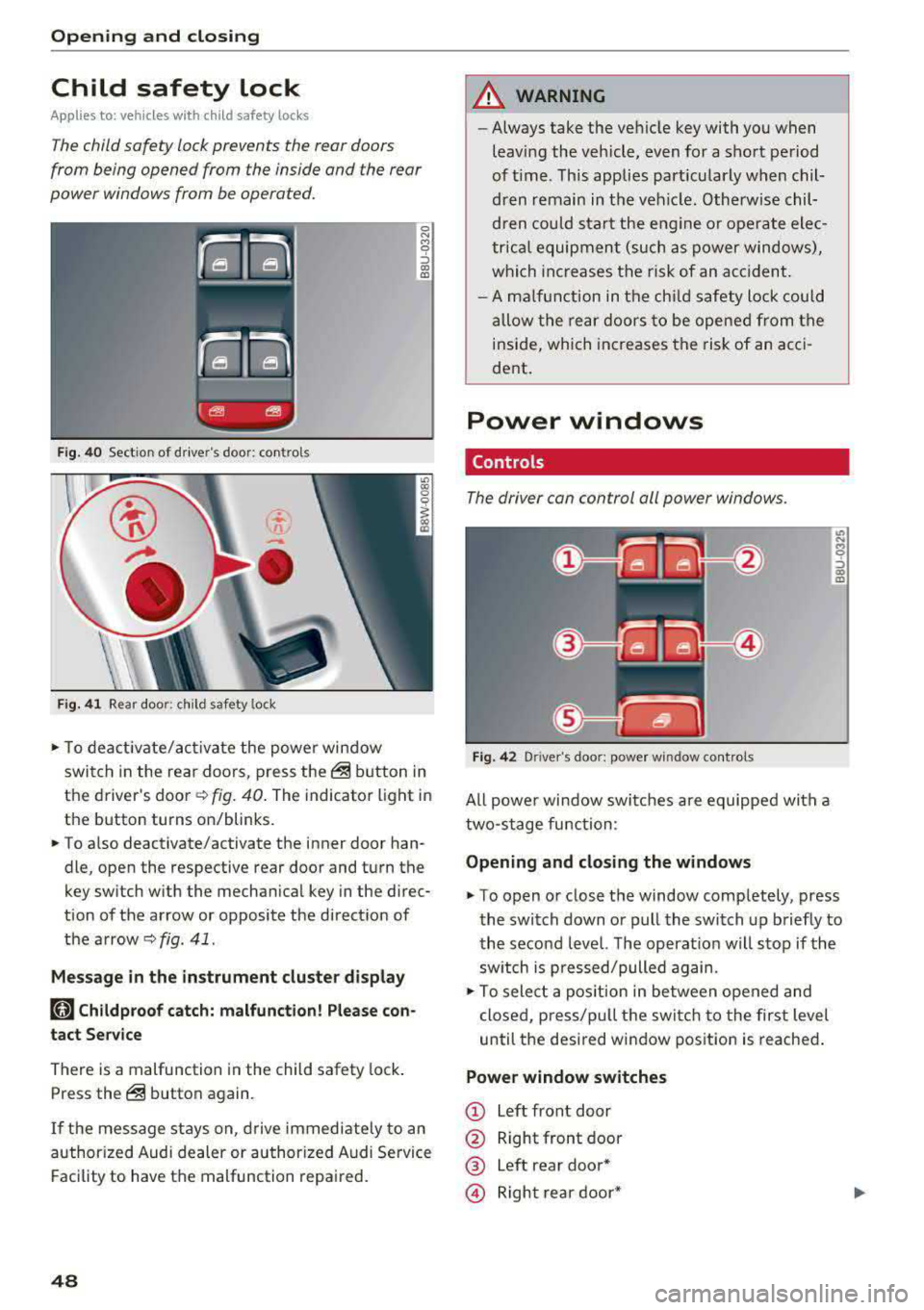
Fig. 40 Section of driver's door: controls
Ci
-
-
Fig. 41 Rear door: chil d safety lock
0 N M 0 ::,
"' "'
• To deactivate/activate the power window
switch in the rear doors, press
the@ button in
the driver's
door ~ fig. 40. The indicator light in
the button turns on/blinks.
• To also deactivate/activate the inner door han
dle, open the respective rear door and turn the
key switch w ith the mechanical key in the direc
tion of the arrow or opposite the direction of
the
arrow~ fig . 41.
Message in the instrument cluster display
(tll Childproof catch: malfunction! Please con
tact Service
There is a malfunction in the child safety lock .
Press
the@ button again.
If the message stays on , drive immediately to an
authorized Audi dealer or authorized Audi Service
Facility to have the malfunction repaired.
48
A WARNING
-Always take the vehicle key with you when
leav ing the vehicle, even for a short period
of time . This applies particularly when chil
dren remain in the vehicle . Otherwise chil
dren could start the engine or operate elec
trical equipment (such as power windows),
which increases the risk of an accident.
- A malfunction in the child safety lock could
allow the rear doors to be opened from the
inside, which increases the risk of an acci
dent.
Power windows
Controls '
The driver can control all power windows .
Fig. 42 Driver's door: power win dow controls
All powe r window switches are equipped with a
two-stage function:
Opening and closing the windows
M 0 ::,
"' "'
• To open or close the window completely, press
the switch down or pull the switch up briefly to
the second level. The operat ion will stop if the
sw itch is p ressed/pulled again.
• To select a position in between opened and
closed, press/pu ll the switch to the first level
until the desired window position is reached.
Power window switches
CD Left front door
@ Right front door
® Left rear door*
© Right rear door*
Page 53 of 409
Valet parking function
Applies to: vehicles wit h valet parking funct ion
The valet parking function protects the luggage
comportment from unauthorized access.
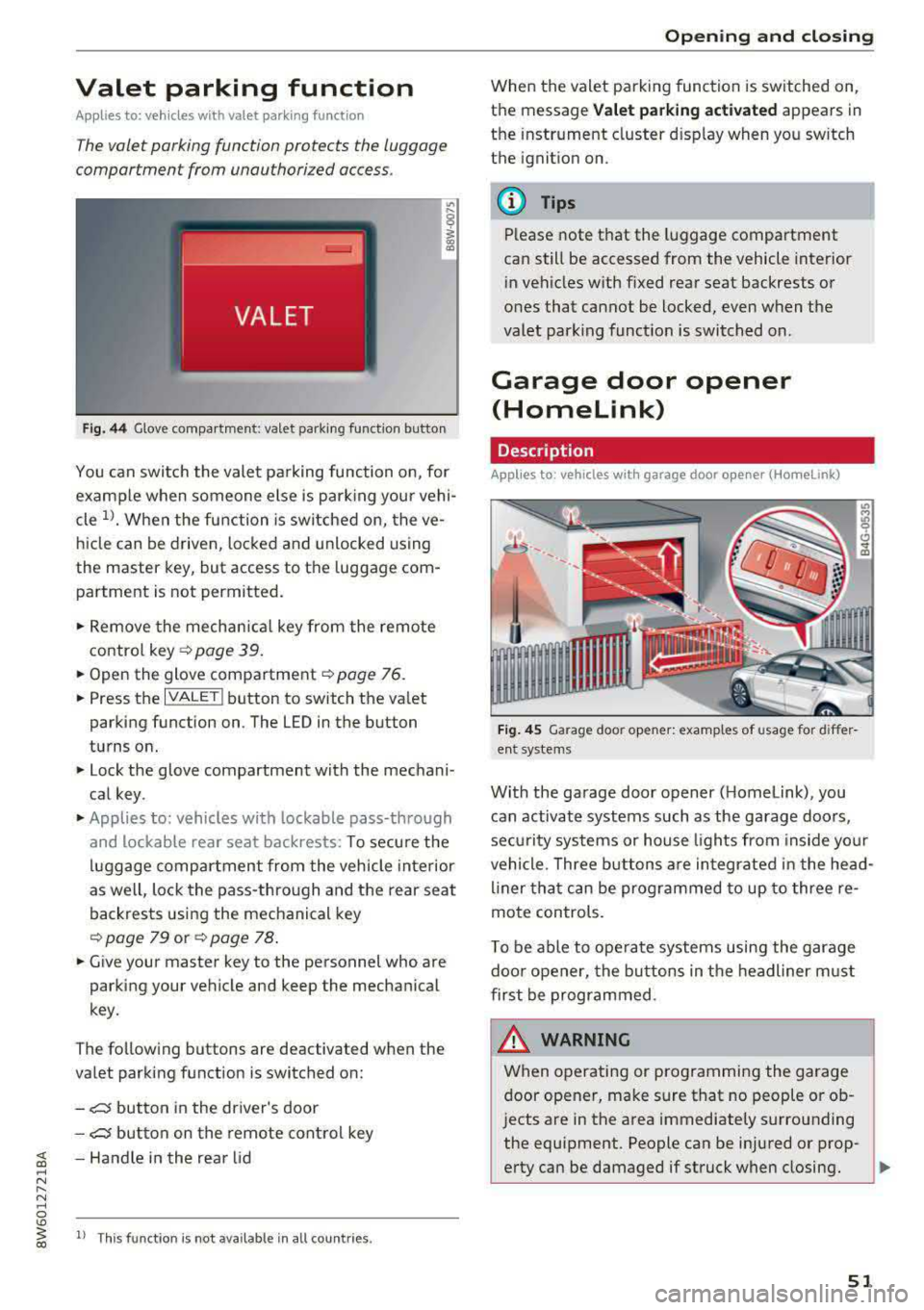
Fig. 44 Glove compartment: valet parking function butto n
You can switch the valet parking function on, for
example when someone else is parking your vehi
cle
l)_ When the function is switched on, the ve
hicle can be driven, locked and unlocked using
the master key, but access to the luggage com
partment is not permitted .
.,. Remove the mechan ical key from the remote
contro l
key~ page 39 .
.,. Open the glove compartment ~ page 76 .
.,. Press the IVALET I button to switch the valet
parking function on . The LED in the button
turns on.
.,. Lock the glove compartment with the mechani
cal key .
.,. Applies to: vehicles with lockable pass-through
and lockable rear seat backrests: To secure the
luggage compartment from the vehicle interior
as well, lock the pass-through and the rear seat
backrests using the mechanical key
~ page 79 or ~ page 78 .
.,. Give your master key to the personnel who are
parking your vehicle and keep the mechanical
key.
The following buttons are deactivated when the
va let parking function is switched on:
-,c:;5 button in the driver's door
-,c:;5 button on the remote control key
~ -Handle in the rear lid ..... N
" N ..... 0
'° ~ ll Th is function is not available in all countr ies . co
Open ing and closing
When the valet parking function is switched on,
the message
Valet parking activated appears in
the instrument cluster disp lay when you sw itch
the ignition on.
@ Tips
Please note that the luggage compartment
can still be accessed from the vehicle interior
in vehicles with fixed rear seat backrests or
ones that cannot be locked, even when the
valet park ing funct ion is switched on.
Garage door opener
(Homelink)
Description
Applies to: vehicles with garage door opener (Home Link)
Fig. 45 Garage door opener: examples of usage for differ
ent system s
With the garage door opener ( Homelink), you
can activate systems such as the garage doors,
sec urity systems or house lights from inside your
vehicle. Three buttons are integrated in the head
liner that can be programmed to up to three re
mote controls.
T o be able to operate systems using the garage
door opener, the buttons in the headliner must
first be programmed .
_& WARNING ~
When operating or programming the garage
door opener, make sure that no people or ob
jects are in the area immediately s urrounding
the equipment. People can be injured or prop-
erty can be damaged if struck when closing.
Ill>
51
Page 57 of 409
_& WARNING
-When operating the power top, make sure
the funct ion is not affected by wind or other
factors and that it does not interfere with other dr ivers .
- Visibility to the rear is limited when operat ing the power top . Avoid operating the top
wh ile driving in reverse .
- Never drive with the power top unlocked .
The wind from driving could cause the pow
er top to open. This can result in injur ies and
damage to the vehicle.
- Make sure no one will be injured by the pow
er top suppo rts or other moving compo
nents when open ing and closing the top.
- T he headroom in the rear is reduced when
opening a nd clos ing the power top. Make
sure the rear passengers keep enough d is
tance from the power top to reduce the risk
of injury.
(D Note
To prevent damage to the power top:
- do not store any objects in the power top storage compartment.
- make sure there is enough space above the
vehicle when opening or clos ing the power
top.
@ Tips
- To prevent the vehicle battery from draining unnecessari ly, do not open or close the pow
er top repea tedly whe n the engine is switch
ed off.
- The power top can also be operated manual
l y temporari ly if there is a malfunc tion
c::, page 58, Power top emergency opera·
tion . An author ized A udi dealer or author
ized Audi Service Facility should diagnose
and correct the cause of the ma lfunction as
soon as possib le.
- If the vehicle is parked with the power top
open, the vehicle inter ior is not protected
from damaging weather or unauthorized ac
cess. Lock any items you leave behind in the
luggage compartment . C lose the power top
before leaving the vehicle .
Powe r top
-The side windows automatically lower
slightly when opening or closing the power
top .
Power top convenience opening/closing
App lies to : vehicles wit h powe r top
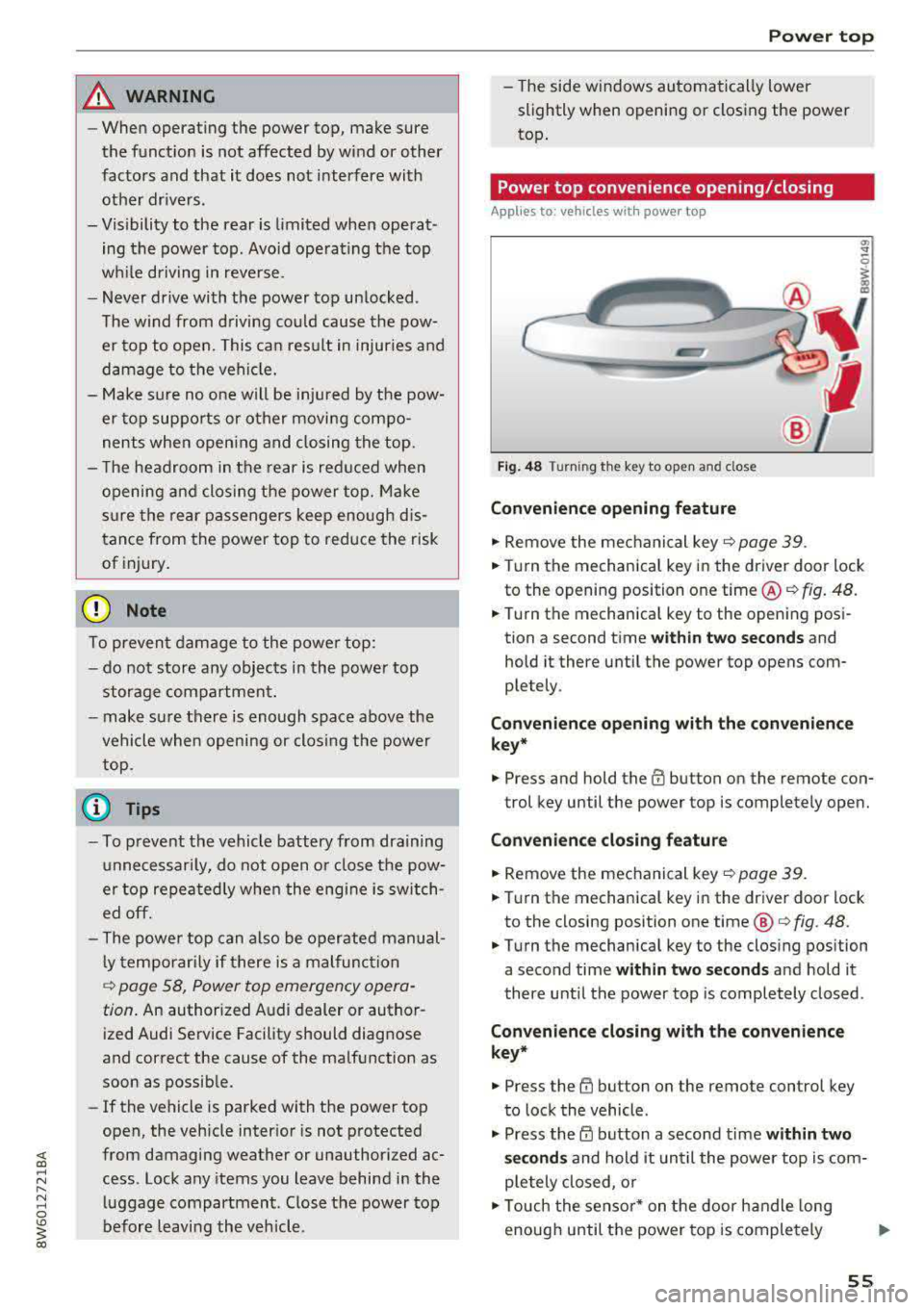
Fi g. 48 Turni ng th e key to open a nd close
Convenien ce opening feature
.,. Remove the mec hanical key c::> page 39 .
.,. Turn the mechanica l key in the driver door lock
to the opening position one time @
c::, fig. 48.
.,. Turn the mechanica l key to the opening posi
tion a second time
wi th in tw o se cond s and
hold it there until the power top opens com
ple tely .
Co nven ien ce opening with th e co nv eni enc e
key*
.,. Press and hold the m button on the remote con-
trol key until the power top is completely open.
Conv enience clo sing featur e
.,. Remove the mechanical key c::, page 39.
.,. Turn the mechanical key in the dr iver door lock
to the closing posit ion one time @
c:> fig. 48.
.,. Turn the mechanical key to the clos ing position
a second time
within two seconds and hold it
there until the power top is completely closed .
Convenienc e closing with th e con ven ience
key*
.,. Press the tfJ button on the remote control key
to lock the vehicle .
.,. Press the CD button a second time within two
s e cond s
and hold it until the powe r top is com
ple tely closed, o r
.,. Touch the sensor * on the door handle long
enough until the power top is completely
Ill>
55
Page 59 of 409
This message appears when there is a malfunc
tion. The power top can be operated manually
r::!) page 58.
.&_ WARNING
Never drive with the power top unlocked. The
wind from driving could cause the power top
to open. This can result in injuries and dam
age to the vehicle.
Wind deflector
Applies to: ve hicles with wind deflecto r
The wind deflector reduces air movement in the
passenger compartment in order to make driving more comfortable.
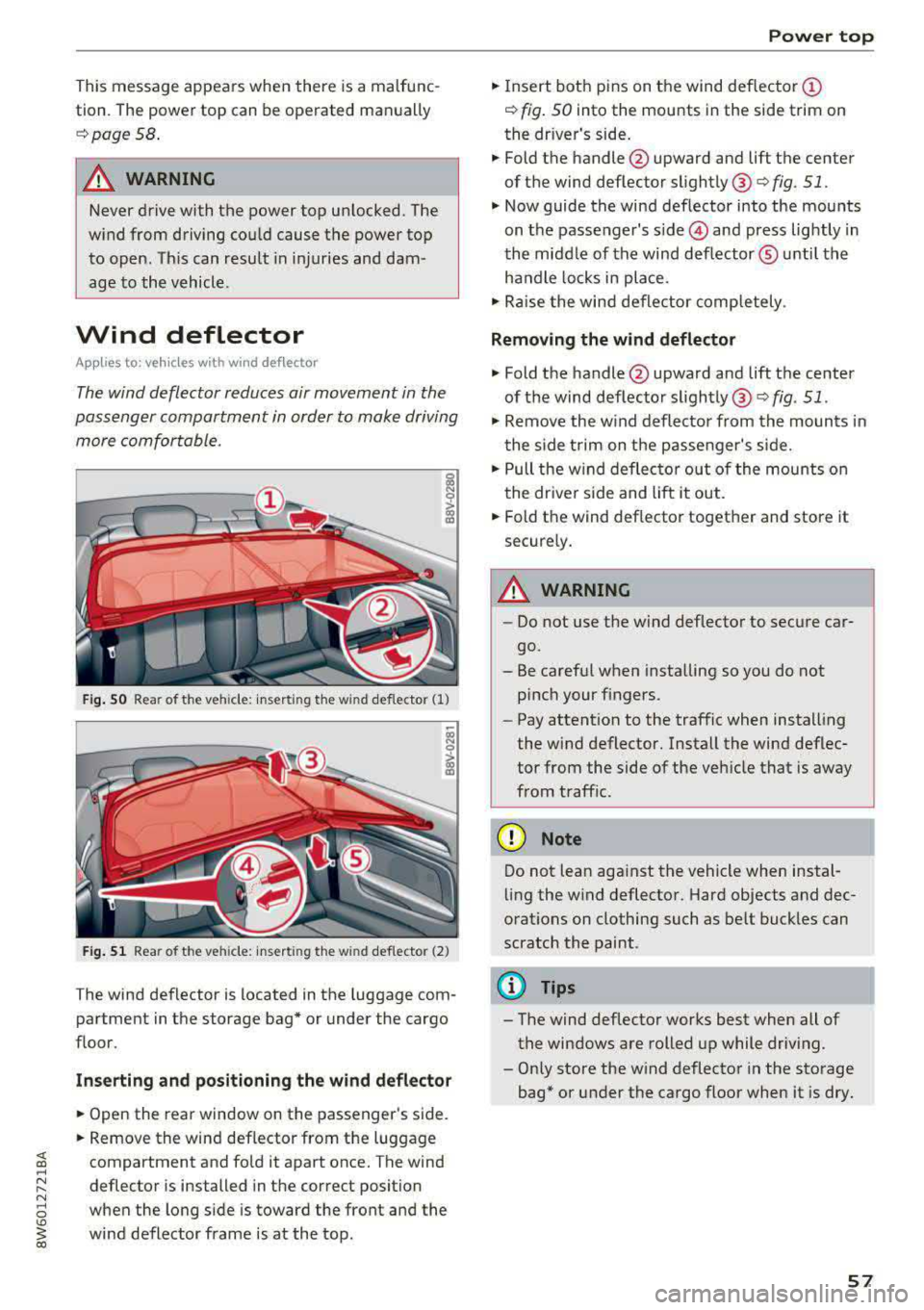
Fig. SO Rea r of t he ve hicle: insert ing the w ind deflecto r (1)
Fig . 51 Rea r of the ve hicle: insert ing the w ind deflecto r (2)
The wind deflector is located in the luggage com
partment in the storage bag* or under the cargo
floor.
Inserting and positioning the wind deflector
.,. Open the rear window on the passenger's side .
.,. Remove the wind deflector from the luggage
compartment and fold it apart once. The wind
deflector is installed in the correct position
when the long side is toward the front and the
wind deflector frame is at the top .
Power top
.,. Insert both pins on the wind deflector @
r::!) fig. 50 into the mounts in the side trim on
the dr iver's side .
.,. Fold the handle @upward and lift the center
of the wind deflector slightly @
c> fig. 51 .
.,. Now guide the wind deflector into the mounts
on the passenger's
s ide © and press lightly in
the middle of the wind deflector ® unti l the
handle locks in place.
.,. Raise the wind deflector completely .
Removing the wind deflector
.,. Fold the handle@upward and lift the center
of the wind deflector slightly ®
c> fig. 51.
.,. Remove the wind deflector from the mounts in
the side trim on the passenger's side .
.,. Pull the w ind deflector out of the mounts on
the driver side and lift it out .
.,. Fold the wind def lector together and store it
securely .
.&_ WARNING ~
-Do not use the wind deflector to secure car-
go.
- Be careful when installing so you do not
pinch your fingers.
- Pay attention to the traffic when installing
the wind deflector. Install the wind deflec
tor from the side of the veh icle that is away
from traff ic.
(D Note
Do not lean aga inst the vehicle when instal
ling the w ind deflector. Hard objects and dec
orat ions on clothing such as be lt buckles can
scratch the paint.
@ Tips
- The wind deflector works best when all of
the windows are rolled up while driving.
- Only store the wind deflector in the storage
bag* or under the cargo floor when it is dry .
57
Page 63 of 409
Lights and Vision
Exterior Lighting
Switching the lights on and off
--- ----~------'~
i
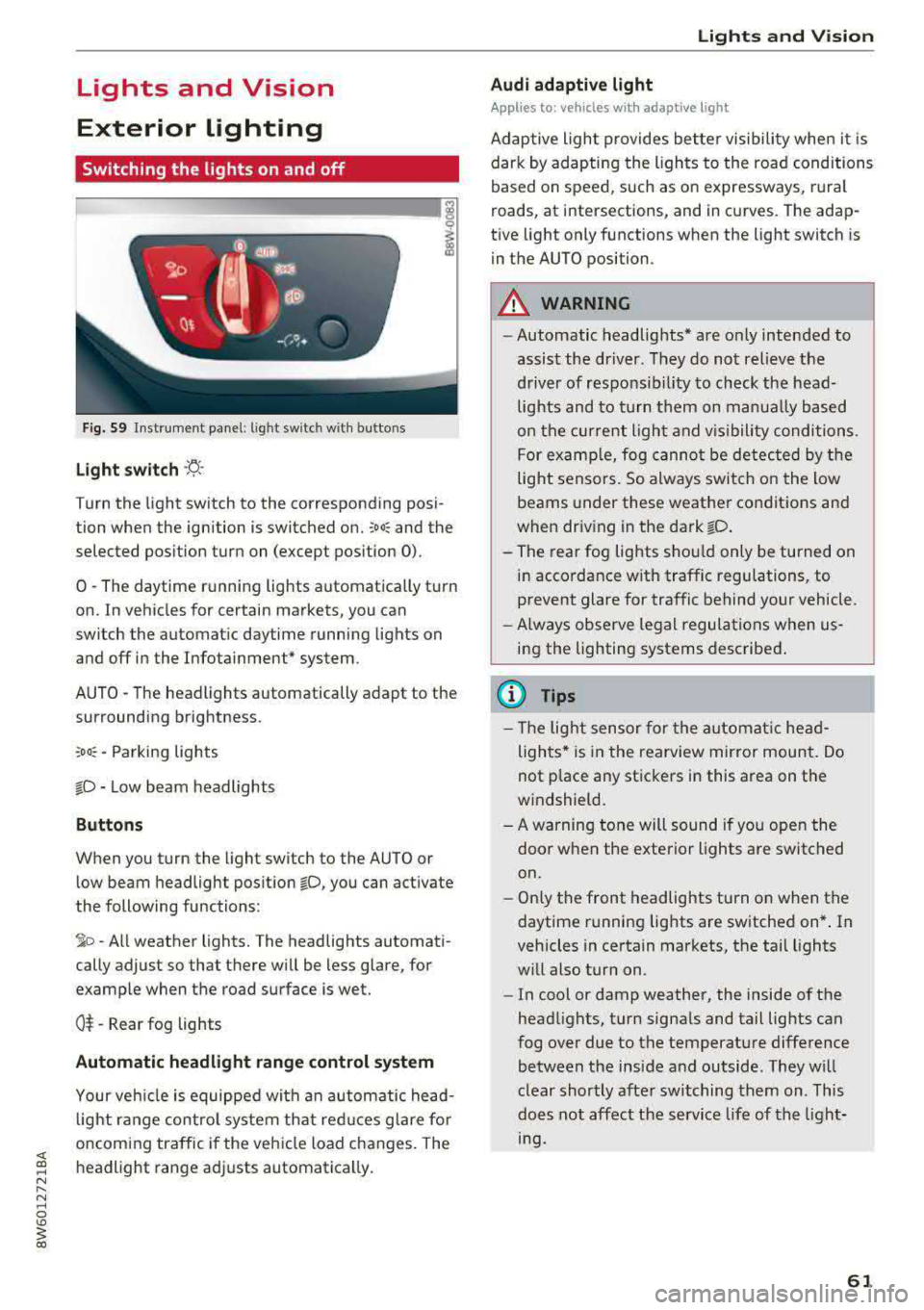
Fig . S9 Instrument panel: l ig ht sw itc h w ith buttons
Light switch ·'!;5- ·
Turn the light sw itch to the corresponding posi
tion when the ignition is switched on.
~oo: and the
selected pos ition turn on (except pos ition 0).
0 · The daytime r unning lights automat ica lly t urn
on. In veh icles for certain markets, you can
switch the automat ic daytime running lights on
and
off i n the Infotainment* system.
AUTO
-T he headlights automatically adapt to the
surrounding brightness.
~oo : -Parking lights
io -Low beam headlights
Buttons
When you turn the light switch to the AUTO or
l ow beam headlight pos it ion
io, you can activate
the following functions:
~ o -A ll weat her lights. The headlights automati
cally adjust so that there w ill be less glare, for
examp le when the road surface is wet.
0$ -Rear fog lights
Automatic headlight range control system
Your veh icle is equippe d with an autom atic head
l ight range contro l system that re duces glare fo r
oncoming traffic if the vehicle load c hanges. The
headlight range ad justs automatica lly.
Lights and V ision
Audi adaptive light
Appl ies to: vehicles wit h adaptive light
Ad aptive ligh t provides be tter visibili ty when i t is
dark by adapting the ligh ts to the road condi tions
based on speed, such as on e xpressways, rura l
roads, at intersections, and in c urves. The adap
t ive light only functions when the light switch is
i n the AUTO position .
A WARNING
--Automatic headlights* are on ly intended to
assist the driver. They do no t relieve the
driver of responsibil ity to check the head
lights and to turn t hem on manu ally b ased
on t he cur ren t ligh t and v is ibility conditi on s.
F o r e xamp le, fog canno t be de tec ted by t he
light sensors. So always swit ch o n the low
beams under these weather co nditions and
when dr iv ing in the dark
io .
- The rear fog lights s hou ld only be turned on
in acco rdance w ith traffic regulation s, to
prevent glare for traffic behind your vehicle.
- Always observe le g al regulations when
us
ing the lighting systems desc ribed .
(D Tips
- The lig ht sen sor for the automat ic he ad
ligh ts* is in the rearview mir ror mount. Do
not p lace any st ickers in this area on the
windshield.
- A warning tone will sound if yo u ope n the
door whe n the e xte rior lights a re switched
on .
- Only t he front headlights turn on when t he
daytime running lights are sw itche d on* . In
vehicles in certain markets, the tail lights
w ill also turn on.
- In cool or damp weather, the inside of the
head lights, turn signa ls and tail lights can
fog over due to the temperature diffe rence
b etween the insi de and outside . They wi ll
clear shortly afte r swi tching them on . This
does n ot aff ect the service life of the light
mg.
61