park assist AUDI A5 COUPE 2018 Owner's Manual
[x] Cancel search | Manufacturer: AUDI, Model Year: 2018, Model line: A5 COUPE, Model: AUDI A5 COUPE 2018Pages: 409, PDF Size: 67.63 MB
Page 147 of 409
Switching off
• Drive faster than 6 mph (10 km/h), or
• Press the p,,,A button, or
• Switch the ignition off.
(D Tips
-The visual display in the r ight part of the
display should help you detect the critica l
vehicle area.
- You can change the volume of the signals
and the display
c:!) page 148.
Perpendicular parking
Applies to: vehicles with rearview came ra
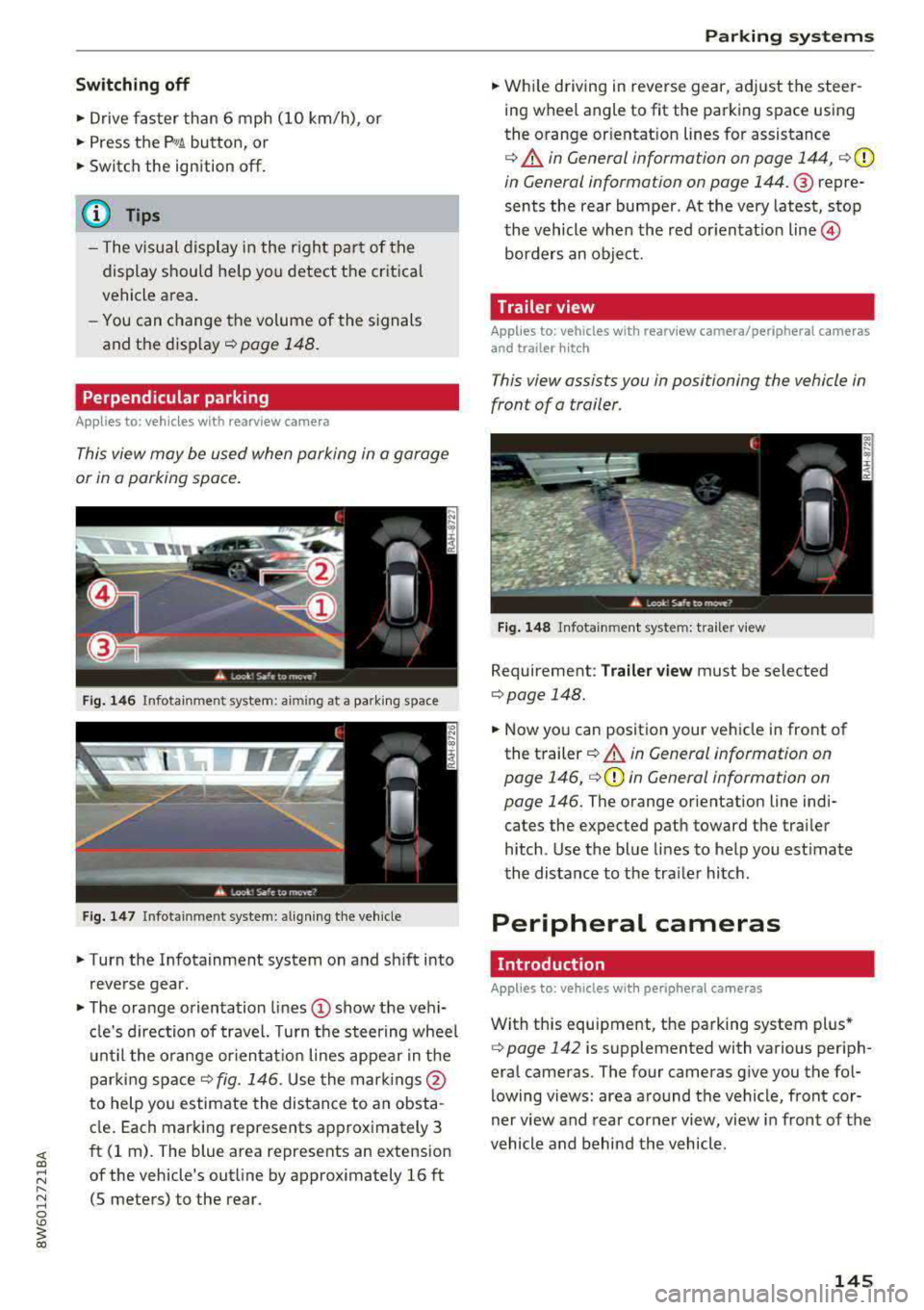
This view may be used when parking in a garage
or in a parking space.
Fig. 146 Infotainment system: aiming at a parking space
Fig . 147 Infotainment sys tem: aligning th e vehicle
• Turn the Infotainment system on and sh ift into
reverse gear.
• The orange orientation lines (D show the vehi
cl e's direction of travel. Turn the steering wheel
until the orange orientat ion lines appear in the
parking
space ¢ fig. 146. Use the marking s@
to help you estimate the distance to an obsta
cle. Each marking represents approximately 3
ft (1 rn). The blue area represents an extension
of the vehicle's outline by approx imately 16 ft
(5 meters) to the rear.
Parking systems
• While driving in reverse gear, adjust the steer
ing wheel angle to fit the parking space using
the orange or ientation lines for assistance
¢ &. in General information on page 144, ¢(D
in General information on page 144. ® repre
sents the rear bumper. At the very latest, stop
the vehicle when the red or ientat io n
line ©
borders an object.
Trailer view
Applies to: vehicles with rearview camera/peripheral cameras
and trailer hitch
This view assists you in positioning the vehicle in
front of a trailer.
Fig. 148 Infota inment system: trailer view
Requirement: Trailer view must be selected
¢page 148.
• Now you can position your vehicle in front of
the trailer
c:!) &. in General information on
page 146,
¢ (D in General information on
page 146.
The orange orientation line indi
cates the expected path toward the trai ler
h itch. Use the blue lines to help you estimate
the distance to the tra iler hitch.
Peripheral cameras
Introduction
Applies to: vehicles wit h periph eral cameras
With this equipment, the parking system plus*
c:> page 142 is supplemented with various periph
eral cameras. The four cameras give you the fo l
lowing views: area around the vehicle, front cor
ner view and rear corner view, view in front of the
vehicle and behind the vehicle.
145
Page 149 of 409
Switching on
• Shift into reverse , or
• Press the P,,1~ button in the center console
c::> fig. 150 . A short confirmation tone sounds
and the LED in the button turns on.
Selecting the mode
"T urn the cont rol knob to the symbol fo r the de
sired
mode @through @c::> fig. 151 and press
the control knob.
Switching off
.. Drive faster than 6 mph (10 km/h), or
" Press the P,,1~ button, or
• Switch the ign ition off.
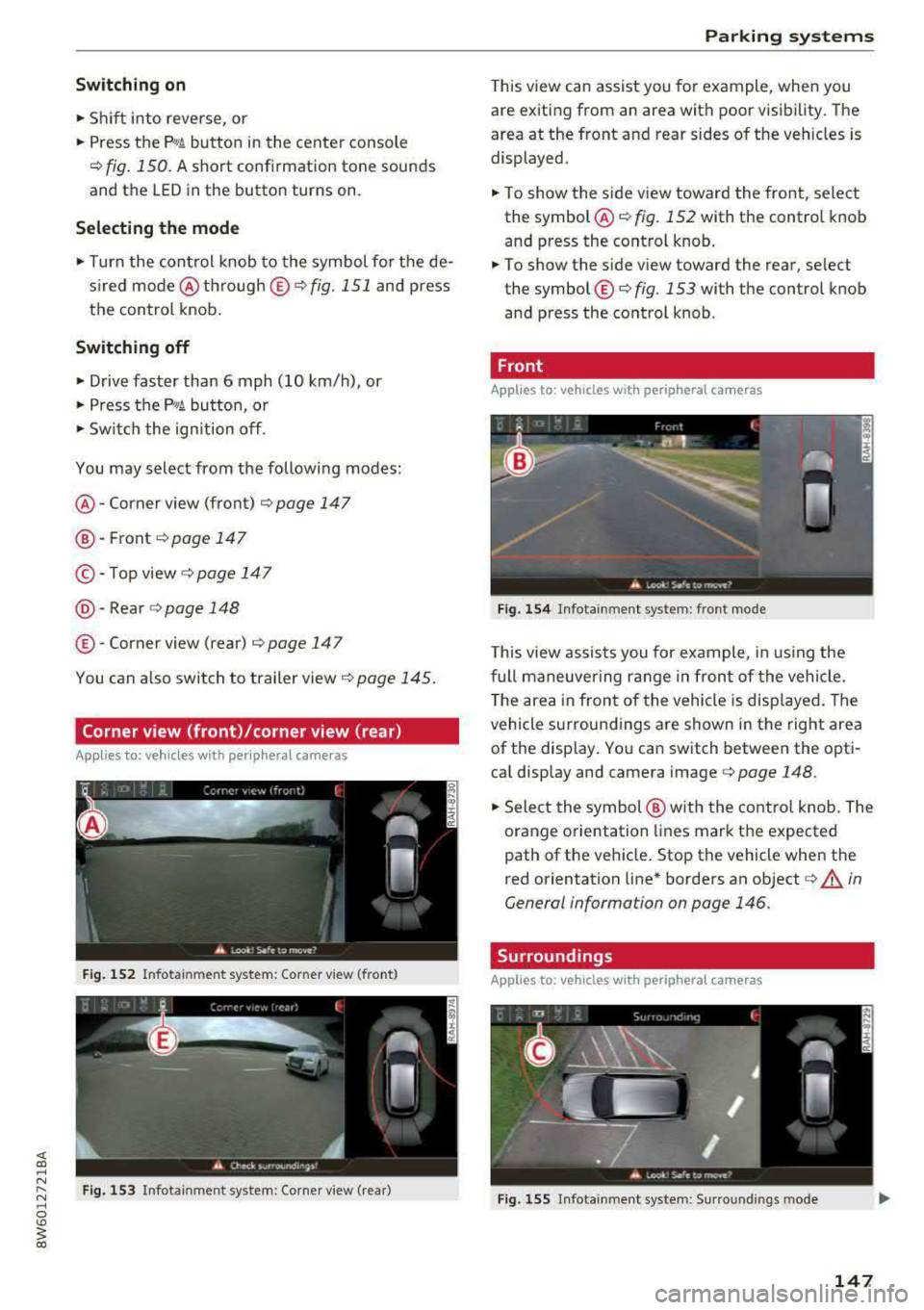
You may select from the following modes:
@ -Corner view (front) c:;> page 147
@ -Front c:;> page 147
©-Top view c:;>page 147
@ -Rear c::> page 148
® -Corner view (rear) c:;> page 147
You can also switch to trailer view c::> page 145.
Corner view (front)/corner view (rear)
Applies to: vehicles with peripheral cameras
F ig . 152 Infotainment system: Corner view (front)
Fig. 153 Infotainment system: Corner view (rear)
Parking systems
This view can assist you for example, when you
are exiting from an area with poor visibility. The
area at the front and rear sides of the veh icles is
displayed.
" To show the side view toward the front, select
the
symbol @c::> fig. 152 with the control knob
and press the control knob.
.. To show the side v iew toward the rear, se lect
the symbol ®
c:;> fig. 153 with the control knob
and press the control knob .
Front
Applies to: vehicles with peripheral cameras
Fig. 154 Infotainment system: fro nt mode
This view assists you for example, in using the
full maneuvering range in front of the vehicle.
T he area in front of the vehicle is disp layed . The
vehicle surround ings are shown in the right area
of the display. You can switch between the opti
cal display and camera image
c:;> page 148.
" Select the symbol@ with the control knob. The
orange orientation lines mark the expected
path of the vehicle. Stop the vehicle when the
r ed orientation line * borders an object
c:;> A in
General information on page 146.
Surroundings
Applies to: vehicles with peripheral cameras
Fig . 155 In fotainment system: Su rroundings mode
147
Page 150 of 409
Parking system s
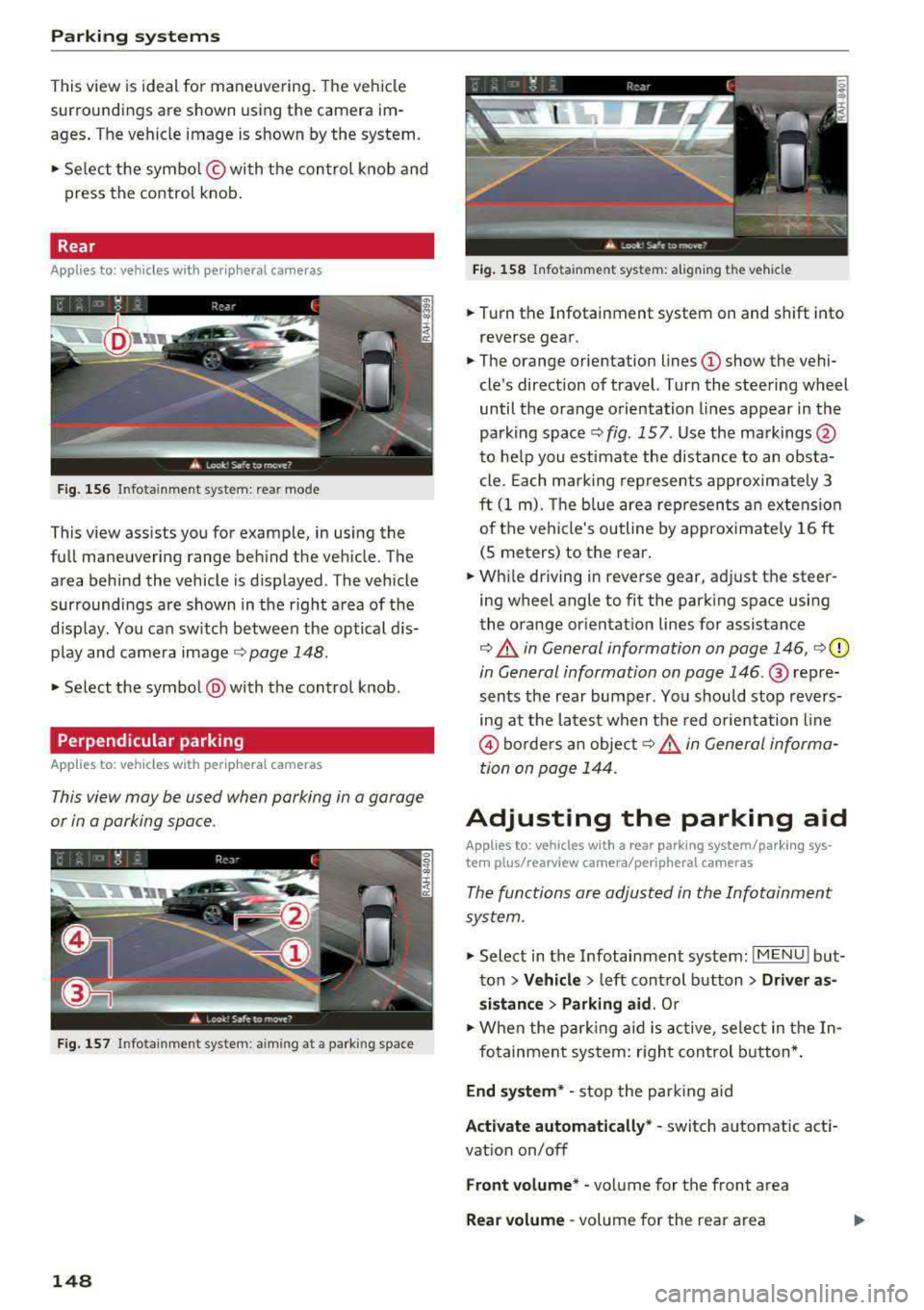
This view is ideal for man euve ring. The veh icle
surroundings are shown us ing the camera im
ages . T he ve hicle image is shown by the system .
.. Se lect the sy mbo l© with the con trol knob and
press the control knob .
Rear
Appl ie s to: ve hicles w ith periph eral came ras
F ig. 156 In fo tain me nt system : re ar mo de
This view ass ists you for example, in using the
full maneuvering range beh ind the veh icle. The
area behind the vehicle is d isplayed . The vehicle
surroundings are shown in the right area of the
d isp lay. You ca n sw itch between the optical d is
p lay and came ra image ¢
page 148.
.. Select the symbol @with the control knob .
Perpendicular parking
App lies to: ve hicles w ith periph eral came ras
This view may be used when parking in a garage
or in a parking space .
Fig. 157 In fo tai nme nt system: aim ing at a p ark ing sp ace
148
Fig . 158 Infota in m ent sys tem: al ign in g the vehicle
.. Turn the Infotainment system on and shift into
reverse gear .
.. The orange orientation lines (D show the vehi
cle 's direction of travel. Turn the steering wheel
until the orange orientation lines appear in the
parking
space ~ fig. 157 . Use the ma rkings @
to he lp you estimate the distance to an obsta
cle. Each m arki ng rep resents approxim ately 3
ft (1 m). The b lue area represents an extension
o f the vehicle's outline by approximate ly 16 ft
(5 meters) to the rear.
.. Wh ile driving in reve rse gear, adjust the steer
ing wheel angle to fit the park ing space using
the orange or ientation lines for assistance
¢ A in General information on page 146, ¢ (D
in General information on page 146 .@ repre
sents the rear bumper . Yo u should stop revers
ing at the latest when the red o rientation line
@ bo rders an object 9 A in General informa
tion on page 144 .
Adjusting the parking aid
Applies to: vehicles wit h a rear par kin g system/pa rking sys
te m plus/ re ar view came ra/pe riph eral cameras
The functions are adjusted in the Infotainment
sys tem .
.. Select in the Infotainment system : IMENU! but
ton
> Vehicle > l eft control button > Driver as
s istance
> Parking aid . Or
.. When the park ing aid is active, select in the In-
fo tainmen t system: r ight con trol b utton* .
End system * -stop the par king a id
A ctivate automat ically* -switch automatic act i
vat ion on/off
Front volume* -vo lume for the front area
Rear vo lume -vol ume for the rear area
Page 151 of 409
<( a, .... N ,....
N .... 0 \0
3 a,
Entertainment fader -the volume of the audio/
video source is lowered when the parking system
is turned on
The newly selected leve l is demonstrated briefly
by the sound generator.
View* -switch between a n optical display
(Graphic ) and camera image (Camera) in the
right section of the display.
Trailer view* -show trailer view
*Auto. front/rear camera change * -the view be
h in d the veh icle
( Rear mode) is displayed auto
mat ically when you shift into reverse gear . The
view in front of the vehicle
(Front mode) is dis
p layed automatically when you shif t into the fo r
ward gea rs. When first a ctivating in a forward
gear with the
P,,1~ button, the front side view is
displayed
( Corner view (front) mode).
If you do not set the../, the view behind the vehi
cle
( Rear mode) is always displayed and it does
not switch to the
Front mode when a forward
gear is selec ted.
(D Tips
- Several menus can be accessed w ith the
right control button only when the parking
aid is active.
- The settings for volume and automatic acti
vat ion* are automatically stored and as
s ig ned to the remote control key being
used.
Error messages
Applies to: veh icles with a rea r parking system/parking sys
tem plus/ rearv iew camera/peripheral cameras
[II Rear park assist: malfunction! Obstacles
cannot be detected
[II Front park assist: malfunction! Obstacles
cannot be detected
Ill Park assist: malfunction! Obstacles cannot
be detected
When one of these messages appears, there is a
system ma lfunction. The LED in the
p,qA button al
so blinks when switching it on. The relevant mes-
Parking systems
sage on ly appears again when you manually acti
vate the parking aid with the button.
Ill Rear parking aid: obstacle detection restrict
ed
T he rear cross-traffic assist* ¢ page 137, Rear
cross -traffic assist
is not available. Either the ESC
is switched off, or the radar sensors may be cov
ered by a bike rack, stickers, leaves, snow or o th
er objects. Switch the ESC on, or clean the area in
front of the sensors if necessary
¢ page 134,
fig . 134.
If this message cont inues to be dis
played, drive immed iately to an author iz ed Audi
dealer or authorized Audi Service Fac ility to have
the malfunction repaired.
Parking system plus*
If a sensor or speaker is faulty, the 94 symbo l
will appear in front of/behind the vehicle in the
Infotainment system d isplay. If a rear sensor is
faulty, only obstacles that are in areas @and @
are shown
¢ page 142, fig. 140 . If a front sensor
i s fa ulty, only obstacles that are in areas© and
@ are shown.
Peripheral cameras*
There is a system malfunction if the% symbol
appears and the corresponding area of the dis
play is shown in black . The camera is not working
i n th is area .
Drive to an authori zed Audi dealer or authori zed
Audi Service Facility immed iately to have the
malfunction corrected .
Trailer hitch
Applies to: vehicles with a rear parking system/park ing sys
tem plus/ rea rview came ra/pe ripheral cameras and traile r
hi tch
When the trailer socket is in use, the parking sys
tem rear se nsors are not activated when you shift
into reverse gear or when yo u press the
p,q~ but
ton . Thi s resu lts in the following restrict ions .
Rear parking system*
There is no distance warning.
149
Page 173 of 409
Voice recognition system Operating
Appl ies to: veh icles wit h vo ice recog nitio n system
You con operate many Infotainment functions
conveniently by speaking .
Requirements: the ignition and the MM I must be
switched on
~page 158, the re must not be any
phone call in progress and the park ing system
must not be active.
~ Switching on : press the 51 button@
~ page 15, fig. 11 or~ page 16, fig. 13 briefly
on the mu ltifunction steering wheel and say
the des ired command after the
Beep .
~ Switching off : press and hold the 51 button.
Or: press the [2] butto n.
~ Pau sing : say the command Pau se . To resume,
press the
l2;J button .
~ Correcting : say the command Corre ction . Or :
simply say a new command during an an
nouncement
<=> page 251.
Input assistance
The system gu ides you throug h the input with
v isua l and audio feedbac k.
- Vi sua l input as sistan ce: after switching on
vo ice recogn it io n, a display w ith a selection of
poss ible commands appears. This command
display can be sw itched on o r off. Se lect:
IMENU I button> Setting s> left cont rol button
> MMI setting s > Speech dialog system .
- Audio input a ssis tance :
to have the poss ible
commands read, tu rn the voice recognition sys
tem on and say
Help.
For the s yst em to understand you:
Speak clearly and dist inctly at a normal vo lume .
Speak louder when d riving faste r.
Emphasize the words in the commands evenly
and do not leave long pauses .
C lose the doors, the windows and the sunroof* to
reduce background noise . Make sure that passen-
;;!; gers are not speaking when you are giving a voice
;::; command. ,....
N .... 0 \0
3
Do not direct the air vents toward the hands-free
microphone, which is on the roof headliner near
t h e front inte rior lights .
Only use the system from the dr iver's seat be
ca use the hands -free microphone is directed to
ward that seat.
Additional settings
Seer=;, page 251, Spee ch dialog system .
A WARNING
-Direct your full attention to dr iv ing. As the
driver, you have complete responsibility for
safety in traffic . Only use the functions in
such a way that you a lways maintain com
p lete contro l over your vehicle in all traffic
situations.
-Do not use the voice recognition system in
emergencies beca use your voice may change
in stressful situations. It may take longer to
d ial the number or the system may not be
able to dial it at all. Dial the emergency
number manually.
@ Tips
- The d ialog pauses when there is an incom
ing phone call and will continue if you ig
nore the call. The d ialog ends if you answer
the ca ll.
- You can select an item in the list using ei
ther the vo ice recognit ion system or the
cont rol knob .
Command overview
information
Appl ies to: ve hicles w ith vo ice recognit ion system
T he following overv iews describe the comma nds
t h at can be used to operate the MMI using the
voice recognition system.
Alte rnative commands a re separate d using
a"/",
for example say: Telephone / (or) Navigation /
(or) Radio.
Sequences of commands used to perfo rm an ac
t ion are iden tified w it h
a"> ", fo r ex ample say:
Ente r addre ss > (t hen) Enter country /state . ..,.
171
Page 369 of 409
Emergency assistance
Emergency assistance
General information
.,. Park the vehicle as far as possible from moving
traffic in the event of a breakdown. In the event
of a flat tire, park the vehicle on a level surface .
It you are on a steep hill, be especially careful.
.,. Set the parking brake .
.,. Switch the emergency flashers on .
.,. Have the passengers exit the vehicle . They
should move to a safe place, for example be
hind a guard rail.
_& WARNING
Follow the steps given above . This is for your
protection and the for the safety of other driv
ers.
Equipment
Vehicle tool kit/tire mobility kit/vehicle
jack
App lies to: veh icles with the vehicle tool kit, tire mobility kit
and veh icle jack
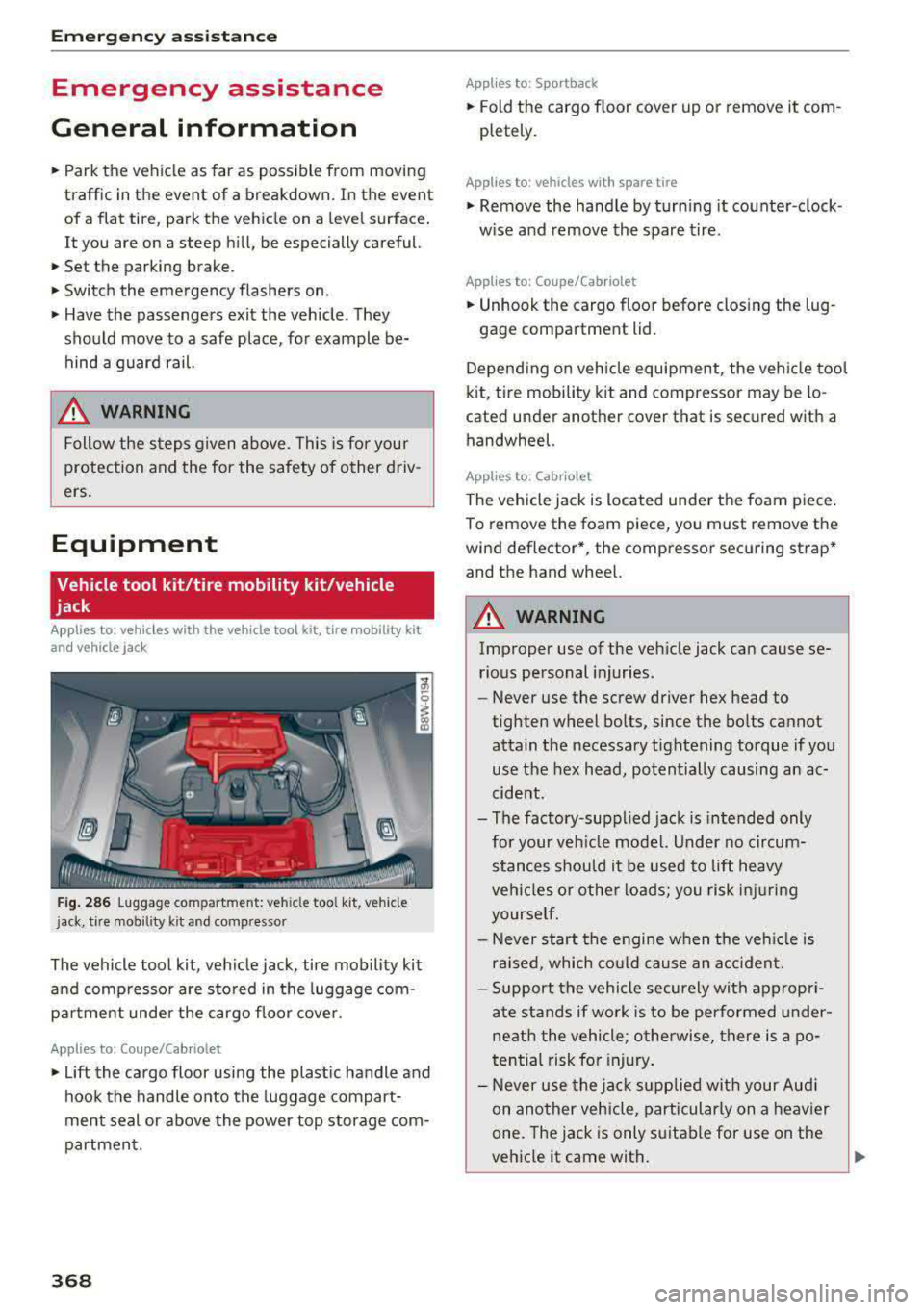
Fig. 286 Luggage compartment: veh icle tool kit, vehicle
j ack, tire mobil ity kit and compressor
The vehicle tool kit, vehicle jack, tire mobility kit
and compressor are stored in the luggage com
pa rtm ent under the cargo floor cover.
Applies to: Coupe/Cab riolet
.,. Lift the cargo floor using the plastic handle and
hook the handle onto the luggage compart
ment seal or above the power top storage com
partment.
368
App lies to : Sportback
.,. Fold the cargo floor cover up or remove it com
pletely .
Applies to: vehicles with spare tire
.,. Remove the handle by turning it counter-clock
w ise and remove the spare tire.
App lies to: Coupe/Cabr io let
.,. Unhook the cargo floor before closing the lug -
gage compartment lid.
Depending on vehicle equipment, the vehicle tool
kit, tire mobility kit and compressor may be lo
cated under another cover that is secured with a handwheel.
Applies to: Cabriolet
The vehicle jack is located unde r the foam piece.
To remove the foam piece, you must remove the
wind deflector*, the compressor securing strap*
and the hand wheel.
_& WARNING
Improper use of the veh icle jack can cause se
rious personal injuries.
- Never use the screw driver hex head to
tighten wheel bolts, since the bolts cannot attain the necessary tightening torque if you
use the hex head, potentially causing an ac
cident.
- The factory-suppl ied jack is intended only
for your veh icle model. Under no circum
stances should it be used to lift heavy
veh icles or othe r loads; you risk injuring
yourse lf.
- Never start the engine when the ve hicle is
raised, which could cause an accident.
- Support the vehicle securely with appropri
ate stands if work is to be performed under
neath the vehicle; otherwise, there is a po
tential risk for in jury .
- Never use the jack supplied with your Aud i
on another vehicle, particularly on a heavier
one. The jack is only suitable for use on the
vehicle it came with.
~
Page 372 of 409
-If the t ire is too severely damaged , see an
authorized Aud i dealer or authorized Aud i
Service Facility for assistance .
@ For the sake of the environment
You can give the used tire sealant bottle to an
author ized Audi dealer or authorized A udi
Serv ice Facility for disposal.
@ Tips
Remember to obtain a new bottle of sea lant
from an authorized Audi dea ler or authorized
Audi Service Facility after repair ing a tire.
Replacing a wheel
Preparation
You must complete the preparation before
changing a tire .
.,. Read and follow the important safety precau
tions ~ page 368 .
.,. Set the parking brake .
Applies to: ve hicles with man ua l transmiss ion
.,. Shift in to 1st gear.
Applies to: ve hicles with automat ic t ra n smi ssio ns
.,. Select the P selector leve r pos ition .
.,. When towing a trailer: disconnect the tra iler
from your veh icle .
.,. Lay out the veh icle tool kit 9 page 368 and the
spare tire
~ page 375 .
.,. Switch the ignition off .
A WARNING
When using the vehicle jack* on a road with a
steep hill or offroad, you must take extra pre
cautions to prevent the vehicle from rolling .
Use suitab le objects to b lock the front and
back of the wheel that is diagonal from the
wheel with the flat tire.
A WARNING
You or your passengers could be in ju red wh ile
chang ing a wheel if you do not follow these
safety precautions :
Emergen cy a ssis tanc e
-If you have a flat tire, move a safe distance
off the road. Turn off the eng ine, turn the
emergency flashers on and use other warn
ing dev ices to alert other motorists .
- Make sure that passengers wait in a safe
place away from the vehicle and well away
from the road and traff ic .
- To help prevent the veh icle from moving
suddenly a nd possib ly slipping off the jack*,
always fully set the park ing brake and block
the front and back of the wheel diagonally opposite the wheel being changed. When
one front wheel is lif ted off the gro und,
p la cing the Automa tic Transmission in P
(Park) will
not prevent the vehicle from
moving.
- Before you change a wheel, be sure the
g ro und is leve l and firm. If necessary, use a
sturdy board under the jack *.
- Always store the vehicle tool kit, the jack *
a nd the replaced tire in the luggage com
partment
~ page 263 .
(D Tips
Obey all laws .
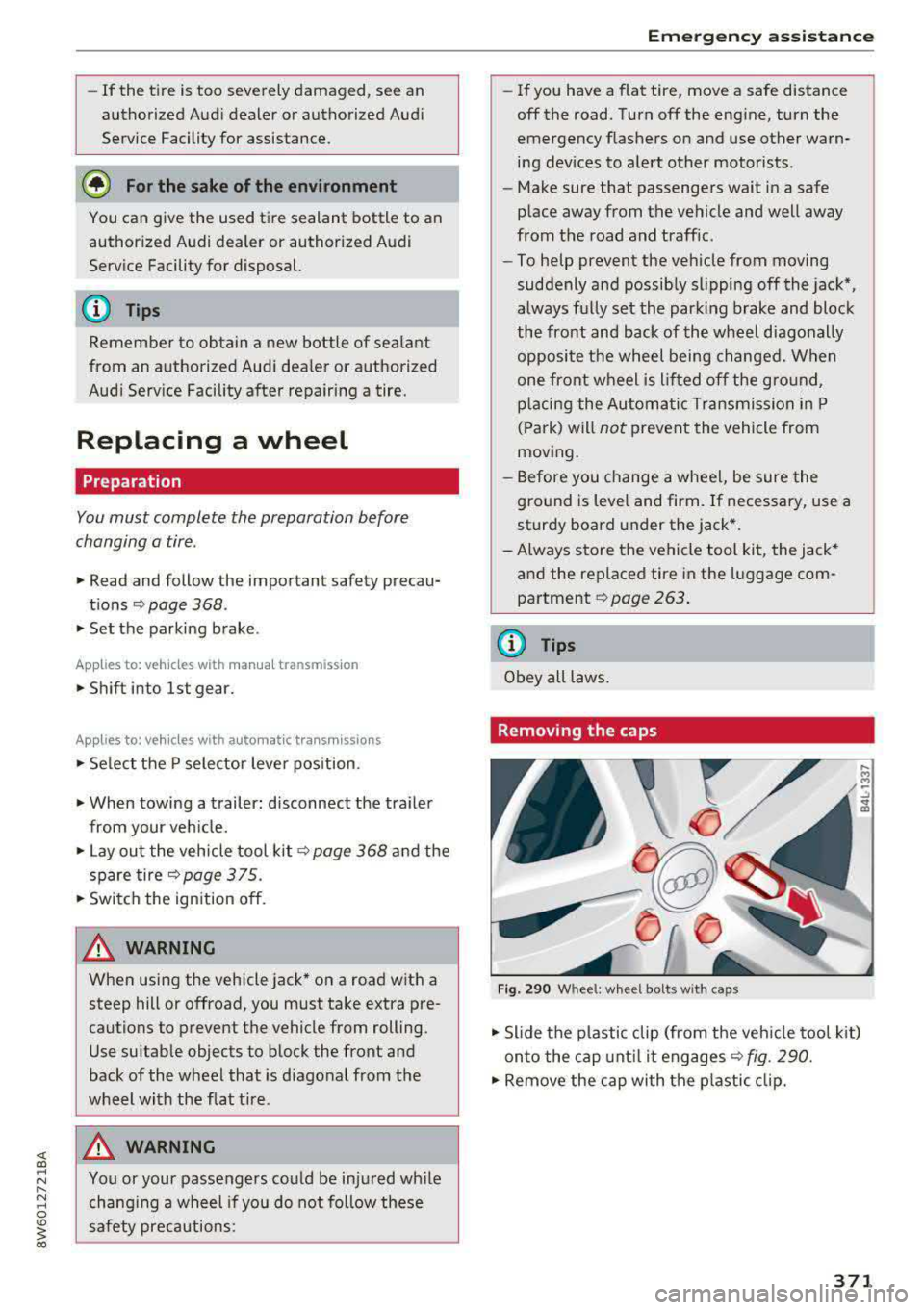
Removing the caps
Fig. 290 W hee l: whee l bolt s w ith ca ps
.,. Slide the p lastic clip (from the veh icle tool k it)
on to the cap unt il it
engages ~ fig. 290.
.,. Remove the cap with the p lastic clip.
371
Page 394 of 409
<( a, .... N ,....
N .... 0 \0
3 a,
A
A/C MAX (button) . . . . . . . . . . . . . . . . . . . . . . 83
A/C (button) . . . . . . . . . . . . . . . . . . . . . . . . . . 82
ABS . . . . . . . . . . . . . . . . . . . . . . . . . . . . . . . . 151
Accessories 75,391
Active lane assist Cleaning the camera area ......... ... .
also refer to Audi active lane assist .. .. .
Active rollover protection system ... .... .
Adapt ive cr uise control ............ .... .
Cleaning the sensors ................ .
Distance indicator and distance warning .
Messages .. .. ................ ..... .
Predictive control .
.......... .. .. .... .
Traffic jam assist ............. .. .... .
Ad Blue
. . .. .. .. ................ ..... .
Messages
Additional accessories 363
130
265
113
363
123 123
120 121
326
326
391
Adjusting air distribution (automatic climate
control) . . . . . . . . . . . . . . . . . . . . . . . . . . . . . . 83
Adjusting the sound 255
Adjusting the temperature (automatic climate
control) . . . . . . . . . . . . . . . . . . . . . . . . . . . . . . 83
Advanced key
refer to Convenience key . . . . . . . . . . . . . . . 89
Airbag . ... .. .. ................ ..... . 277
Airbag system .. ..... ....... ...... 277,297
Advanced Airbag System components . . . 284
Care .. .. .. .. .. ............. .. .. .. . 292
Ch ildren . . . . . . . . . . . . . . . . . . . . . . . . . . . 304
Child restraints
Components (front airbags) ..... ..... .
Danger of fitting a child safety seat on the
front passenger seat .......... .. .... .
Disposal . .. .. .. ............. .. .. .. .
Front airbags ......... ..... ... . .
How do the front airbags work? ....... .
H ow many airbags does my vehicle have?
H ow the Advanced Airbag System compo-
nents work together .......... .. .. .. .
Important safety instructions on the knee
airbag system ................. ..... .
Indicator light ..................... .
K . b nee air ags .. ............... .. .... .
Monitoring . .. ............... .. .... .
PASSENGER AIR BAG light ....... .. .. .
Repairs .. .. .. ........ ..... ... ... .. . 304
284
278 292
282
287 284
286
295 289
293
289
289
292
Index
Safety instructions . . . . . . . . . . . . . . . . . . . 291
When must the system be inspected? . . . 289
Air pressure Tires · · · · · · · · · · · · · · · · ·
· · ....... .. .. 351
Alignment pin (changing the wheel) . . . . . . 368
All season tires . ... .. ................ . 357
All weather lights . . . . . . . . . . . . . . . . . . . . . . 61
All wheel drive Indicator light . . . . . . . . . . . . . . . . . . . . . . . 35
also refer to quattro . . . . . . . . . . . . . . . . . 154
AMI
refer to Audi music interface . . . . . . . 236, 237
Android Auto
refer to Aud i smartphone interface . . . . . 249
Anti -freeze
Windshield washer system . . . . . . . . . . . . 339
Anti- lock braking system
refer to ABS . . . . . . . . . . . . . . . . . . . . . . . . 151
Anti-Slip Regu lation
refer to ASR ... .. .................. .
Apple CarP lay
refer to Aud i smartphone interface ... ..
Arrow view
ASR
Audi active lane assist Messages
Audi connect emergency call and service ..
Online roadside assistance
.......... ..
Audi connect vehicle contro l ............
Parking location .. .................. .
Remote locking and unlocking ..... .. . .
Vehicle status report ............... . . 151
249 23
151
130
132
205
206
201
202
202
202
Audi connect (Infotainment) . . . . . . . . 191, 198
Data protection . . . . . . . . . . . . . . . . . . . . . 199
Services overview
' . . ................ .
Starting ...... .. .. ................ .
Audi drive select
. .. .. ............. .. ..
Audi Entertainment mobile ...... ... .. ..
Audi music interface . ................. .
Audi music stream
refer to Wi-F i .. .. .. ............... . .
Audio files
.. .... .. .. ............... ..
Audio player
Bluetooth audio player .............. .
Wi-Fi audio player . ................. .
Audio track 192
192
138
238
236
234
239
233
234
242
393
Page 395 of 409
Index
Audi p re sense . . . . . . . . . . . . . . . . . . . . . . . 125
M essages . . . . . . . . . . . . . . . . . . . . . . . . . . 129
Sett ings . . . . . . . . . . . . . . . . . . . . . . . . . . . 129
Aud i Serv ice Repair Ma nuals and Lite rature 389
Aud i side assist . . . . . . . . . . . . . . . . . . . . . . . 133
Aud i smartphone interface . . . . . . . . . 249, 253
Aud i virt ua l coc kp it
refer to Instr ume nt cl uster . . . . . . . . . . . . . 10
AUTO Automatic headlights . . . . . . . . . . . . . . . . . 61
Auto Lock (centra l loc kin g system) . . . . . . . . 37
Automatic belt ret ractor . . . . . . . . . . . . . . . 27 2
Automatic climate control . . . . . . . . . . . . . . . 81
Aud i drive select. . . . . . . . . . . . . . . . . . . . . 139
Operation . . . . . . . . . . . . . . . . . . . . . . . . . . . 82
Automatic climate control system Setup . . . . . . . . . . . . . . . . . . . . . . . . . . . . . . 85
Automatic power top
refer to Power top . . . . . . . . . . . . . . . . . . . . 5 4
Automatic transm ission . . . . . . . . . . . . . . . . . 96
E me rgency prog ram . . . . . . . . . . . . . . . . . 10 1
H ill descent contro l . . . . . . . . . . . . . . . . . . . 99
Kick-down . . . . . . . . . . . . . . . . . . . . . . . . . . 100
La unch cont ro l prog ram . . . . . . . . . . . . . . 1 00
M anual s hifting . . . . . . . . . . . . . . . . . . . . . . 99
Parking lock emergency release . . . . . . . . 102
Selector lever pos itions . . . . . . . . . . . . . . . . 96
Autom atic wipe/wash system . . . . . . . . . . . . 67
Auto Safety Hotline . . . . . . . . . . . . . . . . . . . 266
AUTO (button) Automatic c limate control system . . . . . . . 83
Auxiliary heater (a utomat ic cl ima te control) 85
AUX input . . . . . . . . . . . . . . . . . . . . . . . . . . . 237
Ave rage cons umption . . . . . . . . . . . . . . . . . . . 1 7
Average speed . . . . . . . . . . . . . . . . . . . . . . . . 17
B
BACK button 158
Balance (sound) . . . . . . . . . . . . . . . . . . . . . . 255
B ass (sound) . . . . . . . . . . . . . . . . . . . . . . . . . 255
Battery Jump starting . . . . . . . . . . . . . . . . . . . . . . . 381
also refer to Veh icle battery . . . . . . . . . . . 338
Before driving . . . . . . . . . . . . . . . . . . . . . . . . 258
B el t positioners . . . . . . . . . . . . . . . . . . . . . . 27 2
Belt tensioners . . . . . . . . . . . . . . . . . . . . . . . 27S
394
Blended gasoline . . . . . . . . . . . . . . . . . . . . . 322
B lowe r (automat ic cl imate contro l system) . 83
B luetooth
Audio player . . . . . . . . . . . . . . . . . . . . . . . . 233
Connect ing a cell phone . . . . . . . . . . . . . . 178
Settings . . . . . . . . . . . . . . . . . . . . . . . . . . . 254
Boost . . . . . . . . . . . . . . . . . . . . . . . . . . . . . . . . 11
Boos te r seats . . . . . . . . . . . . . . . . . . . . . . . . 312
Boost pressure ind icator . . . . . . . . . . . . . . . . 11
B rake fl uid
Checking the brake fluid level . . . . . . . . . . 337
B rakes . . . . . . . . . . . . . . . . . . . . . . . . . . . . . . 153
B rake ass ist . . . . . . . . . . . . . . . . . . . . . . . . 151
B rake flu id . . . . . . . . . . . . . . . . . . . . . . . . . 33 7
E lectromechanical parking brake . . . . . . . . 94
Emergency braking function . . . . . . . . . . . . 94
New brake pads . . . . . . . . . . . . . . . . . . . . . 153
Worn brake pads . . . . . . . . . . . . . . . . . . . . . 33
B re aking in
New brake pads . . . . . . . . . . . . . . . . . . . . . 153
New engine . . . . . . . . . . . . . . . . . . . . . . . . . 86
New tires . . . . . . . . . . . . . . . . . . . . . . . . . . 348
B rowser
refer to M edi a cente r . . . . . . . . . . . . . . . . . 2 40
Bu lbs . . . . . . . . . . . . . . . . . . . . . . . . . . . . . . . 380
Buttons Contro l panel (MMI) . . . . . . . . . . . . . . . . . 158
Mult ifunct ion steer ing whee l . . . . . . . . 13, 16
Programming (multifunction steering
whee l) . . . . . . . . . . . . . . . . . . . . . . . . . . . . . . 15
C
Cable (USB adapter/AUX connector cable) 236
Cali forn ia Propos ition 65 W arning . . . . . . . 331
Battery specific . . . . . . . . . . . . . . . . . . . . . 338
Call list . . . . . . . . . . . . . . . . . . . . . . . . . . . . . 181
Call options . . . . . . . . . . . . . . . . . . . . . . . . . . 188
C apaci ties
AdB lue . . . . . . . . . . . . . . . . . . . . . . . . . . . . 326
Fuel tank. . . . . . . . . . . . . . . . . . . . . . . . . . . 388
Washer fluid reservoir . . . . . . . . . . . . . . . . 388
Care . . . . . . . . . . . . . . . . . . . . . . . . . . . . . . . . 362
Cargo area
refer to Loading the luggage compart -
ment ........ ... ... ............. ... 263
Catalytic converter . . . . . . . . . . . . . . . . . . . . 329
Page 397 of 409
Index
Cooling system Coolant . . . . . . . . . . . . . . . . . . . . . . . . . . . .
336
Coolant temperature indicato r . . . . . . . . . . 11
C ross ha irs . . . . . . . . . . . . . . . . . . . . . . . . . . . 209
Cruise control system . . . . . . . . . . . . . . . . . . 107
Cup holders . . . . . . . . . . . . . . . . . . . . . . . . . . . 7 6
Curre nt cons umption . . . . . . . . . . . . . . . . . . . 17
D
Data connection . . . . . . . . . . . . . . . . . . . . . . 198
Data protectio n . . . . . . . . . . . . . . . . . . . 199, 230
D ata recorder . . . . . . . . . . . . . . . . . . . . . . . . 156
Date ...... .. .. ................... 17,251
Date display . . . . . . . . . . . . . . . . . . . . . . . . . 25 1
Daytime runni ng lig hts . . . . . . . . . . . . . . . . . 6 1
Declarat ion of compliance
Aud i adapt ive cruise control . . . . . . . . . . .
392
Aud i side assist . . . . . . . . . . . . . . . . . . . . . 392
Ce ll phone package . . . . . . . . . . . . . . . . . . 392
Convenience key . . . . . . . . . . . . . . . . . . . . . 392
Elect ronic immob ilizer . . . . . . . . . . . . . . . . 392
Garage doo r opener (Home link) . . . . . . . . 39 2
Rem ote con trol key . . . . . . . . . . . . . . . . . . 392
D EF
refer to AdBlue . . . . . . . . . . . . . . . . . . . . . . 326
Defrosting (windows) . . . . . . . . . . . . . . . . . . . 84
DEF (inst rument cluste r) . . . . . . . . . . . . . . . . 12
Demo mode
refer to Presentation mode . . . . . . . . . . . . 215
Destination on the map
Using the MMI touch . . . . . . . . . . . . . . . . .
209
Determin ing cor rec t load l imi t
Diese l 356
D iese l part iculate filte r . . . . . . . . . . . . . . . 329
Prewa rm ing . . . . . . . . . . . . . . . . . . . . . . . . . 89
Diese l Exhaust Fl uid (DEF)
refer to Ad Blue . . . . . . . . . . . . . . . . . . . . . . 326
Diese l fuel . . . . . . . . . . . . . . . . . . . . . . . . . . . 323
Dig ita l compass . . . . . . . . . . . . . . . . . . . . . . . 69
Dig ita l Rights Management . . . . . . . . . . . . . 230
D imensions . . . . . . . . . . . . . . . . . . . . . . . . . . 38 7
Dimming the exterior mirrors . . . . . . . . . . . . 66
D imming the rea rview mir ror . . . . . . . . . . . . 66
D ire ctory
refer to Con tacts . . . . . . . . . . . . . . . . . . . . 186
396
D isplay . . . . . . . . . . . . . . . . . . . . . . . . . . . . . . 13
Cleaning . . . . . . . . . . . . . . . . . . . . . . . . . . . 365
Infotainment system d isp lay . . . . . . 159, 252
Instrument cluster . . . . . . . . . . . . . . . . . . . . 16
Mult ifunct ion steer ing whee l . . . . . . . . . . . 13
Ve rsions (MMI) . . . . . . . . . . . . . . . . . . . . . . 159
Distance . . . . . . . . . . . . . . . . . . . . . . . . . . . . . 17
Doors
Emergency locking . . . . . . . . . . . . . . . . . . . . 42
Driver informat ion system . . . . . . . . . . . . . . .
17
Chang ing v iews . . . . . . . . . . . . . . . . . . . . . . 13
Ene rgy consumers . . . . . . . . . . . . . . . . . . . . 18
On-board computer . . . . . . . . . . . . . . . . . . . 17
Outs ide temperat ure display. . . . . . . . . . . . 10
Se rvice in terv al displ ay . . . . . . . . . . . . . . . 340
V iew . . . . . . . . . . . . . . . . . . . . . . . . . . . . . . . 15
D river seat
refer to Seating posi tion . . . . . . . . . . . . . . 259
D rives
refer to Media . . . . . . . . . . . . . . . . . . 230, 239
Drive select
refer to Audi d rive select . . . . . . . . . . . . . . 138
D rivi ng econom ica lly . . . . . . . . . . . . . . . . . . . 86
Driving safe ly . . . . . . . . . . . . . . . . . . . . . . . . 258
D riving through wa ter . . . . . . . . . . . . . . . . . .
86
D . .
t· 17 riving ,me
... ... .. .. ........ ..... .. .
DVD drive (med ia drives) . . . . . . . . . . . . . . .
231
Dynam ic steeri ng . . . . . . . . . . . . . . . . . . . . . 139
Dynam ic volume
refer to System volume . . . . . . . . . . . . . . . 256
E
E-mail 185
Econom ica l rou te . . . . . . . . . . . . . . . . . . . . . 2 14
eco (button) . . . . . . . . . . . . . . . . . . . . . . . . . .
82
EDS . . . . . . . . . . . . . . . . . . . . . . . . . . . . . . . . 151
El ec tromechanical parking b rake . . . . . . . . . 94
Electromechanical steering . . . . . . . . . . . . . 154
E lectronic immobilizer . . . . . . . . . . . . . . . . . .
38
El ectronic stabiliza tion control
referto ESC ..... .. .. ........... 151,152
Emergency assistance . . . . . . . . . . . . . . . . . 368
Emergency b raking function . . . . . . . . . . . . . 94
Emergency call funct io n
A udi con nect eme rgency call and service .
2 05
Emergency flashers . . . . . . . . . . . . . . . . . . . . 63