brake AUDI A5 COUPE 2018 Workshop Manual
[x] Cancel search | Manufacturer: AUDI, Model Year: 2018, Model line: A5 COUPE, Model: AUDI A5 COUPE 2018Pages: 409, PDF Size: 67.63 MB
Page 140 of 409
Assistance systems
CJ) Note
Also read the informat ion in c:> (D in General
information on page 135 .
@ Tips
-You can can cel the automa tic brake activa
tion w ith increasing braking fo rce if you ap
pl y the bra kes yourself or accelerate cons id
e rab ly.
-In some s ituations, rea r cross -traffic assist
may warn you even if there is no cross t raffic
i n a critical a rea, for example w hen back ing
in to a parking space or ma neuver ing.
-The rea r cross-traffic assist also switches off
whe n yo u switc h off the ESC.
-The rea r cross traffic assist switches on and
off thro ugh the pa rking aid
<=:>page 141.
-T he system is not available whe n towin g a
trailer.
Messages
A ppl ies to : ve hicles w ith Audi side assis t
A message appears in the inst rument cl uster dis
p lay if the s ide assist swi tches off automatically .
iii Audi side assist: malfunction! Please contact
Service
@i Audi side assist and exit warning: malfunc
tion! Please contact Service
T he sys tem c an not guar antee th at it w ill detec t
ve hicl es co rrectly and it h as swit ched off. The
sensors h ave bee n moved o r are faul ty . H ave t he
system checked by an a uthorized Audi dea ler or
author ized Audi Se rvice Facility soon.
@i Audi side assist: currently unavailable. Sen
sor vision restricted due to surroundings. See
owner 's manual
@i Audi side a ssist and exit warning : currently
unavailable. Sensor vision restricted due to sur roundings
T he radar senso r vis io n is i mp air ed . Th e ar ea in
fr on t of t he senso rs m ust n ot be covered by bik e
ra ck s, st ickers, leaves, snow or any othe r o bj ects.
Clea n the area in front of the sensors, if necessa
ry
c:> page 134, fig . 134 .
138
@i Audi side assist: currently unavailable. See
owne r's manual
@i Audi side assist and exit warning: currently
unavailable . See owner's manual
S ide assis t ca nnot be switched on at this ti me be
ca use there is a ma lfu nction (fo r exa mple, the
b att ery ch arge level m ay be to o l ow).
@i Audi side assist: unavailable in tow ing mode
iii Audi side assist and exit warning: currently
unavailable. Towing mode
Si de assist switches off automatically when the
e lectrica l connecto r in the factory-installed trail
er hitch is connected. There is no guarantee the
system will sw itch off when using a retrofitted
trailer hitch . Do not use side assist and the ex it
warning w hen tow ing a tra ile r.
Iii Rear parking aid : obstacle detection restrict
ed
The rear c ross-traffic ass ist is not available . E i
ther t he ESC is sw itche d off, or the rada r senso rs
may be cove red by a bike rack, stic ke rs, leaves,
snow or other objects. Switch the ESC on, or clean the area in fron t of the se nso rs if necessa ry
c:> page 134, fig . 134 . If th is message con tinues
to be displayed, dr ive immedia tely to a n author
iz ed Audi dealer or author ized A udi Se rvi ce Facili
ty to h ave the m alfunc tion re paire d.
Audi drive select
Introduction
App lies to : vehicles wi th Audi drive se lect
D rive select makes it possib le to exper ience dif
ferent types of veh icle sett ings in one veh icle.
The dr iver can select
Comfort , Auto and Dynamic
modes in t he In fo tainment system to sw itch b e
t ween, for exa mple , a s porty an d a comfor table
d riv ing mode . In the
Individual mode, t he set
ti ngs c an be adjus ted to yo ur persona l prefe ren
ces . Thi s makes it possib le to comb ine settings
s uc h as a sporty e ngine setting wit h lig ht steer
i ng .
Page 145 of 409
sound was muted, no tone will sound. Pay atten
tion to the vehicle's surroundings when you start
to drive.
Switching on /off
A pp lies to: ve hi cles w ith parkin g system plus
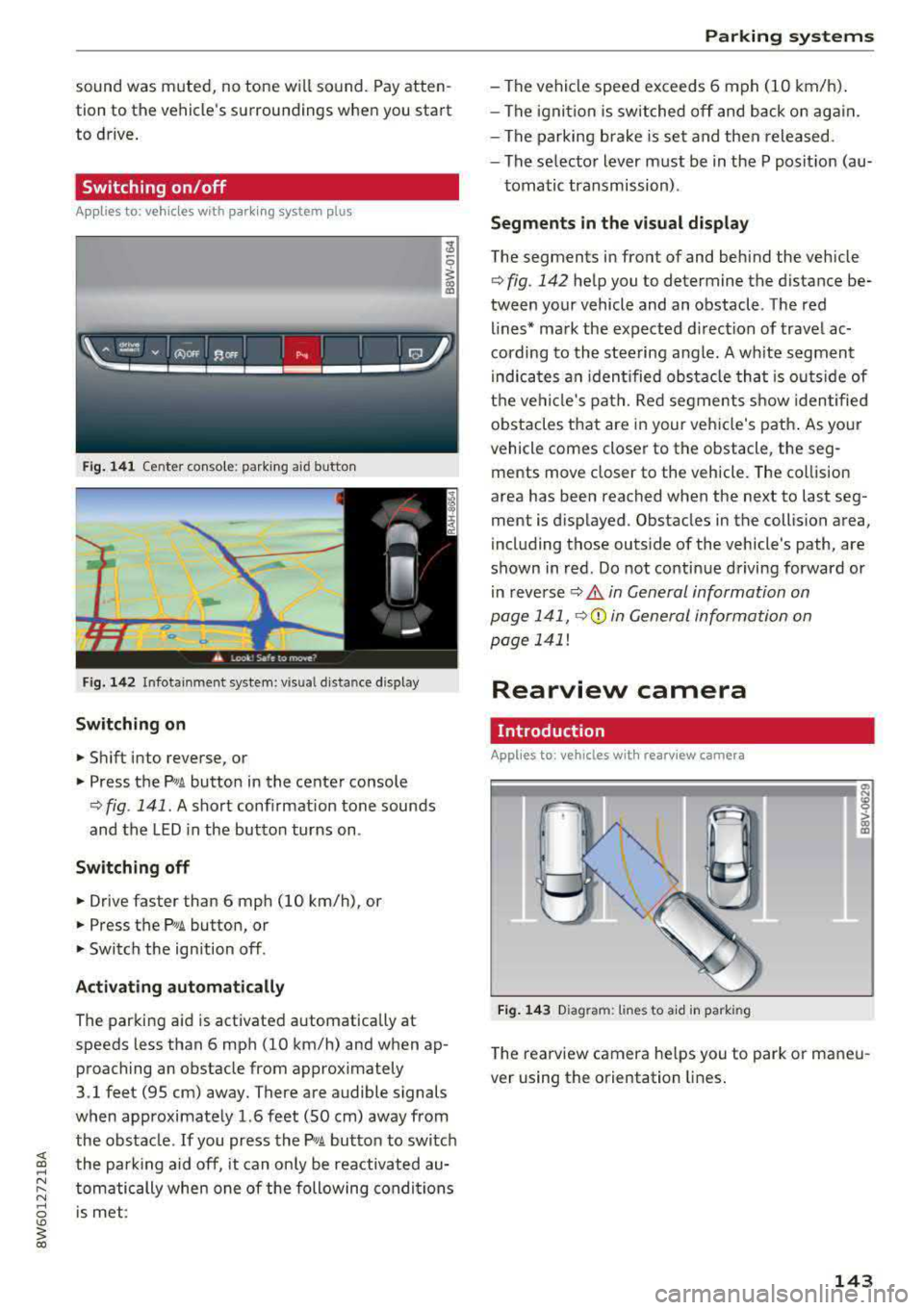
Fig. 141 Center conso le: parki ng aid button
Fig . 142 Infotainment system: visual d istance display
Switching on
~ Shift into reverse, or
~ Press the Pw A button in the center console
¢ fig . 141. A short confirmation tone sounds
and the LED in the button turns on.
Switching off
~ Drive faster than 6 mph (10 km/h), or
~ Press the P,11A button, or
~ Switch the ign ition off .
Activating automatically
The parking aid is activated a utomat ica lly at
speeds less than 6 mph (10 km/h) and when ap
proaching an obstacle from approximately
3.1 feet (95 cm) away. There are audible signals
when approximately 1.6 feet (SO cm) away from the obstacle . If you press the
p,,;A button to switch
the park ing aid off, it can on ly be reactivated au
tomatically when one of the following conditions
is met :
Parking systems
-The vehicle speed exceeds 6 mph (10 km/h).
- The ignition is switched off and back on again.
- The parking brake is set and then released .
- The selecto r lever must be in the P posit ion (au-
tomatic transmission) .
Segments in the visual display
The segments in front of and behind the veh icle
¢fig. 142 help you to determine the distance be
tween your vehicle and an obstacle . Th e red
lines* mark the expected direction of travel ac
cording to the steering angle. A wh ite segment
i ndica tes an identified obstacle tha t is outsid e of
the vehicle's path. Red segments show identified
obstacles that are in your veh icle's path. As your
vehicle comes closer to the obstacle, the seg
ments move closer to the veh icle. The collision
area has been reached when the next to last seg
ment is displayed . Obstacles in the collision area,
including those outs ide of the vehicle's path, are
shown in red. Do not continue driving forward or
in
reverse ¢ A in General information on
page 141,
Q© in General information on
page 141!
Rearview camera
Introduction
App lies to : vehicles wi th rearv iew camera
Fig. 143 D iagram: li nes to a id in parking
a, N :g
:l,. (I) (X)
The rearview camera he lps you to park or maneu
ver using the orientation lines.
143
Page 153 of 409
Intelligent Technology Electronic stabilization
control (ESC)
Description
Ele ctronic stabilization control (ESC) supports
driver safety . It reduces the risk of slipping and
improves d riving stability. ESC detects critica l sit
uations such as when the vehicle is oversteering
and understeering or the wheels are spinn ing.
T he vehicle is stabilized by applying the brakes or
reducing eng ine torq ue. When the ESC engages,
the
J;,j ind icator light blinks in the instrument
cluste r.
T he follow ing systems are integrated in the ESC:
Ant i-loc k bra king s ystem (ABS)
ABS prevents the whee ls from locking when brak
ing. The vehicle can still be steered even during
hard brak ing. Apply steady pressure to the brake
pedal. Do not pump the pedal. A pulsing in the
b rake pedal indicates that the system is act ing to
stabilize the vehicle .
Br ake a ssist s ystem
The brake assist system can decrease braking dis
tance. It increases brak ing power when the driver
presses the brake pedal quickly in emergency sit
uations . You must press and hold the brake pedal
unti l the dangerous sit uat io n is ove r. In veh icles
with adaptive cr uise contro l*, the bra ke assist
system is more sensitive if t he d istance detec ted
to the veh icle dr iv ing ahead is too small.
Anti-Slip Regulation (ASR )
ASR red uces eng ine power when the drive wheels
begin spinning and adapts the force to the road
conditions . This makes it easie r to sta rt, acceler
ate and dr ive up hill s.
Electronic differenti al lock (EDL )
EDL applies the brakes to a wheel that starts
spi nning and t ransfers t he drive powe r to the
;;§ other driving wheels. This f unct ion is not availa-....
~ b lea t higher speeds.
N .... 0 \0
3
In extreme cases , ED L automat ica lly switches off
to keep the brake o n the braked wheel from over
heating. The veh icle is still working correct ly. ED L
will switch on again automatically when condi
tions have returned to normal.
Ste ering recommendation
The ESC he lps to stabilize the vehicle by changing
the steering torque.
In veh icles wi th dynamic steer ing*, ESC also
helps to stab ilize the steer ing in crit ica l sit ua
tions.
Selective wheel torque control
Se lective w heel to rque con trol is used w hen d riv
i ng on curves. Bra king is targeted towa rd t he
whee ls on the inside of the cu rve as needed. This
allows mo re precise driving in curves .
Automatic post -collision braking system
The "automat ic post-collision braking system "
can help to reduce the risk of sliding and of addi
tiona l co llisions after an acciden t. If the a irbag
contro l
module detects a co llision, the veh icle is
braked by the ESC.
T he veh icle does not bra ke automatically if:
- the dr iver presses the acce lerator pedal, or
- the ESC, the brake system or the veh icle elect ri-
cal system are not functioning.
A WARNING
=
- The ESC and its integrated systems cannot
overcome the lim its imposed by natural
phys ica l laws. This is especially important
on slippery or wet roads. If the systems be
gin acting to s tabilize yo ur vehicle, you
should immediately alter your speed to
match the road and traffic conditions. Do
not let the inc reased safety provided tempt
you into taking risks. This could increase
your r isk of a coll is ion.
- Please note the ris k of a collis ion increases
when dr iv ing fast, especially through curves
and on slippery or wet roads, and when dr iv-
ing too close to objects ahead . The ESC and
~
151
Page 155 of 409
<( a, .... N ,....
N .... 0 \0
3 a,
A WARNING
You should only switch sport mode on or switch ESC/ASR off if your driving abilities
and road conditions permit .
- The stabilization function is limited when
sport mode is sw itched on . T he driving
wheels co uld spin and the vehicle cou ld
swerve, espec ially on s lick o r sli ppery roa d
surf aces.
- T here is no vehicle stabilization when ESC/
ASR a re swi tched off .
Brakes
New brake pads
New brake pads do not ac hieve the ir full b raking
effect during the first 250 mi (400 km) . They
must be "broken
in " fi rst . However, you can com
pensate for the slightly reduced bra king fo rce by
pr ess ing firmly o n the bra ke pe dal. Avoid heavy
b ra king dur ing t he b reak -in per io d .
Wear
Brake pad wear depends largely o n the way the
ve hicl e is driven and on operat ing cond it ions .
This is especially t rue if you are d riving freque ntly
in t he c ity and on curves o r wi th a sporty driving
s tyle.
Operating noise
Noises may occur when braking depend ing o n the
speed , braking force and ou ts ide cond it ions such
as te m pe ra ture and humi dity .
Wet conditions or road salt
In certain situations, for example after driving
through water, in heavy ra in or after washing
your car, the braking ef fect may be reduced due
to mo isture or ice on the b rake roto rs and b rake
pads. The b rakes mus t be
"dried" firs t wi th a few
care ful bra ke app lic at ions.
At higher speeds and with t he windsh ie ld wipers
turned o n, the brake pads press against the bra ke
rotors for a s ho rt amoun t of time. This ac tion,
whi ch is not felt by the driver , happens at regul ar
i nte rvals an d ens ures a better reac tion time fo r
the brakes in wet weat her.
Intellig ent Technology
The brak ing effec t can a lso be reduced if yo u are
driving on salted roads and yo u do not app ly the
bra kes for long per iods o f time. The layer of sa lt
on the brake rotors and pads m ust be worn off
first whe n the brakes are applied .
Corrosion
Leaving t he vehi cle pa rked for long periods o f
time, low mileage and avoiding heavy b raking
can contrib ute to corros ion on the b rake roto rs
and to dirty brake pads.
If you usu a lly avoid heavy bra king or if there is
cor rosion prese nt, occasiona l heavy braking at
high speeds is recommended to clean the brake
roto rs and pads
c> ,& .
Brake system malfunction
If you notice that the bra ke pedal trave l has sud
denly in crease d, then a brake circuit in the dua l
circuit b rake system may have malfunctioned.
Drive to an authorized A udi dealer or authorized
Audi Se rvice Facility immed iate ly to have the
problem corrected. On the way there, d rive w ith
reduced speed and keep in mind that you will
need a longer distance to stop and you will need
to press the bra ke ped al ha rder.
Low brake fluid level
When the bra ke fluid level is low, malfu nctions in
the b rake system may occur . T h e brake fluid level
is e lec tron ically moni tored.
Brake booster
The brake booster ampli fies t he p ressure you ap
ply to the brake pedal.
A WARNING
- On ly app ly the brakes for the purpose of
cleaning the brake system when road and
traffic cond itions permi t. You must not en
da nger other road users. This inc reases the
ris k of an a ccid en t.
- Never let the vehicle roll while the engine is
sto pped bec ause t his increases the risk of an
a ccident.
153
Page 156 of 409
Intelligent Technology
CJ) Note
- Neve r let the brakes "rub" by pressing the
pedal light ly when bra king is not actually
necessary. This causes the brakes to over
heat and increases braking d istance and
causes wear .
- Before driv ing downhill a long distance on a
steep hi ll, decrease your speed and select a
l ower gear. This makes use of the engine
b raking effect and re lieves the brakes . If
you need to b rake additionally , brake in in
te rvals and n ot co nti nu ously .
(J) Tips
-If the b rake booster is no t wo rking, you
must press the brake pedal with much more
fo rce th an norma l.
- If you re trofit you r vehicle with a fron t spoil
e r, whee l cove rs o r similar items, ma ke sure
th at t he ai r flow to the fron t wheels is not
i nte rr upt ed . Ot he rw ise the bra ke sys tem
ca n become too hot.
Electromechanical
steering, Dynamic
steering
The elec trome chanical steering supp orts the
driver 's steering movemen ts.
P owe r stee ring adapts electronically based on
t he vehicle speed.
Indicator lights and messages
• Steering: malfunction! Please stop vehicle
If th is indicator light t urns o n and stays on and
this message appears, the power steer ing may
have fa iled.
Stop the vehicle in a safe location as soon as pos
sib le. Do
not continue driving. See an author ized
Aud i dea ler or a uthori zed Aud i Serv ice Facility fo r
assistance .
E£4 Steering: malfunction! You may continue
dri ving
If t he i nd ic ator lig ht tur ns on and the message
a ppears, the stee ring wheel may be more diff i-
154 cu
lt to move o r mo re sensitive than usu a l. The
steering wheel may also be at an ang le when
driv ing straight.
Drive slowly to an au thorized Audi de aler or au
thorized Audi Service Facili ty to have t he mal
funct ion correcte d.
f:$JI Dynamic steering: correcting steering wheel
po sition
If the indica tor ligh t turns on and this message
appears, the dynamic steering* is re in it ia liz ing.
The steer ing whee l will be easy to move afte r
sta rt ing t he engine . Reinitiali zation might be
necessary if the steering wheel was moved while
the engine was switched off. The disp lay turns
off if the initialization was successf ul.
(D Tips
-If the . or ':r,y indica to r light only stays on
for a sho rt time, you may cont inue driving .
- T he dynamic steering s tability sys tems
q page 151 are not ava ila bl e in the event of
a system malfunction .
- For add itio na l information o n dynamic
steeri ng, see
c:;, page 138.
ALL-wheel drive (quattro)
General information
In all whee l drive, the dr iv ing power is dis trib ut
ed betwee n all fou r whee ls w hen needed . This
happe ns automatically depending on your driving
behavior as we ll as the c urrent road con ditions.
A lso see
c:;, page 151, Electronic stabili zation
control (ESC) .
The all-whee l dr ive system distr ibutes the dr iving
power va riably to the front and rear axle. It works
together with selective wheel torq ue control,
which act ivates when dr iv ing through c urves
q page 151. With the sport d ifferent ial*, power
distribution to the rear wheels is var iable and can
be adjusted using the drive select
q pag e 139 .
The all wheel drive concept is designed for high
engine power . Your vehicle is except iona lly pow
erfu l and has excellent driving characteristics
bot h unde r normal d riving conditions and on
IJII>
Page 158 of 409
Intelligent Technology
greater than the amount being generated in or
der to maintain an optimal vehicle battery charge
level.
(D Tips
- Energy management cannot overcome the laws of physics. Note that the charge level
and length of the vehicle battery life are
limited.
- When the starting ability is endangered, the
(•j indicator light turns on ¢ page 30.
What you should know
Maintaining the starting ability is the highest
priority.
A lot of stress is placed on the vehicle battery
when driving short distances, during city driving,
and at cold times of the year. A lot of energy is
used but little is generated. It is also critical
when the engine is not running but electrical
equipment is switched on. In this case, energy is used but none is generated .
In situations like this, energy management will
actively regulate the distribution of energy.
Long periods without use
If you do not drive your vehicle for several days or
weeks, electrical equipment is gradually scaled
back or switched off. This reduces energy use and
ensures the vehicle will be able to start after long
periods of time. Some convenience functions,
such as interior lighting or power seat adjust
ment, may not be available under certain circum
stances . These convenience functions will be
available again once you switch the ignition on
and start the engine.
With the engine switched off
The vehicle battery will drain if you use Infotain
ment functions such as listening to the radio
while the engine is switched off .
If the vehicle's ability to start may be impaired by
the energy use, a message will appear in the In
fotainment system display. The message indi
cates that the system will switch off automatical-
156
ly soon. If you would like to continue using the
functions, you must start the engine.
With the engine running
Although electrical energy is generated while
driving , the vehicle battery can drain. This can
happen if little energy is generated but much is
used, and the charge level of the vehicle battery
is not optimal.
To restore the balance of energy, components
that require large amounts of energy are tempo
rarily scaled back or switched off . Heating sys
tems in particular require a great deal of energy. If you notice, for example, that the seat heating*
or rear window defogger is not working, then it
has been temporarily reduced or switched off.
T hese systems are available again as soon as the
energy supply has been restored.
In addition, you may notice that the idle speed has slightly increased. That is normal and no
cause for concern . By increasing the idling speed,
the additional required energy will be generated
and the vehicle battery will be charged.
Notice about data
recorded by the Event
Data Recorder and
vehicle control modules
Event Data Recorder
This vehicle is equipped with an Event Data Re
corder (EDR). The main purpose of an EDR is to
record, in certain crash or near crash-like situa
tions, such as an airbag deployment or hitting a
road obstacle, data that will assist in understand
ing how a vehicle's systems performed. The EDR
is designed to record data related to vehicle dy
namics and safety systems for a short period of
time , typically 30 seconds or less. The EDR in this
vehicle is designed to record such data as:
- How various systems in your vehicle were oper ating;
- Whether or not the driver and passenger safety
belts were buckled/fastened;
- How far (if at all) the driver was depressing the
accelerator and/or brake pedal; and,
.,_
Page 264 of 409
Pedal area
Pedals
The pedals must always be free to move and
must never be interfered with by a floor mat or
any other object.
Make sure that all pedals move freely without in
terference and that noth ing prevents them from
returning to their original positions .
Only use floor mats that leave the pedal area free
and can be secured with floor mat fasteners.
If a brake circuit fails, increased brake pedal trav
e l is required to bring the vehicle to a full stop.
A WARNING
Pedals that cannot move freely can cause loss
of vehicle control and increase the risk of seri
ous injury.
- Never place any objects in the driver's foot
well. An object could get into the pedal area and interfere w ith pedal function. In case of
sudden braking or an accident, you would not be ab le to brake or accelerate!
-Always make sure that nothing can fall or move into the dr iver's footwe ll.
Floor mats on the driver side
Always use floor mats that can be securely at
tached to the floor mat fasteners and do not interfere with the free movement of the pedals .
... Make sure that the floor mats are properly se
cured and cannot move and interfere with the
pedals
Q .&_ .
Use only floor mats that leave the pedal area un
obstructed and that are firmly secured so that
they cannot slip out of pos it ion . You can obtain
suitable floor mats from your authorized Audi
dealer.
Floor mat fasteners are installed in your Audi .
Fl oor mats used in your vehicle must be attached
to these fasteners. Properly securing the floor mats will prevent them from sliding into posi-
Driving safety
tions that could interfere with the pedals or im
pair safe operation of your vehicle in other ways.
.&_ WARNING
-
Pedals that cannot move freely can res ult in a
l oss of vehicle control and increase the risk of
serious personal injury.
-Always make sure that floor mats are prop
erly secured.
- Never p lace or install floor mats or other
f loor coverings in the vehicle that cannot be
proper ly secured in place to prevent them
from slipping and interfer ing with the ped
als o r the ab ility to control the vehicle.
- Never p lace or install floor mats or other
f loor cove rings on top of already installed
floor mats . Additional floor mats and other
cover ings will reduce t he si ze of the pedal
a rea and in terfere with the pedals.
- Always p roperly re insta ll and secure floor
mats that have been take n out fo r clean ing .
- Always make sure that objects cannot fall
into the d river footwell whi le the vehicle is
mov ing. Objec ts can become trapped under
the brake pedal and accelerator pedal caus
ing a loss of vehicle control.
Storing cargo correctly
Loading the luggage compartment
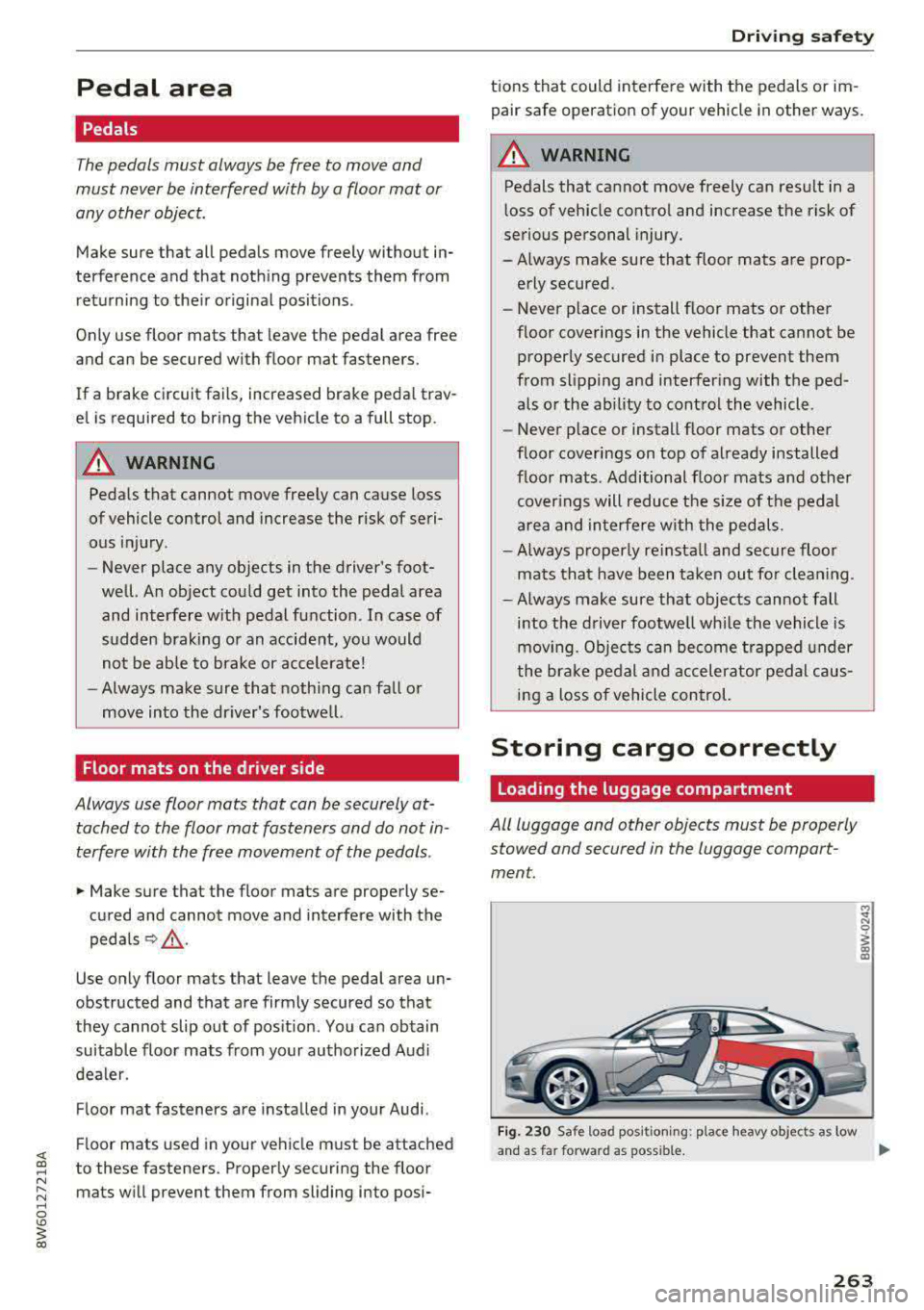
All luggage and other objects must be properly stowed and secured in the luggage compart
ment.
F ig. 230 Safe load positio ning: place heavy objects as low
a n d as far forward as poss ible.
IJI,-
263
Page 331 of 409
Check ing and F illing
Engine compartment
Working in the engine compartment
Special care is required if you are working in the
engine compartment
Fo r wo rk in th e engine compa rtmen t, s uch as
c h ec kin g and filli ng flu id s, th ere is a risk of in
j u ry, sc aldin g, ac cide nts, a nd b urn s. For this
rea son, foll ow all the warning s and gener al
s a fe ty p recaution s pr ov ided in the f ollow ing in·
f o rm ation . Th e en gine c omp artmen t is a dan
ger ous are a.
q ,&.
_& WARNING
- T urn the engine off.
- Switch the ign ition off .
- Set the parking brake .
- Shift the gearshift lever to neutral in vehicles with a manual transm ission and se
lect the P selecto r lever pos ition in vehicles
with an automatic transmission.
- Let the engine coo l down .
- Never open the hood when there is steam or coolant escaping from the eng ine compart
ment, because there is a risk that you cou ld
be burned. Wait until no steam or coolant is
escaping.
- Keep ch ildren away from the engine com
partment.
- Never spill f lu ids on a hot engine. These flu
ids (such as the anti-freezing agent con
ta ined in the coolant) can ignite .
- Avoid sho rt circu its in the electrical system.
- Whe n working in the engine compartment ,
remember that the rad iator fan can sw itch
on even if the ign ition is switched off, which
increases the risk of in jury.
- Never open the cap on the coolant expan
sion tank when the eng ine is warm. The
cooling system is under pressure.
- T o protect your face, hands, and arms from
hot steam or coolant, cove r the cap with a
large cloth when opening .
- Do not remove the engine cover under any
c ircumstances. This increases the risk of
burns .
330
-If tests need to be performed with the en
gine running, there is add itiona l danger due
to mov ing components (such as the r ibbed
belt, alternator and rad iator fan) and from
the high-voltage ignition system .
- Do not under any circumstances activate the
throttle inadvertently (for example, by hand
from the engine compartment) if the veh i
cle is stat ionary but the eng ine is r unning
and a gear is engaged. Otherwise, the veh i
cle will start to move immediately and this
could result in an acc ident.
- Pay attent ion to the following warnings
when work on the fue l system is required :
- Do not smoke.
- Never work near open flames.
-Always have a working fire extinguisher
nearby .
-All work on the battery or electrical system
in your vehicle can result in inju ries, chemi
cal b urns, acc idents or burns. Because of
this, all work must be performed
onl y by an
author iz ed Audi dealer or authori zed Audi
Serv ice Facili ty .
-To reduce the r isk of e lectr ic shock and in
jury, never touch the follow ing components
when the engine is running or is being start ed:
- Ign ition cable
- Other components in the electronic high- vo ltage ign ition system
- If you must che ck or perform wo rk on the
engine whi le it is running:
-First, set the parking brake and and move
the gearshift lever to neutral (for manual
transm issions) or select the P selector lev
er posit ion (for automatic transm issions) .
- Always proceed with extreme caution so
that clothing, jewelry or long hair do not become caught in the rad iator fan, fan
belt or other moving components or do
not come into contact with hot compo
nents. Tie bac k long hair befo re beginn ing
work and do not wear clothing that can
hang down into the engine.
-Lim it yo ur exposure to exhaust and chemi
cals to as short a time as possible
q .&. .
Page 333 of 409
Checking and Filling
-If the hood is not latched completely, it
could fly up while you are driving and ob
struct your vision.
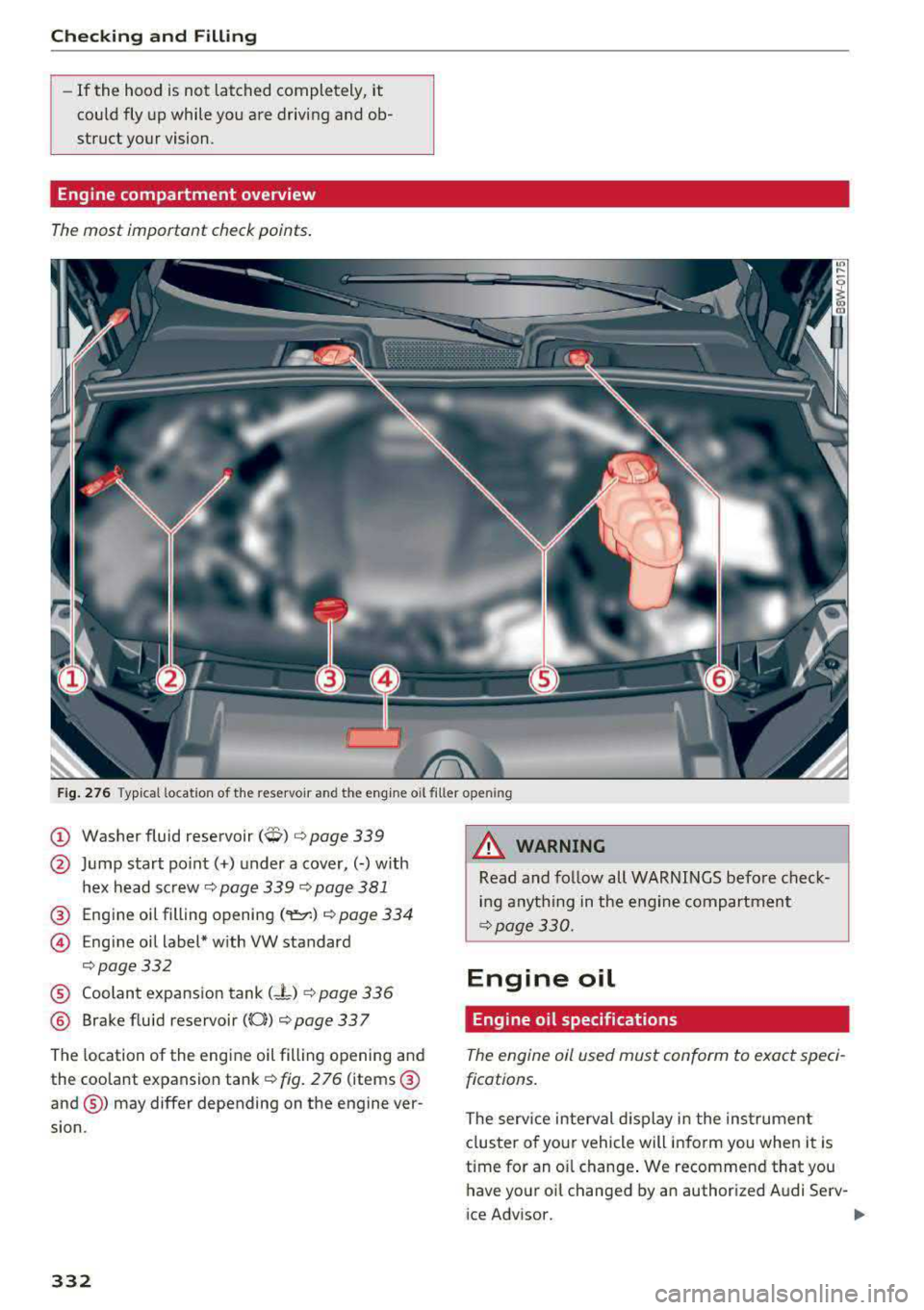
Engine compartment overview
The most important check points.
Fig. 276 Typ ical location of the reservoir and the engine o il filler o penin g
@ Washer fluid reservoir (W) c:> page 339
@ Jump start po int( +) under a cover,(-) w ith
hex head sc rew
c:> page 339 c:> page 381
@ Engine oil filling open ing (
© Eng ine oil label* w ith VW standard
c:> page332
® Coolant expansion tank (- L) c:> page 336
® Brake fluid reservoir ((0)) c:> page 33 7
The location of the engine oil fill ing opening and
the coolant expansion tank
c:> fig. 2 76 (items @
and@) may differ depending on the engine ver
sion .
332
8,_ WARNING
Read and follow all WARNINGS befo re check
ing anything in the engine compartment
c:>page330.
Engine oil
Engine oil specifications
The engine oil used must conform to exact speci
fications.
The serv ice interval d isplay i n the instrumen t
clus ter o f your veh icle will inform you when it is
time for an o il change . We recommend that you
have your oi l changed by an author ized Audi Serv-
ice Advisor.
..,_
Page 338 of 409
.. Place a cloth over the coolant expansion tank
cap .
.. Push the release button ¢ fig. 2 78 and careful
ly unscrew the cap to the left until you feel re
sistance¢ &_ .
.. Push the release button again and remove the
cap completely .
.. Make sure that the fluid level remains stable .
Add more coolant if necessary .
.,. Turn the cap to the right to secure it until yo u
feel resistance a second time.
Coolant loss usually indicates there is a leak . Im
mediately drive your vehicle to an authorized
Audi dealer or authorized Aud i Serv ice Facility
and have the cooling system inspected. If the
cooling system is not leaking, a loss can come
from the coolant boiling through overheating
and being pushed out of the cooling system.
A WARNING
- The cooling system is under pressure. Do
not open the coolant expansion tank cap
when the engine is hot. This increases the
risk of burns .
-The coolant additive and the coolant can be
dangerous to your health . For this reason,
keep the coolant in the original container
and away from children. There is a risk of
poisoning.
-When working in the engine compartment,
remember that the radiator fan can switch
on even if the ignition is switched off, which
increases the risk of injury.
CD Note
Do not add coolant if the expansion tank is
empty. There may be air i n the cooling sys
tem, which increases the risk of engine dam
age . If this is the case, do not continue driv
ing . See an authorized Audi dea ler or author
ized Aud i Service Facility for assistance.
Checking and Filling
Brake fluid
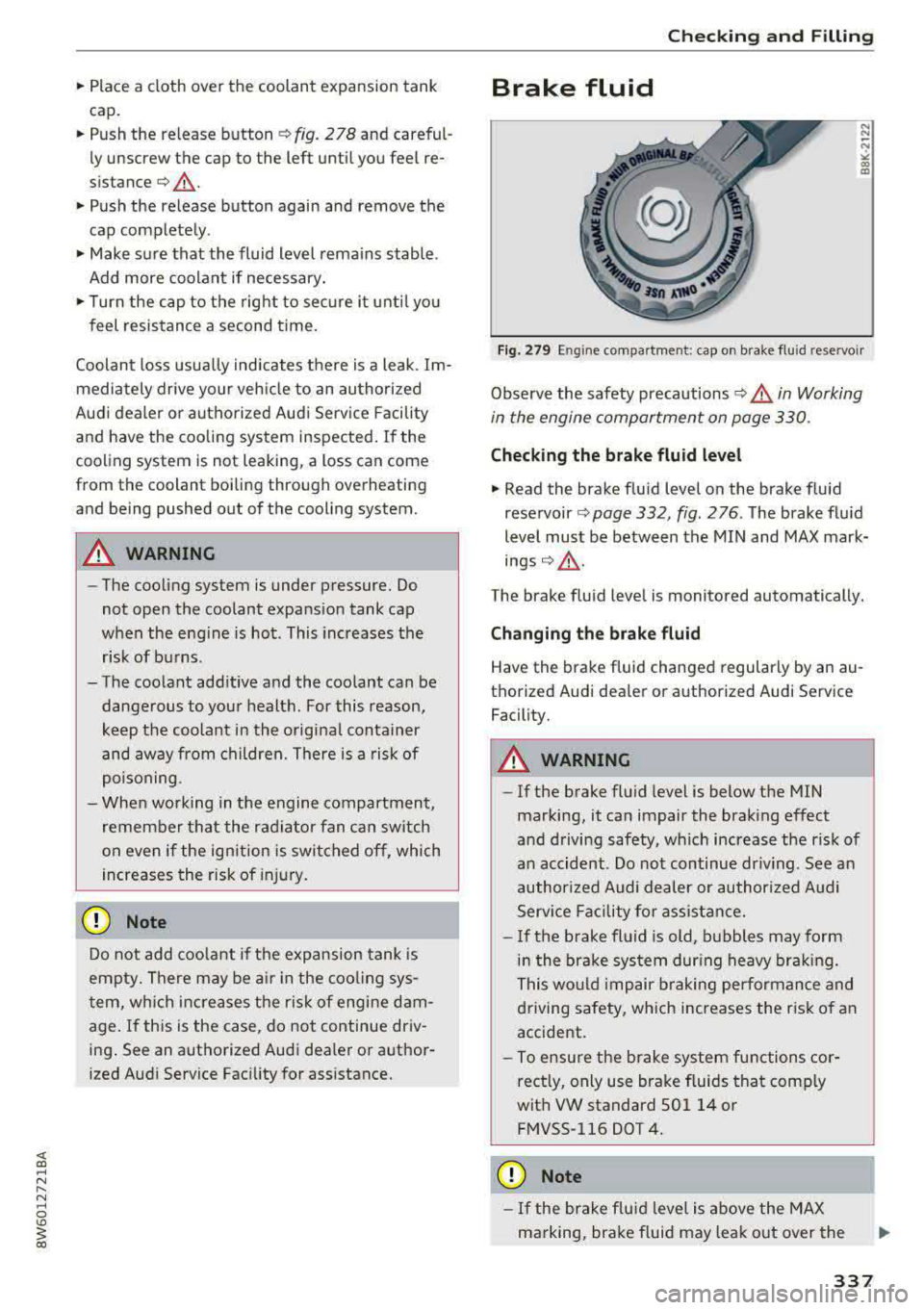
Fig. 279 E ng in e compartment : cap on brake fluid reservo ir
Observe the safety precautions ¢&. in Working
in the engine compartment on page 330 .
Checking the brake fluid level
... Read the brake fluid level on the brake fluid
reservoir¢ page 332, fig . 276 . The brake fluid
level must be between the MIN and MAX mark
ings¢_.&. .
The brake fluid level is monitored automatically.
Changing the brake fluid
Have the brake fluid changed regularly by an au
thorized Audi dealer or authorized Audi Service Facility.
A WARNING
- If the brake flu id level is below the MIN
marking, it can impair the brak ing effect
and driving safety, wh ich increase the risk of
an accident. Do not continue dr iving . See an
authorized Audi dealer or authorized Audi
Serv ice Facility for assistance.
-If the brake fluid is old, bubbles may form
in the brake system dur ing heavy braking.
This would impair braking performance and
driving safety, which increases the risk of an
accident.
-To ensure the brake system functions cor
rectly, only use brake fluids that comp ly
with VW standard 501 14 or FMVSS-116 DOT 4.
CD Note
-If the brake flu id l eve l is above the MAX
marking, brake fluid may leak out over the
337