warning light AUDI A5 COUPE 2018 Repair Manual
[x] Cancel search | Manufacturer: AUDI, Model Year: 2018, Model line: A5 COUPE, Model: AUDI A5 COUPE 2018Pages: 409, PDF Size: 67.63 MB
Page 173 of 409
Voice recognition system Operating
Appl ies to: veh icles wit h vo ice recog nitio n system
You con operate many Infotainment functions
conveniently by speaking .
Requirements: the ignition and the MM I must be
switched on
~page 158, the re must not be any
phone call in progress and the park ing system
must not be active.
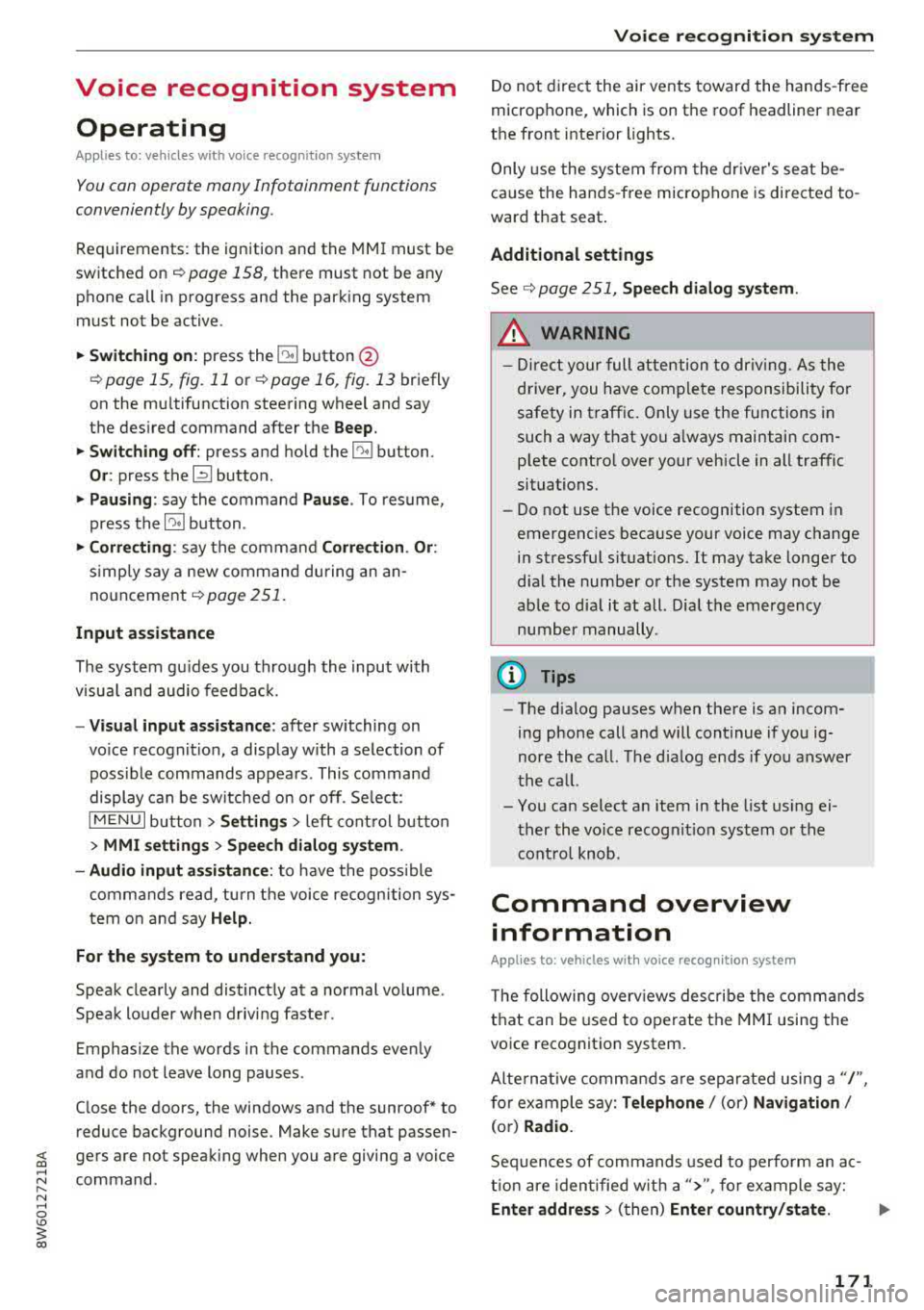
~ Switching on : press the 51 button@
~ page 15, fig. 11 or~ page 16, fig. 13 briefly
on the mu ltifunction steering wheel and say
the des ired command after the
Beep .
~ Switching off : press and hold the 51 button.
Or: press the [2] butto n.
~ Pau sing : say the command Pau se . To resume,
press the
l2;J button .
~ Correcting : say the command Corre ction . Or :
simply say a new command during an an
nouncement
<=> page 251.
Input assistance
The system gu ides you throug h the input with
v isua l and audio feedbac k.
- Vi sua l input as sistan ce: after switching on
vo ice recogn it io n, a display w ith a selection of
poss ible commands appears. This command
display can be sw itched on o r off. Se lect:
IMENU I button> Setting s> left cont rol button
> MMI setting s > Speech dialog system .
- Audio input a ssis tance :
to have the poss ible
commands read, tu rn the voice recognition sys
tem on and say
Help.
For the s yst em to understand you:
Speak clearly and dist inctly at a normal vo lume .
Speak louder when d riving faste r.
Emphasize the words in the commands evenly
and do not leave long pauses .
C lose the doors, the windows and the sunroof* to
reduce background noise . Make sure that passen-
;;!; gers are not speaking when you are giving a voice
;::; command. ,....
N .... 0 \0
3
Do not direct the air vents toward the hands-free
microphone, which is on the roof headliner near
t h e front inte rior lights .
Only use the system from the dr iver's seat be
ca use the hands -free microphone is directed to
ward that seat.
Additional settings
Seer=;, page 251, Spee ch dialog system .
A WARNING
-Direct your full attention to dr iv ing. As the
driver, you have complete responsibility for
safety in traffic . Only use the functions in
such a way that you a lways maintain com
p lete contro l over your vehicle in all traffic
situations.
-Do not use the voice recognition system in
emergencies beca use your voice may change
in stressful situations. It may take longer to
d ial the number or the system may not be
able to dial it at all. Dial the emergency
number manually.
@ Tips
- The d ialog pauses when there is an incom
ing phone call and will continue if you ig
nore the call. The d ialog ends if you answer
the ca ll.
- You can select an item in the list using ei
ther the vo ice recognit ion system or the
cont rol knob .
Command overview
information
Appl ies to: ve hicles w ith vo ice recognit ion system
T he following overv iews describe the comma nds
t h at can be used to operate the MMI using the
voice recognition system.
Alte rnative commands a re separate d using
a"/",
for example say: Telephone / (or) Navigation /
(or) Radio.
Sequences of commands used to perfo rm an ac
t ion are iden tified w it h
a"> ", fo r ex ample say:
Ente r addre ss > (t hen) Enter country /state . ..,.
171
Page 196 of 409
Audi connect (Infotainm ent )
-when the camera-based traffic sign recogn i
tion* is malfunctioning
¢ page 109
-when there a re warnings from the camera-
based traffic sign recognition*
Sw itch ing traffic light information on and
off
-Se lect: I MENU I button > Au di conne ct > Traffi c
ligh t info rm ati on >
On (~) or Off (0 ).
A WARNING
-When traffic light information is shown, a l
so always pay attention to the traffic situa
t ion, the distance to other vehicles and the
area around the vehicle. The driver is always
responsible for assessing the traff ic situa
t ion .
- Always adapt your speed to the current
weather, road and traff ic conditions. The
displayed information must never cause you
to ignore lega l traffic regulations and pose a
safety risk.
-Regardless of the traffic light informat ion,
you should always monitor your speed using
the speedometer and make sure you are ad hering to the legal speed limit .
-The traffic light information does not adjust
yo ur vehicle's speed to the speed recom
mendation shown in the display.
{D) Tips
-Traffic light information is not yet ava ilable
i n a ll cities and is not nationwide .
-Units of measurement and language set
tings are displayed based on how they were
set in the
M MI system settings
¢ page 251 .
-Always read the chap ter¢ page 198, Audi
connect (Infotainment) general informa
tion .
Weather
Applies to vehicles with Audi connect (Infotainment)
Information on current weather conditions as
well as weather forecasts for the selected search area .
194
-
.. Select and confirm Weath er.
You can also display the current weather condi
tions on the map , fo r example.
.. Select: lef t control button > on entry .
Flight information
Applies to vehicles with Audi connect (Infotainment)
Information on flights and current arrival/depar
ture times in the selected search area .
.. Select and confirm Flight inform ation .
City events
Applies to vehicles with Audi connect (Infotainment)
Information on events in various categories in
the desired search area.
.. Sele ct C it y Ev ent s > left co ntro l button > cate
gory.
Online news
Applies to vehicles with Audi connect (Infotainment)
You can check the current headlines of your fa
vorite publications in the MMI.
Requirement: yo ur myAud i acco unt must be sub
scribed to newsfeeds and your vehicle must be
connected to myAudi
~ page 191 .
.. Sele ct: !M EN UI button> Aud i conn ect> Online
new s>
desired new sfeed > a headline .
(D Tips
If you have not s ubs cribed to any pe rsonal
newsfeeds in your myAudi account, pre-con
figured newsfeeds will be displayed.
'Twitter
Applies to vehicles with Audi connect (Infotainment)
You can access the most important functions in
your Twitter accoun t through your
MMI.
Requireme nt:
You must have connected your myAudi account
with Tw itter. You can f ind additional information
fo r this on line at
www .audiu sa .c om /m yaudi.
Page 199 of 409
<( a, .... N ,....
N .... 0 \0
3 a,
Connection man ag er
See ¢ page 2 52.
Licen se sub scr ipt ion
The val idity and expirat ion date of your licenses
are displayed . When the function is switched on
~, the message Warning befor e subscription
e xpire s
will display to warn you that your license
is about to expire.
Refre sh
The content of the selected Audi connect Info
tainment service o r the entire Audi connect (Info
tainment) list is updated.
Wi-Fi hotspot
A ppl ies to: ve hicles with Wi -F i h otspot
You can use the MMI as a Wi-Fi hotspot to con
nect up to eight Wi-Fi devices to the Internet.
While driving, restricted use of unsecured, light,
small wireless devices is only possible from the
rear of the vehicle.
Requirement: the ignition must be switched on.
.,. Se lect : I MENU I button >Telep ho ne> right con-
trol button
> Wi -Fi settin gs.
The follow ing settings can be selected:
Wi-F i
The MMI Wi-Fi hotspot is deactivated at the fac
tory. Switch the Wi-Fi hotspot to
Hot spo t before
establishing a connection between your vehicle
and your Wi -F i dev ice.
- On: the MMI Wi-Fi hotspot is active and visib le
to other devices . You can connect your Wi-Fi
device to the MMI and use the Internet connec
tion if necessary .
-Off: the MMI Wi-Fi hotspot is deactivated. An
Internet connection for Wi-Fi devices is not
poss ible.
A WARNING
- To reduce the risk of an accident, use the
Audi connect Infotainment serv ices w ith a
Wi -Fi hotspot on ly in the rea r seat when the
-
Audi c onn ect ( Inf ota inm ent )
vehicle is in motion, or only when the vehi
cle is stat ionary.
- It is only safe to use tablets, laptops, mo
bile devices and other similar devices when
the vehicle is stationary because, like all
loose objects, they could be thrown around
the inside of the vehicle in a crash and cause
serio us injuries . Store these types of devices
securely while driving.
- Do not use any wireless dev ices on the front
seats within range of the airbags while dr iv
ing. Also read the warnings in the chapte r
¢ page 281, Front airbags.
-As the driver, do not allow usage of the W i
F i hotspot to distract you from driv ing, as
this cou ld increase the r isk of an accident.
(D Note
- Under some conditions, certain mobile devi
ces and ope rating systems may automati
cally sw itch from your vehicle's Wi-Fi hot
spot to the device's mobi le da ta connection.
In that event, standard text and data usage
rates would apply whi le the device's mobile
data connection is in use . Please refer to
documentation provided by your mobile de
vice's manufacture and your data carrier for
details , related terms and privacy state
ment.
- You are responsib le for all precautions tak
en for data protect ion, anti-virus protection
and protection against loss of data on mo
bile devices that are used to access the In
ternet through the Wi-Fi hotspot.
(D Tips
- In vehicles w ithout Audi connect (Infota in
ment)*, the use of the Wi-Fi hotspot is only
possible fo r the W i- Fi aud io player*. A data
c onnect io n to the Inte rnet cannot be es tab
lished.
- For add itiona l information about the Audi
connect Info tainment services, visit
www .audiusa.com /myaudi .
197
Page 204 of 409
Audi connect vehicle control
-Pay attention to upper- and lower-case let
ters when entering the vehicle code.
-If you do not have the 10-digit vehicle code,
contact an authorized Audi dealer or author
ized Audi Service Facility.
Additional options
Applies to vehicles with Audi connect vehicle control
License subscription
The validity and expirat ion date of you r subscrip
tions are displayed. When
Warning before sub
scription expires
is activated, a message wi ll be
d isp layed warning you that your license is about
to expire.
Select:
! MENU ! button> Audi connect > Display
available functions >
right control button> Li
cense subscription.
Resetting the primary user
F or examp le, you ca n reset the key user when
selling your vehicle in order to deactivate these
services .
Requirement: the ignition must be switched on.
Select :
!MENU ! button> Audi connect > right
control button
> Audi connect user management
> Key user> Reset key user .
Warning levels
Requirement: the primary user must have set one
or more warning levels. Secondary users can only
see if a warning level is act ive or not .
Select:
! MENU ! button> Audi connect > right
control button
> Alerts.
Remote locking and
unlocking
Applies to vehicles with Audi connect vehicle control
You can lock and unlock your veh icle using this
service.
Requirement
-This requires the 4-dig it PIN that you specified
during the verification on www.audiusa.com/
myaudi.
-The vehicle must be stationary.
202
-T he ignition must be switched off.
Vehicle status report
Applies to vehicles w ith Audi connect vehicle control
The Driver Information System collects data un
der certain conditions and sends it to a server.
When data is stored, yo u can access va lues such
as these using the service:
-Remaining range
-Fue l tank level
-Oil level
-Vehicle doors are open/closed or locked/un-
locked
-Mi leage
-Next oil change
-Next inspection
-Warning messages
-Side marker lights/parking lights on/off
For additional information on the Driver Informa
tion System, refer to
c:> page 17, Driver informa
tion system.
A WARNING
Do not ignore messages and warning or ind i
cator lights that turn on in the vehicle be
cause of the information in the status report .
This could lead to break downs in on the road,
accidents and serious injuries.
Parking location
Applies to vehicles with Audi connect vehicle control
The vehicle collects data under certain cond it ions
and sends it to a serve r.
When data is stored, you can access values such
as these using the service :
-Vehicle location display,
-Display of one's own location,
-Route to you r vehicle .
If your mobile device also has a navigation func
tion, you ca n navigate to your last kno wn parking
lo ca tion .
Page 209 of 409
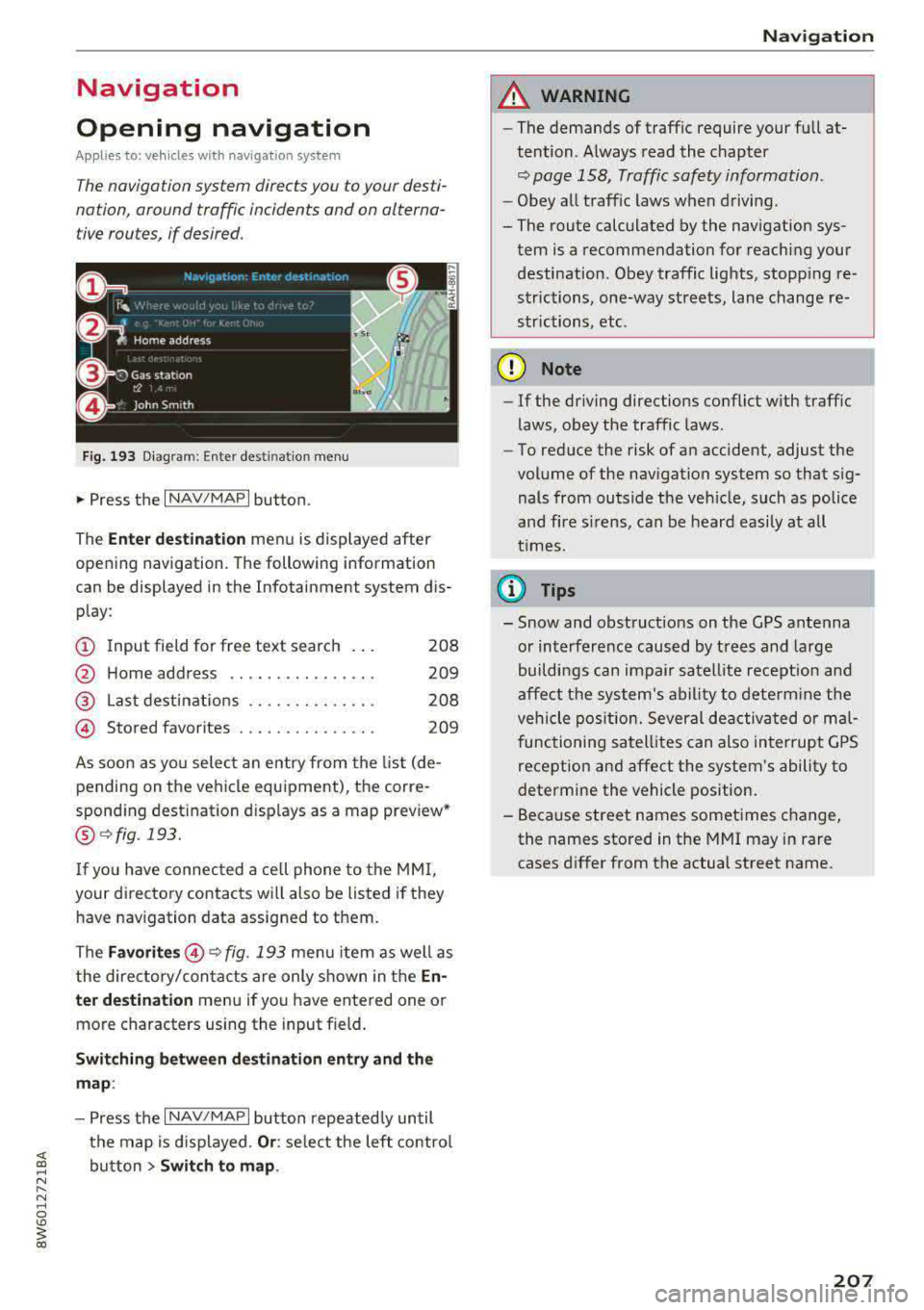
Navigation
Opening navigation
Applies to: vehicles with navigation system
The navigation system directs you to your desti
nation, around traffic incidents and on alterna
tive routes, if desired.
Fig. 193 Diagram : Ente r dest ination menu
.. Press the I NAV/MAPI button.
The
Ente r des tinati on menu is displayed after
opening navigation. The following information
can be displayed in the Infotainment system dis
play:
(D I nput field for free text search 208
@ Home address . . . . . . . . . . . . . . . . 209
@ Last dest inations . . . . . . . . . . . . . . 208
@ Stored favorites . . . . . . . . . . . . . . . 209
As soon as yo u select an entry from the list (de
pending on the vehicle equipment), the corre
sponding destination d isplays as a map preview*
@ r::!> fig . 193.
If
yo u have connec ted a ce ll phone to the MMI,
your di rectory contacts will also be listed if they
have navigation data assigned to them.
The
Fav orites @¢ fig. 193 menu item as well as
the directory/contacts are only shown in the
En
t er des tination
menu if you have ente red one or
more characters using the input field.
Swi tching betwe en d estination entr y and th e
m ap :
- Press the I NAV/MAPI button repeated ly until
the map is d isplayed .
Or: select the left contro l
button
> S wi tch t o map . Na
vigat ion
A WARNING
--The demands of traffic require your full at-
tention. Always read the chapter
q page 158, Traffic safety information.
- Obey all traff ic laws when driving.
- The route calculated by the navigation sys-
tem is a recommendation for reaching your
destination. Obey traffic lights, stopp ing re
strictions, one-way streets, lane change re
strictions, etc.
(D Note
- If the driving directions conflict with traffic
laws, obey the traffic laws .
- To reduce the risk of an accident, adjust the
volume of the nav igation system so that sig
nals from outside the veh icle, such as police
and f ire s irens, can be heard easily at all
times.
(i) Tips
- Snow and obstruct ions on the GPS antenna
or interference caused by trees and large
buildings can impair satell ite recept ion and
affect the system's ability to dete rm ine the
veh icle pos it ion. Several deactivated or mal
functioning satell ites can also interrupt G PS
recept ion and affect the system's ability to
determine the vehicle position.
- Because street names sometimes change,
the names stored in the MMI may in rare cases d iffer from the actual street name.
207
Page 238 of 409
Media
-Do not u se any wireless devices on the fro nt
seats within range of the airba gs w hile driv
ing. Also read and follow the warnings in
c:> page 281, Fro nt airbags.
CD Note
- Always follow the information found in c> 0
in Wi-Fi hotspot on page 197 .
-Please note that there generally are add i
tiona l costs when using an online media
service account, especially when it is used i nternationally.
{!) Tips
-Depending on the Internet connection and
network traff ic, a connection loss can occur
during p layback of on line media serv ices.
-Online media and Internet radio usage de
pends on the serv ice avai lability of the third
party provider.
- Audi AG simply makes the access to on line
media serv ices possible t hrough the MMI
and does not take any respons ibility for the
contents of the onli ne med ia serv ices .
-Always read the chapter c:> page 198, Audi
connect (Infotainment) general informa
tion.
-Depending on the mobile device used, the re
may be interr uptions du ring media playback
and when using the
Audi MMI connect app.
T o avoi d inter ruption s when usi ng a mob ile
device, do no t loc k t he s creen on you r mo
bi le dev ice a nd keep the
Audi MMI connect
app in the foreground .
- Co ntact an a utho rized Audi dea le r or a u
thorized Audi Service Facili ty for additional
informat ion about on line media .
236
Multimedia connections
USB adapter for Audi music interface
You can connect your mobile devices (such as a
smartphone or
MP3 player) to the Audi music in
terface and charge them using a special USB
adapter .
®-
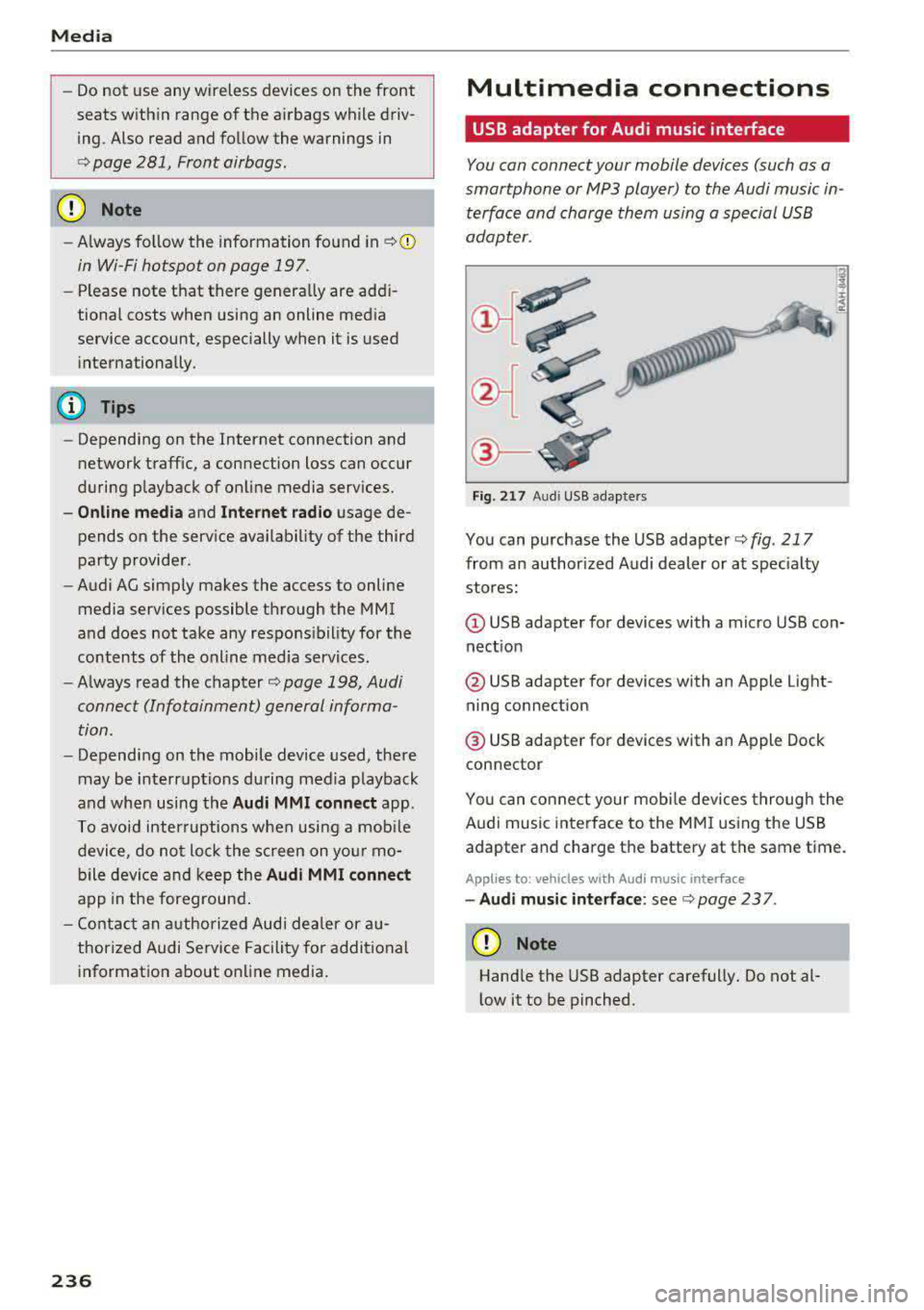
Fig. 21 7 Audi USB adapters
You can purchase the USB adapter c> fig . 217
from an author ized Audi dealer or at spec ia lty
stores:
Q) USB adapter for devices with a micro USB con
nect ion
@ USB adapter for devices with an Apple Light
ning connect ion
@ USB adapte r for devices with an Apple Dock
connector
You can conne ct your mob ile dev ices throug h the
Audi music interface to the MM I using the USB
adapter and charge the battery at the same time.
Applies to: vehicles wit h Aud i music interface
-Audi musi c interface : see c> page 237.
CD Note
Handle the USB adapter carefully. Do not al
l ow it to be pinched .
Page 259 of 409
Driving sa fe ty
Driving safety
Basics
Safe driving habits
Please remember -safe ty first!
The individua l safety features of your vehicle can
work together as a system to help protect you
and your passengers in a wide range of accidents.
These features cannot work as a system if they
are not always correctly adjusted and correctly
used .
This chapter contains important informat ion,
tips, instruct ions and warn ings that you need to
read and observe for your own safety, the safety
of your passengers and others . We have summar
ized here what you need to know about safety
be lts , a ir bags, child restra ints as well as child
safety. Yo ur sa fe ty is for us
priority number 1 . Al
ways observe the information and wa rnings in
this section - for your own safety as well as that
of your passengers.
The informa tion in this section applies to all
model ve rsions of your vehicle . Some of the fea
tures described in th is sections may be standard
equipment on some models, or may be optional
equ ipment on others. If you are not sure, ask
your author ized Audi dealer.
A WARNING
- Always make sure that you follow the in
structions and heed the WARNINGS in th is
manual. It is in your inte rest and i n the in
te res t of your passengers .
- Always keep all of the Owner 's L iterature
man uals in yo ur Audi when you lend o r sell
yo ur vehicle so that this importan t info rma
t ion w ill always be availab le to the dr iver
and passenge rs.
- Alw ays keep t he Owner 's L ite ra tu re han dy
so that you can find i t easi ly if yo u have
questions .
258
· Important things to do before driving
Safety is everybody 's job! Vehicle and occupant
safety always depends on the informed and care
ful driver .
For your safety and the safety of your passen
gers,
before driving always:
.. Make sure that a ll lights and signals are operat
ing correctly .
.. Make sure tha t the tire pressure is correct .
.. Make sure that all windows are clean and afford
good vis ibility to the outs ide .
.,. Sec ure all luggage and othe r items ca refully
¢ page 263 .
.,. Mak e sure tha t noth ing ca n interfere with the
pedals .
.. Adjust front seat, head restraint and mirrors
correctly for your height.
.. Applies to: adjustable head restraints: Instruct
passengers to adjust the head restraints ac
cording to the ir height .
.. Make sure to use the rig ht child restraint cor
rectly to protect chi ldren
~ page 302, Child
safety.
.,. Si t properly in yo ur seat a nd make su re t hat
your passengers do the same ¢
page 71, Front
seats.
.. Fasten your safety belt and wear it properly . Al
so instruct your passenge rs to fasten thei r sa fe
ty belts properly ¢
page 268.
What impairs driving safety?
Safe driving is directly related to the condition of
the vehicle , the driver as well as the driver's abili
ty to concentra te on the road withou t being dis
tracted.
The driver is responsib le for the sa fety of the ve
hicle and a ll of its occupants . If your ability to
drive is impa ired, safety risks for everybody in the
vehicle increase and you a lso become a hazard to
everyone else on the road ¢
,&.. There fore:
.. Do not let yourse lf be distracted by passengers
or by using a cellular telephone .
.. NEVER dr ive whe n your driving ab ility is im -
paired (by med ications, alcohol, drugs, e tc.) .
..,.
Page 260 of 409
.,. Observe all traffic laws, rules of the road and
speed limits and plain common sense .
.. ALWAYS adjust your speed to road, traffic and
weather conditions.
.. Take frequent breaks on long trips. Do not drive
for more than two hours at a stretch.
.. Do NOT drive when you are tired, under pres
sure or when you are st ressed.
& WARNING
Impai red dr iv ing safe ty inc reases the risk of
ser ious personal inju ry and death whenever a
vehicle is being used.
Correct passenger
seating positions
Proper seating position for the driver
The proper driver seating position is important
for safe, relaxed driving.
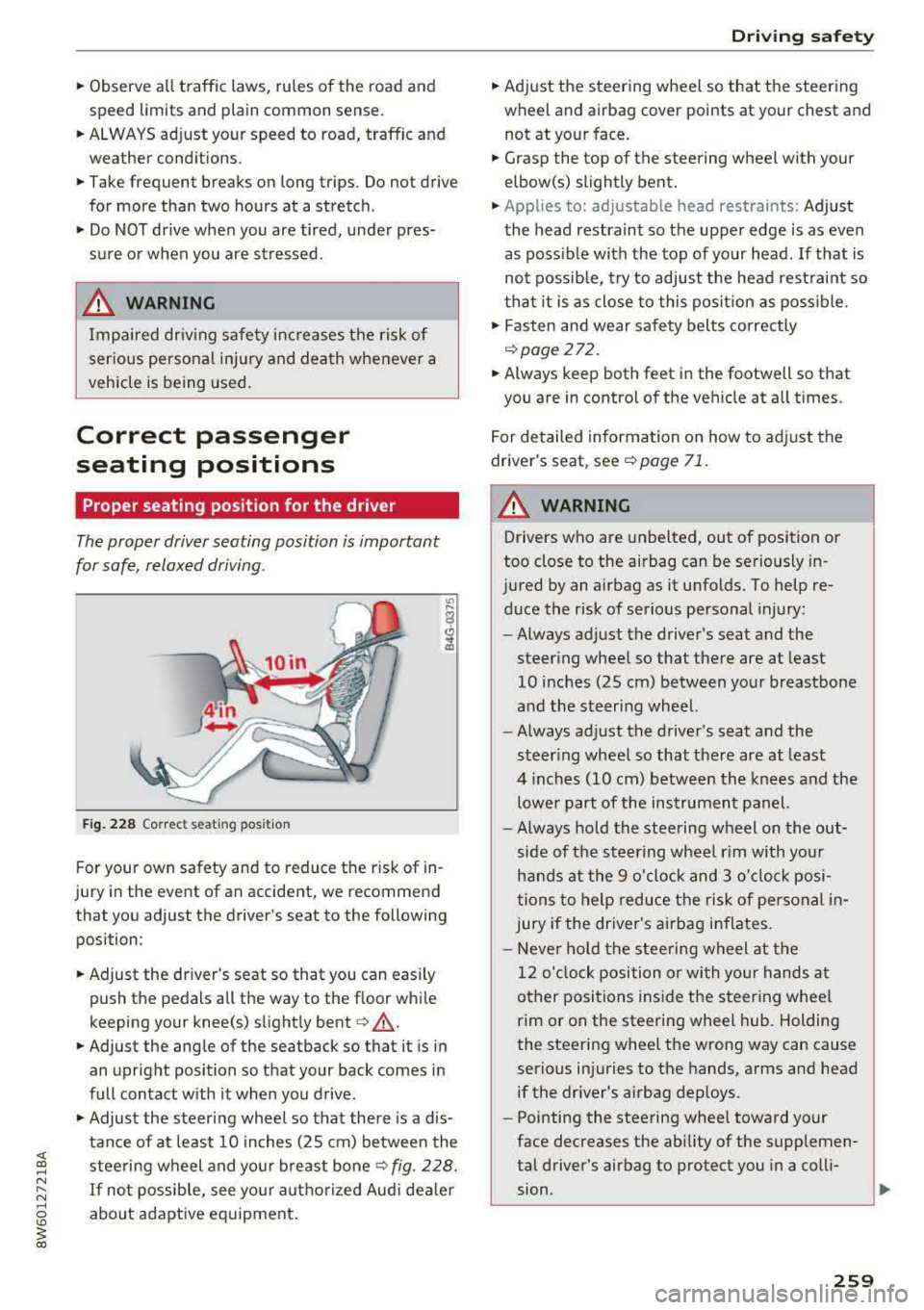
F ig . 2 28 Correct seating posit ion
F or your own safety and to reduce the risk of in
jury in the event of an accident, we recommend
that you adjust the driver's seat to the following position:
.. Adjust the dr iver's seat so that you can easily
push the pedals all the way to the floor while
keeping your knee(s) slight ly
bent ¢&_ .
.. Adjust the angle of the seatback so that it is in
an upright position so that your back comes in
full contact w ith it when you drive .
.,. Adjust the steering wheel so that there is a dis
tance of at least 10 in ches (25 cm) between the
steering wheel and you r breast
bone ¢ fig. 228.
If not possib le, see your aut horized Aud i dea le r
about adaptive eq uipment .
Driving safety
.. Adjust the steering wheel so that the steering
wheel and airbag cover points at your chest and
not at yo ur face .
.. Grasp the top of the steering wheel with your
elbow(s) slightly bent .
.,. Applies to: adjustable head restraints: Adjust
the head restraint so the upper edge is as even as poss ible with the top of your head. If that is
not possib le, try to adjust the head rest raint so
t ha t it is as close to this pos ition as poss ible .
.. Fasten and wear safety belts correctly
¢page 272.
.. Always keep both feet in the footwell so that
you are in contro l of the veh icle at a ll times.
F or detailed information on how to adj ust the
drive r's seat, see
¢page 71 .
A WARNING
-
Drivers who are unbelted, out of position or
too close to the airbag can be seriously in
jured by an airbag as it unfolds. To help re d uce the risk of serious personal injury:
- Always ad just the driver's seat and the
steer ing whee l so that there are at least
10 inc hes (25 cm) between you r breastbone
and the steering wheel.
- Always ad just the driver's seat and the
steer ing wheel so that there are at least
4 inches (10 cm) between the knees a nd the
lowe r part of the instrument panel.
- Always hold the steering w heel on the out
s ide of the steering wheel r im with yo ur
hands at the 9 o 'clock and 3 o'clo ck posi
tions to help reduce the risk of personal in
jury if the driver's airbag inflates.
- Never hold the stee ring wheel at the
12 o' clock position o r wi th yo ur hands at
other positions i nside the steer ing whee l
rim or on the steering wheel hub. Holding
the steering wheel the wrong way can cause
serio us injuries to the hands, arms and head
if the dr iver's airbag dep loys.
- Pointing the steering wheel toward your
face decreases the ability of the supplemen
tal driver's airbag to protect you in a coll i·
.,
sion. ..,
259
Page 269 of 409
Safety belt s
Safety belts
General information
Always wear safety belts!
Wearing safety belts correctly saves lives!
This chapter explains why safety be lts are neces
sary, how they work and how to adjust and wear
them correctly .
.. Read all the information that follows and heed
all of the instructions and WARNINGS.
&_ WARNING
Not wearing safety belts or wearing them im
properly increases the risk of serious personal
injury and death.
- Safety belts are the s ingle most effective
means ava ilable to reduce the risk of serious
injury and death in automobile accidents.
For your protect ion and that of your passen
gers, always co rrectly wear safety be lts
when the vehicle is moving .
- Pregnant women, injured, o r physically im
paired persons must a lso use safety belts.
L ik e all vehicle occ upants, they are mo re
likely to be serio usly injured i f they do not
wea r safety be lts. The best way to protect a
fetus is to protect the mother -thro ughout
the ent ire pregnancy .
Number of seats
Applies to: Coupe/Cab riolet: Your Audi has a to
tal of four seating positions: two in the front and
two in the rear. Each seat ing position has a safety
belt .
App lies to: Sportback: Your Audi has a total of
five seating positions: two in the front and three
in the rear . Each seating posit ion has a safety
belt .
&_ WARNING
Not wea ring safety belts or wearing them im
properly increases the risk of ser io us personal
injury and dea th.
268
- Never strap more than one person, includ
ing small children, into any belt. It is espe
cially dangerous to place a safety be lt over a
child sitting on your lap .
- Never let more people r ide in the vehicle
than there are safety be lts available.
- Be sure everyone riding in the vehicle is
proper ly restrained with a separate safety
be lt or ch ild restraint .
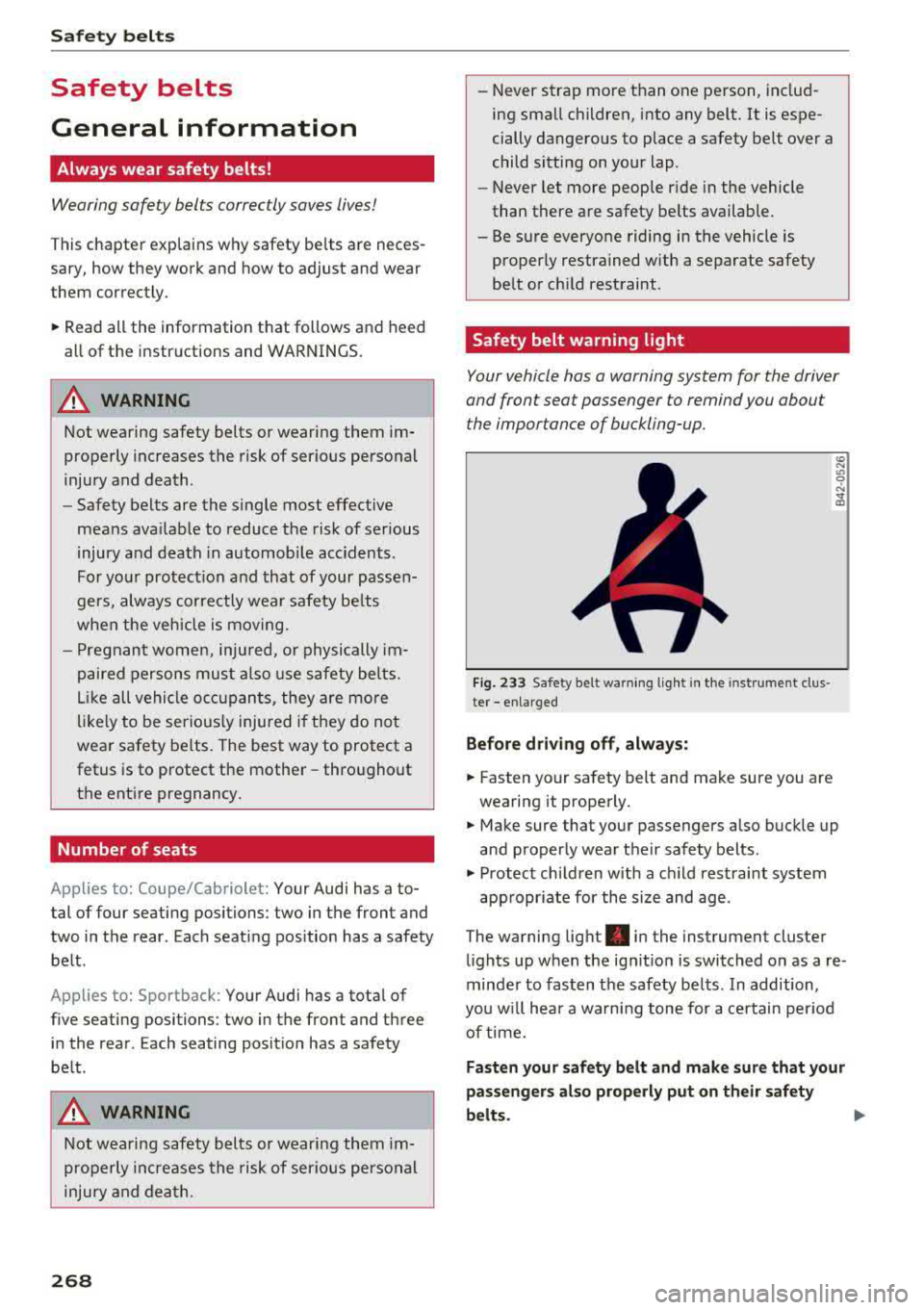
Safety belt warning light
Your vehicle has a warning system for the driver
and front seat passenger to remind you about the importance of buckling-up.
Fi g. 233 Safety belt warn ing lig ht in th e in st rument clus
ter -enlarged
Befor e dri ving off , alway s:
.. Fasten your safety belt and make sure you are
wearing it properly .
and properly wear the ir safety belts .
.. Protect children with a ch ild restraint system
app ropr iate for the size and age .
The warning light . in the instrument cluster
l ights up when the ig nition is switched on as a re
minder to fasten t he safety be lts . In addition,
you w ill hea r a wa rning tone for a ce rtain per iod
of time.
Fasten your saf ety b elt and make sure that your
pas sengers al so prop erly put on th eir safety
belts.
Page 270 of 409
_& WARNING
-Safety belts are the single most effective
means availa ble to r educe the ris k of ser ious
injury and death in automobile accidents .
For your protection and that of your passen
gers, always correctly wea r safety be lts
when the veh icle is moving .
- Failure to pay attention to the warn ing light
that comes on could lead to persona l injury.
Why use safety belts?
Frontal collisions and the law of physics
Frontal crashes create very strong forces for peo
ple riding in vehicles.
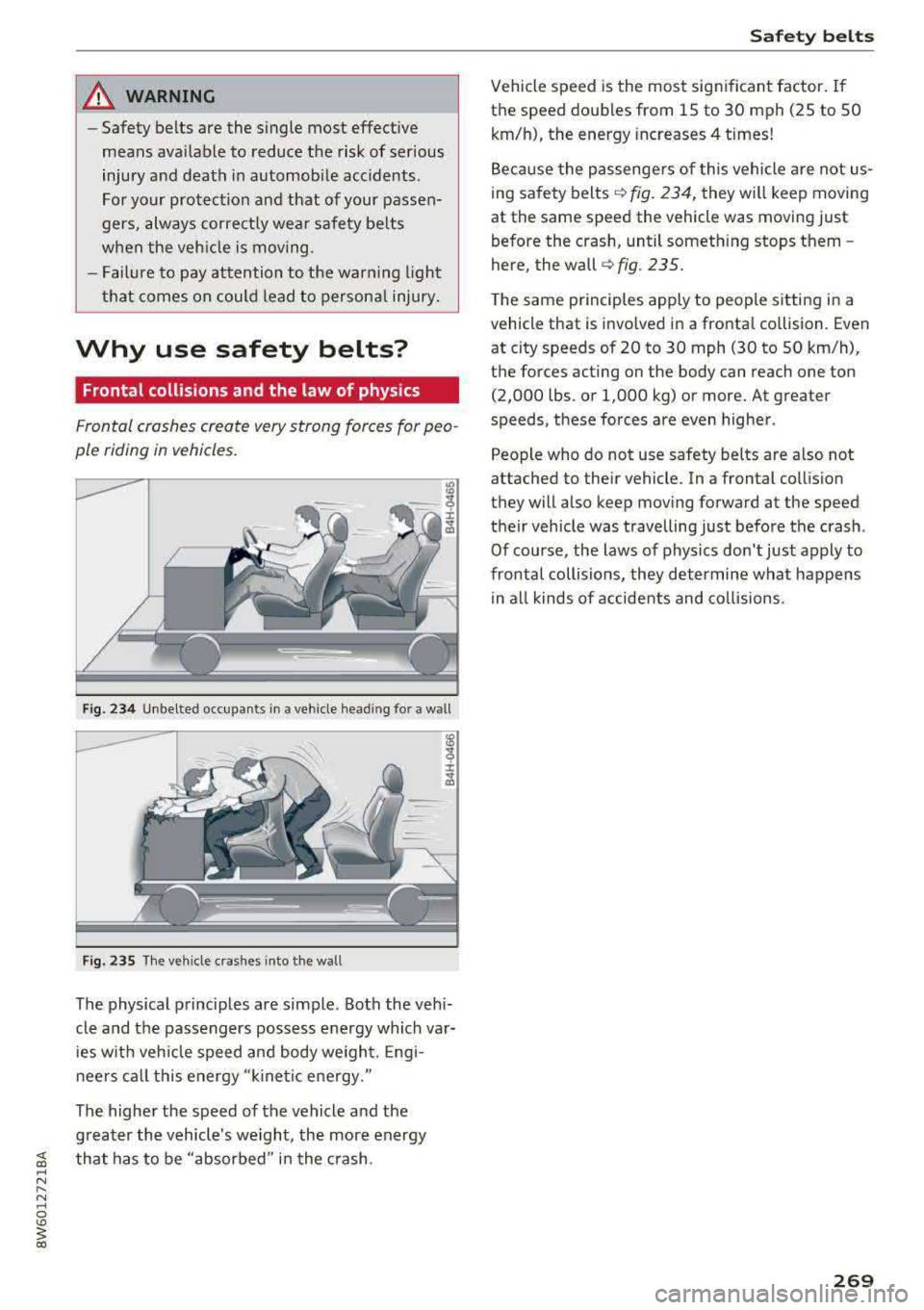
Fig. 2 34 Unbelted occupants in a veh icle head ing for a wall
Fig. 23 5 The veh icle crashes into the wa ll
The physical principles are simple . Both the vehi
cle and the passengers possess e nergy which va r
ies w ith veh icle speed and body weigh t. Engi
n eers ca ll this energy "ki ne tic e nergy."
The highe r the speed of the vehicle and the
g reater the vehicle 's we ight, the more energy
~ that has to be "absorbed " in the crash. ~ N ...... N ~ 0
'° ~ co
Safet y bel ts
Vehicle speed is the most significant factor . If
the speed doubles from 15 to 30 mph (25 to 50
km/h), the energy increases 4 times!
Because the passenge rs of this vehicle a re not us
ing sa fety belts
¢ fig . 234, they will keep moving
at the same speed the vehicle was moving just
before the crash, until someth ing stops them -
here, the wall
c:.-fig. 235.
T he same p rinciples apply to people sitting in a
vehicle that is invo lved in a fronta l co llision. Even
at city speeds of 20 to 30 mph (30 to 50 km/h),
the forces acting on the body can reach one ton (2,000 lbs . or 1,000 kg) or more. At greater
speeds, these forces are even higher .
People who do not use safety belts are a lso not
attached to the ir vehicle. In a frontal collis ion
they will also keep moving forward at the speed
their vehicle was travelling just before the crash .
Of course, the laws of physics don' t just apply to
frontal collisions, they determine what happens in all kinds of accide nts and co llisions.
269