change time AUDI A6 2012 User Guide
[x] Cancel search | Manufacturer: AUDI, Model Year: 2012, Model line: A6, Model: AUDI A6 2012Pages: 298, PDF Size: 74.43 MB
Page 89 of 298
Audi side assist Lane Change Assistant
Description
App lies to vehicles: with si de assist
The side assist helps you when changing
lanes .
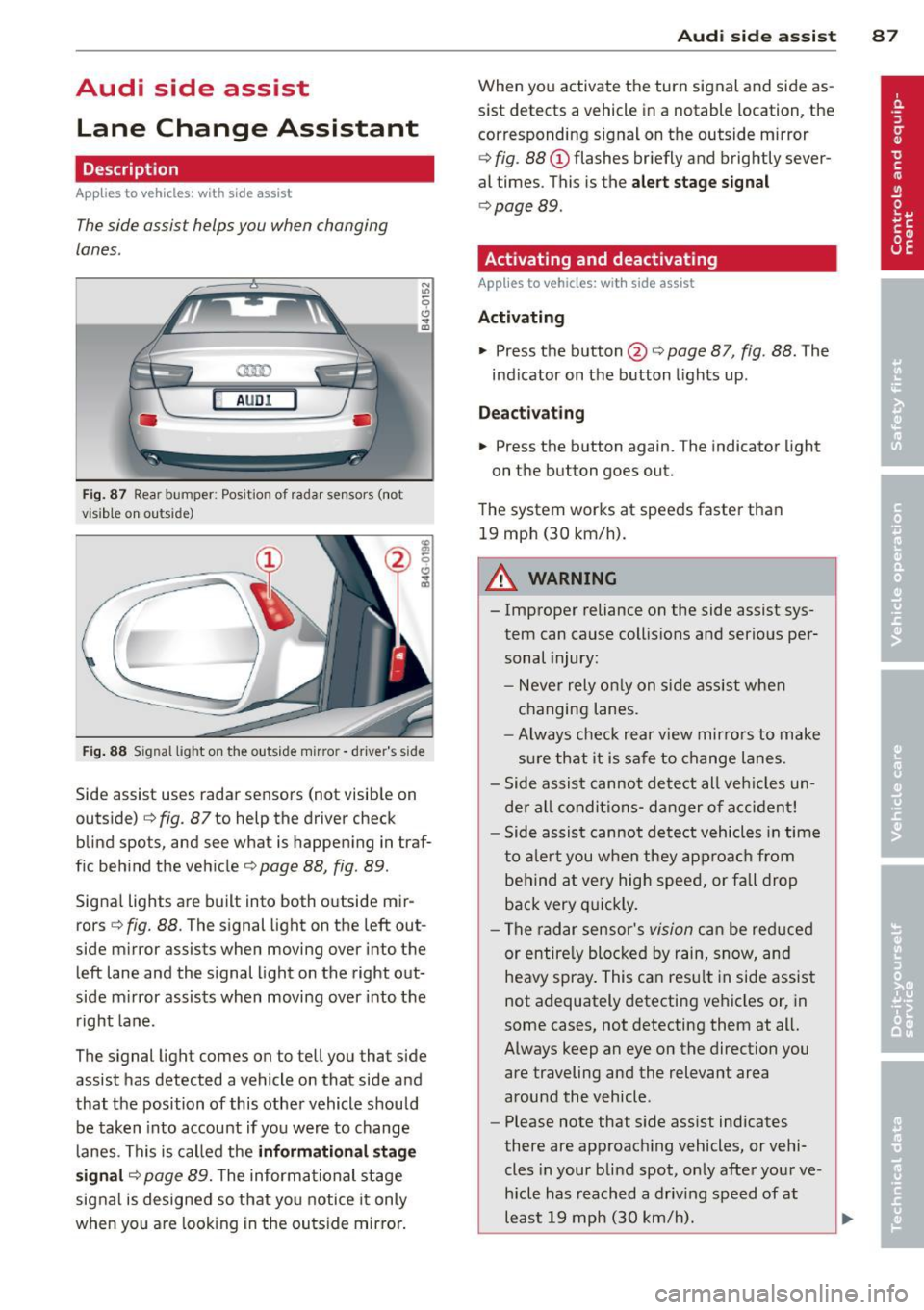
H AUDI I
Fig. 87 Rear bumper : Pos ition of rada r sen sors (not
v isib le on outs ide)
Fig . 88 S ig n al l ight on the outside m irro r - drive r's side
Side assist uses radar sensors (not visib le on
outside)
c::> fig. 87 to help the driver check
blind spots, and see what is happening in traf
f ic beh ind the veh icle
c::> page 88, fig. 89 .
Signal lights are built into both outside mir
rors <=>
fig. 88. The signal light on the left out
side mirror assists when moving over into the left lane and the signal light on the right out
side m irror assists when moving over into the
right lane .
The signal light comes on to tell you that side
assist has detected a vehicle on that side and
that the position of this other vehicle should be taken into account if yo u were to change
lanes. This is called the
informati onal stag e
s ignal
c::> page 89. The informational stage
signal is designed so that you notice it only
when yo u are look ing in the outside mirro r.
Aud i side assist 8 7
When you activate the turn signal and side as
sist detects a vehicle in a notable location, the
corresponding signal on the outside mirror
c::> fig . 88 (D flashes br iefly and brightly sever
al times . This is the
aler t stage signal
c::> page 89 .
Activating and deactivating
Applies to vehicles: wit h side assist
Activating
.., Press the button @c::> page 87, fig. 88 . The
ind icator on the button lights up .
Dea ctivating
.., Press the button again. The indicator light
on the button goes out.
The system works at speeds faster than 19 mph (30 km/h).
A WARNING
-
- Improper reliance on the side assist sys-
tem can cause collisio ns and serious per
sonal injury:
- Never rely on ly on s ide assist whe n
changing lanes.
- Always check rear view mir rors to make
sure that it is safe to change lanes.
- Side assist cannot detect all veh icles un
de r al l conditions- danger of accident!
- Side assist cannot detect vehicles in time
to a le rt you when they approa ch from
behind a t very high speed, or fall drop
back very q uickly.
- The radar sensor's
vision can be red uced
or entire ly blocked by rain, snow, and
heavy spray . This can resu lt in side assis t
not adequately detecting vehicles or, in
some cases, not detecting them at all.
Always keep an eye on the direction you are traveling and the relevant area
around the vehicle .
- Please note that s ide assist indicates
there are approac hing vehicles, or vehi
cles in your blind spot, on ly afte r you r ve
hicle has reach ed a driv ing speed of at
least 19 mph (30 km/h).
~
Page 95 of 298
right of your travel lane, depending on wheth
er you driv e in the center of your lane or closer
to the edge .
I f yo u drive in narrow lanes, s ide ass ist's de
tection area may a lso include other lanes -es
pecia lly if you tend to drive on the edge of
your lane¢
fig. 95. Under these condit ions,
ve hicles can also be detected that are two
lanes away, and side assist then could sw itch
between the informat ional and warn ing stage
sig nals .
When driving in very w ide lanes, vehicles in
the adjacent lane may not be detected be
cause they are not inside the detection area .
Notes
Messages in instrument cluster display
Applies to vehicles: with side assist
If side assist turns off automatically, the indi
cator light on the button wi ll go out and you
will see a message in the instrument cl uster
d isplay:
Aud i side a ssist : not availab le. s en sors
blocked
T he side assist sensors are built into the rear
bumper on the left and right (not visible on
the outside) ¢
page 87, fig. 87. To ensure that
you do not adversely affect the way side assist functions, foreign objects (such as stickers o r
b icycle racks) shou ld not be attached to the
a rea on the rear bumper where the sensors
a re loca ted.
If side ass ist func tions a re ad
versely affected, yo u will see this message in
the instrument cluster display. Remove any
thing that may be blocking the sensors .
If no vehicle is detected for a longer period of
time while driving, side assis t will a lso switch
off a utomatica lly.
Audi side as sist currently not available
If there is a tempora ry problem (such as the
veh icle's battery charge being low), s ide ass ist
cannot be activated tempo rarily.
Audi side a ssis t 93
Audi side assist: system fault
Have the system checked by an author ized Au
di dealer or qualified workshop .
Audi side assist: not available when
to wing
T he radar sensor's view is limited when tow
ing a trai ler . F or vehicles with a facto ry instal
led towing hitch or a trailer hitch that was in
stalled later according to factory specifica
tions, side assist is automatically deactivated
a s soon as the electrical connection to the
trailer 's electrical socket is made, and this sta
tus message appears in the instrument clus
ter display . Deactivation cannot be guaran
teed when using a ret rofitted towing hitch
that was
not installed acco rd ing to facto ry
spe cifica tions.
Safety tips
Applies to vehicles: with side assist
T he side assist detection may be limited when
driving around narrow street corners, on hi lly
streets, and under poor weather conditions.
It is possible that the radar sensors may a lso
detect other objects, s uch as high or stag
gered guardrails .
S ide assist does not measure act ual lane
width. The system assumes a fixed lane width.
Detection in the left and right lanes is based
on this ass umed lane width . When driving on
narrow roads or when driving to the left or
right of the center of a travel lane, it is poss i
ble that vehicles will be detected that are
not
in the lane next to the lane you are using .
A WARNING
-Improper reliance on the side assist sys
tem can cause coll is ions and serio us pe r
sonal injury:
- Never rely on ly on side assist when
changing lanes .
- Always check rear view mirrors to make
sure that it is safe to change lanes.
- Side assist cannot detect all vehicles un-
der all conditions- danger of accident!
~
Page 96 of 298

94 Audi side ass is t
- Side assist cannot detect vehicles in time
to alert you when they approach from
behind at very high speed, or fall drop
back very quickly .
- The radar sensor 's
vision can be reduced
or entirely blocked by rain, snow, and heavy spray . Th is can result in side assist
not adequately detecting vehicles or, in
some cases, not detecting them at a ll.
Always keep an eye on the d irection you
are t raveling and the relevant area
around the vehicle .
- Please note that side assis t indicates
there are approaching vehi cles, o r vehi
cles in your blind spot, only after your ve
hicle has reached a driving speed of at
least 19 mph (30 km/h).
- Side assist signal does not work around
tight corners (turning radius less than
328 feet, or 100 m) .
- Side assist is no rep lacement for the driv
er's f ull attent ion . The dr iver alone is re
sponsible for lane changes and similar
dr iving maneuvers. A lways keep an eye
on the direction you are traveling and the
relevant area around the vehicle.
(D Note
To ensure that side assist is not adve rsely
affected, you should not block the area on
the rear bumper where the radar sensors
are located with fo reign objects (such as
w ith stickers or bicycle racks) .
(D Tips
If the positions of the radar sensors have
been changed as a result of a rear end-col
lision, fo r instance, have side assist
checked by a n author ized Audi dealer for
safety reasons.
Page 97 of 298

Audi drive select Driving settings
Introduction
Aud i drive select makes it possible to experi
ence different types of vehicle settings in one
ve hicl e. The driver can select three
Comfort,
Auto
and Dynamic modes in the MMI to
switch between a sporty and a comfortable
driving mode.
You can also adjust the setting according to
your preferences in the
individual mode. For
examp le, you can comb ine settings such as a
sporty engine tuning with light steering.
Description
The vehicle setup in each mode depends on
the vehicle's features. The engine, transmis
sion and steering are always involved . The cor
nering light* can also be adjusted . The revers i
ble safety belt tensioners~
page 187 are
adapted to the dynamic mode.
Engine and transmission
Depending on the mode, the engine and the
transmission respond more quickly or in a more balanced manner to accelerato r pedal
movements. In the sporty dynamic mode, the
transmission shifts at higher RPMs.
Steering
The steering adapts in terms of steering effort
and steering ratios . Indirect steer ing that
moves easily as in comfort mode is especially
suited to long drives on a highway. In con
trast, dynamic mode provides sporty, direct
steer ing .
The follow ing applies to vehicles with dynam ic
steering*: the steering ratio changes based on
veh icle speed in order to maintain optimum
steer ing effo rt for the driver at all times . Thi s
sets the steering to be less sensitive a t higher
speeds in order to provide improved vehicle
control.
Audi drive select 95
Cornering light*
The cornering light adapts to driving on
curves . The pivoting action and the lighting
are also adapted to the mode.
¢j) Tips
- In some models, the maximum vehicle
speed can only be reached in the
Auto
and Dynamic modes.
- Selecting the
Dynamic mode results in
sporty shifting characterist ics. The
S
gear position engages automatically.
Selecting the driving mode
You can choose between Comfort, Auto, Dy
namic and Individual .
Fig. 96 MMI: Drive select
.. To se lect the mode , se lect the following in
the MMI:
ICARI function button> Comfort,
Auto, Dynamic or Individual.
You can change the driving mode when the ve
hicle is stationary or wh ile driving. If traffic
permits, after changing modes, briefly take
your foot off the accelerator pedal so that the recently selected mode is a lso activated for
the engine .
Comfort -provides a comfort-oriented veh icle
setup and is suited for long drives on high
ways.
Auto -provides an overall comfortable yet dy
namic dr iving feel and is suited for every day
use .
Dynamic -gives the vehicle a sporty driving
feel and is suited to a sporty driv ing style.
Page 116 of 298

114 Park in g s yste m
segments move closer to the vehicle. The col
lision area has been reached when the next to
l ast segment is displayed. Do not cont inue
driving farther
c:> &.!
A WARNING
-Sensors have blind spots in which objects
cannot be detected . Pay special attention
to small children and animals because
the sensors cannot always detect them .
- The parking system cannot replace the
dr ive r's attention. The driver alone is re
sponsible for parking and similar driving
maneuvers.
- Always keep your eyes on the veh icle's
surround ings, using the rear view mirror
as well.
(D Note
Low obstacles al ready signaled by a warn
ing can disappear from the system's detec
tion range as they are approached and will
not con tinue to be signa le d . Obje cts such
as barrier cha ins, trailer draw bars, thin
pa inted vertical poles or fences may not be
detected by the system, posing risk of
damage.
@ Tips
- The sensors must be kept clean a nd free
of snow and ice for the park assist to op
erate.
- You can change the volume and pitch of
the signals as well as the display
<=>page 118.
-What appears in the display is time -de
l ayed.
Audi parking system
plus with rear view
camera
Introduction
Applies to vehicles : pa rkin g system p lus wit h rear view
came ra
Fig. 121 Parking mode 1: reverse parking
Fig. 122 Park ing mode 2: parallel parkin g
This park ing system integ rates a r e arvi ew
cam era
in addition to the audio and v isual
parking system signa ls
<=> page 113.
0 ± .. a,
You can choose between two modes to assist
yo u w ith parking. For example, you can use
"pa rking mode 1" when parking in a park ing
space or garage
c:> fig. 121. When you want to
park para llel to the edge of the st ree t, select
"pa rking mode 2"
<=>fig. 122.
Page 118 of 298

116 Parking system
-Never use warm or hot water to remove
snow or ice from the rear view camera lens -this could cause the lens to crack!
- When cleaning the lens, never use prod
ucts that are abrasive.
Switching on and off
Applies to vehicles: with pa rk in g system plus w it h rear
view ca mera
The rear view camera switches on automati
cally together with the acoustic and visual
park assist when you put the vehicle in re vers e.
Switching on
• Switch the MMI on
• Activate
comfort or auto mode in Audi drive
select
r::!;) page 95.
• Shift into reverse or
• Press the switch
l""I in the center console
r::!;)page 113, fig. 119. A short confirmation
tone sounds and th e indicator light in the
switch lights up.
Switching between the rear view camera
and visual display
• Press the Graphic control button
r::!;) page 117 , fig . 12 S @ to see the visual
display .
• Press the
Rearview control button to see
the rear view camera image
r::!;) page 113,
fig . 120 .
Switching off
• Drive faster than 6 mph (10 km/h), or
• press the switch
I"" I or
• switch
off the ignition.
A WARNING
-The MMI display cannot show, or cannot
adequately show, certain objects (such as
small posts or grating), recesses in the
ground and protruding parts on another
car.
- Only use the rear view camera to assist
you if it shows a good, clear picture. For
example, the image may be affected by the sun shining into the lens, dirt on the
lens or if there is a defect .
- Use the rear view camera only with the
rear lid completely closed. Make sure any
objects you may have mounted on the
rear lid do not block the rear view cam
era .
(!) Tips
-The sensors must be kept clean and free
of snow and ice for the park assist to op
erate.
- If your vehicle is near an obstacle, an ad
ditional visual indicator appears in the
rearview camera image . This superim
posed image is there to help you to de
termined which area of the vehicle is af
fected.
- You can change the volume and pitch of
the signals as well as the display
r::!;) page 118.
-What appears in the display is time-de
layed .
Page 156 of 298

154 Airbag sys te m
- Never place or attach accessories or o th
er objects (such as cup holders, tele
phone brackets, large, heavy or bulky ob
jects) on the doors, over or near the area marked "AIRBAG" on the stee ring wheel,
instrument panel, seat backrests or be
tween those a reas and yourself. These
objects co uld cause injury in a crash, es
pecially when the airbags inflate .
- Never recline the front passenger's seat
to transport objec ts. Items can also
move into the area o f the side airbag or
the front airbag during braking or in a sudden maneuver . Objects near the air
bags can become project iles and cause
injury, part icularly when the seat is re
cl ined .
- Never place or transport ob jects on the
front passenger seat. Objects on the
front passenger seat could cause the ca pacitive senso r in the seat to s ignal to
airbag system that the seat is occupied
by a person whe n it in fa ct is not, o r that
the person on the se at is heavie r than he
or she actually is. The change in electric
capacitance because of such objects can
cause the passenger front airbag to be
t u rned on when it sho uld be
off, or can
cause the airbag to work in a way that is
different from the way it wou ld have
wor ked w ithout ob jects on the seat .
- Always make sure that there is nothing
on the front passenger seat that will
cause the capacitive passenge r detection
system in the s eat to s ignal to the A irbag
System that the seat is occupied by a
person when it is not, or to signa l th at it
is occupied by someone who is heavier
than the pe rson actually s itting on the
seat . The prese nce of an object co uld
cause the passenger front a irbag to be
t ur ned on when it sho uld be
off, or co uld
cause the airbag to work in a way t hat is
different from the way it wou ld have
worked w ithout the object on the seat.
A WARNING
The fine dust created when airbags deploy
ca n cause breathing p rob lems for people
with a history of asthma or ot her breath
i ng cond itions .
- To reduce the risk of breath ing problems ,
those wi th asthma o r othe r respiratory
conditions s hou ld get fresh air right
away by getting o ut of th e veh icle or
open ing windows or do ors .
- If you are i n a collision in which airbags
de ploy, was h your h ands and face wi th
mild soap and wate r before eating.
- Be ca reful not to get the dust into your
eyes, o r into any c uts or sc ratches.
- If the res id ue should get into your eyes,
fl ush them w ith wate r.
Monitoring the
Advanced Airbag System
t~i Airbag monitoring indicator light
Two separate indicators monitor the function
of the Advan ced Airbag Sy stem: the airbag
moni toring indicator light and the
PASSEN
GER AIR BAG O FF
light.
The Adva nced A irbag Sys tem ( incl uding the
ele ct ron ic cont ro l u nit , sensor circu its and sys
tem wir ing) is monitored con tinuously to
make sure that it is functioning properly
whenever the ignition is on. Eac h time you
switch on the ignition, the airbag monitor ing
indicator light
m will come on for a few sec
onds (self diagnostics) .
The sy stem mu st be in spected when the
indicator light
rl:
- does not come on when the ignition is
sw itched on,
- does not go out a few seconds after you
have switched on the ignit ion, or
- comes on while driv ing .
If an airbag system malfunc tion is detec ted,
the i ndicator lig ht w ill first sta rt flashing to
catch the drive r's attention and then stay on .,..
Page 159 of 298

cushion with his or her back up against the
backrest and the backrest is not reclined,
- the adult is not taking weight off the seat by
holding on to the passenger assist handle
above the front passenger door or support
ing their we ight on the armrest,
- the safety be lt is being properly worn and
that there is not a lot of slack in the safety
belt webbing,
- there are no aftermarket seat covers or
cushions or other things (such as blankets)
on the front passenger seat that m ight
cause the capacitive passenger detection
system to miscalculate electrical capac i
tance.
Important safety instructions on
monitoring the Advanced Airbag System
A WARNING
- If the status of the Adva need A irbag Sys
tem has changed wh ile the vehicle is
moving, the
PASSENGER AIR BAG OFF
light b links for about 5 seconds to catch
the driver's attent ion. If this happens, al
ways stop as soon as it is safe to do so
and check the steps described above.
- If the PASSENGER AIR BAG OFF light
does not go off when an adu lt who is not
very small is sitting on the front passen
ger seat after taking the steps described
above, make sure the adult is properly
seated and restrained at one of the rear
seating pos it ions . Have the a irbag sys
tem inspected by your authorized Audi
dealer before transpo rting anyone on the
front passenger seat .
A WARNING
An airbag system that is not funct ioning
prope rly cannot provide supplemental p ro
t e ction in a fron tal crash.
- If the airbag indicato r light comes on, it
means that the re may be somet hing
wrong with the Advance d Ai rb ag Sy stem .
It is possible that the airbag will inflate
A irbag system 157
when it is not supposed to, or will not in
flate when it sho uld.
- Have the airbag system inspected imme
diate ly by you r Audi dealer.
A WARNING
-If the front airbag inflates, a child without
a child restraint, or in a rearward-facing
chi ld safety seat, or in a forward-facing
chi ld restraint that has not been properly
installed w ill be seriously injured and can
be killed.
- Even tho ugh your vehicle is equipped
wit h an Advanced A irbag System, make
certain that all children, espe cially 12
yea rs and younger, alw ays ride on the
back seat properly rest rained for their
age an d size .
- Always install forward o r rear-facing
child seats on the rear sea t - even with
an Advanced Ai rbag System.
- If you m ust install a rearw ard-fa cing
child seat on the front passenger seat
because of exceptional circ umstances
and the PASSENGER AIR BAG OFF light
does not appear and stay on, immediate ly install the rear-facing child seat in a
rea r seat ing pos ition and have the airbag
system inspected by your Audi dealer .
- If, in exceptiona l circumstances, you
must install a forward-fac ing ch ild re
straint on the front passenger seat, al
ways move the sea t into its rearmost po
s ition in the seat 's fore and aft adjust
men t range, as far away from the airbag
as poss ible . The backrest must be ad just
ed to an upright pos ition. Make su re that
the
PASSENGER AIR BAG OFF light
comes on and stays on all the time when
ever the ignit ion is switched on.
A WARNING
- If the PASSENGER AIR BAG OFF light
does not go out when an ad ult is sitting
on the front passenger seat after taking
the steps described above, make su re the ...,
•
•
Page 172 of 298

1 70 Child Safety
c::> page 168, Important things to
know.
(D Tips
Always replace child restraints that were
installed in a vehicle during a crash. Dam
age to a child restraint that is not visible
could cause it to fail in another collision
situation.
Advanced front airbag system and children
Your vehicle is equipped with a front "Ad
vanced Airbag System" in compliance with United States Federal Motor Vehicle Safety
Standard (FMVSS) 208 as applicable at the
time your vehicle was manufactured.
The Advanced Airbag system in your vehicle
has been certified to meet the "low-risk " re
quirements for 3-and 6-year old children on
the passenger side and small adults on the
driver side. The low risk deployment criteria
are intended to reduce the risk of injury
through interaction with the airbag that can
occur, for example, by being too close to the
steering wheel and instrument panel when
the airbag inflates. In addition, the system
has been certified to comply with the "sup
pression" requirements of the Safety Stand
ard, to turn off the front airbag for infants up
to 12 months who are restrained on the front
passenger seat in child restraints that are list
ed in the Standard.
Even though your vehicle is equipped with an
Advanced Airbag system, all children, espe
cially those 12 years and younger, should al
ways ride in the back seat properly restrained
for their age and size. The airbag on the pas
senger side makes the front seat a potentially
dangerous place for a child to ride. The front
seat is not the safest place for a child in a for
ward-facing child safety seat. It can be a very
dangerous place for an infant or a larger child
in a rearward-facing seat.
The vehicle's Advanced Airbag System has a
capacitive passenger detection system in the front passenger seat cushion that can detect
the presence of a baby or a child in a child
re
straint system on this seat.
The capacitive passenger detection system
registers the changes that result in an electri
cal field when a child, a child restraint, and a
baby blanket are on the front passenger seat .
The change in the measured capacitance due
to the presence of a child, a child restraint,
and a baby blanket on the front passenger
seat is related to the child restraint system
resting on the seat. The measured capacitance
of a child restraint system varies depending
on the type of system and specific make and
model.
The electrical capacitance of the various
types, makes, and models of child restraints
specified by the U.S.National Highway Traffic
Safety Administration (NH TSA) in the relevant
safety standard are stored in the Advanced
Airbag System control unit together with the capacitances typical of infants and a 1-year
old child. When a child restraint is used on the
front passenger seat with a typical 1 year-old infant, the Advanced Airbag System compares
the capacitance measured by the capacitive passenger detection system with the data
stored in the electronic control unit.
Child restraints and Advanced front
airbag system
Regardless of the child restraint that you use,
make sure that it has been certified to meet
United States Federal Motor Vehicle Safety
Standards and has been certified by its manu
facturer for use with an airbag. Always be sure
that the child restraint is properly installed at
one of the rear seating positions. If in excep
tional circumstances you must use it on the
front passenger seat, carefully read all of the
information on child safety and Advanced Air
bags and heed all of the applicable WARN
INGS. Make certain that the child and child re
straint are correctly recognized by the capaci
tive passenger detection system in the front passenger seat, that the front passenger air
bag is turned off, and that the airbag status is .,.
Page 191 of 298

Intelligent technology Notice about data
recorded by vehicle
control modules
Your vehicle is not equipped with an Event Da
ta Recorder (EDR), installed by some manu
facturers for the express purpose of capturing
data for retrieval after an accident or crash
event. EDR's are sometimes called "crash re
corders".
Some state laws restrict the retr ieval or down
loading of data stored by EDR's that were in
stalled in a vehicle for the express purpose of
retrieving data after an accident or crash
event without the owner's consent.
Although your vehicle is not equipped with an
EDR, it is equipped with a number of electron
ic control modules for various vehicle systems
such as, for examp le, engine function, emis
sion control, as well as for the airbags and
safety belts.
These electronic control modules also record
vehicle-related data during norma l vehicle op
eration for diagnostic and repair purposes.
The recording capacity of the electronic con
trol modules is limited to data (no sound is re
corded) and only a small amount of data is ac
tually recorded over a very limited period of
time and stored when a system fault or other
condition is sensed by a control unit. Some of
the data then stored may relate to vehicle
speed, direction, braking as we ll as restraint
system use and performance in the event of a
crash or other condition. Stored data can only be read and downloaded with special equip
ment.
Electronic stabilization
program (ESP)
Description
ESP helps to improve road holding and vehicle
dynamics to help reduce the probability of
skidding and loss of veh icle control. It works
only when the engine is running. ESP detects
Intelligent technology 189
certain difficult driving situations, including
when the vehicle is beginning to spin (yaw)
out of control and he lps you to get the veh icle
back under control by se lectively braking the
wheels, and/or reducing engine power and
providing steering ass istance to help hold the
vehicle on the driver's intended course. The in
dicator light
lf.1 in the instrument cluster
blinks when ESP is taking action to help you
control the vehicle.
ESP has limitations.
It is important to remem
ber that ESP cannot overcome the laws of
physics.
It will not always be able to help out
under all conditions you may come up against.
For example, ESP may not always be able to
help you master situations where there is a
sudden change in the coefficient of friction of
the road surface. When there is a section of dry road that is suddenly covered with water,
slush or snow, ESP cannot perform the same
way it would on the dry surface . If the vehicle
hydroplanes (rides on a cushion of water in
stead of the road surface), ESP will not be
able to help you steer the vehicle because con
tact with the pavement has been interrupted
and the vehicle cannot be braked or steered .
During fast cornering, particularly on winding
roads, ESP cannot always deal as effectively
with difficu lt driving situations than at lower
speeds. When towing a trailer, ESP is not able
to help you regain control as it would if you
were not tow ing a trailer.
Always adjust your speed and driving style to road, traffi<; and weather conditions. ESP can
not override the vehicle's physical limits, in
crease the available traction, or keep a vehicle
on the road if road departure is a result of
driver inattention. Instead, ESP improves the
possibility of keeping the vehicle under con
trol and on the road dur ing extreme maneu
vers by using the driver's steering inputs to
help keep the vehicle going in the intended di
rection. If you are traveling at a speed that
causes you to run off the road before ESP can
provide any assistance, you may not experi
ence the benefits of ESP .
•
•