turn signal AUDI A6 2012 User Guide
[x] Cancel search | Manufacturer: AUDI, Model Year: 2012, Model line: A6, Model: AUDI A6 2012Pages: 298, PDF Size: 74.43 MB
Page 90 of 298
88 Audi side a ssis t
- Side assist signal does not work around
t ight corners (turning radius less than
328 feet or 100 m).
- Side assist is no rep lacement for the driv
er's full attent ion. The dr iver alone is re
sponsible for lane changes and similar dr iv ing maneuvers . Always keep an eye
on the di rection yo u are traveling and the
relevant area around the vehicle.
(D Note
- To ensure that you do not adversely af
fect side assist, do not block the area on
the rear bumper whe re the radar sensors
are located with foreign objects (such as
stickers o r bicy cle racks).
- Make sure that the signa l light on the
outside m irror is not blo cked by st ickers
or other items.
@ Tips
- Side assist a utomat ica lly deactivates if it
detects that the radar sensors a re
blocked E} page 93. The ind icator light
on the bu tton goes out.
- The area on the bumper where the radar
sensors are located must consis tently re
main free of snow, ice, and heavy soiling
so that side assist can function properly .
Fo llow the additional notes on
c> page 93.
-Additional tinting on the front side win
dows can make it harder to see and cor
rectly understand the signa l light on the
outside mirror.
- For Declarat ion of Compliance to United
States FCC and Industry Canada regula
tions
c> page 281.
Sensor detection area
Applies to veh icles: w ith side assist
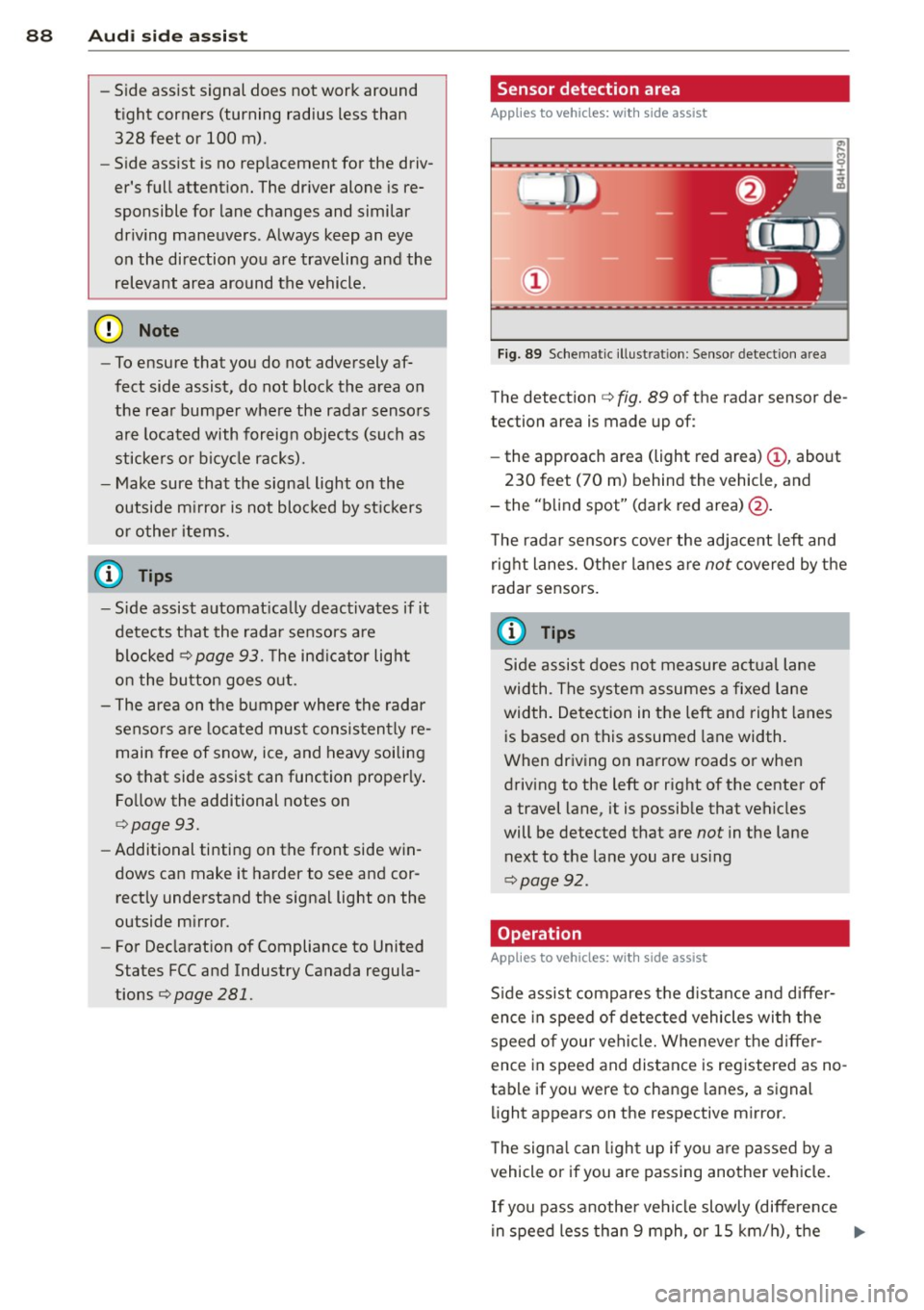
F ig. 89 Schemat ic ill ust rat ion : Sensor detect ion a rea
The detection c> fig. 89 of the radar sensor de
tection area is made up of:
- the approach area (light red area)
(D , about
230 feet (70 m) behind the vehicle, and
- the "b lind spot" (dark red area)@.
T he rada r sensors cover the adjace nt left and
right lanes. Other lanes a re
not covered by the
radar sensors.
(0 Tips
Side assist does not measure a ctual lane
wid th. The system assumes a fixe d lane
width. Detection in the left and right lanes
is based on this assumed lane width .
When driv ing on narrow roads or when
driving to the left or right of the center of
a travel lane, it is possible that vehicles
will be detected that are
not in the lane
next to the lane you are us ing
c> page 92.
Operation
Applies to veh icles: w ith s ide assist
S ide assist compares t he d istance and diffe r
ence in speed of detected vehicles wi th the
speed of your vehi cle. Wheneve r the d iffe r
ence in speed and distance is registered as no
tab le if you were to change lanes, a signal
li ght appears on the respective mirror.
T he signa l can ligh t up if yo u are passed by a
vehicle or if you are passing another vehicle.
If you pass another vehi cle slowly (difference
in speed less than 9 mph, o r 15 km/h), the ..,.
Page 91 of 298
signal light will come on as soon as the other
vehicle is in your blind spot and is detected by
side assist. When the difference in speed is
greater, the signa l light will not come on.
Informational and alert stage signals
App lies to vehicles: with side assist
Side assis t has two s ignal stages:
- the informationa l stage signal, and
- the a le rt stage signa l.
Side assist he lps you by usi ng the approp riate
signal s tage, depending on whether or not
you have activ ated the tu rn signal, and thus
have indicated that you are or are not chang
ing lanes .
Informational stage signal
As long as you have not a ctivated the tu rn sig
n al , side a ssis t inf orms you of detec ted vehi
cles th at are registered as being in a notable
l ocation if you were to change lanes. Whenev
er the detected vehicle's difference i n speed
and d istance is registered by side assist as no
table, the signal lig ht on the respective m irror
prod uces muted illuminat ion.
The brightness of the informat io na l stage sig
na l is designed not to be as intense, so that it
does not interfere wit h your view of the road
when you are driving and have no intention of
changing lanes. When you look in the o utside
mirror, you can clear ly see the info rmat iona l
stage signal.
Alert stage signal
When you activate the turn signa l, and side
assist has detec ted a vehicle i n a notable loca
tion o n that particular side, the s ignal l ight on
this sid e mirro r flashes b right ly . The repeated
b rie f and bright flashing of the alert stage
signal re minds yo u to carefully check tr aff ic to
the rear in the o utside mirror and ove r your
shoulder, so that yo u can safe ly complete the
l ane change
c:> & in Safety tips on page 93.
Aud i side assist 89
@ Tips
The br ightness of the s ignal li ght on the
outside m irr ors can be adjusted with the
MMI c:> page 92.
Driving situation: Fast approaching
vehicles
Applies to vehicles: with side assist
@
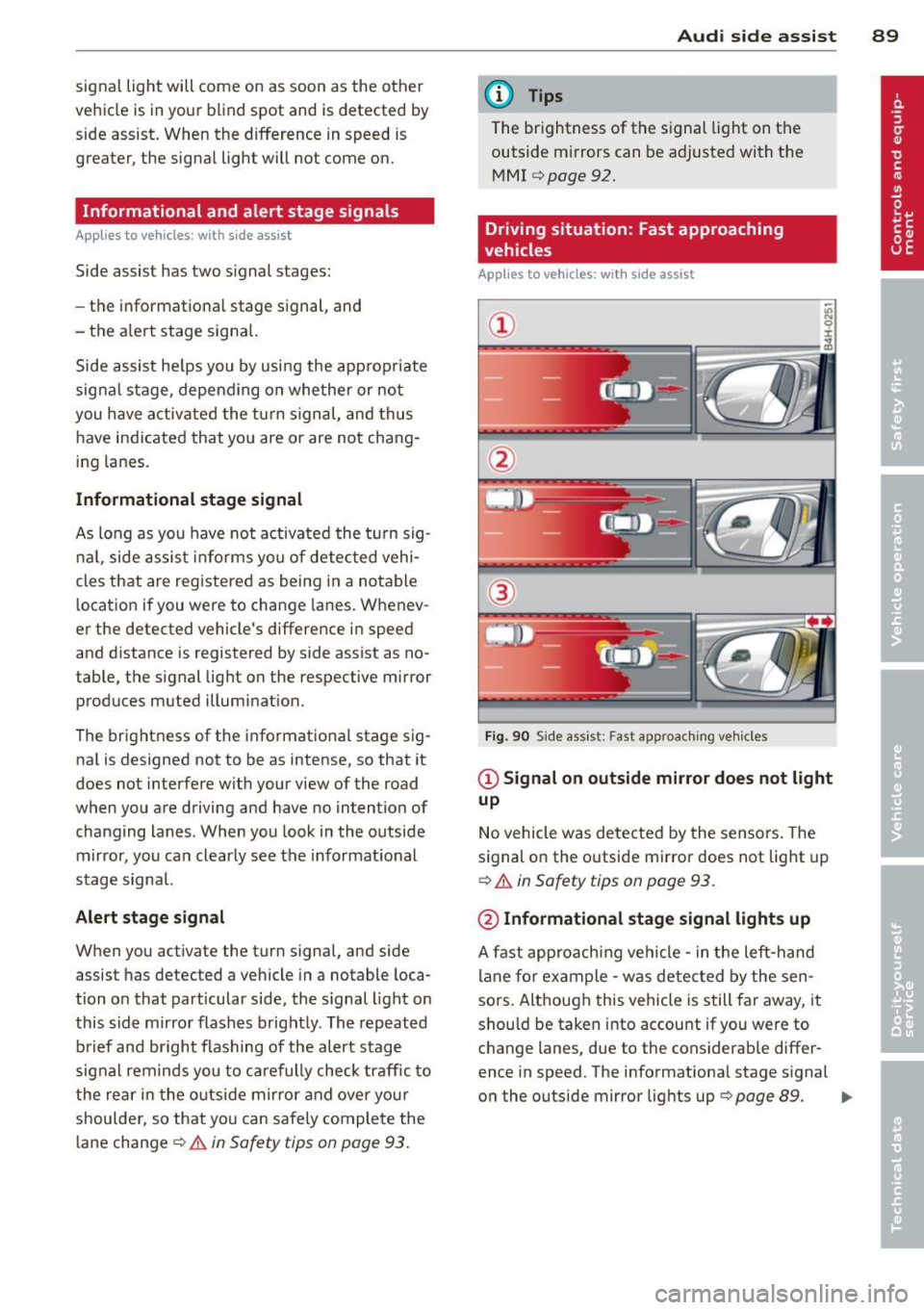
Fig. 9 0 Side as sis t: Fast approac hing ve hicle s
@ Signal on outside mirror does not light
up
No vehicle was detecte d by the sensors . The
s ignal on the o utside mirror does not lig ht up
c:> .&. in Safety tips on page 93 .
@ Informational stage signal lights up
A fast appro ach ing vehicle -in the left-h and
l ane fo r example - was detected by the sen
sors . Although this vehicle is still fa r away, it
sho uld be taken into accou nt if yo u were to
c hange lanes, due to the cons iderab le differ
ence in speed. The informationa l stage s ignal
o n the outside mirror lig hts up
r=> page 89. ..,.
Page 92 of 298
90 Audi side assist
@ Alert stage signal flashes
If you activate your turn signal in driving sit
uation @, th e signa l br iefly f lashes repeated
l y. Side assist is a lerting yo u to a vehicle that
you may not have noticed.
@ Tips
- The faster a vehicle approaches from the
rear, the sooner the signa l on the outs ide
mirror lights up. Side assist will signa l,
at the latest, when a detected vehicle en
ters your "blind spot".
- When vehicles approach very quickly,
changing lanes can be dangerous even if
the signal on the outside mirror does not
li ght up.
Driving situation: Slowly approaching
vehicles
Applies to vehicles : w it h side ass ist
®
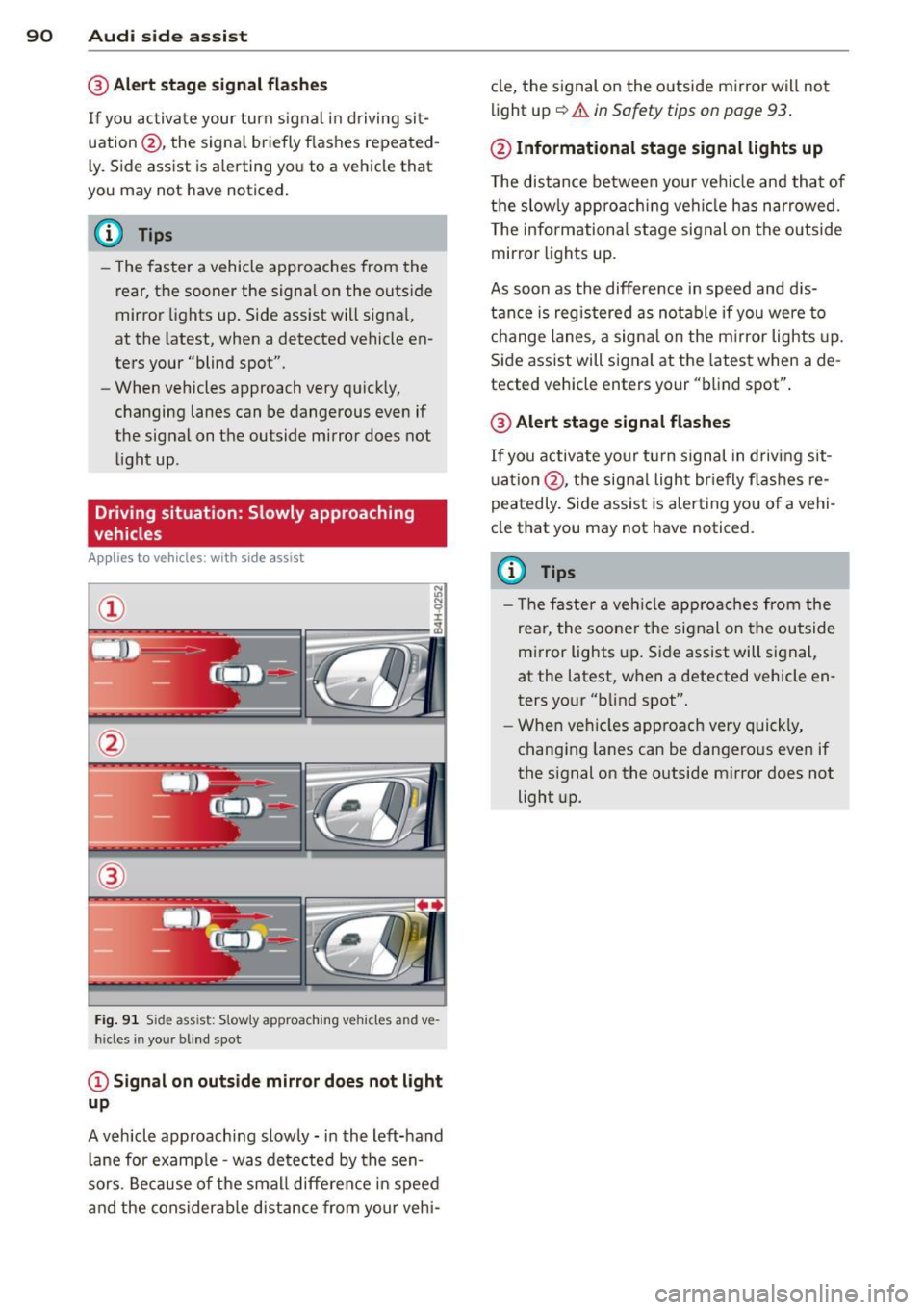
Fig. 91 S ide ass ist: S lowly approaching vehicles and ve
hicles in your blind spot
© Signal on outside mirror does not light
up
A vehicle approaching slowly -in the left-hand
lane for example -was detected by the sen
sors. Because of the small difference in speed
and the considerab le distance from your vehi- cle,
the signal on the outside mirror will not
light up
c::> &. in Safety tips on page 93 .
@ Informational stage signal lights up
The distance between your vehicle and that of
the slowly approaching vehi cle has narrowed.
T he informational stage signal on the outside
mirror lights up.
As soon as the difference in speed and dis
tance is registered as notable if you were to
change lanes, a signal on the mirror lights up.
Side assist will signal at the latest when a de
tected vehicle enters your "blind spot".
@ Alert stage signal flashes
If you activate your turn signal in driving sit
uation @, the signal light br ie fly flashes re
peatedly. Side assist is alerting you of a vehi
cle that you may not have noticed.
(D Tips
- Th e faster a veh icle approaches from the
rea r, the sooner the signal on the outside
mirror lights up. Side assist will signal,
at the latest, when a detected vehicle en
ters your "blind spot".
- When vehicles app roach very quickly,
changing lanes can be dangero us even if
the signal on the outside mirror does not light up.
Page 93 of 298
Driving situation: Vehicles dropping
back slowly
Applies to vehicles: with s ide assis t
~ 9 I
---- ----:~
®
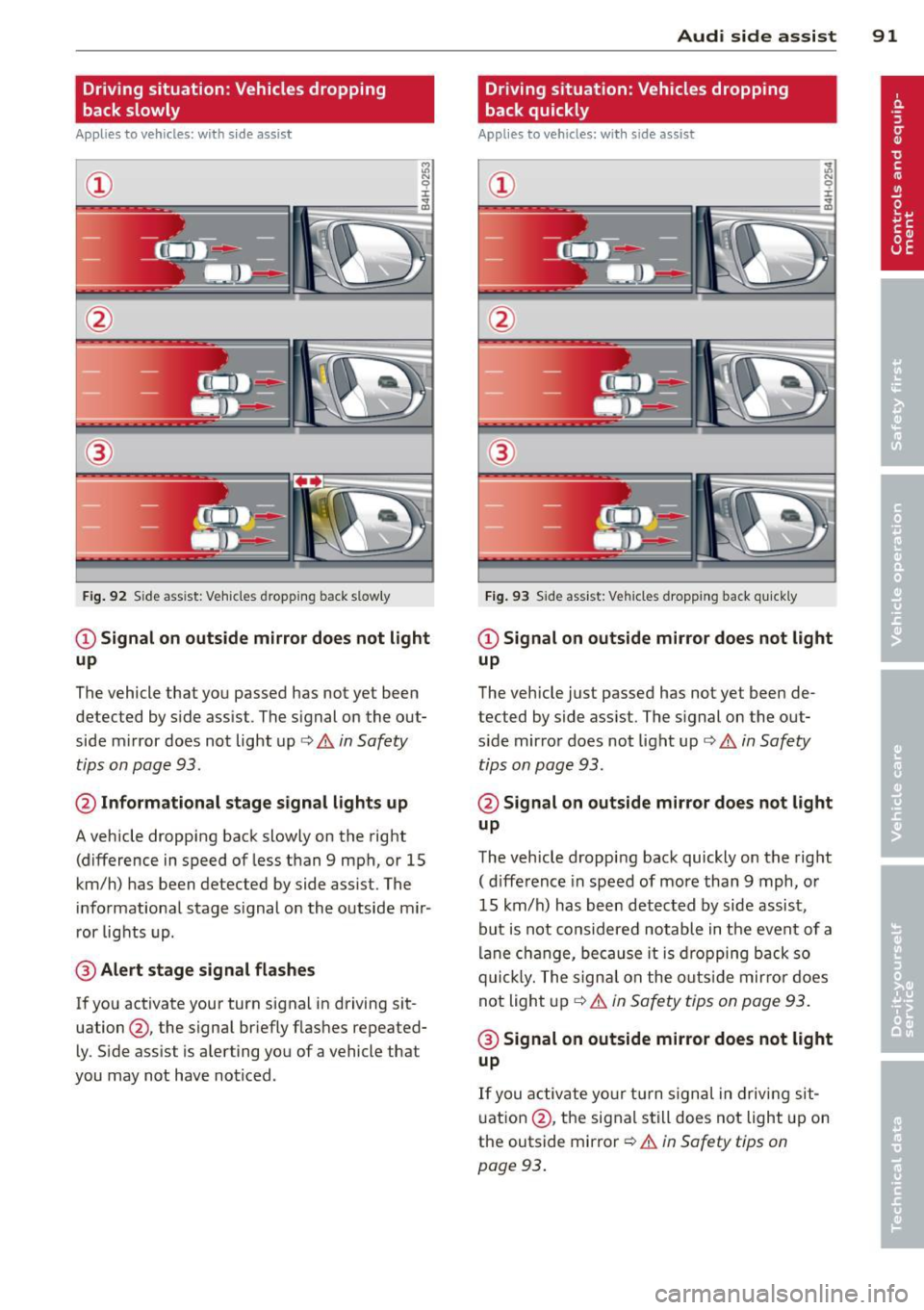
Fig . 92 S ide ass ist: Vehicles dropping back s low ly
CD Signal on outside mirror does not light
up
The vehicle that you passed has not yet been
detected by side assist. The signal on the out
side mirror does not light up ¢
& in Safety
tips on page 93.
@ Informational stage signal lights up
A vehicle dropping back slowly on the right
(difference in speed of less than 9 mph, or 15
km/h) has been detected by side assist. The
informational stage s ignal on the outside mir
ror lights up.
@ Alert stage signal flashes
If you activate your turn signal in driving sit
uation @, the signal briefly flashes repeated
ly. Side assist is alerting you of a vehicle that
you may not have noticed.
Audi side assist 91
Driving situation: Vehicles dropping
back quickly
Applies to vehicles: wi th side assist
®
Fig. 93 Side assist: Vehicles dropping back qui ck ly
CD Signal on outside mirror does not light
up
The vehicle just passed has not yet been de
tected by side assist. The signal on the out
side mirror does not light up ¢
& in Safety
tips on page 93 .
@ Signal on outside mirror does not light
up
The vehicle dropping back quickly on the right
( d ifference in speed of more than 9 mph, or
15 km/h) has been detected by side assist,
but is not considered notable in the event of a
lane change, because it is dropping back so
quickly. The signa l on the outs ide mirror does
not light up
Q &. in Safety tips on page 93.
@ Signal on outside mirror does not light
up
If you activate your turn signal in driving sit
uation @, the signal still does not light up on
the outside mirror
Q & in Safety tips on
page 93.
Page 94 of 298
92 Audi side a ssis t
MMI settings
App lies to vehicles: wit h side ass ist
The basic brightness setting of the signal on
the outside mirror can be adjusted via the
MMI.
,. Select : I CARI function button > Car s ystem s
control button > Driver assist > Audi s ide
a ss is t.
The brightness of the signal lig ht for both the
informationa l and alert stages is automatical
ly adjusted to amb ient light conditions. In ad
d it ion, you can adjust the
basic brightness
sepa rately, via the brightness fun ction.
While making the adjustment, the new brightness setting is displayed briefly . The
brightness displayed is that of the informa
tional stage signal. The alert stage signa l
b rightness is lin ked to the informational st age
signal brightness.
The informational stage signa l br ightness
should be adjusted so tha t you not ice the sig
na l ill uminat ion when yo u loo k in the outside
mirror, but not when you look forward
throug h the windshield.
I n very da rk or light surroundings, the au to
mat ic brightness setting adjusts s ignal light
brightness to maxim um or minimum intensi
ty, as needed. In circumstances such as these,
you may not notice any change in the bright
ness on the outside mirror when ad justing the
basic brightness . You may not notice the
cha nge unt il lighting conditions are norma l
aga in .
(D Tips
- Side assist is not active when the basic
brightness is adjusted. The signal light
comes on br iefly to help you make the
adjustment .
- Your settings are automatically stored
and ass igned to the remote control key
being used.
General information
Applies to veh icles : w it h side assist
S ide assist has limits and cannot dete ct vehi
cl es unde r all road and weat he r c ondit ions .
Please remember sys tem limita tions and nev
er rely on the system, especially when :
- driving thro ugh curves ~
page 92,
- lanes are of d ifferent widths~
page 92.
· When driving through curves
Applies to veh icles: w it h side assist
S ide assist cannot detect ve hicles in c urves
with a turning rad ius o f less than 3 28 fee t
(10 0 m).
When driving thro ugh a curve, it is poss ible
that side assist may reg iste r a veh icle two
l anes over, a nd the signa l o n the ou ts ide mir
ror will ligh t up.
Lane width
Appl ies to veh icles : w ith side assist
0
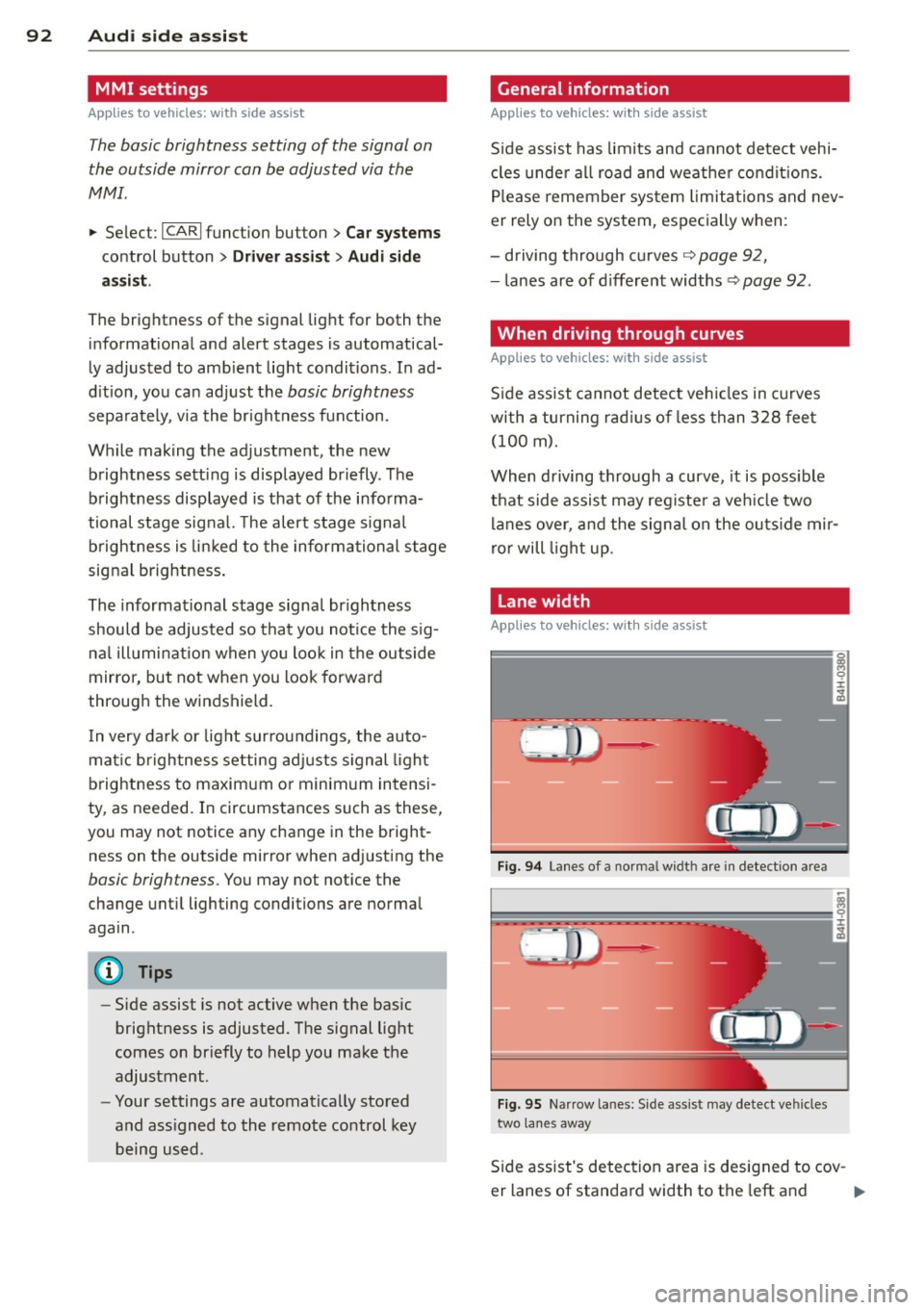
Fi g. 94 La nes o f a norma l widt h are in detect ion area
Fi g. 95 Narrow la nes: S ide ass ist may detect ve hicles
two lanes away
S ide assist's detec tion a rea is designed to cov -
er lanes of standa rd width to the left and
ll-
Page 96 of 298

94 Audi side ass is t
- Side assist cannot detect vehicles in time
to alert you when they approach from
behind at very high speed, or fall drop
back very quickly .
- The radar sensor 's
vision can be reduced
or entirely blocked by rain, snow, and heavy spray . Th is can result in side assist
not adequately detecting vehicles or, in
some cases, not detecting them at a ll.
Always keep an eye on the d irection you
are t raveling and the relevant area
around the vehicle .
- Please note that side assis t indicates
there are approaching vehi cles, o r vehi
cles in your blind spot, only after your ve
hicle has reached a driving speed of at
least 19 mph (30 km/h).
- Side assist signal does not work around
tight corners (turning radius less than
328 feet, or 100 m) .
- Side assist is no rep lacement for the driv
er's f ull attent ion . The dr iver alone is re
sponsible for lane changes and similar
dr iving maneuvers. A lways keep an eye
on the direction you are traveling and the
relevant area around the vehicle.
(D Note
To ensure that side assist is not adve rsely
affected, you should not block the area on
the rear bumper where the radar sensors
are located with fo reign objects (such as
w ith stickers or bicycle racks) .
(D Tips
If the positions of the radar sensors have
been changed as a result of a rear end-col
lision, fo r instance, have side assist
checked by a n author ized Audi dealer for
safety reasons.
Page 120 of 298

118 Parking system
The following steps app ly only when there is
no obstacle such as a wall near the parking
spot. Otherwise, please read the informat ion
prov ided in the "Parking Next to Obstacles"
section <=>
page 118.
.. Activate the turn signal.
.. Position your vehicle parallel to the edge of
the street, approximately 3 ft (1 meter)
from a parked vehicle.
.. Switch the MM I on and se lect reverse gear .
The parking aid turns on and parking mode
1 appears on the display .
.. Press the cont ro l button @<=>
fig. 12 7 on
t h e M MI con trol conso le. Par kin g mode 2
appears .
.. Back up and align yo ur vehicle so the b lue
area @ borders on the rear end of the vehi
cle or on the parking spot line. The bl ue area
represents an extension of the veh icle's out
li ne by approximate ly 16 ft (5 meters) to the
rear . The long side of the blue area should
be o n the cu rb. The entire blue area must fit
into the parking spot .
.. Wi th the veh icle stopped, turn the s teer ing
wheel to the right as far as it w ill go.
.. Back into the park ing spot until the blue
c ur ve to uches the curb<=>
fig. 128. Stop the
vehicle.
.. With the veh icle stopped, turn the steer ing
wheel to the left as far as it will go.
.. Co nti nue to back in to the parking spot until
the veh icle is parked para llel to the curb .@
marks the rear bumper . Stop the vehicle
when the red orientation line@ borders an
obje ct ¢
& -Keep an eye on the front of
yo ur vehicle while doing this ¢0 .
Parking n ext to obstacles
When t here is an obstacle (such as a wall)
next to the pa rk ing spot, choose a spot w ith
mo re space on t he sides. Pos ition the long
side of the blue area so that there is sufficie nt
sp ace from the curb. The area m ust no t be on
the c urb. Yo u will also need to start turning
the steering wheel much earlier. There should
be a suffic ient amo unt of space between the
curb and the b lue curve, and the blue c urve
c;> fig. 128 mus t not touch the curb.
A WARNING
- The rear view camera does not show the
entire area behind the vehicle
c::;, page 115, fig . 123 . Watch out espe
cially fo r small ch ildren and anima ls . T he
rea r view came ra ca nnot always de te ct
them, posing ris k of an acciden t!
- P lease note that objects not touching the
g round can appear to be further away
t han they really are (for examp le, the
bumper of a par ked vehicle, a trai ler
hitch, or the rea r of a truck) . In this case,
you shou ld not use the help lines to help
with parking, wh ic h poses danger of an
accident!
(D Note
In the MMI display, the direction of travel
of the vehicle rear is represented depend
i ng on the steering wheel angle . The vehi
cle front swings out more than the vehicle rear . Maintain plenty of dista nce so that
your outside mi rror or a corner of you r ve
hicle does not col lide with any obstacles.
This can damage to your ve hicle .
(D Tips
The left o r right orie ntation lines and su r
faces will be disp layed, depending on t he
tu rn s ignal being used .
Adjusting the display
and warning tones
Applies to vehicles: with parking system plus or parking
system plus with rear view camera
The display and warning tones can be adjust
ed in the MMI.
.. Select: !CAR ! function b utton> Car sy stems
cont ro l but to n > Driver a ssi st > Parking aid
> Setting s control b utton .
Display
On* -turns on the visual d isplay for pa rking
system p lus and shows the rearview came ra
i mage fo r the park ing system p lus w ith rea r
view camera*. ..,_
Page 148 of 298
146 Airbag system
-Always carefully follow instructions from
child restraint manufacturers when in
stalling child restraints.
_& WARNING
If, in exceptional circumstances, you must
install a forward or rearward -facing child
restraint on the front passenger's seat:
- Improper installation of child restraints
can reduce their effectiveness or even
prevent them from providing any protec
tion.
- An improperly installed child restraint
can interfere with the airbag as it de
ploys and seriously injure or even kill the
child -even with an Advanced Airbag
System.
- Always carefully follow the manufactur
er's instructions provided with the child
seat or carrier .
- Always make sure that there is nothing
on the front passenger seat that will
cause the capacitive passenger detection
system in the seat to signal to the Airbag
System that the seat is occupied by a person when it is not, or to signal that it
is occupied by someone who is heavier
than the person actually sitting on the
seat . The presence of additional objects
could cause the passenger front airbag
to be turned on when it should be off, or
could cause the airbag to work in a way
that is different from the way it wou ld
have worked without the object on the
seat.
Front airbags
Description of front airbags
The airbag system can provide supplemental
protection to properly restrained front seat occupants .
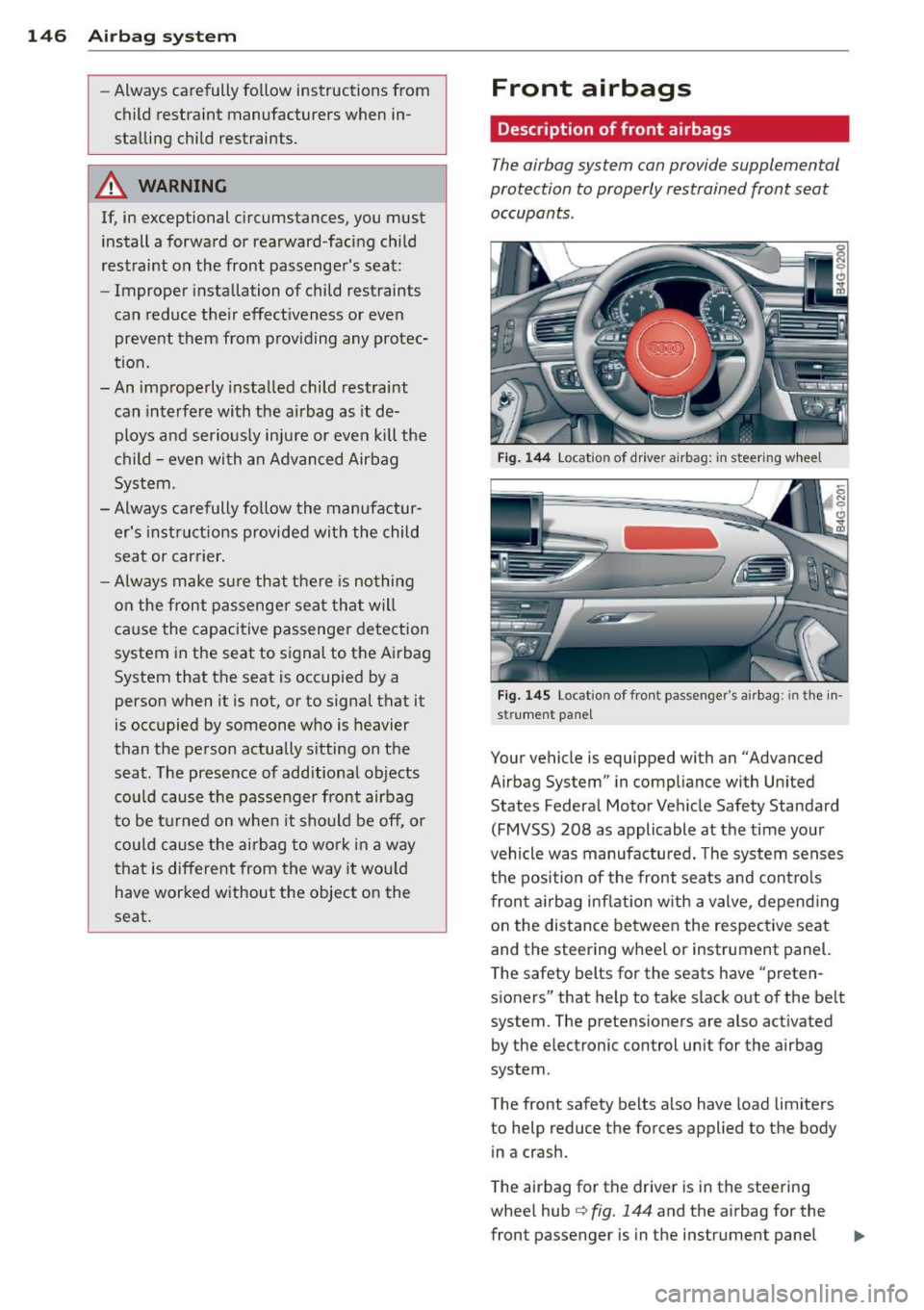
Fig. 144 Locatio n of drive r ai rbag: in steering wh eel
Fig. 145 Locat io n of fron t passenger' s air bag: in the in·
st rument panel
Your vehicle is equipped with an "Advanced
Airbag System" in compliance with United
States Federal Motor Vehicle Safety Standard
(FMVSS) 208 as applicable at the time your
vehicle was manufactured. The system senses
the position of the front seats and controls
front airbag inflation with a valve , depending
on the distance between the respective seat
and the steering wheel or instrument panel.
The safety belts for the seats have "preten
sioners" that help to take slack out of the belt
system. The pretensioners are also activated by the electronic control uni t for the airbag
system .
The front safety belts also have load limiters
to help reduce the forces applied to the body in a crash.
The airbag for the driver is in the steering
wheel hub
¢ fig. 144 and the airbag for the
front passenger is in the instrument panel
Page 152 of 298

150 Airbag sys te m
backrest must be adjusted to an uprigh t
posit ion.
- Always make sure that there is nothing
on the front passenger seat that will
cause the capacitive passenger detection
system in the seat to s ignal to the A irbag
System that the seat is occupied by a
person when it is not, or to signal that it
is occupied by someone who is heavier
than the pe rson actually s itting on t he
seat. The presence of additiona l objects
cou ld cause the passenger front airbag
to be t urned on w hen it sho uld be off, or
cou ld cause the airbag to work in a way
that is different from the way it wou ld
have worked without the object on the
seat.
- Make sure that the
PASSENGER AIR BA G
OFF
light comes on and stays on all the
t ime w henever the ignition is switched
on.
Advanced Airbag System components
The front passenger seat in you r veh icle has a
l ot of very important pa rts of the Advanced
A irbag System in it . These parts include the
capacitive passenge r de tect ion sys tem, wir
ing, brac kets, and more . The cont ro l uni t
monitors the system on the front passenger
seat when the ignition is switc hed on and
turns the airbag indicato r light on when a
malfunction in the one of the system compo
nents is detected
c::;, page 155 . Because the
fro nt passenge r seat contains important pa rts
of the Advanced Airbag System , you must
take ca re to p revent it from being damaged.
Da mage to the seat may preven t the Ad
vanced A irb ag System for the fron t passenger
seat from doing i ts job in a c rash .
The front Advanced Airbag System
consists of the following:
-Crash sensors in the front o f the veh icle tha t
measure veh icle acceleration/dece le ration
to provide information to the Advanced Air bag System about the severity of the crash. -
An elect ronic contro l unit, with integrated
crash sensors for front and sid e impacts .
T he control un it "decides" whether to fire
the front a irbags based on the inform at ion
received from the crash sensors. The control
unit also "decides" whether the safety belt prete nsioners shou ld be act ivated .
- An Advanced A irbag w ith gas generator and
contro l valve for the driver inside the steer
ing wheel hub .
- An Advanced A irbag w ith gas generator and
contro l valve inside the inst rument panel for
the front passenger .
- A capacit ive passenger detection system u n
de rneath the front passenger seat cover .
This system measures the elec trical capac i
t ance of the perso n in t he seat. The informa
t ion regis tered is se nt cont inuo usly to the
electronic con trol un it to regu late deploy
ment of the front Advanced Airbag on the
passenger side.
- An airbag monitoring system and indicator
light in the instr ument cluster
c::;, page 154.
- A senso r in each front seat regis ters the dis
tance between the respective seat and the
steering whee l or instrument panel. The in
formation registered is sent cont inuo usly to
the electron ic contro l uni t to regulate de
ployment of the front Adv a need A irbags .
- The
PASSENGER AIR BAG OFF light comes
on and stays on in the center of the instr u
ment panel
c::;, page 155, fig . 147 and tells
you when the front Advanced Airbag on the
passenger side has been t urned off.
- A sensor in the safety belt latch for the driv
er and fo r the front seat passenger that
senses w hether t hat safety belt is latched or
no t and transmi ts this information to t he
elec tronic con trol un it.
A WARNING
D amage to the fron t passenger seat can
prevent the front airbag from working
p roperly.
- Imp roper repai r or disassembly of the
front passenge r and dr iver seat will pre
vent the Advanced Airbag System from
functioning properly .
-
Page 157 of 298

continuously to serve as a constant reminder
to have the system inspected immediately.
I f a malfunction occurs that turns the front
a irbag on the passenger side
off, t he PA SSEN
GER AIR BAG OFF
li ght wi ll come on and stay
on whenever the ignition is on.
A WARNING
An airbag system that is not functioning properly cannot provide supplemental pro
tection in a frontal crash.
- If the airbag indicator light comes on, it
means that there may be someth ing
wrong with the Advanced Airbag System.
It is possible that the airbag will inflate
when it is not supposed to, or wi ll not in
flate when it should.
- Have the airbag system inspected imme
diately by your Aud i dealer .
PASSENGER AIR BAG OFF light
Fig . 1 47 Sect ion from the inst rumen t pa nel: PASS EN
GER AIR BAG OFF light
The PASSENGER AIR BAG OFF light is located
i n the cen ter of the instrument panel
¢fig. 147 .
The PA SSENGER AIR BAG OFF light will come
on and stay on to tell you when the front Ad
vanced A irbag on the passenger side has been
turned
off by the e lectronic control unit. If the
bu lb for the
PASSENGER AIR BAG OFF light
bu rns out, the airbag indicator light
fl will
come on to signal a malfunction in the Ad
vanced A irbag System. Although the burned
out bulb will not change the way the front
passenger's frontal airbag works, it w ill no
longer be possible to use the
PASSENGER AIR
A irba g sy stem 155
BAG OFF light to make s ure that the airbag
on/off status is correct for the occ upant on
the front passenger seat . Have the airbag sys
tem inspected immediately by your author
ized Audi dealer.
T he PASSENGER AIR BAG OFF l ight will bl ink
for about 5 seconds when:
- t he ignition is switched on and
- the capacit ive passenger detection system,
whi ch swi tches the front seat passenger's
frontal Advanced Airbag on and
off, detects
a change in the status of the front passen
ger seat.
As soon as the
PA SSENGER AIR BAG OFF
light stops blink ing, a lways make sure tha t
the airbag stat us (on or off) as shown by the
PASSENGER AIR BAG O FF light is proper fo r
the age, size and electrical capacitance of the person occupy ing the front passenger seat.
Always make sure that the safety belt for the
front passenger seat is properly fastened .
Th e PA SSENGER AIR BAG OFF light will
show the status of the fron t se at p assenge r's
frontal Advanced Ai rbag a few seconds after
the ignition i s swit c h ed on and th e airbag in
dicator light go es off . The PASSENGER AIR
BAG OFF light :
-will stay on if the front passenger seat is not
occupied;
- will stay on if the electrical capacitance
measured by the capacitive passenger de
tect ion system for the front passenger seat
equa ls the combined capacitance of an in
fant up to about one year of age and one of
the rearward-facing or forward-facing ch ild
restraints listed in Federal Motor Vehicle
Safety Standard 208 with which the Ad
vanced Airbag System in your vehicle was certified; For a listing of the child restraints
that were used to certify your vehicle's com
pliance with the U.S. Safety Standard
i:::;, page 170 .
-will go out if the front passenger seat is oc
cupied by an adult as registered by the ca
pacitive passenger detect ion system.