ECO mode AUDI A6 2013 User Guide
[x] Cancel search | Manufacturer: AUDI, Model Year: 2013, Model line: A6, Model: AUDI A6 2013Pages: 306, PDF Size: 76.92 MB
Page 69 of 306
Warm and cold 67
Four-zone automatic climate control
Operation
Applies to vehicles: with four -zone a utomat ic climate control
We recommend pressing the IAUTOI button and setting the temperature to 72 °F (22 °C).
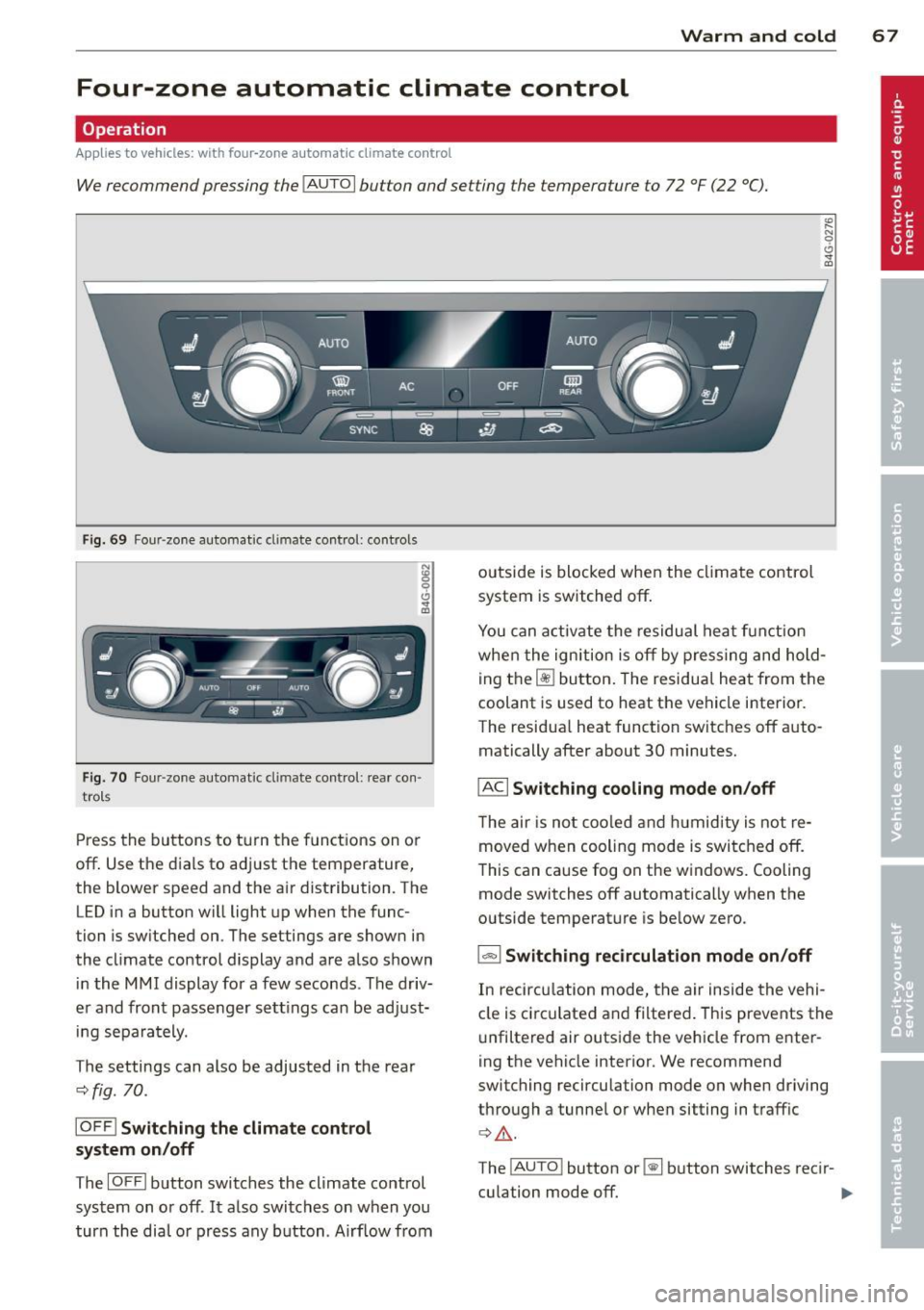
F ig. 69 Four -zone automat ic climate control: controls
Fig. 70 F our -zone automat ic climate control: rear con·
trols
Press the buttons to turn the functions on or
off. Use the dials to adjust the temperature,
the blower speed and the air distribution. The
LED in a button will light up when the func
tion is switched on. The settings are shown in
the climate control display and are also shown in the MMI display for a few seconds . The driv
er and front passenger settings can be adjust·
ing separately.
The settings can also be adjusted in the rea r
<::>fig.
70.
IOFF l Switching the climate control
system on/off
The IOFFI button switches the climate control
system on or off .
It also switches on when you
turn the dial or press any button. Airf low from outside is blocked when the
climate control
system is switched off.
You can activate the residual heat funct ion
when the ignition is off by pressing and hold
ing the ~ button. The residual heat from the
coolant is used to heat the vehicle interior.
The residua l heat function switches off auto
matically after about 30 minutes.
IACI Switching cooling mode on /off
T he air is not coo led and humidity is not re
moved when cooling mode is switched off.
This can cause fog on the windows. Cooling
mode switches off automatically when the
outside temperature is below zero.
1- 1 Switching recirculation mode on/off
In recircu lation mode, the air inside the vehi
cle is circ ulated and filtered. This prevents the
unfiltered air outside the vehicle from enter
ing the vehicle interior. We recommend
switching recirculation mode on when driving
through a tunnel or when sitting in traffic
¢ Li). .
The !AUTO ! button or~ button switches recir-
culation mode off. .,..
Page 70 of 306
68 Warm and cold
IAUTO I Switching automatic mode on
Automatic mode m ainta ins a constant tem
perat ure inside the vehi cle. Air tempera ture,
airflow and air d istribution a re controlled a u
tomatically.
Adjusting the temperature
T empe ratu res between 60 °F (+16 °C) and
84 °F ( +28 ° C) c an be se t. O uts ide of this
range,
lo or hi w ill appear in the climate con
trol system disp lay. At both of these settings,
the cl imate control system r uns continuously
at max imum cooling or heat ing power. There
is no temperature regu lation.
~ Adjusting the airflow
You can a djust the airf low manually to s uit
your needs . To have the airf low reg ulated a u
tomatically, press the
! AUTO ! button.
~ Adjusting the air distribution
You can manu ally se lect the ve nts w here the
a ir will flow. To have the air d istribu tion reg u
l ated automatically, press the
IAUTOI bu tton.
~ I~ * Adjusting seat heating/
ventilat ion*
Pr ess ing the button swi tches the sea t heat
ing/ventilation on at the highest sett ing ( leve l
3). The LEDs indicate the heating/venti lat ion
leve l. To reduce the heating/vent ilation, press
the butto n aga in. To switch the seat heat ing/
ve nti lation off, press the button repeatedly
u ntil the LED turns off.
After 10 minutes, the seat heating automati
cally switches from leve l 3 to level 2.
l <;j) FRON T I Switch the defroster on/off
The win dsh ield and s ide windows are defrost
e d or cleared of con densation as quickly as
possib le. The max imum amo unt of air flows
mainly from the vents be low the windshield.
Recirculation mode switches off.
The
IAUTOI bu tton switches the defroster off.
lliiil REAR ! Switching rear window heater
on /off
T he rea r window heate r only operates w hen
the engine is running. It sw itches off auto
matically after 10 to 20 minutes, depending
o n the outside temperature.
T o p revent the rea r window heate r from
switching off automatically, p ress and ho ld
t h e ~ button for more than 2 seconds. Th is
rema ins stored until the ignition is switched
off .
ISYNC I Synchronization*
When synchronization is switched on, the
same settings are applied to bot h the dr iver
and fr ont passenger, except for the seat heat
i ng/venti lation *. The rear zo ne is also
synchronized. Synchronization switches off
whe n the se ttings for the front passenge r side
o r r ear are ad justed.
You can also switch synchronizati on o n by
pressing and holding a dial. For example, if
you press and hold t he di al on the front pas
senger si de, the setti ngs for that s ide a re
t ran sfer red to t he d rive r si de. The same ap
plies to the re ar.
Air vents
You can open o r close the center and ou ter
vents i n the cockpit and the vents in the rear
c ente r console and doo r pillars us ing t he
ridged t humbwheels. The levers adjust the d i
r ect ion o f the airfl ow from the vents.
A WARNING
-Do not use t he recirc ulation for ex tended
pe riods of time . The windows could fo g
up since no f resh a ir can enter the vehi
cle. If the windows fog up, p ress the air
recirc ulation butto n again immediately
to switch off the air reci rcu latio n fu nc
tion o r se lect defros t.
- Individ uals w it h reduced se nsitivity to
pa in or te mperature cou ld deve lop burns
when us ing the s eat heating fu nction . To
re duc e the risk of i nju ry, these i nd iv idu-
als should n ot us e sea t heating.
~
Page 77 of 306
Emergency brake function
An emergency brake ensures that the vehicle
can be slowed down even if the
normal brakes
fail
c::> pag e 76, Emergency broking .
Indicator light s
-If the par king b rake is closed w ith the igni
t ion
s witched on the indicator lights come
on - (USA models)/ . (Canada models)
in the instrument cluster and in the switch.
- If the par king brake is closed w ith the igni
tion
s witc hed off the indicator lights come
on - (USA models)/ . (Canada models)
in the instr ument cluster and in the switch
for about 20 seconds.
A WARNING
Do not press the accelerator peda l inadver
tently if the vehicle is stat ionary but the
eng ine is running and a gear is selected .
Otherw ise the vehicle will start to move
immediately and cou ld result in a crash .
(D Note
If the symbol . in the display or the ind i
cato r light
1111 (USA models) . (Cana
da models) in the instrument cluster flash
es , the re is a malfunction in the bra ke sys
tem. Please refer to t he detai led descr ip
t ion of the indicator lights ¢
page 15.
- If the indicato r light - (USA mod-
els) . (Canada mode ls) or
IIJ t ur ns
on, there may be a malfunction in the
parking brake
r=> page 16.
@ Tips
-You can apply the pa rking brake at any
time -even w ith the ignition swi tched
off. The ignition must be on in order to
release the parking brake.
- Occasiona l noises when the parking
brake is applied and re leased are norma l
and are not a ca use for concern .
- When the vehicle is parked, the parking
brake goes thro ugh a se lf-test cycle at
r egular intervals . Any assoc iated noises
are norma l.
On the ro ad 75
Parking
Parking
~ Stop the vehicle with the foot brake .
~ Pull the switch(®) to apply t he pa rking
bra ke .
~ Select the P se lec to r lever posit ion
r=> poge 105.
~ Turn the engine off c::> &_.
In addition on inclines and grades
~ Tu rn the steering wheel so that yo ur vehicle
w il l roll aga inst the c urb in c ase it shou ld
s tart to move .
T he pa rk ing brake activates automat ica lly
when you swi tch the ign ition off. This does not
happe n if you se lect the N selector lever posi
tion or switch the parking off with the~ but
ton before switching the ignition off .
A WARNING
-When you leave your vehicle -even if on
ly briefly -always take the ign it ion key
with you . This applies particularly when
children remain in the vehicle. Othe rwise
the children could start the engine, re lease the parking brake o r operate elec
trica l equipment (e.g. power wi ndows).
There i s the r is k of an accident.
- When the veh icle is locked, no one -par
ticularly not childre n should rema in in
the vehicle . Locked doors ma ke it mo re
difficult for emergency wo rke rs to ge t in
to the vehicle -putting lives at risk .
Starting from rest
The starting assist fun ction ensures that the
parking broke is released automatically upon starting .
Stopping and applying parking brake
~ Pull the switch(®) to apply the pa rking
bra ke .
Page 80 of 306
78 On the road
@ Tips
When you stop and the start-stop-system
turns the engine off, the ignition remains
on. Make sure that the ignition is switched
off before exiting the vehicle.
General information
Applies to vehicles: with Start-Stop-System
The standard Start-Stop-mode can be cancel
led for different system-related reasons .
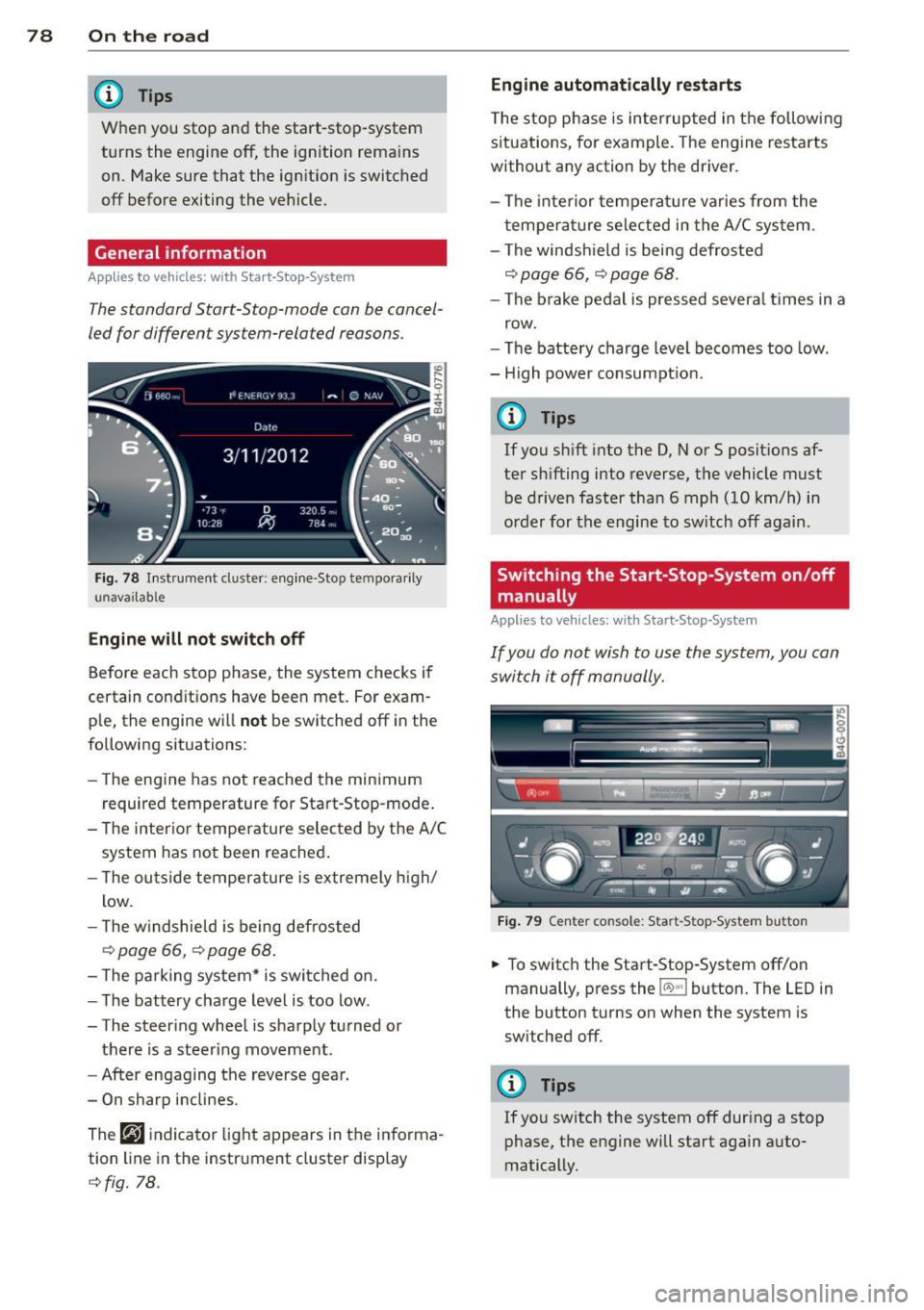
Fig. 78 In st rument cluster: e ngin e-Stop tempo ra ri ly
u navai lab le
Engine will not switch off
Before each stop phase, the system checks i f
certain conditions have been met . For exam
p le, the engine w ill
not be switched off in the
following situations:
- The engine has not reached the minimum
r equired temperature for Start-Stop -mode .
- T he interior temperature selected by the A/C
system has not been reached .
- T he ou tside temperature is extremely h igh/
low .
- T he w indshield is being defrosted
9 page 66, 9 page 68.
- The pa rking system* is switched on.
- The battery charge level is too low .
- The steer ing whee l is sharply turned or
there is a steering movement.
- After engaging the reverse gear.
- On sharp inclines .
The
r,J i ndicato r light appears in the informa
tion line in the instrument cluster disp lay
9 fig. 78. Engine automatically restarts
T
he stop p hase is interrupted in the followi ng
situations, for example . The engine resta rts
without any action by the driver .
- The inte rior temperature varies from the
t empera ture selected in the A/C system.
- The windsh ield is being defrosted
9 page 66, 9 page 68 .
-The brake pedal is pressed severa l times in a
row.
- The battery charge level becomes too low .
- H igh power consumpt ion .
@ Tips
If you shift into the D, Nor S posit ions af
ter sh ifting into reverse, the vehicle must
be driven faster tha n 6 mph (10 km/h) in
o rd er for the engine to sw itch off aga in.
Switching the Start-Stop-System on/off
manually
Appl ies to vehicles: with Start-Stop-System
If you do not wish to use the system, you can
switch it off manually.
Fig. 79 Center co nsole : Sta rt -Stop -System button
.,. To switch the Start-Stop -System off/on
manually, press the
!iiil~·I button. The LED in
the button turns on when the system is
sw itched off.
(D Tips
If you switch the system off during a stop
phase, the engine will start again auto
matically.
Page 81 of 306
Messages in the instrument cluster
display
Applies to vehicles: with Start-Stop-System
Start-Stop system deactivated: Please re
start engine manually
This message appears when specific condi
tions are not met dur ing a s top phase and the
Start -Stop-System w ill
not be able to restart
the eng ine.
If the Dor R selector lever posi
tions were engaged, P will be selected auto mat ica lly. The engine must be started with
the
! START ENGINE STOP I button .
Start-Stop system: System fault! Function
unavailable
There is a malf unctio n in t he Star t-Stop-Sys
tem . Dr ive the veh icle to an authorized repair
fac ility for servicing as soon as possible to cor
rect the malfunction .
Speed warning system
Introduction
The speed warning system helps you to stay
under a specified maximum speed.
The speed warning system warns you if you
a re exceeding the max imum speed that you
have set. You w ill hear a warn ing tone when
your speed exceeds the stored va lue by ap
p rox ima tely 3 mph (3 km/h) . An indicato r
l ight . (USA models)/ . (Canada mode ls) in
t he ins trumen t cluster display also turns on at
the same time. The indicator light
a;m
turns off when the speed decreases below the
stored maximum speed.
Setting a threshold is recommended if you
wou ld like to be reminded when you reach a
certain maximum speed . Situations where you
may want to do so include driving in a country
with a general speed limit or if there is a
specif ied max imum speed for winter tires.
(D Tips
Even tho ugh your vehicle is equipped with
a speed warning system, you should st ill
On the road 79
watch the speedometer to make sure you
are not driving faster than the speed limit.
Setting the threshold
You can set, chang e and delete the threshold
in the MMI.
.,. Select: I CAR I function button > (Car)* sys
tems
control button > Driver assist > Speed
warning.
You can set any threshold between 20 mph
(30 km/h) and lS0 mph (240 km/h). Sett ings
can eac h be adjusted in increments of 6 mph
(10 km/h).
Cruise control
Switching on
Applies to vehicles: with cruise control
The cruise control system makes it possible to
drive at a constant speed starting at
20 mph
(30kmlh).
0
f
®t
0
Fig. 80 Contro l lever with set button
Fig . 81 Display: Selected speed
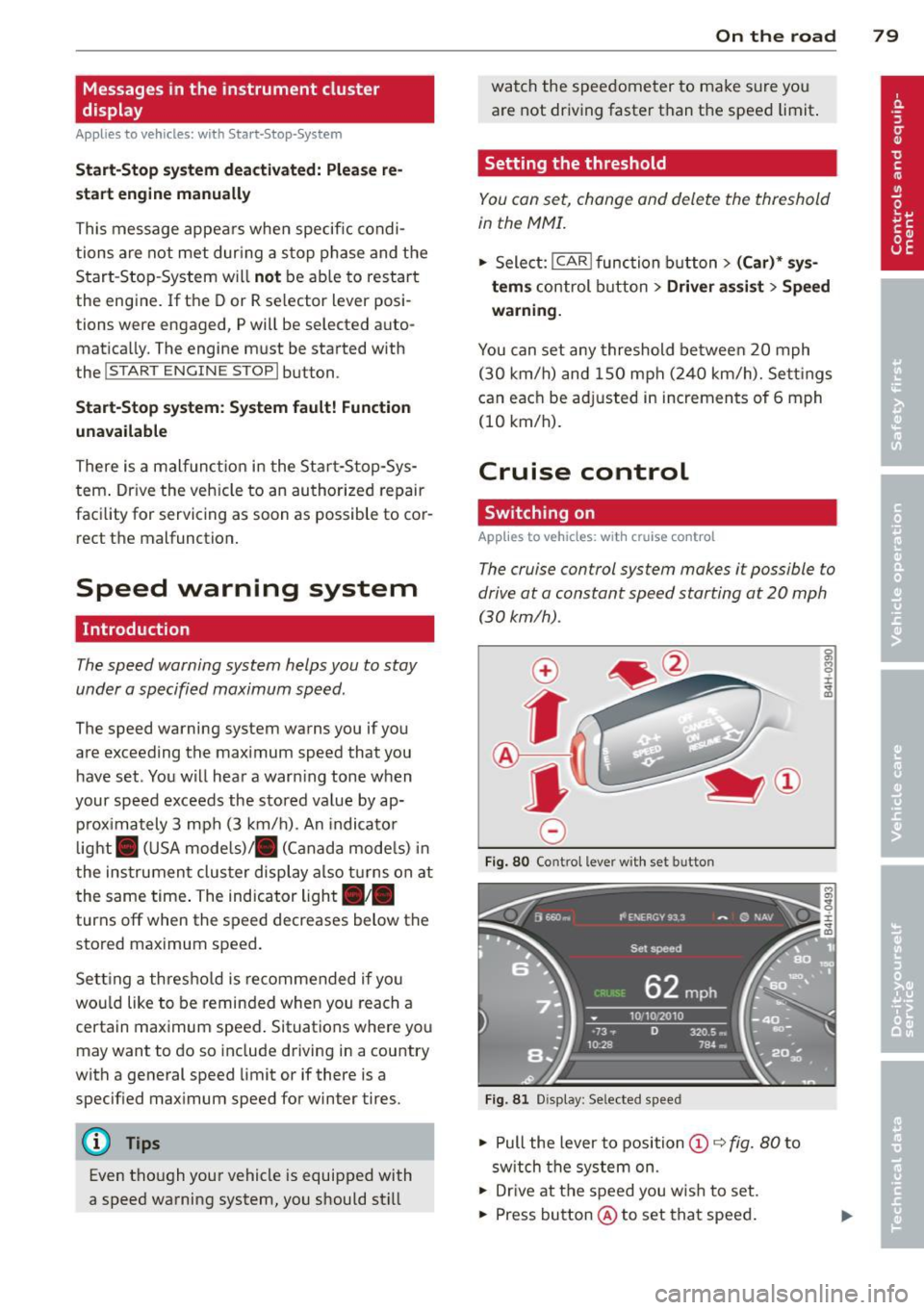
.,. Pull the lever to position © c::> fig. 80 to
sw itch the system on.
.,. Drive at the speed you w is h to set.
.,. Press button @ to set that speed.
Page 89 of 306
Audi adaptive cruise control and braking guard 87
then maintains the stored distance. If the ve
hicle ahead accelerates , adaptiv e cr uis e con
trol will also accelerate up to the stored
speed.
The higher the speed, the greater the distance
in yards (meters)
Q .&. . The Distance 3 setting
is recommended .
The distances prov ided are spec ified values.
Depending on the driving situation and the
how the vehicle ahead is driving, the actual
d istance may be more or less than these tar
ge t distances.
The various symbols for the time increments
appear briefly in the information line @
¢fig. 87when you change the settings.
~-~ --- Distance 1: This setting corre
sponds to a distance of 92 feet/28 meters
when traveling at 62 mph (100 km/h), or a
time interval of 1 second .
~-- ~-- Distan ce 2: This setting corre
sponds to a distance of 118 feet/36 meters
when traveling at 62 mph (100 km/h), or a
time interval of 1.3 seconds .
~--- ~-Distance 3: This setting corre
sponds to a distance of 164 feet/SO meters
when traveling at 62 mph (100 km/h), or a
time interval of 1.8 seconds .
~---- ~ Distance 4: This setting corre
sponds to a distance of 210 feet/64 meters
when traveling at 62 mph (100 km/h), or a
time interval of 2.3 seconds .
.&_ WARNING
Following other vehicles too closely in
creases the risk of co llisions and serious
personal injury.
- Setting short distances to the traffic
ahead reduces the t ime and distance
available to br ing your vehicle to a safe
stop and makes it even more necessary
to pay close attention to traffic.
-
-Always obey applicable traffic laws, use
good judgment, and select a safe follow
ing distance for the traffic, road and
weather conditions .
@ Tips
-Distance 3 is set automatically each time
you switch the ignition on.
- Your standard settings are automatically
stored and assigned to the remote con
trol key being used.
Selecting the driving mode
Applies to vehicles : wit h Audi adapt ive cr uise contro l
.,. Select the desired driving mode in drive se
lect ¢
page 98.
@ Tips
Your settings are automatically stored and
assigned to the remote control key being
used.
Prompt for driver intervention
Applies to vehicles: with A ud i ada ptive cr uise contro l
Fig. 91 Ins trumen t cluster: req ues t fo r drive r inte rven
t io n
In certain situations, the system will prompt
you to take action . Thi s could happen, for ex
amp le, if braking by the adaptive cruise con
trol system is not enough to maintain enough
distance to the vehicle ahead .
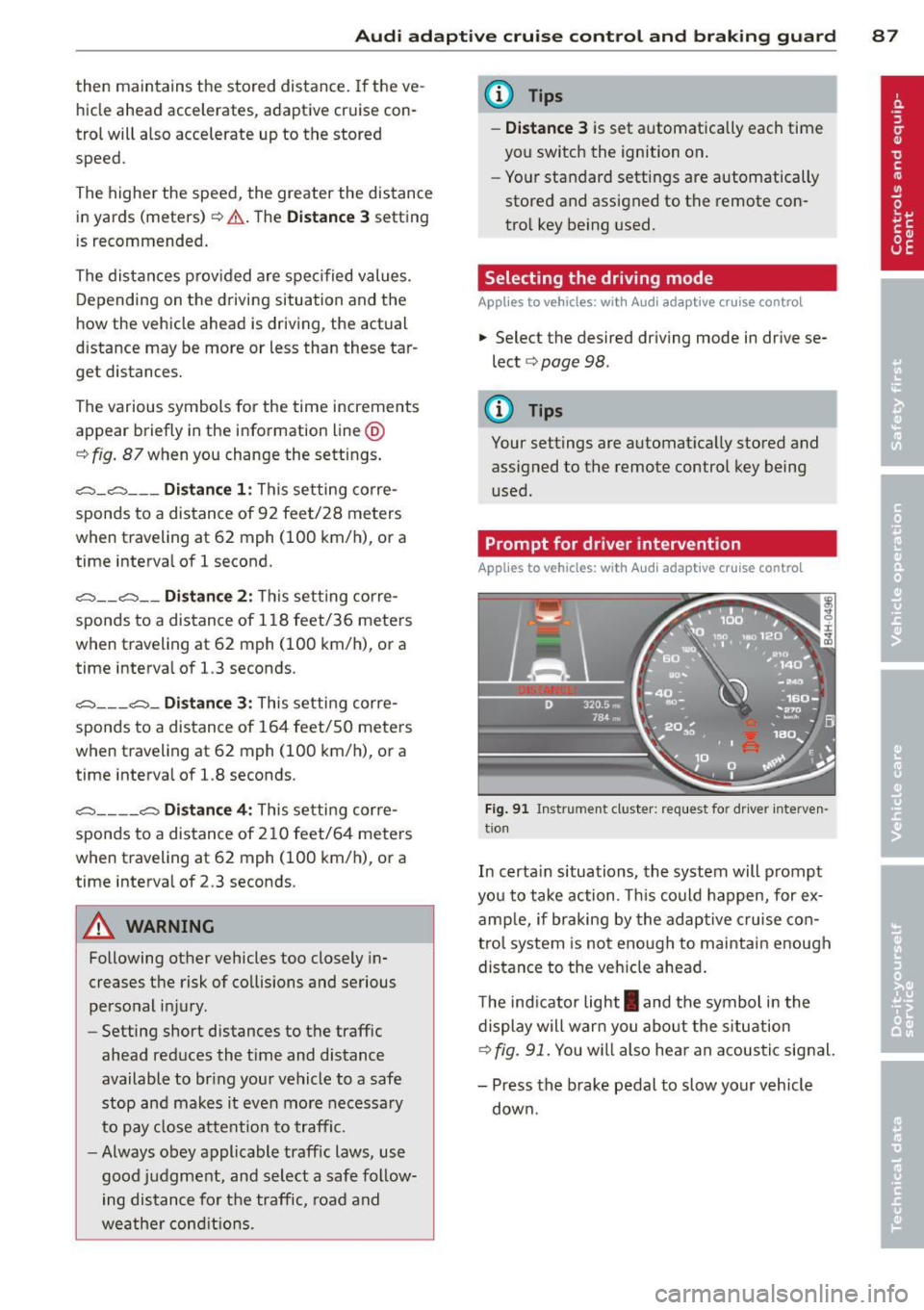
T he ind icator light
I and the symbol in the
display will warn you about the s ituation
¢ fig. 91. You w ill also hea r an acoustic signal.
- Press the brake pedal to slow your vehicle
down.
Page 93 of 306
Audi active Lane assist
Active Lane assist
Description
Applies to vehicles: with active lane assist
Active lane assist helps you keep your vehicle
in your lane.
Active lane assist detects lane marker lines
within the limits of the system using a camera in the windshield . If you are approaching a de
tected lane marker line and it appears likely
that you w ill leave the lane, the system will
warn you by means of corrective steer ing . T he
driver can over ride the cor re ct ive steer ing at
any time. If the veh icle crosses a line, the d riv
er is also warned by a light
vibration in the
steering whee l. The vibration warning must
be switched on in the MMI for this to happen.
Active lane ass ist is operable when the line
marking the lane is detected on at least one
side of the vehicle .
If the system is in active standby mode and
the turn signa l is activated before driving over
the lane marker line, the warning does not oc
cur since the system allows for intentional lane changes .
The system is designed for driv ing on free
ways and expanded highways and thus works
only at speeds of 40 mph (65 km/h) or more .
If the vehicle is also equipped with Audi adap
tive cruise control*, the corrective steering
will be more specif ic in regard to the driving
situation . In addition to the lane marker lines,
the system can a lso take into acco unt other
objects such as guard rails. If they are detect
ed in close proximity to the veh icle, Audi a c
tive lane ass ist helps prevent the vehicle from
driving too close to them . There is also pass
ing assistance. The system does not provide
any corrective steering if it detects that you
are passing another vehicle.
A WARNING
- The system warns the driver that the ve
hicle is leaving the lane us ing corrective
Audi acti ve lane a ssis t 9 1
steering. The driver is always responsible
for keeping the vehicle within the lane.
- The system can assist the driver in keep
ing the vehicle in the lane, but it does
not steer by itself. A lways keep your
hands on the steering wheel.
- Corrective steering may not occur in cer tain situat ions, such as dur ing heavy
brak ing.
- The camera does not recognize all lane
marker lines. Corrective steer ing can only
take p lace on the side of the vehicle
where lane marker lines are detected .
- Other road structures or objects cou ld
possibly be identified un intent ionally as
lane ma rker lines. As a result, cor rect ive
steer ing may be unexpected or may not
oc cur .
- The camera view can be restricted, for
examp le by vehicles driving ahead o r by
ra in, snow, heavy spray or light s hining
into the camera. This can result in a ctive
lane assist not detecting the lane marke r
lines or detect ing them inco rrectly .
- Unde r ce rtain condi tions such as ruts in
the road, a banked roadway or cross
winds, the corrective stee ring alone may
not be enough to keep the vehicle in the
lane.
- For safety reasons, active lane ass ist
must not be used when there are poor
road and/or weather condit ions such as
slippery roads, fog, gravel, heavy rain,
snow and the potent ial for hydroplaning .
Using act ive lane assist under thes e con
ditions may increase the risk of a crash.
Page 100 of 306
98 Audi drive select
Audi drive select
Driving settings
Introduction
Aud i d rive select mak es it possible to expe ri
ence diffe ren t types of vehi cle se ttin gs i n o ne
ve hicl e. The dr ive r can se lect th ree
Comfort ,
Auto and Dynamic modes in the M MI to
switch between a sporty and a comforta ble
driving mo de.
You c an a lso a djust the setti ng according to
your p re ferences in the
Individual mode . F o r
examp le, you ca n combine settings such as a
sporty en gine t uning with comfortab le steer
ing.
A WARNING
Improper use of the A udi drive select can
cause collisions, ot her acc idents and se ri
ous pe rsonal injury.
Description
The vehicle setup in each mode depends on
the veh icl e's featu res. The engine, t ransm is
sion, stee ring, reve rsible sa fe ty belt tension
e rs a nd adap tive air su spension are alw ays in
volved.
Engine and transmission
Depending on the mode, the e ng ine and the
tra nsmission respond quic ker or i n a more bal
an ced manne r to acce le rator pedal move
men ts. In the sporty dyn ami c mode, the
tra nsmission sh ifts at highe r RP Ms.
Air suspension*
The adaptive air suspens ion/adaptive air sus
pension spor t*
(Air suspen sion in the MM I) is
a n e lec tronic ally con trolled air suspension and
da mpi ng sys tem. They are adjus ted depend
ing on the se lected driving mode, the drive r's
steeri ng, braking an d acceleration input and
the road s urface, ve hicle speed and load. A
sporty setting is generally used in ve hicles
with adaptive air suspension sport*. T
he veh icle clearance varies depending on the
se lected mo de an d the speed .
T he highway setti ng is a ct ivated automatic ally
whe n you dr ive above 7 5 mph (120 km/ h) fo r
more than
3 0 seconds in the Auto or Dynamic
mode. The gro und clea rance is increased a uto
matically if the speed drops below
44 mph
(70 km/h) for more than 120 seconds.
Steering
T he s teer ing adap ts in terms of s teer ing effor t
and steering ratios . Indirect stee ring that
moves easily, like the steer ing in comfo rt
mode, is best suited to long drives on a high
way. In contrast, dynamic mode provides sporty, direct steer ing .
Sport differential*
As a component of the all whee l drive system
(quattro ®)
r=:> page 196, th e Sport differen
t ia l* distributes the driving powe r to the rear
axle depending on the situation. The distr ibu
t ion of power va ries depe nding on the select
ed mode, from balanced (comfort) to agile
(dyna mic) . Th e goa l is a high leve l of agility
and ability to acce le rate on cu rves . Th e vehicle
is ve ry re sponsive to st eer ing.
Curve light*
The curve light adapts to driving on curves .
T he pivo ting act io n and the lighting are also
adapt ed to the mode .
Adaptive cruise control*
The behav ior when accelerating can be adjust
ed from comfortab le to sporty, depending on
the drive select mode. Adaptive cru ise cont ro l
also responds to th e dr iv ing behavior o f th e
vehicle a head in a mo re co nse rvative o r sporty
man ne r.
Engine sound*
The sound of the eng ine is adapted to the se
lected mode and ranges from sub tle to sporty . .,.
Page 107 of 306
Automatic Transmission
multitronic ®, S tronic ®,
tiptronic
Introduction
App lies to vehicles: with multitro ni c/S tronic/t iptronic
The automatic transmission is controlled elec
tronically . The transmission upshifts or down
shifts automatically depend ing on which drive
program is se lected.
When a
moderate driving style is used, the
transmission selects the most economical
driving mode .
It will then change up early and
de lay the downshifts to g ive better fuel econ
omy.
The transmission switches to a sporty mode after a k ick-down or when the driver uses a
sporty driving style characterized by quick ac
celerator pedal movements, heavy accelera
tion, frequent changes in speed and traveling
at the maximum speed.
If desired, the driver can a lso se lect the gears
manually (t iptronic mode ) ¢ page 109.
Various automatic transm issions may be in
stalled, depend ing on the model :
multitronic® transmission
The multitronic ® transmission is a continuous
ly variable transmission. Power is transferred
using a multidisk clutch. In contrast to con
ventional automatic transmissions using shift
ing operat ions, the transmission ratio in the
continuously variable transmission is changed
continuously. This opt imizes the comfort level
and conserves fuel.
S tronic ® transmission
The S tronic ® is a dual-clutch transmission .
Power is transferred using two clutches that
work independently from one another. They
r eplace the torque converter used in conven
tional automat ic transmissions and allow the
vehicle to accelerate without a noticeable in
terruption in traction.
Automatic Transmission 105
tiptronic transmission
In the tiptronic transmission, power is trans
ferred by a torque converter .
Selector lever positions
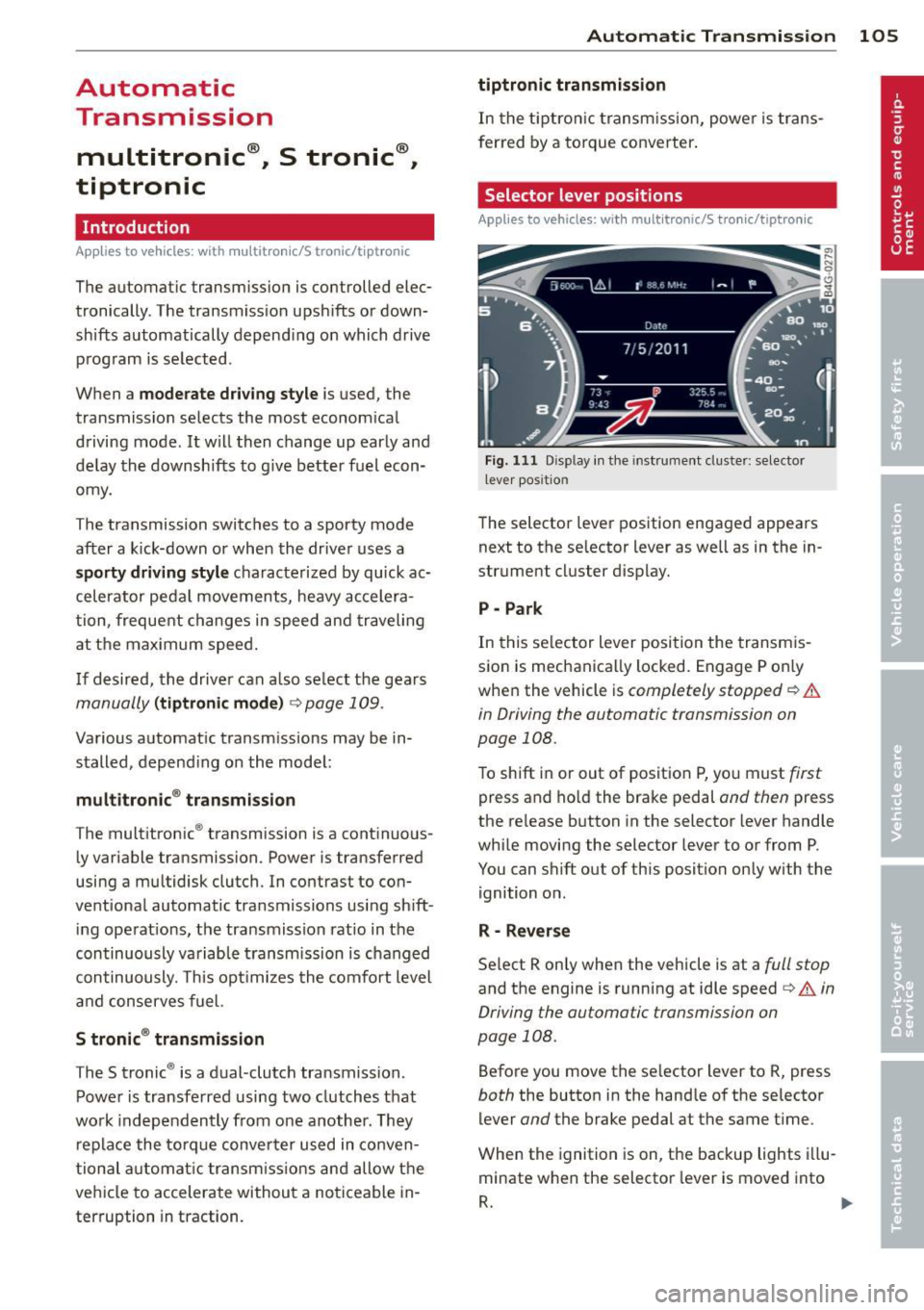
Applies to vehicles: wit h mult itronic/5 tro nic/tiptro nic
Fig. 111 Disp lay in the instrument cluster: selector
l ever pos itio n
The selector lever position engaged appears
next to the selector lever as well as in the in
strument cluster display.
P -Park
In this selector lever position the transmis
sion is mechanically locked. Engage P only
when the vehicle is
completely stopped¢&.
in Driving the automatic transmission on
page 108.
To shift in or out of position P, yo u must first
press and ho ld the brake pedal and then press
the release button in the selector lever handle
while moving the selector lever to or from P .
You can shift out of this position only with the ignition on .
R -Reverse
Select R only when the vehicle is at a full stop
and the engine is running at idle speed¢ A in
Driving the automatic transmission on
page 108.
Before you move the se lector lever to R, press
both the button in the handle of the selector
lever
and the brake pedal at the same time .
When the ignition is on, the backup lights illu
minate when the selector lever is moved into
R. .,.
Page 108 of 306
106 Autom atic Tran smissi on
N - N eutr al
The transmission is in neutral in this position.
Shift to this position for stand ing with the
brakes applied
q .&. in Driving the automatic
transmission on page 108.
When the ve hicle is stationary o r at speeds
be low 1 mph (2 km/h), you must always apply
the footbrake befo re and while moving the
l ever out of N .
DIS -Normal position for driving forward
In the D/S position, the transmiss ion can be
operated e ither in the normal mode Dor in
the sport mode S. To select the sport mode S,
pull the se lector lever back briefly . Pulling the
lever back aga in will select the normal mode
D. The instrument cluster display shows the
selected driving mode.
In the
normal m ode D, the transmission auto
mat ica lly selects the suitab le gear ratio.
It de
pends on engine load, veh icle speed and driv
ing style.
Select the
s p or t mod e S for sporty driving.
The vehicle makes fu ll use of the engine's
power. Shifting may become noticeable when
accelerating.
When the ve hicle is stationary or at speeds
be low 1 mph (2 km/h), you must always apply
the foot brake before and while moving the lever to D/S out of N .
A WARNING
Read and follow all WARNINGS q .&. in
Driving the automatic transmission on
page 108.
(D Note
-
Coast ing downh ill with the transmission in
N and the engine not running w ill result in
damage to the automatic transmiss io n
and possib ly the catalytic converter .
@ Tips
-Audi drive select : you can adjust the
sporty sh ift c haracte ristics in the
Dy-
namic driv ing mode.Swi ll appea r in the
instrument cluster display instead of D.
-If you acc identally select N whi le driving,
take your foot off the accelerator pedal immediately and wait for the engine to
slow down to idle before selecting D/S.
- If there is a power fail ure, the selector
lever w ill not move out of the P position.
The emergency release can be used if
this happens
qpage 111.
Automatic Shift Lock (ASL)
Applies to vehicles: with multitronic/5 tronic/tiptron ic
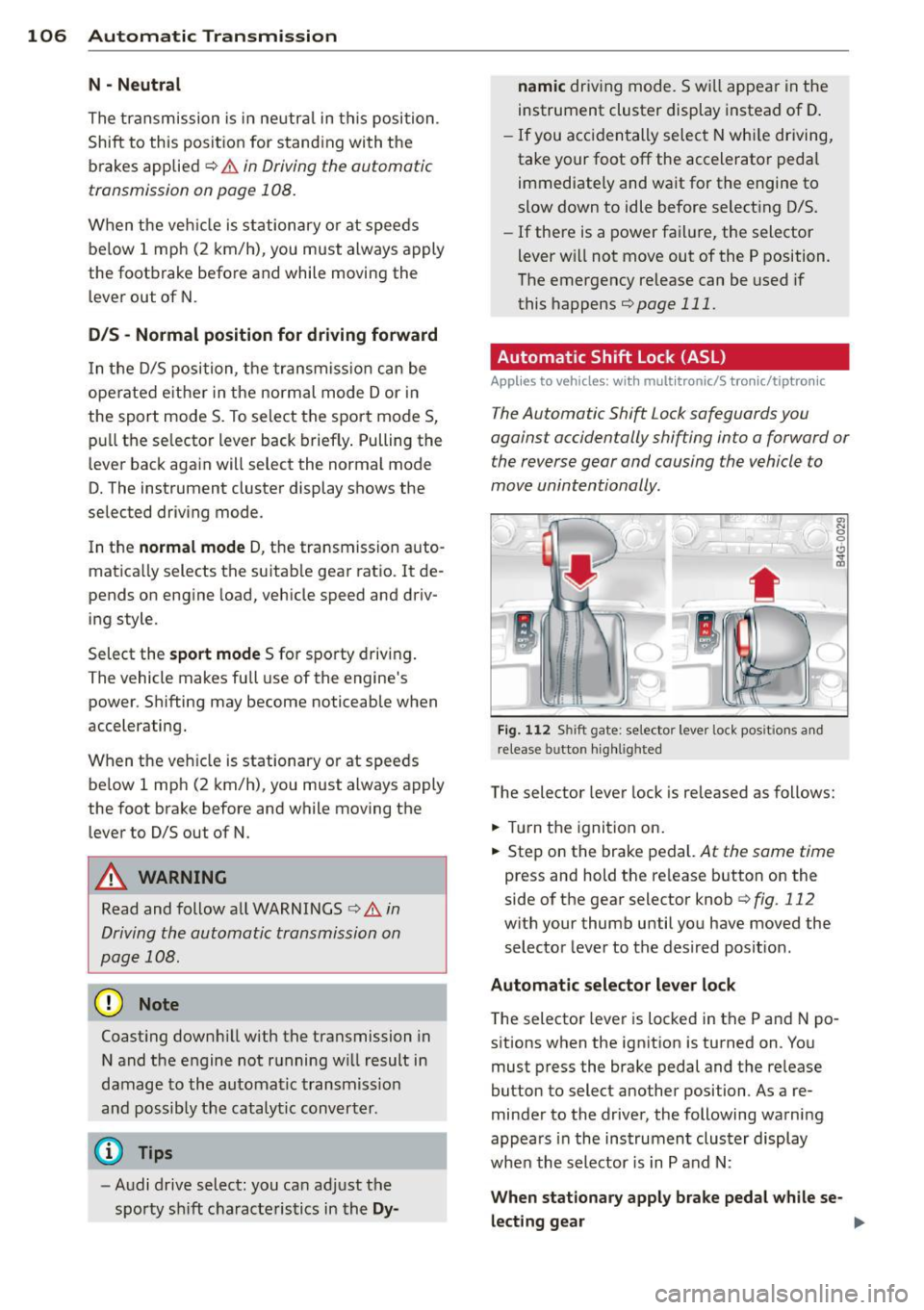
The Automatic Shift Lock safeguards you
against accidentally shifting into a forward or
the reverse gear and causing the vehicle to
move unintentionally.
' ) ( )
F ig . 11 2 Shi ft gate: selector lever lock pos it ions a nd
release b utto n high lig h ted
The selector lever lock is released as follows:
.,. Turn the ignition on.
.,. Step on the brake pedal.
At the same time
press and hold the re lease button on the
side of the gear selector knob
c::> fig . 112
with your thumb until you have moved the
selector lever to the desired posit ion .
Automat ic sel ect or lev er lo ck
The selector lever is locked in the P and N po
s itions when the ignit ion is turned on . Yo u
must press the brake pedal and the re lease
button to select another position . As a re
minder to the driver, the following warni ng
appears in the instrument clus ter display
whe n the selector is in P and N:
When stationary appl y brake peda l while se-
lec ting gear ..,_