brakes AUDI A6 2013 User Guide
[x] Cancel search | Manufacturer: AUDI, Model Year: 2013, Model line: A6, Model: AUDI A6 2013Pages: 306, PDF Size: 76.92 MB
Page 108 of 306
106 Autom atic Tran smissi on
N - N eutr al
The transmission is in neutral in this position.
Shift to this position for stand ing with the
brakes applied
q .&. in Driving the automatic
transmission on page 108.
When the ve hicle is stationary o r at speeds
be low 1 mph (2 km/h), you must always apply
the footbrake befo re and while moving the
l ever out of N .
DIS -Normal position for driving forward
In the D/S position, the transmiss ion can be
operated e ither in the normal mode Dor in
the sport mode S. To select the sport mode S,
pull the se lector lever back briefly . Pulling the
lever back aga in will select the normal mode
D. The instrument cluster display shows the
selected driving mode.
In the
normal m ode D, the transmission auto
mat ica lly selects the suitab le gear ratio.
It de
pends on engine load, veh icle speed and driv
ing style.
Select the
s p or t mod e S for sporty driving.
The vehicle makes fu ll use of the engine's
power. Shifting may become noticeable when
accelerating.
When the ve hicle is stationary or at speeds
be low 1 mph (2 km/h), you must always apply
the foot brake before and while moving the lever to D/S out of N .
A WARNING
Read and follow all WARNINGS q .&. in
Driving the automatic transmission on
page 108.
(D Note
-
Coast ing downh ill with the transmission in
N and the engine not running w ill result in
damage to the automatic transmiss io n
and possib ly the catalytic converter .
@ Tips
-Audi drive select : you can adjust the
sporty sh ift c haracte ristics in the
Dy-
namic driv ing mode.Swi ll appea r in the
instrument cluster display instead of D.
-If you acc identally select N whi le driving,
take your foot off the accelerator pedal immediately and wait for the engine to
slow down to idle before selecting D/S.
- If there is a power fail ure, the selector
lever w ill not move out of the P position.
The emergency release can be used if
this happens
qpage 111.
Automatic Shift Lock (ASL)
Applies to vehicles: with multitronic/5 tronic/tiptron ic
The Automatic Shift Lock safeguards you
against accidentally shifting into a forward or
the reverse gear and causing the vehicle to
move unintentionally.
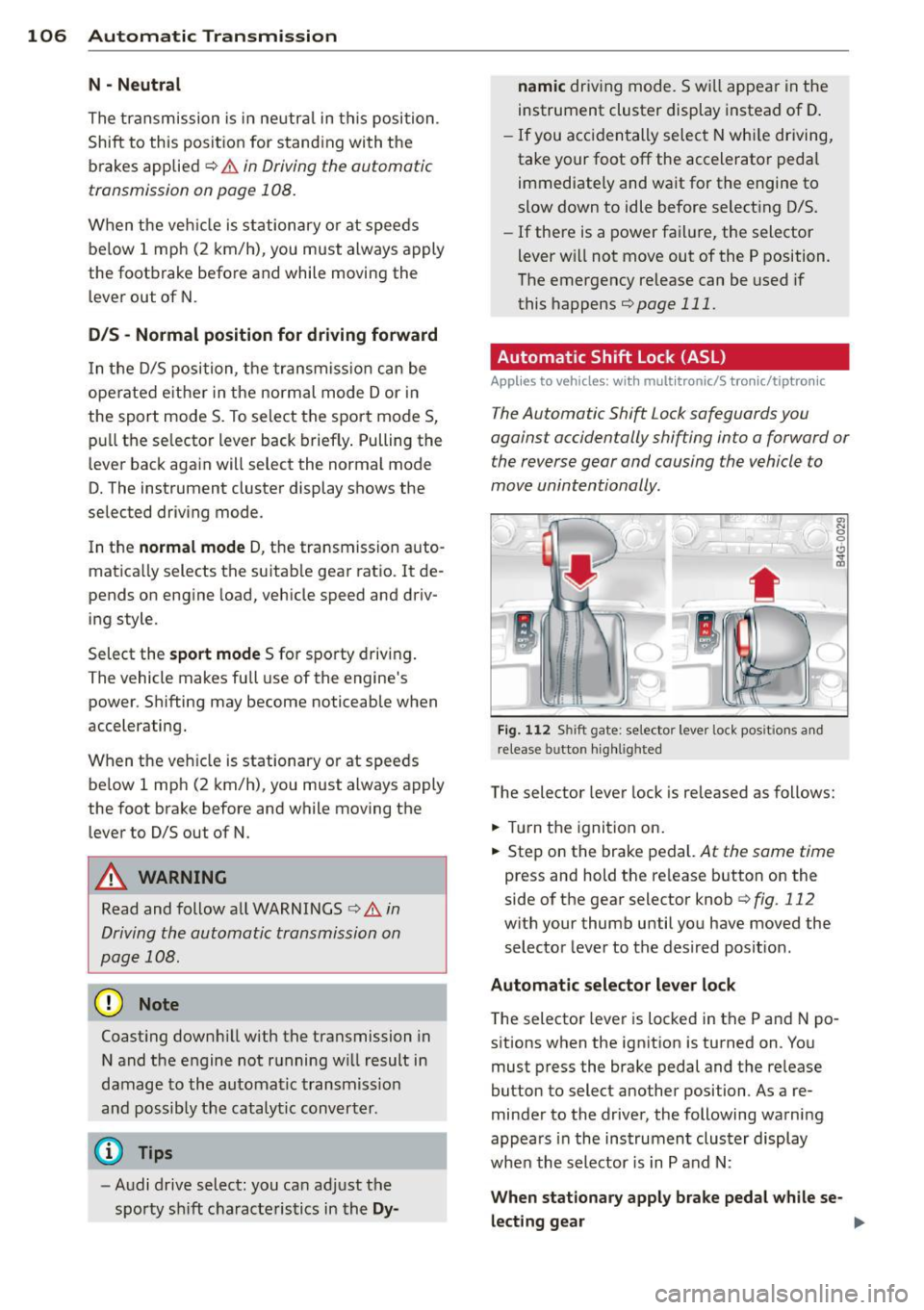
' ) ( )
F ig . 11 2 Shi ft gate: selector lever lock pos it ions a nd
release b utto n high lig h ted
The selector lever lock is released as follows:
.,. Turn the ignition on.
.,. Step on the brake pedal.
At the same time
press and hold the re lease button on the
side of the gear selector knob
c::> fig . 112
with your thumb until you have moved the
selector lever to the desired posit ion .
Automat ic sel ect or lev er lo ck
The selector lever is locked in the P and N po
s itions when the ignit ion is turned on . Yo u
must press the brake pedal and the re lease
button to select another position . As a re
minder to the driver, the following warni ng
appears in the instrument clus ter display
whe n the selector is in P and N:
When stationary appl y brake peda l while se-
lec ting gear ..,_
Page 110 of 306
108 Automatic Transmission
This prevents too much stress from being placed on the locking mechanism.
multitronic transmission : Your vehicle is
equipped with
hill hold assist allowing you to
start while on an incline. The system is acti
vated when the brake pedal is pressed down
and held
for a few seconds. T he brake pres
sure will hold for
o moment after the brake
pedal loosens to prevent the vehicle from roll
ing backwards while starting up .
A WARNING
-The vehicle can also roll when the engine
is stopped .
- Unintended vehicle movement can cause serious injury.
- Never leave your vehicle with the engine
running while in gear. If you must leave
your vehicle when the engine is running, activate the parking brake and move the
selector lever to P.
- Power is still transmitted to the wheels
when the engine is running at idle. To
prevent the vehicle from "creeping ", you
must keep your foot on the brake when
the engine is running and the selector lever is in D/S or R or "tiptronic" mode is
selected.
- Do not press the accelerator pedal when
changing the selector lever position
while the vehicle is stationary and the
engine is running.
- Never shift into R or P while driving.
- Before driving down a steep slope, re-
duce your speed and shift into a lower
gear with "tiptronic".
- Do not ride the brakes or press the brake
pedal too often or too long when driving
down a hill. Constant braking causes the
brakes to overheat and substantially re
duces braking performance, increases
braking distance or causes complete fail
ure of the brake system.
- To prevent the vehicle from rolling back
when stopping on inclines, always hold it
in place with the brake pedal or parking
brake. -
Never hold the vehicle on an incline with
a slipping clutch. The clutch opens auto
matically when it becomes too hot from
the overload . An indicator lamp
[O] illu
minates and a driver message appears
~ page 110 when the clutch is overload
ed.
- If the engine must remain running, never
have any driving position engaged when
checking under the hood. Make sure the
selector lever has securely engaged and
is locked in P with the parking brake set
~ page 219, Engine comportment. Oth
erwise, any increase in engine speed may
set the vehicle in motion, even with the
parking brake applied.
(D Note
- 5 tronic ®- and tiptronic transmission :
When stopping on an incline, do not try
to hold the vehicle in place by pressing
the accelerator pedal while a driving gear
is selected . This can cause the transmis
sion to overheat and can damage it. Acti
vate the parking brake or press the brake
pedal to prevent the vehicle from rolling .
- 5 tronic ®- and tiptronic transmission : Al
lowing the vehicle to roll when the en
gine is stopped and the selector lever is
in N will damage the transmission be
cause it is not lubricated under those cir
cumstances.
(D Tips
For safety reasons, the parking brake is re
leased automatically only when the driv
er's safety belt is engaged in the buckle.
Hill descent control
Applies to vehicles: with mult itronic/5 tronic/tiptronic
The hill descent control system assists the
driver when driving down declines.
Hill descent control is activated when these
lector lever is in D/S and you press the brake
pedal. The transmission automatically selects .,.
Page 111 of 306
a gear that is suitable for the incline. Hill de
scent control tries to maintain the speed ach
ieved at the time of brak ing, within physical
and technica l limitations. If may still be nec
essary to adjust the speed with the brakes.
Hill descent control switches off once the de
cline levels out or you press the accelerator pedal.
On vehicles with the cruise control system*
¢ page 79, hill descent control is also activat
ed when the speed is set.
.&_ WARNING
-
H ill descent control cannot overcome
physical limitations, so it may not be able
to maintain a constant speed under all
conditions. Always be ready to app ly the
brakes .
Manual shift program
Applies to vehicles: with mult itronic/S tronic/tiptron ic
Using the manual shift program you can
manually select gears.
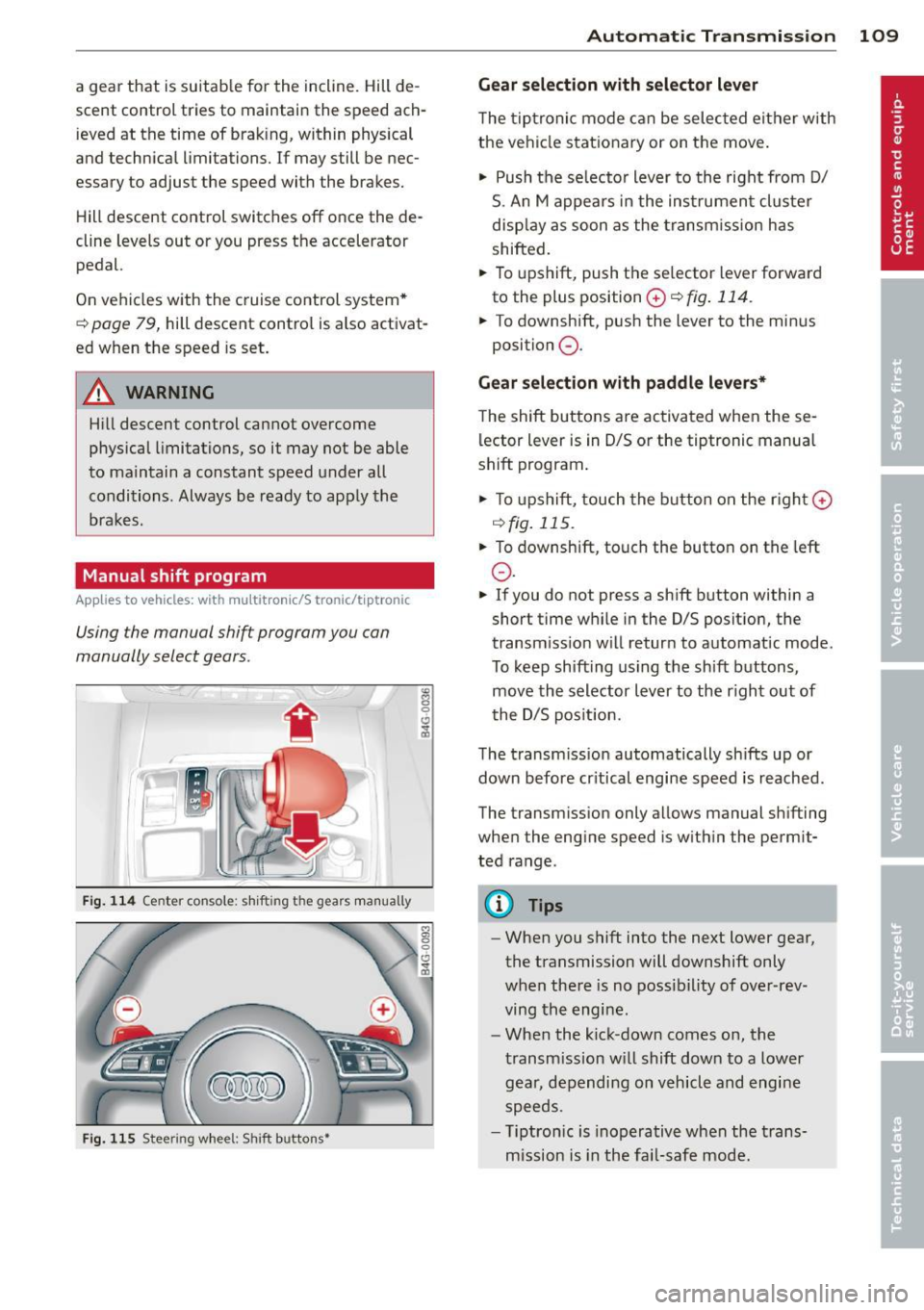
Fig. 114 Center co nsole: shi fting the gears manually
Fig. 115 Steering wheel: Shift buttons•
"' 8 0 CJ
cb
Automatic Transmission 109
Gear selection with selector lever
The tiptronic mode can be selected either with
the vehicle stationary or on the move.
"' Push the se lecto r lever to the right from D/
S. An M appears in the instrument cluster
display as soon as the transm ission has
shifted.
"' To upshift, push the se lector lever forward
to the plus position
0 ¢ fig . 114.
"' To downshift, push the lever to the minus
position
0 .
Gear selection with paddle levers*
The shift buttons are activated when these
lector lever is in D/S or the tiptronic manual
shift program .
"'To upshift, touch the button on the rig ht G)
C) fig. 115 .
.,. To downshift, touch the button on the left
0 .
"' If you do not press a sh ift button within a
short time while in the D/S position, the
transm iss ion w ill retur n to automat ic mode.
To keep shifting using the sh ift buttons,
move the selector lever to the r ight out of
t he D/S posit ion.
The transmission automatically shifts up or
down before cr itical engine speed is reached .
The transm ission only a llows manual sh ifting
when the engine speed is w ithin the permit
ted range.
(D Tips
- When you shift into the next lower gear,
the transmission will downshift only
when there is no possibility of over-rev
ving the engine.
- When the kick-down comes on, the
transmission will shift down to a lower
gear, depending on vehicle and engine
speeds.
- T iptron ic is inoperat ive when the trans
mission is in the fail-safe mode.
Page 195 of 306
ESC includes and/or works together with the
anti-lock brake system (ABS) , brake assist sys
tem, anti -slip regulation (ASR) , electronic dif
ferential lock (E DL) and e lectronic interaxle
d ifferential lock*. ESC is swi tched on all the
time. In certain situat ions when you need less
traction , you can switch off ASR by pressing
the button
[ru ~ fig . 177 . Be sure to switch
ASR on again when you no longer need less
traction.
Anti-lock braking system (ABS)
ABS prevents the wheels from locking up
when braking. The vehicle can still be steered even during hard braking . Apply steady pres
sure to the brake pedal. Do not pump the ped
al. A puls ing in the brake pedal indicates that
the system is he lping you to brake the vehicle.
Brake assist system
The brake assist system can decrease brak ing
d istance.
It increases braking power when the
driver presses the brake pedal quickly in emer
gency situations. You must press and hold the
brake pedal until the situation is over . In
vehicles with adaptive cruise control* , the
brake assist system is more sensitive if the
d istance detected to the vehicle ahead is too
small.
Anti-slip regulation (ASR)
ASR reduces engine power when the drive
wheels begin to spin and adapts the force to
the road condit ions. This makes it eas ier to
s tart, accelerate and drive up hills.
Electronic differential lock (EDL)
The EDL brakes wheels that are spinn ing and
transfers the drive power to the other drive
wheel or whee ls if the vehicle is equipped with
all-whee l drive*. This function is available up
to about 75 mph (120 km/h).
I n extreme cases , EDL automatically switches
off to help keep the brake on the braked wheel
from overheating. EDL wi ll switch on again au
tomatically when conditions have returned to
normal.
Intelligent technology 193
Electronic interaxle differential lock*/
selective wheel torque control*
The electronic interaxle differential lock (front
whee l drive) or the se lective wheel torque
cont rol (all-wheel dr ive) operates when dr iv
ing through curves . The front wheel on the in
s ide of the curve or both wheels on the inside
of the curve are braked selectively as needed .
T his min imizes sliding in the front wheels and
allows for more precise driving through
curves . Th e applicable system may no t acti
vate when driv ing in wet or snowy conditions.
A WARNING
-
-ESC, ABS, ASR, EDL and the electronic in
teraxle differential lock function* cannot
overcome the laws of physics. This is es
pecially important on slippery or wet
roads . If the systems begin acting to sta
bilize your vehicle, you should immedi
ately change your speed to match the
road and traffic conditions. Do not let
the increased safety provided by these
systems tempt you to t.;1ke risks. Doing
so will increase the risk o f a loss of vehi
cle control, collision and serious personal
injuries.
-Always adapt your speed to road, traffic
and weather conditions . The risk of los
ing control of the vehicle increases when
driving too fast, espec ially through
curves and on slippery or wet roads, and
when dr iving too close to vehicles up
ahead . ESC, ABS, the brake assist sys
tem, EDL, ASR and the elec tronic inter
axle differential lock function* cannot
prevent collisions .
- Always accelerate with special care on
even, smooth surfaces such as those that
are wet or covered with ice and snow.
The drive wheels can spin even with
these assistance systems that cannot al
ways he lp to red uce the risk of loss of ve -
hicle control. .,.
•
•
Page 196 of 306
194 Intelligent technology
@ Tips
-ABS and ASR on ly work correctly when
all four wheels are equipped w ith identi
cal tires. Different tire sizes can lead to a
reduction in engine power.
- You may hear noises when the systems
described are working.
- If the indicator light
DJ or 11:11 (USA
models) 1i] (Canada models) appears,
there may be a malfunction¢
page 20,
c> page 19.
Switching on and off
ESC
turns on automatically when you start
the engine.
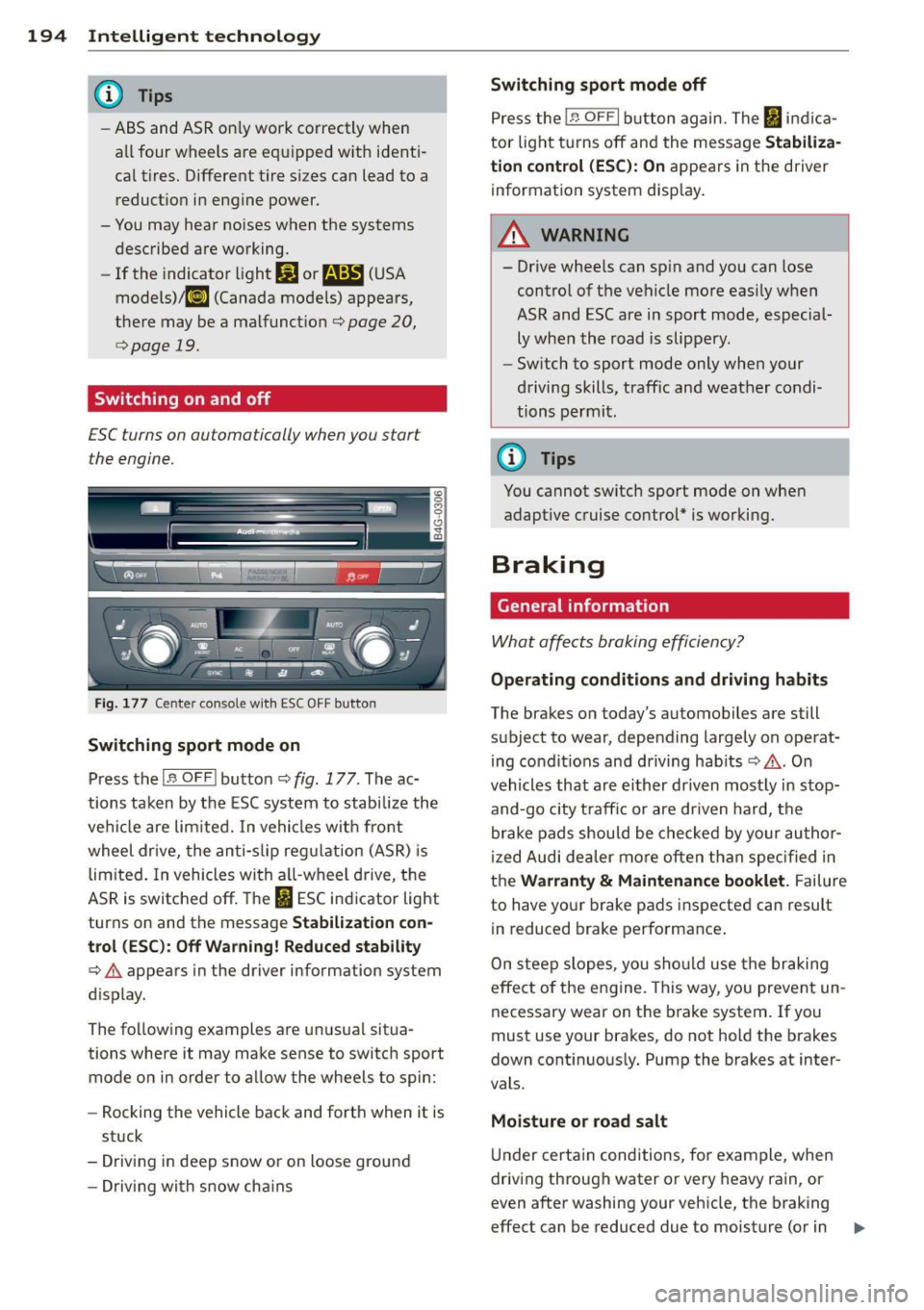
Fig. 177 Center console w it h ESC OFF button
Switching sport mode on
Press the I~ OF FI button c::> fig . 177. The ac
tions taken by the ESC system to stabilize the
vehicle are limited. In vehicles with front
wheel drive, the anti-slip regulation (ASR) is
limited. In vehicles with a ll-wheel drive, the
ASR is switched off. The
It) ESC indicator light
turns on and the message
Stabilization con
trol (ESC): Off Warning! Reduced stability
¢.&. appears in the driver information system
d isplay.
The following examples are unusual situa
tions where it may make sense to switch sport
mode on in order to allow the wheels to spin:
- Rocking the vehicle back and forth when it is
stuck
- Driving in deep snow or on loose ground
- Driving with snow cha ins
Switching sport mode off
Press the 1.$ OF FI button again. The I indica
tor light turns off and the message
Stabiliza
tion control (ESC): On
appears in the driver
information system display .
A WARNING
-
-Drive wheels can spin and you can lose
control of the vehicle more easily when
ASR and ESC are in sport mode, especial
ly when the road is slippery.
- Sw itch to sport mode only when your
driving skills, traffic and weather condi
tions permit.
@ Tips
You cannot sw itch sport mode on when
adaptive cruise control* is working.
Braking
General information
What affects braking efficiency?
-
Operating conditions and driving habits
The brakes on today's automobiles are still
subject to wear, depending largely on operat
ing condit ions and driving hab its
c::> .&. . On
vehicles that are either driven most ly in stop
and-go city t raff ic or are driven hard, the
brake pads should be checked by your author
ized Audi dea ler more often than specified in
the
Warranty & Maintenance booklet. Failure
to have your brake pads inspected can result
in reduced brake performance .
On steep slopes, you should use the braking
effect of the engine . This way, you prevent un
necessary wear on the brake system. If you
must use your brakes, do not hold the brakes
down continuously. Pump the brakes at inter
vals .
Moisture o r road salt
Under certain conditions, for example, when
driving through water or very heavy rain, or
even after washing your vehicle, the braking
effect can be reduced due to moisture (or in .,,_
Page 197 of 306
freezing conditions ice) on the brake pads. A
few careful brake applications sho uld d ry
off
the brake pads or remove any ice coatings.
When you are driving at h igher speeds wit h
the windshield wipers on, the brake pads will briefly touch the brake discs in regular inter
va ls so as to improve reaction t ime when brak
ing on wet surfaces. You the driver w ill not no
tice anything.
The effectiveness of the brakes can be reduced
when the vehicle is dr iven on a salt -covered
road and the brakes are not used . Here too,
you should clean
off accumulated salt coat ing
from brake discs and pads with a few careful
applications of the brake
¢ ,&..
Cor ro sion
There may be a tendency for dirt to bui ld up
on the brake pads and corrosion to form on
the discs if the car is not dr iven regularly or
only for short trips with little use of the brakes .
If the brakes are not used frequently, or if cor rosion has formed on the discs, it is advisable
to clean
off the pads and discs by braking
f irmly a few times from a moderately high
speed ¢,&. .
Fa ult s in the b rake system
If you should notice a sudden increase in
brake pedal travel, then one of the two brake
circu its may have failed
c> ,&..
Lo w brak e flu id le vel
Malfunctions can occur in the brake system if
the brake fluid level is too low . The brake fluid
level is monitored electronically.
Brake boo ste r
The brake booster works with vacuum pres
sure which is created only when the engine is
running ¢ ,&. .
Brake lining w ear statu s
Brake lining wear may be checked by vis ual in
spection of the condition of the brake pads
through the openings in the whee l. If neces-
Int ellig ent technolog y 195
sary, the wheel may be removed for this in
spection ¢
page 263 , Changing a wheel.
A WARNING
- You should perform braking maneuvers
for the purpose of cleaning the brake
system only if road conditions permit.
Other road users must not be put at risk -
you may cause an accident!
- Before descend ing a steep grade, reduce
speed and sh ift transmission into a lower
gear or lower dr iving range . Do not ride
the brakes or hold the pedal down too
long o r too often . Th is could cause the
brakes to get hot and diminish braking
efficiency .
- Do not "ride the brakes" by rest ing you r
foot on the pedal when you do not intend
to brake . This may cause the brakes to
overheat, p remature wear and increased
stopping distance.
- Under certain cl imatic and operating
conditions such as passing thro ugh wa
ter, dr iv ing in heavy rain or after washing
the vehicle, the effectiveness of the brakes can be reduced . In winter, ice can
accumu late on the brake pads, lin ings,
discs and drums . Carefully app ly brakes
for a test. Brakes will dry and ice coat
ings w il l be cleaned
off after a few care
fu l brake applicat ions.
- Driving for an extended period o f time on
salt- covered roads wi thout using your
brakes can a lso affect braking efficiency .
Clean
off accum ulated salt coating from
brake discs and pads with a few careful
brake applications.
- If you damage the front spoiler, or if you
install a different spoiler, be sure the air
f low to the front brakes is not obstruct
ed. Otherw ise the brake system could
overheat reducing the effectiveness of
the entire brake system.
- Failure of one brake circuit will impair
the braking capab ility result ing in an in
creased stopping distance . Avoid driving
the vehicle and have it towed to the near-
est A udi dealer or qualified wo rkshop.
~
•
•
Page 201 of 306
Driving and
environment
The first 1
1000
miles
(11500 km) and
afterwards
New engine
The engine needs to be run-in during the first
1,000 miles (1,500 km) .
For the first 600 mile s (1,000
kilometers ):
.,. Do not use full throttle.
.,. Do not d rive at engine speeds that are more
than 2/3 of the max imum permitted RPM .
.. Avoid high engine speeds.
From 600 to 1,000 miles (1 ,000 to
1,500 kilometers):
.. Speeds can gradually be increased to the
maximum pe rm iss ible road or eng ine speed .
During and after break-in per iod
.,. Do not rev the engine up to high speeds
when it is cold. This applies whether the
transmission is i n N (Neutra l) or in gear.
After the break- in peri od
.. Do not exceed maximum engine speed un
der any circumstances.
.,. Upshift into the next higher gear
before
reaching the red area at the end of the tach
ometer scale
¢ page 11.
During the first few hours of driving, the en
g ine's interna l friction is higher than later
when all the moving parts have been broken
i n. How well this break-in p rocess is done de
pends to a considerable extent on the way the
ve hicl e is driven d uring the first 1,000 miles
(1,500 ki lome ters).
(D Note
Extremely h igh engine speeds are auto
mat ica lly reduced. However, t hese rpm
lim its are progr amme d for an eng ine well
r u n- in, not a new engine .
Driving and environment 199
@) For the sake of the environment
Do not drive with unnecessarily high en
g ine speeds -upshifting ear ly saves f uel,
reduces noise and protects the environ
ment.
New tires
If your vehicle is running on new tires, drive
particularly caref ul for the first 350 miles
(500 kilomete rs) afte r fitt ing.
.&, WARNING
N ew tires tend to be sl ippery and mus t al
so be "b roken -in" . Be sure to remember
this dur ing the f irst 350 m iles (500 kilo
meters) . Brake gently . Avoid fo llowing
closely behind other vehicles or other sit
uations that m ight require sudden, hard
b raking .
New brake pads
Remember that new brake pads do not have a
full brak ing effect dur ing the first 250 m iles
(400 ki lomete rs) afte r they are installed.
New brake pads have to be "burnished in" be
fore they have optima l grab¢ .&. .
D uring the brea k-in period, yo u should avo id
putting severe loads on the brakes. Severe
l oads include , for example, sudden hard brak
i ng, in particular at very h igh speeds or, for
example, on mounta in passes .
.&, WARNING
New b rake pads don't have the best stop
p ing power and must be "broken-i n" dur
ing the initi al 100 to 150 miles (150 to
200 kilometers) o f no rma l ci ty driving . You
can compensate for this by pressing the b rake peda l more firm ly . This also applies
later when new pads are installed.
•
•
Page 203 of 306
Driving through water
on roads
Note the following to avoid vehicle damage
when driving through water, for example on
flooded roads:
- The water must not be any higher than the
bottom of the vehicle body.
- Do not drive faster than wa lking speed.
A WARNING
After driving through water, mud, slush,
etc., the brakes may be slow to take effect
because of wet brake rotors and pads. Dry
the brakes first by braking carefully to re
store the full b raking effect.
([) Note
-Vehicle components such as the eng ine,
transmission, suspension or electr ical
system can be severely damaged by driv
i ng th rough water.
- Always switch off the Start-Stop-System
when driving through water~ page 76.
(D Tips
-Check the depth of the water before dr iv
i ng t hrough it.
- Do not stop the veh icle, dr ive in reverse
or switch the eng ine off whe n driving
through water .
- Keep in mind that oncoming vehicles
may create waves that raise the water
level and make it too deep fo r your vehi
cle to drive t hrough safely.
- Avoid dr iv ing through salt water because
i t can cause corrosion.
Dri vin g and en vironm ent 201
Operate your vehicle
economically and
minimize pollution
General
Your personal style of driving will determine
the economy of your vehicle, as well as ex
haust and noise levels.
Fuel economy, environmenta l impact, and
wear on your eng ine, brakes and tires largely
depend on three factors:
- your pe rsonal d riving style
- operating conditions
- technical limitat ions
If you ant ic ipate what you need to do next and
drive economically, you can easily cut you r
fuel consumpt io n by 10-15 percent . T his sec
tion w ill give you some tips on how you can
help the env ironment and your po cketbook.
@ Tips
The consumption estimates as published
by ENVIRONMENTAL PROT ECTI ON AGENCY
( E PA) a nd Tra nspo rt Canada may no t corre
spond to your actual consump tion on the
road, which will va ry depending upon vehi
cle load and speed, road and weather con
ditions, trip length, etc.
Drive smoothly and keep a lookout
ahead
Vehicles use the most fuel when they are ac
celerating.
.,. Avoid unnecessary accelerating and braking.
Vehicles use the most f ue l when they a re ac
ce le rat ing. If you ant icipate what is going to
happen next, you will need to brake less and,
th us, acce lerate less . Let the vehicle coast
whenever possible - for examp le when you see
that the next traff ic light is red.
•
•
Page 206 of 306
204 Trailer towing
Trailer towing
Driving with a trailer
General information
Your Audi was designed primarily for passen
ger transportation .
If you plan to tow a trailer, p lease remember
that the additional load will affect durability,
economy and performance .
Trailer towing not on ly places more stress on
the vehicle, it also calls for more concentra
tion from the driver.
For this reason, always fo llow the operating
and driving instructions provided and use
common sense.
@ Note
If you are going to tow a trai ler, you must
activate the trailer operation mode
c:::> page 204, Operating instructions.
Technical requirements
Trailer hitch
Use a weight-carrying hitch conforming to the
gross trailer weight. The hitch must be suita ble for your vehicle and trailer and must be
mounted securely on the veh icle's chassis at a
technically sound location . Use only a trailer
hitch with a removable ball mount. A lways
check with the trai ler hitch manufacturer to
make sure that you are using the cor rect
hitch.
Do not use a bumper hitch.
The hitch must be installed in such a way that
it does not interfere with the impact-absorb
ing bumper system. No modifications should
be made to the vehicle exhaust and brake sys
tems . From time to time, check that all hitch
mounting bolts remain securely fastened.
When you are not towing a trailer, remove the
trai ler hitch ball mount. This prevents the
h itch from causing damage should your veh i
cle be struck from behind
c:::> A .
Trailer brakes
If your trailer is equipped with a brak ing sys
tem, check to be sure that it conforms to all
regulations.
T he trailer hydraulic brake system must not be
directly connected to the vehicle's hydraulic
brake system .
Safety chains
Always use safety chains between your veh icle
and the trailer.
Trailer lights
Trailer lights must meet all regulations. Be
sure to check with your Audi dealer for correct
wiring, switches and relays.
Mirrors
If you are unable to see the traffic behind you
using the regular outside mirrors, then you
must install extended mirrors. It is important
that you
always have clear v is ion to the rear .
A WARNING
--
After removing the trailer hitch, do not
store it in your vehicle . In case of sudden
braking, the hitch could fly forward and in
jure you or your passengers.
Operating instructions
Maximum trailer weight
A tra ile r for your vehicle is limited to a typical
class 1 or class 2 tra ile r.
Trailer load distribution
Be sure the load in the trailer is held securely
in place to prevent it from shift ing forward,
backward or sideways.
Never allow a passenger to ride in a trailer
c:::> A in Driving instructions on page 206 .
Engine cooling system
Towing a trailer makes the engine work hard
er . It is important that the cooling system 's
performance is up to the additional load.
Page 207 of 306
Make sure that the cooling system has enough
f luid .
Tire pressure
When tow ing a trai ler, inflate the t ires of your
vehicle to the cold tire pressure listed under
"Full load" on the label located on the driver's
side B-pillar (visible when the door is open).
Inflate trailer tires to trai ler and tire manufac
turers' specifications.
Lights
Check to make sure both veh icle and trailer
lights are working properly.
Safety chains
Be sure tra iler safety cha ins are properly con
nected from the trailer to the hitch on the ve
hicle. Leave enough slack in the chains to per
mit turning corners . When you install safety
chains, make sure they wi ll not drag on the
road when you are driving.
The chains should cross under the tra ile r
tongue to prevent it from dropping in case of
sepa ration from the hitch.
Adjusting the Audi drive select
Make sure the veh icle is on a level surface be
fore hitching up the tra iler and before adjust
in g the tongue weight. The vehicle must be in
auto or comfort dr iving mode and not raised
qpage 98, q(D .
Make sure that the vehicle is lowe red. In Info
tainment, se lect:
ICARI f u nction button> Low
er
control button.
If you must drive under poor road condit ions,
you can raise the veh icle
after coupling the
traile r or
after adjusting the tongue weight
qpage 100.
- Changes in temperatu re or load can af
fect the height of the veh icle.
- Always se lect
auto or comfort mode.
Otherwise, the tongue load spec ified for
you r vehicle will no longer be applicable.
Trailer towing
Driving instructions
Driving with a trailer always requires extra
care and consideration .
To obtain the best possible handling of vehicle
and trailer, please note the following:
... Do not tow a loaded trailer when your car it
self is not loaded.
... Be especially careful when passing other
veh icles.
... Observe speed lim its .
... Do not dr ive at the maximum permissible
speed.
... Always apply brakes early .
... Monitor the temperature gauge.
Weight distribution
Towing a loaded trailer with an empty car re
sults in a highly unstable distribution of
weight. If this cannot be avoided, drive at very low speeds only to avoid the risk of losing
steering control.
A "balanced" rig is easier to operate and con
trol. This means that the tow vehicle should
be loaded to the extent possible and permissi
ble, while keeping the trailer as light as possi
ble under the circumstances. Whenever possi
ble, transfer some cargo to the luggage com
partment of the tow vehicle while observing
tongue load requirements and vehicle loading
considerations.
Speed
The higher the speed, the more difficult it be
comes for the driver to contro l the rig. Do not
drive at the maximum permissible speed. Re
duce your speed even more if load, weather or
wind conditions are unfavorable -particularly
when going downhill.
Reduce vehicle speed
immediately if the trail
er shows the slightest sign of swaying.
Do not
try to stop the swaying by accelerating.
Observe speed limits. In some areas, speeds
for vehicles towing trailers are lower than for
regular vehicles. .,.
205
•
•