buttons AUDI A6 2013 User Guide
[x] Cancel search | Manufacturer: AUDI, Model Year: 2013, Model line: A6, Model: AUDI A6 2013Pages: 306, PDF Size: 76.92 MB
Page 94 of 306
92 Audi active lane assist
Activating and deactivating
Appl ies to vehicles: with active lan e assis t
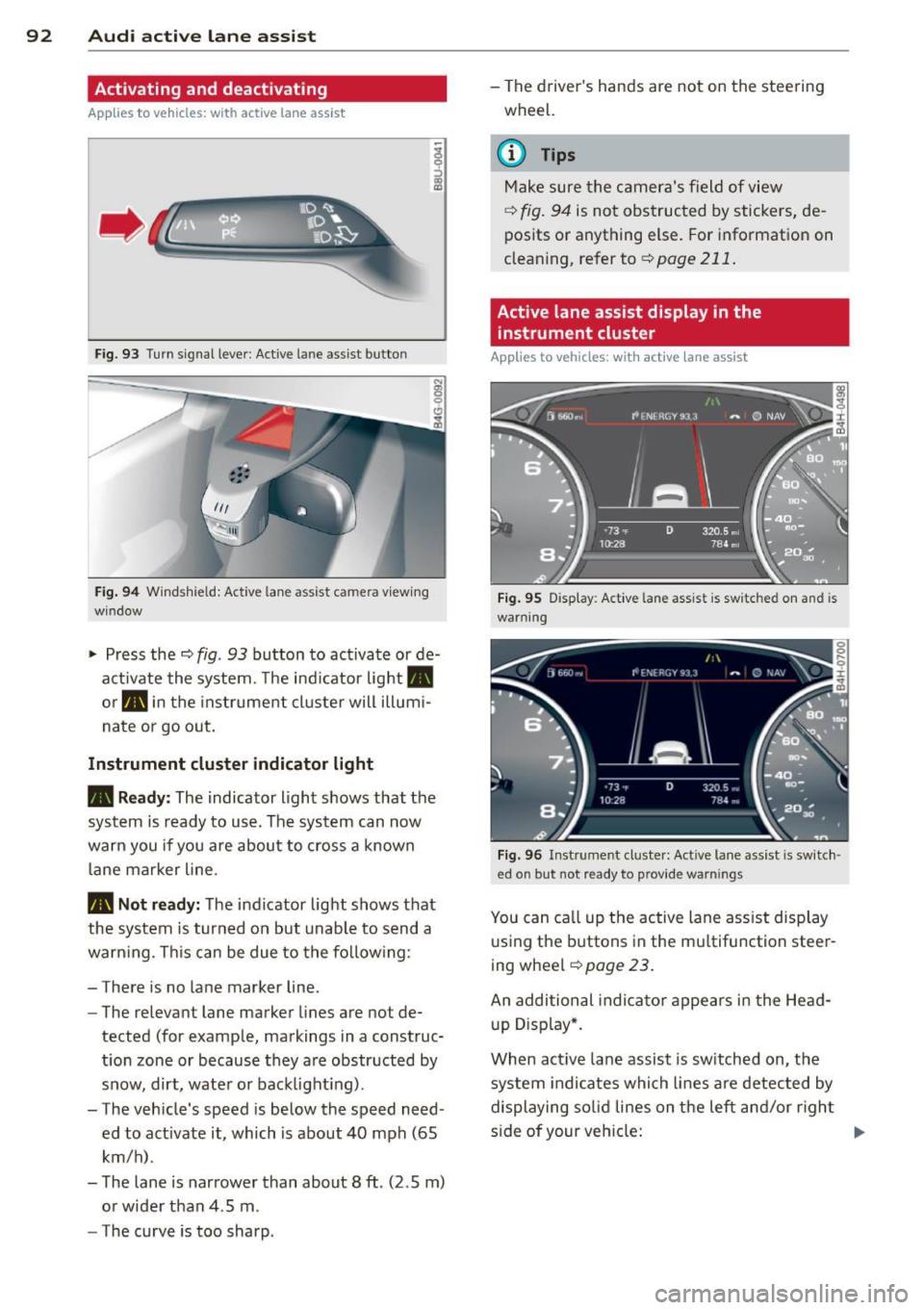
Fig. 93 Turn signal leve r: Active lane ass ist butto n
Fig. 94 Windshie ld: Active lane assist ca mera viewing
win dow
-
I
~ Press the c::> fig. 93 button to activate or de
activate the system. The indicator light.
or . in the instrument cluster will illumi
nate or go out.
Instrument cluster indicator light
• Ready: The indicator light shows that the
system is ready to use . The system can now
warn you if you are about to cross a known
lane marker line .
• Not ready: The indicator light shows that
the system is turned on but unable to send a
warning . This can be due to the following:
- There is no lane marker line .
- The relevant lane marker lines are not de·
tected (for example, markings in a construc
tion zone or because they are obstructed by
snow, dirt, water or backlight ing).
- The vehicle 's speed is below the speed need
ed to activate it, which is about 40 mph (65
km/h) .
- The lane is narrower than about 8 ft . (2 .5 m)
or wider than 4 .5 m .
- The curve is too sharp. - The driver's hands are not on the steering
wheel.
(D Tips
Make sure the camera's field of view
c::> fig. 94 is not obstructed by stickers, de
posits or anything else. For information on
cleaning, refer to
c::> page 211.
Active lane assist display in the
instrument cluster
Applies to vehicles: wit h active lane assist
Fig. 95 D isplay : Active lane assist is switc hed on a nd is
warning
Fig. 96 Instrument cl uster: Active lane assist is switch ·
ed o n but not r eady to p rov id e warn ings
You can call up the active lane assist display
using the buttons in the multifunction steer
ing wheel
c::> page 23.
An additional indicator appears in the Head
up Display*.
When active lane assist is switched on, the
system indicates which lines are detected by
displaying solid lines on the left and/or right
side of your vehicle: .,..
Page 103 of 306
Night vision assistant
Night vision assistant
with detected pedestrian marking
Description
App lies to vehicles: with night v isio n assistant
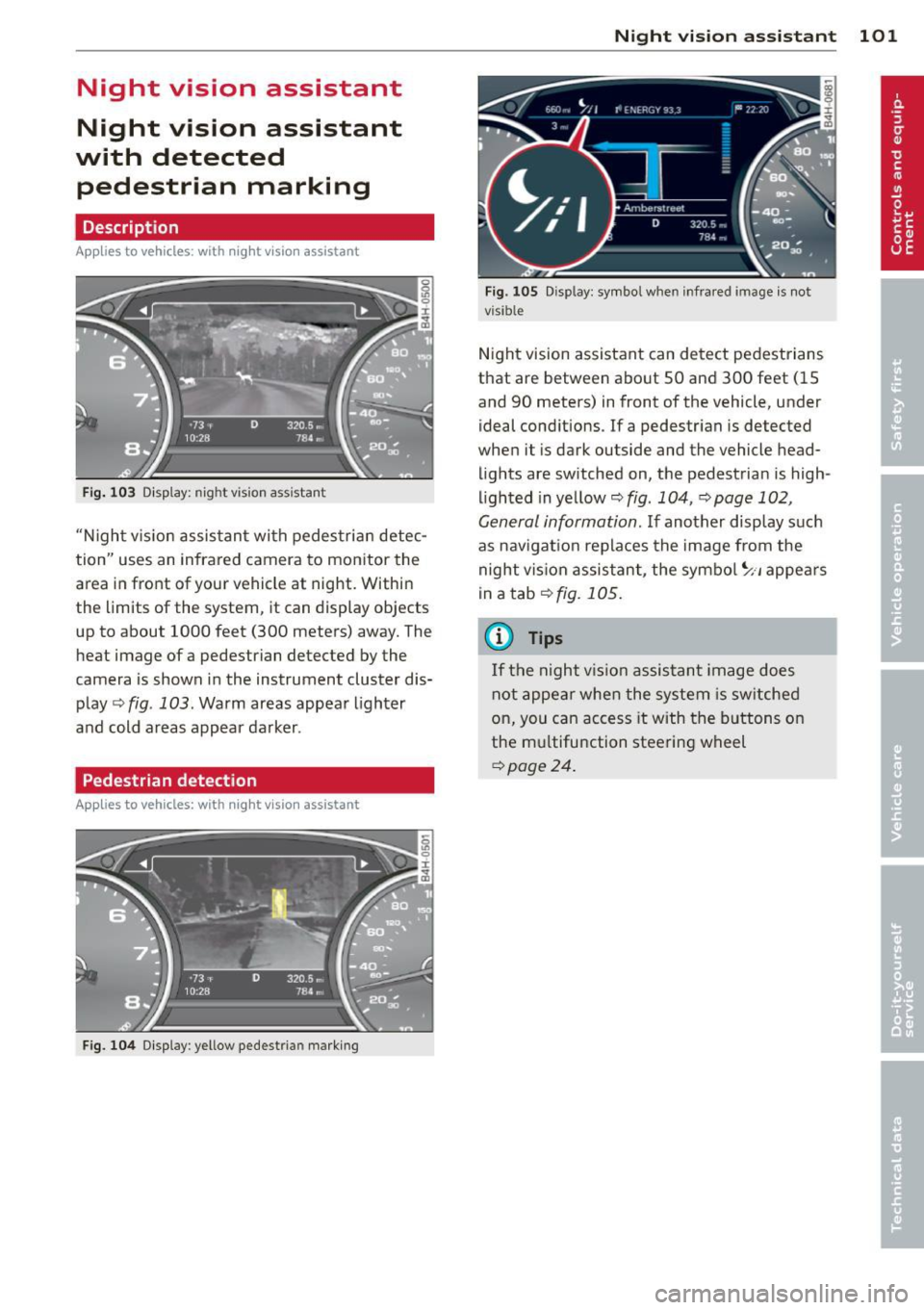
Fig . 103 Disp lay: nig ht v is ion assistant
"N ight v is ion assistant with pedestrian detec
tion" uses an infrared camera to monitor the
area in front of your vehicle at night. Within
the limits of the system , it can display objects
up to about 1000 feet (300 meters) away. The
heat image of a pedestrian detected by the
camera is shown in the instrument cluster dis
play
Q fig . 103 . Warm areas appear lighter
and cold areas appear darker .
Pedestrian detection
Applies to vehicles: with n ig ht v ision ass istant
Fig. 104 Display : yellow pedestrian marking
Night vision assistant 101
Fig. 105 D isp lay: symbo l w hen infrare d image is not
visi ble
Night vision assistant can detect pedestrians
that are between about 50 and 300 feet (15
and 90 meters) in front of the vehicle, under
ideal conditions .
If a pedestrian is detected
when it is dark outside and the vehicle head
lights are switched on, the pedestrian is high
lighted in yellow
Qf/g . 104, Qpage 102,
General information.
If another display such
as navigation replaces the image from the
night vision assistant, the symbo l~,, appears
in a tab
Q fig. 105.
(D Tips
If the night vision assistant image does
not appear when the system is sw itched
on, you can access it with the buttons on
the multifunction steering wheel
Q page24 .
Page 111 of 306
a gear that is suitable for the incline. Hill de
scent control tries to maintain the speed ach
ieved at the time of brak ing, within physical
and technica l limitations. If may still be nec
essary to adjust the speed with the brakes.
Hill descent control switches off once the de
cline levels out or you press the accelerator pedal.
On vehicles with the cruise control system*
¢ page 79, hill descent control is also activat
ed when the speed is set.
.&_ WARNING
-
H ill descent control cannot overcome
physical limitations, so it may not be able
to maintain a constant speed under all
conditions. Always be ready to app ly the
brakes .
Manual shift program
Applies to vehicles: with mult itronic/S tronic/tiptron ic
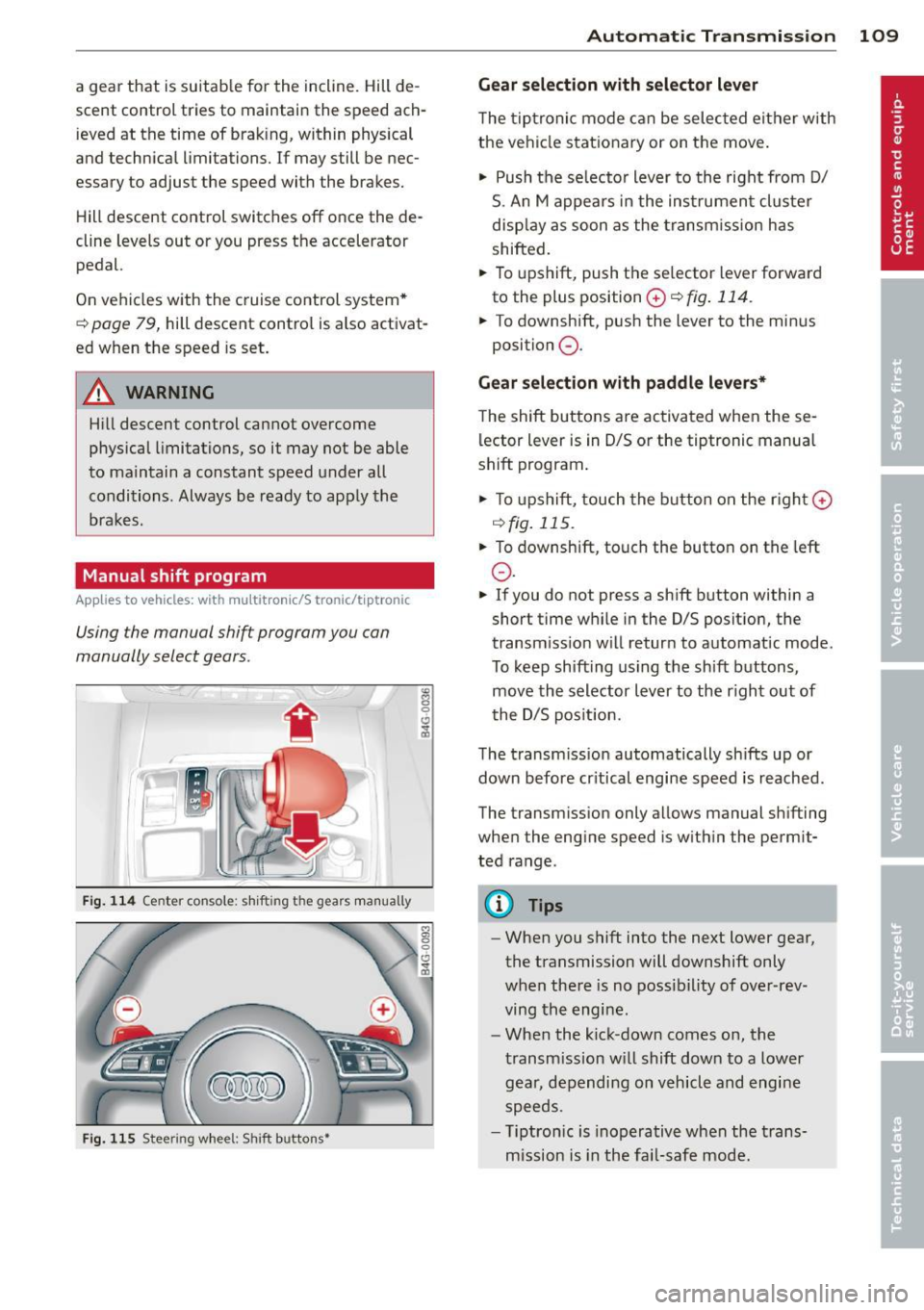
Using the manual shift program you can
manually select gears.
Fig. 114 Center co nsole: shi fting the gears manually
Fig. 115 Steering wheel: Shift buttons•
"' 8 0 CJ
cb
Automatic Transmission 109
Gear selection with selector lever
The tiptronic mode can be selected either with
the vehicle stationary or on the move.
"' Push the se lecto r lever to the right from D/
S. An M appears in the instrument cluster
display as soon as the transm ission has
shifted.
"' To upshift, push the se lector lever forward
to the plus position
0 ¢ fig . 114.
"' To downshift, push the lever to the minus
position
0 .
Gear selection with paddle levers*
The shift buttons are activated when these
lector lever is in D/S or the tiptronic manual
shift program .
"'To upshift, touch the button on the rig ht G)
C) fig. 115 .
.,. To downshift, touch the button on the left
0 .
"' If you do not press a sh ift button within a
short time while in the D/S position, the
transm iss ion w ill retur n to automat ic mode.
To keep shifting using the sh ift buttons,
move the selector lever to the r ight out of
t he D/S posit ion.
The transmission automatically shifts up or
down before cr itical engine speed is reached .
The transm ission only a llows manual sh ifting
when the engine speed is w ithin the permit
ted range.
(D Tips
- When you shift into the next lower gear,
the transmission will downshift only
when there is no possibility of over-rev
ving the engine.
- When the kick-down comes on, the
transmission will shift down to a lower
gear, depending on vehicle and engine
speeds.
- T iptron ic is inoperat ive when the trans
mission is in the fail-safe mode.
Page 127 of 306
@ Tips
To open the garage door, press the button,
but do not press it for longer ten seconds
or the Homelink modu le w ill switch to
programming mode .
Programming the transmitter
Applies to vehicles : with Home Link
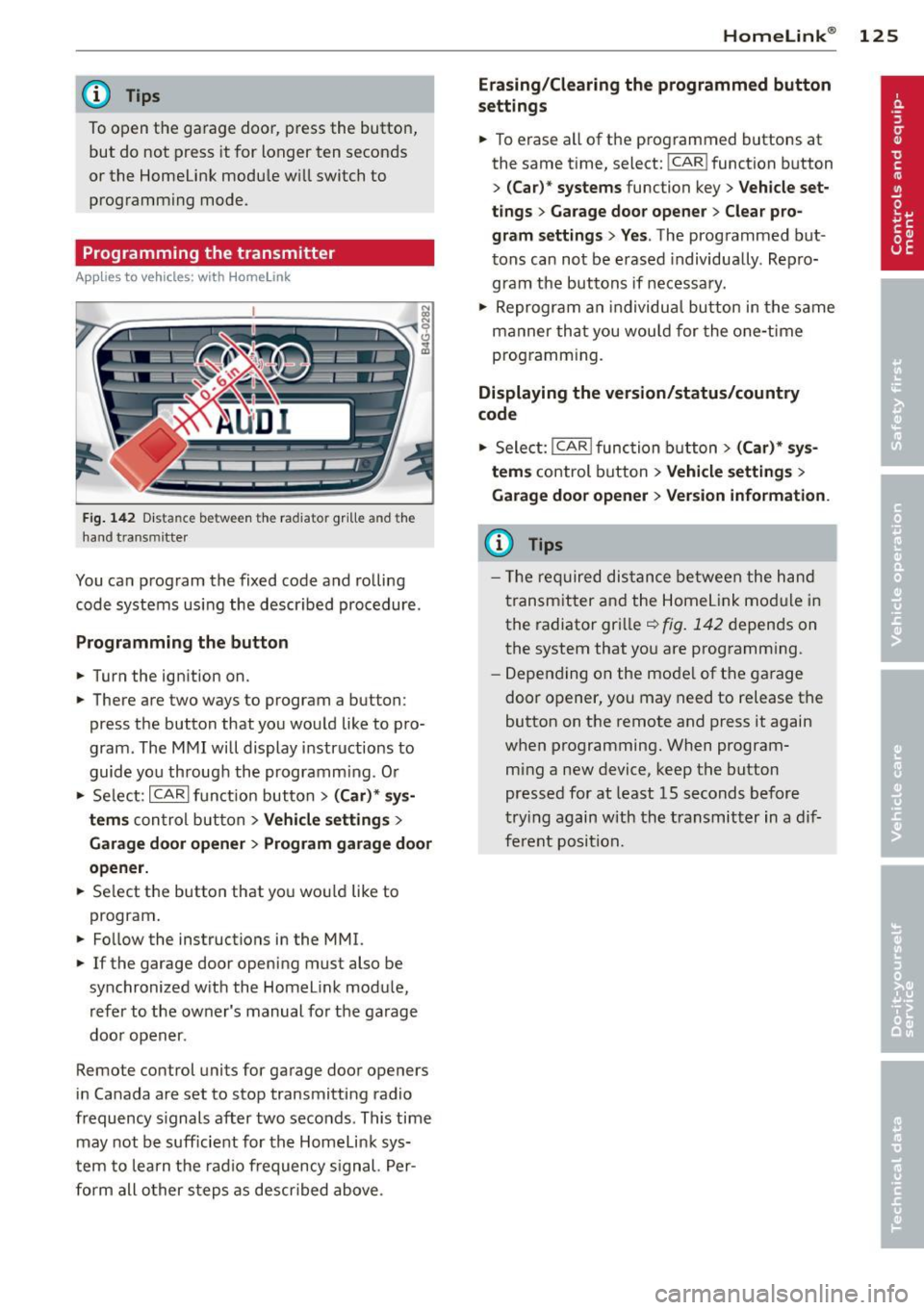
Fig. 142 Dist an ce be tween the ra diato r gr ille a nd the
hand t ransm itter
You can program the fixed code and rolling
code systems using the described procedure.
Programming the button
.. Turn the ignition on.
.. There are two ways to program a button:
press the button that you would like to pro
gram . The MMI will display instructions to
guide you through the programm ing . O r
.. Se lect: ICARlfunction button>
( Car) * sys
tems
con trol button > Vehicle settings >
Garage door opener > Program garage door
opener .
.. Se lect the button that you wou ld like to
program .
.. Fo llow the instructions in the MMI.
.. If the garage door opening must also be
synchronized with the Homelink module,
refer to the owner's manual for the garage
door opener .
Remote control units for garage door openers
in Canada are set to stop transmitting radio
frequency s ignals after two seconds . This time
may not be sufficient for the Homelink sys
tem to learn the radio frequency signal. Per
form all other steps as descr ibed above .
Homelink ® 125
Erasing/Clearing the programmed button
settings
.. To erase all of the programmed buttons at
the same time, select: !CAR ! function button
>
(Car)* systems function key> Vehicle set
tings
> Garage door opener > Clear pro
gram settings> Yes .
The programmed but
tons can not be erased individua lly . Repro
gram the buttons if necessary .
.. Reprogram an individual button in the same
manner that you wou ld for the one-time
programming.
Displaying the version/status/country
code
.. Select: I CAR I function button > (Car)* sys
tems
control button > Vehicle settings >
Garage door opener > Version information .
(D Tips
- The required distance between the hand
transmitter and the Homelink mod ule in
the radiator grille~
fig. 142 depends on
the system that you are programm ing .
- Depending on the mode l of the garage
door opener, you may need to release the
button on the remote and press it again
when programming. When program
ming a new device, keep the button
pressed for at least 15 seconds before
trying again with the transmitter in a dif
ferent position.
Page 217 of 306
when the cleaning solution when cleaning the
display .
The MMI/RS E* contro ls must be cleaned firs t
with a brush so that dirt does no t ente r the
unit or enter between the buttons and the
housing . Then wiping the controls with a cloth
dampened with dish detergent and water is
recommended.
(D Note
- To avoid scratching the disp lay, you
shou ld never clean it dry.
- To prevent damage, make sure fl uids do
not enter the controls .
Head-up Display
Applies to vehicles: with Head-up Display
The Head-up Display may be cleaned with a
damp cloth. The cloth should be free from
dust and lint, like a m icrofiber cloth for exam
ple.
(D Note
- To prevent scratches, do not clean the
display when it is dry.
- To prevent damage, make sure that flu
i ds do not enter the disp lay.
Aluminum trim
Use only n eutral -pH products to remove spots
and depos its from alum inum surfaces .
Chrome ca re produ cts and alkaline cleaners
will a ttac k alum in um s urfaces and can dam
age them over time.
A WARNING
Always read and heed a ll WARNINGS and
other information
~ page 208 .
Fabrics and fabric coverings
Fabrics and fabric coverings (e .g. seats, door
tr im panels, etc.) should be cleaned at reg ular
intervals with a vacuum cleaner. T his removes
surface dirt particles which could become em bedded in the fabr ic through use. Steam
Cleaning and protec tion 215
cleaners sho uld not be used, beca use the
steam tends to p ush the dirt deeper into the
fabric and lock it there .
Normal cleaning
Generally, we recommend using a soft sponge
o r a lint-free microfibe r cloth to the clean fab
ric. Brushes shou ld only be used for carpets
and floor mats, since other fabr ic surfaces
could be harmed by brushes.
Norma l surface stains can be cleaned using a
commercially availab le foam cleaner . Spread
the foam on the s urface of t he fabric with a
soft sponge and work it in gently. Do not satu
rate the fabric. T hen pat the foam dry us ing
absorbent, dry cloths (e.g. m icrofiber cloth)
and vacuum it after it has dried completely.
Cle aning sta in s
Stains caused by beverages (e .g. coffee, fr uit
juice, etc.) can be treated with a mild deter
gent solution. Apply the detergent solution
with a sponge. In the case of stubborn stains,
a detergent paste can be applied directly to
the stain and worked into the fabric. After
wards, use copious amounts of clean water to remove the rema ining de terge nt. App ly the
water wit h a damp cloth or sponge and pat
the fabric dry with an absorbent, dry cloth .
Stai ns from choco late or ma keup should have
de tergent paste (e.g. ox-gall soap) rubbed in
to them. Afterwa rds, remove the soap wi th
wa ter (damp sponge) .
Alcohol can be used to treat stai ns from
grease, o il, lipstick or a ballpoin t pen. Melted
grease o r dye mus t be patted
off using ab
sorbent mater ia l. It may be necessary to re
treat the areas with detergent paste and wa
ter .
In the case of genera l soiling of the upho ls
tery and cover material, we recommend hir ing
a specia list t hat has the eq uipment to clean
the seat covers and other fabric surfaces by
shampooing and spray extraction. •
•
Page 301 of 306
Seat adjustment Controls . . . . . . . . . . . . . . . . . . . . . . . . . . 51
Driver's seat . ... ...... ... .. .. .. .. .. 50
Front passenger's seat . . . . . . . . . . . . . . . 51
Front seats . . . . . . . . . . . . . . . . . . . . . . . . SO
H ead restraints
Safety guide lines . . . . . . . . . . . . .
. . 53, 130
so .... ..... .. .. .. .. ..
Seat belts
WhyYOU M USTwearthem . .. .. .. .. . 136
Sea t hea ting/vent ilation (automatic cli-
mate con trol) . . . . . . . . . . . . . . . . . . . . . . . 68
Seat hea ting (climate control) . . . . . . . . . . 66
Seating position Driver ... .. .. .. ........... .. .. .. .
Front passenger .......... .... .. .. .
H ow to adjust the front seats . .. . ... .
Incorrect seat position ......... ... . . 127
128
128
130
Occupants .. .... .. .... ... .. .. .. .. . 127
R ear passengers . . . . . . . . . . . . . . . . . . . 129
Seat memo ry . . . . . . . . . . . . . . . . . . . . . . . 54
Seats Comfo rt seat side view . . . . . . . . . . . . . . 55
Seat symmetry . . . . . . . . . . . . . . . . . . . . . 55
Seats (number) . ........... .. .. .. ... 136
Select ive unlock feature ..... .. .. .. .. .. 34
Selector lever . .... ..... ... .. .. .. ... 105
Sel ecto r leve r eme rgency r elease . .. .. . 11 1
Service and disposal Safety belt pretens ioner . . . . . . . . . . . . 143
Service in terval disp lay ... ... .. .. .. .. .. 27
Shift buttons ................. .... .. 109
Ship (transporting your veh icle) . .. .. .. . 278
Side airbags
D escr ipt io n . .. ... ..... ... .. .. .. ... 165
How t hey work . ... .... ... .. .. .. ... 166
side assist . . . . . . . . . . . . . . . . . . . . . . . . . . 94
Ad justing the brigh tness ... .. .. .. .. .. 96
Sensor r ange
Side assist
............ .... .. .... 9 5
Activating and deactivating . . . . . . . . . . . 96
C lea ning senso rs ............ .. .... 211
Side curtain airbags ........ .. .. .. .. . 168
Descr ipt ion . ............. .... .. .. .
168
H ow they work ... .. ...... .. .. .. .. . 169
Safety instructions ........... .... . . 169
Side ma rker lights . ..... ... .. .. .. .. .. 41
Ski s ack 63
Index 299
Sliding/tilting s unroo f
Emergency closing . .. ... .... ... .. .. . 40
Open ing and closing . .. ..... ... .. .. . 40
Snow cha ins .. .. .. .... ........... .. 256
Socket . .. .. .. .. .. .. . ... ...... ... .. . 56
Sources of information abo ut child re-
straints and their use .. ... .... ... .. . .
Spa ce-savi ng spa re tire ........... ... .
Spare tire ... .. .. .. .... ............ . 189
2 62
262
Speed limi ter ... .... . ... ...... ... .. . 30
Speedometer ..... .. ................ 27
Speed rat ing letter code .............. 252
Speed warning system ........... .. .. .
Sport d iffe rential .................. . . 7
9
98
Ind icator lig ht ... .. . .. .... .... .. .. . 22
Star button . . . . . . . . . . . . . . . . . . . . . . . . . 24
Star t-Stop-System . . . . . . . . . . . . . . . . . . . 76
En gine does not swi tched off .... ..... 78
E ngine sta rts a utomat ica lly .. ... .. .. . 78
In dicator lights .... . .. ..... ... .. .. . 77
Messages . . . . . . . . . . . . . . . . . . . . . . . . . 79
Starting/stopp ing the engine .... .. .. . 77
switching off/on . . . . . . . . . . . . . . . . . . . . 78
START ENG INE STOP button ... ... .. .. . 71
Starting from rest .. .. .. .. ...... .... . . 75
Starting off w ith a trailer ......... .... . 76
St arti ng the engine ............. .... . 71
Steering El ectr ica lly adjus table steering wheel .. 70
Manually adjustable stee ring wheel .... 70
also refer to Electro-mecha nica l powe r
ass ist .. .... .. .... ... .......... .. 19 6
Steering wheel Easy entry feature . . . . . . . . . . . . . . . . . . 71
Ind icator light . .. .. ..... ........... 18
Stee ring w heel heat ing ......... .. .. . 69
Steering wheel column Adjust ing electrically . . . . . . . . . . . . . . . . 70
Adjust ing ma nually . . . . . . . . . . . . . . . . . 70
Steering wheel with tiptronic ... ... .. .. 109
Steps for determin ing correct load limi t . 24 9
Stopping the eng ine ............. .... . 73
Storage
. . .. .. .. .... . ... ...... ... .. . 57
S tronic tra nsmission
L aunc h Control Prog ram ........ .. .. 110
S tronic ® ... .. .. .. ................. 105
•
•