brake light AUDI A6 2013 Owner's Manual
[x] Cancel search | Manufacturer: AUDI, Model Year: 2013, Model line: A6, Model: AUDI A6 2013Pages: 306, PDF Size: 76.92 MB
Page 89 of 306
Audi adaptive cruise control and braking guard 87
then maintains the stored distance. If the ve
hicle ahead accelerates , adaptiv e cr uis e con
trol will also accelerate up to the stored
speed.
The higher the speed, the greater the distance
in yards (meters)
Q .&. . The Distance 3 setting
is recommended .
The distances prov ided are spec ified values.
Depending on the driving situation and the
how the vehicle ahead is driving, the actual
d istance may be more or less than these tar
ge t distances.
The various symbols for the time increments
appear briefly in the information line @
¢fig. 87when you change the settings.
~-~ --- Distance 1: This setting corre
sponds to a distance of 92 feet/28 meters
when traveling at 62 mph (100 km/h), or a
time interval of 1 second .
~-- ~-- Distan ce 2: This setting corre
sponds to a distance of 118 feet/36 meters
when traveling at 62 mph (100 km/h), or a
time interval of 1.3 seconds .
~--- ~-Distance 3: This setting corre
sponds to a distance of 164 feet/SO meters
when traveling at 62 mph (100 km/h), or a
time interval of 1.8 seconds .
~---- ~ Distance 4: This setting corre
sponds to a distance of 210 feet/64 meters
when traveling at 62 mph (100 km/h), or a
time interval of 2.3 seconds .
.&_ WARNING
Following other vehicles too closely in
creases the risk of co llisions and serious
personal injury.
- Setting short distances to the traffic
ahead reduces the t ime and distance
available to br ing your vehicle to a safe
stop and makes it even more necessary
to pay close attention to traffic.
-
-Always obey applicable traffic laws, use
good judgment, and select a safe follow
ing distance for the traffic, road and
weather conditions .
@ Tips
-Distance 3 is set automatically each time
you switch the ignition on.
- Your standard settings are automatically
stored and assigned to the remote con
trol key being used.
Selecting the driving mode
Applies to vehicles : wit h Audi adapt ive cr uise contro l
.,. Select the desired driving mode in drive se
lect ¢
page 98.
@ Tips
Your settings are automatically stored and
assigned to the remote control key being
used.
Prompt for driver intervention
Applies to vehicles: with A ud i ada ptive cr uise contro l
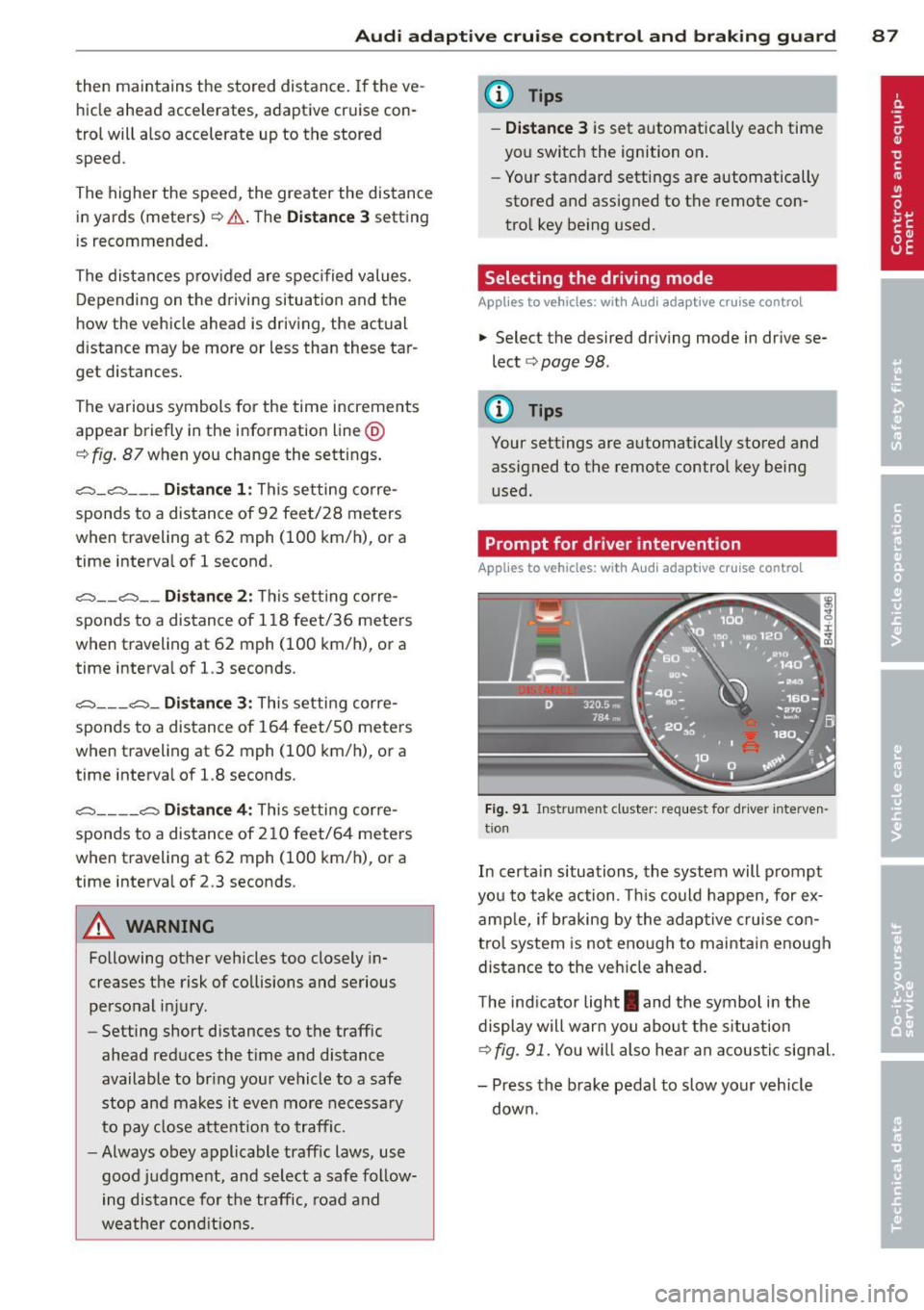
Fig. 91 Ins trumen t cluster: req ues t fo r drive r inte rven
t io n
In certain situations, the system will prompt
you to take action . Thi s could happen, for ex
amp le, if braking by the adaptive cruise con
trol system is not enough to maintain enough
distance to the vehicle ahead .
T he ind icator light
I and the symbol in the
display will warn you about the s ituation
¢ fig. 91. You w ill also hea r an acoustic signal.
- Press the brake pedal to slow your vehicle
down.
Page 107 of 306
Automatic Transmission
multitronic ®, S tronic ®,
tiptronic
Introduction
App lies to vehicles: with multitro ni c/S tronic/t iptronic
The automatic transmission is controlled elec
tronically . The transmission upshifts or down
shifts automatically depend ing on which drive
program is se lected.
When a
moderate driving style is used, the
transmission selects the most economical
driving mode .
It will then change up early and
de lay the downshifts to g ive better fuel econ
omy.
The transmission switches to a sporty mode after a k ick-down or when the driver uses a
sporty driving style characterized by quick ac
celerator pedal movements, heavy accelera
tion, frequent changes in speed and traveling
at the maximum speed.
If desired, the driver can a lso se lect the gears
manually (t iptronic mode ) ¢ page 109.
Various automatic transm issions may be in
stalled, depend ing on the model :
multitronic® transmission
The multitronic ® transmission is a continuous
ly variable transmission. Power is transferred
using a multidisk clutch. In contrast to con
ventional automatic transmissions using shift
ing operat ions, the transmission ratio in the
continuously variable transmission is changed
continuously. This opt imizes the comfort level
and conserves fuel.
S tronic ® transmission
The S tronic ® is a dual-clutch transmission .
Power is transferred using two clutches that
work independently from one another. They
r eplace the torque converter used in conven
tional automat ic transmissions and allow the
vehicle to accelerate without a noticeable in
terruption in traction.
Automatic Transmission 105
tiptronic transmission
In the tiptronic transmission, power is trans
ferred by a torque converter .
Selector lever positions
Applies to vehicles: wit h mult itronic/5 tro nic/tiptro nic
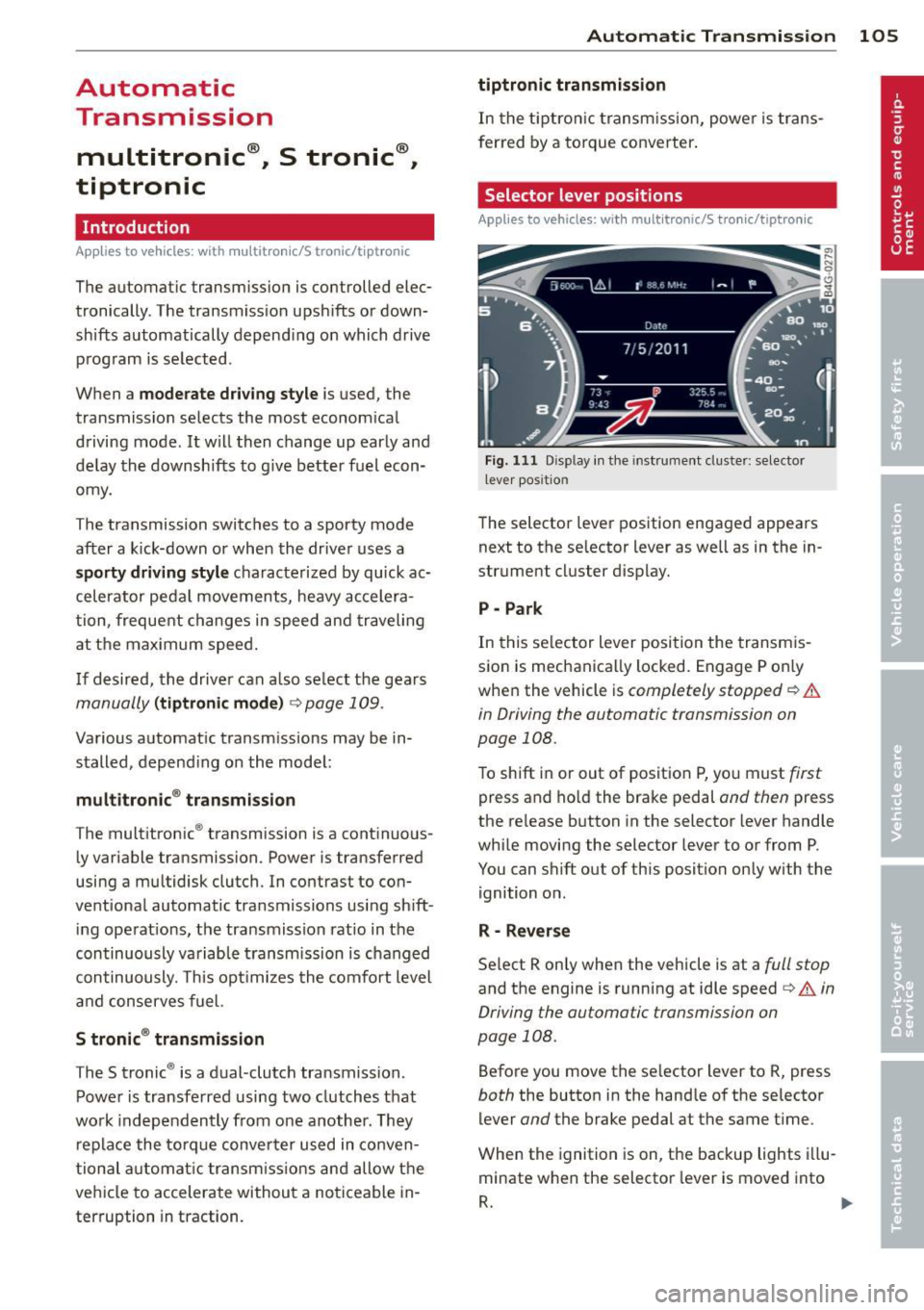
Fig. 111 Disp lay in the instrument cluster: selector
l ever pos itio n
The selector lever position engaged appears
next to the selector lever as well as in the in
strument cluster display.
P -Park
In this selector lever position the transmis
sion is mechanically locked. Engage P only
when the vehicle is
completely stopped¢&.
in Driving the automatic transmission on
page 108.
To shift in or out of position P, yo u must first
press and ho ld the brake pedal and then press
the release button in the selector lever handle
while moving the selector lever to or from P .
You can shift out of this position only with the ignition on .
R -Reverse
Select R only when the vehicle is at a full stop
and the engine is running at idle speed¢ A in
Driving the automatic transmission on
page 108.
Before you move the se lector lever to R, press
both the button in the handle of the selector
lever
and the brake pedal at the same time .
When the ignition is on, the backup lights illu
minate when the selector lever is moved into
R. .,.
Page 109 of 306
The Automatic Shift Lock only functions when
the vehicle is stationary or at speeds below 1 mph (2 km/h).
At speeds above about 1 mph (2 km/h) the
Automatic Shift Lock is automatically deacti
vated in the N position.
A time delay element prevents the se lector
l eve r from locking when it is moved thro ugh
the N position (going from R to 0/5). The lock
ing e lement w ill lock the selector lever if the
lever is left in N (Neutral) for more than ap
prox imately 2 second, without the brake ped
al being pressed.
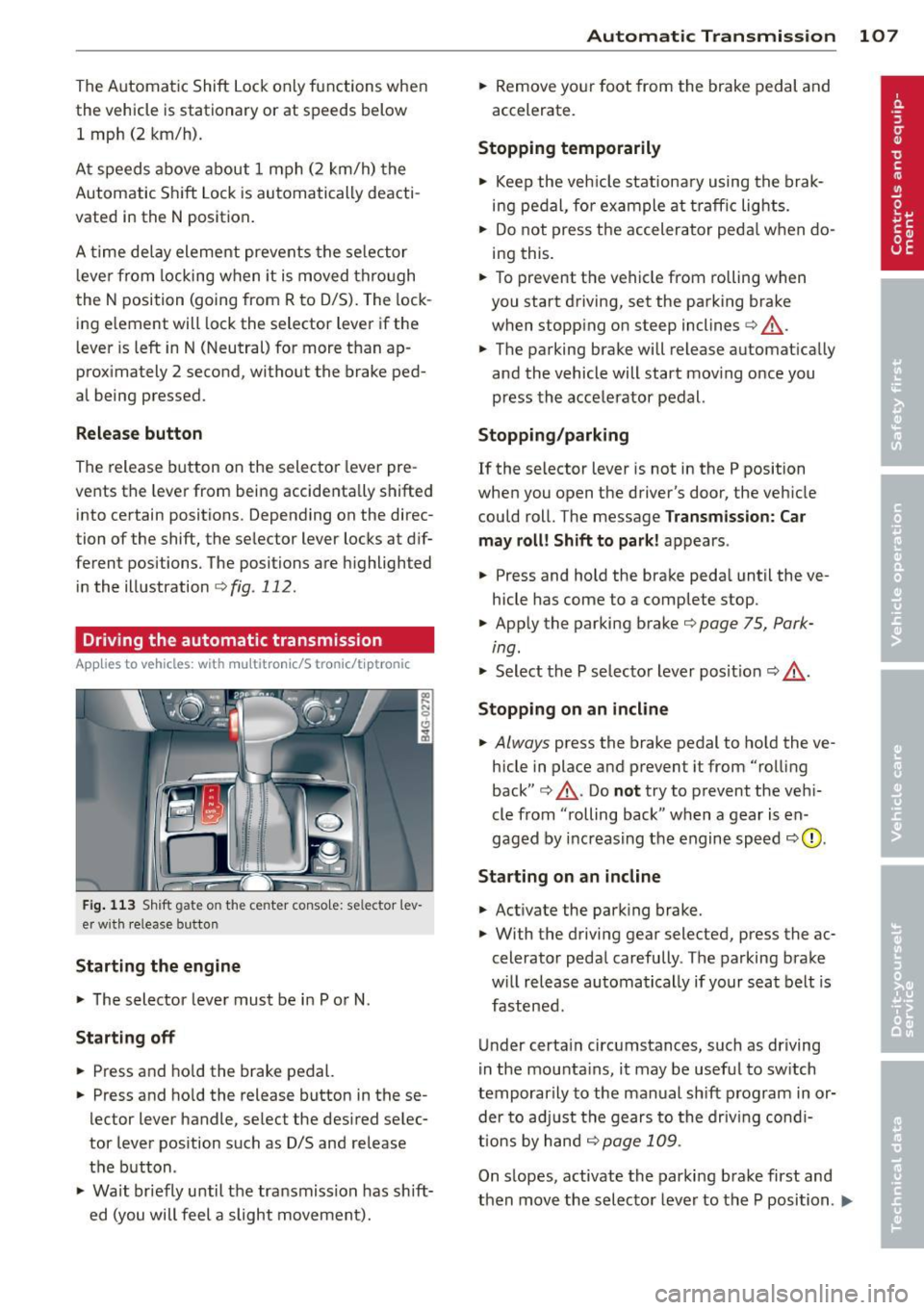
R elease button
The release button on the selector lever pre
vents the lever from being accidenta lly shifted
into certain positions. Depending on the di rec
tion of the shift, the se lector lever locks at d if
ferent positions. The positions are h ighligh ted
in the illustration
¢ fig . 112 .
Driving the automatic transmission
Applies to vehicles: with multitronic/S tronic/t iptro nic
Fig. 1 13 Sh ift gate on the center conso le: se lector l ev
er w it h release button
Starting the engine
.., The selector lever must be i n P or N.
Starting off
.., Press and ho ld the brake pedal.
.., Press and ho ld the release button in these
lector lever handle , select the desired selec
tor lever pos ition such as D/S and release
the button .
.., Wait br iefly until the tra nsmission has sh ift
ed (you will feel a slight movement).
Automatic Tra nsmi ssi on 10 7
.., Remove yo ur foot from the brake pedal and
accelerate.
Stopping t emporarily
.., Keep the veh icle stationa ry using the brak
ing pedal , for example at traffic lights.
.., Do not press the accelerator peda l when do
i ng this .
.., To prevent the vehicle from rolling when
you start driving, set the parking brake
when stopp ing on steep inclines¢,&. .
.., The parking brake will release automat ically
and the vehicle will start mov ing once you
press the accelerator pedal.
Stopping /parking
If the selector leve r is not in the P position
when you open the driver's door, the veh icle
could roll. The message
Transm ission: Car
may roll! Shift to park !
appears.
.., Press and hold the brake peda l until the ve
hicle has come to a complete stop .
.., App ly the parking brake ¢
page 75, Park-
ing.
"' Select the P selecto r lever pos it ion <=:> ,&. .
Stoppin g on an incline
.., Always press the brake pedal to ho ld the ve
hicle in place and prevent it from "rolling
back" ¢,&. . Do
no t try to prevent the veh i
cle from "rolling back " when a gear is en
gaged by increasing the engine speed
<=:> 0 .
Starting on a n incline
.., Activate the park ing brake.
.., With the driving gear selected, press the ac
celerator peda l carefully . The parking brake
w ill release automatically if your seat belt is
fastened .
Under certa in circumstances, such as driving
i n the mounta ins , it may be usefu l to sw itch
temporarily to the manual sh ift p rogram in or
der to ad just the gears to the driv ing cond i
ti ons by hand
<=:> page 109 .
On slopes, activate the parking brake first and
then move the selecto r lever to the P position .
Ill-
Page 112 of 306
110 Automatic Tran sm iss ion
Kick-down
Applies to vehicles: with multitron ic/S tronic/t iptronic
Kick-down enables maximum acceleration .
Applies to ve hicle s w ith a multit ro nic ®
t ra nsmission
When you depress the accelerator pedal be
yond the resistance po int, the transmission
downshifts into a lower gear ratio depend ing
on the vehicle speed and engine speed. As l ong as the accelerator peda l is depressed, the
engine speed is a utomat ica lly regulated for
maximum accelera tion.
Appli es to veh icl es with a S tronic ®-/ ,
tiptronic tran smi ssion
When you dep ress the accele rator pedal be
yond the resistance po int, the a utomat ic
transmission downshifts into a lower gear, de
pending on vehicle speed and engine speed.
The upshift into the next higher gear takes p lace once the maximum specified engine
speed is reached.
A WARNING
,-
Please note that the drive wheels can spin
if kick-down is used on a smooth slippery
road - there is a risk of skidding .
Launch Control Program
Applies to vehicles: with S tronic
The Launch Control Program provides the
best acceleration possible when starting from
a stop .
Requirement : The engine must be at operat
ing temperature and the steering wheel must
not be turned .
.. Press the
I~ O FF I button ¢ page 194 while
the engine is running. The
IJ indica tor light
illuminates in the instrument cluster and
Sta bilization contr ol (ESC ): Off Warn ing!
R educed stabi lit y
appears in the dr iver in
fo rmat io n system disp lay .
.. Move the selecto r lever to posit ion D/S to
select sport mode (5) or select
D yna mic
mode in Audi dr ive select c:> page 99 .
.. Press the b rake pedal strongly with you r left
foot and hold it down for at least 1 second .
.. At the same time, press the accelerator
pedal down complete ly with your r ight foot
until the engine reaches and mainta ins a
high RPM .
.. Remove your foot from the brake pedal
w ith in
5 seconds c:> ,&. .
_&. WARNING
-Always adapt your dr iving to the tr aff ic
f low.
- Onl y use the Launch Cont ro l Program
when road and t raff ic condi tions a llow i t
and other d rivers w ill not be endangered
or annoyed by your driving and the vehi
cle 's acceleration.
- Please note that the driving wheels can spin and the vehicle can b reak away
when ESC is switched off, especially
when the road is slippery .
- Once the vehicle has started moving,
press the
1 1' OFFI button brief ly to turn
the ESC on .
(D Tips
- The transmission temperature may in
crease signif icantly after using the
launch control program. If that happens,
the program may not be ava ilable for a
few minutes. It w ill be available again af
ter a cool-down per iod.
- When accelerating using the launch con
tro l program, all vehicle parts are subject
to heavy loads . This can resu lt in in
creased wear .
Transmission malfunction
Applies to vehicles: with multitronic/S tronic/tiptronic
[O] Tran smi ssi on: Pr ess brake pedal and se
lect gear again
Press the brake peda l and select the desired
selector lever position again. You can the n
continue d riving .
[O] Transmi ssion overheating: Plea se drive
con servatively
Page 126 of 306
124 Homelin k®
Homelink ®
Universal remote
control
General information
Applies to vehicles: with Homelink® unive rsal remote
co ntrol
The Homelink universal remote control can
be programmed with hand-held transmitters
from existing equipment.
With Homelink, you can control devices such
as the garage door, security systems, house lights, etc. comfortably from the inside of you
vehicle.
Homelink makes it possible for you to replace
three different remote controls from devices in your home with one universal remote . Th is
feature works for most garage door and exte rior door moto r signals. Programming the in
d iv idual remote control fo r you r remote con
trol takes p lace near the center of the radiator
grille. There is a control module attached at
this location .
A one-t ime programm ing of the sensor mus t
be performed before you are able to use sys
tems w ith Homelink.
A WARNING
- Never use the Homelink ® transmitter
with any garage door opener that does have not the safety stop and reverse fea
ture as required by federal safety stand
ards. This includes any garage door open
er mode l manufact ured before April 1,
1982.
- A garage door opener which cannot de
tect an object, signaling the door to stop
and reverse does not meet current feder
al safety s tandards. Us ing a garage doo r
o pener witho ut these fea tures increases
risk of serious inj ury or death.
- F or safety reasons never release t he
parking brake or s tart the engine while
anyone is standing in front of the vehicle .
- A garage door or an est ate gate may
sometimes be set in motion when the Homelink
® remote control is being pro
grammed. If the device is repeatedly ac
tivated, this can overstrain motor and
damage its electrica l components - an
overheated motor is a fire hazard!
- To avo id possible injuries or property
damage, please always make absolutely
certa in that no persons or objects are lo
cated in the rang e of motion of any
equ ipme nt being ope rated.
(0 Tips
- If you would like add itional information
on the Home Link® Unive rsal Transce iver,
Homelink compatib le products, or to
purc hase other accessories s uch as the
HomeL ink® Light ing Package, please
contact Homelink at 1-800 -355 -3515 or
on the Internet at www.homelink .com.
- For Declaration of Comp liance to United
States FCC and Ind ustry Canada reg ula
tions
¢page 288.
-For security reasons, we recommend that
you clear the programmed b uttons be
fore selling the vehicle .
Operation
Applies to vehicles: wit h Ho meli nk
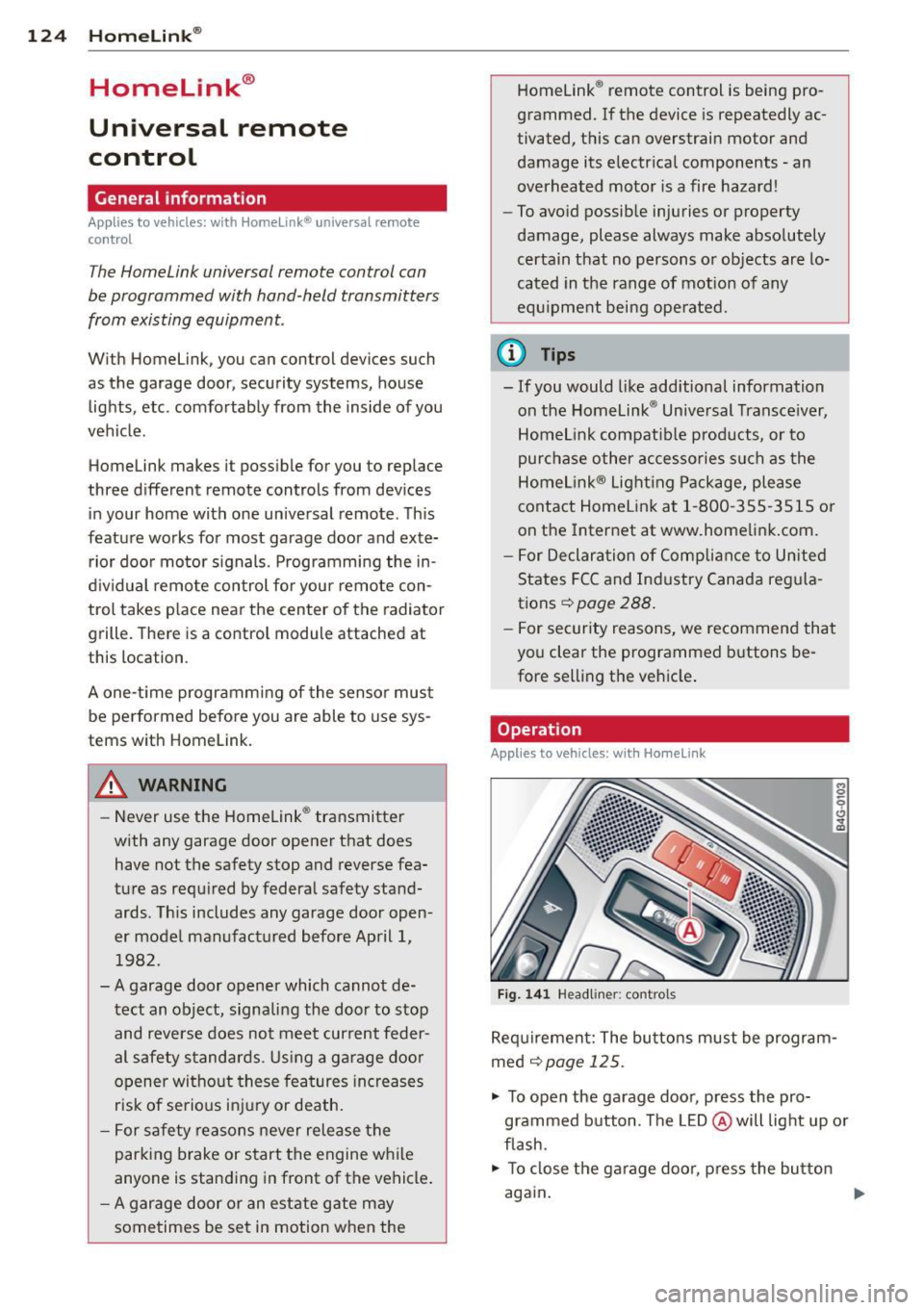
Fig . 14 1 Headliner: controls
M 0
9 (!)
~
Req uirement: The bu tto ns must be program
med ¢
page 125 .
"' To open the garage doo r, press the pro
grammed b utton. The LED @ will light up o r
flash.
"' To close the ga rage doo r, press the button
again .
Ill>
Page 194 of 306
192 Intelligent technology
Intelligent technology
Notice about data
recorded by vehicle
control modules
Your veh icle is not equipped with an Event Da
ta Recorde r (EDR), ins talled by some manu
facture rs fo r the express p urpose of capturing
data for retrieval after an accident or cras h
event . EDR's are sometimes ca lled "crash re
corders".
Some state laws restr ict the retr ieval or down
loading of data stored by EDR's that were in
stalled in a vehicle for the express purpose of retrieving data after an accident or crash
event without the owner's consent.
A ltho ugh yo ur vehicle is not equ ipped wit h an
EDR, it is equipped with a number of electron
ic control modules for various vehicle systems
such as, for examp le, eng ine f unction, em is
sion control, as well as for the airbags and
safety belts.
These electronic contro l modules also record
vehicle-re lated data during norma l vehicle op
erat ion for diagnostic and repa ir purposes.
The recording capacity of the electronic con
trol modules is limited to data (no sound is re
corded) and only a small amount of data is ac
tually recorded ove r a ve ry limited pe riod of
time and stored when a sys tem faul t or o ther
cond ition is sensed by a cont ro l u nit. Some of
the data then stored may re late to vehicle
speed, direction, braking as we ll as restraint
system use and performance in the event of a
crash or other condit ion. Stored data can only
be read and downloaded w ith special equip
ment.
Electronic Stabilization
Control (ESC)
Description
ESC helps to improve road holding and vehicle
dynamics to help reduce the probability of
skidd ing and loss of ve hicle control. It works
only when the eng ine is running. ESC detects certain difficult driving situat
ions, including
when the vehicle is beginning to spin (yaw)
o ut of control and he lps you to get the veh icle
back under control by se lectively braking the
whee ls, and/or reducing eng ine power and
providing steer ing ass istance to he lp hold the
vehicle o n the dr iver's intended course. The in
dicator light
G) in the inst rument cluster
blinks when ESC is ta king action to help yo u
control the veh icle.
ESC has limitations.
It is importa nt to remem
ber that ESC cannot overcome the laws of
physics. It wi ll not always be able to help out
under a ll cond it ions you may come up aga inst.
F or example, ESC may not always be able to
help you master situations where there is a
s u dden change in the coefficient of friction of
the road surface. When there is a section of
dry road that is sudden ly covered w ith water,
s lush or snow, ESC cannot perform the same
way it wou ld on the dry surface . If the ve hicle
hydroplanes (rides on a cushion of water in
stead of the road surface), ESC will not be
able to help you steer the vehicle because con
tact with the pavement has been in terrupted
and the vehicle cannot be braked or steered .
D uring fast cornering, particularly on winding
roads, ESC cannot always deal as effectively
with difficult driving situations than at lower
speeds. When towing a trailer, ESC is not able
to help you regain control as it would if you
were not tow ing a trailer.
Always adjust your speed and driving style to road, traffic; and weather condit ions. ESC can
not override the vehicle's physical limits, in
crease the availab le tract ion, or keep a ve hicle
on the road if road departure is a result of
drive r inattent io n. Instead, ESC imp roves the
poss ibil ity of keeping the vehi cle under con
trol and on the road during ex treme maneu
vers by using the d river's steering inputs to
help keep the vehicle going in the intended di
rection . If you are traveling at a speed that
ca uses you to run off the road before ESC can
provide any assistance, you may not experi
ence the benefits of ESC.
Page 196 of 306
194 Intelligent technology
@ Tips
-ABS and ASR on ly work correctly when
all four wheels are equipped w ith identi
cal tires. Different tire sizes can lead to a
reduction in engine power.
- You may hear noises when the systems
described are working.
- If the indicator light
DJ or 11:11 (USA
models) 1i] (Canada models) appears,
there may be a malfunction¢
page 20,
c> page 19.
Switching on and off
ESC
turns on automatically when you start
the engine.
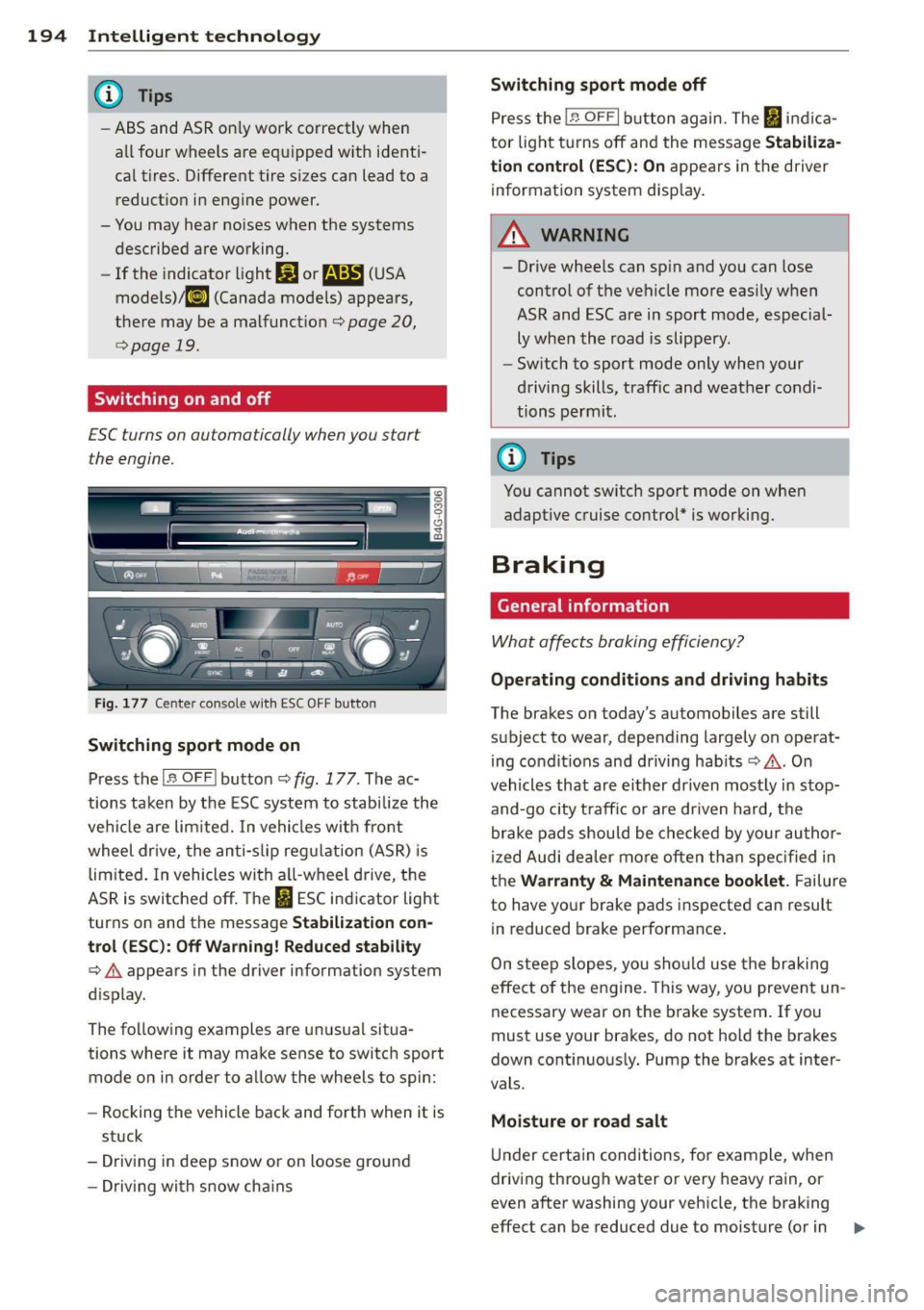
Fig. 177 Center console w it h ESC OFF button
Switching sport mode on
Press the I~ OF FI button c::> fig . 177. The ac
tions taken by the ESC system to stabilize the
vehicle are limited. In vehicles with front
wheel drive, the anti-slip regulation (ASR) is
limited. In vehicles with a ll-wheel drive, the
ASR is switched off. The
It) ESC indicator light
turns on and the message
Stabilization con
trol (ESC): Off Warning! Reduced stability
¢.&. appears in the driver information system
d isplay.
The following examples are unusual situa
tions where it may make sense to switch sport
mode on in order to allow the wheels to spin:
- Rocking the vehicle back and forth when it is
stuck
- Driving in deep snow or on loose ground
- Driving with snow cha ins
Switching sport mode off
Press the 1.$ OF FI button again. The I indica
tor light turns off and the message
Stabiliza
tion control (ESC): On
appears in the driver
information system display .
A WARNING
-
-Drive wheels can spin and you can lose
control of the vehicle more easily when
ASR and ESC are in sport mode, especial
ly when the road is slippery.
- Sw itch to sport mode only when your
driving skills, traffic and weather condi
tions permit.
@ Tips
You cannot sw itch sport mode on when
adaptive cruise control* is working.
Braking
General information
What affects braking efficiency?
-
Operating conditions and driving habits
The brakes on today's automobiles are still
subject to wear, depending largely on operat
ing condit ions and driving hab its
c::> .&. . On
vehicles that are either driven most ly in stop
and-go city t raff ic or are driven hard, the
brake pads should be checked by your author
ized Audi dea ler more often than specified in
the
Warranty & Maintenance booklet. Failure
to have your brake pads inspected can result
in reduced brake performance .
On steep slopes, you should use the braking
effect of the engine . This way, you prevent un
necessary wear on the brake system. If you
must use your brakes, do not hold the brakes
down continuously. Pump the brakes at inter
vals .
Moisture o r road salt
Under certain conditions, for example, when
driving through water or very heavy rain, or
even after washing your vehicle, the braking
effect can be reduced due to moisture (or in .,,_
Page 198 of 306
196 Intellig ent technolog y
-Never let the vehicle roll to a stop with
the engine shut off.
- If the brake booster is not working, for
example when towing your vehicle, or
because the brake booster has somehow
been damaged, the brake pedal must be
pressed considerably harder to make up
for the lack of booster assistance .
Electro-mechanical
power assist
The electro-mechanical power assist helps
the driver when steering.
Power stee ring adapts electronically based on
the veh icle speed.
Indicator lights and messages
• Steerin g d efecti ve! Stop th e vehicl e
If this indicator light turns on and stays on
and this message appears, the power steering may have fa iled.
Do
not continue driving . See your authorized
Aud i dealer or other qualified repa ir facility
for assistance.
lor-ij St eerin g: S yste m malfun ction ! You m ay
c ont inue driv ing
If the indicator light turns on and the mes
sage appears, the steering may be more diffi
cult to move or more sensitive than usual.
Drive s low ly to your author ized Audi dealer or
q ua lified workshop to have the malfunction
corrected .
(D Tips
If the . or 'Iij indicator light only stays
on for a shor t time, you may contin ue driv
ing .
Driving with your
quattro ®
Applies to vehicles : with all-wheel drive
With all-wheel drive , all four wheels are driv
en .
General info rmation
With a ll Wheel Drive, power is distributed to
all four wheels. This happens automatically
depending on your driving style and the road
condit ions at the time. See also ¢
page 192.
With the sport differential*, power distribu
t ion to the rear wheels is va riable and can be
adjusted with Audi drive select*
r::¢, page 98.
Always read and follow safety precautions
Q _& .
Winter tires
When driving in the winter, your vehicle with
all-wheel drive has an advantage, eve n wit h
regular tires. In winter road conditions it may
be advisable to mount winter tires (or all-sea
son tires) for improved driveability and brak
ing : these tires must be mo unted on
all fou r
wheel s. See also ¢ page 255 , Winter tires.
Tire chains
Where tire chains are mandatory on certain
roads, this no rma lly also app lies to ve hicles
with all-wheel drive r::¢,
page 256, Snow
chains.
Replacing wh eels /tires
Vehicles with all-wheel drive m ust always
have ti res of the same s ize. A lso avo id tires
with different t read depths . For detai ls see
page r::¢,
page 251, New tires and replacing
tires and wheels .
Off-Road driving?
You r Audi does not have e nough ground clea r
ance to be used as an off-road vehicle . It is
t h erefore best to avoid rough tracks and un
even terrain as much as possib le . Also refer to
r::¢, page 200. ..,_
Page 203 of 306
Driving through water
on roads
Note the following to avoid vehicle damage
when driving through water, for example on
flooded roads:
- The water must not be any higher than the
bottom of the vehicle body.
- Do not drive faster than wa lking speed.
A WARNING
After driving through water, mud, slush,
etc., the brakes may be slow to take effect
because of wet brake rotors and pads. Dry
the brakes first by braking carefully to re
store the full b raking effect.
([) Note
-Vehicle components such as the eng ine,
transmission, suspension or electr ical
system can be severely damaged by driv
i ng th rough water.
- Always switch off the Start-Stop-System
when driving through water~ page 76.
(D Tips
-Check the depth of the water before dr iv
i ng t hrough it.
- Do not stop the veh icle, dr ive in reverse
or switch the eng ine off whe n driving
through water .
- Keep in mind that oncoming vehicles
may create waves that raise the water
level and make it too deep fo r your vehi
cle to drive t hrough safely.
- Avoid dr iv ing through salt water because
i t can cause corrosion.
Dri vin g and en vironm ent 201
Operate your vehicle
economically and
minimize pollution
General
Your personal style of driving will determine
the economy of your vehicle, as well as ex
haust and noise levels.
Fuel economy, environmenta l impact, and
wear on your eng ine, brakes and tires largely
depend on three factors:
- your pe rsonal d riving style
- operating conditions
- technical limitat ions
If you ant ic ipate what you need to do next and
drive economically, you can easily cut you r
fuel consumpt io n by 10-15 percent . T his sec
tion w ill give you some tips on how you can
help the env ironment and your po cketbook.
@ Tips
The consumption estimates as published
by ENVIRONMENTAL PROT ECTI ON AGENCY
( E PA) a nd Tra nspo rt Canada may no t corre
spond to your actual consump tion on the
road, which will va ry depending upon vehi
cle load and speed, road and weather con
ditions, trip length, etc.
Drive smoothly and keep a lookout
ahead
Vehicles use the most fuel when they are ac
celerating.
.,. Avoid unnecessary accelerating and braking.
Vehicles use the most f ue l when they a re ac
ce le rat ing. If you ant icipate what is going to
happen next, you will need to brake less and,
th us, acce lerate less . Let the vehicle coast
whenever possible - for examp le when you see
that the next traff ic light is red.
•
•
Page 206 of 306
204 Trailer towing
Trailer towing
Driving with a trailer
General information
Your Audi was designed primarily for passen
ger transportation .
If you plan to tow a trailer, p lease remember
that the additional load will affect durability,
economy and performance .
Trailer towing not on ly places more stress on
the vehicle, it also calls for more concentra
tion from the driver.
For this reason, always fo llow the operating
and driving instructions provided and use
common sense.
@ Note
If you are going to tow a trai ler, you must
activate the trailer operation mode
c:::> page 204, Operating instructions.
Technical requirements
Trailer hitch
Use a weight-carrying hitch conforming to the
gross trailer weight. The hitch must be suita ble for your vehicle and trailer and must be
mounted securely on the veh icle's chassis at a
technically sound location . Use only a trailer
hitch with a removable ball mount. A lways
check with the trai ler hitch manufacturer to
make sure that you are using the cor rect
hitch.
Do not use a bumper hitch.
The hitch must be installed in such a way that
it does not interfere with the impact-absorb
ing bumper system. No modifications should
be made to the vehicle exhaust and brake sys
tems . From time to time, check that all hitch
mounting bolts remain securely fastened.
When you are not towing a trailer, remove the
trai ler hitch ball mount. This prevents the
h itch from causing damage should your veh i
cle be struck from behind
c:::> A .
Trailer brakes
If your trailer is equipped with a brak ing sys
tem, check to be sure that it conforms to all
regulations.
T he trailer hydraulic brake system must not be
directly connected to the vehicle's hydraulic
brake system .
Safety chains
Always use safety chains between your veh icle
and the trailer.
Trailer lights
Trailer lights must meet all regulations. Be
sure to check with your Audi dealer for correct
wiring, switches and relays.
Mirrors
If you are unable to see the traffic behind you
using the regular outside mirrors, then you
must install extended mirrors. It is important
that you
always have clear v is ion to the rear .
A WARNING
--
After removing the trailer hitch, do not
store it in your vehicle . In case of sudden
braking, the hitch could fly forward and in
jure you or your passengers.
Operating instructions
Maximum trailer weight
A tra ile r for your vehicle is limited to a typical
class 1 or class 2 tra ile r.
Trailer load distribution
Be sure the load in the trailer is held securely
in place to prevent it from shift ing forward,
backward or sideways.
Never allow a passenger to ride in a trailer
c:::> A in Driving instructions on page 206 .
Engine cooling system
Towing a trailer makes the engine work hard
er . It is important that the cooling system 's
performance is up to the additional load.