cruise control AUDI A6 2013 Owner's Manual
[x] Cancel search | Manufacturer: AUDI, Model Year: 2013, Model line: A6, Model: AUDI A6 2013Pages: 306, PDF Size: 76.92 MB
Page 100 of 306
98 Audi drive select
Audi drive select
Driving settings
Introduction
Aud i d rive select mak es it possible to expe ri
ence diffe ren t types of vehi cle se ttin gs i n o ne
ve hicl e. The dr ive r can se lect th ree
Comfort ,
Auto and Dynamic modes in the M MI to
switch between a sporty and a comforta ble
driving mo de.
You c an a lso a djust the setti ng according to
your p re ferences in the
Individual mode . F o r
examp le, you ca n combine settings such as a
sporty en gine t uning with comfortab le steer
ing.
A WARNING
Improper use of the A udi drive select can
cause collisions, ot her acc idents and se ri
ous pe rsonal injury.
Description
The vehicle setup in each mode depends on
the veh icl e's featu res. The engine, t ransm is
sion, stee ring, reve rsible sa fe ty belt tension
e rs a nd adap tive air su spension are alw ays in
volved.
Engine and transmission
Depending on the mode, the e ng ine and the
tra nsmission respond quic ker or i n a more bal
an ced manne r to acce le rator pedal move
men ts. In the sporty dyn ami c mode, the
tra nsmission sh ifts at highe r RP Ms.
Air suspension*
The adaptive air suspens ion/adaptive air sus
pension spor t*
(Air suspen sion in the MM I) is
a n e lec tronic ally con trolled air suspension and
da mpi ng sys tem. They are adjus ted depend
ing on the se lected driving mode, the drive r's
steeri ng, braking an d acceleration input and
the road s urface, ve hicle speed and load. A
sporty setting is generally used in ve hicles
with adaptive air suspension sport*. T
he veh icle clearance varies depending on the
se lected mo de an d the speed .
T he highway setti ng is a ct ivated automatic ally
whe n you dr ive above 7 5 mph (120 km/ h) fo r
more than
3 0 seconds in the Auto or Dynamic
mode. The gro und clea rance is increased a uto
matically if the speed drops below
44 mph
(70 km/h) for more than 120 seconds.
Steering
T he s teer ing adap ts in terms of s teer ing effor t
and steering ratios . Indirect stee ring that
moves easily, like the steer ing in comfo rt
mode, is best suited to long drives on a high
way. In contrast, dynamic mode provides sporty, direct steer ing .
Sport differential*
As a component of the all whee l drive system
(quattro ®)
r=:> page 196, th e Sport differen
t ia l* distributes the driving powe r to the rear
axle depending on the situation. The distr ibu
t ion of power va ries depe nding on the select
ed mode, from balanced (comfort) to agile
(dyna mic) . Th e goa l is a high leve l of agility
and ability to acce le rate on cu rves . Th e vehicle
is ve ry re sponsive to st eer ing.
Curve light*
The curve light adapts to driving on curves .
T he pivo ting act io n and the lighting are also
adapt ed to the mode .
Adaptive cruise control*
The behav ior when accelerating can be adjust
ed from comfortab le to sporty, depending on
the drive select mode. Adaptive cru ise cont ro l
also responds to th e dr iv ing behavior o f th e
vehicle a head in a mo re co nse rvative o r sporty
man ne r.
Engine sound*
The sound of the eng ine is adapted to the se
lected mode and ranges from sub tle to sporty . .,.
Page 102 of 306
100 Audi drive select
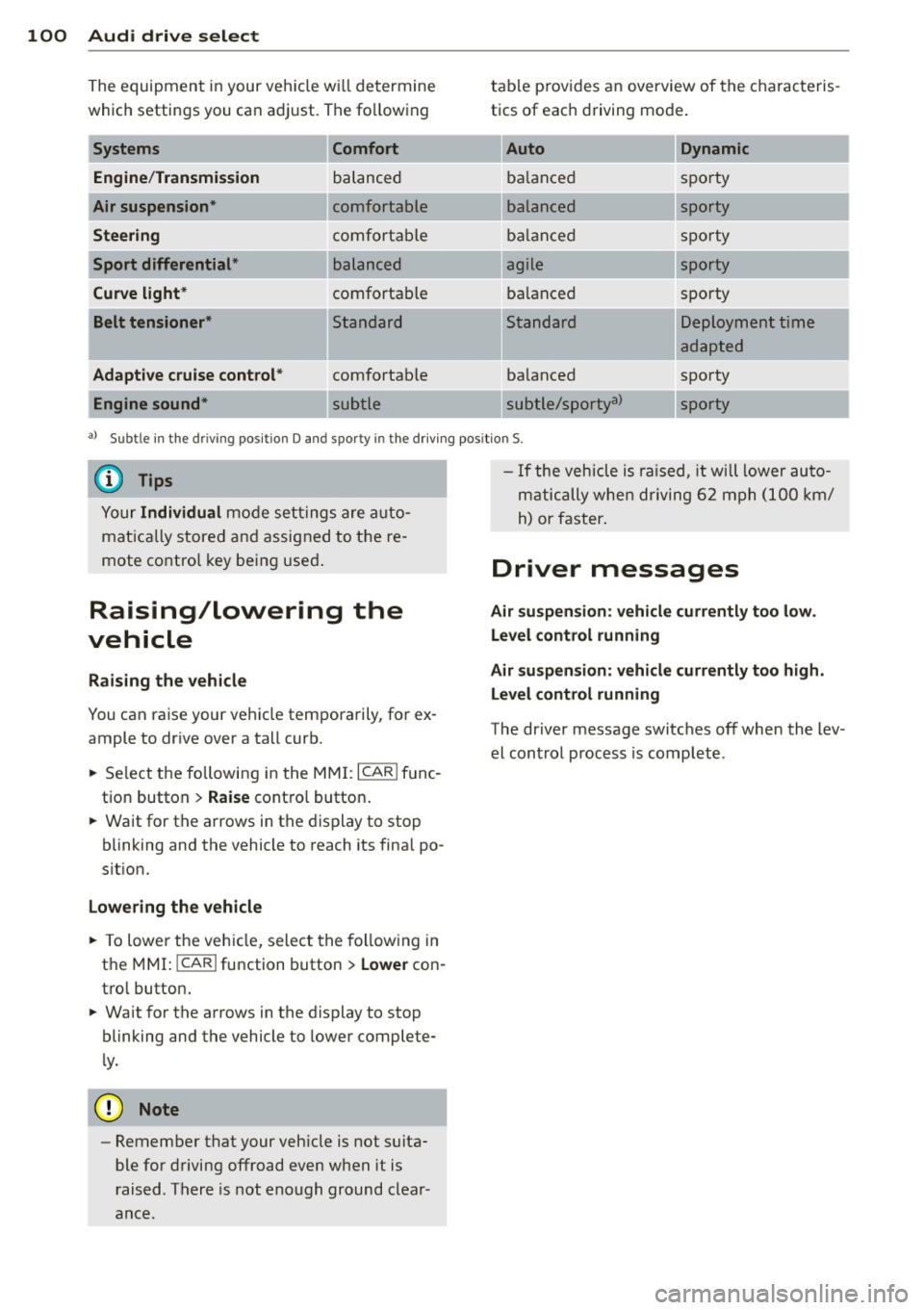
The equipment in your veh icle w ill determine
which settings you ca n adj ust. The fo llowing
Engine /Trans mission
Air su spension *
Steering
Sport differential *
Curve light*
Belt tensioner *
Adapti ve cruise control *
Engine sound* Comfort balanced
comfortable
comfortable
balanced
comfortable
Standard
comfortable
table p
rov ides a n overview of the characteris
tics of eac h driving mode .
Auto Dynamic
balanced sporty
balanced sporty
ba lanced spo
rty
agile sporty
ba lanced spo
rty
---.. ,
Standard
ba lanced
subtle/sportya> Deployment time
adapted
sporty
-...
sporty
-
a l Subt le i n th e drivi ng pos it io n D an d sp o rty in t he d riving pos itio n S.
{DJ Tips
Your Individual mode se ttings are a uto
mat ica lly stored and assigned to t he re
mote co ntro l key being use d.
Raising/lowering the
vehicle
Raising the vehicle
You can ra ise your veh icle temporarily, for ex
ample to dr ive over a tall curb .
., Se lect the following i n the
MM I: ICAR I f u nc
tion button >
Raise cont ro l button .
., Wait for the a rrows in the display to stop
blinking and the vehicle to reach its fina l po
s it ion.
Lowering the vehicle
., To lowe r the veh icle, select the fo llow ing in
the
M MI: ICARlfunction button> Lowe r con
tro l button .
., Wait for the a rrows in the display to stop
blinking and the vehicle to lower complete
l y .
{(D Note
- Remember that your veh icle is not suita
ble for driving offroad even when it is
r aised . There is not enough ground clear
ance.
- If the vehicle is ra ised, it will lower auto
m atic ally when d riving 6 2 mph (1 00 km/
h) or faster .
Driver messages
Air suspen sio n: vehicl e currently too low .
Level control running
Air su spension : vehicle curr ently too high .
L e vel control running
The driver message switc hes off when the lev
el cont rol process is complete .
Page 111 of 306
a gear that is suitable for the incline. Hill de
scent control tries to maintain the speed ach
ieved at the time of brak ing, within physical
and technica l limitations. If may still be nec
essary to adjust the speed with the brakes.
Hill descent control switches off once the de
cline levels out or you press the accelerator pedal.
On vehicles with the cruise control system*
¢ page 79, hill descent control is also activat
ed when the speed is set.
.&_ WARNING
-
H ill descent control cannot overcome
physical limitations, so it may not be able
to maintain a constant speed under all
conditions. Always be ready to app ly the
brakes .
Manual shift program
Applies to vehicles: with mult itronic/S tronic/tiptron ic
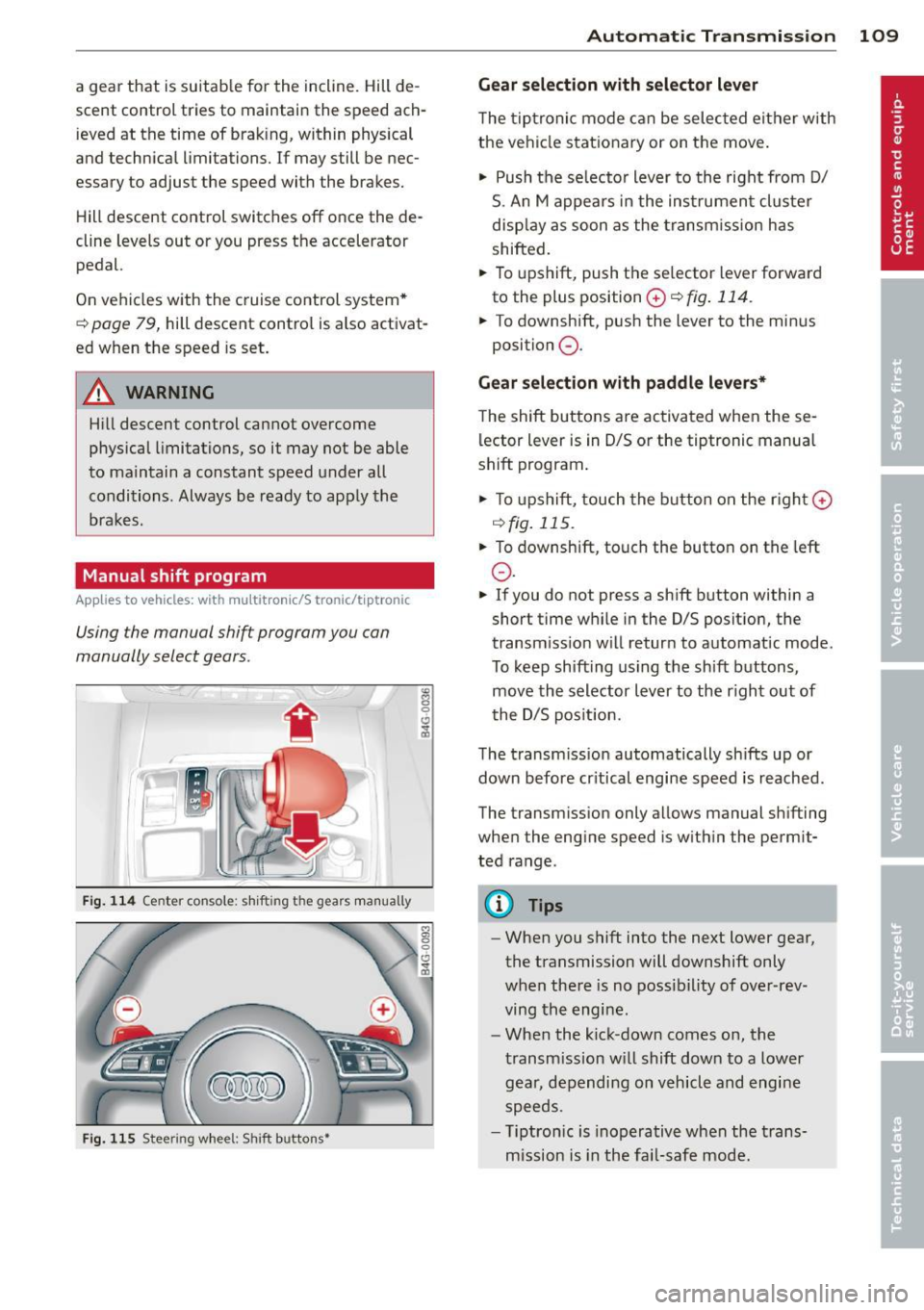
Using the manual shift program you can
manually select gears.
Fig. 114 Center co nsole: shi fting the gears manually
Fig. 115 Steering wheel: Shift buttons•
"' 8 0 CJ
cb
Automatic Transmission 109
Gear selection with selector lever
The tiptronic mode can be selected either with
the vehicle stationary or on the move.
"' Push the se lecto r lever to the right from D/
S. An M appears in the instrument cluster
display as soon as the transm ission has
shifted.
"' To upshift, push the se lector lever forward
to the plus position
0 ¢ fig . 114.
"' To downshift, push the lever to the minus
position
0 .
Gear selection with paddle levers*
The shift buttons are activated when these
lector lever is in D/S or the tiptronic manual
shift program .
"'To upshift, touch the button on the rig ht G)
C) fig. 115 .
.,. To downshift, touch the button on the left
0 .
"' If you do not press a sh ift button within a
short time while in the D/S position, the
transm iss ion w ill retur n to automat ic mode.
To keep shifting using the sh ift buttons,
move the selector lever to the r ight out of
t he D/S posit ion.
The transmission automatically shifts up or
down before cr itical engine speed is reached .
The transm ission only a llows manual sh ifting
when the engine speed is w ithin the permit
ted range.
(D Tips
- When you shift into the next lower gear,
the transmission will downshift only
when there is no possibility of over-rev
ving the engine.
- When the kick-down comes on, the
transmission will shift down to a lower
gear, depending on vehicle and engine
speeds.
- T iptron ic is inoperat ive when the trans
mission is in the fail-safe mode.
Page 192 of 306
190 Audi pre sense
Audi pre sense
Preventative passenger
protection
A pp lies to veh icles: with Audi pre se nse
Audi pre sense can initiate steps to help pro
tect vehicle occupants in certain situations.
The functions described depend on equ ipment
installed in your vehicle:
Audi pre sense basic*
The following functions can be triggered in
certain driving situations:
- Tightening of the safety belts (for example,
during heavy braking) : the front safety belts
have reversible belt pretensioners. If a colli
sion does not occur, the safety belts loosen
slightly and are ready to be tightened again.
- Closing the windows and the sunroof*: the
windows and the sunroof* close leaving a
small open gap.
Audi pre sense basic functions can be trig
gered at speeds above 20 mph (30 km/h).
Vehicles with Aud i drive select*: the deploy
ment time is adapted in
Dynamic mode.
Audi pre sense front (vehicles with
adaptive cruise control*)
Audi pre sense front includes the functions in
Audi pre sense basic. In addition, within the
limits of the system, the likelihood of a colli
sion with the vehicle immediately ahead is al
so calculated . If the system senses an immi
nent collision the following functions can be
tr iggered :
- Braking guard c::>poge
88
-Tightening the safety be lts
- Closing the windows and the sunroof* (leav -
ing a small open gap)
Audi pre sense rear (vehicles with Audi
side assist*)
Audi pre sense rear includes the functions in
Audi pre sense basic. In addition, the likeli
hood of a rear-end collision with the vehicle
coming from behind is also calcu lated.
If the risk
of a co llision is detected, the following
functions can be triggered:
- Tig htening the safety belts
- Closing the windows and the sunroof* (leav-
ing a small open gap)
Audi pre sense plus*
Audi pre sense plus includes the functions in
Audi pre sense front and Audi pre sense rear.
Error message
Audi pre sense: not available
Preventative passenger protection is not avail
able. See your authorized Audi dealer immedi
ately to have the malfunction corrected.
_& WARNING
-=
Audi pre sense cannot overcome the laws
of physics. It cannot prevent a collision. Do
not let the increased safety provided
tempt you to take risks. This will increase
the r isk of a collis ion and serious personal
in juries .
- The sensors cannot always detect all ob
jects. This increases the risk of a colli
s10n.
-Aud i pre sense does not detect people or
an im als or objects that are crossing the
veh icle's path c::> page
82.
-The radar sensor's vis ion can be reduced
by heavy rain, ice, snow, heavy road sp ray
and reflections from guard rails, tunnel
entrances, etc. These and similar condi
tions can prevent vehicles from being ac
curately detected and in some cases they
may not be detected at all.
(D Note
The sensors can be displaced by impacts or
damage to the bumper, wheel housing and
underbody. This can affect the function of
the Audi pre sense system. Have your au
thorized Audi dealer check to make sure
that the system is working properly.
Page 195 of 306
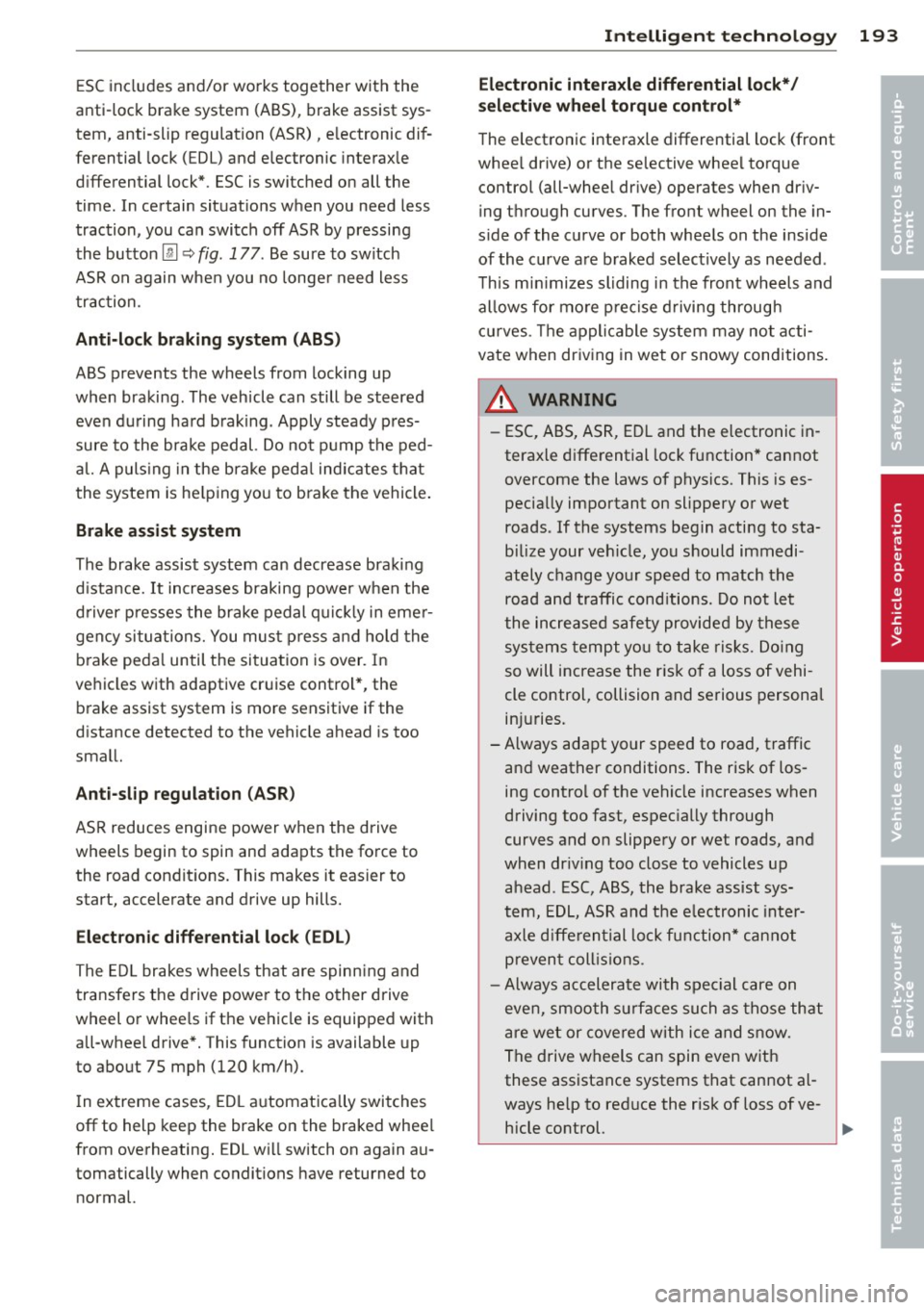
ESC includes and/or works together with the
anti-lock brake system (ABS) , brake assist sys
tem, anti -slip regulation (ASR) , electronic dif
ferential lock (E DL) and e lectronic interaxle
d ifferential lock*. ESC is swi tched on all the
time. In certain situat ions when you need less
traction , you can switch off ASR by pressing
the button
[ru ~ fig . 177 . Be sure to switch
ASR on again when you no longer need less
traction.
Anti-lock braking system (ABS)
ABS prevents the wheels from locking up
when braking. The vehicle can still be steered even during hard braking . Apply steady pres
sure to the brake pedal. Do not pump the ped
al. A puls ing in the brake pedal indicates that
the system is he lping you to brake the vehicle.
Brake assist system
The brake assist system can decrease brak ing
d istance.
It increases braking power when the
driver presses the brake pedal quickly in emer
gency situations. You must press and hold the
brake pedal until the situation is over . In
vehicles with adaptive cruise control* , the
brake assist system is more sensitive if the
d istance detected to the vehicle ahead is too
small.
Anti-slip regulation (ASR)
ASR reduces engine power when the drive
wheels begin to spin and adapts the force to
the road condit ions. This makes it eas ier to
s tart, accelerate and drive up hills.
Electronic differential lock (EDL)
The EDL brakes wheels that are spinn ing and
transfers the drive power to the other drive
wheel or whee ls if the vehicle is equipped with
all-whee l drive*. This function is available up
to about 75 mph (120 km/h).
I n extreme cases , EDL automatically switches
off to help keep the brake on the braked wheel
from overheating. EDL wi ll switch on again au
tomatically when conditions have returned to
normal.
Intelligent technology 193
Electronic interaxle differential lock*/
selective wheel torque control*
The electronic interaxle differential lock (front
whee l drive) or the se lective wheel torque
cont rol (all-wheel dr ive) operates when dr iv
ing through curves . The front wheel on the in
s ide of the curve or both wheels on the inside
of the curve are braked selectively as needed .
T his min imizes sliding in the front wheels and
allows for more precise driving through
curves . Th e applicable system may no t acti
vate when driv ing in wet or snowy conditions.
A WARNING
-
-ESC, ABS, ASR, EDL and the electronic in
teraxle differential lock function* cannot
overcome the laws of physics. This is es
pecially important on slippery or wet
roads . If the systems begin acting to sta
bilize your vehicle, you should immedi
ately change your speed to match the
road and traffic conditions. Do not let
the increased safety provided by these
systems tempt you to t.;1ke risks. Doing
so will increase the risk o f a loss of vehi
cle control, collision and serious personal
injuries.
-Always adapt your speed to road, traffic
and weather conditions . The risk of los
ing control of the vehicle increases when
driving too fast, espec ially through
curves and on slippery or wet roads, and
when dr iving too close to vehicles up
ahead . ESC, ABS, the brake assist sys
tem, EDL, ASR and the elec tronic inter
axle differential lock function* cannot
prevent collisions .
- Always accelerate with special care on
even, smooth surfaces such as those that
are wet or covered with ice and snow.
The drive wheels can spin even with
these assistance systems that cannot al
ways he lp to red uce the risk of loss of ve -
hicle control. .,.
•
•
Page 196 of 306
194 Intelligent technology
@ Tips
-ABS and ASR on ly work correctly when
all four wheels are equipped w ith identi
cal tires. Different tire sizes can lead to a
reduction in engine power.
- You may hear noises when the systems
described are working.
- If the indicator light
DJ or 11:11 (USA
models) 1i] (Canada models) appears,
there may be a malfunction¢
page 20,
c> page 19.
Switching on and off
ESC
turns on automatically when you start
the engine.
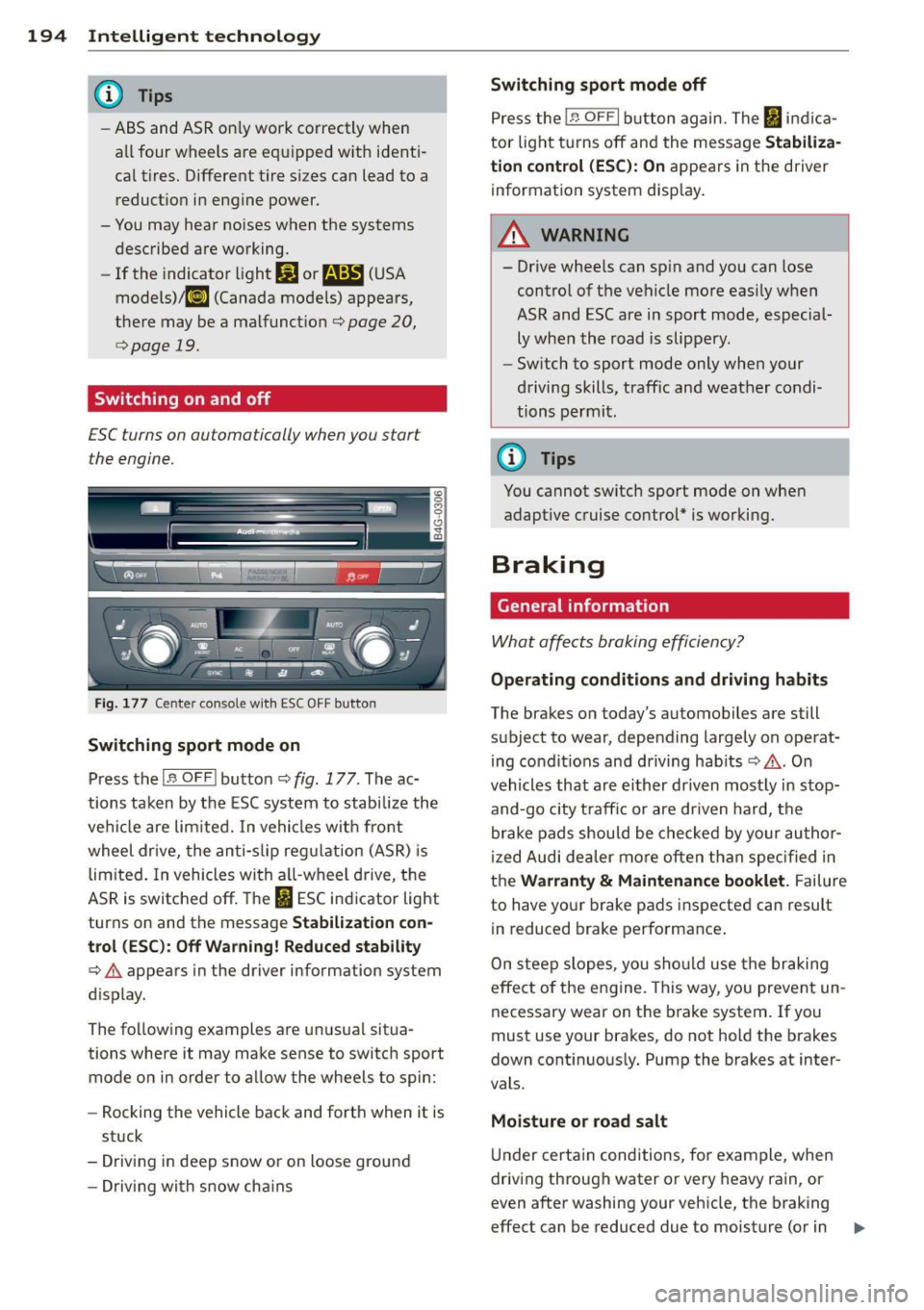
Fig. 177 Center console w it h ESC OFF button
Switching sport mode on
Press the I~ OF FI button c::> fig . 177. The ac
tions taken by the ESC system to stabilize the
vehicle are limited. In vehicles with front
wheel drive, the anti-slip regulation (ASR) is
limited. In vehicles with a ll-wheel drive, the
ASR is switched off. The
It) ESC indicator light
turns on and the message
Stabilization con
trol (ESC): Off Warning! Reduced stability
¢.&. appears in the driver information system
d isplay.
The following examples are unusual situa
tions where it may make sense to switch sport
mode on in order to allow the wheels to spin:
- Rocking the vehicle back and forth when it is
stuck
- Driving in deep snow or on loose ground
- Driving with snow cha ins
Switching sport mode off
Press the 1.$ OF FI button again. The I indica
tor light turns off and the message
Stabiliza
tion control (ESC): On
appears in the driver
information system display .
A WARNING
-
-Drive wheels can spin and you can lose
control of the vehicle more easily when
ASR and ESC are in sport mode, especial
ly when the road is slippery.
- Sw itch to sport mode only when your
driving skills, traffic and weather condi
tions permit.
@ Tips
You cannot sw itch sport mode on when
adaptive cruise control* is working.
Braking
General information
What affects braking efficiency?
-
Operating conditions and driving habits
The brakes on today's automobiles are still
subject to wear, depending largely on operat
ing condit ions and driving hab its
c::> .&. . On
vehicles that are either driven most ly in stop
and-go city t raff ic or are driven hard, the
brake pads should be checked by your author
ized Audi dea ler more often than specified in
the
Warranty & Maintenance booklet. Failure
to have your brake pads inspected can result
in reduced brake performance .
On steep slopes, you should use the braking
effect of the engine . This way, you prevent un
necessary wear on the brake system. If you
must use your brakes, do not hold the brakes
down continuously. Pump the brakes at inter
vals .
Moisture o r road salt
Under certain conditions, for example, when
driving through water or very heavy rain, or
even after washing your vehicle, the braking
effect can be reduced due to moisture (or in .,,_
Page 273 of 306
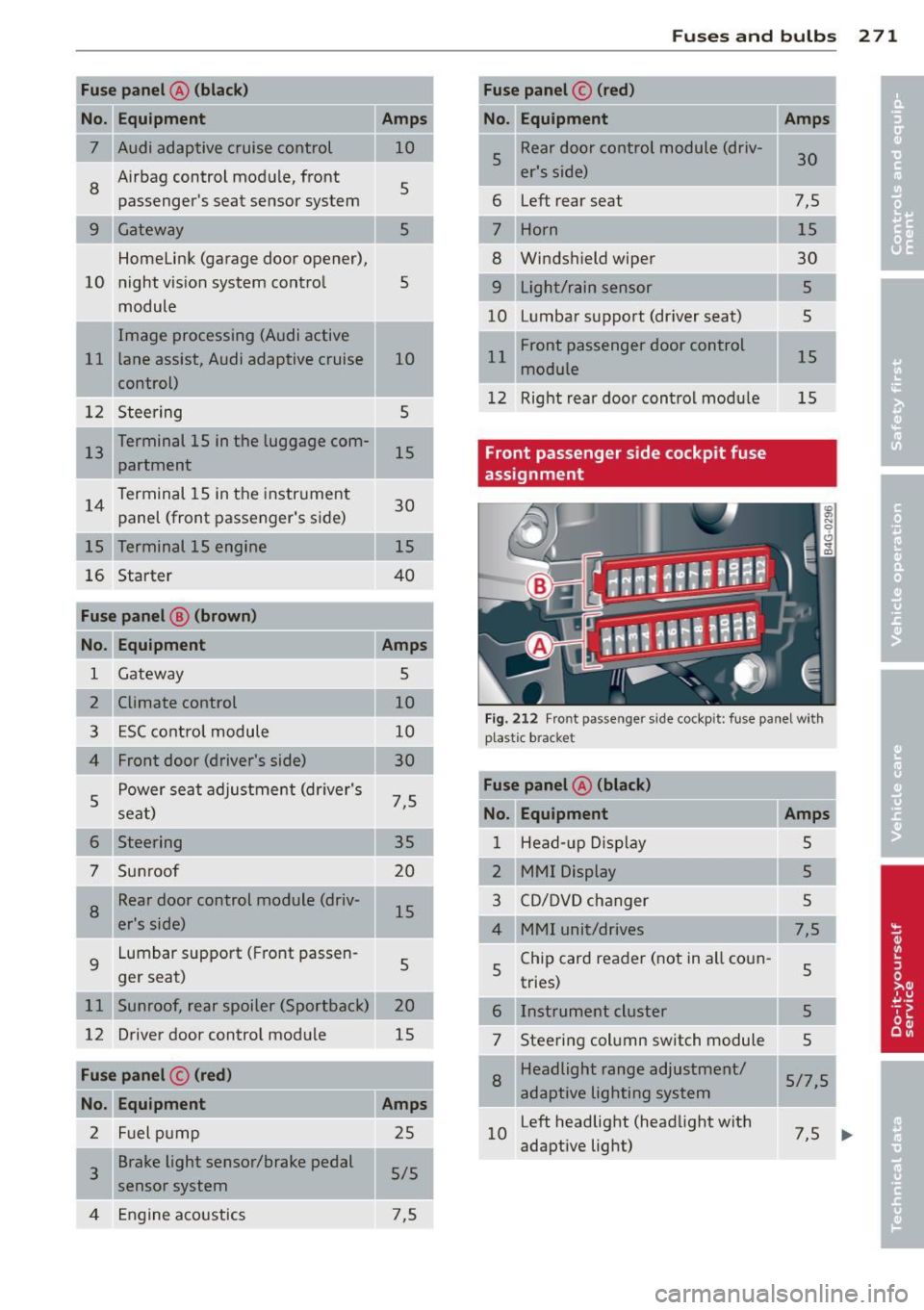
Fuse panel@ (black )
No. Equipment Amps
= = 7 Audi adaptive cruise control 10
8
Airbag control module, front
5
passenger's seat sensor system
Gateway 5
Homelink (garage door opener),
10 night vision system control
5
module
Image processing (Audi active
11 lane assist, Audi adaptive cruise
10
control)
12 Steering 5
1 13 Terminal 15 in the luggage com-
15
partment
14 Terminal 15 in the
instrument
30
panel (front passenger's side)
15 Terminal 15 engine 15
16 Starter 40
Fuse panel
B (brown)
No. Equipment Amps
1 Gateway 5
2 Climate control 10
3 ESC control module 10
Front door (driver's side) 30
s
Power seat adjustment (driver's
7,5
seat)
6 Steering 35
7 Sunroof 20
8
Rear door control module (driv-
15
er's side)
9 Lumbar support (Front passen
-
5
ger seat)
11 Sunroof, rear spoiler (Sportback) 20
12 Driver door control module
15
Fuse panel
c (red)
No. Equipment Amps
2 Fuel pump 25
3 Brake light sensor/brake pedal
sensor system 5/5
4 Engine acoustics 7,5
Fuses and bulbs
-Fuse panel © (red)
No.
u Equipment
5 Rear door
control module (driv-
er's side)
6 Left
rear seat
Horn
Windshield wiper
9 Light/rain sensor
10 L
umbar support (driver seat)
11 Front passenger door control
module
12 Right rear door control modu le
Front passenger side cockpit fuse
assignment Amps
30
7,5 15
30 5
5
15
15
Fig. 212 Front passenger side cockpit: fuse panel wit h
p last ic bracket
Fuse panel A (black)
No. Equipment
Amps
1 Head-up Display 5
2 MMI Display 5
3 CD/DVD changer 5
4 MMI unit/drives
7,5
5 Chip card reader (not in all coun
-
5
tries)
6 Instrument cluster
5
7 Steering column switch module
5
8
Headlight range adjustment/
5/7,5
adaptive lighting system
10 Left
headlight (headlight with
7,5
adaptive light)
I
271
...
Page 292 of 306
29 0 Index
A
Accessories . ...... ..... ... .. .. .... . 28 7
Active lane ass ist . . . . . . . . . . . . . . . . . . . . 91
Activating and deactivating . . . . . . . . . . . 92
C leaning came ra area ... .. .. .. .. .. . 211
Descr ipt ion ... ........... .. .. .... .. 9 1
I nstrument cluster indicator light . . . . . 92
Messages . . . . . . . . . . . . . . . . . . . . . . . . . 92
Notes on instrument cluster display . . . . 92
Setting the steering wheel vibrat ion . . . . 93
AC (automatic cl imate control) . .. .. .. .. 67
AC (climate control) . . . . . . . . . . . . . . . . . . 65
Adaptive air suspension/sport . ... .. .. . . 98
Adapt ive cruise control . . . . . . . . . . . . . . . . 82
C leaning sensors/cameras .. .. .. .... . 211
Messages ............... .. .. .. .. .. 89
Request for driver intervention . . . . . . . . 8 7
Stop-and-go traffic . . . . . . . . . . . . . . . . . 86
Adapt ive Lig ht (defective) ... .. .. .... .. 22
Adding Eng ine coolant ............. .. .... . 233
Eng ine oil .. ..... ........... ... .. . 230
W indshield washer fluid .. ... .. .. .. . 239
Additives Eng ine oil ............... .. .. .. .. . 230
Ad justing
Air distribution (automatic climate con-
trol) ..... .. ... .. ..... ... .. .. .... .. 68
air distribution (climate control) . .... .. 65
Front seats . . . . . . . . . . . . . . . . . . . . . . . . 50
Instrument illum inat ion ... .. .. .. .. . .
44
Steer ing column electrically .. .. .. .. . . 70
Steer ing column manually ..... .. .... 70
Tempe ratu re (automat ic climate control) 68
Tempe ratu re (climate control) .. .. .. . . 65
A irbag system . . . . . . . . . . . . . . . . . 145, 166
Advanced Airbag System . . . . . . . . . . . . 149
Advanced Airbag System components . 153
Care ....... .......... ...... ... .. . 161
C hi ldren . ............... .. .. .... . 173
C hi ld restra ints ........... .. .. .. .. . 173
Components (front airbags) . .... ... . 153
Danger of fitting a child seat on the front
passenger seat . . . . . . . . . . . . . . . . . . . . 147
Disposa l ..... ........... .. .. .... . 161
Front airbags . . . . . . . . . . . . . . . . 149, 151
H ow do the front airbags work? . .... . 155 How many a
irbags does my vehicle
have? . ... .... .. .. ... .. ..... ... .. 153
How the Advanced Airbag System com -
ponents work together ......... .... 155
Important safety instructions on the
knee airbag system ................ 164
Important things to know . .. .. .. .. .. 145
Knee airbags . .. .. .......... ...... . 162
Monito ring .. .. . .. ............ .. .. 15 7
PASS ENG ER A IR BAG OFF light ... .. .. 158
Repairs ... .... .. .. ... .. . .... ... .. 161
Safety instr uctions . .. .. ..... .... . .. 160
Side airbags ..... .. ... ..... ... .. .. 165
S ide curtain airbags ............ .... 168
Warning/ind icator lights ........ .... . 19
Warning/Indicator lights ....... .... 157
When must the system be inspected? 157
Aircraft Transporting your vehicle ..... .. .. .. 278
All-wheel drive .. .. ............. .... 196
Win ter tires . .. . .. ............ .. .. 255
Alloy wheels .. .. .. .......... ...... . 213
Alternator . . . . . . . . . . . . . . . . . . . . . . . . . . 17
Amb ience lighting ................ ... 44
Anti-freeze
refer to Eng ine coolant ............ . 232
Anti- lock braking system . ..... ... .. .. 192
Warning/ind icator lights ........ .... . 20
An ti-s lip reg ulation ............. .. .. 192
Anti-theft systems Electronic immob ilizer ............. .. 32
Ashtray . ... .... .. .. ... .. ..... ... .. . 56
Audi braking guard
refer to b rak ing guard .......... .... . 82
Audi drive select
refer to drive select ............... .. 98
Audi Serv ice Repair Manuals and Litera-
ture ... .... .... .. ............. .... 285
A UTO
a ut omatic climate contro l . . . . . . . . . . . . 68
Automatic headlights ... .... ... .. .. . 41
climate control ... .. ... ..... ... .. .. . 65
A uto Lock .. .... ... ................ . 33
Automat ic be lt retractor ........... .. 139
A utomatic car wash . .... ..... ... .. .. 209
Page 294 of 306

292 Index
Checking Engine coolant level ................ 232
Tire pressure . ............. ... .... . 246
Ch ild restra ints
Danger of using child restra ints in the
front seat . . . . . . . . . . . . . . . . . . . . . . . . 147
Where can I get additional information
about child restraints and their use? .. 189
Child restraint system anchors ... .... . 185
Child safety .. .. . .......... .. .. .... . 171
Convertible locking retractor .. .. .. .. . 182
Important safety instructions for us ing
chi ld safety seats ......... .. .. .... . 175
I mportant things to know when dr iving
with chi ldren . ............... .... . 171
Tether anchors ............ ... .... . 188
Tether straps ..................... 188
Child safety lock Rear doors .............. .. .. .... .. 38
Child safety seats .......... .... .... . 177
Booster seats . .......... ... .. .. ... 180
Convertible ch ild seats .... .. .. .. .. . 178
Convertible locking retractor .. .. .. ... 182
H ow do I proper ly install a child safety
seat in my vehicle? ...... .. .. .. .. .. . 175
I nfant seats .............. ... .... . 177
I nstalling . ............... ... .... . 182
Installing a child restraint using the
LATCH system ................ .... . 187
LATCH system ............ .... ..... 187
Lower anchorages ............ ..... 186
Mounting and releasing the anchorage
hook .. .. .. ... .... ...... ... ... .. . 187
Safety instructions . . . . . . . . . . . . . . . . . 17 5
Unused safety belts on the rear seat .. 177
Cigarette lighter . . . . . . . . . . . . . . . . . . . . . 56
C leaning
Head-up Display .............. .... . 215
Matte finish paint ............ .... . 210
C leaning and protection ..... .. .. .. .. . 208
A lcantara (synthet ic suede) .......... 218
Engine compartment ....... .... ... . 219
Exhaust tail pipes .......... ... .... . 214
Fabrics and fabric coverings .. .. ..... 215
Instrument panel ............. ..... 216
Interior . . . . . . . . . . . . . . . . . . . . . . . . . . 214
Leather . . . . . . . . . . . . . . . . . . . . . . . . . . 217
MMI display/controls .. ... ... .. .. ... 214 Plastic
and vinyl . .............. .... 212
Plastic parts . . . . . . . . . . . . . . . . . . . . . . 216
Safety be lts ... .. ................ . 218
trim strips ................... .... 212
Trim strips ................... .... 212
Cleaning the Head-up Display ......... 215
Climate control Air vents . . . . . . . . . . . . . . . . . . . . . . . . . . 66
Climate controls . .. ............. .. .. . 64
Climate control (four-zone)
Operation ..... .. .. .............. .. 67
Climate control (three-zone) Operation . . . . . . . . . . . . . . . . . . . . . . . . . 65
Clock ...... .... .................... 27
Closing Sliding/tilting sunroof ............... 40
Cold tire inflation pressure ........ .. .. 244
Coming home ....................... 43
Compact spare tire ................. . 262
Compartments . . . . . . . . . . . . . . . . . . . . . . 57
Compliance ..... .. .. .............. . 288
Consumer Information . . . . . . . . . . 134, 285
Consumption (fuel) ............. .... . 24
Contacting NHTSA .............. .... 134
Convenience key . .. ... ........... ... . 35
Starting the engine ............ .... . 71
Stopping the engine (START ENGINE
STOP button) . . . . . . . . . . . . . . . . . . . . . . 73
Switching the ignition on ........ ... . 71
Unlocking and locking vehicle .... .. .. . 35
Convertib le child safety seats ..... .... 178
Convertible locking retractor Activating ... .. .. .. ..... ...... .. .. 184
Deact ivating . .. .. ... ....... ... .. .. 184
Using to secure a child safety seat 1.82, 184
Coolant
refer to Engine coolant ............. 232
Cooling mode (automatic climate control) 67
Cooling mode (climate control) . . . . . . . . . 65
Cruise contro l
Changing speed .. ............. .... . 80
Presetting your speed .............. . 80
Switching off . . . . . . . . . . . . . . . . . . . . . . 80
Switching on . . . . . . . . . . . . . . . . . . . . . . . 79
Warning/ind icator lights ........... .. 23
(upholder .. .... ............... ..... 57
Page 295 of 306
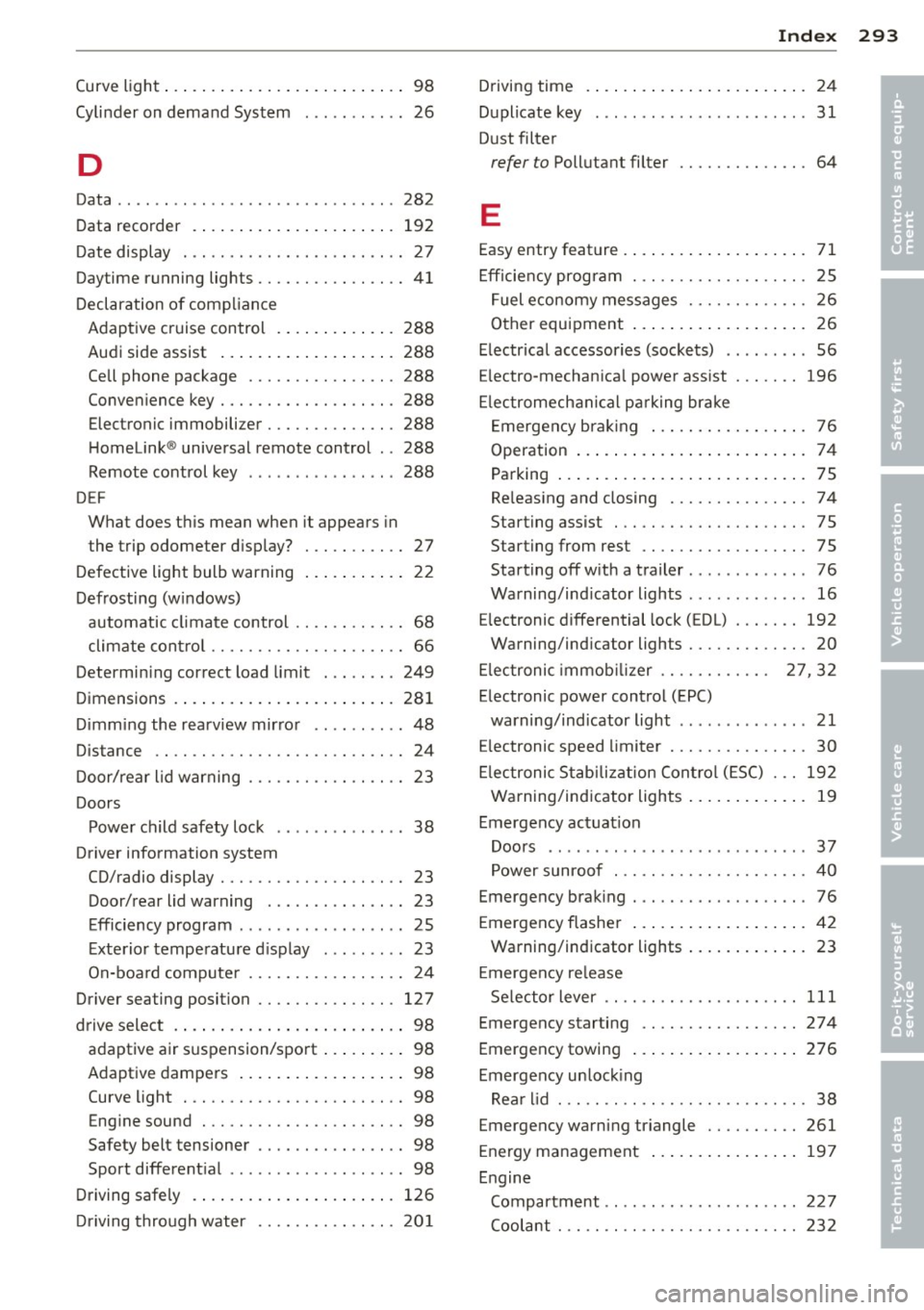
Curve light ... ... ... ...... ... .. .. .... 98
Cylinder on demand System ........... 26
D
Data ...... ... ................ .. .. . 282
Data recorder . .... ..... ... ... ... ... 192
Date display . ................. .. .... 27
Daytime running lights ................ 41
Declaration of compliance Adaptive cruise control . ... .. .. .. .. . 288
Audi side assist .. ..... ... ... ... .. . 288
Ce ll phone package ................ 288
Conven ience key .......... .. .. .. .. . 288
Electron ic immobilizer .............. 288
Homelink ® universal remote contro l .. 288
Remote control key ......... .. .. .. . 288
DEF What does this mean when it appears in
the trip odometer d isplay? ... .. .. .. .. 27
D efective light bulb warning . . . . . . . . . . . 22
Defrosting (w indows)
automatic climate control .. .. .. .. .. .. 68
climate cont ro l . . . . . . . . . . . . . . . . . . . . . 66
Determi ning correct load limit ... .. ... 249
D imensions . ... .... .... ... .. .. .. ... 281
D imm ing the rearview mir ror .......... 48
Distance . . . . . . . . . . . . . . . . . . . . . . . . . . . 24
D oor/rear lid warning . . . . . . . . . . . . . . . . . 23
Doors Powe r child safety lock . . . . . . . . . . . . . . 38
Driver information system
CD/radio display . . . . . . . . . . . . . . . . . . . . 23
Door/rear lid warning . . . . . . . . . . . . . . . 23
Efficiency program . . . . . . . . . . . . . . . . . . 25
E xte rio r tempe ratu re d isplay ... .. .. .. 23
On-boa rd compute r . . . . . . . . . . . . . . . . . 24
Driver seating position ............... 127
d rive select . ... ... ..... ... .. .. .. .... 98
adaptive air s uspension/spo rt ... .. .. .. 98
Adaptive dampers . . . . . . . . . . . . . . . . . . 98
Curve light . . . . . . . . . . . . . . . . . . . . . . . . 98
Eng ine sound ............ .... .. .. .. 98
Safety bel t tensioner . . . . . . . . . . . . . . . . 98
Sport different ial . . . . . . . . . . . . . . . . . . . 98
Driving safe ly . .... ..... ... .. .. .. ... 126
Dr iving through water ............... 201
Inde x 293
Driving time . ..... .. . .. .. ..... ... .. . 24
D uplicate key . . . . . . . . . . . . . . . . . . . . . . . 31
D ust filter
refer to Pollutant filter .............. 64
E
Easy entry feature . . . . . . . . . . . . . . . . . . . . 71
E fficiency program . .. .. ......... .. .. . 25
F uel economy messages .......... .. . 26
Other equipment ... . ... ...... ... .. . 26
E lectrical accessories (sockets) . . . . . . . . . 56
E lectro-mechan ica l power assist ... .. .. 196
El ectromech anica l pa rking brake
E mergency bra king .. .. ... .... ... .. . 76
Operation . . . . . . . . . . . . . . . . . . . . . . . . . 7 4
Pa rking ... .. .... ... .. .. ..... ... .. . 75
Re leas ing and closing .......... .. .. . 74
Starting assist ... .... ......... .. .. . 75
Starting from rest ................. . 75
Starting off w ith a trailer . . . . . . . . . . . . . 76
Warning/ind icator lights .... ...... .. . 16
E lectronic differential lock ( EDL) ..... .. 192
Warning/ind icator lights ........ .. .. . 20
E lectronic immob ilizer . . . . . . . . . . . . 27, 32
E lectronic power control (EPC)
warning/indicator light . . . . . . . . . . . . . . 21
E lectronic speed limiter .......... .. .. . 30
El ectronic Stab iliz ation Contro l (E SC) . .. 192
Warning/ind icator lights ..... ... .. .. . 19
Emergency actuat ion
Doors ....... ... .. ................ 37
Power sunroof . .. ............. .. .. . 40
Emergency brak ing . .. ........... .... . 76
Emergency flasher .... .. .. ..... ... .. . 42
Warning/ind icator lights ..... ... .. .. . 23
E mergency re lease
Se lector lever . . . . . . . . . . . . . . . . . . . . . 111
Emergency starti ng ................. 274
Emergency towing ... . .. .. ..... ... .. 276
Emergency un lock ing
Rea r lid . . . . . . . . . . . . . . . . . . . . . . . . . . . 38
Emergency warning triangle .......... 261
Energy management .. .. .. ..... ... .. 197
Engine Compartment .. .. .. ........... .... 22 7
Coolant ... .. .. .. .... ............. 232
•
•