lights AUDI A6 2013 Owner's Guide
[x] Cancel search | Manufacturer: AUDI, Model Year: 2013, Model line: A6, Model: AUDI A6 2013Pages: 306, PDF Size: 76.92 MB
Page 74 of 306
72 On the road
By pressing the I STAR T ENGINE ST OP I button
without depressing the brake peda l, the igni
tion is on and switched
off by pressing it
again .
After a cold engine is started, the re may be a
brief period of increased noise because oil
pressure must first bu ild up in the hydraulic
va lve adjusters. This is normal and not a cause
f or concern.
If the engine should not start immediately,
the starting process is automatically stopped
after a short time . Repeat starting procedure.
Start-Stop-S ystem *:
When you stop and the Start-Stop-System*
turns
off the engine, the ignition still remains
switched on.
- If you press the I STAR T ENGINE STOPI but
ton now, the ignition wi ll be switched
off.
T he engine will not start ¢ page 78 .
-Make sure tha t th e ig nit ion is swi tched off
before ex iting the vehicle.
Sw itching the ignition /engine off
automat icall y*
The fo llow ing applies to vehicles with Start
Stop -System*: to prevent the battery from
draining, the ignition and the engine wi ll
switch
off automatically under the following
conditions :
- T he vehicle has already been dr iven.
- T he d river's door is opened.
- T he driver's seat be lt is removed.
- The brake pedal is not pressed down .
- The veh icle is sta tionary.
In t his case, the activated low beam w ill be re
p laced by the side marker lights. The side
marker lights will switch
off after a certain pe
riod of time or when you lock the vehicle.
Driver m essage in the in strument clu ster
di spl ay
P ress b rake pedal to start engine
This message appears i f you press the
I S TAR T ENGINE STOP ! button to start the en
gine and do not depress the brake peda l. The engine can only be started if the brake pedal
is depressed.
!I C
o nveni ence key: I s ke y not in th e vehi
cle?
T h is message appears along with the !I sym
bol if the master key is removed from the ve
hicle with the eng ine runn ing.
It is in tended
to rem ind yo u (e.g . when chang ing dr ivers)
not to continue the journey without the mas
ter key.
If the master key is no longe r in t he ve hicl e,
yo u canno t swi tch on the igni tion after stop
ping the engine and you also cannot start the
engine again. Moreover, you cannot lock the
vehicle from the outside with the key.
Tu rn off ignition before leav ing car
This message appears if the drive r's door is
opened wh ile the ign ition is switched on. Al
ways swi tch off the ignit io n if you a re leav ing
the vehi cle. See also
¢ page 72 .
Shift to P, otherwi se vehicle can roll away.
Doors do not lock if lever is not in P .
This message appears for safety reasons
along with an audible warning tone if the P
selector lever position is not engaged when
stopp ing the eng ine with t he
I S TAR T ENGI NE ST OP I but ton. Select the P se
l ector lever posi tion. Otherwise the vehicle
could roll and it cannot be locked.
Ke y not r ecogni sed . Hold back of ke y again st
marked ar ea . See owner' s manual.
If the indicato r light turns on and this mes
sage appears, there is a malfunct ion
Q page 74.
Turn off ignition b efore leaving car
This message appears if the driver's door is
opened wh ile the ignition is switched on. Al
ways switch off the ignit ion if you a re leav ing
the vehicle. See also
¢ page 72 .
Shift to P and turn off ignition before leav-
ing car, otherwise vehicle can roll awa y
This message appears if the drive r's door is
opened while the ignition is switched on and
jll,,
Page 75 of 306
the sel ector lever is not in the P position. Shift
the s ele ctor lever into th e P position and
sw itch
off the ign ition when you ex it the vehi
cle . Otherwise the vehicle could ro ll. See a lso
c::;,page
72.
St eeri ng lock
The steering locks when you turn the engine
off using the I S TAR T ENGINE STOP I button
and open the d river 's door. The locked steer
ing helps prevent vehicle theft.
A WARNING
- Never allow the engine to ru n in confined
spaces -dange r of asphyxiation .
- Never turn
off the eng ine until the vehi
cle has come to a complete stop .
- The brake booster and power steer ing
only work when the engine is running . If
the engine is
off, you have to use more
force when steering or braking . Because
you cannot stee r and brake as you usua l
ly wou ld, this could lead to crashes and
serious injur ies.
(IT),) Note
- Avoid high eng ine rpm , fu ll th rottle and
heavy engine loads unti l the engine has
r eached operating temperat ure -ot her
wise yo u risk eng ine dam age.
- The eng ine cannot be sta rted by pushing
or tow ing the veh icle.
-If the engine has been under heavy load
fo r an ex tended pe riod, hea t builds up in
the engine compartment after the en
gine is switched
off -there is a risk of
damaging the engine. Allow the engine
to run at idle for about 2 m inutes befo re
switch ing it
off.
@ Tips
- If you open the driver's door with the ig
nitio n on, a buzzer sounds and the mes
sage
Ignition is on appears in the instru
ment cluster disp lay. Switch the ign it ion
off .
- If you leave the vehicle with t he ignit ion
switched on, the igniti on will switch
off
On th e ro ad 73
after a cer tain per iod of t ime. P lease
note that electrical eq uipment such as
exterior lights will sw itch
off as well
when that happens.
Stopping the engine
... Bri ng your ve hicle to a complete stop.
... Move the se lector lever to the P or N posi
tion .
... Press the
I STA RT ENGINE ST OP ! button
¢fig. 74 .
Emergency off
If necessary, the engine can be switched off
with the selector lever in the R or D/S posi
t ion . The eng ine stops if you press the
I S TAR T ENG INE S T OPI button at speeds below
6 mph (10 km/h) and press the b rake peda l.
A WARNING
-Never turn off the en gine until the vehi
cle has come to a complete stop .
- The brake booster and p owe r stee ring
only work when the eng ine is r unning .
If
the engine is off, you have to use more
force when steering or braking. Because
you cannot steer and bra ke as you usual
ly would, this cou ld lead to crashes and
serious inju ries.
- For safety reasons, you sho uld a lways
park your vehicle w it h the selector lever
in P. Otherwise, the vehicle could inad
vertently roll away .
- After the eng ine has been switched
off,
the radiator fa n can cont in ue to run for
up to 10 minutes - even with the ignition
sw itc hed
off. It can also sw itch on again
afte r some t ime if the coo lant tempera
ture rises as the resu lt of a hea t buildu p
or if the engine is hot and the engine
compa rtment is additionally heated by
the s un's rays .
(D Note
Do no t stop the eng ine immedia tely after
hard o r extended driving . Keep the engine
.
Page 77 of 306
Emergency brake function
An emergency brake ensures that the vehicle
can be slowed down even if the
normal brakes
fail
c::> pag e 76, Emergency broking .
Indicator light s
-If the par king b rake is closed w ith the igni
t ion
s witched on the indicator lights come
on - (USA models)/ . (Canada models)
in the instrument cluster and in the switch.
- If the par king brake is closed w ith the igni
tion
s witc hed off the indicator lights come
on - (USA models)/ . (Canada models)
in the instr ument cluster and in the switch
for about 20 seconds.
A WARNING
Do not press the accelerator peda l inadver
tently if the vehicle is stat ionary but the
eng ine is running and a gear is selected .
Otherw ise the vehicle will start to move
immediately and cou ld result in a crash .
(D Note
If the symbol . in the display or the ind i
cato r light
1111 (USA models) . (Cana
da models) in the instrument cluster flash
es , the re is a malfunction in the bra ke sys
tem. Please refer to t he detai led descr ip
t ion of the indicator lights ¢
page 15.
- If the indicato r light - (USA mod-
els) . (Canada mode ls) or
IIJ t ur ns
on, there may be a malfunction in the
parking brake
r=> page 16.
@ Tips
-You can apply the pa rking brake at any
time -even w ith the ignition swi tched
off. The ignition must be on in order to
release the parking brake.
- Occasiona l noises when the parking
brake is applied and re leased are norma l
and are not a ca use for concern .
- When the vehicle is parked, the parking
brake goes thro ugh a se lf-test cycle at
r egular intervals . Any assoc iated noises
are norma l.
On the ro ad 75
Parking
Parking
~ Stop the vehicle with the foot brake .
~ Pull the switch(®) to apply t he pa rking
bra ke .
~ Select the P se lec to r lever posit ion
r=> poge 105.
~ Turn the engine off c::> &_.
In addition on inclines and grades
~ Tu rn the steering wheel so that yo ur vehicle
w il l roll aga inst the c urb in c ase it shou ld
s tart to move .
T he pa rk ing brake activates automat ica lly
when you swi tch the ign ition off. This does not
happe n if you se lect the N selector lever posi
tion or switch the parking off with the~ but
ton before switching the ignition off .
A WARNING
-When you leave your vehicle -even if on
ly briefly -always take the ign it ion key
with you . This applies particularly when
children remain in the vehicle. Othe rwise
the children could start the engine, re lease the parking brake o r operate elec
trica l equipment (e.g. power wi ndows).
There i s the r is k of an accident.
- When the veh icle is locked, no one -par
ticularly not childre n should rema in in
the vehicle . Locked doors ma ke it mo re
difficult for emergency wo rke rs to ge t in
to the vehicle -putting lives at risk .
Starting from rest
The starting assist fun ction ensures that the
parking broke is released automatically upon starting .
Stopping and applying parking brake
~ Pull the switch(®) to apply the pa rking
bra ke .
Page 82 of 306
80 On the road
The stored speed and the ind icator light
A;(l)~i~ (US mo dels) 1,'I (Canadian mode ls) a p
pea r in the instrument cluster d isp lay
c::> fig. 81. The display may vary, depending on
the type of d isplay in your vehicle .
This informat ion is also shown briefly in the
Head -up Display*.
The speed is kept constant v ia an engine o ut
put adjustment or active b rake intervention.
A WARNING
- Always pay attention to traffic even when
the cruise control is switched on. You are
always responsible for your speed and
the distance between your vehicle and
other vehicles .
- For safety reasons, the cruise control
should not be used in the city, in stop
and-go traff ic, on twist ing roads and
when road conditions are poor (such as ice , fog, grave l, heavy ra in and hydro
planing) -risk of accident.
- Turn
off the cruise control temporar ily
when entering turn lanes, highway exit lanes o r in construc tion zones.
- Please note that inadvertently "rest ing"
yo ur foot on the accelerator peda l causes
the cruise control not to brake . T his is
because the cr uise control is overridden
by the d river's acce leration .
- If a brake system malfunc tion such as
overheating occurs when the cruise con
tro l system is switched on, the braking
function in the system may be switched
off. The other cruise control functions re
ma in active as long as the indicator light
[~;rn~i~ (US models) !Ill (Canad ian mod
els) is on .
(j) Tips
The brake lights illuminate as soon as the
brakes decelerate automat ica lly.
Changing speed
Applies to veh icles: w ith cru ise control
., To increase/decrease the speed in inc re
ments, tap the lever in the
0 10 direc tion
c::> fig . 80
., To increase/decrease the speed quic kly,
hold t he lever in the
0 10 direction until
the desired speed is displayed.
You can also press the accelerator pedal down
to increase your speed, e.g . if you want to
pass someone . The speed you saved earlier
will res ume as soon as you release the acceler
ator pedal.
If, however, you exceed your saved speed by
6 mph (10 km/h) for longer than 5 m inutes,
the cr uise control wi ll turn
off temporari ly.
The green symbol
A;(l)~i~ (US mode ls) 1,'I
(Canadian mode ls) in the display will go out
but the saved speed rema ins the same .
Presetting your speed
Applies to veh icles : w ith cru ise control
You can preset your desired speed while the
vehicle is not moving.
., Switch on the ignition.
., Pull lever into position
(D c::> fig . 80.
., Press t he lever in the 0 or 0 direction to
increase or decrease your speed .
., Release the lever to save that speed .
This function makes it possible, for examp le,
to save the speed you want before dr iving on
the h ighway. Once on t he h ighway, act ivate
the cru ise control by pulling the lever toward
(D .
Switching the system off
Applies to veh icles: w ith cruise control
Temporary deactivation
., Press the b rake pedal, or
., Press the leve r into posi tion @(n ot clicked
into place)
c::> fig. 80, or
... Drive for longer t han 5 min utes at more
than 5 mph (10 km/h) above the stored
speed.
Page 87 of 306
Audi adaptive cruise control and braking guard 85
the tachometer @and is also shown briefly
in the display @¢
fig. 87 .
.. You must also press the brake peda l when
the vehicle is stopped.
Switching adaptive cruise control off
.. Push the lever away from you into position
@ until it clicks into place. The message
ACC off appears.
@ Indicator lights
r• 1 -Adaptive cruise control is switched on. No
vehicles are detected up ahead . The stored
speed is ma intained.
I -A moving vehicle is detected up ahead .
The adaptive cruise control system regulates
the speed and distance to the moving vehicle
ahead and acce lerates/brakes automatical ly.
fa) -Adaptive cruise control is switched on. A
moving vehicle up ahead was detected. Your
ve hicl e remains stopped.
I -When automat ic braking is not able to
keep enough distance to a previously detected
moving vehicle up ahead, you must take con
trol and brake¢
page 87, Prompt for driver
intervention.
© Display
If adaptive cruise control is not shown in the
d isp lay, you can call it up with the multifunc
tion steering wheel buttons ¢
page 23.
Based on the symbols in the d isplay, you can
determine if the system is maintaining a dis
tance to the vehicle ahead and what that d is
tance is.
No vehicle -No veh icle ahead was detected .
White vehicle -A vehicle ahead was detected.
Red vehicle -Prompt for the driver to take ac
tion
¢ page 87.
Both arrow s on the scale© indicate the dis
tance to the vehicle ahead. No arrow appears
when the vehicle is on an open road and there
is no object ahead . If an object is detected
ahead , the arrow moves on the scale . The
green zone on the scale shows the stored
distance. For information on changing the
stored distance, refer to ¢
page 86. If the
distance selected is too close or may soon be
come too close, the arrows move into the red
zone on the sca le .
A WARNING
Improper use of the adaptive cruise con
trol can cause collisions, other accidents
and serious personal injur ies .
- Pressing the
!SET ! button when driv ing at
speeds below
20 mph (30 km/h), will au
tomatically accelerate the vehicle to
20
mph (30 km/h), which is the minimum
speed that can be set.
(D Tips
-If you switch the ignit ion or the adaptive
cruise control off, the set speed is erased
from the system memory.
- You cannot switch the Electronic Stabili
zation Control (ESC) to the SPORT mode
when adaptive cruise control is switched
on.
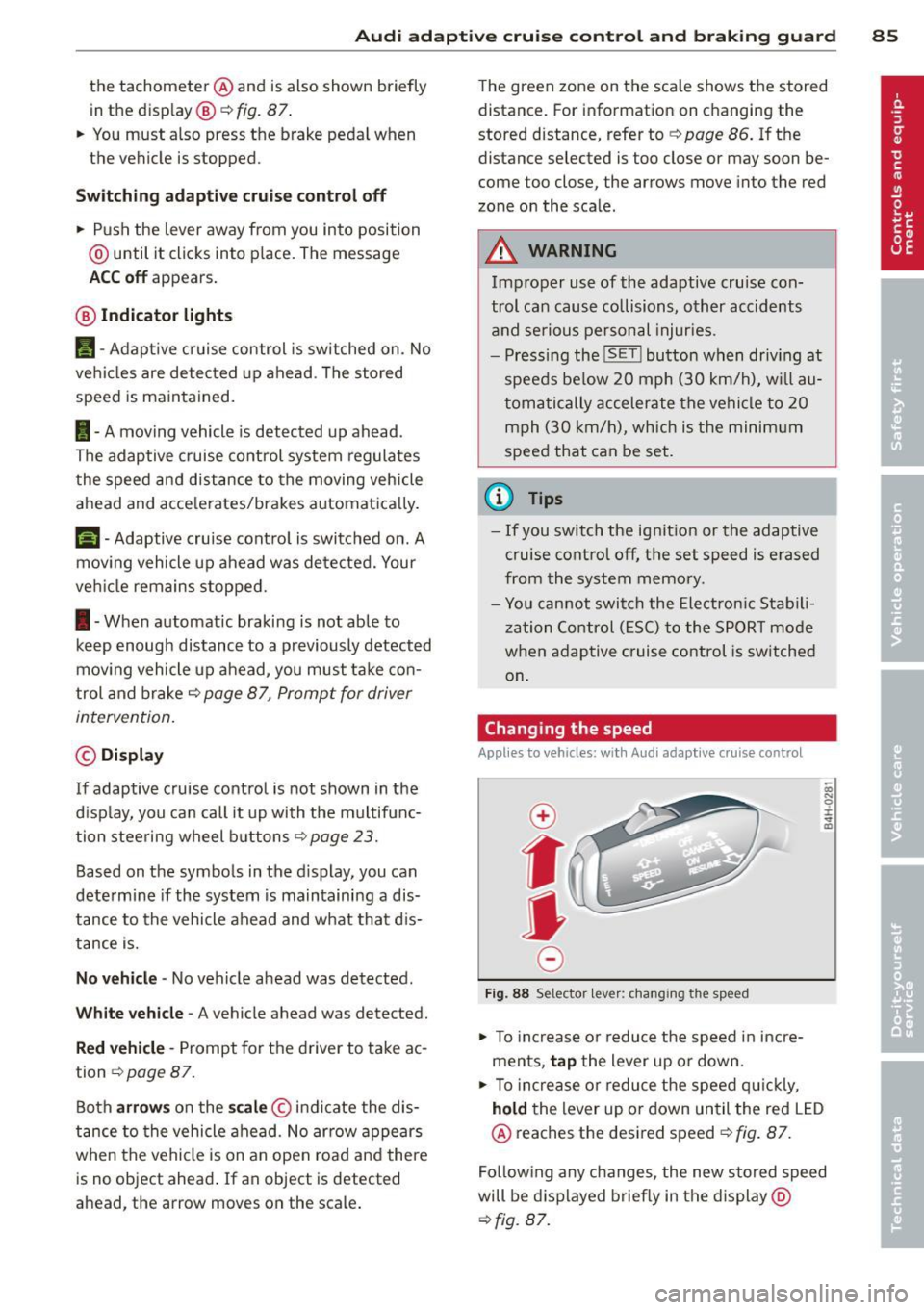
Changing the speed
Applies to vehicles: with Aud i adapt ive crui se control
0
f
• 0
Fig. 88 Selector lever: changing the speed
.. To increase o r reduce the speed in incre
ments,
tap the lever up or down.
-0:, N 0 ± ... a)
.. To incr ease o r reduce the speed quickly,
hold the lever up or down until the red LED
@ reaches the desired speed¢
fig. 87.
Following any changes, the new stored speed
will be displayed briefly in the display @
¢fig. 87.
Page 103 of 306
Night vision assistant
Night vision assistant
with detected pedestrian marking
Description
App lies to vehicles: with night v isio n assistant
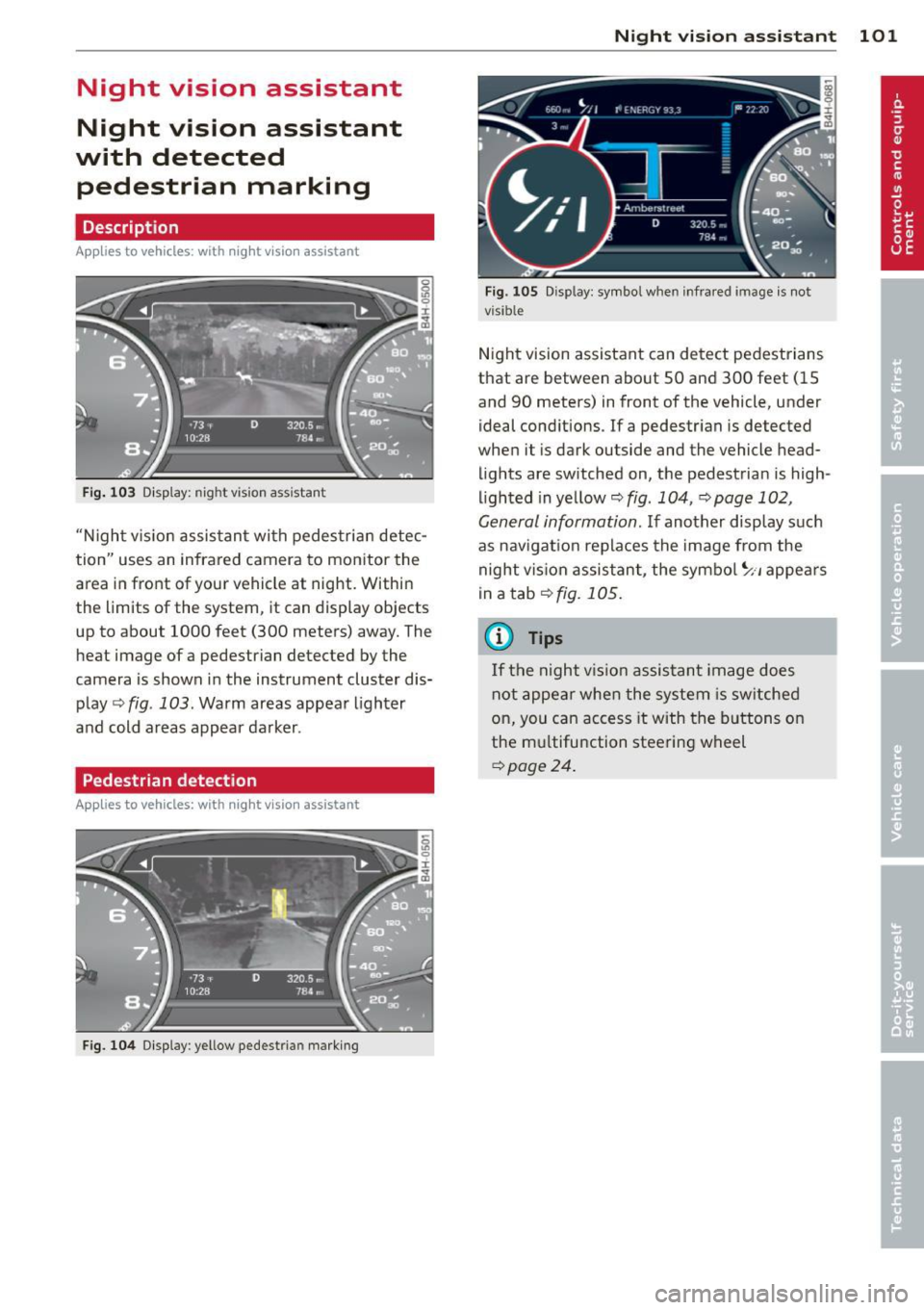
Fig . 103 Disp lay: nig ht v is ion assistant
"N ight v is ion assistant with pedestrian detec
tion" uses an infrared camera to monitor the
area in front of your vehicle at night. Within
the limits of the system , it can display objects
up to about 1000 feet (300 meters) away. The
heat image of a pedestrian detected by the
camera is shown in the instrument cluster dis
play
Q fig . 103 . Warm areas appear lighter
and cold areas appear darker .
Pedestrian detection
Applies to vehicles: with n ig ht v ision ass istant
Fig. 104 Display : yellow pedestrian marking
Night vision assistant 101
Fig. 105 D isp lay: symbo l w hen infrare d image is not
visi ble
Night vision assistant can detect pedestrians
that are between about 50 and 300 feet (15
and 90 meters) in front of the vehicle, under
ideal conditions .
If a pedestrian is detected
when it is dark outside and the vehicle head
lights are switched on, the pedestrian is high
lighted in yellow
Qf/g . 104, Qpage 102,
General information.
If another display such
as navigation replaces the image from the
night vision assistant, the symbo l~,, appears
in a tab
Q fig. 105.
(D Tips
If the night vision assistant image does
not appear when the system is sw itched
on, you can access it with the buttons on
the multifunction steering wheel
Q page24 .
Page 106 of 306

104 Night vision assistant
Night vision assistant: only available in dark
ness and with lights switched on
N ig ht vision assist ant only wo rk s when i t is
da rk ou tside and the headlig hts are o n.
Night vision assistant: pedestrian detection
not available
The system has deactivated the pedestrian de
tec tion f unct ion.
Page 107 of 306
Automatic Transmission
multitronic ®, S tronic ®,
tiptronic
Introduction
App lies to vehicles: with multitro ni c/S tronic/t iptronic
The automatic transmission is controlled elec
tronically . The transmission upshifts or down
shifts automatically depend ing on which drive
program is se lected.
When a
moderate driving style is used, the
transmission selects the most economical
driving mode .
It will then change up early and
de lay the downshifts to g ive better fuel econ
omy.
The transmission switches to a sporty mode after a k ick-down or when the driver uses a
sporty driving style characterized by quick ac
celerator pedal movements, heavy accelera
tion, frequent changes in speed and traveling
at the maximum speed.
If desired, the driver can a lso se lect the gears
manually (t iptronic mode ) ¢ page 109.
Various automatic transm issions may be in
stalled, depend ing on the model :
multitronic® transmission
The multitronic ® transmission is a continuous
ly variable transmission. Power is transferred
using a multidisk clutch. In contrast to con
ventional automatic transmissions using shift
ing operat ions, the transmission ratio in the
continuously variable transmission is changed
continuously. This opt imizes the comfort level
and conserves fuel.
S tronic ® transmission
The S tronic ® is a dual-clutch transmission .
Power is transferred using two clutches that
work independently from one another. They
r eplace the torque converter used in conven
tional automat ic transmissions and allow the
vehicle to accelerate without a noticeable in
terruption in traction.
Automatic Transmission 105
tiptronic transmission
In the tiptronic transmission, power is trans
ferred by a torque converter .
Selector lever positions
Applies to vehicles: wit h mult itronic/5 tro nic/tiptro nic
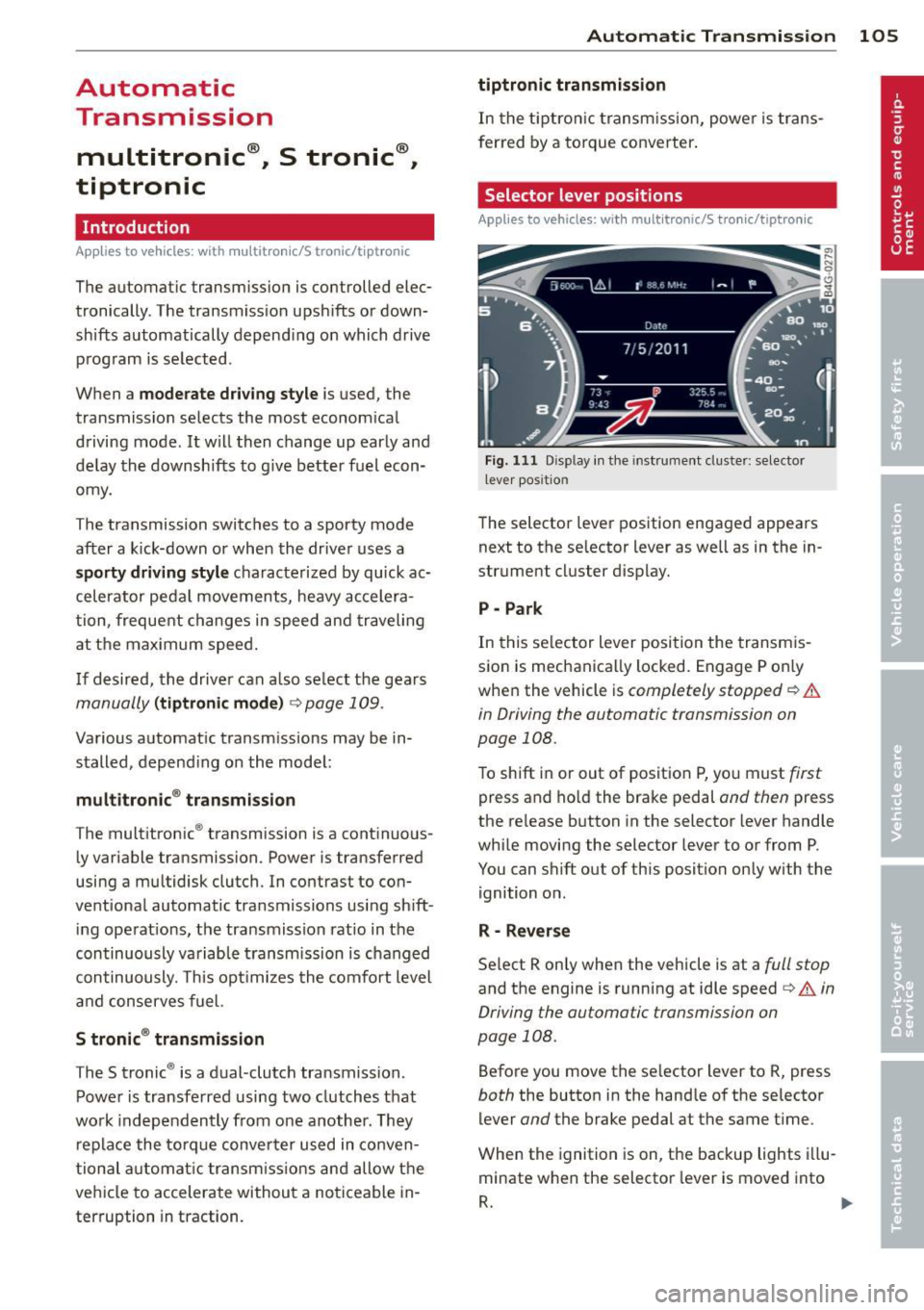
Fig. 111 Disp lay in the instrument cluster: selector
l ever pos itio n
The selector lever position engaged appears
next to the selector lever as well as in the in
strument cluster display.
P -Park
In this selector lever position the transmis
sion is mechanically locked. Engage P only
when the vehicle is
completely stopped¢&.
in Driving the automatic transmission on
page 108.
To shift in or out of position P, yo u must first
press and ho ld the brake pedal and then press
the release button in the selector lever handle
while moving the selector lever to or from P .
You can shift out of this position only with the ignition on .
R -Reverse
Select R only when the vehicle is at a full stop
and the engine is running at idle speed¢ A in
Driving the automatic transmission on
page 108.
Before you move the se lector lever to R, press
both the button in the handle of the selector
lever
and the brake pedal at the same time .
When the ignition is on, the backup lights illu
minate when the selector lever is moved into
R. .,.
Page 109 of 306
The Automatic Shift Lock only functions when
the vehicle is stationary or at speeds below 1 mph (2 km/h).
At speeds above about 1 mph (2 km/h) the
Automatic Shift Lock is automatically deacti
vated in the N position.
A time delay element prevents the se lector
l eve r from locking when it is moved thro ugh
the N position (going from R to 0/5). The lock
ing e lement w ill lock the selector lever if the
lever is left in N (Neutral) for more than ap
prox imately 2 second, without the brake ped
al being pressed.
R elease button
The release button on the selector lever pre
vents the lever from being accidenta lly shifted
into certain positions. Depending on the di rec
tion of the shift, the se lector lever locks at d if
ferent positions. The positions are h ighligh ted
in the illustration
¢ fig . 112 .
Driving the automatic transmission
Applies to vehicles: with multitronic/S tronic/t iptro nic
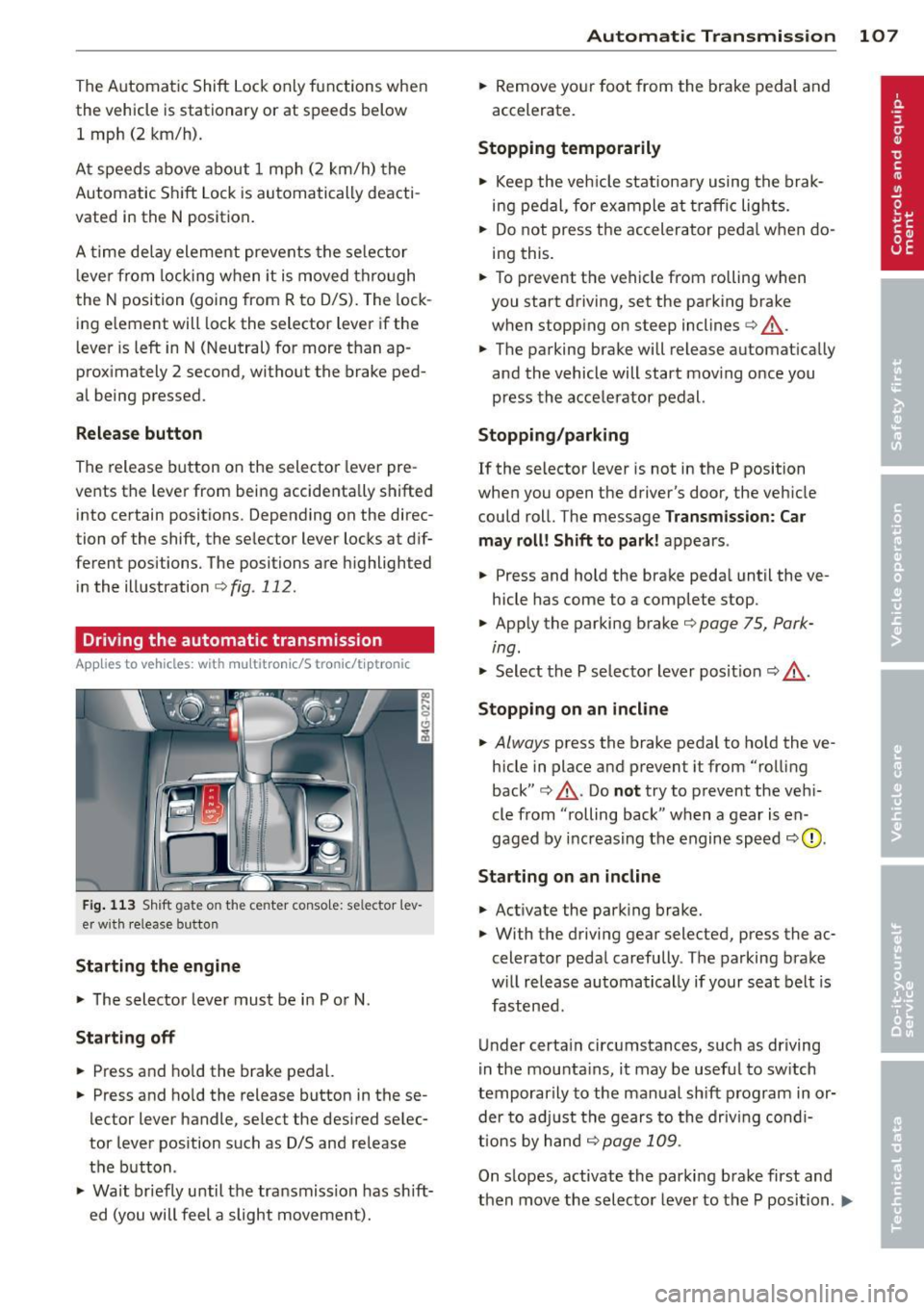
Fig. 1 13 Sh ift gate on the center conso le: se lector l ev
er w it h release button
Starting the engine
.., The selector lever must be i n P or N.
Starting off
.., Press and ho ld the brake pedal.
.., Press and ho ld the release button in these
lector lever handle , select the desired selec
tor lever pos ition such as D/S and release
the button .
.., Wait br iefly until the tra nsmission has sh ift
ed (you will feel a slight movement).
Automatic Tra nsmi ssi on 10 7
.., Remove yo ur foot from the brake pedal and
accelerate.
Stopping t emporarily
.., Keep the veh icle stationa ry using the brak
ing pedal , for example at traffic lights.
.., Do not press the accelerator peda l when do
i ng this .
.., To prevent the vehicle from rolling when
you start driving, set the parking brake
when stopp ing on steep inclines¢,&. .
.., The parking brake will release automat ically
and the vehicle will start mov ing once you
press the accelerator pedal.
Stopping /parking
If the selector leve r is not in the P position
when you open the driver's door, the veh icle
could roll. The message
Transm ission: Car
may roll! Shift to park !
appears.
.., Press and hold the brake peda l until the ve
hicle has come to a complete stop .
.., App ly the parking brake ¢
page 75, Park-
ing.
"' Select the P selecto r lever pos it ion <=:> ,&. .
Stoppin g on an incline
.., Always press the brake pedal to ho ld the ve
hicle in place and prevent it from "rolling
back" ¢,&. . Do
no t try to prevent the veh i
cle from "rolling back " when a gear is en
gaged by increasing the engine speed
<=:> 0 .
Starting on a n incline
.., Activate the park ing brake.
.., With the driving gear selected, press the ac
celerator peda l carefully . The parking brake
w ill release automatically if your seat belt is
fastened .
Under certa in circumstances, such as driving
i n the mounta ins , it may be usefu l to sw itch
temporarily to the manual sh ift p rogram in or
der to ad just the gears to the driv ing cond i
ti ons by hand
<=:> page 109 .
On slopes, activate the parking brake first and
then move the selecto r lever to the P position .
Ill-
Page 126 of 306
124 Homelin k®
Homelink ®
Universal remote
control
General information
Applies to vehicles: with Homelink® unive rsal remote
co ntrol
The Homelink universal remote control can
be programmed with hand-held transmitters
from existing equipment.
With Homelink, you can control devices such
as the garage door, security systems, house lights, etc. comfortably from the inside of you
vehicle.
Homelink makes it possible for you to replace
three different remote controls from devices in your home with one universal remote . Th is
feature works for most garage door and exte rior door moto r signals. Programming the in
d iv idual remote control fo r you r remote con
trol takes p lace near the center of the radiator
grille. There is a control module attached at
this location .
A one-t ime programm ing of the sensor mus t
be performed before you are able to use sys
tems w ith Homelink.
A WARNING
- Never use the Homelink ® transmitter
with any garage door opener that does have not the safety stop and reverse fea
ture as required by federal safety stand
ards. This includes any garage door open
er mode l manufact ured before April 1,
1982.
- A garage door opener which cannot de
tect an object, signaling the door to stop
and reverse does not meet current feder
al safety s tandards. Us ing a garage doo r
o pener witho ut these fea tures increases
risk of serious inj ury or death.
- F or safety reasons never release t he
parking brake or s tart the engine while
anyone is standing in front of the vehicle .
- A garage door or an est ate gate may
sometimes be set in motion when the Homelink
® remote control is being pro
grammed. If the device is repeatedly ac
tivated, this can overstrain motor and
damage its electrica l components - an
overheated motor is a fire hazard!
- To avo id possible injuries or property
damage, please always make absolutely
certa in that no persons or objects are lo
cated in the rang e of motion of any
equ ipme nt being ope rated.
(0 Tips
- If you would like add itional information
on the Home Link® Unive rsal Transce iver,
Homelink compatib le products, or to
purc hase other accessories s uch as the
HomeL ink® Light ing Package, please
contact Homelink at 1-800 -355 -3515 or
on the Internet at www.homelink .com.
- For Declaration of Comp liance to United
States FCC and Ind ustry Canada reg ula
tions
¢page 288.
-For security reasons, we recommend that
you clear the programmed b uttons be
fore selling the vehicle .
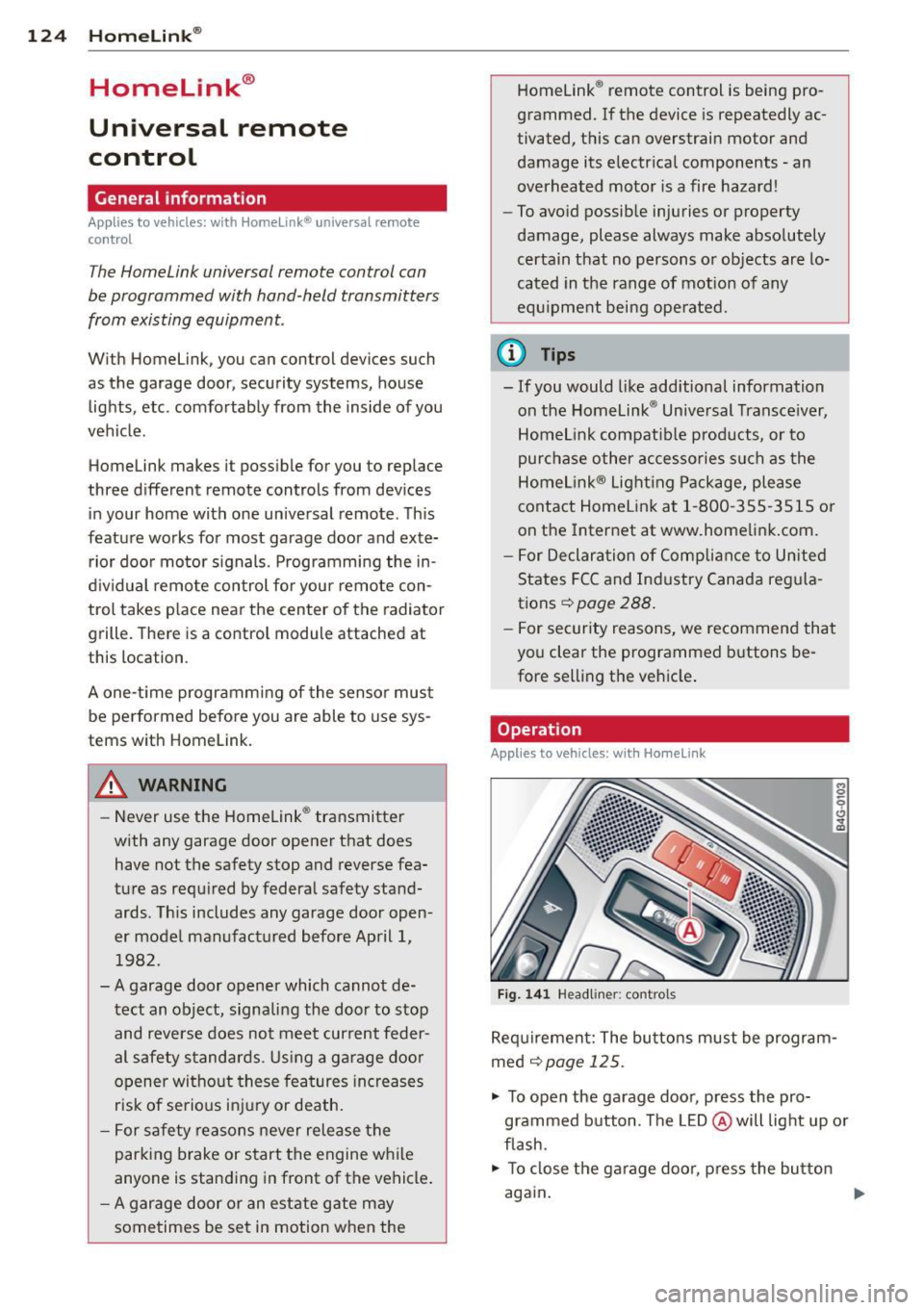
Operation
Applies to vehicles: wit h Ho meli nk
Fig . 14 1 Headliner: controls
M 0
9 (!)
~
Req uirement: The bu tto ns must be program
med ¢
page 125 .
"' To open the garage doo r, press the pro
grammed b utton. The LED @ will light up o r
flash.
"' To close the ga rage doo r, press the button
again .
Ill>