window AUDI A6 2013 Owners Manual
[x] Cancel search | Manufacturer: AUDI, Model Year: 2013, Model line: A6, Model: AUDI A6 2013Pages: 306, PDF Size: 76.92 MB
Page 4 of 306
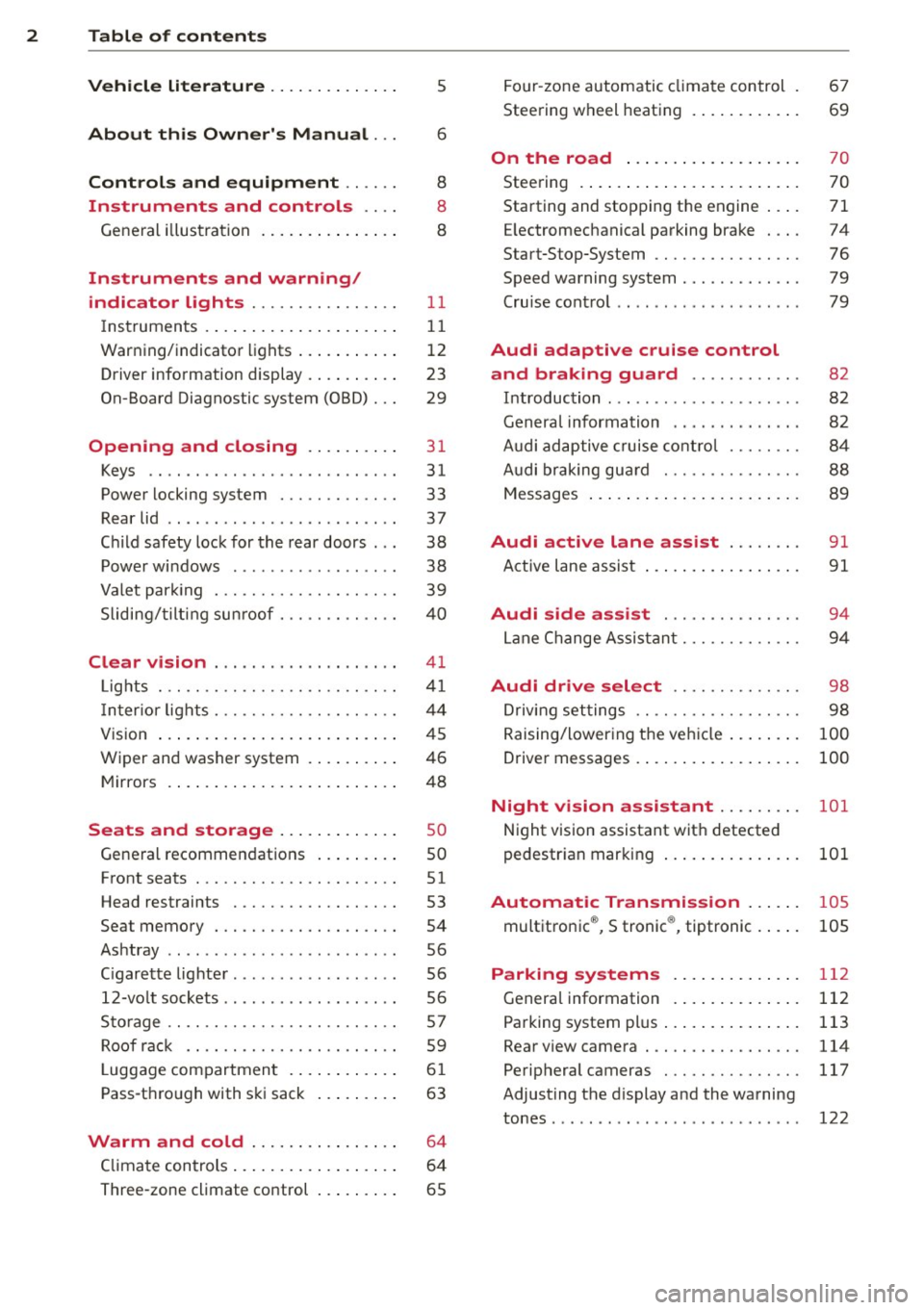
2 Table of contents Vehicle literature .. .. .. .. .. ... .
5
About this Owner's Manual . . . 6
Controls and equipment .. ... .
Instruments and controls .. . .
General illustration ......... .. ... .
Instruments and warning/
indicator lights ........ .. .. .. . .
Instruments ............ ... .. ... .
Warning/indicator lights .......... .
Driver information display .. .. .. ... .
On-Board Diagnostic system (OBD) . . .
Opening and closing .. .. .... . .
Keys .. ...... ........... .. .. ... .
Power locking system ..... .. .. .. . .
Rear lid .. .. ........ ..... .. ..... .
Child safety lock for the rear doors .. .
Power windows . .......... ... .. . .
Valet park ing . ........... .. .. ... .
Sliding/tilting sun roof ... .. .. .. .. . .
Clear vision .. ....... ... .. .. ... .
Lights . .. .. .. . .......... .. .. .. . .
I nter ior lights ............ .. .. .. . .
V1s 1on .......... ......... ... ... .
Wiper and washer system ... .... .. . 8
8
8
11
11
12
23
29
31
31
33
37
38
38
39
40
41
41
44
45
46
Mirrors . . . . . . . . . . . . . . . . . . . . . . . . . 48
Seats and storage ......... ... .
General recommendations ... .... . .
Front seats .............. .. .. ... .
Head restraints .............. ... .
Seat memory . ........... .... ... .
Ashtray .. .. ... .... ...... .. .. .. . .
C igarette lighter .............. .. . .
12-vo lt sockets ... ..... ... .. .. .. . .
Storage ................. .. .. ... .
Roof rack ............... .. .. .. . .
L uggage compartment ........... .
Pass-through with ski sack ... .. ... .
so
so
51
53
54
56
56
56
57
59
6 1
63
Warm and cold . . . . . . . . . . . . . . . . 64
Climate controls . . . . . . . . . . . . . . . . . . 64
Three-zone climate control . . . . . . . . . 65 Four-zone
automatic climate control .
Steering wheel heating ........... . 67
69
On the road
. . . . . . . . . . . . . . . . . . . 70
Steering . . . . . . . . . . . . . . . . . . . . . . . . 70
Starting and stopping the engine . . . . 71
E lectromechanical parking brake . . . . 74
Start-Stop-System . . . . . . . . . . . . . . . . 76
Speed warning system . . . . . . . . . . . . . 79
Cruise control . . . . . . . . . . . . . . . . . . . . 79
Audi adaptive cruise control
and braking guard . . . . . . . . . . . .
8 2
Introduction . . . . . . . . . . . . . . . . . . . . . 82
Genera l information . . . . . . . . . . . . . . 82
Audi adaptive cruise control . . . . . . . . 84
Audi braking gua rd . . . . . . . . . . . . . . . 88
Messages . . . . . . . . . . . . . . . . . . . . . . . 89
Audi active lane assist . . . . . . . . 91
Active lane assist . . . . . . . . . . . . . . . . . 91
Audi side assist . . . . . . . . . . . . . . . 94
Lane Change Assistant. . . . . . . . . . . . . 94
Audi drive select . . . . . . . . . . . . . . 98
Driving settings . . . . . . . . . . . . . . . . . . 98
Raising/lowering the vehicle . . . . . . . . 100
Driver messages . . . . . . . . . . . . . . . . . . 100
Night vision assistant . . . . . . . . . 101
Night vision assistant with detected
pedestrian marking . . . . . . . . . . . . . . . 101
Automatic Transmission . . . . . . 105
multitronic ®, S tronic ®, tiptronic . . . . . 105
Parking systems . . . . . . . . . . . . . . 112
General information . . . . . . . . . . . . . . 112
Parking system plus . . . . . . . . . . . . . . . 113
Rear view camera . . . . . . . . . . . . . . . . . 114
Peripheral cameras . . . . . . . . . . . . . . . 117
Adjusting the d isplay and the warning
tones. . . . . . . . . . . . . . . . . . . . . . . . . . . 122
Page 33 of 306
Opening and closing Keys
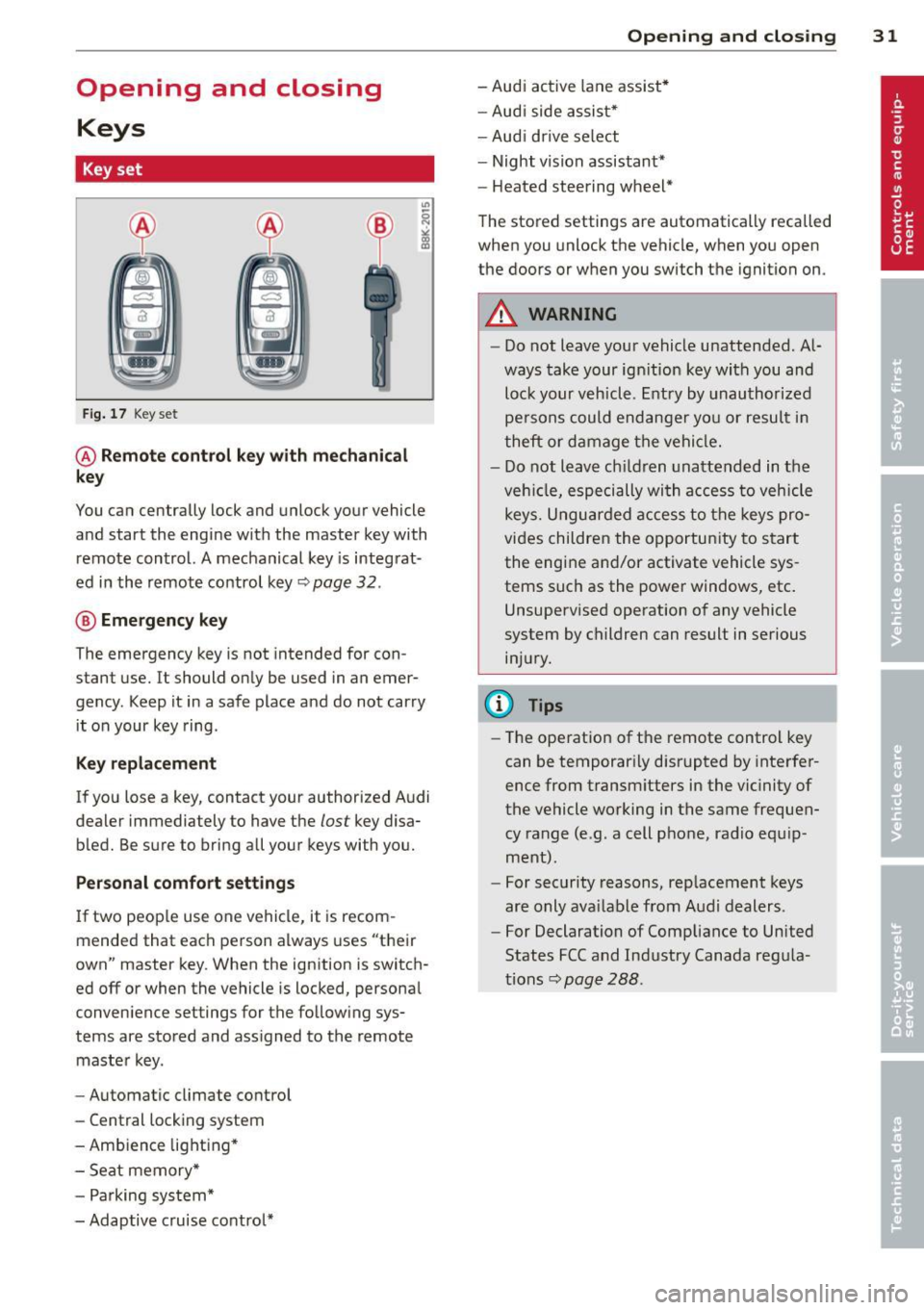
Key set
Fig. 17 Key set
@ Remote control key with mechanical
key
You can centrally lock and unlock your vehicle
and start the engine with the master key with
remote control. A mechanical key is integrat
ed in the remote control key~ page
32 .
® Emergency key
The emergency key is not intended for con
stant use.
It should only be used in an emer
gency . Keep it in a safe place and do not carry
it on your key ring .
Key replacement
If you lose a key, contact your authorized Audi
dealer immediately to have the
lost key disa
bled. Be sure to bring all your keys with you.
Personal comfort settings
If two people use one vehicle, it is recom
mended that each person always uses "their
own" master key. When the ignition is switch
ed off or when the vehicle is locked, personal
convenience settings for the following sys
tems are stored and assigned to the remote
master key.
- Automatic climate control
- Central locking system
- Ambience lighting*
- Seat memory*
- Parking system*
- Adaptive cruise control*
Opening and closing 31
- Audi active lane assist*
- Audi side assist*
-Audi drive select
- Night vision assistant*
- Heated steering wheel*
The stored settings are automatically recalled
when you unlock the vehicle, when you open
the doors or when you switch the ignition on.
A WARNING
- Do not leave your vehicle unattended. Al
ways take your ignition key with you and
lock your vehicle. Entry by unauthorized
persons could endanger you or result in
theft or damage the vehicle.
- Do not leave children unattended in the
vehicle, especially with access to vehicle
keys. Unguarded access to the keys pro
vides children the opportunity to start
the engine and/or activate vehicle sys
tems such as the power windows, etc.
Unsupervised operation of any vehicle
system by children can result in serious
injury.
(D Tips
- The operation of the remote control key
can be temporarily disrupted by interfer
ence from transmitters in the vicinity of
the vehicle working in the same frequen
cy range (e.g . a cell phone, radio equip
ment).
- For security reasons, replacement keys
are only available from Audi dealers.
- For Declaration of Compliance to United
States FCC and Industry Canada regula
tions~ page
288.
Page 34 of 306
32 Opening and closing
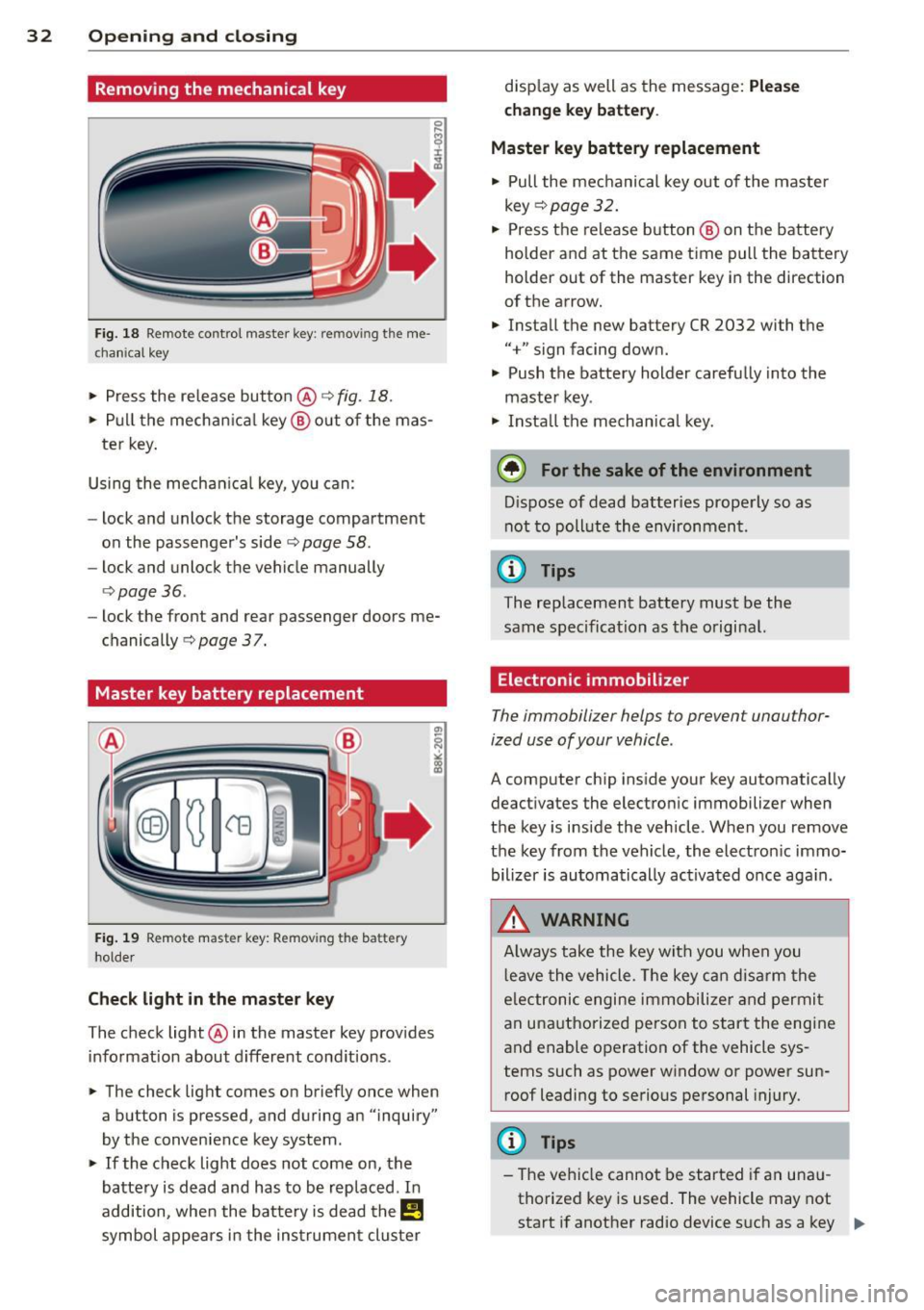
Removing the mechanical key
Fig. 18 Remote control master key : re m ov ing the me
c hani cal key
> Press the release button @ c:> fig. 18.
.. Pull the mechanical key@out of the mas
te r key.
Using the mechanical key, you can:
- lock and unlock the storage compartment
on the passenger's side
c:> page 58.
- lock and unlock the vehicle manually
<=>page 36.
-lock the front and rear passenger doors me
chanically
c:> page 37.
Master key battery replacement
Fig. 19 Remote master key: Remov ing th e ba tte ry
ho lder
Check light in the master key
The check light @in the master key provides
information about different conditions .
.. The check light comes on briefly once when
a button is pressed , and during an "inquiry"
by the convenience key system .
> If the check light does not come on, the
battery is dead and has to be replaced . In
addition, when the battery is dead
them
symbol appears in the instrument cluster disp
lay as well as the message:
Please
change key battery.
Master key battery replacement
• Pull the mechanical key out of the master
key
<=> page 32.
"' Press the release button @ on the battery
holder and at the same time pull the battery
holder out of the master key in the direction
of the arrow .
.. Install the new battery CR 2032 with the
"+" sign facing down.
• Push the battery holder carefully into the
maste r key .
• Insta ll the mechanical key.
@ For the sake of the environment
Dispose of dead batteries properly so as
not to pollute the environment.
(D Tips
The replacement battery must be the
same specification as the original.
Electronic immobilizer
The immobilizer helps to prevent unauthor
ized use of your vehicle .
A computer chip ins ide your key automatically
deactivates the electronic immobilizer when
the key is inside the vehicle . When you remove
the key from the vehicle, the electron ic immo
bilizer is automatically activated once aga in.
_& WARNING
-
Always take the key with you when you
l eave the vehicle. The key can disarm the
e lectronic engine immobilize r and permit
an unauthorized person to start the engine
and enable operation of the vehicle sys
tems such as power window or power sun
roof leadi ng to serious personal injury.
(D Tips
- The vehicle cannot be started if an unau
thorized key is used. The vehicle may not
start if another radio device such as a key ""
Page 35 of 306
for another vehicle or a transponder is located on the key ring.
- For Declaration of Compliance to United
States FCC and Industry Canada regula
tions ¢
page 288.
Power locking system
General description
The power locking system locks or unlocks all
doors and the rear lid simultaneously.
You can lock and unlock the vehicle centrally.
You have the following choices:
- Remote master key¢
page 34,
- Door handles with convenience key*
¢page 35 ,
- Lock cylinder at the driver's door
¢page 36, or
- Power locking switch inside¢
page 36.
Selective unlocking
When you lock the vehicle, the power locking
system will lock the doors and the rear lid.
When unlocking, you can set in the MMI
whether only the driver's door or the entire
vehicle should be unlocked
¢page 34.
Automatic locking
The automatic locking feature locks all the ve
hicle doors and the rear lid when you drive
faster than 9 mph (1S km/h).
T he car is unlocked again, when the opening
function in the power locking system switch
or at one of the door levers is actuated .
Anti-theft alarm warning system
If the anti-theft alarm warning system de
tects a break-in into the vehicle, acoustic and
visual warning signals are triggered .
T he anti-theft warning system is activated au
tomatically when you lock the vehicle . It is de
activated when unlocking using the remote key, with the mechanical key, and when you
switch the ignition on.
The alarm also turns off when the alarm cycle has expired.
Opening and closing 33
Turn signals
When you unlock the vehicle, the turn signals
flash twice. When you lock the vehicle the
turn signals flash once. If they do not flash ,
one of the doors, the rear lid or the hood is not locked.
Unintentionally locking yourself out
In the following cases there safeguards to
prevent you locking your remote master key in
the vehicle:
- The vehicle does not lock with the central
locking switch¢
page 36 if the driver's
door is open.
- On vehicles with convenience key*, if the
most recently used master key is in the lug
gage compartment, the rear lid is automati
cally unlocked again after it is closed.
Do not lock your vehicle with the
remote mas
ter key or convenience key*
until all doors
and the rear lid are closed. In this way you
avoid locking yourself out accidentally.
Power side door closer*
The vehicle doors are equipped with a power
side door closer. When closing a door, you on
ly have to let it fall lightly into the latch. The
door will then automatically close by itself
¢..1, .
A WARNING
-
- When you lock your vehicle from outside,
nobody -especially children -should re
main inside the vehicle. Remember,
when you lock the vehicle from the out
side the windows cannot be opened from
the inside.
- When you leave the vehicle, always take
the ignition key with you . This will pre
vent passengers (children, for example) from accidentally being locked in the ve
hicle should they accidentally press the
power locking switch in the doors.
- Do not leave children inside the vehicle
unsupervised. In an emergency it would
be impossible to open the doors from
the outside without the key.
Page 40 of 306
38 Opening and closing
- Always ensure that no one is within
range of the rear lid when
it is mov ing, in
particular close to the hinges - fingers or
hands can be pinched.
(D Tips
When the vehicle is locked, the rear lid can
be opened separately by pressing the but
ton
l .::::sl on the master key . When you close
the rear lid again, it locks automatically .
Rear lid emergency release
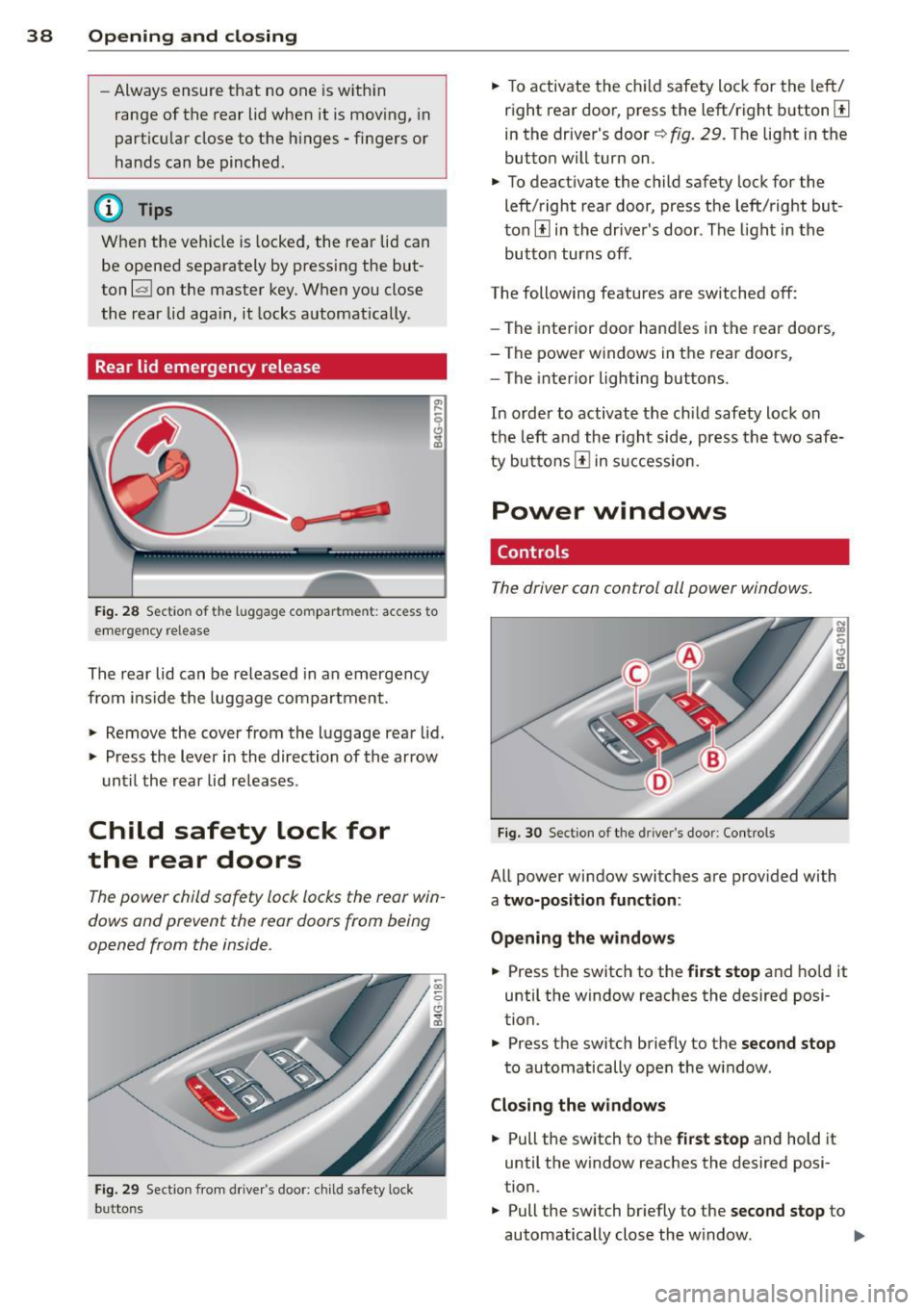
Fig. 28 Sectio n of t he lu ggage compar tme nt: access to
emergency re lease
The rear lid can be released in an emergency
from inside the luggage compartment .
.. Remove the cover from the luggage rear lid .
.. Press the lever in the direction of the arrow
until the rear lid releases .
Child safety lock for
the rear doors
The power child safety lock locks the rear win
dows and prevent the rear doors from being
opened from the inside .
Fig. 29 Section from drive r's door : ch ild safety lock
b u tto ns
.. To activate the child safety lock for the left/
right rear door, press the left/right button[!]
in the driver's door~
fig. 29. The light in the
button will turn on.
.. To deactivate the child safety lock for the
left/right rear door, press the left/right but
ton[!] in the driver's door. The light in the
button turns off .
The following features are switched off:
- The interior door handles in the rear doors ,
- The power windows in the rear doo rs,
- The interior lighting buttons .
In order to activate the child safety lock on
the left and the right side, press the two safe
ty buttons[!] in succession.
Power windows
Controls
The driver can control all power windows.
Fig. 30 Section of the dri ver 's doo r: Con tro ls
All power window switches are provided with
a two-position function :
Opening the windows
.. Press the switch to the first stop and hold it
until the window reaches the desired posi
tion .
.. Press the switch briefly to the
second stop
to automatically open the w indow .
Closing the windows
.. Pull the switch to the first stop and hold it
until the window reaches the desired posi
tion.
.. Pull the switch br iefly to the
second stop to
automatically close the w indow. ..,_
Page 41 of 306
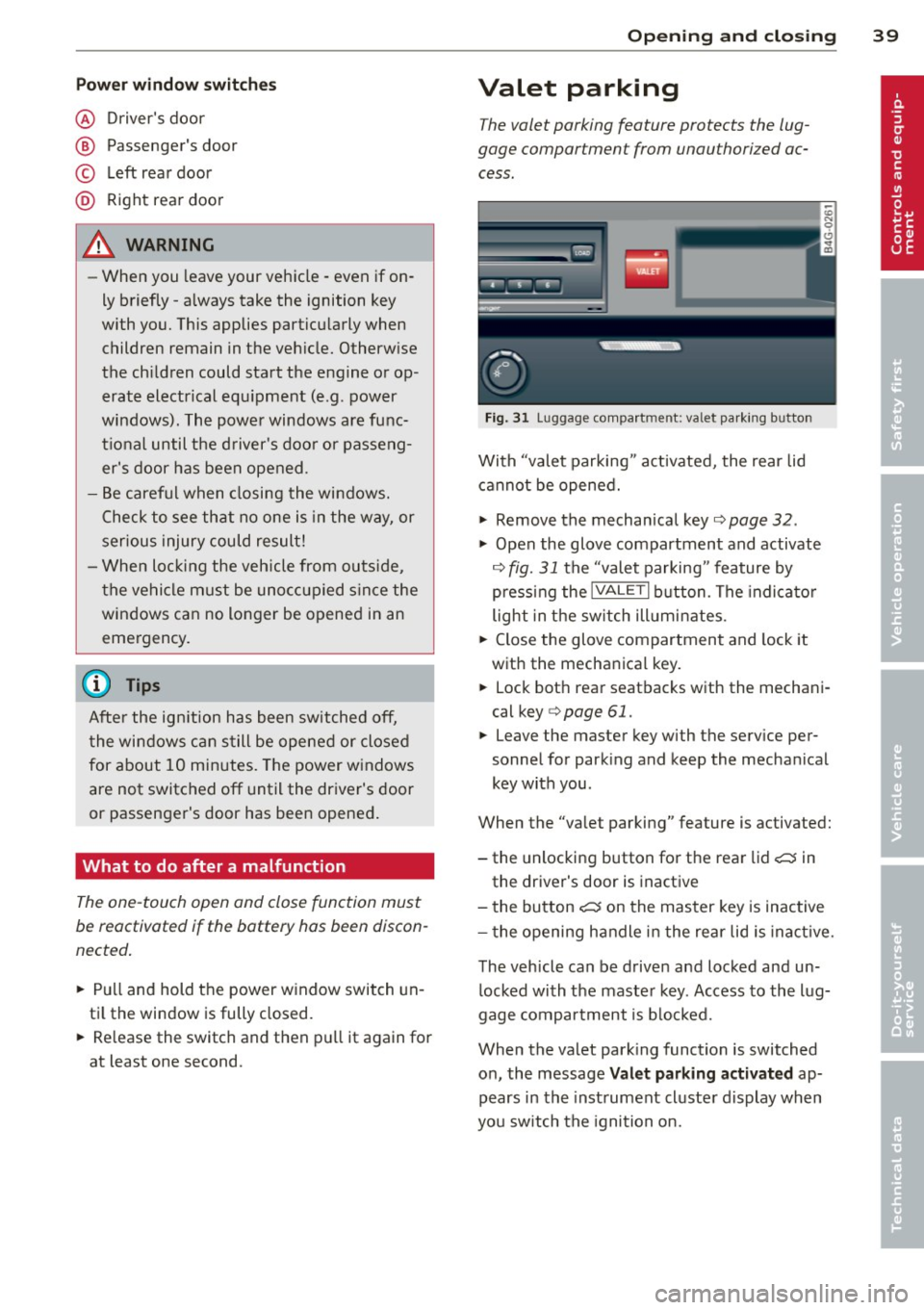
Pow er w ind ow switche s
@ Driver's door
® Passenger's door
© Le ft rea r door
@ Ri ght rear door
~ WARNING
- When you leave your veh icle -even if on
ly briefly -always take the ignition key
with you. This applies particularly when
children remain in the vehicle. Otherw ise
the ch ildren could start the engine or op
erate electrical eq uipment (e.g. power
windows). The power windows are func
t io nal until the d river's doo r or passeng
er's door has been opened.
- Be careful when closing the windows.
Check to see that no one is in the way, or
serious injury could result!
- When lo cking the veh icle from ou tside,
t he ve hicle must be unocc upied s in ce the
windows can no longer be opened in an eme rgency.
(D Tips
After the ig nition has been switched off,
t he wi ndows can still be opened or closed
for about 10 minutes. The power w indows
are not switched off until the dr iver's door
or passenger's door has been opened .
What to do after a malfunction
The one-touch open and close function must
be reactivated if the battery has been discon
nected .
.,. Pull and hold t he power w indow switch un
ti l the window is fully closed .
.,. Re lease the switch and then p ull it again for
at least one second.
Opening and clo sin g 39
Valet parking
The valet parking feature protects the lug
gage compartment from unauthorized ac
cess.
F ig. 31 Luggage compartment: valet parking button
With "valet parking" act ivated, the rear lid
cannot be opened.
.,. Remove the mechan ical key¢
page 32 .
.,. Open the glove compartment and activate
¢
fig. 31 the "valet parking" feature by
p ressi ng the
!VALET I b utton. The indica to r
light in the sw itch ill umi nates .
.,. Close the glove compartment and lock it
with the mechanical key.
.,. Lock bot h rea r seatbacks with the mechani
cal key ¢
page 61.
.,. Leave the master key with the service per
sonnel for park ing and keep the mecha nical
key with you.
When the "valet parking" feature is activated:
- the unlocking button for the rear lid
c:::; in
the driver's door is inact ive
- the bu tton
c:::; on the mas ter key is inactive
- the opening h andle i n the rear lid is inac tive.
The vehicle can be drive n and locked and un
l ocked with the maste r key. Access to the lug
gage co mpar tment is b locked.
When the valet park ing function is switched
o n, the message
Valet parking activat ed ap
pears in the inst rument cl uste r display when
you sw itch the igni tion on.
Page 47 of 306
@ Tips
The instrument illumination (for dials and
needles) lights on when the ign it ion is
sw itched on and the vehicle lig hts are
turned off. As the daylight fades, the illu
m ination of the dials likewise dims auto
mat ically and w ill go ou t comp lete ly when
the o utside lig ht is ve ry low. This fea ture is
meant to remi nd you t o swit ch o n the
head ligh ts when o utside light condi tions
become poor.
Vision
Sun visors
( J
F ig. 39 Sun visor
The sun visors for the driver and passenger
can be released from their brackets and
turned toward the doors¢
fig. 39@.
The mirror light switches on when the cover
over the vanity mirror @ope ns.
Sun shade
Applies to vehicles: with sun shade
F ig . 40 Sun shade pulled up on the rea r window
Clear vi sion 45
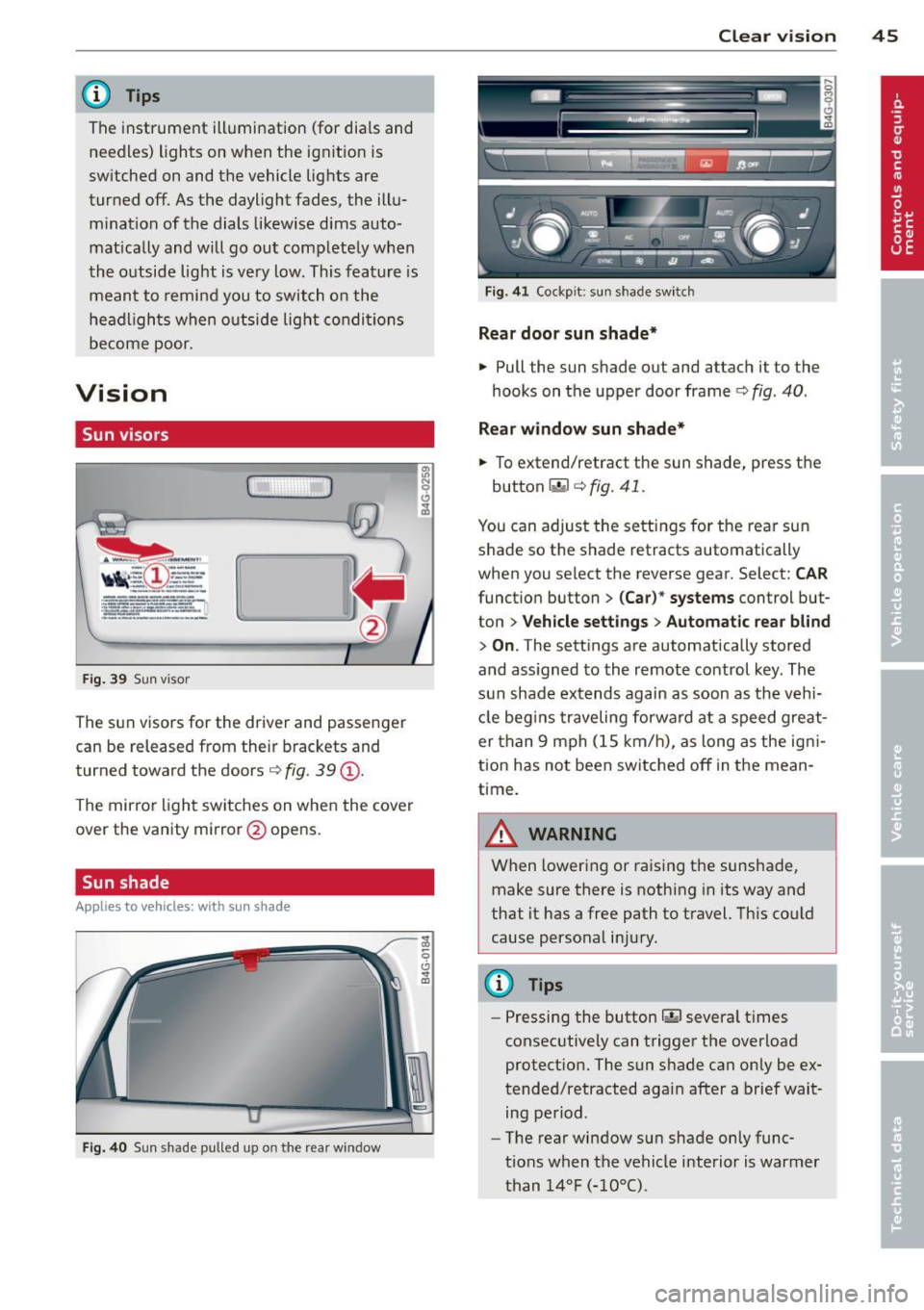
Fig . 4 1 Cockp it: sun shade switch
Rear door sunshade*
"' Pull the sun shade out and attach it to the
hooks on the upper door frame¢
fig. 40 .
Re ar window sun shade*
... To extend/retract the sun shade, press the
button~ ¢
fig. 41.
You can adjust the settings for the rea r sun
shade so the shade retracts automatically
when you select the reverse gear. Select:
CAR
function button > (Car )* systems control but
ton >
Vehicle settings > Automatic rea r bl ind
> On .The sett ings are automatically stored
and ass igned to the remote control key . The
s u n shade ex tends again as soon as the v ehi
cle beg ins traveling forwa rd at a speed gre at
er than 9 mph (1S km/h), as long as the ig ni
tion has not been switched off in the mean
time.
A WARNING
When loweri ng or raising the sunshade,
make sure there is nothing in its way and
that it has a free path to t ravel. Th is cou ld
cause perso nal inju ry.
@ Tips
-
- Pressing the button rn severa l t imes
consec utive ly can trigger the overload
protect ion. The sun s hade can only be ex
tended/retracted again after a brief wait ing period.
- The rear window sun shade only func
t ions when the vehicle i nterior is warmer
t han
1 4°F ( -10°() .
Page 48 of 306
46 Clear vision
Wiper and washer
system
Switching the windshield wipers on
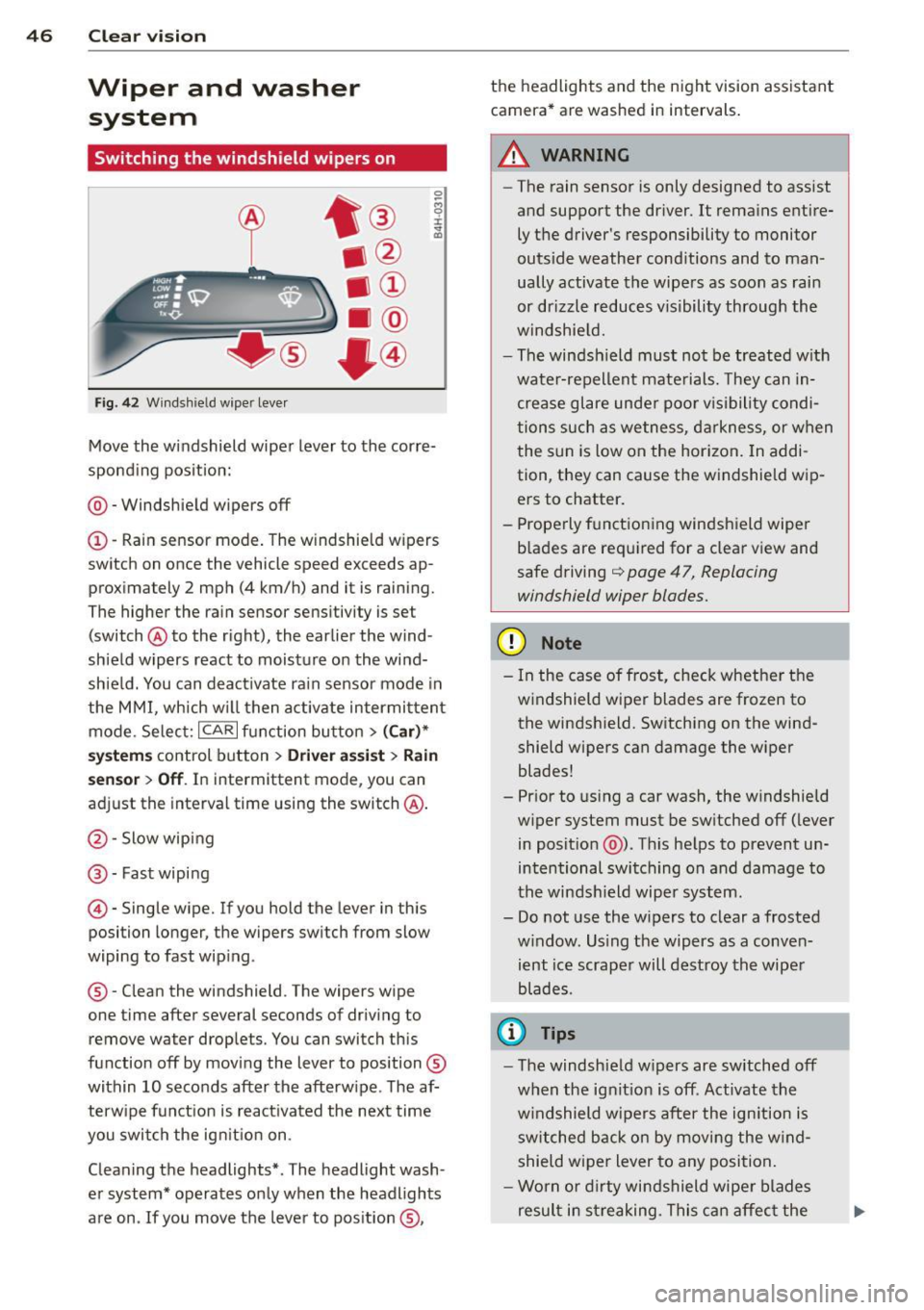
Fig. 42 Wind shie ld wipe r lever
Move the windshield wiper lever to the corre
sponding position:
@ - Windshield wipers off
(I) -Rain sensor mode. The windshield wipers
switch on once the vehicle speed exceeds ap
proximately 2 mph (4 km/h) and it is raining.
The higher the rain sensor sensitivity is se t
(switch @to the right), the earlier the wind
shield wipers react to moisture on the wind
shield. You can deactivate rain sensor mode in
the MMI, which will then activate intermittent
mode. Select:
ICARI function button > (Car)*
systems control button > Driver assist> Rain
sensor
> Off. In intermittent mode, you can
adjust the interval time using the switch @.
@-Slow wiping
@-Fast wiping
© -Single wipe. If you hold the lever in this
posi tion longer, the wipers switch from slow
wiping to fast wiping .
® - Clean the windshield . The wipers wipe
one time after several seconds of driving to remove water drople ts. You can switch this
function off by moving the lever to position ®
within 10 seconds after the afterwipe . The af
terwipe function is reactivated the next time
you switch the ignition on.
Cleaning the headlights*. The headlight wash
er system* operates only when the headlights
are on . If you move the lever to position ®, the headlights and the night vision assistant
camera* are washed in intervals.
.&_ WARNING
-
- The rain sensor is only designed to assist
and support the driver.
It remains entire
ly the driver's responsibility to monitor
outside weather conditions and to man
ually activate the wipers as soon as rain
or drizzle reduces visibility through the
windshield.
- The windsh ield must not be treated with
water-repellent materials. They can in
crease glare under poor visibility condi
tions such as wetness, darkness, or when
the sun is low on the horizon. In addi
tion, they can cause the windshield wip
ers to chatter.
- Properly functioning windshield wiper
blades are required for a clear view and
safe driving
q page 47, Replacing
windshield wiper blades.
(D Note
- In the case of frost, check whether the
windshield wiper blades are frozen to
the windshield. Switching on the wind
shield wipers can damage the wiper
blades!
- Prior to using a car wash, the windshield
wiper system must be switched off (lever
in position @). This helps to prevent un
intentional switching on and damage to
the windshield wiper system.
- Do not use the wipers to clear a frosted
window . Using the wipers as a conven
ient ice scraper will destroy the wiper
blades .
(D Tips
-The windshield wipers are switched off
when the ignition is off . Activate the
windshield wipers after the ignition is
switched back on by moving the wind
shield wiper lever to any position.
- Worn or dirty windshield wiper blades
result in streaking. This can affect the
Page 51 of 306

Manual anti-glare adju stment
"' Move the small lever (located on the bot
tom edge of the mirror) to the r ear.
Automaticall y dimming mirror s*
"' To dim the rearv iew mirror and both exteri
or mirrors, press the@ button. The diode
@ turns on . The rearview and exte rior mi r
rors dim automatically when l ight sh ines on
them, for example from h eadlights on ave
hicle to the rear.
A WARNING
E lectrolyte flu id can leak from automatic
dimming mirrors if the glass is broken.
Electrolyte flu id can irritate skin, eyes and
resp iratory system .
- Repeated or prolonged exposure to elec
tro lyte can cause irritation to the resp ira
tory system, espec ially among people
with asthma or other respiratory cond i
tio ns. Get fresh ai r immediately by leav
ing the vehicle or, if that is not possible,
open windows and doors all the way.
- If electrolyte gets into the eyes, flush
them tho ro ughly wi th la rge amoun ts of
clean water for at least 15 m in utes;
medica l attention is recommended .
-If elec trolyte contacts s kin, f lush affec t
ed area with clean water for at least 15
minutes and then wash affected area
with soap and water; medical attention
is recommended . Thoroughly wash af
fected clothing and shoes before reuse.
- If swa llowed and person is conscious,
rinse mouth w ith water for at least 15
minutes . Do not induce vom iting un less
instructed to do so by medical professio
nal. Get medical attention immedia tely .
(D Note
Liquid electrolyte leaking from broken mir
ror glass will damage any p lastic surfaces
it comes in contact with . Clean up spilled
electrolyte immediately with clean water
and a sponge.
Clear vis ion 49
(D Tips
- Switching
off the dimming function of
the inside rear view mirror also deacti
vates the automatic dimming function of the exter ior mirrors.
- The automatic dimming mirrors do not dim when the interior lighting is turned
on or the reverse gear is selected.
-Automatic d imming for the mirror only
operates properly if the light striking the
inside m irror is not hindered in any way .
Page 60 of 306
58 Seats and storage
vehicle movement, hot liquid could spill,
causing scalding burns. Spilled hot liquid
can also cause an accident and personal
injury .
- Use only soft cups in the cupholder. Hard
cups and glasses can cause injury in an
accident .
- Never use the cupholder or adapter as an
ashtray- risk of fire.
([) Note
Only drink containers with lids should be
carried in the cupholder. Liquid could spill
out and damage your vehicle's electronic
equipment or stain the upholstery, etc.
Cooled glove compartment
Ap plies to vehicles: with coole d glove compa rtm ent
The cooled glove compartment only functions
when the AIC system is switched on.
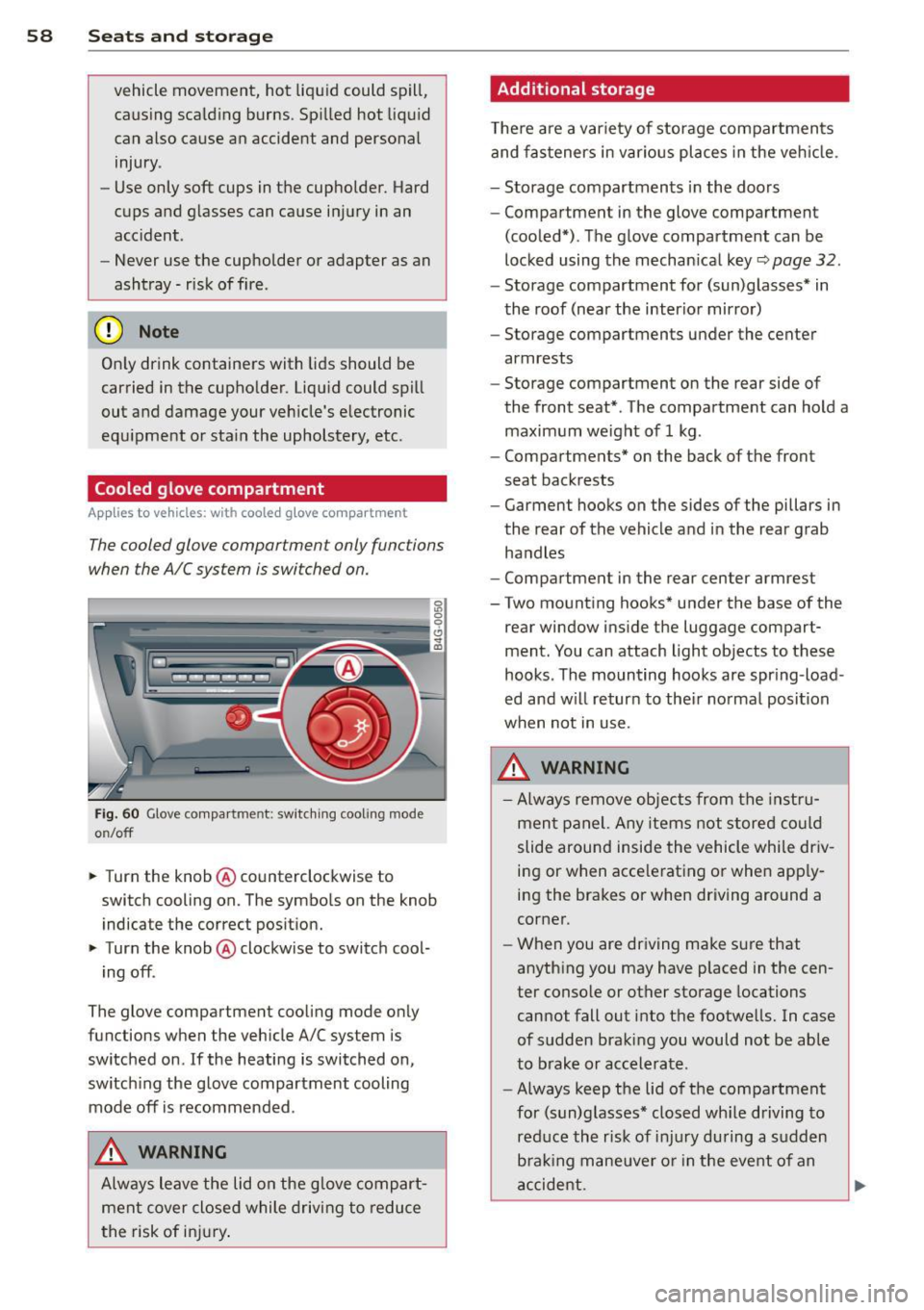
Fig. 60 Glove compa rtment: switc hing cooling mode
o n/off
~ Turn the knob@ counterclockwise to
switch cooling on. The symbols on the knob
indicate the correct position.
~ Turn the knob @ clockwise to switch cool-
ing off .
The glove compartment cooling mode only
functions when the vehicle A/C system is
switched on .
If the heating is switched on,
switching the glove compartment cooling
mode
off is recommended .
_& WARNING
Always leave the lid on the glove compart
ment cover closed while driving to reduce
th e risk of injury.
Additional storage
Ther e are a variety of storage compartments
and fasteners in various places in the vehicle.
- Storage compartments in the doors
- Compartment in the glove compartment
(cooled*) . The glove compartment can be
locked using the mechanical key
r::;, page 32.
-Storage compartment for (sun)glasses* in
the roof (near the interior mirror)
- Storage compartments under the center
armrests
- Storage compartment on the rear side of
the front seat* . The compartment can hold a
maximum weight of 1 kg .
- Compartments* on the back of the front
seat backrests
- Garment hooks on the sides of the pillars in
the rear of the vehicle and in the rear grab
handles
- Compartment in the rear center armrest
- Two mounting hooks* under the base of the
rear window inside the luggage compart
ment. You can attach light objects to these
hooks . The mounting hooks are spring -load
ed and will return to their normal position
when not in use.
_& WARNING
- Always remove objects from the instru
ment panel. Any items not stored could
slide around inside the vehicle while driv
ing or when accelerating or when apply
ing the brakes or when driving around a
corner.
- When you are driving make sure that
anything you may have placed in the cen
ter console or other storage locations
cannot fall out into the footwells. In case
of sudden braking you would not be able
to brake or accelerate.
- Always keep the lid of the compartment
for (sun)glasses* closed while driving to
reduce the risk of injury during a sudden
braking maneuver or in the event of an
accident.
-