Front parking AUDI A6 2014 User Guide
[x] Cancel search | Manufacturer: AUDI, Model Year: 2014, Model line: A6, Model: AUDI A6 2014Pages: 304, PDF Size: 76.32 MB
Page 123 of 304
@-Rear* ¢ page 122
©- Corner view (rear)* ¢ page 121
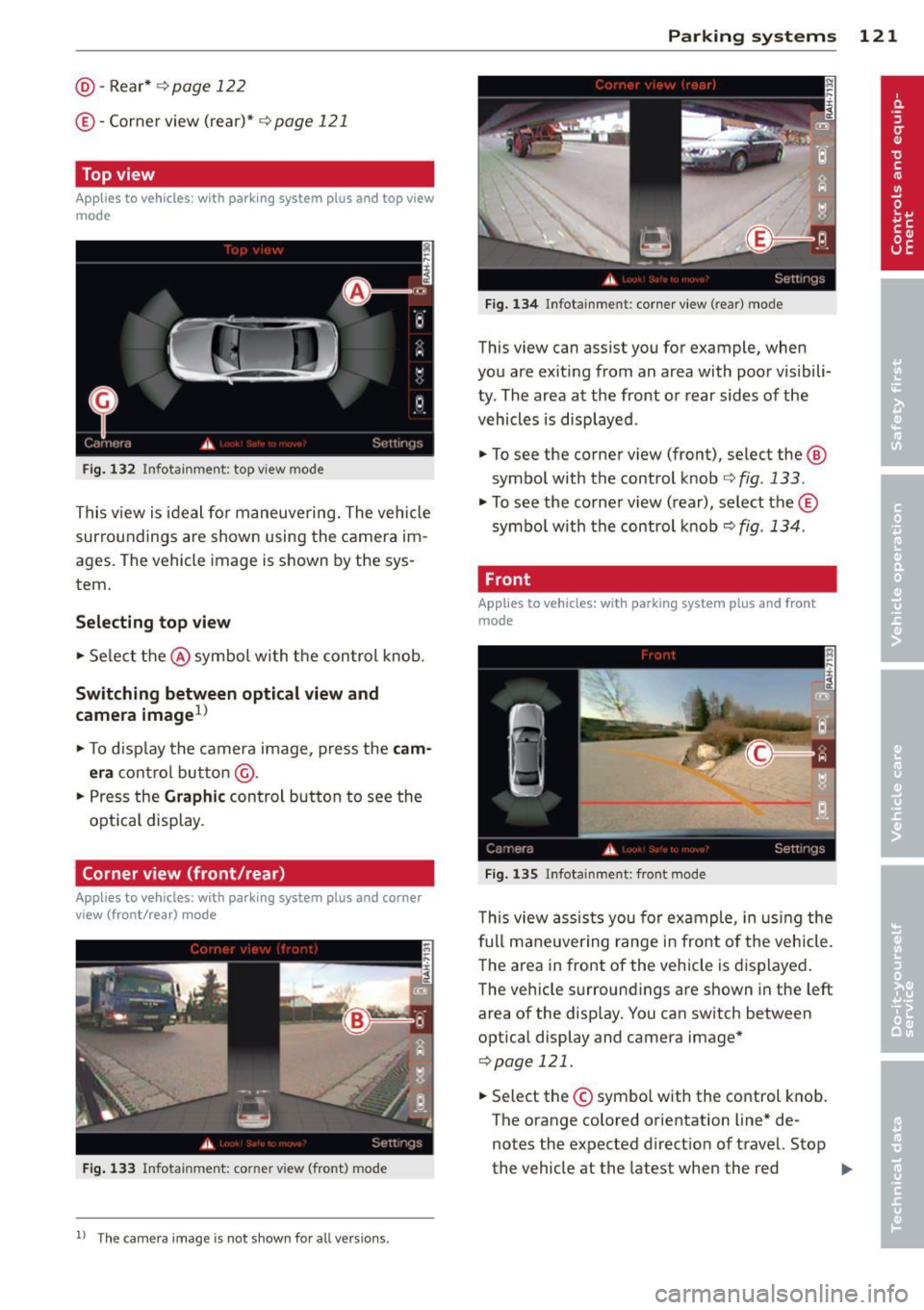
Top view
Applies to vehicles: with parking system plus and top view
mode
Fi g. 1 32 In fota inm ent: top v iew mode
This v iew is ideal for maneuve ring. The vehicle
surro undings are shown using the camera im
ag es. The vehicle image is shown by the sys
tem.
Selecting top vi ew
~ Se lect the @symbol with the control knob.
Switching between optical view and
came ra image
1
)
~ To d isp lay the camera image, press the c am
era
contro l bu tton @ .
~ Press the Graph ic control button to see the
opt ica l display .
Corner view (front /rear )
Applies to vehicles: with parki ng system plus and corner
view (front/rear ) mode
Fig. 133 In fot ainm en t: co rn er view (fro nt} mode
1 1
Th e cam era im age is n ot s how n for al l ve rs ion s.
Parking systems 121
Fig . 1 34 Infot ainm en t: corne r vie w (r ea r) mode
This view can assist you for example, when
you are exit ing from an area with poor visibili
ty . The area at the front or rear sides of the
vehicles is displayed .
~ To see the corner view (fron t), select the @
symbol with the control knob
¢ fig . 133 .
~ To see the co rner v iew ( rear), select the ©
symbo l with the control knob
r=> fig . 134 .
, Front
Applies to vehicles: with parking system plus and front
mo de
Fig. 1 35 ln fota inment: front mode
T his view assis ts you for example, in us ing the
full maneuver ing range in front of the vehicle.
The area in front of the vehicle is displayed .
The vehicle s urround ings are shown in the left
area of the display . You can switch between
optical display and camera image*
<=> page 121.
~ Select the © symbo l with the control knob .
T he o range colored orientation line* de
notes the expected d irection of travel. Stop
the vehicle at the latest when the red
Iii>-
Page 124 of 304
122 Park in g s ystems
orientation line * borders an object q .&. in
General information on page 120 .
Rear
Applies to vehicles: with parking system plus and rear
mode
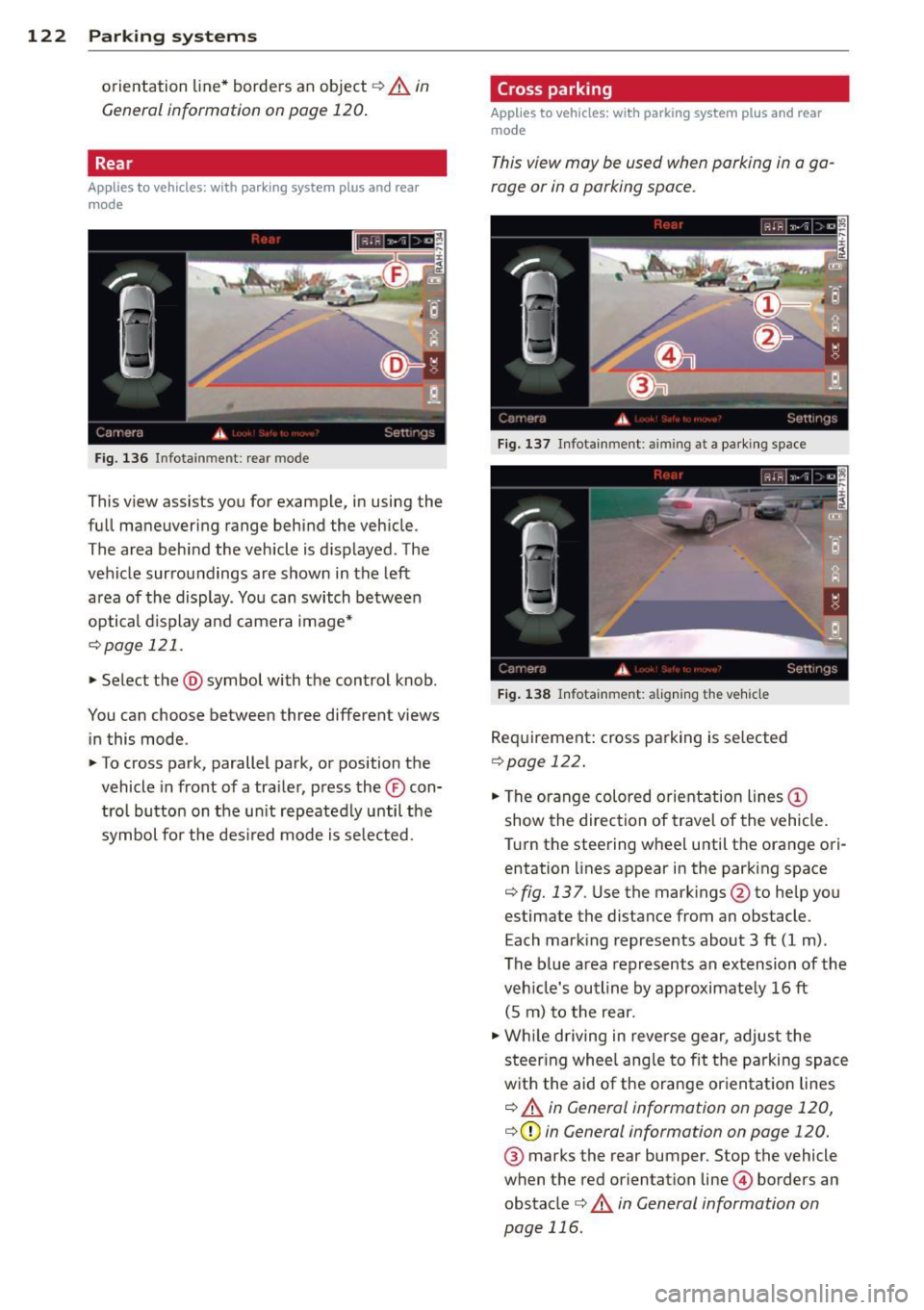
F ig. 136 Infotainment: rear mode
This view assists you for example, in using the
full maneuvering range behind the veh icle.
The area beh ind the veh icle is d isplayed. The
vehicle surroundings are shown in the left
area of the display. You can switch between
optical d isplay and camera image*
¢page 121 .
.,. Select the @symbol with the control knob.
You can choose between three different views in this mode.
.,. To cross park, parallel park, or position the
vehicle in front of a tra iler, p ress the ® con
t ro l button on the un it repeatedly until the
symbol for the des ired mode is se lected.
Cross parking
Applies to vehicles: w ith park ing system plus and rear
mode
This view may be used when parking in a ga
rage or in a parking space.
F ig . 1 37 Infotainment: aiming at a pa rki ng space
Fig . 1 38 Infotainment: aligning the vehicle
Requirement: cross parking is se lected
Q page 122 .
.,. The orange colored orientation lines@
show the direction of travel of the vehicle.
T urn the steering wheel until the orange ori
entation lines appear in the parking space
¢ fig. 137 . Use the mark ings @to he lp you
estimate the distance from an obstacle.
Each marking represents about 3 ft (1 m).
The b lue area represents an extension of the
veh icle's outline by approximate ly 16 ft
(5 m) to the rear .
.,. Wh ile d riving in reverse gear, adjust the
steer ing whee l ang le to fit t he parking space
w ith the aid of the orange or ientat ion lines
¢ .&. in General information on page 120,
¢ (Din General information on page 120.
® marks the rear bumper. Stop the vehicle
when the red orientation line© borders an
obstacle
¢ .&. in General information on
page 116.
Page 125 of 304
Parallel parking
Applies to vehicles: with parking system plus and rear
mode
This view may be used when parallel parking
along the side of a street.
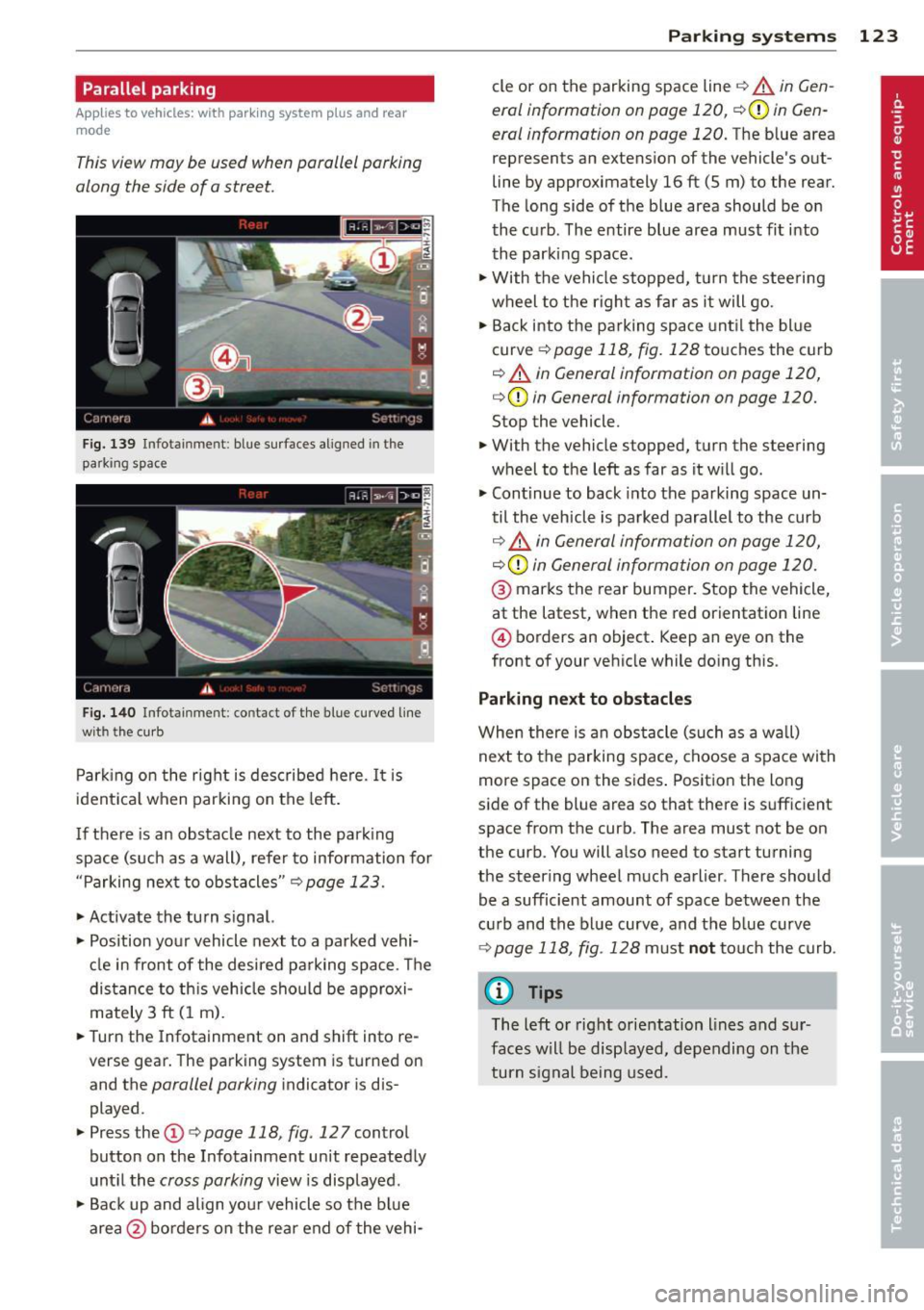
F ig. 139 Infot ainme nt: bl ue su rfaces aligned in th e
park ing space
Fig . 14 0 Infota inmen t: co ntact of the blue curved line
with t he curb
Parking on the right is described he re. It is
ident ical when parki ng on the left .
I f there is an obstacle next to the park ing
space (such as a wall), refer to information for
"Parking nex t to obstacles"
c::> page 123.
~ Activate the turn s ignal.
~ Position your vehicle next to a parked vehi
cle in front of the desired parking space . T he
distance to th is vehicle sho uld be approxi
mately 3 ft (1 m).
~ Turn the Infotainment on and shift into re
verse gear. The parking system is turned on
and the
parallel parking i ndicator is dis
played .
~ Press the@¢ page 118 , fig . 127 control
button on the Infotainment un it repeatedly
unt il the
cross parking view is disp layed.
~ Backup and align yo ur vehicle so the blue
area @ borders on the rear end of the vehi-
Parking systems 123
cle or on the parking space line c::> A in Gen
eral information on page 120,
c::> (D in Gen
eral information on page 120.
The b lue area
represent s an extens ion of the vehicle 's out
line by approximately 16 ft (5 m) to the rear.
The long side of the blue area should be on
the curb . The entire blue area must fit into
th e parking space .
~ With the vehicle stopped, turn the stee ring
wheel to t he righ t as fa r as it will go.
~ Back into the parking space unt il the blue
curve
c::> page 118, fig. 128 to uches the curb
c::> A in General information on page 120,
c::> (D in General information on page 120.
Stop the vehicle.
~ With the vehicle s topped, turn the steering
wheel to the left as far as it w ill go.
~ Continue to back into the parking space un
til the vehicle is parked parallel to the curb
c::> ..&. in General information on page 120,
c::> (D in General information on page 120.
@ marks the rear bumper. Stop the vehicle,
at the latest, when the red orientation line
@ borders an object . Keep an eye on the
front of your vehicle while do ing this .
Parking next to obstacles
When there is an obstacle (such as a w all)
next to the parking space, choose a space with
more space on the sides . Positio n the long
side of the blue area so that there is suff icient
space from the curb. The area must not be on
the curb. You will a lso need to start turning
the steering wheel much earlier . T here should
be a sufficient amount of space between the
c ur b and the bl ue curve, and t he b lue curve
c::> page 118, fig . 128 m ust no t touch the curb.
@ Tips
The left o r right orientation lines and su r
faces w ill be disp layed, depending on the
turn s ignal being used .
Page 126 of 304
124 Park in g s yste m s
Trailer view
Applies to vehicles: with par king system p lus and tra iler
hitch
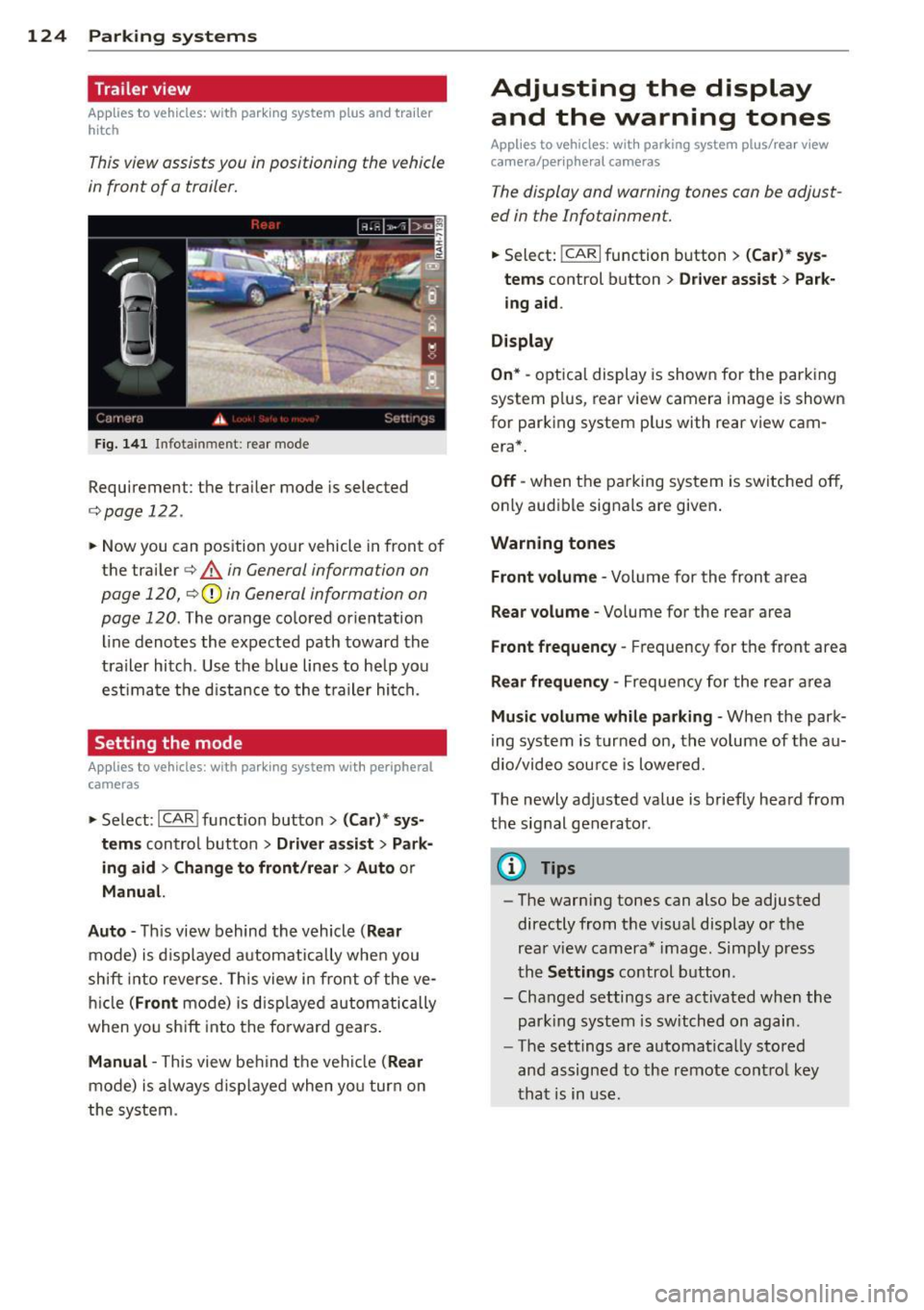
This view assists you in positioning the vehicle
in front of a trailer.
F ig. 1 41 Infotainment: rear mode
Requirement: the trailer mode is selected
c:;,page 122.
.. Now you can pos ition your vehicle in front of
the trailer
c:;, A in General information on
page 120,
c:;, (D in General information on
page 120.
The orange colored orientation
line denotes the expected path toward the
trailer hitch . Use the b lue lines to he lp you
est imate the d istance to the t railer hi tch.
Setting the mode
A ppl ies to vehicles: with park ing system wit h peripheral
cameras
.. Se lect : I CAR I func tion button> (Car )* sys
t e m s
control button > Dri ver as sis t > Park
ing aid > Ch ange to front /re ar > Aut o
or
Manua l.
A uto -
Th is view behind the vehicle ( Rea r
mode) is d isplayed automatically when you
shift into reverse. This view in front of the ve
h icle
( Fron t mode) is d isp layed automatically
when you sh ift into the fo rward gears .
Manual -This view behind t he vehicle (Rear
mode) is a lways d is p layed when you turn on
the system .
Adjusting the display
and the warning tones
Applies to vehicles: wit h parking system plus/ rea r vi ew
came ra/ peri pheral cameras
The display and warning tones can be adjust
ed in the Infotainment.
.. Select: !CARI function button > ( Car )* sys
tem s
control button > Drive r a ssist > Par k
in g a id .
Di splay
On * -
optical display is shown for the parking
system p lus, rear view camera image is shown
for parking system plus with rear view cam
era*.
Off -when the parking system is switched off,
only audible signals are given .
Warning tones
Fr ont volume -
Volume for the front area
Rear volume -Volume for the rear area
Front frequency -Frequency for the front area
Rear frequen cy -Frequency for the rear area
Mu sic v olum e wh ile parkin g -When the park
ing system is turned on, the volume of the au
dio/video sou rce is lowered.
The newly adjusted value is briefly heard from
the signal generator .
@ Tips
-The warn ing tones can also be adjusted
directly from the visual display o r the
rear v iew camera* image. Simply press
the
Setting s control button .
- Changed settings are act ivated when the
park ing system is switched on again.
- The settings are automatica lly stored
and assigned to the remote control key
that is in use .
Page 127 of 304
Error messages
Applies to vehicles: with parking system plus/rear view
camera/per ipheral cameras
There is an e rror in the system if the LED in
the
p, qA button is blinking and you hear a con
tinuous alarm for a few seconds afte r switch
ing on the parking system or when the park
ing system is already activated. If the error is
not corrected before you switch off the igni
tion, the LED in the
Pw.6. button will blink the
next time you switch on the parking system by
shifting into reverse.
Parking system plus
If a sensor is faulty, the~ symbol will appear
in front of/behind the vehicle in the Infotain
ment display. If a rear sensor is fau lty, only
obstacles that are in areas @ and @ are
shown ¢
page 115, fig. 118. If a front sensor
i s faulty, only obstacles that are in areas ©
and @are shown .
Peripheral cameras*
There is also a system error if:
- the
'(:8:)• • symbol appears in the display and
the corresponding display area is shown in
blue. The camera is not working in this area.
- all segments around the vehicles are red or
if no segments are displayed.
Drive to your authorized Aud i dea ler o r au
thorized repair fac ility immediately to have
the ma lfunction corrected.
Trailer hitch
Appl ies to vehicles: with parking system plus/rear view
camera/per ipheral cameras and trailer hitch
For vehicles using the tra iler socket, the park
ing system rear senso rs do not turn on when
you shift into reverse gear or when yo u press
the P
01A button. This results in the following re
strictions:
Parking system plus*
There is no distance wa rning for the rear. The
front sensors rema in activated. The visual dis
play switches to the traile r tow ing mode.
Parking systems 125
Parking system plus and rear view
camera* /Peripheral cameras*
There is no distance warning for the rear. The
front sensors remain activated. The visual dis
play sw itches to the trailer towing mode. The
rear view camera image will not show the ori
entation lines and the blue surfaces .
{D Tips
Trailer hitches that are not installed at the
factory may cause the park ing system to
malfunction or they may restr ict its func
tion.
Page 128 of 304
126 Homelink
Homelink
Universal remote
control
General information
Applies to vehicles: with Homelink u nive rsal remote con
tro l
The HomeLink universal remote control can
be programmed with hand-held transmitters
from existing equipment.
With Homelink, you can control devices such
as the garage door, security systems, house
lights, etc. comfortably from the inside of you
vehicle.
Homelink makes it possible for you to replace
three different remote controls from devices in your home with one universal remote . Th is
feature works for most garage door and exte
rior door motor signals. Programming the in
d iv idual remo te control fo r your remote con
trol takes p lace near the center of the radiator
grille. There is a control module attached at
this location .
A one-t ime programm ing of the sensor mus t
be performed before you are able to use sys
tems w ith Homelink.
A WARNING
- Never use the Homelink transmitter
with any garage door opener that does
have not the safety stop and reverse fea
ture as requ ired by federal safety stand
ards. Th is includes any garage door open
er model manufactured before April 1, 1982.
- A garage door opener which cannot de
tect an object, signaling the door to stop
and reverse does not meet current feder
al safety standards . Us ing a garage doo r
opener witho ut these fea tures increases
risk of serious injury or death.
- For safety reasons never release the
parking brake or start the engine while
anyone is standing in front of the vehicle .
- A garage door or an estate gate may
sometimes be set in motion when the Homelink remote control is being pro
grammed. If the device is repeatedly ac
tivated, this can overstrain motor and
damage its electrical components -an
overheated motor is a fire hazard!
- To avo id possible injuries or property
damage, please always make absolutely
certa in that no persons or objects are lo
cated in the range of motion of any
equ ipment being operated.
(0 Tips
- If you would like additional information
on the Homelink Un iversal Transceiver,
Homelink compatible products, or to
purchase other accessories su ch as the
Homelink Lighting Package, please con
tact Homelink at 1 -800-355-3515 or on
the Internet at www.homelink.com.
- For Declara tion of Comp liance to United
States FCC and Ind ustry Canada reg ula
tions¢
page 286 .
-For security reasons, we recommend that
you clear the programmed b uttons be
fore selling the ve hicle .
Operation
Appl ies to vehicles: wit h Ho melink
Fig . 14 2 Headliner: controls
M 0
9 (!)
~
Requirement: The buttons must be program
med
¢page 127.
"'To open the garage door , press the program
med b utton . The LED @ will light up o r
flash.
"' To close the garage door, press the button
again .
Ill>
Page 210 of 304
208 Trailer towing
Always apply brakes early. When driving
downhill, shift into a lower gear to use the en
g ine braking effect to slow the vehicle . Use of
the brakes alone can cause them to overheat
and fail.
Coolant temperature
The coolant temperature gauge¢ page 11
must be observed carefully. The coolant tem
perature can increase if you drive on long in
clines in a low gear at high engine speeds. Re
duce your speed immediately if the LEDs in
the top part of the display turn on .
For more information about indicator lights,
refer to.
¢ page 17 .
A WARNING
Anyone not properly restrained in a mov
ing vehicle is at a much greater risk in an
accident . Never let anyone r ide in your car
who is not properly wear ing the restraints
provided by Aud i.
Trailer towing tips
Important to know
Your vehicle handles differently when towing
a trailer because of the additional weight and
different weight distribution . Safety, perform
ance and economy w ill greatly depend on how
carefully you load your trailer and operate
your rig .
Before you actually tow your trailer, practice
turn ing, stopp ing and back ing up in an area
away from traffic. Keep practicing until you
have become comp lete ly familiar with the way
your ve hicle-trai ler comb ination behaves and
responds.
Backing up is difficult and requires practice .
Backing up with a tra iler generally requi res
steering act ion opposite to that when backing
up your vehicle without a trailer.
Maintain a greater distance between your ve
hicle and the one in front of you. You will need
more room to stop. To compensate for the trailer, you wi
ll need a larger than normal
turning radius.
When passing, remember that you cannot ac
celerate as fast as you norma lly would be
cause of the added load. Make sure you have
enough room to pass . After passing, a llow
plenty of room for your trailer before chang
ing lanes again.
Avoid jerky starts , sharp turns or rapid lane
changes.
(D Tips
- Do not tow a trailer during the break-in
period of your vehicle.
- If you tow a trailer, your Audi may re
quire more frequent maintenance due to
the extra load ¢
page 283.
Parking on a slope
Do not park on o slope with a trailer. If it can
not be avoided, do so only after doing the fol
lowing:
When parking:
.,. App ly the foot brake .
.. Have someone place chocks under both the
vehicle and the trailer wheels.
.. With chocks in place, slowly release the
brakes until the wheel chocks absorb the
load .
.. Turn the wheels towards the curb.
.. Apply the parking brake.
.. Select the P selector lever position .
When restarting after parking:
.. Apply the foot brake.
.. Start the engine.
.. Select the D/S selector lever position .
.. Release the parking brake and slowly pull
out and away from the wheel chocks .
.,. Stop and have someone retr ieve the wheel
chocks .
Ill-
Page 266 of 304
264 What do I do now?
&_ WARNING
You or your passengers could be injured
while changing a wheel if yo u do n ot fol
low t hese safety precautions:
- If you have a flat t ire, move a safe dis
tance
off the road. Turn off the engine,
turn the emergency flashers on and use other warning dev ices to alert other mo
torists.
- Make sure that passengers wait in a safe
place away from the vehicle and well
away from the road and traff ic.
- T o help p revent the veh icle from mov ing
sudden ly and possibly slipping off the
ja ck, always fully set the parking b rake
and bloc k the whee l diagona lly opposite
the whee l being changed. When one
front whee l is lifted off the gro und, plac
ing the Automat ic Transmiss ion in P
(Park) will
not prevent the vehicle from
moving.
- Before you change a wheel, be sure the
ground is level and firm. If necessary,
use a sturdy board under the jack.
- Always store the vehicle tool kit, the jack
and the replaced t ire i n the luggage com
partment
c> page 134.
Before chang ing the wheel, yo u m ust acti
vate the jacking mode, so that the auto mat ic cont rols for the Adaptive Air S us
pens ion* do not make it more difficult to
lift the vehicle with the jack
c> page 266.
Changing a wheel
When you change a wheel, follow these
quence described below step-by-step and in
exactly that order .
1. Activate the vehicle jack mode*
~page 266.
-
2. Remove the decorative wheel cov er* . For
mo re details see also
c> page 265, Deco
rative wheel covers
or c> page 265,
Wheels with wheel bolt caps.
3 . L oosen the wheel bolt s c> page 265.
4. Locate the proper mounting point for the
jack and alig n the jack below that point
c> page 266 .
5.
Raise the car with the jack c> page 266.
6. Remove the wheel with the flat tire and
then insta ll
the s pare c>page 267.
7. Tighten all whee l bolts lightly.
8 . Lower the vehicle with the jack .
9. Use the wheel bolt wrench and firmly
t igh ten al l w heel bo lts c> page 265.
10. Replace the decora tive wh eel co ver*.
11. Deactivate the vehicle jack mode * in the
MMI:
I CARI f u nction button > (Car )* sys
tems
control button > Se rvicing & chec ks
> A ir susp .: jac k mode > Off .
The vehicle jack mode * switches off automati
ca lly at speeds above
6 mph (1 0 km/h) .
&_ WARNING ,.__
Always read and follow all WARNINGS and
i nformat ion
c> &. in Raising the vehicle on
page 266
and c> page 268.
After changing a wheel
A wheel change is not complete without the
doing the following.
.,. Always store the vehicle tool kit, the jack*
and the rep laced tire in the luggage com
partment
c> page 134.
.,. Check the tire pressu re on the spare whee l
immed iate ly after mounting it .
.,. As soon as poss ible, have the
tight ening
torques
on all whee l bolts checked with a
t o rque wrenc h. The co rrect tighte ning tor
que is 90 ft lb (120 Nm).
.,. Have the fla t tire
replaced as soon as possi
b le.
(D Tips
- If you not ice th at the wheel bo lts a re
co rroded and difficult to turn while
changing a tire, they should be rep laced
before you check the tightening torque.
- Drive at reduced speed until you have the
tightening torques checked .
ll-
Page 272 of 304
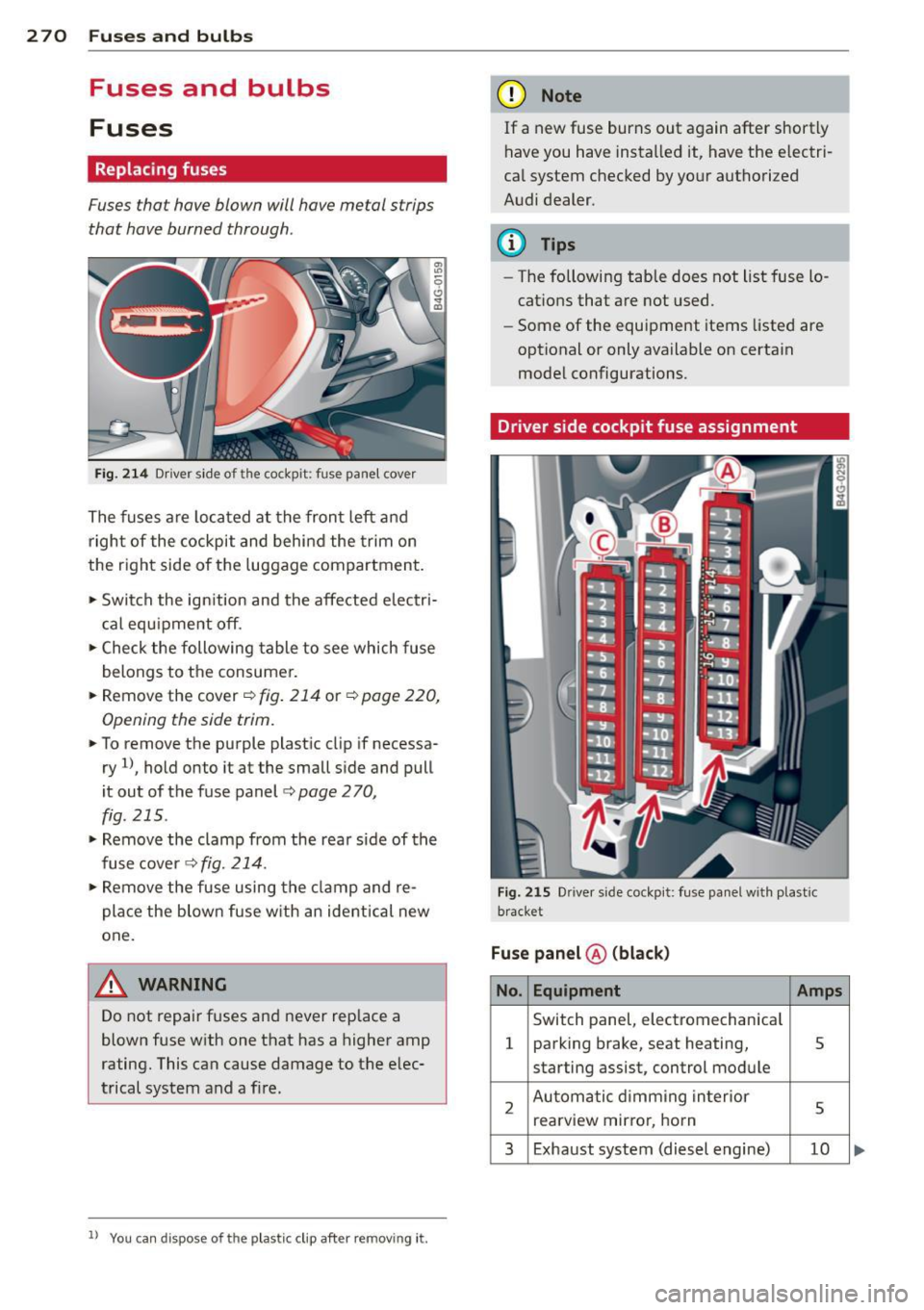
2 70 Fuses and bulbs
Fuses and bulbs
Fuses
Replacing fuses
Fuses that have blown will have metal strips
that have burned through.
Fig. 214 Dr iver side of the cockpit: fuse panel cover
The fuses are located at the front left and
right of the cockpit and behi nd the trim on
the right side of the luggage compartment.
• Switch the ign ition and the affected electri
c al equ ipment off.
• Check the following table to see which fuse
belongs to the consumer.
• Remove the cover ¢
fig. 214 or¢ page 220,
Opening the side trim.
• To remove the purple plast ic clip if necessa
ry
ll, hold onto it at the small side and pull
i t out of the fuse panel
c:> page 2 70,
fig. 215 .
• Remove the clamp from the rear s ide of the
fuse cover ¢
fig. 214.
• Remove the fuse using the cla mp and re
pla ce the blown fuse w ith an ident ical new
one.
A WARNING
Do not repair fuses and never rep lace a
blown fuse with one that has a higher amp
rating. This can cause damage to the e lec
trical system and a fi re.
ll You can dis pose of the plastic clip after removing it.
(D Note
If a new fuse burns out again after shortly
have you have installed it, have the electri
ca l system checked by yo ur authorized
Audi dealer.
(D Tips
- The following table does not list fuse lo
cations that are not used .
- Some of the equipment items listed are
optional or only available on certain
model configurations.
Driver side cockpit fuse assignment
Fig . 2 15 Dr iver side cockpit: fuse pa nel w ith plast ic
bracket
Fuse panel ® (blac k)
No. Equipment Amps
Switch panel, electromechan ica l
1 parking brake, seat heating, 5
starting assist, control module
2 Automatic d imming in terior
5 rea rview mirro r, horn
3 Exhaust system (diesel engine) 10
Page 274 of 304
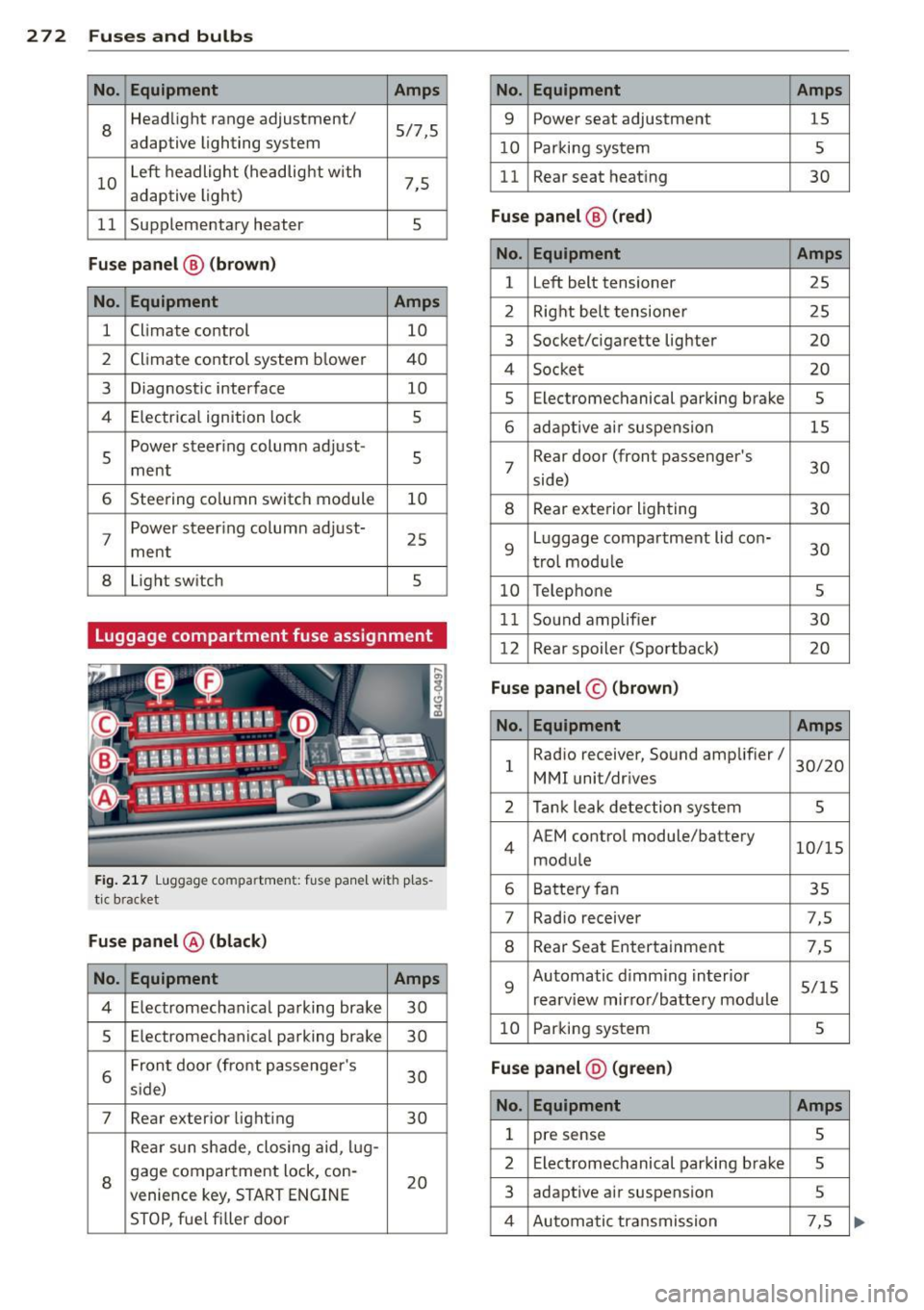
272 Fu ses and bulb s
No. Equ ipment Amps
8
Headlight range adjustment/
5/7,S
adaptive lighting system
10 Left headlight
(headlight with
7,5
adaptive light)
11 Supplementary heater
s
Fu
se p ane l@ (b ro w n)
No . Equipment Amps
1 Climate control
10
2 Climate control system blower 40
3 Diagnostic interface
10
4 E lectrical ignition lock
s
s
Power steering column adjust-
s ment
6 Steering column switch module
10
7 Power
steering column adjust-
ment 25
8 Light switch
s
Luggage compartment fuse assignment
Fig
. 217 Luggage compartment: fuse panel with plas
tic bracket
Fuse p anel @ (b la ck )
No. Equipment Amps
4 E lectromechanical parking brake 30
s Electromechanical parking brake
30
6 Front door
(front passenger's
30
s ide)
7 Rear exter ior lighting
30
Rear sun shade, closing aid, lug-
8 gage compartment
lock, con-
20
venience key, START ENGINE
STOP, fuel filler door
No. Equipment Amps
9 Power seat adjustment
15
10 Parking system
s
11 Rear seat
heating
30
Fuse pan el@ (r e d )
No . Equipment Amps
l Left belt tensioner
25
2 Right belt tensioner 25
3 Socket/cigarette
lighter
20
4 Socket 20
5 Electromechanical
parking brake
5
6 adaptive ai r suspension 15
7 Rear door
(front passenger's
30
side)
8 Rear exterior lighting 30
9 Luggage compartment
lid con-
30
t rol modu le
10 Telephone 5
11 Sound amplifier 30
12 Rear
spoiler (Sportback)
20
Fuse pan el© (brown)
No . Equipment Amps
1 Radio receiver,
Sound amplifier/
30/20
MMI unit/drives
2 Tank leak detection system
s
4 AEM
control module/battery
10/15
module
6 Battery fan 35
7 Rad
io receiver 7,5
8 Rear Seat Entertainment 7,5
9 Automatic d
imming interior
5/15
rearview mirror/battery module
10 Parking system 5
Fuse pan el@ (gre en)
No . Equipment Amps
1 pre sense 5
2 Electromechanical parking brake
s
3 adaptive
air suspension
5
4 Automatic transmission 7,5