lock AUDI A6 2014 User Guide
[x] Cancel search | Manufacturer: AUDI, Model Year: 2014, Model line: A6, Model: AUDI A6 2014Pages: 304, PDF Size: 76.32 MB
Page 36 of 304
34 Opening and closing
for another vehicle or a transponder is
located on the key ring.
- For Declaration of Compliance to United
States FCC and Industry Canada regula
tions ¢
page 286.
Power locking system
General description
The power locking system locks or unlocks all
doors and the rear lid simultaneously.
You can lock and unlock the vehicle centrally.
You have the following choices:
- Remote master key¢
page 35,
-Door handles with convenience key*
¢page 36,
-Lock cylinder at the driver's door
<=?page 37, or
- Power locking switch inside
<=? page 37.
Selective unlocking
When you lock the vehicle, the power locking
system w ill lock the doors and the rear lid .
When unlocking, you can set in the MMI
whether only the driver's door or the entire
vehicle should be unlocked <=?
page 35.
Automatic locking
The automat ic locking feature locks all the ve
h icle doors and the rear lid when you drive
faster tha n 9 mph (15 km/h).
The car is unlocked again, when the opening
function in the power locking system sw itch
or at one of the door levers is actuated .
Anti-theft alarm warning system
If the anti-theft alarm warning system de
tects a break- in into the vehicle, acoust ic and
visual warning signals are triggered .
The anti-theft warning system is activated au
tomatically when you lock the vehicle . It is de
activated when u nlocking using the remote
key, with the mechanical key, and when you
switch the ignition on.
The alarm also turns off when the alarm cycle has expired.
Turn signals
When you unlock the vehicle, the turn s ignals
flash twice. When you lock the vehicle the
turn signals flash once. If they do not flash ,
one of the doors, the rear lid or the hood is
not locked .
Unintentionally locking yourself out
In the follow ing cases there safeguards to
prevent you locking your remote master key in
the vehicle:
- The vehicle does not lock w ith the central
locking switch <=?
page 37 if the driver's
door is open.
- On veh icles with convenience key*, if the
most recently used master key is in the lug
gage compartment, the rear lid is automati
cally un locked again after it is closed.
Do not lock your veh icle w ith the
remote mas
ter key or convenience key*
unti l all doors
and the rear lid are closed. In this way you
avoid locking yourself out accidentally .
Power side door closer*
The veh icle doors are equipped with a power
s ide door closer . When closing a door, you on
ly have to let it fall light ly into the latch . The
door will then automatically close by itself
¢& .
A WARNING
-- When you lock your vehicle from outside,
nobody - especially children -should re
main inside the vehicle. Remember,
when you lock the vehicle from the out
side the windows cannot be opened from
the inside.
- When you leave the vehicle, always take
the ignition key with you . This will pre
vent passengers (children, for example)
from accidentally being locked in the ve
hicle should they accidentally press the
power locking switch in the doors.
- Do not leave children inside the vehicle
unsupervised. In an emergency it would
be impossible to open the doors from
the o utside without the key.
Page 37 of 304
-Applies to vehicles with power side door
closer*:
- When closing a door, make sure noth ing can interfere w ith the door. This
could cause ser ious personal inj ury.
- You can stop the door from clos ing at
any time by pulling on the inside or
outside doo r handle.
(D Tips
- In the event of a crash with airbag de
ployment a ll locked doors will be auto
ma tically unlocked to g ive access to the
vehicle occupants from the outside .
- If the power locking system should ma l
f unct ion, you can lo ck the dr iver's door
us ing the mechanical key¢
page 38.
-If the power lo cking system should fail,
you can still open the fuel tank flap in a n
emergency ¢
page 220.
- You are we ll advised not to keep valua
bles inside an unattended vehicle, visib le
or not. Even a properly locked vehicle
cannot provide the security of a safe.
- If the L ED in the upper edge o f the driv
er's door panel comes on for abo ut 30
seconds after the vehicle is locked, there
is a ma lfunction in the power locking or
the anti-theft warning system. Have the
malfunction corrected by an author ized
Audi dealersh ip or qua lified repair fac il i
ty.
Setting power locking
The driver can determine the functions for
power locking in the MMI.
• Select : I CARI function button > (C ar)* sy s
tems
control button > Vehicle se tti ngs >
Central lock ing .
Unlock door s -You can decide if All doors or
only the
Driv er should unlock . The rear lid al
so unlocks when
All is selected . If you select
Driv er in a vehicle with a convenience key*,
only the door whose handle you pull will un l ock.
Op enin g an d clos ing 35
If you select Driver , all the doors and rear lid
will unlock if you press the
ffi button on the re
mote control master key twice.
Loc k exterior trunk handl e -If yo u se lect On ,
the rear lid handle is locked . In this case the
rear lid can be opened with the b utton
cs on
the master key or with the
cs button in the
driver's door. In veh icles with a convenience
key*, you can still open the rear lid using the
handle if an authorized master key is near the
proxim ity sensor.
Fold m irrors * -If you select On, the exterior
rearview mirrors fold in automatically when
you press the
ff! button on the remote control
master key or touch the sensor* in the ha ndle.
To ne when lock ing -When you select On, a
confirmation tone sounds when you lock the
vehicle .
locking and unlocking the vehicle with
the remote control
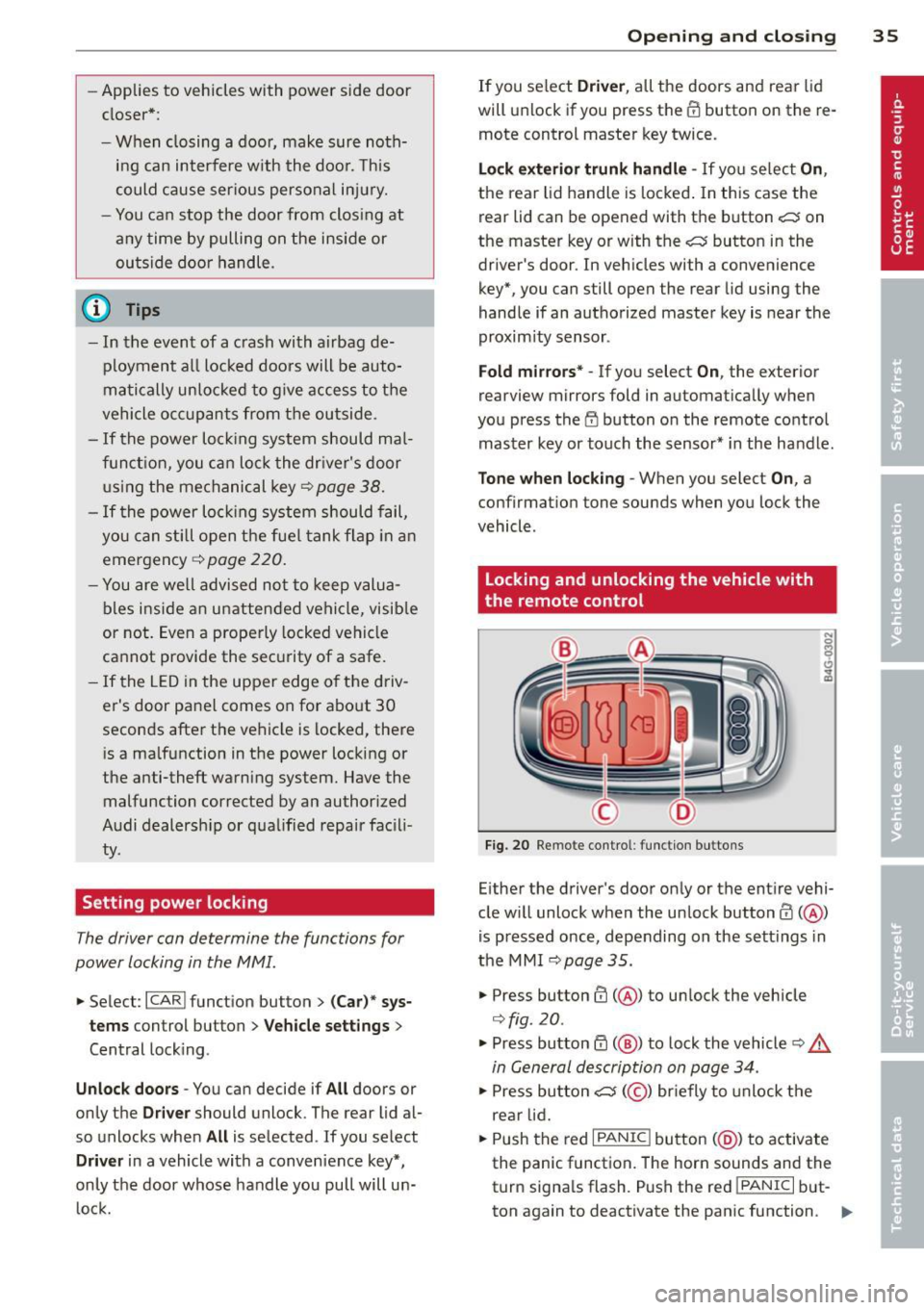
Fig. 20 Remote cont rol : function buttons
Either the driver's door only or the entire vehi
cle w ill unlock when the unlock button
ffi ( @ )
is pressed once, depending on the sett ings in
the MMI
¢page 35.
• Press button ffi (@ ) to unlock the vehicle
¢fig . 20 .
• Press button ff! (@ ) to lock the vehicle ¢ &.
in General description on page 34.
• Press button cs( @) briefly to unlock the
rear lid.
• Push the red
I PANIC ! button (@ ) to activate
the panic function. The horn sounds and the
turn signa ls flash . P ush the red
!PANIC I but
ton again to deactivate the panic function. ..,.
Page 38 of 304
36 Openin g and clo sing
If the vehicle is unlocked and no door, the rear
lid or the hood is opened within 60 seconds ,
the veh icle locks itse lf aga in automatically.
This feature prevents the veh icle from be ing
accidentally left unlocked over a long period
of time.
It depends on the sett ings in the MMI wheth
er the entire veh icle is unlocked or on ly cer
tain doors
<=) page 35.
A WARNING
Read and follow all WARNINGS Q .&. in
General description on page
34.
(D Tips
- In order to make sure the locking func
tion is working, you should always keep
your eye on the vehicle to make sure it is
proper ly locked.
-
- Do not use the remote control if you are
i nside the car, otherwise you may unin
tentionally lock the vehicle, and then you
would set off the anti-theft ala rm when
you try to start the engine or open a door. In c ase this happens anyhow, push
the un lock button@ .
- The vehicle can on ly be locked when the
se lector lever is in the P posit ion .
- Use the panic funct ion only if you are in
an emergen cy situa tion.
Locking and unlocking with convenience
key
App lies to vehicles: with co nve nience key
The doors and the rear lid can be unlocked
and locked without operating the master key.
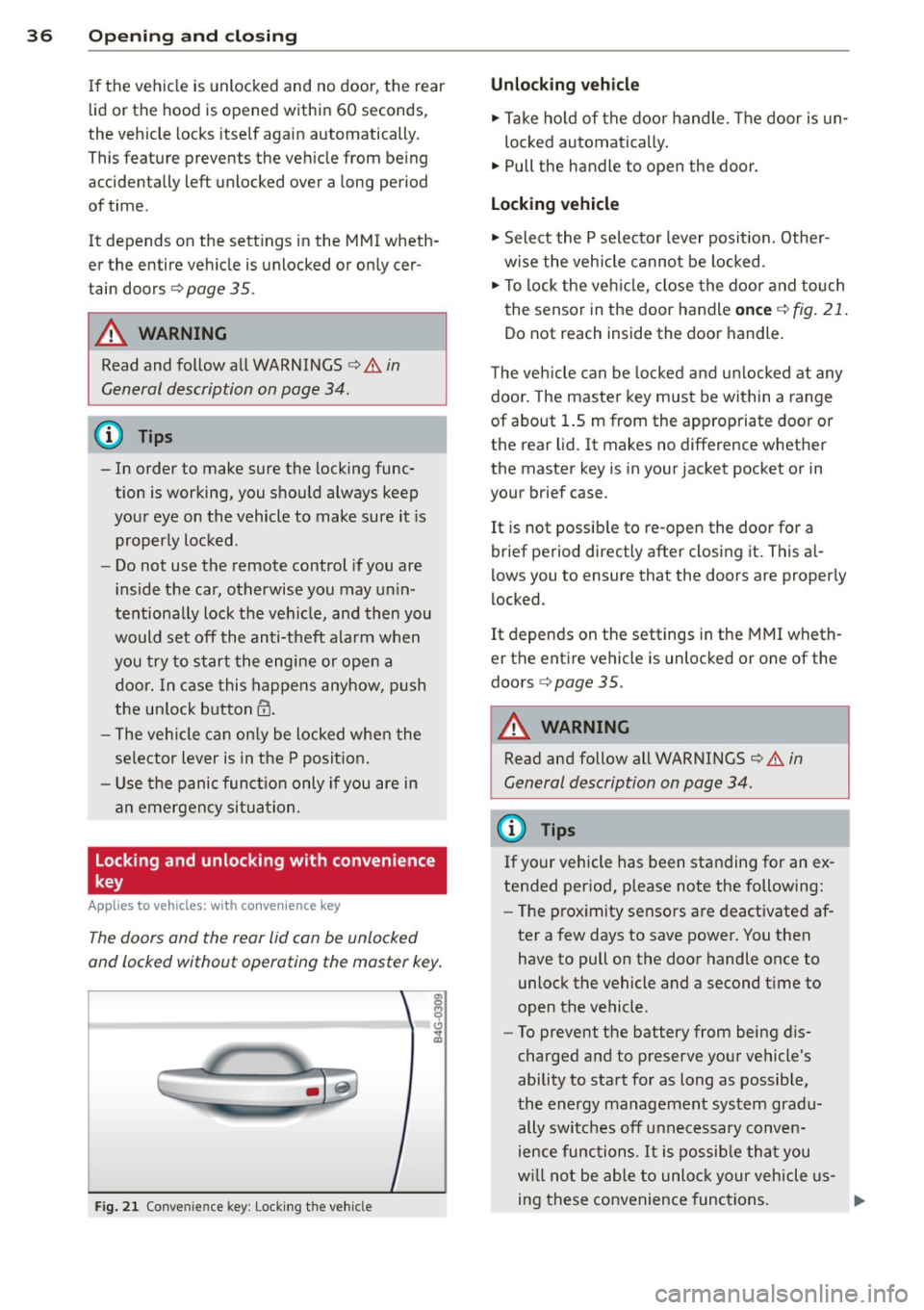
Fig. 2 1 Conve nience key : Lock ing the vehicle
Unlocking vehicle
.,. Take ho ld of the door handle . T he door is un-
loc ked automatically .
.,. Pull the handle to open the door .
Locking vehicle
.,. Select the P se lecto r lever posit ion. Othe r
w ise the veh icle cannot be locked.
.,. To lock the ve hicle, close the door and touch
the sensor in the door handle
on ce Q fig . 21 .
Do not reach inside the door handle.
T he veh icle can be locked a nd u nlocked at any
doo r. The master key must be within a range
of about 1.5 m from the appropriate door or
the rear lid. It makes no difference w hether
the master key is in your jacket pocket or in
your brief case.
It is not possib le to re -open the door for a
brief period directly after closing it. This a l
l ows you to ensure that the doors are proper ly
locked.
It depends on the settings in t he MMI wheth
er the entire vehicle is unlocked or one of the
doors
<=) page 35.
A WARNING
Read and follow all WARNINGS ¢.&. in
General description on page
34.
(D Tips
If your vehicle has been standing for an ex
tended per iod, please note the following:
- The p roximity sensors are deactivated af-
ter a few days to save power. You then have to pull on the door handle once to
unlock the vehicle and a second t ime to
open the vehicle.
- To prevent the battery from being d is
charged and to preserve your vehicle's
ability to start for as long as possib le,
the energy management system gradu
ally switc hes off unnecessary conven
ience func tion s. It is possib le tha t you
w ill not be able to unloc k your vehicle us
ing these convenience func tions.
Page 39 of 304
-For Declaration of Compliance to United
States FCC and Industry Canada regula
tions ¢
page 286.
Operating locks with the key
In the event of a failure of the power locking
system, the driver's door can be locked and
unlocked at the lock cylinder.
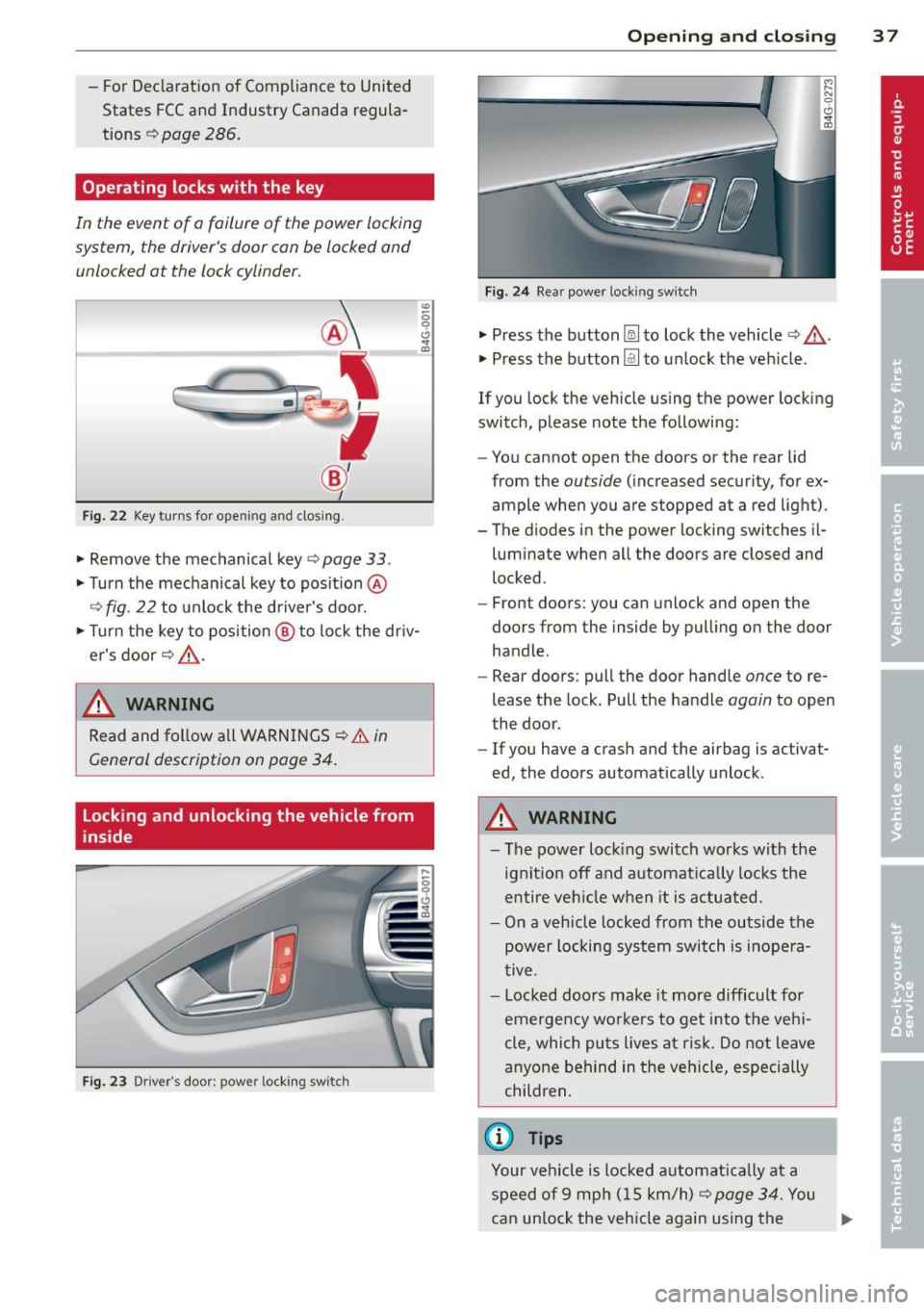
Fig . 22 Key tur ns for open ing and dosing .
• Remove the mechanical key <::> page 33 .
• Turn the mechanical key to posit ion @
9fig . 22 to unlock the d river's door.
• Turn the key to position ® to lock the dr iv
er's door
r:::> .&_ .
A WARNING
"' :; 0 0 .., a,
-
Read and follow a ll WARNINGS ¢.& in
General description on poge 34.
Locking and unlocking the vehicle from
inside
Fig . 23 Driver' s door: power lockin g swi tc h
Op enin g an d clos ing 3 7
Fig . 24 Rea r powe r lock ing switch
• Press the button~ to lock the vehicle Q .&_ .
• Press the button Im to un lock the veh icle .
If you lock the vehicle using the power locking
switch, please note the following:
- You cannot open the doors or the rear lid
from the
outside (increased security, for ex
ample when you are stopped at a red light).
- The diodes in the power locking switches il- luminate when all the doors are closed and
locked .
- Front doors: you can unlock and open the
doors from the inside by pulling on the door
handle.
- Rear doors: pull the door handle
once to re
lease the lock. Pull the handle
again to open
the door .
- If you have a crash and the airbag is activat
ed, the doors automatically unlock .
A WARNING
-The power locking switch wo rks with the
ignition off and automat ica lly locks the
entire veh icle when it is actuated.
- On a vehicle locked from the outside the
power locking sys tem switch is inope ra
tive .
- Locked doors make it more difficult for
emergency wo rke rs to get into the veh i
cle, which puts lives at risk. Do not leave
anyone behind in the vehicle, especially
children .
(D Tips
Your vehicle is locked a utomat ica lly at a
speed of 9 mph ( 15 km/h)
r:::> page 34. You
can un lock the vehicle again using the .,..
Page 40 of 304
38 Openin g and clo sing
opening function in the power locking sys
tem switch.
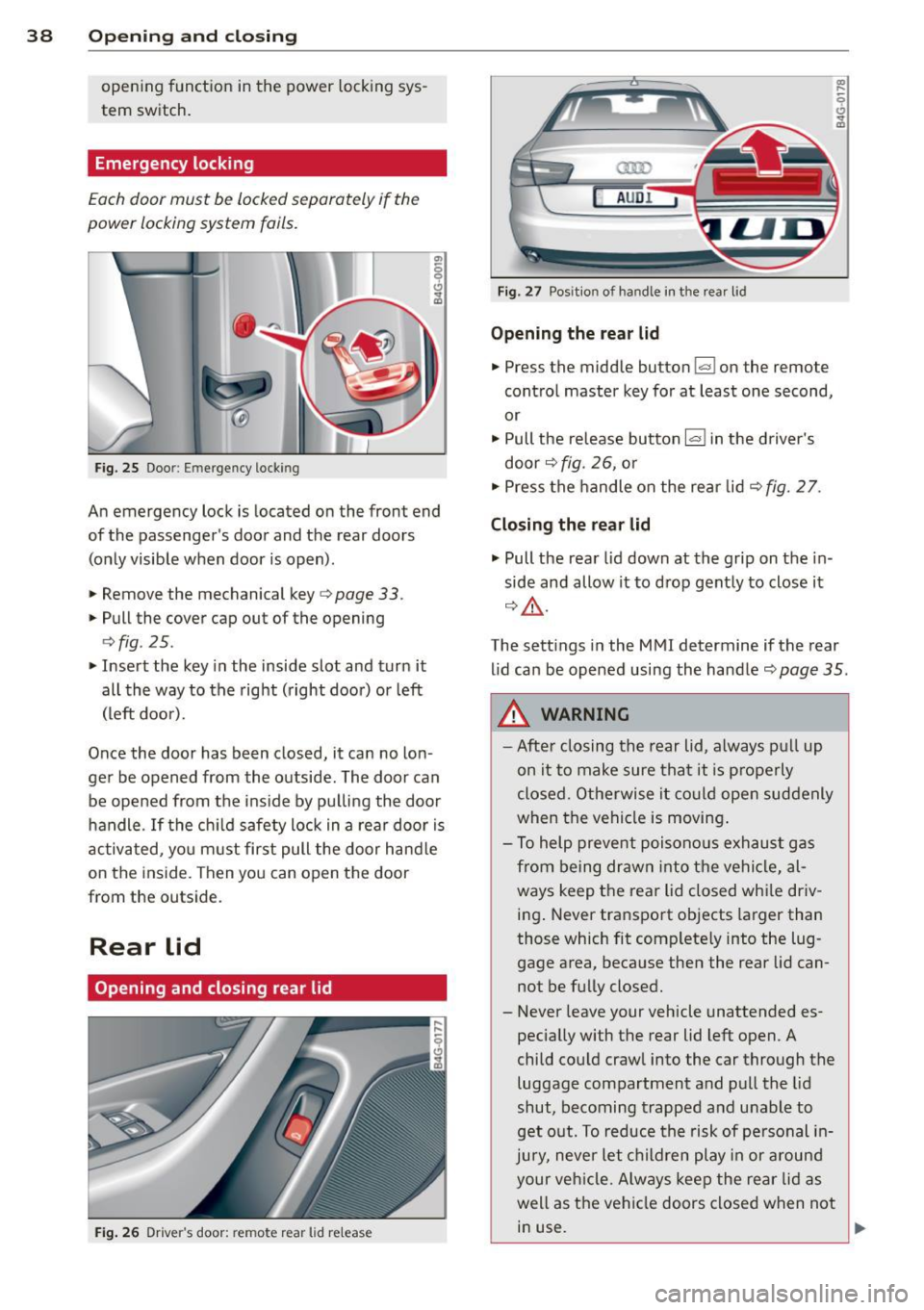
Emergency locking
Each door must be locked separately if the
power locking system fails.
Fig. 25 Doo r: Em erge ncy lock ing
An emergency lock is located on the front end
of the passenger's doo r and the rear doors
(only visible when door is open).
.. Remove the mechanical key ¢
page 33.
.. Pull the cover cap out of the opening
¢ fig . 25 .
.. Insert the key in the inside slot and turn it
all the way to the right (right doo r) or left
(left door).
Once the doo r has been closed, it can no lon
ger be opened from the outside. The door can be opened from the ins ide by pu lling the door
handle . If the ch ild safety lock in a rea r door is
activated, yo u m ust first pull the door hand le
on the inside. Then you can open the door
from the outside.
Rear lid
Opening and closing rear lid
F ig . 26 Drive r's door: re m ote rear lid release
a:ro
AU DI
Fig. 27 Pos it io n of ha ndle i n th e rear l id
Opening the re a r lid
.. Press the middle button~ on the remote
cont ro l master key for at least one second,
or
.. Pull the release button
l«=>I in the driver's
door ¢
fig. 26, o r
.. Press the handle on the rear lid ¢
fig. 2 7.
Closing the rear lid
.. Pull the rear lid down at the grip on the in
side and allow it to d rop gent ly to close it
¢ &, .
The sett ings in the M MI determine if the rear
l id can be opened using the handler=)
page 35 .
&, WARNING
-Afte r closing the rear lid, a lways p ull up
on it to make sure tha t it is p rope rly
closed. Otherwise it co uld ope n suddenly
when the vehicle is moving .
- T o help prevent p oisono us e xhaust gas
from being dr awn i nto t he ve hicl e, al
ways keep the rear lid closed whi le driv
ing . Never transpo rt objects larger than
those which fit complete ly into the lug
gage area, beca use then the rear lid can
not be fully closed.
- Never leave your vehicle unattended es
pecially with the rear lid left open. A
child cou ld craw l into the car through the
luggage compartment and pul l the lid
shut, becoming trapped and unable to
get o ut. To reduce the risk of pe rsonal i n
jury, neve r let ch ildren play in or a round
your ve hicle. Alw ays kee p the rear lid as
well as the vehi cle doors closed when not
in use.
L,__ _______________ _J ~
Page 41 of 304
-Always ensure that no one is with in
range of the rear lid when it is mov ing, in
particular close to the hinges -fingers or
hands can be pinched.
(D Tips
When the vehicle is locked, the rear lid can
be opened separately by pressing the but
ton
l a ! on the master key. When you close
the rear lid again, it locks automatically.
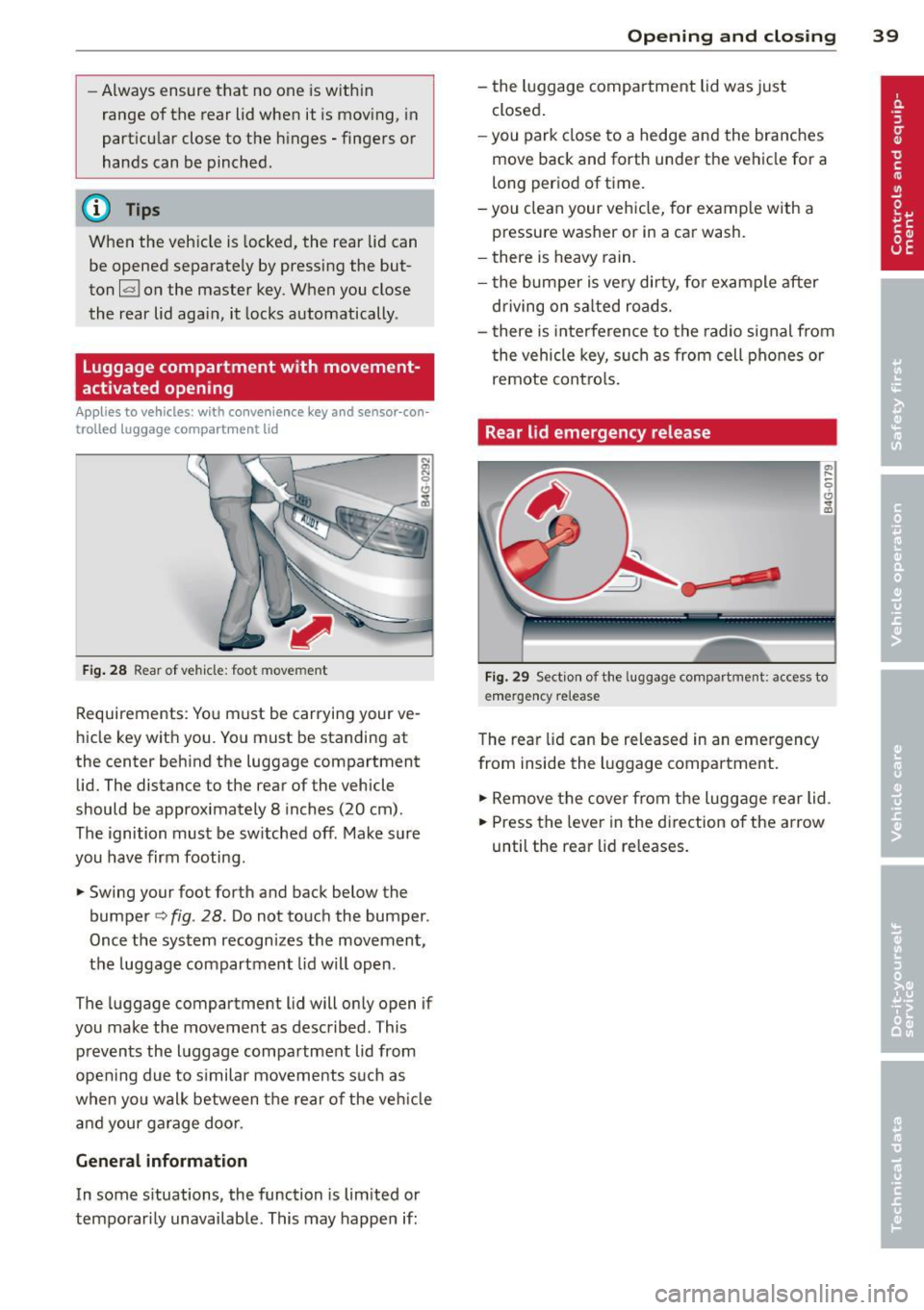
Luggage compartment with movement
activated opening
Applies to vehicles : with convenience key and sensor-con
trolled luggage compartment lid
Fig . 28 Rear of vehicle: foot movement
Requirements: You must be carrying your ve
hicle key with you . You must be standing at
the center beh ind the luggage compartment
lid. The distance to the rear of the vehicle
should be approximately 8 inches (20 cm).
The ignition must be sw itched off. Make sure
you have firm footing .
.. Swing your foot forth and back below the
bumpe r<=>
fig . 28. Do not touch the bumper.
Once the system recognizes the movement,
the luggage compartment lid wil l open.
The luggage compartment l id will only open if
you make the movement as described. This prevents the luggage compartment lid from
opening due to s imilar movements such as
when yo u walk between the rear o f the ve hicle
and your ga rage doo r.
General information
In some s ituations, the function is limited or
temporarily unavailable. This may happen if:
Opening and closing 39
- the luggage compartment lid was just
closed.
-you park close to a hedge and the branches
move back and forth under the vehicle for a
long period of time.
-you clean your vehicle, for example with a
pressure washer or in a car wash.
- there is heavy rain.
- the bumper is very dirty, fo r example after
driving on sa lted roads.
- there is interference to the radio signal from
the vehicle key, such as from cell phones or
remote contro ls.
Rear lid emergency release
Fig. 29 Section of the luggage compartment: access to
emerge ncy release
The rear lid can be released in an emergency
from inside the luggage compartment.
.. Remove the cover from the luggage rear lid.
.. Press the leve r in the direction of the arrow
until the rear lid releases.
Page 42 of 304
40 Opening and clo sing
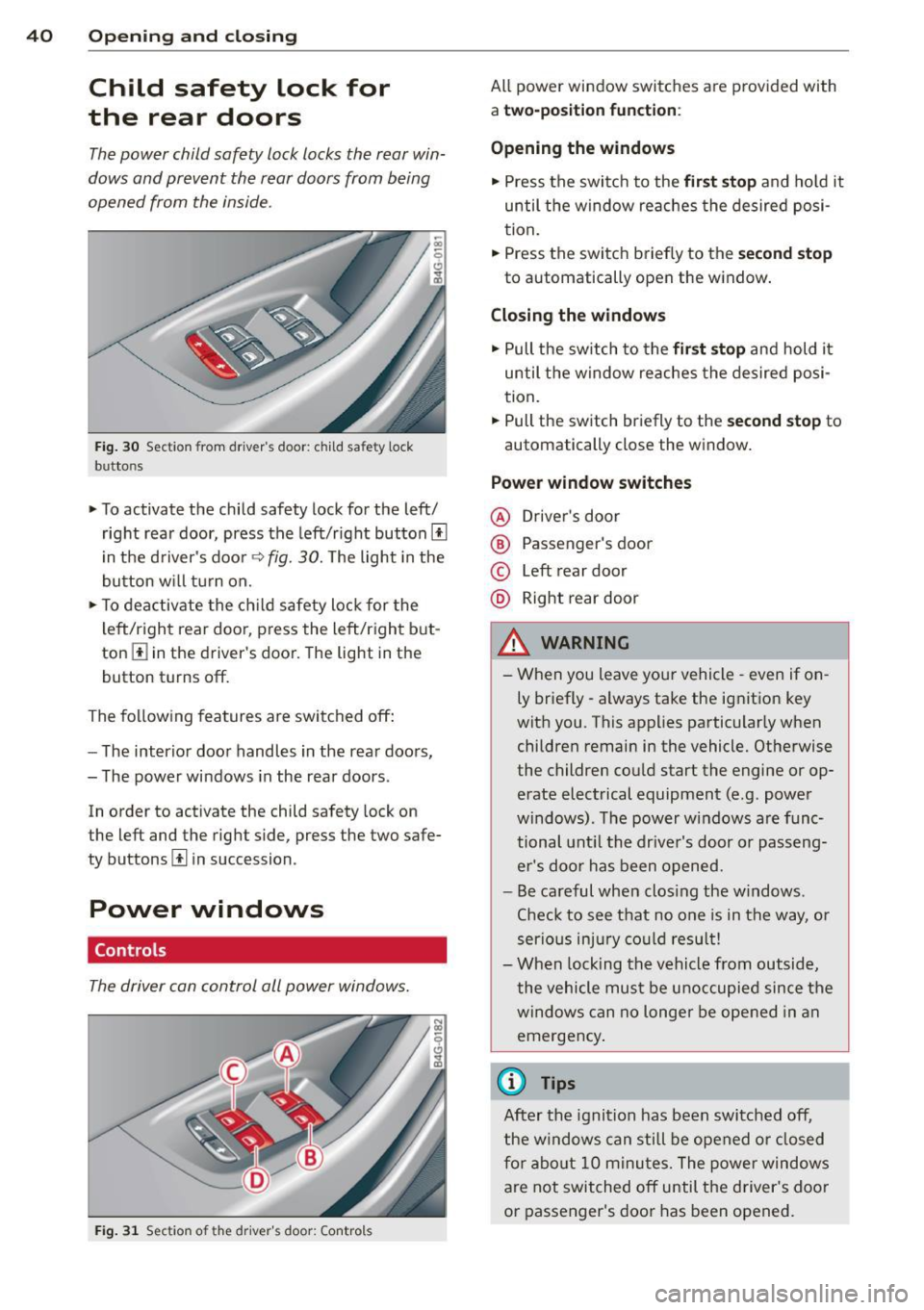
Child safety lock for
the rear doors
The power child safety lock locks the rear win
dows and prevent the rear doors from being
opened from the inside.
Fig. 30 Section from driver's door: child safety lock
buttons
• To activate the child safety lock for the left/
right rear door, press the left/right button[!]
i n the d river's door
q fig. 30. The light in the
button w ill turn on.
• To deactivate the ch ild safety lock for the
l eft/right rear door, press the left/right b ut
ton
III in the driver's door. The light in the
button turns off.
The following features are switched off:
- The interior door handles in the rear doors,
- The power windows in the rear doors .
In order to activate the child safety lock on
the left and the right side, press the two safe
ty buttons[!] in succession.
Power windows
Controls
The driver can control all power windows.
Fig . 31 Section of the driver's door: Controls
All power window switches are provided with
a two-po sition function :
Opening the windows
• Press the switc h to the fir st sto p and hold it
until the window re aches the desired posi
tion.
• Press the switch briefly to the
second stop
to automatically open the window .
Closing the windows
• Pull the sw itch to the fir st stop and hold it
until the window reaches the desired posi
tion .
.. Pull the switch br iefly to the
s e cond stop to
automatically close the window.
Power window switches
@ Drive r's door
® Passenger's door
© Left rear door
@ Right rear door
& WARNING
- When you leave you r vehicle -even if on
ly briefly -always take the ignition key
wit h you . This applies particularly when
children remain in the vehicle. Otherwise
the children could start the engine or op
erate electrical equipment (e.g. power
windows). The power windows are func
tional unt il the drive r's door or passeng
er 's doo r ha s been opened.
- Be careful when clos ing the w indows .
Chec k to see that no o ne is in the way, or
serio us inju ry co uld resu lt!
- When lock ing the vehicle from outside,
the vehicle mu st be u noccupied since the
windows can no longer be opened in an
emergency .
{1) Tips
After the ignition has been switched off,
the windows can still be opened o r closed
fo r a bout 10 m inu tes. The power windows
are not switched off until the driver 's doo r
or passenger 's door has been opened.
Page 43 of 304
What to do after a malfunction
The one-touch open and close function must
be reactivated if the battery has been discon
nected.
.,. Pull and hold the power window switch until
the window is fully closed.
.,. Release the switch and then pull it again for
at least one second.
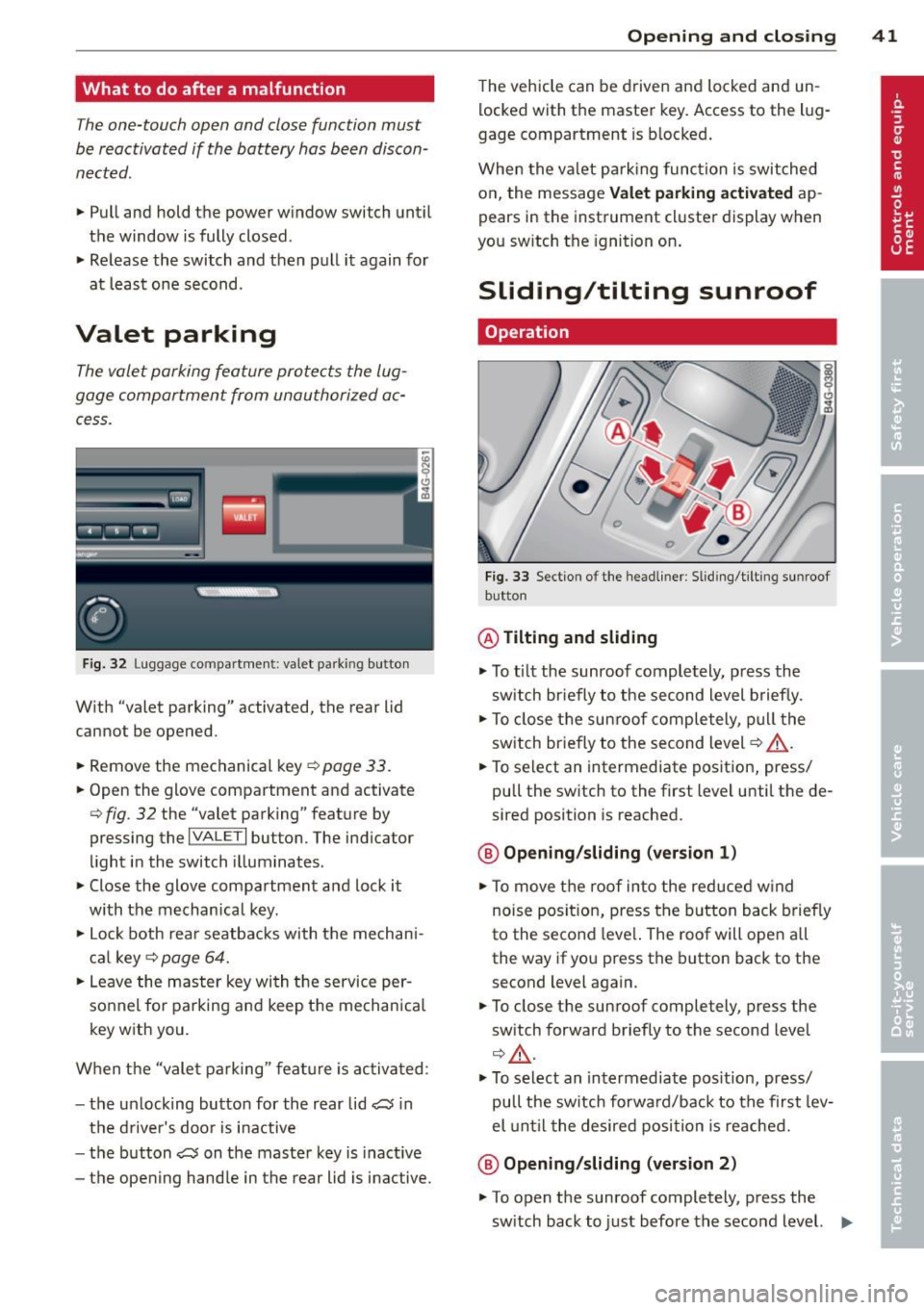
Valet parking
The valet parking feature protects the lug
gage compartment from unauthorized ac cess.
Fig. 32 Lugg age compartment: valet parking button
With "valet parking" activated, the rear lid
cannot be opened.
.,. Remove the mechanical key
¢ page 33.
.,. Open the glove compartment and activate
¢ fig . 32 the "valet parking" feature by
pressing the
I VALET I button. The indicator
light in the switch illuminates .
.,. Close the glove compartment and lock it
with the mechanical key.
.,. Lock both rear seatbacks with the mechan i
cal key ¢
page 64.
.,. Leave the master key with the service per
sonnel for parking and keep the mechanical
key with you.
When the "vale t parking" feature is activated :
- the un locking button for the rear lid
a in
the driver's door is inactive
- the button
a on the master key is inactive
- the opening handle in the rear lid is inactive.
Opening and closing 41
The vehicle can be driven and locked and un
locked with the master key. Access to the l ug
gage compartment is blocked.
When the valet park ing function is switched
on, the message Valet parking activated ap
pears in the instrument cluster display when
you sw itch the ignition on .
Sliding/tilting sunroof
Operation
Fig. 33 Section of the headliner: Sliding/ti lting sunroof
button
@ Tilting and sliding
.,. To tilt the sunroof completely, p ress the
sw itch briefly to the second level briefly.
.,. To close the sunroof completely , pull the
switch briefly to the second level¢_&. .
.,. To select an intermediate position, press/
pull the switch to the first level until the de
sired position is reached.
@ Opening /sliding (version 1)
.,. To move the roof into the reduced w ind
noise posit ion, press the button back briefly
to the second leve l. The roof will open all
the way if you press the button back to the
second level again.
.,. To close the sunroof completely, press the
sw itch forward briefly to the second level
¢,&. .
.,. To select an intermediate position, press/
pull the sw itch forwa rd/back to the first lev
el until the desired posi tion is reached.
@ Opening/sliding (version 2)
.,. To open the sunroof completely, press the
sw itch back to just before the second level. .,.
Page 47 of 304
Automatic headlights
You can adjust the following settings in the
Automatic headlights menu:
Headlights activation time -You can adjust if
the headlights switch on
Early, Med . or Late
according to the sensitivity of the ligh t sensor.
Audi adaptive light* -You can switch adaptive
light
On and Off.
Daytime running lights
USA models:
You can switch the dayt ime run
n ing lights
on and off .
Canada models :
The function cannot be
turned off . It is activated automatically each
time the ignition is switched on. This menu
item is shown "greyed out" .
Coming home, Leaving home
The coming home function illuminates the
area outside the vehicle when you switch the
ignition off and open the driver's door. To turn
the function on, select
Lights when leaving
car > On .
The leaving home function illuminates the
area outside the vehicle when you un lock the
vehicle. To turn the funct ion on, select
Lights
when unlocking car > On .
The coming home and leaving home functions
only operate when it is dark and the light
switch is in the
AUTO position. Clear
vision 45
Turn signals and high beam lever
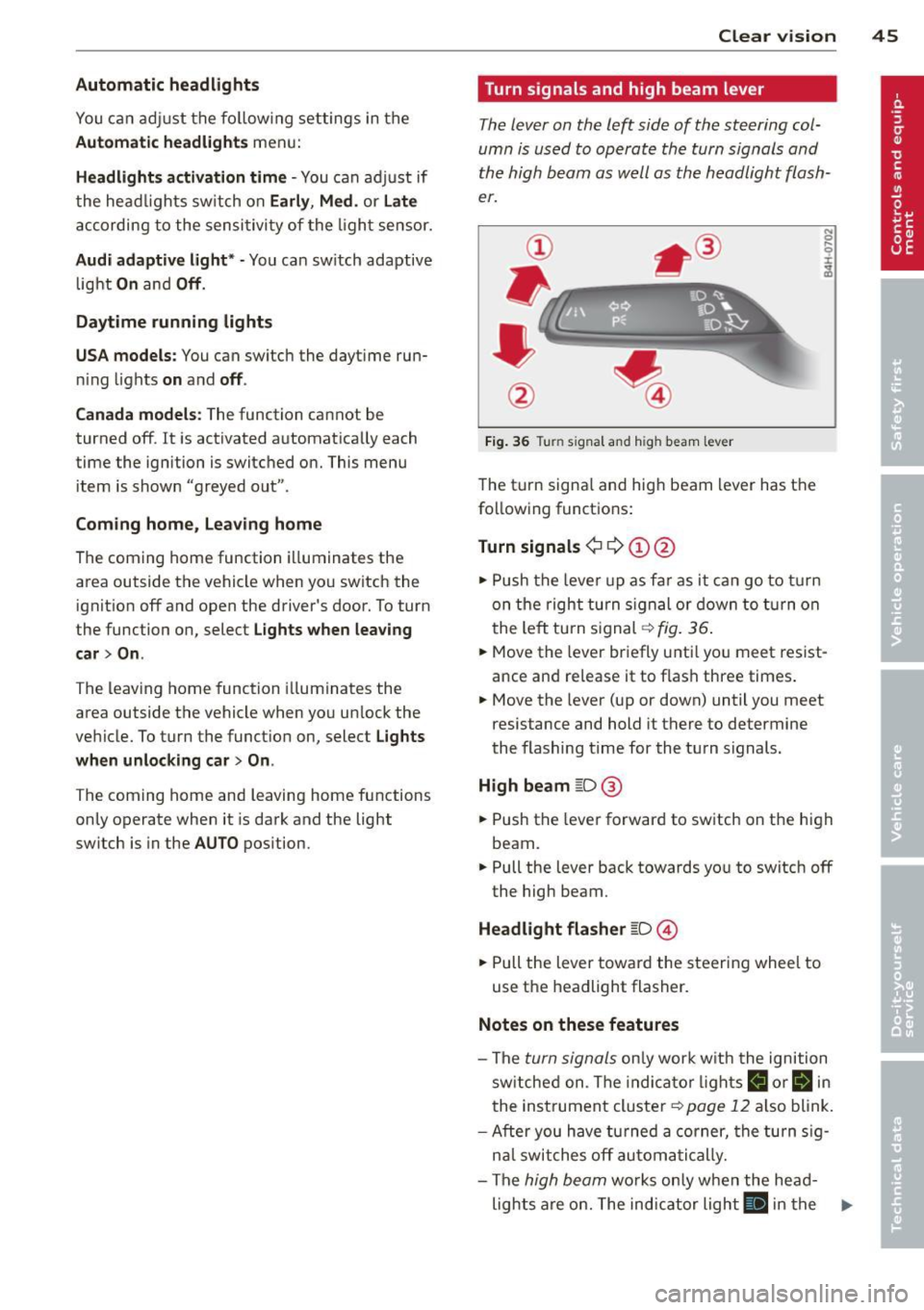
The lever on the left side of the steering col
umn is used to operate the turn signals and
the high beam as well as
the headlight flash
er.
Fig. 36 Tu rn signal and high beam lever
The turn signal and high beam lever has the
following functions:
Turn signals ¢ 9 ©@
.,. Push the lever up as fa r as it can go to turn
on the right turn signa l or down to turn on
the left tu rn s ignal ¢
fig. 36.
.. 0 ....
~
... Move the lever briefly unti l you meet resist
ance and re lease it to flash three times.
.,. Move the lever (up or down) until you meet
resistance and hold it there to determine
the flashing time for the turn signals.
High beam ~D @
... Push the lever forward to switch on the high
beam .
.,. Pull the lever back towards you to switch off
the high beam.
Headlight flasher ~D ©
... Pull the lever toward the steering wheel to
use the headlight flasher.
Notes on these features
-The turn signals on ly work w ith the ignition
sw itched on. The indicator l ights
B or Bin
the instrument cluster¢ page 12 also blink.
-After you have turned a corner, the turn sig-
n al switches off automatically.
- The
high beam works only when the head-
lights are on. The indicator light
El in the .,.
Page 48 of 304
46 Clear vis ion
instrument cluste r illuminates when the
high beams are on.
- T he
headlight flash er works only as long as
yo u hold the lever - even if there are no
l ights turned on. The indicator light
II in
the instrument cluster il luminates when you
use the headlight flasher.
A WARNING
Do not use the high beam or headlight
flasher if you know that these could blind
oncoming traffic.
Interior lights
Front and rear interior lighting
Fi g. 37 Headliner: Front interior ligh ts
Fig . 38 Re ar headli ne r: Readi ng light
Press the appropriate button q fig . 3 7:
El -Interior lighting on/off
I]]-Door contac t sw itch . The inter ior lighting
turns on automatica lly when you unlock the
vehicle, open a door or switch the ignition off.
The interior lighting turns off several seconds
after you close the doors, when you lock the
vehicle or when you sw itch the ignition on.
When a door is open, the light t urns off afte r
a few minutes.
L:!l -Read ing lights on/off
~ - Switching the rear read ing lights on/off
from the cockpi t.
I" REARI * -Switching the rear reading lights
o n/off from the cockpit.
Ambience lighting
Applies to vehicles: w ith amb ience lighting
You can adjust the br ightness for the ambi
ence ligh tin g.
.. Select in the MMI:
ICA RI function button>
(Car )* sys tem s control button > Vehicle set
ting s
> Interi or lighting > Brightne ss.
.. To increase or reduce the b rightness, turn
t he knob and press it .
T he ambience light ing tu rns on when you turn
the headlights on wh ile the ign ition is swi tc h
ed on.
(D Tips
The setti ng is automati cally sto red and as
s igned to the remo te contr ol key t hat i s in
u se.
Instrument illumination
You can adjust the brightness of the instru
men t and di splay illumination a s well as the
Head-up Display*.
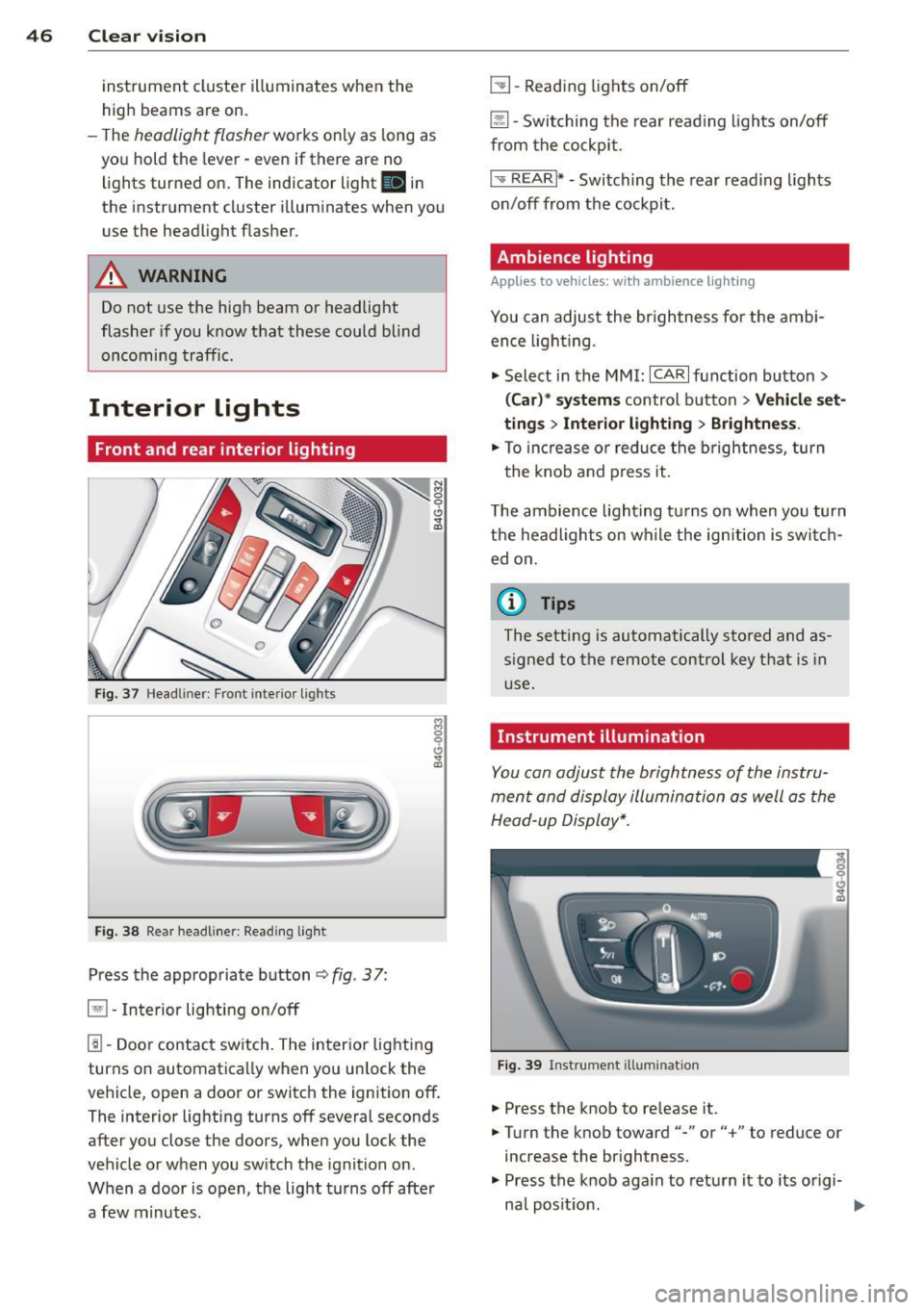
Fi g. 39 Instrume nt illumina tion
... Press the knob to release it.
.. Turn the knob toward"-" or"+" to reduce or
increase the br ightness .
.. Press the knob aga in to return it to its o rigi-
na l posit ion . ...