parking brake AUDI A6 2014 User Guide
[x] Cancel search | Manufacturer: AUDI, Model Year: 2014, Model line: A6, Model: AUDI A6 2014Pages: 304, PDF Size: 76.32 MB
Page 94 of 304
92 Audi adaptive cruise control and bra king guard
ACC : Currently unavailable . Gradient too
steep
T he road ex ceeds the maxim um poss ible an
g le for proper adaptive cruise co ntrol opera
tion . Adaptive cruise control is sw itched off .
ACC: Only available in D, Sor M
Select the D/S or M selector lever position .
ACC: currently unavailable. Parking brake
appl ied
T he adaptive c ruise co ntro l system swi tc hes
off a utomat ica lly if t he pa rking brake is set.
ACC : Currently unavailable . Stability control
(ESC) input .
This message appea rs if the Elect ron ic Stabili
z ation Cont ro l (ES C) is wo rking to help stabi
l iz e the vehicle. In thi s case, a dap tive cru ise
con tro l sw itches o ff autom atically .
ACC off: Manual control!
This message appears whe n adapt ive cr uise
control can not set the par king b rake. Press
the brake peda l to prevent the vehicle from
rolling .
•••
Three w hite dots appear if a settin g can not be
se lected with the se lecto r lever. For example,
this happens if adapt ive cr uise control cannot
resume driv ing in stop-and-go traff ic because
one o f the conditions required for ACC to wor k
i s not present .
Door open
The adaptive c ruise control system c annot
switch on whe n a doo r is open .
Stationary object ahead
This message appea rs if you would like to
sw itch adaptive cru ise cont rol on and ther e is
a stat io na ry ve hicle o r obstacle directly ahead
of yo ur vehicle .
Page 111 of 304
The Automatic Shift Lock only functions when
the vehicle is stationary or at speeds below
1 mph (2 km/h).
At speeds above about 1 mph (2 km/h) the
Automatic Shift Lock is automatically deacti
vated in the N position.
A time delay element prevents the se lector
l eve r from locking when it is moved thro ugh
the N position (going from R to 0/5). The lock
ing e lement will lock the selector lever if the
lever is left in N (Neutral) for more than ap
prox imately 2 second, without the brake ped
al being pressed.
R elease button
The release button on the selector lever pre
vents the lever from being accidenta lly shifted
into certain positions. Depending on the direc
tion of the shift, the selector lever locks at d if
ferent positions. The positions are h ighlighted
in the illustration
¢ fig . 113 .
Driving the automatic transmission
Applies to vehicles: with multitronic/S tronic/t iptronic
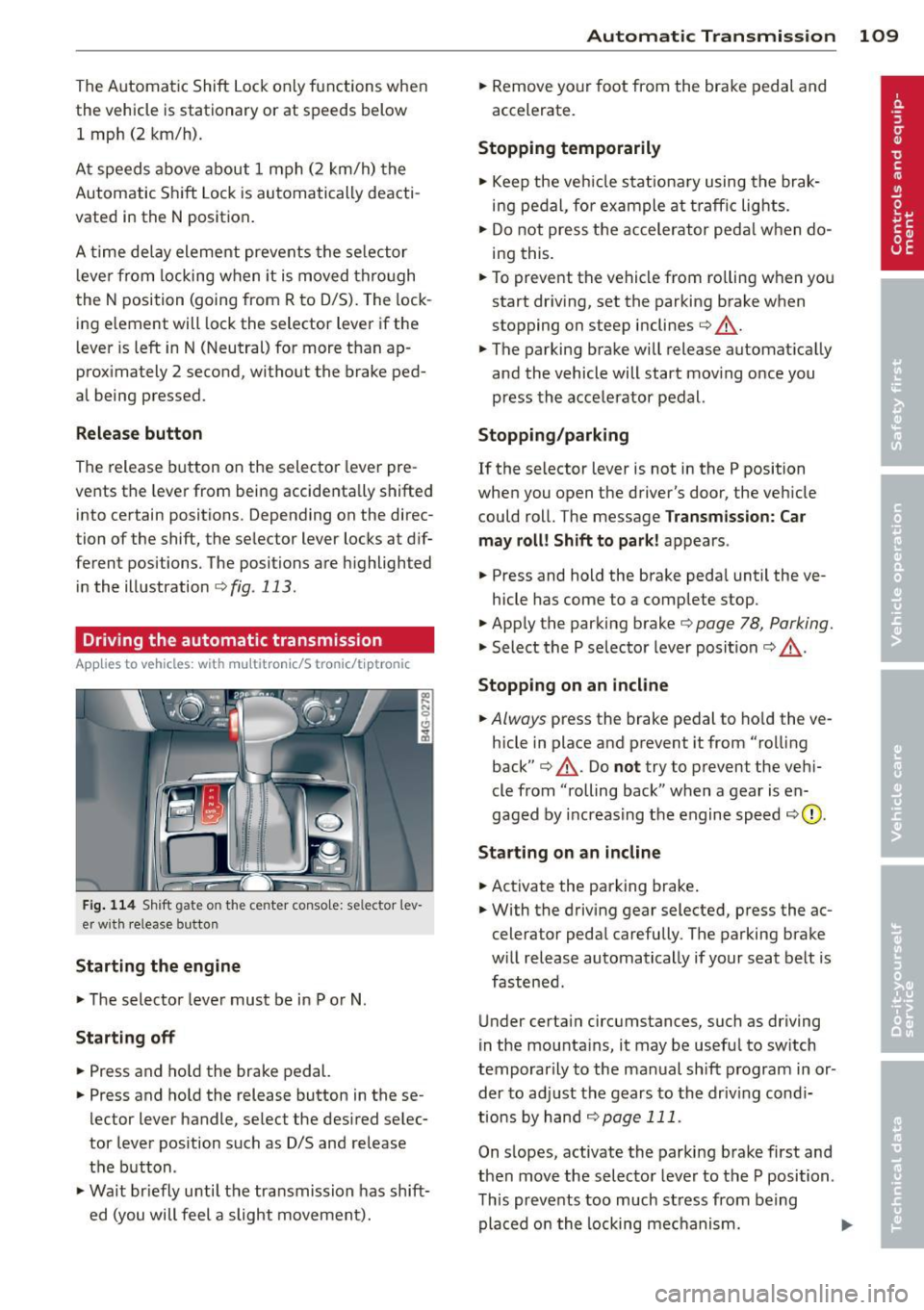
Fig . 114 Sh ift gate on the center conso le: selector lev
er w ith release button
Starting the engine
.., The selector lever must be in P or N .
Starting off
.., Press and ho ld the brake pedal.
.., Press and hold the release button in these
lector lever handle, se lect the desired selec
tor lever pos ition such as D/S and release
the button .
.., Wa it br iefly until the transmission has sh ift
ed (you will feel a slight movement).
Automatic Tra nsmi ssi on 109
.., Remove your foot from the brake pedal and
accelerate.
Stopping t emporarily
.., Keep the veh icle stationa ry using the brak
ing pedal , for example at traffic lights.
.., Do not press the accelerator peda l w hen do
ing this .
.., To prevent the vehicle from ro lling when you
start dr iving, set the parking brake when
stopping on steep inclines¢.&_ .
.., The parking brake will release automat ically
and the vehicle will start mov ing once you
press the accelerator pedal.
Stopping /parking
If the selector lever is not in the P position
when you open the driver's door, the vehicle
could roll. The message
Transm ission: Car
may roll! Shift to park !
appears.
.., Press and hold the brake peda l until the ve-
hicle has come to a complete stop .
.., Apply the parking brake¢
page 78, Parking.
.., Select the P selector lever posit ion c::> ,&. .
Stopping on a n incline
.., Always press the brake pedal to ho ld the ve
hicle in place and prevent it from "rolling
back"
c::> .&_ . Do not try to prevent the veh i
cle from "rolling back" when a gear is en
gaged by increas ing the engine speed
c:::, (D ,
Sta rting on an incline
.., Activate the parking brake .
.., With the driving gear selected, press the ac
celerator peda l carefully. The parking brake
w ill release automatically if your seat belt is
fastened .
Under certain circumstances, such as driving
in the mounta ins, it may be useful to switch
temporarily to the manual shift program in or
der to ad just the gears to the driv ing cond i
tions by han d
¢page 111.
On s lopes, activate the parking brake first and
then move the selector lever to the P position .
This prevents too much stress from being placed on the locking mechanism. .,.
Page 112 of 304
110 Automatic Tran sm iss ion
multitronic transmission : Your vehicle is
equipped with
hill hold assist allowing you to
start while on an incline. The system is acti
vated when the brake pedal is pressed down
and held
f o r a few s econds . The brake pres
sure will hold for
a moment after the brake
pedal loosens to prevent the veh icle from roll
ing backwards whi le starting up .
A WARNING
- The veh icle can also roll when the engine
is stopped.
- Unintended veh icle movement can cause
serious injury .
- Never leave your vehicle with the eng ine
running wh ile in gea r. If you must leave
yo ur vehicle when the engine is running,
act ivate the park ing brake and move the
selector lever to P .
- Power is st ill transmitted to the whee ls
when the engine is running at idle . To
prevent the vehicle from "creeping", you
must keep your foot on the brake when
the engine is running and the selector
lever is in D/S or R or "tiptronic" mode is
selected.
- Do not press the accelerator pedal when
changing the selector lever pos ition
wh ile the vehicle is stat io nary and the
engine is running .
- Never shift into R or P wh ile driving .
- Before driv ing down a steep slope, re-
duce your speed and shift into a lower
gear with "tiptronic" .
- Do not ride the brakes or press the brake
pedal too often or too long when dr iving
down a hill. Constant braking causes the
brakes to overheat and substant ially re
duces b raking performance, inc reases
braking distance or causes comp lete fail
ure of the brake system.
- T o prevent the veh icle from rolling back
when stoppi ng on incl ines, always hold it
in place with the brake peda l or parking
brake.
- Never hold the veh icle on an incl ine with
a slipping clutch. The clutch opens auto
matically when it becomes too hot from the overload. An indicato
r lamp
[O] illu
minates and a driver message appears
¢ page 112 when the clutch is overload
ed.
- If the engine must remain running, never
have any driving posit io n engaged when
checking under the hood . Make sure the
selector lever has securely engaged and is locked in P with the park ing brake set
¢ page 224. O therwise, any increase in
engine speed m ay se t the vehicle in mo
tion, even with the parking brake ap plied .
(D Note
-S tronic- and tiptronic transmission :
When stopping on an incl ine , do not try
to hold the vehicle in place by pressing
the acce lerator pedal while a driving gear
is se lected. This can cause the transmis
sion to overheat and can damage it. Acti
vate the parking brake or press the brake
peda l to prevent the vehicle from roll ing.
- S tronic- and tiptronic transmission : A l
lowing the vehicle to ro ll when the en
gine is stopped and the selector lever is
in N will damage the transmission be
cause it is not l ubricated unde r those cir
cumstances.
{!) Tips
For safety reasons, the parking brake is re
l eased automatically only when the d riv
er's safety belt is engaged in the buckle.
Hill descent control
Applies to vehicles: with multitro nic/5 tronic/t iptronic
The hill descent control system assists the
driver when driving down declines .
Hill descent control is activated when these
lector lever is in D/S and you press the brake
pedal. The transmission automatically selects
a gear that is sui table fo r the incline. H ill de
scent contro l tries to ma inta in the speed ach-
ieved at the time of b raking, with in physica l .,.
Page 128 of 304
126 Homelink
Homelink
Universal remote
control
General information
Applies to vehicles: with Homelink u nive rsal remote con
tro l
The HomeLink universal remote control can
be programmed with hand-held transmitters
from existing equipment.
With Homelink, you can control devices such
as the garage door, security systems, house
lights, etc. comfortably from the inside of you
vehicle.
Homelink makes it possible for you to replace
three different remote controls from devices in your home with one universal remote . Th is
feature works for most garage door and exte
rior door motor signals. Programming the in
d iv idual remo te control fo r your remote con
trol takes p lace near the center of the radiator
grille. There is a control module attached at
this location .
A one-t ime programm ing of the sensor mus t
be performed before you are able to use sys
tems w ith Homelink.
A WARNING
- Never use the Homelink transmitter
with any garage door opener that does
have not the safety stop and reverse fea
ture as requ ired by federal safety stand
ards. Th is includes any garage door open
er model manufactured before April 1, 1982.
- A garage door opener which cannot de
tect an object, signaling the door to stop
and reverse does not meet current feder
al safety standards . Us ing a garage doo r
opener witho ut these fea tures increases
risk of serious injury or death.
- For safety reasons never release the
parking brake or start the engine while
anyone is standing in front of the vehicle .
- A garage door or an estate gate may
sometimes be set in motion when the Homelink remote control is being pro
grammed. If the device is repeatedly ac
tivated, this can overstrain motor and
damage its electrical components -an
overheated motor is a fire hazard!
- To avo id possible injuries or property
damage, please always make absolutely
certa in that no persons or objects are lo
cated in the range of motion of any
equ ipment being operated.
(0 Tips
- If you would like additional information
on the Homelink Un iversal Transceiver,
Homelink compatible products, or to
purchase other accessories su ch as the
Homelink Lighting Package, please con
tact Homelink at 1 -800-355-3515 or on
the Internet at www.homelink.com.
- For Declara tion of Comp liance to United
States FCC and Ind ustry Canada reg ula
tions¢
page 286 .
-For security reasons, we recommend that
you clear the programmed b uttons be
fore selling the ve hicle .
Operation
Appl ies to vehicles: wit h Ho melink
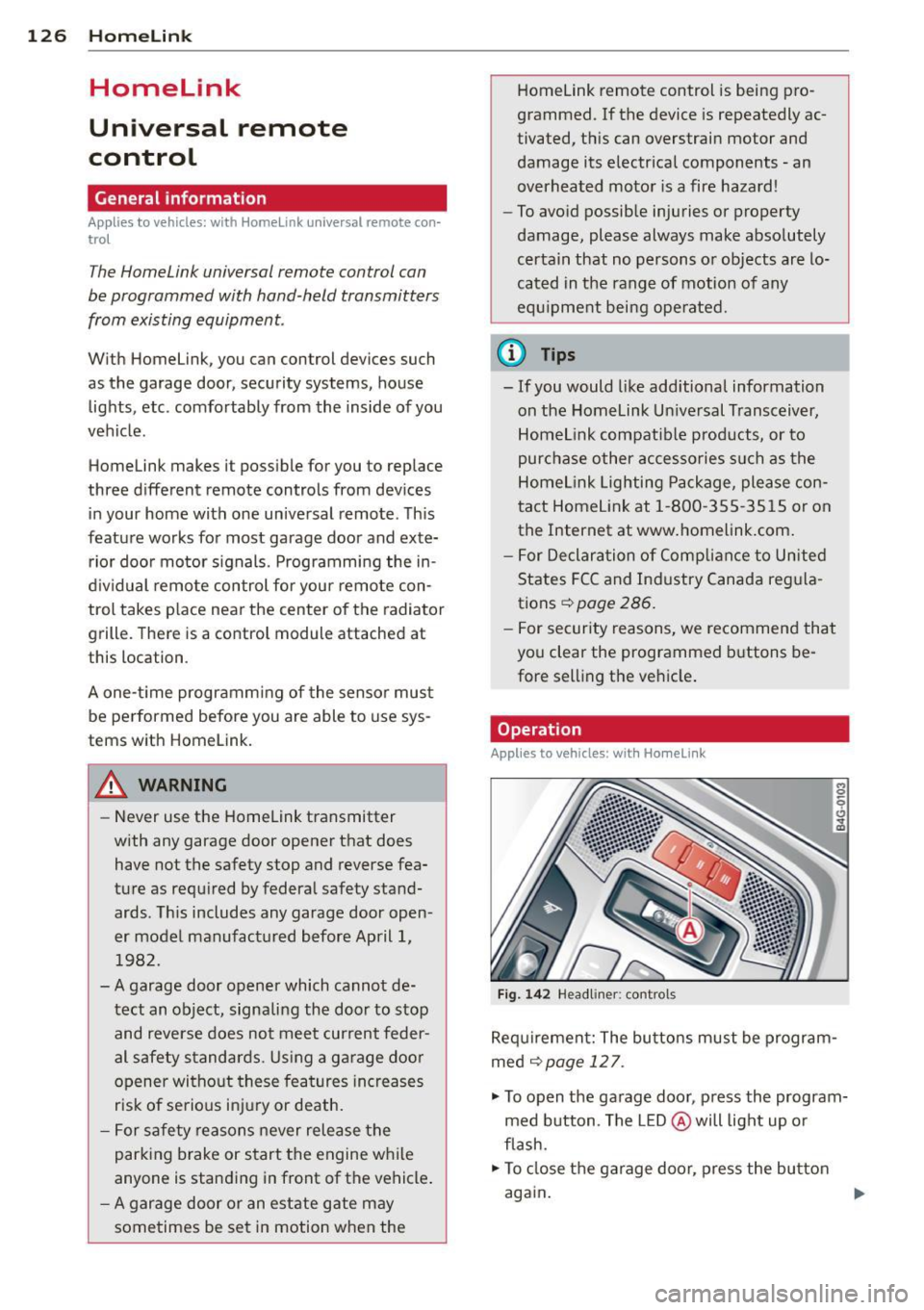
Fig . 14 2 Headliner: controls
M 0
9 (!)
~
Requirement: The buttons must be program
med
¢page 127.
"'To open the garage door , press the program
med b utton . The LED @ will light up o r
flash.
"' To close the garage door, press the button
again .
Ill>
Page 210 of 304
208 Trailer towing
Always apply brakes early. When driving
downhill, shift into a lower gear to use the en
g ine braking effect to slow the vehicle . Use of
the brakes alone can cause them to overheat
and fail.
Coolant temperature
The coolant temperature gauge¢ page 11
must be observed carefully. The coolant tem
perature can increase if you drive on long in
clines in a low gear at high engine speeds. Re
duce your speed immediately if the LEDs in
the top part of the display turn on .
For more information about indicator lights,
refer to.
¢ page 17 .
A WARNING
Anyone not properly restrained in a mov
ing vehicle is at a much greater risk in an
accident . Never let anyone r ide in your car
who is not properly wear ing the restraints
provided by Aud i.
Trailer towing tips
Important to know
Your vehicle handles differently when towing
a trailer because of the additional weight and
different weight distribution . Safety, perform
ance and economy w ill greatly depend on how
carefully you load your trailer and operate
your rig .
Before you actually tow your trailer, practice
turn ing, stopp ing and back ing up in an area
away from traffic. Keep practicing until you
have become comp lete ly familiar with the way
your ve hicle-trai ler comb ination behaves and
responds.
Backing up is difficult and requires practice .
Backing up with a tra iler generally requi res
steering act ion opposite to that when backing
up your vehicle without a trailer.
Maintain a greater distance between your ve
hicle and the one in front of you. You will need
more room to stop. To compensate for the trailer, you wi
ll need a larger than normal
turning radius.
When passing, remember that you cannot ac
celerate as fast as you norma lly would be
cause of the added load. Make sure you have
enough room to pass . After passing, a llow
plenty of room for your trailer before chang
ing lanes again.
Avoid jerky starts , sharp turns or rapid lane
changes.
(D Tips
- Do not tow a trailer during the break-in
period of your vehicle.
- If you tow a trailer, your Audi may re
quire more frequent maintenance due to
the extra load ¢
page 283.
Parking on a slope
Do not park on o slope with a trailer. If it can
not be avoided, do so only after doing the fol
lowing:
When parking:
.,. App ly the foot brake .
.. Have someone place chocks under both the
vehicle and the trailer wheels.
.. With chocks in place, slowly release the
brakes until the wheel chocks absorb the
load .
.. Turn the wheels towards the curb.
.. Apply the parking brake.
.. Select the P selector lever position .
When restarting after parking:
.. Apply the foot brake.
.. Start the engine.
.. Select the D/S selector lever position .
.. Release the parking brake and slowly pull
out and away from the wheel chocks .
.,. Stop and have someone retr ieve the wheel
chocks .
Ill-
Page 211 of 304
@ Tips
If you move the selector lever of the auto
mat ic transm ission to P before app lying
the parking brake and before blocking the
wheels, you may have to use more force later to move the lever out of the P posi
tion .
Trailer towin g 209
•
•
Page 226 of 304
224 Checking and filling
Checking and filling Engine hood
Releasing the engine hood
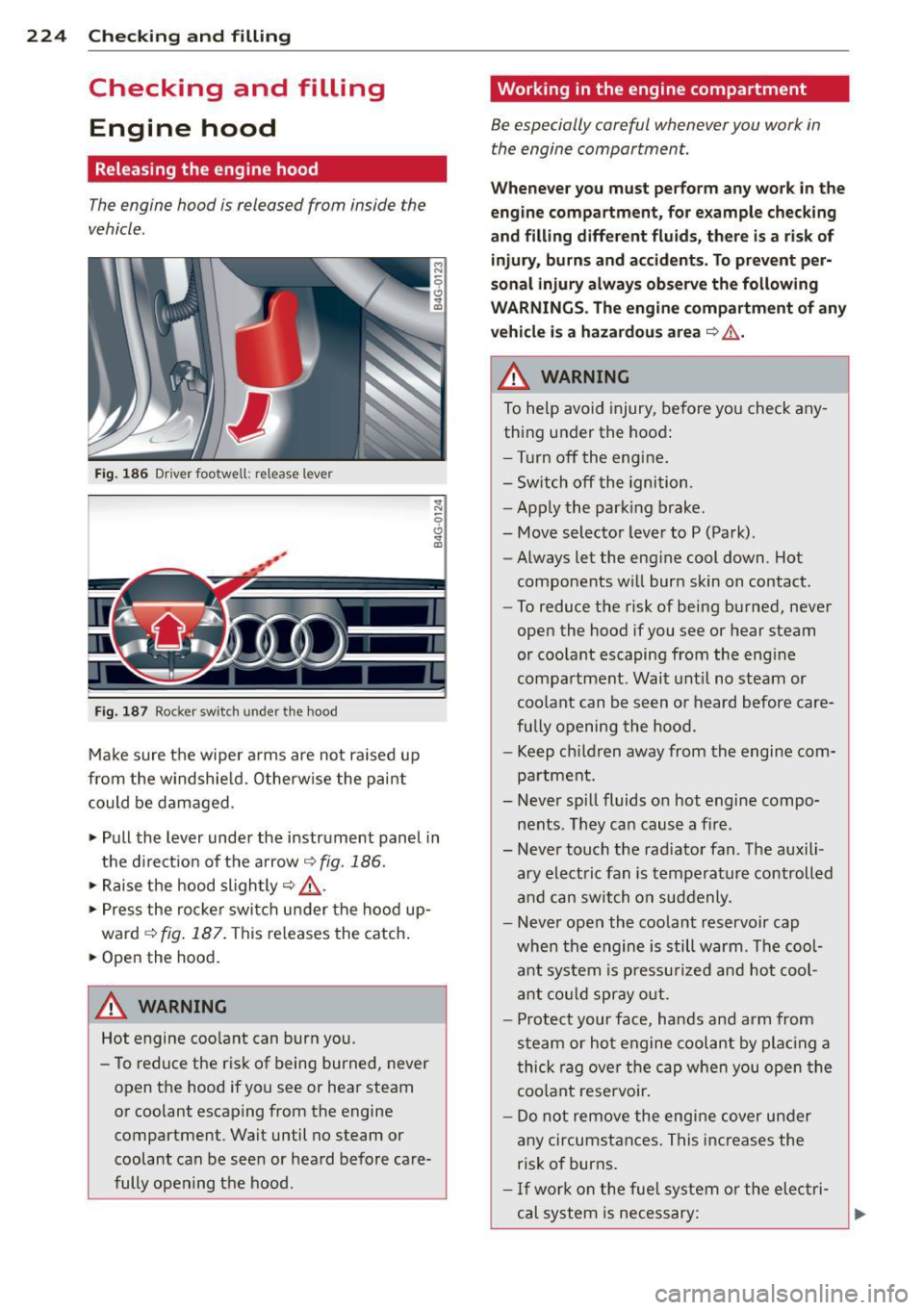
The engine hood is released from inside the
vehicle .
Fig. 186 Driver foo twell: release lever
Fig. 187 Rocker switch un der the hood
Make sure the wiper arms are not raised up
from the windshield. Otherwise the paint
could be damaged .
.,. Pull the lever under the instrument panel in
the direction of the arrow
¢ fig. 186.
.,. Raise the hood slightly¢,&. .
... Press the rocker switch under the hood up
ward
~ fig. 187. This releases the catch.
• Open the hood.
&_ WARNING
Hot engine coolant can burn you.
- To reduce the risk of being burned,
never
open the hood if you see or hear steam
or coolant escaping from the engine compartment . Wait until no steam or
coolant can be seen or heard before care
fully opening the hood .
'Working in the engine compartment
Be especially careful whenever you work in
the engine compartment.
Whenever you must perform any work in the
engine compartment, for example checking
and filling different fluids, there is a risk of injury, burns and accidents. To prevent per
sonal injury always observe the following
WARNINGS. The engine compartment of any
vehicle is a hazardous area
¢ ,&. .
A WARNING
To help avoid injury, before you check any
thing under the hood:
- Turn off the engine.
- Switch off the ignition .
- Apply the parking brake.
- Move selector lever to P (Park).
- Always let the engine cool down. Hot
components will burn skin on contact.
- To reduce the risk of being burned, never
open the hood if you see or hear steam
or coolant escaping from the engine
compartment. Wait until no steam or
coolant can be seen or heard before care
fully opening the hood.
- Keep children away from the engine com
partment.
- Never spill fluids on hot engine compo
nents . They can cause a fire .
- Never touch the radiator fan. The auxili
ary electric fan is temperature controlled
and can switch on suddenly .
- Never open the coolant reservoir cap
when the engine is still warm . The cool
ant system is pressurized and hot cool
ant could spray out.
- Protect your face, hands and arm from
steam or hot engine coolant by placing a
thick rag over the cap when you open the
coolant reservoir.
- Do not
remove the engine cover under
any circumstances. This increases the
risk of burns.
- If work on the fuel system or the electri
cal system is necessary:
Page 227 of 304
-Always disconnect the battery.
- Never smoke or work near heaters or open flames. Fluids in the engine com
partment could start a fire.
- Keep an approved fire extinguisher im
mediately available.
- To avoid electrical shock and personal in
jury while the engine is running or being
started, never touch :
- Ignition cables
- Other components of the high voltage
electronic ignition system.
- If you must perform a check or repair
with the engine running:
- First, fully apply the parking brake,
move selector lever to P (Park).
- Always use extreme caution to prevent
clothing, jewelry, or long hair from get
ting caught in the radiator fan, V-belts
or other moving parts, or from contact ing hot parts. Tie back hair before
starting, and do not wear clothing that
will hang or droop into the engine.
- Minimize exposure to emission and
chemical ha zards c:::> & .
A WARNING
California Proposition 65 Warning:
- Engine exhaust, some of its constituents,
and certain vehicle components contain
or emit chemicals known to the State of
California to cause cancer and birth de
fects and reproductive harm. In addition ,
certain fluids contained in vehicles and
certain products of component wear con
tain or emit chemicals known to the
State of California to cause cancer and
birth defects or other reproductive harm .
Checking and filling 225
-Battery posts, terminals and related ac
cessories contain lead and lead com
pounds, chemicals known to the State of
California to cause cancer and reproduc
tive harms. Wash hands after handling.
(D Note
When adding fluids, always make sure that
they are poured into the proper container
or filler opening, otherwise serious dam
age to vehicle systems will occur.
(® For the sake of the environment
To detect leaks in time, inspect the vehicle
floor pan from underneath regularly . If
you see spots from oil or other vehicle flu ids, have your vehicle inspected by an au
thorized Audi dealer.
Closing the engine hood
.,. Pull the hood down until the pressure from
the struts is reduced.
"'Let the hood
drop down and latch in place.
Do not try to push it shut; it may fail to en
gage
c:::> ,A .
A WARNING
-
A hood that is not completely latched
could fly up and block your view while driv
ing .
- When you close the engine hood, check it
to make sure the safety catch has proper ly engaged. The hood should be flush
with the surrounding vehicle body parts.
- If you notice while driving that the hood
is not secured properly , stop at once and
close it. •
•
Page 272 of 304
2 70 Fuses and bulbs
Fuses and bulbs
Fuses
Replacing fuses
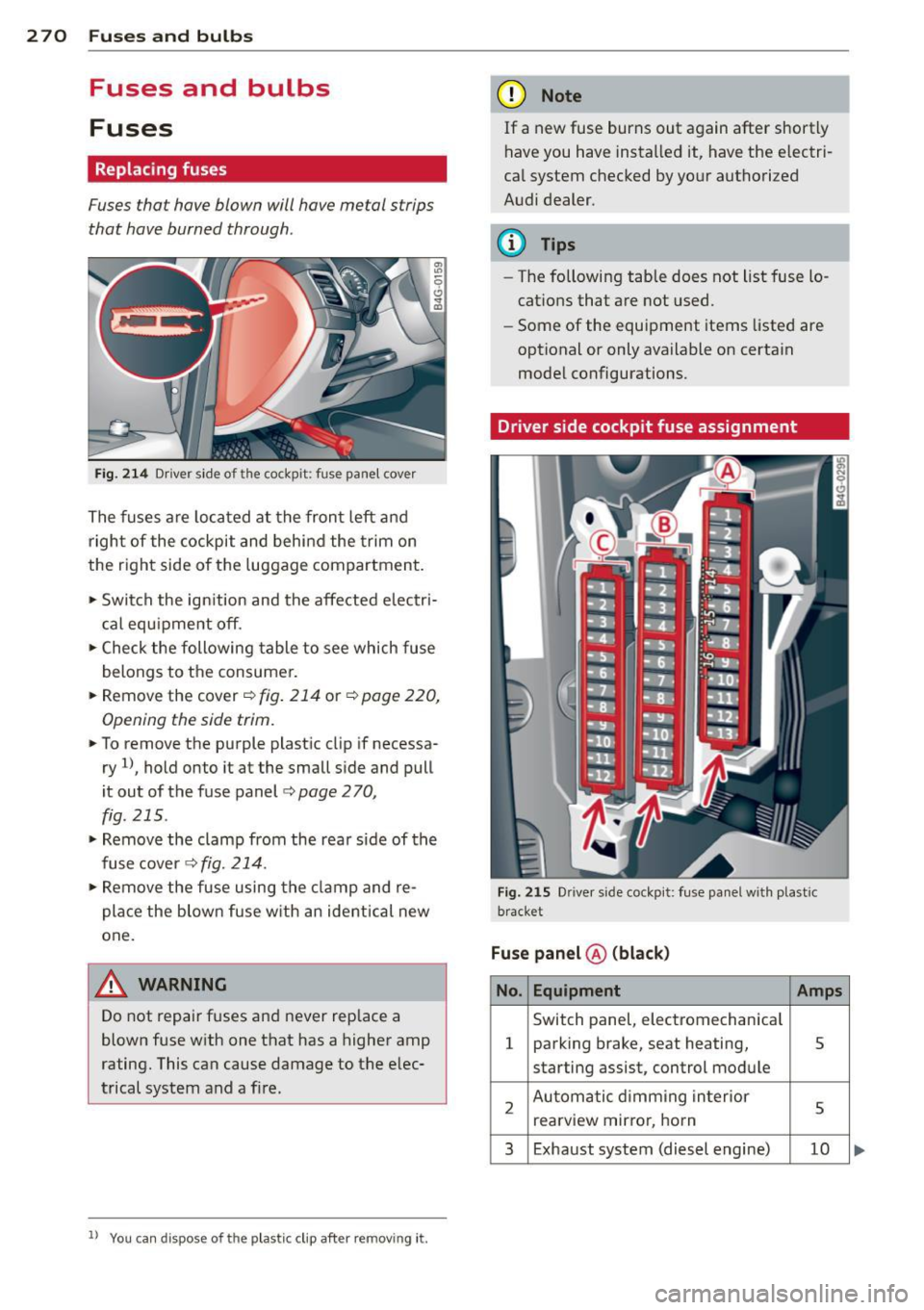
Fuses that have blown will have metal strips
that have burned through.
Fig. 214 Dr iver side of the cockpit: fuse panel cover
The fuses are located at the front left and
right of the cockpit and behi nd the trim on
the right side of the luggage compartment.
• Switch the ign ition and the affected electri
c al equ ipment off.
• Check the following table to see which fuse
belongs to the consumer.
• Remove the cover ¢
fig. 214 or¢ page 220,
Opening the side trim.
• To remove the purple plast ic clip if necessa
ry
ll, hold onto it at the small side and pull
i t out of the fuse panel
c:> page 2 70,
fig. 215 .
• Remove the clamp from the rear s ide of the
fuse cover ¢
fig. 214.
• Remove the fuse using the cla mp and re
pla ce the blown fuse w ith an ident ical new
one.
A WARNING
Do not repair fuses and never rep lace a
blown fuse with one that has a higher amp
rating. This can cause damage to the e lec
trical system and a fi re.
ll You can dis pose of the plastic clip after removing it.
(D Note
If a new fuse burns out again after shortly
have you have installed it, have the electri
ca l system checked by yo ur authorized
Audi dealer.
(D Tips
- The following table does not list fuse lo
cations that are not used .
- Some of the equipment items listed are
optional or only available on certain
model configurations.
Driver side cockpit fuse assignment
Fig . 2 15 Dr iver side cockpit: fuse pa nel w ith plast ic
bracket
Fuse panel ® (blac k)
No. Equipment Amps
Switch panel, electromechan ica l
1 parking brake, seat heating, 5
starting assist, control module
2 Automatic d imming in terior
5 rea rview mirro r, horn
3 Exhaust system (diesel engine) 10
Page 274 of 304
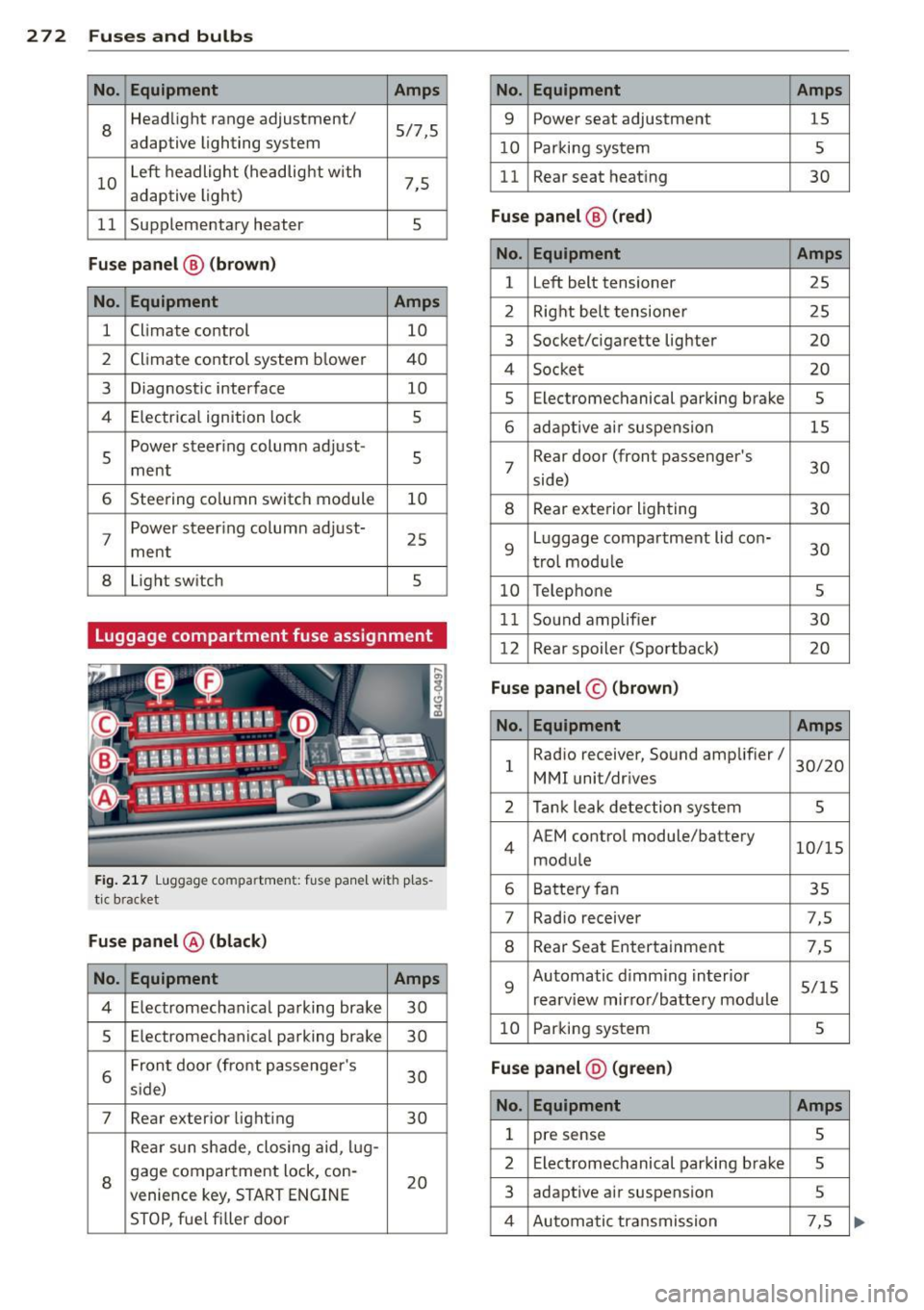
272 Fu ses and bulb s
No. Equ ipment Amps
8
Headlight range adjustment/
5/7,S
adaptive lighting system
10 Left headlight
(headlight with
7,5
adaptive light)
11 Supplementary heater
s
Fu
se p ane l@ (b ro w n)
No . Equipment Amps
1 Climate control
10
2 Climate control system blower 40
3 Diagnostic interface
10
4 E lectrical ignition lock
s
s
Power steering column adjust-
s ment
6 Steering column switch module
10
7 Power
steering column adjust-
ment 25
8 Light switch
s
Luggage compartment fuse assignment
Fig
. 217 Luggage compartment: fuse panel with plas
tic bracket
Fuse p anel @ (b la ck )
No. Equipment Amps
4 E lectromechanical parking brake 30
s Electromechanical parking brake
30
6 Front door
(front passenger's
30
s ide)
7 Rear exter ior lighting
30
Rear sun shade, closing aid, lug-
8 gage compartment
lock, con-
20
venience key, START ENGINE
STOP, fuel filler door
No. Equipment Amps
9 Power seat adjustment
15
10 Parking system
s
11 Rear seat
heating
30
Fuse pan el@ (r e d )
No . Equipment Amps
l Left belt tensioner
25
2 Right belt tensioner 25
3 Socket/cigarette
lighter
20
4 Socket 20
5 Electromechanical
parking brake
5
6 adaptive ai r suspension 15
7 Rear door
(front passenger's
30
side)
8 Rear exterior lighting 30
9 Luggage compartment
lid con-
30
t rol modu le
10 Telephone 5
11 Sound amplifier 30
12 Rear
spoiler (Sportback)
20
Fuse pan el© (brown)
No . Equipment Amps
1 Radio receiver,
Sound amplifier/
30/20
MMI unit/drives
2 Tank leak detection system
s
4 AEM
control module/battery
10/15
module
6 Battery fan 35
7 Rad
io receiver 7,5
8 Rear Seat Entertainment 7,5
9 Automatic d
imming interior
5/15
rearview mirror/battery module
10 Parking system 5
Fuse pan el@ (gre en)
No . Equipment Amps
1 pre sense 5
2 Electromechanical parking brake
s
3 adaptive
air suspension
5
4 Automatic transmission 7,5