Safe AUDI A6 2015 User Guide
[x] Cancel search | Manufacturer: AUDI, Model Year: 2015, Model line: A6, Model: AUDI A6 2015Pages: 314, PDF Size: 77.57 MB
Page 21 of 314
M N
0 <.J 'SI: ,...., \!) ..,.,
,...., ..,., ,....,
Instrument s and warnin g/indic ator ligh ts 19
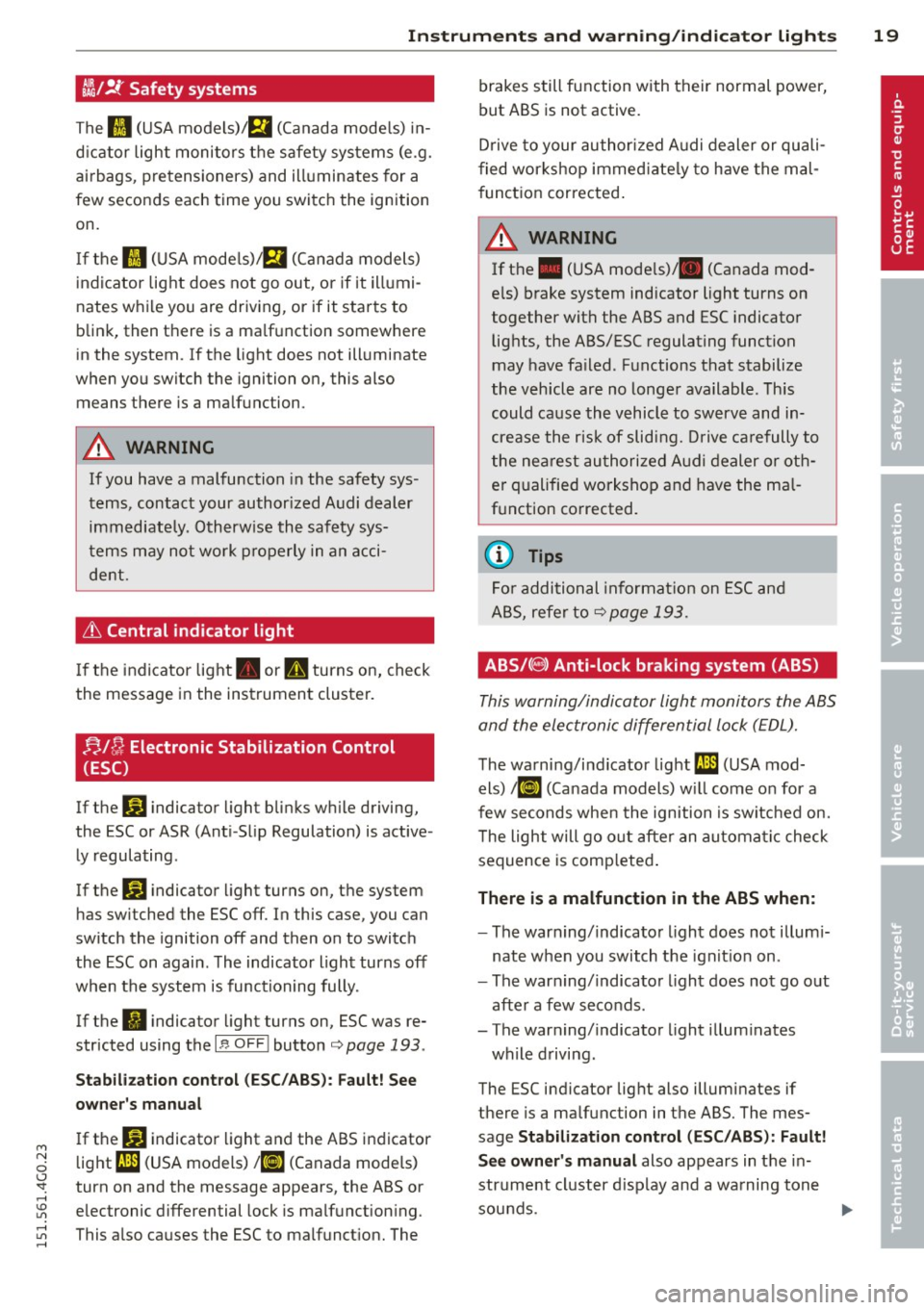
~/ !J.: Safety systems
The fl (USA models)/ E,I (Canada mode ls) in
d icator light moni tors the safety systems (e.g.
airbags, pretensioners) and illuminates for a
few seconds each time you switch the ignition
on.
If the II (USA mode ls)/ E,I (Canada models)
indicator light does not go out, or if it illumi
nates while you are driving, or if it starts to
blink, then there is a ma lfunction somewhere
in the system.
If the light does not illuminate
when you switch the ignition on, this also means there is a malfunction.
A WARNING
If you have a malfunction in the safety sys
tems, contact your author ized Audi dealer
immediately. Otherw ise the safety sys
tems may not wo rk p roperly in an acci
dent.
& Central indicator light
I f the indicator light . or II turns on, check
the message in the instrument cluster.
f;.J ~ Electronic Stabilization Control
(ESC)
If the J.i3 indicator light blinks wh ile driving,
the ESC or ASR (Ant i-Slip Regulation) is active
ly regulating .
If the
G1 indicator light turns on, the system
has sw itched the ESC off. In this case, you can
switch the ignition off and then on to switch
the ESC on again. The indicator light turns off
when the system is functioning fully.
If the
fl indicator light turns on, ESC was re
stricted using the
I ~ OF FI button¢ page 193 .
Stabilization cont rol (E SC /AB S): F ault! See
owner 's manu al
If the DJ indicator light and the ABS indicator
light
f;U1 (USA models) 1 11] (Canada mode ls)
turn on and the message appears, the ABS or
electronic differential lock is ma lfunction ing .
This a lso causes the ESC to malfunct ion. The brakes still function with their normal power,
but ABS is not active.
D
rive to your author ized A udi dealer or quali
f ied wor kshop immed iate ly to have the mal
f unct ion corrected .
A WARNING
If the . (USA mode ls)/ . (Canada mod
e ls) brake system indicator light turns on
together with the ABS and ESC indicator
lights, the ABS/ESC regulating function
may have fa iled. Functions that stabilize
the vehicle are no longe r available. Th is
could cause the vehicle to swerve and in
crease the risk of sliding. Drive ca refully to
the nea rest authori zed Audi dealer or oth
e r qualified workshop and have the ma l
f u nction corrected.
(D Tips
For additional informat ion on ESC and
ABS, refer to
¢page 193.
ABS/(8) Anti-lock braking system (ABS)
This warning/indicator light monitors the ABS
and the elec tronic differential lock (EDL).
The wa rning/indicator light f;U1 (USA mod-
els)
I ii] (Canada models) w ill com e on for a
few seconds whe n the ignition is switched on.
T he light will go o ut after an automa tic check
sequence is comp leted .
There is a malfunct ion in the ABS when:
- The warn ing/indicator light does not illum i
nate when you switch the ign it ion on.
- The warn ing/indicato r light does not go out
after a few seconds.
- The warning/indicator light illum inates
while driving.
The ESC indicator lig ht also illuminates if
there is a malfunction in the ABS. The mes
sage
S tab ilizat ion control (ESC /ABS ): Fault!
S ee owner's manual
also appears in the i n
strument cluster d isp lay and a warning tone
sounds.
~
Page 24 of 314
22 Instruments and warning/indicator lights
If the engine speed limitation was activated
by an engine control malfunction , the indica
tor light ~ also t urns on. Make sure that the
speed does not go above the speed displayed .
Drive to your authori zed Aud i dealer immedi
ately to have t he malfunction corrected .
If the symbol illuminates, contact your au
thor ized Audi dealer a nd have the o il sensor
i n spected . Until you have t his done , ch eck the
oil level each time you refuel just to be on the
safe side
c::> page 2 26 .
Bil Fuel level indicator
ID'J Plea se refuel
If the indicator light turns on fo r the fi rs t
time and the message app ears, ther e ar e
about 2.6 gallons (10 liters) of f ue l left in the
t an k. T ime to refue l
c::>page 216 .
Ill Tank system malfunction! Contact dealer
If the i ndicator light tu rns on and t his mes
sage appears, t here is a ma lfunction in the
tank system .
Drive to yo ur autho rized Aud i dea ler immedi
ately to have t he malfunction corrected.
~ Windshield washer fluid level
~ Please refill washer fluid
If the symbo l illuminates, add windshield
washer f luid to the washer system/headlight
washer system*
c::> page 235.
~• Windshield wipers
m Windshield wiper defective
There is a malfunct io n with the w indshield
wipers.
D rive to yo ur autho rize d Au di dea ler immedi
ate ly to have t he malfunction cor rected .
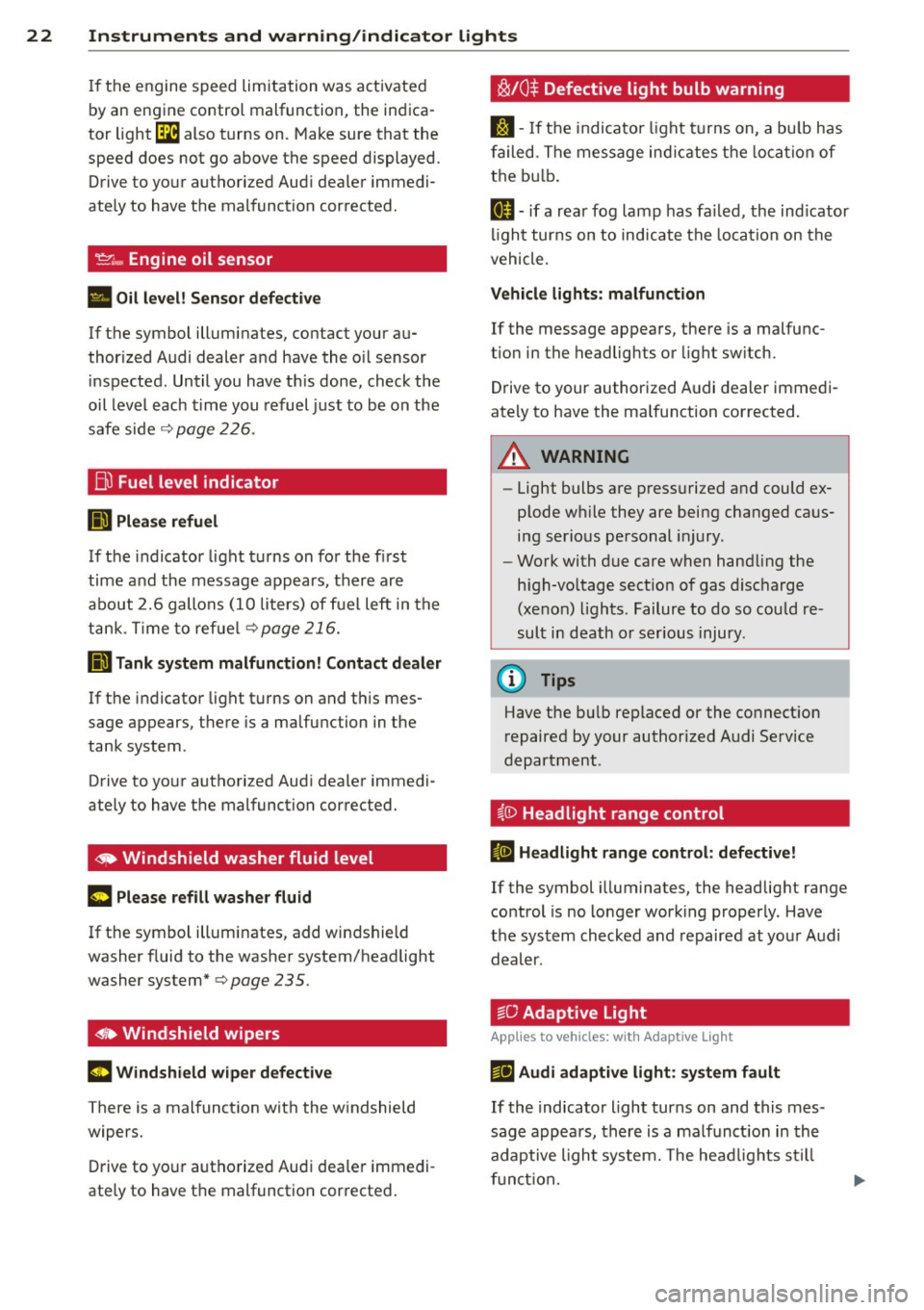
~/0$ Defective light bulb warning
S:j -If t he in dicato r light tu rn s on, a bu lb h as
f ailed. The message in dicates t he loca tio n of
t h e b ulb .
II-if a rea r fog lamp has fa iled , the ind icator
li gh t tur ns on to ind icate the loca tion on the
vehicle.
Vehicle lights : malfunction
If the message appears, there is a malfu nc
t ion in the headlights o r light sw itch.
Drive to your authorized A udi dealer immedi
ate ly to have the ma lfunction corrected.
.&_ WARNING
- Light bulbs a re pr ess urized and could ex
p lode w hile they are being changed ca us
i n g s erio us pe rsonal injury .
- Wo rk with due care when han dling the
h igh-vo ltage sect io n o f gas disc harge
(xe non) ligh ts. Failur e to do so could re
s ult in death or ser ious injury .
(D Tips
Have t he b ulb replaced or the co nnect ion
r epaired by y our auth orized A udi Se rvice
d epartment .
~{i) Headlight range control
II Headlight range control : defective!
If the symbol illuminates, the headlig ht range
control is no lo nger wor king properly . Have
t h e sys tem checked and repaired at yo ur Audi
d eal er.
:sO Adaptive Light
App lies to veh icles : w ith Adapt ive lig ht
r!J Audi adaptive light: sy stem fault
If the indicato r light turns on and this m es
sage appears, there is a malf unct io n in th e
adaptive ligh t syste m. The head lig ht s s till
funct ion.
Page 25 of 314
M N
0 <.J 'SI: ,...., \!) 1.1'1 ,...., 1.1'1 ,....,
Instruments and warning/indicator lights 23
Go to an authorized dea lership to have the
headlights or the contro l unit for the Adaptive
Light repaired.
fi.D Light/rain sensor
El Automatic headl ights/automatic wipers:
system fault
If the indicator light t urns on and this mes
sage appears, the light/rain sensor is not
functioning correctly .
F or safety reasons the low beams are turned
on permanent ly with the switch in
AUTO.
However, you can continue to turn the lights
on and off using the light switch. You can still
control all funct ions that are independent of
the rain sensor through the windsh ield wiper
lever .
Contact your author iz ed Audi dealer as soon
as possible to have the problem corrected.
I-: Sport differential
App lies to vehicles: with sport different ia l
IIJ Sport differential: system fault
There is a malfunct ion with the sport differen
tial.
Drive to your authorized Audi dea ler immedi
ately to have the malfunction corrected.
IIJ Sport differential : overheating
The transmission temperature has increased
sig nificantly due to the sporty dr iv ing manner .
Dri ve i n a less sporty manner until the tem
perature returns to the normal range and the
indicator light switches of .
A WARNING
Contact your authorized Audi dealer or a
qualif ied workshop if the sport differential
is faulty or ma lfunctioning. The repa ir
must be performed by trained personnel
using the correct oil in order to ensure
safety .
-
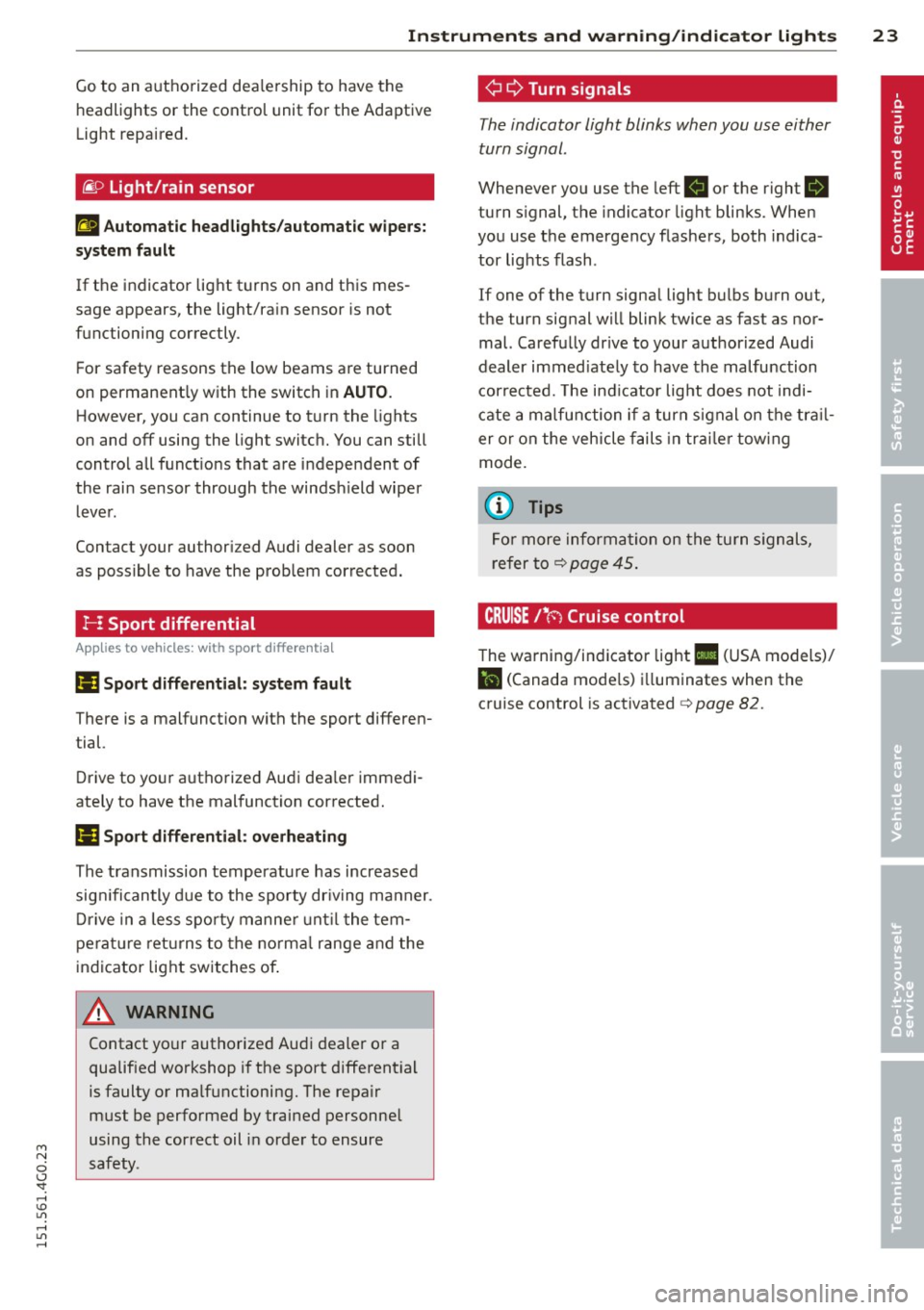
¢ Q Turn signals
The indicator light blinks when you use either
turn signal .
Whenever you use the left . or the right 1B
turn s ignal, the indicator light blinks. When
you use the emergency flashers, both indica
tor lights flash .
If one of the turn signa l light bulbs burn out,
the turn signal will blink twice as fast as nor
mal. Carefully dr ive to your authorized Audi
dealer immed iately to have the malfunction
corrected. The ind icator light does not indi
cate a malfunction if a turn signal on the trail
er or on the vehicle fails in trailer towing
mode.
(D Tips
For more information on the turn signals,
refer to
q page 45.
CRUISE/' (-) Cruise control
The warning/indicator light Ill (USA models)/
l'I (Canada mode ls) illuminates when the
cruise control is activated
q page 82.
Page 33 of 314
M N
0 I.J "". rl I.O
"' rl
"' rl
Opening and closing Keys
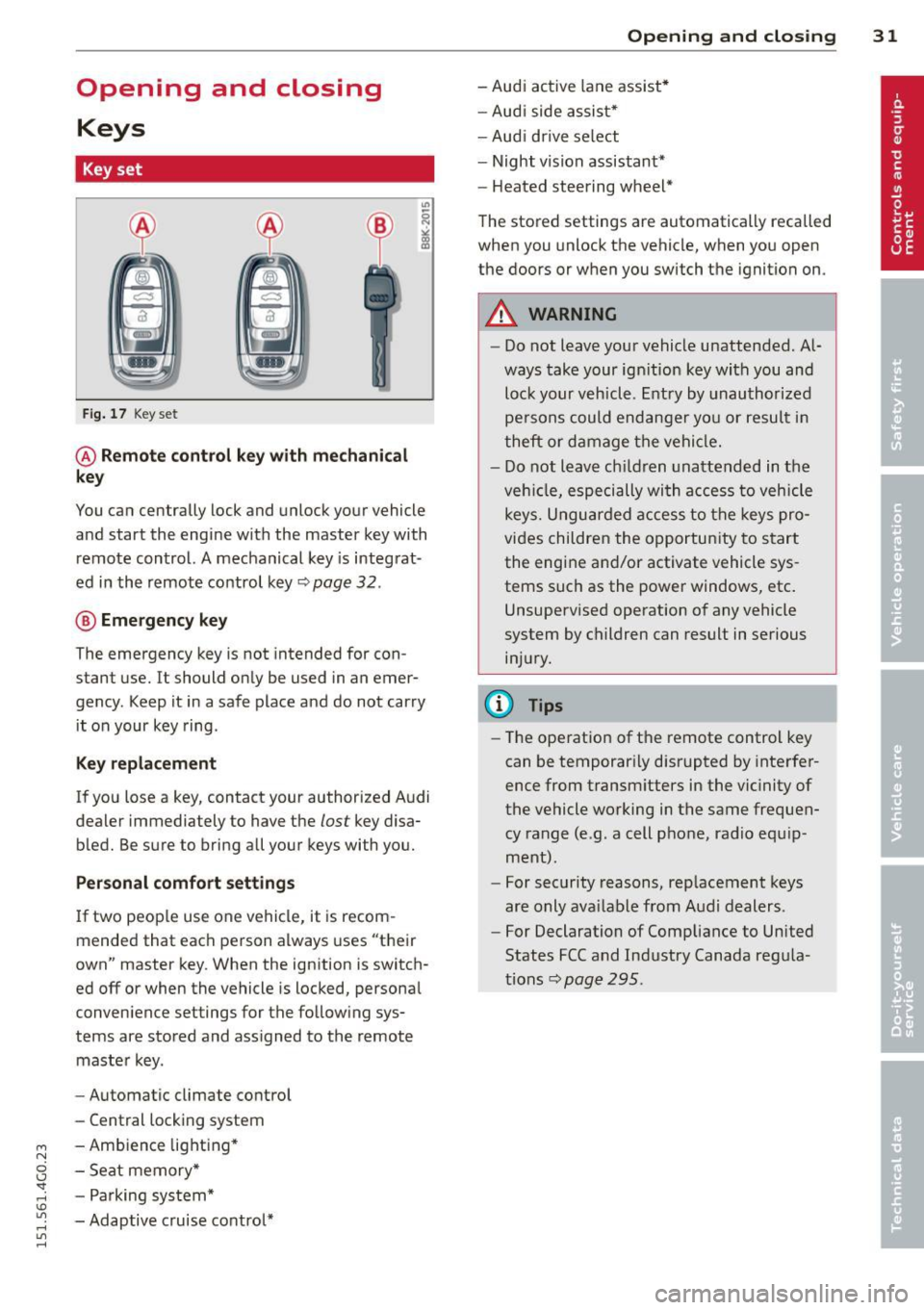
Key set
F ig. 17 Key set
@ Remote control k ey with mechanical
key
You can centrally lock and unlock your vehicle
and start the engi ne with the master key with
remote control. A mechanical key is integ rat
ed in the remote co ntrol key~ page
32 .
® Emergency key
The emergency key is not intended for con
stant use.
It should on ly be used in an emer
gency. Keep it in a safe place and do not car ry
it on your key ring .
Key replacement
If you lose a key, contact your authorized A udi
dealer immediately to have the
lost key disa
b led. Be s ure to bring all your keys with you.
Personal comfort settings
If two peop le use one vehicle, it is recom
mended that each person always uses "t heir
own" master key . When the ignition is switch
ed off or when the vehicle is locked, persona l
conven ience settings for the follow ing sys
tems are stored and ass igned to the remote
maste r key.
- Automatic cl imate contro l
- Central locking system
- Amb ience lig hting *
- Seat memory *
- P arking sys tem*
- Adaptive c ruise control*
Opening and clo sin g 31
- Audi ac tive lane assist *
- Au di side as sis t*
- Aud i drive se lect
- Night vision assistant*
- Heated stee ring wheel*
The stored settings are automatically recalled
when you unlock the vehicle, when you open
the doors or w hen you switch t he ignition on.
A WARNING
- Do not leave you r vehicle unattended. A l
ways take your ig nition key wi th you and
loc k your v ehicle. Entry by unau th or ize d
pe rsons could endanger yo u or resul t in
theft or d amage t he vehi cle.
- D o not leave c hildren una ttended in t he
veh icle, especi ally wi th a ccess to vehicle
key s. U ngu ard ed a ccess to t he keys pro
vi des childre n the o pportu nity to s tart
the eng ine a nd/or activate vehicle sys
tems such as the power windows, etc .
Unsupervised operation o f any vehicle
system by c hildren can result in serious
in ju ry .
(D Tips
- Th e ope ration of t he remote control key
can be temporar ily disrupted by inte rfer
ence fr om transm itters in the vic inity of
the vehicle working in the same fr equen
cy range (e.g. a cell p hone, radio e quip
m ent).
- Fo r security reasons, r eplacement keys
are only ava ilable from Audi dealers.
- For Declaration of C omp liance to Un ited
States FCC and Ind ustry Canada reg ula
tions~ page
295.
Page 35 of 314
M N
0 <.J 'SI: ,...., \!) ..,.,
,...., ..,., ,....,
for another vehicle or a transponder is located on the key ring.
- For Declaration of Compliance to United
States FCC and Industry Canada regula
tions
¢ page 295.
Power locking system
General description
The power locking system locks or unlocks all
doors and the rear lid simultaneously.
You can lock and unlock the vehicle centrally.
You have the following choices:
- Remote master key¢
page 34,
- Door handles with convenience key*
¢page 35 ,
- Lock cylinder at the driver's door
¢page 36, or
- Power locking switch inside¢
page 36.
Selective unlocking
When you lock the vehicle, the power locking
system will lock the doors and the rear lid.
When unlocking, you can set in the MMI
whether only the driver's door or the entire
vehicle should be unlocked
¢page 34.
Automatic locking
The automatic locking feature locks all the ve
hicle doors and the rear lid when you drive
faster than 9 mph (1S km/h).
T he car is unlocked again, when the opening
function in the power locking system switch
or at one of the door levers is actuated .
Anti-theft alarm warning system
If the anti-theft alarm warning system de
tects a break-in into the vehicle, acoustic and
visual warning signals are triggered .
T he anti-theft warning system is activated au
tomatically when you lock the vehicle . It is de
activated when unlocking using the remote key, with the mechanical key, and when you
switch the ignition on.
The alarm also turns off when the alarm cycle has expired .
Opening and closing 33
Turn signals
When you unlock the vehicle, the turn signals
flash twice. When you lock the vehicle the
turn signals flash once. If they do not flash ,
one of the doors, the rear lid or the hood is not locked.
Unintentionally locking yourself out
In the following cases there safeguards to
prevent you locking your remote master key in
the vehicle:
- The vehicle does not lock with the central
locking switch¢
page 36 if the driver's
door is open.
- On vehicles with convenience key*, if the
most recently used master key is in the lug
gage compartment, the rear lid is automati
cally unlocked again after it is closed.
Do not lock your vehicle with the
remote mas
ter key or convenience key*
until all doors
and the rear lid are closed. In this way you
avoid locking yourself out accidentally.
Power side door closer*
The vehicle doors are equipped with a power
side door closer. When closing a door, you on
ly have to let it fall lightly into the latch. The
door will then automatically close by itself
¢..1, .
A WARNING
-
- When you lock your vehicle from outside,
nobody -especially children -should re
main inside the vehicle. Remember,
when you lock the vehicle from the out
side the windows cannot be opened from
the inside.
- When you leave the vehicle, always take
the ignition key with you . This will pre
vent passengers (children, for example) from accidentally being locked in the ve
hicle should they accidentally press the
power locking switch in the doors.
- Do not leave children inside the vehicle
unsupervised. In an emergency it would
be impossible to open the doors from
the outside without the key.
Page 36 of 314
34 Openin g and clo sing
- Applies to vehicles with power side door
closer *:
- When closing a door, make sure noth
i ng can interfere w ith the doo r. T his
could cause ser ious perso nal inj ury.
- You ca n stop the door from clos ing at
any time by pulling on the inside or
out side door handle.
(0 Tips
- In the event of a c rash wi th airbag de
ployment a ll locked doo rs will be auto
m atically unlo cked to g ive access to the
vehicle occ upants from the outside.
- If the power loc king system should ma l
func tion, you can lo ck the dr iver's door
u sing the mechanical key
I:!> pdge 3 7.
- If the power locking system should fai l,
you can st ill open the f ue l t ank flap in a n
emergency ¢
page 218.
-You are well advised no t to keep valua
bles inside an unattended vehicle, visib le
or not . Even a properly locked vehicle
ca nnot provide the sec urity of a safe.
- If the LED in the up per edge of the driv
er's door panel comes on fo r abo ut
30
seconds after t he vehicle is locked, there
i s a ma lfunction in the power locking or
the anti-theft warning system. Have the
malfunction corrected by an author ized
A udi dealersh ip or qua lified repa ir fac ili
ty .
Setting power locking
The driver con determine the functions for
power locking in the MMI.
.,. Se lect : I CAR ! funct ion button > (Car )* sy s
tems
control button > Vehicle sett ings >
Central locking .
Unlock doors -You can decide if All doors or
only the
Dr iver should unlock. The rear lid al
so unlocks when
All is selected . If you select
Driver in a vehicle with a convenience key*,
only the door whose handle you pull will un l ock. If you se
lect
Dri ver, a ll the doors and rear lid
will unlock if you press them button on the re
mote control maste r key twice.
Loc k exterior trunk handle -If you se lect On ,
the rear lid handle is locked . In this case the
rear lid can be opened with the b utton
cs on
the master key or with the
cs button in the
driver's door . In veh icles with a convenience
key* , you can still open the rear lid using the
handle if an authorized master key is near the
proxim ity sensor .
Fold mir rors * -If you select On , the exterior
rearview mirrors fold in automatically when
you press the
~ button on the remote control
master key or touch the sensor* in the ha ndle.
Tone when locking -When you select On, a
confirmation tone sounds when you lock the
vehicle .
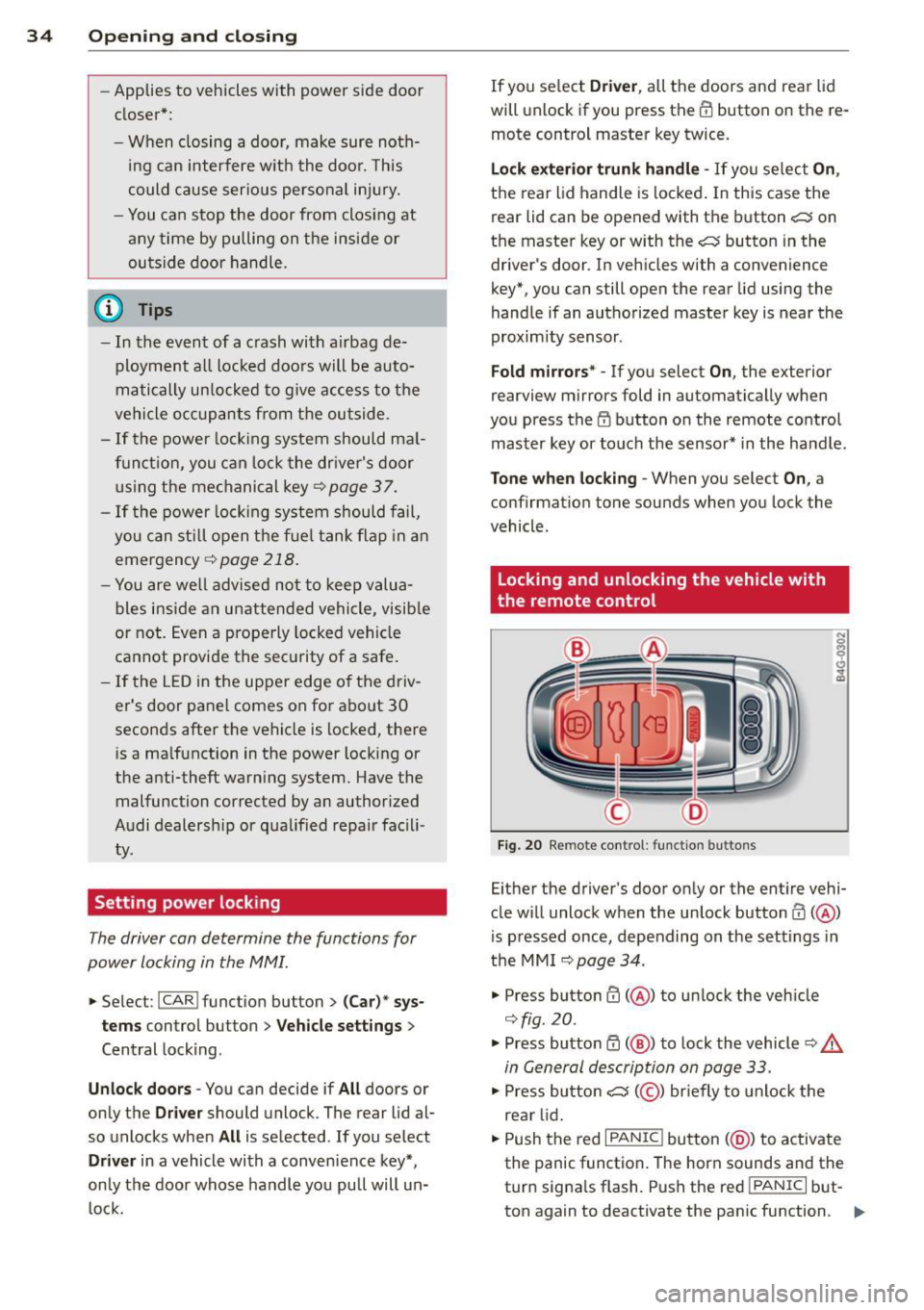
Locking and unlocking the vehicle with
, the remote control
F ig . 20 Remote co ntrol : funct io n buttons
N 0
q Cl
~
Eithe r the driver's door on ly or the ent ire vehi
cle w ill unlock when the unlock button m
(@ )
is p ressed once, depending on the settings in
the MMI
I:!> page 34.
" Press button CD( @) to unlock the veh icle
¢fig. 20.
.,. Press button ~ (@ ) to lock the vehicle I:!> .&.
in General description on page 33 .
.,. Press bu tto n cs( @) briefly to unlock the
re ar lid .
.,. Push the red
I PANIC ! button (@ ) to activate
the panic function . The horn sounds and the
turn signa ls flash. Push the red
I PANIC I but
ton again to deactivate the pan ic function . .,.
Page 39 of 314
M N
0 I.J -
"' rl
opening function in the power locking sys
tem switch.
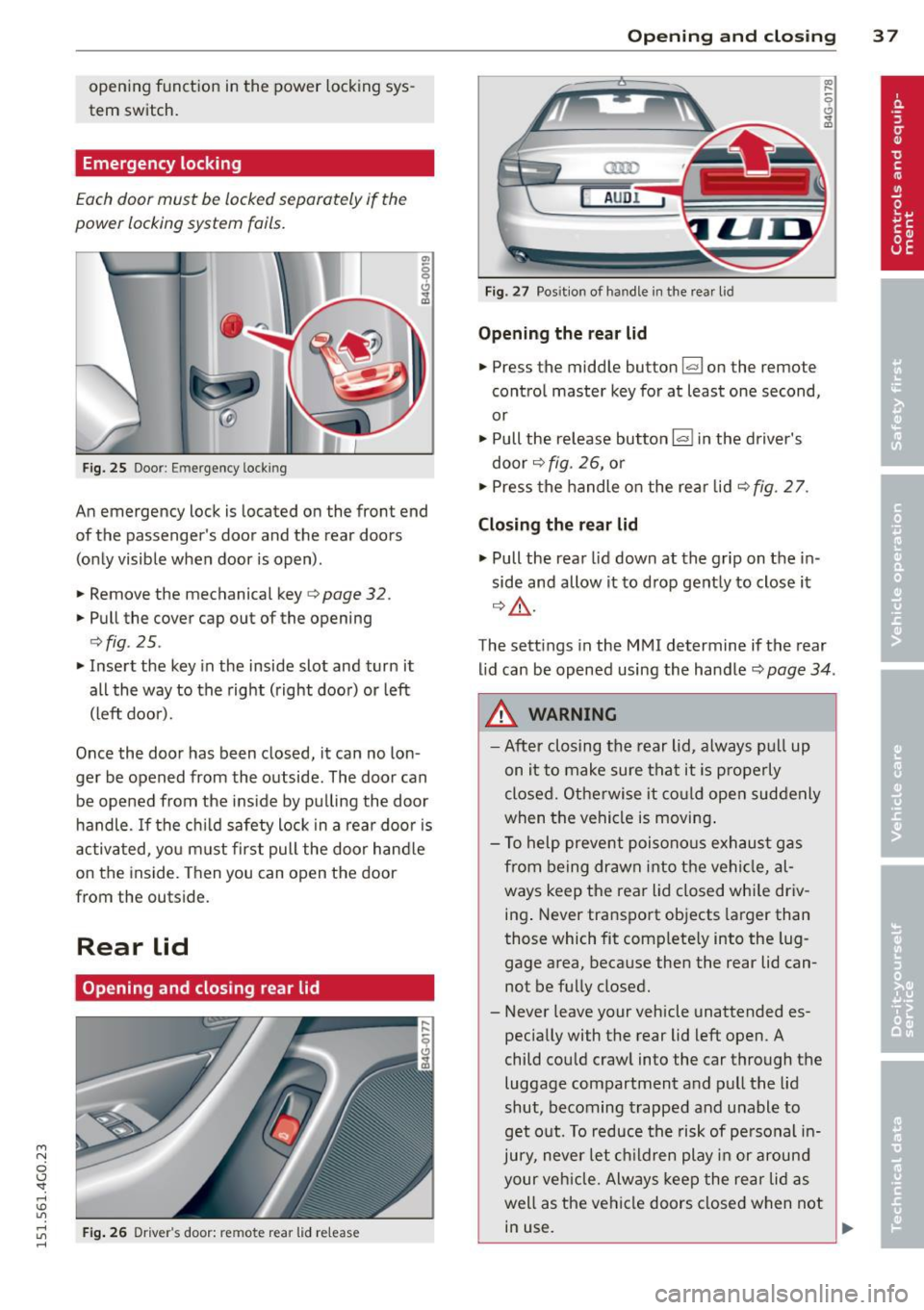
Emergency locking
Each door must be locked s eparately if th e
power locking system fails.
F ig. 25 Doo r: E mergency loc king
An emergency lock is located on the front end
of the pas senger's door and the rear doors
(on Ly visible when door is open) .
• Remove the mechanical key
c> page 32.
• Pull the cover cap out of the opening
c> fig . 25 .
• Insert the key in the inside slot and turn it
all the way to the right (right doo r) or left
(left door).
Once the door has been closed, it can no lon
ger be opened from the outside . The door can
be opened from the ins ide by pu lling the door
h andle. If the c hild safety lock in a rear door is
activa ted, you m ust first pull the door hand le
on the inside. Then you can open the door
from the outside.
Rear lid
Opening and closing rear lid
Fig . 26 Dr ive r's door: re m ote rear lid release
Op enin g an d clos ing 3 7
a:ro
AU D !
Fig . 27 Pos it ion o f ha ndle in t he rear l id
Opening the re ar lid
• Press the middle button~ on the remote
control master key for at least one second,
or
• Pull the release button
l=I in the driver's
door
c> fig . 26, o r
• Press the handle o n the rear lid
c> fig . 2 7.
Clo sin g the re a r lid
• Pull the rear lid down at the grip on the in
side and allow it to d rop gently to close it
Q &, .
a, .....
9 (!) ...
"'
The settings in the MMI determine if the rear
lid can be opened using the handle
c> page 34 .
A WARNING
-After closing the rear lid, always pu ll up
on it to make sure that it is p roperly
closed. Otherwise it co uld open suddenly
when the vehicle is moving .
- To help prevent poisono us exhaust gas
from being drawn into the vehi cle, al
ways keep the rear lid closed whi le driv
ing . Never transport objects larger than
those which fit complete ly into the lug
gage area, because then the rear lid can not be fu lly closed.
- Never leave your vehicle unattended es pecially with the rear lid left open. A
child cou ld crawl into the car through the
luggage compartment and pul l the lid
shut, becoming trapped and unable to
get o ut. To reduce the risk of pe rsonal in
jury, never let ch ildren play in or around
your veh icle. Always keep the rear lid as
well as the vehicle doors closed when not in use.
Page 41 of 314
M N
0 I.J "". rl I.O
"' rl
"' rl
Child safety lock for
the rear doors
The power child safety lock locks the rear win
dows and prevent the rear doors from being
opened from the inside .
Fig. 30 Sectio n fr om driv er' s door : child sa fety lock
b uttons
• To activate the child safety lock for the left/
right rear door, press the left/right button
[!l
in the driver's door¢ fig. 30. The light in the
button w ill turn on.
• To deactivate the child safety lock for the
left/right rear door , press the left/right but
ton [!] in the driver's door. The light in the
button turns off.
The following features are switched off:
- The interior door handles in the rear doors,
- The power windows in the rear doors .
In order to activate the ch ild safety lock on
the left and the right side , press the two safe
ty buttons
[!l in succession .
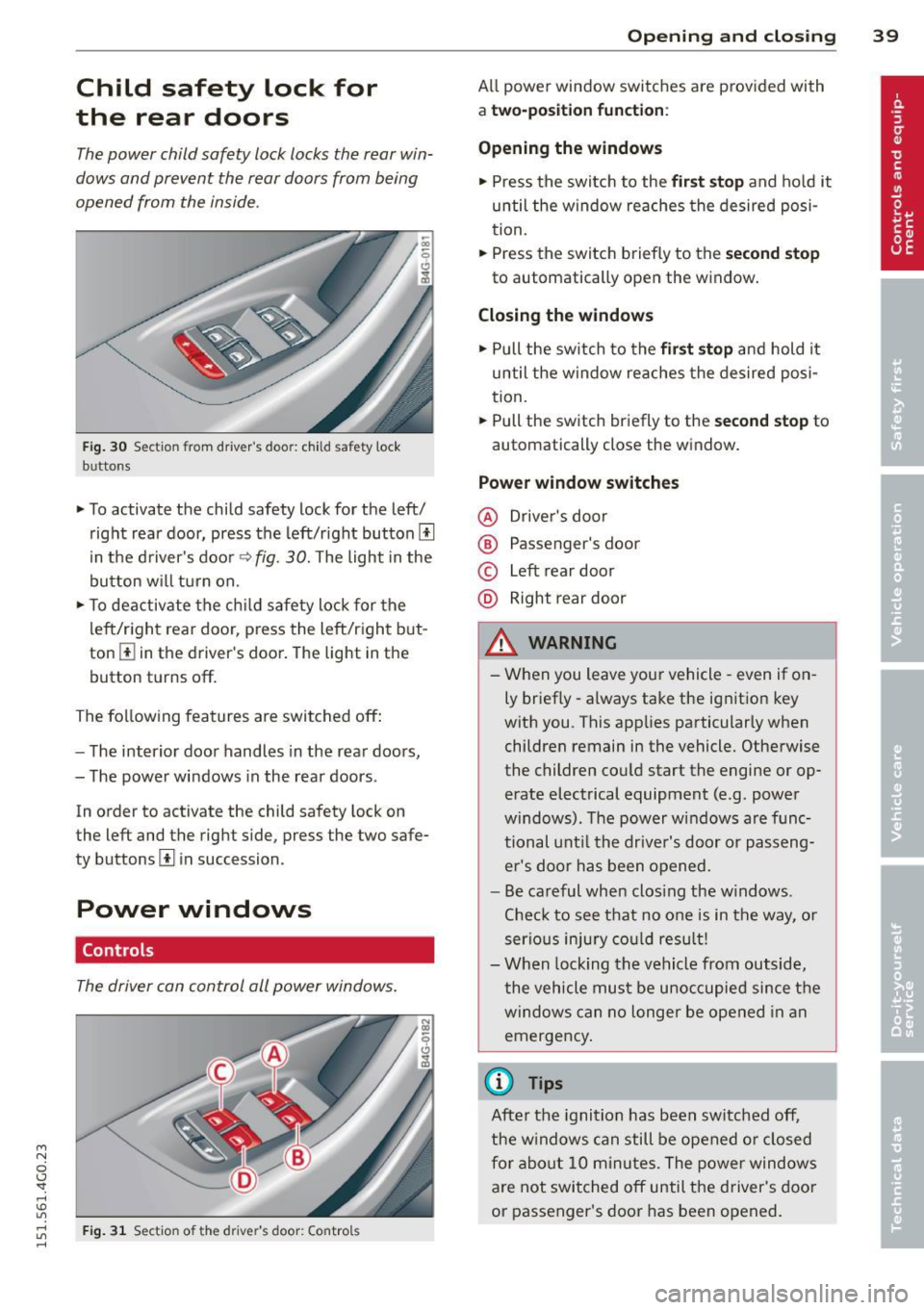
Power windows
Controls
The driver can control all power windows.
Fig . 31 Sectio n of t he dr iv er 's d oor: Control s
Opening and closing 39
All power window switches are prov ided with
a two-po sition function :
Opening the windows
• Press the switch to the first stop and hold it
until the window reaches the desired posi
tion.
• Press the switch briefly to the
second stop
to automatically open the window.
Closing the windows
• Pull the switch to the first stop and hold it
until the window reaches the desired posi
tion.
• Pull the switch briefly to the
second stop to
automatically close the window.
Power window switches
@ Driver's door
® Passenger's door
© Left rear door
@ Right rear door
& WARNING
-When you leave your vehicle -even if on
ly briefly -always take the ignition key
with you . This applies particularly when
children remain in the vehicle. Otherwise
the children could start the engine or op
erate electrical equipment (e .g . power
windows). The power windows are func
tional until the driver's door or passeng
er's door has been opened.
- Be careful when clos ing the w indows .
Check to see that no one is in the way, or
serious injury could result!
- When locking the vehicle from outside,
the vehicle must be unoccupied since the
windows can no longer be opened in an
emergency.
(D Tips
After the ignition has been switched off,
the windows can still be opened or closed
for about 10 minu tes. The power windows
are not switched off until the driver's door
or passenger's door has been opened.
Page 50 of 314
48 Clear vis ion
Wiper and washer
system
Switching the windshield wipers on
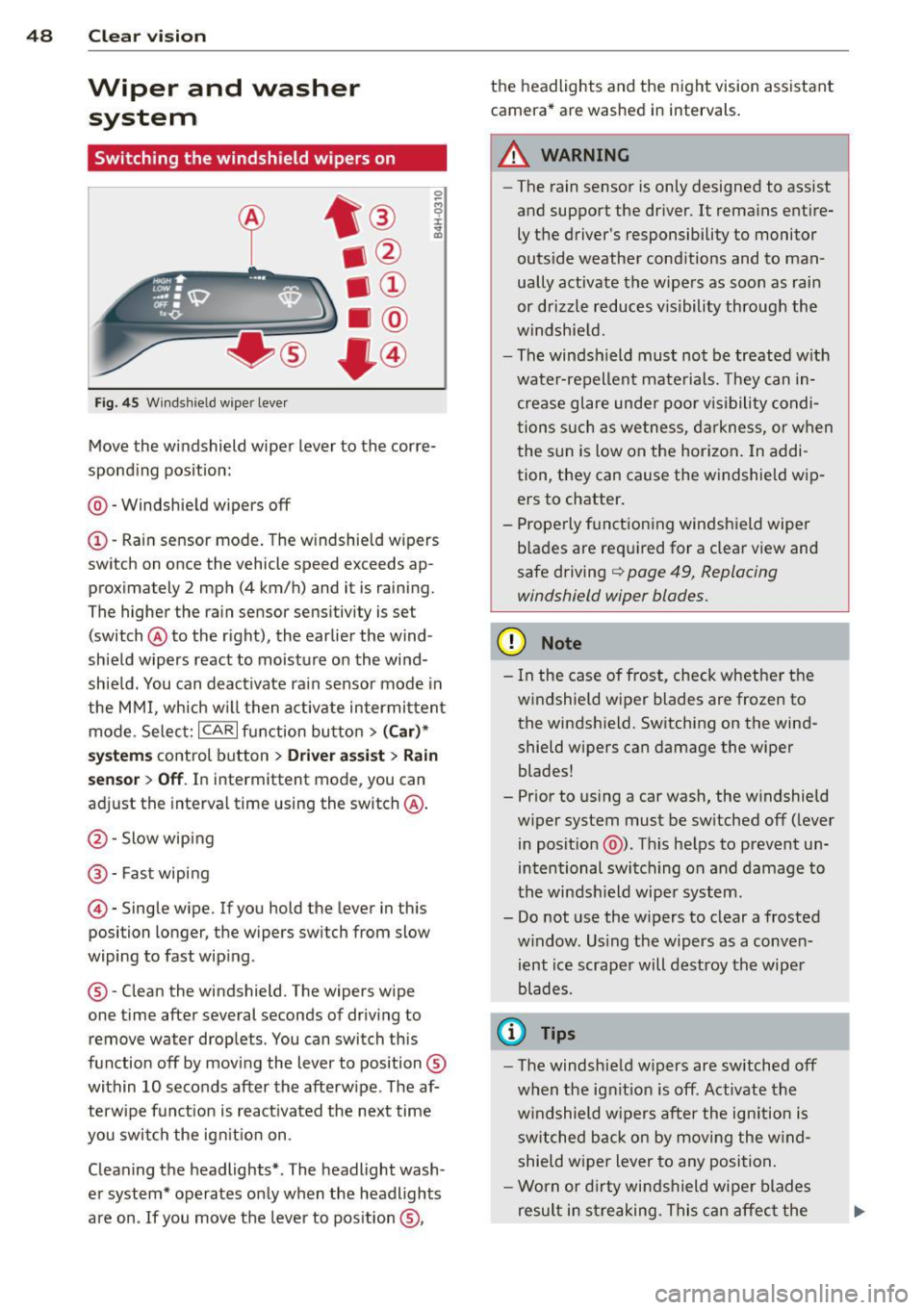
F ig. 45 Windsh ie ld wiper lever
Move th e windshield wiper lever to the corre
sponding pos ition:
@ -Windshie ld wipers off
(I) -Rain sensor mode . The windshield w ipers
switch on once the vehicle speed exceeds ap
p roximately 2 mph (4 km/h) and it is raining.
The higher the rain sensor sensitivity is set
(switch @to the right), the earlier the wind
shield wipers react to moisture on the wi nd
shie ld. You can deact ivate rain sensor mode in
the MMI, which w ill then activate intermittent
mode. Selec t:
ICAR I function bu tton > ( Car )*
system s control button > Driver ass is t > Rain
se nsor
> Off . In intermittent mode, you can
adjust the interval time using the switch@.
@-Slow wiping
@-Fast wiping
© -Single wipe. If you hold the lever in this
position longer, the wipers switch from slow
wiping to fast wip ing.
® - Clean the windshield. The wipers wipe
one time after several seconds of driv ing to
remove water drop lets. You can switch this
function off by mov ing the lever to position ®
within 10 seconds after the afterw ipe . The af
terw ipe fun ct ion is react ivated the next time
you swit ch the ig nition on.
Cleaning the headlights* . The headlight wash
e r system* operates only when the headlights
are on. If you move the lever to pos ition ®, t
h e headlights and the night vision assistant
camera* are washed in intervals.
.&_ WARNING
-
-The rain sensor is only designed to assist
and support the driver.
It remains entire
ly t he driver's responsibility to monitor
outside weather cond itions and to man
ually activate the wipe rs as soon as rain
or drizzle reduces v isibility through the
windshie ld.
- The windsh ield must no t be treated w ith
wate r-repellent mate rials. They can in
crease glare unde r poo r vis ibility condi
tions such as we tness, d arkness, or when
the s un is low on the hor izon. In addi
tion, they can cause the w indshield w ip
ers to chatter .
- Prope rly f unctioning windshield wiper
b lades are required for a clear view and
safe driving
q page 49, Replacing
windshield wiper blades.
(D Note
- In the case of frost, check whethe r th e
windshield wiper blades are frozen to
the windsh ield. Sw itching on the wind
shield wipers can damage the wiper
blades!
- Prior to us ing a car wash, the w indshield
w iper system must be sw itched off (lever
in posit ion @). Th is he lps to prevent un
intentional switching on and damage to
the winds hield wiper system.
- Do not use the w ipers to clear a frosted
w indow. Us ing the wipers as a conven
ient ice scrape r will destroy the wipe r
blades .
(D Tips
-The windshie ld w ipers are switched off
w hen the ignit ion is off . Activate the
w indshield wipers after the ign ition is
s witched back o n by moving the w ind
shield wiper lever to any position.
- Worn or dirty windshield wipe r blade s
result in streaking. This can affec t the
Page 51 of 314
M N
0 <.J 'SI: ,...., \!) 1.1'1 ,...., 1.1'1 ,....,
rain sensor function. Check your
windshield wiper b lades regularly.
- The washer fluid nozzles of the wind
sh ield washer system are heated at low
temperatures when the ignit ion is on .
- When stopping temporarily, e .g . at a
traffic light , the set speed of the wind
shield wipers is automatically red uced by
one speed.
Cleaning windshield wiper blades
Clean the wind shield wiper bl ades when they
begin to leave streaks . Use a soft cloth and
glass cleaner to clean the windsh ield wiper
b lades.
.,. Pl ace the wind shield wiper arm s in the serv
ice position . Refer to ¢
page 49.
.,. Lift the w iper arm away from the front win
dow.
_& WARNING
Dirty w indshie ld w iper blades can imp air
your view. This can lead to accidents.
Replacing windshield wiper blades
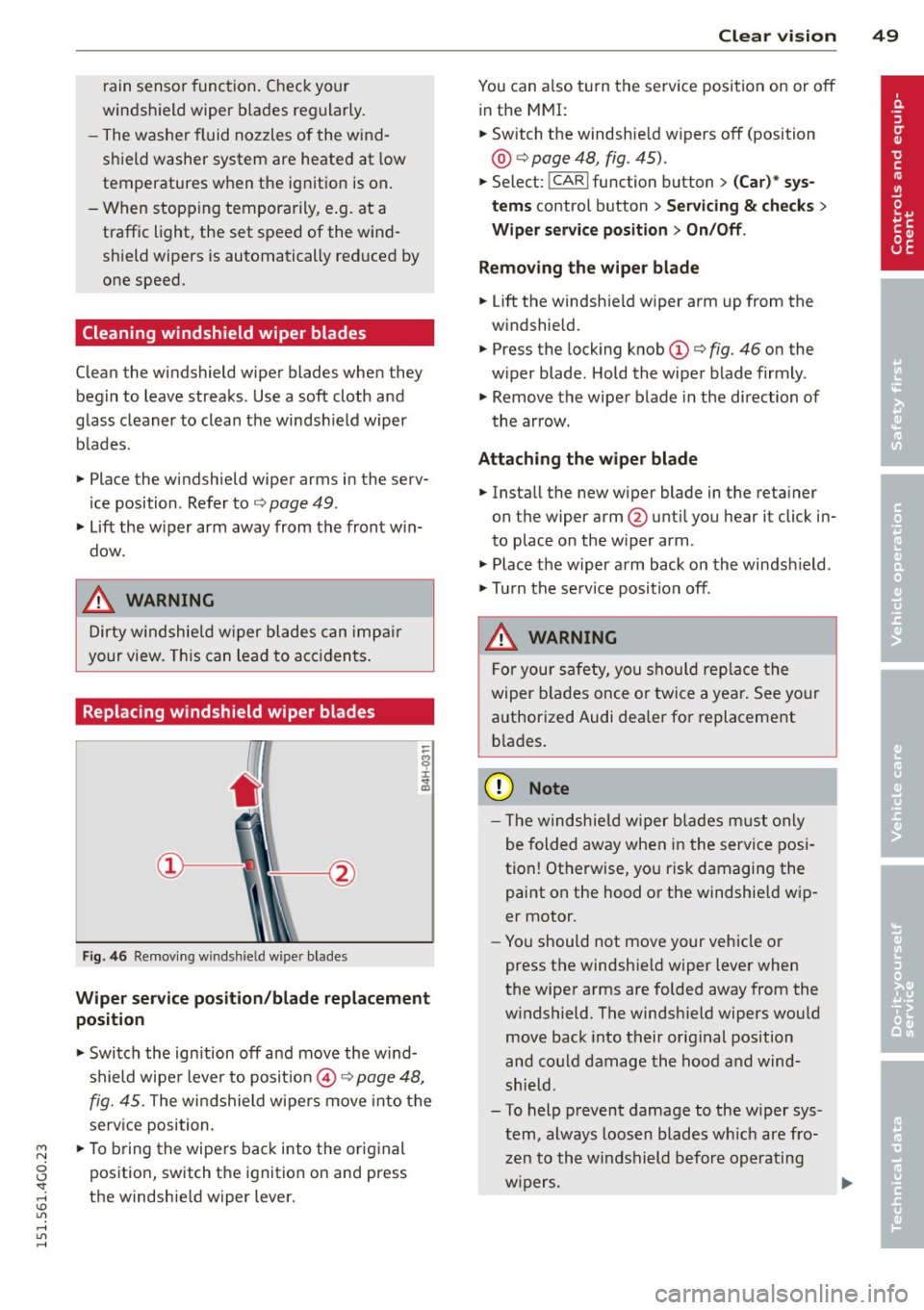
Fig. 46 Re movi ng winds hield w ipe r blade s
-
Wiper ser vice position /blade replacement
position
.,. Switch the ign ition off and move the w ind
shield wipe r lever to posit io n @ ¢
page 48,
fig. 45. The windshield wipers move into the
service position.
.,. To b ring th e wipe rs back into the original
position, switch the ignition on and press
the windshie ld wipe r lever.
Clear v is ion 49
You can also t urn the se rv ice position on or off
in the MMI:
.,. Switch the windsh ie ld wipers off (position
@ ¢ page 48, fig. 45) .
.,. Select: !CAR ! function but ton> (Car )* sy s
tem s control button > Servicing & check s >
Wiper service po sition > On /Off .
Remo ving th e wiper bl ade
.,. Lift the windsh ie ld wipe r arm up from the
w indshield.
.,. Press the locking knob
(D ¢ fig. 46 on the
w iper blade. Hold the wiper blade firmly .
.,. Remove the wiper blade in the direction of
the arrow .
Attaching the wipe r blade
.,. Install the new wiper blade in the reta iner
on the wipe r arm @unti l you hear it click in
to place on the w iper arm .
.,. Place the w iper arm back on the windshield .
.,. Tu rn the se rvice position off.
_& WARNING
-
F or your safety, you s hou ld rep lace the
wiper b lades once or twice a yea r. See your
authorized Audi dea ler for replacement
b la d es .
Q) Note
- Th e windsh ie ld wiper b lades must only
be folded away when in the service posi
tion! Otherwise, yo u ris k damaging the
paint on the hood or the windshie ld wip
er motor.
- Yo u should not move your vehicle or
press the windshield wiper lever when
the wiper arms are folded away from the
w indshield . The windsh ield wipers wou ld
move back into their original position
and could damage the hood a nd wind
shield .
- To help prevent damage to the w iper sys
tem, always loosen blades w hich are fro
zen to the windshield before operating
w ipers. ..,.