door lock AUDI A6 2015 User Guide
[x] Cancel search | Manufacturer: AUDI, Model Year: 2015, Model line: A6, Model: AUDI A6 2015Pages: 314, PDF Size: 77.57 MB
Page 40 of 314
38 Opening and closing
- Always ensure that no one is within
range of the rear lid when
it is mov ing, in
particular close to the hinges - fingers or
hands can be pinched.
(D Tips
When the vehicle is locked, the rear lid can
be opened separately by pressing the but
ton
l .::::s l on the master key. When you close
the rear lid again, it locks automatically .
luggage compartment with movement
activated opening
Applies to vehicles : wit h co nvenience key and se nsor -con
tro ll ed luggage compartmen t lid
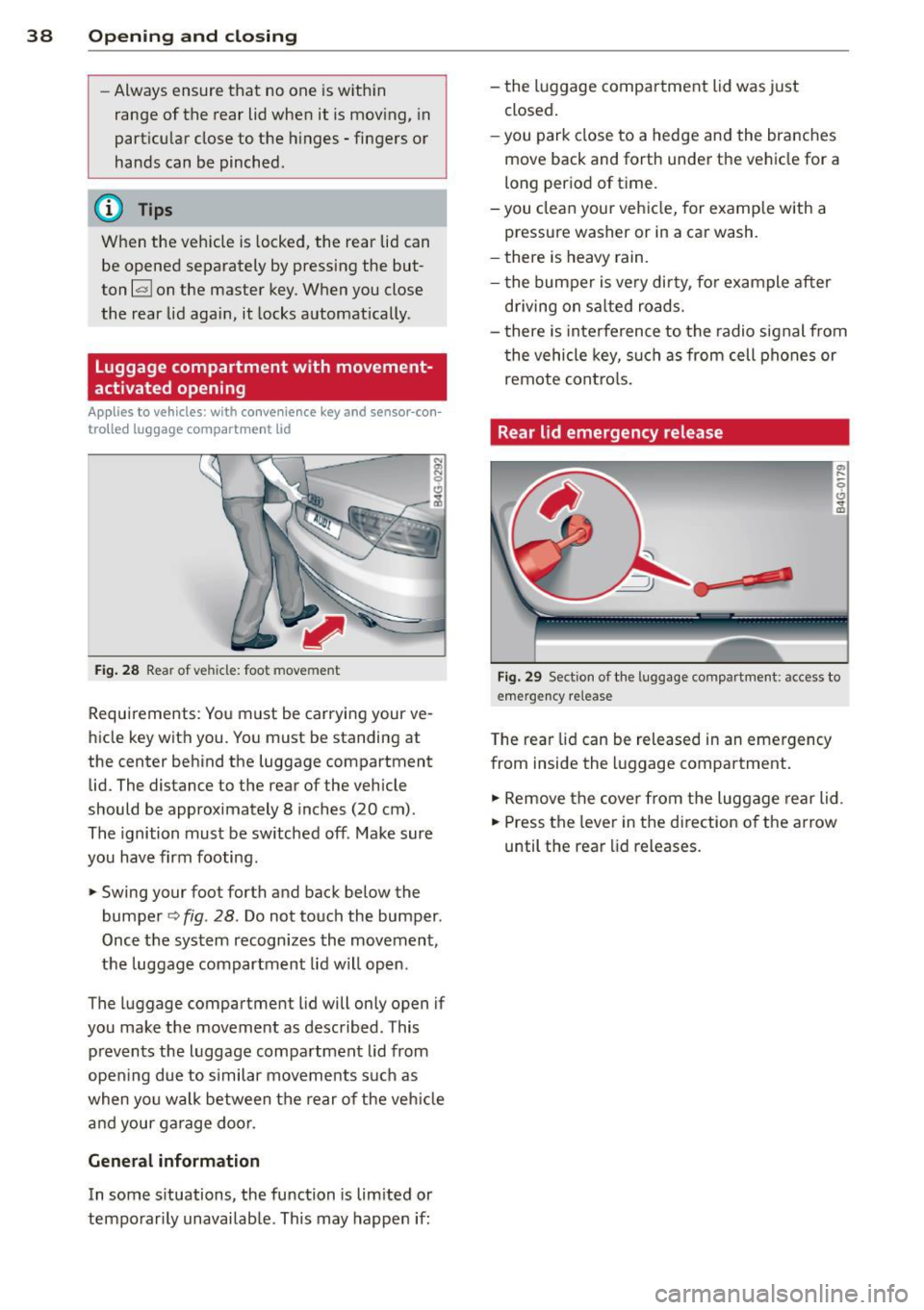
Fig. 28 Rear of vehicle: foot movement
Requirements : You must be carrying your ve
hicle key with you. You must be standing at
the center behind the luggage compartment
lid. The distance to the rear of the vehicle
should be approximately 8 inches (20 cm).
The ignition must be sw itched off . Make sure
you have firm footing.
,.. Swing your foo t forth and back below the
bumper
o fig . 28. Do not touch the bumper .
Once the system recognizes the movement,
the luggage compartment lid will open.
The luggage compartment l id will only open if
you make the movement as described . This
p revents the luggage compartment lid from
opening due to s imilar movements such as
when you walk between the rear o f the vehicle
and your garage door.
General information
In some situations, the function is lim ited or
temporarily unavailab le. This may happen if: -
the luggage compartment lid was just
closed.
-you park close to a hedge and the branches
move back and forth under the vehicle for a
long per iod of time.
-y ou clean your vehicle, for example with a
pressure washer or in a car wash.
- there is heavy rain.
- the bumper is very dirty, fo r example after
driving on salted roads.
- there is interference to the radio signal from
the vehicle key, such as from cell phones or
remote controls.
Rear lid emergency release
Fig. 29 Sect io n of the luggage compartmen t: access to
e m erge ncy re lease
T he rear lid can be released in an emergency
from inside the luggage compartment.
,.. Remove the cover from the luggage rear lid.
,.. Press the lever in the direction o f the arrow
until the rear lid releases.
Page 41 of 314
M N
0 I.J "". rl I.O
"' rl
"' rl
Child safety lock for
the rear doors
The power child safety lock locks the rear win
dows and prevent the rear doors from being
opened from the inside .
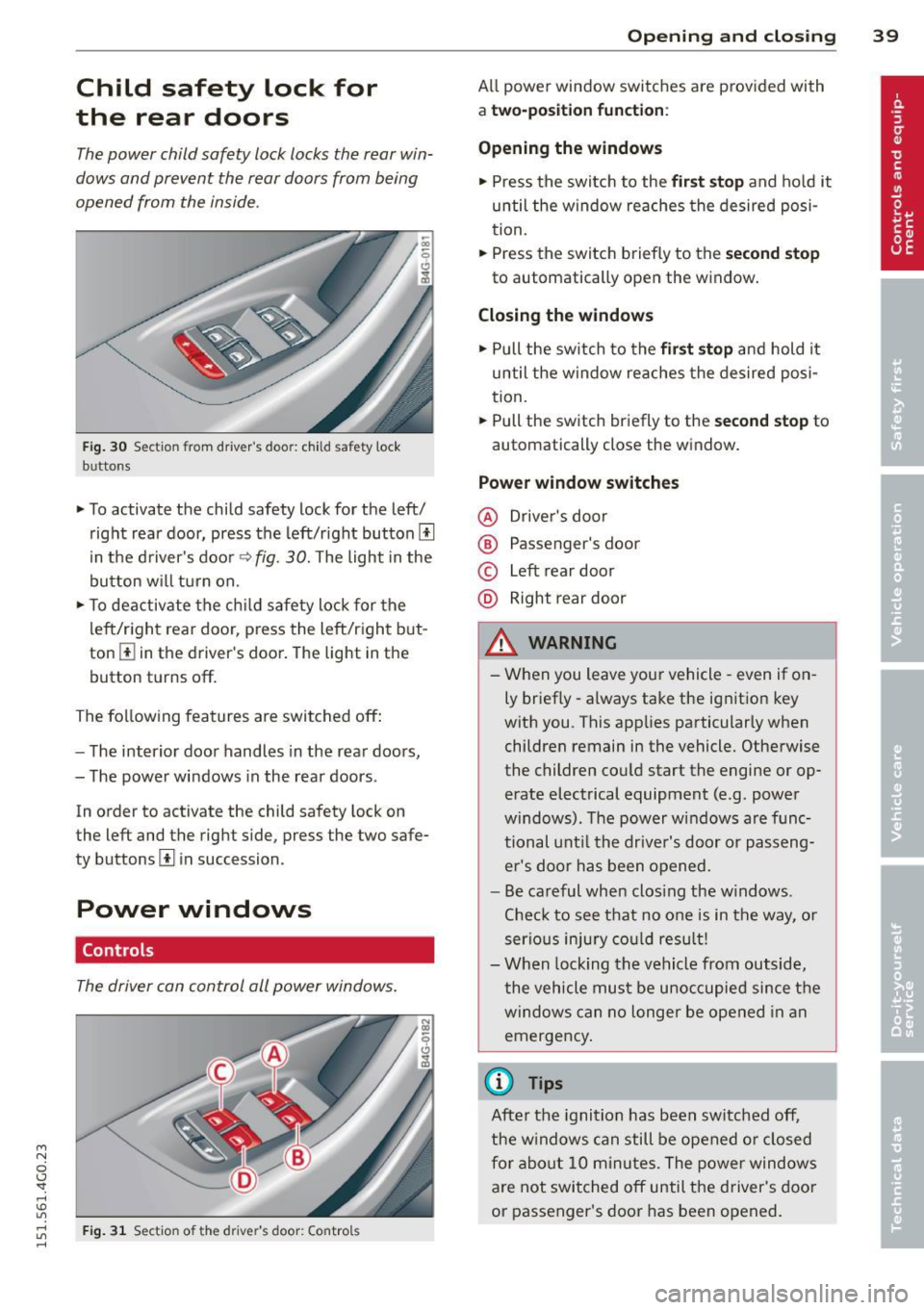
Fig. 30 Sectio n fr om driv er' s door : child sa fety lock
b uttons
• To activate the child safety lock for the left/
right rear door, press the left/right button
[!l
in the driver's door¢ fig. 30. The light in the
button w ill turn on.
• To deactivate the child safety lock for the
left/right rear door , press the left/right but
ton [!] in the driver's door. The light in the
button turns off.
The following features are switched off:
- The interior door handles in the rear doors,
- The power windows in the rear doors .
In order to activate the ch ild safety lock on
the left and the right side , press the two safe
ty buttons
[!l in succession .
Power windows
Controls
The driver can control all power windows.
Fig . 31 Sectio n of t he dr iv er 's d oor: Control s
Opening and closing 39
All power window switches are prov ided with
a two-po sition function :
Opening the windows
• Press the switch to the first stop and hold it
until the window reaches the desired posi
tion.
• Press the switch briefly to the
second stop
to automatically open the window.
Closing the windows
• Pull the switch to the first stop and hold it
until the window reaches the desired posi
tion.
• Pull the switch briefly to the
second stop to
automatically close the window.
Power window switches
@ Driver's door
® Passenger's door
© Left rear door
@ Right rear door
& WARNING
-When you leave your vehicle -even if on
ly briefly -always take the ignition key
with you . This applies particularly when
children remain in the vehicle. Otherwise
the children could start the engine or op
erate electrical equipment (e .g . power
windows). The power windows are func
tional until the driver's door or passeng
er's door has been opened.
- Be careful when clos ing the w indows .
Check to see that no one is in the way, or
serious injury could result!
- When locking the vehicle from outside,
the vehicle must be unoccupied since the
windows can no longer be opened in an
emergency.
(D Tips
After the ignition has been switched off,
the windows can still be opened or closed
for about 10 minu tes. The power windows
are not switched off until the driver's door
or passenger's door has been opened.
Page 47 of 314
M N
0 I.J "". rl I.O
"' rl
"' rl
Automatic headlights
You can adjust the following settings in the
Automatic headlights menu:
Headlights activation time -You can adjust if
the headlights switch on
Early, Med . or Late
according to the sensitivity of the ligh t sensor.
Audi adaptive light* -You can switch adaptive
light
On and Off.
Daytime running lights
USA models:
You can switch the dayt ime run
n ing lights
on and off .
Canada models :
The function cannot be
turned off . It is activated automatically each
time the ignition is switched on. This menu
item is shown "greyed out" .
Coming home, Leaving home
The coming home function illuminates the
area outside the vehicle when you switch the
ignition off and open the driver's door. To turn
the function on, select
Lights when leaving
car > On .
The leaving home function illuminates the
area outside the vehicle when you un lock the
vehicle. To turn the funct ion on, select
Lights
when unlocking car > On .
The coming home and leaving home functions
only operate when it is dark and the light
switch is in the
AUTO position. Clear
vision 45
Turn signals and high beam lever
The lever on the left side of the steering col
umn is used to operate the turn signals and
the high beam as well as
the headlight flash
er.
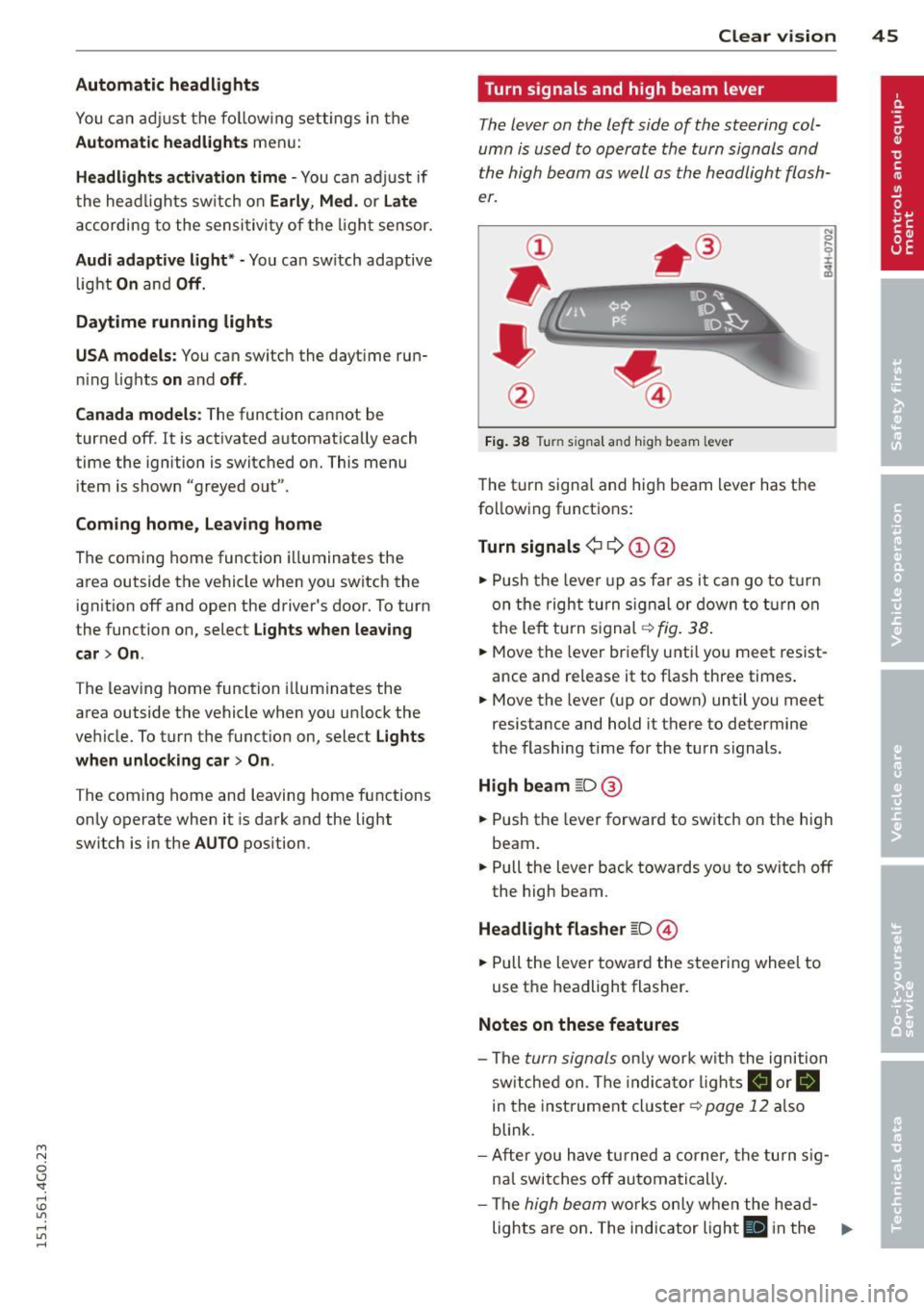
Fig. 38 Tu rn signal and high beam lever
The turn signal and high beam lever has the
following functions:
Turn signals ¢ 9 ©@
.,. Push the lever up as fa r as it can go to turn
on the right turn signa l or down to turn on
the left tu rn s ignal ¢
fig. 38.
.. 0 ....
~
... Move the lever briefly unti l you meet resist
ance and re lease it to flash three times.
.,. Move the lever (up or down) until you meet
resistance and hold it there to determine
the flashing time for the turn signals.
High beam ~D @
... Push the lever forward to switch on the high
beam .
.,. Pull the lever back towards you to switch off
the high beam.
Headlight flasher ~D ©
... Pull the lever toward the steering wheel to
use the headlight flasher.
Notes on these features
-The turn signals on ly work w ith the ignition
sw itched on. The indica tor l ights
a or.
in the instrument cluster¢
page 12 also
blink.
- After you have turned a corner, the turn sig
nal switches off automatically .
- The
high beam works only when the he ad-
lights are on . The indicator light
El in the ..,.
Page 48 of 314
46 Clear vis ion
instrument cluste r illuminates when the
high beams are on.
- T he
headlight flash er works only as long as
yo u hold the lever - even if there are no
l ights turned on. The indicator light
II in
the instrument cluster il luminates when you
use the headlight flasher.
A WARNING
Do not use the high beam or headlight
flasher if you know that these could blind
oncoming traffic.
Interior lights
Front and rear interior lighting
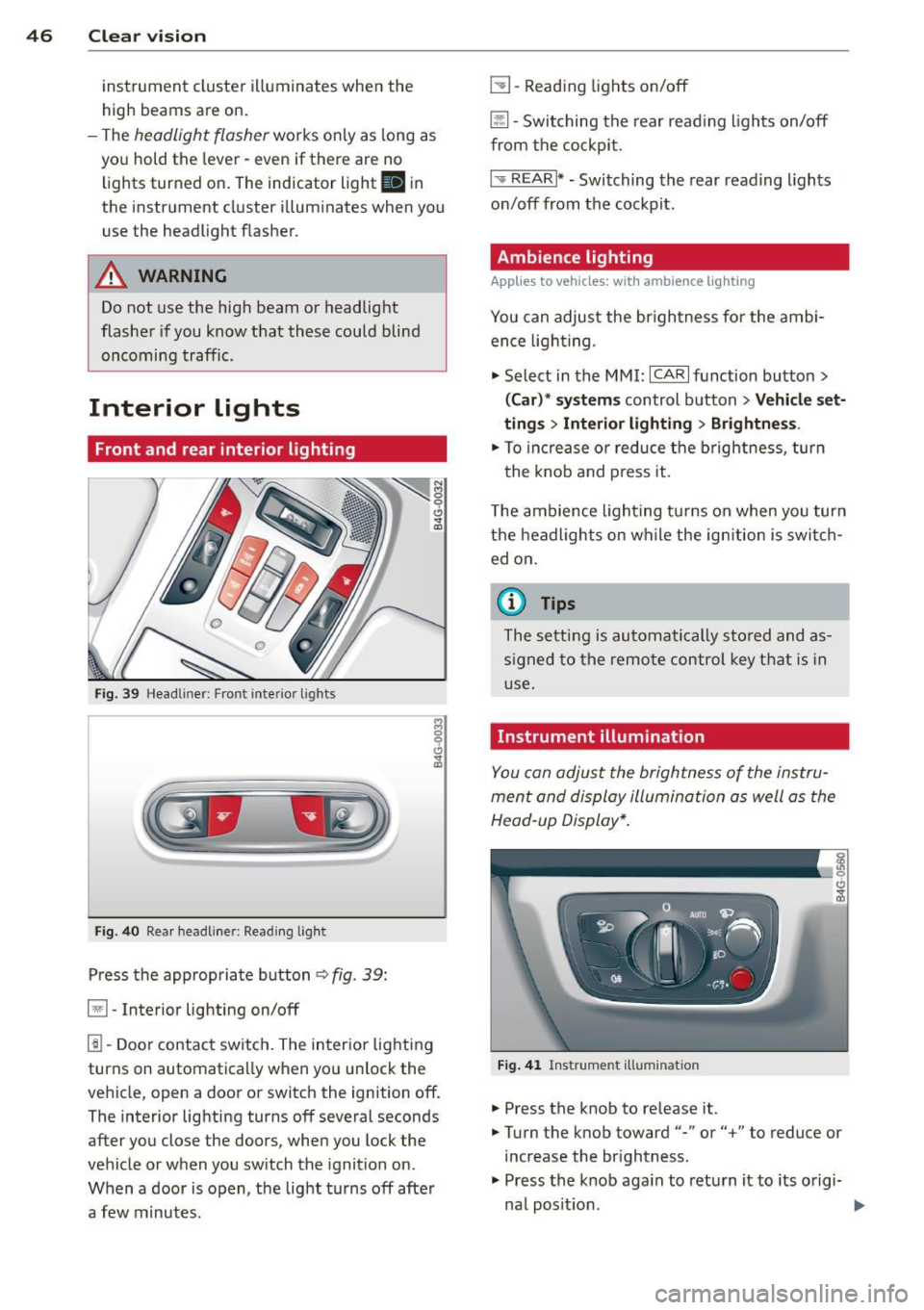
Fi g. 39 Headliner: Front interior ligh ts
Fig . 40 Re ar headli ne r: Readi ng light
Press the appropriate button q fig. 39:
El-Interior lighting on/off
I]]-Door contac t sw itch . The inter ior lighting
turns on automatica lly when you unlock the
vehicle, open a door or switch the ignition off.
The interior lighting turns off several seconds
after you close the doors, when you lock the
vehicle or when you sw itch the ignition on.
When a door is open, the light t urns off afte r
a few minutes.
L:!l -Read ing lights on/off
~ - Switching the rear read ing lights on/off
from the cockpi t.
I" REARI * -Switching the rear reading lights
on/off from the cockpit.
Ambience lighting
Applies to vehicles: w ith amb ience lighting
You can adjust the br ightness for the ambi
ence ligh tin g.
.. Select in the MMI:
ICA RI function button>
(Car )* sys tem s control button > Vehicle set
ting s
> Interi or lighting > Brightne ss.
.. To increase or reduce the b rightness, turn
t he knob and press it .
T he ambience light ing tu rns on when you turn
the headlights on wh ile the ign ition is switc h
ed on.
(D Tips
The setting is automati cally sto red and as
s igned to the remo te contr ol key t hat i s in
u se.
Instrument illumination
You can adjust the brightness of the instru
men t and display illumination a s well as the
Head-up Display*.
Fi g. 41 Instrume nt illumina tion
... Press the knob to release it.
.. Turn the knob toward"-" or"+" to reduce or
increase the br ightness .
.. Press the knob aga in to return it to its o rigi-
na l posit ion . ...
Page 58 of 314
56 Seats and storage
Rear head restraints
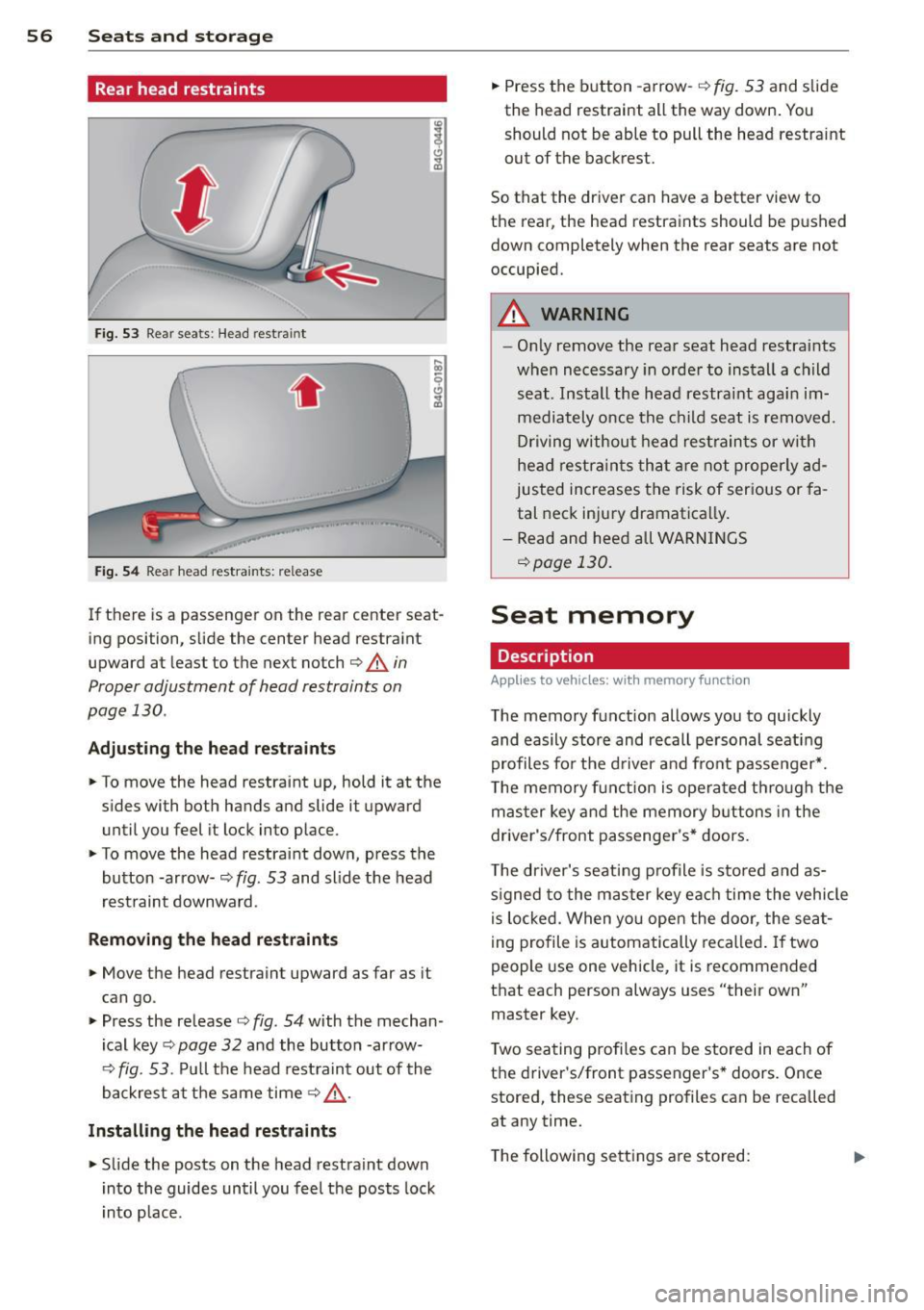
Fig. 53 Rear seats: Head restra int
. .
Fig . 54 Rear head restraints: release
If there is a passenger on the rear center seat
ing position, slide the center head restraint
upward at least to the next notch
c::> A in
Proper adjustment of head restraints on
page 130 .
Adjusting the he ad restr aint s
• To move the head restraint up, hold it at the
s ides with both hands and slide it upward
until you feel it lock into place.
• To move the head restraint down, press the
button -ar row-
c::> fig. 53 and slide the head
rest raint downward.
Rem oving the head re straints
• Move the head restraint upward as far as it
can go.
• Press the release
c::> fig. 54 with the mechan
ical key
c::> page 32 and the button -ar row-
c::> fig. 53. Pu ll the head rest raint out of the
backrest at the same time
c::> .,&. .
Install ing th e he ad re str aints
• Slide the posts on the head restraint down
into the guides until you feel the posts lock
i nto place. •
Press the b utton -arrow-
c::> fig. 53 and slide
the head restraint all the way down . You
should not be able to pull the head restraint
out of the backrest.
So that the dr iver can have a better view to
the rear, the head restraints should be p ushed
down completely when the rear seats are not
occupied.
A WARNING
-- On ly remove the rear seat head restraints
when necessary in order to install a child
seat . Install the head restraint agai n im
mediately once the child seat is removed.
Dr iving without head rest rain ts or wi th
head restra ints tha t a re no t properly ad
justed increases the risk of ser ious or fa
tal neck injury dramatically .
- Read and heed all WARN INGS
c::> page 130 .
Seat memory
Description
Applies to vehicles: with memory function
The memory function allows you to quickly
and easily stor e and recall pe rsonal seati ng
profiles for the d river an d front passenger *.
T he memory f un ction is opera ted th ro ugh the
mas ter key and the memory buttons in the
driver's/front passenger's* doors .
T he driver's seat ing profile is stored and as
s igned to the master key ea ch time the vehicle
i s lo cked. When yo u open the door, the sea t
i ng profile is automatically reca lled . If two
people use one vehicle, it is recommended
that each person always uses "their own"
master key.
T wo sea ting profiles can be stored in each of
the d river's/front passenger's * doors. Once
stored, these seating profiles can be recalled
at any time.
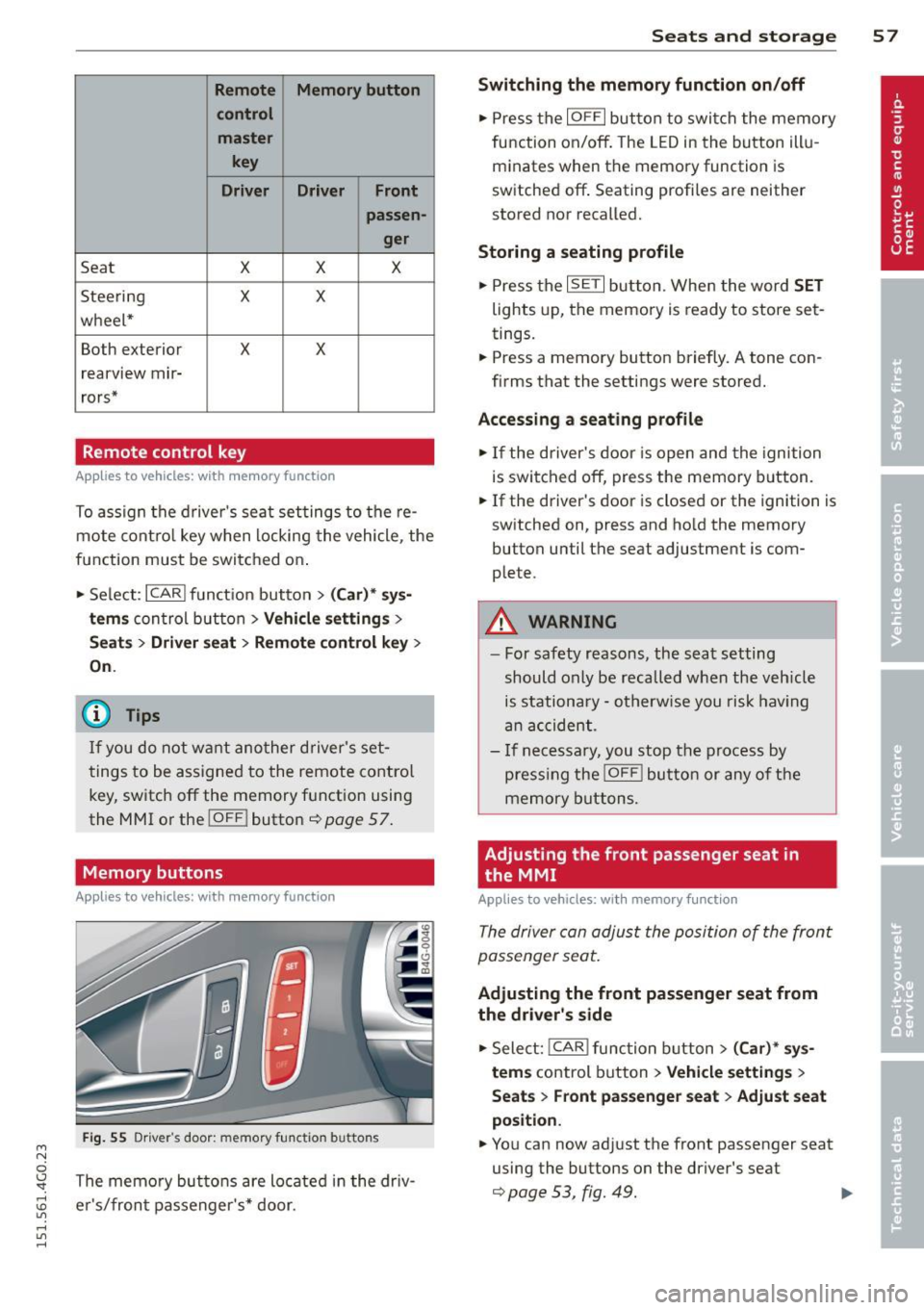
T he following sett ings a re stored:
Page 59 of 314
M N
0 \,J
"". rl I.O
"' rl
"' rl
Remote Memory button control master
key
Driver Driver Front passen-
ger
Seat X X X
Stee ring X X
wheel*
Both exterior
X X
rearview mir-
rors*
Remote control key
Applies to vehicles: with memory function
To assign the d river 's sea t settings to the re
mote cont ro l key w hen locking the vehicle, the
function must be swi tc h ed on .
• Se lect:
I CARI funct io n button > (Car )* sys
tems
con trol button > Vehicle settings >
Seats > Driver seat > Remote control key >
On .
@ Tips
If you do not wa nt ano ther d river' s set
t ings to be a ssigned to the remote control
key, switch off the memory f unction usin g
the MMI or the
! OFF ! button ce:> page 57.
Memory buttons
Applies to vehicles: with memory function
Fig. 55 Dr iver·s door: memory fu n ct io n buttons
The memo ry but tons are located in the dr iv
e r's/fron t passenger 's * door.
Seats and storage 5 7
Switching the memory function on/off
• Press the IOFFI but ton to swi tch the memory
fu nction on/off . The LED in the button ill u
m inates when the memory function is
sw itched off . Seating profiles are neither
stored nor recalled.
Storing a seating profile
• Press the ISET I button. When the word SET
lights up, the memory is ready to store set
tings.
• Press a memory button briefly. A tone con
firms that the settings were stored.
Accessing a seating profile
• If the driver's door is open and the ignition
is swi tched off, press t he memory b utton.
• If the driver's door is closed or the ignition is
sw itched on, press and ho ld the memory
button until the seat adjustment is com
plete.
A WARNING
- For safety reasons, the sea t setting
should only be recalled when the veh icle
is stationary - o therw ise y ou risk hav ing
an acc ident.
- I f necessary, you stop th e process by
press ing the
jOFF ! butt on o r any o f the
memory buttons.
Adjusting the front passenger seat in
the MMI
Applies to veh icles: w ith memory function
The driver con adjus t the posi tion of the front
passenger seat.
Adjusting the front passenger seat from
the driver's side
• Sele ct: !CAR I functio n button> (Car)* sy s
tem s
control button > Vehicle settings >
Seat s > Front passenger seat > Adjust seat
position .
• You can now ad just the front passenger seat
using the buttons on the driver's seat
¢ page 53, fig. 49. .,..
Page 62 of 314
60 Seats and st o rage
Front cuphold er
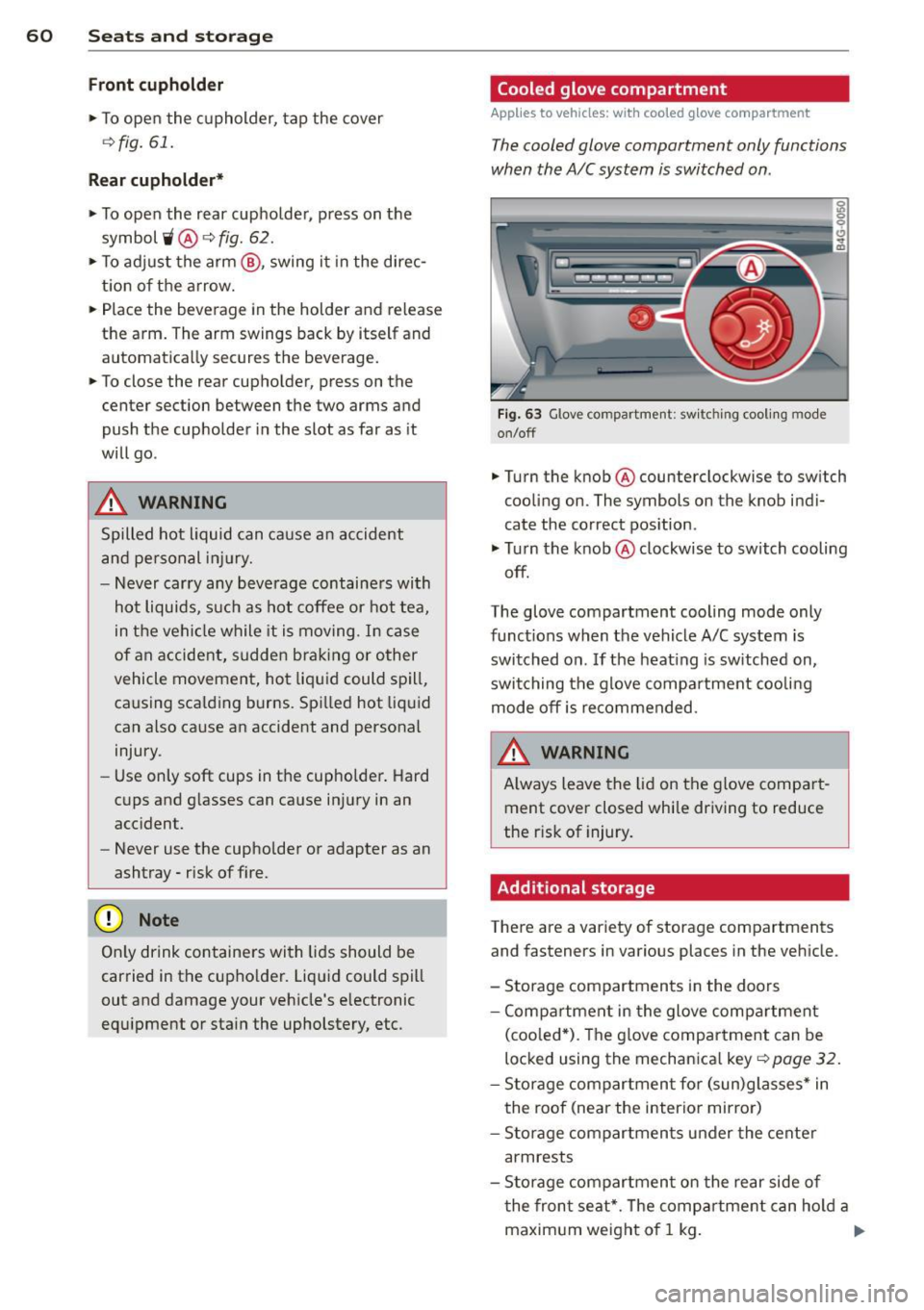
.,. To open the cupholder, tap the cover
~ fig. 61.
Rear cuphold er*
.,. To open the rear cupholder, press on the
symbol
'i @ ~ fig. 62 .
.,. To ad just the arm @, swing it in the direc
tion of t he arrow .
.,. Place the beverage in the holder and release
the arm. The arm swings back by itself and automatica lly secures the beverage .
.,. To close the rear cupho lder, press on the
center section between the two arms and
push the cupholder in the slot as far as it
will go .
A WARNING
Spilled hot liquid can cause an accident
and pe rsonal inj ury.
-
- Never carry any beve rage containe rs with
hot liquids, such as hot coffee or hot tea,
in t he veh icle while it is moving. I n case
of an accident, s udden brak ing or other
vehicle movement, hot liquid could spill,
causing sca lding burns. Spi lled hot liqu id
can also cause an accident and personal
injury.
- Use only soft cups in the cupholder . Hard
cups and glasses can cause in jury in an
acc ident.
- Never use the cupholder or adapter as an
ashtray- risk of f ire.
Q;) Note
On ly drink containers wi th lids should be
carried in the cupho lder. Liquid could spill
out and damage your vehicle's e lectronic
equ ipment or sta in the upholstery, etc.
Cooled glove compartment
Applies to vehicles: with cooled g love compartment
The cooled glove compartment only functions
when the A/C system is switched on .
Fig . 63 Glove compartme nt: sw itching cooli ng mode
on/off
.,. Turn the knob @ counterclockwise to sw itch
cooling on. The symbols on the knob indi
cate the correct pos ition .
.,. Tu rn the knob @ clockwise to switch cooling
off.
The glove compartment cooling mode only
funct ions when the vehicle A/C system is
switched on . If the heating is sw itched on,
switching the g love compa rtment coo lin g
mode off is recommended.
WARNING
A lways leave the lid on the glove compar t
ment cover closed while driving to reduce
the r isk of injury.
Additional storage
There are a variety of storage compartments
and fasteners in various places in the vehicle.
- Storage compartments in the doors
- Compartmen t in the glove compa rtment
(coo led *) . T he g love compar tment can be
locked using the mechanica l key~
page 32.
- Storage comp artmen t fo r (sun)glasses * in
the roof (near the interior mirro r)
- Storage compartments under the cente r
armrests
- Storage compartmen t on the rear side of
t he fron t seat*. The comp artment can hold a
maxim um weight of 1 kg . ..,_
Page 66 of 314
64 Seats and storage
Enlarging cargo capacity of the vehicle
interior
The seat backs can be folded forward to en
large the cargo capacity .
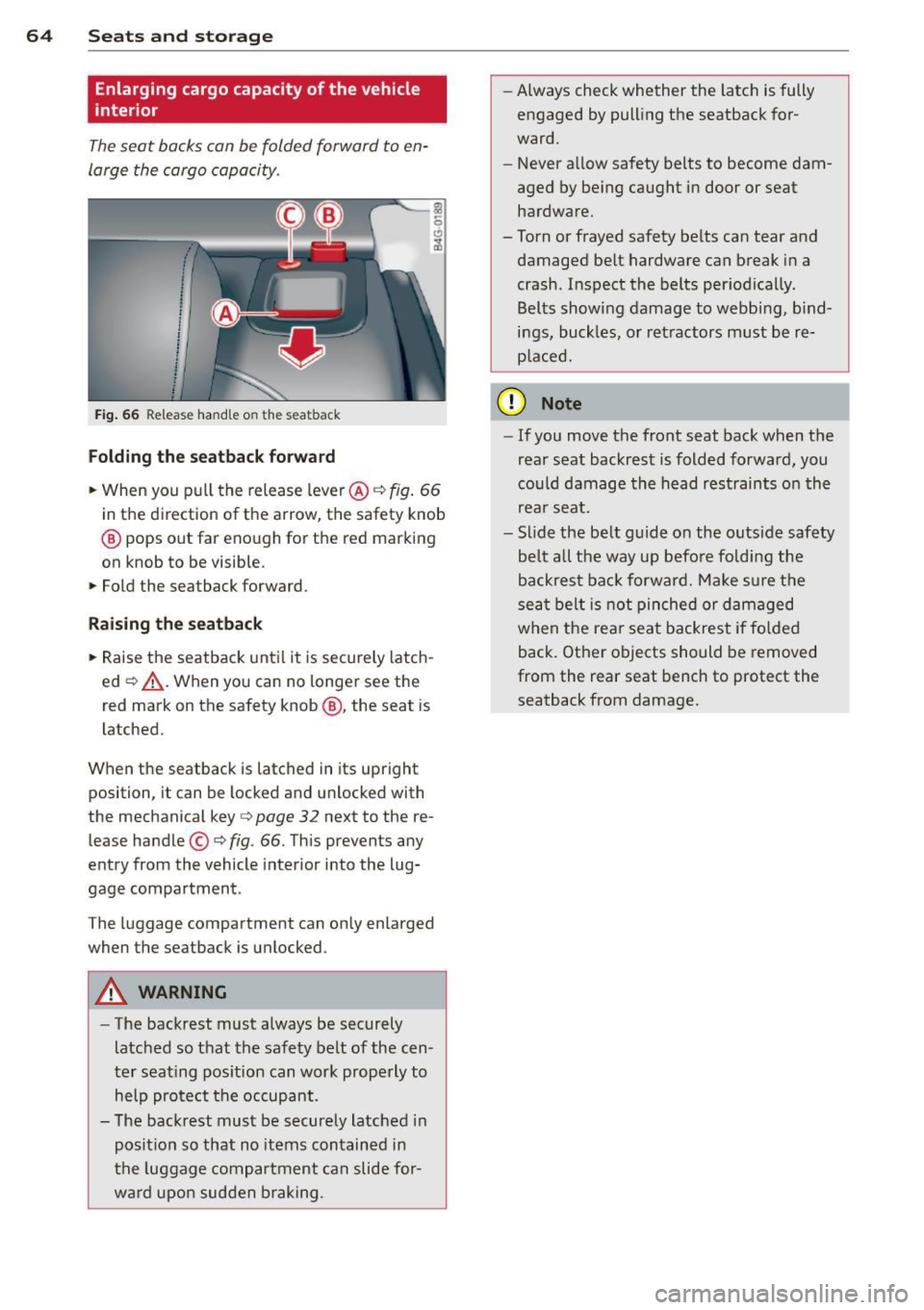
Fig . 66 Re lease hand le on the seatback
Folding th e seatback forward
.. When you p ull the release lever @c:::> fig. 66
in the d irection o f the arrow, the safety knob
@ pops out far enough for the red marking
on knob to be visible.
.. Fold the seatback forward.
Rai sing th e seatback
.. Raise the seatback until it is securely latch
ed
c:::> &_ . When you can no longer see the
red mark on the safety knob @, the seat is
l atched.
When the seatback is latched in its upright position, it can be locked and unlocked with
the mechanical key
c:::> page 32 next to the re
lease handle ©
c:::>fig. 66. Th is prevents any
entry from the vehicle interior into the lug
gage compartment .
The luggage compartment can only enlarged when the seatback is unlocked .
A WARNING
-
-The backrest must a lways be securely
latched so that the safety belt of the cen
ter seating pos ition can work properly to
help protect the occupant .
- The backrest must be securely latched in
posit ion so that no items contained in
the luggage compar tment can slide for
wa rd upo n sudden b raking . -
Always check whether the latch is fully
engaged by pull ing the seatback for
ward.
- Never allow safety belts to become dam
aged by be ing caught in door or seat
hardware.
-Torn or frayed safety be lts can tear and
damaged be lt hardware can break in a
crash . Inspect the belts periodica lly.
Belts show ing damage to webb ing, b ind
ings, buckles, o r retractors must be re
p laced.
(D Note
- If you move the front seat back when the
rear seat backrest is folded forward, you
cou ld damage the head r estraints on th e
rea r seat.
- Slide the be lt guide on the outside safety
be lt a ll the way up befo re fold ing the
backrest back forward. Make sure the
sea t belt is not pinched or damaged
when the rear seat backrest if fo lded
back. Other objects should be removed
from the rear seat bench to protect the
seatback from damage.
Page 77 of 314
M N
0 <.J 'SI: ,...., \!) ..,.,
,...., ..,., ,....,
Starting the engine
"'Press the brake pedal c::> _&..
"'Pr ess the !START ENGINE STOPI button
c::> fig. 77. The engi ne will start.
"' It is possible that there will be a slight delay
when starting the engine for diesel vehicles
in colder temperatures. Therefore, you must
hold the brake pedal down until the engine
starts. The indicator lamp
Ii illuminates
when the engine is preheated.
If the engine should not start immedi ately,
the starting process is automatically stopped
after a short time . Repeat starting procedure.
Start-Stop-System*:
Note the information on c::> page 79, Start
Stop-System.
A WARNING
- Never allow the engine to run in confined
spaces -danger of asphyxiation .
- Never turn off the engine until the vehi
cle has come to a complete stop.
- The brake booster and power steering
only work when the engine is running.
If
the engine is off, you have to use more
force when steering or braking. Because
you cannot steer and brake as you usual
ly would, this could lead to crashes and
serious injuries.
-Avoid high engine rpm, full throttle and
heavy engine loads until the engine has
reached operating temperature - other
wise you risk engine damage.
- The engine cannot be started by pushing
or towing the vehicle.
(D Tips
-After a cold engine is started, there may
be a brief period of increased noise be
cause oil pressure must first build up in
the hydraulic valve adjusters. This is nor mal and not a cause for concern.
- If you leave the vehicle with the ignition
switched on, the ignition will switch off
On the road 75
after a certain period of time. Please
note that electrical equipment such as
exterior lights will switch off as well
when that happens.
Stopping the engine
"'Bring your vehicle to a complete stop.
"' Move the selector lever to the P or N posi
tion .
"'Press the
I STAR T ENGINE ST OP I button
c::> page 7 4, fig. 77.
Steering lock
The steer ing locks when you turn the engine
off using the
I STAR T ENGINE STOP I button
and open the driver's door. The locked steer ing helps prevent vehicle theft.
Emergency off
If necessary, the engine can be switched off
with the selector lever in the R or D/S posi
tion. The engine stops if you press the
I START ENGINE STOPI button at speeds below
6 mph (10 km/h).
A WARNING
-Never turn off the engine until the vehi
cle has come to a complete stop.
- The brake booster and power steering
only work when the engine is running. If
the engine is off, you have to use more
force when steering or braking. Because
you cannot steer and brake as you usual
ly would, this could lead to crashes and
serious injuries.
- For safety reasons, you should always
park your vehicle with the selector lever
in P. Otherwise, the vehicle could inad
vertently roll away.
- After the engine has been switched off,
the radiator fan can continue to run for
up to 10 minutes -even with the ignition
switched off.
It can also switch on again
after some time if the coolant tempera
ture rises as the result of a heat buildup
.
or if the engine is hot and the engine .,..
Page 78 of 314

76 On the road
compartment is additionally heated by
the sun's rays.
(D Note
Do not stop the engine immediate ly after
hard or extended driving. Keep the engine r un ning for approximately two minutes to
prevent excessive heat build -up.
Driver message in the instrument
cluster display
Turn off ignition before leaving car
This message appears and a warning tone
sounds if you open the dr iver 's door when the
i gnit ion is switched on .
Press brake pedal to start engine
This message appears if you press the
I START ENGINE STOP! button to start the en
gine and do not depress the brake peda l. The
engine can on ly be started if the brake pedal
is depressed.
Ill Is key in the vehicle?
If the indicator light turns on and the mes
sage appears, the remote control key was re
moved from the vehicle while the engine was
running . If the ignition key is not in the vehi
cle you will not be ab le to switch on the igni
tion or restart the engine after it has been
switched off. You w ill also not be able to lock
the vehicle from the outside .
Shift to P, otherwise vehicle can roll away.
Doors do not lock if lever is not in P.
This message appears for sa fe ty reasons
a long with an audib le warning tone if the P
selector lever position is not engaged when
stopping the engine with the
I STAR T ENGIN E ST OP ! button . Select the P se
lector lever position . Otherwise the vehicle
could roll and it can not be locked .
II Key is not recognized. Hold back of key
against marked area . See owner's manual.
If the indicator light turns on and this mes
sage appears, there is a malfunction
¢ page 76.
Turn off ignition before leaving car. Battery
is discharging
T h is message appears if the driver's door is
opened while the ignition is switched on. Al
ways switch off the ignit ion if you are leav ing
the vehicle . See also ¢
page 80.
Shift to P and turn off ignition before leav
ing car, otherwise vehicle can roll away
This message appears if the driver's door is
opened wh ile the ignition is switched on and
the selec tor lever is not in the P position. Shift
the selec tor lever into the P position and
swi tch off the ignition when you exit the vehi
cle. Otherwise the vehicle could roll . See also
¢ page 80.
Starting the engine if there is a
malfunction
It may not be possible to start the engine un
der cer tain circums tances, for example if the
ba ttery in the vehicle key is drained, if in ter
ference hos affected the key or if there is a
system malfunction .
Fig. 78 Center co nsol e/master key: star ting the eng ine
i f the re is a mal funct ion
Requirement: The message Key not recog
nized. Hold back of key against marked area.
See owner's manual.
must appear and the in
dicator light
II must sw itch on .
.,. Hold the master key vertically in the loca
tion indicated
f >l) ¢ fig . 78 .
.,. Press the brake pedal ¢ A in Starting the
engine on page
75 .