lane assist AUDI A6 2015 User Guide
[x] Cancel search | Manufacturer: AUDI, Model Year: 2015, Model line: A6, Model: AUDI A6 2015Pages: 314, PDF Size: 77.57 MB
Page 96 of 314
94 Audi active lane assist
Activating and deactivating
A pp lies to vehicles: with active lan e assis t
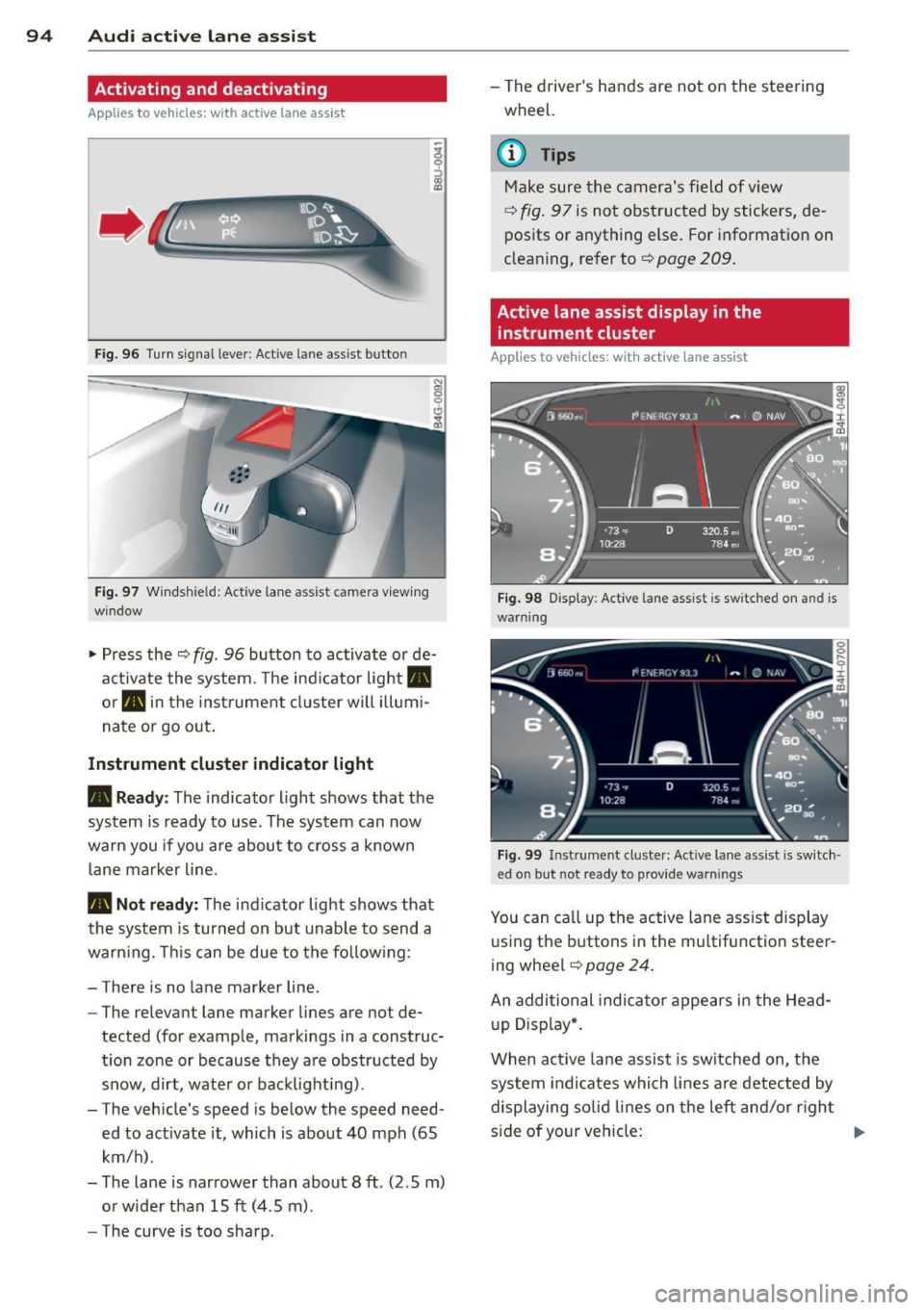
Fig. 96 Turn signal leve r: Active lan e ass ist butto n
Fig. 97 Windshie ld: Active lane assist ca mera viewing
wi ndow
-
I
~ Press the ¢ fig. 96 button to activate or de
activate the system. The indicator light .
or . in the instrument cluster will illumi
nate or go out.
Instrument cluster indicator light
• Ready: The indicator light shows that the
system is ready to use . The system can now
warn you if you are about to cross a known
lane marker line .
• Not ready: The ind icator light shows that
the system is turned on but unable to send a
warning . This can be due to the following :
- There is no lane marker line .
- The relevant lane marker lines are not de-
tected (for example, markings in a construc
tion zone or because they are obstructed by
snow, dirt, water or backlight ing).
- The vehicle' s speed is below the speed need
ed to activate it, which is about 40 mph (65
km/h) .
- The lane is narrower than about 8 ft . (2 .5 m)
or wider than 15 ft (4 .5 m).
- The curve is too sharp . - The driver's hands are not on the steering
wheel.
(D Tips
Make sure the camera's field of view
¢fig. 97 is not obstructed by stickers, de
posits or anything else. For information on
cleaning, refer to¢
page 209.
Active lane assist display in the
instrument cluster
App lies to vehicles: wit h act ive lane assist
Fig. 98 Display : Activ e la ne ass is t i s s witc hed on and is
warning
Fig. 99 Instrume nt cl ust er: Act ive lane a ssist is switch ·
ed o n but no t re ady to pro vid e wa rning s
You can call up the active lane assist display
using the buttons in the multifunction steer
ing wheel ¢
pag e 24.
An additional indicator appears in the Head
up Display*.
When active lane assist is switched on, the
system indicates which lines are detected by
displaying solid lines on the left and/or right
side of your vehicle: .,..
Page 97 of 314
M N
0 <.J 'SI' ,...., \!) 1.1'1 ,...., 1.1'1 ,....,
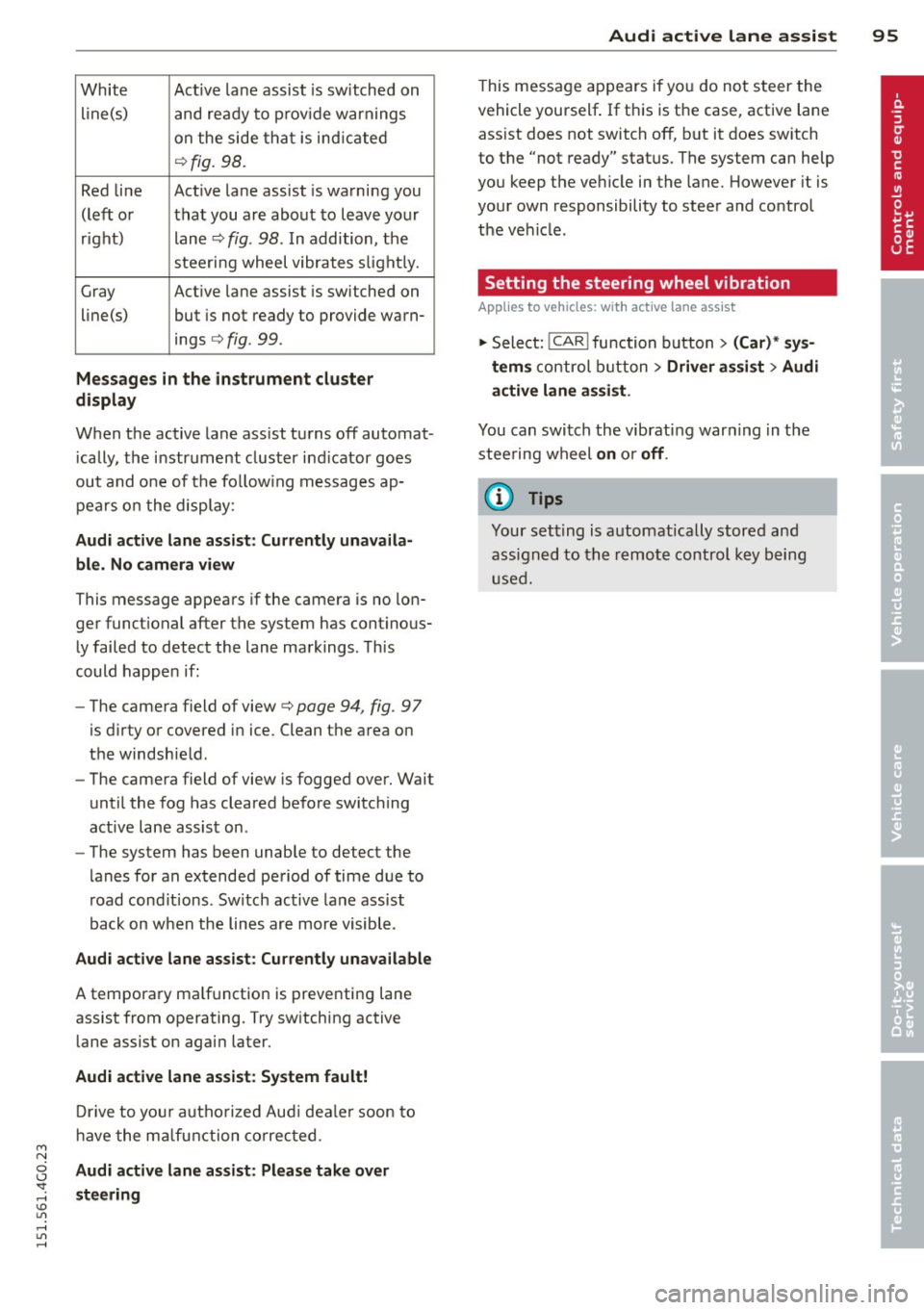
White Active l ane assist is sw itched on
line(s) and ready to p rov ide warnings
on the side that is ind icated
¢ fig. 98.
Red line Act ive lane assist is warning you
(left or that you are about to leave your
right) lane
¢ fig . 98. In addition, the
steeri ng wheel vibrates s light ly.
Gray Act ive l ane assist is switched on
line(s) but is not ready to provide warn-
ings
¢ fig . 99.
Mes sages in the instrument clu ster
display
When the active lane ass ist turns off automat
i cally, the i nstrument cluster ind icator goes
out and one of the fo llow ing messages ap
pears on the display :
Audi active lane a ssist : Currently un availa
bl e. No camera view
This message appears if the camera is no lon
ger funct ional after the system has cont inous
ly failed to detect the lane markings . This
could happen if :
- The camera field of view¢
page 94, fig. 97
is d irty or covered in ice. Clean the area on
the windshie ld.
- The camera field of view is fogged over. Wait
until the fog has cleared before switching
active lane assist on .
- The system has been unable to detect the
lanes for an extended period of time due to
road cond it ions . Switch active lane ass ist
back on when the lines are more visible .
Audi active lane a ssist : Currently un available
A temporary ma lf u nction is preventing lane
assist from operating. Try sw itching active
lane assist on again later.
Audi acti ve lane a ssist : S ys tem fault!
Drive to you r autho rized Aud i dea le r soon to
h ave the ma lfunction co rrec ted.
Audi active lane a ssis t: Pl ea se take over
s te ering
Audi acti ve lane a ssis t 95
This message appears if yo u do not s teer the
vehicle yourself . If this is the case, active lane
ass ist does not switch off, b ut it does sw itch
to the "not ready" stat us. The system can help
you keep the ve hicle in the lane. However it is
your own responsibility to steer and control
t h e ve hicle .
Setting the steering wheel vibration
Applies to vehicles: with active lane assist
11> Select: !CAR ! function button> (Car )* sys
tem s
control button > Driver a ssis t > Audi
a ctive lan e as sis t.
You can switch the vibrat ing warn ing in t he
stee ring wheel
o n or off .
(D Tips
Your setting is a utomat ically stored and
assigned to the remo te control key being
used.
Page 98 of 314

96 Audi side assist
Audi side assist
Lane Change Assistant
Description
App lies to vehicles: wit h side ass ist
Fig . 100 Sensor detection range
Fig. 101 Display on the exterio r mirro r
Side assist helps you monitor your blind spot
and traffic behind your vehicle. Within the
limits of the system, it warns you about
vehicles that are coming closer or that are
traveling with you within sensor range
(D
c:> fig . 100: if a lane change is class ified as crit
ical, the display @ in the exterior mirror
¢fig. 101 turns on.
The display in the left exterior mirror provides
assistance when mak ing a lane change to the
left, while the display in the right exterior mir·
ror provides assistance when making a lane
change to the right.
Information stage
As long as you do not activate the turn signal,
side assist
informs you about vehicles that are
detected and class ified as critical. The display
in the respective mirror turns on, but is dim. The
display remains dim intentionally in the
information stage so that your view toward
the front is not disturbed.
Warning stage
If you activate the turn signal, side assist
warns you about vehicles that are detected
and classified as critical. The display in the re
spective mirror blinks brightly. If this hap
pens, check traffic by glancing in the rearview
mirror and over your shoulder
c:> .&. in General
information on page
97.
(D Tips
- You can adjust the brightness of the dis
play @
c:> page 98.
-Please refer to the instructions for tow·
ing a trailer located in
¢ page 97 .
Page 99 of 314
M N
0 I.J -
"' rl
General information
Applies to vehicles: with side assist
®
©
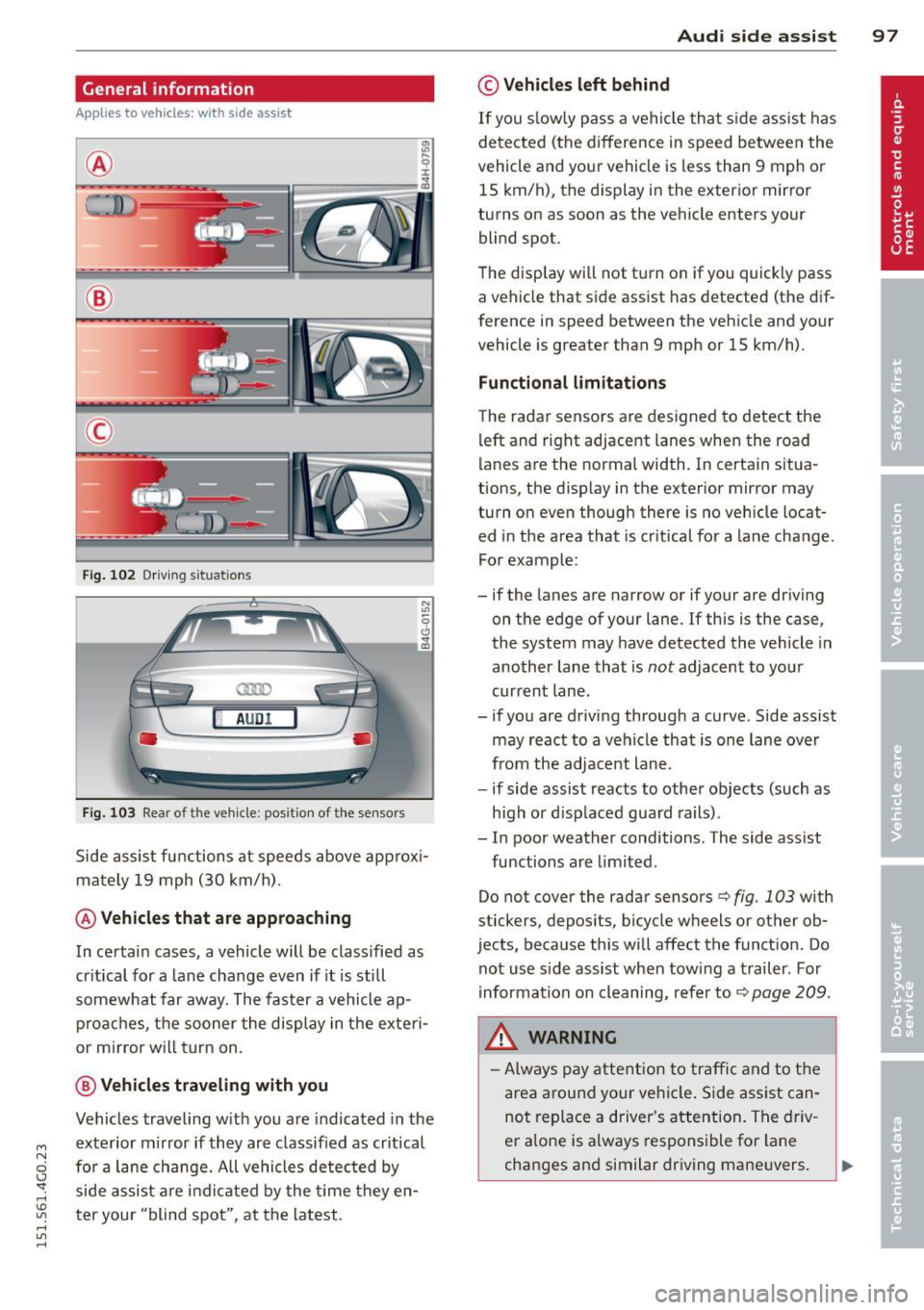
Fig . 102 Dr iving situations
AUDI
Fig. 103 Rear of t he ve hicle: positio n of t he se nsors
Side assist functions at speeds above approx i
mately 19 mph (30 km/h).
@ Vehicl es th at ar e approaching
In certain cases, a vehicle will be classified as
cr itical for a lane change even if it is still
somewhat far away. The faster a vehicle ap
p roaches, the sooner the display in the exteri
or m irror will t urn on.
@ V ehicles traveling with you
Vehicles traveling w ith you are indicated in the
exterior m irror if they are classified as cr itical
for a lane change. All vehicles detec ted by
side assist are indicated by the time they en
ter your "blind spot", at the latest.
Audi side assist 9 7
© Vehicle s left behind
If you s low ly pass a vehi cle that s ide assist has
detected (the difference in speed between the
vehicle and you r vehicle is less than 9 mph or
15 km/h), the display in the exterior mirror
turns on as soon as the vehicle enters your blind spot.
The disp lay will not t urn on if you quickly pass
a vehicle that side assist has detected (the dif
ference in speed between the vehicle and your
vehicle is greater than 9 mph or 15 km/h).
Functi onal limitation s
The radar sensors are designed to detect the
left and right adjacent lanes when the road
lanes are the normal width. In certain situa
tions, the d isp lay in the exterior mirror may
turn on even though there is no veh icle locat
ed in the area that is cr itical for a lane change.
For example:
- if the lanes are narrow or if your are dr iving
on the edge of your lane.
If this is the case,
the system may have detected the vehicle in
another lane that is
not adjacent to your
current lane .
- if you a re driving through a curve. Side assist
may react to a vehicle that is one lane ove r
from the adjacent lane.
- if side assist reacts to other objects (such as
high or d isp laced guard rails) .
- In poor weather conditions. The side assist
functions are l imited .
Do not cover the radar sensors
c> fig. 103 with
stickers, depos its, bicycle wheels or other ob
jects, because this will affect the funct ion. Do
not use s ide ass ist when towing a trailer. For
i nformation on cleaning, refer to
c> page 209 .
_&. WARNING
-Always pay attention to traffic and to t he
area around your ve hicl e. S ide assist can
not replace a driver's attention. The driv
er a lone is always responsible for lane
changes and similar driving mane uvers.
Page 100 of 314

98 Audi side assist
-Improper reliance on the side assist sys
tem can cause collisions and serious
personal injury:
- Never rely only on side assist when
changing lanes.
- Always check rear view mirrors to make
sure that it is safe to change lanes.
- Side assist cannot detect all vehicles un
der all conditions- danger of accident!
- Please note that side assist indicates
there are approaching vehicles, or
vehicles in your blind spot, only after
your vehicle has reached a driving speed
of at least 19 mph (30 km/h).
- In certain situations, the system may not
function or its function may be limited.
For example:
- if vehicles are approaching or being left
behind very quickly . The display may
not turn on in time.
- in poor weather conditions such as
heavy rain, snow or heavy mist .
- on very wide lanes, in tight curves or if
there is a rise in the road surface.
Vehicles in the adjacent lane may not be detected because they are outside
of the sensor range.
(D Note
The sensors can be displaced by impacts or
damage to the bumper, wheel housing and
underbody. This can affect the system.
Have your authorized Audi dealer or au
thorized Audi Service Facility check their
function.
@ Tips
- If the window glass in the driver's door
or front passenger's door has been tint ed, the display in the exterior mirror may
be misinterpreted.
- For Declaration of Compliance to United
States FCC and Industry Canada regula
tions¢
page 295.
Activating and deactivating
Applies to vehicles: rnit s ide ass ist
Fig. 104 Driver's doo r: Side ass ist butto n
.. Press the button c> A in General informa
tion on page 9
7 to switch the system on/off .
The LED in the button turns on when side
assist is switched on .
Adjusting the display brightness
Applies to vehicles: wit h side assist
The brightness setting can be adjusted via the
MMI.
.. Select: !CAR I function button> (Car)* sys
tems control button > Driver assist > Audi
side assist .
The display brightness adjusts automatically
to the brightness of the surroundings, both in
the information and in the warning stage. In
very dark or very bright surroundings, the dis
play is already set to the minimum or maxi
mum level by the automatic adjustment . In
such cases, you may notice no change when
adjusting the brightness, or the change may
only be noticeable once the surroundings
change.
Adjust the brightness to a level where the dis
play in the information stage will not disrupt
your view forward. If you change the bright
ness, the display in the exterior mirror will
briefly show the brightness level in the infor
mation stage. The brightness of the warning
stage is linked to the brightness in the infor mation stage and is adjusted along with the
information stage adjustment .
Page 195 of 314
M N
0 <.J 'SI: ,...., \!) ..,.,
,...., ..,., ,....,
@ Tips
Your vehicle may be equipped with Audi
connect. Your use of certain Aud i connect
features req uires wireless serv ices that are
provided by a third party wireless telecom
municat ions provider. For details regard
ing how information obtained through
Aud i connect is collected, processed,
transmitted, used, and shared, please see
your contra ct w ith the wire less telecom
municat ions provider and the "About A udi
connect" tab in your vehicle's MMI:
!MENU !
button > Audi connect > About Audi con·
nect .
Electronic Stabilization
Control (ESC)
Description
ESC helps to improve road holding and vehicle
dynamics to help reduce the probability of
skidd ing and loss of veh icle control. It works
only when the eng ine is running. ESC detects
certain difficult driv ing s ituations, including
when the vehicle is beginning to spin (yaw) out of cont ro l and helps you to get the vehicle
back under control by select ively brak ing the
wheels, and/or red ucing engine powe r and
p roviding steering assistance to help hold the
ve hicle on the driver's intended course . The in
dicator light
m in the instrument cluster
blinks when ESC is taking action to help you
control the vehicle.
ESC has limitations.
It is important to remem
ber that ESC cannot overcome the laws of
phys ics. It will not a lways be able to help out
under all conditions you may come up against.
For example, ESC may not always be able to
h elp you master situat ions where there is a
sudden change in the coefficient of fr iction of
the road surface. When there is a sect io n of
d ry road that is s udden ly cove red with water,
slush o r snow, ESC canno t perform the same
way it would on the dry su rface.
If the vehicle
hydroplanes (rides on a c ush ion of wate r in
stead of the road surface), ESC wi ll not be
ab le to he lp you steer the veh icle because con-
Int ellig ent technolog y 193
tact with the pavement has been interrupted
and the vehicle cannot be braked or steered .
D uring fast corner ing, particular ly on wind ing
roads, ESC cannot always deal as effectively
with difficult dr iv ing s ituations than at lower
speeds. When towing a trailer, ESC is not able
to help you regain control as it would if you
were not tow ing a trailer.
Always adjust your speed and driving style to road, traffic and weather conditions . ESC can
not override the vehicle's physical lim its, in
crease the availab le tract ion, or keep a veh icle
o n the road if road departu re is a result of
driver ina ttent io n. Instead , ESC imp roves the
poss ibility of keep ing the vehicle under con
trol and on the road during extreme maneu
vers by using the driver's steering i nputs to
help keep the vehicle go ing in the intended di
rect ion. If you are traveling at a speed that
causes you to run off the road before ESC can
provide any assistance, you may not experi
ence the benefits of ESC.
ESC includes and/or works together with the
anti-lock brake system (ABS), brake ass ist sys
tem, ant i-slip regu lation (ASR), electron ic dif
ferential lock (EDL), dynam ic steer ing* and
El ectronic interax le differentia l lock* /selective
whee l to rque control*. ESC is switched on a ll
the time. In ce rtain sit uat io ns when yo u need
less traction, you can sw itch off ASR by press
ing the b utton
[fil ¢ page 195, fig. 178. Be
s u re to switch ASR on again when you no lon
ger need less traction .
Anti-lock braking system (ABS )
ABS prevents the whee ls from locki ng up
when b raking. The vehicle can st ill be stee red
even during hard braking . App ly steady pres
su re to the brake peda l. Do not pump the ped
al. A pulsing in the brake pedal indicates that
the system is helping you to brake the vehicle.
Brake a ssis t sy ste m
The brake ass ist system can decrease braking
distance . It increases braking power when the
driver presses the brake peda l quickly in emer
gency s ituations. You must press and hold the
brake pedal unti l the situation is over. In .,,.
•
•
Page 299 of 314
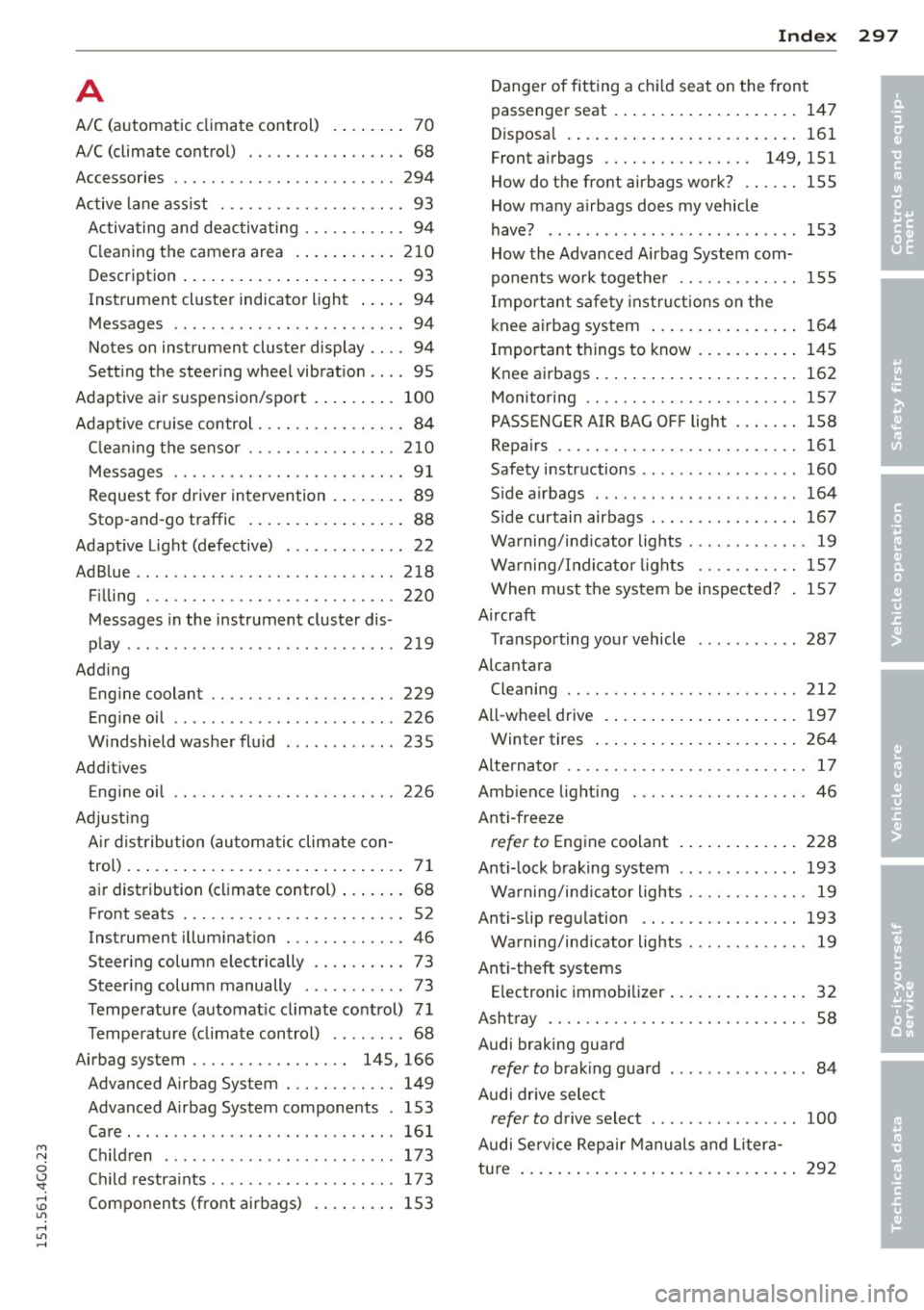
A
A/C (automatic climate control) .... .. .. 70
A/C (climate control) . . . . . . . . . . . . . . . . . 68
Accessories .. ............. .... .. .. . 294
Active lane assist . . . . . . . . . . . . . . . . . . . . 93
Activating and deactiva ting . .. .. .. .. .. 94
C leaning the camera area ... ... .. .. . 2 10
Descript ion ...... ..... ... ... ... .... 93
Instrument cluster indicator light . . . . . 94
Messages . . . . . . . . . . . . . . . . . . . . . . . . . 94
Notes on instrument cluster display .. .. 94
Sett ing the steering wheel vibrat ion .. .. 95
Adaptive a ir s uspension/sport . ... .. .. . 100
Adapt ive cruise control . . . . . . . . . . . . . . . . 84
C lea ning the sensor ....... .. .. .. .. . 210
Messages .. ............. .... .. .. .. 91
Request for driver intervention . . . . . . . . 89
Stop-and-go traffic . . . . . . . . . . . . . . . . . 88
Adapt ive Lig ht (defective) ... .. .. .. .. .. 22
AdBlue .. .. .. ................. .. ... 218
F il ling . .. .. ................. .. ... 220
Messages in the instrument cluster dis -
play . .. .. .. .. ........ ... .. ... ... . 219
Adding Eng ine coolant ........... .... .. .. . 229
Eng ine oil .. .. ........... .. .. .. ... 226
W indshield washer fluid ....... ... .. 235
Addit ives
E ng ine oi l .. ............. .... .. ... 226
Adj usti ng
A ir dist ribution (au toma tic climate con-
trol) ... .. .. .. .... .. .... ... .. .. .... 71
air distribution (cl imate control) ... .. .. 68
Front seats . . . . . . . . . . . . . . . . . . . . . . . . 52
Instrument illum inat ion ... .. .. .. .. .. 46
Steer ing colum n elec trically .. .. .. .. .. 73
Steer ing colum n manually . .. .. .. .. .. 73
Temperature (automat ic climate co ntrol) 71
Temperature (climate control) .. ... ... 68
Airbag system . . . . . . . . . . . . . . . . . 145, 166
Advanced Airbag System ... .. .. .. .. . 149
Advanced Airbag System components . 153
Care ...... ... ................ .... 161
M N Chi ld ren ... ... .. .. ...... .. .. .. .. . 173 0
~ Chi ld restra ints ........... .. .. .. ... 173
~ Components (front airbags) .. .. .. .. . 153 1.1"1 ,...., 1.1"1 ,....,
Inde x 297
Danger of fitting a ch ild seat on the front
passenger seat ..... . ... ...... ... .. 147
•
Disposa l .. .. .. .. .. . .. ... .... ... .. 161 •
Front a irbags . . . . . . . . . . . . . . . . 149, 151
How do the front airbags work? .... .. 155
How many a irbags does my vehicle
have? .. .. .. .. .. .. . .. .... .... .... 153
How the Advanced Airbag System com-
ponents work togethe r ......... .... 155
Impo rtant sa fe ty instru ctions on the
knee airbag sys tem ... .. .... ... .. .. 164
Important t hings to know . . . . . . . . . . . 145
Knee airbags ... .... . ... ...... ... .. 162
Monitoring .. .. .. ................. 157
PASSENGER AIR BAG OFF light ..... .. 158
Repairs ... .. .. .. .... ............. 161
Safety instructions .. .............. . 160
S ide a irbags ... .. .. . .. .... .... .. .. 164
S ide curtain airbags . ... ..... ... .... 167
Warning/ind icator lights ........ .. .. . 19
Warning/Indicato r lights ....... .. .. 157
When must t he system be inspected? 157
A ircraft
Transpo rting your vehicle 287
A lcantara
Cleaning .. .. .. .. ................. 212
A ll-wheel drive .. .... . ... ...... ... .. 197
Winter tires ..... .. . .. .. ..... ... .. 264
Alternato r . . . . . . . . . . . . . . . . . . . . . . . . . . 17
Amb ience lighting . ................. . 46
Anti -freeze
refer to Engine coolant . ..... ... .. .. 228
Anti- lock b raking system ............ . 193
Warning/ind icator lights ........ .. .. . 19
Anti-slip regu lation .. ........... .... 193
Warning/ind icator lights .. .. ... ... .. . 19
Anti-theft systems Electronic immobi lizer ....... ... .. .. . 32
Asht ray .... .. .. .. .. . ............... 58
Audi braking guard
refer to brak ing guard ............. .. 84
Audi drive select
refer to drive select ... ............. 100
A udi Se rv ice Repair Manuals and Liter a-
tu re .. ... .. .. .... .. . .. ... .... ... .. 292
Page 305 of 314
M N
0 <.J 'SI: ,...., \!) 1.1'1 ,...., 1.1'1 ,....,
-----------------------------~I~ n~d~ e~x 303
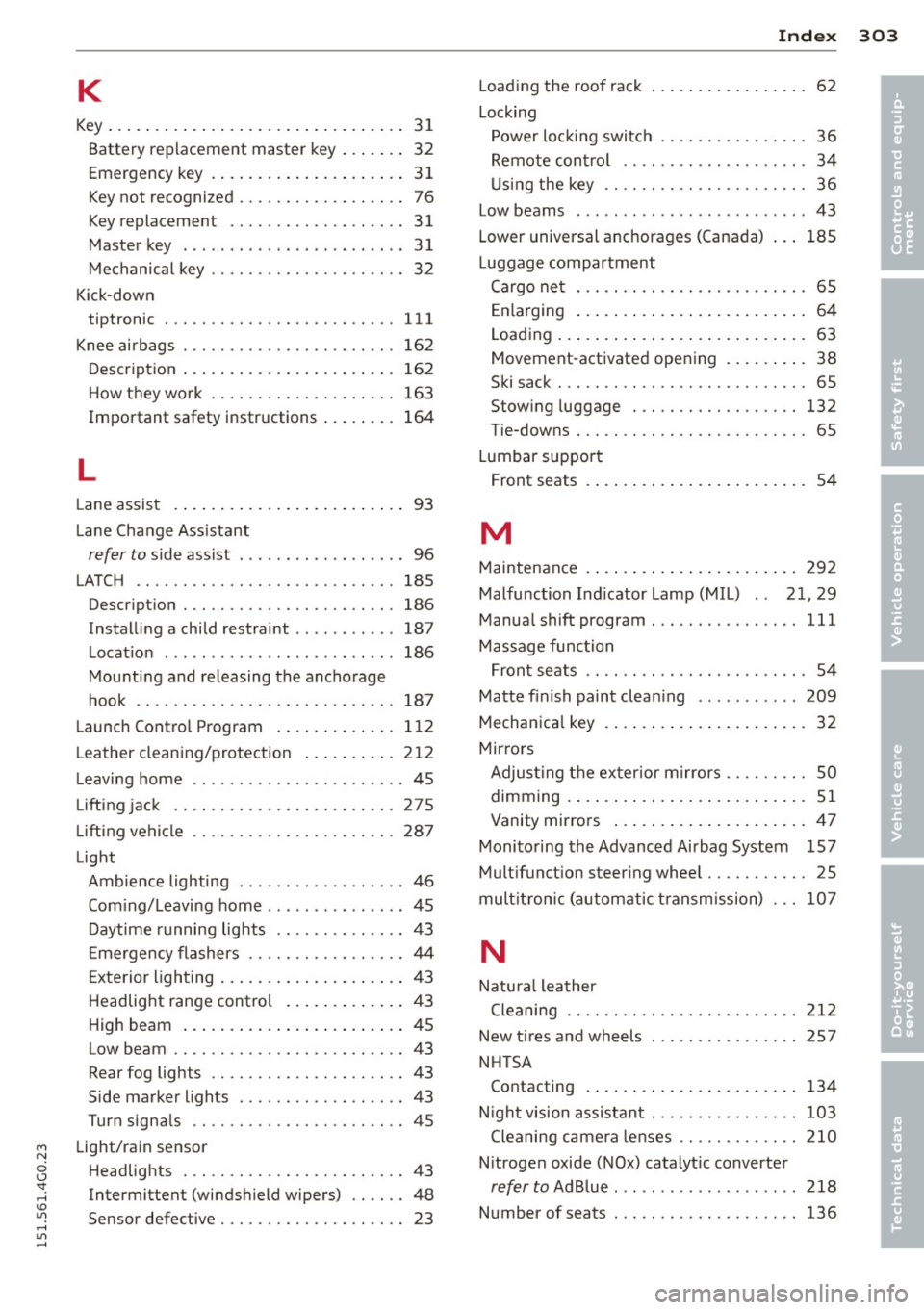
K
Key ... .... .. .. .... .. .... ... .. .. .... 31
Battery rep lacement master key ... .. .. 32
Emergency key . . . . . . . . . . . . . . . . . . . . . 31
Key not recognized . . . . . . . . . . . . . . . . . . 76
Key replacement . . . . . . . . . . . . . . . . . . . 31
Master key . . . . . . . . . . . . . . . . . . . . . . . . 31
Mechanical key . . . . . . . . . . . . . . . . . . . . . 32
Kick-down tiptronic
K . b nee air ags . ............. .. .. .. .. .
D escr ipt ion .... .. ..... ... .. .. .. .. .
How they work . ... .... ... .. .. .. .. . 111
16 2
162 163
Important safety instructions ... .. .. . 164
L
Lane assist . . . . . . . . . . . . . . . . . . . . . . . . . 93
L ane Change Ass istant
refer to side assist . . . . . . . . . . . . . . . . . . 96
LATCH
.... .. ............. .... .. ... 185
Descr ipt ion . .... ......... .... .. .. . 186
Instal ling a child restraint .. .. .. .. .. . 187
L ocat ion . ............ ...... .... .. 186
M ounting and releasing the ancho rage
hook .. .. .. .... ......... .... .. .. . 187
Launch Contro l Program .... .. .. .. .. . 112
L eather clean ing/protection ... .. .. ... 2 12
L eaving home .. ..... ...... .. .. .. .. .. 45
Lifting jack ........................ 275
L ift ing vehicle
Light 287
Ambie nce lighting ........... .. .... . 46
Com ing/Leavi ng home ......... ... ... 45
D aytime running lig hts .... .. .. .. .. .. 43
E mergency flashers ....... .. .. .. .. .. 44
E xte rio r lighting ... .... ... .. .. .. .. .. 43
Headlig ht range contro l ... .. .. .. .. .. 4 3
High beam ... ... ..... ... .. .. .. .... 45
Low beam .. ............. .... .. .... 43
Rear fog lights ........... .. .. .. .. .. 43
Side marker lights ........ .. .. .. .. .. 43
Turn signa ls .. ..... ...... .. .. .. .. .. 45
Light/rain sensor Headlights . ............. .... .. .. .. 43
Intermittent (windshield wipers) .. .. .. 48
Sensor defective . . . . . . . . . . . . . . . . . . . . 23 Load
ing the roof rack .. .. .. ... ... .. .. . 62
Locking Power loc king switc h ............... . 36
Remote con trol . . . . . . . . . . . . . . . . . . . . 34
U sing the key .. .. ................. . 36
Low beams
. .. .. .... .......... ...... 43
Lower universal anchorages (Canada) 185
Luggage compartment Cargo ne t . . . . . . . . . . . . . . . . . . . . . . . . . 6S
E nlarging . . . . . . . . . . . . . . . . . . . . . . . . . 64
Loading ... .. .... .. . .. .. ..... ... .. . 63
Movement-activated ope ning . ... .. .. . 38
Ski sack ... .. .. .. .. . .............. . 65
Stow ing luggage ..... ............. 132
Tie-downs . . . . . . . . . . . . . . . . . . . . . . . . . 6S
Lumbar support Front seats . . . . . . . . . . . . . . . . . . . . . . . . 54
M
Maintenance . ....... . .. .. ..... ... .. 292
Malfunction Ind icator Lamp (MIL) . . 21, 29
Manua l shift program ... ............. 111
Massage func tio n
F ron t se ats . . . . . . . . . . . . . . . . . . . . . . . . 54
Matte f inish paint clean ing .......... . 209
Mechanica l key .. .. .. . ... ...... ... .. . 32
Mir ro rs
Adjus ting t he ex ter ior mirrors . . . . . . . . . SO
d' . 1mming .. .. .... .. . .. .. ..... ... .. . 51
Vanity mirrors ... .. . ... ...... ... .. . 47
Monito ring the Advanced Airbag System 157
Mult ifunct ion steer ing whee l .......... . 25
mult itron ic (automatic t ransm ission) . .. 107
N
Natu ra l leather
Cleaning
New tires and wheels
NH TSA
Contacting 212
2S7
134
N igh t vision assistant ............ .. .. 103
Cleaning came ra lenses ......... .. .. 210
N itrogen oxide (NOx) catalyt ic converte r
refer to Ad Blue .......... ......... . 218
Number of seats . .. .... ......... .. .. 136
•
•