brakes AUDI A6 2017 User Guide
[x] Cancel search | Manufacturer: AUDI, Model Year: 2017, Model line: A6, Model: AUDI A6 2017Pages: 280, PDF Size: 70.24 MB
Page 90 of 280
Assist
Audi adaptive cruise
control
Description
Applies to: vehicles with Audi adapt ive cruise control
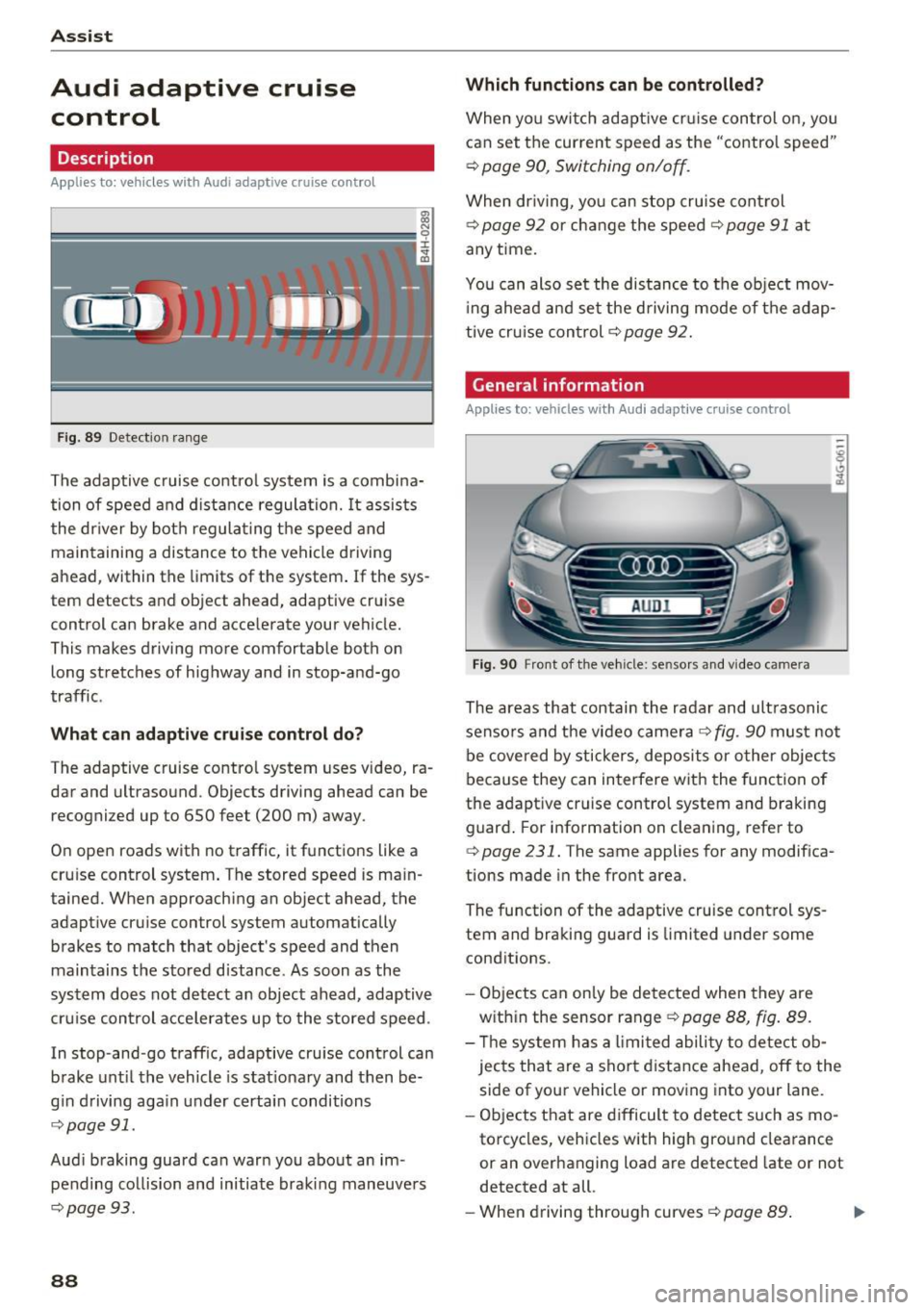
F ig. 89 Detection range
The adaptive cruise control system is a combina
tion of speed and distance regulation.
It assists
the driver by both regulating the speed and
maintaining a distance to the vehicle driving
ahead, within the limits of the system .
If the sys
tem detects and object ahead, adaptive cruise
control can brake and acce lerate your vehicle.
This makes driving more comfortable both on long stretches of highway and in stop-and-go
traffic.
What can adaptive cruise control do?
The adaptive cruise contro l system uses video, ra
dar and ultrasound . Objects driving ahead can be
recognized up to 650 feet (200 m) away.
On open roads with no traffic, it functions
like a
cruise control system . The stored speed is main
tained. When approaching an object ahead, the
adaptive cruise control system automatically
brakes to match that object's speed and then
maintains t he stored distance . As soon as the
system does not detect an object ahead, adaptive
cru ise control acce lerates up to the stored speed .
In stop-and-go traffic, adaptive cru ise control can
brake until the vehicle is stat ionary and then be
g in driving aga in under certain conditions
¢page 91.
Audi braking guard can warn you about an im
pending collision and initiate braking maneuvers
¢page 93.
88
Which functions can be controlled?
When you switch adaptive cruise control on, you
can set the current speed as the "control speed"
¢ page 90, Switching on/off.
When driving, you can stop cruise control
¢page 92 or cha nge the speed ¢ page 91 at
any time.
You can also set the distance to the object mov
ing ahead and set the driving mode of the adap
tive cruis e con trol
¢p age 92.
General information
Applies to: vehicles with Audi adaptive cruise control
Fig. 90 Front of the vehicle: sensors and video camera
The areas that contain the radar and ultrasonic
senso rs and the video camera ¢
fig. 90 must not
be covered by stickers, deposits or other objects
because they can interfere with the function of
the adapt ive cruise control system and braking
guard. For information on clea ning, refer to
¢ page 231. The same applies for any modif ica
tions made in the front area.
The function of the adaptive cruise control sys
tem and braking guard is limited under some
conditions.
- Objects can only be detected when they are
with in the sensor range
¢p age 88, fig. 89.
- Th e system has a limit ed ability to detect ob
jects that are a sho rt distance ahead, off to the
side of your vehicle or moving into your lane.
- Objects that are difficult to detect such as mo
torcycles, vehicles with high ground clearance
or an overhanging load are detected late or not
detected at all.
- When driving through curves¢
page 89. ll>
Page 92 of 280
Ass is t
When driving into a curve ~ fig. 91 and out of a
curve, the adaptive cruise control may react to an
object in the neighbor ing lane and apply the
brakes. You can prevent that by pressing the ac
celerator pedal brief ly .
Stationary objects
App lies to: vehicles with Audi adaptive cruise contro l
Fig . 92 Examp le: ob ject changin g lanes and stationary o b
j ect
The adaptive cruise contro l system only reacts to
objects that are mov ing or that the system has
a lready detected as moving. For examp le, it can
react when a vehicle that has a lready been de
tected @turns or changes lanes, but adaptive
cru ise control does not react to a stat ionary vehi
cle @.
Switching on /off
Applies to: vehicles with Audi adaptive cruise control
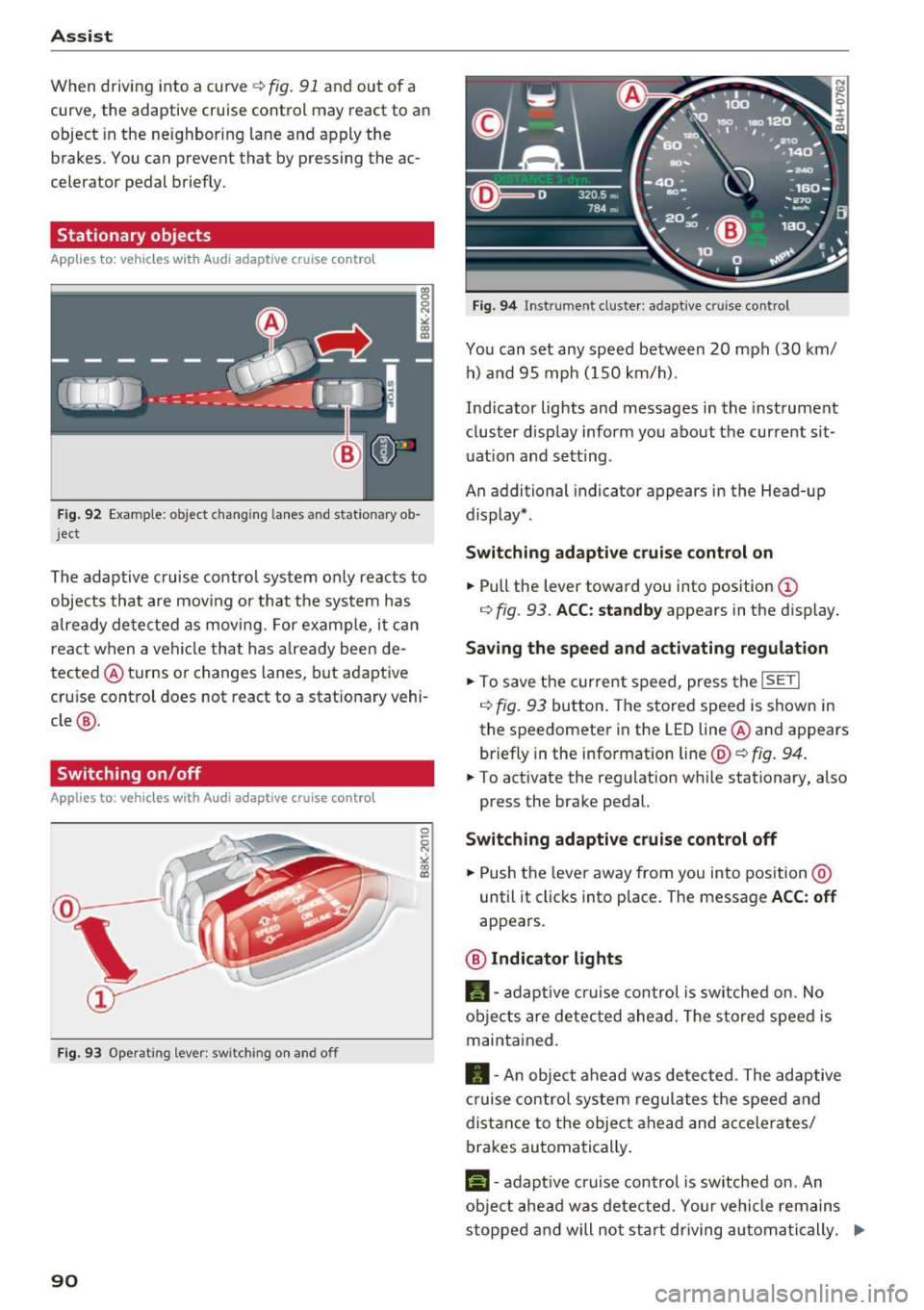
Fig. 9 3 Operat ing leve r: sw itching on a nd o ff
90
F ig. 94 In str umen t cl uste r: ad ap tive cr uise cont rol
You can set any speed between 20 mph (30 km/
h) a nd 95 mph ( 150 km/h).
Ind icator lights and messages in the instrument
cluster display inform you about the current sit
uat ion and setting .
An additional indicator appears in the Head-up display* .
Switching ad apti ve c ruise control on
.,. Pull the lever toward you into position (D
r=> fig. 93 . ACC: standb y appears in the disp lay.
Saving the speed and activating regulat ion
.,. To save the current speed, press the ISETI
r=> fig . 93 button . The stored speed is shown in
the speedomete r in the LED line @and appears
briefly in the info rmation line @'=>
fig. 94.
.,. To activate the regu lation while stationary, also
press the brake pedal.
Switching adaptive crui se control off
.,. Push the lever away from you into position @
until it clicks into place. The message
ACC : off
appears .
@ Indicator lights
fll-adap tive cr uise contro l is sw itched on. No
objects are detec ted ahead. The s tored speed is
maintained.
• -A n object ahead was detected . The adaptive
cruise contro l sys tem regu lates the speed and
d istance to the objec t ahead and ac ce lera tes/
brakes automatically .
f:i-adaptive cruise control is switched on. An
object ahead was detected . Yo ur vehicle remains
stopped and will not start driving au toma tically. ..,.
Page 94 of 280
Assist Interrupting cruise control
Applies to: vehicles with Audi adaptive cruise contro l
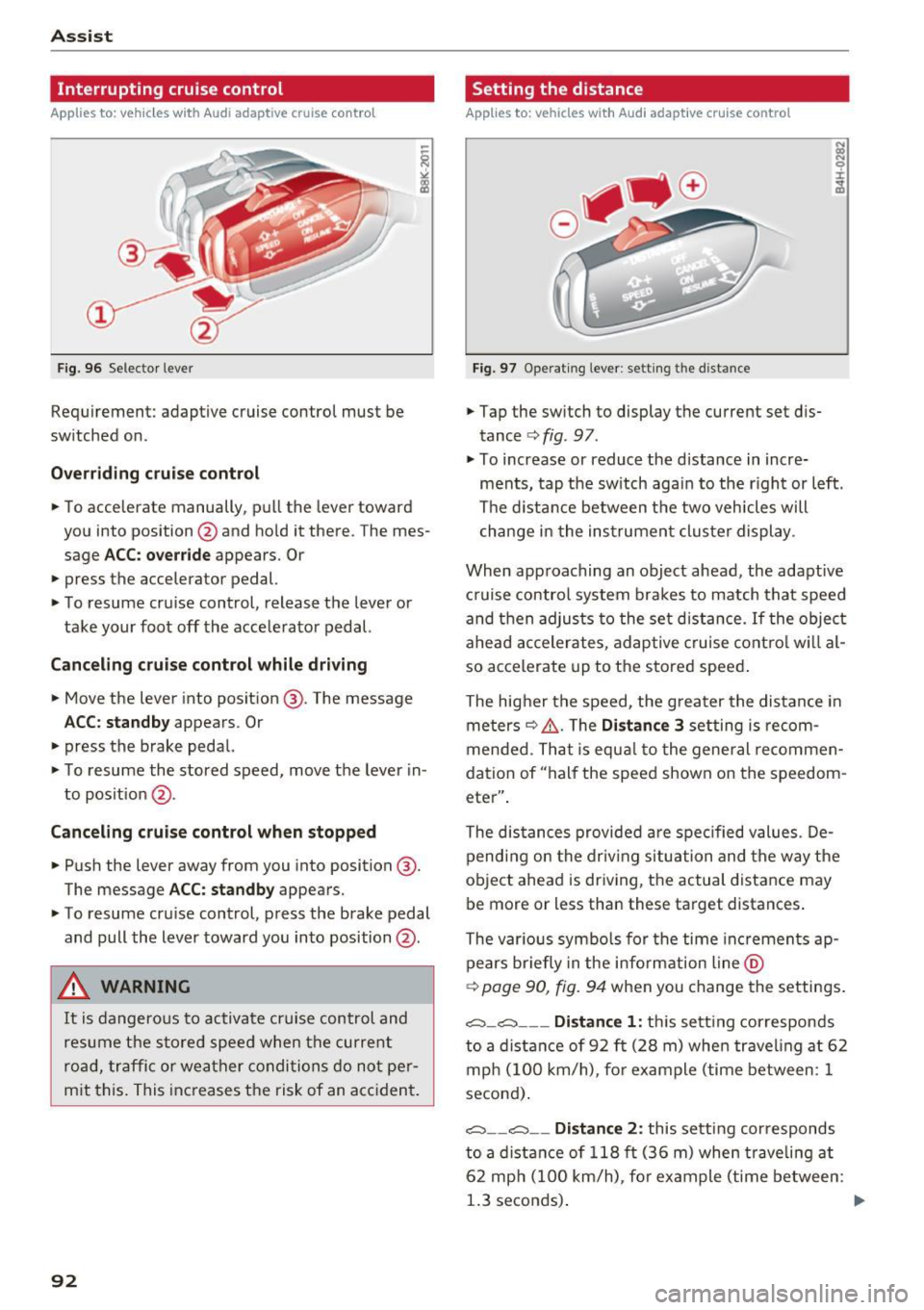
Fig. 96 Selector lever
Requirement: adaptive cruise control must be
switched on.
Overriding cruise control
• To accelerate manually, pull the lever toward
you into position @and hold it there . The mes
sage
ACC: override appears. Or
• press the accelerator pedal.
• To resume cruise control, release the lever or
take your foot off the accelerator pedal.
Canceling cruise control while driving
• Move the lever into position @. The message
ACC: standby appears. Or
• press the brake pedal.
• To resume the stored speed, move the lever in
to posit ion @.
Canceling cruise control when stopped
• Push the lever away from you into position @.
The message
ACC : standby appears.
• To resume cruise control, press the brake pedal
and pull the lever toward you into position @.
A WARNING
It is dangerous to activate cruise control and
resume the stored speed when the current
road, traffic or weather conditions do not per
mit this. This increases the risk of an accident.
92
Setting the distance
Applies to: vehicles with Audi adaptive cruise control
Fig. 97 Operat ing leve r: setting the distance
• Tap the switch to display the current set dis
tance ¢
fig. 97.
• To increase or reduce the distance in incre
ments, tap the sw itch again to the r ight or left .
The distance between the two veh icles will
change in the instrument cluster display .
When approaching an object ahead, the adaptive
c ruise contro l system brakes to match that speed
and then adjusts to the set distance.
If the object
ahead accelerates, adaptive cruise control will al
so accelerate up to the stored speed .
The higher the speed, the greater the distance in
meters
~ &, . The Distance 3 setting is recom
mended. That is equa l to the general recommen
dation of "half the speed shown on the speedom
eter" .
The distances provided are specified values . De
pending on the driving situation and the way the
object ahead is driving, the actual distance may
be more or less than these target distances .
The various symbols for the time increments ap
pears briefly in the informat ion line @
¢
page 90, fig. 94 when you change the settings .
c::::,_c::::, ___ Distance 1 : this sett ing corresponds
to a distance of 92 ft (28 m) whe n traveling at 62
mph (100 km/h), for example (time between: 1
second) .
c::::, __ c::::, __ Distance 2: this setting corresponds
to a distance of 118 ft (36 m) when traveli ng at
62 mph (100 km/h), fo r example (time between:
1.3 seconds) .
IIJJ,
Page 95 of 280
co
co
.... N
" N .... 0 0 <.,;) 'SI"
~-- -~ -Di st a nce 3: this setting corresponds
to a distance of 164
ft (SO m) when traveling at
62 mph (100 km/h), for examp le (time between:
1.8 seconds).
~ -- --~ Dist a nce 4: This setting corresponds
to a distance of 210
ft (64 m) when traveling at
62 mph (100 km/h), (time distance of 2.3 sec
onds).
A WARNING
Following other vehicles too closely increases
the risk of coll isions and ser ious personal in
jury.
- Setting short distances to the traffic ahead
reduces the t ime and distance available to
br ing your vehicle to a safe stop and makes
it even mo re necessary to pay close atten
t ion to traffic.
- Always obey applicable traffic laws, use
good j udgment, and select a safe following
distance for the traffic, road and weather
condit ions .
@ Tips
- Di stance
3 is set automatically each time
you switch the ignition on.
- Your settings are automatically stored and
assigned to the remote control key being
used.
Selecting the dr iving mode
Applies to: vehicles with Audi adaptive cruise control
.,. Se lect the des ired driving mode in dr ive se lect
~ page 104.
@ Tips
Your se ttings a re au toma tic al ly s to red and as
signed to the remote contro l key being used.
A ss ist
Request for driv er interv ent ion
Applies to: vehicles with Audi adaptive cruise control
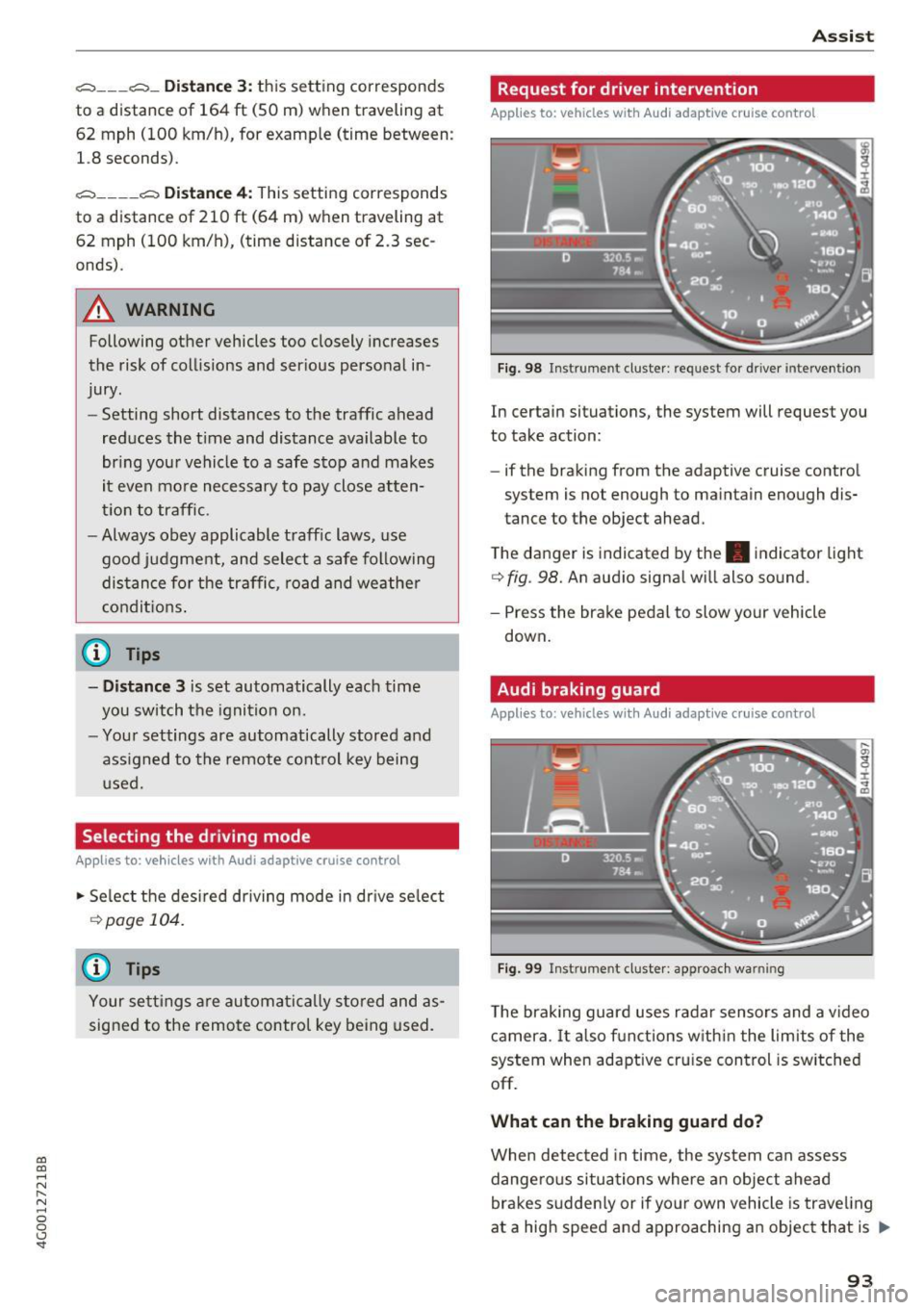
F ig. 98 Instrument c luster: request for driver intervention
In certain situations, the system will request you
to take action:
- if the braking from the adaptive cruise control
system is not enough to maintain enough dis
tance to the object ahead.
T he danger is indicated by the. indicator light
~ fig. 98. An aud io signa l will also sound.
- Press the brake pedal to slow your vehicle down.
Audi braking guard
Applies to: vehicles with Audi adaptive cruise control
Fig . 99 Instrument cluste r: approac h warning
The braking guard uses radar sensors and a v ideo
camera. It also f unctions w ith in t he lim its of the
system when adaptive cru ise control is switched
off.
What can the b raking guard d o?
When detected in time, the system can assess
dange rous situations where an object ahead
brakes sudden ly or if yo ur own vehicle is trave ling
at a high speed and approaching an object that is
II>
93
Page 96 of 280
Assist
moving more slowly. The braking guard does not
react if it cannot detect the situation.
The system advises you of various dangerous sit
uations:
- The
distance warning occurs if you drive too
closely to the object ahead for a long period of
time . If the object ahead brakes strongly, you
would not be able to avoid a collision. The.
indicator light appears as an indication for this.
- The
approach warning occurs when an object
ahead is traveling more slowly or brakes
strongly . When this warning occurs, it may only
be possible to avoid a collision by swerving or
braking strongly. The danger is indicated by the
• indicator light ¢
fig. 99. An aud io signa l will
also sound.
If you do not react early enough or at all to a dan
gerous situation, the braking guard supports you
with a braking intervention.
- If a collision is imminent, the system will first
provide an
acute warning by braking sharply.
- If you do not react to the acute warning, the
braking guard can increase the braking force
within the limits of the system
1l. Th is reduces
the vehicle speed in the event of a co llision.
- The system can initiate complete deceleration
shortly before a collision
ll. Full deceleration at
high speeds occurs only in vehicles with adap
tive cruise control and s ide assist (pre sense
plus).
- If the braking guard determines that you are
not braking strongly enough when there is an
impen ding collision, it can increase the braking
force .
- The pre sense functions also engage when
there is an impending collision
¢ page 137.
Which functions can be controlled?
You can switch the braking guard and the dis
tance/approach warning on or off in the Infotain
ment system ¢
page 95, Settings in the Info
tainment system.
l) This is not availab le in some co untr ies.
94
A WARNING ,_
Lack of attention can cause collisions, other
accidents and serious personal injuries. The
braking guard is an assist system and cannot
prevent a collision by itself . The driver must
always intervene. The driver is always respon
sible for braking at the correct time.
- Always pay close attention to traffic, even
when the braking guard is switched on. Be
ready to intervene and be ready to take
complete control whenever necessary. Al
ways keep the safe and legal distance be
tween your vehicle and vehicles up ahead.
- Braking guard works within limits and will
not respond outside the system limits, for
example when approaching a stopped vehi
cle or stationary obstacle (end of a traffic
jam or vehicle that has broken down in traf
fic).
- Always remember that the radar sensor for
the braking guard works only within defined
detection and range limits that may prevent
the proper detection of other vehicles.
- The radar sensor's function and range can
be reduced by rain, snow and heavy spray.
Moving vehicles up ahead may not be
promptly detected or may not be detected
at all.
- Reflective surfaces including crash barriers
or tunnel entrances may impair the function
of the radar sensor.
(D Tips
-You can cancel the braking with increasing
force that is initiated by the system by brak
ing yourself, by accelerating noticeably or
by swerving.
- Keep in mind that braking guard can brake
unexpectedly. Always secure any cargo or
objects that you are transporting to reduce
t he risk of damage or injury.
Page 122 of 280
Intelligent Technology
Intelligent Technology
Electronic Stabilization
Control (ESC)
Description
Elect ronic Stabilization Control (ESC) suppo rts
driver safety.
It red uces the risk of slipping and
improves dr iving stability. ESC detects crit ica l sit
uations such as the veh icle oversteering and un
dersteering or the wheels are sp inning. The vehi
cle is stabilized by app lying the brakes or reduc
ing engine torque. As soon as the ESC is active ly
regulat ing, the
D.1 indicato r light blin ks in the in
s trumen t clus ter.
The fo llow ing systems are integrated in the ESC :
Ant i-lock braking system (ABS)
ABS p revents the whee ls from locking whe n brak
ing. The vehicle can sti ll be steered even during
hard brak ing. Apply steady press ure to the brake
pedal. Do not pump the pedal. A puls ing in t he
b rake pedal indicates that the system is acting to
s tabilize the vehicle .
Br ake assist system
The brake assist system can decrease brak ing dis
tance . It increases brak ing power when the driver
presses the brake pedal q uick ly in emergency sit
uations . You must press and hold t he b rake pedal
until the dangerous sit uat io n is over . In veh icles
with adapt ive c ruise control*, the bra ke as sist
sy stem is more sensitive if t he di sta nce detec ted
t o the vehicle dr iv ing ahead is too small. On
ve hicl es with act ivated and f unct io ni ng night vi
sion assist*, the brake assist system can respond mo re sensit ively if there is a warning .
Anti-slip regulation (ASR)
ASR red uces eng ine power when the drive w heels
be gin sp inning an d adapts the force to the road
conditions. This makes it easie r to sta rt, acceler
ate and dr ive up h ills.
Electronic differential lock (EDL)
T he EDL applies the b rakes to a whee l t h at s tarts
sp inning and tra nsfe rs t he dr ive powe r to t he
o ther driving wheel or wheels (if the veh icle is
120
equipped with a ll w hee l drive*) . T h is f unction is
not avai lab le at higher speeds .
I n extreme cases , EDL automat ic al ly swi tches off
to keep t he b rake o n the br aked wheel from ove r
heating. The ve hicle is still working correct ly. ED L
will switc h on again automatically when condi
tions have returned to normal.
Steering recommendation
The ESC he lps to s tabili ze th e vehicle by ch ang ing
t h e s teer ing torque.
I n veh icles with dynamic s teer ing*, ESC a lso
helps to stab ilize the s teeri ng in cr it ic al situ a
tions.
Selective wheel torque control
Se lective wheel to rque control is used when d riv
i ng on curves . The front whee l on the ins ide of
t h e curve or both whe els on the i nside of th e
cu rve are braked se lectively as needed. This al
l ows mo re pre cise driving in curves .
Automatic post -collision braking system
The "a utomat ic post -coll is io n braking system"
can help to reduce the risk of sl iding and of addi
tiona l co llisions after an acc iden t. If the a irbag
c on tro l modu le dete cts a collision above a cer tain
vehicle speed, the veh icle is braked by t he ESC.
The veh icle does not brake automatically if:
- the drive r presses the accelerator pedal, or
- the bra king force generate d by the pressed
brake pedal is greater than the b raking force
that would be in itiated by the system, or
- the ESC, the bra ke system or the vehicle elect ri
cal system are not functioning.
A WARNING
- The ESC and its integ rated systems can not
overcome the lim its imposed by natura l
p hys ica l laws. Th is is es pec ially i mpo rtan t
on s lippery or we t roads. If the system s be
g in a cting to s tabili ze yo ur vehicle, you
should immedi ately alte r your speed to
match the road and tra ffi c conditions. Do
not let the inc reased safety provided tempt
Page 124 of 280
Intelligent Technology
Braking
New brake p ads
New b rake pads do no t achieve the ir full b raking
effect during the firs t 250 mi (400 km) . They
m ust be "broken in" first .
Wear
Brake pad wear depends largely o n the way the
ve hicl e is driven and on operat ing cond it ions.
This is especi ally true if you are d riving frequently
in the c ity and on c urves or with a sporty driving
style.
Operating noise
Noises may occur when bra king depend ing on the
speed, b raking force and outs ide cond it ions s uch
as temperature and humidity.
Effect of water and road salt
In ce rtain s ituations, for example after driving
through water, in heavy ra in, afte r ove rnight con
densat ion or after washing your car, the b raking
effect can be red uce d by mo isture or ice on the
b rake rotors and brake pads. The brakes must be
"dried" first with a few careful brake applica
tions.
At highe r speeds and with t he windshie ld wipers
turned on, the brake pads press against the bra ke
rotors for a short amount of time . This action,
which is not felt by the driver, happens at regular
intervals and ens ures a better reaction time for
the brakes in wet weathe r.
The braking effect can also be reduced if you are
driving on sa lted roads and you do not apply t he
brakes for long periods of time. The layer of salt
on the brake rotors and pads must be worn off
first when the brakes are applied.
Corrosi on
Leaving the vehicle parked for long periods of
time, low mi leage and avo iding heavy brak ing
can contribute to corrosion on the brake rotors
and to d irty brake pads.
If you usually avoid heavy b raking or if there is
corros ion present, occasional heavy braking at
122
high speeds is recommended to clean the brake
rotors and pads¢.&. .
Brake system malfunction
if you not ice that the b rake peda l t ravel has sud
denly increased, then a br ake circuit in the du al
c irc uit b rake system may have malfunctioned.
Drive to an authorized A udi dealer or authorized
A udi Se rvice Facility immediate ly to have the
problem corrected. On the way there, drive w ith
reduced speed and keep in m ind t hat you will
need a longer distance to stop and you will need
to press the brake peda l harder .
lo w b rake fluid level
When the brake fluid level is low, malfunctions in
the brake system may occur. The brake fluid level
i s electronically monitored.
Brake booster
The brake boos ter amp lifies the pressure you ap
ply to the brake pedal. It only works when the en
gine is running .
A WARNING
- Only app ly the brakes for the purpose o f
cleaning the brake system when road and
traffic conditions permit. You must not en
danger other road users. This i ncreases the
r is k of an accident .
-
- Never let the ve hicle roll while the engine is
s topped because this i ncreases the ris k of an
accident .
- New brake pads do no t ach ieve the ir full
braking effect dur ing the first 250 m i
( 4 00 km). They m ust be "b roken in" fi rst.
However, you can compensa te fo r the
slightly reduced brak ing force by pressing
firm ly on the brake pedal. Avo id heavy brak
ing during the break-in period.
- Ce rtain weather and operating condi tions
such as d riving through water, dr iv ing in
heavy rain o r driv ing after washi ng your ve
hicle can impai r the effectiveness of the
brakes. In the winter, ice may build up on
the brake pads, rotors and dr ums. Check
Page 125 of 280
co
co
.... N
" N .... 0 0 <..:l '
plying the brakes carefully several times
dries the brakes and removes ice bui ld-up.
- The effic iency of the brakes can also be im
paired by driving for long stretches on roads
covered w ith salt without using the brakes.
You can remove salt deposits from the brake rotors and pads by ca ref ull y applyi ng
the brakes severa l t imes.
- If the front spo iler is damaged or you install
another spoiler, ma ke sure the front w heel
bra kes are vent ilated p roperly. O therwise,
t h e brake syste m could ove rheat, wh ic h re
duces the ir effec tiveness.
- Failure of a bra ke circuit impai rs b raking
performan ce, which incre ases bra king dis
tance . Avoid driving the vehicle and have it
towed it to the nearest authorized A udi
dealer or author ized Audi Service Facility .
- If the brake booste r is not working, you wi ll
have to press m uch ha rder on the bra ke
peda l to compensate for the lac k of the
booster.
(D Note
- Never let the brakes "rub" by pressing the
p edal light ly when bra king is not actually
necessa ry. This causes the brakes to over
heat and increases bra king d istance and
causes wear.
- Befo re driving downh ill a long distance on a
steep h ill, decrease your speed and select a
l ower gear. This makes use of the engine
braking effect and relieves the brakes. If
you need to b rake additionally, brake in in
te rvals and not cont inuous ly .
(0 Tips
- If the brake booster is not working, you
must p ress the brake pedal with much mor e
fo rc e th an norma l.
-If you re trofit your vehicle wi th a front spoil
er, whee l covers o r similar items, ma ke sure
t h at t he ai r flow to the front whee ls is not
i nte rru pted. Ot he rw ise the brake sys tem
c a n become too hot.
Intellig ent Technology
Electromechanical
steering, dynamic
steering
The ele ctromechanical s teering supports the
driver's steering movements.
P ower s teer ing adapts electroni cally based on
the ve hicle spee d.
Indicator lights and messages
• Do not dr iv e vehicle: steering defective
If this indicator light turns on and stays on and
t hi s message appears, the power steering may
have failed.
Stop the vehicle in a safe location as soon as pos
s ible. Do
not cont inue driving. See an authorized
Audi dealer or authorized A udi Service Fac ility for
ass istance.
,~n Stee ring: System fault You can continue
driving
If the indicator light turns on and the message
appea rs, the steering whee l may be more diffi
cul t to move o r more sensitive than us ual. The
steering wheel may also be at an ang le when
driv ing straight.
Drive slowly to an a uth orized Audi dea ler or a u
t h orized Audi Service Facility to have the mal
f unct ion corrected.
,Ion Dynamic steering: Initiali zing
If the indicator light is blinking and this message
appea rs, dynam ic steering* is be ing ini tialized.
T he s teer ing whee l will be easy to move a fter
sta rt ing the engine. Re -ini tialization mig ht be
necessary if the steering w heel was moved hard
to the left and right while the ve hicle was not
moving. The d isp lay turns off if the init ialization
was s uccessful.
(D Tips
- If the . or
,Ion indicato r light only stays on
for a short time, you may continue driving.
- The dynamic steering stability systems
¢ page 120 are not ava ilable in the event of
a system mal function.
IJJ,
123
Page 214 of 280
Wheel s
® Mud and snow capability
"M/5" or "M+S" indicates the tire
is sui table for driving on mud and
snow.
& indicates a winter tire.
@ Composition of the tire cord
and materials
The number of plies indicates the
number of rubberized fabric lay
ers in the t ire. In general: the
more layers, the more weight a
tire can carry . Tire manufacturers
must also specify the materials
used in the tire. These include
steel, nylon, po lyester and other
materials.
@ Maximum permitted load
This number indicates the maxi
mum load in kilograms and
pounds that the tire can carry .
@Uniform tire quality grade
standards for treadwear,
traction and temperature resist ance
Tread wear, traction and temper
ature ranges¢
page 227.
@ Running direction
The arrows indicate the running
direction of unidirectional t ires .
You must always follow the speci
fied running direction
¢page 241 .
212
@ Ma ximum permitted
inflation pressure
This number indicates the maxi
mum pressure to which a tire can
be inflated under normal operat
ing condit ions.
Glossary of tire and loading
terminology
Acces sory we ight
means the combined weight (in
excess of those standard items
which may be replaced) of auto matic transmission, power steer
ing, power brakes, power win
dows, power seats, radio, and
heater, to the extent that these
items are available as factory-in
stalled equipment (whether in
stalled or not) .
Aspect ratio
means the ratio of the height to
the width of the tire in percent .
Numbers of 55 or lower indicate a
low sidewall for improved steer
ing response and better overall
handling on dry pavement.
Bead
means the part of the tire that is
made of steel wires, wrapped or
reinforced by ply cords and that is
shaped to fit the r im . ...
Page 216 of 280
Wheel s
Maximum (permissible)
inflation pressure
means the max imum cold infla
tion pressure to which a t ire may
be inflated . Also called "maxi
mum inflation pressure."
Normal occupant weight
means 150 lbs. (68 k ilograms)
times the number of occupants seated in the vehicle up to the to
tal seating capacity of your vehi
cle .
Occupant distribution
means distribution of occupants
in a vehicle.
Outer d iameter
means the overall diamete r of an
inflated new tire.
Overall width
means the linear distance be
tween the exteriors of the side
walls of an inflated tire , including
elevations due to labeling, deco rations, or protective bands or
ribs .
Ply
means a layer of rubber-coated
para llel cords.
2 14
Production options we ight
means the combined weight of
those installed regular product ion
options weighing over 5 lbs . (2 .3
kg) in excess of those standard
items which they replace, not pre
viously considered in curb weight or accessory weight , including
heavy duty brakes, ride levelers,
roof rack, heavy duty battery, and
special trim.
Radial ply ti re
means a pneumatic tire in which
the ply cords that extend to the beads are la id at substantially 90
degrees to the centerline of the
tread.
Recommended inflation
pressure
see ¢ page 213 , Cold tire infla
tion pressure.
Reinforced tire
means a tire designed to operate
at higher loads and at higher in
flation pressures than the corre
sponding standard tire . Rein
forced tires may be identified as "XL", "xl", "EXTRA LOAD", or "RF"
on the sidewall. ...