cruise control AUDI A6 2017 User Guide
[x] Cancel search | Manufacturer: AUDI, Model Year: 2017, Model line: A6, Model: AUDI A6 2017Pages: 280, PDF Size: 70.24 MB
Page 91 of 280
co
co
.... N
" N .... 0 0 <.,;) 'SI"
- With stationary objects~ page 90.
A WARNING
Always pay attention to traffic when adapt ive
cruise control is switched on and braking
guard is active . As the dr iver, you are still re
sponsible for starting and for maintaining
speed and d istance to other objects. Braking
guard is used to assist you . The driver must
always take action to avoid a collision . The
driver is always responsib le for brak ing at the
co rrect time .
- For safety reasons, do not use adapt ive
cruise co ntro l when driv ing on ro ads w ith
many curves, when the road su rface is in
poor condit ion and/or in bad weather (s uch
as ice, fog, grave l, heavy rain and hydrop la n
ing). Using the system under these condi
t ions increases the risk of an accident.
- Switch adaptive cruise contro l off tempora
rily when driving in turning lanes, on ex
pressway exits or in construction zones. This
prevents the vehicle from accelerating to
the stored speed when in these situations .
- The adapt ive cru ise control system will not
brake by itself if you put your foot on the ac
celerator pedal. Doing so can overr ide the
speed and distance regulation .
- When approaching stat ionary objects such
as stopped traffic, adapt ive cru ise control
will not respo nd and braking gua rd will have
l imited func tion .
- The adapt ive cru ise control system and
bra king g uard do not react to people, ani
mals, objects crossing the road or oncom ing
objects.
- T he function of the radar sensors can be af
fec ted by reflec tive objects s uch as guard
rai ls, the ent rance to a tunnel, heavy rain or
ice.
& WARNING
- Improper use of adaptive cruise control can cause collisions, other accidents and serious
persona l injury.
- Never let the comfort and convenience that
adaptive cruise cont rol and braking guard
A ss ist
offe r dist ract you from the need to be alert
to traffic cond itions and the need to remain
in full control of your vehicle at all times,
- Always remember that the adaptive cruise
control and braking guard have limits -they
will not slow the vehicle down or maintain
the set distance when you dr ive towa rds an
obstacle or something on or near the road
that is not moving, s uch as vehicles stopped
in a t raff ic jam, a stalled or disab led vehicle.
If r eg istered by the radar sensors, vehicles
or obsta cles that are not moving ca n trigger
a co llision wa rning and if confirmed by the
video came ra, an acute co llision wa rning .
- Never fo llow a vehicle so closely that you
cannot stop your vehicle safely . The adap
tive cruise contro l cannot slow or brake the
veh icle safely w hen you follow another vehi
cle too closely. A lways remember that the
automatic braking function cannot bring the
veh icle to a sudde n or emergency stop u n
der these conditions .
- To prevent unintended operat ion , always
sw itch ACC off when it is not being used .
(D Note
The sensors can be d isplaced by impacts or
damage to the bumper, wheel housing and
underbody. That could affect the adaptive
cruise contro l system and braking gua rd .
Have an au thorized Audi dealer o r autho rized
A udi Service Fac ility check the ir funct ion.
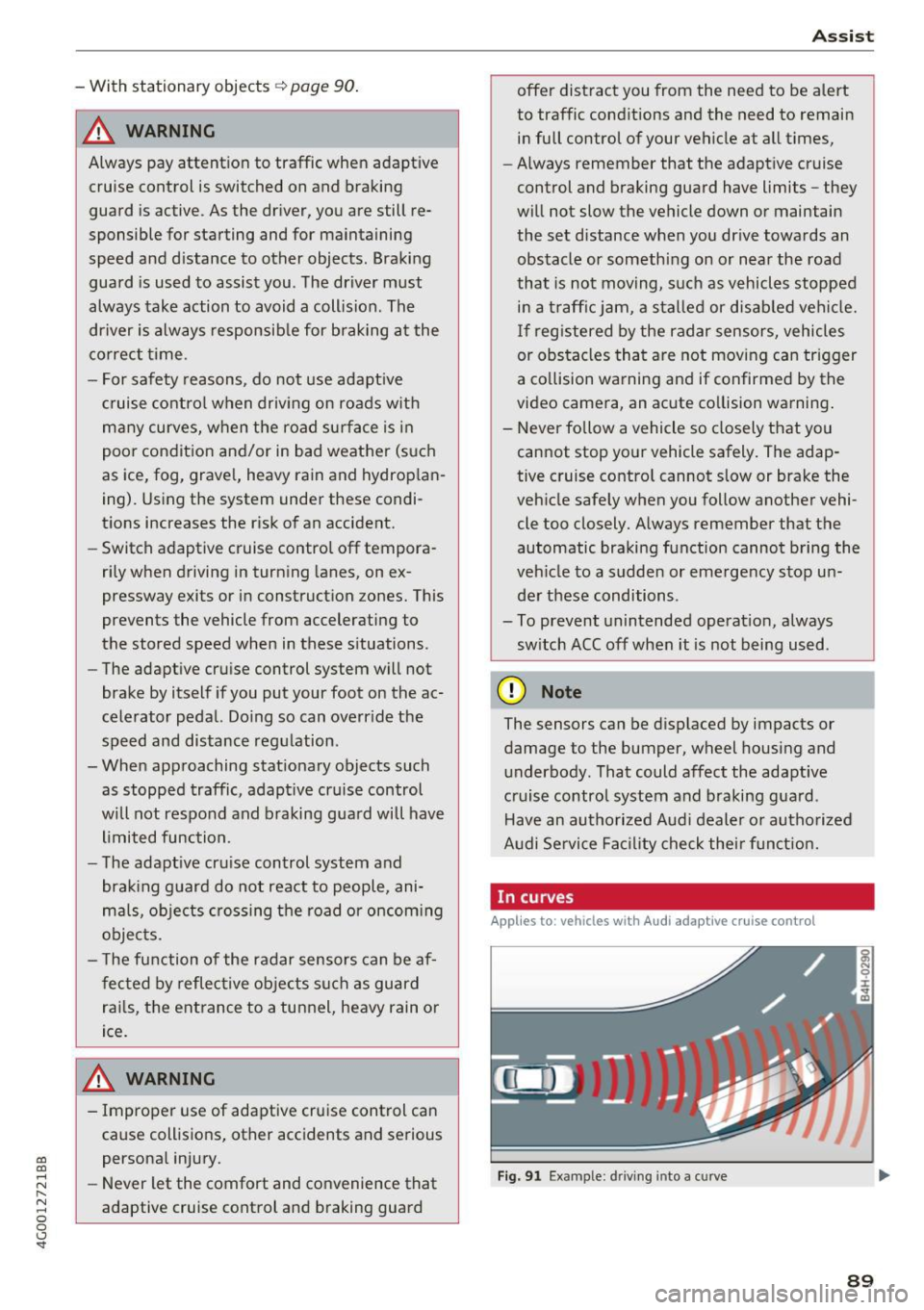
In curves
Applies to: vehicles with Audi adaptive cruise control
I
F ig. 91 Exa mpl e: dri ving into a c urve
89
Page 92 of 280
Ass is t
When driving into a curve ~ fig. 91 and out of a
curve, the adaptive cruise control may react to an
object in the neighbor ing lane and apply the
brakes. You can prevent that by pressing the ac
celerator pedal brief ly .
Stationary objects
App lies to: vehicles with Audi adaptive cruise contro l
Fig . 92 Examp le: ob ject changin g lanes and stationary o b
j ect
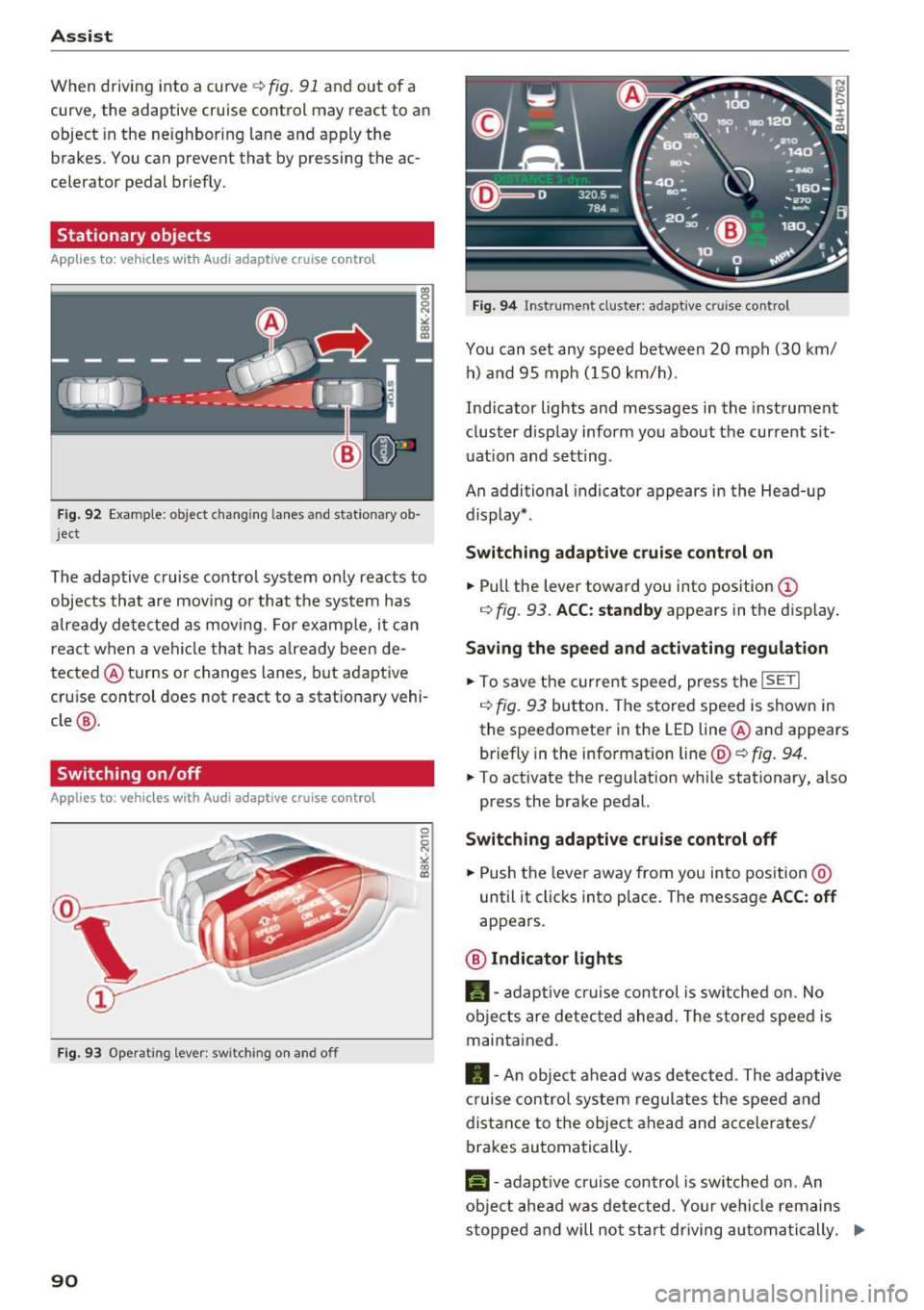
The adaptive cruise contro l system only reacts to
objects that are mov ing or that the system has
a lready detected as moving. For examp le, it can
react when a vehicle that has a lready been de
tected @turns or changes lanes, but adaptive
cru ise control does not react to a stat ionary vehi
cle @.
Switching on /off
Applies to: vehicles with Audi adaptive cruise control
Fig. 9 3 Operat ing leve r: sw itching on a nd o ff
90
F ig. 94 In str umen t cl uste r: ad ap tive cr uise cont rol
You can set any speed between 20 mph (30 km/
h) a nd 95 mph ( 150 km/h).
Ind icator lights and messages in the instrument
cluster display inform you about the current sit
uat ion and setting .
An additional indicator appears in the Head-up display* .
Switching ad apti ve c ruise control on
.,. Pull the lever toward you into position (D
r=> fig. 93 . ACC: standb y appears in the disp lay.
Saving the speed and activating regulat ion
.,. To save the current speed, press the ISETI
r=> fig . 93 button . The stored speed is shown in
the speedomete r in the LED line @and appears
briefly in the info rmation line @'=>
fig. 94.
.,. To activate the regu lation while stationary, also
press the brake pedal.
Switching adaptive crui se control off
.,. Push the lever away from you into position @
until it clicks into place. The message
ACC : off
appears .
@ Indicator lights
fll-adap tive cr uise contro l is sw itched on. No
objects are detec ted ahead. The s tored speed is
maintained.
• -A n object ahead was detected . The adaptive
cruise contro l sys tem regu lates the speed and
d istance to the objec t ahead and ac ce lera tes/
brakes automatically .
f:i-adaptive cruise control is switched on. An
object ahead was detected . Yo ur vehicle remains
stopped and will not start driving au toma tically. ..,.
Page 93 of 280
co
co
.... N
" N .... 0 0 <..:l 'SI'
•-T he automatic braking is not enough to
maintain a sufficient distance to an object ahead.
You must intervene ¢
page 93, Request for
driver intervention.
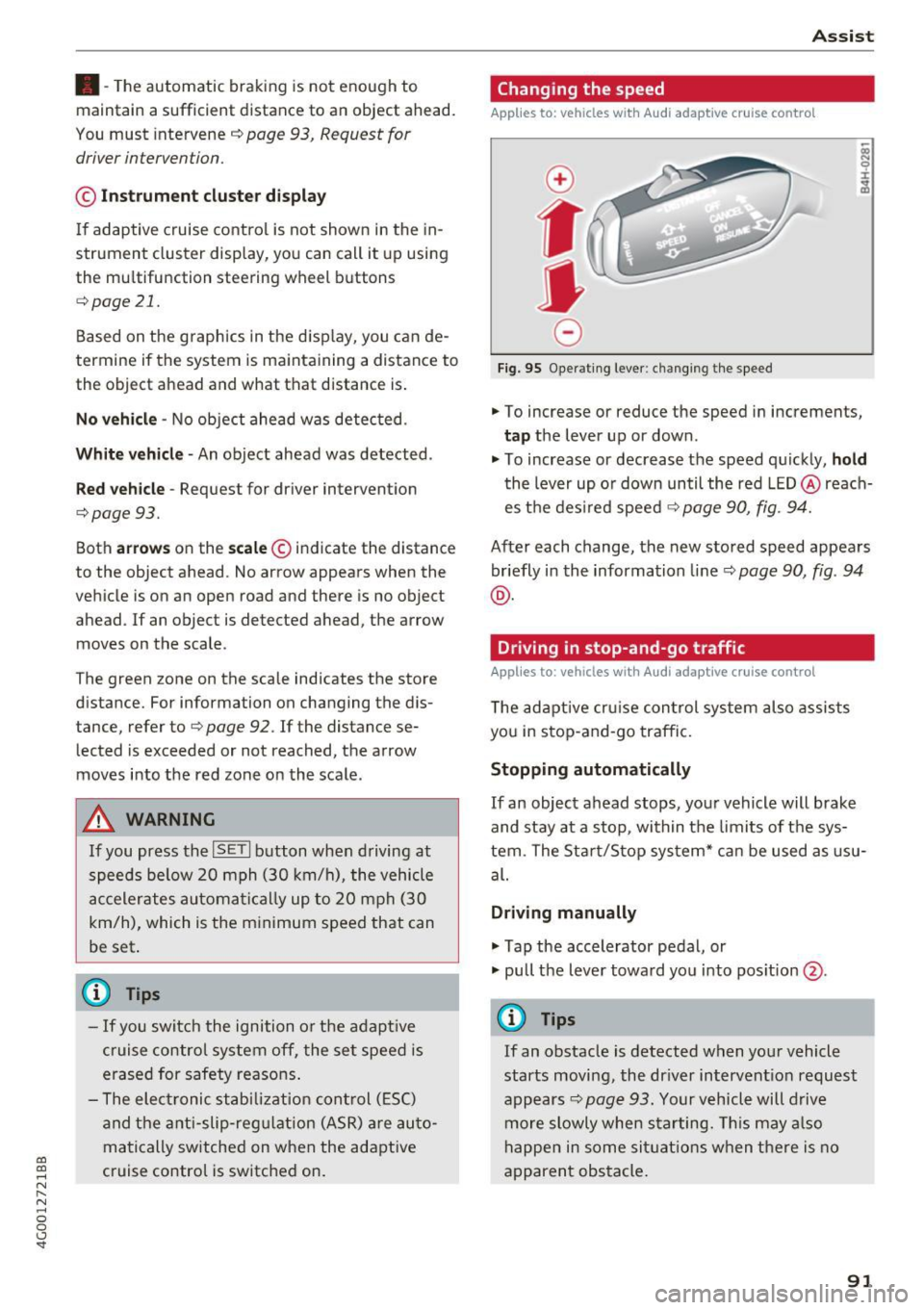
© In str um ent clust er dis pla y
If adaptive cruise control is not shown in the in
strument cluster display, you can call it up using
the multifunction steering wheel b uttons
¢ page 21.
Based on the graphics in the d isp lay, you can de
termine if the system is maintaining a distance to
the object ahead and what that distance is.
No v ehi cle -No object ahead was detected .
Whit e v ehicle -An object ahead was detected .
Red veh icle -Request for driver intervention
¢page 93.
Both arro ws on the scale© indicate the distance
to the object ahead. No arrow appears when the
vehicle is on an open road and there is no object
ahead .
If an object is detected ahead, the arrow
moves on the scale .
The green zone on the scale indicates the store
distance. For information on changing the dis
tance, refer to ¢
page 92 . If the distance se
lected is exceeded or not reached, the arrow
moves into the red zone on the scale.
A WARNING
If you press the !SETI button when driving at
speeds below 20 mph (30 km/h), the vehicle
accelerates automatically up to 20 mph (30
km/h), which is the minimum speed that can
be set .
(}) Tips
-If yo u switch the ignition or the adapt ive
cruise control system off, the set speed is
erased for safety reasons .
- The elect ronic stabi lization cont rol (ESC)
and the anti-slip-regulation (ASR) are au to
matically sw itched on when the adaptive
cruise control is switched on .
Ass ist
Changing the speed
Applies to: vehicles with Audi adaptive cruise control
0
f
•
0
Fig. 95 Operating lever: changing the speed
.,. To increase or reduce the speed in increments,
tap the lever up or down .
.. To increase or decrease the speed quickly,
ho ld
the lever up or down until the red LED @reach
es the des ired speed ¢
page 90, fig. 94.
After each change, the new stored speed appears
briefly in the information line¢
page 90, fig. 94
@ .
Driving in stop-and-go traffic
Applies to: vehicles with Audi adaptive cruise control
The adaptive cru ise con trol system also assists
you in stop-and-go traffic.
Stopping automatically
If an object ahead stops, your vehicle will brake
and stay at a stop, within the limits of the sys
tem. The Sta rt/Stop system* can be used as usu
al.
Dri ving manu ally
.,. Tap the accelerator pedal, or
.,. pull the lever toward you into pos ition @.
(D Tips
If an obstacle is detected when your vehicle
starts moving, the dr iver intervent ion request
appears¢
page 93. Your vehicle will drive
more slowly when starting. Th is may a lso
happen in some sit uat ions when there is no
apparent obstacle.
91
Page 94 of 280
Assist Interrupting cruise control
Applies to: vehicles with Audi adaptive cruise contro l
Fig. 96 Selector lever
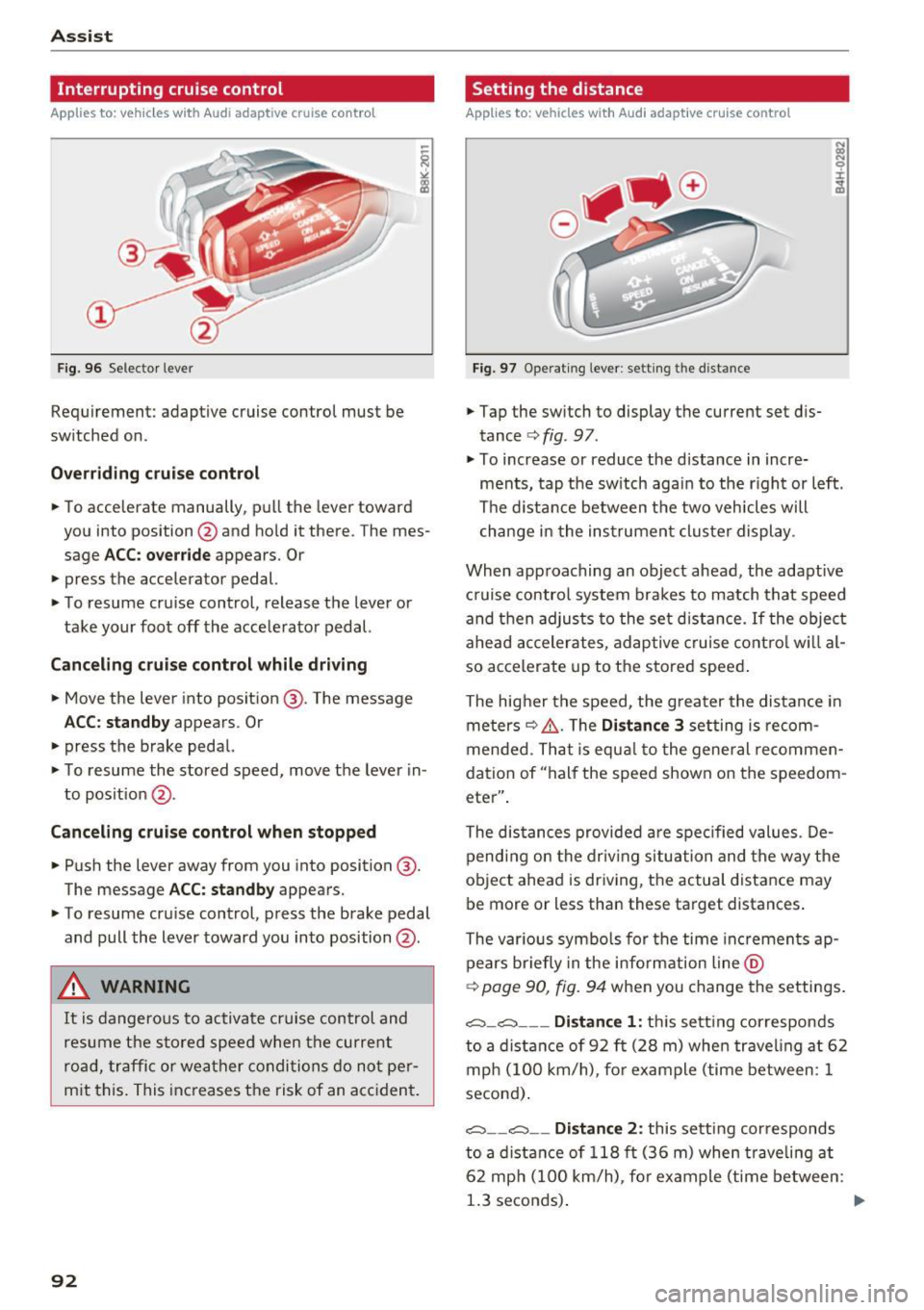
Requirement: adaptive cruise control must be
switched on.
Overriding cruise control
• To accelerate manually, pull the lever toward
you into position @and hold it there . The mes
sage
ACC: override appears. Or
• press the accelerator pedal.
• To resume cruise control, release the lever or
take your foot off the accelerator pedal.
Canceling cruise control while driving
• Move the lever into position @. The message
ACC: standby appears. Or
• press the brake pedal.
• To resume the stored speed, move the lever in
to posit ion @.
Canceling cruise control when stopped
• Push the lever away from you into position @.
The message
ACC : standby appears.
• To resume cruise control, press the brake pedal
and pull the lever toward you into position @.
A WARNING
It is dangerous to activate cruise control and
resume the stored speed when the current
road, traffic or weather conditions do not per
mit this. This increases the risk of an accident.
92
Setting the distance
Applies to: vehicles with Audi adaptive cruise control
Fig. 97 Operat ing leve r: setting the distance
• Tap the switch to display the current set dis
tance ¢
fig. 97.
• To increase or reduce the distance in incre
ments, tap the sw itch again to the r ight or left .
The distance between the two veh icles will
change in the instrument cluster display .
When approaching an object ahead, the adaptive
c ruise contro l system brakes to match that speed
and then adjusts to the set distance.
If the object
ahead accelerates, adaptive cruise control will al
so accelerate up to the stored speed .
The higher the speed, the greater the distance in
meters
~ &, . The Distance 3 setting is recom
mended. That is equa l to the general recommen
dation of "half the speed shown on the speedom
eter" .
The distances provided are specified values . De
pending on the driving situation and the way the
object ahead is driving, the actual distance may
be more or less than these target distances .
The various symbols for the time increments ap
pears briefly in the informat ion line @
¢
page 90, fig. 94 when you change the settings .
c::::,_c::::, ___ Distance 1 : this sett ing corresponds
to a distance of 92 ft (28 m) whe n traveling at 62
mph (100 km/h), for example (time between: 1
second) .
c::::, __ c::::, __ Distance 2: this setting corresponds
to a distance of 118 ft (36 m) when traveli ng at
62 mph (100 km/h), fo r example (time between:
1.3 seconds) .
IIJJ,
Page 95 of 280
co
co
.... N
" N .... 0 0 <.,;) 'SI"
~-- -~ -Di st a nce 3: this setting corresponds
to a distance of 164
ft (SO m) when traveling at
62 mph (100 km/h), for examp le (time between:
1.8 seconds).
~ -- --~ Dist a nce 4: This setting corresponds
to a distance of 210
ft (64 m) when traveling at
62 mph (100 km/h), (time distance of 2.3 sec
onds).
A WARNING
Following other vehicles too closely increases
the risk of coll isions and ser ious personal in
jury.
- Setting short distances to the traffic ahead
reduces the t ime and distance available to
br ing your vehicle to a safe stop and makes
it even mo re necessary to pay close atten
t ion to traffic.
- Always obey applicable traffic laws, use
good j udgment, and select a safe following
distance for the traffic, road and weather
condit ions .
@ Tips
- Di stance
3 is set automatically each time
you switch the ignition on.
- Your settings are automatically stored and
assigned to the remote control key being
used.
Selecting the dr iving mode
Applies to: vehicles with Audi adaptive cruise control
.,. Se lect the des ired driving mode in dr ive se lect
~ page 104.
@ Tips
Your se ttings a re au toma tic al ly s to red and as
signed to the remote contro l key being used.
A ss ist
Request for driv er interv ent ion
Applies to: vehicles with Audi adaptive cruise control
F ig. 98 Instrument c luster: request for driver intervention
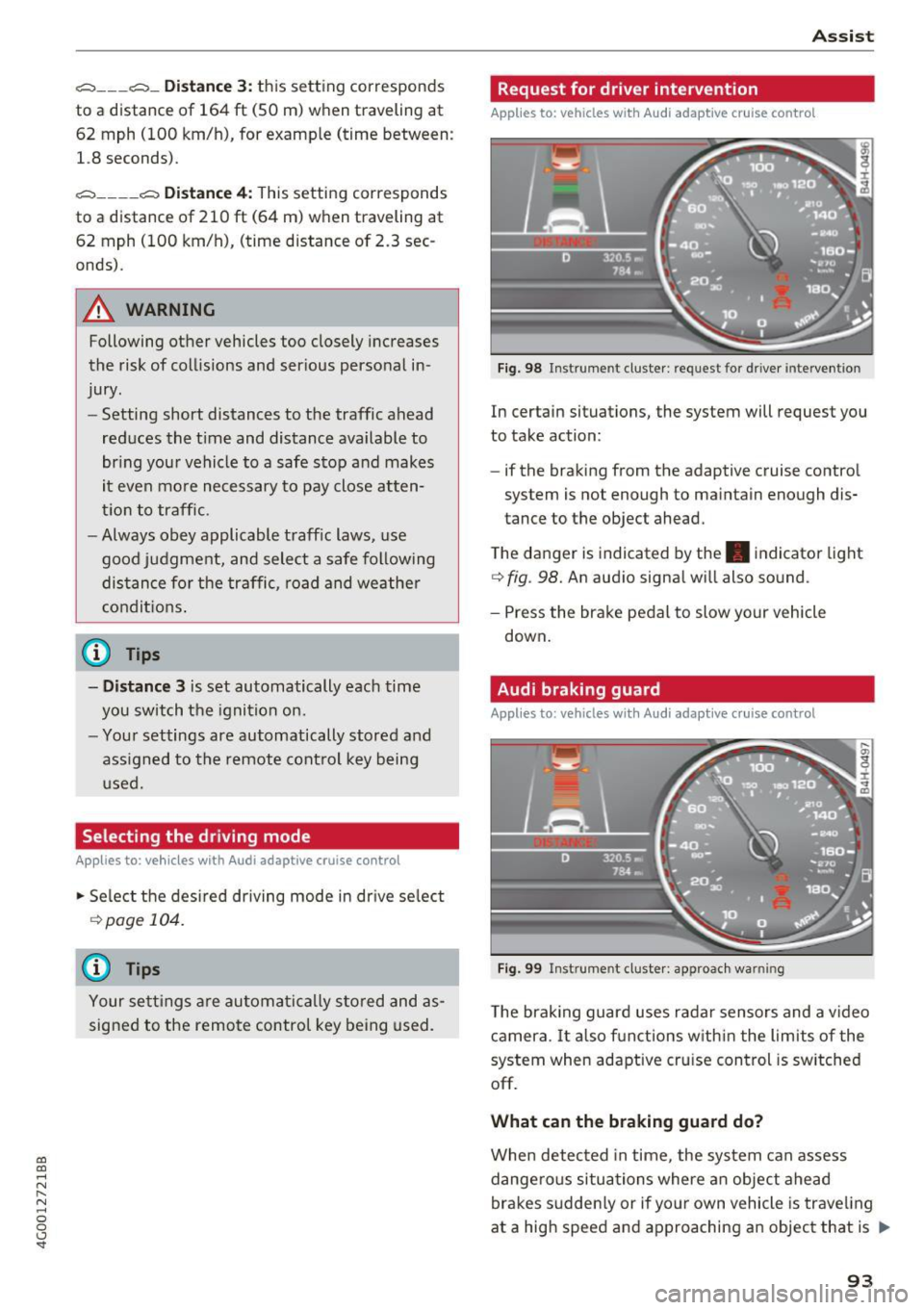
In certain situations, the system will request you
to take action:
- if the braking from the adaptive cruise control
system is not enough to maintain enough dis
tance to the object ahead.
T he danger is indicated by the. indicator light
~ fig. 98. An aud io signa l will also sound.
- Press the brake pedal to slow your vehicle down.
Audi braking guard
Applies to: vehicles with Audi adaptive cruise control
Fig . 99 Instrument cluste r: approac h warning
The braking guard uses radar sensors and a v ideo
camera. It also f unctions w ith in t he lim its of the
system when adaptive cru ise control is switched
off.
What can the b raking guard d o?
When detected in time, the system can assess
dange rous situations where an object ahead
brakes sudden ly or if yo ur own vehicle is trave ling
at a high speed and approaching an object that is
II>
93
Page 96 of 280
Assist
moving more slowly. The braking guard does not
react if it cannot detect the situation.
The system advises you of various dangerous sit
uations:
- The
distance warning occurs if you drive too
closely to the object ahead for a long period of
time . If the object ahead brakes strongly, you
would not be able to avoid a collision. The.
indicator light appears as an indication for this.
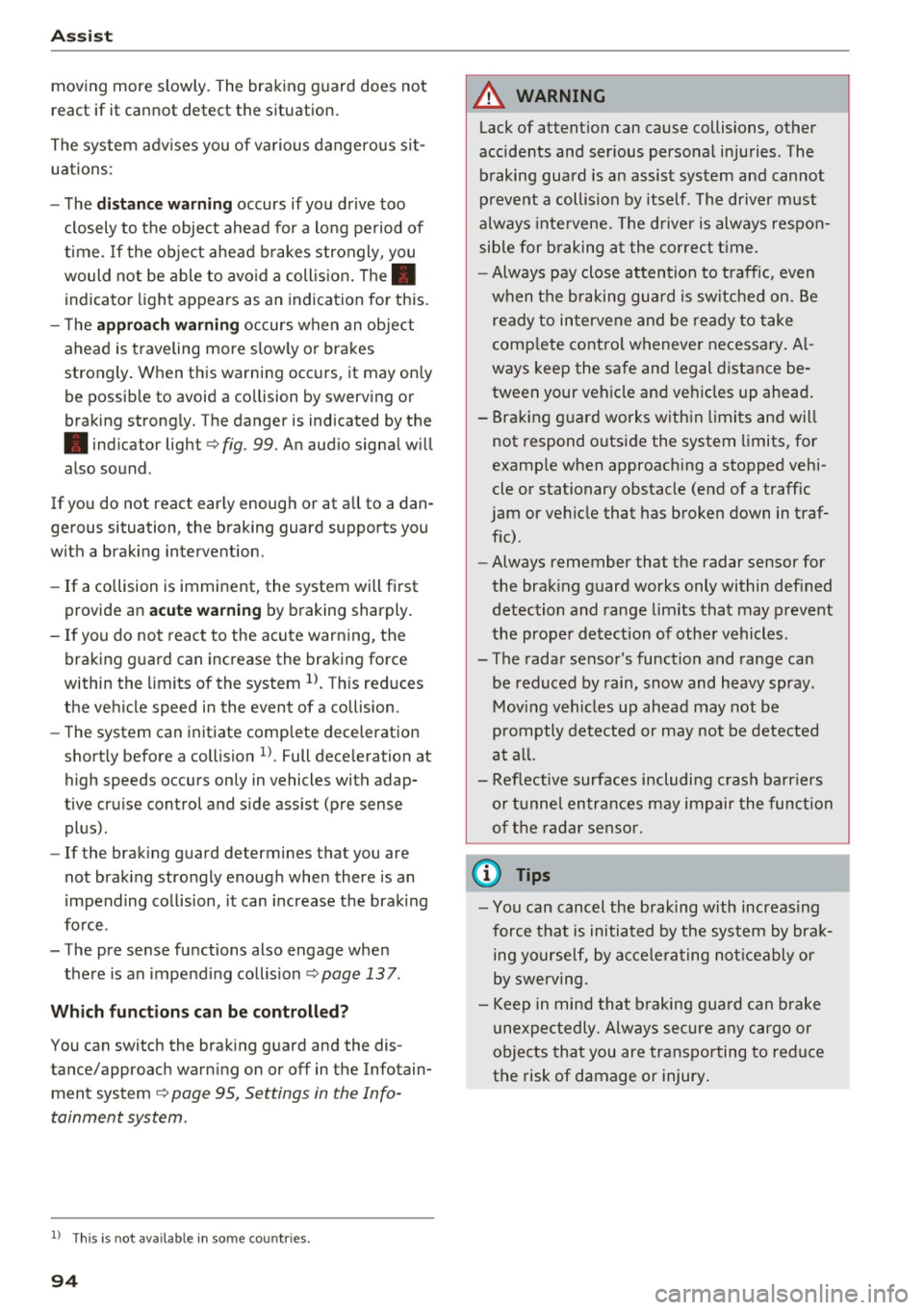
- The
approach warning occurs when an object
ahead is traveling more slowly or brakes
strongly . When this warning occurs, it may only
be possible to avoid a collision by swerving or
braking strongly. The danger is indicated by the
• indicator light ¢
fig. 99. An aud io signa l will
also sound.
If you do not react early enough or at all to a dan
gerous situation, the braking guard supports you
with a braking intervention.
- If a collision is imminent, the system will first
provide an
acute warning by braking sharply.
- If you do not react to the acute warning, the
braking guard can increase the braking force
within the limits of the system
1l. Th is reduces
the vehicle speed in the event of a co llision.
- The system can initiate complete deceleration
shortly before a collision
ll. Full deceleration at
high speeds occurs only in vehicles with adap
tive cruise control and s ide assist (pre sense
plus).
- If the braking guard determines that you are
not braking strongly enough when there is an
impen ding collision, it can increase the braking
force .
- The pre sense functions also engage when
there is an impending collision
¢ page 137.
Which functions can be controlled?
You can switch the braking guard and the dis
tance/approach warning on or off in the Infotain
ment system ¢
page 95, Settings in the Info
tainment system.
l) This is not availab le in some co untr ies.
94
A WARNING ,_
Lack of attention can cause collisions, other
accidents and serious personal injuries. The
braking guard is an assist system and cannot
prevent a collision by itself . The driver must
always intervene. The driver is always respon
sible for braking at the correct time.
- Always pay close attention to traffic, even
when the braking guard is switched on. Be
ready to intervene and be ready to take
complete control whenever necessary. Al
ways keep the safe and legal distance be
tween your vehicle and vehicles up ahead.
- Braking guard works within limits and will
not respond outside the system limits, for
example when approaching a stopped vehi
cle or stationary obstacle (end of a traffic
jam or vehicle that has broken down in traf
fic).
- Always remember that the radar sensor for
the braking guard works only within defined
detection and range limits that may prevent
the proper detection of other vehicles.
- The radar sensor's function and range can
be reduced by rain, snow and heavy spray.
Moving vehicles up ahead may not be
promptly detected or may not be detected
at all.
- Reflective surfaces including crash barriers
or tunnel entrances may impair the function
of the radar sensor.
(D Tips
-You can cancel the braking with increasing
force that is initiated by the system by brak
ing yourself, by accelerating noticeably or
by swerving.
- Keep in mind that braking guard can brake
unexpectedly. Always secure any cargo or
objects that you are transporting to reduce
t he risk of damage or injury.
Page 97 of 280
co
co
.... N
" N .... 0 0 <..:l '
Appl ies to: ve hicles with Audi adaptive cruise co ntro l
.,. Se lect: t he ICAR I fu nction bu tton > ( Car) *Sys
tem s
control button > Driver as sis tance > Audi
braking guard .
System -
Switch the bra kin g g ua rd On/ Off. When
you swit ch the ig nition on, the message
Braking
guard: Off
appears if t he sys tem is switched o ff.
Early warning -The distance and approac h warn
i ngs i n the display can be sw itched
On/ Off.
@ Tips
- Your settings are automatically stored and
ass igned to the remote cont rol key bei ng
used.
- If you restric t or sw itch off the ESC, the
braking gua rd also sw itches itself off
¢ page 12 1.
- Switch braking guard off when yo u are load
i ng t he ve hicle on to a vehicle ca rr ier, t rain,
shi p or other type o f transportation. This
c a n p reven t undesired w arnings from the
br akin g guard system.
Messages
App lies to: ve hicles with Audi adaptive cruise co ntro l
Braking guard: Off
This message appea rs if the sys tem is switc hed
off through the In fota inme nt system . Otherwise ,
if the system is tur ned off, the informa tion ap
pears every time shortly after the start of t he
tr ip.
The message also appears if the system is not
avai la bl e d ue to a ma lfunction or if the ESC is
switched off~
page 121. If this is the case, the
system w ill not prov ide warnings about a possi
b le co llision.
Braking guard : engaged
This message appea rs if a sha rp bra ke press ure
was applied due to an ac ute wa rn ing.
ACC: unavailable
ACC and Audi braking guard: Unavailable
Assist
T he system cannot gua rantee that it will detect
objects co rrectly and is sw itched off . The sensors
have been moved or are faulty. The p re sense
funct ions may a lso be affected . D rive to an au
t h orized Audi dea ler or authorized Audi Service
Facility immed iate ly to have the malfunction cor
rected .
ACC: Currently unavailable. No sensor vis ion
ACC and Audi braking guard: Cu rrently unavail
able. No sensor vision
Th is mess age appears if the senso r view i s ob
str ucted, for examp le by leaves, snow , heavy
spray or dirt. Clean the sensors¢
page 88,
fig. 90 .
ACC : Currently unavailabl e. Gradient too steep
The road exceeds the maximum poss ible angle
fo r safe adaptive c ruise cont rol operat io n. Adap
t ive cr uise control is sw itched off.
ACC: only available in D, Sor M
Se lect the D/S or M selector lever position.
ACC : Currently unavailable. Parking brake ap •
plied
The ad apt ive cr uise cont rol system sw itches off
a utoma tica lly if the parking brake is se t.
ACC: Currently unavailable . Stability control
( ESC) input .
This message appears if the Electronic Stab iliza
t ion Control (ESC) is taking action to stab ilize the
vehicle . In t his case, adaptive cruise control
switches off automatically .
ACC off: Manual control!
This message appears when adaptive cruise con
trol cannot set the parking brake. P ress the brake
pedal to prevent the vehicle from ro lling.
• ••
T h ree white do ts appear if a setting canno t be se
l ecte d w it h t he oper ati ng leve r. For ex ample, this
h appens if a daptive cr uise con trol c annot sta rt
driv ing a utomat ica lly in stop -and -go traff ic be
ca use the dr iver has not fastene d their safety
belt . ..,.
95
Page 98 of 280
Ass is t
D oor open
The adaptive c ruise contro l system cannot sw itch
on when a door is open.
Stat ionar y obj ect ah ead
This message appears if you would like to switch
adapt ive cruise control on and there is a station
ary object or obstacle directly ahead of your vehi
cle .
Audi active Lane assist
Description
Appl ies to: ve hicles w ith Audi active lane assist
Active lane assist detects lane marker lines with
in the limits of the system using a camera in the
windshield. If you are approaching a detected lane marker line and it appears likely that you
will leave the lane, the system will warn you with
correct ive steering . You can ove rride th is steer ing
at any time . If you pass over a line, the steer ing
wheel will v ibrate l ightly. In order for this warn
ing vib ration to occur, it must fi rst be sw itched
on in the Infotainment sys tem . Active lane assist
is ready for operation when the lane marker line
is detected on at least one side of the vehicle .
The system is designed for driving on express
ways and highways and therefore only activates
at speeds above approximately 40 mph (65 km/
h).
A pp lies to: ve hicles w ith s ide assist
If you activate a turn sig na l when active lane as
sist is ready and it classifies a lane change as crit
ical because of vehicles traveling alongside you or
approaching you, there will be noticeab le correc
tive steering shortly before you leave the lane.
This will attempt to keep your vehicle in the lane.
A ppl ies to: ve hicles w ithout s ide ass ist
The system will not warn you before crossing a
lane marker line if yo u have activated the tu rn
signa l. In this case, it ass umes that you are
changing lanes intentiona lly .
A ppl ies to: ve hicles with adaptive cruise co ntrol
The corrective stee ring is targeted based on the
driving situat ion . In addition to the lane marker
96
li nes, the system can a lso take into account other
objects such as guard rails. If they are detected in close prox imity to the ve hicle, active lane assist
helps prevent the vehicle from dr iving too close
to them. There is a lso pass ing ass istance. The
system does not provide any corrective steering if i t detects that you are pass ing another vehicle .
A WARNING
-The system warns the drive r that the vehicle
is leaving the lane using cor rect ive steering.
The drive r is always responsible fo r keeping
the vehicle within the lane.
- The system can help you keep the vehicle in
the lane, but it does not drive by itse lf. Al
ways keep your hands on the steering
wheel.
- Cor rective steering m ay no t occur in certain
si tuations, such as during heavy braking.
- There may be cases where t he camera does
not recognize all lane marker lines . Correc
tive steering can only take place on the s ide
of the vehicle where lane marker lines are
detected.
- Other road structures or objects could possi
bly be identified unintent ionally as lane
marker lines. As a result, corrective steering
may be unexpected or may not occur.
- The camera view can be restricted, for ex
ample by vehicles driving ahead or by rain,
snow, heavy spray or light shining into the
camera . This can result in active lane ass ist
not detecting the lane marker lines or de
tect ing them inco rrectly .
- Under certain cond it ions such as ruts in the
road, a banked roadway or crosswinds, the
corrective steer ing alone may not be enough
to keep the vehicle in the m iddle of the lane.
- For safety reasons, act ive la ne assist must
no t be use d when there are poor road and/
or weather condi tions such as slippery
roads, fog, gravel, heavy rain, snow and the potential for hydrop laning. Using active lane
assist under these conditions may increase
the risk of a crash.
Page 107 of 280
The adjustment depends on the driving mode se
l ected, steering movements, the driver's brak ing
and accelerat ion, and as the road su rface, vehicle
speed and load.
The vehicle ground clearance depends on the mode se lected and the speed . When you are in
the
auto , the highway setting is act ivated when
you dr ive above 75 mph (120 km/h) for more
than 30 seconds. The g round clearance is in
creased automat ica lly if the speed drops below
44 mph (70 km/h) for more than 120 seconds .
Steering
The power steering adapts. Ind irect steering that
moves easily as in comfort mode is especially
sui ted to long drives on a h ighway. The Dynamic
mode provides sporty, direct steering .
Applie s to: vehicles with dynamic steering
The steering ratio changes based on vehicle
speed in order to maintain optimum steering ef
fort for the dr iver at a ll times. This sets the steer
i ng to be less sensit ive at higher speeds in order
to p rovide imp roved vehicle contro l. At reduced
speeds, steer ing is mo re direct in order to keep
t he s teering effo rt as m inima l as poss ib le when
t he dr iver is maneuvering the vehicle . At low and
ave rage speeds, dynamic steering* additionally
p rovides more responsive stee ring performance.
Sport differential *
As a component of the all wheel d rive system
(quattro)
<=? page 124 , the sport diffe rential dis
tr ib utes the dr iv ing power to the rear ax le de
pending on the situation. The distribution o f
power varies from balanced (comfort) to sporty
(dynamic) depending on the selected mode . The
goa l is a high leve l of agility and ab ility to accel
erate on curves. The ve hicle is very respons ive to
steer ing.
Cornering light*
The cornering light adapts the high beams to the
direction of the curve depending on the speed.
The pivot ing action and the light ing also adapt to
~ t he mode . .... N
" N .... 0 0 <..:l -
Adaptive cruise control*
T he behavio r whe n accelerating ca n be adjusted
from comfortable to sporty, depending on the
drive select mode. Adaptive cruise control also
responds to the driving behavior of the vehicle
ahead in a more conservative or sporty manner.
Engine sound *
The eng ine sound adapts to the c urren t mode
and can be subtle to sporty.
(D Note
Applies to: vehicles with adaptive ai r suspension
- Make sure there is enough clearance above
and be low the vehicle when parking. The
height of the vehicle (gro und clearance) can
change once it is parked due to temperature
fluctuations, changes to the load conditions
and changes to the dr iving modes .
- When transporting the vehicle on a car car
r ie r, train, ship or by other means, o nly tie
the vehicle down at the run ning s urface of
the t ires , which is the outer c ircumference.
Se cur ing the vehicle at the axle compo
nents, sus pen sion str uts o r towing eyes is
no t perm itted because the pressure in the
air suspens ion struts can change d uring
transport . The vehicle may not be secured
sufficiently if th is happens .
(D Tips
-In some models, the maximum vehicle
speed can only be reached in the auto and
dynamic modes.
- The S selector lever position automatica lly
engages if the dynamic mode is selected.
- Applies to: vehicles with dynamic steering:
operating noise is heard when starting or
stopping the engine. Th is does not ind icate
a problem.
105
Page 123 of 280
co
co
.... N
" N .... 0 0 <..:l 'SI"
you into taking risks. This could increase
your risk of a collision.
- Please note the risk of a co llision increases
when driving fast, especially through curves
and on slippery or wet roads, and when driv
ing too close to objects ahead. The ESC and
its integrated systems cannot always pre
vent collisions -there is still a r isk of acci
dents!
- Press the accelerator pedal carefully when
accelerating on even, slippery surfaces such
as ice and snow. The drive wheels can spin
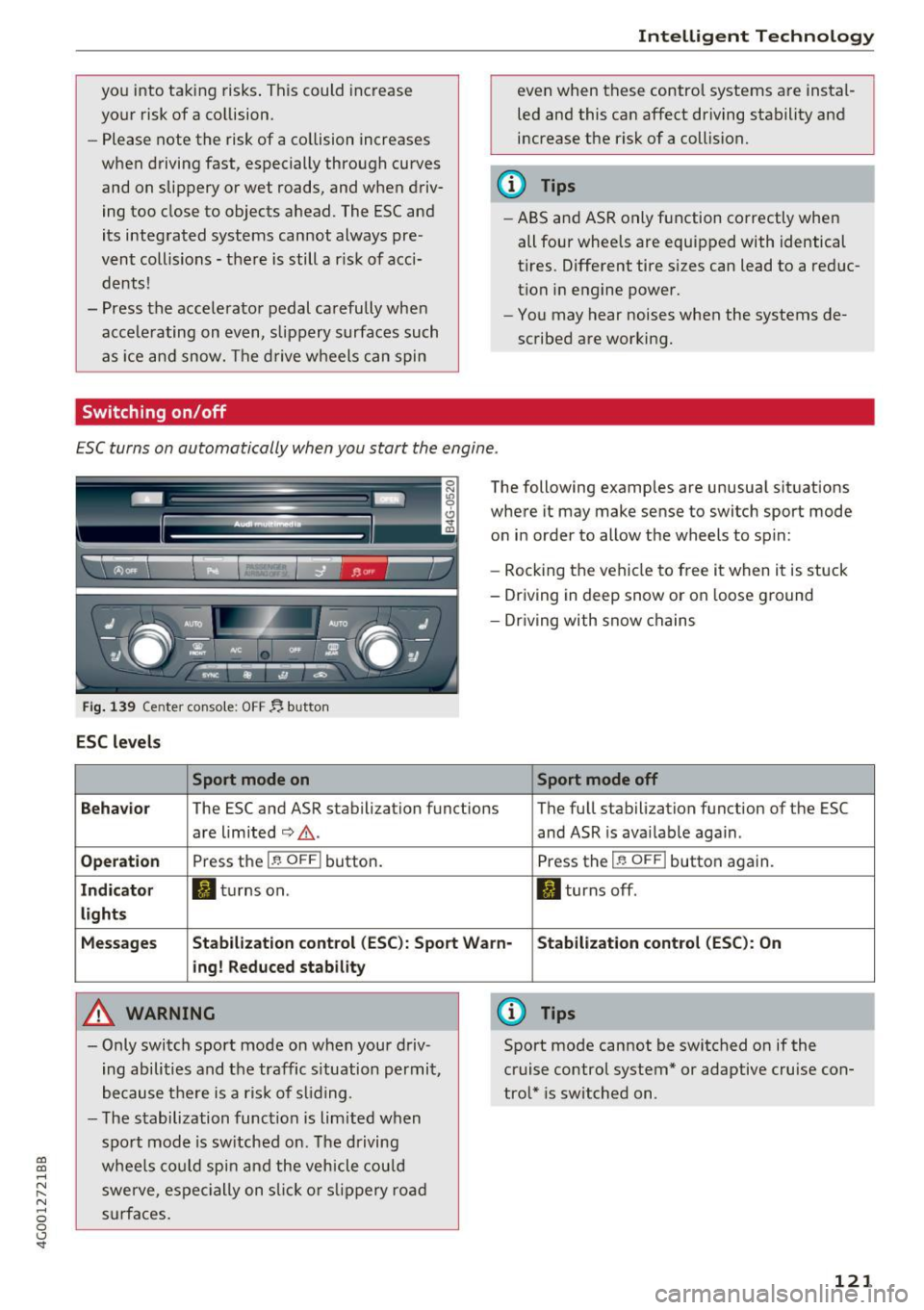
Switching on /off
Intelligent Technology
even when these control systems are instal
led and this can affect driving stability and
increase the risk of a collision.
(D Tips
- ABS and ASR only function correctly when
all four wheels are equipped with identical
tires. Different tire s izes can lead to a reduc
tion in engine power.
- You may hear noises when the systems de
scribed are working.
ESC turns on automatically when you start the engine .
Fig. 139 Center console: OFF ~ button
ESC levels
Sport mode on
The following examples are unusual situations
where it may make sense to switch sport mode
on in order to allow the wheels to spin:
- Rocking the vehicle to free it when it is stuck
- Driving in deep snow or on loose ground
- Dr iving with snow chains
Sport mode off
Behavior
The ESC and ASR stabilization functions The full stabilization function of the ESC
are limited
c:> .&. . and ASR is available again .
Operation Press the I~ OFF I button. Press the I~ OFFI button again.
Indicator ltltur nson. II turns off .
lights
Messages Stabilization control (ESC): Sport Warn· Stabilization control (ESC): On
i ng! Reduced stability
A WARNING
- Only switch sport mode on when your driv
ing abilities and the traffic s ituation permit,
because there is a risk of sliding .
- The stabilization function is limited when
sport mode is switched on. The driving
wheels could spin and the vehicle could
swerve, espec ially on slick or slipp ery road
surfaces .
(D Tips
Sport mode cannot be switched on if the
cruise control system* or adaptive cruise con
trol* is switched on .
121