parking brake AUDI A6 2017 User Guide
[x] Cancel search | Manufacturer: AUDI, Model Year: 2017, Model line: A6, Model: AUDI A6 2017Pages: 280, PDF Size: 70.24 MB
Page 81 of 280
co
co
.... N
" N .... 0 0 <..:l -
pressed.
Interlock button
The in terlo ck button i n the selector lever handle
p revents yo u from moving the selector lever i n
advertently while in some se lector lever posi
tions. The positions that require the interlock button to be pressed are marked in co lor i n the il
lustration
c:> fig . 84.
Driving tips
Starting the engine
.. The selector lever must be in the P or the N po
s it ion.
Starting from a stop
.. Press and hold the brake pedal.
.. Press and hold the lock button in the selector
lever hand le, select the desired se lector lever
pos ition such as 0/5 and release the lock but
ton .
.. Wait a moment unt il the transm ission shifts .
You w ill no tice a slight movement when t he
gear e ngages .
.. Release t he b rake pedal and press the acce le ra
tor pedal
c:> &_ .
Stopping temporarily
.. Keep the veh icle stat ionary using the braking
peda l, for example at traffic lights .
.. Do no t press t he accelerator pedal when doing
t hi s.
.. To p revent the vehicle from rolling when yo u
sta rt driving, se t the park ing brake when stop
ping on steep i nclines
c:> _&. .
.. The parking bra ke wi ll re lease automatically
and the vehicle will start moving once you press
the accelerator pedal.
Stopping /parking
If the se lec to r l ever is not in the P posi tion when
you open the driver's door, the vehicle could rol l.
The message
Transmission: selector lever in
drive position!
appears . A warn ing tone wi ll also
sound.
.. Press and hold the brake pedal
c:> _&. .
Driving
.. Se t the par king brake.
.. Select the P selector lever posit ion .
U nder certain circumst ances, su ch as driving in
t h e mo unta ins, i t may be useful to swi tch tempo
ra rily to the manual s hift program in order to
man ua lly adjust the gea rs to the driving condi
tions
c:> poge 80.
On inclines, activate the parking brake fi rs t a nd
t h en move the selector lever to t he P position
c:> page 75. This prevents the locking mechanism
from be ing loaded too heavily and will make it
easier to move the selector lever out of the P po
s ition .
A WARNING
- The vehicle ca n roll even if the ignit ion is
sw itched off .
- Never leave your ve hicle w ith the engine
r u nning while in gear .
- Do not press the acce le rator peda l when
changing the se lector lever posi tion while
the vehicle is s ta tionary and the engi ne is
r u nning .
-
-Please no te that a small amo unt of power is
transmi tted if the veh icle is stopped tern po
r a rily w hile in t he D/S or R select or leve r po
si tion. To reduce t he risk of an a cc iden t, y ou
m ust cont in ue pressing firmly on the brake
pedal whi le t he veh icle is stoppe d so that i t
does not ro ll.
- Never engage the R or P sele ctor leve l pos i
tions while dr iv ing. It could ca use a crash .
- Before driving down a steep slope, reduce
your speed and sh ift into a lowe r gear w ith
"t i pt ronic" .
- Do not r ide the brakes or p ress the brake
pedal too often or too lon g when dr iving
downhill . Constant bra king causes the
brakes to overheat and s ubstant ially re
duces brak ing performance, increases b rak
ing d istance or causes comp lete fai lure of
the bra ke system.
- If you must stop on an incline, a lways hold
the vehicle in place wit h the foot brake or
pa rking bra ke to p reve nt i t from rolling
back.
79
Page 82 of 280
Driving
-Never hold the vehicle on an incline with a
slipping clutch. The clutch opens automati
cally when it becomes too hot from the
overload . The
[i1 indicator Light turns on
and a message appears~
page 81 when
the clutch is overloaded.
(D Note
-When stopping on an incline, do not try to
hold the vehicle in place by pressing the ac
celerator pedal while a driving gear is se
lected. This can cause the transmission to
overheat and can damage it. Set the parking brake or press the brake pedal to prevent
the vehicle from rolling.
- Allowing the vehicle to roll when the engine
is stopped will damage the transmission be
cause it is not lubricated .
@ Tips
For safety reasons, the parking brake is re
leased automatically only when the driver's
safety belt is fastened.
Hill descent control
The hill descent control system assists the driver
when driving down hills .
Hill descent control is activated when the selec
tor lever is in the Dor S position and you press
the brake pedal. The transmission automatically
selects a gear that is suitable for the hill . Hill de
scent control tries to maintain the speed ach
ieved at the time of braking, within physical and
technical limitations. If may still be necessary to
adjust the speed with the brake pedal.
Hill descent control switches off once the hill lev
els out or you press the accelerator pedal.
On vehicles with a cruise control system*
~ page 86, hill descent control is also activated
when the speed is set.
A WARNING
Hill descent control cannot overcome physical
limitations , so it may not be able to maintain
80
a constant speed under all conditions. Always
be ready to apply the brakes .
Shifting manually (tiptronic mode)
The tiptronic mode allows the driver to shift the
gears manually.
'
}
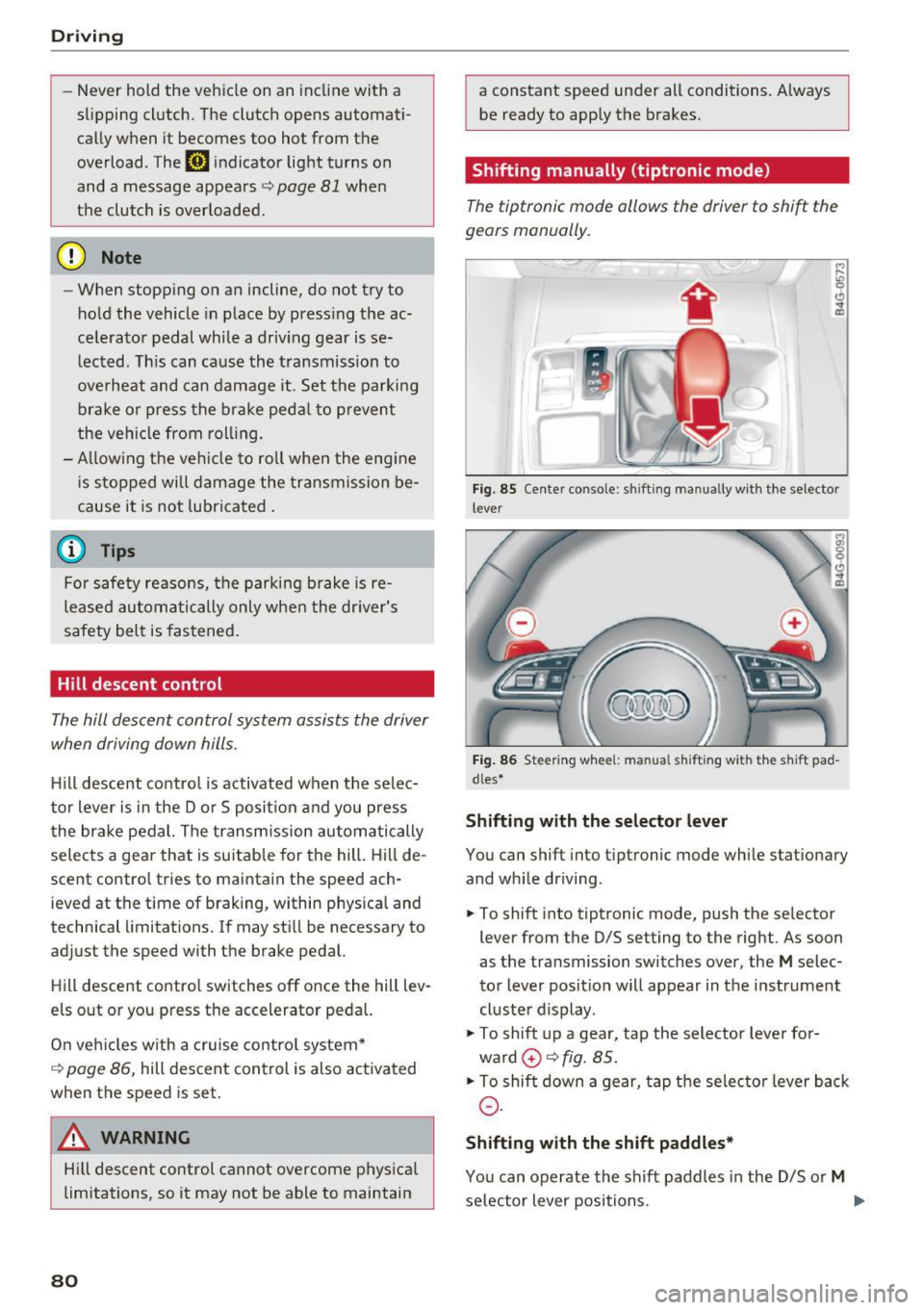
Fig . 85 Center console: sh ift ing manually with the selector
l ever
Fig. 86 Steering wheel : manual s hift ing with the s hift pad
dles*
Shifting with the selector lever
You can shift into tip tron ic mode while stationary
and while driving.
.,. To shift into tiptronic mode, push the selector
lever from the D/S setting to the right. As soon
as the transmission switches over, the
M selec
tor lever position will appear in the instrument
cluster display .
.,. To shift up a gear, tap the selector lever for
ward
0 ~ fig. 85.
.,. To shift down a gear, tap the selector lever back
0-
Shifting with the shift paddles*
You can operate the shift paddles in the D/S or M
selector lever positions. ..,.
Page 87 of 280
co
co
.... N
" N .... 0 0 <..:l '
The coolant temperature gauge c::> page 9 must
be observed carefu lly . The coolant temperature
can increase if you drive on long inclines in a low
gear at high engine speeds. Reduce your speed immediately if the LEDs in the top part of the dis
play turn on.
F or more information about ind icator lights, re
fer to.
c::> page 14.
A WARNING
Anyone not proper ly restrained in a moving
vehicle is at a much greater risk in an acci
dent. Never let anyone ride in your car who is
not properly wearing the restraints provided
by Audi.
Trailer towing information
Important to know
Your vehicle handles differently when towing a
tra iler because of the additional weight and dif
ferent weight distribut ion . Safety, performance
and economy will greatly depend on how careful
ly you load your trailer and operate your rig.
Before you actually tow your trailer, practice
turning, stopp ing and back ing up in an area away
from traff ic. Keep practicing until you have be
come completely fam iliar with the way your vehi
cle-trailer combination behaves and responds.
Backing up is difficult and requires pract ice.
Backing up with a trailer generally requires steer
ing action opposite to that when backing up your
vehicle without a trailer.
Maintain a greater d istance between your vehicle
and the one in front of you. You w ill need more
r oom to stop. To compensate for the trailer, you
will need a larger than normal turning radius.
When passing, remember that you cannot accel
erate as fast as you normally wou ld because of
the added load. Make s ure you have enough room
to pass. After passing, a llow plenty of room for
your tra iler before changing lanes again.
Trailer towing
Avoid jerky starts, sharp turns or rapid lane
changes.
(D Tips
- Do not tow a trailer during the break-in peri
od of your vehicle.
- If you tow a trailer, your Audi may require
more frequent maintenance due to the ex
tra load
c::> page 259 .
Parking on a slope
Do not pork on a slope with a trailer. If it cannot
be avoided, do so only after doing the following:
When parking:
• Apply the foot brake.
• Have someone place chocks under both the ve
hicle and the trailer wheels.
• With chocks in place, slowly release the brakes
until the wheel chocks absorb the load.
• Turn the whee ls towards the curb.
• App ly the parking brake.
• Select the P selector lever position.
When restarting after parking:
• App ly the foot brake.
• Start the engine.
• Select the D/S se lector lever position.
• Release the parking brake and slowly pull out
and away from the wheel chocks.
• Stop and have someone retrieve the wheel
chocks.
(D Tips
If you move the selector lever of the automat
i c transmission to P before applying the park
i ng brake and before blocking the wheels, you
may have to use more force later to move the
l ever out of the P position.
85
Page 97 of 280
co
co
.... N
" N .... 0 0 <..:l '
Appl ies to: ve hicles with Audi adaptive cruise co ntro l
.,. Se lect: t he ICAR I fu nction bu tton > ( Car) *Sys
tem s
control button > Driver as sis tance > Audi
braking guard .
System -
Switch the bra kin g g ua rd On/ Off. When
you swit ch the ig nition on, the message
Braking
guard: Off
appears if t he sys tem is switched o ff.
Early warning -The distance and approac h warn
i ngs i n the display can be sw itched
On/ Off.
@ Tips
- Your settings are automatically stored and
ass igned to the remote cont rol key bei ng
used.
- If you restric t or sw itch off the ESC, the
braking gua rd also sw itches itself off
¢ page 12 1.
- Switch braking guard off when yo u are load
i ng t he ve hicle on to a vehicle ca rr ier, t rain,
shi p or other type o f transportation. This
c a n p reven t undesired w arnings from the
br akin g guard system.
Messages
App lies to: ve hicles with Audi adaptive cruise co ntro l
Braking guard: Off
This message appea rs if the sys tem is switc hed
off through the In fota inme nt system . Otherwise ,
if the system is tur ned off, the informa tion ap
pears every time shortly after the start of t he
tr ip.
The message also appears if the system is not
avai la bl e d ue to a ma lfunction or if the ESC is
switched off~
page 121. If this is the case, the
system w ill not prov ide warnings about a possi
b le co llision.
Braking guard : engaged
This message appea rs if a sha rp bra ke press ure
was applied due to an ac ute wa rn ing.
ACC: unavailable
ACC and Audi braking guard: Unavailable
Assist
T he system cannot gua rantee that it will detect
objects co rrectly and is sw itched off . The sensors
have been moved or are faulty. The p re sense
funct ions may a lso be affected . D rive to an au
t h orized Audi dea ler or authorized Audi Service
Facility immed iate ly to have the malfunction cor
rected .
ACC: Currently unavailable. No sensor vis ion
ACC and Audi braking guard: Cu rrently unavail
able. No sensor vision
Th is mess age appears if the senso r view i s ob
str ucted, for examp le by leaves, snow , heavy
spray or dirt. Clean the sensors¢
page 88,
fig. 90 .
ACC : Currently unavailabl e. Gradient too steep
The road exceeds the maximum poss ible angle
fo r safe adaptive c ruise cont rol operat io n. Adap
t ive cr uise control is sw itched off.
ACC: only available in D, Sor M
Se lect the D/S or M selector lever position.
ACC : Currently unavailable. Parking brake ap •
plied
The ad apt ive cr uise cont rol system sw itches off
a utoma tica lly if the parking brake is se t.
ACC: Currently unavailable . Stability control
( ESC) input .
This message appears if the Electronic Stab iliza
t ion Control (ESC) is taking action to stab ilize the
vehicle . In t his case, adaptive cruise control
switches off automatically .
ACC off: Manual control!
This message appears when adaptive cruise con
trol cannot set the parking brake. P ress the brake
pedal to prevent the vehicle from ro lling.
• ••
T h ree white do ts appear if a setting canno t be se
l ecte d w it h t he oper ati ng leve r. For ex ample, this
h appens if a daptive cr uise con trol c annot sta rt
driv ing a utomat ica lly in stop -and -go traff ic be
ca use the dr iver has not fastene d their safety
belt . ..,.
95
Page 201 of 280
co
co
.... N
" N .... 0 0 <..:l '
circumstances . This increases the risk of
burns.
- If tests need to be performed with the en
gine running, there is additional danger due
to moving components (such as the ribbed belt, alternator and radiator fan) and from
the high voltage ignition system.
- Do not under any circumstances give gas in
advertently (for example, by hand from the
engine compartment) if the vehicle is sta
tionary but the engine is running and a gear
is engaged. Otherwise, the vehicle will start
to move immediately and this could result
in an accident.
- Pay attention to the following warnings list
ed when work on the fuel system or on the
electrical equipment is required.
- Do not smoke .
- Never work near open flames.
- Always have a working fire extinguisher
nearby
- All work on the battery or electrical system
in your vehicle can result in injuries, chemi•
cal burns, accidents or burns. Because of
this, all work must be performed
only by an
authorized Audi dealer or authorized Audi
Service Facility.
- To reduce the risk of electric shock and in
jury, never touch the following components when the engine is running or is being start
ed :
- Ignition cable
- Other components in the electronic high-
voltage ignition system
- If you must check or perform work on the
engine while it is running:
- Set the parking brake and place the selec
tor lever in the P (park) position first .
- Always proceed with extreme caution so
that clothing, jewelry or long hair do not
become caught in the radiator fan, fan
belt or other moving components or do not come into contact with hot compo
nents. Tie back long hair before beginning
work and do not wear clothing that can
hang down into the engine .
Checking and Filling
-Limit your exposure to exhaust and chemi
cals to as short a time as possible
c:> A .
A WARNING
-California Proposition 65 Warning:
- Engine exhaust, some of its constituents,
and certain vehicle components contain or
emit chemicals known to the State of Cali
fornia to cause cancer and birth defects and
reproductive harm . In addition, certain flu
ids contained in vehicles and certain prod
ucts of component wear contain or emit
chemicals known to the State of California
to cause cancer and birth defects or other
reproductive harm.
- Battery posts, terminals and related acces
sories contain lead and lead compounds,
chemicals known to the State of California
to cause cancer and reproductive harms. Wash hands after handling.
(D Note
When filling fluids, be sure not to mix the flu
ids up. Otherwise severe malfunctions and en
gine damage will occur.
@ For the sake of the environment
You should regularly check the ground under
your vehicle in order to detect leaks quickly. If
there are visible spots from oil or other fluids, bring your vehicle to an authorized Audi deal
er or authorized Audi Service Facility to be
checked.
199
Page 238 of 280
Emergency assistance
Emergency assistance
General information
... Park the vehicle as far as possible from moving
traffic in the event of a breakdown. In the event
of a flat tire, park the vehicle on a level surface .
It you are on a steep hill, be especially careful.
.,. Set the parking brake .
.,. Switch the emergency flashers on .
... Set up the warning triangle
r=;, page 236 .
... Have the passengers exit the vehicle . They
should move to a safe place, for example be
hind a guard rail.
A WARNING
Follow the steps given above. This is for your
protection and the for the safety of other driv
ers.
Equipment
Warning triangle
A ppl ies to: ve hicles w ith warning triangle
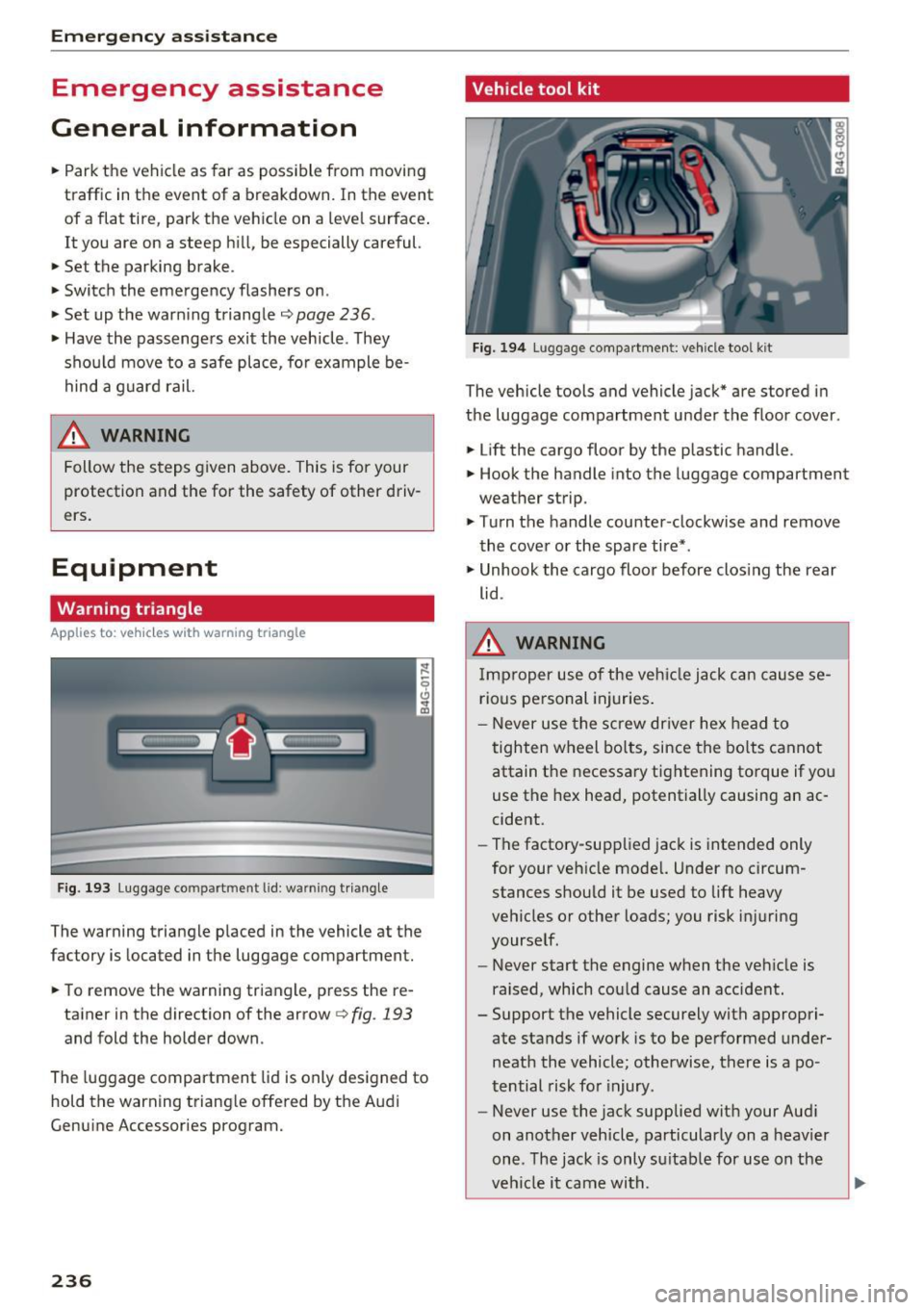
Fig. 193 Luggage co mpartment lid : wa rnin g triangle
The warning triangle placed in the vehicle at the
factory is located in the luggage compartment.
... To remove the warning triangle, press the re-
tainer in the direction of the arrow
r=;, fig . 193
and fold the holder down.
The luggage compartment lid is only designed to
hold the warning triangle offered by the Audi
Genuine Accessories program.
236
Vehicle tool kit
Fig. 194 Luggage compartment: vehicle tool kit
The vehicle tools and vehicle jack* are stored in
the luggage compartment under the floor cover.
... Lift the cargo floor by the plastic handle.
.,. Hook the handle into the luggage compartment
weather strip.
.,. Turn the handle counter-clockwise and remove
the cover or the spare tire* .
.,. Unhook the cargo floor before closing the rear
lid .
A WARNING
Improper use of the vehicle jack can cause se
rious personal injuries.
- Never use the screw driver hex head to
tighten wheel bolts, since the bolts cannot
attain the necessary tightening torque if yo u
use the hex head, potentially causing an ac
cident.
- The factory-supplied jack is intended only
for your vehicle model. Under no circum
stances should it be used to lift heavy
vehicles or other loads; you risk injuring
yourself.
- Never start the engine when the vehicle is
raised, which cou ld cause an accident .
- Support the vehicle securely with appropri ate stands if work is to be performed under
neath the vehicle; otherwise, there is a po
tential risk for injury .
- Never use the jack supplied with your Audi
on another vehicle, particularly on a heavier
one. The jack is only su itable for use on the
vehicle it came wi th.
Page 239 of 280
co
co
.... N
" N .... 0 0 <..:l '
The vehicle jack* in your vehicle is mainte
nance-free.
Replacing wheels
Before changing a wheel
Observe the following precautions for your own
and your passenger's safety when changing a
wheel .
.,. After you experience a tire failure, pull the car
well away from moving traffic and try to reach
level ground before you stop¢,&. .
.,. All passengers should
leave the car and move
to a safe location (for instance, beh ind the
guardrail)¢ ,&..
.. Engage the
parking brake to prevent your vehi
cle from rolling unintentionally ¢,&. .
.. Move
selector lever to position P ¢ ,&. .
.,. If you are towing a trailer, unhitch the trailer
from your vehicle.
.,. Take the
jack and the spare tire* out of the lug
gage compartment c:> page 236.
A WARNING
You or your passengers could be inju red wh ile
changing a wheel if you do not follow these
safety precautions:
- If you have a flat tire, move a safe distance
off the road. Turn off the engine, turn the
emergency flashers on and use other warn
ing devices to alert other motorists .
- Make sure that passengers wait in a safe
place away from the vehicle and well away
from the road and traffic.
- T o help prevent the vehicle from moving
sudden ly and possibly slipping off the jack,
always fully set the parking brake and block
the wheel diagonally opposite the wheel be ing changed. When one front wheel is lifted
off the ground, plac ing the Automatic
Transmission in P (Park) will
not prevent the
vehicle from mov ing.
- Before you change a wheel, be sure the
ground is level and firm. If necessary, use a
sturdy board under the jack .
Emergency assistance
-Always store the vehicle too l kit, the jack
and the replaced tire in the luggage com
partment
¢page 134.
@ Tips
Before changing the wheel, you must activate
the jacking mode, so that the automatic con
tro ls for the Adaptive Air Suspension* do not
make it more difficult to lift the vehicle with
the jack
c> page 239.
Changing a wheel
When you change a wheel, follow the sequence
described below step-by-step and in exactly that
order .
l. Activate the vehicle jack mode* ¢ page 239 .
2. Remove the decorative wheel cover* or the
wheel bolt caps* . For more details see also
¢ page 238, Decorative wheel covers or
¢ page 238, Wheels with wheel bolt caps .
3. Loosen the wheel bolts¢ page 238 .
4. Locate the proper mounting point for the
jack and align the jack below that point
¢page 239.
5. Raise the car with the jack c> page 239 .
6. Remove the wheel with the flat tire and then
install
the spare ¢ page 241.
7. Tighten all wheel bolts lightly.
8.
Lower the vehicle with the jack .
9 . Use the wheel bolt wrench and
firmly tighten
all wheel bolts
c> page 238.
10. Replace the decorative wheel cover* or the
wheel bolt caps*.
11. Deactivate the vehicle jack mode* in the
MMI:
I CARI function button > ( Car)* systems
control button > Servicing & checks > Air
susp.: jack mode > Off.
The vehicle jack mode* switches off automatica l
ly at speeds above 6 mph (10 km/h).
A WARNING
--
Always read and follow all WARNINGS and in
formation
¢ .&. in Raising the vehicle on
page 240
and c> page 242 .
237
Page 247 of 280
co
co
.... N
" N .... 0 0 <.,;) 'SI"
Driver side cockpit fuse
assignment
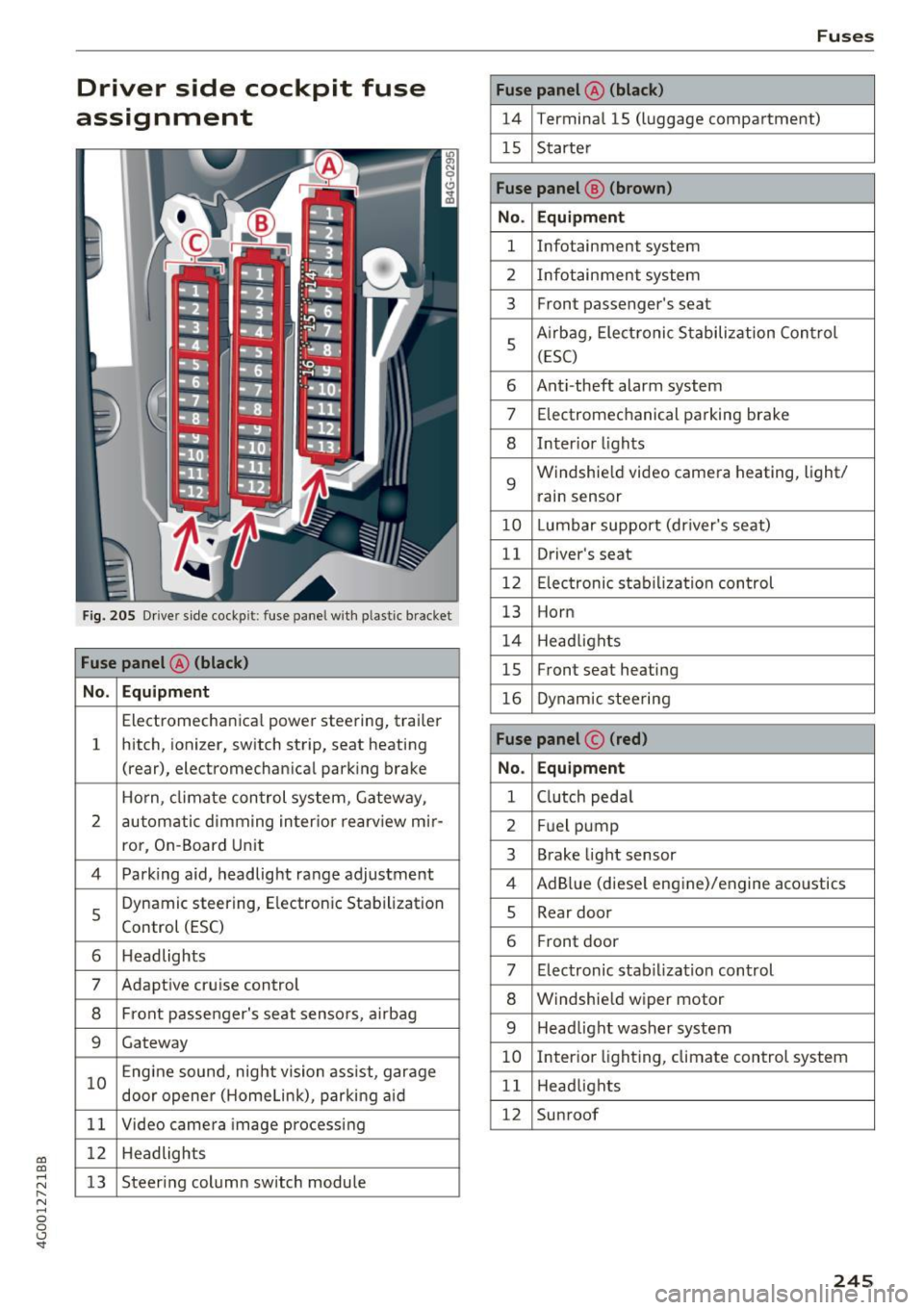
Fig. 205 Drive r side cockp it : fuse panel w ith plastic bracket
Fuse panel @ (black)
No. Equipment
Electromecha nica l powe r steering, trailer
1 hitch,
ionizer, switch strip, seat heating
(rear), electromechan ica l park ing brake
Horn, climate con trol system, Gateway,
2 automatic
dimm ing in ter ior rearview mir-
ro r, On-Board Unit
4 Park ing aid, headlight range adjustment
5
Dynamic steering, E lectron ic Stabilization
Control (ESC)
6 Headlights
7 Adapt ive cruise control
8 Front passenger's seat sensors, airbag
9 Gateway
10 Engine
sound, night vision ass ist, garage
door opener (Homelink), parking aid
11 Video camera
image processing
12 Headlights
13 Steering column sw
itch module
Fuses
Fuse panel @ (black)
14 Termina l 15 (luggage compartment)
15 Starter
Fuse panel @ (brown)
No. Equipment
1 Infotainment system
2 Infotainment system
3 Front
passenger's seat
5
Airbag, Electronic Stabilization Control
( ESC )
6 Anti
-theft alarm system
7 Electromec hanical pa rking brake
8 Inter io r li ghts
9
Windshield video camera heating, light/
rain sensor
10 Lumba r support (driver's seat)
11 Driver
's seat
12 Electronic sta bilization control
13 Horn
1 4 Headlights
15 Front seat heating
16 Dynamic steering
Fuse panel © (red)
No. Equipment
1 C lutch peda l
2 Fuel pump
3 Brake
light sensor
4 AdB lue (diese l engine)/engine aco ustics
5 Rear
door
6 Fro
nt door
7 Electronic stabilization control
8 Windshield wip er motor
9 Headlight washer system
10 Interio
r lighting, climate control system
1 1 Headlights
12 Sunroof
245
Page 248 of 280
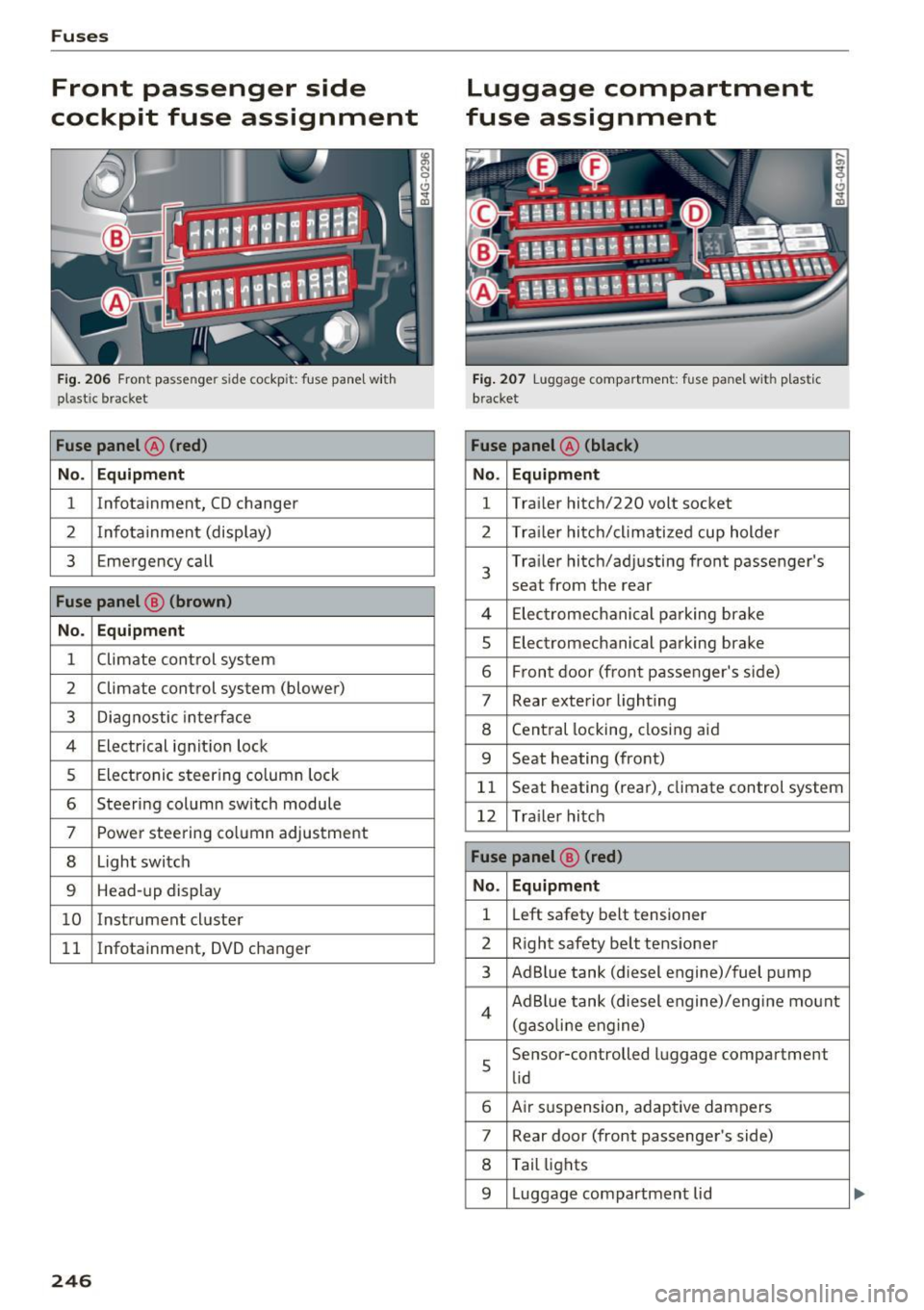
Fuses
Front passenger side
cockpit fuse assignment
Fig. 206 Front passenger side cockpit: fuse panel wit h
plastic bracket
Fuse panel @ (red)
No. Equipm ent
1 Infotainment, CD changer
2 Inf
ota inment (display)
3 Emergency call
Fuse panel @ (brown)
No. Equipment
1 Climate control system
2 Climate control
system (blower)
3 Diagnostic interface
4 Electrical ignit ion lock
5 Electronic steering column lock
6 Steering column switch module
7 Power steering column adjustment
8 Light switch
9 Head-up display
10 Instrument cl uster
11 Infotainment, DVD
changer
246
Luggage compartment
fuse assignment
Fig. 207 Luggage compa rtme nt: fuse panel with plast ic
bracket
Fuse panel @ (black)
No . Equipment
1 Tra
iler hitch/220 volt socket
2 Trailer hitch/climatized cup holder
3
Trailer hitch/adjusting front passenger's
seat from the rear
4 El ec trom echan ical parking brake
5 Electromechanical parking brake
6 Front door (front passenger's side)
7 Rear exterior lighting
8 Central locking, closing aid
9 Seat heating (fro nt)
11 Seat heating
(rear), climate control system
12 Trailer hitch
Fuse panel @ (red)
No. Equipment
1 L
eft safety belt tensioner
2 Right safety belt tensioner
3 Ad Blue tank (diesel engine)/fuel pump
4 Ad Blue tank (diesel engine)/engi ne mount
(gaso lin e eng ine)
5
Se nsor-controlled luggage compartment
lid
6 Air suspension, adaptive dampers
7 Rear door (front passenger's side)
8 Tail lights
9 Luggage compartment lid
Page 266 of 280
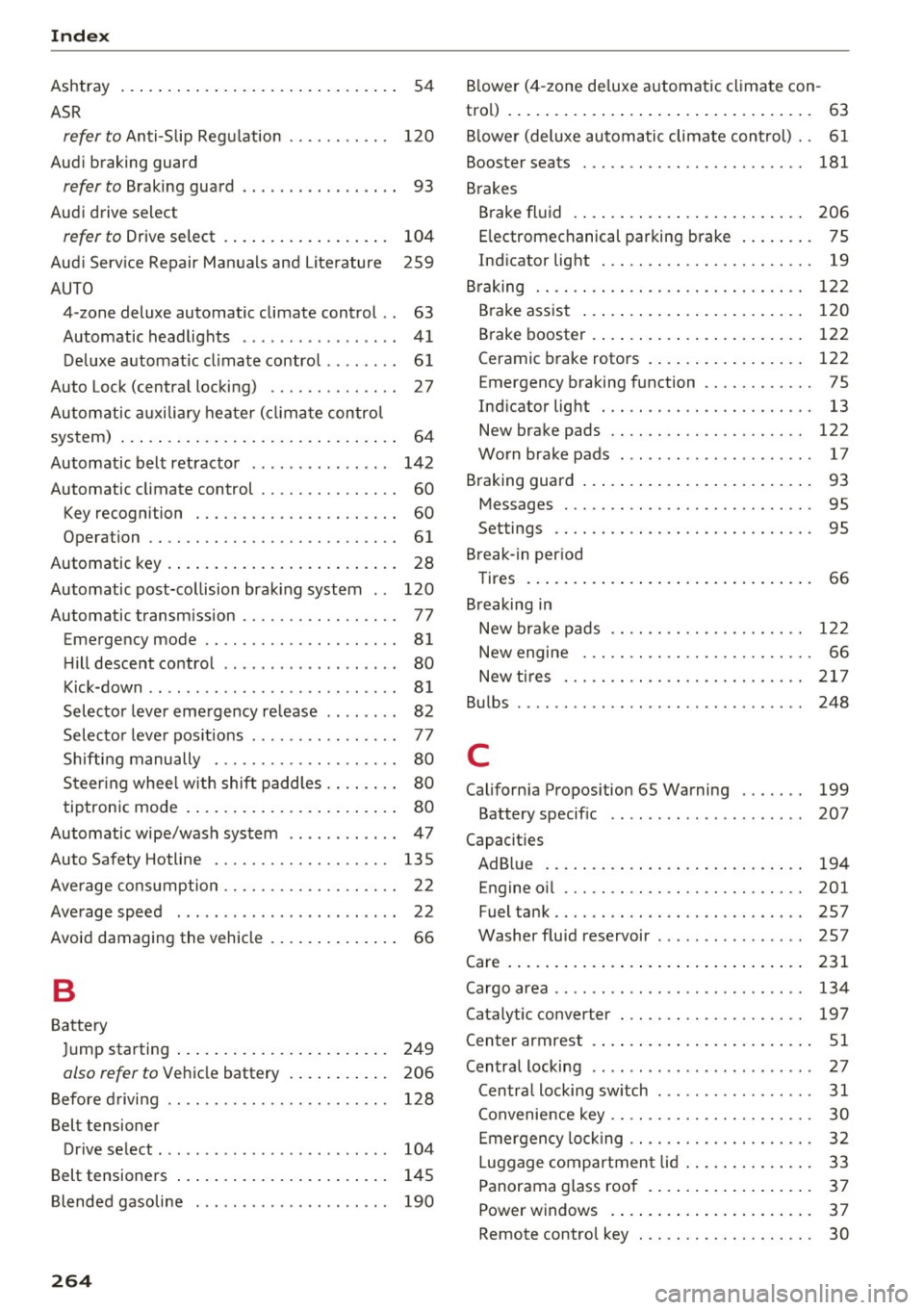
Index
Ashtray . . . . . . . . . . . . . . . . . . . . . . . . . . . . . . 54
ASR
refer to Anti-S lip Reg ulation . . . . . . . . . . . 120
Aud i braking guard
refer to B raking guard . . . . . . . . . . . . . . . . . 93
Aud i drive select
refer to Drive select . . . . . . . . . . . . . . . . . . 104
Aud i Serv ice Repair Ma nuals and Li terature 259
AUTO 4-zone deluxe automatic climate control . . 63
Automatic headlights . . . . . . . . . . . . . . . . . 41
D eluxe a utomatic clima te contro l . . . . . . . . 6 1
Auto Lock (centra l locking) . . . . . . . . . . . . . . 27
Autom atic auxili ary heate r (cli ma te contro l
system) . . . . . . . . . . . . . . . . . . . . . . . . . . . . . . 64
Automatic belt ret ractor . . . . . . . . . . . . . . . 14 2
Automatic climate control . . . . . . . . . . . . . . . 60 Key recogn ition . . . . . . . . . . . . . . . . . . . . . . 60
Operation . . . . . . . . . . . . . . . . . . . . . . . . . . . 61
Automatic key . . . . . . . . . . . . . . . . . . . . . . . . . 28
Automatic post-co llision brak ing system . . 120
Automatic transm ission . . . . . . . . . . . . . . . . . 77
Eme rgency mode . . . . . . . . . . . . . . . . . . . . . 81
H ill descent control . . . . . . . . . . . . . . . . . . . 80
Kick-down . . . . . . . . . . . . . . . . . . . . . . . . . . . 8 1
Selecto r leve r eme rgency re lease . . . . . . . . 82
Selecto r leve r pos itions . . . . . . . . . . . . . . . . 77
Shifti ng manually . . . . . . . . . . . . . . . . . . . . 80
S teer ing whee l w ith shift padd les . . . . . . . . 80
t ip tron ic mode . . . . . . . . . . . . . . . . . . . . . . . 80
Automatic wipe/wash sys tem . . . . . . . . . . . . 47
Auto Safety Hotline . . . . . . . . . . . . . . . . . . . 135
Ave rage cons umption . . . . . . . . . . . . . . . . . . . 2 2
Average speed . . . . . . . . . . . . . . . . . . . . . . . . 22
Avoid damaging the vehicle . . . . . . . . . . . . . . 66
B
Batte ry
J ump starting . . . . . . . . . . . . . . . . . . . . . . . 249
also refer to Veh icle battery . . . . . . . . . . . 206
B efore d riving . . . . . . . . . . . . . . . . . . . . . . . . 128
Belt tensioner Drive select . . . . . . . . . . . . . . . . . . . . . . . . . 104
Belt tensione rs . . . . . . . . . . . . . . . . . . . . . . . 145
B lended gasoline . . . . . . . . . . . . . . . . . . . . . 190
264
Blower (4 -zone de luxe a utomatic cl ima te con -
tro l) . . . . . . . . . . . . . . . . . . . . . . . . . . . . . . . . . 63
Bl owe r (deluxe au tomatic climate cont rol) . . 61
Booster seats 181
B rakes
Brake fl uid . . . . . . . . . . . . . . . . . . . . . . . . . 2 06
E lectromechanical parking brake . . . . . . . . 75
Ind icator light . . . . . . . . . . . . . . . . . . . . . . . 19
B raking . . . . . . . . . . . . . . . . . . . . . . . . . . . . . 1 22
B rake ass ist . . . . . . . . . . . . . . . . . . . . . . . . 120
B rake booster . . . . . . . . . . . . . . . . . . . . . . . 122
Ceramic brake roto rs . . . . . . . . . . . . . . . . . 122
Emergency braking function . . . . . . . . . . . . 75
Ind icator light . . . . . . . . . . . . . . . . . . . . . . . 13
New brake pads . . . . . . . . . . . . . . . . . . . . . 122
Worn bra ke pads . . . . . . . . . . . . . . . . . . . . . 17
Braking guard . . . . . . . . . . . . . . . . . . . . . . . . . 93
Messages . . . . . . . . . . . . . . . . . . . . . . . . . . . 95
Settings . . . . . . . . . . . . . . . . . . . . . . . . . . . . 95
B reak- in per iod
Tires . . . . . . . . . . . . . . . . . . . . . . . . . . . . . . . 66
B reaking in
New bra ke pads . . . . . . . . . . . . . . . . . . . . . 1 22
New engine . . . . . . . . . . . . . . . . . . . . . . . . . 66
New t ires ..... .. .. .. ............. .. 217
Bu lbs . . . . . . . . . . . . . . . . . . . . . . . . . . . . . . . 248
C
Californ ia Propos ition 65 Warning . . . . . . . 199
Battery specif ic . . . . . . . . . . . . . . . . . . . . . 207
Capacities AdBl ue . . . . . . . . . . . . . . . . . . . . . . . . . . . . 194
Engine o il . . . . . . . . . . . . . . . . . . . . . . . . . . 201
Fuel tan k. . . . . . . . . . . . . . . . . . . . . . . . . . . 257
Washer flu id reservoir . . . . . . . . . . . . . . . . 257
Care . . . . . . . . . . . . . . . . . . . . . . . . . . . . . . . . 231
Cargo area . . . . . . . . . . . . . . . . . . . . . . . . . . . 134
Catalytic converter . . . . . . . . . . . . . . . . . . . . 197
Center armrest . . . . . . . . . . . . . . . . . . . . . . . . 51
Central locking . . . . . . . . . . . . . . . . . . . . . . . . 27
Cen tra l locking sw itch . . . . . . . . . . . . . . . . . 31
Convenie nce key . . . . . . . . . . . . . . . . . . . . . . 30
E mergency lock ing . . . . . . . . . . . . . . . . . . . . 32
Luggage compartmen t lid . . . . . . . . . . . . . . 33
Panorama glass roof . . . . . . . . . . . . . . . . . . 37
Power windows . . . . . . . . . . . . . . . . . . . . . . 37
Remote control key . . . . . . . . . . . . . . . . . . . 30